Google has expanded Gemini Spark to the macOS app, adding computer-use capabilities that let the AI agent complete tasks on a Mac without user involvement.
The expansion follows Google’s broader rollout of Spark across web, Android, and iOS for AI Ultra subscribers in the United States. The agent first launched in May as an always-on background assistant capable of handling multi-step workflows on a user’s behalf without requiring manual input at each stage.
Building on that foundation, the macOS version extends Spark’s reach to desktop automation, covering tasks such as sorting files into designated folders or generating budget spreadsheets from invoice documents stored in a Downloads folder. The agent executes the workflow independently rather than waiting for step-by-step instructions.
Beyond local automation, Google is adding remote task assignment to Spark on Mac, which will allow a user to delegate a multi-step workflow from their phone and have the agent complete it on the desktop without any direct interaction once the task is set in motion.
Advertisement
Alongside the Mac expansion, Google is broadening Spark’s third-party integrations to include Canva, Dropbox, Google Keep, Google Tasks, Instacart, and Zillow Rentals.
Advertisement
Those connected app integrations will become available on the web and mobile platforms from next week, with support for the macOS app arriving in the weeks that follow.
More significantly for developers and power users, Google is rolling out Model Context Protocol support for Spark, a standard that allows the agent to connect with a wide range of third-party tools beyond the officially integrated applications already confirmed for the platform.
Advertisement
Spark is also gaining real-time topic tracking, which lets users configure the agent to monitor specified subjects and surface relevant updates the moment they become available, covering use cases from sports results to financial alerts triggered by a stock reaching a defined threshold.
Gemini Spark remains exclusive to AI Ultra subscribers in the United States across all supported platforms, with Google yet to confirm a timeline for broader regional availability.
Minix ER939-AI Pro dual 10GbE networking hints at workloads beyond ordinary desktop computing
The Radeon 8060S removes the need for separate graphics hardware entirely
Four simultaneous 8K displays push this machine beyond typical mini PCs
Minix has released the ER939-AI, a mini PC running AMD‘s Ryzen AI Max+ 395 processor with 16 cores, 32 threads, and a boost clock reaching up to 5.1 GHz.
A Pro variant with dual 10 Gigabit Ethernet and a leather-like carry handle on the chassis has also been announced, sitting above the base model in every measurable specification.
Both devices share the same core platform and are built around one specific use case — running AI workloads locally, without any dependence on cloud infrastructure.
Latest Videos From
A 126 TOPS Platform Squeezed Into 205mm of Chassis
The Ryzen AI Max+ 395 platform delivers 126 TOPS of combined AI compute across the CPU, GPU, and a dedicated NPU rated at 50 TOPS natively.
Advertisement
The Radeon 8060S integrated graphics handles GPU-accelerated workloads that would otherwise require a discrete card, keeping the 205 x 192 x 70 mm chassis free of any expansion slots entirely.
This mini PC supports Wi-Fi 7, Bluetooth 5.4, USB4 at 40 Gbps, and quad 8K@60Hz display output through HDMI 2.1, DisplayPort 1.4, and two USB4 ports.
A fingerprint reader built into the power button handles Windows Hello login, and a 240 W power adapter ships inside the retail box.
Advertisement
Sign up to the TechRadar Pro newsletter to get all the top news, opinion, features and guidance your business needs to succeed!
Its storage starts at 2 TB via PCIe 4.0 NVMe and expands to 8 TB, accommodating the model libraries and dataset archives that local AI work tends to accumulate.
The device also ships with 128 GB of LPDDR5-8000 memory across eight 16 GB modules — and that figure deserves a moment’s pause.
Most laptops ship with 16 GB, while most desktops are considered powerful if they arrive with up to 64 GB of RAM.
Advertisement
This mini PC ships with 128 GB because running large language models locally means the entire model lives in RAM, and anything less simply means the model does not run at all.
The Pro Variant Adds a Handle
The Minix ER939-AI Pro builds on the same platform and memory configuration while adding dual 10G Ethernet ports and refined triple-fan cooling with a twin turbo intercooler.
Advertisement
It also arrives with a carry handle mounted on top of the chassis, which is the kind of design decision that either makes immediate sense or raises an eyebrow depending on who is buying.
The handle material resembles leather, though MINIX has not confirmed whether it is genuine or synthetic, leaving the “vegan leather” characterisation somewhere between reasonable inference and optimistic branding.
Windows Hello fingerprint login and TPM support handle security for enterprise deployments, while the Pro’s three M.2 2280 PCIe 4.0 x4 NVMe slots push maximum storage capacity to 12 TB.
The base ER939-AI sells for $3,150.00 on the MINIX Official Store, with the Pro’s price still unannounced — though given its specification sheet, expecting it to cost considerably more seems entirely reasonable.
The massive FortiBleed credential theft campaign has been linked to the INC and Lynx ransomware operations, suggesting the stolen Fortinet credentials were intended to fuel future network intrusions.
Earlier this month, a server containing credentials stolen from more than 73,000 Fortinet devices was discovered exposed on the internet. Researchers found the server contained downloaded FortiGate configuration files, credentials harvested from compromised devices, and infrastructure used to crack password hashes and perform credential-stuffing attacks.
The campaign was dubbed “FortiBleed” due to the large number of exposed credentials and the massive credential-theft operation.
Follow-up investigations by SOCRadar revealed that the operation used a custom packet-sniffing tool called “FortiGate Sniffer” on compromised FortiGate firewalls, allowing attackers to intercept VPN credentials and other authentication data directly from network traffic.
SOCRadar’s Threat Research Unit (STRU) latest research now ties the credential theft operation directly to members of the INC and Lynx ransomware-as-a-service (RaaS) groups.
Advertisement
The researchers told BleepingComputer that they discovered this link after identifying a Windows server used as part of the FortiBleed infrastructure.
“Our threat researchers identified a Windows server belonging to the FortiBleed infrastructure, which provided further insight into the threat actors’ modus operandi,” SOCRadar told BleepingComputer.
“During the investigation of that server, analysis of the collected artifacts revealed that the threat actor had accessed the ransomware negotiation panels of both the Lynx / INC ransomware group.”
SOCRadar shared screenshots with BleepingComputer showing browser sessions accessing the administration panels for both ransomware groups. The images show negotiation dashboards containing victim chats used during ransomware negotiations.
Advertisement
According to the researchers, this provides direct evidence that an individual with access to FortiBleed infrastructure was also involved with the ransomware groups’ negotiation platforms.
The company also says it identified more than 200 additional operational servers beyond those originally associated with the campaign, discovered victim information harvested during FortiBleed that overlaps with organizations later listed on the INC ransomware leak site, and uncovered evidence suggesting the operation consists of roughly 20 members with defined roles.
SOCRadar also says the campaign was considerably larger than originally understood.
According to the researchers, the operation targeted more than 430,000 FortiGate firewalls worldwide and deployed traffic sniffers on approximately 19,000 devices.
Advertisement
After notifying impacted organizations, the number has fallen to around 11,000 compromised devices. The researchers also say they identified roughly 500 servers used by the operation.
The researchers also believe the attackers exploited a previously undisclosed Nextcloud zero-day vulnerability as part of their operations to expand access after initial compromise. However, technical details have not yet been released.
SOCRadar also told BleepingComputer it found persistent backdoor accounts using the username “adminin” on compromised systems and is continuing efforts to recover ransomware decryption keys.
INC Ransom has operated as a ransomware-as-a-service platform since mid-2023, targeting organizations across healthcare, education, government, and other sectors worldwide.
Advertisement
Lynx emerged in mid-2024 and is believed by security researchers to be a rebrand of the INC ransomware gang rather than a new extortion group.
SOCRadar says a second technical white paper containing indicators of compromise, attribution evidence, and additional technical analysis will be released once its investigation is complete.
Security teams log 54% of successful attacks and alert on just 14%. The rest move through your environment unseen.
The Picus whitepaper shows how breach and attack simulation tests your SIEM and EDR rules so threats stop slipping by detection.
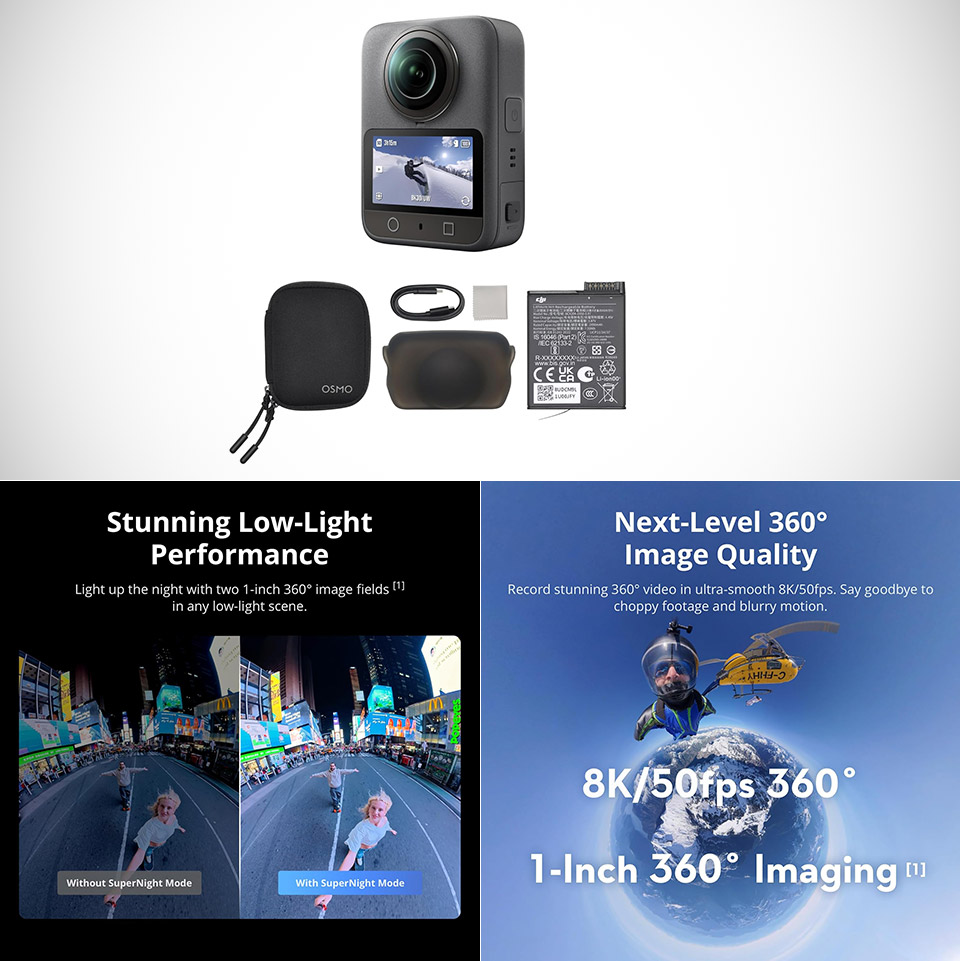
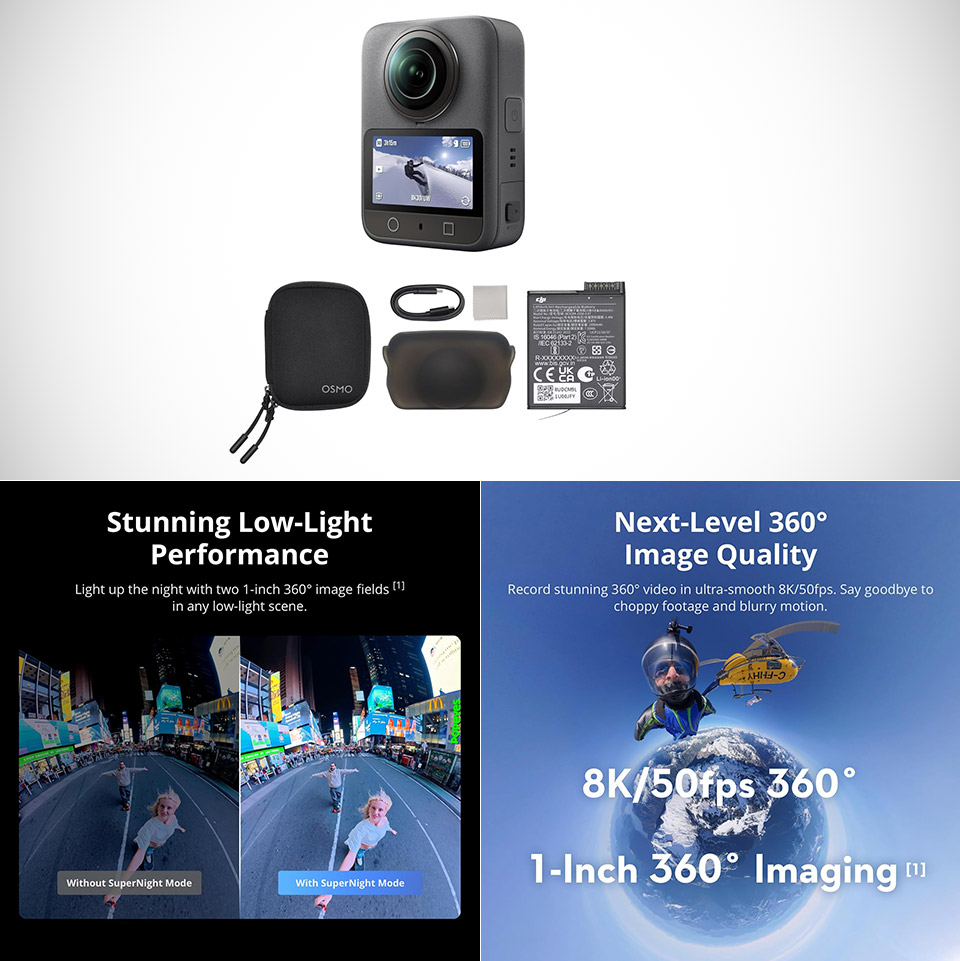
A 360-degree camera records everything in every direction at once. That freedom comes with trade-offs in most models, whether through high prices, fiddly controls, or footage that needs heavy cleanup later. DJI’s first dedicated effort in this category, the Osmo 360, priced at $349 (was $467), arrives with larger sensors than most rivals, strong stabilization, and a price that lands the Standard Combo in a more reachable range for enthusiasts who want immersive video without jumping to the most expensive options on the market.
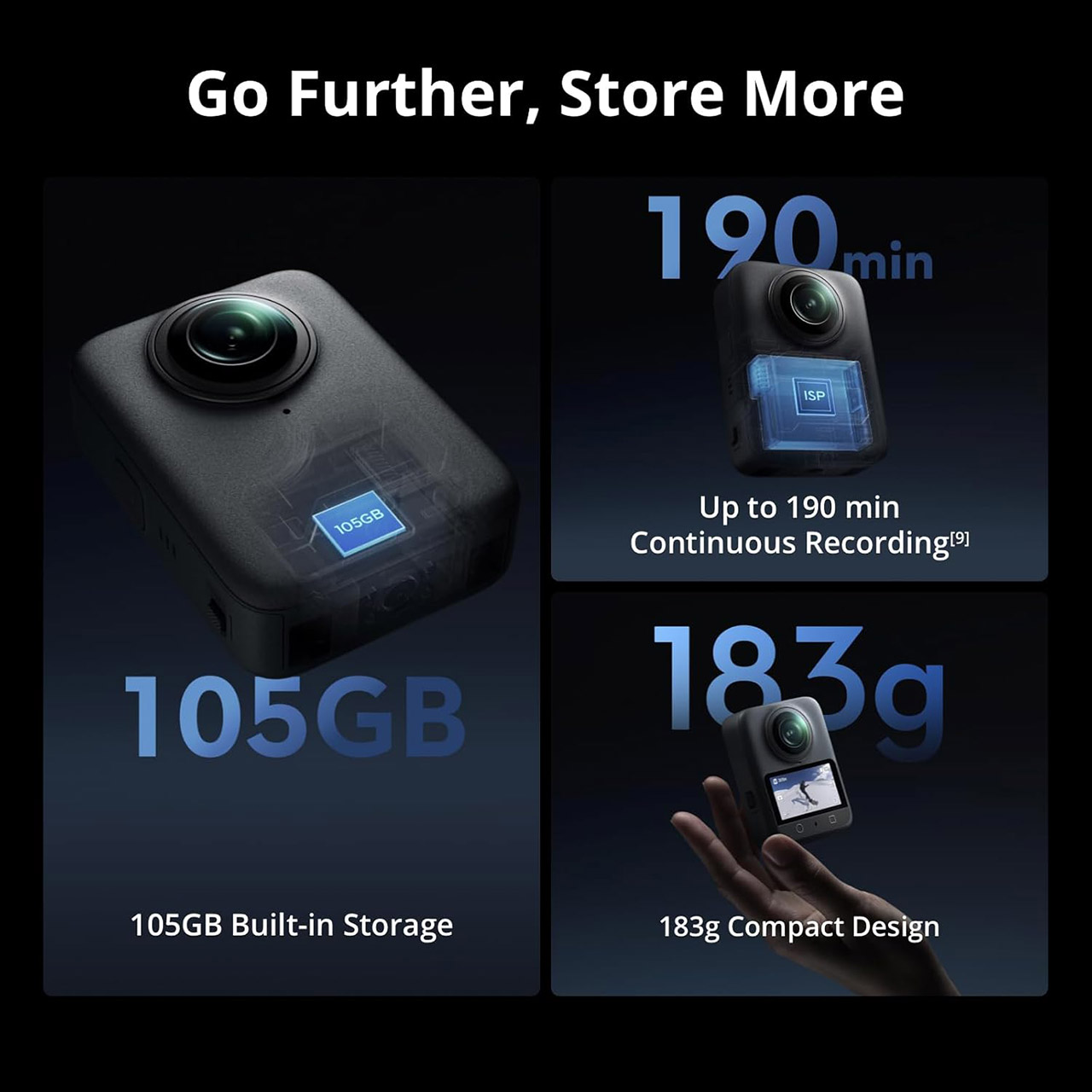
The camera body is approximately 61 by 36 by 81 millimeters and weighs 183 grams, resulting in a compact brick-like design with lenses on either side and a 2-inch touchscreen on one side of the camera, making it quite simple to navigate. A few physical buttons control power, shutter, and quick view modes; meanwhile, a 1/4-inch tripod thread is neatly tucked away at the bottom, along with DJI’s magnetic fast-release technology, which allows you to use mounts common with its action-cam series. Overall, it’s a little, unobtrusive product that fits neatly into a pocket or attaches onto a bag.
Inside are two 1/1.1-inch sensors with 2.4-micron pixels and f/1.9 apertures. The square design allows the camera to get more information from each sensor for the spherical image, which improves detail and light gathering. You can shoot video in a native 8K resolution (7680 by 3840) at 50 frames per second in full 360 mode, with 10-bit color depth and D-Log M profile support for color grading later if you want to get serious about it. Single lens modes can capture 5K at 60fps or 4K at 120fps for more classic wide-angle shots. For still images, you get a stunning 120 megapixels in complete 360 panoramic form, or approximately 31 megapixels from a single lens.
Real-world footage from reviewers shows some pretty sharp results, decent colors, and a strong dynamic range that holds up in daylight. The bigger pixels significantly improve low-light performance, and there is even a specific SuperNight mode, however very low-light/high-motion movies will require additional post-production effort. Stabilization is excellent, combining RockSteady 3.0 with HorizonSteady to keep vistas flat and smooth out any walking/panning movement. Furthermore, the software does an excellent job of removing hardware from the final spherical file the majority of the time, so you can wave goodbye to a lot of selfie-stick crap.
The battery life is approximately 100 minutes of continuous 8K recording at 30 frames per second with the included 1950mAh pack, and I was pleasantly surprised to see that this actually holds up well in testing. The battery is replaceable and compatible with some of the most recent Osmo Action models, which can be useful when traveling with several devices. Charging is done via USB-C Power Delivery and isn’t too slow; a full recharge takes a decent amount of time given the capacity. Storage is a generous 128 GB to begin with, with approximately 105 GB usable, and there is also a microSD slot that takes cards up to 1 TB, which helps to lessen the need to swap cards mid-shoot on longer days.
Four standard built-in microphones provide great audio, but when you combine the camera directly with DJI wireless microphones, things become interesting. You can connect two microphones to the camera without needing a separate receiver, allowing you to record high-quality speech tracks with the 360 footage. The Standard Combo, which includes the camera, a battery, pouch, cleaning cloth, USB-C cable, and lens cover, is a nice place to start; however, if you want more goods, you might be better off looking at higher-tier bundles or purchasing them individually.
It’s a ‘complete BEC operations environment,’ Talos researcher says
EvilTokens, the device-code phishing kit that can allow criminals to bypass multi-factor authentication (MFA) and silently authenticate as the victim to the organization’s Microsoft 365 applications, appears to be even more insidious than we all thought.
Cisco Talos incident responders on Wednesday described how the lure reaches a victim’s inbox, and revealed new capabilities alongside a “more sophisticated evasion approach” than documented in earlier EvilTokens research.
Advertisement
Talos uncovered a phishing-as-a-service (PhaaS) operator panel, branded “ARToken,” that appears to be an EvilTokens customer, according to security research engineer Michael Kelley, who noted the phishing operation shares infrastructure, API contracts, and operational patterns with the EvilTokens platform.
EvilTokens was first documented by French cybersecurity firm Sekoia in March, and in April Microsoft said the device-code phishing campaign was compromising hundreds of organizations daily.
“Since March 15, 2026, we have observed 10 to 15 distinct campaigns launching every 24 hours,” Microsoft VP of security research Tanmay Ganacharya told El Regat the time. “Each campaign is distributed at scale, targeting hundreds of organizations with highly varied and unique payloads, making pattern-based detection more challenging.”
While most subsequent analysis has covered EvilTokens’ panel and phishing kit, “what it has not shown is how an ARToken lure actually reaches an inbox,” Kelley said on Wednesday. “Talos recovered two near-identical messages, sent roughly four minutes apart on April 20, 2026, that initiate the chain. The tradecraft is targeted, not spray-and-pray.”
Advertisement
Specifically, the email lure abused a real vendor relationship between a US life-sciences company and a legitimate plumbing and fire-protection contractor. The email uses an outstanding-invoice lure, telling the life-sciences company that “the following invoices appear to still be outstanding,” and the “from” header presents the contractor’s real domain. The reply-to, however, redirects replies to an unrelated domain.
Even the visible anchor text in the body of the email reads as the vendor’s genuine SharePoint tenant, we’re told. The actual href, however, points to a near-identical copycat tenant under a different, attacker-controlled Microsoft 365 workspace. But because the destination is still a legitimate sharepoint.com host, the email is less likely to be flagged as a phish.
During its investigation into the ARToken phishing infrastructure, Cisco uncovered the connections to EvilTokens – including an identical API contract to the one originally documented by Sekoia and matching deployment and operational models – as well as “notably more sophisticated” anti-analysis and evasion capabilities.
ARToken’s panel also revealed a very comprehensive post-exploitation toolkit that provides token management and persistence mechanisms, and a built-in business email compromise (BEC) tool with full Microsoft Outlook inbox read access, email sending capabilities as the victim, inbox rule creation for forwarding and deleting messages, and keyword-based monitoring across all compromised accounts.
Advertisement
“These features indicate the platform is more mature than a simple device code phishing kit – it is a complete BEC operations environment,” Kelley wrote. ®
The Venice.ai leadership team, from left: Austin Virts, VP of marketing; Jesse Proudman, president and CTO; Erik Voorhees, CEO; Jonathan Shapiro, head of strategy; Tim Shakarian, head of engineering; and Johanna Tseng, VP of business operations. (Venice Photo)
Venice.ai, a privacy-focused AI startup with strong Seattle ties, has raised $65 million in its first outside funding, valuing the 2-year-old company at $1 billion.
The company positions itself as a private and unrestricted alternative to mainstream AI services, offering access to a range of open-source and commercial AI models. Venice says it doesn’t log or store users’ prompts and responses on its servers, keeping conversations on people’s own devices. It also strips out many of the content filters built into competing tools.
The Series A round, announced Wednesday morning, was led by Dragonfly, a crypto-focused investment firm, with participation from North Island Ventures, Coinbase Ventures, Archetype, Morgan Creek, Liquid2 Ventures and Seattle-based Founders’ Co-op.
The company was founded in 2024 by crypto entrepreneur Erik Voorhees, its CEO, who runs the company from San Francisco. Voorhees founded the crypto exchange ShapeShift and has long argued against heavy government regulation of cryptocurrency.
Seattle tech veteran and serial entrepreneur Jesse Proudman is Venice’s president, CTO and co-founder. The two met as classmates at the University of Puget Sound in Tacoma.
Advertisement
“We want Venice to be thought of in the consumer landscape on the same terms as a ChatGPT or an Anthropic,” Proudman said in an interview. “We want people to open their phones and have our app sitting alongside those apps.”
The case for privacy comes from how people are starting to use AI. As chatbots become go-to tools for sensitive matters — medical questions, legal issues, job negotiations, relationship advice — users hand over intimate details that accumulate in the databases of companies like OpenAI and Anthropic.
That data, Proudman said, is only as safe as the company holding it.
“It only takes one breach, one disgruntled employee who is going through that data, a government subpoena, a change in government policy — and then all of that data no longer is private to you,” he said. “It can be health records, it can be legal questions, it can be job negotiations, it can be relationship advice.”
Advertisement
Venice’s answer is to create no central trove to breach or subpoena in the first place.
Marketing AI with fewer restrictions can make Venice more useful in some cases, but it also raises the misuse questions that lead mainstream services to build in guardrails in the first place. Proudman said Venice includes some safeguards to prevent abuse and illegal activity.
The company nonetheless bills itself as an “AI safety company,” casting the surveillance of users’ thoughts — rather than the content of their prompts — as the greater danger.
Proudman spent about three years as a VP at Betterment, where he started moonlighting on Venice in 2024 — building it nights and weekends before leaving to go full-time.
Venice says it reached 3 million users in April and turned profitable in the first quarter.
“That hockey stick that we always hear about, and that I’ve spent 25 years trying to build companies to find, finally manifested,” Proudman said.
Venice makes money through consumer subscriptions and paid access to its developer API. It also has its own cryptocurrency, the VVV token, which developers can buy and lock up to reserve a share of the company’s computing capacity instead of paying per use.
Advertisement
Proudman said Venice will use the funding to build its own data center infrastructure — owning the GPUs that power its service rather than renting computing capacity — and to invest in growth as it tries to establish itself as a mainstream consumer brand.
The company has grown to about 45 employees, up from roughly 15 people a year ago, with six in Seattle. It operates as a remote team and doesn’t currently have an office.
Whether Venice expands its Seattle footprint long-term may hinge on state politics. Proudman has publicly opposed Washington’s new 9.9% “millionaires tax” — a state income tax on household income above $1 million that was signed into law in March and takes effect in 2028 — and said he won’t stay in the state if it does.
He’s pinning his hopes on a repeal campaign that backers are trying to get on the November ballot.
Advertisement
“I love it here … Seattle is a unique and phenomenal place to build a company, and I’ve been building companies here my entire life,” Proudman said. “I want to see us continue to be competitive against the Bay Area.”
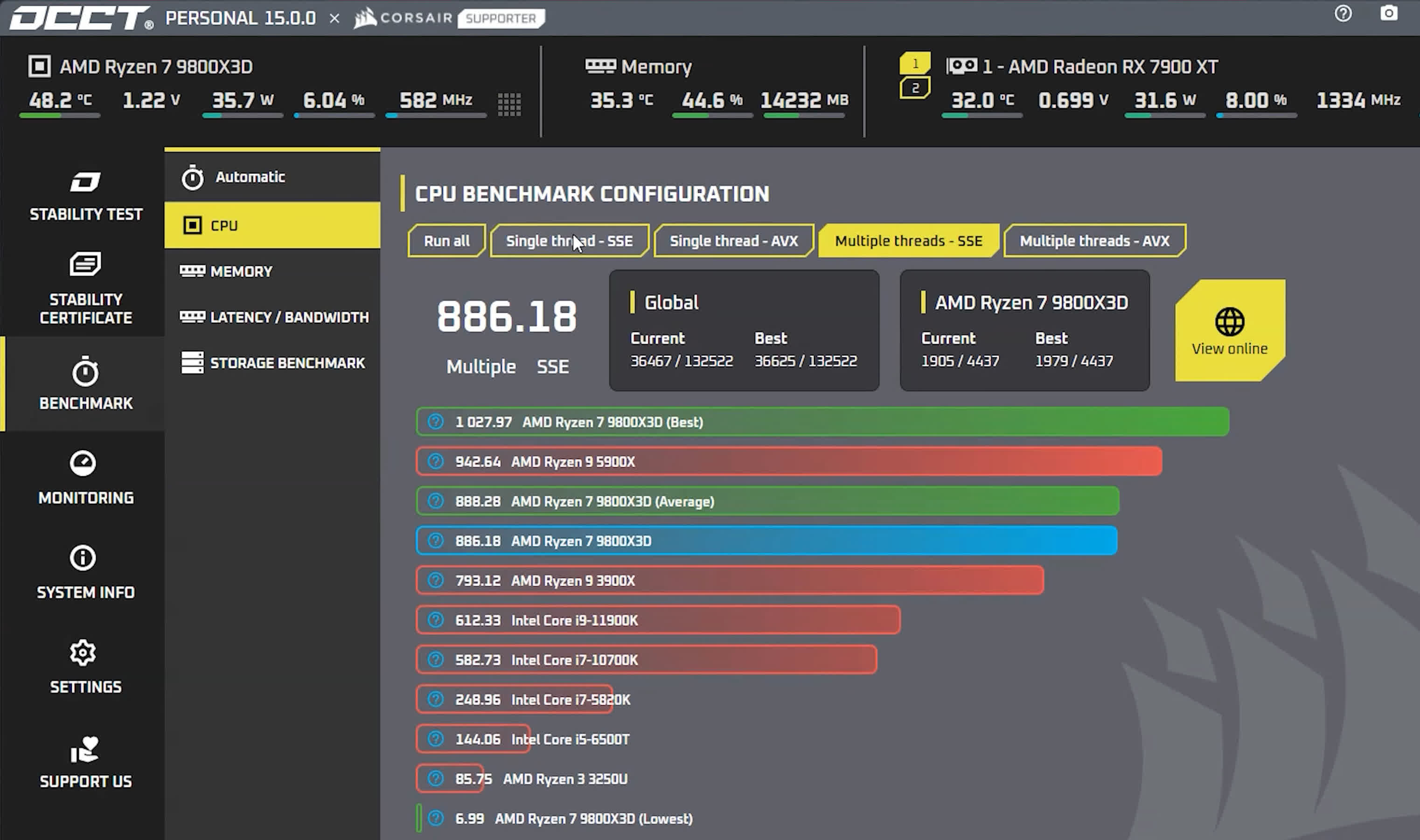
The name OCCT comes from OverClock Checking Tool. This application will let you benchmark and overclock your system components. OCCT is the most popular all-in-one stability check and stress test tool available.
It generates heavy loads on your components while checking for errors, and will detect stability issues faster than anything else. OCCT embeds HwInfo’s monitoring engine to get precise readings and diagnose issues faster.
Can I use OCCT to benchmark my CPU and GPU?
OCCT is primarily a stress test tool used for checking stability issues. With this program you can stress test your CPU, GPU and determine the memory usage on your system. You can configure the app to stop the test when the temperature is too high or when it finds any error so you can prevent hardware failures.
How long does it take to run an OCCT benchmark?
With OCCT you can run stability tests on your hardware from one minute to as long as ten hours. However, it is advisable to stress test your CPU for at least an hour.
What is the new coil whine detection feature in OCCT 15?
OCCT integrates coil whine detection helping users identify electrical noise from their GPU under load. By controlling GPU stress patterns and fan speeds, OCCT can make your card “sing” with distinct tones, making it easier to detect coil whine even in noisy environments. Results vary by GPU model, cooling design, and case acoustics.
Advertisement
Is the new storage test safe for my SSD or HDD?
Yes, but it’s intentionally very demanding. The storage test pushes drives to their thermal and workload limits to verify stability and endurance. While it’s safe for occasional diagnostics, running it too frequently may shorten the lifespan of SSDs or HDDs due to sustained high temperatures and write cycles.
Is OCCT free?
OCCT is free for personal use, but some features such as the Stability Certificate are reserved for paid users. For commercial use there are paid versions that start at $5 per month that include more features such as unlimited time duration.
Features
Up to 16-core support ( for instance, up to a Quad-Kentsfield or an Octo-Conroe )
Customizable tests ( Duration, Priority, CPU or RAM, … )
CPU and Motherboard detection
Monitoring support through 3rd party application ( i.e. MBM5, Speedfan and Everest Ultimate Edition 3.50 or above )
Can produce graphs showing temperature and voltages during the test : Unique feature !
Multi-language support
Don’t let your work go to waste
Ensure your computer is stable before working on your beloved projects – don’t let a reboot or memory corruption put your hard work to waste
Is this a game bug or my computer?
Advertisement
Find out by stress-testing your components. If anything’s wrong, OCCT will pick it up and tell you ! By having a wide-range of test integrated, you’ll be able to pinpoint which one is faulty.
Stop wasting time with after-sale services
Find out which component is faulty and gain time by giving after-sale services proof your hardware is faulty. I don’t promise you it’ll go smooth, but at least, you’ll have backup.
Modern monitoring dashboard
Advertisement
Create easy-to-read, attractive monitoring dashboards showing how your component is behaving in real-time.
Check your cooling
OCCT test will make your components go all out. If anything is wrong with your cooling, you’ll quickly know.
The ultimate CPU test
Advertisement
OCCT’s CPU test gives you full control on which core is tested – Cycle through cores, know which one generated an error, invert them… Lots of fun there.
Squeeze every MHz of your components
OCCT will help you pinpoint ideal values for your overclocked components and ensures rock-stable day-to-day usage.
What’s New
Last month, we introduced one of the biggest evolutions in OCCT’s history: a completely redesigned and fully modular Memory Test.
Advertisement
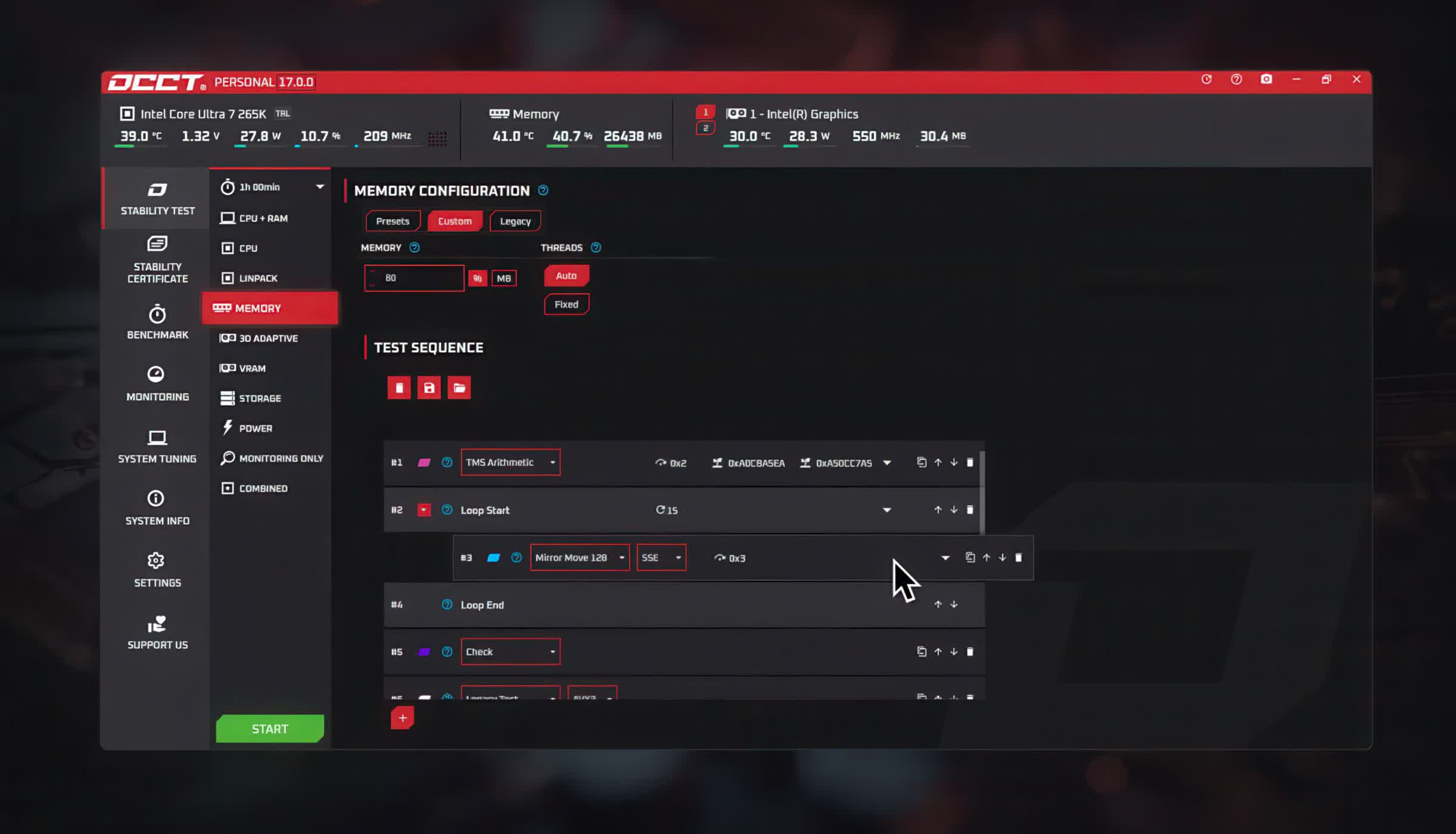
Today, we’re excited to officially release OCCT v17, bringing together the new Memory Test system alongside a new launcher for OCCT and major optimizations and quality-of-life improvements across the entire application.
This release also comes with new presets for the memory test, including a community-made preset by Stephen Shanks, with even more to come in future releases.
A New Memory Test
OCCT v17 introduces a full redesign of the Memory Test, rebuilt entirely from scratch around a highly modular architecture.
Advertisement
Currently, the new system includes 16 individual testing blocks that can be freely combined to create highly customized memory stress tests. This makes the new OCCT Memory Test one of the most flexible and customizable memory validation solutions available.
Whether you’re validating system stability, investigating intermittent memory issues, or creating specialized test scenarios, the new framework gives you complete control over how memory is stressed and analyzed.
Optimizations and Quality-of-Life Improvements
Alongside the new Memory Test, OCCT v17 delivers major improvements to performance, reliability, and overall usability.
Advertisement
Faster Startup Time – A brand-new launcher improves startup times by approximately 10% to 30%.
Lower Memory Usage – Overall memory consumption has been reduced by approximately 15% to 30%, with monitoring data now written directly to disk for improved efficiency during long test sessions.
Improved Reliability – Better support for portable installations, a reworked auto-update system, and enhanced crash recovery make OCCT more stable and easier to troubleshoot than ever.
Community Presets
One of the goals behind the new Memory Test architecture is to enable the community to create and share powerful testing scenarios.
The stable version of V17 launches with 6 presets, including one community-made preset, AM5 Margin Probe by ‘srshanks’.
Over the coming months, we’ll continue working internally and with the community to identify useful presets that can be integrated directly into OCCT, making advanced testing methods accessible to everyone.
If you have created a particularly effective memory testing configuration, we encourage you to share it with other users through our Discord server and community channels.
Previous Release Notes:
Adding support for Arrow Lake CPUs
With V16.1, the System Tuning tool now supports Intel Arrow Lake CPUs, including the newly released Arrow Lake Refresh, allowing users to take full advantage of native tuning capabilities directly within OCCT.
System Tuning in v16.1
The System Tuning tool was designed to simplify and unify the CPU tuning process by combining configuration and testing within a single software.
Advertisement
With OCCT V16.1, users can:
Tune their CPU directly within OCCT
Run stability tests during the tuning process
Adjust per-core frequencies (16.6 MHz steps on Arrow Lake)
Work on both Windows and Linux
This approach removes the need for multiple tools while improving the speed and reliability of system stability and overclocking validation.
Continuing to expand support
Expanding hardware compatibility remains a key focus. With Arrow Lake now supported alongside Granite Rapids, we’re already working on bringing the System Tuning feature to more current and previous generations of CPUs.
Advertisement
As always, we welcome your feedback as we continue to improve the System Tuning tool and expand its capabilities.
OCCT 15 Release notes
We’re thrilled to announce that OCCT v15 is now officially out of beta! A big thank you to everyone who helped us test and refine this release over the past few weeks.
This update includes:
Advertisement
The stable release of our new Storage Test and Benchmark.
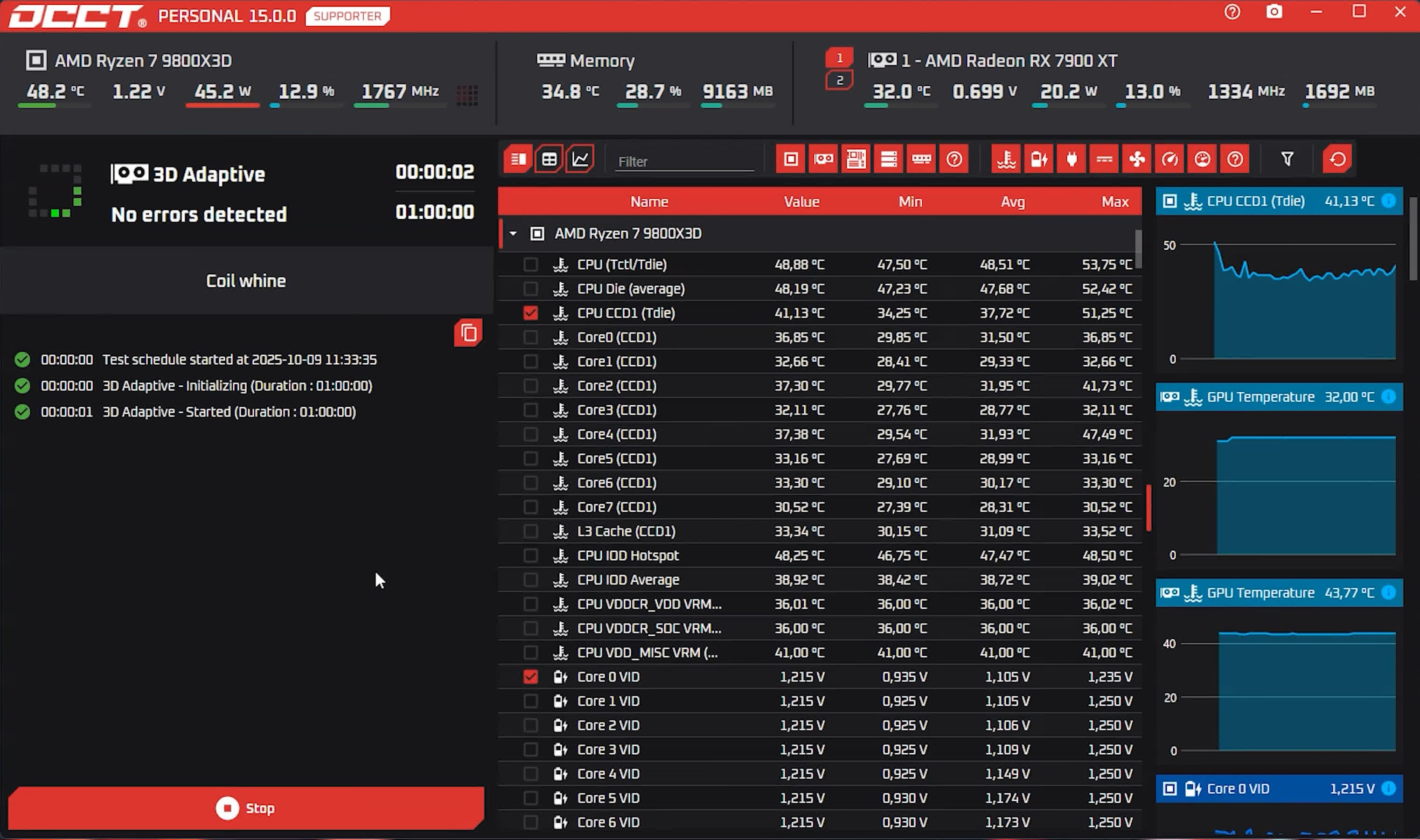
A major 3D Adaptive Test update, with better error detection and a new coil whine detection feature.
And finally, the long-awaited return of OCCT skins, with LinusTechTips and Corsair kicking things off!
Storage Test and Benchmark Stable Release
The new Storage Test is now officially stable and available to all users, including OCCT Pro and Enterprise editions. If you missed it during beta, this feature stress-tests your SSDs and HDDs under heavy workloads and high temperatures to validate performance and reliability. However, keep in mind that this test can be very intense for your components and very frequent use can impact your SSD and HDD lifespan, though normal usage poses no significant risk.
Alongside it, we’re also releasing our new Storage Benchmark. We didn’t try to reinvent the wheel here, instead we aimed to deliver metrics people are familiar with. That’s why we built our benchmark model around CrystalDiskMark-style metrics, providing results that are efficient, comparable, and easy to interpret. It will take us some time still to build the database and give you more meaningful comparative data overtime.
With these additions, OCCT continues to evolve toward an all-in-one tool that enthusiasts and professionals can use for reliable data without the need for multiple software.
Major 3D Adaptive Test Update
OCCT v15 isn’t just about storage, it’s also a big leap forward for our GPU test. Our 3D Adaptive test has been made significantly more demanding and precise than before.
The test works the same as before, but we’ve improved error detection efficiency. Though you might notice lower frequencies or lower power consumption on some GPU’s because the test triggers protection mechanism more aggressively at maximum intensity.
In short: the new 3D Adaptive test pushes your GPU harder, smarter, and catches issues with greater accuracy.
New Coil Whine Detection Feature
One of the more experimental and fun addition in v15 is the new Coil Whine Detection feature.
When working in noisy environments, it can be tough to tell whether a system is producing coil whine. While refining the 3D Adaptive Test, we noticed that in Switch mode GPU fan noise varies depending on load intensity, and thought, “what if we could control that and make the GPU ‘sing’?”
Turns out, we can! We’re starting with three different tunes, with plans to add more, and maybe even let you create your own in the future.
It’s important to note that results can vary depending on your GPU model and overall configuration, including factors such as the type of coils used on the board, cooling system, and the case.
New OCCT Skins
Yes, you read that right, OCCT skins are back! Some of you might remember the Cooler Master skin. Sadly, that one’s gone, but after taking time to rethink how we handle skins and partnerships, we’re thrilled to announce their return in v15.
You can enable their skins directly from OCCT’s settings or download their dedicated versions from our download page. If you own a Corsair pre-built PC, you may even find OCCT preinstalled and already rocking Corsair colors!
We have more skins lined up for future release, so stay tuned!
It’s a question that plagued car designers for over a century: How do we make a car go faster? Instinctually, one would assume that you could throw horsepower at it until you achieve the numbers you want, but that only works to a point. After all, the definition of “fast” extends beyond just how hard a car accelerates and the top speed it can hit; otherwise, supercars would more closely resemble drag cars. Rather, what makes a supercar quick is a combination of two elements: power-to-weight ratio and grip.
Power-to-weight ratio influences how quickly the car can get up to speed and how easily it maintains that speed, while grip reflects how well it holds to the road and is influenced by elements like aerodynamics and tires. Combine both elements, and presto, you have a car that’s fast on the straights and maintains speed through the corners. A fast supercar, by design, will have a lower power-to-weight ratio than your average car, as well as aero parts like functional front and rear wings, a rear diffuser, and wide tires to increase grip. All that, combined with sophisticated systems and a modern, stiff chassis, makes up the recipe for most supercars today outside of certain specialized machines like the Caterham Seven — which, for all its greatness, is remarkably one of the worst cars ever in terms of aerodynamic efficiency.
Advertisement
Of course, the actual physics behind it all are far more nuanced than that. For instance, how do weight and power determine a car’s speed, beyond the obvious “more power is more fast?” Likewise, how do large tires, aerodynamic devices, and a low center of gravity help carry that momentum?
Advertisement
Why power-to-weight ratio and balance matter
All cars need horsepower, but supercars take it a step further by (usually) having bigger engines with more power than the average car. That seems simple enough on the surface. But it’s not so straightforward. Think about it this way: The largest piston engine in the world produces over 100,000 hp, but the cargo ships it powers go only a fraction of the speed of a supercar. Similarly, some high-load big rigs produce around the same power as some supercars, but aren’t fast at all. That’s because these vehicles are all far heavier.
There’s a famous quote attributed to Sir Colin Chapman, founder of Lotus: “Simplify, then add lightness.” That formula went on to secure victories throughout the 1950s and 1960s, solidifying Lotus as an outstanding motorsports constructor and later influencing Lotus sports cars like the Elise and Exige. Put simply, having less weight to push around amplifies the horsepower an engine makes. You don’t need a massive engine to shove around a little car, which is how supercars go fast in the first place. Sure, a bigger power is nice, but weight is also a vital part of the equation.
Where that weight is placed is also vital. Supercars, much like racecars, ride close to the ground to lower their center of gravity, keeping the car balanced and planted. Engine placement also matters because engines are generally quite heavy and can affect handling. That’s why rear-engine Porsches tend to oversteer, and front-heavy cars understeer. Most modern supercars feature mid-engine layouts, affording their platforms an ideal front-to-rear weight balance.
Advertisement
Getting quicker in the corners
Balance and weight matter when cornering, too; a car turns better if there’s less mass to throw around. It’s basic Newtonian physics — the car’s mass wants to keep moving in a straight line, so the tires have to coax it to turn. This means supercars, by necessity, must have good tires and a planted chassis to turn well.
However, that’s only the tip of the iceberg. Now, we’ll get into aerodynamics. To keep things brief, the faster the car goes, the more air it must move out of the way. Some of that air becomes drag, preventing the car from going faster. A body that minimizes drag lets the car slice through the air and leave a smaller wake, granting it a higher top speed. That’s why supercars are shaped the way they are.
Advertisement
The second core component of aerodynamics rests not in drag, but in downforce. More aggressive aerodynamic elements like a pronounced front and rear wing, diffusers, and canards all work to push a car to the ground. The more force it pushes down with, the faster it can corner (generally with the trade-off of top speed). That’s why many modern supercars have movable aerodynamic devices like extendable wings — these extend to keep the cars planted at speed and retract for better aerodynamic efficiency in a straight line. Some also take advantage of ground effect, which sucks the car to the ground for even more downforce. Good examples include the McLaren F1, which had a secret pair of fans that provided downforce and decreased drag, and the GMA T.50 fan car.
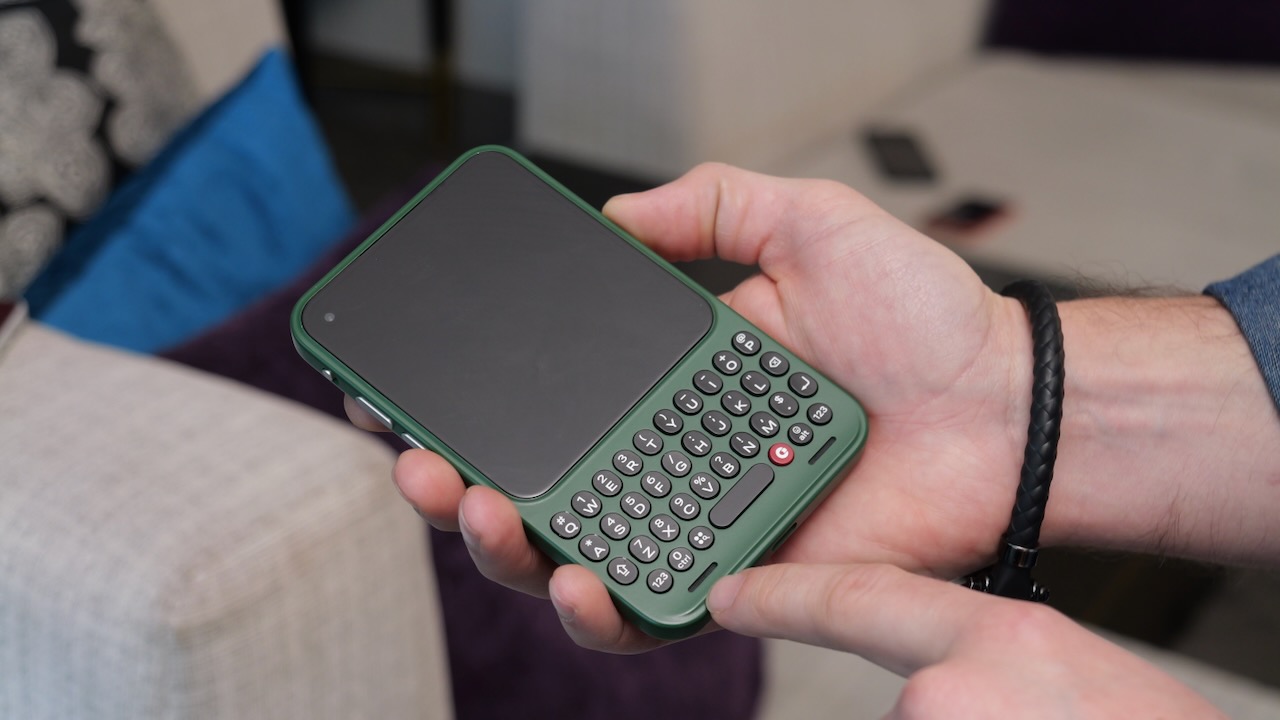
The Clicks Communicator has made its first proper appearance in action. This gives us our clearest look yet at the modern take on the BlackBerry-style smartphone. The planned launch is later this year.
In a newly published demo, Clicks showed a working pre-production version of the Communicator. This revealed how its physical keyboard, custom Android interface and hardware features come together.
While the company has previously teased the device, this is the first time it’s been seen running day-to-day apps and core features. We got the chance to play with a non-working model at CES 2026, and came away impressed.
The biggest draw remains the physical keyboard. However, the demo suggests there’s more to the Communicator than nostalgia. A vertical ribbon of favourite apps anchors the home screen. This makes it easy to jump into Gmail, Telegram, WhatsApp and Spotify without digging through an app drawer. Users can also begin typing straight from the home screen to quickly search for installed apps.
Advertisement
The keyboard itself packs a few tricks, too. The spacebar doubles as a fingerprint reader. This allows users to unlock the phone or authenticate with their thumb while keeping their hands in a natural typing position. Clicks also confirmed that more software features are on the way, including a touch-sensitive keyboard, Message Hub, Prompt Key, Signal Light and a hardware kill switch. However, these weren’t demonstrated in detail.
Advertisement
The hardware looks surprisingly well equipped for a keyboard-first phone. The Communicator includes a 3.5mm headphone jack, stereo speakers and three microphones for clearer voice calls and recordings. It also has a barometric pressure sensor to improve GPS accuracy and weather data.
Advertisement
Around the back, the removable cover reveals room for both a physical SIM card and a microSD card. The device supports storage expansion up to 2TB. The demo also showed the device connected to a 5G network. In addition, it demonstrated working Wi-Fi, Bluetooth and other core smartphone features.
Clicks stressed that the hardware is still in the pre-production stage and expects to refine the internal layout before launch. Even so, the latest demo suggests the Communicator is much closer to becoming a real product than just another nostalgic concept. The company is still targeting a Q4 release.
Russia is putting pressure on Apple with a proposed $52M fine for discriminating against state-backed apps and not having them installed on every iPhone.
On June 25, the Kremlin demanded answers as to why Russian applications made by VK were removed from the App Store. Apple was accused of removing VK apps and services without “warning or explanation,” and Russia threatened to withdraw its cooperation with Apple entirely over the issue.
Now, the country has taken even stricter measures, issuing a warning to Apple, saying the company could face an almost $52 million fine for discriminating against Russian software. Russia’s Federal Antimonopoly Service said Apple devices will need to have the Max messenger and Russian search engines pre-installed.
As noted by Reuters, unless Apple complies with the demands of Russian authorities by July 15, it will face a fine equating to roughly $51.6 million. Even with the threat, though, it’s unlikely Apple will ever include Max or Russian search engines as pre-installed software on iPhones and iPads sold in the country.
Advertisement
Apple hasn’t sold its products in Russia since March 2022, after the Russian invasion of Ukraine. There are no Authorized Apple Resellers in the country, either.
Consequently, every iPhone and iPad sold in Russia makes its way into the country through the grey market. Hardware aside, the App Store remains available on iOS devices in Russia, and Apple has occasionally complied with app-related requests from Russian authorities.
Apple has removed ‘undesirable’ apps in Russia, but it won’t pre-install state software
In July 2024, Apple removed VPN apps from the App Store in Russia. In October 2024 and November 2024, the company similarly removed independent media apps that contained content labeled “undesirable” by Russian authorities.
In February 2023, Apple also paid a $12.12 million antitrust fine for forcing iOS users to rely on its in-app purchase system. After Apple Ireland was fined for breaking sanctions against Russia in March 2026, however, subscriptions and payments for Apple Services are no longer available in Russia.
Advertisement
Despite Apple’s periodic willingness to appease Russian authorities, the two continue to have a strained relationship. In September 2023, Apple warned Russian journalists of state-sponsored spyware, while Russian authorities claimed Apple was helping the United States spy on iPhone users.
Overall, Apple’s only attempts at complying with demands from Russia involve removing apps from the App Store. Beyond that, there’s little the company is seemingly willing to do.
At best, App Store users in Russia might see the return of VK apps. It’s unlikely Apple will develop a region-specific product configuration for Russia, as it does not sell its devices in the country. That ultimately means the state-backed Max app will probably never be preinstalled on iPhones in Russia.
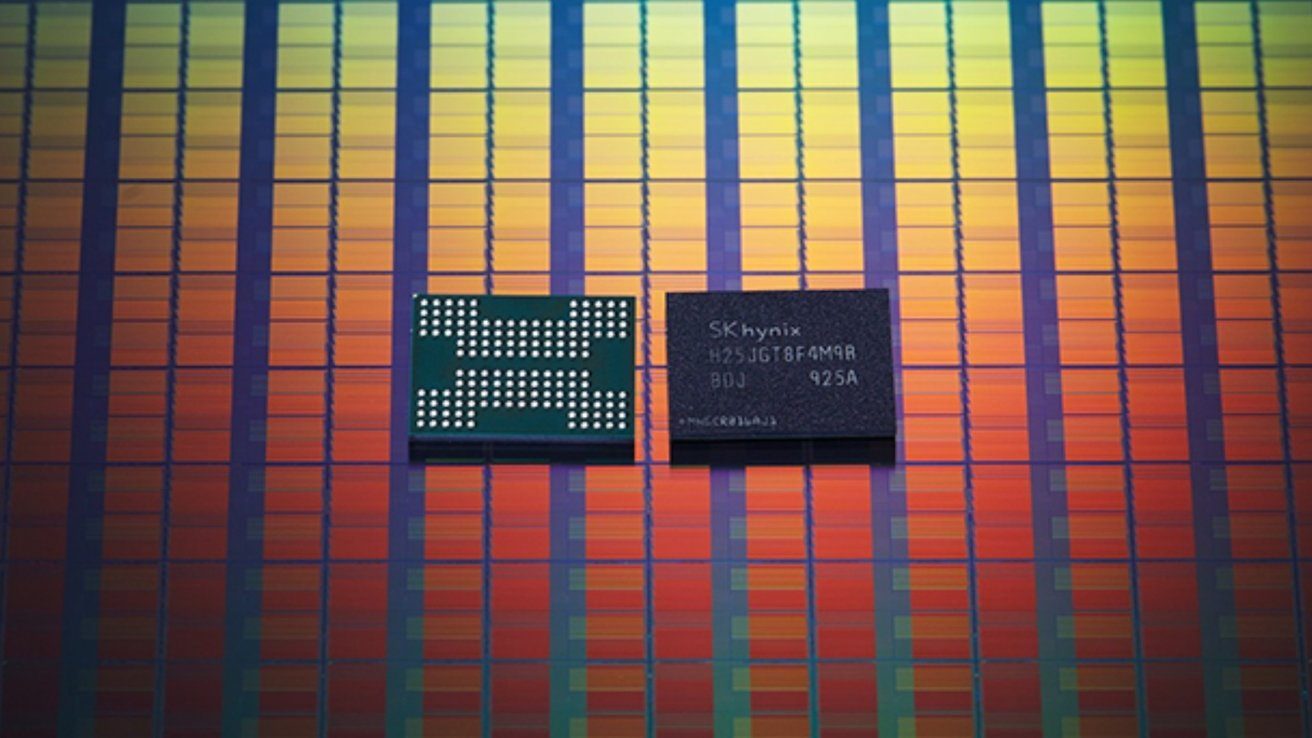
A global memory shortage is pushing Apple to consider alternate RAM suppliers. In all likelihood, this will draw scrutiny from U.S. lawmakers.
The companies in question are ChangXin Memory Technologies Inc. and Yangtze Memory Technologies Co. The companies are on a Department of Defense list of Chinese companies believed to support Beijing’s military.
According toBloomberg, talks are still ongoing and nothing is final yet. However, Apple’s goal is to reduce the impact of a global memory shortage, which recently caused the company to increase prices across its hardware lineup.
Outgoing CEO Tim Cook, who is set to step down in September, has appealed to the Trump administration, including Treasury Secretary Scott Bessent. Technically, Apple doesn’t need formal approval; the company would likely seek it to avoid any blowback from working with blacklisted entities.
Advertisement
Apple previously attempted to buy Chips from YMTC, specifically for iPhones to be sold in China. At the time, Marco Rubio, the top Republican on the Senate Intelligence Committee, said Apple was “playing with fire.”























































You must be logged in to post a comment Login