

Tech
GitHub nukes 70+ Microsoft repos amid suspected worm attack



security
Miasma worm shapeshifts, but cloud secret-scouting remains the goal
Microsoft’s GitHub has disabled over 70 repositories after they were reportedly compromised by a worm in the latest open source supply chain attack.
The code shack took down 73 repos within the space of 105 seconds after its alarms were tripped on Friday, June 5, after detecting signs of the Miasma worm infecting its projects, according to StepSecurity’s co-founder and CTO, Ashish Kurmi.
Users reported issues quickly on Friday, after visits to those repos all resulted in the same message displayed, indicating that they had been disabled due to terms of service violations.
According to StepSecurity’s analysis, the attack kicked off after a compromised contributor account pushed a malicious commit to Azure/durabletask. The commit dropped configuration files that triggered remote code execution on machines when a developer opened the repo in an IDE or AI coding tool, such as Claude Code, Gemini CLI, and Cursor.
Several developers soon reported broken CI/CD pipelines, a support thread showed, although a moderator said at the time this was due to “an internal management issue.”
“The repo that most immediately caused issues was Azure/functions-action,” Kurmi wrote, used to deploy code to Azure. With it being taken down, every workflow that referenced Azure/functions-action@v1 stopped resolving.
GitHub stepped in a few hours after the repos were infected by the malicious commit. Its automated detections kicked in and disabled the repos in under two minutes, in two separate waves.
However, it was the borking of the durabletask family that hinted at the bigger picture, that the attack was indeed a re-opening of the previous Miasma worm attack that hit Microsoft last month.
Microsoft’s durabletask PyPi package was a previous target of the Miasma worm on May 19. Within a 35-minute window, three versions of the package were uploaded to PyPi, which planted infostealers on developers’ machines, specifically sniffing out cloud secrets and developer tool configurations on Linux systems.
Crucially, the re-targeting of durabletask suggests the tokens associated with the compromised developer account used to execute the PyPi attack were not fully rotated, allowing an attacker to gain access and push commits to GitHub, Kurmi said.
It was either that, or the contributor was re-compromised through the worm’s own propagation loop, or a different contributor’s token was used but the attacker altered the metadata to make it look like a repeated attack.
Security shop Snyk described Miasma as a descendant of the Mini Shai Hulud worm. It’s the same one that ravaged open source packages over at the npm registry, including Red Hat’s, earlier this month.
Cybercrime group TeamPCP claimed responsibility for developing Mini Shai Hulud, which itself is named after an earlier worm of the same name, sans “mini.”
However, because TeamPCP open-sourced Mini Shai Hulud, it’s difficult to tell whether it was also behind Miasma or if someone else took the reins on the follow-up project.
StepSecurity also reported that two days before the Microsoft attack, the same worm was making a nuisance of itself at npm, compromising more than 50 packages, including a Vapi.ai SDK with more than 408,000 monthly downloads.
The Register asked Microsoft for comment, but it did not immediately respond. ®



The manual transmission occupies a strange, almost contradictory position within modern car culture and the auto industry itself. On one hand, car enthusiasts adore the manual transmission for its fun factor and added engagement, so much so that there are entire communities dedicated to “saving the manual.” On the broader industry side, however, things are not so rosy for the manual gearbox, with a decreasing list of manual cars available each year and the vast majority of them coming in niche sports models.
There has, however, been some sense of the manual transmission making a comeback recently, with some attributing this to the increasing popularity of manuals among Gen Z drivers. Is this actually happening though? Are young drivers leading a surge in demand for new manual vehicles that’s causing automakers to rethink their product strategies? That part isn’t so clear.
There may be strong interest in manuals from some Gen Z drivers, but the actual market size of this group, and the influence it has on the industry, might be a bit overstated. The trend highlights the importance of distinguishing between the vocal online commentariat and real-world car buyers. It also underscores the distinction, no matter the age group, between niche car enthusiasts and the mainstream auto market.
Why Gen Z Is Drawn to Manual Transmissions
For decades, a manual transmission with a clutch pedal was default equipment on a huge portion of cars, trucks, and SUVs sold in America. In fact, because of this,some people even called them “standard transmissions.” Many buyers would pay extra for the convenience of an automatic, but as recently as the mid-2000s, it was still fairly common to see manual transmissions on a lot of normal cars and trucks. Gradually, though, the manuals became a niche option that had to be specifically sought out by drivers who wanted to row their own gears.
With the decline of mainstream manual-equipped vehicles, many younger drivers grew up without ever needing to learn how to drive one. Car enthusiasts, though, are different from your average driver, and for them, the decline in manual options has brought an increased reverence for the market’s stick shift models.
It makes sense that Gen Z might be driving recent interest in manual transmissions in ways that older generations didn’t when you consider they’ve grown up in a world full of automatic cars and EVs, the latter of which have single-speed transmissions rather than a multi-speed gearbox. There is, however, a difference between a group showing interest in manual cars and having the means to go out and buy brand-new ones in significant numbers.
Manual Enthusiasm Doesn’t Equal a Market Comeback
The exact degree to which the manual is or isn’t making a comeback is hard to discern, especially when you factor in new car sales. While there is strong demand at times for manuals among enthusiasts, that interest isn’t always enough to sustain mainstream offerings. For example, manual Volkswagen Golf GTI take rates in the U.S. surged to 41% of the hatchback’s orders in 2024. Still, these take rates weren’t enough to make Volkswagen change its mind about bringing back the manual Golf GTI after axing the stick option for the 2025 model year. On the other hand, you have Subaru planning to add three manual cars to its 2027 lineup.
A 2023 article from the Wall Street Journal highlighted growing manual interest among younger drivers, but some of the enthusiasts profiled in the story were driving older ones. The article also brought up the manual share of the new car market rising from 0.9% to 1.7% from 2021 to 2023. However, according to The Washington Post, preliminary government data shows an all-time low of 0.6% of new vehicles manufactured for the U.S. featuring stick shifts. These numbers reinforce the idea of niche manual enthusiasm (especially among younger drivers) versus a broad market transformation.
It’s unlikely we ever return to the days when Camrys, CR-Vs and F-150s came standard with manual gearboxes, but continued interest from young enthusiasts should help keep today’s dwindling number of manual cars from disappearing completely.
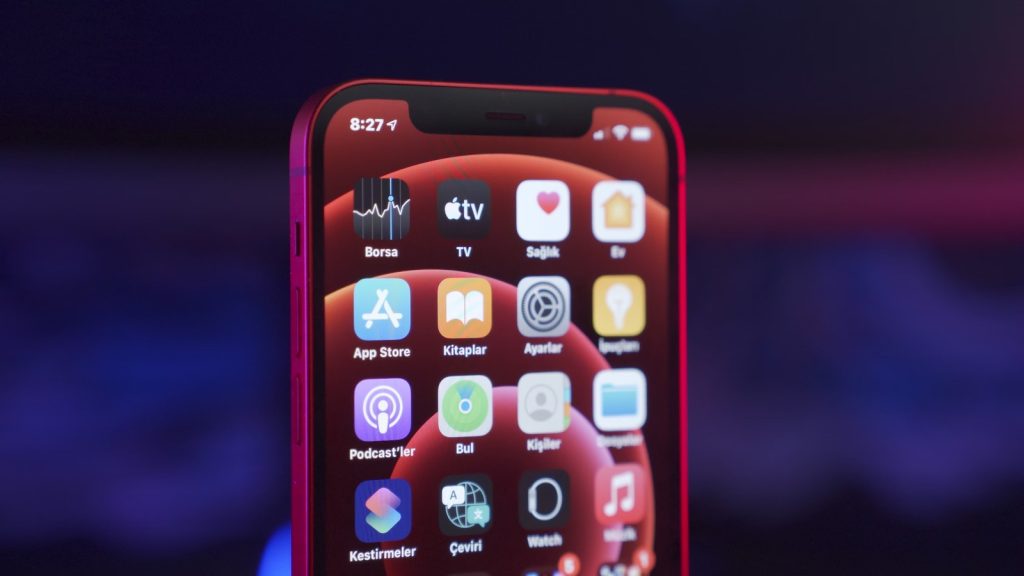
According to reports, Apple plans to introduce its new Apple Upgrade leasing plan in the United States next week. The program aims to spread the cost of eligible devices into monthly installments. It may also act as an alternative to the existing iPhone Upgrade Plan offered by Apple.
Apple is expected to launch the Apple Upgrade Program in partnership with Klarna. Customers will reportedly need to complete a soft credit check before enrolling. According to reports, the Apple Upgrade Program is expected to work just like a subscription. Customers have the option of paying for their device in full before the end of their lease period.
Customers can also retain the device after paying off the entire amount. If the customer is no longer interested in the device, they can give it back when the lease expires. The customer gets more freedom compared to a one-time purchase. Apple is likely to offer various lease deals depending on the device. iPhones and Apple Watch can be leased for 24 months. Macs and iPads will have a 36-month lease.
Eligible Devices, Exclusions, and Changes for Buyers

The plan is said to cover eligible iPhones, iPads, Macs, and Apple Watches. But not all Apple products are set to be covered by the new lease plan. This is because some products will be excluded from the list, among them the iPhone 16, Apple Watch SE, budget iPad, and MacBook Neo. Apple also plans to exclude business and education purchases.
Unlike the current iPhone Upgrade Program, the new service is not expected to offer AppleCare coverage. Reports also suggest Apple will stop accepting new customers for the existing iPhone Upgrade Program after Apple Upgrade launches. The new leasing option may make premium Apple devices easier to afford. Customers can spread payments over several months instead of paying the full price upfront.
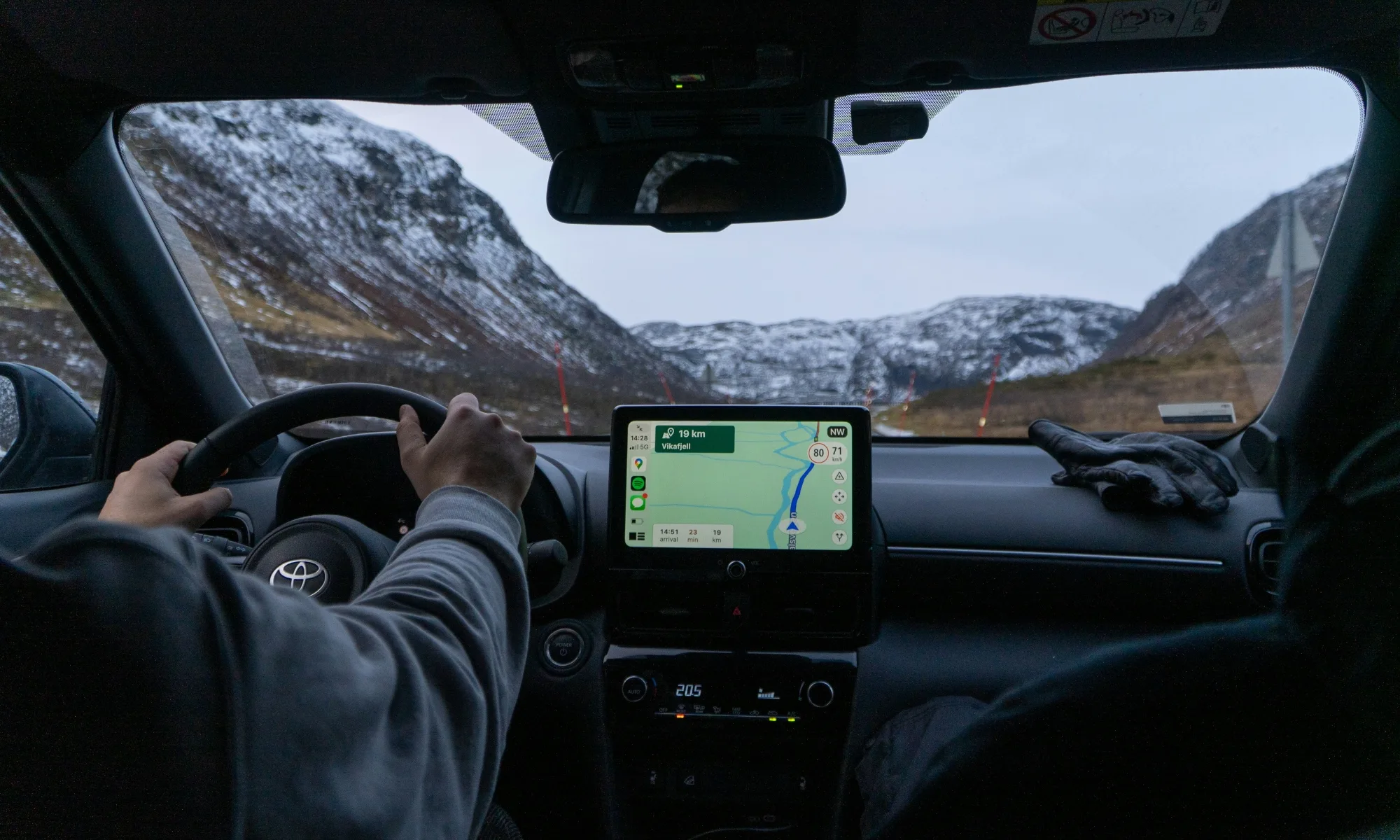
Google is widening the rollout of two long-awaited Google Maps features for Android Auto users: Immersive Navigation and a built-in live speedometer. After months of limited availability, reports suggest both features are now reaching a broader group of users, including people running stable versions of Google Maps instead of beta builds.
The update is part of Google’s ongoing effort to modernize the Android Auto navigation experience. While the company unveiled Immersive Navigation earlier this year as one of the platform’s biggest upgrades in years, the feature has been trickling out slowly, leaving many users without access. That appears to be changing, with more devices now receiving the update through a server-side rollout.
The rollout is still gradual, and availability may vary depending on region and device, but it signals that Google is becoming more confident about deploying the new experience at scale.
Maps becomes more visual while Android Auto gains a useful driving tool
Immersive Navigation makes Google Maps easier to follow while driving by displaying richer road layouts, clearer lane guidance, and more detailed intersections. The updated interface is designed to present navigation information in a way that’s easier to interpret with a glance instead of requiring drivers to study the map.

Alongside the redesigned navigation view, Google is also expanding the rollout of a live speedometer inside Android Auto. Unlike speed limit warnings, the feature displays the vehicle’s current speed directly within Google Maps, reducing the need to switch attention between the infotainment display and the instrument cluster in vehicles where that information isn’t readily visible.
Users receiving the update will also notice another interface change. On Android phones, the Gemini icon has replaced the Google Assistant shortcut in the top-right corner of Google Maps, continuing Google’s transition from Assistant to Gemini across its ecosystem.
A server-side rollout means patience is still required
Although more users are reporting access, Google has not released the features through a standard app update. Instead, the rollout appears to be happening server-side, meaning installing the latest version of Google Maps or Android Auto does not necessarily guarantee immediate access. Reports also suggest the features are appearing on stable builds rather than remaining exclusive to beta users, making them accessible to a much wider audience over time.

For Android Auto users, this update is less about adding flashy new capabilities and more about refining the everyday driving experience. Better lane visualization, more detailed navigation guidance, and an integrated speedometer are incremental improvements individually, but together they make Google Maps feel more complete as an in-car navigation system. As the rollout expands, more drivers should begin seeing those upgrades without needing to join Google’s beta programmes.
It’s been two years since the last total solar eclipse, but another one is coming in a few weeks — and with it, a special addition that rarely happens. Some people will get to see the solar eclipse during sunset, giving them an extraordinary view. The only problem is, you may have to jet off on a summer vacation to see it.
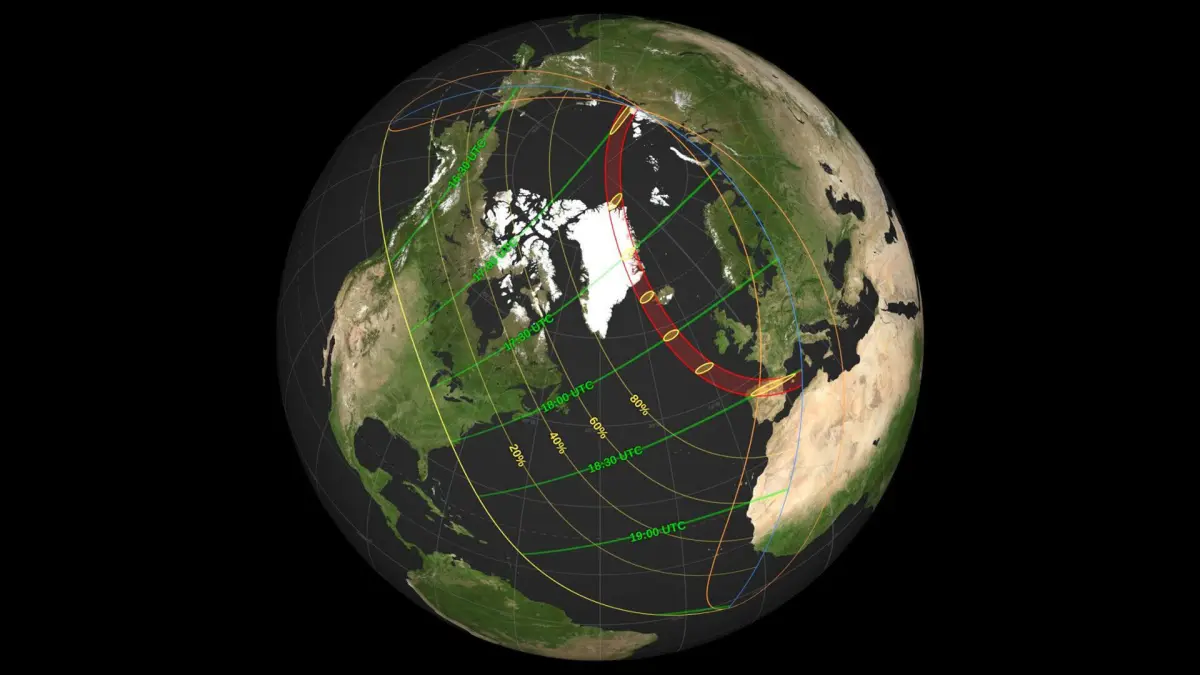
The total eclipse will only grace the shores of a few countries. According to NASA, the total eclipse on Aug. 12 will hit Greenland, Iceland, the northern half of Spain and one corner of Portugal. Spain is at the tail end of the eclipse, and as such, it will occur later in the day at around sunset, giving viewers in Spain a spectacular sight.
Other countries in Europe and Africa will also get quite a show. Most of Europe and a sizable portion of northern Africa are still getting a partial solar eclipse, which will happen around sunset. That means tens of millions of people will be in the right place to see a partial or total solar eclipse at sunset.
Russia is the luckiest country this time around. The eclipse starts at sunrise near the uninhabited Taymyr Peninsula, streaks across the world all day, and then Russians on the other side of the country are in the path for the partial solar eclipse at sunset, making Russia the only country that will see the eclipse at both sunrise and sunset.
How often do sunset eclipses happen?
Sunset eclipses don’t occur very often, at least where people can see them. There are two reasons for this.
The first is that solar eclipses usually only last for a few hours, and the timing for that being right at sunset isn’t terribly common.
The other reason is that solar eclipses have long paths, and sometimes those paths cut through the ocean or places where people don’t live. In the last 15 years, only a handful of total eclipses sit in that Venn diagram of occurring late enough in the day to happen at sunset, while also taking place where humans can see it.
The most recent sunset eclipse in North America was in 2014, but it was only a partial eclipse. South America’s most recent one was in July 2019, where people in Chile and Argentina had the best view of a total solar eclipse happening at sunset, while most of the rest of the country had a partial view. Asia’s most recent was in December 2019.
In short, this is a once-in-a-decade event for most of the world.
The path of this year’s solar eclipse takes it across the northern portions of Earth before ending in Europe. North Americans won’t see much.
NASA
Will this eclipse be visible in North America?
North America is pretty far from the main action, but a few states are in the path. The math is a little complicated, but if you look at a map of the US and draw a line from Alaska to North Carolina, all the states north of that line will get a little bit of an eclipse (less than 20% coverage), and all the states south of that line are sitting this one out.
If you live in the path and want to check it out, be sure to adhere to proper solar eclipse viewing safety protocols so that you don’t harm your eyes.
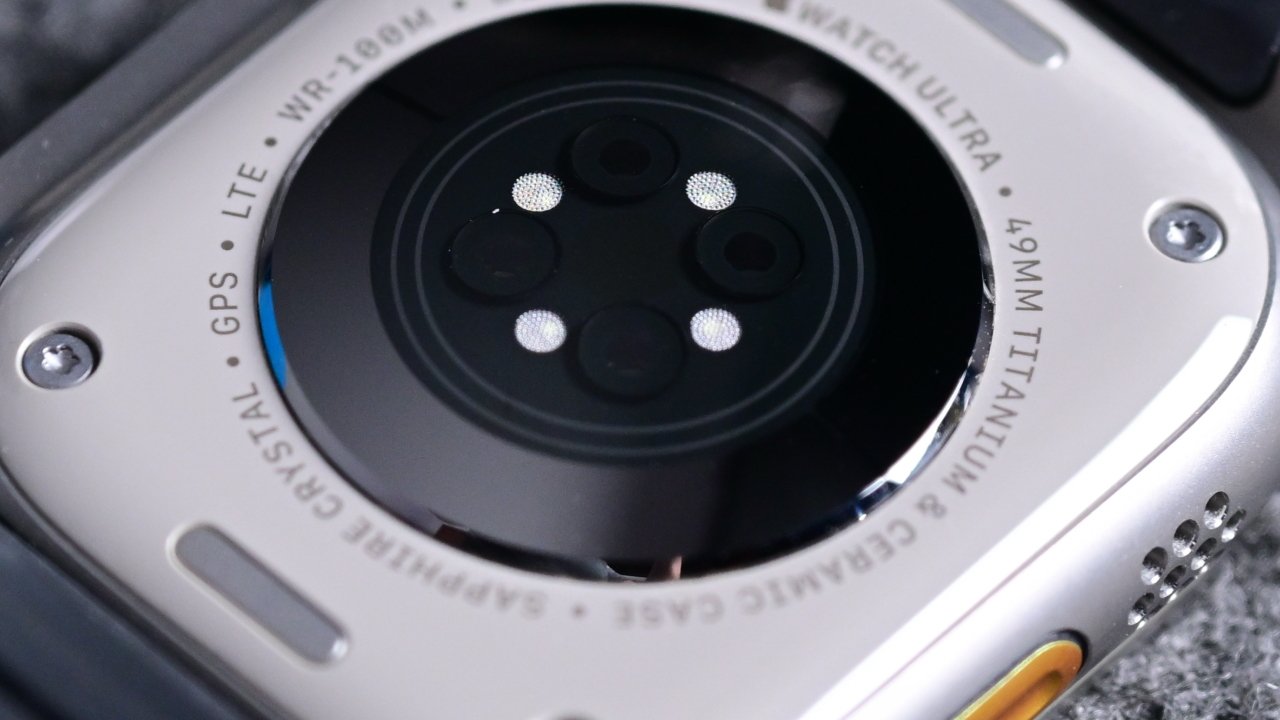
Apple is reportedly testing its September 2026 Apple Watch lineup, but the new models are expected to be minor updates while more substantial changes are much further off.
Most recent rumors have claimed that the forthcoming Apple Watch Series 12 will not feature any hardware improvements over its predecessor. Now backing up those reports, Bloomberg says that neither the Apple Watch Series 12 nor the expected Apple Watch Ultra 4 will get visible upgrades to their design.
Instead, the updates will be concentrated on giving the new Apple Watches a significant performance boost through a new processor. There may also be health and fitness tracking improvements, though previous reports have claimed that there won’t be new sensors, so this may be a software update.
The new lineup has the codenames N237 and N238 for the Wi-Fi and cellular versions of the Apple Watch Series 12 while the Apple Watch Ultra 4 is codenamed N240. All three models are said to now be in late-stage testing.
It’s claimed that these are the only three models due to be launched in September 2026, and specifically that there will not be a new Apple Watch SE released at this time.
There’s no indication of when an upgraded Apple Watch SE may come, but the report says that work is being done on a significant redesign for the regular Apple Watch. That’s not expected to result in a new device for at least a couple of years, however.
Separately, a recurring rumor has claimed again that the 2026 Apple Watch models will feature a new system for attaching bands. It remains as possible yet unlikely, though, as it has for the last several years that the rumor has circulated.
Also, while this new report predicts no noticeable changes to the Apple Watch Ultra, a rumor in May 2026 suggested that there may well be a significant update. Supply chain sources claimed that the Apple Watch Ultra 4 could double its number of sensors over the previous models.

“The rise of TikTok, Instagram Reels and Amazon storefronts has created a new kind of white-collar exit strategy,” reports Bloomberg. Workers ditch office jobs not to become celebrities, necessarily, “but to piece together an income online through brand deals, affiliate links and highly personal videos documenting everyday life.”
In many cases, the followers necessary to sustain a living are smaller (and more attainable) than people might assume. A small but loyal audience can now generate enough income to rival a midlevel salary. Welcome to the middle-class creator economy. Last year, 25-year-old Abi Platock balanced a corporate marketing job in New York while posting online in her spare time. She built her audience by posting one or two videos a day, offering career advice, beauty tips and daily vlogs. “I signed my first brand deal in the four-figure range, and for me that was just such a big eye-opening moment,” Platock says of her partnership with deodorant brand Secret. She had 8,000 followers on TikTok at the time. “You can totally make it work without having hundreds of thousands of followers.” Platock, who now has roughly 25,000 followers across platforms, has signed about $25,000 in brand deals so far this year and expects her annual creator income to reach around $50,000 by yearend.
Her experience reflects a broader shift in advertising. Brands are increasingly moving money toward so-called microinfluencers — smaller online personalities who have less than 100,000 followers. “They are hiring a bunch of microcreators at scale instead of hiring a handful of macrocreators for what could potentially be the same cost,” says Ali Grant, co-chief executive officer of the Digital Department, a creator management company. And they perform where it matters most: engagement. An engagement rate of 3% is considered strong, and some microinfluencers exceed 10%, Grant says of the closely watched metric that tracks how often followers interact with content through likes, comments, shares and saves. Microinfluencers average a 3.2% engagement rate, almost triple the 1.1% rate for macroinfluencers (more than 1 million followers), according to growth marketing agency ATTN… A TikTok partnership with a creator who has around 50,000 followers can run a brand more than $3,500 for a single post, Grant says; with 10 times the followers, that fee might just triple, to around $10,000….
The influencer marketing economy ballooned to a projected $33 billion in 2025 up from $1.7 billion in 2015. The segment gained momentum after the COVID-19 pandemic, as dissatisfaction with traditional work pushed many to reconsider conventional career paths, says Brooke Duffy, a professor of communications at Cornell University. “They realized the trade-offs in terms of the investments of time, energy and human capital were not necessarily worth sacrificing so much of one’s personal self for,” she says. Success online can bring greater freedom — and even higher pay than many traditional office jobs, which have a median US salary of $69,000, according to Glassdoor. But the middle-class hustle still requires constant effort to maintain. The career has no promise of lifetime longevity. And unlike traditional workers, creators have no predictable paycheck or job protections, making career stability elusive. Roughly 57% of 3,000 surveyed full-time creators earn below a living wage from content creation, according to a report last year from Influencer Marketing Hub. Income from social media can fluctuate wildly from month to month, driven by shifts in algorithms, sponsorship cycles and platform trends.
“You could have a month where you make zero dollars, or you could have a month where you make $10,000,” Platock says.
The article cites Gallup Poll data released last year that found employee engagement in the U.S. had fallen to its lowest level in a decade [with engagement defined as “the psychological attachment workers have to their work/team/employer]. “Among the hardest-hit groups were Generation Z and workers in finance and technology. Broader workplace challenges, including rapid organizational change, hybrid and remote work transitions, and rising employee expectations are considered drivers of the overall trend.”
“For many workers, influencing can seem like a better deal; flexible schedules and independence wrapped in a veneer of creativity and fun. Almost 60% of Gen Zers say they’d become an influencer if given the opportunity, according to a 2023 survey from Morning Consult.”

Previously exclusively in the US, AppleCare One is now launching in the UK, France, Germany, and Australia, with Apple’s best insurance deal for users with multiple devices — as long as you’re careful in selecting what’s covered.
A year after it launched in the US, AppleCare One is expanding outside of the US. It’s only going to four more countries, and they’re countries you’d expect it to launch in, but that’s a start.
“At Apple, we’re focused on creating and delivering exceptional experiences,” Bob Borchers, Apple’s vice president of Worldwide Product Marketing, said in a statement to AppleInsider. “With AppleCare One, customers in the UK can now enjoy the trusted protection of AppleCare+ in a way that’s simpler and more flexible than ever before — one plan, one price, and the peace of mind that comes with knowing all their eligible products can be covered.”
Full details of the terms, conditions and all pricing have yet to be published, but based on the details provided by Apple UK, the program will cost around the same as it does in the US. It will also offer the same befits, which are:
- Up to three products covered
- Theft and Loss Coverage (for iPhone, iPad, and Apple Watch)
- Unlimited repairs for accidental damage
- Free battery replacement
- Priority access to Apple support
There are limits in that, for instance, AppleCare One users may only make up to three claims of theft or loss per year. But then there are also extra benefits in that iPad accidental damage from handling (ADH) coverage can include an associated Apple Pencil or Apple-branded iPad keyboard.
Who this does and does not work for
Users who have any single device, such as one iPhone or one iPad, should not take up the new AppleCare One option. They should use AppleCare+, which Apple has also improved.
That AppleCare+ plan used to only feature theft and loss coverage for the iPhone, but it now extends this to the iPad and Apple Watch. AppleCare+ prices vary depending on the model of device, but for example the monthly cost in the US at time of writing is:
- iPhone: from $9.99 to $13.99
- iPad: from $5.49 to $11.49
- Mac: from $3.99 to $17.99
- Apple Watch: from $2.99 to $5.99
- Apple Vision Pro: $19.99
Each of these comes with an annual version which is roughly equivalent to 10 months at the monthly rate. Note that AppleCare+ only allows annual payment for insuring displays, Apple TV, HomePod, or AirPods.
Those items can, though, be paid for monthly via the new AppleCare One. Again, non-US details will not be fully available until AppleCare One launches on August 4, but the US version does allow adding headphones, for example.
Nonetheless, users who want to insure single devices get no financial benefit from the new AppleCare One. Users who have two devices will definitely benefit if those devices include the Apple Vision Pro.
Covering the Apple Vision Pro by itself with AppleCare+ is exactly the same price as covering it via AppleCare One. So that would be like getting coverage for a second and even third device for free.
Devil in the details
There are ways in which AppleCare One’s coverage of three devices is more than the price of insuring them each with a separate AppleCare+ plan. It depends on if the devices include a Mac, which on its own ranges from $3.99 per month for a Mac mini, to $17.99 per month for a Mac Pro.
Or with the iPhone, the separate monthly cost is $9.99 for an iPhone 17e, rising to $13.99 for an iPhone Air, iPhone 17 Pro, or iPhone 17 Pro Max.
It naturally gets more complicated if you have both an iPhone and a Mac in the equation. For example, if the three devices to be insured consist of an iPhone 17e, Mac mini, and an Apple Watch SE, the total individual cost is $16.97 where AppleCare One is $19.99 and you shouldn’t go near it.
But then if the devices are, say, an iPhone 17 Pro Max, an M5 13-inch iPad Pro, and a Mac Studio, you’d save a startling $12.48 per month by going to AppleCare One. In that case, that’s a hell of a deal.
That’s if you stick to just the basic AppleCare One and its coverage of three devices. It’s possible to add a fourth or any number of more devices, for $5.99 per month each.
Do that by adding, say, an Apple Vision Pro to the example with the iPhone 17 Pro max, 13-inch iPad Pro, Mac Studio and your monthly cost goes up to $25.99. The cost of doing these separately is more than double at $57.46.
One more huge benefit
Not long ago, all of this comparison of coverage costs would be moot because you were limited to which devices could get any AppleCare. It was typically a new device, or a device bought in the last 60 days.
Now with AppleCare One, the coverage is not only cheaper for most people in most circumstances, it is broader. Instead of solely being for new devices, AppleCare One can potentially be used for Apple devices that are up to four years old.
Those devices have to be in good condition, and during online registration users are prompted through questions regarding potential damage. It’s also possible that Apple will require the device to be brought to a store for a visual inspection.
If a user is starting with a new device, then instructions for signing up to AppleCare One will be displayed in Settings. Otherwise it can be done via the Apple website using the user’s Apple Account.
Those users who already have AppleCare plans will be able to switch to AppleCare One. Apple says that their existing plans will be cancelled and a new AppleCare One plan put in place.
Apple’s best deal
As long as you check out the pricing differences between AppleCare+ and AppleCare One, this new program can represent a very significant saving. So it’s unquestionably worth examining the details once Apple has published them for the UK, France, Germany, and Australia, on August 4, 2026.
Note, though, that the US service had some teething problems with eligible devices not always being displayed. If that happens again with the new countries, there are steps you can take to get the correct coverage.


Security
So much for Microsoft and CrowdStrike’s plans for consistent names across the industry
Google has created a new taxonomy to describe cybercrime outfits, seemingly abandoning a Microsoft-led effort to create consistent names.
The Big G announced its new schema on Saturday in a post that notes its 2022 acquisition of Mandiant and its subsequent incorporation into a new team called the Google Threat Intelligence Group (CTIG).
Now that two have become one, Google reckons they need consistent naming conventions to describe cybercrime crews.
The result is a two-word schema in which the first word “is a unique and memorable term chosen to represent the specific actor.” If security folk have already applied a particular moniker Google will use it, otherwise it will randomly generate a word “to remove bias.”
Google says the second word “categorizes threat clusters by motivation, attribution, or activity type based on which category we consider to be most important for defense and response strategies.”
More on that later.
Google has decided on the following names:
-
CASTLE to describe crews from the People’s Republic of China
-
ION for threats from Iran
-
NEPTUNE for North Korean attackers
-
RELIC for Russians
-
COMET for cybercrims who aren’t backed by a state
Google’s post notes that other infosec industry players have developed their own schemas for describing threat actors and says the web giant is therefore “intentionally seeking to keep this system as simple as possible to streamline operations and facilitate mapping to other naming taxonomies.”
That’s an odd position, given that in 2025 Microsoft and CrowdStrike tried to spark an industry-wide effort to apply consistent names to threat actors. As we noted at the time, the existence of multiple naming schemas means that researchers often refer to the same group by ten different names. Researchers use the names Seashell Blizzard, IRIDIUM, VOODOO BEAR, BE2, UAC-0113, Blue Echidna, PHANTOM, BlackEnergy Lite, and APT44 to refer to the same entity – Russia’s Military Intelligence Unit 74455.
With most orgs using multiple security tools and therefore receiving threat intelligence security info from many vendors, users must try to understand which crews they’re trying to defend against.
At the time, sources told us Google and Mandiant were keen to adopt the Microsoft-led scheme.
Google’s new announcement suggest the relationship either wasn’t consummated or didn’t last.
Back to the issue of possible bias, as in 2024 China’s National Computer Virus Emergency Response Center (CVERC) complained that western companies choose names like “Typhoon,” “Panda,” or “Dragon” to describe Chinese cybercrime groups.
CVERC suggested names that reflect English language idioms, such as “Hurricane” or “Koala” are more appropriate.
For what it’s worth, “Koala” is a word from the language spoken by the Darug people, the indigenous tribe who lived around Sydney, Australia, prior to British colonization. Koalas are utterly supine creatures that sleep 18 to 22 hours a day, and a mention of the marsupials may therefore not spur defenders to action, even if the creatures’ habits do perhaps describe the behavior of some sleeper malware. ®
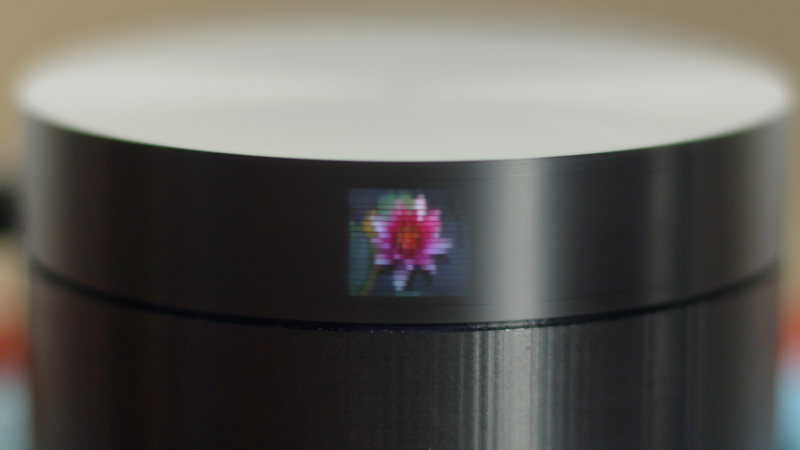
When you hear the word TV, you probably think of a big LED screen, maybe even the old CRT TVs, but in either case it’s something large and fairly complicated. However, thanks to the persistence of vision, it doesn’t have to be. In this handheld-sized project from [Ancient], the Scanwheel is born, a miniature mechanical TV that uses a spinning disk and some LEDs to produce an image.
The electronics of the Scanwheel are pretty straightforward. The smarts come from a Raspberry Pi Pico, an A4988 motor driver, a couple of LEDs, and a small 21-02485 stepper motor. The Raspberry Pi Pico is used to command the motor speed as well as coordinate the LEDs to turn on at the right time. The case is 3D printed; the base includes space for the various support electronics as well as some small light baffles to ensure the LEDs don’t bleed over outside their intended area. The top of the case is a disk that includes 20 small holes spaced evenly around the perimeter at varying heights, allowing light to only leave the disk when one of these holes is in front of the LEDs.
When you put all these pieces together, spin the motor up to roughly 900 RPM, and turn the LEDs on in a precise order, you end up with a really cool result: a miniature TV. And due to the five different LEDs in this build, you actually have a color 20×20 pixel display in the center and, on either side of that, two more 20×20 black-and-white displays capable of showing different images. Thanks [Ancient] for sharing this awesome build that takes advantage of the persistence of vision effect to create a unique display. Be sure to check out the video below as well as the instructions on how to build your own. And if you enjoy this sort of thing, check out some of our other persistence-of-vision projects as well.
Yeast spends its days chewing through sugar and splitting the leftovers into alcohol and carbon dioxide. Most people chasing homemade ethanol treat the second half of that reaction as pure waste and let the gas drift away. One maker decided the gas was too useful to ignore and set out to trap every molecule, dry it, chill it, and pack it into the same kind of high-pressure bottles that drive paintball markers and soda siphons.
The numbers appear almost too clean, since 4 kilograms of ordinary sugar dissolved in 14 liters of water already gives a solution that is nearly 22% sugar. If the yeast performs its job and converts everything, the process should result in little more than 2 kg of CO2. That’s enough liquid to fill nearly four 20-ounce paintball cylinders. The problem is that the gas comes out of the fermenter wet and diluted, making the first job (gathering it) difficult, as does maintaining the pressure up and preventing air from entering the system.
Sale

Airmoto Tire Inflator Portable Air Compressor for Cars, Bikes and Bicycles
- QUICK & ACCURATE: Built with the highest quality materials, Airmoto is a portable tire inflator for car, trucks, SUVs, motorcycles, and bicycles…
- AUTO SHUT OFF: Use the “+” and “-” control buttons on the Airmoto to easily select your desired pressure, simply connect the air hose to your…
- MAIN HIGHLIGHTS: Easily change between PSI, kPa, BAR, and KG/CM pressure units with a push of a button; Easy to read large LCD; Digital Tire Pressure…
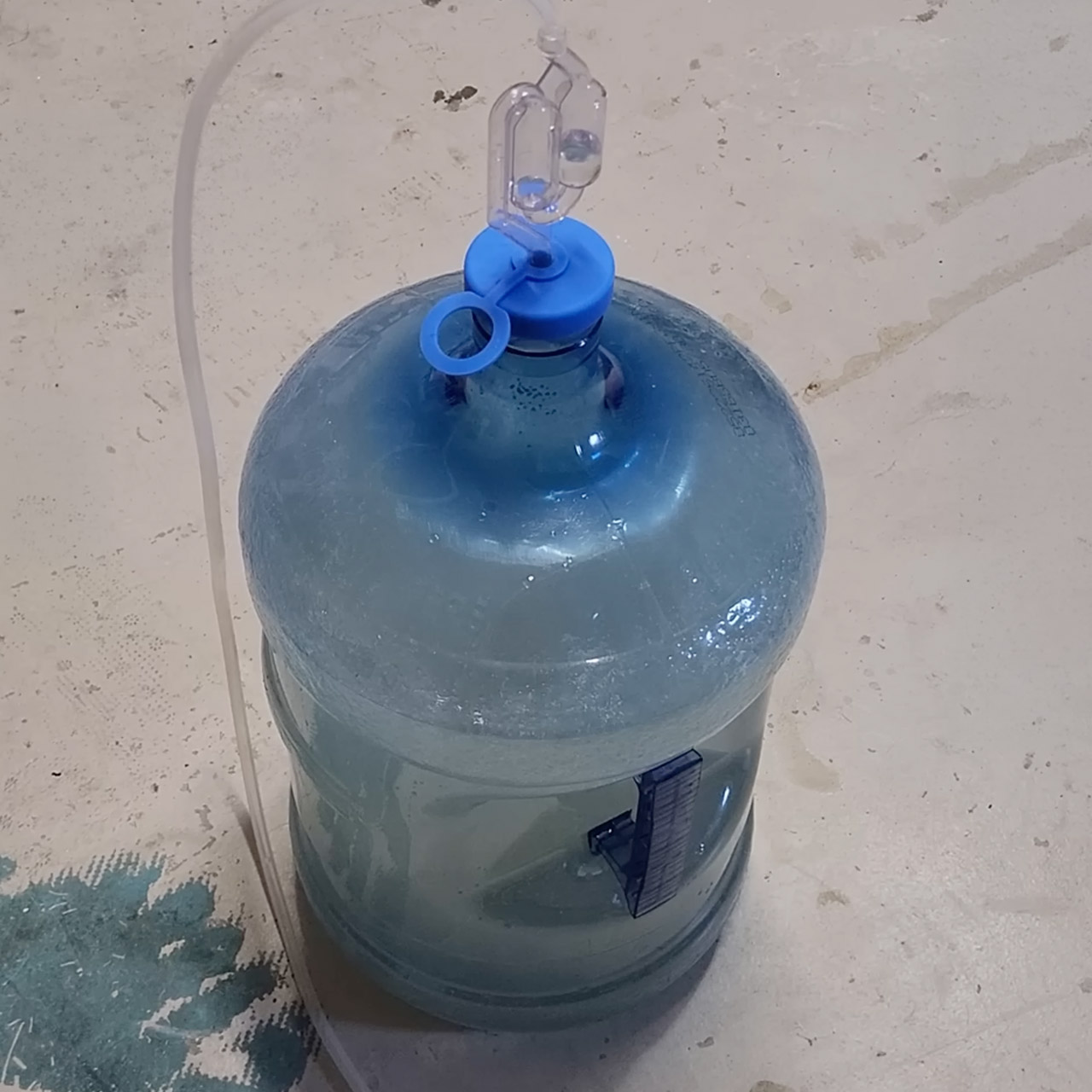
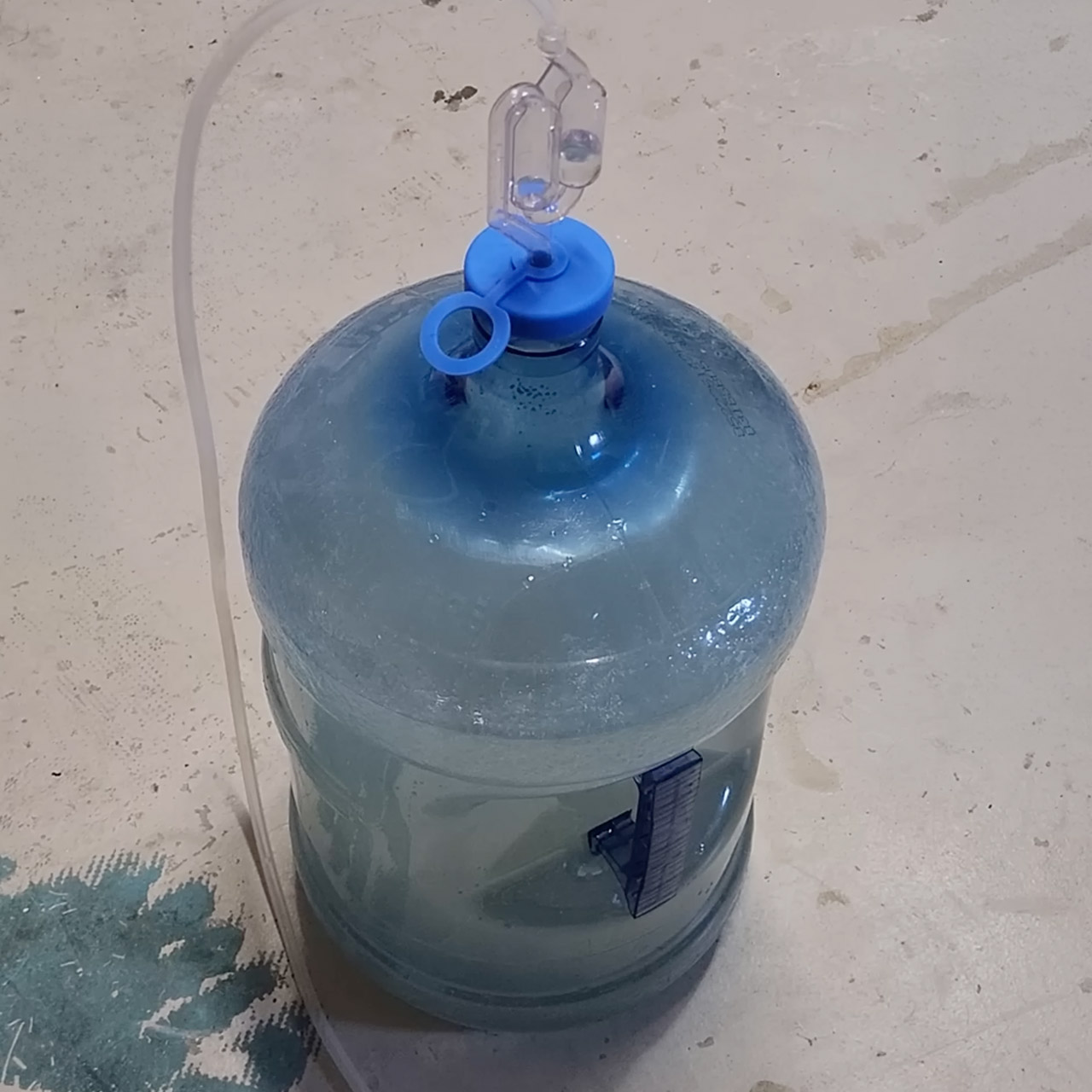
A 5-gallon water jug serves as a fermentation tank. The carbon dioxide is routed out via an airlock tube and into a recycled water-filter canister. The works is stuffed with silica-gel beads, which reduces moisture slightly, but we later discovered that the dew point remains too high, causing ice to form inside the valves. The next step is to transfer the gas to a beach ball. It takes a few days, but the ball eventually fills up with hundreds of gallons of CO2. It serves the purpose of providing some extra room to keep the pressure near the proper level while the yeast is still active.

The major issue is turning the squishy substance into liquid. At room temperature, the CO2 must be compressed to roughly 64bar before it can condensate. The problem is that standard shop compressors can only reach a fraction of that capacity. The solution is to simply leave it in the air box. To cool a copper coil, a DIY system makes use of propylene as a refrigerant. This lowers the temperature to roughly -33 degrees Celsius and reduces the condensation pressure to about 13 bar absolute, which is well within the capabilities of a severely modified oil-less air compressor with its over-pressure cut-out switch disabled.

That copper coil is a 2-inch pipe, approximately 2 feet long, with a thinner copper coil within to convey the propylene. The CO2 from the beach ball enters at the top, meets the chilly surface, and condenses into a liquid that gathers at the bottom. A second coil (the same as the first) is housed in a 96% ethanol-lined thermos. A paintball tank sits in that bath, keeping the metal cool. Once some liquid has accumulated in the coil, a valve opens and the liquid flows into the chilled tank.
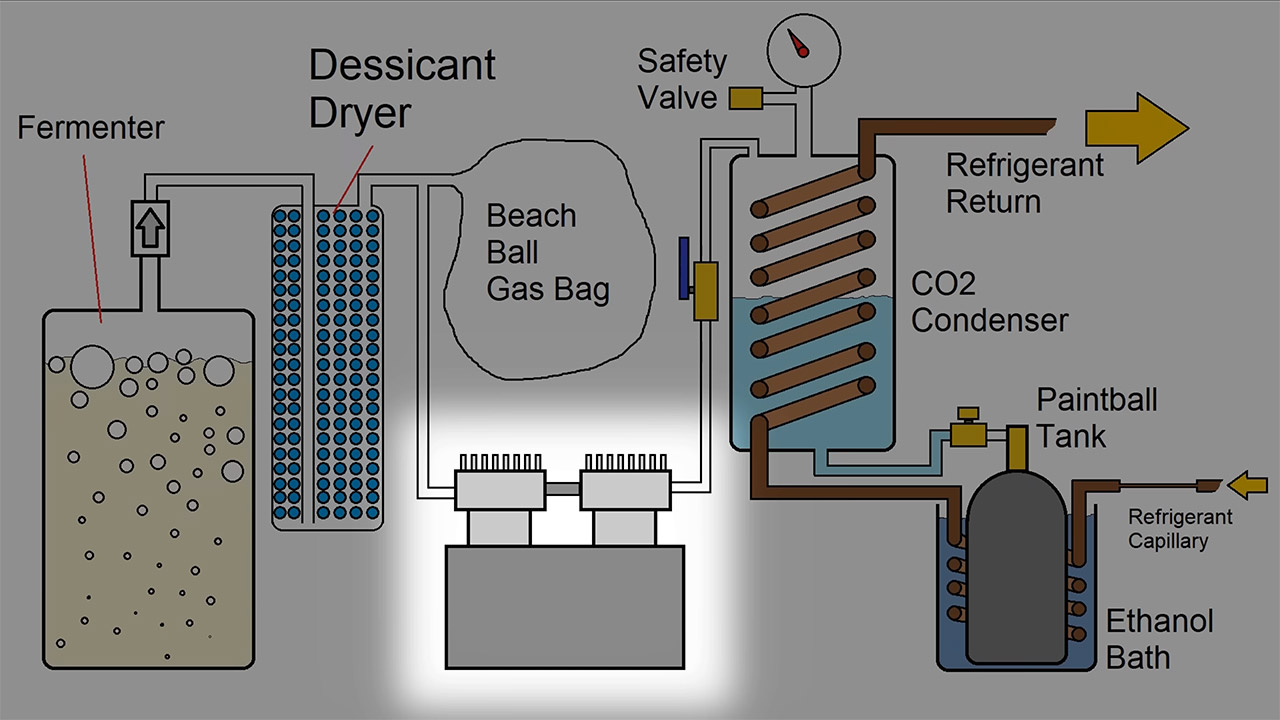
An typical oil-free compressor can move the gas, but only at a very sluggish rate; at 17 bar, it moves like a snail. Switching to a refrigerated compressor provides the necessary pressure, 400 psi or greater, and reduces fill time to 10 or 15 minutes. But now we have a new problem: oil separation. Any lubricant that gets into the tank degrades the purity. Then there’s water, which still freezes inside the tank valve while we pump it out, and this can jam the nozzle until the metal heats up again.
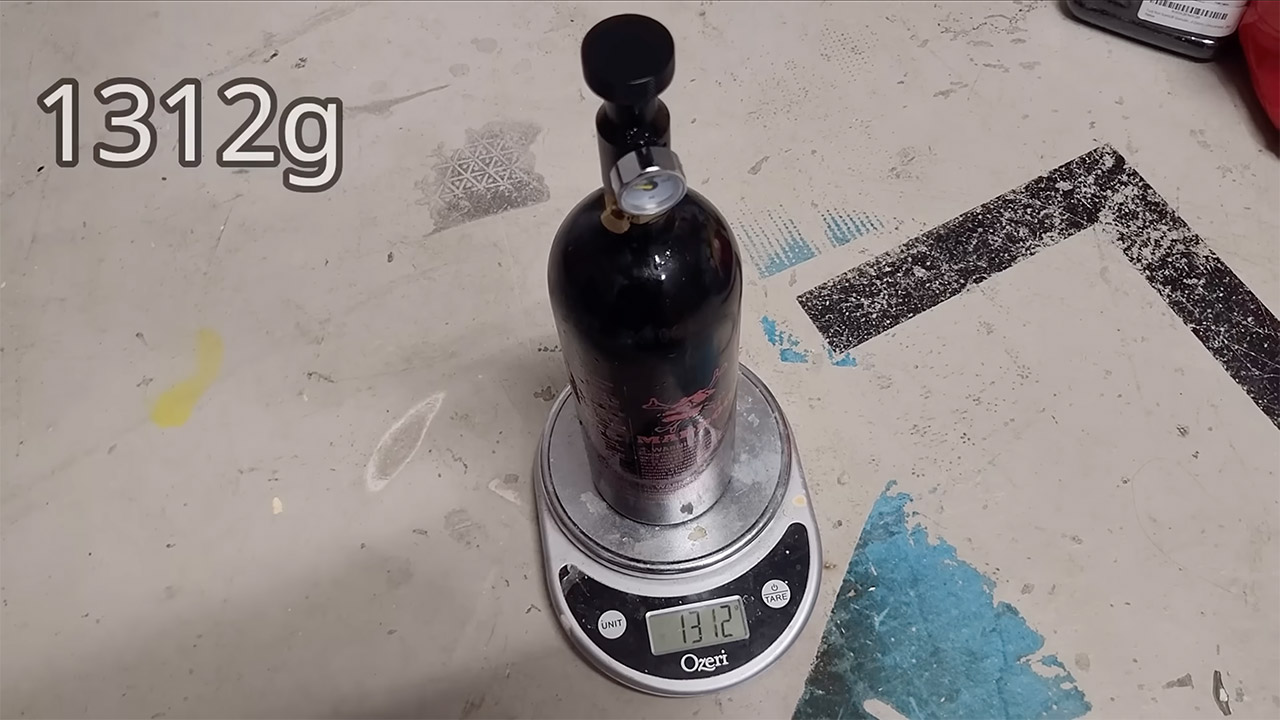
After filling the bottle to capacity, the scales read 1312 grams with the valve still connected. When the contents were drained, 974 grams remained, indicating that 338 grams of liquid carbon dioxide had been trapped inside. The container wasn’t even full to the brim, but that liquid was unmistakable, and when that valve was opened quickly, the temperature of the tank dropped to the point where it iced over. If you discharge it completely and quickly, you could bring it down to the temperature of dry ice.
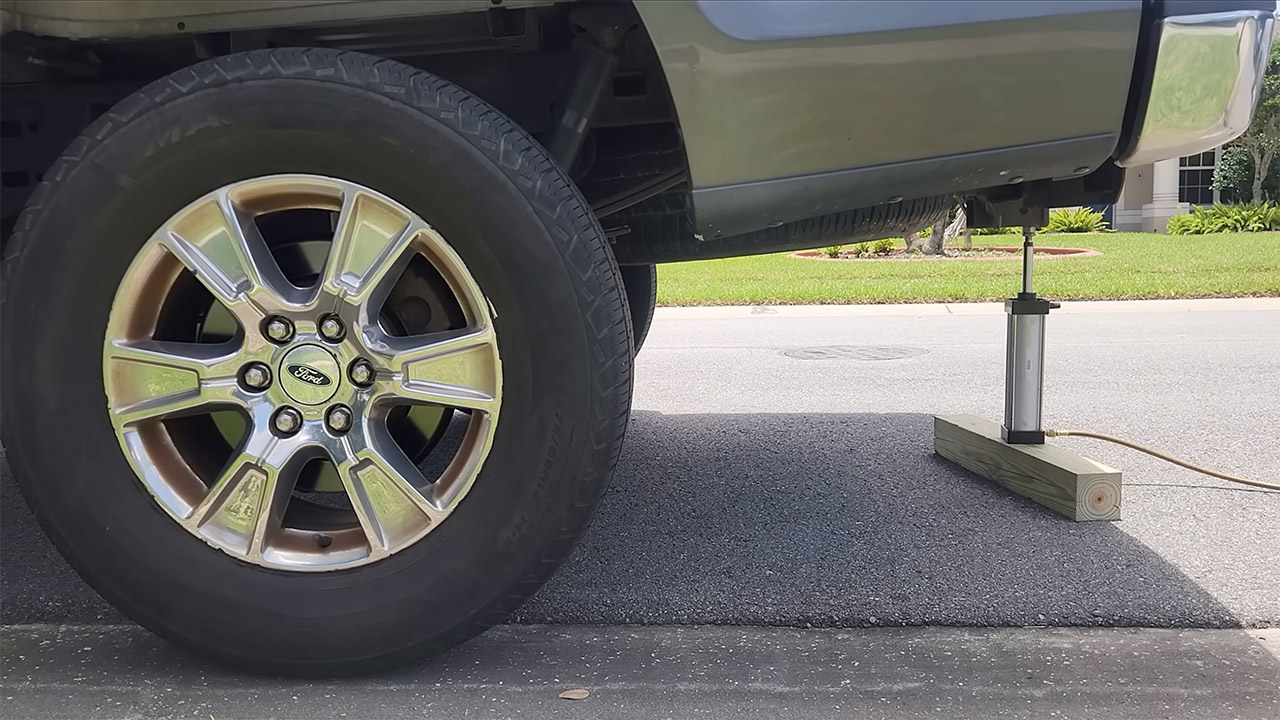
That small charge of ours already has some substantial practical power behind it. By connecting it to a short-stroke pneumatic actuator, he was able to elevate the back end of a full-size pickup approximately 200 millimeters off the ground. The same gas, linked to a vane motor, was able to power a small generator for a few minutes, but you can probably predict where this is going: the intense chill that comes in as the liquid boils away causes the pressure to drop and the motor to turn off.
[Source]

Storj files for Chapter 11, extending a week of crypto failures. Token slides 16%

Lando Norris claims his first victory of the 2026 F1 season

Transfer news LIVE: Arsenal prepare record-breaking Vinicius Jr offer, Liverpool learn Bradley Barcola price, Yan Diomande nears move


-

 Fashion3 days ago
Weekend Open Thread: Brooks Brothers
-

 Crypto World6 days ago
Grayscale Files For Worldcoin ETF, WLD Registers Sharp Rise
-

 NewsBeat6 days ago
How a former Blue Peter presenter stunned America’s Got Talent judges
-

 Tech6 days ago
Sail Virtually Aboard The “Itanic” With IA-64 Emulator
-
 Tech6 days ago
Turtle Beach Command Series KB7 review: a nifty screen-equipped gaming keyboard
-

 NewsBeat7 days ago
Unregistered fitter used Gas Safe logo on business flyers
-

 Tech9 hours ago
Intel is reversing course and bringing hyper-threading back to its server chips
-
 Business5 days ago
New Jersey voter registration controversy explained: How 6,600 noncitizens got on the rolls, and what happens next
-
 Entertainment6 days ago
Johnny Depp’s R-Rated Gothic Cult Classic Gets New Release Ahead of Sydney Sweeney Remake
-

 Tech7 days ago
Watch Flock Safety CEO Garrett Langley discuss the future of surveillance at TechCrunch Disrupt 2026
-

 Crypto World4 days ago
Ethics, other provisions in crypto Clarity Act to be further discussed
-
 NewsBeat6 days ago
Shanghai science forum photos show China’s AI and robotics advances in rivalry with US
-

 Crypto World7 days ago
Circle’s President Sold Over 360,000 Shares, The Filings Explain Why
-
 Sports13 hours ago
Commonwealth Games boxing: Jadumani Singh seals dominant 5-0 win over Pakistan’s Sumama Rehman to enter quarter-finals | Commonwealth Games News
-

 News Videos4 days ago
The Peugeot Family: How 200 Years of an “Old Money” Dynasty Died in A Boardroom
-

 Sports3 days ago
2026 3M Open leaderboard: Scottie Scheffler finds putter in Round 1, sits three back
-

 Politics21 hours ago
Spain sweeps the board at 2026 World Cup with individual awards
-

 Fashion3 days ago
16 Dresses for the High Summer Event
-

 Crypto World6 days ago
Andrew Cuomo joins OKX board as crypto exchange expands in U.S.
-

 Tech7 days ago
The 35 Best Board Games for Family Game Night
You must be logged in to post a comment Login