Hackers are exploiting two authentication bypass vulnerabilities in the Qinglong open-source task scheduling tool to deploy cryptominers on developers’ servers.
Exploitation started in early February, before the security issues were disclosed publicly at the end of the month, according to researchers at cloud-native application security company Snyk.
Qinglong is a self-hosted open-source time management platform popular among Chinese developers. It has been forked more than 3,200 times and has over 19,000 stars on GitHub.
The two security problems impact Qinglong versions 2.20.1 and older and can be chained to achieve remote code execution:
CVE-2026-3965: A misconfigured rewrite rule maps ‘/open/*’ requests to ‘/api/*’, unintentionally exposing protected admin endpoints through an unauthenticated path
CVE-2026-4047: The authentication check treats paths as case-sensitive (/api/), while the router matches them case-insensitively, allowing requests like ‘/aPi/…’ to bypass authentication and reach protected endpoints.
The root cause in both flaws is a mismatch between middleware authorization logic and Express.js routing behavior.
“Both vulnerabilities stem from a mismatch between the security middleware’s assumptions and the framework’s behavior,” Snyk researchers explain.
Advertisement
“The auth layer assumed certain URL patterns would always be handled one way, while Express.js treated them differently.”
Snyk reports that attackers have been targeting these two flaws on publicly exposed Qinglong panels to deploy cryptominers since February 7.
This activity was first spotted by Qinglong users, who reported about a rogue hidden process named ‘.fullgc’ utilizing between 85% and 100% of their CPU power.
The name deliberately mimics “Full GC,” an innocuous but resource-intensive process, to evade detection.
Advertisement
According to Snyk, the attackers exploited the flaws to modify Qinglong’s config.sh and injected shell commands that downloaded a miner to ‘/ql/data/db/.fullgc,’ and executed it in the background.
The remote resource located at ‘file.551911.xyz’ hosted multiple variants of the binary, including for Linux x86_64, ARM64, and macOS.
The attacks continued with multiple confirmed infections across various setups, including behind Nginx and SSL, while the Qinglong maintainers only responded to the situation on March 1.
The maintainer acknowledged the vulnerability and urged users to install the latest update. However, the mitigation in pull release #2924 focused on blocking command injection patterns, which Snyk says was insufficient.
Advertisement
The researchers report that the effective fix came in PR #2941, which corrected the authentication bypass in the middleware.
AI chained four zero-days into one exploit that bypassed both renderer and OS sandboxes. A wave of new exploits is coming.
At the Autonomous Validation Summit (May 12 & 14), see how autonomous, context-rich validation finds what’s exploitable, proves controls hold, and closes the remediation loop.
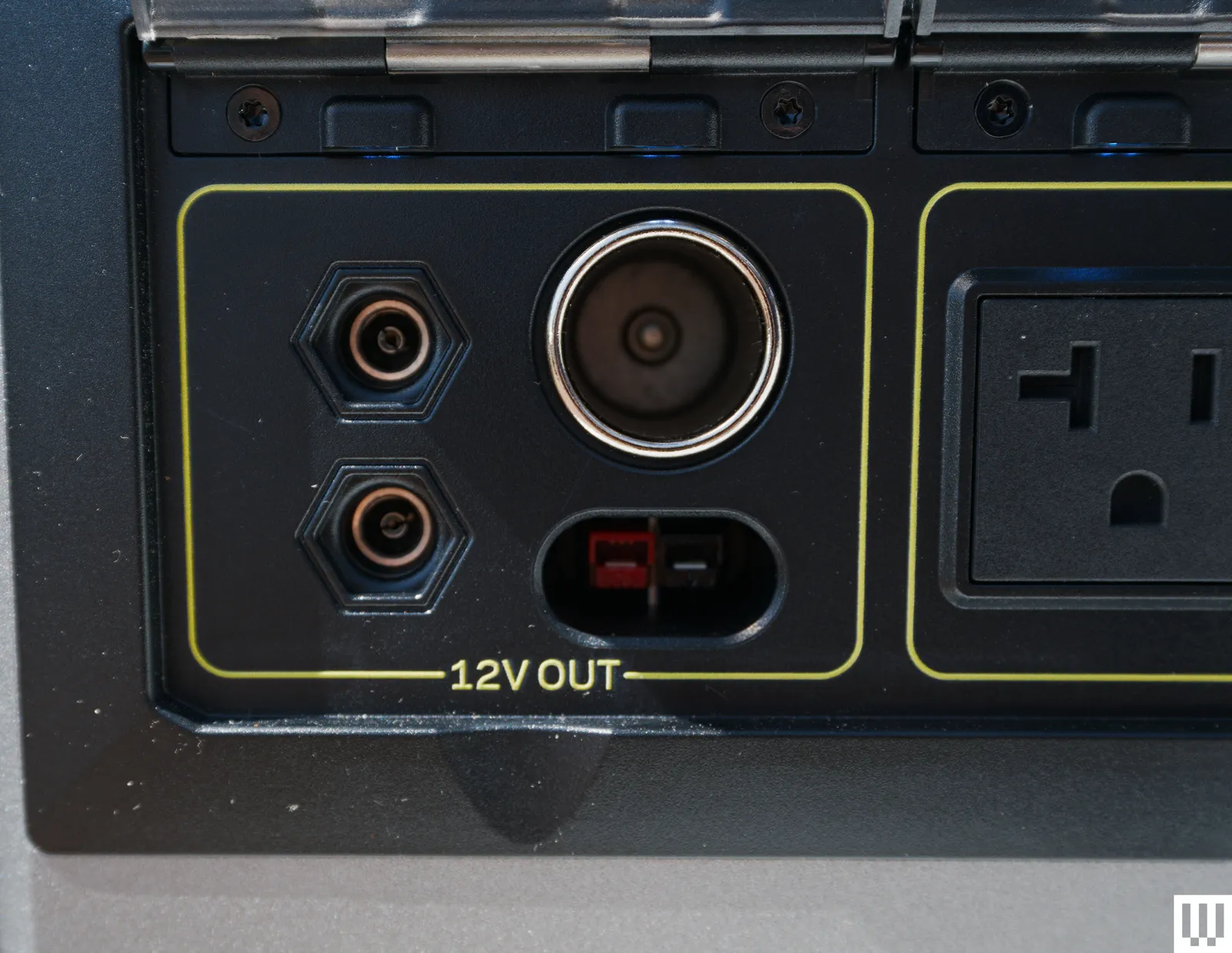
All those ports are fairly standard for a power station in this class, and similar to what was on the previous model—although the 140-W USB port is new and very nice to have. Where the new Yeti 1500 shines is the 12-V charging options, which include a high-power 12-V port capable of 30 amp output. That’s enough for most van and overlanding vehicle power systems, meaning you can tie the Yeti 1500 directly to your house power 12-V distribution panel. There’s also standard Anderson connector outputs and a cigarette-lighter-style outlet available.
There are three ways to charge the Yeti 1500. There’s AC wall power, which can charge at up to 1,800 watts, getting you from 0 to 100 percent in just over an hour. (There’s a switch to slow this down to 1,500 W if you’re plugged into a campground pole, which typically can’t handle the full draw.) You can also hook the Yeti up to a max of 900 watts of solar panels. There are both 8-mm inputs and HPP inputs for Goal Zero solar panels. You don’t need Goal Zero panels, though; you can use just about anything so long as you get the right adapters and stick within the charging limits (I use an adapter like this to plug just about any solar panel into just about any power station/charger). The rear charging panel is also where you’ll find the ground lug for semi-permanent installs in a vehicle or off-grid tiny home.
Goal Zero’s Yeti app allows you to control the system from your phone, potentially from the other side of the world if you have the battery connected to your Wi-Fi. I opted for direct connection via Bluetooth, bypassing the network, since I don’t always have my Starlink network up and running in my camper. This still allows me to toggle all the output types on and off, get basic battery status like charge state, current power draw (by type), change the charge profile (there are four), and some charge and discharge history information. The latter is not as full-featured with direct connection as it would be with a network connection, and I found it often had trouble loading, but overall I found the app handled everything I needed it to do. I particularly like the ability to turn off the 12-V output from bed at night, shutting off all power to eliminate any phantom drains on the battery.
The Only One
Photograph: Scott Gilbertson
I’ve relied on a fourth-gen Yeti 1500 as supplemental power for many years now. I’ve run everything from power tools to space heaters to full-size refrigerators, and as a backup for my RV when I needed to do something to the built-in system. In all that time it’s never let me down, and in my experience strikes the best balance between portability and power. It’s heavy, but the dual handles make it pretty easy to carry. I’ve also tested the 1000X and the 500X models, which while lighter and smaller, lack some of the things that make the 1500 great.
The telephone was an invention that revolutionized human communication. No more did you have to physically courier a letter from one place to another, or send a telegram, or have a runner carry the message for you. Instead, you could have a direct conversation with another person a great distance away. All well and good if you can speak and hear, of course, but rather useless if you happen to be deaf.
Those hard of hearing were not left entirely out of the communication revolution, however. Well before IP switched networks and the Internet became a thing, there was already a way for the deaf to communicate over the plain old telephone network—thanks to the teletypewriter!
Over The Wires
The teletypewriter (TTY) has been around for a long time. The first device came into being in 1964, developed by James C. Marsters and Robert Weitbrecht, both deaf. Their idea was to create a method for deaf individuals to communicate over the phone network in a textual manner. To this end, the group sourced teleprinters formerly used by the US Department of Defense, and hooked them up with acoustic couplers that would allow them to mate with the then-ubiquitous AT&T Model 500 telephone. Thus, the TTY was born. A user could dial another TTY machine, and key in a message, which would print out at the other end. The receiving user could then respond in turn in the same manner.
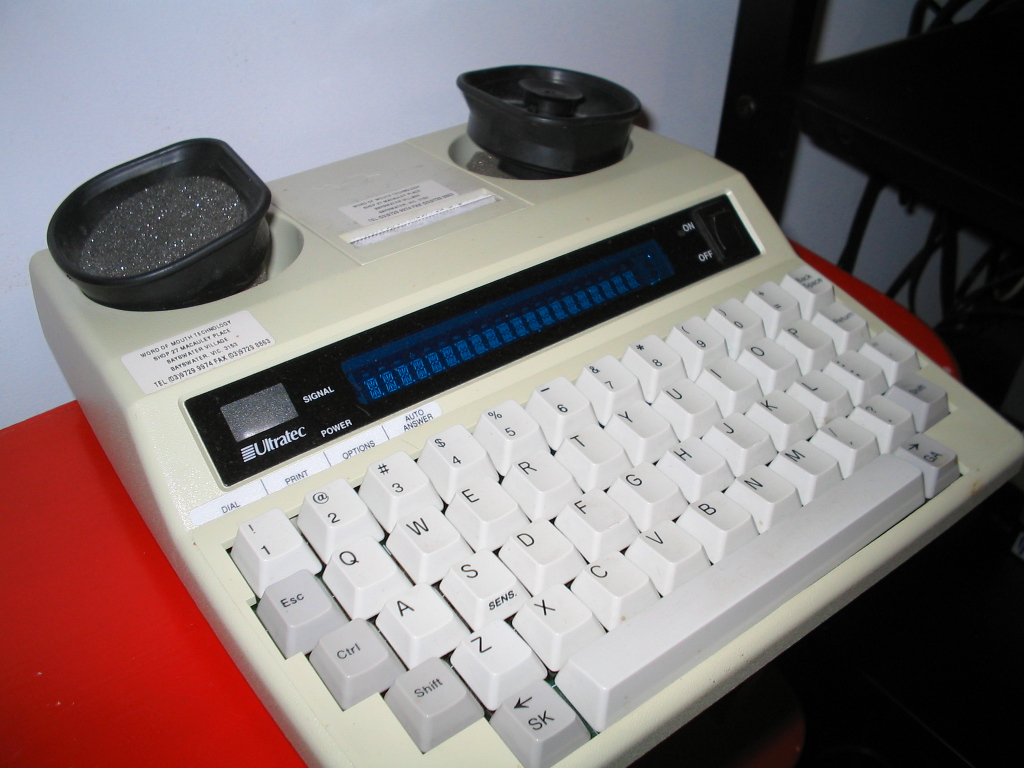
A Miniprint 425 TDD device. Note the acoustic coupler on top, the VFD for displaying messages, the printer, and the SK and GA keys which automatically key in these regularly-used abbreviations. Credit: public domain
The early machine used simple frequency-shift keying to encode the characters of the alphabet and some basic control codes, allowing text messages to be sent back and forth via a regular analog telephone call. In the US, where the devices eventually became known as telecommunications device for the deaf (TDDs), the devices used an improved development of Baudot code (the USA-TTY variant of ITA-2) to send signals over the phone lines.
This involved representing characters with five bits, which was enough to cover the 26 characters of the English alphabet, plus 0-9 and a few control codes. Transmission rates were slow—typically just 45.5 to 50 baud. With a 5-bit code, this limited transmission to approximately 10 characters per second.
Advertisement
The sign on the left indicates a payphone with a TTY device attached. These were rare installs back in the landline era, and vanishingly few remain today. Credit: CC BY-SA 4.0
TTYs quickly caught on as a useful device for the deaf and hard of hearing, and developed its own norms similar to other textual telecommunications methods that came before. Users would key “GA” for “go ahead,” to indicate the other party could “speak” on the half-duplex link, as two users typing at the same time would lead to garbled messages. “SK” stood for “stop keying” to indicate the ending of a call. Abbreviations were common to save effort, such as “CU” (see you) and “TMW” (tomorrow).
Relay Service
At its heart, the TTY was a very useful device for allowing its users to communicate via textual means to others with compatible hardware. However, alone, a TTY could not allow a deaf user to communicate effectively with regular telephone users. To enable greater accessibility, many organizations developed telecommunications relay services.
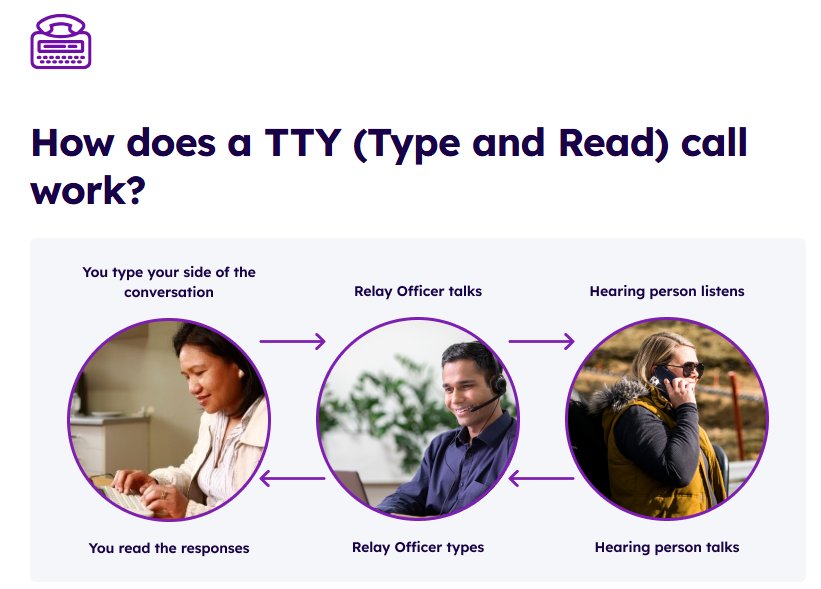
TTY machines led to the establishment of relay services that allowed deaf users to make regular phone calls with assistance from an operator. Credit: screenshot, Australian National Relay Service
These first existed as a number that deaf TTY users could call in order to connect to a human operator with their own TTY machine. This operator would place calls on behalf of the deaf individual, speaking on their behalf to other parties based on the deaf user’s inputs to their TTY device. In turn, the operator would key out the responses from the called party so the deaf individual could read back the conversation.
The first relay service was established by Converse Communications in Connecticut in 1974. The concept was quickly picked up by many other telecommunications operators around the world to provide an accessibility aid to those who needed it. These days, relay services still exist, though a great many relay services now operate over IP-based systems rather than via phone lines and TTY devices.
Hanging On
TTY still exists to some degree out in the world today. There are still subscribers with analog phone lines, and the basic TTY technology still fundamentally works over these links. However, the rise of SMS text messaging and widespread Internet connectivity have somewhat negated a lot of use cases for TTY technology these days. There have also been cases where digital upgrades to the phone network have made TTY operation more difficult, though some efforts have been made to ensure compatibility in some networks, particularly for emergency uses.
Ultimately, TTY was a technology that brought telecommunications access to a greater number of people than ever before. Like the landline phone and the fax machine, it’s no longer such a feature of modern life. However, it was an important link to the world for many in the deaf and hard of hearing community, and was greatly valued for the connection and accessibility it provided.
Spring brought three fresh flip phones from Motorola, and one rises above the rest in every measurable way.The Motorola RAZR Ultra 2026 takes the basic flip phone design and adds some completely sensible features that make carrying it around a joy.
From the time you pick it up, the RAZR Ultra 2026 has a very quality feel to it. There are various finishes available, including one in a stunning Pantone Orient Blue with a slight texture that catches the light, and the cloth is even imported from Italy. Another option is a natural wood veneer in a warm Pantone Cocoa tone, which gives the overall look a very unique, earthy feel. But whichever finish you choose, it’s all kept together by a pretty robust titanium-reinforced hinge designed to resist years of opening and closing. Don’t get me started on the glass, which has built-in drop protection and meets some major military standards for heat, cold, and humidity.
PRIVACY DISPLAY: Automatically hide your screen from those beside you. The built-in privacy display can be preset¹ to turn on when receiving…
TYPE IT IN. TRANSFORM IT FAST: Enhance any shot in seconds on your smartphone by using Photo Assist² with Galaxy AI.³ Add objects, restore details…
NIGHTS, CAPTURED CLEARLY: From gigs to city lights, record and capture moments after dark with clarity using Nightography so your photos and videos…
The screens on both sides are the real deal, with the brightness and speed you’d expect from a high-end smartphone. When you open it, you’ll see a stunning seven-inch screen that just lights up with color and brightness and is silky smooth to scroll around. To top it all off, it’s bright enough to be read in direct sunshine. Close it, and the four-inch exterior display takes over, which is more than enough to keep track of messages, notifications, and even whole apps without having to unlock the phone. Simply hover your palm over the top and the screen will come to life, or fall to sleep if you like. If you need to accomplish something quickly, simply give the phone a voice command and it will take care of it.
Advertisement
Under the hood, the RAZR Ultra 2026 is extremely well-specced, with a strong Snapdragon 8 Elite processor, 16GB of RAM, and a whopping 512GB of storage, allowing you to jump between programs in the blink of an eye while still having enough of memory for all your games and videos. The battery life is the best in class, with 5,000mAh and over 36 hours of mixed use from a single charge. If you need a charge, simply plug it into the 68w charger for a full day’s worth of juice in eight minutes, or leave it on the 30w wireless charger overnight and it will take care of itself.
Finally, there are three fifty-megapixel lenses to play with, so whether you’re attempting to record a bright sunset or a dark room, they’ll still catch all of the detail, plus there’s a super-wide shot for landscapes and a macro mode for microscopic subjects up close. The front camera is also impressive, with automatic framing adjustments to ensure you always get the perfect group image. Then there’s the AI, which helps out without complicating matters. Want to zoom in on a specific subject in a video? Simply rotate the phone as if it were an antique video camera. Want a group shot in which everyone looks their best? Just let the AI handle it. If you consistently utilize the same editing styles, the system will learn your tendencies and automatically apply them to new photographs.
Preorders begin on May 14th for $1,499.99 at all major retailers and on the Motorola website, with unlocked phones available on May 21st. In other regions of the world, the device is called as the Razr 70 Ultra with similar timing. [Source]
This post is brought to you in paid partnership with SKG
Buying a meaningful Mother’s Day gift is harder than it sounds, and most of the usual options don’t hold up beyond the day itself. The SKG G7 Pro Fold 3.0 neck massager and the SKG W9 Ultra 2.0 lower back massager, engineered for daily, intelligent recovery, are a different kind of gift. Both are 15% off from April 25th to May 8th, both are built around daily use rather than novelty, and both address the kind of neck and back discomfort that tends to build up quietly over years of desk work, commuting, and everything in between.
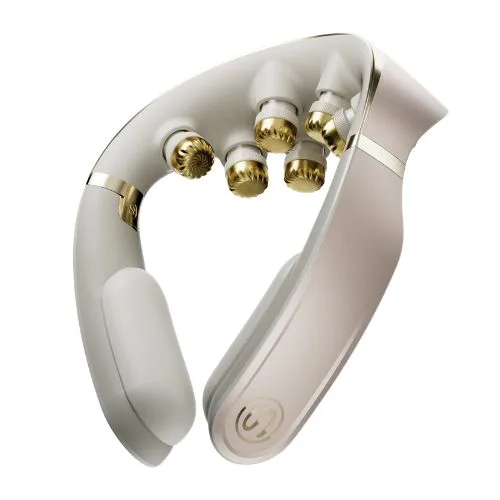
The SKG G7 Pro Fold 3.0 is the definitive upgrade for daily neck care. The nine independent floating massage heads are coated with TiN-treated 316L stainless steel, which gives them a matte gold finish and a durability advantage over plastic-headed competitors, while remaining hypoallergenic and incredibly gentle on the skin. The heads move independently to maintain contact across different neck shapes, delivering a targeted, human-like massage.
The heating system pairs 640nm red light with 850nm near-infrared across four heat levels, covering the kind of deep tissue warmth that superficial heat pads don’t reach. Beyond surface-level relief, the device integrates a dual-pulse system that combines TENS and EMS technologies. By delivering 4-7 kHz mid-frequency pulses, it actively bypasses the skin to stimulate deeper muscle layers, effectively blocking pain signals and accelerating real recovery. These technologies power eleven distinct massage modes, all seamlessly managed through intuitive app control. Rather than fumbling for buttons behind her neck, she can easily adjust heat levels, fine-tune pulse intensity, or select the app-exclusive “Dopamine Tech” mode directly from her smartphone, while the 2,400mAh battery delivers up to 140 minutes of use between charges.
Advertisement
What makes the SKG G7 Pro Fold 3.0 neck massager particularly well-suited as a gift is the foldable design. Weighing just 0.6 pounds and folding down smaller than popular over-ear headphones like the AirPods Max, it slips easily into a daily tote or carry-on, making recovery accessible on a long flight, at the office, or on the sofa. Its first generation won the German iF Design Award in 2024, which speaks to the care in the industrial design as much as the functionality. As a bonus, it also arrives in packaging that reads like a considered present rather than a last-minute purchase.
Where the G7 Pro Fold 3.0 targets the neck, the SKG W9 Ultra 2.0 addresses the lower back with the same commitment to intelligent recovery. The wearable belt wraps around the lumbar region and delivers kneading through eight TiN-coated titanium heads, each mimicking the layered pressure of a hand massage rather than the flat vibration that cheaper belts rely on. A mid-frequency pulse combines TENS and EMS technologies to bypass the surface and stimulate deeper muscle layers, effectively blocking pain signals and accelerating lumbar recovery.
The dual-spectrum light system runs 11 near-infrared emitters alongside 31 red light sources across a 20,000mm² heating zone, which is a meaningfully larger coverage area than most competing back massagers offer. Three temperature levels can run independently or in combination with the kneading function, and eight independently controlled zones let you focus on exactly where the discomfort sits rather than treating the entire back as a single area.
The W9 Ultra 2.0 runs cordlessly for up to 100 minutes on a single charge and comes equipped with a dedicated remote control. It also has a 30cm extension strap so it can comfortably fit different waists. This thoughtful design makes it genuinely wearable during everyday activity. It charges via USB-C and can be worn discreetly under clothing, which makes it as practical during a workday as it is during a recovery session after exercise. Plus, whether she uses the included remote or the companion app on her phone, she can fine-tune settings instantly—no reaching for hidden buttons required.
Why they make good Mother’s Day gifts
Both the SKG G7 Pro Fold 3.0 neck massager and the W9 Ultra 2.0 lower back massager are designed to be used daily. That’s what separates a useful gift from one that ends up in a cupboard after a few weeks. Neck and back tension are among the most common physical complaints for people who spend significant time at a desk or on their feet, and both devices address those complaints with technology that goes beyond what a heating pad or standard massage cushion can offer.
Advertisement
At $169.99 each during the Mother’s Day sale, they hit that sweet spot of high-end tech and profound personal care. Choose one for targeted relief, or bundle both for the ultimate wellness package. (Make sure to grab the 15% discount before the promotion ends on May 8th.)
The gift that gets it right
If you’re looking for a Mother’s Day gift that holds up well past the occasion itself, the SKG G7 Pro Fold 3.0 neck massager and the SKG W9 Ultra 2.0 lower back massager are both worth serious consideration. The neck massager covers travel and desk use with a foldable design and deep tissue heat, while the back massager wraps around the lumbar region with targeted kneading and infrared therapy. Either one makes a considered gift; both together make a complete one.
If you’re looking to introduce her to intelligent active recovery at a different price point, SKG offers a complete ecosystem of wellness devices. They deliver the brand’s signature targeted relief and smart features, ensuring you can find the perfect, thoughtful gift no matter your budget.
During Microsoft’s latest earnings call on Wednesday, CEO Satya Nadella perhaps unintentionally summed up the current state of the company’s massive agentic AI push.
“It sort of didn’t work until it started working,” Nadella said, referencing the Agent Mode feature in Microsoft Excel, “and that’s just because the model showed up.”
Agent Mode, a feature that uses AI to create and edit Excel workbooks in tandem with your actions, is now the default mode for Microsoft 365 Copilot and Premium subscribers in Excel, Word and PowerPoint as of last week. He said Microsoft’s investments in its AI infrastructure gave the company the usage capacity to implement the model that worked.
Advertisement
(Nadella used the term Agent Mode, but officially, Microsoft has retired that term, preferring the simpler “edit with Copilot.”)
That capacity played a big role during the earnings call, as Microsoft shifts toward charging customers for how much they use the AI, not just for access licenses. “We have a structural position in knowledge, work, coding [and] security,” he said. “And then you couple that with the right business model… which is user plus usage.”
Nadella said nearly 90% of Fortune 500 companies now have active agents built with “our low-code/no-code tools,” and the company is seeing its Copilot Credit consumption nearly double quarter-over-quarter as customers employ custom agents tailored to their workflows.
There was also a significant milestone, Nadella said: Microsoft Bing, the company’s 17-year-old search service, reached 1 billion active monthly users for the first time.
The number of enterprise subscribers on the platform has nearly tripled year-over-year, he said, with nearly 140,000 organizations now using GitHub Copilot.
Every GitHub Copilot plan will include a monthly allotment of GitHub AI Credits. According to the GitHub blog, “Usage will be calculated based on token consumption, including input, output and cached tokens, using the listed API rates for each model.”
Microsoft announced $82.9 billion in revenue for the quarter, an 18% increase from the previous year’s third quarter, during the period from January to March. Capital expenditures are expected to rise to over $40 billion to build out more capacity for AI tools — including massive data centers.
Waiting in line for a midnight game release or scrambling to find a sold-out gaming headset at your favorite electronics store feels far less appealing in a world where instant digital access is just a click away. Today’s gamers are done chasing physical stock and juggling dozens of store accounts. Instead, they’re seeking out a more streamlined, cost-effective way to buy gear and titles, often without ever leaving their chair.
Digital marketplaces have exploded in popularity among gaming enthusiasts aiming to make every dollar and minute count. For those new to this shift, sites like Eneba.com have made a strong mark by combining everything from rare peripherals to discounted digital game codes in one convenient space. With fierce competition driving prices lower and generous selection on offer, these platforms now rival traditional game shops, yet offer far more flexibility, whether it’s a late-night shopping urge or a flash sale on the latest blockbuster.
While there are plenty of options to buy digital games online, many in-the-know buyers gravitate toward platforms like Eneba for several reasons. Eneba stands out by offering instant access to game keys, which allow players to redeem titles directly on platforms such as PlayStation, with no disc or shipping required. This gives buyers more choice and frequently better prices than traditional platform stores, while an enormous catalog and up-front global or region-locked information make for transparent shopping. Plus, with verified sellers and robust marketplace controls, the risk of counterfeits drops markedly. Beyond game keys, Eneba also features gift cards for services like Xbox, PSN, and Steam, meaning players can top up accounts and snag games or content of their choice, skipping the hunt for specific game keys.
The Big Draws: Price, Speed, and Selection
Amanz/Unsplash
What drives players to trust digital marketplaces over the tried and tested big-name stores? Savings are a major factor: prices for both hardware and digital game keys can dip well below official retailer listings. Flash sales or limited-time discounts mean buyers can seize deals at odd hours, no camping out, no extra fees for international shipping.
But it’s not just the cost that wins people over. Instant access is non-negotiable for gamers who want a new release the second it drops, or need to replace a mic in time for tonight’s match. Digital codes and direct-to-home shipping let buyers skip wait times entirely. On top of that, curated stock and real-time availability mean less hunting around, which saves effort. Every moment not spent scrolling is one more minute playing.
Advertisement
Security and Transparency Keep Gamers Loyal
Skepticism around digital goods is only natural when you’re entering codes worth fifty or even a hundred dollars. Digital marketplaces have worked hard to build trust by publishing clear security guarantees, requiring third-party merchant verification, and setting strict standards for compliance and sourcing. Buyers know that when issues arise, support teams are ready to step in, a far cry from faceless classified ads or auction sites.
Transparency is a dealbreaker for many. Region-locked codes? Out-of-stock hardware? Sites that label everything clearly and show purchase history on demand find it easier to retain picky shoppers. Gamers remember who wasted their time and who made the experience simple.
Flexibility for Modern Gaming Lifestyles
Physical games and hardware still have a place, but the digital approach caters to how gamers actually live and play. Swapping consoles with friends, jumping from PC to mobile, and redeeming codes while traveling all become easier with digital ownership. The global reach of digital marketplaces makes it possible to find rare or region-specific gear and content not available locally.
With the cycle of new releases and old favorites never ending, staying ahead of the next hot thing is less stressful when your shopping list can be satisfied in one place. Digital marketplaces like Eneba, offering deals on all things digital, continue to reshape how players discover, buy, and enjoy what they love most.
An exercise bike is one of the most effective tools for building endurance and burning calories, but it’s also one of the easiest to use incorrectly. Just because the motion feels repetitive doesn’t mean it’s foolproof; whether you’re a first-timer or a seasoned cyclist, small errors in setup or form can stall your progress. Instead of maximizing your cardio, poor habits can lead to unnecessary strain and keep you from seeing the results you’re working for.
To ensure you’re using your exercise bike with the proper form, adjustments and technique, so you can get the most out of your workouts, I spoke with several cycling experts to learn more about mistakes you’re likely making when on an exercise bike.
1. Your seat is too low
One of the first lessons I learned when I started taking group cycling classes was that you need to properly adjust the seat height. Aviron coach and certified indoor cycling instructor John Steventon says the right seat height is key.
Advertisement
“[If the seat is] too low, they won’t be able to get full extension of the legs, often needing to cycle with their knees splayed outward to make room for them,” Steventon explains. This leads to a loss of potential power and a compressed and uncomfortable pedal stroke. “If the seat is too high, the rider will risk bouncing from side to side as they lean off the side of the saddle, trying to get the right extension of the legs.”
According to Matt Wilpers, the saddle should be positioned high enough that your knee is slightly bent and not locked.
Erik Isakson/Getty Images
Peloton instructor Matt Wilpers offers a couple of tips to keep in mind when setting up your seat. “When riding, bring your one foot to the bottom of the pedal stroke (6 o’clock),” he says. “The saddle should be positioned high enough that there is a slight bend in the knee so that the knee is soft and not locked.” This will prevent you from feeling cramped or having to reach for the bottom of the pedal stroke.
Advertisement
Steventon points out that how the foot sits on the pedal is important, too. “The center spindle that the pedal rotates around should be underneath the ball of the foot because I’ve seen people who ride on their toes, and people who ride on their heels — both reduce power and efficiency of the stroke.”
Wilpers advises trying the “heel test,” which is when you unclip the foot at 6 o’clock to see if your heel can touch the pedal when your leg is straight.
You don’t want the seat too far or too close to the handlebars.
Advertisement
Andrii Borodai/Getty Images
2. The saddle isn’t the right distance from the handlebars
Another factor to consider when setting up your exercise bike’s saddle is its distance from the handlebars. Wilpers says the goal here is to get the knee stacked over the pedal, especially when the pedal is at 3 o’clock. “I usually start with the saddle pushed toward the handlebars and then adjust accordingly when I ride,” he recommends. The problem is that when your seat is too far forward, your knees take on the pressure, and if it’s too far back, the stress lands on the heels.
3. The handlebars are too high
Besides the seat, make sure the handlebars are at the right height. “In general, it’s recommended to keep the handlebars at the level of your saddle or just above,” says Wilpers. “Many competitive cyclists like their handlebars at or slightly below saddle height because it better optimizes both performance and aerodynamics when cycling outdoors.”
Make sure the handlebars are aligned with the saddle on your bike.
Advertisement
Konstantin Ushakov/Getty Images
However, Wilpers says that in some cases, such as if you have back problems, raising your handlebars even further is advised.
4. You skip the warm-up or cool-down
If you’re eager to jump on your bike and get a quick workout in, chances are you’re skipping a warm-up or cool-down. Steventon says that if you want to get your body ready for your workout, spending 10 minutes increasing resistance and cadence before a longer or more intense ride will prime the muscles.
“Rather than slowly working up from 60 revolutions per minute to 110 rpm during the warmup, 30-second bursts at gradually higher reps in between 30 seconds of easy pedalling will allow the warmup to be effective without draining energy before the main workout,” he explains.
Some warm-up exercises Wilpers recommends include:
Advertisement
Hip openers like 90/90s (a stretch that uses internal and external hip mobility), pigeon pose and lateral lunges
Quadruped thoracic rotations (this exercise stretches out your spine)
World’s Greatest Stretch (a full body mobility exercise that targets hips, hamstrings, and spine)
Exercises to wake up the ankles and feet, such as ankle-controlled articular rotations (slow rotational movement of the ankle to improve ankle mobility) and performing the downward dog stretch while pedaling out the calves
If you skip a warm-up or cool-down, you’re missing out on some important steps.
Wera Rodsawang/Getty Images
The cool-down shouldn’t be neglected either. “In some cases, after a particularly hard workout, stopping suddenly can cause the blood to pool in the legs, and the cyclist may get dizzy,” warns Steventon. He recommends spending 5 minutes slowing your cadence to help the muscles keep pumping blood and oxygen as you ease out of the strain of the main workout.
You should also stretch the muscles used during a ride, such as your hamstrings, quads, hip flexors and calves. “Triceps, shoulders and wrists shouldn’t be ignored either,” Steventon says. “These muscles are soaking up the mass of the upper body, bouncing up and down, left and right on the handlebars.”
If you’re riding a bike with a screen, the screen’s position can sometimes lead to neck pain. In those circumstances, Steventon recommends gentle neck stretches to ease off the tension after a workout.
Advertisement
5. Your bike workouts aren’t planned out
If you don’t have a general workout program or structure, you may be using your bike inefficiently. It’s important to make sure that you’re riding with intention if you want to get the most out of it. “Everyone has the same three training variables to manipulate in order to get what they want out of their training: frequency, duration and intensity,” Wilpers says.
Frequency relates to how often you work out, since it’s important to have a consistent riding schedule. “Cycling is great because it’s low impact, meaning it’s easier to recover from it and therefore you can ride more often without much fear of injury,” Wilpers says.
If you’re a newbie, it’s best to focus on easy rides. Steventon recommends new riders aim for two to three rides per week and take a rest day between each cycling workout to let their bodies recover from the workout the day before. “Not only for the muscles, but depending on the length of the ride, there’s an element of saddle discomfort that rest will help,” Steventon explains.
Once you have a riding schedule established, you can focus on duration. This is when you start increasing the length of your sessions.
Advertisement
Finally, once you’ve become comfortable with your bike, you can increase the intensity to improve your fitness. Steventon says more experienced riders are capable of putting in four to five workouts a week.
“The importance of foundation building zone 2 heart rate [exercise performed at 60% to 70% of your maximum heart rate] during longer rides is the same for all riders, but with three more workouts to play with,” Steventon explains. “They can add in some tempo and sprint interval workouts too, pushing the cardio harder, and working at a mix of cadence and resistance through these workouts.”
Below are different ways you can structure your workout depending on your goals:
Advertisement
You should have a plan, whether cycling is your main form of cardio or your choice of cross-training.
Westend61/Getty Images
As the main form of cardio
If cycling is your main focus, Wilpers recommends riding three to five days per week, with one to two intense days, one long day and the remainder as easier rides. Aim to ride for 30 minutes to 2 hours or longer.
As part of a strength-training program
If you’re prioritizing strength training but want to include cycling as your preferred form of cardio, Steventon and Wilpers advise aiming for two to three sessions at a zone 2 heart rate for 20 to 45 minutes.
As part of a cross-training plan
You can also use an exercise bike for cross-training. This could be ideal for runners or other athletes who want a hybrid workout schedule during the week. Steventon says, “Cross-training utilization of cycling can be a very effective way to keep cardio topped up without the impact problems of constantly running.” Wilpers recommends cross-training once or twice per week for 20 to 45 minutes, as long as you’re healthy.
Advertisement
If you have injuries or certain aches from running, you can shift your training to cycling two to four times per week for 20- to 45-minute sessions. Steventon recommends that runners cycle whenever their bodies need to recover from running. “Long, slow rides will keep your fitness foundation strong, with harder sprint intervals tapping into VO2 max improvements,” Steventon says. VO2 max is the maximum rate at which your body consumes oxygen during exercise.
Riding distracted is just as bad as doing too much during a ride.
DaniGonzalez/Getty Images
6. Doing too much or too little on the bike
One of the biggest mistakes people make when riding an exercise bike is either doing too much too soon or coasting while distracted. “Many people seem to think that unless they wake up sore, nothing was accomplished, and on the other end of the spectrum, I see people just pedaling and texting,” says Wilpers.
Advertisement
When riding, remember to focus on the workout at hand. Distractions like texting or answering emails can get in the way of making progress. “Have a purpose and plan before getting on the bike so that your time is structured,” Wilpers suggests. “This will help you stay focused and get the most out of your time.”
Steventon notes that the best way to use a bike or any fitness machine is to mix up the intensities to avoid hitting a plateau. “Long, slow rides, short sprint intervals and tempo rides (moderately hard ride) including hard, long intervals will improve the mitochondria-building, zone 2, foundation end of fitness, while the shorter sprints will help improve the VO2 max end, and the tempo rides are where mental resilience is built,” he says.
7. Wearing the wrong cycling shoes
Wearing the right cycling shoes can improve your riding experience. Depending on the bike, you may need specific cycling shoes, like carbon-fiber cleats, road bike shoes, clip-in shoes, mountain bike shoes or even everyday shoes.
When choosing a cycling shoe, you want to make sure it’s comfortable because they don’t come cheap. Steventon recommends mountain bike shoes if you aren’t sure what to pick. “These are a little bit more flexible and have recessed cleats, making it a lot easier to move around, providing stability in situations where ‘off bike’ moves like squats or weights are included in a cycling class.”
Advertisement
The right shoes can improve your cycling experience.
Getty Images
Wilpers favors clip-in cycling shoes because they’re stiff and lead to better energy transfer from the body to the bike. However, the shoe you pick will depend on the type of bike you’re using, and most importantly, you want the shoe to fit well.
Steventon says everyday gym sneakers are acceptable, but that they may not be the best option. “The pedal efficiency may be compromised even with toe clips that hold these shoes in place on the pedal,” he explains, pointing out that because these shoes tend to be soft-soled, it can be uncomfortable to use for long periods of time.
Advertisement
Wilpers notes that some cycling shoe brands are much narrower than others, so it depends on your needs and comfort. “Lastly, I think it’s worth noting that a good set of road cycling shoes can cost hundreds of dollars, but these shoes typically last up to five years,” he says.
8. You’re not braking correctly
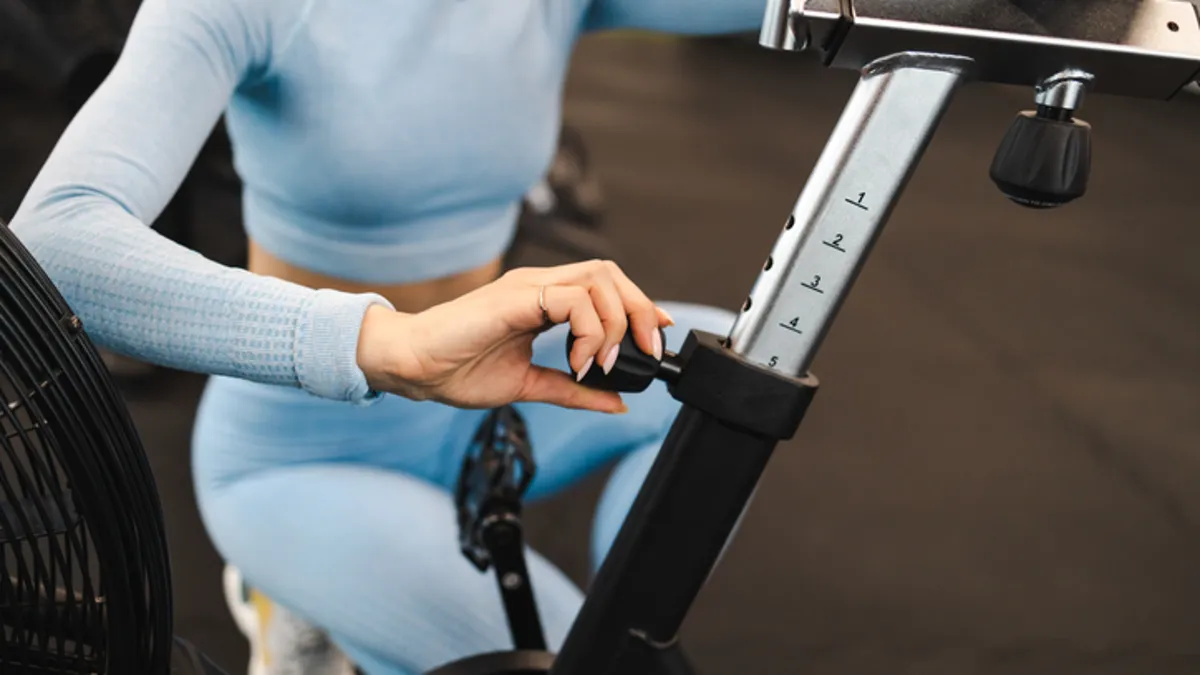
Usually, when you stop an exercise bike, you’re either pressing down the emergency brake or using the resistance knob to slow it down. “Trying to suddenly stop the flywheel or unclip feet while the heavy flywheel still wants to turn has great potential for injury,” warns Steventon. “Always use the resistance knob or emergency brake to slow things down properly, and wait until the flywheel has stopped before unclipping.”
If you aren’t properly braking, you risk injuring yourself.
Advertisement
D_Zheleva/Getty Images
9. You don’t maintain or clean your bike
It’s easy to forget that you need to do maintenance and clean your bike every so often. Wilpers reminds us that all bikes need to be cleaned and maintained. “Cyclists are known for constantly cleaning and occasionally replacing parts on their bikes because this is what it takes to keep your bike working great for many years,” he explains.
Keeping your bike in good condition is important if you want it to last a long time.
Getty Images
One thing people often overlook is adjusting their bike settings annually. “Think about how much your body can change in a year,” explains Wilpers. “You may get stronger, weaker, heavier, lighter, tighter, more flexible and so on.” By adhering to bike settings, you’ll not only have a more comfortable ride but also one that’s customized to your changing needs.
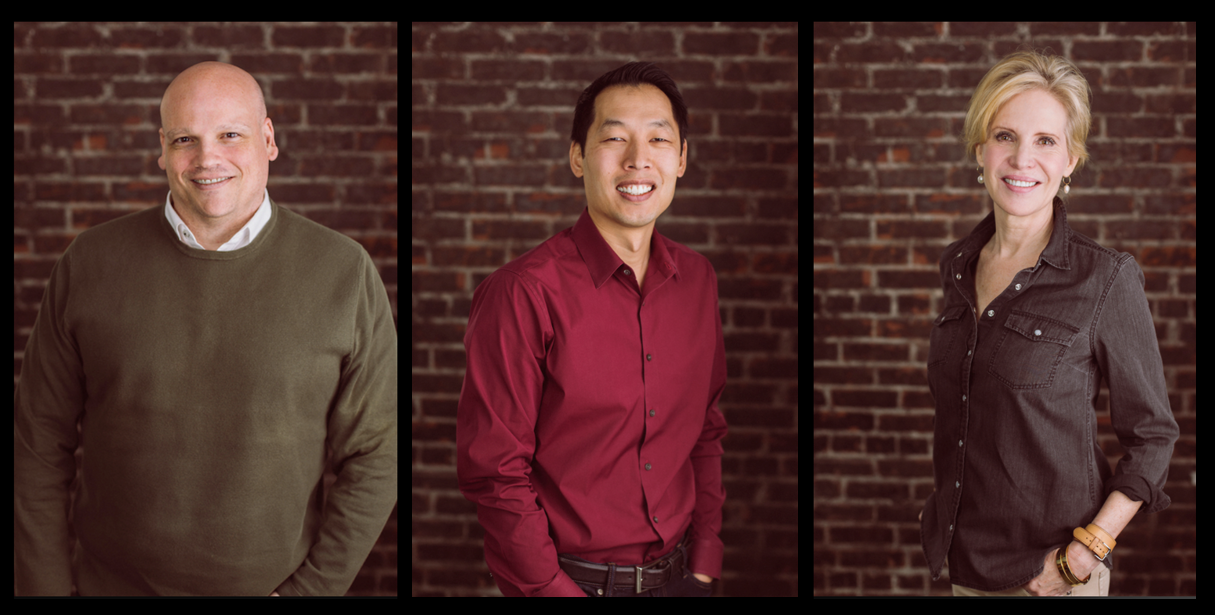
Flying Fish Partners’ Geoff Harris, Frank Chang and Heather Redman. (Flying Fish Photo)
The venture world is still digesting the eye-popping debut of London-based Ineffable Intelligence, the new startup from DeepMind legend David Silver, which announced $1.1 billion in funding at a $5.1 billion valuation this week.
The deal — which CNBC called the largest-ever seed round for a European startup — drew heavyweight backers including Sequoia Capital, Lightspeed Venture Partners, Google and Nvidia.
But tucked inside the cap table is a less obvious name: Flying Fish Partners, a Seattle-based firm with less than $250 million under management that wrote the first check for the nascent company just four months ago.
So how did a relatively small and scrappy Pacific Northwest venture capital firm break into one of the most competitive AI deals in years?
Turns out it was less about check size and more about old-school hustle, networking and smarts, including years of relationship-building, a well-timed early bet, and a lot of flights to London.
Advertisement
I caught up with Flying Fish Managing Director Frank Chang — who had just landed in London — to get the scoop on how his tiny Pacific Northwest firm managed to secure a front-row seat in one of the most ambitious moonshots in the race toward artificial general intelligence.
“We’ve been laying the foundations for an investment like this for years,” Chang said via email.
The story starts with Phaidra, a Seattle-based AI startup co-founded by a team that includes former DeepMind engineers Jim Gao and Vedavyas Panneershelvam. Flying Fish wrote one of the first checks for the company in 2020. The investment gave them more than a compelling portfolio company — it opened doors into the world’s most elite AI talent pool.
Chang and Flying Fish partners Heather Redman, Geoff Harris and others worked those connections, essentially making the firm a fixture in the London AI scene, where DeepMind started in 2010 before Google acquired it in 2014.
Advertisement
They hosted enough coffee meetings and dinners with AI researchers that Flying Fish apparently became a recurring character in the “Ex-DeepMind” WhatsApp group.
“There were so many gatherings over the years that I’ve been told founders would post on that group about which Flying Fish dinner they got invited to,” said Chang, who worked at Amazon and Microsoft before co-founding Flying Fish.
In fact, it was Heather Gorham, then a principal in the VC firm, who initially reached out to Silver after he published a paper titled “The Era of Experience,” which posited that a new approach was needed to AI since the “knowledge extracted from human data is rapidly approaching a limit.”
Chang and Gorham developed a strong relationship with Silver, discussing company goals, strategies, recruiting and a complementary philosophy on where AI is headed. The Phaidra investment also gave them credibility with Silver and his circle.
Advertisement
Gorham has since joined Ineffable’s founding team, according to her LinkedIn profile.
By the time Silver — the mind behind AlphaGo and a leading figure in reinforcement learning — was ready to build his new startup, Flying Fish wasn’t just a random VC from Seattle; they’d established themselves at the forefront of the field. And they were ready to write a check.
In the most recent round — which included Google, Nvidia and the U.K. Sovereign AI Fund — Flying Fish wrote the biggest check in the firm’s 10-year history. Chang declined to disclose the full size of Flying Fish’s investment in Ineffable. However, it was so large that they established a special purpose vehicle, a separate fund set up specifically for a single investment, to fund a large portion of it.
The big bet comes from a mutual understanding with Silver on how AI is changing, going beyond large language models (LLMs).
Advertisement
“Lots of investors are searching for the company that will deliver AGI or superintelligence, and there is a popular belief amongst many that LLMs can get there,” Chang said. “However, we hold the position that LLMs, powerful as they are, cannot. Many prominent AI researchers have the same view.”
The thesis behind Ineffable is that LLMs have a ceiling. To reach AGI, or true superintelligence, you need a “superlearner.” That means discovering knowledge from its own experience, rather than just vacuuming up the internet’s existing data.
The company’s approach, as Silver described in a Wired profile this week, involves placing AI agents inside simulations where they can learn from experience, achieve goals and collaborate with one another.
Chang acknowledges this is an outlier in the “frontier lab” arms race where Anthropic has reached a $1 trillion valuation on secondary markets. But he argues the capital is a necessity.
Advertisement
“If Ineffable achieves what it set out to, and far surpasses the capabilities of LLMs, the returns, even at a seed round value of over $5B will be well worth it,” he said.
Beyond the math and the GPUs, what most impressed Chang about the investment was the entrepreneur behind Ineffable.
“David is a genuinely good human being, down to earth, and likeable, but he is clearly driven by the mission, so much so that he has said he will give away what he makes from Ineffable equity to charity,” he said. “Combine all this with his pedigree, and he will be able to attract the very best talent to the company.”
In fact, in the Wired profile this week, senior writer Will Knight wrote, “Silver’s reputation as being both a top researcher and frankly, not an asshole, may work in his favor when it comes to recruiting talent.”
Advertisement
That also stands out to Chang at Flying Fish.
“Add it all up and you have one of the most respected and prominent AI researchers on the planet who is mission oriented, a good person, has built a rock star team, and is going after a huge swing that could change the world,” said Chang. “What’s not to like?”
Healthcare, as we’ve known it for decades, has largely been built around a simple premise: you seek help when something goes wrong. Symptoms appear, you visit a doctor, you run tests, and then you treat the issue. But that model is increasingly being challenged by a new category of companies – platforms that aim to predict, prevent, and optimize health before disease ever sets in.
At the center of this shift is a rapidly growing industry often referred to as preventive health, longevity tech, or health optimization platforms. And within this space, Superpower is positioning itself as one of the most comprehensive solutions available today.
This article breaks down what this industry is, why it matters, who it’s for, and how Superpower compares to its closest competitors.
What Industry Does Superpower Belong To?
Superpower operates in the preventive healthcare and longevity technology space – a sector that brings together advanced biomarker testing, AI-driven health insights, continuous monitoring, and personalized medical guidance into a unified system. Rather than treating these as separate services, this industry merges them into a cohesive experience designed to give users a deeper and more ongoing understanding of their health.
Advertisement
Unlike traditional healthcare systems, which are reactive, this industry focuses on early detection, long-term optimization, and data-driven decision-making. The underlying philosophy is straightforward but transformative: if you can measure your body deeply and consistently, you can identify risks years before they develop into full-blown diseases.
This space has grown rapidly in recent years as consumers have become more proactive about their well-being, wearable technology has entered the mainstream, and artificial intelligence has made it possible to interpret complex biological data in a way that was previously inaccessible.
Why This Industry Is Suddenly So Important
Modern lifestyles have created a paradox. We have access to better medical technology than ever before, yet chronic conditions such as diabetes, cardiovascular disease, and hormonal imbalances continue to rise at an alarming rate.
The issue is not the availability of treatment but the timing of intervention. Most conditions are diagnosed only after symptoms become visible, at which point treatment becomes more complicated, more expensive, and often less effective.
Advertisement
SuperpowerSuperpower
Preventive platforms like Superpower are designed to address three interconnected challenges. The first is the lack of visibility into one’s own body, as most individuals rely on infrequent and limited testing that fails to capture early warning signs. The second is the fragmentation of health data, where medical records, fitness metrics, and lab results exist in isolation without a unified view. The third is the complexity of medical information, which makes it difficult for individuals to interpret results and take meaningful action without expert support.
By bringing these elements together, Superpower creates a system that continuously tracks, analyzes, and guides health decisions, effectively turning scattered data into a coherent and actionable narrative.
What Superpower Does Differently
At its core, Superpower combines multiple layers into a comprehensive health ecosystem that goes well beyond traditional testing platforms.
Deep Diagnostics
Users undergo testing across more than a hundred biomarkers, spanning 13 distinct health categories that collectively map the body’s internal state. These include key systems such as metabolic health, hormonal balance, inflammation, nutrient status, and long-term disease risk. This level of depth allows Superpower to establish a meaningful baseline for every user, turning what would otherwise be a generic health check into a highly personalized starting point.
Advertisement
This baseline membership experience is critical because it defines the user’s entry into the platform. Rather than offering fragmented insights, Superpower builds a structured understanding of the body from day one, enabling early detection of imbalances long before they manifest as symptoms.
The Superpower Baseline Panel is a comprehensive entry-level diagnostic test designed to give users a detailed snapshot of their health through the analysis of over 100 biomarkers across key systems like metabolism, hormones, inflammation, and disease risk. It serves as the starting point for Superpower’s broader preventive health platform, establishing a personalized baseline that can be tracked over time. The blood draw can be completed in a lab visit or an optional at-home appointment, with results typically delivered within a week. These insights are then used to generate tailored health recommendations and ongoing guidance within the Superpower ecosystem.
But the Baseline Panel is called “baseline” for a reason. Superpower offers a suite of advanced add-on panels for users who want to go deeper into specific systems, including expanded hormone, advanced cardiovascular, heavy metals, micronutrient, and toxin panels. These optional tests layer onto the baseline to give users a more granular view of the areas most relevant to their goals, symptoms, or family history.
Unified Health Platform
Advertisement
Superpower integrates lab results, medical records, wearable data, and lifestyle inputs into a single, continuously evolving dashboard. Instead of forcing users to piece together their health story across multiple apps and reports, it presents a unified view that reflects how different systems in the body interact with one another.
This integration extends beyond diagnostics into actionable pathways. Based on biomarker insights, users can access a built-in marketplace that offers curated supplements, often recommended directly in response to their test results. This creates a seamless transition from insight to intervention, removing the guesswork that typically follows health testing. Another important point we would like to mention here is that the marketplace has member-exclusive discounts of up to 25 per cent.
AI + Human Expertise
Superpower’s approach is not limited to data interpretation. It combines artificial intelligence with real medical oversight to deliver guidance that is both scalable and clinically grounded. The platform goes a step further by integrating access to a pharmacy, allowing members to obtain prescription treatments such as GLP-1 therapies, NAD+ support, and testosterone optimization when medically appropriate.
Advertisement
This combination of diagnostics, recommendations, and access to treatment creates a closed-loop system where users are not just informed about their health but are also equipped to act on it immediately.
The Competitive Landscape
Superpower is not alone in this space. Several companies are attempting to redefine preventive healthcare, each approaching the problem from a different angle.
Function Health stands out as one of the closest competitors, offering extensive biomarker testing and detailed reports. While its strength lies in diagnostics, Superpower provides more tools for members to turn their results into action plans.
InsideTracker has built a strong reputation among athletes and fitness enthusiasts by focusing on performance optimization. Its insights are valuable, but they are often centered around fitness outcomes, while Superpower expands the conversation to include long-term health and disease prevention.
Advertisement
Mito Health offers biomarker testing alongside biological age tracking, giving users a sense of how their body is aging. Mito Health offers a more premium experience (such as a 1:1 consultation about results), but at a more expensive price point ($349 vs $199), and does not have an at-home blood draw option as Superpower does.
Empirical Health takes a specialized approach by focusing on cardiovascular biomarkers. This depth is useful within its niche, but it lacks the broader, multi-system perspective that Superpower provides.
Vitals Vault emphasizes the scale of data, offering a larger number of biomarkers. While this appeals to users seeking detailed insights, the platform leans heavily on data collection, whereas Superpower focuses on translating that data into clear and actionable recommendations.
SelfDecode approaches preventive health through DNA analysis, offering insights based on genetic predisposition. While valuable, genetic data is inherently static, and Superpower complements this by focusing on dynamic, real-time biological signals.
Advertisement
SiPhox Health prioritizes convenience through at-home testing kits, making health tracking more accessible. However, it does not offer the same level of integrated care and continuous guidance that defines the Superpower experience, which includes a team of trained medical professionals for blood draws instead of home test kits, so that the results are as reliable as possible. The reason being self-administered at-home test kits are at a higher risk of being contaminated or done incorrectly.
WHOOP brings wearable-based insights into recovery, sleep, and strain. While useful for daily monitoring, it lacks the diagnostic depth and medical-grade analysis that Superpower integrates into its platform. Also, members can also integrate data from Whoop wearables into the Superpower platform.
Why Superpower Stands Out
Across this competitive landscape, most platforms excel in specific areas, whether it is deep diagnostic testing, fitness tracking, genetic insights, or accessibility through at-home solutions. Superpower distinguishes itself by combining these capabilities into a single, unified system that prioritizes both depth and usability.
SuperpowerSuperpower
Its differentiation lies in three core strengths. The first is its ability to pair extensive data collection with meaningful context, ensuring that users are not overwhelmed by numbers but guided by clear explanations of what those numbers mean. The second is its focus on continuous health management, transforming what is typically a one-time testing experience into an ongoing journey that evolves with the user. The third is its integration of artificial intelligence with human medical expertise, creating a system that is both scalable and deeply personalized.
Who Should Use Platforms Like Superpower?
Preventive health is no longer confined to niche audiences such as biohackers or elite athletes. It is becoming increasingly relevant for a wide range of individuals who want greater control over their well-being.
Advertisement
High-performance professionals, including entrepreneurs and executives, can use these platforms to optimize energy levels, focus, and productivity. Individuals with a family history of chronic conditions such as diabetes or heart disease can benefit from early detection and proactive risk management. Fitness enthusiasts who already track their activity can gain deeper insights into underlying biological processes, moving beyond surface-level metrics. At the same time, a growing number of people who simply want to understand their bodies better are turning to these platforms as a more informed alternative to reactive healthcare.
Why Preventive Health Will Define The Next Decade
Healthcare is undergoing a fundamental transformation that is reshaping how individuals interact with their own bodies. The shift from episodic care to continuous monitoring is changing expectations around how often and how deeply people engage with their health. Similarly, the move from generalized advice to personalized insights reflects a broader demand for precision and relevance in medical guidance.
SuperpowerSuperpower
This evolution is being driven by advances in diagnostics, the growing capabilities of artificial intelligence, and a cultural shift toward proactive health management. As these forces converge, platforms like Superpower are emerging as central tools in this new ecosystem, acting as the interface through which individuals understand and manage their health.
The Bottom Line
The preventive health industry is no longer a niche category but an essential part of the future of medicine. While competitors such as Function Health, InsideTracker, and WHOOP each offer valuable capabilities, most remain focused on specific aspects of the health journey.
Superpower’s advantage lies in its ability to bring these elements together into a single, cohesive system that prioritizes clarity, continuity, and action. It does not merely present data but transforms it into a guided experience that helps users understand their bodies, make informed decisions, and improve their health over time.
Advertisement
In a world where health is increasingly recognized as the most valuable asset, this shift from information to action is not just meaningful – it is essential.
Microsoft’s Azure cloud business accelerated in the March quarter, growing 40% and topping the company’s own forecast, giving the tech giant a new answer to questions about its ability to translate record capital spending on AI infrastructure into stronger financial results.
The company’s revenue rose 18% to $82.9 billion, beating the $81.4 billion analyst consensus, and earnings per share jumped 23% to $4.27, above the $4.06 expected by Wall Street.
Note: Q2-26 net income ($38.5B GAAP) includes $7.6B gain from OpenAI investments. Non-GAAP net income was $30.9B.
AI run rate: In its earnings news release, Microsoft also disclosed that its AI business has reached an annual revenue run rate of $37 billion, up 123% from a year ago. It’s the first time the company has updated the figure since it reported a $13 billion run rate in January 2025.
Capex trends: Capital spending came down to $31.9 billion from $37.5 billion the previous quarter. Microsoft had said the decline would come and that it reflected the timing of data center construction and hardware deliveries, not a slowdown in demand for cloud and AI services.
Copilot: For the quarter, Microsoft 365 Copilot now exceeds 20 million paid seats, up from 15 million in January. That means about 4.4% of the company’s commercial base is on its paid enterprise AI plan.
Cloud overall: Microsoft Cloud revenue, which includes Azure, commercial Microsoft 365, LinkedIn, and Dynamics 365, rose 29% to $54.5 billion. The company’s remaining performance obligations, a measure of contracted future revenue, was $627 billion, with a significant part of that backlog tied to OpenAI.
Elsewhere in Microsoft’s business:
Advertisement
Revenue in the More Personal Computing segment fell 1% to $13.2 billion, with Xbox content and services revenue down 5% and Windows OEM and devices revenue down 2%. Search advertising revenue grew 12%.
The Productivity and Business Processes segment, which includes Microsoft 365, LinkedIn, and Dynamics 365, grew 17% to $35 billion. LinkedIn revenue rose 12%, and Dynamics 365 revenue increased 22%.
The Intelligent Cloud segment, home to Azure, grew 30% to $34.7 billion, making it nearly equal in size to the productivity segment for the first time.
The results come three months after Microsoft’s stock dropped 10%, wiping out $357 billion in market value, despite the company beating expectations on revenue and earnings.
Investors focused on the record capital spending, a Copilot product that had reached just 3.3% of Microsoft 365’s commercial base at that time, and a revenue backlog heavily dependent on OpenAI.
The OpenAI relationship has shifted significantly since then.
This week, the two companies restructured their partnership, with OpenAI ending its exclusive commitment to Microsoft’s Azure cloud and gaining the ability to run its products on other platforms, notably Amazon Web Services. Microsoft, in turn, locked in its revenue-sharing arrangement and removed a clause that could have ended it if OpenAI had declared artificial general intelligence.






























































You must be logged in to post a comment Login