

Tech
How to teach an old Intel Mac new tricks with OpenCore Legacy Patcher

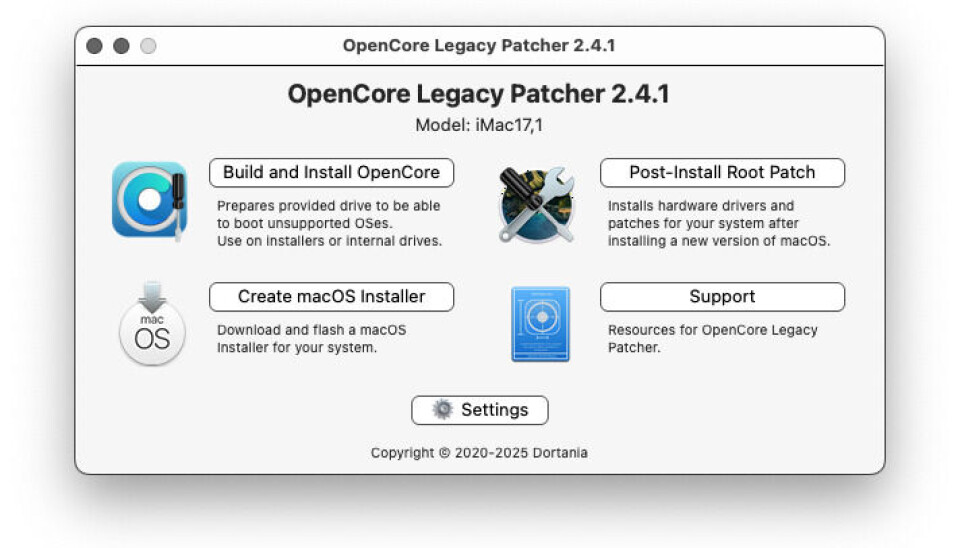
HANDS-ON Dortania’s OpenCore Legacy Patcher lets you run newer versions of macOS on unsupported Intel Macs. It’s handy, but there are a few things to beware of – including macOS Tahoe.
OpenCore Legacy Patcher brings Hackintosh techniques to genuine Mac hardware. It’s an inspired hack that helps you to install newer versions of Apple macOS on older Macs for which Apple has dropped support in recent versions of macOS. Its co-author, Mykola Grymalyuk, has a fascinating retrospective on its development.
We introduced OCLP a few years ago when it was still quite new. Our screenshot then showed version 1.01, but as the project’s GitHub page shows, it’s now up to version 2.4.1. It does still have one big drawback, though. At present, the newest macOS it can help with is version 15 “Sequoia,” whose release we covered back in 2024. In 2025, The Register warned that the forthcoming macOS 26 “Tahoe” would be the last version to have any support for x86 Macs. As we confirmed in September, it supports a mere four x86 Macs. This limited Intel support makes it a significant challenge for the OCLP development team, and nearly a year later, the latest OCLP still does not support Tahoe.
As we’ve mentioned a few times, the main desktop computer at the Irish Sea wing of Vulture Towers is a 27-inch Retina 5K iMac (late 2015). A couple of years ago, we maxed out this machine with a quad-core i7, 32 GB of RAM, a 1 TB NVMe SSD, and an 8 TB hard disk. It also drives a 27-inch Apple Thunderbolt Display. It’s a capable box, but the last supported OS was 2021’s macOS 12 “Monterey.” As we mentioned last month, this is now too old for the latest Raspberry Pi Imager. It was time.
Getting started with OCLP
Alongside OCLP’s own documentation, there are several how-to guides out there, such as the iFixit Guide and Greg Gant’s 10-step guide. We are not setting out to recreate them, just to point out the stumbling blocks we encountered.
Ever since OS X 10.9 “Mavericks” in 2013, macOS has been a free download. You can get it from Apple’s App Store, and the company even has a downloads page to help you find older versions.
When you download a version of macOS, what you get is a macOS application, called “Install macOS [Codename].” Buried inside this is a little command-line app to create a bootable USB key to reinstall a completely blank machine – for instance, if you fit a new empty SSD. You’ll need a fairly big, and ideally fast, key. The recommended minimum is 32 GB.
Then you boot off the key and install or upgrade macOS. However, OCLP can also patch a system disk to make it bootable on an unsupported Mac. It will even download various releases of macOS and create the installation USB key for you.

The basic way that OCLP works is by creating a standard macOS installer and adding a model-specific OpenCore configuration that bypasses Apple’s firmware checks. It may also apply post-install root patches for unsupported hardware. Intel Macs use EFI firmware, which means a small hidden partition containing the EFI bootloader, called the EFI System Partition, or ESP for short. OCLP adds a new entry to this, which shows a special “EFI Boot” entry, as shown in the manual. You must use this to start your newly created key.
OCLP does not build a generic modified macOS – it creates a model-specific OpenCore configuration for the Mac on which you run it. There is an option to bypass that and create a custom USB key for a different Mac, but watch out: by default, it creates one for the machine you run it on. For an easier life, you might want to keep a small partition with the last officially supported macOS for your machine – and if you’re installing on a blank disk, do that first, before continuing with the process. Even after it’s created a custom USB, you can’t boot this the normal way. You must use the custom “EFI Boot” entry it creates.
You will probably do a lot of rebooting. Don’t do this process with a wireless keyboard or mouse, even if they’re official Apple ones. Plug in plain old wired USB ones. If it’s a PC keyboard, make sure that you know which keys are which in Mac terms. If the instructions say “hold down the Option key,” that means Alt; if they say “press Cmd plus [some other key],” that means the Windows key. Our normal Das Keyboard is a USB 3 device, which might be why it doesn’t always register when the machine boots, so we needed to use an additional USB 2 as well.
To pick custom boot options, press the Option key (Alt) immediately after the power-on chime, and hold it down. Wait for all the options to appear, and pick EFI Boot, then in the following boot-device picker, choose the installer for your new version. Don’t worry: after it’s all installed, you don’t need to do this every time – only if you change the Startup Disk to an unpatched, supported version, then need to switch back again.
Once you’ve booted your new, customized macOS installer key, you can either do a clean install or upgrade an existing copy of macOS, just like normal. As a fallback measure, we used Bombich’s Carbon Copy Cloner to make a backup copy of our Monterey partition on another drive, just in case. This has been an essential Mac utility for decades, and it has a handy trick up its sleeve. Since 10.14 Mojave, macOS has defaulted to Apple’s proprietary APFS, and since 10.15 Catalina, it uses a system of container volumes to keep the core OS semi-immutable and safe. For an example, the Eclectic Light Company explains the Sequoia config. This limits how much a macOS volume can be shrunk, but Carbon Copy Cloner can image a volume onto any destination big enough to hold the data, which is very handy.
Post-install gotchas
Of all our apps, only one didn’t work. A couple of years ago, Broadcom made VMware Fusion freeware, but we couldn’t update past Fusion 13. With Sequoia, we could update to Fusion 26 – but it didn’t work. All VMs had a blank black display. No biggie: we have VirtualBox and the very capable UTM, and both work fine.
Our iMac came with a “Fusion drive” – a tiered storage volume combining a tiny 24 GB SSD and a 1 TB HDD. When we upgraded the drives, to keep life simple, we didn’t recombine them: it boots from the SSD, and we have a big HFS+ data volume on the hard disk that holds our home directory. Sequoia seems not to expect home directories on HFS+, and various settings would not save. It asked some of the same first-run questions every boot. To get around this, we had to move it back. You can’t move the home directory of a logged-in account, so we were glad of the standby “Administrator” user account we created years ago for emergencies.
Logging in as “Administrator,” we moved all the big data folders out of our home directory (Documents, Downloads, Pictures, Music, Videos, and so on) elsewhere on the hard disk. Then we moved the home directory into its normal location in the boot volume on the SSD. Apple’s Library folder is huge, and this process took a long time – about five hours.
We didn’t really expect it to work, but we created aliases to the data folders in our newly relocated home directory. (Aliases are the macOS equivalent of symbolic links, and to make them by drag-and-drop, hold down Cmd and Opt – the mouse pointer gains a curved arrow emblem, much like Windows shortcut icons.) This worked perfectly, and all of our apps find the folders in their new location. With the whole home directory on SSD, the Mac runs much faster and apps load much quicker too. (The folders don’t have their usual icons, which is just cosmetic; also, Apple Music isn’t very happy – but we never use it: Foobar 2000 does all we want.)
Another snag is that once Sequoia was running smoothly, it started nagging us to upgrade to Tahoe. Don’t do this: OCLP doesn’t support macOS 26 yet, and while it might boot, USB doesn’t work – and no Mac is very useful without a keyboard and mouse. If you do this, just say no to Tahoe.
(If you only need some specific app then an older version of macOS may be all you need. Last year, we Hackintoshed a Dell Latitude to recover some data from a network Time Machine backup, and we found that macOS 11 Big Sur was much quicker than macOS 12 Monterey on that hardware. If an older version will do what you need, it may be easier or lighter-weight, but we decided to just go direct to the latest version on offer.)
Back in March, we looked at “Stop Tahoe Upgrade,” a tiny macOS policy file that you can install to make the nags go away. This worked perfectly on our M1 MacBook Air, but it didn’t on our iMac. Doing some further investigation, we found some additional steps that got it working. You need to manually create two UUIDs and add them to the scripts, then the profile worked on our Intel box. The comments on that article offer an alternative method, by opting into beta updates, but that resulted in us being offered a beta of the update to 15.7.8, which isn’t ideal.
Why not Linux, or even Windows?
We have considered using Boot Camp Assistant to see if we can crowbar Windows 10 LTSC onto this machine, but to be honest, we didn’t buy a Mac to run Windows on it. This vulture adopted Windows with 2.01 in 1988. We’ve done our time, served our sentence, and we don’t want to go back.
So why not Linux? This is, after all, The Reg FOSS desk. Well, we tried it. The main problem is the iMac’s dual displays. Its built-in screen is a massive 5,120 2,880, but the Thunderbolt display is a quarter of the resolution at just 2,560 x 1,440. Running two different dot-pitches currently means using Wayland, and that massively reduces the choice of desktops. First, we tried Pop!_OS 24.04 – we quite like its COSMIC desktop. This normally snappy distro took tens of minutes to boot and was almost totally unresponsive.
After some research, we disconnected the Thunderbolt display, and then it ran fine, but we couldn’t install it. As we reported back in 2021, the Pop!_OS installer expects an ESP of at least a gigabyte for its systemd-boot setup, while Apple, like Microsoft, typically creates one only a couple of hundred megabytes in size.
Next, as a control, we tried Ubuntu 26.04. With the second screen disconnected, Ubuntu worked fine: HiDPI screen, Wi-Fi, power management, everything. We installed it and updated it, and it ran very quickly indeed… until we connected the Thunderbolt screen, when it instantly fell over.
It seems that Linux’s Thunderbolt support is distinctly lacking. Back in 2022, we reported on the difficulties connecting this display via a USB-C to Thunderbolt adapter. The adapter won’t work at all on our company Dell Latitude 5420. Apparently, tenth-generation and later Intel processors can’t talk to Thunderbolt 1 anymore.
We had more luck on an older Dell, the 2025 FOSS desk testbed XPS 13. That can drive the display through an adapter, but only as a display. The 27-inch Thunderbolt display is also a docking station: it has Firewire, Ethernet, three USB-B 2 ports, a webcam, microphone, and stereo speakers, and can power an Apple laptop over MagSafe too. None of these ports work in Linux. It becomes just a big, hot, external screen.
For now, Linux’s hardware support just isn’t up to making the most of some Apple hardware, even an 11-year-old iMac.

After we moved the home directory onto the APFS boot drive, Sequoia runs very well on this machine. Thanks to having the home directory on SSD, it’s faster than ever. For a couple of days, it ran hot and slow while Spotlight re-indexed some three terabytes of files, but once that was done, it happily purrs along at 63ºC, the same as before.
If you have an older but well-specified Mac, OCLP can give it the gift of life. It doesn’t support all models, but it supports most from the last decade and a half. So long as current browsers are available, running a dated version of macOS is no big problem. It’s not trivial to install; you want as many backups as you can make, and once running, you must make very sure that it doesn’t try to update itself to macOS 26. We hope that the OCLP developers add support for that final x86 release soon. ®

A newly discovered strain of macOS malware is taking social engineering to an unsettling new level. Instead of exploiting a software vulnerability or silently stealing information in the background, it simply refuses to let you use your Mac until you type in your login password.
Dubbed ClickLock, the malware repeatedly shuts down key macOS processes, disables notifications, displays convincing Apple password prompts, and effectively traps users in a loop that only ends when the correct password is entered. Once that happens, it doesn’t just steal the password. It goes after browser data, cryptocurrency wallets, saved credentials, password managers, and much more.
A BleepingComputer reports states researchers at Group-IB say the malware has already infected at least 100 systems across 33 countries since May. Even more worrying, when it was first uploaded to VirusTotal in June, none of the security engines on the platform flagged it as malicious.
ClickLock doesn’t hack your Mac. It hacks you.
Unlike many modern malware campaigns that rely on zero-day exploits or privilege escalation vulnerabilities, ClickLock succeeds through psychological pressure. The infection is believed to begin with a ClickFix-style attack, where users are tricked into copying and pasting a command into Terminal under the guise of completing a Cloudflare “human verification” check. While a fake verification progress bar keeps the victim distracted, the malware quietly downloads its payloads in the background.
At the same time, it disables keyboard interrupts, hides the Terminal cursor, and suppresses macOS Notification Center alerts for nearly six hours, making it much harder for victims to realise something suspicious is happening.
The malware’s most disturbing feature comes next. It displays what appears to be a legitimate macOS password dialog complete with the user’s real account name and Apple branding. If the victim enters the correct system password, ClickLock immediately validates it and sends the credentials to the attackers through Telegram.
If the user refuses, the malware doesn’t give up. Instead, it installs persistence mechanisms that reactivate after the next login. Once triggered, ClickLock begins killing critical macOS processes every 210 milliseconds, including Finder, Dock, Terminal, Activity Monitor, Console, System Settings, Spotlight, and even popular web browsers.
The result is a Mac that appears almost completely unusable, leaving only the password prompt visible on screen. According to Group-IB, this loop can continue for more than 83 hours, or until the victim finally gives in.
It wants far more than your password
The login password is only the beginning. ClickLock also attempts to trick victims into approving a genuine Keychain access prompt that grants permission to Chrome’s Safe Storage key. That key can later be used to decrypt stored passwords, cookies, and autofill information from Chromium-based browsers.
The malware’s data-stealing module casts an exceptionally wide net. It targets browser profiles from Chrome, Firefox, Brave, Microsoft Edge, Opera, Vivaldi, Arc and Chromium, harvesting saved passwords, cookies, bookmarks, browsing sessions, local storage and autofill information.
Cryptocurrency users face an even greater risk. ClickLock searches for browser wallet extensions, desktop wallet files, encrypted wallet vaults and cached wallet addresses across major blockchain ecosystems including Bitcoin, Ethereum-compatible chains, Solana, TRON, TON and Stacks.
It also collects FileZilla FTP configurations, shell history, basic system information and public IP addresses before compressing everything into ZIP archives and uploading the stolen data through the Telegram Bot API. To ensure attackers maintain long-term access, ClickLock deploys a modified version of the open-source GSocket tool, creating a persistent backdoor capable of remotely controlling the infected Mac. Unlike the malware’s other components, which delete themselves after execution to minimise forensic evidence, this backdoor remains active on the system.
The stealth techniques don’t end there. Researchers say the malware is hosted on compromised but otherwise legitimate websites, helping it evade reputation-based security systems. Its payloads also remove themselves after execution, leaving very few traces behind. Despite that, Group-IB says defenders can still spot suspicious behaviour by watching for repeated password dialog boxes generated through osascript, continuous termination of macOS processes, mass access to browser profile folders and unusual outbound connections to Telegram.
The biggest takeaway, however, is surprisingly simple. If a website ever asks you to open Terminal and paste a command to prove you’re human, close the page immediately. No legitimate website, including Cloudflare, requires Terminal access for human verification. And if your Mac suddenly becomes unusable while repeatedly demanding your system password, resist the urge to comply. Instead, force a shutdown using the power button, restart in Safe Mode, and investigate the system before entering any credentials. In ClickLock’s case, your password isn’t solving the problem. It’s exactly what the attackers are waiting for.


SAAS
Retirement of PowerShell -Credential parameter pushed back to the end of 2026
Microsoft has delayed the removal of the -Credential parameter from Exchange Online PowerShell until December 2026, giving administrators more time to update affected scripts and automation.
The -Credential parameter is used when connecting to Exchange Online PowerShell. It allows an administrator to supply stored username and password credentials. These days, it is heavily discouraged, particularly when more secure authentication methods are available.
Microsoft had designated the parameter for removal in July 2026 as part of its move away from password-based authentication. The trouble is tracking down automation scripts that use it, updating them, and validating the changes – assuming a fix is even possible.
Once the parameter is gone from the Connect-ExchangeOnline and Connect-IppsSession cmdlets in the Exchange Online PowerShell module, any scripts still relying on it will break, potentially taking carefully built workflows down with them.
However, Microsoft has opted to push back the retirement beginning December 2026 – a festive gift for administrators.
The company stated: “If your organization uses the -Credential parameter in PowerShell scripts or automation workflows connecting to Exchange Online or Security & Compliance PowerShell, those scripts will break when you update to an Exchange Online PowerShell module version released beginning December 2026.”
As such, the retirement won’t take effect until an update is performed. The server-side retirement of the underlying authentication flow is planned “for a later date.”
“When that occurs, the -Credential parameter will stop functioning even on older module versions.”
Microsoft said it delayed the retirement due to “customer feedback,” although it came late in the day. That said, a few extra months will be welcomed by affected administrators dealing with the impact of the change.
And the change is still coming. Microsoft added: “While our published timeline extends to the start of December 2026, we strongly recommend that all customers transition away from the -Credential parameter as soon as possible and not wait until the deadline.” ®

Anyone hoping Apple would refresh its entry-level iPad or iPad Air before the end of next year may need to be patient.
According to Bloomberg, Apple is planning a rollout that begins with a new iPad mini in October 2026. This will be followed by a refreshed entry-level iPad in the first quarter of 2027. Updated iPad Air models are then expected to follow in spring 2027.
The base iPad appears to be getting the most meaningful upgrade of the bunch. While it will not receive a redesign or an OLED display, the report claims it will move from the current A16 chip to an A19 processor. This change would bring support for Apple Intelligence. As a result, it would become the last iPad in Apple’s lineup to gain access to the company’s AI features.
The rest of the lineup looks set for more modest changes. Bloomberg says neither the 11-inch nor 13-inch iPad Air is expected to receive a major visual overhaul. However, previous reports have suggested Apple is preparing an OLED version of the tablet. Samsung is reportedly due to begin mass-producing those panels in late 2026. This points to a possible launch around March 2027.
The iPad Pro is also expected to return around the same time. While the latest report doesn’t mention any significant design changes, earlier rumours have claimed Apple is working on vapor chamber cooling for the premium tablet. That could help sustain performance during heavier workloads.
The only iPad expected to arrive sooner is the iPad mini. Rumours have consistently pointed to an October 2026 launch. The compact tablet is tipped to become the next model in Apple’s lineup to adopt an OLED display. If that proves accurate, it would make the iPad mini the second OLED-equipped iPad after the current iPad Pro.

The MSI Claw A8 was the first handheld to run AMD’s Ryzen Z2 Extreme chip, and now it’s £150 cheaper too.
The MSI Claw A8 is currently listed at Currys for £749, down from £899, a £150 saving that brings AMD’s most powerful handheld chip within reach of buyers who baulked at its original price tag when it launched.
Save £150 on the MSI claw 8 handheld gaming console of your dreams
Powered by AMD’s most powerful handheld chip, the Ryzen Z2 Extreme, with a 120Hz screen, the MSI Claw A8 is down to £749, a £150 saving.
That chip is a 16-thread Ryzen Z2 Extreme paired with a 16-core RDNA 3.5 GPU, and in games like Forza Horizon 5 it managed a smooth 59fps at native resolution without needing any upscaling to get there.
It’s paired with an 8-inch, 1920×1200 IPS screen running at 120Hz, hitting a genuinely bright 514.9 nits in testing, so fast-paced titles look sharp and punchy rather than washed out on a smaller, dimmer panel.
The Hall effect thumbsticks and triggers are a genuine upgrade over cheaper mechanisms, staying accurate and drift-free over time, while the blockier grips make the 765g body comfortable to hold even during longer gaming sessions away from a desk.

Connectivity is well catered for too, with a pair of Thunderbolt 4 ports up top that let you dock the Claw A8 to an external monitor or a fast SSD without needing extra adapters at your desk.
There’s 24GB of fast LPDDR5X memory and a full 1TB SSD onboard, plenty of room for a handful of modern AAA titles alongside the smaller indie games most people actually play, though a couple of bigger installs will eat into that fast.
MSI’s 80Whr battery is one of the largest in this category, lasting close to ten hours in general use and around two hours and forty five minutes of sustained gaming, with the bundled 65W charger getting it back to half power in just 31 minutes.
At £749 instead of £899, the Claw A8 becomes a far easier sell against pricier Windows rivals, and anyone chasing the strongest chip currently available in a handheld gets it without paying full flagship money for the privilege.
SQUIRREL_PLAYLIST_10148964
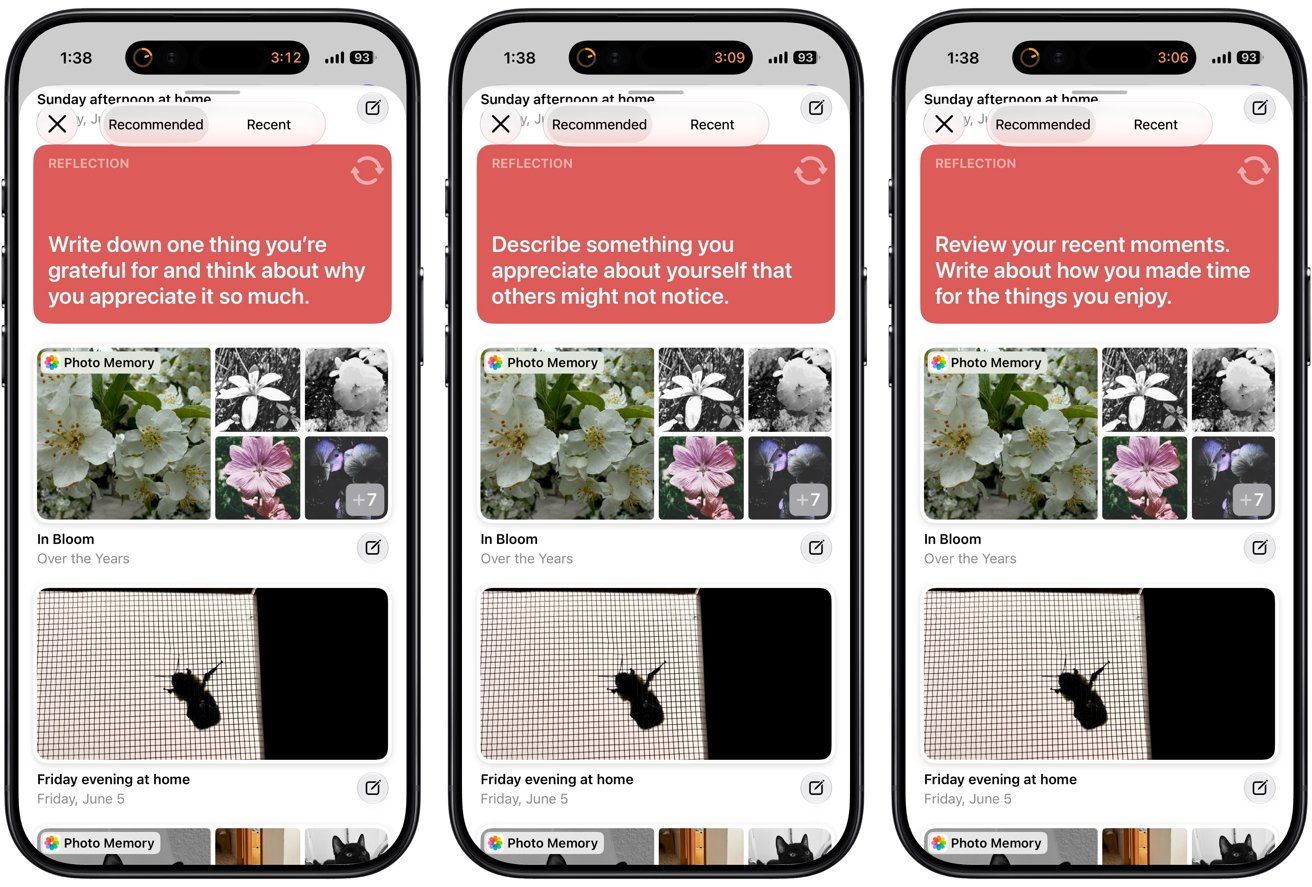
Apple’s Journal app doesn’t promise to improve mental health, but its approach to reflective writing closely aligns with what decades of psychological research actually supports. Here’s why that matters, and how Apple’s approach differs from most wellness apps.
Journal focuses on people’s thoughts and experiences instead of their bodies, unlike the data-driven health tracking with Apple Watch. The app encourages users to reflect on their emotions and pay closer attention to the everyday moments that shape their lives.
Instead of evaluating users or assigning psychological scores, Apple designed Journal as a private place for writing and memory. People can use it to revisit meaningful moments and build a habit of reflection over time.
Apple’s decision to prioritize writing over interpretation aligns with decades of research showing that expressive writing can produce measurable psychological benefits (Frattaroli, 2006; Reinhold et al., 2018). Journal encourages reflection without trying to explain what users think or how they should feel.
Apple has never described Journal as a treatment for depression, anxiety, or any other mental health condition. Researchers also haven’t conducted clinical trials evaluating Apple’s implementation, so no one can honestly claim the app itself improves mental health.
The strongest evidence comes from research on expressive writing, gratitude interventions, autobiographical memory, habit formation, and emotional self-monitoring (Frattaroli, 2006; Sohal et al., 2022). Many wellness apps make mental health claims that go beyond the available evidence.
Apple has taken a more restrained approach with Journal. The company presents the app as a tool for reflection, which is consistent with what current research supports.
Mindfulness doesn’t always begin with meditation
Meditation has become closely associated with mindfulness for stress management and emotional distress. Mindfulness, however, includes paying closer attention to thoughts, emotions, and everyday experiences.
Reflective writing develops that awareness by encouraging people to revisit experiences and examine their emotional reactions. Journaling asks people to think about experiences they’ve already lived.
A difficult conversation, an afternoon hike, dinner with friends, or an ordinary Tuesday can all become opportunities to pause and consider what happened instead of immediately moving on to the next task.
Reflective journaling also asks different questions than a traditional diary, which usually records the events of the day. The practice focuses on why those events mattered, why someone reacted a certain way, or what can be learned from the experience.
Researchers generally agree that intentional reflective writing provides greater psychological value than simply documenting daily activities. The benefits are usually modest and vary considerably from person to person (Frattaroli, 2006; Reinhold et al., 2018).
Journal’s writing prompts reinforce that approach without making the experience feel like homework. The app’s widget suggests topics such as gratitude, kindness, purpose, and meaningful moments instead of asking users to list everything they did that day. Reflection prompts are one of the app’s primary ways of encouraging that habit.
Writing is still Journal’s most powerful feature
Psychologists have studied expressive writing for decades by asking participants to write privately about emotionally meaningful experiences over multiple sessions.
Individual studies have reached different conclusions. Large reviews have still found a consistent pattern across the research (Frattaroli, 2006; Reinhold et al., 2018).
People who write thoughtfully and repeatedly often report small improvements in psychological well-being compared with people who don’t write at all. The benefits appear consistently enough to support reflective writing as a useful mental wellness practice.
The limits of expressive writing are as important as its potential benefits. Researchers don’t consider expressive writing a treatment for depression or anxiety, and they don’t recommend replacing professional care with journaling alone (Reinhold et al., 2018).
Writing about emotionally difficult experiences can temporarily increase distress before those experiences become easier to process. Research also suggests that structured writing exercises usually produce better results than completely open-ended journaling.
Regular practice appears more helpful than writing only during periods of overwhelming stress (Reinhold et al., 2018; Smyth et al., 2018). Apple doesn’t require users to follow a structured writing program, but Journal encourages several habits that researchers have linked to better outcomes.
Reflection prompts reduce the pressure of facing a blank page, suggested moments highlight experiences with emotional significance, and reminders make it easier to return to the app consistently.
Apple doesn’t tell users what conclusions they should reach. Journal focuses on removing common barriers that make reflective writing harder to maintain.
Consistency may be Journal’s most important design goal. Most people don’t abandon journaling because they dislike writing.
Often, people stop because they don’t know what to write about, they forget to open the app, or the effort required to get started outweighs the habit. Apple addresses each of those problems by making reflection easier to begin rather than trying to make journaling more entertaining.
Journal Suggestions may be Apple’s smartest design decision
Opening a blank page can feel surprisingly intimidating. Even people who enjoy writing often struggle to decide whether an experience is interesting enough to record.
Journal Suggestions solve that problem by shifting the question. Instead of asking users to invent something worth writing about, the app surfaces experiences that have already happened.
Psychologists have long understood that autobiographical memory depends heavily on cues. People rarely retrieve memories in chronological order like scrolling through a timeline (Crane et al., 2007).
 Journaling Suggestions
A photograph can suddenly bring back details that seemed forgotten. A familiar song can transport someone to a particular afternoon years earlier. Walking past a familiar location often recalls conversations, emotions, and experiences connected to that place.
Apple appears to have designed Journal around that understanding of memory. Journal Suggestions don’t preserve memories more accurately or strengthen memory itself, and the research doesn’t support making claims that broad.
Presenting those moments changes how the journaling experience feels. Journal brings meaningful experiences back to users instead of asking them to search for something to write about.
Apple extends that philosophy throughout the rest of the app. Users can begin an entry on their iPhones, attach photos, voice recordings, and locations without switching between apps, and continue writing later on an iPad or Mac.
None of those features change the psychology behind reflection. Each one removes another small barrier between living an experience and thinking about what that experience meant.
Health adds context without trying to explain everything
Journal becomes even more interesting when viewed alongside Apple’s Health app. Users can choose to log a state of mind while writing and automatically record time spent journaling as mindful minutes.
Health then places those entries alongside sleep, exercise, daylight exposure, and other health information. Apple’s decision to separate those responsibilities between two apps deserves attention.
Journal captures experiences while they’re still fresh. Health organizes information over weeks and months, allowing trends to emerge naturally instead of interrupting the writing process with charts and graphs.
The separation keeps Journal focused on reflection while allowing Health to remain the place where patterns become visible.
Researchers generally consider emotional self-monitoring a useful practice when used thoughtfully. Recording moods over time can reveal recurring stressors and show how daily habits affect emotional well-being (Wright et al., 2025).
 Using the Mental Wellbeing feature
Mood records can also make conversations with healthcare providers more productive because people don’t have to rely entirely on memory. Several weeks of entries often reveal patterns that are difficult to recognize one day at a time.
Mood tracking also has limitations, and Apple deserves credit for avoiding some of the most common pitfalls. Research has found that repeatedly monitoring emotions without a clear purpose can make ordinary emotional fluctuations feel more significant than they really are (Wright et al., 2025).
Some wellness apps respond by generating scores, interpretations, or personalized advice that imply a level of certainty the underlying data can’t support. Apple takes a more restrained approach.
State of Mind entries remain optional, and Health presents relationships rather than explanations. Someone may notice that poor sleep often coincides with lower mood or that regular exercise tends to accompany more positive days.
Health doesn’t claim one caused the other, and Journal doesn’t attempt to interpret those observations. Apple gives users information while leaving the conclusions to them.
Privacy encourages honest reflection
Journaling only works when people feel comfortable writing honestly. Self-reflection becomes much more difficult when people worry that deeply personal thoughts could become advertising data, appear on social media, or be accessed by someone else.
Apple built Journal around keeping personal reflections private. Journal Suggestions are generated using on-device intelligence instead of sending personal context to Apple’s servers for analysis.
Users also decide whether Journal can access Health data, choose what information appears in entries, and can lock the app with Face ID, Touch ID, or a device passcode.
Apple also protects Journal entries stored in iCloud with end-to-end encryption. As long as users enable two-factor authentication and secure their devices with a passcode, only their trusted devices hold the keys needed to decrypt journal entries.
Journal entries stored in iCloud remain end-to-end encrypted even when Advanced Data Protection is turned off.
Privacy alone doesn’t make journaling effective, but it can remove an important obstacle. Research on expressive writing consistently suggests that people are more willing to explore difficult thoughts and emotions when they believe their writing will remain confidential (Frattaroli, 2006).
Apple’s privacy model supports that process by making personal reflection feel like a conversation with yourself.
Consistency matters more than perfection
One of the clearest findings across habit research is that consistency usually matters more than intensity. Habits become part of daily life because repeating the same behavior gradually requires less conscious effort (Lally et al., 2010).
Journal reflects that understanding in dozens of small ways. Reminders encourage people to return at regular times, and suggested moments eliminate the pressure of finding something worth writing about.
The research also suggests people don’t need to write pages every night to benefit from reflection. Spending five or ten minutes thinking carefully about one meaningful experience is often easier to sustain than waiting for inspiration to produce a long journal entry (Smyth et al., 2018).
Pairing journaling with an existing routine, such as finishing dinner or plugging in an iPhone before bed, may also help reflection become part of everyday life instead of another goal competing for attention.
Looking back through older entries can be just as valuable as writing new ones. Individual entries often feel ordinary while they’re being written. Weeks or months of consistent reflection can reveal recurring themes that are difficult to notice in the moment.
Small sources of stress, recurring moments of gratitude, changing priorities, and gradual personal growth become much easier to recognize once enough experiences have accumulated on the page.
Journal doesn’t introduce a new theory of mental wellness. Apple built the app around well-established psychological principles and removed as much friction as possible from the act of reflection.
 Journal provides insights on your journey
Reflective writing, expressed gratitude, habit formation, and self-monitoring can all make modest contributions to everyday well-being.
People stop because life gets busy, blank pages become intimidating, and habits quietly disappear. Journal addresses those problems with thoughtful design instead of exaggerated promises.
Journal’s greatest achievement may be its restraint. Rather than trying to convince people they need another wellness platform, Apple built software that steps aside and lets one of psychology’s oldest reflective practices become part of everyday life.
How Journal became my external memory
Research explains why reflective writing can be valuable, but one idea changed how I think about journaling. I stopped treating journaling as a diary and started thinking of it as an external brain.
I’ve been journaling through various apps since 2013, and it has become “A History of Andrew Thus Far.” I record interesting dreams, write down memories when one randomly pops into my head, and save photos and videos of memorable events.
Earlier in 2026, I started thinking about journaling differently. Instead of treating a journal entry as one long Captain’s Log of each day’s events, I began treating it like a personal social network.
I write multiple short entries a day, even if it’s one sentence, such as a joke I thought of or an insight into myself. Memory is fallible and I’ve learned of “cognitive offloading” in which a journal becomes an external archive.
My grandpa suffered from Alzheimer’s disease before he passed away, although I was too young to remember him much. Journaling, and apps like Reminders, are alternatives to posting sticky notes around my apartment so that I don’t forget important things.
Another aspect of journaling is thinking more about myself through time. Past Andrew, Present Andrew, and Future Andrew are part of a continuum. Present Andrew learns from Past Andrew to make sure that Future Andrew will be a good person.
Journaling helps me do that, and the wonderful thing about using an app is the ability to search through memories.
I hope that Apple creates a “On This Day” widget that surfaces old entries so that I can be reminded and even update past entries with current thoughts and experiences.
People may never read my journal, or maybe someday I’ll print it out at the end of my life. Journaling is a way to let the universe know that I was here, that I was able to exist.
References
There’s a lot that went into the research and use of this piece. In-line links didn’t seem appropriate in this case. Here’s what I’ve used over the years while developing my program, habits, and mindfulness.
Crane, C., Barnhofer, T., Visser, C., Nightingale, H., & Williams, J. M. G. (2007). Cue self-relevance affects autobiographical memory specificity in individuals with a history of major depression. Memory, 15(3), 312-323.
Cregg, D. R., & Cheavens, J. S. (2021). Gratitude interventions: Effective self-help? A meta-analysis of the impact on symptoms of depression and anxiety. Journal of Happiness Studies, 22(1), 413-445.
Frattaroli, J. (2006). Experimental disclosure and its moderators: A meta-analysis. Psychological Bulletin, 132(6), 823-865.
Kirca, M., Yldrm, M., & Bakrcolu, R. (2023). Expressed gratitude interventions: A meta-analysis. Journal of Well-Being Assessment, 7, 207-233.
Lally, P., van Jaarsveld, C. H. M., Potts, H. W. W., & Wardle, J. (2010). How are habits formed: Modelling habit formation in the real world. European Journal of Social Psychology, 40(6), 998-1009.
Reinhold, M., Brkner, P.-C., & Holling, H. (2018). Effects of expressive writing on depressive symptoms: A meta-analysis. Clinical Psychology: Science and Practice, 25(1), e12224.
Smyth, J. M., Johnson, J. A., Auer, B. J., Lehman, E., Talamo, G., & Sciamanna, C. N. (2018). Online positive affect journaling in the improvement of mental distress and well-being in general medical patients with elevated anxiety symptoms: A preliminary randomized controlled trial. JMIR Mental Health, 5(4), e11290.
Sohal, M., Singh, P., Dhillon, B. S., & Gill, H. S. (2022). Efficacy of journaling in the management of mental illness: A systematic review and meta-analysis. Family Medicine and Community Health, 10(1), e001154.
Wright, L. A., Majid, M., Shajan, G., Momoh, G., Patil, R., Rawsthorne, M., Purewal, D., Patel, S., & Morriss, R. (2025). The user experience of ambulatory assessment and mood monitoring in depression: A systematic review and meta-synthesis. npj Digital Medicine, 8, 737.


Few companies turn flagship phones into objects that belong in a display case as much as on a desk. Caviar has spent years refining that balance, and its newest Legends collection takes the approach one step further by centering two of the most recognizable names in football. Timed with the close of the 2026 FIFA World Cup, the collection marks what many expect to be the final major international chapter for Lionel Messi and Cristiano Ronaldo.
Instead of normal run-of-the-mill products, Caviar created a pair of exceptionally rare handsets that combined the latest smartphones with hand-finished enamel artwork and extensive gold plating. The Messi edition is based on Samsung’s upcoming Galaxy Z Fold 8 Ultra model. The regular rear side is replaced with a detailed portrait of the Argentine captain done in cloisonne enamel in the national team’s white and sky-blue colors, which were chosen for national pride. The jersey number 10, national emblems, and edges of the entire artwork are all fully plated with 24-karat gold. The phone’s frame is likewise encased in matching gold, and just 19 will be created.
Sale

LEGO Editions Lionel Messi – Collector’s Set Co-Pack – Building Toy for Kids – Soccer Collectible…
- INCREDIBLE SOCCER COLLECTIBLE – Excite soccer fans with this 2 in 1 building toy, featuring the LEGO Editions Lionel Messi – Soccer Highlights…
- DETAILED SPORTS DISPLAY – Pay tribute to a legendary soccer player with a unique piece of sports décor featuring a buildable number 10, an M-shaped…
- BUILDABLE LIONEL MESSI-FIGURE – Construct a highly detailed model of Lionel Messi that can be displayed pointing towards the sky in his signature…

The Ronaldo edition begins with the iPhone 17 Pro and iPhone 17 Pro Max as the foundation. You get a cloisonne enamel portrait in the Portuguese national team’s classic red and green colors. The design features Ronaldo’s trademark number 7, the Portuguese coat of arms, and a background with strict, upward lines. The frame and artwork’s distinguishing forms are accented with 24-karat gold plating. It will also be limited to exactly 19 units, like the Messi edition.

Both phones retain all of the normal functions of their base versions. The customization occurs only on the outside, where the enamel and gold transform each smartphone into a portable, or more accurately, carryable piece of commemorative art rather than a normal everyday phone. Caviar doesn’t just give you the phone as part of the package. Along with the handset, you get specially branded packaging, a gold-plated key, a Caviar coin, and a multi-level certificate of authenticity, giving the whole affair some considerable weight. You also get a one-year warranty, and they accept custom orders, which include engraving your initials or logos on the side, modifying the artwork, or even swapping out the materials.


The Ronaldo iPhone 17 Pro with 256GB costs $11,410. The Messi Galaxy Z Fold 8 Ultra starts at $13,130 for the same storage capacity. Those figures represent the level of craftsmanship that has gone into each and every one of these handsets, the quality of the gold plating, and the fact that you will be one of just 19 people to own any of these limited edition smartphones.
[Source]

from the give-em-an-inch-and-they’ll-take-a-panopticon dept
This is probably nothing more than another data point in a deluge, but it’s worth pointing out because it’s instructive.
Cops are using a whole lot of surveillance tech these days. Flock Safety has been especially aggressive in pursuing the law enforcement market, offering cops access to a nationwide network of cameras, including many owned and operated by private citizens.
Flock — and its law enforcement partners — have generated a lot of negative press over the last couple of years. Some of this is due to cops abusing their access and/or performing searches for federal agencies that aren’t allowed to directly access Flock’s database. Some of this is due to Flock itself, which has seen the negative press and largely chosen to ignore it.
But now Flock has real problems. Federal legislators are demanding answers to uncomfortable questions. And dozens of cities are attempting to rid themselves of Flock cameras following public outcry and/or evidence of abuse by those with access.
In San Francisco, it’s a blend of both. And the answers/excuses made by Flock and the SFPD make it clear law enforcement agencies cannot be trusted with the tech they now have easy access to.
“During a routine compliance audit in May, SFPD officials found that the Northern California Regional Intelligence Center (NCRIC) had queried SFPD’s Flock network on behalf of federal and out-of-state agencies. There were 299 improper inquiries over approximately one year, which accounts for 0.005% of inquiries over that period,” the release states.
Each of these searches performed on behalf of federal agencies broke state law. To its credit, the SFPD pulled the plug on access following the results of this audit. And while that’s the sort of response we’d like to see from more law enforcement agencies, the statements issued by those involved (SFPD, Flock) make it clear the only way to prevent abuse is to never allow cops to have access to this tech in the first place.
Here’s what Flock Safety had to say about the audit results:
A Flock spokesperson in February said the company had disabled its national lookup feature for all California agencies and is confident its privacy protections comply with state law, local policy and community expectations.
[…]
In response to the San Francisco audit, Flock spokesperson Paris Lewbel told KTVU that the searches were not a result of a software malfunction, platform issue, unauthorized access, or any failure of the Flock system.
Without more information, it’s impossible to tell whether the first statement issued by Flock (in response to a lawsuit) is true. It could be that feds asked the SFPD to perform local searches, which would lend credence to Flock’s initial statement. The fact that 299 potentially illegal searches took place over the last year doesn’t generate a whole lot of confidence in either the supply or demand side of the Flock equation.
The second statement makes things a bit more clear: this wasn’t SFPD officers going outside of any limitations imposed by Flock or the department itself. Instead, they broke the law by running searches they most likely knew violated state regulations. In other words, this wasn’t Flock enabling lawlessness. This was cops working within the system to violate the law.
The implication gets even stronger now that the SFPD has issued its own statement. This appears to have been officers breaking the law, rather than the law being (accidentally or otherwise) bypassed because the software wasn’t configured correctly.
The San Francisco Police Department identified the activity through a routine audit of its own Flock network and took immediate action, Lewbel noted.
He added that no out-of-state or federal agencies had direct access to SFPD’s Flock system or any California Flock system.
The first sentence means something. The second sentence, however, is meaningless. The limitations placed on access by Flock and SFPD policies were circumvented to perform exactly the sort of searches they were meant to prevent. This audit could have come back completely clean if SFPD officers hadn’t decided to break the rules.
And even if 299 illegal searches are only “0.005%” of the total number of searches, that doesn’t mean the other 99.995% of searches were justified. Most people assume ALPR databases are only accessed when a license plate generates a hit due to prior placement on a watch list. That’s an false impression that’s been perpetrated for years by law enforcement, which constantly claims these are used to track down car thieves, kidnappers, bank robbers, and other dangerous criminals.
But when audits are only looking for searches that route around parameters, they don’t see all the searches being made by cops who are bored or are tracking their exes or trying to hunt down women who are doing nothing more than seeking to terminate unwanted pregnancies. The “0.005% of searches” assertion is likely misleading as well. Plaintiffs suing the state over its ALPR use alleged more than 1.6 million illegal searches during the same time period across the state. Not only that, but the number of total searches is likely inflated by those triggered by the system itself, which involve minimal interaction by officers utilizing the ALPR network.
On one hand, if we decide Flock is actually telling the truth this time, the blame lies with the officers who choose to break the rules and the law. On the other hand, if Flock’s representation of the facts is inaccurate, it only means cops who knew what the law was chose to break it simply because they easily could. Neither of these scenarios add up to the SFPD being trustworthy. And splitting the difference just means we can’t trust the SFPD’s camera provider either.
Filed Under: alpr, license plate readers, location tracking, san francisco, san francisco police, surveillance
Companies: flock safety
Tech
FCC Officials Took Pricey Gifts From Paramount As The Company Needed Approval For Billion-Dollar Deals
from the the-appearance-of-a-conflict-is-a-conflict dept
This story was originally published by ProPublica. Republished under a CC BY-NC-ND 3.0 license.
The rich and famous who filed into the Kennedy Center’s opera house in December were there to enjoy one of the nation’s most exclusive celebrations of the performing arts: the center’s annual honors gala.
The black-tie event, hosted by President Donald Trump, prioritized tickets to people who donated more than $75,000 to the center. This year, it feted Hollywood icon Sylvester Stallone, the legendary glam rock band Kiss and the Grammy Award-winning disco pioneer Gloria Gaynor.
Among the attendees that evening were two lower-profile government officials whose regulatory decisions had been crucial to the future of the gala’s broadcast sponsor, CBS, and its parent company, Paramount.
Five months earlier, Federal Communications Commissioner Olivia Trusty cast a decisive vote approving Paramount’s historic $8 billion merger with Skydance Media. Now, the commissioner and a guest enjoyed the star-studded celebration thanks to tickets gifted to her by Paramount worth more than $12,000, according to ethics disclosure records obtained by ProPublica.
The other commissioner who approved the merger watched from a prized perch. FCC Chair Brendan Carr and his wife sat in a private skybox with Paramount CEO David Ellison and other executives from Paramount and CBS. Such seats sold for $125,000 a ticket, according to Kennedy Center guidelines.
It’s unclear if Paramount gifted Carr the premium seats because the FCC has yet to make public his financial disclosure for last year.
However, past disclosures show Carr and Trusty are among seven FCC commissioners who have accepted Kennedy gala tickets from CBS or its parent company over the last decade. Ethics experts told ProPublica this poses a blatant conflict of interest since the commission regulates the network. Carr’s previous financial statements show he has accepted tickets at least seven times since his 2017 appointment, totaling over $63,000 in gifts.
Last December’s ceremony attended by Trusty and Carr took place as Paramount was launching a hostile takeover bid for Warner Bros. Discovery, a move that would later result in a merger agreement that requires FCC approval.
Federal ethics rules ban employees from taking gifts from any entity that does business with, is regulated by or seeks official action from their agency.
Four ethics experts told ProPublica that by accepting the premium tickets Trusty and Carr compromised the FCC’s impartiality and should not take part in any upcoming decision on the merger.
“There’s no way that any top federal regulator should ever, ever accept a gift from a regulated company with interests their work will foreseeably affect,” said Walter Shaub, who led the federal Office of Government Ethics from 2013 to 2017. “The appearance of taking gifts like that is terrible. What’s at stake is nothing less than the public’s trust in government.”
Virginia Canter, who served as an ethics lawyer at the White House, Treasury Department, and Securities and Exchange Commission during the presidencies of George H.W. Bush, Bill Clinton, George W. Bush and Barack Obama, said the commissioners who accepted tickets cannot participate in this matter without damaging the integrity of the government’s decision-making process.
“This is shocking. Pretty disturbing, that’s what I would say. I just don’t understand what they were thinking,” said Canter, who now works as chief counsel for ethics and corruption at the nonpartisan government watchdog group Democracy Defenders Fund.
The FCC’s review of the merger is one of the final hurdles facing a historic $110 billion consolidation of two of the five largest film studios in Hollywood. The deal would unite Paramount Skydance with Warner Bros., bringing under the control of one company Paramount+ and HBO Max streaming services; CBS and CNN; and scores of other major broadcast channels, cable networks, and digital platforms.
The new megacorporation, which could reshape how millions will access news, movies, sports and video games, faces fierce opposition from inside and outside Hollywood. More than 5,000 actors, producers and entertainment workers — including stars such as Robert De Niro, Javier Bardem, Joaquin Phoenix and Glenn Close — signed an open letter decrying how the consolidation would eliminate jobs and compromise “the integrity, independence, and diversity of our industry.”
On Monday, California, New York and 10 other Democratic states filed a lawsuit seeking to block the merger under federal and state anti-monopoly laws.
American and international regulators are evaluating the deal for its potential national security implications and impacts to consumers worldwide. Last week, the British government signaled it planned to investigate whether the new entertainment titan that would emerge from the union would unfairly stifle competition. The FCC’s ongoing review includes examining the Middle Eastern sovereign wealth funds backing the deal, including from Saudi Arabia, Qatar and Abu Dhabi.
The FCC usually has five commissioners — all appointed by the president and confirmed by the Senate to serve five-year terms — but the agency currently has only three. Any vote by the full commission would likely be decided by Republicans Carr and Trusty over Democrat Anna Gomez. Gomez was not at the December 2025 show but has accepted tickets from Paramount in the past. Because the FCC requires a three-commissioner quorum for a vote, any recusal could leave the panel unable to decide on the merger. Carr could decide to ask staff to approve the deal rather than bring it to a commission vote, but the ethics experts said he should recuse himself from any decisions affecting the Paramount merger.
The experts warned the commissioners’ gifts might become central in legal challenges and said the Justice Department should investigate potential violations of federal rules or laws.
Neither Carr nor Trusty responded to ProPublica’s requests for comment. Gomez said in a statement that she followed agency advice when she attended the event in 2023 and 2024. Her statement did not elaborate or otherwise address why taking gifts from Paramount did not pose a conflict of interest.
An FCC spokesperson said agency ethics officers have for years cleared commissioner appearances, finding it consistent with ethics law.
“FCC Chairs and officials have attended the same event, in the same ways, consistently from the Trump Administration to the Biden Administration to the Obama Administration,” the FCC said in a statement. “There has been no change in recent years.”
Shaub called the justification outrageous.
“It’s no excuse to say that you took the gift because everyone else was doing it or that your agency has had a bad habit of indulging in gift taking for a long time,” Shaub said. “That kind of explanation doesn’t work for school children, and it sure as hell doesn’t work for government officials who are supposed to have better judgment than a fifth grader.”
Despite their oversight role, FCC members have long enjoyed a night out at the Kennedy Center courtesy of CBS or its parent company. Seven of the 10 commissioners who served since 2016 accepted tickets worth more than $260,000, according to a ProPublica analysis of ethics disclosures.
Carr’s predecessor, Jessica Rosenworcel, who was appointed FCC chair by President Joe Biden and stepped down in January 2025, attended regularly.
Rosenworcel and several other former commissioners who accepted the tickets did not respond to requests for comment. The one commissioner who didn’t accept a single gift, Nathan Simington, said he received the Kennedy Center invites from CBS and Paramount but turned them down because it “wasn’t my cup of tea.”
A review of 10 years of disclosures shows commissioners accepted paid trips from various sponsors to appear at banquets and speak at conferences. Some of those gifts came from other media companies regulated by the FCC. NBCUniversal, ABC-Disney and Fox News, for instance, paid for commissioners to attend White House Correspondents’ Association dinners, records show. The total value of the combined gifts topped $308,000. But the vast majority came from CBS and its parent company.
Melissa Zukerman, Paramount’s chief communications officer, said it was a decades-long “CBS practice to invite government officials from both parties” to the Kennedy Center show. She didn’t address why the practice continued after new ownership took over last year, the purpose of the gifts or whether the tickets posed a conflict of interest.
Carr, who joined the FCC as a staffer in 2012 and rose to become the agency’s general counsel, was appointed to serve as a commissioner by Trump during his first term. Since then, Carr has accepted tickets annually, except when the 2020 event was postponed due to the COVID-19 pandemic, according to his public disclosures.
Carr did not respond to an email request from ProPublica for his latest ethics report, which would indicate whether Paramount also paid for him to attend last December’s gala. The FCC referred us to the Office of Government Ethics, which told us that the FCC had not yet provided the disclosure. The FCC did not respond to our subsequent requests for the record.
A 2009 Office of Government Ethics memo gave federal employees the right to attend Kennedy Center events but explicitly said officials cannot accept free attendance “offered by persons other than the Kennedy Center and its trustees, officers and employees.” In 2016, the ethics office tightened its gift requirements, warning officials to avoid any appearance “of loss of impartiality.”
There is an exemption to the gift rules that allows free entry to gatherings that are widely attended and paid for by third parties, but only if certain conditions are met.
The event must “further agency programs or operations,” and the agency’s interest in an official attending must outweigh “concern that the employee may be, or may appear to be, improperly influenced in the performance of official duties,” according to the federal rules.
As an example, the Office of Government Ethics said an industry-wide seminar attended by more than 100 people could be allowed if the employee’s participation would be in the agency’s interest. But those attending should “represent a range of persons interested in a given matter” and the event must provide a “structured opportunity” to exchange ideas and views among invitees.
The office clarified in a 2007 memo that performing arts presentations would not count even if they, like the honors gala, have a reception before or afterward at which officials can mingle with other attendees.
Canter, the former White House ethics lawyer, said it would be a “stretch” for the FCC to argue the exemptions apply to the Kennedy Center’s annual show, where famous musicians perform and celebrities laud those who are being honored. “It’s not what we would consider a widely attended gathering,” she said.
Kedric Payne, general counsel and senior director of ethics at the Campaign Legal Center, a nonpartisan watchdog group, noted that federal rules also require agencies to weigh the market value of the attendance, its relevance to the agency, any sensitive pending matters involving the donor and whether accepting free tickets creates an appearance of preferential treatment.
“The ethics rules are designed to prevent this exact situation,” he said, adding that it is an “obvious conflict of interest” for an official to “accept expensive gifts from anyone with decisions pending before the agency. This matters because it makes the public question whether official decisions are free from the improper influence of wealthy special interests.”
An FCC official familiar with the legal guidance given to the commissioners said they were told the event met the criteria for the “widely attended gathering” exception. (The source was not authorized to talk publicly about agency legal discussions.)
Shaub, the former Office of Government Ethics head, disagreed, saying it would be “hard to understand what compelling interest the FCC could think it had in letting its commissioners” attend the gala.
“What possible reason could have outweighed the obvious ethics concerns?” he asked.
Federal rules require written authorization for an official to accept free entry to a widely attended gathering. The FCC did not respond to our requests to provide the authorizations for the Paramount tickets or say who authorized them. Two senior ethics officials at the agency, Kathleen Fulp and Lauren Northrop, did not respond to requests for comment.
While December’s event came at a particularly sensitive time for Paramount and the FCC, it wasn’t the first.
More than a year earlier, in September 2024, Paramount had filed paperwork seeking the commission’s approval for its merger with Skydance Media. A month later, the FCC launched an investigation of CBS after a conservative group complained about a “60 Minutes” interview with Democratic presidential candidate Kamala Harris. Trump later filed a lawsuit alleging the network deceptively edited the interview — an accusation CBS denied.
Then in November, less than two weeks after his election victory, Trump declared he would appoint Carr as FCC chair. Almost immediately, Carr accused CBS of biased election coverage and said it would be an obstacle to approving the Paramount-Skydance merger.
That December, Carr and three other commissioners — Rosenworcel, Gomez and Geoffrey Starks — accepted Kennedy Center gala tickets from Paramount worth a combined $48,156.
On Jan. 16, 2025, just days before Rosenworcel stepped down from the commission, she announced the agency was dismissing the election complaint against CBS. She and Gomez called the outcome a victory for the First Amendment.
But days later, Carr, the incoming FCC chair, reopened the investigation.
To resolve Trump’s lawsuit, CBS agreed to pay the president $16 million, a decision criticized by legal experts who decried Trump’s claims as baseless.
Two days after Trump posted on social media that he had received the settlement money, the FCC took up the Paramount-Skydance merger. To meet Carr’s demands, Paramount agreed to appoint an independent ombudsperson who would evaluate claims of bias. The company also pledged to eliminate its diversity, equity and inclusion initiatives.
By then, Starks and Simington had unexpectedly stepped down from the commission. Trusty, a Trump appointee, had been confirmed by the Senate the previous month.
Trusty and Carr voted in favor of the merger. Gomez voted against, blasting the approval for requiring “never-before-seen forms of government control over newsroom decisions and editorial judgment.”
Experts said that while Trusty had no conflict yet, Carr and Gomez did. The fact that Gomez voted against Paramount did not mean she didn’t face a conflict under the rules, Shaub said.
Federal rules only require those who accept improper gifts to make a prompt reimbursement, but Shaub and the other experts said Carr and Gomez should have abstained from the vote.
“If you repay the face value of the ticket, the gift rules don’t require you to recuse — though common sense and any kind of conscience might lead you to recuse voluntarily for the good of the country,” Shaub said. “But if you refuse to repay the donor, I don’t see how anything short of recusal could remotely remediate the problem.”
With the Paramount-Skydance merger greenlit by the FCC, Ellison, the new company’s CEO, then set his sights on acquiring Warner Bros. Discovery.
Warner at first rebuffed Paramount’s overtures and on Dec. 5 — two days before the Kennedy Center gala — accepted a bid from Netflix to buy its studio and streaming assets. Ellison responded by making numerous calls to administration officials and had a long talk with Trump, according to The Wall Street Journal.
On the night of the gala, Trump told reporters the Netflix deal “could be a problem” and that he planned to get directly involved with the regulatory approval. Inside the Kennedy Center, Carr and his wife sat with Ellison in an exclusive skybox, Bloomberg reported. (Gomez said in her statement to ProPublica that she declined Paramount’s “invitation because of serious concerns about press independence connected to conditions Paramount agreed to as part of its merger transaction before the FCC.”)
Hours after the gala ended, Paramount announced it was launching its hostile takeover bid of Warner Bros. Discovery.
About three months later, Carr publicly endorsed Paramount over Netflix on CNBC, promising swift approval.
If one or more commissioners choose to abstain from a merger vote because of ethical concerns, what would happen next is unclear. Under federal conflict of interest rules, an agency designee could theoretically permit commissioners to vote after considering several factors, including “the difficulty of reassigning the matter,” the nature of the relationship between the commissioners and Paramount, and the “effect that resolution of the matter would have upon the financial interests” of the firm.
Carr could bypass a full commission vote entirely, as he did with the recent acquisition of Tegna by Nexstar Media Group. In that case, Carr delegated authority to FCC staff to approve the takeover.
But any decision on the Paramount deal — whether by the full commission or by staff at the direction of the chair — is likely to be challenged.
Richard Painter, a former White House ethics attorney in the administration of George W. Bush, said while courts often defer to the government’s judgment, they also can become skeptical if a regulatory agency is shown to have violated ethics rules.
“A judge may very well say that the merger decision of the FCC isn’t worth jack because the process was corrupted,” he said.
Filed Under: anna gomez, brendan carr, conflict of interest, david ellison, disclosure, ethics, fcc, jessica rosenworcel, kennedy center, nathan simington, olivia trusty
Companies: paramount


One of the Russian government’s most elite hacking groups has adopted an attack, known as Clickfix, to compromise devices belonging to sensitive organizations in Ukraine, the latter country’s CERT center is warning.
Clickfix has emerged as an effective attack technique that attackers, primarily financially motivated criminals, began using in the last year or so. Websites under the control of the attackers display a CAPTCHA that requires the visitor to copy a jumble of text and paste it into the terminal. The text contains scripts that, once entered, perform malicious actions, typically by installing malware or exfiltrating sensitive data. Ukraine’s CERT said Wednesday that Sandworm, an advanced hacking unit inside the GRU, Russia’s military intelligence arm, is now using the technique.
“GhettoVibe,” “ScoutCurl,” and many more
The Clickfix attacks began in the spring and have continued through the summer. The campaign has resulted in the network compromise of at least one organization when a connected device was found to be infected by FreakyPoll, the name of one of Sandworm’s custom malware packages. Ukrainian authorities discovered 10 compromised websites that displayed a PowerShell command as part of a fake CAPTCHA that said it had to be passed to ensure a real human was behind the visiting device’s keyboard.
Once the user entered the script, it could install malicious Visual Basic scripts and other malicious wares that went on to install a variety of Sandworm malware. Typically, the first malware to run was a reconnaissance program that gathered information from the infected device. Machines deemed important would then receive follow-on malware that backdoored the system.
“The command, as an example, could be intended to load and save a VBS file in the Startup directory,” a translated version of Tuesday’s advisory stated. “One of the variants of such a program was called GHETTOVIBE. At the next stage, in order to determine the importance of the cyberattack object, the SCOUTCURL software tool can be loaded onto the attacked computer, which is a PowerShell script that performs basic reconnaissance by collecting and exfiltrating information about the computer: basic characteristics, programs, files, Internet browser data, etc.”

Roblox has officially added support for the Hindi language to its platform, thus becoming even more user-friendly for millions of players in India. The newly added language option is now available to all Roblox users on the website, in the Creator Hub, and in Roblox Studio. With this update, the platform should become even more accessible to millions of Hindi-speaking people.
Enable Hindi on Roblox
- Open the Roblox app.
- Click on Settings from the menu.
- Select Account Info.
- Choose the Language option.
- Click Hindi and save your changes.
Roblox supports Hindi translations for game names, descriptions, in-game text, and game products. This helps creators create content for the Hindi-speaking community on Roblox. Commenting on the announcement, Sunil Rao said Roblox sees India as an important market for future growth. He noted that the company will continue expanding its localization efforts. “Roblox thrives on connection, and language shouldn’t be a barrier to creativity.”
Hindi SEO Support Makes Roblox Content Easier to Find
Hindi SEO support is another recent addition made by Roblox. This update makes indexing Hindi content on the site through search engines easier. It will help users locate Roblox content using Hindi queries.
Roblox has confirmed that more Hindi features will arrive in future updates. The company will be adding a feature called Hindi Chat Translator to its game. This feature will help communicate with people from other regions who speak other languages. It will make conversations easier for both parties during game time and other activities. The company sees this as another step toward building a more inclusive user experience.
Major contract win for one of Wales’ tech firms IQE

The CFTC has one commissioner and all of crypto

Taylor Momsen’s Tribute to Her, Kardashians’ Security Guard


-

 Fashion7 days ago
Weekend Open Thread: Nutriplenish Leave-In Conditioner
-
 NewsBeat23 hours ago
London Mayor Sadiq Khan handed a peerage by Keir Starmer alongside 15 other Labour figures… just days before the PM leaves No10
-

 Crypto World2 days ago
CFTC blocks Kalshi from unwinding Michigan trades after court order
-

 Business1 day ago
Nvidia Stock Slips After Big Tuesday Rally as Huang Confirms Vera Rubin Chip Is Now in Production Today
-

 Politics2 days ago
Young campaigners urge incoming PM to act on outdoor junk food ads
-
 Entertainment2 days ago
Disney’s Most Ambitious Failed Star Wars Attraction Is Coming to SDCC
-

 News Videos3 days ago
XRP BOMBSHELL… XRP OMBOARDED FOR TRANSACTIONS!!!
-

 Tech3 days ago
Get Your ESP32 Sunny Side Up With This Solar Dev Board
-

 Crypto World18 hours ago
Injective Submits SEC Transfer-Agent Registration to Onchain Ownership Records
-

 Tech3 days ago
Dark Secrets Emerge When Jailbreaking LLMs
-

 Business1 day ago
Palantir Shares Rise After Expanded Nvidia Partnership and Fresh Analyst Upgrades Ahead of Earnings Day
-
 Sports2 days ago
New Cornerback Enters Vikings Trade Rumor Mill
-

 News Videos7 hours ago
Money | Class 12 Economics | CBSE Board Exam 2026-27
-

 NewsBeat2 hours ago
Registration is now open for March for Men with Kev 2026
-

 Business13 hours ago
Banco Bilbao Vizcaya Argentaria, S.A. (BBVA) Discusses Global Macro Environment and Economic Outlook for Core Markets Transcript
-
 Tech4 days ago
Cloudflare Precursor Watches Your Mouse and Keyboard To Decide If You Are Human
-

 News Videos4 days ago
how to make coin bank box with cardboard #scienceproject #money #diy #shorts
-
 Entertainment2 days ago
Vicki Gunvalson Defends Discussing Heather Dubrow’s Money
-
Crypto World3 days ago
Ripple, Coinbase, Circle Join Linux x402 Foundation to Help Shape AI Payments
-
 Crypto World16 hours ago
Claude Fable 5 Slips to Second in AI Coding Leaderboard
You must be logged in to post a comment Login