OpenAI offers app integrations in ChatGPT to allow you to connect your accounts directly to ChatGPT and ask the assistant to do things for you. For instance, with a Spotify integration, you can tell it to create personalized playlists that will show up right in your Spotify app.
To get started, make sure you’re logged into ChatGPT. Then type the name of the app you want to use at the start of your prompt, and ChatGPT will guide you through signing in and connecting your account.
If you want to set everything up at once, head over to the Settings menu, then click on Apps and Connectors. You can browse through the available apps, pick the ones you like, and it’ll take you to the sign-in page for each one.
However, it’s important to note that connecting your account means you’re sharing your app data with ChatGPT. Make sure to review the permissions you’re giving when you’re linking your accounts. For example, if you connect your Spotify account, ChatGPT can see your playlists, listening history, and other personal information. (Sharing this info helps personalize the experience, but if you have privacy concerns, consider whether you’re comfortable with this level of access before connecting.)
Advertisement
You can also disconnect any app whenever you want, right from the Settings menu.
Available apps
Image Credits:OpenAI
Angi
Angi is one of the most recent companies to launch an in-app experience within ChatGPT. The online home service marketplace gives users a way to ask home improvement questions directly in the AI chatbot and request to be matched with an Angi professional in one place. Users can ask about house projects and repair guidance, then request a quote and be directed to Angi, where they can continue the experience with its own AI assistant.
Booking.com
Image Credits:OpenAI
This integration with the online travel giant is designed to help travelers, especially first-time visitors in need of suggestions for where to stay.
Techcrunch event
San Francisco, CA | October 13-15, 2026
Advertisement
Once you link your Booking.com account, you can ask ChatGPT to find hotels in your preferred city based on your dates and budget. You can also specify how many people are coming and whether you want the hotel near public transport. ChatGPT aims to make this process more intuitive than searching directly on the Booking.com site. Plus, you can be more specific, like searching for options “with breakfast included.”
When you find a hotel you like, just open the Booking.com listing to complete your reservation.
Canva
Image Credits:Canva
Canva in ChatGPT is a helpful tool for graphic designers and anyone else who needs to generate visual content quickly. Whether it’s for a social media post, a poster, or a slide deck for a presentation, this may be a good way to help kickstart your project and brainstorm ideas.
Once you connect your Canva account, you can ask ChatGPT to design something like “a 16:9 slide deck about our Q4 roadmap” or “a fun poster for a dog-walking business.” You can include specifics such as the fonts you prefer, color schemes, formats (like Instagram posts or stories), and exact dimensions.
Advertisement
AI-generated designs are seldom perfect, with occasional distorted images or spelling mistakes. However, some users may find this better than starting from scratch, and they can jump into Canva at any time to tweak their design and make it look just how they want.
Coursera
Image Credits:Coursera
Coursera’s integration is designed to help you quickly discover the best online courses for your skill level. For instance, you can then tell ChatGPT to find an “intermediate-level course on Python.” You can then tell the chatbot to compare course options by rating, duration, and cost before enrolling. ChatGPT can also provide a quick rundown of what exactly each course covers.
DoorDash
Image Credits:DoorDash
DoorDash introduced its ChatGPT integration in December 2025, which aims to save time on meal planning and grocery shopping. Users can ask the chatbot for a meal plan and instantly add all ingredients to their DoorDash cart, then review and check out.
Currently, this feature is available only to users in the U.S., with participating grocery retailers, including Kroger, Safeway, Fairway Market, Wegmans, and more.
Expedia
Image Credits:Expedia
ChatGPT can display hotel options and flights via Expedia without leaving chat. Whether you’re looking for a quick escape or a longer trip, it can find flights that fit your travel dates, budget, and number of travelers. You can narrow things down by saying stuff like “Only show 4-star hotels.” Once you see something you like, go to Expedia to finalize everything and book your trip.
Figma
Image Credits:Figma
To use Figma in ChatGPT, you can ask it to generate diagrams, flow charts, and more. This is helpful for turning your ideas and brainstorming sessions into something more tangible. It may also be useful for visualizing complex concepts or workflows.
You can also upload files and ask the chatbot to generate a product roadmap for your team. This roadmap can include milestones, deliverables, and deadlines, helping your team stay organized and focused on their goals.
Quizlet
Quizlet recently launched a native app within ChatGPT, allowing students to convert AI conversations, notes, or documents into study materials and flashcard sets. Plus, users can now enter an active practicing mode in ChatGPT, where they can access Quizlet’s library of millions of study sets.
Advertisement
Spotify
Image Credits:Spotify
One of the most helpful aspects of using Spotify in ChatGPT is the ability to quickly create playlists and listen to new recommended songs tailored to your specific tastes. You can ask it to create a playlist based on your current mood, or just a playlist that only includes tracks by your favorite band.
It can also suggest new artists, playlists, audiobooks, and podcast episodes. Additionally, ChatGPT can perform actions on your behalf, including adding and removing items from your Spotify library.
Target
Image Credits:Target
Retail giant Target strategically launched a beta version of its ChatGPT integration before Black Friday. This feature allows shoppers to ask the chatbot for gift suggestions and quickly create a shopping basket with multiple items without leaving ChatGPT. For example, users can request ideas for a movie night, and the chatbot will provide a curated selection of available Target items. Shoppers can add these items to their cart and make a purchase using their Target account. They can then choose from same-day “Drive Up,” in-store pickup, or standard shipping.
Uber
If you’re planning a trip, the Uber integration makes it easy to find ride options, which is especially useful if you’re in a new country. You can set up your trip in the ChatGPT app, then complete the ride request and payment in the Uber app.
Currently, it’s only available in the U.S., and it doesn’t let you book rides in advance; only on-demand rides are available. You can choose from options like UberX, UberXL, Comfort, and Black.
There’s also an Uber Eats integration for U.S. users, so you can check out local restaurants and menu items within ChatGPT, then finish paying in the Uber Eats app.
Advertisement
Wix
Image Credits:Wix
In March 2026, website builder Wix launched its integration, allowing users to prompt ChatGPT to create a functional website with just a text or voice prompt. Users can describe the capabilities they want the website to have, how it should look, and other desired features. Additionally, existing Wix users can manage their business within ChatGPT, which can handle scheduling, payments, SEO, accessibility, performance, security, and more.
Zillow
Image Credits:Zillow
If you’re looking for a new home, Zillow in ChatGPT could make the search experience more straightforward. Using a simple text prompt, you can find homes that meet your criteria and apply filters to narrow the results. Whether you’re looking for a specific price range, number of bedrooms, or particular neighborhoods, you can specify these details in your prompt, making the search process much more efficient and tailored to your needs.
What’s next?
Alongside the announcement that OpenAI would bring apps into ChatGPT, the company also said it plans to welcome additional partners soon, including OpenTable, PayPal, and Walmart. These will launch in 2026.
The rollout of ChatGPT’s app integrations is currently limited to the U.S. and Canada. Users in Europe and the U.K. are excluded for now.
This story has been updated to include newly launched integrations.
Broadcom’s acquisition of VMware in 2023 set off a wave of migrations that shows no signs of subsiding. But moving from VMware to another hypervisor may introduce significant technical and operational risks.
IT teams must prepare for challenges that are not always apparent at the start of a migration.
Price hikes, licensing changes and shifts in customer support have driven VMware customers to look for alternatives. Recent operational problems haven’t helped.
Many of those workloads will shift to platforms such as Microsoft Hyper‑V, Azure Stack HCI, Nutanix AHV, Proxmox VE or KVM. Unfortunately, the journey comes with challenges. Switching hypervisors is a high-stakes infrastructure change.
IT professionals need to focus on completing a successful migration with their data intact and available.
Why hypervisor migration is technically risky
It sounds simple: Export data, convert it to a new format and then import it into a new hypervisor. But that process is far riskier than it sounds.
That’s because hypervisors don’t interoperate. Multiple technical variables increase the risk of failed or unstable migrations. Hypervisors differ in disk formats, hardware abstractions, driver stacks and networking models.
Snapshots and templates behave differently. Even subtle configuration differences can create instability that only surfaces once workloads are under real production pressure.
Migrating from VMware can increase cost, risk and operational drag, while limiting strategic options.
Acronis Cyber Protect gives IT leaders control with a flexible, AI‑powered cyber protection platform that cuts migration time by up to 60% and keeps the business secure and responsive throughout change.
Backup is essential to a successful hypervisor migration
The most important prerequisite for any platform migration is not a conversion tool. It is verified, restorable backup.
Organizations need to protect workloads with full-image, application-consistent backups that IT pros can restore not only to the same hypervisor but to dissimilar hardware or an entirely different virtualization platform.
IT teams need to perform recovery drills before they start migration, not just after cutover.
A platform-agnostic backup architecture provides a necessary safety net. It enables restoration from the source environment to the destination environment, and it allows rapid reversion to the original platform if compatibility or performance issues arise.
Advertisement
The bottom line is that data remains safe and accessible.
Any-to-any hypervisor recovery — restoration from physical, virtual or cloud environments to any other destination — reduces migration risk and has the added advantage of reducing long-term vendor lock-in.
How to avoid three risks most teams underestimate during migration
Even the most carefully planned and executed migrations can fail for predictable reasons.
1. Teams often underestimate planned downtime
Advertisement
Too many teams plan for an ideal level of downtime as opposed to a worst-case scenario. Unfortunately, migrations frequently stretch beyond maintenance windows. If a window closes when systems are not stable, organizations can suffer missed transactions, stalled operations, SLA violations and reputational damage.
That’s why migration planning must include a formal business continuity strategy, Ask in advance:
How long can each workload realistically be offline?
What happens if rollback is required?
Who makes the go or no-go decision?
What is the communication plan if restoration time exceeds expectations?
Backup and recovery are critical. The ability to quickly restore workloads to their original platform can mean the difference between a short delay and a multi-day outage.
2. Backup and recovery gaps can plague transitions
Migration creates a dangerous gray zone for backup and disaster recovery, with environments are often split between old and new platforms. That is when recoverability must be strongest. The time it takes to restore backups from either environment is critical.
Advertisement
Common gaps appear when:
Backup chains are broken during VM exports.
Incremental backup jobs may fail after platform conversion.
Application-consistent snapshots are not validated on the new hypervisor.
DR replication targets are not synchronized during phased cutovers.
Backup and recovery must function continuously throughout the migration. IT teams need to maintain parallel protection during overlap periods so that workloads are recoverable from both the legacy and target platforms until the transition is finished.
3. An expanding attack surface means backup images need protection
Migration also expands your attack surface.
With two hypervisor stacks running, complexity spikes. Backup repositories, an image-level backups in particular, can become high-value targets. If attackers compromise them during migration, your rollback and recovery options disappear.
Advertisement
Immutability is essential during this phase. IT teams need to protect backup images against modification or deletion, even by privileged accounts. They need to tighten role-based access controls and limit administrative access.
Equally important is adherence to the 3-2-1 principle: At least three copies of data, on two different media types, with one copy stored off-site or offline. During migration, that third copy becomes critical insurance.
If both production and primary backup infrastructure are affected, an isolated copy preserves your recovery path.
The value of a natively integrated platform
Maintaining parallel protection is essential because it lowers operational risk. However, it also increases management complexity. Two hypervisor stacks, multiple storage systems and parallel protection policies must coexist without creating gaps.
Advertisement
A unified cyber protection platform can simplify this process for IT teams. A unified cyber protection platform can reduce complexity by delivering consistent backup, recovery and security controls across physical servers, hypervisors and cloud workloads through a single point of control.
Natively integrated protection and migration capabilities in Acronis Cyber Protect can reduce transition timelines while maintaining rollback readiness and continuous synchronization.
Migration as a resilience opportunity
The shift away from VMware has made one concept clear: Migration planning is a long-term competency, not a one-time project.
Teams that succeed treat hypervisor transitions as resilience exercises. They validate backups in advance, ensure cross-platform recovery capability, maintain rollback paths, harden backup storage against ransomware and verify data integrity after cutover.
Advertisement
With these safeguards in place, migration becomes more predictable and significantly more likely to succeed.
VMware migrations don’t have to be slow, risky or disruptive.
With Acronis Cyber Protect, IT teams gain a flexible, responsive platform that accelerates migration while delivering AI‑powered security, backup and recovery in one natively integrated solution.
If you’re planning a move away from VMware, see how Acronis helps organizations migrate faster and stay protected at every step.
With newer car brands like Tesla gaining prominence, along with the broader rise of electric powertrains, and other formerly high-end technology becoming common on even the most basic new cars, it often feels that the line between luxury automakers and mainstream car brands is blurrier than ever.
Still, no matter what type of powertrain is under the hood, there are lots of car buyers who desire the prestige, performance, and extra amenities that come with these luxury brands, and they’re happy to pay the additional cost to own them. This market position is distinct enough for luxury brands to have their own separate category when it comes to ranking things like reliability and customer satisfaction. When it comes to the top-ranked luxury brand for customer satisfaction, the winner shouldn’t be too surprising for anyone who has followed the industry for a while.
In the 2025 American Customer Satisfaction Index Automobile Study, it was the Toyota-owned Lexus that ranked highest among luxury automakers, jumping up two spots and overtaking both Mercedes-Benz and Tesla when compared to the previous year’s rankings. A big part of of that is the wide-ranging and high-quality Lexus hybrid vehicle lineup, with hybrids in general earning higher satisfaction rankings across all brands, especially when compared to electric vehicles.
Advertisement
Hybrid is the way
ACSI conducted its automobile satisfaction survey between 2024 and 2025, surveying a little under 10,000 vehicle owners on a variety of different categories that summarize the ownership experience. The list includes traditional satisfaction categories like driving performance, efficiency, comfort, and reliability, along with two new categories added for 2025, total range on a fuel tank or electric charge, and expected resale value.
Advertisement
Lexus took the top spot among all luxury brands with a total score of 87 on a scale of 100, five points ahead of second-place Mercedes-Benz. The result isn’t shocking, as the brand’s corporate parent, Toyota, is also ranked highly when it comes to customer satisfaction. What especially drove Lexus’ rise in this year’s rankings is its hybrid vehicles. Hybrid and plug-in hybrid vehicles like the popular Lexus RX 500h crossover make up a big part of the brand’s volume, with the vast majority of the Lexus lineup offering some form of hybrid powertrain.
When separated by powertrain type across all luxury brands, hybrids earned the highest satisfaction score with an 83 out of 100, followed by gasoline at 80, and electric at 78. While Lexus does have EV offerings in its lineup, the brand has largely gone the way of parent company Toyota in focusing heavily on hybrid models over pure electric vehicles. Right now, that decision seems to be paying dividends, especially when compared to the European luxury brands that have pursued EVs more aggressively.
Advertisement
Other findings in the luxury car market
Overall, across the luxury segment, customer satisfaction scores were down slightly in 2025 from the previous year, with most of that decline attributed to poor performance from electric vehicles, particularly those from Audi and BMW. In its findings, ACSI points out that high driver frustration with those German EVs not only drags down an individual brand’s rankings, but aggregates customer satisfaction across all brands.
One of the new customer satisfaction categories added for 2025, which looks at the driving distance on a full charge or full tank of gas is especially interesting to look at, as it represents a real-world interpretation of driving range that can differ from official specs or EPA ratings. It’s here where luxury hybrids win once again, with a score of 76, compared to 74 for gasoline, and 71 for electric vehicles.
As for the future, with EV sales on a downward trend in America, it’s possible that brands like Audi, BMW, and Mercedes could regain some of their lost ground if EVs represent a smaller slice of their sales going forward, but for now, Lexus seems to be in the catbird seat. Along with luxury brand rankings, ACSI’s study also covers mass market brands, and in the 2025 mass market car customer satisfaction rankings, it was another Japanese automaker that earned the number one spot.
Apple introduction of its late Siri overhaul is expected to finally arrive during WWDC, as part of a trend by the company to improve the quality of the software it ships.
We’re still waiting for New Siri…
Apple was thought to be preparing its big update to Siri for a developer beta of iOS 26.4, as well as similar betas for macOS Tahoe and iPadOS 26.4. With it not visible in the developer beta builds at this late stage, the next probable launch time for it will be during WWDC in June. However, Siri faces being only a part of a number of areas Apple will improve during its annual developer showcase. Continue Reading on AppleInsider | Discuss on our Forums
The Camp Snap is a digital pocket camera with the design of a retro-styled film camera. It’s extremely inexpensive and leans into the digicam trend that’s popular among 20-somethings and younger. It doesn’t quite succeed in the same way similar cameras do, like the Flashback.
Image quality is fairly mediocre, even for a budget camera, which, to be fair, might be what some people are looking for with the retro trend. However, spending even a small amount more can get you better images to start with, giving you more options for how the final photos look.
For the price, the Camp Snap isn’t bad. In fact, it’s better than some ultrabudget cameras I’ve tested, but beyond the overall design, the Camp Snap has less to offer, even compared to other cameras with similar vibes and style.
Advertisement
Camp Snap specs
Photo resolution
8 megapixels (3,264×2,448)
Video resolution
N/A
Sensor size
1/3.2-inch
Lens
32mm (35mm equivalent) f/1.8
Image stabilization
None
Screen type
Monochrome LCD with image count only
Storage
MicroSD (4GB card included)
Weight
97grams (0.2 pounds)
App
None
The Camp Snap has fairly unimpressive specs, not too surprising for something that costs $70. The version I bought was V105, which overall looks the same as previous versions but has the ability to install custom filters for the photos and a slight redesign of the flash toggle.
The toggle also turns the camera on and off. Previous versions used the shutter button to do that. I can see why they made that change. It’s far less likely to take 50 photos of the inside of your bag with a physical power switch.
Advertisement
Geoff Morrison/CNET
Surprisingly, the camera actually has a removable microSD card on the bottom under a door that’s secured with a screw. That’s not exactly the most user-friendly design, which I suppose is why Camp Snap recommends connecting the camera via USB and barely mentions the card.
Next to the card slot, hidden by the same door, are the extent of the Camp Snap’s settings: a mode button and two others for up and down. This is to set the date recorded in the photo’s metadata. That’s it. No exposure settings, modes, switchable filters, nada.
This camera was designed to replicate the feeling of using disposable film cameras. If you want more than that, look elsewhere.
Advertisement
Geoff Morrison/CNET
You can install a filter for your photos, though this process also isn’t user-friendly. To switch filters, you need to plug the camera into a computer and download a .flt file from the Camp Snap website, drop it into the camera’s memory and all images taken after that will use that filter’s settings. You can’t change it on the go, and unlike the Flashback, you don’t get unfiltered photos to adjust later.
Geoff Morrison/CNET
You can, however, design your own filter if one of the premade options on the website isn’t to your liking. It’s an easy-to-use interface, complete with a preview of your adjustments.
Most people buying the Camp Snap will probably stick with either the preinstalled “Camp Classic” or “Vintage” filter (it’s called both on different parts of its site) or choose one of the other premade ones that are available, but being able to design your own this easily is a great feature.
However, again, switching filters isn’t as simple as pressing a button or scrolling through menus.
Advertisement
The filter design page on Camp Snap’s website.
Camp Snap/CNET
Not having Bluetooth or Wi-Fi is likely one of the reasons the Camp Snap is so cheap. It’s also why spending a bit more on the Flashback is probably a wise investment. Not having to connect to a computer to do anything is definitely a bonus.
The other problem is that the base image quality isn’t great, limiting the effectiveness of the filters in general. I’ll get to that in the next section.
Usability and photo quality
Advertisement
Enlarge Image
All images in this section are unedited other than cropping and use the preinstalled Camp Classic/Vintage filter unless otherwise noted.
Geoff Morrison/CNET
Using the Camp Snap isn’t quite as satisfying as the Flashback either. First, it feels even more cheaply made. You wouldn’t think there’d be much of a difference between the Camp Snap’s 97 grams and the Flashback’s 147 grams, but it’s noticeable, and the lighter Camp Snap feels even more disposable.
There’s less tactile and audible enjoyment as well, with a cheap-feeling shutter button, extremely unsatisfying electronic shutter sound and none of the ratcheting click-click-click of the Flashback’s “film” advance dial.
Advertisement
Enlarge Image
Geoff Morrison/CNET
That said, with a single button and no settings to adjust, the Camp Snap is obviously very easy to use. It doesn’t even have a screen, unless you count a small monochromatic LCD that shows the picture count. You can line up a shot with an optical viewfinder. These never worked particularly well, but it’s better than nothing.
Enlarge Image
Advertisement
Geoff Morrison/CNET
Going for the retro aesthetic is one thing, but it invites the question: What’s retro? Does that mean the 2000s digital cameras? Or is it 90s disposable film cameras? Black and white?
Digital cameras have long had settings and “filters” that adjust how the final image looks. Some, like many Fujifilm cameras, have built a cult following around their filters (or, as we in the cult call them, recipes).
The Camp Snap’s preinstalled filter is alternately called Camp Classic or Vintage, which they describe as “that classic summer camp vibe.” But again, summer camp from what period?
Geoff Morrison/CNET
The images with the preinstalled filter have an overly warm color temperature that wasn’t typical in-era, but some imagine it was. The images are noisy and oversharpened, looking vaguely like a budget 2000s digital camera or early camera phone. The camera also tends to blow out highlights. They look better than the Kodak Charmera, at least.
Advertisement
Enlarge Image
From left to right: Camp Classic/Vintage, Kodaclone, 101Clone and a custom “neutral” filter made using the website tool’s Standard preset.
Geoff Morrison/CNET
I can see what Camp Snap was trying for with the looks of some of the filters, but because the underlying images are mediocre, the filters end up looking like the kind of filters you’d get on a cheap digital camera that you never use after the first day.
Then again, that’s not entirely different than what Camp Snap says it’s going for with this camera. Such marketing just ends up feeling like “if you can’t fix it, feature it,” though. Or to put it another way, you could do what these filters are doing on a camera that produces better images, and the final result would overall be better.
Advertisement
Maybe I’m overthinking it. If people wanted “better” photos, they wouldn’t be looking to mimic old disposable cameras.
More camp, less snap
Geoff Morrison/CNET
I’ve mentioned it a bunch in this review because I came away from my time with the Flashback rather enamored with it. It’s a nostalgia-induced dopamine hit for those who used disposable cameras and something delightfully retro for many (most?) of its potential customers that likely never experienced such things the first time around. That’s fine — every generation has that about something.
The bones on the Flashback were good, though. It took decent pictures for a $120 camera, and it was easy to use. I didn’t get that same warm feeling after my time with the Camp Snap. This is a very inexpensive camera that feels and performs like a very inexpensive camera, trying to mimic something it isn’t.
The Camp Snap has the added hassle of needing to connect to a computer to view your images. Not ideal. Even if you have a microSD card reader for your phone, you’d need to also carry a tiny screwdriver to get at the card. Also not ideal.
Advertisement
Then there’s the pictures themselves, which are retro but in a bad way. The Flashback presents images that are an idealized aesthetic of what once was. The Camp Snap is what was, specifically, the worst cameras of the era.
Swan boats with the 101Clone filter taken approximately 0.75 miles from the 101 highway.
Geoff Morrison/CNET
Physically, though, it looks great, and is available in a selection of colors I wish more products had in this era of grays on grays on grays. I don’t believe for a second they sell out of specific colors as often as its website says. That manufactured scarcity seems to be a trend in budget camera viral marketing.
Advertisement
For a little more, the Flashback is the better option. Also, for the same price as that camera is a step-up Camp Snap model, the CS-Pro, which has a 16-megapixel resolution and the ability to choose between four filters on the fly. Plus, it upgrades the flash from the base model’s LED to Xenon.
That latter feature should help get that 90s flashbang look when using it. Camp Snap’s marketing says it has better image quality, but it still doesn’t have Bluetooth or Wi-Fi. It also has a silver-on-black design that looks like SLRs from the 70s. To each their own, but I prefer the color options of the base Camp, snappy as they are.
While there are Canadian AI companies, they remain for-profit enterprises, their interests not necessarily aligned with our collective good. The only real alternative is to be bold and invest in a wholly Canadian public AI: an AI model built and funded by Canada for Canadians, as public infrastructure. This would give Canadians access to the myriad of benefits from AI without having to depend on the U.S. or other countries. It would mean Canadian universities and public agencies building and operating AI models optimized not for global scale and corporate profit, but for practical use by Canadians…
We are already on our way to having AI become an inextricable part of society. To ensure stability and prosperity for this country, Canadian users and developers must be able to turn to AI models built, controlled, and operated publicly in Canada instead of building on corporate platforms, American or otherwise… [Switzerland’s funding of a public AI model, Apertus] represents precisely the paradigm shift Canada should embrace: AI as public infrastructure, like systems for transportation, water, or electricity, rather than private commodity… Public AI systems can incorporate mechanisms for genuine public input and democratic oversight on critical ethical questions: how to handle copyrighted works in training data, how to mitigate bias, how to distribute access when demand outstrips capacity, and how to license use for sensitive applications like policing or medicine…
Canada already has many of the building blocks for public AI. The country has world-class AI research institutions, including the Vector Institute, Mila, and CIFAR, which pioneered much of the deep learning revolution. Canada’s $2-billion Sovereign AI Compute Strategy provides substantial funding. What’s needed now is a reorientation away from viewing this as an opportunity to attract private capital, and toward a fully open public AI model. Long-time Slashdot reader sinij has a different opinion. “To me, this sounds dystopian, because I can also imagine AI declining your permits, renewal of license, or medication due to misalignment or ‘greater good’ reasons.”
Advertisement
But the Schneier/Sanders essays argues this creates “an alternative ownership structure for AI technology” that is allocating decision-making authority and value “to national public institutions rather than foreign corporations.”
If you’re at all familiar with digital computing, you’ll know that computers represent everything in binary values of one and zero. Except that’s not technically the only way to do computing! You can use any numerical system you like if you build your hardware to suit, as [Jeroen Brinkman’s] ternary adder demonstrates.
As you might guess from the prefix, “ternary” refers to a base-3 numerical system. In this case, [Jeroen] implemented a balanced ternary system, which effectively uses values of -, 0, and + instead of just 1 and 0. The adder is built using relay logic, and is designed to handle 4 trits—the ternary equivalent of bits, where each trit can have one of the three aforementioned states. On a hardware level, trit states are represented with voltages of -5, 0, or 5 V in this case, and are handled with special tri-state switching elements that [Jeroen] constructed out of simple SPDT relays.
[Jeroen]’s write-up does a great job of explaining both ternary basics as well as the functioning of the adder. It’s also quite intuitive because it’s possible to see the relays clicking away and the LEDs flashing on and off as the circuit does its work to add values stored in ternary format.
If you’re cooking up your own computing apparatus that uses some weird number system or something, remember—we’d love to hear about it on the tipsline!
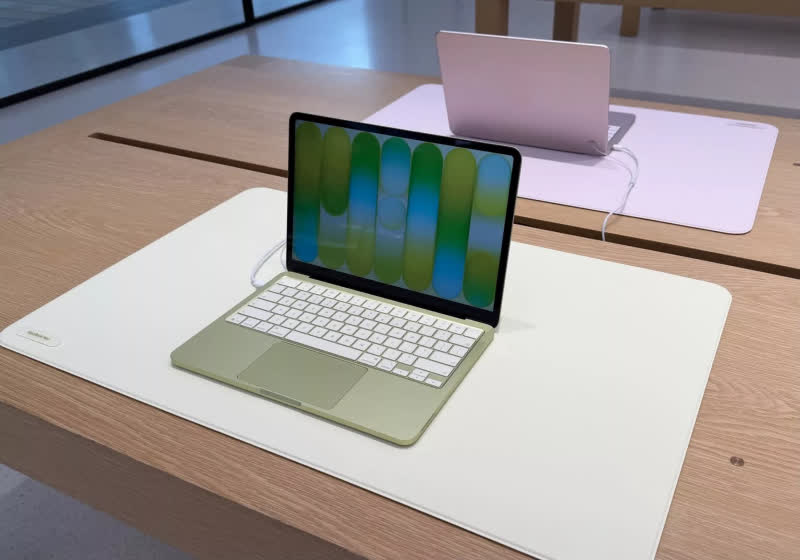
Unlike recent MacBook Air and Pro models, where Apple’s unibody “top case” design turns keyboard problems into major surgery, the Neo’s keyboard is treated as its own part rather than being permanently bundled with the upper shell. Read Entire Article Source link
David Pogue, author of “Apple: The First 50 Years” is our special guest talking about what did and did not make it into the book, plus there are rumors of the HomeHub and real-world news of the MacBook Neo and iPhone 17e, all on the AppleInsider Podcast.
David Pogue talks about his new history of Apple book
Pogue is everywhere this week, talking about his 600-page history of Apple, but now you can hear the very first interview he gave about it. Listen to the stories behind the book, but also hear just how keen he was to find out what AppleInsider thought of it. Listen to the interview here or read the lightly-edited transcript. It’s a wide-ranging interview, but of course the book is not the only thing happening this week. Continue Reading on AppleInsider | Discuss on our Forums
Microsoft is investigating several issues causing email synchronization and connection problems when using the classic Outlook desktop client.
The first bug causes “Can’t connect to the server” errors when creating groups in classic Outlook when Exchange Web Services (EWS) is enabled for the tenant.
According to Microsoft, this occurs because the AD Graph call for ValidateUnifiedGroupProperties fails with the following error: “An internal server error occurred. The operation failed. Both AAD and MSGraph clients are null or AAD Graph is disabled for this API.”
“The Outlook Team is working to release updated group functionality that uses REST APIs which will address this issue. We will update this topic as soon as we know the REST release specifics,” Microsoft said in a recently published support document.
Advertisement
Until a fix is available, Microsoft advises affected users to create and edit groups using the new Outlook client or Outlook Web Access (OWA).
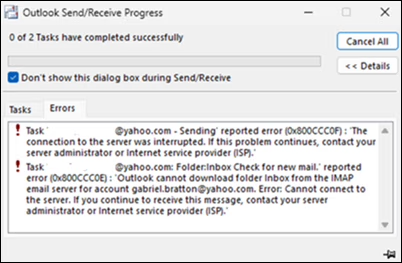
The other known issue is triggering 0x800CCC0F and 0x80070057 when synchronizing Gmail and Yahoo accounts in classic Outlook.
Classic Outlook sync errors (Microsoft)
“After changing your Gmail or Yahoo account passwords in classic Outlook you are not prompted to sign in. There might be other circumstances that lead to this same issue that we are investigating,” Microsoft said.
The Outlook team is working to identify the root cause of this known issue and will share more details once a fix is available.
Until then, customers are advised to work around the sync problems by deleting the registry entries for the affected email address under the Identities key at Computer\HKEY_CURRENT_USER\Software\Microsoft\Office\16.0\Common\Identity\Identities in the Windows Registry Editor.
Advertisement
Deleting Outlook Identities (Microsoft)
Microsoft is also investigating a classic Outlook bug, acknowledged almost two months after the first reports surfaced online, that causes the mouse pointer to disappear for some users. The same issue also affects some users of OneNote and other Microsoft 365 apps.
Redmond has asked affected customers to open a support case with the Outlook Support Team through their Microsoft 365 admin and submit diagnostic log files to assist the Outlook team with analysis.
As temporary workarounds, affected users can click an email in the message list when the cursor disappears, which may cause it to reappear, or switch to PowerPoint, click into an editable area, and then return to Outlook, which may also restore the mouse pointer.
If neither of them works, Microsoft said that restarting the impacted computer should also resolve the issue temporarily.
Microsoft has released an out-of-band (OOB) update to fix a security vulnerabilities affecting Windows 11 Enterprise devices that receive hotpatch updates instead of the regular Patch Tuesday cumulative updates.
The KB5084597 hotpatch update was released yesterday to fix vulnerabilities in the Windows Routing and Remote Access Service (RRAS) management tool that could allow remote code execution when connecting to a malicious server.
“Microsoft has identified a security issue in the Windows Routing and Remote Access Service (RRAS) management tool that could allow remote code execution when connecting to a malicious server,” reads an advisory from Microsoft.
“This issue only applies to a limited set of scenarios involving Enterprise client devices running hotpatch updates and being used for remote server management.”
Advertisement
The KB5084597 update is for Windows 11 versions 25H2 and 24H2, as well as Windows 11 Enterprise LTSC 2024 systems.
“An attacker authenticated on the domain could exploit this vulnerability by tricking a domain-joined user into sending a request to a malicious server via the Routing and Remote Access Service (RRAS) Snap-in,” reads the description for all three flaws.
The company says the hotpatch update is cumulative and includes all fixes and improvements from the March 2026 Windows security update released on March 10.
Advertisement
While the vulnerabilities were already fixed on Patch Tuesday, installing cumulative updates requires devices to be rebooted. However, some devices are used for mission-critical applications and services that cannot be easily rebooted.
To protect these types of devices, hotpatch updates apply new vulnerability fixes by performing in-memory patching of running processes to deliver fixes. At the same time, they update the files on disk so that the next time the device reboots, the fixes are still present.
Microsoft says it previously released hotfixes for these flaws, but re-released them yesterday “ensure comprehensive coverage across all affected scenarios.”
However, Microsoft says the hotpatch will only be offered to devices enrolled in the hotpatch update program and managed through Windows Autopatch, where it will be installed automatically without requiring a restart.
Advertisement
Malware is getting smarter. The Red Report 2026 reveals how new threats use math to detect sandboxes and hide in plain sight.
Download our analysis of 1.1 million malicious samples to uncover the top 10 techniques and see if your security stack is blinded.