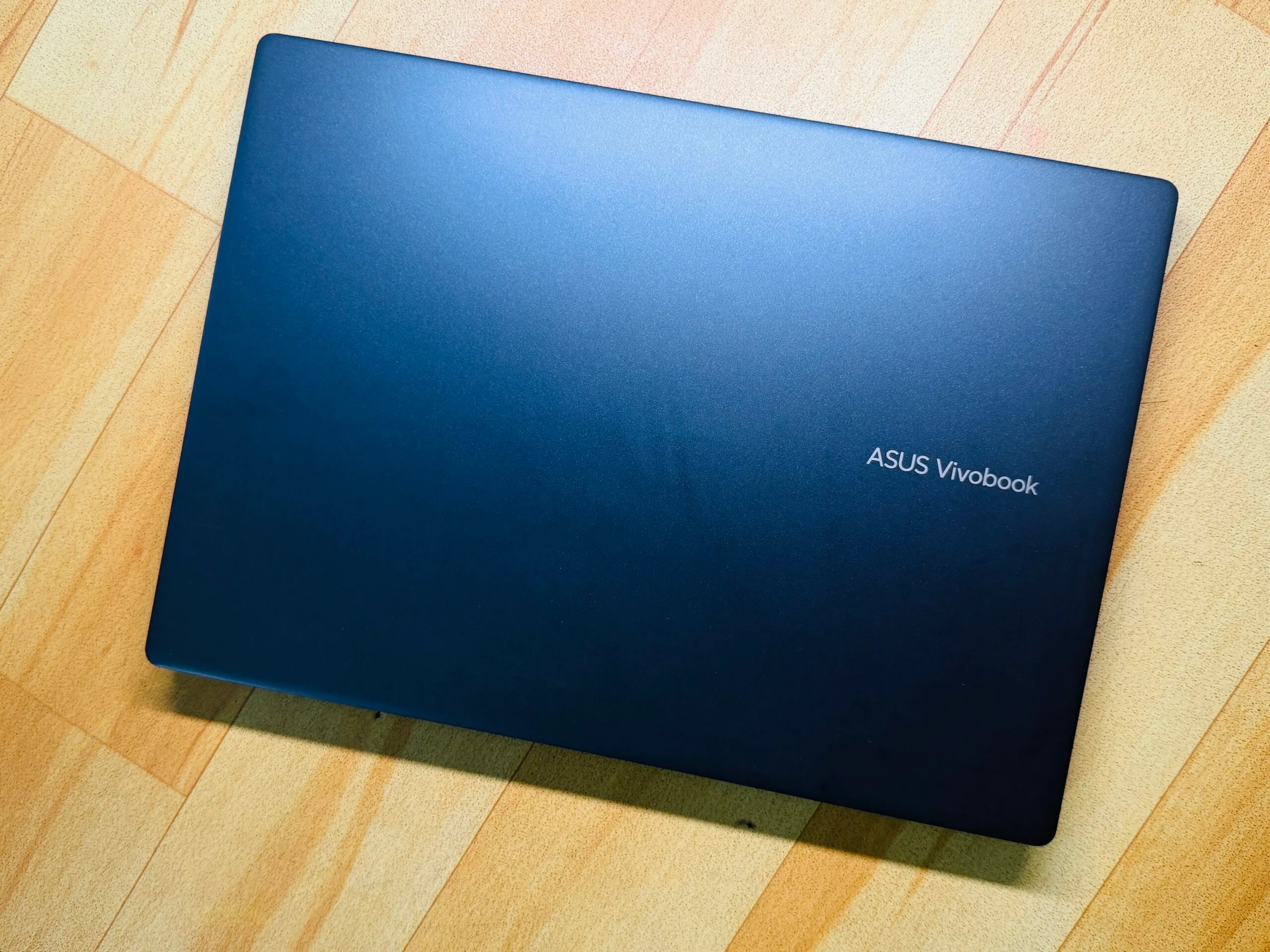
“Asus Vivobook 14 is a good template for serving the best of Windows 11 on an affordable and practically rewarding platter”
Pros
Solid trackpad and decent keyboard
Sufficient selection of ports
Decent performance for the price
Reliable battery with fast charging
Generous memory for 2026
Windows Hello for biometric lock
Cons
Display could’ve been better
Plastic flexes on lid and deck
Fan can get noisy
Random performance hiccups
What makes a good laptop? Well, I can give a pretty haphazard answer to that. But if I were to give a broad verdict, I would say any PC that gets the job done without nuking your wallet, heating like a pan, and lasting at least a full day without forcing you to hunt for a wall socket, takes the cake.
Apple has mastered that art with the MacBook Air, and to such an extent that shoppers have no qualms spending on two, or even three-generation-old, machines. Windows, thanks in no part to the extreme fragmentation, has struggled with the idea.
With Intel Evo-certified PCs, an attempt was made, but they just couldn’t hit the performance-efficiency levels of a MacBook. Then came Qualcomm with its Snapdragon silicon for Windows-on-Arm machines bearing the Copilot+ branding. The vision was squarely a Mac-killer machine at various price points.
Now that we are headed into the second generation of Qualcomm-powered laptops, I took a leap of faith away from my trusty M4 MacBook Air and fired up the cheapest Cipolot+ laptop I could find – the Asus Vivobook 14, which is currently going for $649 from the brand’s online marketplace, and often dips lower during sales events.
Advertisement
Did I regret it? Not exactly. On the contrary, I came out fairly impressed with the machine, though not without a few harsh learnings.
A quick look at the specs
Color
Cool Silver, Quiet Blue
Operating System
Windows 11 Home (ASUS recommends Windows 11 Pro for business)
Processor
Snapdragon X (X1 26 100) (30MB Cache, up to 2.97GHz, 8 cores, 8 Threads)
Neural Processor
Qualcomm Hexagon NPU (up to 45TOPS)
Graphics
Qualcomm Adreno GPU
Display
14.0-inch LED Backlit, 60Hz, 45% NTSC, Anti-glare (87% screen-to-body ratio)
Memory
16GB LPDDR5X on board (Max 16GB)
Storage
512GB M.2 NVMe PCIe 4.0 SSD
I/O Ports
2x USB 3.2 Gen 1 Type-A; 2x USB 4.0 Gen 3 Type-C; 1x HDMI 2.1; 1x 3.5mm Jack
Camera
FHD camera with IR function (Windows Hello) and privacy shutter
I will start with the value perspective first. Asus is more generous with the memory situation on the Vivobook 14 than Apple, matching the memory at 16GB, but offering a healthy 512GB storage on the base model. For anyone who wishes to use their PC for at least the next half a decade, this is the bare minimum.
Nadeem Sarwar / Digital Trends
I keep my media editing work restricted to the iPad Pro, and it’s a headache. Beyond the cumulative burden of OS updates, the gradual app installs fill up the storage sooner than I would like. Whether you need a machine for work, or college duties, Asus offers a better value for your money if you have an Apple comparison in mind.
Then we have the port situation. Yes, the MacBook Air is sleek, but that comes at the cost of a terrible port selection. And the only way to survive the MacBook Air lifestyle is a dongle. Asus’ affordable laptop won’t outdo Apple’s laptop in the looks department, but it trades a svelte waistline for a reasonable diversity of ports.
You get a pair of USB-C and USB-A ports each, alongside an HDMI port and a 3.5mm combo jack. Now, you may not always use all the ports, but on the days when you are struggling with an external monitor, charger, storage device, and an input device, you really appreciate the I/O versatility at hand.
Advertisement
Nadeem Sarwar / Digital Trends
Another neat perk, and an expected one at the current asking price, is the IR camera kit for face unlock. On modern PCs, biometric unlock is an extremely underrated perk, especially in an age where passkeys are taking over conventional passwords for identity verification.
The keyboard isn’t bad either. There’s plenty of travel, the keycaps are spaced well, and despite the slight wobble, I actually loved typing on it more than my MacBook Air. The keys offer a springy feedback, and there’s a satisfying resistance, as well. There’s a bit of flex in the central portion of the deck, but not enough to hamper the typing experience.
The display is a mixed bag. The 14-inch panel offers a full-HD resolution, which is fairly standard for the price. But it doesn’t fare well in well-lit surroundings. I mostly work in a dark room, but every time I stepped out for a cafe work session, or the nearby park, I had to crank the brightness all the way up to the 100%, and still felt a tad underwhelmed.
Nadeem Sarwar / Digital Trends
Thankfully, it’s not a glossy panel, so reflection was never much of a problem. Out of the box, the display has an odd tint to it, and I had to manually adjust the temperature to make it look neutral. And yeah, the saturation could definitely be better. The Asus laptop, however, is hiding a cool trick.
In the MyAsus app, there’s an E-reading mode that gives a monochrome tint to the screen. All the content is rendered in black and white, and you can even adjust the grayscale level. You also get an eye-care mode, with five levels of blue light reduction. I often found myself juggling between these two modes as they tangibly reduced the eye strain, while the e-ink mode helped me with an extra dose of focus.
Another cool trick is hiding on the trackpad. It’s serviceable on its own, but I loved the edge gestures. Across the left and right edges, you can slide to adjust the volume and brightness levels, while the top edge helps with media playback. I love these thoughtful additions, which go beyond gimmicks and don’t burden you with a learning curve either.
Advertisement
Performance
Nadeem Sarwar / Digital Trends
The Snapdragon X is a rather odd processor, which is both good and bad news. For example, it fares almost as well as the MacBook Air… with the three-generation-old M2 chip on Cinebench at multi-core output, but the Oryon core can’t quite drive ahead of the single-core performance.
That’s both good and bad news. Apple’s M-series silicon is terrific, and I have friends and family members still holding on tightly to their M1-powered machines. On the Windows side of the ecosystem, the Vivobook 14 raced ahead of Intel’s Core Ultra 5 226V, and the equivalent Intel Core 12th Gen processor at Geekbench runs
Paired with 16 gigs of RAM and speedy SSDs, the Asus laptop fared pretty well at my day-to-day tasks. It handled Slack, Teams, Chrome with two dozen tabs, and Copoilt with ease. For academic use and basic corporate work restricted to Workspace and Office suites, there’s enough firepower available here.
Nadeem Sarwar / Digital Trends
But what holds this machine back — and nearly every Windows on Arm machine that I have tested so far – is the inconsistency. On days, the Asus laptop felt buttery smooth. And then there were occasions where it randomly crashed under the stress of a few Chrome windows. Another recurring problem is the update situation, which often left me staring at a blank screen and required a force restart.
Where Qualcomm needs to work, especially when compared against Intel’s Arc and AMD’s Radeon graphics architecture, is the integrated Adreno GPU. On 3DMark Steel Nomad, I got an average tally of around 9fps after three test runs, while an in-game benchmark only reached 18fps. Needless to say, gaming is a distant pipedream, and your only hope is cloud services such as Xbox or GeForce Now.
I wish the fans were a tad less noisy. Even under the stress of web-based work, you can hear them whirring. Thankfully, I didn’t notice any overt heating or scenarios where the laptop became too hot to keep on the lap. Whisper mode offers some respite from the fan house, but to avoid the heat build-up and throttling, I preferred working with the fan profile set to Full-Speed mode. Thankfully, my earbuds helped deal with the noise.
Advertisement
Nadeem Sarwar / Digital Trends
But when I pushed it while editing videos in Filmora, the upper area of the keyboard deck ran noticeably hotter. What bothered me more was the resource allocation. Between two windows and a total of eight apps in total, the system was using 80% of the memory, which is way too much, while the CPU load remained comfortably under the 18% range.
Battery life
This is one aspect where the Asus Vivobook 14 really surprised me. I was expecting it to be a mediocre performer, but it actually proved to be a workhorse. With Power Mode set to balanced, the laptop managed around 11 hours of work in my most recent run, with the screen brightness set close to the 60% mark.
Dialing up to the high-performance mode, the device still managed around eight to nine hours of consistent work before I saw the first low-battery alert. It’s evident that the entry-level Snapdragon X silicon is focusing more on efficiency, instead of raw performance. This approach, I believe, works well for a machine like the Vivobook 14.
I’ve tested over a dozen Windows machines in as many months, but this Asus machine offered the best mileage in the Snapdragon pool for its size, and fared better than Intel machines from rival brands. If your budget is strictly close to the $700 mark, you already have a certain performance expectation in mind.
Nadeem Sarwar / Digital Trends
The Asus Vivobook 14 isn’t exactly blowing past those expectations, but it delivers solid results with battery efficiency. The hiccup was the edge scenarios, where I needed the machine to focus more on creative workflows at high performance levels, and the drop in battery levels was haphazardly aggressive.
On the bright side, the laptop offers a few meaningful tricks within the MyAsus app. There’s a dedicated battery care mode that limits peak charging to the 80% mark, similar to iPhones, in order to preserve its longevity. But for scenarios where you want the full juice for on-the-go work sessions, you can temporarily bypass it for 24-hours and get the full 100% juice.
Advertisement
Verdict
The Asus Vivobook 14 is a laptop that cuts some expected corners, but delivers in a few unexpected ways. It’s got a kit that’s easy on the eyes, but raises the bar with a military-grade (MIL-STD 810H) build. For students and workers who commute daily, this is an underrated perk that can save you hundreds of dollars in accidental repairs and servicing.
Nadeem Sarwar / Digital Trends
On to the topic of battery life, this laptop does a fine job, and support for fast charging (an hour of plugged-in time for a full tank) is just the cherry on top. Now, I don’t know many souls out there who want a laptop specifically for native Copilot AI perks, but if you’re one of those souls, this Asus laptop is a bargain deal that qualifies for all the Copilot+ AI perks, such as on-device translations, AI-powered image editing, and Windows Recall.
The performance is enough for the asking price, though not exactly an Earth-scorcher. As a sweet bargain for not setting the benchmark tables on fire, you get plenty of ports (with ample diversity), a large trackpad with practical tricks, convenient biometric unlock with a physical privacy shutter, and a decent set of speakers that get the job done, but won’t exactly wow your ear canals.
At an asking price of $649 (and even lower, if you’re a good deal-hunter), the Asus Vivobook 14 is a lovely laptop for its target audience. And at a time when the industry is staring at rising PC prices owing to an unprecedented memory crisis, this laptop feels like a bargain in stormy days for market.
Threat actors are exploiting the recent Claude Code source code leak by using fake GitHub repositories to deliver Vidar information-stealing malware.
Claude Code is a terminal-based AI agent from Anthropic, designed to execute coding tasks directly in the terminal and act as an autonomous agent, capable of direct system interaction, LLM API call handling, MCP integration, and persistent memory.
On March 31, Anthropic accidentally exposed the full client-side source code of the new tool via a 59.8 MB JavaScript source map included by accident in the published npm package.
The leak contained 513,000 lines of unobfuscated TypeScript across 1,906 files, revealing the agent’s orchestration logic, permissions, and execution systems, hidden features, build details, and security-related internals.
Advertisement
The exposed code was rapidly downloaded by a large number of users and published on GitHub, where it was forked thousands of times.
According to a report from cloud security company Zscaler, the leak created an opportunity for threat actors to deliver the Vidar infostealer to users looking for the Claude Code leak.
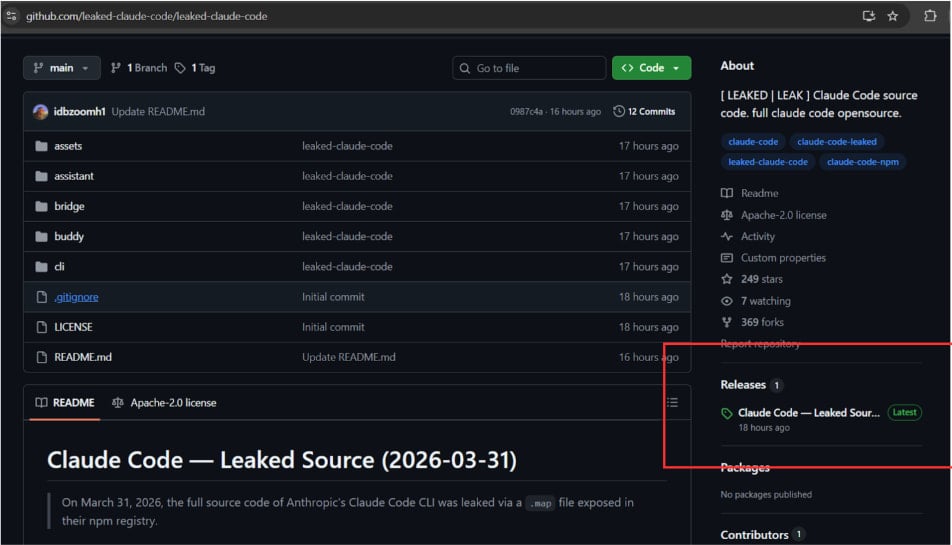
The researchers found that a malicious GitHub repository published by user “idbzoomh” posted a fake leak and advertised it as having “unlocked enterprise features” and no usage restrictions.
To drive as much traffic to the bogus leak, the repository is optimized for search engines and is shown among the first results on Google Search for queries like “leaked Claude Code.”
Search result for the malicious GitHub repo Source: Zscaler
According to the researchers, curious users download a 7-Zip archive that contains a Rust-based executable named ClaudeCode_x64.exe. When launched, the dropper deploys Vidar, a commodity information stealer, along with the GhostSocks network traffic proxying tool.
Zscaler discovered that the malicious archive is updated frequently, so other payloads may be added in future iterations.
Advertisement
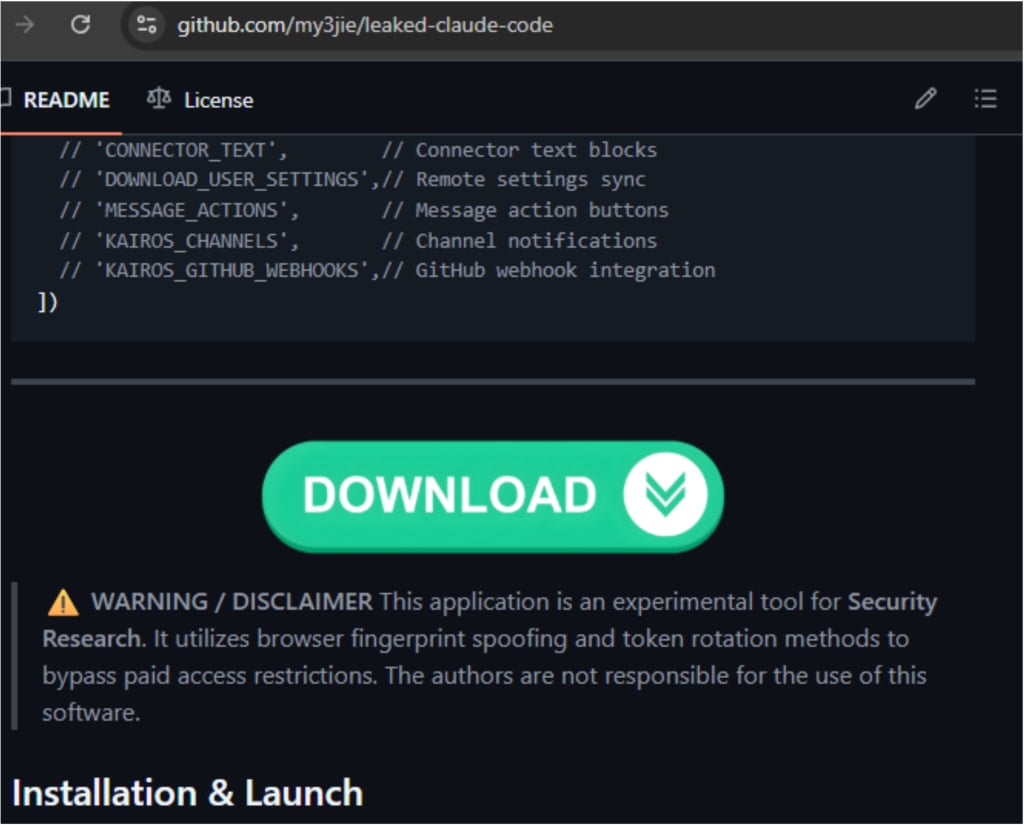
The researchers also spotted a second GitHub repository with identical code, but it instead shows a ‘Download ZIP’ button that wasn’t functional at the time of analysis. Zscaler estimates it is operated by the same threat actor who likely experiments with delivery strategies.
Second GitHub repository linked to the same threat actor Source: Zscaler
Despite the platform’s defenses, GitHub has often been used to distribute malicious payloads disguised in various ways.
In campaigns in late 2025, threat actors targeted inexperienced researchers or cybercriminals with repositories claiming to host proof-of-concept (PoC) exploits for recently disclosed vulnerabilities.
Historically, attackers were quick to capitalize on widely publicized events in the hope of opportunistic compromises.
Automated pentesting proves the path exists. BAS proves whether your controls stop it. Most teams run one without the other.
This whitepaper maps six validation surfaces, shows where coverage ends, and provides practitioners with three diagnostic questions for any tool evaluation.
Built from the same research as Gemini 3, the new family spans a 2B edge model that runs on a Raspberry Pi to a 31B dense model currently ranked third on the Arena AI open-model leaderboard. The Apache 2.0 licence is a significant shift from previous Gemma releases.
Google has released Gemma 4, the latest generation of its open-weight model family, in four sizes designed to cover everything from on-device inference on smartphones to workstation-class deployments.
The models are built from the same research and technology that underpins Gemini 3, Google’s proprietary frontier model, and are released under an Apache 2.0 licence, a more permissive terms than previous Gemma generations, and a change that Hugging Face co-founder Clément Delangue described as “a huge milestone.”
Demis Hassabis, CEO of Google DeepMind, called the new models “the best open models in the world for their respective sizes.”
The four variants are the Effective 2B (E2B) and Effective 4B (E4B) edge models, designed to run on-device on phones, Raspberry Pi, and Jetson Nano hardware developed in collaboration with the Pixel team, Qualcomm, and MediaTek; and the 26B Mixture-of-Experts (MoE) and 31B Dense models, aimed at offline use on developer hardware and consumer GPUs.
Advertisement
The 31B Dense model currently ranks third among all open models on the Arena AI text leaderboard; the 26B MoE sits sixth. Google claims both larger models outcompete models up to 20 times their size on that benchmark.
The 31B’s unquantised weights fit on a single 80GB Nvidia H100 GPU; quantised versions run on consumer hardware.
All four models are multimodal, natively processing video and images, and are trained across more than 140 languages. The E2B and E4B models additionally support native audio input for speech recognition. Context windows are 128K tokens for the edge models and 256K for the two larger variants.
On capability, Google highlights multi-step reasoning improvements, native function-calling and structured JSON output for agentic workflows, and offline code generation. On performance, the Android Developers Blog notes the E2B model runs three times faster than the E4B, while the edge family overall is up to four times faster than previous Gemma versions and uses up to 60% less battery.
Advertisement
The E2B and E4B models are also the foundation for Gemini Nano 4, Google’s next-generation on-device model for Android, which will arrive on consumer devices later this year.
Gemma has accumulated more than 400 million downloads and over 100,000 community-created variants since its first release, a figure Google points to as evidence of developer adoption at scale.
Gemma 4 is available immediately on Hugging Face, Kaggle, and Ollama, with the 31B and 26B models accessible via Google AI Studio and the edge models via AI Edge Gallery.
The Apache 2.0 licensing decision is the most consequential commercial signal in the launch: it removes restrictions that prevented some enterprise and commercial deployments under the previous Gemma terms, opening the ecosystem to a broader range of production use cases.
For April Fools’ Day, the developer of Look Outside released an update that added a new option to your interactions with NPCs: kissing. Instead of just fighting or talking to enemies and surviving neighbors in the cursed apartment building, you could give ’em a smooch. Their dialogue and sprites were updated accordingly, too. Cue stammering eldritch horrors with bright red blushing cheeks. April Fools’ Day is (thankfully) over now, but there’s good news for anyone who has been enjoying the lovefest or didn’t get a chance to try it. Developer Francis Coulombe has built in a way for players to access “smooch mode” going forward.
“If you started a game on April 1st and kissed the wounded neighbor, that save file is now permanently in smooch mode!” Coulombe posted on social media. “You can also activate smooch mode on a new save file by naming Sam ‘Casanova’.” I immediately started a new save to confirm and, yes, doing this does indeed allow you to go on a kissing spree. While you can’t smooch every single person/abomination you’ll run into, you sure can kiss a lot of them.
Want to kiss the Rat King? Go wild. Pierre? Yup. That weird bug guy in the basement who eats bandages? Unfortunately yes, he’s kissable too. This truly is the game that keeps on giving. We’re apparently getting a real, non-silly update in the near-future as well, so Look Outside fans are eatin’ good. Now, please excuse me while I get back to my Kiss Everyone (except Lyle) run.
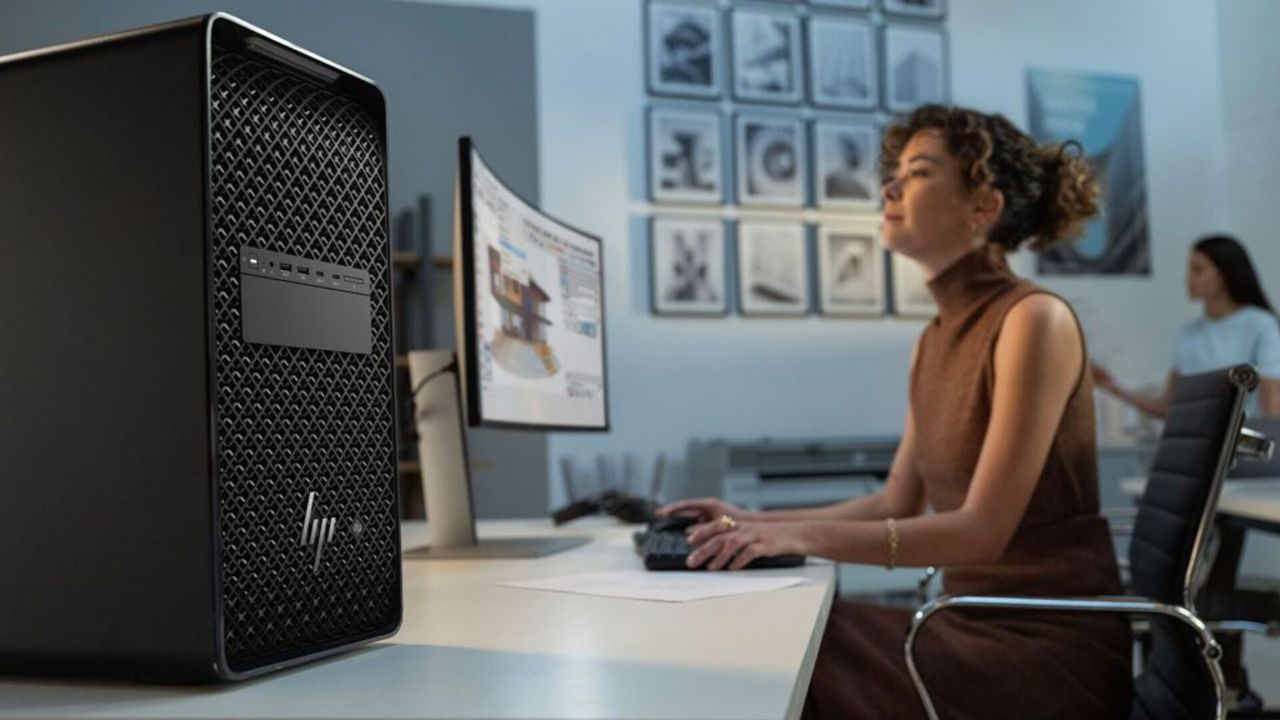
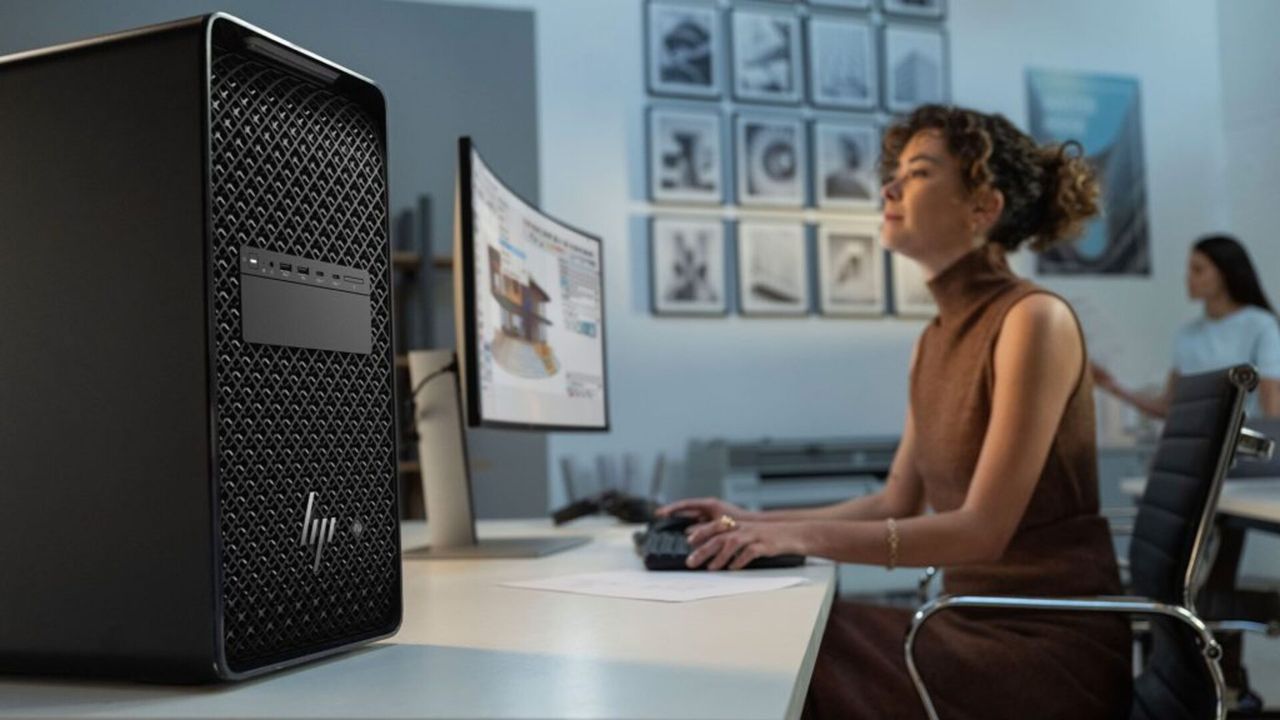
HP Z8 Fury G6i supports up to four Nvidia RTX PRO GPUs
Next-generation Intel Xeon processors deliver up to 86 cores and 174 threads
Memory scales up to 2TB DDR5-6400 ECC across 16 DIMM slots
HP recently unveiled a host of new high-performance systems at its latest product showcase, but one device seems to dominate the conversation.
The HP Z8 Fury G6i stands out as the company’s most aggressive attempt yet at addressing heavy AI and simulation workloads without compromise.
This system supports up to four Nvidia RTX PRO 6000 Blackwell GPUs, paired with next-generation Intel Xeon processors, scaling up to 86 cores and 174 threads, with boost frequencies reaching 4.8GHz and large cache allocations.
Article continues below
Advertisement
Extreme processing power
This configuration allows it to handle complex rendering, large-scale simulations, and demanding AI development tasks.
“Technology and high-performance workflows are evolving faster than ever,” said Jim Nottingham, SVP and Division President, Advanced Compute Solutions.
Advertisement
“HP Z workstations are built to equip the best and brightest professionals with the tools they need for specialized workflows and AI at the edge, while giving IT decision makers the ability to scale performance responsibly.”
The hardware goes further than typical workstation limits, especially as memory and data requirements continue to grow.
Sign up to the TechRadar Pro newsletter to get all the top news, opinion, features and guidance your business needs to succeed!
It supports up to 2TB of DDR5-6400 ECC memory across 16 DIMM slots and eight memory channels, enabling data-heavy AI workflows without constant bottlenecks.
Advertisement
This device supports an optional HP Max Side Panel that expands the chassis itself, increasing internal volume and allowing larger graphics cards to fit without modification.
It is an industry-first feature because it physically extends the workstation’s width to accommodate quad-wide and up to 600W GPUs.
The tool-free design addresses a practical issue because some users had to cut open workstation panels just to install oversized graphics cards, so this will no longer be necessary.
Advertisement
“It increases your airflow and your thermals by 15%,” Nottingham added, noting GPU power requirements continue to rise with each generation.
The HP Z8 Fury G6i features a data center–style architecture with up to 104TB of storage across multiple NVMe configurations, including front-accessible, hot-swappable drives.
It offers nine PCIe slots, including PCIe 5.0 x16 lanes, for additional accelerators, networking cards, or storage controllers.
Dual power supplies of up to 2700W provide stable performance under heavy workloads.
Advertisement
For connectivity, this device includes Thunderbolt 5, high-speed USB, Wi-Fi 7, and networking up to 100GbE.
HP’s workstation lineup also includes the Z4 G6i desktop and mobile ZBook X G2i and ZBook 8 G2i models.
It also offers hybrid systems, including the HP ZGX Nano and ZGX Fury, which combine local compute with cloud resources.
The HP Z8 Fury G6i is expected to be available on HP.com starting in April 2026, with pricing to be provided closer to availability.
“The intersection of these fields is where the most impactful breakthroughs in diagnostic precision occur,” says Appaji, an associate professor of medical electronics engineering at the B.M.S. College of Engineering, in Bengaluru, India.
Abhishek Appaji
Employer
Advertisement
B.M.S. College of Engineering, in Bengaluru, India
B.M.S. College of Engineering; University of Visvesvaraya, in Bengaluru; Maastricht University, in the Netherlands
Many of his inventions have been deployed in remote areas of India, providing physicians with quality diagnostic tools, including an AI-powered machine that can scan retinas to detect medical conditions and a smart bed that continuously monitors a patient’s vital signs.
Advertisement
An active volunteer with the IEEE Young ProfessionalsBangalore Section, he has launched professional networking events, technology workshops, a mentorship program, and other initiatives.
“This award represents a significant milestone in my career,” Appaji says. “It validates my core belief that our success as engineers is not solely measured by research outcomes or publications but by the tangible impact we have on lives through accessible technology and the quality of the next generation of leaders we empower.”
After earning a bachelor’s degree in engineering from B.M.S. in 2010, he joined the school as a lecturer in its medical electronics engineering department. At the same time, he pursued master’s degrees in bioinformatics at the University Visvesvarya College of Engineering, also in Bengaluru. He graduated in 2013 and continued to teach at B.M.S.C.E.
Advertisement
Four years later, Appaji signed up for the MIT Global Entrepreneurship Bootcamp, a two-week intensive hybrid program that includes webinars, online courses, and a five-day stay at MIT. It’s designed to give teams of aspiring entrepreneurs, innovators, and early-stage founders the structured mindset, tools, and frameworks they need to succeed.
Appaji says he discovered the program while researching opportunities in innovation.
“I had the technical expertise, but I needed a structured framework to transition my research from the laboratory to the market,” he says.
During the MIT boot camp, he and a team of four other participants were tasked with approaching a complex health care challenge. They developed a noninvasive blood glucose measurement device to manage gestational diabetes—a condition that causes high blood sugar and insulin resistance during pregnancy. When the program ended, Appaji and two of his Australia-based teammates continued their collaboration by founding Glucotek in Brisbane, Australia.
His thesis focused on computational methods to identify retinal vascular patterns.
“The patterns we analyze—including the curvature of the vessels, the angles at which they branch out, and their dimensions—reveal the health of the microvascular system,” he says. “With conditions like schizophrenia and bipolar disorder, microvascular changes mirror neurovascular changes in the brain.”
“My journey has shown me that IEEE is much more than a professional society; it is a global platform that allows me to collaborate with a diverse network of experts to solve local humanitarian challenges.”
Advertisement
Examining and measuring the retinal vascular system offers physicians a noninvasive way to examine neural changes, which can be biomarkers for psychiatric illnesses, he says.
To bring his idea to life, he collaborated with an ophthalmologist, a psychiatrist, and colleagues from his engineering school to develop a screening device. They also created and trained the AI models that analyze retinal images.
Ideas from his thesis led to the creation of the Smart Eye Kiosk, an AI-powered tool that scans the network of small veins that deliver blood to the inner retina. The tool monitors stress levels and mental health. It also screens for basic eye diseases such as diabetic retinopathy, as well as damage to retinal blood vessels caused by high blood sugar.
Retinal images also can reveal physiological changes in the brain associated with psychiatric disorders such as schizophrenia and bipolar disorder, Appaji says. The kiosk uses AI models to analyze measurements of the vasculature network, such as vessel thickness, which can be biomarkers for psychiatric conditions. Since mental illnesses can be linked to genetics, relatives of patients with schizophrenia and bipolar disorder were also invited to participate in a study funded by India’s Cognitive Science Research Initiative’s Department of Science & Technology. The clinical data from this study can pave the way for earlier, more accurate diagnoses.
Advertisement
“The biological basis for this is fascinating,” Appaji says. “The retina is the only place in the human body where the central nervous system and the vascular system can be visualized directly and noninvasively. Anatomically, the retina is an extension of the posterior part of the brain. Therefore, physiological changes in the brain are often reflected in the eyes.”
He earned his Ph.D. in 2020 from Maastricht, and he received the Best Thesis Award from the university’s Mental Health and Neuroscience Research Institute. Appaji credits his time at the school for his multidisciplinary approach to developing medical devices.
“Having the perspectives of mentors from diverse fields was essential to help me move my research beyond theory into a data-driven diagnostic tool,” he says.
Advertisement
He was then named institutional coordinator of R&D at B.M.S. and later was promoted to be its head.
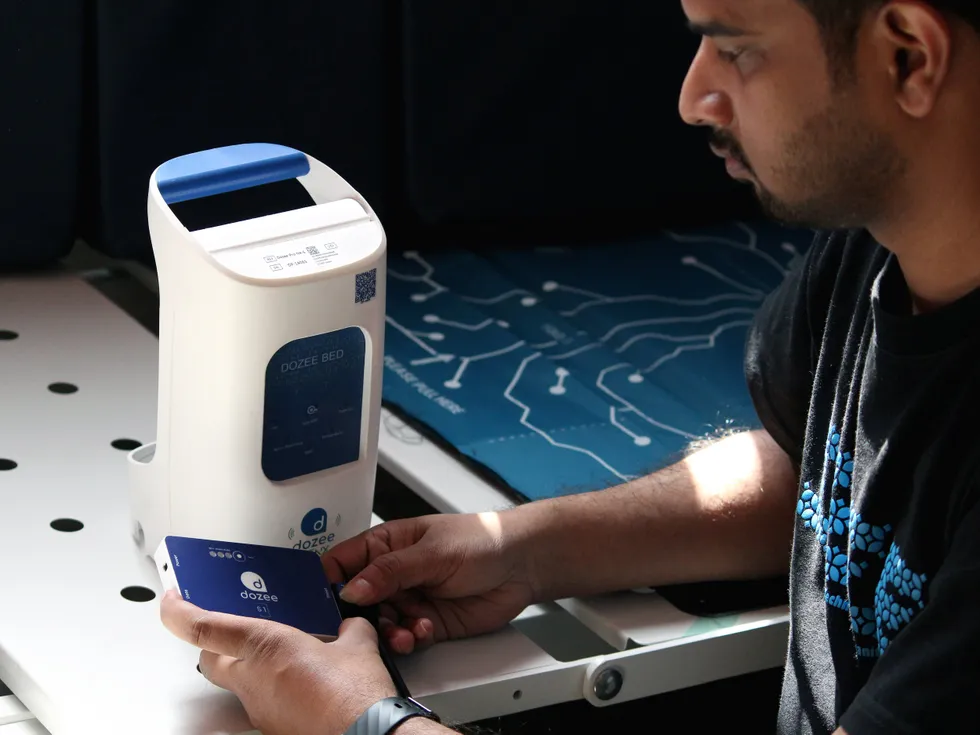
Abhishek Appaji working on a smart bed sensor that continuously monitors a patient’s vital signs without the use of wires or wearable sensors.Abhishek Appaji
A wireless smart bed to monitor vital signs
Appaji continues to develop technologies for patients who need them most. “I feel a deep need to bridge this gap and ensure innovations have a tangible impact on society,” he says. In addition to the Smart Eye Kiosk, he improved the performance of the sensors of the smart beds that continuously monitor a patient’s vital signs without the use of wires or wearable sensors. The beds help hospital staff check on their patients in a noninvasive way.
The project was done in collaboration with health AI company Dozee (Turtle Shell Technologies) in Bengaluru. The system measures mechanical microvibrations produced by the body in response to the ejection of blood into the aorta, which occurs with each heartbeat. A thin, industrial-grade sensor sheet is placed underneath the mattress. Additional funding is being provided by India’s Department of Science and Technology.
“These sensors are incredibly sensitive,” Appaji says. “They pick up minute mechanical tremors through the mattress material.”
Advertisement
The sensors detect the force of the patient’s heartbeat and the expansion and contraction of their chest during respiration. The vibrations are converted into electrical signals and analyzed using deep learning algorithms developed by Appaji and his team at the university in collaboration with Dozee.
The technology is used in more than 200 hospitals throughout India and in thousands of households, he says.
Mentoring budding entrepreneurs
Appaji is also executive director of the BMSreenivasiah Innovators Guild Foundation, dedicated to nurturing entrepreneurial talent among students and faculty across the BMS group of Institutions. A not-for-profit company promoted by the BMS Education Trust, BIG Foundation provides a structured ecosystem for innovation, incubation, and startup growth.
There, Appaji mentors budding entrepreneurs, offering advice on business plans, product pitches, marketing strategies, and licensing. Participants are students and faculty members.
Advertisement
The foundation has incubated more than 10 ventures, according to Appaji.
“The majority are centered on health care applications,” he says, “and have successfully secured backing from investors and seed funds.”
Taking IEEE’s mission to heart
Appaji was introduced to IEEE as an undergraduate when one of his professors encouraged him to volunteer for a conference sponsored by the IEEE Engineering in Medicine and Biology Society. He transcribed the seminars for session chairs, assisted with managing the talks, and helped answer attendees’ questions.
“That experience was transformative,” he recalls. “I was amazed to find myself in the same room with the speakers and scientists who had authored the very textbooks I was studying.
Advertisement
“It was then that I realized IEEE is far more than just technology and volunteering; it is a global platform for high-level networking with world-class scientists and technologists.”
“What motivates me to remain active within IEEE is the profound alignment between my personal goals and the organizational mission of advancing technology for the benefit of humanity,” he says. “My journey has shown me that IEEE is much more than a professional society; it is a global platform that allows me to collaborate with a diverse network of experts to solve local humanitarian challenges.”
The organization has helped fund some of Appaji’s lifesaving work. During the COVID-19 pandemic, he received a grant from the IEEE Humanitarian Technologies Board and Region 10 to develop 3D-printed protective equipment for people in Bengaluru’s underserved communities. The virus spread quickly in the high-density areas, where social distancing was nearly impossible. The kits, which included a door opener to avoid high-touch surfaces and an elbow-operated soap dispenser, were sent to nearly 500 households.
Advertisement
“This work remains one of my most meaningful contributions to humanitarian technology,” Appaji says, “demonstrating how engineering can be rapidly deployed to protect vulnerable populations during a global crisis.”
He advises younger IEEE members to: “Say yes to taking on roles of responsibility. Don’t wait for a formal title to lead; instead, start by volunteering to do small, manageable tasks within your local chapter or section.”
“The networking opportunities and leadership skills you gain through these early responsibilities will shape your professional career far more than any textbook ever could.”
A titanium smart ring that tracks sleep, heart rate, stress, and over 20 biometric indicators without a screen, a strap, or anything that announces itself on your wrist is a different proposition to most wearables, and at £139.99 it is close to the cheapest it has ever been.
The research-grade sensors inside the 4-star Oura Ring Gen 3 Horizon monitor over 20 biometric indicators including sleep stages, heart rate, heart rate variability, stress, and activity, and because the ring sits on your finger rather than your wrist, the pulse readings are more accurate than most wrist-based wearables can manage.
Advertisement
Battery life runs to up to seven days on a single charge, which means weekly charging rather than the daily or every-other-day routine that most smartwatches require, and the titanium construction keeps it lighter than the average wedding ring while remaining non-allergenic and water resistant.
The ring integrates with over 40 apps including Apple Health, Google Health Connect, Strava, Natural Cycles, and Flo, so the data it collects feeds into whatever health ecosystem you are already using rather than sitting in isolation.
An Oura Membership is required to access the full range of insights and personalised health data, with the first month free and a subscription of £5.99 per month after that, which is worth factoring into the overall cost before buying.
Advertisement
The Oura Ring Gen 3 Horizon is available in sizes 6 through to 13, and because Oura sizing does not correspond to standard ring sizes, the brand recommends purchasing a sizing kit on Amazon before committing to a size, with a £10 Amazon credit included to offset the cost against your ring purchase.
Outside of Black Friday itself, £139.99 for the Oura Ring Gen3 Horizon in Brushed Titanium is about as close to the November low as this ring is likely to get until the sales come around again.
Hims & Hers, the telehealth company that sells weight-loss drugs and sexual health prescriptions, has confirmed a data breach affecting its third-party customer service platform.
The healthcare company said in a data breach notice filed with the California attorney general’s office on Thursday that the hackers stole data about user requests sent to the company’s customer support team. The company said hackers broke into its third-party ticketing system between February 4 and February 7 and stole reams of support tickets, which contained personal information submitted by customers.
The data breach notice said the hackers took customer names and contact information, as well as other unspecified personal data that Hims & Hers left redacted in the letter.
Although the company says customer medical records were not affected by the breach, the nature of customer support systems means that the data may contain sensitive information about a person’s account, personal information, and healthcare.
Advertisement
It’s not yet known how many individuals had personal information compromised in the hack. Under California law, companies are required to disclose data breaches involving 500 or more state residents.
Jake Martin, a spokesperson for Hims & Hers, told TechCrunch in a statement the company was hit by a social engineering attack, in which hackers trick employees into granting access to their systems. The spokesperson said the stolen data “primarily included customer names and email addresses.” The company did not say what specific types of data were taken, when asked by TechCrunch.
The company would not say if it has received any communication from the hackers, such as a demand for money.
In recent months, customer support and ticketing systems have become rich targets for financially motivated hackers, who have raided databases containing customer information and extorted companies into paying a ransom.
Advertisement
Last year, Discord had a data breach that affected its customer support ticketing system and exposed the government-issued IDs of around 70,000 people who had submitted their driver’s licenses and passports to the company to verify their age.
The new Kindle Scribe lineup, led by the first colour Kindle Scribe, has been available in the States for months now, but Amazon has finally confirmed when we’ll be able to get our hands on it.
At the centre of it all is the Kindle Scribe Colorsoft, which introduces a colour e-paper display designed specifically for writing.
Amazon says its custom Colorsoft tech keeps colours soft and easy on the eyes. Meanwhile, a new rendering engine makes writing feel fast and fluid.
Advertisement
The hardware has also had a serious rethink. The new Scribe is thinner (5.4mm), lighter (400g) and around 40% faster when it comes to writing and page turns. The 11-inch display is still front and centre. However, it now feels more paper-like thanks to a redesigned glass texture and a near-zero parallax effect. This effect makes the pen feel closer to the screen.
Advertisement
Amazon is also pushing software harder this time. A new AI-powered notebook lets you search handwritten notes using natural language and even pulls together quick summaries. There’s also tighter integration with Google Drive, Microsoft OneDrive and OneNote. This makes it easier to import, annotate and export documents without jumping through hoops.
Other additions feel more practical than flashy. You can now write in 10 pen colours, highlight in five shades, organise everything into workspaces, and quickly jot things down via a new Quick Notes feature from the redesigned home screen.
Advertisement
Battery life still stretches into weeks, and there are no distracting apps or notifications to pull you out of focus. This sticks to what makes Kindle devices appealing in the first place.
Filming a video on your phone may be a frustrating experience, with unsteady footage that looks like a terrible home video. The DJI Osmo Mobile 7P really flips the script. Priced att $99 (was $129), it produces silky smooth video that appears to have been taken with a pricier piece of equipment.
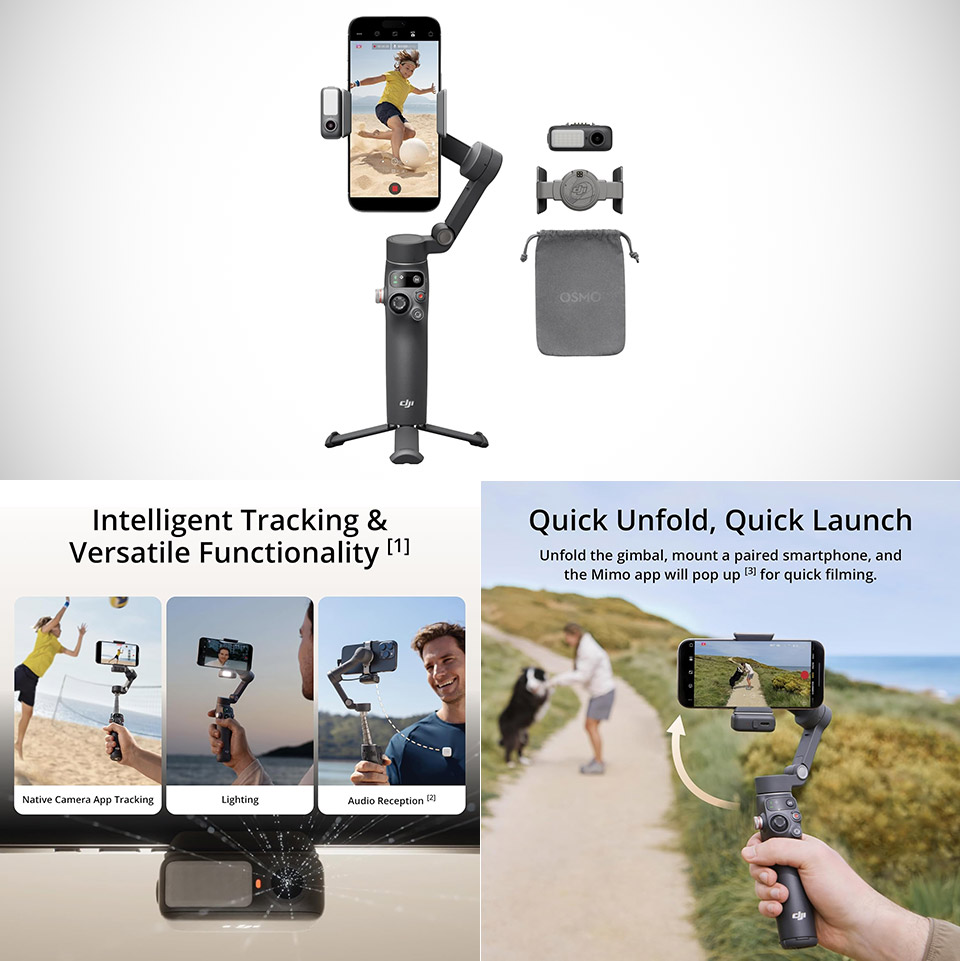
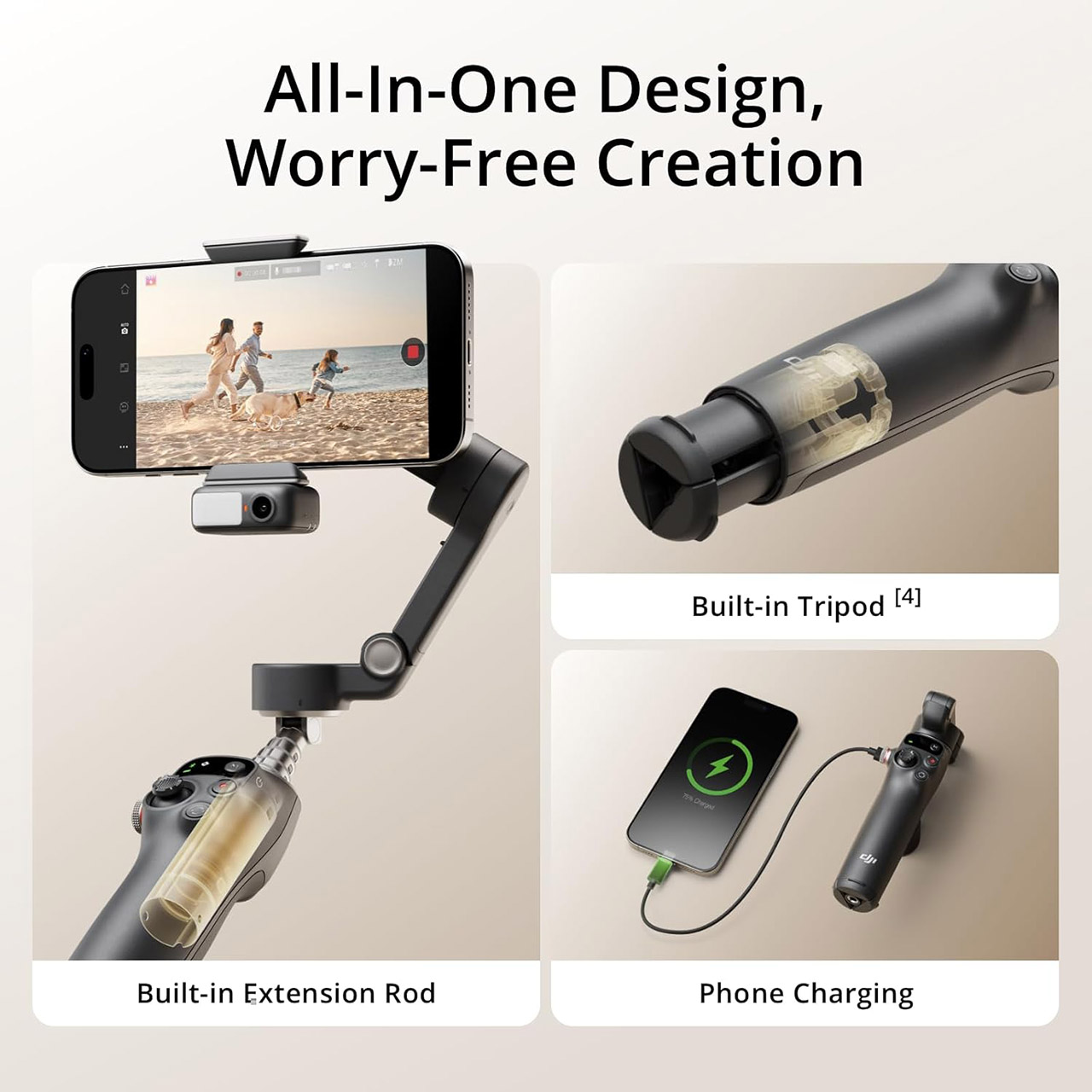
First, let’s discuss how the device performs everyday use. When you open it, the magnetic clamp immediately secures your phone without requiring you to fiddle with it. The extension rod extends to 215mm, allowing you to shoot a wide image or selfie without having to strain. If you flip down the tripod feet, you’ll have a self-standing set suitable for static pictures, time-lapse photography, and other applications. These small comforts pile up quickly when you’re out shooting, and the last thing you want to be carrying is a bunch of unnecessary gear.
Snap the Spectacular – The Multifunctional Module packs intelligent tracking, DJI Mic 2/DJI Mic Mini reception, and lighting features into one compact…
Experience Seamless Stability – Osmo Mobile 7P’s robust 3-axis gimbal stabilization ensures lossless stability. Capture creative bursts and craft…
Capture Like a Pro From Day One – Pair your Osmo Mobile 7P with DJI Mimo for ShotGuides and One-Tap Edit. Film and edit like a pro, saving time and…
The Osmo Mobile 7P also excels in terms of battery life. Its 3350 milliamp battery will keep you going for about ten hours under typical settings, enough to get through a full day of casual recording or a longer event without having to look for a power source. Even with the extra module attached for tracking and lighting, most users get five full hours out of it, which is significantly more than the earlier Osmo Mobile 6. As an added bonus, the gimbal can recharge your phone’s battery when it runs low, allowing you to stay in the game longer.
Advertisement
Once your phone is balanced, the stabilization feels practically seamless, with three motors keeping the frame level while you walk, run, or pan madly. The real show-stopper, however, is ActiveTrack 7.0. Simply tap a person or item on the screen, and the gimbal will track it with incredible accuracy, even if the subject moves in and out of view or changes direction. Earlier versions required the DJI app for accurate tracking; however, this new edition incorporates a small multipurpose module with its own camera. That means the smart following feature works great in your phone’s native camera, streaming apps, and pretty much anyplace else you want to utilize it.
The same module includes a handy fill light and receiver for DJI wireless mics. The light provides just enough even lighting to sort out faces in gloomy areas or outside when it’s coming close to dusk, and the warmth can be adjusted to maintain skin tones looking realistic. When you pair a microphone, your audio will be crystal clear without the need for cords or clip-ons. That’s the beauty of this thing: all of the things that used to need separate purchases or larger rigs are now available in one nice little box.











 Abhishek Appaji working on a smart bed sensor that continuously monitors a patient’s vital signs without the use of wires or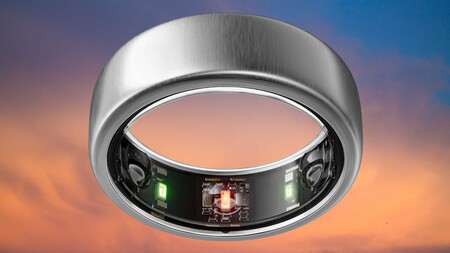










































You must be logged in to post a comment Login