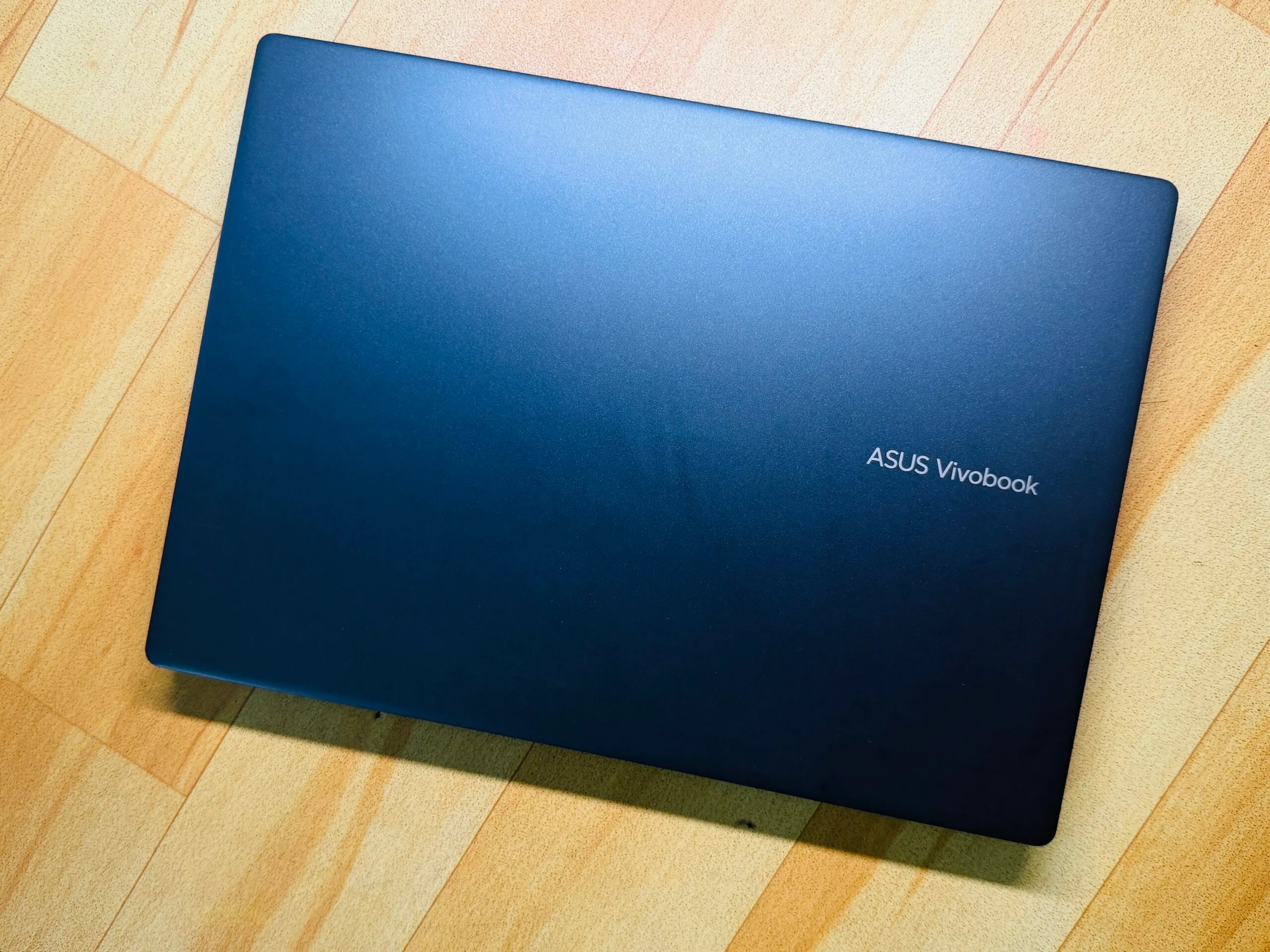
“Asus Vivobook 14 is a good template for serving the best of Windows 11 on an affordable and practically rewarding platter”
Pros
Solid trackpad and decent keyboard
Sufficient selection of ports
Decent performance for the price
Reliable battery with fast charging
Generous memory for 2026
Windows Hello for biometric lock
Cons
Display could’ve been better
Plastic flexes on lid and deck
Fan can get noisy
Random performance hiccups
What makes a good laptop? Well, I can give a pretty haphazard answer to that. But if I were to give a broad verdict, I would say any PC that gets the job done without nuking your wallet, heating like a pan, and lasting at least a full day without forcing you to hunt for a wall socket, takes the cake.
Apple has mastered that art with the MacBook Air, and to such an extent that shoppers have no qualms spending on two, or even three-generation-old, machines. Windows, thanks in no part to the extreme fragmentation, has struggled with the idea.
With Intel Evo-certified PCs, an attempt was made, but they just couldn’t hit the performance-efficiency levels of a MacBook. Then came Qualcomm with its Snapdragon silicon for Windows-on-Arm machines bearing the Copilot+ branding. The vision was squarely a Mac-killer machine at various price points.
Now that we are headed into the second generation of Qualcomm-powered laptops, I took a leap of faith away from my trusty M4 MacBook Air and fired up the cheapest Cipolot+ laptop I could find – the Asus Vivobook 14, which is currently going for $649 from the brand’s online marketplace, and often dips lower during sales events.
Advertisement
Did I regret it? Not exactly. On the contrary, I came out fairly impressed with the machine, though not without a few harsh learnings.
A quick look at the specs
Color
Cool Silver, Quiet Blue
Operating System
Windows 11 Home (ASUS recommends Windows 11 Pro for business)
Processor
Snapdragon X (X1 26 100) (30MB Cache, up to 2.97GHz, 8 cores, 8 Threads)
Neural Processor
Qualcomm Hexagon NPU (up to 45TOPS)
Graphics
Qualcomm Adreno GPU
Display
14.0-inch LED Backlit, 60Hz, 45% NTSC, Anti-glare (87% screen-to-body ratio)
Memory
16GB LPDDR5X on board (Max 16GB)
Storage
512GB M.2 NVMe PCIe 4.0 SSD
I/O Ports
2x USB 3.2 Gen 1 Type-A; 2x USB 4.0 Gen 3 Type-C; 1x HDMI 2.1; 1x 3.5mm Jack
Camera
FHD camera with IR function (Windows Hello) and privacy shutter
I will start with the value perspective first. Asus is more generous with the memory situation on the Vivobook 14 than Apple, matching the memory at 16GB, but offering a healthy 512GB storage on the base model. For anyone who wishes to use their PC for at least the next half a decade, this is the bare minimum.
Nadeem Sarwar / Digital Trends
I keep my media editing work restricted to the iPad Pro, and it’s a headache. Beyond the cumulative burden of OS updates, the gradual app installs fill up the storage sooner than I would like. Whether you need a machine for work, or college duties, Asus offers a better value for your money if you have an Apple comparison in mind.
Then we have the port situation. Yes, the MacBook Air is sleek, but that comes at the cost of a terrible port selection. And the only way to survive the MacBook Air lifestyle is a dongle. Asus’ affordable laptop won’t outdo Apple’s laptop in the looks department, but it trades a svelte waistline for a reasonable diversity of ports.
You get a pair of USB-C and USB-A ports each, alongside an HDMI port and a 3.5mm combo jack. Now, you may not always use all the ports, but on the days when you are struggling with an external monitor, charger, storage device, and an input device, you really appreciate the I/O versatility at hand.
Advertisement
Nadeem Sarwar / Digital Trends
Another neat perk, and an expected one at the current asking price, is the IR camera kit for face unlock. On modern PCs, biometric unlock is an extremely underrated perk, especially in an age where passkeys are taking over conventional passwords for identity verification.
The keyboard isn’t bad either. There’s plenty of travel, the keycaps are spaced well, and despite the slight wobble, I actually loved typing on it more than my MacBook Air. The keys offer a springy feedback, and there’s a satisfying resistance, as well. There’s a bit of flex in the central portion of the deck, but not enough to hamper the typing experience.
The display is a mixed bag. The 14-inch panel offers a full-HD resolution, which is fairly standard for the price. But it doesn’t fare well in well-lit surroundings. I mostly work in a dark room, but every time I stepped out for a cafe work session, or the nearby park, I had to crank the brightness all the way up to the 100%, and still felt a tad underwhelmed.
Nadeem Sarwar / Digital Trends
Thankfully, it’s not a glossy panel, so reflection was never much of a problem. Out of the box, the display has an odd tint to it, and I had to manually adjust the temperature to make it look neutral. And yeah, the saturation could definitely be better. The Asus laptop, however, is hiding a cool trick.
In the MyAsus app, there’s an E-reading mode that gives a monochrome tint to the screen. All the content is rendered in black and white, and you can even adjust the grayscale level. You also get an eye-care mode, with five levels of blue light reduction. I often found myself juggling between these two modes as they tangibly reduced the eye strain, while the e-ink mode helped me with an extra dose of focus.
Another cool trick is hiding on the trackpad. It’s serviceable on its own, but I loved the edge gestures. Across the left and right edges, you can slide to adjust the volume and brightness levels, while the top edge helps with media playback. I love these thoughtful additions, which go beyond gimmicks and don’t burden you with a learning curve either.
Advertisement
Performance
Nadeem Sarwar / Digital Trends
The Snapdragon X is a rather odd processor, which is both good and bad news. For example, it fares almost as well as the MacBook Air… with the three-generation-old M2 chip on Cinebench at multi-core output, but the Oryon core can’t quite drive ahead of the single-core performance.
That’s both good and bad news. Apple’s M-series silicon is terrific, and I have friends and family members still holding on tightly to their M1-powered machines. On the Windows side of the ecosystem, the Vivobook 14 raced ahead of Intel’s Core Ultra 5 226V, and the equivalent Intel Core 12th Gen processor at Geekbench runs
Paired with 16 gigs of RAM and speedy SSDs, the Asus laptop fared pretty well at my day-to-day tasks. It handled Slack, Teams, Chrome with two dozen tabs, and Copoilt with ease. For academic use and basic corporate work restricted to Workspace and Office suites, there’s enough firepower available here.
Nadeem Sarwar / Digital Trends
But what holds this machine back — and nearly every Windows on Arm machine that I have tested so far – is the inconsistency. On days, the Asus laptop felt buttery smooth. And then there were occasions where it randomly crashed under the stress of a few Chrome windows. Another recurring problem is the update situation, which often left me staring at a blank screen and required a force restart.
Where Qualcomm needs to work, especially when compared against Intel’s Arc and AMD’s Radeon graphics architecture, is the integrated Adreno GPU. On 3DMark Steel Nomad, I got an average tally of around 9fps after three test runs, while an in-game benchmark only reached 18fps. Needless to say, gaming is a distant pipedream, and your only hope is cloud services such as Xbox or GeForce Now.
I wish the fans were a tad less noisy. Even under the stress of web-based work, you can hear them whirring. Thankfully, I didn’t notice any overt heating or scenarios where the laptop became too hot to keep on the lap. Whisper mode offers some respite from the fan house, but to avoid the heat build-up and throttling, I preferred working with the fan profile set to Full-Speed mode. Thankfully, my earbuds helped deal with the noise.
Advertisement
Nadeem Sarwar / Digital Trends
But when I pushed it while editing videos in Filmora, the upper area of the keyboard deck ran noticeably hotter. What bothered me more was the resource allocation. Between two windows and a total of eight apps in total, the system was using 80% of the memory, which is way too much, while the CPU load remained comfortably under the 18% range.
Battery life
This is one aspect where the Asus Vivobook 14 really surprised me. I was expecting it to be a mediocre performer, but it actually proved to be a workhorse. With Power Mode set to balanced, the laptop managed around 11 hours of work in my most recent run, with the screen brightness set close to the 60% mark.
Dialing up to the high-performance mode, the device still managed around eight to nine hours of consistent work before I saw the first low-battery alert. It’s evident that the entry-level Snapdragon X silicon is focusing more on efficiency, instead of raw performance. This approach, I believe, works well for a machine like the Vivobook 14.
I’ve tested over a dozen Windows machines in as many months, but this Asus machine offered the best mileage in the Snapdragon pool for its size, and fared better than Intel machines from rival brands. If your budget is strictly close to the $700 mark, you already have a certain performance expectation in mind.
Nadeem Sarwar / Digital Trends
The Asus Vivobook 14 isn’t exactly blowing past those expectations, but it delivers solid results with battery efficiency. The hiccup was the edge scenarios, where I needed the machine to focus more on creative workflows at high performance levels, and the drop in battery levels was haphazardly aggressive.
On the bright side, the laptop offers a few meaningful tricks within the MyAsus app. There’s a dedicated battery care mode that limits peak charging to the 80% mark, similar to iPhones, in order to preserve its longevity. But for scenarios where you want the full juice for on-the-go work sessions, you can temporarily bypass it for 24-hours and get the full 100% juice.
Advertisement
Verdict
The Asus Vivobook 14 is a laptop that cuts some expected corners, but delivers in a few unexpected ways. It’s got a kit that’s easy on the eyes, but raises the bar with a military-grade (MIL-STD 810H) build. For students and workers who commute daily, this is an underrated perk that can save you hundreds of dollars in accidental repairs and servicing.
Nadeem Sarwar / Digital Trends
On to the topic of battery life, this laptop does a fine job, and support for fast charging (an hour of plugged-in time for a full tank) is just the cherry on top. Now, I don’t know many souls out there who want a laptop specifically for native Copilot AI perks, but if you’re one of those souls, this Asus laptop is a bargain deal that qualifies for all the Copilot+ AI perks, such as on-device translations, AI-powered image editing, and Windows Recall.
The performance is enough for the asking price, though not exactly an Earth-scorcher. As a sweet bargain for not setting the benchmark tables on fire, you get plenty of ports (with ample diversity), a large trackpad with practical tricks, convenient biometric unlock with a physical privacy shutter, and a decent set of speakers that get the job done, but won’t exactly wow your ear canals.
At an asking price of $649 (and even lower, if you’re a good deal-hunter), the Asus Vivobook 14 is a lovely laptop for its target audience. And at a time when the industry is staring at rising PC prices owing to an unprecedented memory crisis, this laptop feels like a bargain in stormy days for market.
5G covers under 40% of landmass. This Whitepaper details how 3GPP Release 17 addresses six satellite challenges: delay, Doppler, path loss, polarization, spectrum, and architecture.
What Attendees will Learn
Why non-terrestrial networks are now integral to the 5G roadmap — Understand how the Third Generation Partnership Project (3GPP) Release 17 incorporates satellite-based connectivity into the 5G system, targeting ubiquitous coverage across maritime, remote, and polar regions where terrestrial networks reach less than 40% of the world’s landmass. Learn the distinction between New Radio non-terrestrial networks for mobile broadband and Internet of Things non-terrestrial networks for low-power machine-type communications.
How satellite constellation design shapes coverage, capacity, and latency — Examine how orbit altitude (low earth orbit, medium earth orbit, geostationary earth orbit), beam footprint geometry, elevation angle, and inclination determine coverage area, round-trip time, and differential delay across user equipment within a single beam. Explore the trade-offs between transparent bent-pipe and regenerative onboard-processing payload architectures.
What radio frequency challenges distinguish satellite links from terrestrial propagation — Explore the six major technical challenges: high free-space path loss, time-variant Doppler, differential delay across large beam footprints, Faraday rotation of polarization through the ionosphere, and spectrum coexistence between terrestrial and non-terrestrial bands in the S-band and L-band.
How 5G protocols must adapt to support non-terrestrial connectivity — Learn the specific amendments to hybrid automatic repeat request operation, timing advance control (split into common and user-equipment-specific components), random access procedure timing extensions, discontinuous reception power saving adaptations, earth-fixed tracking area management, conditional handover mechanisms, and feeder link switching for service continuity in a unique propagation environment.
Gateway Capital Partners, the venture firm founded by Dana Guthrie, announced the first close for its $25 million target Fund II earlier this week, the Milwaukee-based firm told TechCrunch. Gateway Capital declined to share the exact amount of the first close.
The first close means Fund II can begin its investment operations.
Guthrie said the firm began raising its Fund II in the middle of last year. Fund II’s average check size will be between $500,000 and $600,000.
It will be industry-agnostic, she said, though it will have “a bias toward Midwest industries that are ripe for disruption,” such as supply chain and logistics, and manufacturing AI. Guthrie said she hopes to back at least 20 companies from this fund.
Advertisement
Gateway Capital, launched in 2020, last raised a $13 million Fund I in 2020.
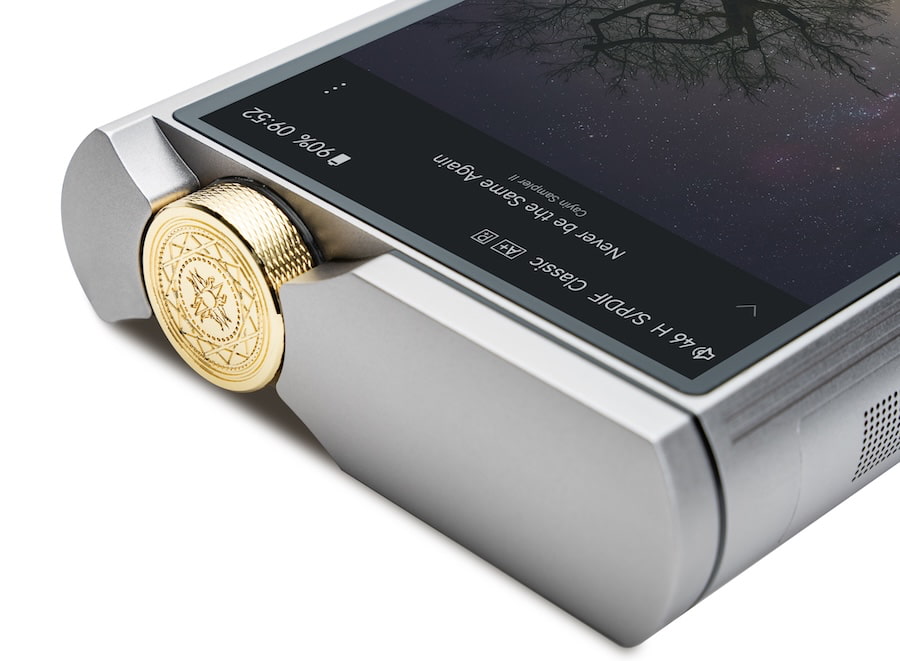
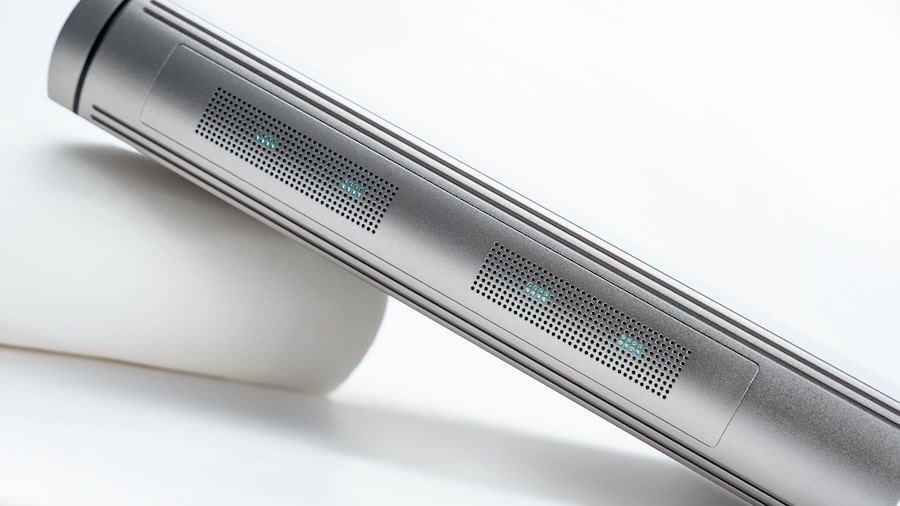
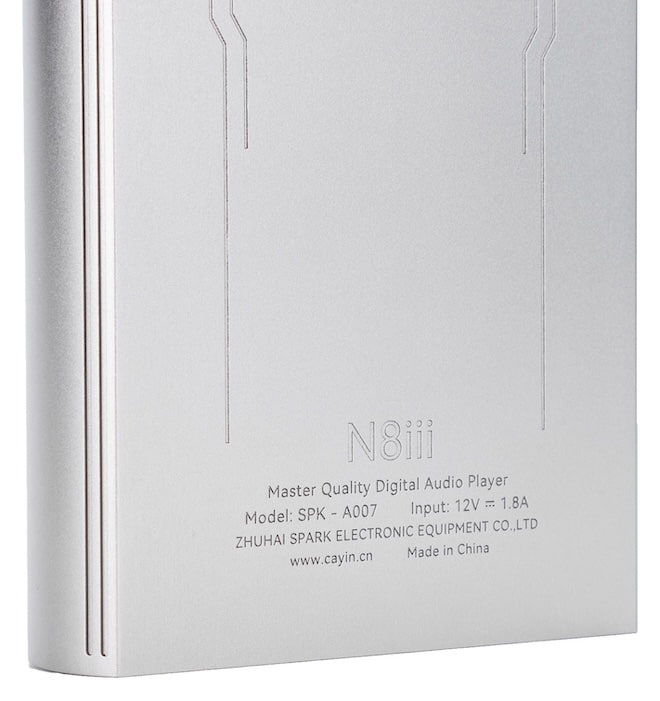
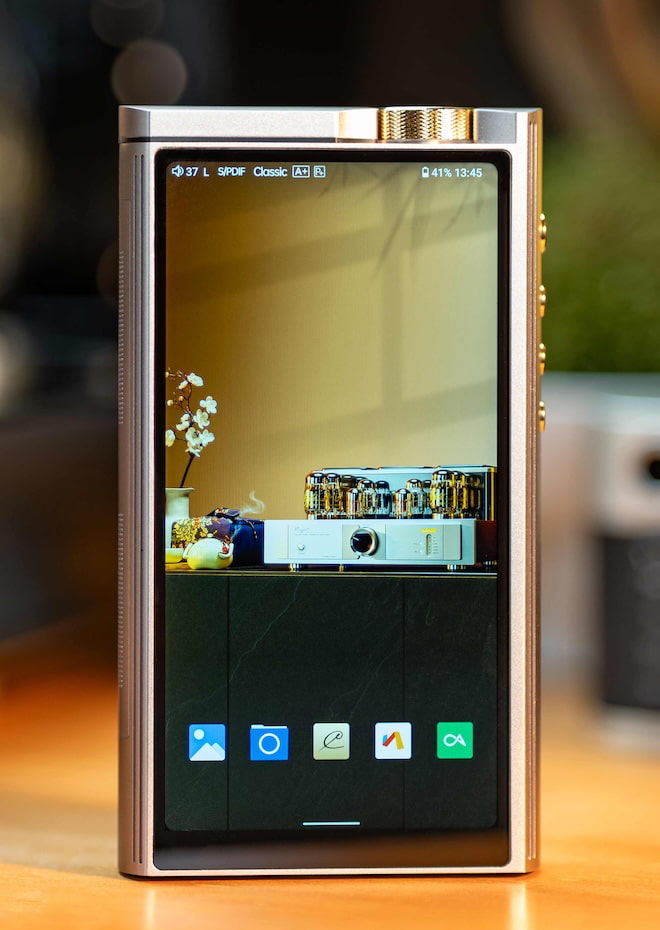
Cayin has officially taken the wraps off the N8iii, its next generation flagship digital audio player (DAP), and this time there is enough real information to move past speculation. The timing matters. Astell&Kern continues to dominate the premium tier with refined hardware and software, FiiO has become far more aggressive at the top end, and iBasso keeps pushing output and modular flexibility. Cayin is no longer competing in a niche it helped create. It is now part of a very crowded field where execution matters more than ambition.
Cayin is positioning the N8iii as a limited release with just 500 units worldwide and a suggested retail price of $3,999, placing it squarely in the upper tier of the DAP market and making it clear this is not intended for a broad audience.
A Flagship That Sticks With Tubes
Cayin is continuing with its hybrid tube and solid state approach. The N8iii introduces a Triple Timbre system with Tube Classic, Tube Modern, and Solid State modes. This is less about novelty and more about giving users different tonal options depending on the headphone and music. Cayin has been consistent here. It is one of the few brands willing to deal with the complexity of tube integration in a portable device, even if that comes with tradeoffs in size, heat, and battery life.
Power Output and Amplifier Design
The N8iii offers up to 900 milliwatts single ended and 1285 milliwatts balanced output, which translates to roughly 0.9 watts and 1.285 watts respectively. That is enough power for a wide range of headphones, including many planar magnetics and most dynamic designs in the portable category. It should not have any issue with efficient or moderately demanding full size headphones.
Where things get less certain is with high impedance dynamic headphones. Models in the 300 to 600 ohm range often require voltage swing as much as current, and Cayin has not provided enough detail yet to determine how the N8iii handles that. It is likely usable, but whether it offers full control and headroom is still an open question.
Advertisement
It is also worth stating the obvious. This is not designed for electrostatic headphones. That requires a completely different amplification approach, and Cayin is not trying to solve that problem here.
Cayin includes triple amplifier modes and dual output modes, which gives users some flexibility in how the player behaves, but it also adds complexity that will need to be justified in real world use.
DAC & Platform
Cayin is moving forward with a new flagship AKM DAC architecture, although full details have not been confirmed. That will appeal to listeners who prefer the AKM presentation, especially after several years where ESS dominated the category.
The N8iii runs on a Snapdragon 665 platform with 8GB of RAM and 256GB of internal storage. That is not cutting edge by smartphone standards, but it is in line with what most high end DAPs are using and should be sufficient for streaming and local playback without performance issues.
Advertisement
Software & Battery
The player uses a customized Android audio system with DTA, allowing SRC bypass for bit perfect playback across supported apps. This is expected at this level and Cayin is in line with the rest of the market here.
Battery capacity is listed at 13,500mAh with PD2.0 fast charging. That is a large battery, which makes sense given the use of tubes and relatively high output power. Actual runtime will depend on how those features are used, and Cayin has not provided estimates yet.
Advertisement. Scroll to continue reading.
The Competition
At this price and level, Cayin is up against established competition. Astell&Kern offers more polished industrial design and a mature user experience. FiiO is delivering strong performance with competitive pricing. iBasso continues to push output power and modular flexibility. These are complete products that balance sound quality with usability.
Cayin’s approach remains more specialized. The N8iii focuses on offering a different listening experience rather than trying to be the most practical option.
Advertisement
Cayin N8ii vs N8iii: What’s Actually Changed
Looking at the available data, the jump from the N8ii to the N8iii is not about reinventing the concept. Cayin is refining it, adding flexibility, and pushing output a bit further while trying to clean up some of the practical limitations that came with the earlier design.
The N8ii already established the blueprint. Snapdragon 660 platform, 6GB of RAM, 128GB storage, Android 9, ROHM DACs, and dual Nutube implementation. It was powerful for its time, but it also felt like a device that prioritized experimentation over usability. Battery life hovered around 8 to 11 hours depending on mode, the chassis was thick and heavy at around 442 grams, and while the output was respectable, it was not class leading.
On the output side, the N8ii delivered up to 420mW at 16 ohms from the single ended output in standard mode, and up to 720mW in its higher power setting. Balanced output pushed that further to 760mW standard and up to 1200mW in its higher power mode. That translates to roughly 0.76W to 1.2W balanced depending on how hard you push it. In practical terms, it could handle most headphones reasonably well, but it was not the last word in authority, especially with higher impedance dynamics where voltage swing matters more than raw wattage.
The N8iii moves that forward, but not dramatically. Cayin is now quoting up to 900 milliwatts single ended and 1285 milliwatts balanced output, which translates to roughly 0.9 watts and 1.285 watts respectively. That is enough power for a wide range of headphones, including many planar magnetics and most dynamic designs in the portable category. It should not have any issue with efficient or moderately demanding full size headphones.
Advertisement
Where things remain uncertain is with high impedance dynamic headphones. The increase in output is incremental, not transformative, and Cayin has not provided detailed voltage specs yet. That means headphones in the 300 to 600 ohm range may still be usable, but not necessarily driven to their full potential. And just to be clear, neither the N8ii nor the N8iii is designed for electrostatic headphones, so that remains outside the scope entirely.
The more meaningful change is in flexibility. The N8ii gave you tube or solid state. The N8iii expands that into Triple Timbre with Tube Classic, Tube Modern, and Solid State. That suggests Cayin is focusing more on user tuning and adaptability rather than just raw performance gains. It is a shift toward giving listeners more control over presentation depending on the headphone pairing.
Internally, there is also a shift in direction. The N8ii relied on dual ROHM BD34301 DACs, which offered a certain tonal character that some preferred over ESS implementations. The N8iii is moving to a new flagship AKM architecture, which likely signals a different tuning approach. That is not inherently better or worse, but it does indicate Cayin is responding to market preferences and the return of AKM supply.
Platform and usability are also getting a modest update. The N8iii moves to 8GB of RAM and 256GB of storage, along with a Snapdragon 665. That is not cutting edge, but it is an improvement and should make the device feel less constrained with modern streaming apps. The inclusion of a customized Android audio system with SRC bypass brings it in line with what competitors have already been doing, rather than pushing ahead.
Battery is another area where Cayin appears to be compensating for its design choices. The N8ii used a 10,000mAh battery rated at 38Wh and delivered between roughly 8 to 11 hours depending on mode. The N8iii increases that to 13,500mAh and adds PD fast charging. That suggests Cayin is trying to offset the power demands of tubes and higher output rather than fundamentally improving efficiency.
Advertisement
The rest of the design philosophy remains consistent. Both devices are heavy, complex, and not particularly concerned with being pocket friendly. Both are built around the idea that a portable device can approximate a desktop listening experience if you are willing to accept the tradeoffs.
Advertisement. Scroll to continue reading.
The Bottom Line
The Cayin N8iii builds on what the company has been doing with its flagship line. It keeps the tube hybrid concept, adds more flexibility in tuning, and delivers enough power for most headphones people are likely to use with a portable device. It is not intended to cover every use case. High impedance dynamics may still require more careful matching, and electrostatic headphones are not part of the equation.
At nearly $4,000 USD and with only 500 units available, this is a focused product for a specific audience. The competition is strong and more well rounded than it used to be. Cayin is relying on differentiation and sound tuning to justify its place at the top. Whether that is enough will depend on how it performs outside of the spec sheet.
What the charts from the previous model make clear is how much detail still has not been confirmed for the N8iii. The N8ii offered a very complete set of physical connections including both 3.5mm single ended and 4.4mm balanced headphone outputs, along with matching line outputs on both connections. It also included digital outputs over USB and I2S via a mini HDMI connection, plus coaxial S PDIF. That made it more than just a portable player. It could function as a transport or DAC in a larger system. With the N8iii, Cayin has not yet clarified whether all of those outputs carry over unchanged, or if anything has been added or removed. Given how important that flexibility is to this category, that is not a small omission.
Advertisement
Bluetooth is another area where details matter. The N8ii supported a wide range of codecs including LDAC, UAT, AAC, and SBC, with both transmit and receive capability. That placed it ahead of many competitors at the time, especially with UAT support for higher bandwidth wireless audio. So far, Cayin has not confirmed the codec support for the N8iii. If it remains unchanged, it is still competitive. If it has been updated, that could be a meaningful improvement. If it has been simplified, that would be a step backward. Right now, we simply do not know.
The digital section is where the lack of detail becomes harder to ignore. The N8ii supported PCM up to 32-bit/768kHz and DSD512 over USB and I2S, along with DoP support over coaxial. It could function as a USB DAC across multiple platforms and offered asynchronous USB audio with broad compatibility. Those are not niche features. They are part of what makes a flagship DAP viable as a hub in a desktop or transport based system. Cayin has confirmed a new DAC architecture for the N8iii, but has not yet outlined the full range of supported formats, digital input and output capabilities, or whether its USB DAC functionality has been expanded or refined.
MSRP: $3,999 (launch date not confirmed at en.cayin.cn).
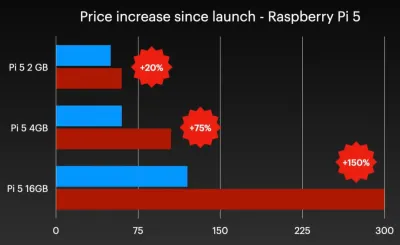
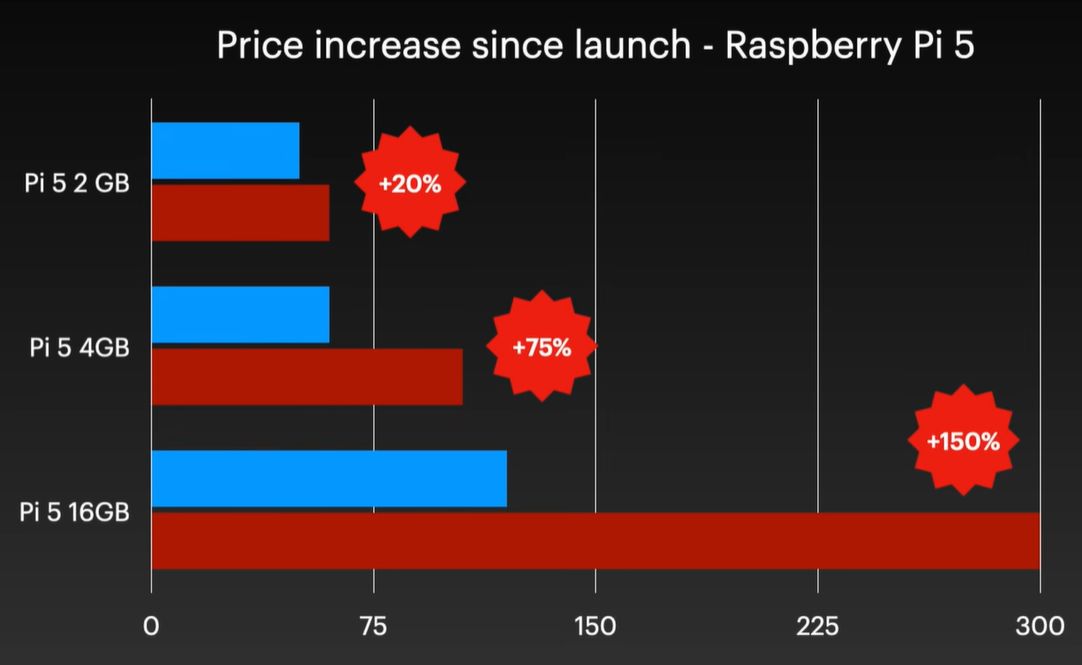
Raspberry Pi 5 price increases. (Credit: Jeff Geerling)
Although easily dismissed by some as another cruel April Fools joke, Raspberry Pi’s announcement of a new 3 GB model of the Raspberry Pi 4 along with (more) price increases for other models was no joke. Courtesy of the ongoing RAMpocalypse, supplies of LPDDR4 and LPDDR5 are massively affected, leading to this new RPi 4 model with two 1.5 GB LPDDR4 chips, as these are apparently cheaper to source.
Affected in this latest price increase across RP’s product range are RPi 4 and 5 models with 4 or more GB of RAM, with price bumps ranging from $25 on the low end to $150 for the Raspberry Pi 500+. If you wanted a Raspberry Pi 5 with 16 GB of RAM, you’re now paying $300 for the privilege.
Obviously, this news has got people like [Jeff Geerling] rather down in the dumps, essentially stating that using SBCs like the RPi is now beyond the means of many hobbyists. While you can still use SBCs that use e.g. LPDDR2 RAM, such as the older RPi Zero, 2 and 3 models, [Jeff] himself is now moving more towards wrangling with snakes on MCUs, as these boards are so far not significantly affected in terms of price.
With current projections in the RAM market being that this year will still see more price increases, it remains hard to tell exactly how ‘temporary’ this situation will be. That said, using readily available, powerful and cheap MCUs like the ESP32 variants for projects isn’t a bad idea if you really don’t need to be running more than perhaps FreeRTOS.
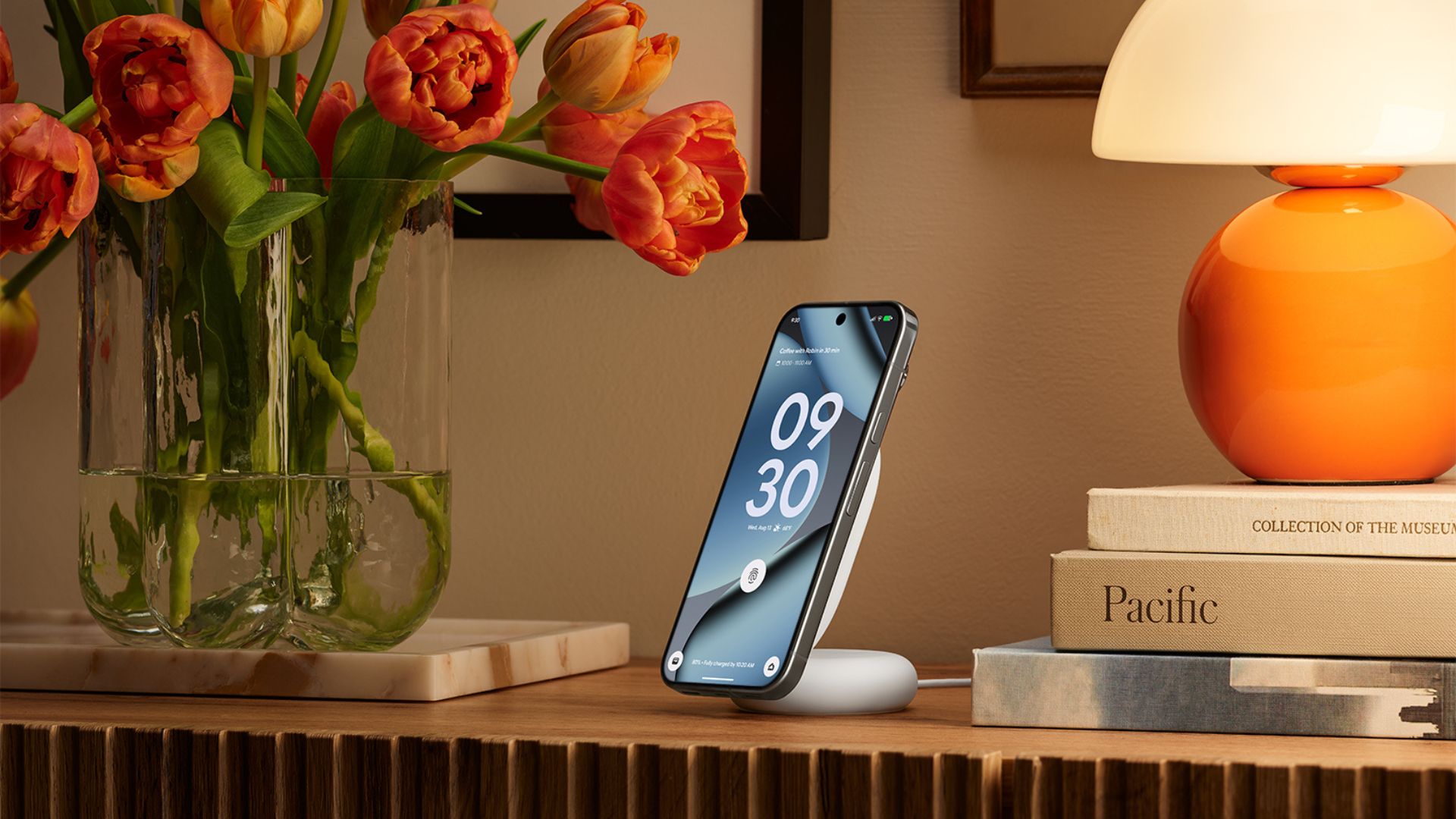
Google has confirmed that its Pixelsnap Charger receives firmware updates automatically and silently while charging a Pixel phone, with the latest release sitting at version 1.51.0.
Pixel owners can verify their charger’s firmware status by navigating to Settings, then Connected devices, and selecting the charger from the list of paired accessories, giving users a straightforward way to confirm whether their unit is running the most current software.
The updates maintain Qi compatibility and keep the charger performing at its intended standard, with Google framing the silent background update process as a hands-off approach that requires no input from the user during normal charging use.
The automatic update mechanism sets the Pixelsnap Charger apart from the vast majority of wireless chargers on the market, where firmware is either fixed at the factory or requires proprietary software and a PC connection to update, a process that most consumers never attempt.
Advertisement
For users without a Pixel device, Google has launched a dedicated web portal at pixel.google.com/pixelsnap that enables manual firmware updates through a different method, plugging the USB-C end of the charger into any Android 16 or newer phone and visiting the page through mobile Chrome rather than a desktop browser.
Advertisement
How to update manually
The manual update process involves selecting the Pixelsnap Charger from a list of compatible devices within the web portal, granting Chrome access to the connected accessory, and following the on-screen instructions to check and install any available firmware releases.
Google updated its Pixelsnap support documentation with these details over the past three months, suggesting the manual update pathway has been available quietly for some time before receiving wider attention from users and third-party publications.
Advertisement
The $39.99 Pixelsnap Charger sits within Google’s broader Pixel accessory ecosystem, and the introduction of a firmware update infrastructure reflects a growing expectation that charging hardware should receive software support in the same way smartphones and smartwatches do.
Users can check whether their charger requires an update at any time through either the Settings menu on a paired Pixel phone or by visiting the dedicated support portal on a compatible Android device.
Everyone’s four favorite anthropomorphic turtles are returning to the world of video games. Teenage Mutant Ninja Turtles: Empire City will be released on April 30 for the Meta Quest, Steam VR and Pico. It is made by VR game company Cortopia Studios and will retail for $25. Empire City is a first-person action game that you’ll be able to play solo or co-op with up to four people. And yes, that means all four of the turtles are playable.
We’ve seen a lot of the quartet flexing their fighting form in games over the years, but this is their first time appearing in a standalone VR title. In addition to the shelled heroes, the first part of the new game’s trailer highlights other familiar figures from the series, such as Karai of the Foot Clan and ripped rhino Rocksteady. And of course April is there providing pizza and intel.
schwit1 shares a report from the Kathmandu Post: In Nepal, helicopter rescue on high altitude is, by any measure, a genuine lifesaving operation. At high altitude, where oxygen thins and weather changes without warning, the ability to airlift a stricken trekker to Kathmandu within hours has saved countless lives. But threaded through that legitimate system, exploiting its urgency, its opacity, and its distance from oversight, is one of the most sophisticated insurance fraud networks in the world. Nepal’s fake rescue scam is not new. The Kathmandu Post first exposed it in 2018. Months later, the government convened a fact-finding committee, produced a 700-page report, and announced reforms. In February 2019, The Kathmandu Post published a long investigative report. Last year, Nepal Police’s Central Investigation Bureau reopened the file, and what they found is that the fraud did not stop — instead it was growing.
The mechanics of the fake rescue racket are straightforward: stage a medical emergency, call in a helicopter, check a tourist into a hospital, and file an insurance claim that bears little resemblance to what actually happened. But the sophistication lies in how each link in the chain is compensated, and how difficult it is for a foreign insurer — operating from Australia and the United Kingdom — to verify events that occurred at 3,000 metres in a remote Himalayan valley. The CIB investigation identifies two primary methods for manufacturing an “emergency.” The first involves tourists who simply don’t want to walk back. After completing a demanding trek — an Everest Base Camp trek, for instance, can take up to two weeks on foot — guides offer an alternative: pretend to be sick, and a helicopter will come. The guide handles the rest. The second method is more troubling. At altitudes above 3,000 meters, mild symptoms of altitude sickness are common. Blood oxygen saturation can drop, hands and feet tingle, headaches develop. In most cases, rest, hydration or a gradual descent is all that is needed. But guides and hotel staff, according to the CIB investigation, have been trained to terrify trekkers at precisely this moment. They tell them they are at risk of dying, that only immediate evacuation will save them. In some cases, investigators found that Diamox (Acetazolamide) tablets, used to prevent altitude sickness, were administered alongside excessive water intake to induce the very symptoms that would justify a rescue call.
In at least one case cited in the investigation, baking powder was mixed into food to make tourists physically unwell. Once a “rescue” is called, the financial choreography begins. A single helicopter carries multiple passengers. But separate, full-price invoices are submitted to each passenger’s insurance company, as if each had their own dedicated flight. A $4,000 charter becomes a $12,000 claim. Fake flight manifests and load sheets are fabricated. At the hospital, medical officers prepare discharge summaries using the digital signatures of senior doctors who were never involved in the case. In some cases, these are done without those doctors’ knowledge. Fake admission records are created for tourists who were, in some documented instances, drinking beer in the hospital cafeteria at the time they were supposedly receiving treatment. In one case, an office assistant at Shreedhi Hospital admitted that he had provided his own X-ray report taken about a year ago at a different hospital, to be used as a case for treatment of foreign trekkers to claim insurance. The commission structure that holds the network together was described in detail during police interrogations. Hospitals pay 20 to 25 percent of the insurance payment to trekking companies and a further 20 to 25 percent to helicopter rescue operators in exchange for patient referrals. Trekking guides and their companies benefit from inflated invoices. In some cases, tourists themselves are offered cash incentives to participate.
Looking for the most recent Strands answer? Click here for our daily Strands hints, as well as our daily answers and hints for The New York Times Mini Crossword, Wordle, Connections and Connections: Sports Edition puzzles.
Today’s NYT Strands puzzle relies on you having a good knowledge of a certain category of food. Some of the answers are difficult to unscramble, so if you need hints and answers, read on.
If that doesn’t help you, here’s a clue: Not vegetables.
Clue words to unlock in-game hints
Your goal is to find hidden words that fit the puzzle’s theme. If you’re stuck, find any words you can. Every time you find three words of four letters or more, Strands will reveal one of the theme words. These are the words I used to get those hints but any words of four or more letters that you find will work:
These are the answers that tie into the theme. The goal of the puzzle is to find them all, including the spangram, a theme word that reaches from one side of the puzzle to the other. When you have all of them (I originally thought there were always eight but learned that the number can vary), every letter on the board will be used. Here are the nonspangram answers:
ACAI, GUAVA, MANGO, PINEAPPLE, LYCHEE, PAPAYA
Today’s Strands spangram
The completed NYT Strands puzzle for April 3, 2026.
NYT/Screenshot by CNET
Today’s Strands spangram is TROPICALFRUIT. To find it, look for the T that’s five letters down on the far-left vertical row, and wind across, down, over and up.
Sony Interactive Entertainment, owner of the PlayStation brand, has acquired Cinemersive Labs, a UK startup developing tools to convert 2D photos and videos into 3D volumes. The startup team will join Sony’s Visual Computing Group, a research engineering team focused on graphical technology, including game rendering, video coding and generative AI models.
Cinemersive’s most recent product is a virtual reality app called Parallax that works as a viewer for parallax photos — three-dimensional images that you can peer around with natural head movements — captured using traditional smartphones and professional cameras with stereo lenses. The startup developed custom AI tools to convert 2D images into 3D volumes to make Parallax possible, and Sony apparently wants to apply that expertise to its own projects.
“Following the acquisition, the Cinemersive Labs team will join SIE’s Visual Computing Group (VCG) and contribute to our broader efforts in advancing state of the art visual computing within games,” Sony says. “This includes applying machine learning to enhance gameplay visuals, improve rendering techniques, and unlock new levels of visual fidelity for players.”
Machine learning has been a major focus of Sony’s efforts to improve graphical performance on the PlayStation 5 and future hardware. The PlayStation 5 Pro was designed around a new GPU, faster storage and PlayStation Spectral Super Resolution (PSSR), custom AI upscaling tech that let the console run games at a lower resolution and then upscale them to 4K. The company recently squeezed even more performance out of the Pro with an updated version of PSSR it released in March. And with AMD, Sony is working on Project Amethyst, a multi-pronged collaboration to improve ray tracing and upscaling on the future consoles.
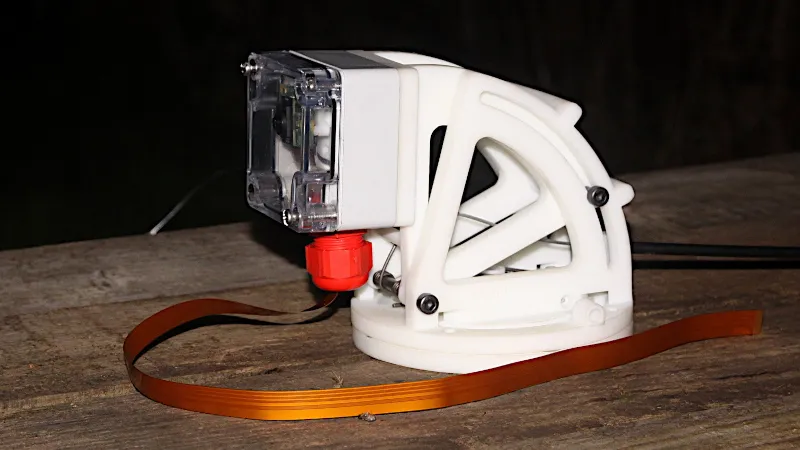
Over the years there have been many designs for pan-and-tilt camera mounts suitable for single board computer cameras. Often they mount small servos for the movement, but those in turn present problems when the device finds its way outdoors. [GOAT Industries] is here with a novel solution to this problem, instead of trying to cover up the servos on the mount itself, the whole thing is remotely controlled by linear actuators through Bowden cables.
Testing was performed using Mole-Grips instead of actuators, and revealed a few design quirks. There are hefty springs to provide tension, and since they work against 3D printed assemblies those in turn have to be reinforced. The layout of the Bowden cable run is also important, as it has a bearing on the amount of springinesss in the system. But it provides a versatile pan-and-tilt mount for a Pi camera mounted in an IP-rated box, which is the object of the exercise.
For anyone wishing to build one the files can be found in a GitHub repository, and there’s a video below showing the device in action. Meanwhile it’s by no means the first pan-and-tilt head we’ve seen here at Hackaday, however many others are by necessity much more substantial affairs.





















































You must be logged in to post a comment Login