Connect with us
DAPA Banner

Tech

IEEE Young Professionals Tackle Skills Gap in Tech

Published

on

The America’s Talent Strategy: Building the Workforce for the Golden Age report, published last year by the U.S. Departments of Commerce, Education, and Labor, identified a significant engineering and skills gap. The 27-page report concluded that the shortage of talent in essential areas—including advanced manufacturing, artificial intelligence, cloud computing, and cybersecurity—poses significant risks to U.S. economic and technological leadership.

To help attract talent in those fields, the Labor Department last month introduced incentives for apprenticeships, including a US $145 million “pay for performance” grant program. The funding aims to develop registered apprenticeships in high-demand fields including artificial intelligence and information technology.

Reacting to the urgent national need for targeted workforce development were members of IEEE Young Professionals, led by Alok Tibrewala, an IEEE senior member. He is a cochair of the IEEE North Jersey Section’s Young Professionals group.

“As a software engineer, this impending shortage concerns me because I believe that the U.S. AI and cybersecurity skills gap would show up first in the early-career pipeline,” Tibrewala says. “Students will be entering the U.S. workforce without enough hands-on experience building secure AI-enabled enterprise and cloud systems, and this gap will persist without practical, mentor-led training before graduation.”

Advertisement

Tibrewala led a strategic planning session with representatives from the New Jersey Institute of Technology, IEEE Member and Geographic Activities, and IEEE Young Professionals to discuss holding an event that would provide practical, industry-relevant training by experts and IEEE leaders.

“I was able to establish a partnership with NJIT, recruit speakers, design the event’s agenda, and promote the event to ensure it was aligned with the strategy outlined in the workforce report,” he says. “This effort aligns with broader U.S. workforce development priorities focused on industry-driven skills training in critical technology areas.”

The IEEE Buildathon event was held on 1 November at NJIT’s Newark campus. More than 30 students and early-career engineers heard from 11 speakers. Through interactive workshops, live demonstrations, and networking opportunities, they left with practical, employer-aligned skills and clearer career pathways for AI-era skills-building.

Tibrewala chaired the event and also serves as chair of the IEEE Buildathon program.

Advertisement

Session takeaways

Region 1 Director Bala S. Prasanna, a life senior member, gave the keynote address. He emphasized the need for universities, industry practitioners, and IEEE volunteer leaders to collaborate on programs to enhance technical skills.

IEEE Member Kalyani Matey, cochair of the IEEE North Jersey Section’s Young Professionals, conducted a workshop on how to build one’s personal brand and a responsive network. Participants received valuable insights about résumé building, effective communication strategies, and enhancing their visibility and employability.

“Over time, this kind of structured, employer-aligned training will help increase confidence, employability, and technical readiness across the country. With sustained support, programs like the IEEE Buildathon can become a practical bridge from education to industry in the AI era.” —Alok Tibrewala

Tibrewala led the Unlocking AI’s Potential: Solving Big Challenges With Smart Data and IEEE DataPort session. The web-based DataPort platform allows researchers to store, share, access, and manage their research datasets in a single, trusted location. He discussed needed skills including AI literacy, strong data handling and dataset stewardship, and turning data into actionable insights.

Advertisement

Chaitali Ladikkar, a senior software engineer, delivered the insightful Brains Behind the Game seminar. Ladikkar, an IEEE member, highlighted the transformative impact AI is having on gaming and game engine technologies. She explained how AI is reshaping game development. She also covered how machine learning is being used for animation, faster content generation and testing of new titles. Her seminar received enthusiastic feedback from participants.

The Building Better Business Relationships DiSC workshop provided insights into enhancing professional relationships and communication within an engineering workforce. DiSC is a behavioral self-assessment used to understand an individual’s communication style and to adapt to others.

Participant experience and testimonials

The event received high praise from participants for its practical and industry-relevant content, according to Tibrewala.

“This training significantly enhanced my understanding and readiness for industry roles, filling gaps my regular academic coursework did not fully address,” said Humna Sultan, an IEEE student member who is a senior studying computer science at Stevens Institute of Technology, in Hoboken, N.J.

Advertisement

“The Buildathon was structured around real engineering challenge scenarios that deepened my understanding of AI and cloud technologies,” said Carlos Figueredo, an IEEE graduate student member who is studying data science at the University of Michigan, in Ann Arbor. “It boosted my confidence and practical skills essential for the industry.”

Bavani Karthikeyan Janaki said “it was incredible to see how technology and sustainability came together to drive real-world impact, thanks to the dedicated efforts of the organizers including Tibrewala, Matey, and the IEEE North Jersey Young Professionals.” Janaki is pursuing a master’s degree in computer and information science at Long Island University, in New York.

Funding and collaborative efforts

The Buildathon was made possible through grants from the IEEE Young Professionals group and funding from the IEEE North Jersey Section and IEEE Member and Geographic Activities. Their support shows how IEEE’s professional organizations can collaborate to address workforce needs by supporting the delivery of technical sessions that strengthen early-career pipelines.

Future plans and a call to action

Building on the event’s success, Tibrewala and Matey plan to make the IEEE Buildathon an ongoing initiative. They are exploring ways to expand it to additional university campuses and IEEE communities.

Advertisement

Tibrewala says they plan to refine the format based on participant feedback and lessons learned. To support consistent quality, he and Matey say, they are working on a playbook for organizers that will include a repeatable agenda, a workshop template, speaker guidelines, and post-event feedback forms.

The approach depends on continued coordination among host universities, local IEEE sections, and Young Professional volunteers, Tibrewala says.

“Enabling other groups to run similar events,” he says, “can help more students and early-career engineers gain practical exposure to AI, data, cloud, cybersecurity, and other key emerging technologies in a structured setting.

“Efforts like this help translate national workforce priorities into real training that students and early-career engineers can apply immediately to their projects. This also helps close the gap between classroom learning and the realities of building secure, reliable systems in production environments. Over time, this kind of structured, employer-aligned training will help increase confidence, employability, and technical readiness across the country.

Advertisement

“With sustained support, programs like the IEEE Buildathon can become a practical bridge from education to industry in the AI era.”

From Your Site Articles

Related Articles Around the Web

Source link

Advertisement
Continue Reading
Click to comment

You must be logged in to post a comment Login

Leave a Reply

Tech

Copilot is ‘for entertainment purposes only,’ according to Microsoft’s terms of use

Published

on

AI skeptics aren’t the only ones warning users not to unthinkingly trust models’ outputs — that’s what the AI companies say themselves in their terms of service.

Take Microsoft, which is currently focused on getting corporate customers to pay for Copilot. But it’s also been getting dinged on social media over Copilot’s terms of use, which appear to have been last updated on October 24, 2025.

“Copilot is for entertainment purposes only,” the company warned. “It can make mistakes, and it may not work as intended. Don’t rely on Copilot for important advice. Use Copilot at your own risk.”

A Microsoft spokesperson told PCMag that the company will be updating what they described as “legacy language.”

Advertisement

“As the product has evolved, that language is no longer reflective of how Copilot is used today and will be altered with our next update,” the spokesperson said.

Tom’s Hardware noted that Microsoft isn’t the only company using this kind of disclaimer for AI.  For example, both OpenAI and xAI caution users that they should not rely on their output as “the truth” (to quote xAI) or as “a sole service of truth or factual information” (OpenAI).

Source link

Advertisement
Continue Reading

Tech

How to Get Reliable Wi-Fi in Your Backyard

Published

on

No one wants the tunes buffering when they have friends round for a barbecue or a stuttering podcast as they try to finish yard work. While the average router might fill your home with Wi-Fi, it doesn’t always extend to the patio or deck, much less the end of your backyard. But you can get great Wi-Fi coverage in your outdoor spaces, and I will show you the best options.

You may also want to read up on how to make your Wi-Fi faster, how to buy a router, and whether you should opt for a single router or a mesh system.

Table of Contents

Adjust or Move Your Router

Advertisement

Before you think about spending any money, try adjusting or moving your wireless router. Routers send out Wi-Fi signals in a rough circle, so I always recommend placing your router in the center of your home. Moving it slightly closer to your backyard or wherever you want to extend Wi-Fi is the simplest option. Ensure it’s positioned high and in the open. You may need a longer Ethernet cable. If your router has adjustable antennas, I also strongly recommend moving them and testing the signal strength in your problem spot (this can make a surprising difference).

If you have a mesh system, try moving one of the nodes to the back windowsill of your home to extend Wi-Fi into the backyard. If you’re able, running an Ethernet cable between your main router and the node nearest your outside space for wired backhaul can also extend range and speed significantly. If you have an outbuilding, you could even consider running an armored Ethernet cable from your main router to a mesh node or access point out there.

Use Your Smartphone as a Hot Spot

If you get a decent cellular network signal on your phone in your garden and you have plenty of data, it might be worth using your phone as a hot spot, which enables other devices to piggyback on your mobile network connection. We have a full guide on how to use your smartphone as a hot spot, but it’s very easy to do. Here’s the quick version:

Advertisement
  • On an iPhone: Open Settings, Personal Hotspot, toggle on Allow Others to Join, and set a Wi-Fi Password.
  • On an Android: Open Settings, Network and Internet (or Connections on a Samsung phone), choose Hotspot and tethering, toggle Wi-Fi hotspot on, and pick a name and password.

The problem with this is that it will use up your data allowance, tie up your phone, and drain your battery fast. But it’s a good solution in a pinch.

Upgrade Your Setup

If the two options above don’t fix your Wi-Fi woes, it might be time to upgrade your hardware. We have guides to the best routers, best mesh systems, and best Wi-Fi extenders. If you’re currently using an old or ISP-provided router, simply snagging a new one could make a big difference to your range. Most routers have a rough estimate of the square-footage range, but the construction of your home and other factors will impact it.

Switching from a single router to a mesh system is a better upgrade if you need to extend that Wi-Fi coverage. I’m not keen on Wi-Fi extenders, but they can sometimes be the most cost-effective way to get Wi-Fi to a single trouble spot. If you recently upgraded or already have a mesh, there are still other options.

Get an Outdoor Router

Advertisement

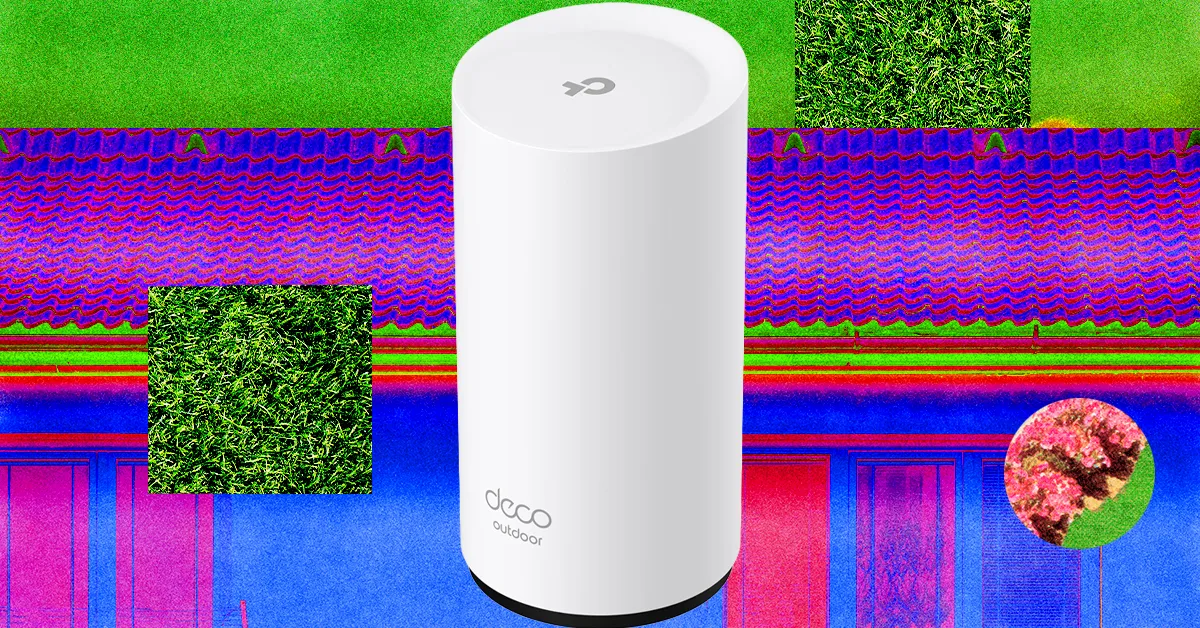
Folks with a mesh system can often add an outdoor router or node easily. Outdoor routers are weatherproof and generally have an IP rating determining what kind of weather they can withstand. They often come with fixings to mount on an exterior wall, fence, or pole, but you must consider how to run a power cable to an outlet. The right outdoor router for you depends entirely on your mesh system.

Source link

Continue Reading

Tech

Week in Review: Most popular stories on GeekWire for the week of March 29, 2026

Published

on

Get caught up on the latest technology and startup news from the past week. Here are the most popular stories on GeekWire for the week of March 29, 2026.

Sign up to receive these updates every Sunday in your inbox by subscribing to our GeekWire Weekly email newsletter.

Most popular stories on GeekWire

Source link

Continue Reading

Tech

When And Why US Aircraft Carriers Break This Vital ‘5-Mile’ Rule

Published

on


All 11 U.S. aircraft carriers employ what is called a “Five-Mile Rule,” which is rarely broken. The rule is a 5 nautical mile (5.75-mile) exclusion zone established around aircraft carriers, and its purpose is essentially force protection. Aircraft carriers are huge machines that can be dangerous to get close to, as colliding with one will always end in the carrier’s favor. Additionally, the constant need for flight operations ensures the safety of both the pilots and crew. Essentially, a five-mile buffer serves to further protect the carrier from threats.

It’s almost unfathomable how large carriers like the Lincoln are, as it displaces over 100,000 tons of seawater. When moving, it can’t turn or stop on a dime, as its inertia is considerable. Getting too close means that a collision can be unavoidable, so the exclusion zone’s purpose is essentially all about safety. While you might see pictures showing tight formations with the Lincoln among the vessels that comprise its Carrier Strike Group, that’s not normal during combat and flight operations, as breaking the Five-Mile Rule is a big naval no-no … until it isn’t.

Advertisement

Violating the exclusion zone isn’t common, but it happens. Think of it more as a rule that’s allowed to be broken than an unwavering law because there are conditions that warrant its violation. Typically, an emergency, where someone falls overboard, an unforeseen issue that arises during combat or flight operation, or any emergent situation might compel an aircraft carrier’s captain to chuck the exclusion zone into the drink and move the carrier or another ship closer than normal. Everyone onboard is trained for these situations, but it’s nonetheless dangerous since exclusion zones are there for good reasons.

Advertisement

The Five-Mile Rule and why it’s necessary

First and foremost, all U.S. aircraft carriers have a five-mile rule, and it’s all for the same reason. In 2000, the USS Cole (DDG-67) was attacked by a small vessel, causing widespread damage to its hull while killing 17 sailors and wounding almost 40 additional personnel. Since then, the U.S. Navy has been wary of small vessels, and a five-mile buffer ensures that none can get close to the carrier, as the Cole bombing proved the danger that explosive-laden craft could pose in potentially sinking an aircraft carrier. Another reason is flight operations, which is dangerous in and of itself.

The danger is elevated when an approaching aircraft has problems with onboard weapon systems or fuel. This can endanger surrounding ships, so the buffer offers added protection. Also for flight operations, the carrier must turn into the wind, requiring a large turn radius, making it imperative that its surrounding waters are devoid of any vessels. Air operations also require a bubble of airspace for recovering aircraft low on fuel, which the exclusion zone provides. The rule is only violated when combat action requires it, but under normal conditions, breaking the buffer can be hazardous.

Another aspect of carrier operations results in high-powered radar and electronic warfare radio signals. These can disrupt communications and electronics, especially with commercial, civilian vessels. Keeping them away limits potential damage to their navigation and communications equipment. The carrier is further protected by a series of submarines, cruisers, and guided-missile destroyer escorts, ensuring that no vessels stray too close. This ensures that everyone on or around an aircraft carrier like the Lincoln remains safe and secure.

Advertisement


Source link

Advertisement
Continue Reading

Tech

5 Things You Didn’t Know Your Apple Watch Can Do In 2026

Published

on


Are you using your Apple Watch to its full potential? Whether you’ve owned an Apple Watch for years, answering texts and counting steps with the small device on your wrist, or you’re new to wearing a smart watch, it’s likely that there’s a trove of hidden features and tools that you’ve never used.

Apple currently sells three versions of its popular watch: the Series 11, the SE 3, and the Ultra 3. Each version offers different features, display sizes, and battery life, but no matter which version you own, there are hidden tools that you aren’t utilizing.

It’s common knowledge that you can answer texts and phone calls, tap to pay, and track your daily exercise routine, but all models of Apple Watch offer much more. Before you get too involved in picking a fun watch face and comfortable or stylish band, take the time to learn about all the functions your watch offers. After all, it’s a big investment, especially if you opted for the high-end Ultra 3. Here are some Apple Watch features that may have flown under your radar.

Advertisement

Sleep apnea detection

If you or a loved one snores loudly or wakes up after hours of sleep still feeling tired, you may be showing symptoms of sleep apnea, a disorder that causes pauses in your breathing while you’re asleep. It affects about 30 million Americans, and the risk increases as you age. Untreated sleep apnea can lead to other issues with your health, such as high blood pressure and cardiac rhythm disturbances. If you suspect you have sleep apnea, you should make an appointment with a health care provider, but while you wait to be seen by a doctor, your Apple Watch can help look for breathing disturbances.

The Sleep Apnea Notifications feature is available on Apple Watch Series 9 or later, Apple Watch Ultra 2, or Apple Watch SE 3. Your phone must be updated to the latest version of iOS, and you must also turn on the Sleep Tracker feature, found in the Health app on your phone. Then, wear your watch when you sleep for a minimum of 10 nights over a 30-day period, and the data will be analyzed every 30 days.

Advertisement

To turn on sleep apnea notifications, open the Health app on your iPhone, tap Search, then tap Respiratory, and set up Sleep Apnea Notifications. If you receive a notification, you can export the report as a PDF to share with your health care provider.

Advertisement

Mute notifications with gestures

You’re in an important meeting, or mid-way through the first act of Hamilton, when you suddenly realize you forgot to silence notifications on your Apple Watch. The situation dictates stealth — you don’t want to interrupt your boss or draw attention to yourself in a dark theatre. Luckily, Apple offers several options that will allow you to quickly mute the notifications on your watch.

If you only remember that notifications are active because you receive an alert, such as an incoming phone call or text, you can quickly mute your that alert by covering your watch display with your hand for at least three seconds. You’ll feel a tap to notify you that you’ve successfully muted the notification. This option is typically on by default, but you can check by going to the Settings app on your watch and tapping Gestures.

You can also mute calls and dismiss notifications simply by quickly turning your wrist over and back again. Apple dubbed this the wrist flick gesture, and it’s supported on the SE 3, Series 9, Ultra 2, and later models. Again, this feature is turned on by default, and you can access it on the Settings app under Gestures.

Advertisement

Live Listen

If you’re hard of hearing, you have a loved one that is struggling with their hearing, or you’re simply struggling to hear clearly in an especially noisy situation, you can turn an Apple Watch into an accessibility aid using Live Listen. This feature uses the microphone on your iPhone to stream sound to your AirPods or MFi hearing devices. When paired with your Apple Watch, a transcription of the conversation also appears on your watch’s screen in real time.

You must use headphones or a hearing device with this feature, and Live Captions is not available in all languages or regions. Apple also warns that the accuracy of the captions may vary, so you should not rely on the transcription in an emergency situation. Live Listen is available with watchOS 26, which requires an Apple Watch Series 6 or SE 2 or later. It’s available on all models of the Apple Watch Ultra.

If you want to keep Live Listen easily accessible, add it to your watch’s Control Center. Once you’ve done that, simply place your phone near the source you want to listen to, such as a speaker or a lecturer. Open the Control Center on your watch and tap the Hearing Controls button. Scroll down to Live Listen, then you can start a session, or rewind a current session, view the live transcription, and stop the session.

Advertisement

Music recognition

We’ve all been there: you’re enjoying coffee at a cafe or watching a movie with friends and you hear a catchy tune that you simply love. You don’t know the name or the artist, and the song is fleeting – once it’s over, you may wait months to hear it again! In the days before smart phones, you’d have to describe the song to a friend or family member, hoping someone would recognize it from your clumsy humming. Eventually, music recognition apps like Shazam appeared on the scene, but you’d have to get your phone out and get the app going before the song ended.

If you own an Apple Watch, you no longer have to hum for friends or even get your phone out of your pocket. Apple now owns Shazam and has built music recognition directly into your watch, with no additional app necessary. Simply open Music Recognition on your watch by tapping the icon (a blue circle with a white, S-shaped logo) and tap again to initiate listening. Once it identifies the song, your watch will display both the title and artist. You can then see the song in Apple Music, add it to your library or playlist, and even see additional details about the song, such as the album and release date, all without pulling out your phone. If you forget to take note of a song that you heard days or weeks earlier, open the Music Recognition app on your watch and scroll down to see a history of identified songs. This capability is available on all watches running watchOS26.

Advertisement

Live translation

Only about 23% of Americans are bilingual, or able to speak more than one language. Though much of the world speaks English, this can still be a challenge, especially when we travel — only about 360 million out of more than eight billion people speak English as their first language. If you frequently travel internationally, you may want to consider investing in an Apple Watch rather than relying on a translation app on your phone.

Apple’s live translation app allows users to translate both text and voice into a long list of supported languages. You can also download new languages so you can use them without an internet connection. Offline translation is available on the Apple Watch SE 3, Series 9 and newer, and Ultra 2 and newer models.

To use live translation, first open the Translate app on your Apple watch. Tap the language you want to translate your text or speech into. If you require verbal translation, tap the microphone button and say a phrase. Your watch will translate as you type or speak and translation will appear on your watch display. To play the audio translation, tap the play button. To automatically hear translations, tap More, then Play Translations. If it’s a common phrase that you’ll likely repeat throughout your day, you can save the translation as a favorite for easy access in the future. If a word has several meanings, your Apple Watch allows you to select the one you want, and you can also select feminine or masculine translations for words.

Advertisement


Source link

Advertisement
Continue Reading

Tech

Polymarket took down wagers tied to rescue of downed Air Force officer

Published

on

A Democratic congressman had harsh criticism for Polymarket for allowing users to bet on the date the United States would confirm the rescue of Air Force service members shot down over Iran.

In a social media post on Friday, Representative Seth Moulton wrote, “They could be your neighbor, a friend, a family member. And people are betting on whether or not they’ll be saved. This is DISGUSTING.” (President Donald Trump announced early Sunday that the second service member, a weapons system officer, has been rescued.)

Moulton also described Polymarket as a “dystopian death market” and noted that Donald Trump Jr. is an investor. The congressman recently banned his staff from participating in prediction markets like Polymarket and Kalshi. 

Polymarket responded that it had taken the market down “immediately” for not meeting the company’s integrity standards.

Advertisement

“It should not have been posted, and we are investigating how this slipped through our internal safeguards,” the company said.

Polymarket previously saw hundreds of millions of dollars traded on contracts tied to the bombing of Iran by the United States and Israel.

Source link

Advertisement
Continue Reading

Tech

Building A Vise Stand With Pen-Like Retracting Wheels

Published

on

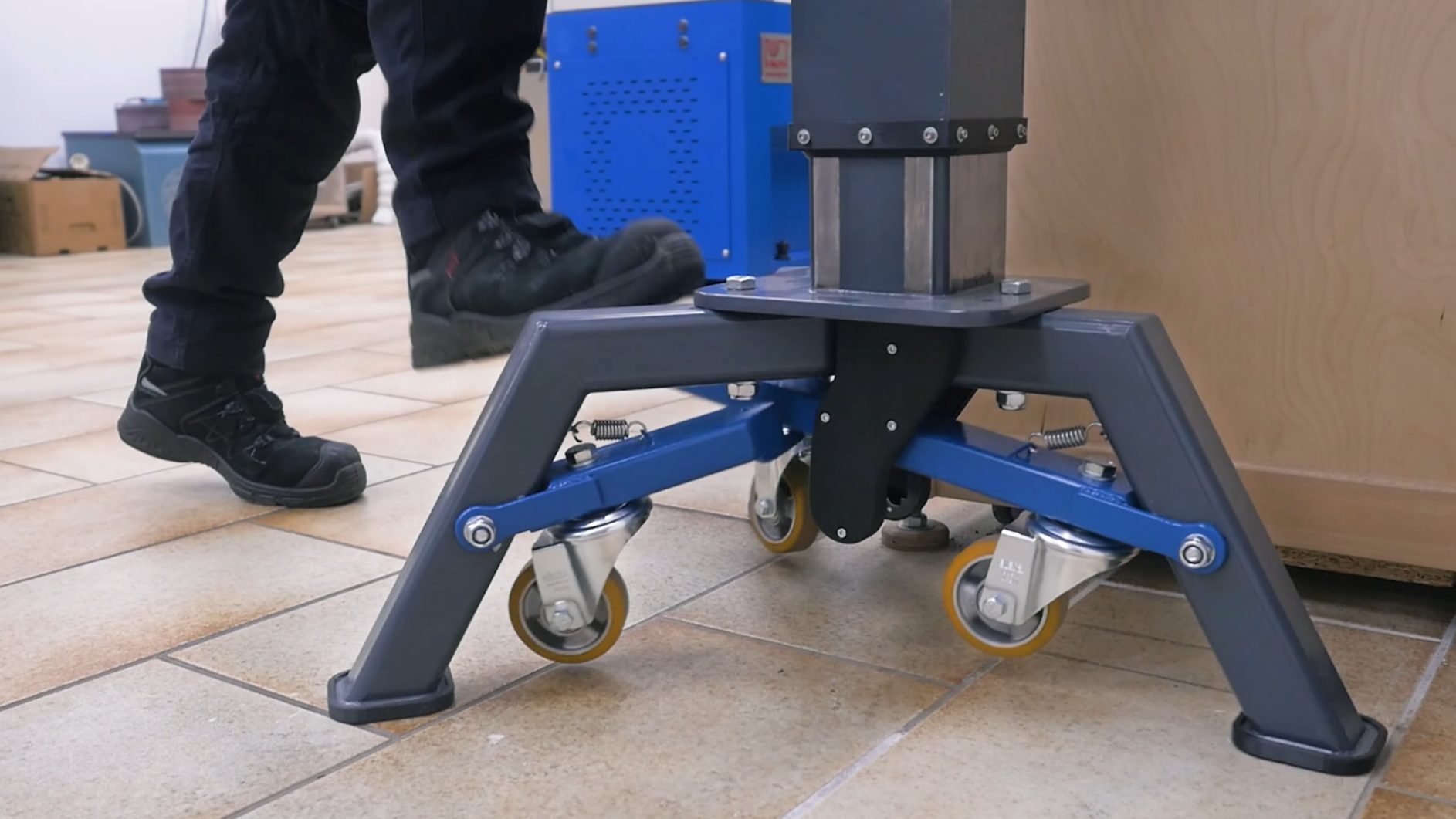
Old shop tools have a reputation for resilience and sturdiness, and though some of this is due to survivorship bias, some of it certainly comes down to an abundance of cast iron. The vise which [Marius Hornberger] recently restored is no exception, which made a good stand indispensable; it needed to be mobile for use throughout the shop, yet stay firmly in place under significant force. To do this, he built a stand with a pen-like locking mechanism to deploy and retract some caster wheels.

Most of the video goes over the construction of the rest of the stand, which is interesting in itself; the stand has an adjustable height, which required [Marius] to construct two interlocking center columns with a threaded adjustment mechanism. The three legs of the stand were welded out of square tubing, and the wheels are mounted on levers attached to the inside of the legs. One of the levers is longer and has a foot pedal that can be pressed down to extend all the casters and lock them in place. A second press on the pedal unlocks the levers, which are pulled up by springs. The locking mechanism is based on a cam that blocks or allows motion depending on its rotation; each press down rotates it a bit. This mechanism, like most parts of the stand, was laser-cut and laser-welded (if you want to skip ahead to its construction, it begins at about 29:00).

Unlike locking caster wheels, this provides significant grip when the wheels are retracted; considering the heft of the vise [Marius] restored, this must be helpful. If you’re more interested in building a vise than a stand, we’ve seen that too.

Advertisement

Thanks to [Keith Olson] for the tip!

Source link

Advertisement
Continue Reading

Tech

Check out this stunning Earth shot as Artemis II crew edges toward new record

Published

on

NASA has shared a stunning image (above) captured by the crew of the Artemis II mission as they head toward the moon. It shows a tiny Earth, mostly in darkness and surrounded by the inky blackness of space.

The photo was taken on day four of the Artemis II mission that will see four astronauts fly around the moon before returning to Earth. On Monday, the crew — NASA’s Victor Glover, Reid Wiseman, and Christina Koch, along with Jeremy Hansen of the Canadian Space Agency — will loop around our nearest neighbor, setting a new flight record in the process.

“One last look at Earth before we reach the moon,” NASA said in a post on X that shared the incredible photo.

“This view of the Earth was captured on April 5, the fourth day of the Artemis II mission, from inside the Orion spacecraft. The four astronauts will reach their closest approach of the moon tomorrow, April 6.”

Advertisement

One last look at Earth before we reach the Moon.

This view of the Earth was captured on April 5, the fourth day of the Artemis II mission, from inside the Orion spacecraft. The four astronauts will reach their closest approach of the Moon tomorrow, April 6. pic.twitter.com/z2NJUGWkKc

— NASA (@NASA) April 5, 2026

Tantalizingly for the crew, the Orion spacecraft is expected to pass within about 4,070 miles of the moon, giving astronauts their closest view of the cratered, rugged terrain in more than five decades.

But that’s not all. On Monday afternoon, shortly before 2 p.m. ET, the Artemis II crew will surpass the greatest distance from Earth ever reached by humans, set by the Apollo 13 crew in 1970 when it flew 248,655 miles from our planet. Then, about five hours later, the Artemis II astronauts will reach their farthest point from Earth, 252,760 miles, setting a new record.

Advertisement

The 10-day mission, which launched from the Kennedy Space Center in Florida on April 1, has so far been going mostly to plan. One hiccup, however, concerns the onboard toilet, which has been experiencing intermittent problems during the flight.

The latest issue has been caused by what engineers believe may be ice blocking a pipe that expels the astronauts’ urine into space. It means that for now, the crew members are having to use special bags to collect and store their liquid waste. Fortunately, the toilet still works for number-2 waste, which is dealt with differently.

Artemis II marks the first crewed flight of the Orion spacecraft and the second Orion flight overall. The mission is designed to test the spacecraft’s systems in preparation for more complex missions like Artemis IV, which will endeavor to return humans to the lunar surface after an absence of more than five decades.

Advertisement

Source link

Continue Reading

Tech

New leash on life: Why this Tableau vet walked away from tech to roll with the dogs

Published

on

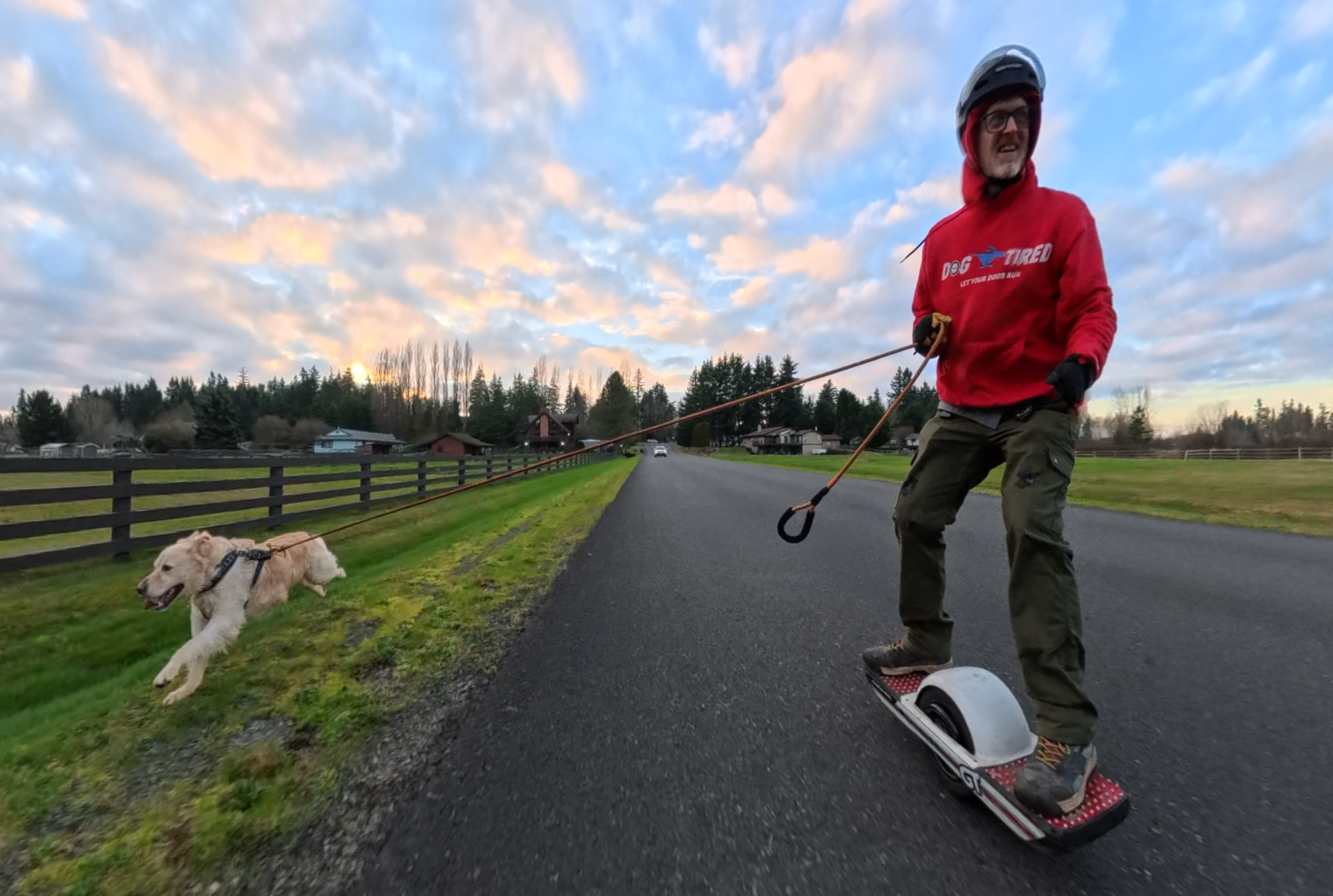
Eric Howard, founder of Dog Tired, rides his One Wheel while running Boone, a golden retriever, near Lake Tapps, Wash. (Photo courtesy of DogTired)

It’s tough to tell who has the bigger smile: the guy zipping by on the Onewheel, the dog running alongside him at full sprint, or the passersby lucky enough to witness it.

This is Eric Howard‘s dream job.

Howard is the founder and chief dog runner at Dog Tired, a dog-exercising service outside of Seattle that operates at a different speed. After stints in tech, including at data visualization company Tableau, Howard ditched the corporate leash for one he actually wanted to hold.

“I show up and I’m like the Beatles, and they’re like a teenage girl. They’re just excited to see me,” Howard said of his four-legged clients. “It’s hard to have a bad day when you go see eight dogs and they’re all just losing their mind, happy to see you.”

A longtime adventure seeker, Howard is a snowboarder and kiteboarder who fell in love the first time he stepped on a Onewheel — the self-balancing, single-wheeled electric board that riders control by shifting their weight.

Advertisement

He’s also a dog lover. When a relationship in Portland ended and the dog he’d shared with his girlfriend stayed behind, he got another one — a 15-pound poodle mix named Riley — and soon realized he was cut out for some sort of job in the pet industry.

The concept for Dog Tired came together when a friend had a high-energy rat terrier that was, in Howard’s words, bouncing off the walls. Howard tried running the dog alongside his Onewheel and it quickly became a daily — sometimes twice daily — ritual.

His friend noticed the difference immediately. The dog was more manageable and happy. And Howard saw an opportunity.

A nudge from dad

Howard graduated from the University of Washington with a degree in informatics at age 31 — a non-traditional path that he describes as a theme in his life. He joined Tableau as a senior tech support engineer when the company was still in what he considered a startup phase — long before it was acquired for $15.7 billion by San Francisco-based Salesforce in 2019.

Advertisement

He spent nearly five years across two separate stretches at Tableau, which he called the best employer he’s ever had. But as the startup atmosphere began to fade he lost his passion for data analysis, server engineering and managing a team. He needed a change.

“My dad really wanted me to do the Onewheel business. I really credit my dad with giving me that final nudge,” Howard said. “He was like, ‘You’ve got some money in your retirement and some money in savings. How long could you survive without making any money?’”

Howard figured he could make it six months or so.

“As soon as I started reaching out, spreading the word, it just caught fire,” he said. “People were just like, ‘This is a genius idea.’”

Advertisement

‘Bottomless demand’

Howard soon had 15 clients and a regular weekly routine. Within six months he was covering his bills. And five years later, Dog Tired has grown into a full-fledged operation. Howard does 50 runs a week and a part-time employee handles another dozen or more.

“I’ve got about 5,000 dog runs under my belt, about 17,000 miles total,” he said, adding that the business largely sells itself, with little turnover. “There’s a bottomless demand out there of dogs that are just waiting to get the exercise they need.”

Howard has a 100-pound-dog limit and he sticks to low-traffic areas. It helps him stay in control on the Onewheel when his clients want to chase squirrels or rabbits.

He said the work is really about relationship management, which is a lot of what he learned at Tableau. There’s plenty of troubleshooting, but in this case it’s dogs rather than computers.

Advertisement

“I’m not rich. I don’t make a fortune, but I feel very rich,” Howard said. “I look forward to every day. I get up early in the morning and the day can’t get started fast enough for me.”

Source link

Continue Reading

Tech

Save $150 on Apple's new M5 MacBook Air during Amazon's April sale

Published

on

The lowest price ever is in effect now on Apple’s M5 MacBook Air, with a weekend deal at Amazon slashing prices by $150 (and there are numerous 13-inch and 15-inch configurations to choose from).

Close-up of a MacBook Air keyboard and screen dock, with a bold banner reading Grab the lowest price ever on M5 models and a red corner label saying NEW
Grab the lowest price ever on Apple’s new M5 MacBook Air.

Apple’s brand-new M5 MacBook Air, which was released in March 2026, is on sale at Amazon today, with multiple 13-inch and 15-inch configurations to choose from.
Kicking off the sale is a $150 discount on the standard 13-inch MacBook Air with Apple’s M5 chip. Pick up the M5/16GB/512GB configuration for $949.99, the lowest price to date on the Sky Blue and Starlight models.
Continue Reading on AppleInsider | Discuss on our Forums

Source link

Continue Reading

Trending

Copyright © 2025