Connect with us
DAPA Banner
DAPA Coin
DAPA
COIN PAYMENT ASSET
PRIVACY · BLOCKDAG · HOMOMORPHIC ENCRYPTION · RUST
ElGamal Encrypted MINE DAPA
🚫 GENESIS SOLD OUT
DAPAPAY COMING

Tech

Lenovo Idea Tab Plus Review

Published

on

Verdict

For students who need an affordable tablet that includes a stylus and offers great side-by-side multitasking for productivity on the go, the Lenovo Idea Tab Plus is an easy option to recommend.

  • Stylus included

  • A great screen and software for multitasking

  • 256GB as standard

  • Limited software updates

  • MediaTek chipset has its limits

  • Not the best stylus experience from Lenovo

Key Features

  • Trusted Reviews IconTrusted Reviews Icon

    Review Price:
    £299.99

  • Advertisement

    PC Mode:

    Resize and minimise apps like on your desktop

  • Advertisement

    12.1-inch 2.5K 90Hz display:

    ideal for multitasking and entertainment

  • Advertisement

    Lenovo Tab Pen included:

    Indulge in digital drawing and note-taking

Introduction

Need an inexpensive yet work-capable tablet for your time at college or university? The Lenovo Idea Tab Plus might be exactly what you’re after.

Advertisement

As an iPad obsessive for the better part of two decades and as someone who got through the majority of their studies using an iPad Mini as opposed to a dedicated laptop, I’ve always preferred the simplicity of tablet computers, not to mention the portability they bring to the table.

Although I’m fairly knee-deep in the iPadOS ecosystem at this point, I am constantly amazed by the value that Apple’s more affordable Android competitors provide.

Advertisement

The OnePlus Pad Go 2 was easily my favourite budget tablet of last year, and I’ve been continually impressed by others including the even cheaper OnePlus Pad Lite, not to mention more expensive but brilliantly compact Lenovo Yoga Tab.

Advertisement

At £299.99/$259.99, the Lenovo Idea Tab Plus slots itself snugly at the higher end of the budget range, but that’s crucially a lower price than the entry-level iPad A16. The question is, does the Idea Tab Plus do enough to tempt potential buyers away from team Apple (and competing Android tablets)? After testing the tablet myself, here’s what I have to say on the matter.

Design

  • Sleek aluminium build
  • Slim at just 6.29mm
  • No magnetic housing for the stylus

One of the first things I noticed about the Lenovo Idea Tab Plus is that, when picked up, it’s a great example of just how far the market surrounding the best cheap tablets has come. With a smooth aluminium backing and frame, particularly when paired with the Luna Grey colourway of my review unit, Lenovo has done all that it can here to convince you that the Idea Tab Plus is anything but cheap.

The Lenovo Idea Tab Plus has Dolby Atmos-ready speakersThe Lenovo Idea Tab Plus has Dolby Atmos-ready speakers
Image Credit (Trusted Reviews)

Advertisement

It just feels wonderfully smooth in the hand (or both hands as it’s too large for one-handed use), and the fact that it’s just 6.29mm thick makes it easy enough to fling in a backpack or messenger bag and never feel that it’s taking up more space than it should.

The total weight of 530g is also just at the right level where you can hold the tablet for quite some time without any sense of fatigue, although Lenovo does expect you to bring a keyboard case into the mix to have the tablet propped up on a table, owing to the three-point connector at the base of the device.

The only area where the Idea Tab Plus does lose out to the entry-level iPad A16 is in the variety of colourways available. For Lenovo’s tablet, you can choose between the Luna Grey model featured here, and a slightly more eye-catching Sand Rose alternative, but that’s it. Compared to the four vibrant colours that Apple’s contender offers, there isn’t quite as much freedom for expression here, but you can always mitigate that with a case.

Advertisement

Arguably more detrimental is the complete lack of any housing for the included Lenovo Tab Pen. On the Lenovo Yoga Tab, there’s a magnetic strip along the top of the device so the included Pen Pro can sit there securely when it’s not in use, but there’s no equivalent here, meaning that the stylus sits around awkwardly on your desk.

Even though the Tab Pen doesn’t operate via wireless charging and instead uses a AAA battery, it would still have been nice to have a dedicated spot to keep it out of the way when you don’t need it.

Screen

  • 12.1-inch 2.5K IPS LCD
  • 90Hz refresh rate for smooth scrolling
  • Plenty of space for multitasking

Advertisement

Even though the Idea Tab Plus is aimed at the budget market, I think Lenovo understands very well that if you have a great screen to go with your tablet, much of the user experience naturally falls into place. That’s certainly the case here.

You’re getting a large 12.1-inch 2.5K IPS LCD panel that gets fairly bright, with a peak of 800 nits, along with a smooth 90Hz refresh rate that immediately gives the device an edge over the now-ancient-feeling 60Hz cap of the standard iPad.

Advertisement
Avengers Infinity War playing on the Lenovo Idea Tab PlusAvengers Infinity War playing on the Lenovo Idea Tab Plus
Image Credit (Trusted Reviews)

What I like about the display is its wide 16:10 ratio, which makes it feel brilliantly suited not just to streaming (films feel wonderfully cinematic here), but also multitasking, as there’s plenty of space to have multiple apps take up the screen and never feel as if you’re squinting at any of them. This is handy too, as the tablet has fairly robust multitasking software built in, so it all works in tandem to make this a solid buy for light productivity tasks.

When streaming a bit of Disney Plus and my go-to film of Avengers: Infinity War for testing tablet displays, the climactic battle in Wakanda did wow me with the colours on display. I’ve been a bit spoiled as of late, having moved over to using the uber premium Samsung Galaxy Tab S11 Ultra in between reviews, but even with that knowledge of how good the high-end can be, I still had a very enjoyable experience watching the film on the Idea Tab Plus.

While I do appreciate the 90Hz refresh rate, especially as it makes simple things like web browsing or scrolling through social media feel nice and smooth, it is worth mentioning that the OnePlus Pad Go 2 does have it beat with a 120Hz refresh rate for not that much more at the checkout. That tablet uses an alternative 7:5 aspect ratio, which I do prefer for work, although it isn’t quite as well-suited for entertainment.

Advertisement

Cameras

  • 13MP rear-facing camera
  • 8MP 1080P selfie camera
  • Gets the job done for scanning and Zoom calls

For the cameras on the Lenovo Idea Tab Plus, you’re looking at a single 13MP rear-facing sensor, along with an 8MP 1080p front camera for work calls and chatting with friends or family. It’s the standard setup you’d expect for a tablet at this price, which is to say it’s functional but should never be used instead of your phone if you can help it.

The back camera can pick up a decent bit of colour with the right amount of light involved, but if you get too close then the colour reproduction can look a bit off, as I soon discovered when taking pictures of my Matcha Green Kindle. It’s best used for scanning documents that can then be interacted with via the Lenovo Tab Pen.

Advertisement

It’s a similar situation with the front-facing camera – other people on a call will be able to see your face well enough, but don’t expect them to pick up on the finer details of your complexion.

Performance

  • MediaTek Dimensity 6400 chipset
  • Works well with everyday activities
  • Struggles with high-end games

Advertisement

Much like the design of the Lenovo Idea Tab Plus, the other aspect that showed me just how far the budget market has come was the tablet’s performance.

Unlike super-cheap tablets such as the OnePlus Pad Lite or the Oppo Pad SE, which are best designed for light entertainment and web browsing only, the Idea Tab Plus can work as a genuine productivity device, so long as your workload includes less intensive apps like Chrome, Google Docs and Canva.

Powering the show is the MediaTek Dimensity 6400 chipset, and in everyday use, it’s a fine CPU that delivers the right level of performance for most people, especially students. Moving through the app tray is smooth, as is jumping from one app to another, and you can delve into a bit of side-by-side multitasking without issue.

Advertisement
Side-by-side multitasking on the Lenovo Idea Tab PlusSide-by-side multitasking on the Lenovo Idea Tab Plus
Image Credit (Trusted Reviews)

I had Lenovo’s Notepad app open on one side, letting me doodle away, whilst watching YouTube on the other to catch up on the recent glut of trailers for the latest video games. For when you’re studying in the library and need to have Google Docs open alongside a browser for research, the Idea Tab Plus works exactly as you’d hope.

You can have three apps open at one time, wherein two of them are split into quarter blockers on one side of the screen, but this is where I did notice a bit of slowdown, as the tablet didn’t register my drawings at quite the same speed as before, so I don’t recommend it.

Advertisement

An area that left me feeling disappointed was the stylus itself. I’ve been spoiled by years of using Remarkable tablets to know how good the digital writing experience can be, and although I’m not usually a fan of using a stylus on a glass display, the Lenovo Yoga Tab won me over with the Lenovo Pen Pro’s haptic feedback, which recreated the feeling of moving a pencil across a piece of paper.

It’s a great bit of tech, but one that’s unfortunately missing on the standard Lenovo Tab Pen, so although the tablet can respond quickly to your inputs, the whole experience just doesn’t feel as fun or as intuitive as what you’ll find elsewhere.

Advertisement
The Lenovo Idea Tab Plus includes a Lenovo Tab Pen stylusThe Lenovo Idea Tab Plus includes a Lenovo Tab Pen stylus
Image Credit (Trusted Reviews)

When diving into a bit of gaming, a quick round of Call of Duty: Mobile was a fun and engaging experience with no visible lag and a fast pace, bolstered by the 90Hz refresh rate.

Much like with multitasking, however, if you push the Dimensity 6400 chipset even further with a game like Honkai: Star Rail, that’s where you’ll see the limits pretty quickly. By default, Star Rail sets its graphical quality to Low, where the title runs well enough, but change the settings to anything higher than that, and you’ll see the whole thing turn into a slideshow.

Regardless of whether you’re gaming or simply streaming a bit of Netflix, the tablet’s quad-speaker setup does a great job of enveloping you in its soundscape. When cranking the volume up on Avengers: Infinity War, I was able to pick up on a few layers of the overall track that I’d forgotten were there as they can get lost in the overall mix.

Advertisement

The fact that you’re getting 256GB storage as standard, plus the ability to expand that with a Micro SD card slot, means that you won’t have to worry when it comes to downloading tons of films and TV shows for a long journey.

Advertisement
Call of Duty Mobile running on the Lenovo Idea Tab PlusCall of Duty Mobile running on the Lenovo Idea Tab Plus
Image Credit (Trusted Reviews)

For those who prefer to be untethered from a Wi-Fi signal when they work, there is a 5G-compatible model of the Idea Tab Plus available to buy.

Software

  • Lenovo ZUI overlay
  • PC Mode is great for productivity
  • A bit of bloatware to contend with

Just like other tablets from the brand, the Idea Tab Plus runs the Lenovo ZUI Android overlay. It’s easily one of the least offensive of its kind, but equally, it’s not enough to stand out as a selling point in itself.

The aforementioned multitasking software feels very much like it’s taken a leaf from OnePlus’ Open Canvas feature, which is exactly why this tablet is such a good fit for students who want to have more than one app open at a time during lectures or while studying at the library.

Advertisement

If you want to take the productivity experience even further, you can delve into the surprisingly efficient PC mode, which replicates the look of a typical desktop and lets you resize apps at your leisure and minimise them for quick access later.

It all works with a higher level of performance than my ageing iPad 10th Gen, and the fact that this is a tablet with a £299.99/$299.99 RRP but can often be found for less, just makes this a bit of a bargain compared to Windows laptops. If you throw in a wireless keyboard like the Logitech Keys-to-Go 2 into the mix then the whole experience feels even more intuitive.

Advertisement
PC Mode on the Lenovo Idea Tab PlusPC Mode on the Lenovo Idea Tab Plus
Image Credit (Trusted Reviews)

There is a fair bit of bloatware to deal with once you boot up the Idea Tab Plus for the first time. Not only are there Lenovo’s own-brand apps, but there are third-party apps like Opera, WPS Office and Candy Crush Saga. It’s not quite as abrasive or in your face as what I’ve seen with MagicOS on Honor brand tablets, but it doesn’t surpass the relatively bloat-free look of OxygenOS on OnePlus devices.

The Idea Tab Plus’ biggest hang-up is that Lenovo is only promising a total of two OS upgrades from launch. That is bolstered somewhat by four years of security patches, but it’s a long way from the support provided by the likes of Apple and Samsung.

With that in mind, it’s just enough of an update cycle to get you through your studies, but I’d hesitate to recommend the Idea Tab Plus to an adult who might be looking for a tablet they can use long-term.

Advertisement

Battery life

  • 10,200mAh capacity
  • 45W charging speed
  • Plenty of juice for all-day working

One of the more eye-catching specs of the Lenovo Idea Tab Plus is that it carries a massive 10,200mAh battery, which is quite a rarity even amongst the more premium crowd. The only other tablets I’m aware of that come close at this end of the market are the OnePlus Pad Go 2 (10,050mAh) and the Honor Pad 10 (10,100mAh).

What you get with that cell, according to Lenovo, is the ability to stream up to 13 hours of YouTube, which I think is more than enough to keep most people satisfied over the course of a day. This means that if you have a long-haul flight ahead of you and you’d rather tune into your own curated library of entertainment, then you’ll have more than enough juice to see you through to your destination.

Advertisement
Battery life on the Lenovo Idea Tab PlusBattery life on the Lenovo Idea Tab Plus
Image Credit (Trusted Reviews)

Seen another way, if you decide to venture away from the library for a few hours and study with friends at a cafe, then you won’t have to worry about making sure that you’re seated next to a charging outlet.

When it comes time to top up the battery, however, you can rely on 45W speeds over a wired connection, which is faster than the 33W cap of the OnePlus Pad Go 2, so you won’t have to wait long before the battery is full once more.

Advertisement

Should you buy it?

Advertisement

You’re a student in need of a solid productivity tablet on a budget

With a price that undercuts the entry-level iPad, not to mention having a larger display and slick multitasking software, the Lenovo Idea Tab Plus is great for all-day studying.

Advertisement

You want a long-term Android tablet

With a fairly limited cycle of support, the Idea Tab Plus is immediately bettered by the likes of Apple and Samsung for anyone who wants a long-term upgrade.

Advertisement

Final Thoughts

If I were just about to head into university and had about £300/$300 to spend on a new tablet to see me through my studies, then the Lenovo Idea Tab Plus is exactly the option that I’d want to buy. The fact that you’re getting a larger (and faster) 12.1-inch 90Hz display over the iPad A16, and a stylus included, is just too good a package to overlook from a pure value standpoint.

For those who do want a slightly more compact tablet, the Lenovo Yoga Tab is available. Although I also love that tablet for its superior processor and writing experience, when it comes to side-by-side multitasking, I do prefer the Idea Tab Plus because you have more room for apps to spread out.

I do think that you get a better screen and software experience with the OnePlus Pad Go 2, but the Idea Tab Plus still comes out on top for battery life and charging speed.

Advertisement

If Lenovo were to support the Idea Tab Plus beyond the promised two-year OS update cycle, I would just as easily recommend it to adults as well, but for now, it’s just a great buy for students on a budget.

How We Test

We test every mobile phone we review thoroughly. We use industry-standard tests to compare features properly and we use the phone as our main device over the review period. We’ll always tell you what we find and we never, ever, accept money to review a product.

  • Used as a main tablet for over a week
  • Tested and benchmarked using respected industry tests and real-world data

FAQs

Does the Lenovo Idea Tab Plus come with a stylus?

Yes, the Lenovo Tab Pen is included with the tablet.

Advertisement
Does the Lenovo Tab Pen have wireless charging?

No, unlike the Tab Pen Pro, the standard Lenovo Tab Pen requires a AAA battery to run.

Advertisement

Test Data

  Lenovo Idea Tab Plus
Geekbench 6 single core 757
Geekbench 6 multi core 2008
Geekbench 6 GPU 1227
1 hour video playback (Netflix, HDR) 7 %
3D Mark – Wild Life 1212
3D Mark – Wild Life Stress Test 99.3 %

Advertisement

Full Specs

  Lenovo Idea Tab Plus Review
UK RRP £299.99
USA RRP $298.99
Manufacturer Lenovo
Screen Size 12.1 inches
Storage Capacity 256GB
Rear Camera 13MP
Front Camera 8MP
Video Recording Yes
IP rating Not Disclosed
Battery 10200 mAh
Size (Dimensions) 278.80 x 181.05 x 6.29 MM
Weight 530 G
Operating System Android (Lenovo ZUI)
Release Date 2025
First Reviewed Date 18/06/2026
Resolution 2560 x 1600
HDR Yes
Refresh Rate 90 Hz
Ports USB-C
Chipset MediaTek Dimensity 6400
RAM 8GB
Colours Luna Grey, Sand Rose
Stated Power 45 W

Source link

Continue Reading
Click to comment

You must be logged in to post a comment Login

Leave a Reply

Tech

How an IEEE Awardee Became Bewitched by Engineering

Published

on

When considering the 1960s sitcoms Bewitched and I Dream of Jeannie, both of which featured women with supernatural powers navigating life with mortals, most people wouldn’t connect them with pursuing an engineering career. But Karen Panetta did. The sitcoms’ main characters—Samantha Stevens, a witch; and Jeannie, a genie—were “strong, empowered female leads using magic,” Panetta says, and they inspired her to become an engineer, as it was like sorcery to her.

Panetta, an IEEE Fellow, is dean of graduate education at the Tufts University engineering school, in Medford, Mass., outside of Boston.

Karen Panetta

Employer

Advertisement

Tufts University, in Medford, Mass.

Title

Dean of the engineering school’s graduate education

Member grade

Advertisement

IEEE Fellow

Alma maters

Boston University and Northeastern University in Boston

Like Samantha and Jeannie, Panetta has made magic happen, such as when she helped to invent the first CPU digital-twin simulator. Digital twins are computer simulation programs that track and adjust the operations of a physical device in detail. Her simulator has been adapted for several industrial uses, including by NASA to help design spacecraft.

Advertisement

Panetta also mentors young women to encourage them to pursue a STEM career through the Nerd Girls program she launched at Tufts in 2000. Engineering undergraduate students work on technology for socially conscious projects such as environmental cleanup, renewable energy, and the development of assistive devices to improve mobility for people with disabilities.

Panetta received this year’s IEEE Mildred Dresselhaus Medal for “contributions to computer vision and simulation algorithms, and for leadership in developing programs to promote STEM careers.” The award, sponsored by Google, was presented at the IEEE Honors Ceremony on 24 April in New York City.

Receiving the medal is particularly special to Panetta, she says, because she knew its namesake: Mildred Dresselhaus, an IEEE Life Fellow who pioneered the study of carbon nanostructures at a time when researching physical and material properties of commonplace atoms was unpopular. She was a MIT professor of physics and electrical engineering, and died in 2017.

Panetta nominated Dresselhaus for the IEEE Medal of Honor, which she received in 2015.

Advertisement

“Millie was a rock star,” Panetta says. “I can’t think of another medal that really encapsulates her spirit and what I’ve dedicated my life to.”

Finding a creative outlet in engineering

As a child growing up in Boston, Panetta built trapdoors and other features in her treehouse, she says.

“I also explored fashion and sewed my own clothes,” she adds. “I wasn’t very successful, but I was very creative.”

She was a top performer in math and science classes in high school, so her father encouraged her to pursue civil engineering.

Advertisement

“I didn’t know what an engineer was, and my father, who was a mechanic working on heavy construction equipment, only knew about civil engineers,” Panetta says. “I started taking computer programming classes at school, but knowing how to type on a keyboard and make a software program wasn’t good enough for me. I wanted to know what was inside the box.”

Her thirst for knowledge inspired her to pursue a bachelor’s degree in computer engineering at Boston University.

“My father was very disappointed that I didn’t pick civil engineering,” she says, laughing.

She commuted to school, and she struggled to find study groups for her classes, so she joined IEEE to connect with peers.

Advertisement

She became active in the university’s student branch, organizing events including the IEEE Student Professional Awareness Conference, which helps students learn practical career skills including résumé building, interviewing, and networking. She organized a SPAC for her branch, and IEEE Life Senior Member Jim Watson volunteered to speak at the event. It changed her life, she says.

Watson was the director of commercial and industrial marketing at Ohio Edison in Akron, where he worked for 36 years.

“He flew to Boston to speak at our event, but fewer than 20 students attended. I was embarrassed,” Panetta says. But Watson told her the important lesson was that she showed up and organized the event.

“He said I would be successful because of that,” she says. “He didn’t care about the attendees’ grade point averages, only that we were professional enough to organize the talk.

Advertisement

“That encouragement was the first time anyone outside of my family ever told me that I would succeed, so it was reaffirming. To this day, I still use some of the techniques that I learned in his presentation in my own classroom to teach students.”

Panetta graduated in 1986. Her IEEE membership helped her get hired for her first dream job: a diagnostic engineer at Digital Equipment Corp.

While attending the IEEE Computer Society’s annual symposium on very large-scale integration in Boston, she handed her résumé to a DEC representative, who hired her to work in Hudson, Mass.

While working full time, Panetta attended Northeastern University, in Boston, as a part-time graduate student. She earned a master’s degree in electrical engineering in 1988.

Advertisement

Developing the first CPU digital twin

In the early 1990s, Panetta was assigned to work with Ernst Ulrich, one of DEC’s most respected consulting engineers, she says. He was developing a new CPU using millions of CMOS transistors.

“I thought, ‘Wow, what a great opportunity,’” she says, “not realizing they assigned it to me because no one else wanted to work with him, as he set rigorous standards, expecting those who worked with him to think outside of the box and hold their own to bullet-proof new concepts.”

Panetta and Ulrich wanted the ability to test the CPU while still designing the hardware and software. That way, both would be ready to use at the same time. Typically, the hardware was developed before the software was written.

“We decided that we were going to simulate the machine to see how it was going to run—which was unheard of,” she says.

Advertisement

During a meeting with the company’s top engineers, Panetta shared her idea for an algorithm that could accomplish the team’s goal. She was met with silence.

“It’s going to be the engineers who better society because we know how to work together. We’ve proven that IEEE members know how to work across geographic boundaries, ethnic boundaries, and gender boundaries. And that’s a good model for the world.”

“I thought to myself, ‘Did I just say something stupid?’” she says. “But then, the top engineer looked at me and said, ‘I have been doing this for 50 years, and you, a kid just out of school, comes up with this [solution] like it’s obvious.’”

Her idea became the basis for the digital twin simulator. It used behavioral models to run software on a CPU simulation. The software passes information through the system, she says, just like it would pass information through wires or interconnects.

Advertisement

“We did successfully have a complete model of millions of transistors,” Panetta says. “I efficiently simulated hundreds of thousands of experiments and ran the software on this simulated model so that we knew exactly how it was going to perform on the real machine. That had never been done before.”

Her groundbreaking work led to a promotion: from computer analyst to principal software engineer.

When she began managing a team and hiring staff members, Panetta noticed the younger employees knew the theory but didn’t have the technical skills to hit the ground running, she says.

“It took the company two years to train somebody before they could really contribute technically to a team,” she says. She decided she wanted to help prepare students for jobs in industry.

Advertisement

In 1995 she was accepted into DEC’s Engineers and Education program, in which full-time employees who wanted to teach could take a leave of absence to complete a degree while still being paid. Participants were then placed in academic institutions for two-year stints to help students bridge the gap between classroom theory and real-world problem-solving.

After earning a Ph.D. in electrical engineering from Northeastern in 1994, Panetta began her teaching assignment at Tufts. After one year, she left her job at DEC to join the university as its first female electrical engineering professor. At the time, the department had only one female undergraduate EE student.

“I showed up to work dressed in an all-pink suit,” she says, laughing. “Other professors looked at me like I didn’t belong there because I looked different.”

She didn’t let that stand in the way of reaching her goals: preparing the next generation of students for jobs and mentoring young women who were interested in becoming engineers but who felt they wouldn’t be accepted and therefore couldn’t pursue a career in the field.

Advertisement

Launching the Nerd Girls program

When Panetta began teaching, she noticed that students weren’t getting any hands-on engineering experience, so in 1996 she created an internship program. It was the precursor to Nerd Girls.

At the time, she was consulting for NASA’s data visualization and animation lab in Langley, Va., translating complex information into a user-friendly animated form. The programs visualized Earth’s atmosphere and identified pollutants, their origins, and their effects on people and the environment.

Panetta needed a larger team to help conduct the research, so she asked her undergraduate students if they wanted to participate.

“Female students flocked to me because they could relate to the work I was doing, loved how their skills could benefit humanity, and didn’t see me as the classic nerd professor with no life,” Panetta said in a 2008 interview with The Institute about the program. “Eventually, the girls outnumbered the boys.”

Advertisement

“The research project ended up winning awards,” she added. “Tufts couldn’t believe that undergrads had a hand in it. That’s when things really turned around.”

Nerd Girls officially launched at Tufts in 2000 as a class where students work closely with industry on engineering projects. Examples have included building a solar-powered car, developing a battery for the last functioning twin lighthouse in the United States, and creating devices to help people train service animals.

“Everyone who has participated in the program graduated with a bachelor’s degree,” Panetta says. “I’m also very proud that 98 percent of participants pursue a graduate degree within three years of earning their bachelor’s.”

The program is open to all students, regardless of gender.

Advertisement

Creating a community at IEEE

Panetta became an active IEEE volunteer in 2004 after meeting Arthur Winston, the IEEE president at the time. Winston, an IEEE Life Fellow, was an electrical engineering professor at Tufts. He helped found the Gordon Institute, a leadership-focused engineering school at the university.

“I sat next to him on a bus, and he invited me to attend the IEEE Boston Section meetings,” she says.

Panetta eventually was elected by the section as a member-at-large—which allowed her to attend conferences and other events.

To help spread the word about the Nerd Girls program throughout IEEE, Winston connected Panetta to Mary Ellen Randall, who was chair of IEEE Women in Engineering at the time. Randall is the current IEEE president and CEO. Panetta joined IEEE WIE and was elected as its 2007–2009 chair.

Advertisement

In that position, she worked with Randall and Leah Jamieson, the 2007 IEEE president, to hire more staff to support the program and launch its magazine.

“At that time, we didn’t have any way to connect to members or tell the stories of women in technology,” Panetta says. “I wanted people to read the stories of women from around the globe and how they overcame adversity. So I launched the IEEE Women in Engineering Magazine in 2007.”

Panetta serves as the award-winning publication’s editor in chief, and she is a member of several other IEEE societies and committees.

IEEE is helping to change the world for the better, she says.

Advertisement

“It’s going to be the engineers who better society,” she says, “because we know how to work together.

“We’ve proven that IEEE members know how to work across geographic boundaries, ethnic boundaries, and gender boundaries. And that’s a good model for the world.”

From Your Site Articles

Related Articles Around the Web

Advertisement

Source link

Continue Reading

Tech

The AirTag 2 is down to its best price since launch

Published

on

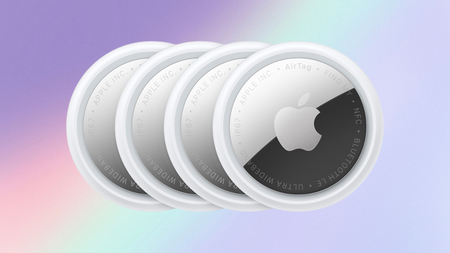
Amazon is still selling the multipack of four AirTag 2 trackers for a great price.

The handy trackers are down to $89 from their usual $99, a generous saving of 10% and the lowest price we’ve seen these drop to.

Apple Airtags on a pastel backgroundApple Airtags on a pastel background

The AirTag 2 is down to its best price ever

A $89 price tag on the AirTag 2 makes keeping track of keys, luggage, or anything else you cannot afford to lose far easier.

Advertisement

View Deal

Precision Finding has expanded significantly in this generation, since upgraded Ultra Wideband and Bluetooth chips allow the AirTag to guide you toward a lost item from considerably farther away than the original ever managed reliably.

Advertisement

That expanded range means less time wandering blindly through a house or car park, because the Find My app now offers accurate step-by-step directions across a wider radius before the item even comes into view.

Losing track of something is only half the problem, since actually locating it once you are close still depends on being able to hear it clearly over background noise.

Advertisement

The Whatsapp LogoThe Whatsapp Logo

Get Updates Straight to Your WhatsApp

Advertisement

Join Now

The AirTag 2 addresses that directly with a speaker that is 50% louder alongside a new, more distinctive chime, making the final few feet of searching far less frustrating than before.

Advertisement

Apple Watch owners gain something the previous generation never offered, since Precision Finding now extends to the watch itself, letting you track a lost item without needing to pull out your phone at all.

Battery life remains a genuine strength here too, with the AirTag 2 rated to run for more than a year on a single, easily replaceable standard battery that avoids constant charging concerns entirely.

Sharing an AirTag has also become more flexible, since location access can now be extended temporarily and securely to trusted contacts, third parties, or any of the many airline partners Apple has onboarded.

Keeping track of keys, luggage, or anything else you cannot afford to lose is exactly what the AirTag 2 was built for, and at $89 it makes a strong case for buying in at its lowest price to date.

Advertisement

Advertisement

SQUIRREL_PLAYLIST_10148964

Source link

Advertisement
Continue Reading

Tech

AI-native startups hire fewer juniors, Harvard finds

Published

on

TL;DR

A Harvard Business School and INSEAD working paper finds AI-native startups are 25% smaller, employ 13% more engineers, and carry roughly 15% lower shares of entry-level workers and managers than non-AI peers. Their hires skew senior, elite-educated, Silicon Valley-based, and male, suggesting AI is concentrating rather than democratising opportunity.

Startups built around AI hire fewer entry-level workers than their peers, according to a working paper from Harvard Business School and INSEAD, first reported by Business Insider. The firms are leaner, flatter, and heavily weighted towards senior technical talent.

Advertisement

Researchers Rembrand Koning and Hyunjin Kim examined Y Combinator startups from 2020 to 2024 alongside a broader set of US venture-backed firms. They define AI-native startups by two shifts: using AI internally to make employees more productive, and embedding it in products so customers can automate work that once required human teams.

The numbers are stark, with AI-native startups 25% smaller, employing 13% more engineers, and carrying roughly 15% lower shares of both entry-level workers and managers. The share of senior workers runs 20% higher, and valuations are comparable to non-AI peers, implying more value created per employee.

The workers these firms do hire skew a particular way. “These workers are especially likely to be graduates from elite institutions, concentrated in Silicon Valley, and male,” the authors wrote.

That cuts against the hopeful reading of the AI boom, in which juniors use AI to punch above their grade and vibe coding lowers the technical bar. The paper suggests opportunity is instead concentrating among the already credentialed.

The authors’ deeper worry is compounding inequality, warning that if AI accelerates learning for those who use it, “differential adoption rates may translate into widening performance gaps”. That applies to workers within firms and to the entrepreneurs who found them.

Advertisement

The bottom rung is cracking

The findings echo what is already visible in the labour market, where AI is killing the summer internship and graduate unemployment is climbing. Recent graduates now make up just 7% of new hires at major tech companies.

Big Tech is busy converting payroll into compute, with Meta and Microsoft cutting 23,000 roles as AI spending hits records. Demand at the top is so hot, meanwhile, that AWS is putting $1bn into forward-deployed AI engineers.

Even hiring itself has become an AI-on-AI arms race. For new graduates, the machines now sit on both sides of the table.

The study’s implication is uncomfortable for anyone selling AI as a democratising force. The technology may flatten hierarchies inside companies while steepening the climb to get into them.

Advertisement

Source link

Continue Reading

Tech

Week in Review: Most popular stories on GeekWire for the week of June 28, 2026

Published

on

Get caught up on the latest technology and startup news from the past week. Here are the most popular stories on GeekWire for the week of June 28, 2026.

Sign up to receive these updates every Sunday in your inbox by subscribing to our GeekWire Weekly email newsletter.

Most popular stories on GeekWire

Source link

Continue Reading

Tech

5 Harbor Freight Icon Tools You Can Only Buy In-Store

Published

on


Amid the dozens of brands available at Harbor Freight, a few stand out. Icon is one of the most notable brands in the discount retailer’s current range, with its high quality, mechanic-oriented series of tools having been available since 2018. In recent years, the Icon brand’s lineup has expanded significantly, and several high profile products have gone viral across social media.

You might have seen reviewers testing out the capabilities of the brand’s much-hyped magnetic mat, or perhaps you’ve been drawn in by comparison tests that evaluate the price and performance of Icon’s ratchets against Snap-On. Either way, Icon has certainly made waves with the online community of Harbor Freight enthusiasts.

Advertisement

However, despite that online attention, some of the brand’s latest and greatest products are not actually available to purchase on Harbor Freight’s website. At the time of writing, these five products all remain in-store exclusives, although some look more likely than others to eventually be made available for online purchase.

Advertisement

Icon 6 Inch Flush Cut Pliers

Browse through the range of electrical pliers on Harbor Freight’s website and you’ll find plenty of products that can be added straight to your cart, but the Icon 6 inch flush cut pliers are not among them. At the time of writing, these $34.99 pliers are instead only available in-store. Like all the Icon products here, it’s still worth checking Harbor Freight’s website to see stock levels at your nearest retail location before you go, since availability may be limited in certain locations.

The pliers feature a ¾-inch jaw capacity, and can therefore handle a variety of different sizes of wires, zip ties, or anything else you’ll need to cut through. Their grips are made from a nonslip material, while the blades are made from heat-treated steel. Icon covers all of its hand tools with a limited lifetime warranty, which covers any defects in either the material or the construction of the tool.

Advertisement

Icon T10 Professional Comprehensive Diagnostic Scanner

Icon makes no secret of the fact that it benchmarks its products against leading tool truck brands, and in some cases, it also takes heavy inspiration from their product names to boot. The Icon T10 diagnostic scanner is the Harbor Freight brand’s version of the Snap-On Triton-D10, but as you might expect, it’s far cheaper. Icon sells its scanner for $1,699.99, while Snap-On’s equivalent offering carries an MSRP of $6,550.

Buyers of the Icon scanner also receive a free year of Icon’s proprietary TrueFix diagnostics software, although after that, a subscription is required. The scanner comes with various accessories, including a USB borescope inspection camera, a wireless 12V battery tester, and OBD-II and DOIP cables. According to the brand, the scanner’s 6,300mAh battery should provide up to 8 hours of runtime before it’ll need to be put back into its docking station. A one year warranty is included as standard.

Advertisement

Icon G2 1/2 Inch Drive, 12 Inch Standard Ratchet with Comfort Grip

Although a significant number of Icon’s G2 ratchets are available to purchase online, some of its latest launches remain in-store exclusives for now. At the time of writing, the brand’s ½-inch drive, 12 inch standard ratchet with Comfort Grip is a brand new addition to the lineup, and so it’s not yet available to purchase online.

Harbor Freight first introduced the Icon G2 ratchets in 2025, and there are a few key differences between its latest line and the older G1 line. G2 ratchets are designed with sealed heads and feature gears made from nickel-chromium-molybdenum alloy, making them more durable than before. Icon’s selection of different sizes and types of ratchet has continually expanded since the launch of the G2 line, and the latest drop in June 2026 adds a further 15 different variants to the range.

Advertisement

One thing that hasn’t changed is their competitive pricing, with Icon’s G2 ratchets being much cheaper than their Snap-On rivals. The ½-inch drive, 12 inch standard ratchet with the comfort grip handle retails for $54.99. As a bonus, all of the G2 ratchet line is covered by a lifetime warranty.

Advertisement

Icon Heavy Duty Mechanics Roller Seat

With its prominent “Icon” logo embroidered into the cushion, the Icon heavy duty mechanics roller seat looks more premium than similar seats from fellow in-house Harbor Freight brand Pittsburgh. It’ll hold more weight too, with Pittsburgh’s roller seat able to accommodate a maximum of 250 lbs while Icon’s seat has a capacity of 350 lbs.

Then, there are the smaller details: The Icon’s integrated parts tray features dividers to keep small items and essential tools within easy reach, while the Pittsburgh’s tray is just one flat surface. Add in the additional tool drawer that slots neatly under the seat cushion, and it’s easy to see why the Icon seat commands a higher price than the Pittsburgh.

Whether that price is worth it is another question, and will depend on how often you plan on using the seat. The Icon seat retails for $74.99, which is over double the price of its budget rival. However, it’s still far cheaper than a similar seat from a tool truck brand like Snap-On. The Icon seat also remains an in-store exclusive for now, while the Pittsburgh seat is available to purchase straight from the retailer’s website.

Advertisement

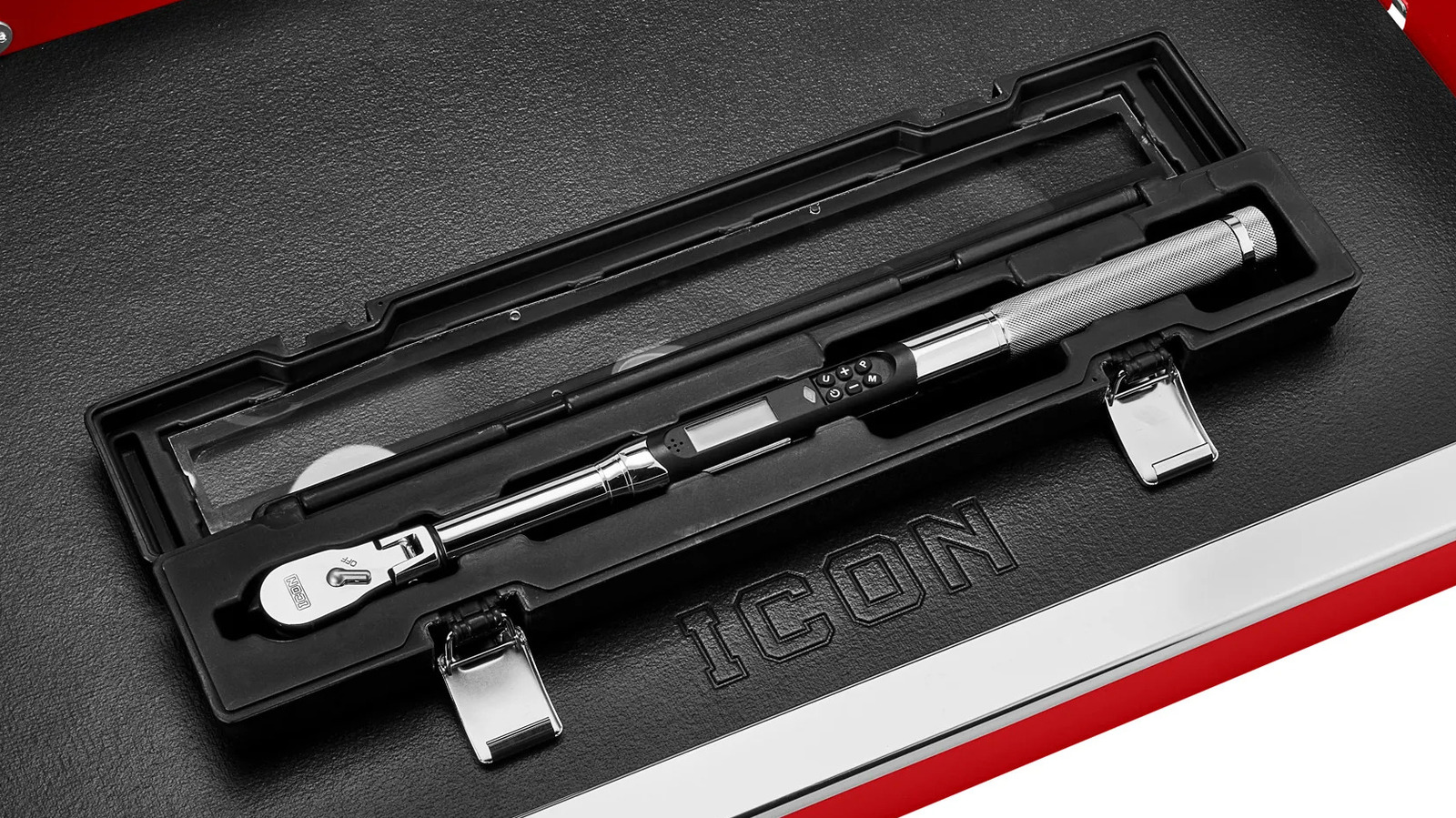
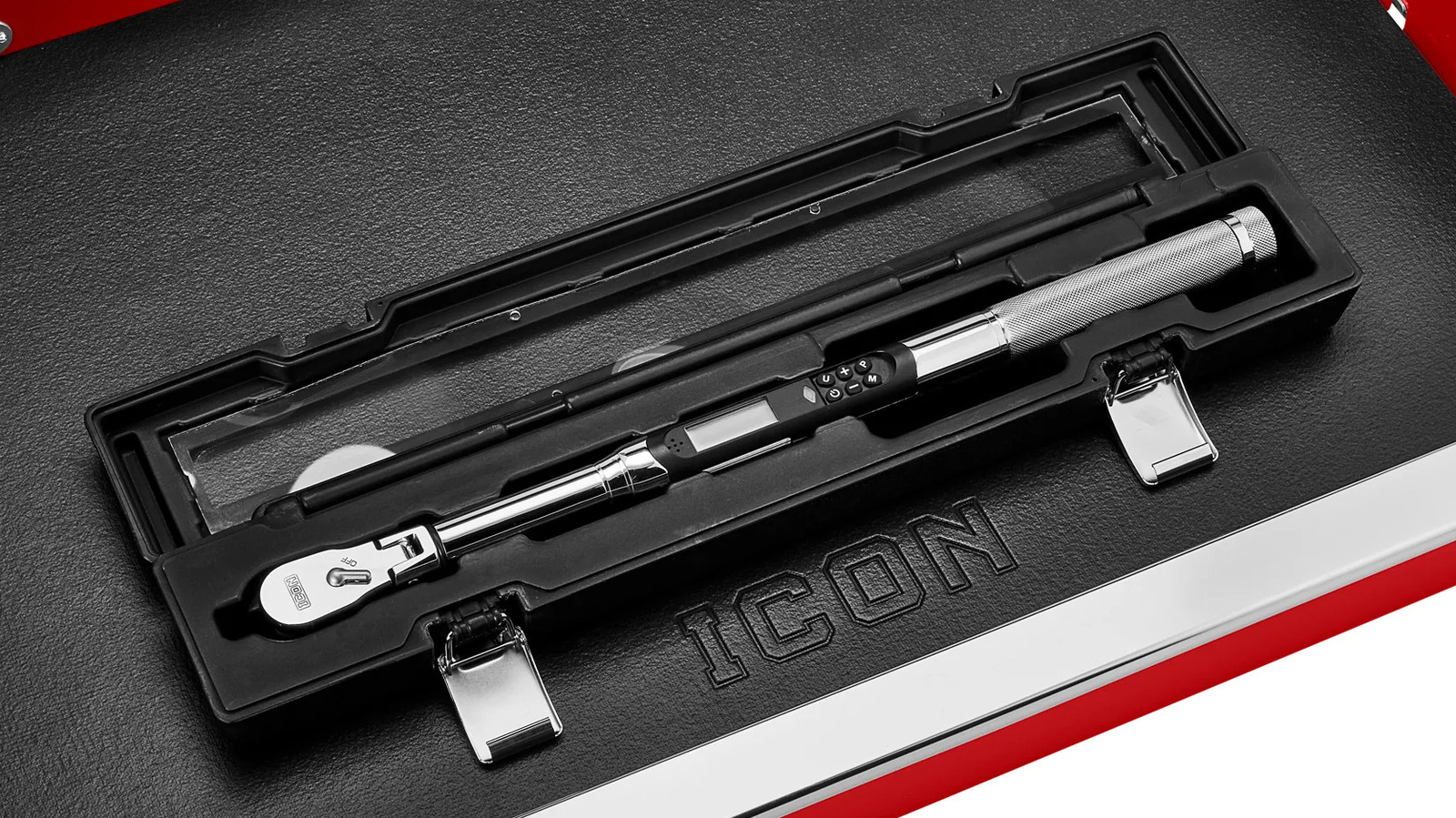
Icon 3/8 Inch Drive, 5 to 100 ft-lb Flex-Head Angle Digital Torque Wrench

Another Icon tool that’s designed to rival Snap-On is the ⅜-inch drive, 5 to 100 ft-lb digital torque wrench. It features an LCD screen and an indicator light to let users know at a glance when the desired torque has been applied. It also offers the option to add up to nine preset torque settings into memory.

In an independent test by YouTuber Project Farm, the torque wrench performed impressively well compared to its tool truck competitor. Although it wasn’t quite as accurate as the Snap-on tool, the difference was relatively small given the significant price difference between the two. When Project Farm tested the tool in 2025, it retailed for $379, but as of June 2026, Harbor Freight has dropped its price to $359.99.

Advertisement

According to its maker, the torque wrench should be accurate between +/- 2% clockwise and +/- 3% counterclockwise. The tool only needs to swing 5° to start tightening, and its flex-head adjusts 15° for optimal versatility. Readouts are available in ft-lb, in-lb, Nm, Kgcm, and dNm. It’s another Icon tool that promises professional-grade accuracy without the tool truck price tag, but it’s only available in Harbor Freight stores, and not online for now.

Advertisement


Source link

Continue Reading

Tech

Today’s NYT Connections Hints, Answers for July 6 #1121

Published

on

Looking for the most recent Connections answers? Click here for today’s Connections hints, as well as our daily answers and hints for The New York Times Mini Crossword, Wordle, Connections: Sports Edition and Strands puzzles.


Today’s NYT Connections puzzle contains a fun Looney Tunes-related category, which I thought was hilarious. Read on for clues and today’s Connections answers.

The Times has a Connections Bot, like the one for Wordle. Go there after you play to receive a numeric score and to have the program analyze your answers. Players who are registered with the Times Games section can now nerd out by following their progress, including the number of puzzles completed, win rate, number of times they nabbed a perfect score and their win streak.

Advertisement

Read more: Hints, Tips and Strategies to Help You Win at NYT Connections Every Time

Hints for today’s Connections groups

Here are four hints for the groupings in today’s Connections puzzle, ranked from the easiest yellow group to the tough (and sometimes bizarre) purple group.

Yellow group hint: Oh my gosh.

Advertisement

Green group hint: Classic kid projects.

Blue group hint: Road Runner: Beep-beep!

Purple group hint: Swipe right.

Answers for today’s Connections groups

Yellow group: Stunning news.

Advertisement

Green group: Science Fair model subjects.

Blue group: ACME products used by Wile E. Coyote.

Purple group: Starting with dating apps.

Read more: Wordle Cheat Sheet: Here Are the Most Popular Letters Used in English Words

Advertisement

What are today’s Connections answers?

completed NYT Connections puzzle for July 6, 2026

The completed NYT Connections puzzle for July 6, 2026.

NYT/Screenshot by CNET

The yellow words in today’s Connections

The theme is stunning news. The four answers are bombshell, revelation, shocker and thunderbolt.

The green words in today’s Connections

The theme is science fair model subjects. The four answers are atom, DNA, solar system and volcano.

Advertisement

The blue words in today’s Connections

The theme is ACME products used by Wile E. Coyote. The four answers are earthquake pills, iron bird seed, rocket skates and TNT.

The purple words in today’s Connections

The theme is starting with dating apps. The four answers are bumblebee, grind rail, matcha and tinderbox.

Source link

Advertisement
Continue Reading

Tech

If it exists, Elon Musk's SpaceX AI prototype hardware is thinner than iPhone

Published

on

While the device has a questionable future, and Elon Musk has denied the report, SpaceX is said to be taking on Apple by shifting into AI hardware, reportedly showing investors a prototype before the company’s IPO.

Man in a dark blazer on stage, touching his chin thoughtfully while speaking, with bright spotlights behind him against a mostly dark background
Elon Musk – Image Credit: Tesla

SpaceX’s artificial intelligence arm, xAI, has been working on a considerably more grounded product it wants to sell to consumers, as it competes against Apple Intelligence and other AI platforms. One that doesn’t involve being blasted off the planet.
According to the Wall Street Journal, Elon Musk’s rocket company has worked on a prototype for an AI device for some time. It was shown off to investors and other stakeholders before the company’s IPO.
Continue Reading on AppleInsider | Discuss on our Forums

Source link

Continue Reading

Tech

JBL Live Beam 3 Earbuds Turn the Charging Case Into a Practical Tool with a Touchscreen

Published

on

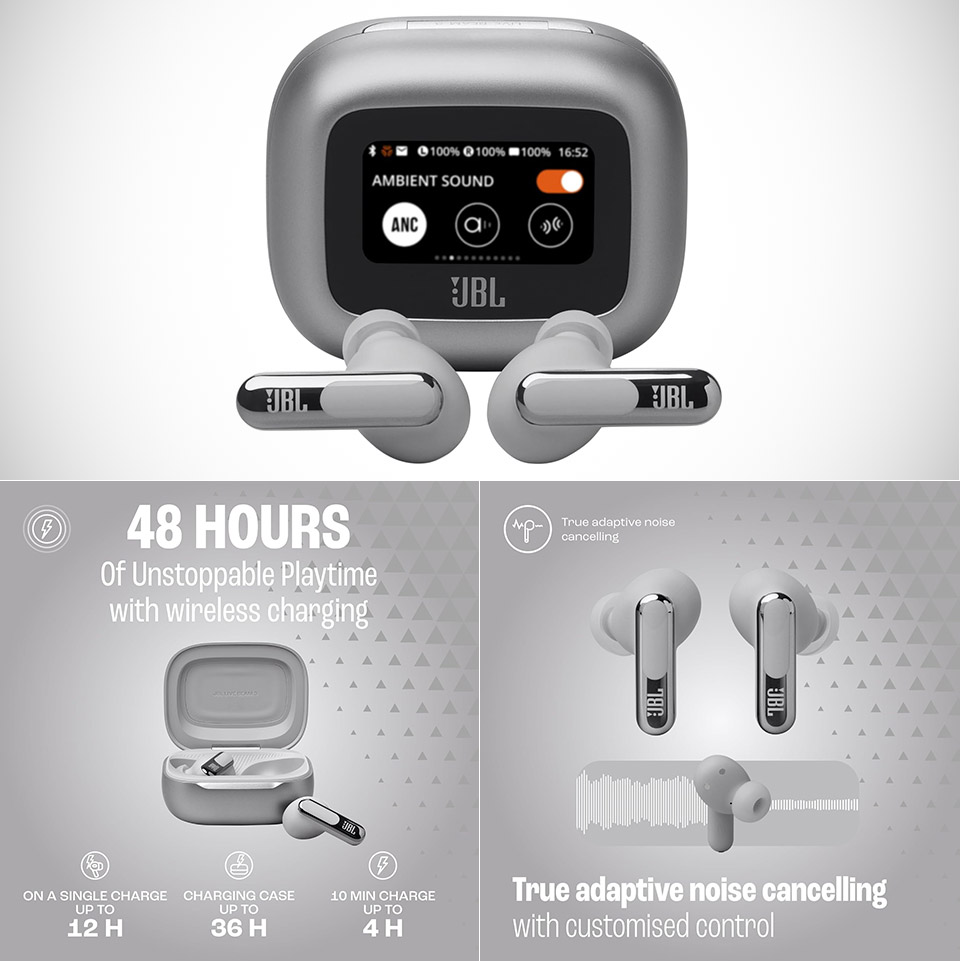
JBL Live Beam 3 Touchscreen Charging Case Earbuds
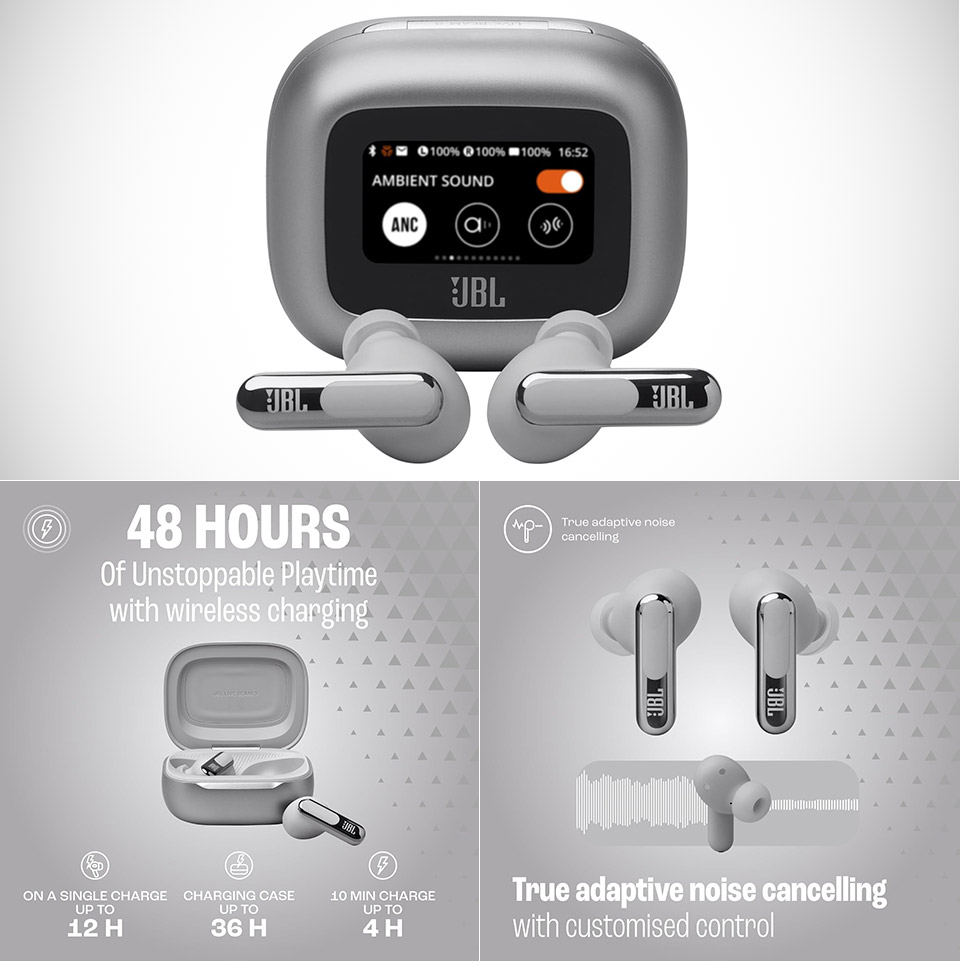
JBL packed a color touchscreen into the charging case of the Live Beam 3 earbuds, priced at $99.95 (was $149.95). That addition changes how people interact with their audio gear during a normal day. Someone heading to work or hitting the gym can open the case and swipe through options right there. Volume goes up or down with a touch. Playback pauses or skips without pulling out a phone. ANC modes switch from full noise blocking to letting in some surroundings. Even EQ presets become accessible on the go.


A tap wakes up the display, which shows the battery levels for both the buds and the casing at a glance. Users can pick a favorite photo as the background, and it rotates appropriately when the lid opens, allowing guests to see it right side up. A flashlight option brightens the screen for quick light in a pinch. Shortcuts remain adjustable in the companion app, so only the most often used tools appear. This setup addresses a major complaint about many wireless earphones. Touch controls on the buds handle basic commands but frequently need sacrifices. Adjusting one thing results in losing simple access to another. The case screen eliminates this limitation and keeps everything in one easy location that goes with the buds anyway.

The sound quality backs up the convenience, as these earbuds provide a dynamic presentation with plenty of detail and strong bass that sounds engaging across a variety of music styles. Listeners that prefer a little more vitality in their songs will find it enjoyable. Advanced codec compatibility enables compatible phones and players to send higher-quality audio when available. Those who wish to fine-tune their EQ can use an app.


The battery life is outstanding, with a single charge lasting nine to ten hours with noise canceling turned on. If you turn off ANC, it will last about twelve hours. The enclosure increases the total playback time to nearly two full days of use. When time is of the essence, a quick ten-minute charge via USB-C adds an extra four hours.


Silicone tips provide fit by forming a seal that is beneficial to both sound quality and noise reduction. The buds’ IP55 rating ensures that sweat from exercises or unexpected rain will not be an issue. Many individuals find the stem style comfortable for lengthy usage, however results vary depending on ear shape, as with most in-ear designs. Active noise canceling works nicely in this price range. It successfully minimizes traffic noise, train noise, and workplace chatter, making it suitable for everyday commutes or concentrated work. Adaptive modifications are made automatically based on the surroundings and fit. Calls come through clearly thanks to multiple beamforming microphones that eliminate wind and background interference. Multipoint Bluetooth allows the buds to connect to two devices at once, making it easy to swap between a phone and a laptop or tablet.

Advertisement

Source link

Continue Reading

Tech

Meta’s Kylie Jenner collab doesn’t make me feel any better about smart glasses

Published

on

It’s not often we mention the Kardashian-Jenner clan here at Trusted Reviews, but Kylie Jenner’s surprise collaboration with Meta is all I’ve been thinking about. 

In case you missed it, the youngest Jenner recently unveiled her own pair of Meta smart glasses. Coined Starfire, the oval-shaped specs are not only framed as a trendy choice but they’re fitted with Meta’s controversial features, including Meta AI and, most notably, the built-in 12MP camera.

Kylie’s collaboration with Meta is surprising and disappointing for so many reasons. Firstly, in a viral interview back in May, she recalled how scary and invasive growing up with paparazzi essentially stalking her for photos was.

Like her eldest sister, she’s known for keeping certain parts of her life private. For example, she hid her first pregnancy entirely from the media, and then later was reluctant to share photos of her second child online. This is completely understandable, as everyone has a right to privacy and absolutely shouldn’t feel any need to share images online.

Advertisement

With the above in mind, why on earth is Kylie therefore promoting smart glasses that have the power to take privacy away from pretty much anyone who has the bad luck of walking past a desperate aspiring content-creator-slash-creep?

Advertisement

Meta glasses have a terrible reputation for being a complete privacy nightmare, especially when it comes to women and girls’ safety. Back in May, the BBC reported that a woman was going about her day when a man approached her, without a camera or phone in hand. Instead, he was wearing smart glasses, and she had “no idea she was being filmed”. 

The video was then posted online and viewed thousands of times, with the woman only finding out when a friend sent it to her. 

Advertisement

While we don’t know the exact brand of smart glasses the man was wearing, Meta glasses all have a light that comes on when you’re filming, which technically should show people that they’re being filmed. However, and I’ve seen this for myself, that light literally couldn’t be any smaller. I would totally understand if someone passed off the light as a simple reflection or maybe even just a large scratch on the glasses. 

Meta Starfire Kylie EditionMeta Starfire Kylie Edition
Meta Starfire as shown on Kylie Jenner. Image Credit (Meta)

That’s not the only worrying story. As uncovered by Wired last month, Meta has recently embedded face-recognition technology into the Meta AI app. While it’s not currently accessible by users, it will identify people captured by the glasses’ camera and alert the wearer when it recognises someone. 

This has, unsurprisingly, caused concern. Experts who spoke to The Independent earlier this year feared this technology could pose a “direct and serious risk” to domestic abuse survivors as it could enable their abusers to locate and track (in other words, stalk) them, without them even knowing. 

Advertisement

Plus, the fact that anyone who walks past a Meta glasses wearer’s image will be “cropped, indexed, and saved to a folder marked ‘pending’” is incredibly unnerving. What if your neighbour or the fellow commuter who always gets the same train as you is wearing Metas? Will your image be consistently stored for them to see? Will Meta actually note that you’re a frequent passer-by and attempt to identify you? 

Advertisement

What are the merits of smart glasses?

I’ve had hands-on experience with both the Meta Ray-Bans 2 and the Oakley Meta Vanguard too. The latter I somewhat understand the purpose of more, as they’re used as sports glasses and enable you to capture your surroundings, get real-time stats and more without needing to reach for your phone. The Ray-Bans 2 and similar glasses, on the other hand, are a different story.

Ray Ban Meta 2Ray Ban Meta 2
Ray-Ban Meta 2. Image Credit (Trusted Reviews)

Yes, Meta glasses allow you to do interesting things like translate live, but so do AirPods and many of the best Android phones. And yes, the glasses also give you real-time answers with Meta AI without you needing to reach for your phone, but is anything really that urgent?

I admit, I just can’t get on board with smart glasses, and maybe it’s because I’m not the target audience. But once you factor in the high price, the limited style options and, most notably, the serious privacy concerns, the cons surely vastly outweigh the pros.

Advertisement

However, Kylie Jenner’s influence is undeniable, and Meta clearly knows this as she’s one of the most followed users on Instagram. Her collaboration with Meta is not only hypocritical from someone who publicly states how much she favours privacy, but it will undoubtedly attract a new demographic of younger users who grow to think it’s simply fine to film people without their knowledge.

Advertisement

Obviously (and very unfortunately) it’s not as easy to say “let’s just ban smart glasses”, but there undoubtedly needs to be more regulation of filming and sharing content online.

Source link

Advertisement
Continue Reading

Tech

Quordle hints and answers for Monday, July 6 (game #1624)

Published

on

Looking for a different day?

A new Quordle puzzle appears at midnight each day for your time zone – which means that some people are always playing ‘today’s game’ while others are playing ‘yesterday’s’. If you’re looking for Sunday’s puzzle instead then click here: Quordle hints and answers for Sunday, July 5 (game #1623).

Quordle was one of the original Wordle alternatives and is still going strong now more than 1,500 games later. It offers a genuine challenge, though, so read on if you need some Quordle hints today — or scroll down further for the answers.

Enjoy playing word games? You can also check out my NYT Connections today and NYT Strands today pages for hints and answers for those puzzles, while Marc’s Wordle today column covers the original viral word game.

Advertisement

Source link

Continue Reading

Trending

Copyright © 2025