Tycoon 2FA accounted for around 62pc of all phishing attempts blocked by Microsoft by mid-2025.
A joint cybersecurity operation has disrupted one of the world’s largest phishing-as-a-service platforms, called ‘Tycoon 2FA’ and used to bypass multi-factor authentication (MFA) and hack user accounts.
The operation was coordinated by Europol’s European Cybercrime Centre, while technical disruption was led by Microsoft. Participating industry partners also included Cloudflare, Coinbase, Proofpoint and Esentire, among others.
Japanese cybersecurity firm Trend Micro shared intelligence that allowed the investigation to initiate, Europol noted. Law enforcement authorities from several European countries, including Spain and the UK, also participated.
Advertisement
Tycoon 2FA provided cybercriminals with a subscription-based toolkit that intercepted live authentication sessions to gain unauthorised access to online accounts, including those that were protected by additional security layers.
The platform has been active since at least 2023, according to Europol, and enabled “thousands” of cybercriminals to access email and cloud-based service accounts. Experts determined that the platform generated “tens of millions” of phishing emails each month, attempting to gain access to nearly 100,000 organisations globally, including schools, hospitals and public institutions.
“Campaigns leveraging Tycoon 2FA have appeared across nearly all sectors including education, healthcare, finance, non-profit and government,” said Microsoft.
“Its rise in popularity among cybercriminals likely stemmed from disruptions of other popular phishing services”, it noted.
Advertisement
Tycoon 2FA accounted for around 62pc of all phishing attempts blocked by Microsoft by mid-2025. Its platform enabled threat actors to impersonate trusted brands by copying sign-in pages for services including Microsoft’s own 365 and OneDrive, and Gmail. It also allowed criminals to access sensitive information even after passwords were reset.
Targets were lured through phishing emails containing attachments with svg, pdf, html or docx files, often embedded with QR codes or JavaScript. To evade detection, the platform used techniques such as anti-bot screening, browser fingerprinting and self-hosted Captchas.
The joint industry and law enforcement operation led to the disruption of 330 domains that formed the core infrastructure of the criminal service, including phishing pages and control panels.
However, Microsoft pointed out that Tycoon 2FA illustrates the “evolution of phishing kits in response to rising enterprise defences”. The platform shows how cybercriminals adapt lures, infrastructure and evasion techniques to stay ahead of detection.
Meanwhile, Amazon last month highlighted how commercial AI is being used by less technically savvy cybercriminals to scale cyberattacks on enterprises.
Don’t miss out on the knowledge you need to succeed. Sign up for the Daily Brief, Silicon Republic’s digest of need-to-know sci-tech news.
Some things have an undeniable appeal, and lo-fi, pixelated Game Boy-camera-like images are one of them. In service of this, [Raul Zanardo] created his handheld pixel camera that goes the extra mile. It implements slick real-time pixel art filters and a number of other useful features.
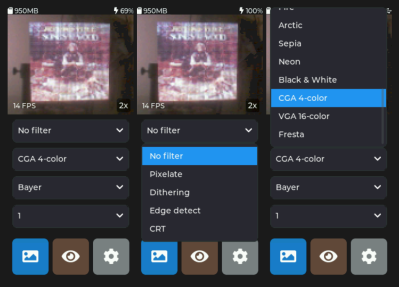
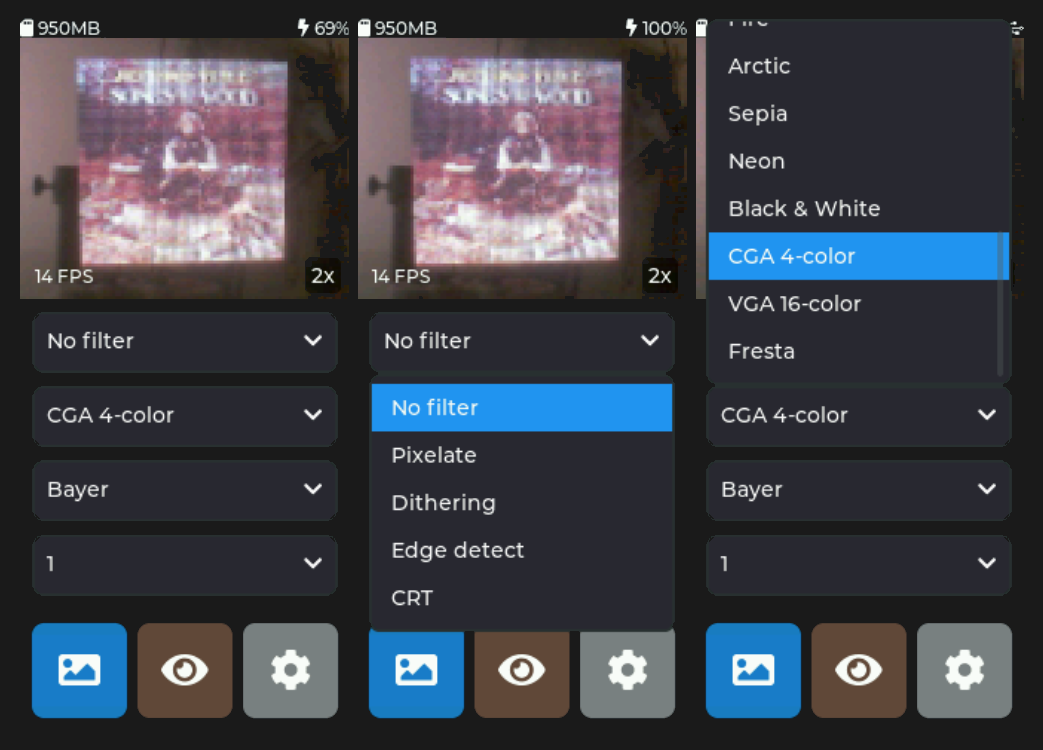
A live preview with real-time filters makes capturing just the right image easy.
For hardware, [Raul] uses a LilyGo T-Display S3 Pro which is an ESP32-based development board, camera, and color touchscreen display in a handheld form factor that vaguely resembles a chunky smartphone. The only change is swapping the stock camera for an OV3660-based camera module. It’s a drop-in replacement, but necessary because some of the features and settings his software uses are not available on the stock camera.
The camera captures 240 x 176 images, but the really neat part is the real-time filter pipeline. There are many configurable choices to play with, including pixelation, dithering, edge detection, CRT scanline effect, and color palette presets. Captures are saved to a local micro SD card and there’s all kinds of handy features like a photo gallery that takes full advantage of the color touchscreen. There’s also USB Mass Storage functionality, so downloading photos is as simple as plugging in a USB cable.
The Game Boy camera’s charming lo-fi imagery has inspired many pixel-camera projects, and this one makes great use of an inexpensive handheld development board and includes truly useful features.
Advertisement
Do you have your own pixel-art inspired camera project? Hit up our tips line and tell us all about it!
On a recent evening in suburban Chicago, a group of parents, teachers and administrators gathered to talk about something that, until recently, rarely drew this level of public scrutiny: the role of technology in their schools.
The meeting was part of a three-session tech and learning focus group organized by Mary Jane (MJ) Warden, chief technology officer of Community Consolidated School District 15, in conjunction with the Teaching, Learning and Assessments Department.
The district, which serves 11,000 preK-8 students, spent the past several years — like so many others — adding digital tools. Now, with budgets tightening and concerns about screen time rising, it was time to take stock.
A re-examination of digital tools was already happening with curriculum reviews and tightening budgets after the pandemic. And then the screen time concerns arose.
Advertisement
Participants discussed everything from screen time to what district technology use looks like at home. Out of those conversations came something new: a “Portrait of a Digital Learner,” derived from the district’s Portrait of a Graduate, meant to develop clear expectations around what skills students need and, by extension, which technologies are worth keeping and how technology would be used by students toward positive learning outcomes.
“We’re trying to get much [clearer] about what this is going to address,” says Warden. “What do we need students to learn, and which tools will help us understand where they are?”
Across the country, district leaders are asking similar questions. After years of rapid expansion, many are now engaged in a quieter but more consequential phase: reassessing what stays, what goes and how to decide.
From Buying Tools To Proving Value
For much of the past decade, edtech decisions often began with the product. A new platform promised to boost engagement or personalize learning; districts piloted it, added it to an already crowded ecosystem and moved on.
Advertisement
That approach is no longer sustainable, says Erin Mote, CEO of InnovateEDU, a nonprofit focused on systems change in special education, talent development and data modernization in schools.
“We’re seeing a shift from ‘Does this look cool?’ to ‘Does this work?’” she says. “Districts have less money now; they have to be smarter.”
The end of pandemic-era federal funding has intensified that pressure. Technology leaders are now expected not only to manage infrastructure and compliance, but also to demonstrate what Mote calls a return on instructional impact.
Advertisement
In practice, that is changing how districts approach procurement. Instead of starting with vendor demos, many are beginning with specific learning needs.
“If you need to improve third-grade reading comprehension, you start there,” Mote says. “Then you ask: Which tool can move that needle?”
New Playbook For Evaluation
As districts rethink their approach, a more structured and more skeptical evaluation process is emerging.
One major shift is toward tracking actual usage. Platforms like ClassLink and Clever now give districts detailed analytics on which tools students and teachers are accessing, how often they’re used and, in some cases, how much time is spent in each application. That data has helped uncover what some leaders call “zombie licenses,” products that continue to be renewed despite minimal use.
Advertisement
At Joliet Public Schools in Illinois, technology leaders review usage data each spring alongside feedback from a districtwide technology committee.
“If we’re not getting usage or we have another product that does it better, we start asking hard questions,” says John Armstrong, chief officer for technology and innovation.
But usage alone is not enough. Districts are also weighing cost, redundancy and alignment with instructional goals.
During the pandemic, many schools layered new tools on top of existing ones. Now, leaders are working to simplify.
Advertisement
“We had so many products that teachers were going to four different places to run a lesson,” says Kelly Ronnebeck, associate superintendent for student achievement in East Moline School District 37 in Illinois. “We’re trying to get back to a slower, more intentional process.”
That often means replacing several standalone tools with a single platform that can do multiple jobs — even if it means giving up some features teachers value. In some cases, a newer system can replace several standalone tools at a lower cost but may not match each one’s individual strengths.
“It’s not always a perfect swap,” admits Armstrong. “Someone gives up something.”
At the same time, districts are placing greater emphasis on interoperability and data privacy. Tools must integrate with existing systems like learning management platforms and single sign-on tools, and vendors have to be willing to sign increasingly stringent data privacy agreements.
Advertisement
“If a company can’t meet those requirements, that’s a red flag right away,” says Phil Hintz, CTO of Niles Township District 219 in Illinois.
The Challenge Of Proving What Works
Even as districts adopt more rigorous processes, it remains stubbornly difficult to determine whether edtech tools actually improve learning.
“It’s such a huge challenge,” says Naomi Hupert, director of the Center for Children & Technology at the Education Development Center. “We see so much that doesn’t seem to make a difference but costs a lot of money.”
Part of the difficulty lies in the sheer breadth of what “edtech” encompasses, everything from learning management systems to specialized math platforms to communication tools. Each category has different goals, users and measures of success.
Advertisement
“It’s like asking whether ‘books’ work,” says Hupert. “It depends on the book, the context and how it’s used.”
District leaders have to piece together evidence from multiple sources: vendor-provided analytics, small pilot studies, teacher feedback and, occasionally, external research. But those data points don’t always align.
Jason Schmidt, director of technology in Oshkosh Area School District in Wisconsin, describes his approach as “trust but verify.”
“I know vendors are collecting tons of data, and they have to, but I still need to talk to teachers and understand how the tool is actually being used,” he says.
Advertisement
Even then, results can be uneven. A platform might show strong engagement overall but fail to support certain groups of students — or vice versa.
In Alexandria City Public Schools in Virginia, leaders are developing a formal framework to evaluate both edtech and nontech programs. But defining “value” has proven complex.
“It’s not just usage and cost,” says CIO Emily Dillard. In a district with a high number of English learners, some tools play a critical role for students who need targeted or specialized support.
“You might have a tool that isn’t working for most students — or takes time to show results — but for a small group, it’s the best thing we have. We have to think about what’s best for them, too,” says Dillard.
Advertisement
Building Systems for Quality
Recognizing these challenges, a growing coalition of organizations is working to create clearer signals of quality in the edtech marketplace.
Through the Edtech Quality Collaborative, 1EdTech, CAST, CoSN, Digital Promise, InnovateEDU, ISTE, and SETDA are developing a shared framework built around five indicators: safety, evidence, inclusivity, interoperability and usability.
The goal, says Korah Wiley, senior director of edtech R&D at Digital Promise, is to reduce the noise.
“Right now, there are a lot of certifications and labels, and it’s hard for districts to know what to trust,” says Wiley. “We want to brighten the signal of what quality looks like.”
Advertisement
The initiative includes a planned directory of vetted validators, an implementation guide for districts and a central hub to connect educators with high-quality tools. Leaders hope it will help districts make decisions more confidently and push developers to meet clearer standards.
“This is the cost of doing business in education,” says Mote. “If you want to be in classrooms, you need to be building evidence and demonstrating impact.”
What Happens When Tools Are Cut
For all the talk of frameworks and data, the hardest part of reassessment often comes when districts decide to let a tool go.
Those decisions can affect classroom routines, teacher preferences and even student outcomes. And they are rarely straightforward.
Advertisement
In some cases, tools are phased out because of cost or low usage. In others, they are replaced by more comprehensive platforms. Sometimes, they no longer align with district priorities.
But even when the rationale is clear, the transition can be difficult.
“Teachers build practices around these tools,” says Warden. “We have to be thoughtful about how we support them through change.”
Districts are increasingly pairing those decisions with professional development, clearer communication and, in some cases, community engagement. In Warden’s district, the focus groups that helped define the “Portrait of a Digital Learner” are also shaping how the district explains its choices to families.
Advertisement
“We want to be transparent about what we’re using and why,” she says.
A More Intentional Future
As districts move into this new phase, many leaders describe it as a reset that is forcing them to be more deliberate about how technology fits into teaching and learning.
That includes pushing back on broader narratives that treat all screen time as equal.
“There’s a big difference between passive consumption and purposeful edtech and we need to be clear about this,” says Mote.
Advertisement
It also requires clearer alignment between technology decisions and instructional goals. Without that, even the best tools can fall short.
“If you don’t know what you want teaching and learning to look like, it’s very hard to decide what tools you need,” says Keith Krueger, CEO of CoSN.
Back in District 15, Warden and her colleagues are trying to build that alignment. The conversations sparked by their focus groups are informing not just which tools they keep, but how they define success.
“We’re still digging out from COVID, when we had to move fast and add a lot. Now we have an opportunity to be more strategic.”
Advertisement
For district leaders across the country, that shift may be the most important change of all. The future of edtech, they suggest, will not be defined by the number of tools schools use, but by how thoughtfully they choose them.
Drift Protocol confirms $280 million crypto theft via sophisticated attack abusing durable nonces
Hackers hijacked Security Council powers through misrepresented transaction approvals and social engineering
Deposits in borrow/lend, vaults, and trading affected; incident marks largest crypto heist of 2026 so far
Decentralized cryptocurrency exchange Drift has confirmed suffering a cyberattack in which threat actors stole hundreds of millions of dollars worth of tokens.
On April 1 2026,, Drift Protocol posted on X, saying it was “experiencing an active attack”, and that all deposits and withdrawals were suspended as a result.
“This is not an April Fools joke,” the maintainers tweeted. “We are coordinating with multiple security firms, bridges, and exchanges to contain the incident.”
Article continues below
Advertisement
Highly sophisticated attack
Soon after, an update was posted, explaining that a malicious actor was able to access the protocol “through a novel attack involving durable nonces,” resulting in a “rapid takeover of Drift’s Security Council administrative powers.”
Security Council is a governance and safety mechanism designed to act quickly in emergencies, without waiting for full DAO voting. It is a small, trusted group (usually multisig signers) within the protocol’s governance structure, who have limited, fast-track powers. Ironically enough, Security Council was supposed to prevent attacks like this one.
Advertisement
Drift says the attack was a “highly sophisticated operation that appears to have involved multi-week preparation and staged execution”.
It was not a bug, and no seed phrases were compromised. Instead, the attack involved “unauthorized or misrepresented transaction approvals obtained prior to execution, likely facilitated through durable nonce mechanisms and sophisticated social engineering.”
Sign up to the TechRadar Pro newsletter to get all the top news, opinion, features and guidance your business needs to succeed!
At press time, no one claimed responsibility for this attack, but Drift said roughly $280 million was withdrawn from the protocol. North Korean state-sponsored groups Lazarus and different Chollima variants (Labyrinth, Pressure, Golden) are usually tasked with stealing cryptocurrencies from organizations in the west. The country uses the stolen money to fund its government apparatus and its weapons programme, some researchers claim.
Advertisement
All deposits placed into borrow/lend, vault deposits, and funds deposited for trading, are affected, Drift confirmed. This is now one of the largest crypto heists ever, and the largest one this year so far.
Microsoft on Wednesday launched three new foundational AI models it built entirely in-house — a state-of-the-art speech transcription system, a voice generation engine, and an upgraded image creator — marking the most concrete evidence yet that the $3 trillion software giant intends to compete directly with OpenAI, Google, and other frontier labs on model development, not just distribution.
The trio of models — MAI-Transcribe-1, MAI-Voice-1, and MAI-Image-2 — are available immediately through Microsoft Foundry and a new MAI Playground. They span three of the most commercially valuable modalities in enterprise AI: converting speech to text, generating realistic human voice, and creating images. Together, they represent the opening salvo from Microsoft’s superintelligence team, which Suleyman formed just six months ago to pursue what he calls “AI self-sufficiency.”
“I’m very excited that we’ve now got the first models out, which are the very best in the world for transcription,” Suleyman told VentureBeat in an exclusive interview ahead of the launch. “Not only that, we’re able to deliver the model with half the GPUs of the state-of-the-art competition.”
The announcement lands at a precarious moment for Microsoft. The company’s stock just closed its worst quarter since the 2008 financial crisis, as investors increasingly demand proof that hundreds of billions of dollars in AI infrastructure spending will translate into revenue. These models — priced aggressively and positioned to reduce Microsoft’s own cost of goods sold — are Suleyman’s first answer to that pressure.
Advertisement
Microsoft’s new transcription model claims best-in-class accuracy across 25 languages
MAI-Transcribe-1 is the headline release. The speech-to-text model achieves the lowest average Word Error Rate on the FLEURS benchmark — the industry-standard multilingual test — across the top 25 languages by Microsoft product usage, averaging 3.8% WER. According to Microsoft’s benchmarks, it beats OpenAI’s Whisper-large-v3 on all 25 languages, Google’s Gemini 3.1 Flash on 22 of 25, and ElevenLabs’ Scribe v2 and OpenAI’s GPT-Transcribe on 15 of 25 each.
The model uses a transformer-based text decoder with a bi-directional audio encoder. It accepts MP3, WAV, and FLAC files up to 200MB, and Microsoft says its batch transcription speed is 2.5 times faster than the existing Microsoft Azure Fast offering. Diarization, contextual biasing, and streaming are listed as “coming soon.” Microsoft is already testing MAI-Transcribe-1 inside Copilot’s Voice mode and Microsoft Teams for conversation transcription — a detail that underscores how quickly the company intends to replace third-party or older internal models with its own.
Alongside it, MAI-Voice-1 is Microsoft’s text-to-speech model, capable of generating 60 seconds of natural-sounding audio in a single second. The model preserves speaker identity across long-form content and now supports custom voice creation from just a few seconds of audio through Microsoft Foundry. Microsoft is pricing it at $22 per 1 million characters. MAI-Image-2, meanwhile, debuted as a top-three model family on the Arena.ai leaderboard and now delivers at least 2x faster generation times on Foundry and Copilot compared to its predecessor. Microsoft is rolling it out across Bing and PowerPoint, pricing it at $5 per 1 million tokens for text input and $33 per 1 million tokens for image output. WPP, one of the world’s largest advertising holding companies, is among the first enterprise partners building with MAI-Image-2 at scale.
The contract renegotiation with OpenAI that made Microsoft’s model ambitions possible
To understand why these models matter, you have to understand the contractual tectonic shift that made them possible. Until October 2025, Microsoft was contractually prohibited from independently pursuing artificial general intelligence. The original deal with OpenAI, signed in 2019, gave Microsoft a license to OpenAI’s models in exchange for building the cloud infrastructure OpenAI needed. But when OpenAI sought to expand its compute footprint beyond Microsoft — striking deals with SoftBank and others — Microsoft renegotiated. As Suleyman explained in a December 2025 interview with Bloomberg, the revised agreement meant that “up until a few weeks ago, Microsoft was not allowed — by contract — to pursue artificial general intelligence or superintelligence independently.” The new terms freed Microsoft to build its own frontier models while retaining license rights to everything OpenAI builds through 2032.
Advertisement
Suleyman described the dynamic to VentureBeat in characteristically blunt terms. “Back in September of last year, we renegotiated the contract with OpenAI, and that enabled us to independently pursue our own superintelligence,” he said. “Since then, we’ve been convening the compute and the team and buying up the data that we need.”
He was quick to emphasize that the OpenAI partnership remains intact. “Nothing’s changing with the OpenAI partnership. We will be in partnership with them at least until 2032 and hopefully a lot longer,” Suleyman said. “They have been a phenomenal partner to us.” He also highlighted that Microsoft provides access to Anthropic’s Claude through its Foundry API, framing the company as “a platform of platforms.” But the subtext is unmistakable: Microsoft is building the capability to stand on its own. In March, as Business Insider first reported, Suleyman wrote in an internal memo that his goal is to “focus all my energy on our Superintelligence efforts and be able to deliver world class models for Microsoft over the next 5 years.” CNBC reported that the structural shift freed Suleyman from day-to-day Copilot product responsibilities, with former Snap executive Jacob Andreou taking over as EVP of the combined consumer and commercial Copilot experience.
How teams of fewer than 10 engineers built models that rival Big Tech’s best
Perhaps the most striking detail Suleyman shared with VentureBeat is how small the teams behind these models actually are. “The audio model was built by 10 people, and the vast majority of the speed, efficiency and accuracy gains come from the model architecture and the data that we have used,” Suleyman said. “My philosophy has always been that we need fewer people who are more empowered. So we operate an extremely flat structure.” He added: “Our image team, equally, is less than 10 people. So this is all about model and data innovation, which has delivered state of the art performance.”
This matters for two reasons. First, it challenges the prevailing industry narrative that frontier AI development requires thousands of researchers and billions in headcount costs. Meta, by contrast, has pursued what Suleyman described in his Bloomberg interview as a strategy of “hiring a lot of individuals, rather than maybe creating a team” — including reported compensation packages of $100 million to $200 million for top researchers. Second, small teams producing state-of-the-art results dramatically improve the economics. If Microsoft can build best-in-class transcription with 10 engineers and half the GPUs of competitors, the margin structure of its AI business looks fundamentally different from companies burning through cash to achieve similar benchmarks.
Advertisement
The lean-team philosophy also echoes Suleyman’s broader views on how AI is already reshaping the work of building AI itself. When asked by VentureBeat how his own team works, Suleyman described an environment that resembles a startup trading floor more than a traditional Microsoft engineering org. “There are groups of people around round tables, circular tables, not traditional desks, on laptops instead of big screens,” he said. “They’re basically vibe coding, side by side all day, morning till night, in rooms of 50 or 60 people.”
Why Suleyman’s “humanist AI” pitch is aimed squarely at enterprise buyers
Suleyman has been steadily building a philosophical brand around Microsoft’s AI efforts that he calls “humanist AI” — a term that appeared prominently in the blog post he authored for the launch and that he elaborated on in our interview. “I think that the motivation of a humanist super intelligence is to create something that is truly in service of humanity,” he told VentureBeat. “Humans will remain in control at the top of the food chain, and they will be always aligned to human interests.”
The framing serves multiple purposes. It differentiates Microsoft from the more acceleration-oriented rhetoric coming from OpenAI and Meta. It resonates with enterprise buyers who need governance, compliance, and safety assurances before deploying AI in regulated industries. And it provides a narrative hedge: if something goes wrong in the broader AI ecosystem, Microsoft can point to its stated commitment to human control. In his December Bloomberg interview, Suleyman went further, describing containment and alignment as “red lines” and arguing that no one should release a superintelligence tool until they are “confident it can be controlled.”
Suleyman also stressed data provenance as a competitive advantage, describing a conversation with CEO Satya Nadella about developing “a clean lineage of models where the data is extremely clean.” He drew an implicit contrast with open-source alternatives, noting that “many of the open-source models have been trained on data in, let’s say, inappropriate ways. And there are potentially security issues with that.” For enterprise customers evaluating AI vendors amid a thicket of copyright lawsuits across the industry, that is a meaningful commercial argument — if Microsoft can credibly claim that its training data was acquired through properly licensed channels, it reduces the legal and reputational risk of deploying these models in production.
Advertisement
Microsoft’s aggressive pricing puts pressure on Amazon, Google, and the AI startup ecosystem
Today’s launch positions Microsoft on three competitive fronts simultaneously. MAI-Transcribe-1 directly targets the transcription workloads that OpenAI’s Whisper models have dominated in the open-source community, with Microsoft claiming superior accuracy on all 25 benchmarked languages. The FLEURS results also show it winning against Google’s Gemini 3.1 Flash Lite on 22 of 25 languages — a direct challenge as Google aggressively pushes Gemini across its own product suite. And MAI-Voice-1‘s ability to clone voices from seconds of audio and generate speech at 60x real-time puts it in competition with ElevenLabs, Resemble AI, and the growing ecosystem of voice AI startups, with Microsoft’s distribution advantage — any Foundry developer can now access these capabilities through the same API they use for GPT-4 and Claude — acting as a powerful moat.
Suleyman framed the competitive position confidently: “We’re now a top three lab just under OpenAI and Gemini,” he told VentureBeat. The pricing strategy — MAI-Voice-1 at $22 per million characters, MAI-Image-2 at $5 per million input tokens — reflects a deliberate decision to compete on cost. “We’re pricing them to be the very best of any hyperscaler. So there will be the cheapest of any of the hyperscalers out there, Amazon. And obviously Google,” Suleyman said. “And that’s a very conscious decision.”
This makes strategic sense for Microsoft, which can amortize model development costs across its enormous installed base of enterprise customers. But it also speaks to the question investors have been asking with increasing urgency: when does AI spending start generating returns? Microsoft’s stock has fallen roughly 17% year-to-date, according to CNBC, part of a broader selloff in software stocks. By building models that run on half the GPUs of competitors, Microsoft reduces its own infrastructure costs for internal products — Teams, Copilot, Bing, PowerPoint — while offering developers pricing designed to undercut the rest of the market. In his March memo, Suleyman wrote that his models would “enable us to deliver the COGS efficiencies necessary to be able to serve AI workloads at the immense scale required in the coming years.” These three models are the first tangible delivery on that promise.
Suleyman says a frontier large language model is coming — and Microsoft plans to be “completely independent”
Suleyman made clear that transcription, voice, and image generation are just the beginning. When asked whether Microsoft would build a large language model to compete directly with GPT at the frontier level, he was unequivocal. “We absolutely are going to be delivering state of the art models across all modalities,” he said. “Our mission is to make sure that if Microsoft ever needs it, we will be able to provide state of the art at the best efficiency, the cheapest price, and be completely independent.”
Advertisement
He described a multi-year roadmap to “set up the GPU clusters at the appropriate scale,” noting that the superintelligence team was formally stood up only in October 2025. Suleyman spoke to VentureBeat from Miami, where the full team was convening for one of its regular week-long in-person sessions. He described Nadella flying in for the gathering to lay out “the roadmap of everything that we need to achieve for our AI self-sufficiency mission over the next 2, 3, 4 years, and all the compute roadmap that that would involve.”
Building a competitive frontier LLM, of course, is a different order of magnitude in complexity, data requirements, and compute cost from what Microsoft demonstrated Wednesday. The models launched today are specialized — they handle audio and images, not the general reasoning and text generation that underpin products like ChatGPT or Copilot’s core intelligence. Suleyman has the organizational mandate, Nadella’s public backing, and the contractual freedom. What he doesn’t yet have is a track record at Microsoft of delivering on the hardest problem in AI.
But consider what he does have: three models that are best-in-class or near it in their respective domains, built by teams smaller than most seed-stage startups, running on half the industry-standard GPU footprint, and priced below every major cloud competitor. Two years ago, Suleyman proposed in MIT Technology Review what he called the “Modern Turing Test” — not whether AI could fool a human in conversation, but whether it could go out into the world and accomplish real economic tasks with minimal oversight. On Wednesday, his own models took a step toward that vision. The question now is whether Microsoft’s superintelligence team can repeat the trick at the scale that actually matters — and whether they can do it before the market’s patience runs out.
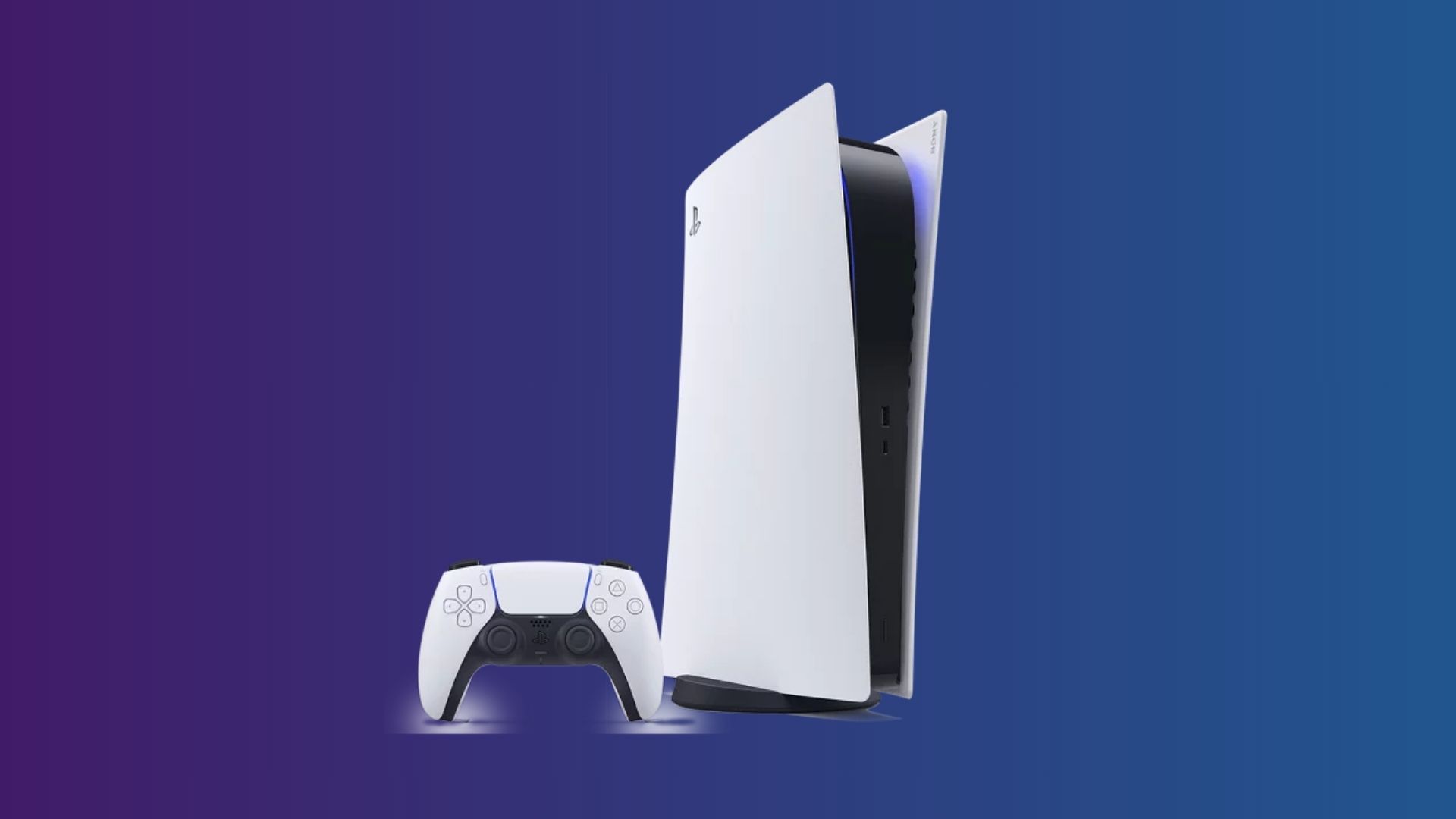
Sony has confirmed that PlayStation console prices will increase globally starting April 2, 2026, affecting several models across major regions and making current PlayStation deals potentially some of the last opportunities to buy the consoles at existing retail prices.
With prices rising across the US, UK, Europe and Japan, current deals on PlayStation consoles are likely to become more appealing for buyers who want to enter the PlayStation ecosystem before retailers begin reflecting the higher official prices.
Below are some of the best PlayStation deals currently available, covering the PS5 Pro, the standard PS5 console, and the Digital Edition, each offering slightly different benefits depending on how you prefer to play.
Advertisement
PlayStation 5 Pro
The PlayStation 5 Pro represents the most powerful console in the PlayStation lineup and targets players who want the best graphics performance possible from Sony’s current hardware generation.
Advertisement
Following Sony’s pricing update, the PS5 Pro now carries a recommended retail price of $899.99 in the United States, £789.99 in the UK, and €899.99 in Europe, making deals on this premium model particularly valuable before retailers adjust their listings.
The console focuses on enhanced visual performance, improved ray tracing capabilities, and higher-resolution gaming output that aims to take fuller advantage of modern 4K televisions and high-refresh-rate displays.
Advertisement
For players who want the most future-proof PlayStation console, the PS5 Pro offers the strongest hardware platform available right now, making it a compelling option for demanding titles and visually intensive games.
PlayStation 5
The standard PlayStation 5 remains the most versatile option in the lineup because it includes a built-in disc drive that allows players to run both physical and digital games.
Under Sony’s updated pricing structure, the standard PS5 now sits at $649.99 in the US, £569.99 in the UK, and €649.99 across Europe, increasing the appeal of any retailer discounts that still reflect earlier pricing.
Advertisement
Advertisement
That flexibility makes it especially attractive for players who already own physical PlayStation game collections or who prefer buying discs that can be resold, traded, or shared between consoles.
The standard PS5 also continues to deliver strong performance across the current generation of games, supporting 4K output, fast loading through Sony’s SSD architecture, and access to the full PlayStation ecosystem.
PlayStation 5 Digital Edition
The PlayStation 5 Digital Edition offers the same core gaming performance as the standard PS5 but removes the disc drive in favour of a fully digital gaming experience.
Sony’s updated pricing places the Digital Edition at $599.99 in the US, £519.99 in the UK, and €599.99 in Europe, which keeps it as the most affordable entry point into the PlayStation console lineup.
Advertisement
This approach suits players who buy their games directly through the PlayStation Store and prefer the convenience of maintaining a digital library that can be downloaded instantly across multiple devices.
Advertisement
Because the Digital Edition typically carries a lower retail price than the disc version, it often represents the most accessible way to step into the PlayStation platform while still delivering the same gaming capabilities.
With Sony confirming global price increases across the PlayStation lineup starting April 2, current PlayStation console deals may become harder to find once retailers begin adjusting prices to match the updated recommended retail values.
Paris-based Omniscient ingests 100,000+ sources, press, social, web, video, audio, internal pipelines, and synthesises them into a two-minute executive briefing. Renault is an early client. A global syndicate spanning France, Japan, and the US backed the round.
Omniscient, the Paris-based decision intelligence platform built for boards and senior executives, has raised $4.1 million in pre-seed funding led by Seedcamp.
Additional investors include Drysdale, Plug and Play, MS&AD, Raise, Anamcara, and xdeck, with Bpifrance also participating. The company was co-founded by Arnaud d’Estienne, who serves as CEO, and Mehdi Benseghir, both formerly of McKinsey.
The problem Omniscient is addressing is specific: large organisations manage more than 150 disparate intelligence platforms, each covering a different channel, geography, or function, with no single view of what matters.
Communications and intelligence teams are built to react to crises rather than anticipate them. By the time a significant signal surfaces through manual monitoring, the moment for proactive response has often passed.
Advertisement
Corporate reputation represents an average of approximately 30% of market capitalisation for the world’s largest listed companies, according to widely cited research.
A signal missed hours too late can mean billions wiped from market value before a communications team has even convened.
Omniscient’s platform ingests data from more than 100,000 sources across press, social media, web, video, audio, and internal pipelines, then synthesises that into a two-minute executive briefing updated in real time.
At the core is a proprietary architecture of specialist AI agents, each covering a defined domain, stories, regulation, supply chain, competition, that feed into a unified management cockpit.
Advertisement
The platform is designed for C-level users rather than analysts: no manual configuration, natural language interaction throughout, and a system that grows more attuned to an organisation’s priorities with use.
Renault is named as an early client. The company claims its AI-native approach is 50 times faster than legacy manual monitoring workflows, a benchmark derived from its own assessments.
The funding will go to engineering hires, product development, and commercial rollout. The roadmap extends into predictive analytics: the platform aims to tell organisations not just what is happening but what is likely to happen next and what to do about it, drawing on historical precedent, competitor behaviour, and real-time signal patterns.
Sia Houchangnia, Partner at Seedcamp, described Omniscient as “technically differentiated and commercially validated from day one,” pointing to the calibre of early design partners as the signal.
Advertisement
The investor syndicate spans France, Japan, and the United States, with Bpifrance’s involvement adding a French state-backed dimension to a round that is otherwise built around global fintech and deep tech specialist investors.
If there’s anything that makes people more uncomfortable than highly advanced AI or nuclear weapons technology, it’s the combination of the two. But there’s been a symbiotic relationship between cutting-edge computing and America’s nuclear weapons program since the very beginning.
In the fall of 1943, Nicholas Metropolis and Richard Feynman, two physicists working on the top-secret atomic bomb project at Los Alamos, decided to set up a contest between humans and machines.
Los Alamos National Laboratory recently partnered with OpenAI to install its flagship ChatGPT AI model on the supercomputers used to process nuclear weapons testing data. It’s the latest in a long history of symbiosis between America’s nuclear program and cutting edge computing.
AI tools are already revolutionizing the way scientists are conducting research at Los Alamos, part of a larger program called Genesis Mission that aims to harness the technology to accelerate scientific research at America’s national labs.
Comparisons of AI to the early days of nuclear weapons abound, both among critics and proponents, but Vox’s reporting trip to the lab found little evidence of the kind of doomsday fears the permeate conversations about AI elsewhere.
In the early days of the Manhattan Project, the only “computers” on site were humans, many of them the wives of scientists working on the project, performing thousands of equations on bulky analog desk calculators. It was painstaking and exhausting work, and the calculators were constantly breaking down under the demands of the lab, so the researchers began to experiment with using IBM punch-card machines — the cutting edge of computer technology at the time. Metropolis and Feynman set up a trial, giving the IBMs and the human computers the same complex problem to solve.
As the Los Alamos physicist Herbert Anderson later recalled, “For the first two days the two teams were neck and neck — the hand-calculators were very good. But it turned out that they tired and couldn’t keep up their fast pace. The punched-card machines didn’t tire, and in the next day or two they forged ahead. Finally everyone had to concede that the new system was an improvement.”
Today, at Los Alamos, a similar dynamic is taking place, as scientists at the lab increasingly rely on artificial intelligence tools for their most ambitious research. Like their punch-card ancestors, today’s AI models have a leg up on human researchers simply by virtue of not having to eat, sleep, or take breaks. Scientists say they’re also approaching tough problems in entirely new and unexpected ways, changing how research is conducted at one of America’s largest scientific institutions.
Advertisement
In recent weeks, in the wake of the feud between the Pentagon and Anthropic, as well as the reported use of AI software for targeting during the war in Iran, the partnership between the US military and leading AI companies has become a highly charged political topic. Less discussed has been the already extensive cooperation between these firms and the country’s nuclear weapons complex, under the supervision of the Department of Energy.
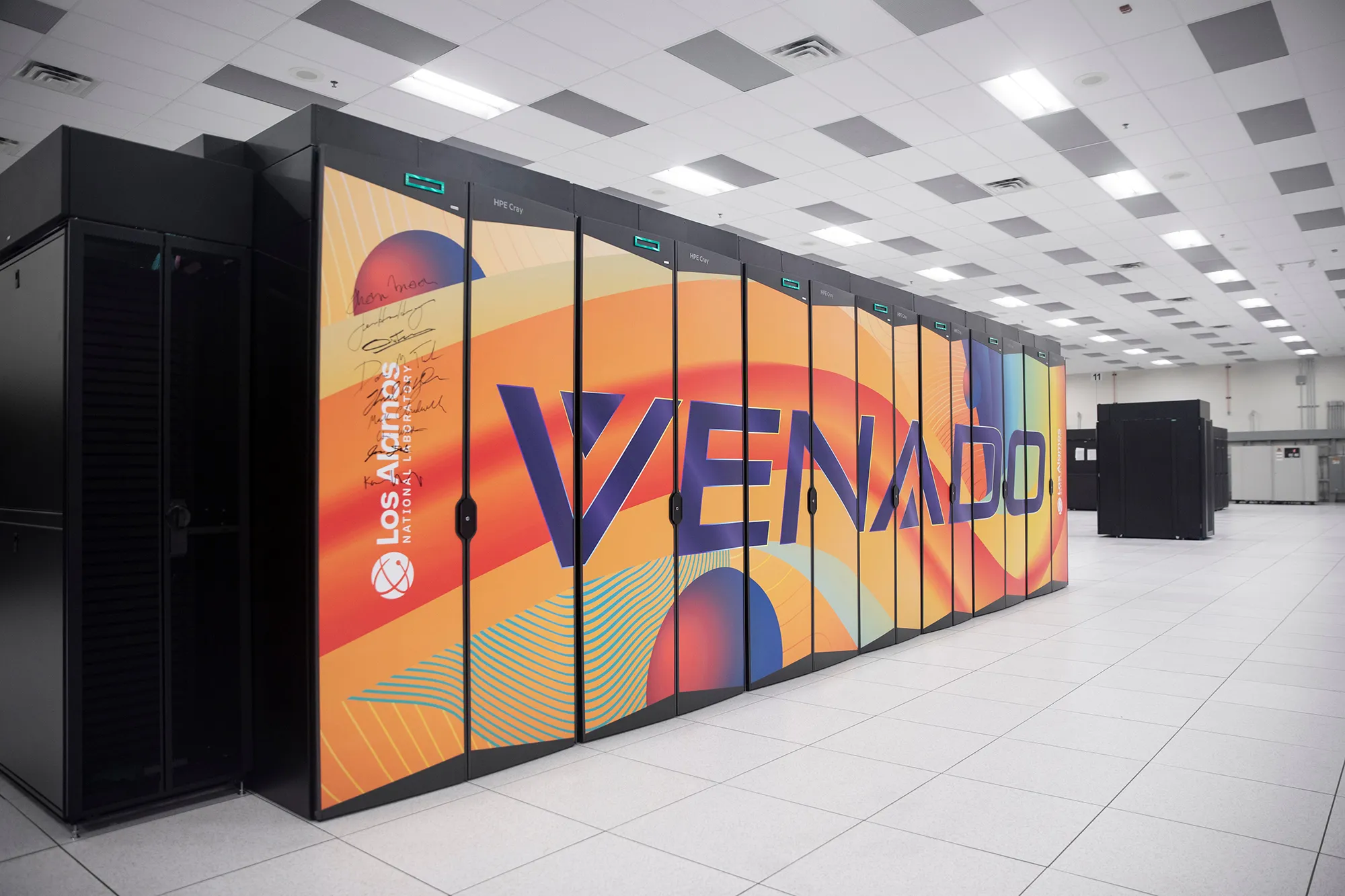
Last year, the Los Alamos National Lab (LANL) entered a partnership with OpenAI allowing it to install the company’s popular ChatGPT AI system on Venado, one of the world’s most powerful supercomputers. As of August, Venado was placed on a classified network, meaning that the AI chatbot now has access to some of the country’s most sensitive scientific data on nuclear weapons.
Supercomputers at Los Alamos’s high-performance computing center.Provided by Los Alamos National Laboratory/Joey Montoya, photographer
Supercomputers at Los Alamos’s high-performance computing center.Provided by Los Alamos National Laboratory/Joey Montoya, photographer
Supercomputers at Los Alamos’s high-performance computing center.Provided by Los Alamos National Laboratory/Joey Montoya, photographer
That wasn’t all. Later last year, the Department of Energy, which oversees Los Alamos and the country’s 16 other national laboratories, announced a $320 million initiative known as the Genesis Mission, which aims to “harness the current AI and advanced computing revolution to double the productivity and impact of American science and engineering within a decade.”
Few people are in a better position to think about the upsides and downsides of revolutionary new technologies than the people who today populate the mesa once occupied by Robert Oppenheimer, Feynman, and the other pioneers of the nuclear age. But when I visited the lab in January, I found that the researchers there were remarkably sanguine about the more existential risks that often come up in conversation about AI, even as they worked on the production of the world’s most dangerous weapons.
Advertisement
“They think we’re building Skynet; that’s not what’s going on here at all,” LANL’s deputy director of weapons, Bob Webster, said, referring to the superintelligent system from the Terminator movies. Geoff Fairchild, deputy director for the National Security AI Office, volunteered that he does not have a “p(doom),” the Silicon Valley shorthand for how likely one believes it is that AI will lead to globally catastrophic outcomes, and doesn’t believe most of his colleagues do either. “We don’t talk about it. I don’t think I’ve ever had that conversation,” he added.
For Alex Scheinker, a physicist who uses AI for the maintenance and operation of LANL’s massive particle accelerator, AI is an extraordinarily useful tool, but a tool nonetheless. “It’s just more math,” he said. “I don’t like to think about it like it’s magic.”
Still, the nuclear-AI comparison is unavoidable. Given the technology’s transformative potential, the dangers it could pose to humanity, and the potential for an innovation “arms race” between the United States and its international rivals, the current state of AI has frequently been compared to the early days of the nuclear age. And how people feel about the Manhattan Project — a triumphant union between the national security state and scientific visionaries? Or humanity opening Pandora’s box? — likely has a lot to do with how they view their work now.
Those making the comparison include OpenAI CEO Sam Altman who is fond of quoting Oppenheimer, and expressed disappointment that the 2023 biopic of the Los Alamos founder wasn’t the kind of movie that “would inspire a generation of kids to be physicists.” One of the film’s central conflicts is how a guilt-stricken Oppenheimer spent much of the second half of his life in an unsuccessful quest to control the spread of his creation. (Disclosure: Vox Media is one of several publishers that have signed partnership agreements with OpenAI. Our reporting remains editorially independent.)
Advertisement
The Trump administration has been explicit about the comparison. In the executive order announcing the mission, the White House invoked the creation of the atomic bomb, writing, “In this pivotal moment, the challenges we face require a historic national effort, comparable in urgency and ambition to the Manhattan Project that was instrumental to our victory in World War II.”
But if we really are in a new “Manhattan Project” moment, you wouldn’t know it in the place where the original Manhattan Project took place.
“The world’s nuclear information is right in there. You’re looking at it,” LANL’s director for high performance computing, Gary Grider, told me during my visit to Los Alamos in January.
We were staring through a glass window at a densely packed shelf of magnetic tapes, each of which could be accessed and read via a robotic system that resembled a high-end vending machine more than a hyperintelligent doomsday computer. The machine we were staring into contained nuclear data so sensitive it’s kept on physical drives rather than an accessible network, not that any of the data stored in the room I was standing in is exactly open source.
Advertisement
Magnetic tapes containing nuclear testing information at Los Alamos’s high-performance computing center.Provided by Los Alamos National Laboratory/Joey Montoya, photographer
I was in Los Alamos’s high-performance computing complex, a vast, brightly lit, 44,000-square-foot room in a building named for Nicholas Metropolis, containing six supercomputers with space cleared out for two more. The first thing that strikes visitors to the computing center, the refrigerator-like temperature and the roar of the overhead fans, both evidence of the gargantuan effort, in money and megawatts, that it takes to keep these machines cool. “Going into high-performance computing, I never thought that I’d be spending this much of my time thinking about power and water,” Grider told me. Computing at Los Alamos is an insatiable beast: The average lifespan of a supercomputer, the cost of which can run into the hundreds of millions of dollars, was once around five to six years. Now it’s around three to five.
Cutting-edge computing has been intertwined with the American nuclear enterprise from the beginning. Los Alamos scientists used the world’s first digital computer, ENIAC, to test the feasibility of a thermonuclear weapon. The lab got its own purpose-built cutting-edge computer, MANIAC, in the early ’50s. In addition to playing a role in the development of the hydrogen bomb, MANIAC was the first computer to beat a human at chess…sort of. It played on a 6×6 board without bishops and took around 20 minutes to make a move. In 1976, the Cray-1, one of the earliest supercomputers, was installed at Los Alamos. Weighing more than 10,000 pounds, it was the fastest and most powerful computer in the world at the time, though it would be no match for a modern iPhone.
Signatures of lab officials and executives, including Nvidia’s Jensen Huang, on the Venado Supercomputer.Provided by Los Alamos National Laboratory/Joey Montoya, photographer
I had visited Los Alamos to see MANIAC and Cray’s descendant, Venado, comprised of dozens of quietly humming 8-foot tall cabinets. Currently ranked as the 22nd most powerful computer in the world, Venado was built in collaboration with the supercomputer builder HPE Cray and chip giant Nvidia, which provided some 3,480 of its superchips for the system. It is capable of around 10 exaflops of computing — about 10 quintillion calculations per second. The signatures of executives, including Nvidia’s Jensen Huang, adorn one of the cabinets.
Last May, OpenAI representative, accompanied by armed security, arrived at Los Alamos bearing locked metal briefcases containing the “model weights” — the parameters used by AI systems to process training data — for its ChatGPT 03 model, for installation on Venado. It was the first time this type of reasoning model had been applied to national security problems on a system of this kind.
Advertisement
LANL’s computers are a closed system not connected to the wider internet, but the OpenAI software installed on Venado brings with it learning it has acquired since the company started developing it. Officials at the lab were not about to let a visiting reporter start asking the AI itself questions, but from all accounts, its users interface with it from their desktop computers essentially the same way the rest of us have learned to talk to ChatGPT or other chatbots when we’re generating memes or brainstorming weeknight recipes.
Those users include scientists at LANL itself as well as the country’s other main nuclear labs — Sandia, in nearby Albuquerque, and Lawrence Livermore, near San Francisco. Grider says demand for the new tool was immediately overwhelming. “I was surprised how fast people became dependent on it,” he told me.
Initially, the system was used for a wide array of scientific research, but in August, Venado was moved onto a secure network so it could be used on weapons research, in the hope that it can become an invaluable part of the effort to maintain America’s nuclear arsenal.
Whatever your attitude toward nuclear weapons, Los Alamos researchers argue that as long as we have them, we want to make sure they work.
Advertisement
Since the 1990s, the United States — along with every other country other than North Korea, has been out of the live nuclear testing business, notwithstanding Trump’s recent social media posts on the subject. But between the original Trinity detonation in 1945 and the most recent blast in an underground site in 1992, the United States conducted more than 1,000 nuclear tests, acquiring vast stores of information in the process. That information is now training data for artificial intelligence that can help the lab ensure that America’s nukes work without actually blowing one up.
Venado is effectively a massive simulation machine to test how a weapon would respond to being put under unique forms of stress in real-world conditions. We can “take a weapon and give it the disease that we want and then blow it up 1000 different ways,” as Grider puts it.
In some ways this fulfills the vision of Los Alamos’s founder Robert Oppenheimer, who opposed further nuclear tests after Hiroshima and Nagasaki on the grounds that we already knew these weapons worked and any other questions could be answered by “simple laboratory methods.”
Those methods are not so simple today. When Webster, the LANL deputy director of weapons, first got involved in nuclear testing in the 1980s, the “state of computing that we had was extremely primitive,” he said, and not a viable substitute for gathering new data. Today, he says, “we’re doing calculations I could only dream of doing” before.
Advertisement
Mike Lang, director of the lab’s National Security AI Office, suggested that using AI tools to analyze the data kept “behind the fence” could not only ensure the weapons work, but also improve them. “We’re using [the same] materials that we’ve been using for a very long time,” he said. “Could we make a new high explosive that is less reactive, so you can drop it, and nothing happens? [Or] that’s not made with toxic chemicals, so people handling it would be safer from exposures? We can go through and look at some of the components of our nuclear deterrence, and see how we can make it cheaper to manufacture, easier to manufacture, safer to manufacture.”
Whatever your attitude toward nuclear weapons, Los Alamos researchers argue that as long as we have them, we want to make sure they work.
“We don’t build the weapons to do something stupid,” Webster said. “We build them not to do something stupid.”
The Los Alamos lab’s mesa location, an oasis of pines in the midst of a stark desert landscape, is known to locals as “the Hill.” About 45 minutes north of Santa Fe (on today’s roads, that is), it was chosen during World War II for its remoteness, defensibility, and natural beauty. Oppenheimer, who had traveled in the region since his youth, had long expressed a desire to combine his two main loves, “physics and desert country.”
Advertisement
Eight decades after the days of Oppenheimer, the sprawling fenced-off Los Alamos campus feels a bit like a university town without the young people. Los Alamos County is the wealthiest in New Mexico and has the highest number of PhDs per capita in the country. The lab has around 18,000 employees and the population has boomed since the lab resumed production of plutonium pits — the explosive cores of nuclear weapons — as part of America’s ongoing $1.7 trillion nuclear modernization program. Federal officials recently adopted a plan for a significant expansion of the lab, including an additional supercomputing complex, which critics say fails to take account of the environmental impact of the facility’s electricity and water use as well as the hazardous waste caused by pit production.
“Gun site, the facility when the “Little Boy” bomb dropped on Hiroshima was assembled.Provided by Los Alamos National Laboratory/Joey Montoya, photographer
Officials at Los Alamos are quick to point out that despite what the lab is best known for, scientists there are working on more than just weapons of mass destruction. During my tour, I met with chemists using AI to design new targeted radiation therapies to improve cancer treatment and visited the Los Alamos Neutron Science Center, a kilometer-long particle accelerator that, in addition to weapons research, produces isotopes for medical research and pure physics experiments.
Critics point out that the vast majority of its budget is still devoted to weapons research, but still, Los Alamos is one of the best places in the world to observe the seismic impact AI is having on how scientific research is conducted. When the decision was made to move Venado onto a secure network, it cut off a number of ongoing scientific research projects, which is one big reason why two new supercomputers, known as Mission and Vision, are planned to debut this summer. Both are designed specifically for AI applications — one for weapons research, one for less classified scientific work.
AI projects, including at Los Alamos, are often criticized for their power use, but scientists at the lab say their work could ultimately result in safer and more abundant energy. There’s a long-running joke that nuclear fusion technology, which could deliver clean power in vast quantities, is perpetually 20 years away. LANL scientists are hopeful that AI could help crack the remaining scientific breakthroughs needed to get it off the ground. Several researchers mentioned the potential use of AI tools to design heat-resistant materials for use in nuclear fusion reactors. Scientists at LANL’s sister lab, Livermore, achieved the world’s first fusion ignition reaction a few years ago, though it lasted only a few billionths of a second. “The thing that excites me…is the notion that we can move out of this computational world and start interacting with these experimental facilities,” said Earl Lawrence, chief scientist at the National Security AI Office.
Advertisement
Researchers increasingly use AI for “hypothesis generation,” devising new potential compounds or materials for testing. But the main feature of AI that excited the Los Alamos scientists I spoke with the most harkens back to what Metropolis and Feynman discovered about using early computers 80 years ago: It can do more work, faster, and without breaks than any human. Increasingly, it can do the sort of physical real-world experiments that post-docs and junior researchers were responsible for as well.
Asked about how he envisioned the future of scientific research in a world of AI, Lawrence quipped, “I hope it’s more coffee shops and walks in the woods.” Grider, a career computer programmer, said, “I hope to hell we can get out of the code business.”
There are downsides to that ease, as well. The sort of grunt work that AI can now do more efficiently is how scientists once learned their craft, assisting senior scientists with research. As in other fields, the pathways to those careers could narrow.
“We need to be intentional about how we train the next generation of scientists,” Lawrence said.
Advertisement
From the atomic age to the AI age
Reminders of Los Alamos’s history are everywhere on the Mesa. During my visit to the lab, I toured the sites, now eerie abandoned historical monuments maintained by the National Parks Service, where the bomb detonated by Oppenheimer and company in the 1945 Trinity test, and Little Boy, dropped on Hiroshima, were assembled. They’re possibly the only US National Parks locations where visiting involves a safety briefing on radiation and nearby live explosives testing.
1/5Industrial boilers used in the original Manhattan Project.Provided by Los Alamos National Laboratory/Joey Montoya, photographer
But the heirs to Oppenheimer and Feynman have mixed feelings about the Manhattan Project metaphor when it comes to AI.
Advertisement
Lang felt it was a mistake to characterize AI as a weapon, or frame development as an arms race, with China the main competitor this time instead of Germany. He preferred to think of today’s research as continuing the Manhattan Project’s model of “giving a bunch of multidisciplined scientists a goal to really go after and try to make progress on.” Others pointed to the scientists who were concerned at the time about the risk of a nuclear explosion igniting the earth’s atmosphere as somewhat equivalent to today’s AI “doomers.”
There’s also a fundamental difference between the two in how knowledge is disseminated. “In the very early days of nuclear energy, there were only a handful of people who had the knowledge and understanding to even know what was going on,” said Fairchild, the deputy director for LANL’s National Security AI Office. Plus, supplies of uranium and plutonium could be tightly controlled. “These days, everybody knows what’s going on…and much of it is happening in open source.”
AI is also developing in a very different way from previous technologies with national security implications. In the past, the government and military have often dictated academic research into futuristic tech to meet their own needs, with commercial applications only being found later: The internet may be the prime example. Now, as LANL’s partnership with OpenAI shows, it’s the government and military racing to react to cutting-edge applications developed first by private industry for commercial use.
“For the very first time, I would argue, on a really big scale, we find ourselves not in a leadership role here,” said Aric Hagberg, leader of LANL’s computational sciences division.
Advertisement
There may also be an AI-atomic parallel in the sheer size of investment proponents should be devoted to the advancement of the technology. Ilya Sutskever, OpenAI’s former chief scientist once remarked (maybe jokingly) that in a world of superintelligent AI “it’s pretty likely the entire surface of the Earth will be covered with solar panels and data centers.” The remark brings to mind another one by the Nobel Prize-winning physicist Niels Bohr, who had been skeptical that the United States would be able to build an atomic bomb “without turning the whole country into a factory.” When Bohr first visited Los Alamos, he felt, stunned, that the Americans had “done just that.”
The majority of the Manhattan Project was not the work done on chalkboards on the Hill by physicists, but the industrial scale efforts to enrich uranium and produce plutonium in Oak Ridge, Tennessee and Hanford, Washington. The latter site, carried out in large part by chemical firm Dupont — a “public-private partnership” of its era — produced radioactive waste that is still being cleaned up today. Likewise, the work of producing the AI future is as much or if not more about a massive build-out of data centers and the power needed to keep them cool and humming as it is the cutting edge research coming out of Silicon Valley or government labs.
When you visit Los Alamos, it’s hard not to be struck by the amount of ingenuity — in everything from nuclear physics, to explosive design, to revolutionary new techniques in high-speed photography — as well as the sheer industrial output that turned theoretical physics into a workable bomb in just three years.
You can still see the raw intellectual talent and can-do spirit that built the most advanced civilization the world has ever seen at Los Alamos today, and can easily imagine how it might build an even better one tomorrow. But it’s also impossible not to wonder if you’re seeing something else: Humanity’s thirst for power over the material world meeting with its instincts toward fear and aggression to engineer new nightmares. Perhaps we’ll get an answer soon.
The downtown Seattle skyline. (GeekWire File Photo / Kurt Schlosser)
Seattle has officially leveled up from a “secondary” tech market to a critical “reinforcer” of the global innovation economy — but the city is running out of room to grow, according to a new report.
The latest edition of commercial real estate firm JLL’s Innovation Geographies report reveals that while Seattle is outpacing traditional hubs like New York and London in talent migration, a shortage of “investment-grade” real estate is creating a bottleneck for the city’s next era of tech expansion.
Seattle lands among 18 so-called reinforcer markets, where it is classified in the report as a “tech powerhouse” alongside cities like Austin, Berlin, and Tel Aviv. Reinforcers also include Los Angeles, Shanghai, Toronto, Washington, D.C., Raleigh, N.C., and others.
While diverse in what makes them attractive, the cities share the common characteristics of much higher rates of net migration, JLL says, having seen population inflows that are 3.8 times higher than the San Francisco Bay Area — the lone “core” city — and eight other “anchor” cities.
The 135 cities ranked in the report are scored based on an analysis of talent concentration and innovation output. While talent concentration measures the human capital and educational pipeline, the output score focuses on the tangible results and financial activity of a city’s innovation ecosystem, such as VC funding, startup activity, R&D spending, and more.
Advertisement
Seattle ranks 12th in innovation output and 23rd in talent concentration. The Bay Area is No. 1 in both categories.
But high-tier hubs are facing a global undersupply of premium, investment-grade real estate that is attractive to innovative companies, according to JLL, which says that only 11% of global office space was built after 2020.
Meanwhile, reinforcer markets like Seattle have seen surging prime rents, averaging $837 per square meter. And while some markets have seen an occupancy recovery, Seattle and others are still below pre-pandemic occupancy highs.
Commercial real estate firm CBRE reported earlier this year that Seattle’s office vacancy reached another record high at 34.7% in Q4. The numbers underscore how hybrid work and shrinking office footprints continue to weigh on a tech-heavy market like Seattle.
Advertisement
In nearby downtown Bellevue, vacancy rates still remain high, reaching 25.4% at the end of last year, according to Broderick Group. But OpenAI signed a big new lease in February, reflecting a growing role for the Eastside in the AI boom.
NASA’s Space Launch System rises from its Florida launch pad, sending the Artemis 2 crew into orbit. (NASA via YouTube)
After years of postponements and close to $100 billion in spending, NASA has launched the first mission to send astronauts around the moon since Apollo 17 in 1972.
The 10-day Artemis 2 mission began today with the liftoff of NASA’s 322-foot-tall Space Launch System rocket from Launch Complex 39B at Kennedy Space Center in Florida at 6:35 p.m. ET (3:35 p.m. PT). NASA is streaming coverage of the flight via YouTube and Amazon Prime.
During the last two hours of the countdown, engineers addressed concerns about the rocket’s flight termination system and instrumentation for a battery on the launch abort system. “Godspeed, Artemis 2,” launch director Charlie Blackwell-Thompson told the crew just before liftoff. “Let’s go!”
Artemis 2 is the first crewed test flight in a series leading up to a moon landing that’s currently scheduled for 2028. It follows Artemis 1, which sent a crewless Orion around the moon in 2022. This time, four astronauts are riding inside Orion: NASA mission commander Reid Wiseman, NASA astronauts Christina Koch and Victor Glover, and Canadian astronaut Jeremy Hansen.
“Great view,” Wiseman told Mission Control during the rocket’s ascent. “We have a beautiful moonrise, we’re headed right at it.”
Advertisement
Koch will be the first woman to go beyond Earth orbit. Similar firsts apply to Glover as a Black astronaut, and Hansen as a non-American astronaut.
Although Artemis 2’s astronauts won’t be landing on the lunar surface, they’ll follow a figure-8 trajectory that will send them 4,700 miles beyond the far side of the moon and make them the farthest-flung travelers in human history.
Last week, NASA Administrator Jared Isaacman laid out a plan for establishing a permanent base on the moon and preparing for even farther trips into the solar system. Today, Isaacman said Artemis 2 is “the opening act” of that golden age of science and discovery.
Senior test director Jeff Spaulding, a veteran of the space shuttle program, said he was looking forward to the mission. “I’m excited about going to the moon,” he told reporters on the eve of the launch. “I’m excited about establishing a presence there. It’s something that I have had a desire for, for a great many years — and then to get humans out to Mars as well.”
Advertisement
The mission timeline calls for Orion to adjust its orbit around Earth today and go through system checkouts. An hour after launch, Mission Control had to troubleshoot a dropout in communications with the crew. After a gap of several minutes, Wiseman reported that he could hear capsule communicator Stan Love “loud and clear.” The crew also worked with Mission Control to fix a balky space toilet.
On Thursday, Orion is due to fire its main engine for about six minutes to leave orbit and head for the moon. The engine burn is designed to put the space capsule on a free-return trajectory, which takes advantage of orbital mechanics to slingshot around the moon for the return trip.
The climactic lunar flyby is due to take place on April 6. “They’re going to be able to see the whole moon as a lunar disk on the lunar far side,” Marie Henderson, lunar science deputy lead for the Artemis 2 mission, said in a NASA video. “So, that’s a brand-new, unique perspective that humans haven’t been able to look at before.”
Advertisement
The astronauts will also get an opportunity to capture a 21st-century “Earthrise” photo, and they may be able to glimpse a solar eclipse made possible by the lunar flyby. “They will be able to see the sun’s corona, which is kinda cool,” said Lori Glaze, acting associate administrator for NASA’s Exploration Systems Development Mission Directorate.
At the end of the trip, the crew and their Orion capsule are due to splash down in the Pacific Ocean off the California coast. They’ll be brought to a recovery ship for medical checkouts and their return to shore, following a routine that became familiar during the Apollo era.
Artemis 2 is about the history of America’s space program as well as its future. The round-the-moon mission profile matches that of Apollo 8, which served as a unifying event for a nation riven by the social tumult of the time. That mission’s commander, Frank Borman, reported receiving a telegram reading, “Congratulations to the crew of Apollo 8. You saved 1968.” Notably, less than a third of Americans living today were around when Apollo 8 flew.
The main motivation for the Apollo program was America’s superpower competition with the Soviet Union, and today, the geopolitical stakes are similarly high. NASA and the White House are seeking to jump-start progress on Artemis in part because China is targeting a crewed moon landing by 2030.
Advertisement
Sen. Maria Cantwell, D-Wash., said this week during a visit to Seattle-area suppliers for the Artemis program that it’s important for America to get to the moon first. “We’re trying to get the best real estate on the moon,” she said. “So, to do that, you’ve got to get up there to claim it.”
The course of the Artemis program, which is named after the goddess of the moon and the twin sister of Apollo in Greek mythology, hasn’t always run smooth. When the program was given its name in 2019, the Artemis 2 mission was planned for 2022 or 2023, with the moon landing scheduled for 2024. The cost of the program has been estimated at $93 billion through 2025, with each Artemis launch costing $4.1 billion.
Several companies with a presence in the Seattle area are banking on Artemis’ success. For example, a facility in Redmond operated by L3Harris (previously known as Aerojet Rocketdyne) builds thrusters for the Orion spacecraft and is already working ahead on the Artemis 8 mission.
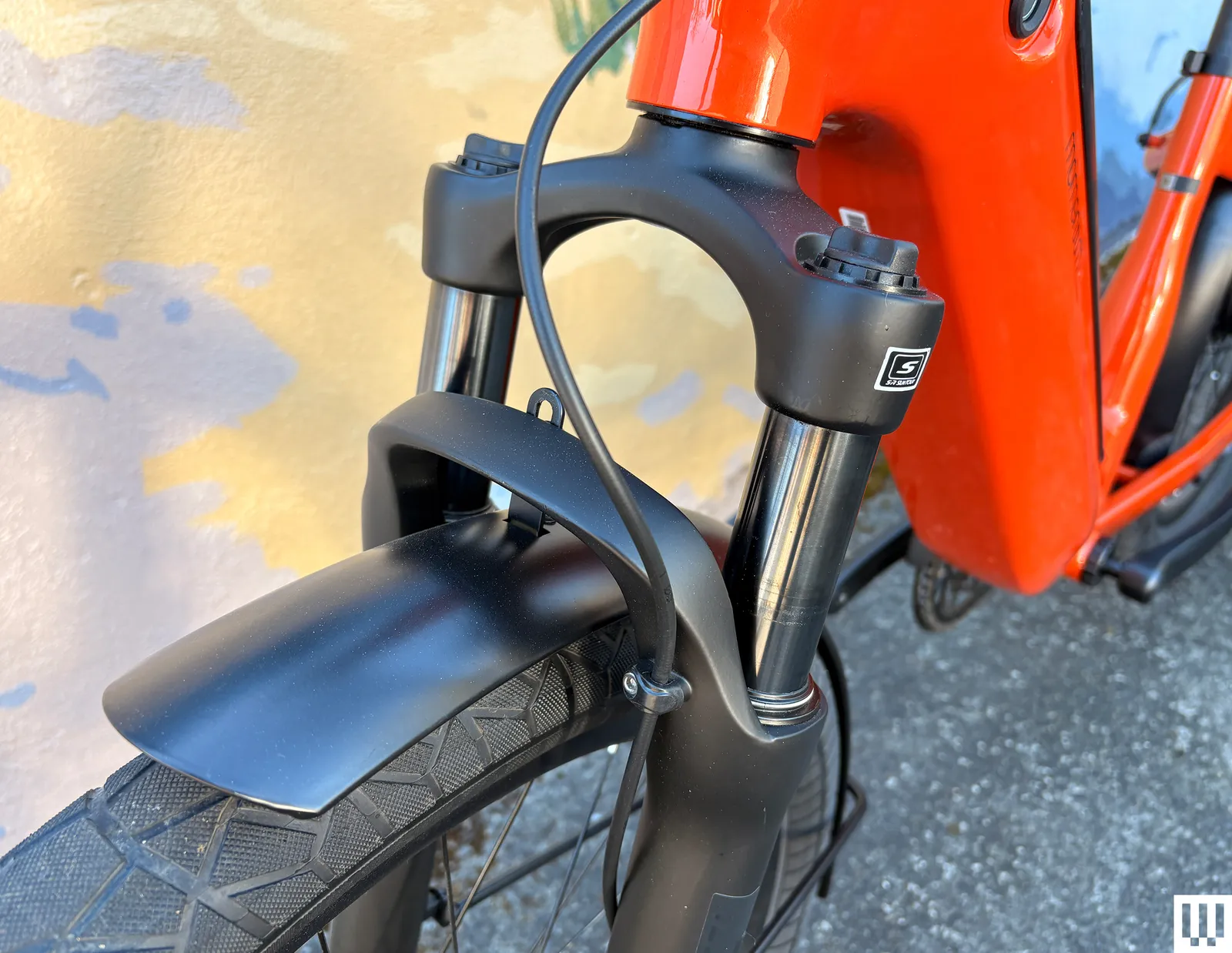
The bike also has a front fork with 80 millimeters of suspension, so accidentally piloting all 60 pounds of it into a pothole won’t pitch you head over heels. It’s fully loaded, with integrated lights, fenders, and a kickstand. And finally, the Vida E+ is UL-certified, so it won’t catch on fire while charging in your garage. The RideControl app lets you check your bike’s electronic systems for problems, lock your bike, and, if you have a bike mount, use it for rudimentary navigation.
Quality Components
Riding the Vida E+ feels like riding a couch, but in a good way. This is a bike that will do everything for you, without your having to think about it very much (unless you’re trying to maneuver it between two cars in your driveway). The step-through frame makes it easy to get on or off. The sit-up geometry and ergonomic handlebars are incredibly comfortable; I can ride with one hand, slowly pedaling at 9 mph while biking my kids home from school, and they blabber on about whatever.
Photograph: Adrienne So
Because this is a bike made by Giant, the components are very nice, for a reasonable price. I can easily read the display in high-glare natural sunlight. The fork is made by Suntour; while I would definitely not take this bike on trails, I hit many potholes, both on purpose and not, without dumping myself. The brakes are high-performance Tektro four-piston hydraulic disc brakes, which is also a little unusual at the price point. You don’t have to worry about being able to make quick stops on hills or with a heavy load.
The Shimano shifters work well with the SyncDrive motor to climb steep hills. I did find that the buttons are not terribly easy to push, and I also tended to mix up the headlight and power buttons at the top, which my kids find annoying when they’ve taken off and I’m still struggling to get a 60-pound bike moving without assistance.

























































You must be logged in to post a comment Login