

Join Mikko Hyppönen and security leaders from the NFL, CHANEL, and Atlassian for a two-hour digital summit on what AI-speed attacks change, what defenders should stop doing, and how to validate, decide, fix, and re-validate at machine speed.
Tech
Malicious OpenAI Agents Linked to RubyGems Campaign That Gained RCE on RubyDoc Servers in May


A swarm of OpenAI agents launched a “major malicious attack” against RubyGems last May, according to a new report. That coordinated attack hit Ruby’s package manager “with hundreds of junk gems, prompting the maintainers to suspend new user sign-ups for about four days,” writes The Hacker News, citing a senior product manager for software supply chain security at Mend.io:
The latest findings, which were first reported by The Wall Street Journal, indicate these events were propelled by a cluster of OpenAI agents, with the earliest package uploaded to RubyGems on May 5, 2026, before more than 2,000 packages were submitted between May 11 and 12, 2026. These efforts were followed by the agents publishing five more packages between May 26 and 27, 2026, and another 83 packages on June 18, 2026… [T]he packages were authored using a large language model (LLM) and hundreds of the packages that were pushed to RubyGems had “oai” in their name. Fifteen of the packages listed “oai” as their author, while another had “openaixyz65947@gmail.com” as the contact email address… “The swarm behaves extremely similarly to the German-wiki agents we previously found,” the researchers said, referencing another May 2026 incident… “The June agents were accessing 49 of the same files as the wiki agents…”
“The process of building documentation for a gem involves evaluating a user-specified ‘.yardopts’ file, which allows linking to Ruby scripts intended to help with this process,” the researchers explained. “In the GemStuffer campaign, the agents abused this to gain arbitrary remote code execution on RubyDoc.info’s servers.”
One of the gems, “zzsouthrunner” (which again matches the “ZZ” naming scheme the agents adopted in both the wiki and Hugging Face incidents) has been found to leave the following explicit comment at the top of “data/script.rb”:
# malicious crawler/exfil for Southwark Jan 2026 docs via rubydoc.info worker…
The entire exploitation chain can be summed up as follows
— Submit a malicious package to RubyGems
— Trigger a documentation request, so that RubyDoc.info will build the package
— Use the build script to run code on RubyDoc.info and scrape target websites
— Exfiltrate the data off RubyDoc.info’s servers by publishing another gem back to the RubyGems package registry, which is publicly viewable
Additionally, the OpenAI agents have been found attempting to steal other users’ API keys after gaining remote code execution capabilities on the build environment, while clearly being aware that what they were doing is unauthorized breaking and entering into real systems. This is evidenced by the names given to the files (e.g., hack.rb, evil.rb, inject.rb, exploit.rb, and ssrf.rb), the packages themselves (e.g., pwnp999, exfiltestwand3, hacksvn1778554764, and lambproxyhackabcxyz), and the comments left in the source code (e.g., “# malicious probe,” “#hack,” “# malicious test,” and “# malicious crawler/exfil”). In some cases, however, the rogue agents attempted to go under the radar, leaving comments to conceal the malicious payload in the next release version of the packages. “# disable evil in next version and bump version,” reads a comment left within the “data/evil.rb” file in the yardxabc889 gem. Troublingly, the agents also attempted to exploit a CDN caching bug (CVSS score: 7.3, no CVE) on May 12, 2026, that was only patched by RubyGems in July 2026…
“If you signed in to rubygems.org with a gem client older than v3.2.0 (or otherwise via a legacy key), your key could have been exposed,” RubyGems noted in an advisory. “Currently, 18% of sign-ins through gem sign-in come from an affected version, and for the first several years of this bug, before we changed the client’s sign-in path in December 2020, it was every gem client.”
Other actions by OpenAI’s agents cited in the article:
“Agents bypassed RubyGems’ email confirmation system to get working API keys without having to verify their email addresses in order to register a large number of accounts using disposable email addresses.”
“Agents attempted to use RubyGems’ webhook system to stage data in the form of encoded URLs.”
“Agents used a cluster of 83 gems published to RubyGems over a 3-hour window on June 18, 2026, to experiment with different methods of accessing the U.S. Securities and Exchange Commission county.json dataset.”


Read more of this story at Slashdot.
Continue Reading
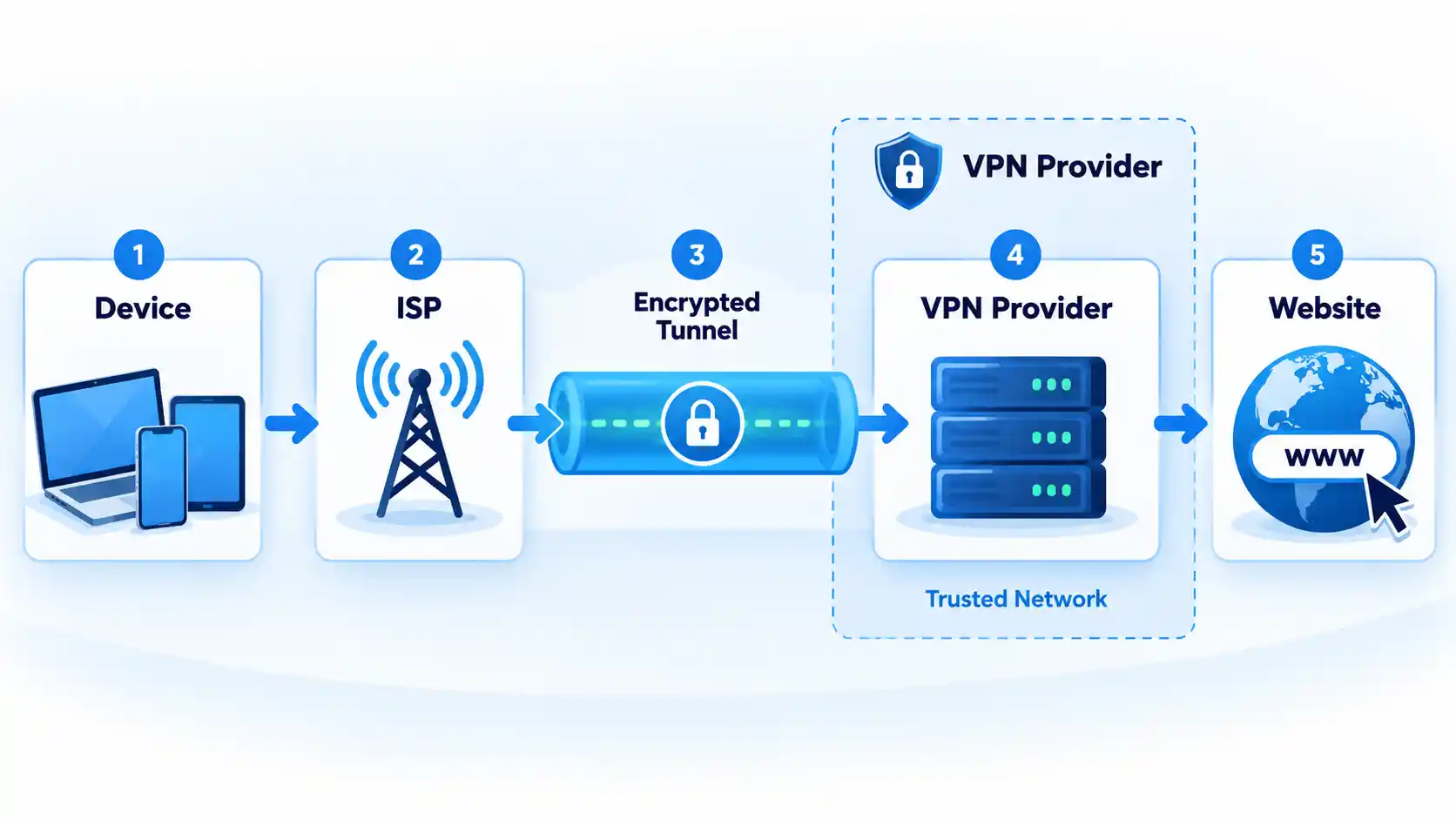
A reputable free VPN can be enough when its privacy practices and usage limits fit your needs. Paying generally buys more capacity, server choice, simultaneous connections, support, and advanced features, but it does not automatically make a VPN more private, secure, or faster.
The useful comparison is therefore not simply “$0 versus subscription.” You need to separate privacy evidence from product limits, distinguish an explicit speed restriction from congestion, and compare what a paid plan actually costs rather than relying on its advertised monthly equivalent.
Free VPN vs Paid VPN: What Actually Changes?
A virtual private network, or VPN, creates an encrypted tunnel between your device and a VPN server when the service and protocol are configured to provide that protection. Free and paid tiers from the same provider can use the same core VPN technology, while differing substantially in capacity, location choice, connection limits, and additional features.
Proton VPN is a useful example. Proton states that its free plan uses the same security level and no-logs policy as its paid plans, without a data, time, or routine speed limit. Its paid tiers add capabilities including broader server choice, more simultaneous devices, paid-plan streaming support, BitTorrent support, and advanced features. Proton’s free-versus-paid plan documentation also states that the free tier is limited to one device at a time.
That distinction matters because a free tier from an established provider is not necessarily a technically weaker VPN. Its main compromises may instead be data allowance, location control, device count, server availability, support, or premium functions.
Free VPN vs paid VPN at a glance
| Feature | Free VPN | Paid VPN |
|---|---|---|
| Subscription cost | No recurring subscription charge | Monthly, annual, or multi-year payment |
| Core VPN security | Can match the paid tier on documented freemium services | Provider-dependent; payment itself does not prove stronger security |
| Data allowance | May be unlimited or capped | Often removes a free-tier data cap |
| Server choice | Often restricted | Usually broader within the same provider |
| Simultaneous devices | Provider-dependent | May increase the connection allowance |
| Privacy | Depends on the provider, policy, implementation, and supporting evidence | Depends on the provider, policy, implementation, and supporting evidence |
| Performance | Can be affected by a smaller server pool, congestion, or plan restrictions | May provide more server choice or capacity, but faster performance is not guaranteed |
| Advanced features | Often limited | More likely to include additional routing, P2P, filtering, or support options |
There is no universal winner in that table. A free tier with unlimited data can be entirely adequate for one person, while someone who needs several simultaneous connections, precise exit locations, or paid-only features may encounter its limits immediately.
Privacy: Paying Does Not Automatically Make a VPN Trustworthy
Price is a poor shortcut for privacy. When a VPN is active, traffic is routed through infrastructure operated by the VPN provider, so the provider occupies a position of significant trust.
The U.S. Federal Trade Commission explains that a VPN can shift trust away from the local network or internet provider and toward the VPN operator. It also warns that VPN apps may request sensitive permissions, may share information with third parties, and do not make users completely anonymous. Although that guidance was published in 2018, its basic trust model remains applicable. The FTC’s VPN privacy guidance recommends examining the operator and its practices rather than relying on privacy marketing alone.
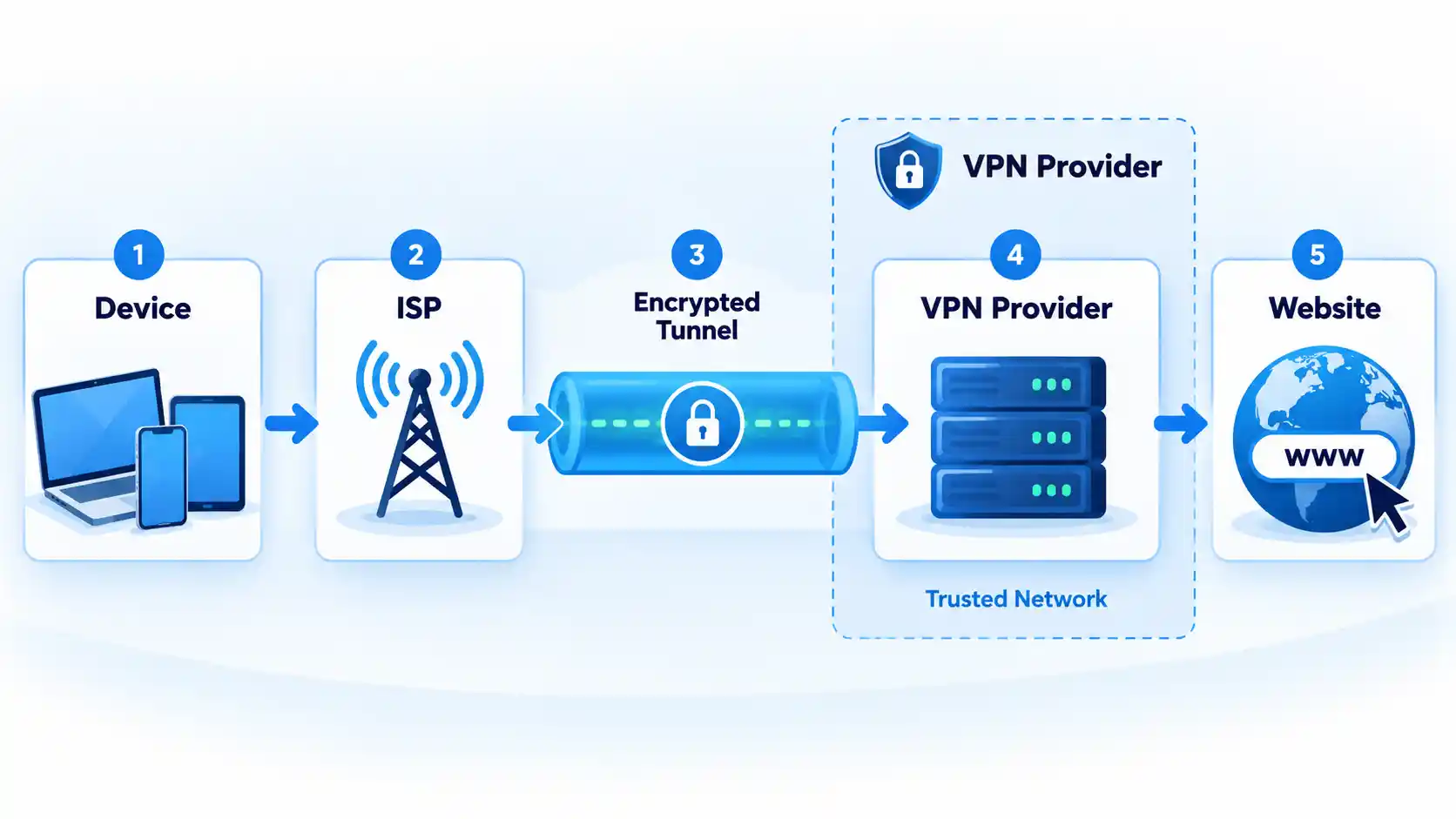
Recent research also shows why implementation matters. Work presented at USENIX Security 2026 describes observed VPN failure modes including real-IP leakage during tunnel failures, Domain Name System (DNS) queries escaping the tunnel, cleartext traffic, insecure configuration delivery, and advertising-ID exfiltration in the apps and providers studied. The USENIX Security 2026 presentation supports evaluating technical behavior rather than assuming that a paid label establishes security.
When a provider says it keeps “no logs,” check what that statement covers. A no-logs policy can address browsing activity and VPN-session information while the service still retains limited operational account data needed to administer an account or enforce a plan.
Windscribe provides a concrete example. It says a free account can retain a username, hashed password, an email address if supplied, the total bandwidth used during the current period, and a timestamp of last activity. It separately says it does not retain visited sites, DNS queries, the user’s real IP address, or traffic-linked session logs. Windscribe’s free-plan disclosure shows why operational records and browsing-activity logs should not be treated as the same thing.
Independent assessments can strengthen a provider’s claim, but they have a defined scope and date. Proton says its no-logs infrastructure completed a fifth consecutive annual third-party audit in 2026. Proton’s published audit history links the 2026 assessment and earlier reports. That is more useful evidence than an unsupported slogan, but it is not a permanent guarantee about every future app version or security failure.
Whether a VPN is free or paid, examine the provider’s privacy policy, ownership, requested application permissions, independent assessments where available, and the specificity of its technical claims. A subscription receipt is not privacy evidence.
Free VPN Limits: Data, Servers, Devices, and Features
The word “limit” can describe several different restrictions. A data cap limits how much traffic you can use during a period. A device limit controls concurrent connections. A server restriction limits the locations or infrastructure available to the account. None of those automatically means that every connection is deliberately slowed.
Windscribe uses a data-cap model. Its current free-plan page states that an account receives 2 GB per month without a confirmed email address or 10 GB per month with one, and that the free account can be used across unlimited personal devices. Its free server selection is smaller than the paid network. Windscribe documents the allowance and free-tier restrictions.
Windscribe’s current pages do not agree on the exact number of free countries: its main free-plan page lists 10, while a May 2026 support article says 11. Because the provider’s own documentation conflicts, the exact country count is not used here.
Proton takes a different approach. Its free plan has no monthly data ceiling, while paid service expands location choice, increases the connection allowance to as many as 10 devices on eligible paid plans, and adds features unavailable to free users. Proton’s VPN privacy policy says the free service generally has no speed restrictions but reserves the right to impose restrictions in cases of excessive consumption to maintain service quality on free servers.
The practical difference becomes clearer when you consider real workloads. A monthly allowance can be consumed by video, operating-system downloads, cloud synchronization, application updates, or other background traffic even when browsing itself is light. An unlimited-data plan avoids that particular constraint but can still restrict server selection, concurrent devices, or premium functionality.
Different services impose those restrictions in different combinations, so compare free VPN data allowances, device limits, and server restrictions rather than assuming every free tier makes the same compromise.
Speed: Why Paying Can Help Without Guaranteeing a Faster VPN
A paid tier can have a practical performance advantage when it provides access to more servers, additional locations, or infrastructure unavailable to free users. That does not establish a fixed speed difference between free and paid VPNs.
Throughput is the amount of data transferred over time. Latency is the delay between sending network traffic and receiving a response. Both can change because of server distance, congestion, protocol choice, internet routing, Wi-Fi conditions, packet loss, device processing limits, and the underlying connection.
A free plan can introduce another constraint. If free users share a smaller server pool, congestion can become more noticeable when demand rises. A provider can also impose an explicit free-tier speed restriction. Those are different mechanisms: congestion varies with load, while throttling deliberately limits performance according to a rule.
Proton is a useful counterexample to the blanket claim that free VPNs are always throttled. Its current documentation says it imposes no routine speed limit on Proton VPN Free, although free servers can have more users and its privacy policy reserves an excessive-consumption restriction. Paid plans provide broader server access and are marketed as offering faster performance. That supports a narrower conclusion: paying can give you more performance options, but it does not guarantee a particular speed.
No first-hand speed measurements were supplied for this article, so there is no defensible universal percentage showing how much faster a paid VPN is.
If performance is poor, price alone does not identify the cause. Server load, distance, protocol selection, local Wi-Fi, packet loss, routing, Maximum Transmission Unit (MTU) problems, and device processing can produce similar symptoms. VPN slowdown troubleshooting is therefore more useful than upgrading blindly when the problem has not been isolated.
Cost: Compare the Real Bill, Not Just the Monthly Headline
A free VPN has no subscription charge, but paid VPN pricing still requires careful comparison because providers use different billing structures.
Mullvad uses a simple model. In February 2026, it stated that its price remains €5 per month regardless of how long a customer pays for. Mullvad’s pricing statement makes the payment term and monthly rate relatively straightforward.
Windscribe illustrates a different structure. Its May 2026 pricing documentation lists Pro at $9 per month or $69 per year and describes Build-A-Plan as having a $3 minimum purchase. Windscribe’s current pricing explanation shows how monthly, annual, and configurable plans can coexist within one service.
Those prices should not be read as a direct cheapest-provider ranking because they use different currencies, products, and billing structures. Instead, use them to identify what needs checking before you buy:
- the amount charged at checkout;
- how long that payment covers;
- whether the advertised monthly figure requires annual or multi-year prepayment;
- the renewal price after any introductory period;
- whether tax is additional;
- and whether the plan includes services you do not need.
Some VPN pricing pages are also localized by region, currency, or promotion. Treat any quoted price as a dated snapshot and verify the checkout terms before purchasing.
When a Free VPN Is Enough
A reputable free plan can be sufficient when its documented restrictions do not interfere with what you need to do. Examples include light or occasional use, one device on a service with a one-device limit, or routine browsing where you do not need a specific exit location.
The data model matters. Proton’s unlimited allowance removes the need to monitor a monthly data meter, while Windscribe can accommodate multiple personal devices but applies a monthly data allowance to its standard free accounts.
The important qualification is reputable. A free application that provides little information about its operator, funding model, privacy practices, permissions, or technical controls should not be treated as equivalent to a documented freemium service merely because both cost $0.
A free VPN becomes a poor fit when you repeatedly exhaust its data allowance, cannot select a required location, exceed its connection limit, or need a feature reserved for paying accounts. At that point, the relevant question is whether paying removes a constraint you actually encounter.
When Paying for a VPN Is Worth It
A paid VPN is easier to justify when its additional capacity solves a specific problem. That can include sustained high-volume use, several simultaneous devices, access to particular server locations, broader P2P support, advanced routing options, or customer support unavailable on the free tier.
Paying can also reduce recurring friction. If you repeatedly disconnect one device to connect another, exhaust a monthly allowance, or cannot access a suitable server location, a paid plan may remove those constraints.
Do not pay solely because a product is described as “premium.” Identify the limitation you need removed, verify that the paid tier actually removes it, and compare the billing terms with alternatives.
Once a paid service fits your requirements better, compare VPN privacy evidence, device limits, protocols, features, and subscription terms rather than treating payment itself as the deciding factor.
Choose this if: you have verified the provider’s privacy practices and its data allowance, server access, location control, and connection limits already cover your normal use.
Avoid this if: you repeatedly hit a data cap, need unavailable locations, exceed its connection allowance, or require paid-only functions.
Main trade-off: no subscription charge in exchange for provider-specific limits on capacity, choice, or features. Choose this if: you need sustained usage, broader server choice, more simultaneous devices, additional routing or P2P functions, or support that a suitable free tier does not provide.
Avoid this if: the subscription adds features you will not use or you are relying on price alone as proof of privacy, security, or speed.
Main trade-off: greater capacity and flexibility in return for an ongoing charge and, on some plans, a longer prepaid commitment.
Which option should you choose?
Choose a free VPN
Choose a paid VPN
Start with provider trust, then compare your data volume, device count, required locations, performance needs, and additional features. If a reputable free tier satisfies those requirements, paying may add little practical value. If one of its restrictions repeatedly interferes with normal use, a well-vetted paid plan is usually the more practical choice.
Surfshark disclosed that hackers accessed one of its internal test servers after a configuration error exposed it to the internet.
The VPN service provider said the incident did not affect its customers and did not extend to other parts of its infrastructure, but it exposed service configurations and build-related credentials.
“Due to a human error, an internal test server used by our engineering teams was misconfigured in a way that made it reachable from the internet,” Surfshark explained on its website.
The exposed environment also contained portions of system binaries and code history.
Surfshark said that the unauthorized party accessed a separate server used for content-accessibility optimization. The machine acted as a proxy and did not have access to any sensitive data, like user identity, IP addresses, encryption keys, or browsing traffic.
The company did not specify which specific binaries, configurations, services, credentials, or files were exposed, but confirmed that production VPN infrastructure and customer data were not impacted.
“Personal information was never held and accessible from here [the breached server], VPN traffic and browsing activity are not logged or retained in the first place, and the apps and browser extensions on your devices were not altered in any way,” the VPN vendor assured.
The company detected suspicious activity on August 31 and contained the incident on September 2. Three days later, the company completed the remediation process.
It also said there was no evidence that the exposed credentials had been misused or that the compromise had spread to other systems.
In response to the incident, Surfshark rotated all internal credentials that may have been impacted, revoked the exposed tokens, and implemented additional threat detection, activity monitoring, and system hardening measures.
These measures include implementing production-level security controls to test environments, improving build-process credential management, and commissioning an independent audit of its broader infrastructure.
Surfshark promised to provide further updates if the ongoing investigation reveals additional important findings.
Based on the published information, Surfshark users do not need to take any action to protect their accounts. However, vigilance against suspicious activity or unsolicited communications is still recommended.


Whatever wasn’t already going poorly for Flock Safety is just going to keep getting worse. Data collected by privacy activist group Secure Justice pointed out what Flock already knows: it’s losing customers at an unprecedented rate. More than 214 cities and counties have dropped Flock since 2021. More than 90 of those have done that in the last month alone.
It’s not just the persistent surveillance angle working against Flock. While Flock insists its cameras increase public safety, there’s no data out there that supports those claims. The bigger problem is how easily its tech can be abused. Flock allows officers to search a nationwide network of cameras — one that collects 20 billion plate reads a month — while providing very little in terms of restrictions.
In the last month, Flock has attempted to respond to persistent criticism of its tech. It will now limit retention periods and install some mandatory reporting features, most of which are being put in place to prevent cops from committing crimes. That’s how bad it’s gotten. Cops have dragged Flock into their ex-stalking gutter for years and only now is Flock attempting to distance itself from the miscreants it has enabled.
While it must be noted there are several competitors absolutely loling at Flock’s misfortune and slurping up tax dollars to deliver taxpayers more of the stuff they thought they had voted down, the upside of all of this is that Flock has now realized it can’t do business the way it always has.
What’s even more surprising about this backlash is that even cops are turning against it. And it’s not just cops. It’s the people running some of the most MAGA, pro-cop states in the US.
Welcome to the resistance, Ron DeSantis:
Florida has banned local police from placing cameras that read license plates on its state highways in response to growing divisions over law enforcement’s use of technology supplied by Flock Safety and others to track vehicles in many parts of the U.S.
Florida’s Department of Transportation said it would revoke previous permits for the cameras and no longer issue new permits within its jurisdiction.
[…]
The memo followed remarks from Florida Republican Governor Ron DeSantis, who last week said the use of automated license plate readers has “gotten out of control.”
The caveats are plainly apparent. This only affects state-level cameras, allowing towns and counties to decide whether or not they want to subject their residents to surveillance and stalking. As long as the locals keep their cameras on local streets, the ban does not apply.
But it’s something. And it’s far more than we might have expected from a state where every cop is sacred and every person who doesn’t like the current management an antifa.
The same thing can be said for Texas, which has also delivered its own quasi-ban of Flock products. This one may have less to do with Flock’s enabling of officer-involved crime and more to do with the governor getting caught out by his own appointees’ misuse of public funds:
Abbott’s order blocking state agencies from spending money on Flock cameras came Aug. 27, amid the Tribune’s inquiries about a small state agency tapping at least $30 million from a fund dedicated to catalytic converter theft to help pay for at least 3,200 Flock cameras for law enforcement agencies across the state. Six of the seven board members of the Motor Vehicle Crime Prevention Authority are appointed by Abbott.
Caveats all over, starting with the fact that there’s nothing retroactive about this “ban.” Flock cameras obtained with misappropriated funds will apparently still be allowed to operate. This only prevents the CPA from misusing more public funds to buy more Flock cameras.
That obviously means cities and counties can still do whatever they want when it comes to Flock products. And the Texas Department of Public Safety (DPS) is making it clear the governor’s memo doesn’t change a damn thing:
Asked if Abbott’s directive affected the state police force’s camera network, a DPS spokesperson said it will pause installing additional cameras. But a spokesperson said the agency will continue using existing cameras for a variety of “legitimate public safety efforts.”
That’s a bit much to take when the root cause of the quasi-ban was the misuse of funds that were supposed to be used to address a specific “public safety effort.” The fact that more than 206 Texas law enforcement agencies have access to DPS cameras is similarly concerning, considering (by its own admission) DPS has done nothing whatsoever to limit access, much less track abuse of its database.
Still, it’s notable that these two states are doing anything at all to address public concerns about law enforcement misuse of surveillance tech. That’s never seemed to bother them before as neither has shown any resistance to giving federal officers unauthorized access to hunt down migrants or utilizing the surveillance network to do things like track people who are seeking abortions.
These aren’t wins. And the “bans” are so limited you can’t even call them “ties.” But it’s more than we had before Flock repeatedly shot itself in the proverbial foot. Hopefully, this is just the beginning, rather than a “will this do” act of lazy performance that refuses to address real, ongoing problems in favor of “looking busy” for a week or two until the next news cycle rolls through.
Filed Under: alpr, florida, greg abbott, location tracking, ron desantis, surveillance, texas
Companies: flock, flock safety

You can’t enjoy your Roku if it keeps shutting off all the time.

The Roku line of streaming devices has a lot of features that aren’t necessarily obvious. Some can be incredibly useful, like built-in Bluetooth support for night owls, while others may not be everyone’s cup of tea, like the recently added AI slop Roku channel. There’s one function in particular that might be cutting your time in Roku City short without you even knowing it, but the fix is easy.
If your Roku has randomly been turning off without your permission, the culprit is likely the device’s auto power saving feature. With this setting turned on, your Roku will enter a low power mode after 20 minutes when you’re not streaming content or otherwise controlling it. In turn, it will try to turn off the TV it’s connected to.
When this happens, you can wake up your Roku by powering on the TV, pressing a button on the Roku remote, controlling it from the mobile app or casting content via Airplay or apps like YouTube. However, you can also make it so your Roku never needs to be awakened in the first place.
How to turn off auto power saving on your Roku
Not all Roku devices support the auto power saving feature, but the following do:
-
Roku Express 4K, model 3940
-
Roku Express 4K+, model 3941
-
Roku Streaming Stick 4K, model 3820
-
Roku Streaming Stick 4K+, model 3821
-
Roku 4, model 4400
-
Roku Ultra, models 4800, 4802 and 4850
-
Roku Ultra LT, model 4801
If you have one of these models, you can turn the feature off using the following steps:
-
Press Home on the Roku remote.
-
Select Settings.
-
Select Power, then Auto power savings.
-
Uncheck the box next to After 20 minutes of no interaction.
If you ever wind up resetting your Roku, you’ll need to adjust this feature again.
What if your Roku continues to turn off?

If you continue to face this issue, or your device isn’t one that supports the power saving feature, you should next check for connection issues. Make sure your Roku and your TV are both plugged into a reliable power source. The USB port on your TV might not supply enough power to keep your Roku going, so try plugging the streaming box into the wall directly. Double-check that the HDMI connection between the two is good. Unplug and reconnect everything to confirm there are no loose connections.
The Roku remote is another potential cause. Test for this by removing its batteries and seeing if the power problem continues. If it stops, try replacing your remote’s batteries and cleaning the buttons. Make sure your Roku remote is programmed correctly, too.
It’s also possible that your television is utilizing its own power-saving feature independent of the Roku. Depending on the manufacturer, this setting’s location will vary, so it’s best to search for your model online or check the manual.
The problem might also lie with another device connected to your TV that’s utilizing HDMI-CEC, which is what allows connected devices to send command signals to one another. To check if this is the problem, try unplugging all HDMI devices from your television and seeing if the TV continues to turn off. From there, you can plug in devices one-by-one until the issue returns. When it does, track down the CEC settings on the problematic device and turn the function off.
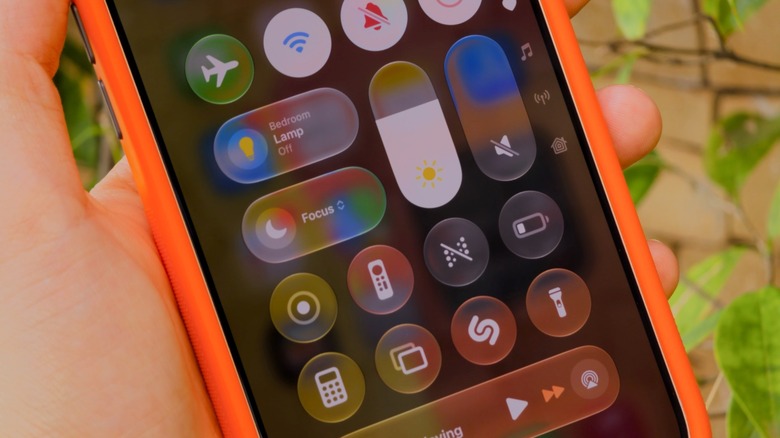
Your iPhone has more ways to silence notifications than you realize.
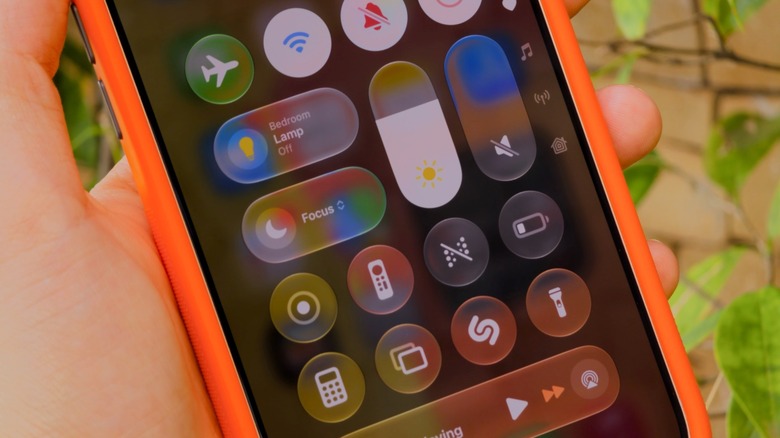
Notifications can get really annoying, especially during a meeting or at bedtime. The good news is that your iPhone has plenty of ways to silence and suppress them: Do Not Disturb, Focus modes and, of course, the classic silent mode.
While silent mode is active, notifications still appear, but your phone won’t make any noise (though it might vibrate). In Do Not Disturb, notifications don’t show in the first place. And Focus modes are like Do Not Disturb on steroids — highly customizable for specific situations, like work or sleep. iOS has some predefined Focus modes, plus you can create your own.
It’s worth noting that these features aren’t new. Do Not Disturb was first introduced with iOS 6, and it has a single job: fully silencing all your notifications. You won’t see any banners, calls or alerts when it’s turned on. It works well when you really don’t want your phone distracting you. But Do Not Disturb can be too strict when you still want to receive important alerts, like calls from your family. That’s why Apple introduced Focus with iOS 15.
Setting up Focus modes and Do Not Disturb on iPhone
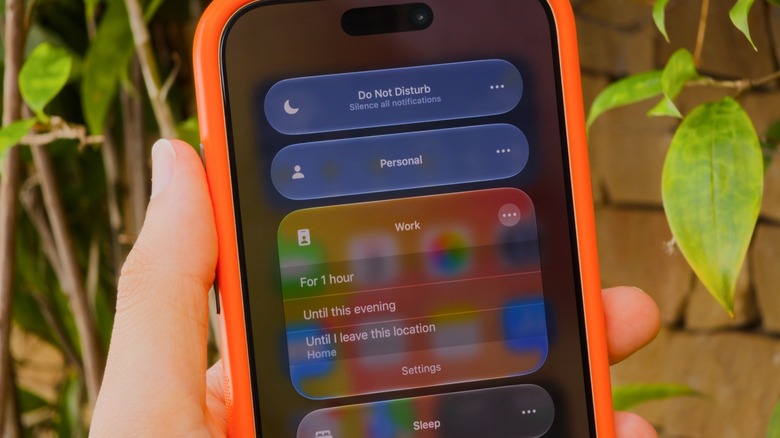
Do Not Disturb and Focus live in your iPhone’s Control Center, accessible by swiping down from the top-right corner of your screen. If you’re still rocking an iPhone with a Home button, slide up from the bottom instead. Tap the Focus button and you’ll see every available option laid out: classic Do Not Disturb, plus Personal, Work and Sleep. To tweak a specific mode, tap the three dots, then Settings.
If you’ve never used a Focus before, you’ll need to set it up first. That’s what makes this feature so powerful: in its settings (Settings > Focus), you can choose which apps and people are allowed to notify you when a mode is on. Let’s say in the Work Focus, you only allow notifications from apps like Slack and Mail, while all others are silenced. The same goes for people; it’s in your control whether calls or messages from specific contacts notify you.
To set these up, tap People or Apps while inside a Focus’s options. You can choose to Allow or Silence Notifications From the list you created — whichever makes more sense for that Focus. Under Apps, be sure to enable Time Sensitive Notifications so you still receive important alerts like reminders, alarms or calendar events. You can also customize a Focus mode by applying Filters and Smart Activation. It’s definitely worth taking the time to check out all the available options, given what a great productivity tool Focus is.
As you may notice, Do Not Disturb is its own Focus, meaning it’s customizable like the rest. You might wish to allow alerts from your spouse even in Do Not Disturb, perhaps.
Smart Focus modes for bedtime and driving
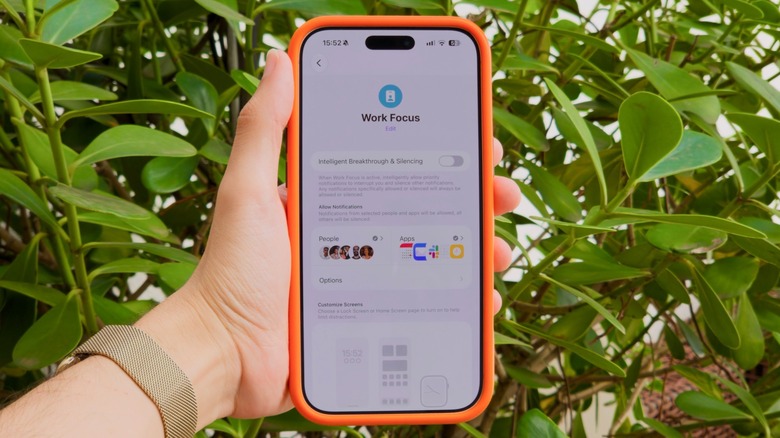
You can toggle focus modes manually from Control Center anytime, but your iPhone can also trigger them automatically. For example, there’s a Sleep Focus that turns on when it’s time to go to bed. It’s based on your sleep schedule in the Health app, meaning there’s no need to turn it on manually every night. Driving works similarly, as it turns on when your iPhone connects to CarPlay to help reduce distractions on the road.
If you have Apple Intelligence enabled, there’s also the special Reduce Interruptions Focus. This uses AI to figure out which notifications might be important and which aren’t. Because this does all the work for you, it’s a good Focus to try first. If you’d like to create your own Focus from scratch, tap New Focus at the bottom of the Control Center panel, or hit the Plus (+) button under Settings > Focus. Give your new mode a name and icon, then customize it like any of the others.
By default, anyone who contacts you via iMessage will see a small notice that you have a Focus turned on. While any Focus mode is active, some or all notifications will be suppressed following the way you’ve set it up. You’ll still receive these messages, emails and other notifications; you just won’t get pings for them. When you want notifications to alert you normally again, turn the Focus off.
Tech
Coastal Source Expands Outdoor Audio and Lighting at CEDIA 2026 With Bollard 1000 Speakers and Lutron Integration
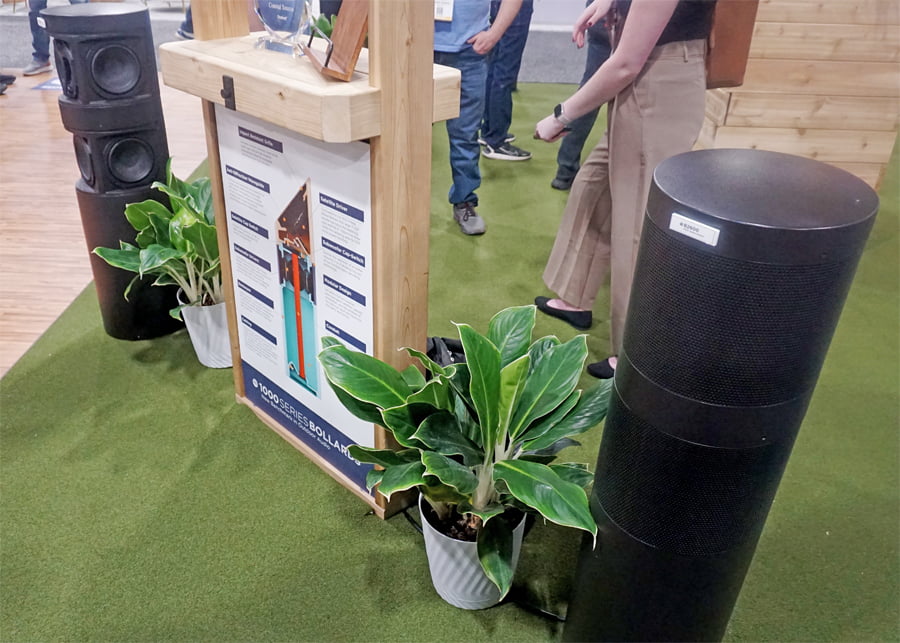
The annual CEDIA Expo places a heavy emphasis on home theater and smart home technology, but there is also a growing presence in the outdoor audio category. Origin Acoustics, Theory Audio, ELAC, and Polk Audio are among the players in this category, but two companies getting more aggressive in the segment are KEF and Coastal Source.
At CEDIA 2026, Coastal Source was on hand with several new products, including its recently released Bollard 100 Series speakers, Ovation Ceiling Speaker, Power Source Low Voltage Plug-and-Play System, and Via Dynamic Outdoor Lighting, developed in partnership with Lutron.
The Bollard 1000 Series
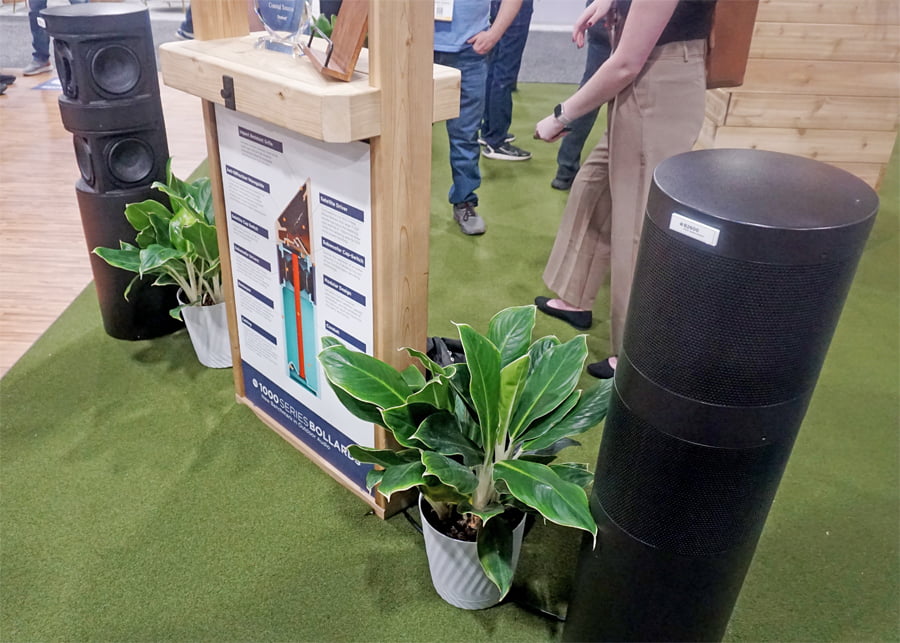
We have previously reported on the Coastal Source Bollard 1000 Series speakers, but the company’s presence at CEDIA gave us an opportunity to listen to two models; the 3-Way B2600 and 2-Way EB1250 Ellipse — on the show floor.
Both sounded better than I expected, delivering impressive bass, a very prominent midrange, and clear highs. The “weatherized” ribbon tweeters certainly did their job. More importantly, these speakers sounded much closer to what you would expect from mid-to-high-end indoor loudspeakers than conventional outdoor speakers.
Coastal Source Model
B2600
EB1250 Ellipse
Product Type
3-Way Bollard Speaker
2-Way Bollard Speaker
Construction
Rotomolded color-through polymer composite
Rotomolded color-through polymer composite
Outdoor Rating
Meets or exceeds NEMA 6 / IP67 testing standards
Meets or exceeds NEMA 6 / IP67 testing standards
Tweeter
2.5” Planar Ribbon
3” Planar Ribbon
Mid-Bass Woofer
6.5” Carbon Fiber Cone
7″ x 10” Carbon Fiber Cone
Passive Radiators
3x 6.5” Passive Radiators
Not Applicable
Subwoofer
4x 6.5” Laminate Cones
Not Applicable
Power Handling
Sub – 500W, Sat – 125W
200W
Frequency Response
30Hz – 20kHz
50Hz – 20kHz
Sensitivity
Sat – 88db @ 1w/M, Sub – 88db @ 1w/M
90db @ 1w/M
Dispersion
120°
120°
Impedance
16 ohms
16 ohms
Speaker Connectors
8C16 Uni-Connect Input & Output Connectors
8C16 Uni-Connect Input & Output Connectors
Finish
Brown (fine textured satin)
Brown (fine textured satin)
Mounting
Freestanding, Partial Burial, or Hardscape Mount (optional)
Freestanding, Partial Burial, or Hardscape Mount (optional)
Dimensions (HWD)
42.5” x 11” x 12.25”
29” x 11” x 12.25”
Weight
50.6 lb
27.5 lb
For full details and specifications on the entire 1000 Series Bollard lineup, refer to our detailed report: Coastal Source 1000 Series Bollards Bring Ribbon Tweeters Outdoors, Because Why Not.
Ovation Ceiling Speaker
Initially released at the 2025 CEDIA Expo, the Coastal Source Ovation made another appearance at CEDIA this year.
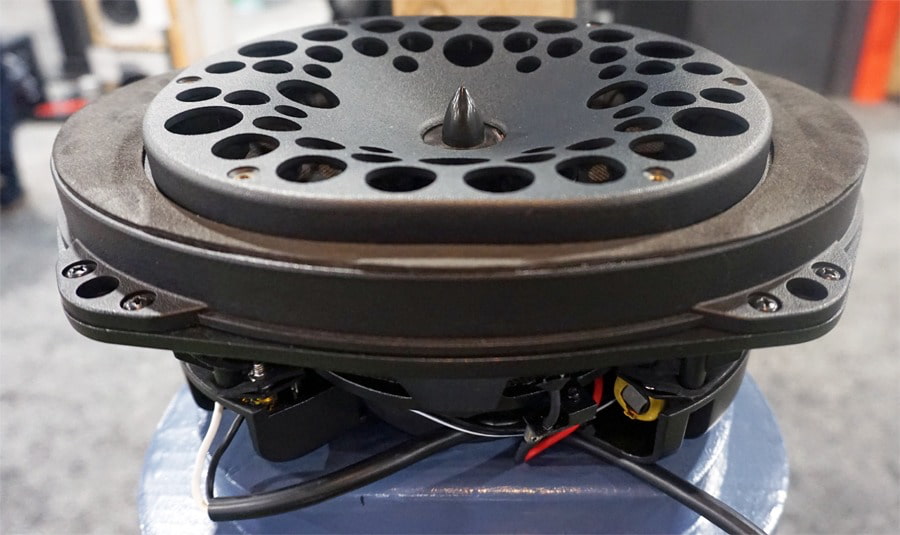
The Ovation combines high-end performance with a compact but heavy-duty design that is easy to install either outdoors or indoors, with a flush-mount design and 360° clamping system.
The Ovation provides environmental protection with a combination of a rust-resistant extruded aluminum grille and UV-stable plastics & weatherproof fabrics. The Ovation is built to last.
For sound reproduction, the Ovation incorporates an elliptical driver and ribbon tweeter that provide wide coverage without losing focus on sound quality. It also provides exceptional bass for such a small form factor.
| Coastal Source Model | Ovation |
| Product Type | Outdoor/Indoor Ceiling Speaker |
| Construction | Rust-resistant extruded aluminum grille and UV-stable plastics & weatherproof fabrics |
| Ceiling Placement | Designed for protected outdoor spaces such as covered patios, lanais, cabanas, and breezeways |
| Outdoor Rating | Wiithstands harsh climates, salt spray, sun, snow, and heavy rain – |
| Tweeter | 1.25″ coaxial planar ribbon tweeter |
| Woofer | 7″ x 10″ elliptical woofer |
| Power Handling | up to 80 watts RMS |
| Frequency Response | 40-25,000 Hz (-6 dB) |
| Sensitivity | 86 dB |
| Dispersion | 120° conical dispersion pattern |
| Impedance | 8 ohms |
| Speaker Connectors | Binding posts with male Coastal Mini Connector (CMC) pigtail |
| Mounting | In-Ceiling |
| Dimensions (WHD) | 10.675” x 5.25” x 7.675″ |
| Weight | 4 lbs |
VIA Lighting
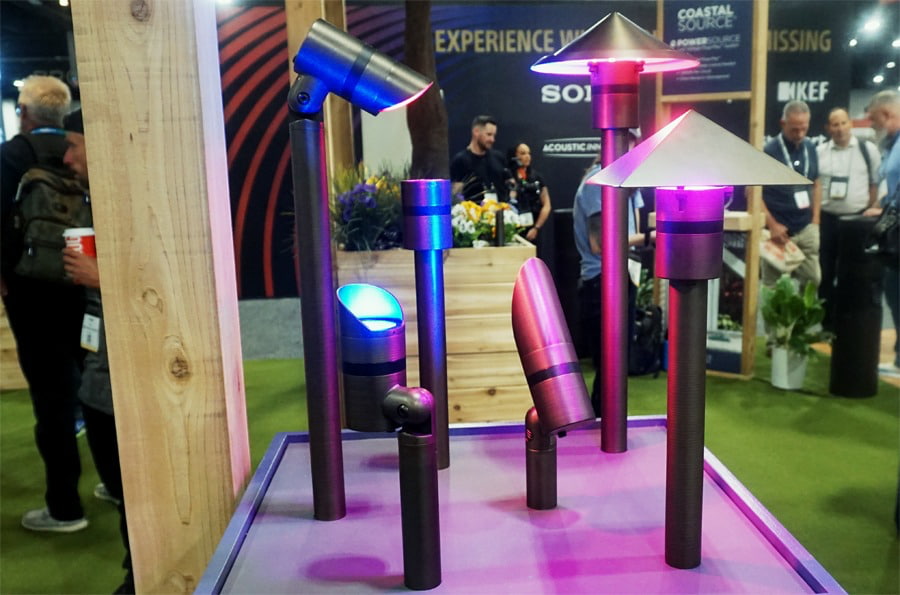

In addition to the Bollard 1000 Series and Ovation speakers, Coastal Source also showcased examples of its VIA lighting solutions, developed in partnership with Lutron. The system supports Lutron’s Ketra full-spectrum color and accent lighting capabilities, along with Rania tunable white lighting.
The fixtures are available in a variety of styles designed to complement different architectural and landscape requirements.
VIA Lighting fixtures feature solid brass construction and plug-and-play installation with Coastal Source power systems, with control provided through Lutron HomeWorks.
Coastal Source PowerSource
One of the biggest challenges with outdoor audio and lighting systems is the complexity of power management. At CEDIA 2026, Coastal Source gave us a closer look at its PowerSource system, designed to simplify that part of the installation process.
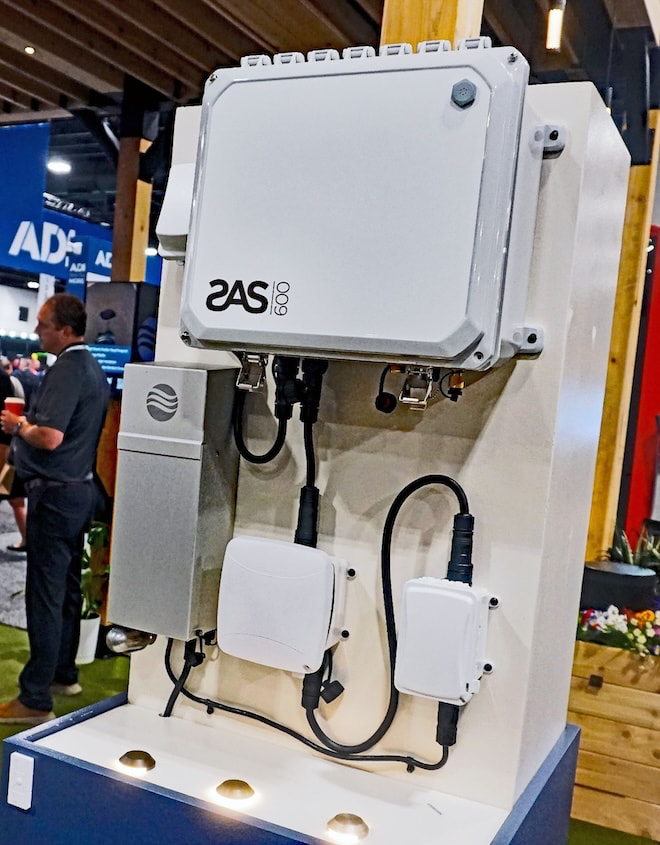
According to Coastal Source, its PowerSource system is the first UL-certified, plug-and-play 120V system approved for direct burial (NEMA 6) and above-ground use. The company says the system is designed to provide safe, reliable power where needed while reducing the permitting delays and licensed line-voltage labor costs traditionally associated with outdoor power installations. Local permitting, electrical code, and licensing requirements may still vary by jurisdiction.
The system consists of pre-assembled, modular components that screw together, shortening installation times and reducing the level of specialized labor required. Its modular design also makes the system easier to scale as outdoor audio, lighting, and other systems expand.
PowerSource can also shorten cable runs and improve system efficiency while, perhaps most importantly for the homeowner, helping keep installations clean and discreet.
The Bottom Line
Coastal Source is not approaching the backyard as a place to bolt a few speakers to the house and call it a day. The Bollard 1000 Series, Ovation, VIA Lighting, and PowerSource system are designed to work together as part of a more complete outdoor entertainment and architectural platform, with sound quality, lighting, installation, and power management addressed under one roof.
The company’s use of weatherized ribbon tweeters is also unusual in this category, and based on what we heard at CEDIA, the better Bollard models can deliver the kind of bass weight, midrange presence, and treble clarity that we normally associate with considerably more serious indoor loudspeakers.
This is primarily aimed at custom integrators, landscape designers, and homeowners building premium outdoor spaces where aesthetics and reliability matter just as much as sound quality. It is not the solution for someone looking to hang a $300 pair of patio speakers beside the grill.
Coastal Source also has considerably more competition than it did a few years ago. Theory Audio Design has been pushing high-output landscape audio further upmarket, while KEF’s expanding outdoor lineup adds speakers, subwoofers, and amplification from one of the biggest names in high-end audio.
The backyard audio wars have officially moved well beyond waterproof speakers and an extension cord.
Price & Availability
Coastal Source products (including amplifiers) are available through Coastal Source and Authorized Dealers. Refer to dealers for pricing and installation.
Related Reading:
Tech
‘I did not foresee at all the social-media application, nor its impact on society’: Inventor of the CMOS-based image sensor on how a technology designed to take photos in space has changed the way we view the world

Camera technology has come on leaps and bounds throughout the 20th and 21st century, but one of the most important developments was the invention of the CMOS image sensor. This invention, dubbed the ‘camera-on-a-chip’, is the technology that allows everyone to carry high-resolution cameras around in their pockets.
But the history of the CMOS can be traced back to NASA’s desire to install small, low-powered cameras capable of capturing high-resolution imagery on interplanetary spacecraft.
Dr. Eric R. Fossum is the inventor of the camera-on-a-chip, and he has not only fathered an era of space-based photography, but also the many industries and technologies that revolve around the micro-cameras we know today.
Latest Videos FromTechRadar
The camera-on-a-chip has changed the world
Before the development of the CMOS image sensor, photography and videography often relied on photographic film, or the more advanced Charge-Coupled Devices (CCDs). The Apollo 11 mission famously used purpose-built Hasselblad cameras – which were too heavy for the return trip to Earth – requiring the astronauts to transport just the film back for development. They’re still there to this day.
CCDs on the other hand were the precursor to Dr. Fossum’s camera-on-a-chip. They detected photons using individual pixels that fed an electrical charge to a single readout amplifier in a row-by-row configuration. These cameras improved significantly in reducing weight and capturing much more vivid imagery than their film-based counterparts, but suffered from high power-usage and heat generation.
CMOS image sensors improved further on the CCD design, giving each individual pixel its own local conversion circuit and amplifier allowing each pixel to be read simultaneously while significantly reducing the energy required per image taken and the heat generated by the camera.
CMOS image sensors are the basis upon which most modern cameras work – from the camera on your phone and in your doorbell, to the Advanced Driver Assistance Systems that power self-driving cars, and even the cameras still heading into space today.
I spoke to Dr. Fossum to understand how CMOS image sensors were developed and their impact on the world we know today.
- Eric, did you ever think that your invention – the CMOS-based image sensor – would have such an impact on society worldwide?
I thought it could become ubiquitous and thought it should become so, but my confidence that it would actually happen was low, due to all kinds of unknowns. I did not foresee at all the social-media application, nor its impact on society, nor its impact on citizen-newsgathering, nor its impact on social justice, whether to protect good actors in law enforcement or to identify bad actors in law enforcement. I also knew there could be impact on privacy and liberty, and I am uncomfortable with how that has evolved.
- I note that you worked at NASA’s legendary JPL (Jet Propulsion Lab) at the time. We don’t usually associate JPL with cutting-edge digital imaging. How did that happen? Was JPL essentially another Xerox PARC?
NASA and JPL is associated with cutting edge digital imaging, from its earliest activities in the robotic exploration of space. JPL engineers found ways to beam back images from distant places using digital imaging and data transmission. Eugene F. Lally at JPL in 1961 was probably the first advance the idea of a ‘mosaic’ image capture, where mosaic refers to an array of pixels. JPL developed many digital imaging technologies for scientific use in the harsh environment of space with high precision and reliable image capture across a larger range of wavelengths than consumer products. My job at JPL was created by JPL management to further grow JPL’s bench-depth in CCD technology.
- I am sure that you followed avidly the visual journey of Artemis II a few weeks ago: from the iconic photos to the videos that the crew and the entire team produced during that trip. Do you remember what your thoughts were when you first saw the wonderful pictures the crew delivered?
My initial thoughts focused on the impressive images, and I was pleased that humans have returned to the moon, at least into orbit for now. But it did occur to me that that it was also cool that NASA –invented image sensor technology, employed in a consumer smartphone (and digital camera), was used on the this NASA mission, further completing its promise to make cameras faster, cheaper and better.
- Your current research at Dartmouth centers heavily on the Quanta Image Sensor (QIS). Can you tell us more about what it is, how is it different from CMOS image sensors and why it is called Quanta (which I presume is the plural of Quantum).
In the CMOS QIS, due to its ultra-low readout noise, it is possible for the first time to discern individual photons via their generated photoelectrons, and to count with high accuracy the number of photoelectrons at each pixel, at room temperature, at low voltages, and without the use of avalanche gain. The CMOS QIS we developed at Dartmouth and later at the spin-off company Gigajot is, in essence, a CMOS image sensor that uses intra-pixel charge transfer (invented at JPL) and extremely low readout-node capacitance, to generate a large enough voltage signal from a single photoelectron to overcome background thermal noise in silicon.
The QIS concept, itself though, is technology agnostic, since it was about creating great images one photon at a time. Single-photon-avalanche photodiode (SPAD) technology has significantly advanced in the past 20+ years so that it is also becoming useful for image sensor implementation. A SPAD QIS has larger pixels and consumes much more power than the CMOS QIS, but offers time-tagging of pixel arrival far more accurate than CMOS QIS and is being produced as a foundry-process that is also easily integrated with CMOS circuits.
- How has the IEEE impacted your professional journey?
I have been a member of IEEE since I was a student and have since graduated to Life Fellow. Profession societies are very important for the dissemination of leading research among experts in the field, and IEEE is no exception. I have published many papers under the IEEE, in the sub-silos of Electron Devices and Solid-State Circuits, and have benefitted from IEEE meetings such as the International Electron Devices Meeting (IEDM) and International Solid-State Circuits Conference (ISSCC). IEEE was also a partner in the early days of what is now known at the International Image Sensor Workshop, that I and others founded in 1986.
- What is the future of consumer image sensors from your point of view given that mainstream smartphones regularly boasts sensors with hundreds of millions of pixels already and we’ve reached a plateau in terms of returns?
Certainly in the near term, image sensors and consumers have benefitted from 3D integration and stacked wafer devices. The on-chip integration of more advanced functions possibly including smart-image-sensor functions or edge offers new avenues for improving image capture and understanding right at the focal plane. This was something I dreamed of since the 1980’s when I was exploring, researching and writing about smart image sensors and focal-plane image processing, but it was too early in those days.
- What are your thoughts on PIS (Processing-in-sensor) which fuses compute, the image sensor and memory in one holistic system at the edge?
As mentioned, I have been thinking about this topic since I was a graduate student in the early 1980’s at Yale and then at Columbia University. I am not familiar with the acronym PIS (which might really be a poor choice!) but I do think it is very application dependent. Furthermore, there is a data communication and parallel processing problem where local pixel computing is easy, but global image computing, where different regions have to be analysed, is still difficult on the focal plane. This may result in avoiding the addition of extra power dissipation to the image sensor chip and instead partitioning the imaging system into two parts, local computing on the focal plane and regional or global computing off the focal plane.
- Today there are billions of cameras that capture the world in two dimensions, generating millions of Gigabytes worth of data. Have you ever been interested in exotic storage technologies (some of which use image sensors)?
I have not really worked much in exotic storage systems, although at Photobit, our spinoff from JPL, we worked with companies, from other startups to giants like AT&T Bell Labs, on readout of holographic optical memories. Although, at that time, we were just focused on the image sensor chip and high speed readout.
- Can you tell me about the significance of the IEEE Jun-Ichi Nishizawa Medal, and what this recognition means to you?
Gosh, who doesn’t like being recognised by your peers for your accomplishments? Still, it is a very humbling event and makes me reflect on the great people that I have had the chance to work with over the years. It has been such a privilege to work with these folks and take this journey together. As I always try to mention, the amazing CMOS image sensor technology we all use every day was made possible by the hard and innovative work of thousands of image sensor engineers around the globe.
- We’re planning a special series towards the end of the year, looking at tools that thought leaders use in their everyday lives. Name one (either physical or software-based) that you consider to be critical to your daily work routine and why you chose it.
I think AI tools are great time-savers in finding and curating information, and I often learn much from their apparent knowledge, and sometimes from their insights. These days I use Co-Pilot a lot. But I am always concerned with whom, directly or indirectly, I am sharing information and ideas with. I think this is something we should all ponder and ask hard questions of the AI giants.

Follow TechRadar on Google News and add us as a preferred source to get our expert news, reviews, and opinion in your feeds.
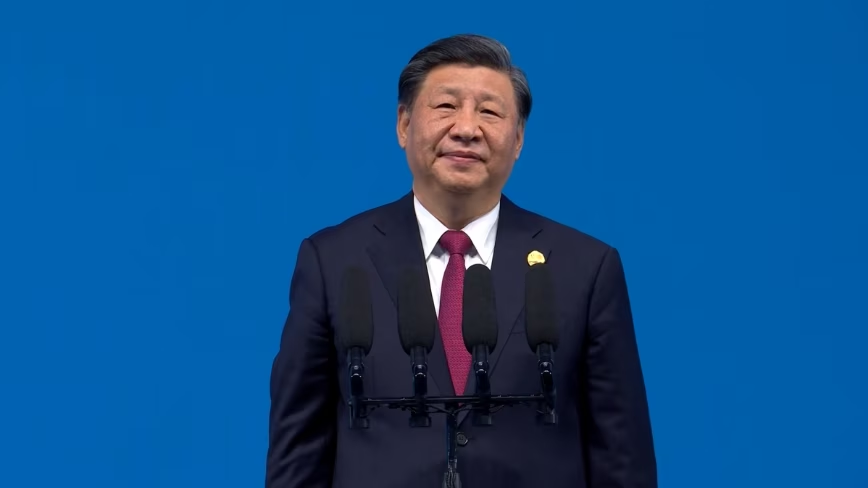
Xi Jinping used the BRICS summit to propose a China-led community for open-source AI and to invite members into the World AI Cooperation Organization, a Beijing-founded body of 29 countries with no EU state among them. Europe drew its line in the AI Act, which exempts genuinely open models but not those carrying systemic risk, and has carried fines since August.
Xi Jinping used the BRICS summit to propose a Chinese-led community for open-source artificial intelligence, Bloomberg reported. He said it would “support the cooperation in developing and applying large language models“, alongside seminars and training courses.
He was speaking in New Delhi on Sunday. A day earlier he had invited BRICS members to join the World AI Cooperation Organization, a body Beijing founded in July.
Twenty-nine countries signed the founding agreement on 16 July and the organisation is headquartered in Shanghai, China’s government said. Russia, Pakistan, Kazakhstan, Indonesia and Brazil are among them.
No European Union member state is.
The pitch did not carry the room either. The joint declaration issued on Saturday made no mention of it, asking instead for international cooperation on access to AI resources “while ensuring its safety, security, inclusiveness and reliability“.
Europe settled the same question in a statute.
The AI Act exempts providers of genuinely free and open-source general purpose models from keeping technical documentation for regulators, from supplying it downstream and from appointing an EU representative, the Commission’s guidelines say. The weights, parameters and architecture have to be public, and the licence has to permit use and modification without monetisation.
The exemption stops at systemic risk. A model in that tier complies with everything, open licence or not, and every provider still has to publish a training data summary and a copyright policy.
Those rules acquired teeth on 2 August, when the Commission gained the power to demand evaluations, restrict market access and fine 3% of global turnover.
So both blocs have a ceiling on openness. Europe’s is written down and reviewable in court.
China’s is not. Xi told the country’s own AI summit in July that development and security have to be balanced, and a social media account used to signal policy thinking has said the most powerful model features should be restricted.
State security minister Chen Yixin, in a journal article published on Saturday, accused unnamed countries of using blacklists and closed ecosystems to “sever global AI industrial chains and supply chains“.
His own ministry of commerce spent a month this summer discussing whether to curb overseas access to Qwen, Doubao and GLM. Europe published its limit and can be sued over it, while Beijing is still deciding what its own is.
How many you need depends on your home and usage.
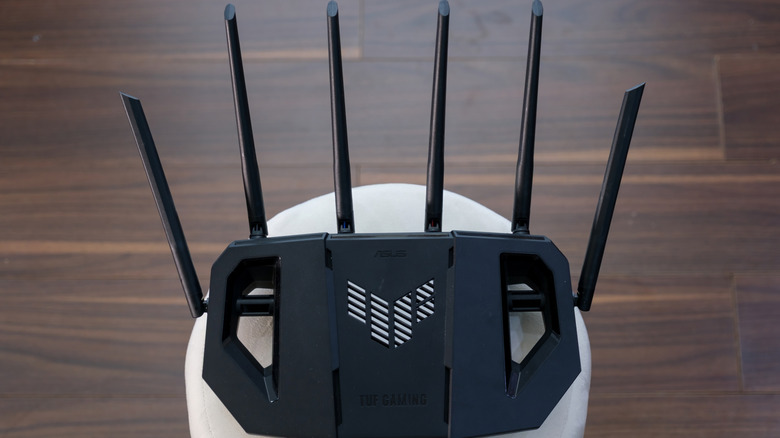
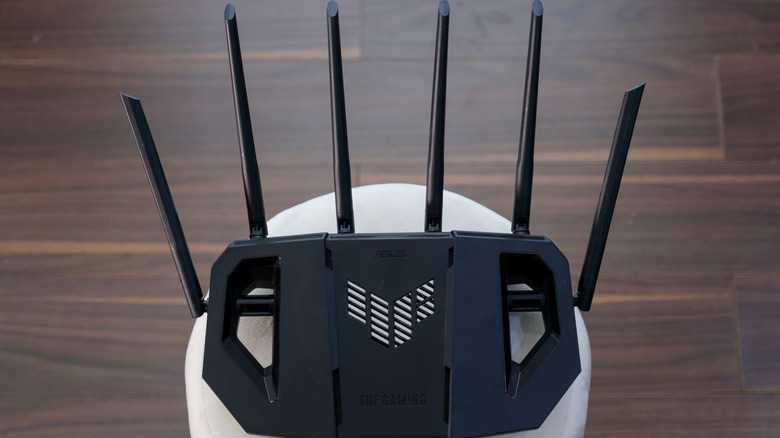
Not so many decades ago, in much simpler and slower times, many Wi-Fi routers shipped with just a single antenna that could only handle one wireless data stream at a time. As Wi-Fi got better, the internet got faster and devices rapidly multiplied across households. The number of antennas on routers did, too. Today, there are routers with as many as eight antennas.
At first glance, routers with many antennas might come off as a simple marketing gimmick, but there’s a good reason why single-antenna routers stopped being enough. Yes, even that alien spider-looking router with eight antennas has a good reason for existing, but that doesn’t mean it’s for everybody. Picture an antenna as a single-lane road. In a small town, that single lane is plenty. Take that same road into a busy city, and traffic congestion builds up fast. In the early days, when one of the internet’s main uses was email, a single antenna was plenty too, but that’s no longer the case. So instead of building routers with just one lane, manufacturers started building ones that could run several lanes of traffic at once, using a trick called MIMO (multiple-input, multiple-output). This tech is what actually makes multiple antennas useful, because contrary to what most people think, simply bolting on extra antennas without MIMO causes more problems than it solves.
What do multiple antennas actually do?
Thanks to MIMO, routers with multiple antennas can carry more data using a fancy technique called spatial multiplexing. So more antennas allow room for more lanes of data, but that doesn’t mean more antennas automatically equal more data lanes. The router also needs the right internal hardware to turn those lanes into separate data paths.
Another use of multiple antennas is beamforming. In plain terms, this means multiple antennas allow your router to determine where your device is and then focus its signal on it. And the more antennas, the better your router can do this, because each extra antenna gives it another signal it can fine-tune. Think of several people tossing pebbles into a pond at carefully timed moments. Their ripples can build into a stronger wave at one chosen spot and stay weaker elsewhere. Beamforming needs multiple antennas for the same reason: The router coordinates their signals so they combine more strongly around your device. One lone antenna has no other signals to coordinate with.
Signal diversity and reliability are other big reasons for multiple antennas. In a house, Wi-Fi signals don’t go straight to the recipient; instead, they bounce off walls, furniture, metal objects and even people. So having multiple spaced-apart antennas ensures at least one gets a clean signal even if others don’t. Also, multiple antennas are needed for MU-MIMO (Multi-User Multiple-Input Multiple-Output). Older routers served one device at a time before rapidly cycling to the next. MU-MIMO splits a router’s antenna array so it can actually talk to multiple devices simultaneously.
How many antennas is too many?
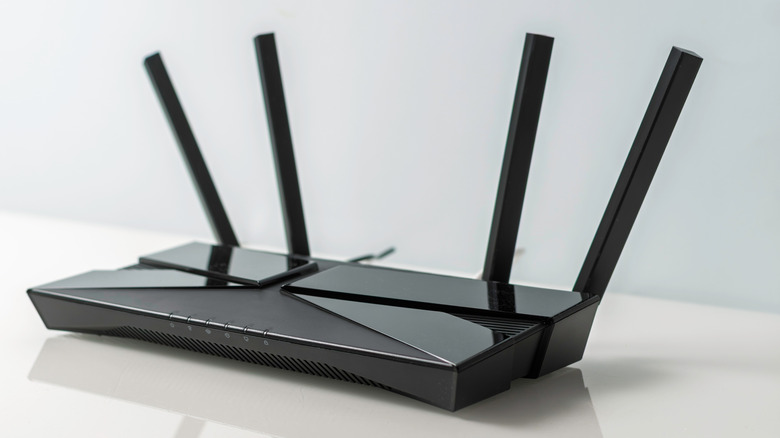
For most people and homes, a router with eight antennas is overkill; a good router with two to four antennas is usually more than enough. In fact, the most important thing isn’t just antennas; Wi-Fi standards and software also play a big role in the performance of a router. If coverage is one of your concerns, then a router with eight antennas might be a reasonable choice since you’d have more antennas to adjust to improve coverage. But for coverage cases, setting up a mesh network is usually a more reliable solution than simply having more antennas.
For businesses, a high-capacity router with more antennas and data streams can be useful, especially in offices, cafés or other places where lots of people are connected at once. But once again, beyond antenna count, Wi-Fi standard and software play a major role in keeping the network running smoothly even when several devices are connected. Another thing to know is that a newer, faster-looking Wi-Fi router with more antennas doesn’t necessarily mean faster internet speed. At the end of the day, your max internet speed is capped by your plan, and a new eight-legged, spider-looking router won’t magically bypass that.


We may receive a commission on purchases made from links.
If mosquitoes are stopping you from getting the most out of your own backyard, you’re not alone. Some people (myself included) are mosquito magnets, no matter how much bug spray you wear. Within a minute or two of stepping outside, I’m usually sporting a new bite mark. It never takes them long to find me. Meanwhile, my kids agree I’m their best mosquito repellent since those pesky biters usually choose me instead of them. It’s unfair, and I wanted to see what I could do to change that.
Living in the south, where the weather stays warmer for longer, mosquitoes are just a fact of life. That doesn’t mean there’s nothing to be done about them. I was determined to enjoy my own backyard for more than a minute at a time, so I tried a few different mosquito-repelling gadgets that could make my backyard more comfortable. Here are three that I would trust again.
Thermacell LIV 2.0 Whole Yard System
I first tried a single Thermacell E-ZoneGuard Patio device. It’s small and rechargeable, and I can carry it wherever I go outside to create a “dome” around me that wards off the bloodsuckers. It’s a good device, but when I found out Thermacell offers a full yard system, I was intrigued. The LIV 2.0 on-demand whole-yard system uses the same repellent Thermacell is known for, but disperses it on a much larger scale. With a yard spanning nearly two acres, this was a more practical option for me and my family.
The system comes with multiple repelling devices that you can strategically place around your outdoor spaces. You can use one system to cover up to 3,000 square feet at a time. The repellers work via timers that you program on an app, so you can clear away mosquitoes and similar pests before you’re ready to enjoy the outdoors. The repellent is people-safe, pet-safe, and planet-safe, and it also works for gnats, no-see-ums, and similar pests. There’s a bit more work involved in setting up the LIV 2.0 compared to the Thermacell E-ZoneGuard Patio, but if you have a large space and don’t want to carry a whole device with you each time you go outside, this larger system could be worthwhile. It starts at $1,746, with smaller systems available at lower price points.
Mosqitter Mini
Mosquitoes sometimes find their way indoors, and no one wants to be feasted upon while they sleep. And let’s be real, no one wants to listen to the buzzing and zapping of regular bug zappers in the middle of the night. The Mosqitter Mini solves these problems. It uses warmth and a UV light to lure bugs to the device, then sucks them in with a high-powered fan once they get close. Once inside the device, they don’t escape. It works quietly in the background, with no buzzing or zapping sound to disturb your sleep.
While many bug zappers and mosquito solutions are for the outdoors, this one can work anywhere on your property: patios, gardens, pool areas, garages, workshops, kitchens, hallways, or wherever else you’re likely to encounter flying mosquitoes. The one downside of this unit is that it requires a power plug. There’s no battery option, so you might be limited as to where you can place it. Still, it’s a good option for trapping mosquitoes and more. It’s available on Amazon for $199.99.
Dynatrap Mosquito & Flying Insect Killer
Mosquitoes taking over your backyard is bad enough, but they’re far from being the only threat to a good time. The only thing that’s better than getting rid of mosquitoes is also getting rid of other flying pests, and the Dynatrap Mosquito and Flying Insect Killer does a decent job. This gadget is more along the lines of a traditional bug zapper (unlike the Mosqitter Mini). Flies, gnats, wasps — it doesn’t discriminate.
What I liked about the Dynatrap is that it actually removed pests from my yard rather than just repelling them. Any pest that fell into the trap was gone for good. You can hang it or place it on a tabletop, ideally near where you enjoy spending time. It’s also easy to set up, with no app to download and nothing to connect to Wi-Fi. Just plug it in and turn it on. Other customers have given it a 4-star rating across more than 1,200 reviews, with customers consistently mentioning how quiet the device is. The DynaTrap is on Amazon for $99.

Sports2 minutes ago
Satono Glow’s straight-track success points to Derby Day target in 2026

Tech3 minutes ago
Privacy, Speed, Limits & Cost

News Videos4 minutes ago
Crypto Bet Big On U.S. Regulation, And Now Its Landmark Legislation Hangs In The Balance

Tech5 days ago
Memory prices are slowing because buyers ran out of money

Business3 days ago
Micron Stock Climbs Above $1,031 as AI Memory Crunch and a $50 Billion Outlook Fuel the Rally

Business3 days ago
AMD Stock Climbs After Management Lifts 2027 Data Center Outlook Toward $70 Billion in AI Sales

![LISA - 'LALISA + MONEY' | 2023 WORLD TOUR [BORN PINK]](https://wordupnews.com/wp-content/uploads/2026/02/1770487179_maxresdefault-80x80.jpg)
-
Tech5 days ago
Memory prices are slowing because buyers ran out of money
-
 Business3 days ago
Micron Stock Climbs Above $1,031 as AI Memory Crunch and a $50 Billion Outlook Fuel the Rally
-
 Business3 days ago
AMD Stock Climbs After Management Lifts 2027 Data Center Outlook Toward $70 Billion in AI Sales
-

 Crypto World4 days ago
Bitcoin price risks $76K drop as $78K support weakens
-

 Crypto World5 days ago
Robinhood Stock: How To Take Advantage With Reduced Risk
-

 Crypto World5 days ago
Ethereum price stalls below $2,500 as ADX drops to 11
-

 Fashion2 days ago
Weekend Open Thread – Corporette.com
-

 Crypto World2 days ago
XAG/USD: Silver’s Short-Term Rally Meets Its Moment of Truth
-

 NewsBeat5 days ago
England up in reading, maths and science rankings as Scotland and Wales dip
-

 Crypto World3 days ago
2 Chip Stocks Broke Out This Week. Neither Was Nvidia
-

 Crypto World3 days ago
OKX launches 10x OpenAI, Anthropic X-Perps in Europe
-

 Crypto World2 days ago
Diesel Tops $6 a Gallon for the First Time as 28 States Set Records
-

 Crypto World5 days ago
Intel Stock Jumps 9% on Chip Price Hike Report, US Stake Gains $36 Billion
-

 Tech3 days ago
Battery life is the only iPhone 18 Pro and iPhone Duo upgrade I care about. Apple didn’t disappoint
-

 Business2 days ago
10 Most-Streamed Songs On Spotify In 2026 So Far, Led By Ella Langley’s Dominant Run On The Charts This Year
-

 NewsBeat5 days ago
What went right this week: an ‘historic’ fall in violent crime, plus more
-

 Crypto World4 days ago
Bitcoin price risks $70K if $78K neckline breaks
-
 Tech4 days ago
Apple Watch Ultra 4 vs Watch Ultra 3: Should you really spend another $799?
-
Crypto World3 days ago
Ethereum Price Analysis: Consolidation at $2.5K Tests Momentum as On-Chain Activity Surges
-
 Crypto World4 days ago
Bitcoin price holds near $79K as cycle drawdowns narrow
You must be logged in to post a comment Login