

Connect with us

Tech

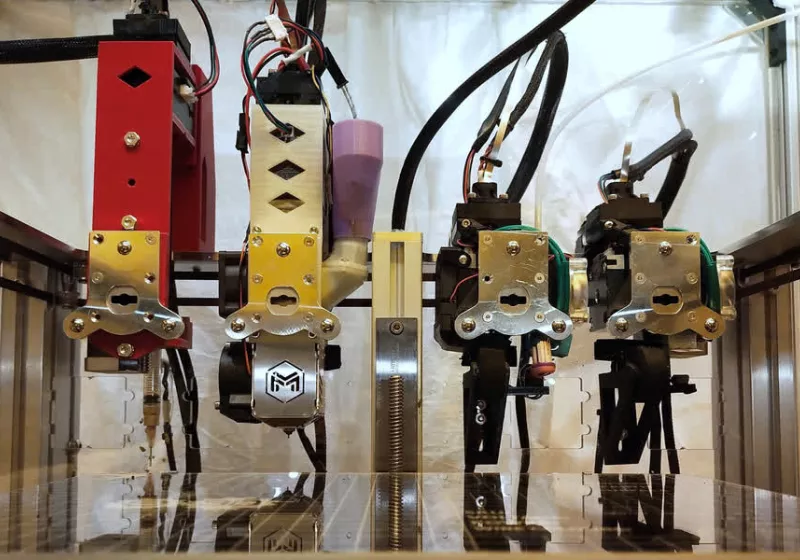
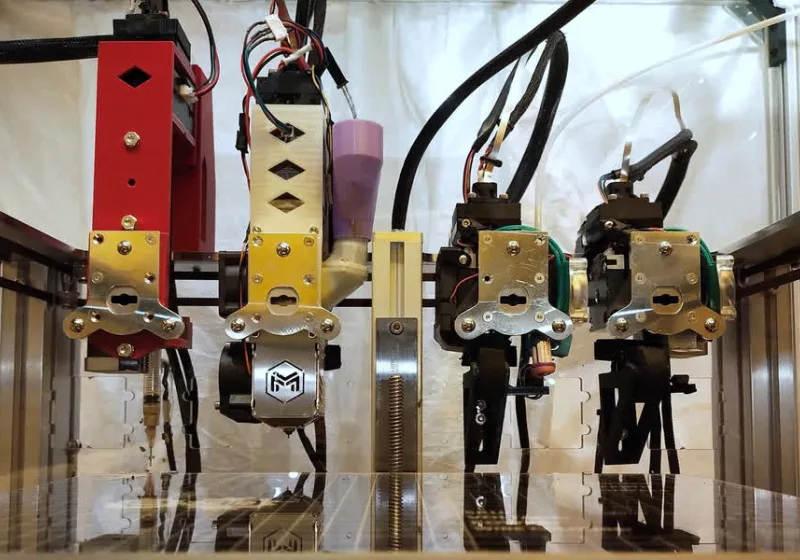
MIT's new 3D printer can create a working electric motor in one build

Published

on


The team, based at MIT’s Microsystems Technology Laboratories, demonstrated the system by printing an electric linear motor – the type that generates straight-line motion instead of spinning a shaft.
Read Entire Article
Source link

Continue Reading
Click to comment

Leave a Reply

Your email address will not be published. Required fields are marked *

Tech

Exploring Innovative Number Formats for AI Efficiency

Published

on

AI has driven an explosion of new number formats—the ways in which numbers are represented digitally. Engineers are looking at every possible way to save computation time and energy, including shortening the number of bits used to represent data. But what works for AI doesn’t necessarily work for scientific computing, be it for computational physics, biology, fluid dynamics, or engineering simulations. IEEE Spectrum spoke with Laslo Hunhold, who recently joined Barcelona-based Openchip as an AI engineer, about his efforts to develop a bespoke number format for scientific computing.

LASLO HUNHOLD

Laslo Hunhold is a senior AI accelerator engineer at Barcelona-based startup Openchip. He recently completed a Ph.D. in computer science from the University of Cologne, in Germany.

What makes number formats interesting to you?

Advertisement

Laslo Hunhold: I don’t know another example of a field that so few are interested in but has such a high impact. If you make a number format that’s 10 percent more [energy] efficient, it can translate to all applications being 10 percent more efficient, and you can save a lot of energy.

Why are there so many new number formats?

Hunhold: For decades, computer users had it really easy. They could just buy new systems every few years, and they would have performance benefits for free. But this hasn’t been the case for the last 10 years. In computers, you have a certain number of bits used to represent a single number, and for years the default was 64 bits. And for AI, companies noticed that they don’t need 64 bits for each number. So they had a strong incentive to go down to 16, 8, or even 2 bits [to save energy]. The problem is, the dominating standard for representing numbers in 64 bits is not well designed for lower bit counts. So in the AI field, they came up with new formats which are more tailored toward AI.

Why does AI need different number formats than scientific computing?

Advertisement

Hunhold: Scientific computing needs high dynamic range: You need very large numbers, or very small numbers, and very high accuracy in both cases. The 64-bit standard has an excessive dynamic range, and it is many more bits than you need most of the time. It’s different with AI. The numbers usually follow a specific distribution, and you don’t need as much accuracy.

What makes a number format “good”?

Hunhold: You have infinite numbers but only finite bit representations. So you need to decide how you assign numbers. The most important part is to represent numbers that you’re actually going to use. Because if you represent a number that you don’t use, you’ve wasted a representation. The simplest thing to look at is the dynamic range. The next is distribution: How do you assign your bits to certain values? Do you have a uniform distribution, or something else? There are infinite possibilities.

What motivated you to introduce the takum number format?

Advertisement

Hunhold: Takums are based on posits. In posits, the numbers that get used more frequently can be represented with more density. But posits don’t work for scientific computing, and this is a huge issue. They have a high density for [numbers close to one], which is great for AI, but the density falls off sharply once you look at larger or smaller values. People have been proposing dozens of number formats in the last few years, but takums are the only number format that’s actually tailored for scientific computing. I found the dynamic range of values you use in scientific computations, if you look at all the fields, and designed takums such that when you take away bits, you don’t reduce that dynamic range

This article appears in the March 2026 print issue as “Laslo Hunhold.”

From Your Site Articles

Related Articles Around the Web

Advertisement

Source link

Continue Reading

Tech

Which Luxury Brand Has Lower Maintenance Costs?

Published

on


Purchasing a new car is hardly an easy task, even if you’re shopping in the more budget-friendly quarters of the market. But the process can no doubt be even more daunting for folks shopping in the luxury vehicle category, as there tends to be more money at stake up front. If you are eyeing a new ride in that corner of the market, there’s a likelihood that vehicles from BMW and Toyota’s luxury shingle, Lexus, are on your radar. 

Those vaunted auto brands have essentially become permanent fixtures on yearly lists, amassing the best-selling luxury brands. If you’ve been comparing those automotive brands yourself, you likely noticed that, at least at the point of purchase, BMW models will likely cost you a few more Benjamins than their Lexus counterparts. But in the luxury automobile sector, maintenance should also factor heavily in your decision-making process, as it can be expensive to keep those vehicles looking and running the way any owner would expect from a high-priced ride.

Advertisement

It can, however, be difficult to properly determine maintenance costs on your own. As such, consumer ratings factions like Consumer Reports (CR) can be invaluable in helping you crunch the numbers. And according to CR, in the long run, the estimated cost of maintaining a BMW may be considerably more than that of a Lexus. For the record, several other factions — including SoFi and CarEdge — also rank Lexus well ahead of BMW in this category, even as there may be more to the numbers to consider.

Advertisement

The maintenance numbers are tricky between Lexus and BMW

Given Lexus’s ties to the Toyota brand, it’s not entirely shocking that the brand is cheaper to maintain. Save for a few recent issues, Toyota is well-known in the automobile arena for reliable vehicles that don’t cost much to properly maintain. To that end, both SoFi and CarEdge rank Lexus as one of the best luxury options on the market in terms of maintenance costs.

Though numbers vary, Consumer Reports estimates tell the same story. But the numbers aren’t as cut and dry as you might think. In fact, per CR’s estimates, over the first five years of ownership, a Lexus might cost more to properly maintain at a potential cost of $1,800 to BMW’s $1,700. It’s in years six through 10 that things shift dramatically, however, with CR estimating it may cost $9,300 to maintain a BMW and $5,600 for a Lexus. Consumer Reports’ 10-year estimates break down to $11,000 for BMW and $7,400 for Lexus. While the other noted survey factions claim that cost could run closer to $16,000 or more for the German brand, the overall Lexus numbers are more in-line CR’s estimate.

There is one caveat to consider regarding these numbers, in that CR reportedly only accounts for costs that are paid directly by the vehicle’s owner, effectively ignoring services covered by the manufacturer in complimentary maintenance plans. That may account for variances in the cited estimates. And with new BMWs getting three years of complimentary service from the manufacturer in comparison to Lexus’s one-year plan, the overall numbers could see a notable shift. 

Advertisement


Source link

Advertisement
Continue Reading

Tech

How To Properly Wash A Microfiber Cloth After Cleaning Your Car

Published

on


Microfiber cloths are an eco-friendly and versatile cleaning tool that many of us keep around the house. They serve a multitude of purposes, from wiping down your countertops and polishing your eyeglasses to cleaning your electronics and detailing your car. They’re a great choice when you want to polish a surface without scratching it, and many people use them to hand wash their cars. But what’s the best way to clean them after you use them, or even after they’ve simply hit the ground?

Microfiber cloths, as the name implies, are made up countless synthetic fibers that carry an electrostatic charge. It’s this charge that attracts dirt so well; maintaining that charge means washing them in ways that don’t limit the cloth’s abilities. Thankfully, you don’t need to wash those microfiber cloths by hand — your washing machine will do the job. However, if the microfiber towels are extremely dirty, you may want to give them a rinse in the sink beforehand. That being said, you should wash them on their own and not with other clothing or towels, especially anything that’s cotton or wool, as this can make it harder for all those synthetic fibers to keep attracting dust and dirt.

Once you toss those microfiber cloths safely into the washing machine, set the water to warm, which will help loosen the dirt and clean them more thoroughly. Use gentle detergent and avoid fabric softeners and bleach, which can also damage the fibers. Stick to the gentle or normal cycle to minimize wear and tear caused by heavy agitation. If you want to ensure that the cloths are clean, you can add an extra rinse to the cycle. Once the microfiber cloths come out of the washer, you can either allow them to air dry or throw them in the dryer on low heat. Once they’re clean and dry, they should be ready for another round!

Advertisement

How and why to use microfiber to clean your car

Visit the car detailing aisle at your local big box store and you’ll be greeted with a multitude of sponges, washing mittens, and towels. However, the pros often choose microfiber because it’s both soft and dense, and all those small fibers it’s made of easily pick up tiny dirt particles without being abrasive. They’re also very absorbent and don’t tend to leave behind streaks or lint, making them a better choice for washing your vehicle than sponges or an old rag. They’re also cost-effective, as you can use them again and again as long as you clean them properly.

To avoid cross-contamination and the potential for scratches, use a separate microfiber cloth for each section of your car when you wash it, including the tires, the body, and the windows. Glass-specific microfiber cloths for your windshield can be particularly helpful in keeping it free of streaks. Never use the cloth on dry paint; always rinse your vehicle first to remove loose dirt and reduce the risk of scratches. You may want to use one bucket for soapy water and another with clean water to rinse the cloth as you wash. Instead of using a circular motion, wipe in straight lines when using a microfiber cloth, as this helps reduce any marks that may be left over when you’re done.

Advertisement

To dry your vehicle, use another clean cloth. Instead of wiping, gently pat with the cloth, which again will help you avoid scratches, smudges, and streaks. Finally, never reuse a microfiber cloth without washing them — even if they look clean, dirt trapped in the cloth may lead to scratched paint the next time around.


Advertisement

Source link

Continue Reading

Tech

I spent a day at an elite hi-fi show to pick out 6 affordable speakers and hi-res players even I’d buy, so maybe you can too

Published

on

I saw some of the best stereo speakers while wearing my boots down at Bristol Hi-Fi Show between February 20-22, and I wrote a whole listicle on some of the premium audio gadgets which will absolutely shatter your bank account.

But at the annual show, I also saw a decent amount of kit that wasn’t so wallet-shredding. I enjoyed listening to plenty of headphones and speakers which you and I could even end up buying — I mean, if my landlady decided I could be exempt from rent for a month or two.

Advertisement

Source link

Continue Reading

Tech

The “dumb” TV pivot: why your next screen shouldn’t be smart

Published

on

Modern smart TVs have a fatal flaw: the software ages significantly faster than the hardware. A beautiful 4K panel can easily last a decade, but the built-in operating system will become a laggy, ad-filled, bloated mess within three years. Add in the privacy concerns of viewing data collection and unskippable interface ads, and it is easy to see why tech enthusiasts are pivoting back to “dumb” screens.

The new power-user move is to buy a display that does nothing but show a picture, and pair it with a dedicated, high-power streaming box (like an Apple TV 4K or Nvidia Shield) that you can easily replace when it inevitably gets slow.

Here are the best ways to get a high-quality “dumb” screen in 2026.

The quick list

Samsung — 65” 4K BEFX-H Business Pro TV

Advertisement

You don’t have to be a business owner to buy a commercial display. Screens like the Samsung Business Pro series are designed to be mounted in sports bars or menu boards, meaning they are engineered to run 16 hours a day without failing. They offer crisp 4K UHD resolution and high dynamic range, but lack the consumer-facing bloatware and complex smart menus.

  • Price: $648.00 (Discounted from $720.00)
  • Why it works: It is a heavy-duty, reliable panel that exists simply to take an HDMI input and display it brightly.

Sceptre — 50-inch 4K UHD LED TV (U515CV-U)

Sceptre is one of the last brands actively producing true, non-smart TVs for the consumer market. There is no Ethernet port, no Wi-Fi antenna, and no user agreements to sign when you turn it on. It is an incredibly affordable, barebones LED panel with multiple HDMI ports that just works right out of the box.

  • Price: $232.07
  • Why it works: It isn’t going to win any awards for HDR brightness, but if you just want a reliable 4K screen for a guest room or garage that will never ask you to perform a software update, this is the one.

Sony — 77″ Class BRAVIA XR A95L OLED 4K UHD Smart Google TV (2023)

You can’t buy a flagship, top-tier consumer TV that doesn’t have a smart OS baked in. However, you can bypass it. The Sony A95L is arguably the best-looking TV on the market. Because it runs on the Google TV platform, you are given a choice during the initial setup: “Google TV” or “Basic TV.” Choosing Basic Mode strips away all the smart features, apps, and internet connectivity, turning this masterpiece into a glorious, high-end input switcher.

  • Price: $4,499.99 (Discounted from $4999.99)
  • Why it works: You get the absolute pinnacle of current television technology (QD-OLED, unmatched color accuracy) without the privacy invasions or home screen advertisements.

The bottom line

If you want to keep costs low and avoid the internet entirely, the Sceptre 50-inch is the most straightforward option. If you want longevity and commercial-grade reliability, the Samsung Pro TV is a brilliant workaround. But if you want a true cinematic experience without the smart-TV lag, the Sony Bravia XR A95L OLED (running in Basic Mode) is the ultimate 2026 living room setup.

Source link

Continue Reading

Tech

You will need skills beyond engineering, says controls engineer

Published

on

Michael Cawley discusses the crucial and unexpected skills he applies in his day-to-day role at Abbott.

A controls engineer at pharmaceutical Abbott, Michael Cawley, who is based in Donegal, works on the production of FreeStyle Libre continuous monitors.

“A device I also use myself as I have T1 diabetes,” Cawley told SiliconRepublic.com. “I enjoy solving problems and helping improve the technology that supports people living with diabetes.”

If there is such a thing, can you describe a typical day on the job?

My day usually starts at 8am on-site in Abbott’s Diabetes Care division in Donegal, where I work in the Sensor Print Line department as a controls engineer. This is the first step in the process that produces sensors that are vital for diabetes care, so keeping the line running smoothly is critical. At 8:15am, we have a short but focused engineering and operations meeting where we align on priorities and assign tasks. It’s a great way to keep everyone on the same page and ensure critical actions are tackled first.

Advertisement

From there, no two days are the same. I might be troubleshooting equipment, programming PLCs, fine-tuning vision or motor control systems for IQA qualifications, or collaborating on process improvements. Managing workload is a balance of structured planning and reactive problem-solving. I keep a prioritised task list and stay flexible for unexpected issues. The ultimate goal? Keep the line running smoothly and safely while driving continuous improvement, because every sensor we produce plays a role in improving lives.

What types of projects do you work on?

I work on a variety of projects, from troubleshooting to optimising existing systems to commissioning new production lines. We’re also implementing new approaches to accommodate upcoming products, which adds an exciting layer of innovation. Working alongside experienced controls engineering colleagues and addressing day-to-day issues has developed my experience. These projects are critical because they help guarantee the required supply of devices that make a real difference to diabetes care worldwide.

What skills do you use on a daily basis?

Every day, I rely on a mix of technical and soft skills. On the technical side, PLC programming, motor control, and vision system configuration are core to my work. I also use diagnostic tools like JMP to monitor performance and troubleshoot issues quickly. Beyond that, problem-solving and adaptability are essential because production environments can change in an instant. My previous experience in multiple roles – as an operator, process lead, and validation engineer – has been invaluable. It gave me a deep understanding of manufacturing processes, quality standards, and team dynamics, which I draw on regularly.

What surprised me most was how much I’d need skills beyond engineering. Project management, stakeholder communication, and balancing priorities under pressure have become part of my day-to-day. I also didn’t expect to spend so much time analysing data, but this is a crucial skill for driving improvements and ensuring alignment across teams.

Advertisement
What are the hardest parts of your working day and how do you navigate them? 

Debugging a PLC program or analysing data in JMP requires focus, but unexpected issues on the line can come up at any moment and need immediate attention. Switching between structured tasks and reactive problem-solving can be demanding. To manage this, I block time for critical work where possible. Another challenge is maintaining concentration during commissioning phases, which often involve long hours and tight deadlines. Clear communication with the team and setting realistic expectations helps keep things on track.

Do you have any productivity tips that help you through the day?

One of my biggest productivity tips is to document everything in OneNote. In controls engineering, there are multiple types of coding which means you may be tracking issues over several software platforms. Good documentation is essential as it provides clear information to colleagues who may need to work on the same issues later. For data analysis and troubleshooting, I rely on JMP to quickly identify trends and root causes, which speeds up decision-making. Another tip is to block time for deep work when possible, especially during programming or diagnostics, so I can maintain focus and deliver high quality results.

What skills and tools are you using to communicate daily with your colleagues? 

Most of my communication happens through Microsoft Teams for quick updates, video calls and coordinating tasks. For formal updates, including communication with vendors, email is still widely used. Face-to-face communication on the production floor is also vital, you can solve problems faster and make sure you have strong alignment between engineering and operations teams. One of the most important communication skills in my role is explaining complex controls issues or software updates to colleagues who may not have a technical background. I focus on breaking down the information clearly and concisely without sounding condescending. This helps maintain trust and ensures everyone understands the impact of changes on production and quality.

How has this role changed as this sector has grown and evolved?

I’ve only been in this role for three years, so I haven’t seen all the long-term changes as I’m still gaining experience. However, it’s clear how quickly hardware and software versions change with advances in technology. Even in a short time, I’ve seen components and platforms needing updates to keep up with new standards and features.

Advertisement
What do you enjoy most about the job?

I love problem solving. There’s a real sense of satisfaction in diagnosing or resolving an issue, implementing a solution, and seeing the production line run smoothly again. I also enjoy the variety and complexity of the work. As a user of the FreeStyle Libre 2 Plus sensor we manufacture in Donegal, knowing that the systems I help to maintain contribute to producing devices that improve the lives of people with diabetes, makes my job even more meaningful.

Don’t miss out on the knowledge you need to succeed. Sign up for the Daily Brief, Silicon Republic’s digest of need-to-know sci-tech news.


Source link

Advertisement
Continue Reading

Tech

The fantastic Suri 2.0 Sonic Electric Toothbrush has crashed to its lowest price since Black Friday

Published

on

I’ve used budget-friendly Oral-B and Philips electric toothbrushes for a few years now, but thanks to a deal I’ve just spotted, I’m tempted to make an upgrade. It’s for the highly rated Suri 2.0 Sonic Electric Toothbrush, which is now on sale at Amazon for £89.10 (was £104.99).

The generous 15 per cent discount brings the latest version of the sonic toothbrush down to the lowest price we’ve seen since Black Friday. With no major sales on the horizon, I think this is the best deal that we’ll see for a while.

Suri 2.0 Sonic Toothbrush review, we described the toothbrush as “sustainability and performance at its absolute best.” Building on version 1.0, the latest model “combines all the eco-friendly design features of its predecessor while adding in more premium upgrades.”

We’re big fans of the upgraded pressure sensor that delivers a better, more efficient, and safer clean. Suri has also improved the UV travel case, which is now battery-powered for ultimate portability.

The Suri toothbrush is also known for its sustainability credentials. “It uses recycled materials in construction, the heads are plant-based and can be recycled – for free by Suri in some countries – and it’s made to last.” That means you’re getting a high-performing toothbrush while being friendly to our planet.

Advertisement

If this excellent deal doesn’t tickle your fancy, then check out our guide to the best electric toothbrushes. We’ve included options to cover all types of budgets and feature preferences.

Source link

Advertisement
Continue Reading

Tech

Trump says Netflix will face ‘consequences’ if it doesn’t fire board member Susan Rice

Published

on

President Donald Trump said in a social media post Saturday that Netflix will “pay the consequences” if it doesn’t fire Susan Rice, who has served on the company’s board of directors since 2018.

Trump’s comments came after Rice — a former ambassador to the United Nations who held diplomatic and advisory roles in the Obama and Biden administrations — appeared on the “Stay Tuned with Preet” podcast hosted by Preet Bharara and predicted that corporations that “take a knee” to Trump will be “held accountable” when Democrats return to power.

“If these corporations think that the Democrats, when they come back in power, are going to, you know, play by the old rules, and […] say, ‘Oh, never mind. We’ll forgive you for all the people you fired, all the policies and principles you’ve violated, all, you know, the laws you’ve skirted,’ I think they’ve got another thing coming,” Rice said.

In response, Trump posted on his social network Truth Social, “Netflix should fire racist, Trump Deranged Susan Rice, IMMEDIATELY, or pay the consequences. She’s got no talent or skills – Purely a political hack! HER POWER IS GONE, AND WILL NEVER BE BACK. How much is she being paid, and for what???”

Advertisement

Trump’s post also includes a screenshot of a post from far-right activist Laura Loomer criticizing Rice’s comments and claiming, “The Netflix-Warner Bros. merger would result in a streaming monopoly, which the Obamas will have a significant stake in” due to the deal between Netflix and the Obamas’ production company Higher Ground.

While Trump’s post does not mention specific consequences, Netflix’s massive Warner Bros. acquisition will need to be approved by federal regulators. The streaming company’s co-CEO Ted Sarandos reportedly met with Trump before the deal was announced, with Trump subsequently saying that Netflix is a “great company […] but it’s a lot of market share, so we’ll have to see what happens.”

Last fall, Trump published a similar post demanding that Microsoft fire its president of global affairs Lisa Monaco, who was also targeted by Loomer. Monaco is still at Microsoft.

Techcrunch event

Advertisement

Boston, MA
|
June 9, 2026

Source link

Advertisement
Continue Reading

Tech

Five Things We Learned From The Bristol Hi-Fi Show 2026

Published

on

By the time you read this, another Bristol Hi-Fi Show would have come and gone, with audio and AV brands showcasing their latest wares in front of the UK public on a slightly grey and wet weekend.

But, new hi-fi and home cinema products always brightens our day, and there were a few new products making their debut – as well as some products we’ve seen at previous shows such as Paris and Munich – that were in attendance in Bristol.

Rather than round up all the new launches Trusted Reviews saw while it was at the show, we thought we’d round up what we saw into five things that look like they will shape hi-fi and AV trends for the rest of 2026.

RGB Laser projectors are taking over

Optoma Bristol Hi-Fi Show 2026Optoma Bristol Hi-Fi Show 2026
Image Credit (Trusted Reviews)

This is not necessarily new news. Over the course of 2025 Trusted Reviews saw (and reviewed) several RGB laser projectors but 2026 does feel like the time has come for RGB laser technology to usurp projector-based lamp technology.

Advertisement

Advertisement

Optoma launched its 4K RGB laser UHZ78LV at the Bristol show, an effort supports HDR10+, Dolby Vision HDR and IMAX Enhanced, is able to produce 5000 lumens of brightness, with its PureEngine Ultra tech able to harness those specs and meld them into a native 4K image that’s bright, detailed and colourful.

Watching a few trailers on the projector, we were impressed by the colour fidelity and richness of its performance; along with the brightness of the projector, especially as black levels come across as strong.

The UHZ78LV doesn’t come cheap at around £5999 when it launches in March 2026. We’ll be hoping to take a closer look at it in the near future.

Two-channel sound is here to stay

DALiI Sonik Bristol Hi-Fi Show 2026DALiI Sonik Bristol Hi-Fi Show 2026
Image Credit (Trusted Reviews)

Did two-channel sound ever go away? The introduction of immersive formats such as Dolby Atmos, DTS:X, and more recently Eclipsa Audio lent weight to the theory that two-channel belonged in the past, not the future. But it’s still here, and if anything, it’s having a resurgence as punters choose the stereo image of speakers over height-enabled soundbars.

This is increasingly down to more hi-fi speakers modelling themselves not just as speakers for hi-fi but also partners in crimer with your TV. As active/powered speakers grow in popularity; you could do the same with a passive speaker by adding streaming amplification that supports HDMI ARC and connect it to your TV.

Advertisement

Advertisement

DALI’s new Sonik range typified this approach at Bristol, with its floorstanding models showing they can fit nicely into a living room as part of the furniture – and they also sounded pretty good too.

Budget stereo speakers + streamers = affordable hi-fi

Audi3 Bristol Hi-Fi Show 2026Audi3 Bristol Hi-Fi Show 2026
Image Credit (Trusted Reviews)

Perhaps there aren’t as many people now than there was in the past who understand “hi-fi”. But the industry has pushed streaming as a way of making hi-fi more accessible to people who’d otherwise be (understandably) baffled its intricacies. And streaming has become very, very affordable.

You could, quite easily, bag yourself a pair of small bookshelf speakers for less than £300; and add a streaming module (say a WiiM or a Bluesound) and start your music streaming experience for less than £500.

That said, we did see the opposite end of this spectrum at the Bristol Hi-Fi Show with the Audi3 A3HF1 speakers and A3IA1 streaming amplifier (with HDMI connection). With a design in which you could neatly place the streaming module on top of a speaker the price for the entire system was stratospheric – £9950 – a world away from getting a DALI Kupid and add a WiiM Pro.

Advertisement

A system more for enthusiasts, while its price is costly, perhaps it’s good that there’s action at both ends of this market as it continues to grow.

Advertisement

Portable music players can be desktop amps too

iBasso DX340 Bristol Hi-Fi Show 2026iBasso DX340 Bristol Hi-Fi Show 2026
Image Credit (Trusted Reviews)

Portable music players haven’t given up the ghost just yet, and in recent years there’s been a realisation that they can be more than just be an alternative to your smartphone for music – they can provide a few more reasons to inveigle their way into your life.

Now, we’re seeing more of them positioned as desktop amplifier substitutes; and one that we got up close to was the new iBasso DX340 player which acts as a portable music player when outdoors and can be used as a headphone amplifier indoors.

With 8GB of RAM onboard, a Qualcomm Snapdragon 665 processor running the show, its headphone amplifier circuitry, plus 2TB of expandable storage, support for audio up to PCM 32-bit/768kHz and native DSD512 decoding and the iBasso is a portable powerhouse.

Advertisement

It does mean that the DX340 is on the chunky, heavy side; but that might be a sacrifice worth making given its specs.

CD players have staying power

Musical Fidelity Bristol Hi-Fi Show 2026Musical Fidelity Bristol Hi-Fi Show 2026
Image Credit (Trusted Reviews)

Advertisement

Just like turntables, of which there were many at the Bristol Hi-Fi Show, we caught a glance at a few CD players; notably Musical Fidelity’s B1xCD.

It features a “true” Red Book CD-DA drive that uses a tray-loader mechanism that aims to extract as much information, with as much accuracy, as it possibly while keeping jitter (put simply, noise/distortion within the signal) to a minimum.

Cassette has experienced a revival in the last year, and along with vinyl, there seems to be a trend where analogue media is making a concerted comeback. However, considering the number of new CD players we’ve seen launched in the past year, we’re putting our money on the silver disc having more staying power than the cassette tape, which at the moment still feels like more of a retro fad.

Advertisement

Source link

Continue Reading

Tech

The best cheap Windows laptops for 2026

Published

on

You don’t need to spend a fortune to get a capable Windows laptop. For everyday tasks like web browsing, writing documents, streaming video or handling schoolwork, a well-chosen budget machine can still deliver a smooth, reliable experience. The challenge is cutting through the noise to find affordable options that balance performance, build quality and battery life without serious compromises.

For many buyers, timing is no longer optional. With Windows 10 support now officially over, upgrading has become a necessity rather than a nice-to-have. The picks below focus on cheap Windows laptops that can handle day-to-day workloads comfortably while keeping you current on software and security updates. If you’re open to spending more for extra power or premium features, our broader guide to the best Windows laptops covers higher-end alternatives as well.

What to look for in a budget-friendly Windows laptop

While you can do a lot even when spending little on a Windows laptop, you must set your expectations accordingly. The biggest downside when purchasing a budget laptop (of any kind, really) is limited power. You’ll want to carefully consider a few specs, the most important among them being the processor (CPU). Many Windows laptops under $500 run on Intel Celeron or Pentium chipsets, but you can find some with Core i3/i5 and AMD Ryzen 3/5 CPUs at the higher end of the price spectrum.

We recommend getting the most powerful CPU you can afford because it will dictate how fast the computer will feel overall. Memory (RAM) is also important because, the more you have, the easier it will be for the laptop to manage things like a dozen browser tabs while you edit a Word document and stream music in the background.

Advertisement

When it comes to storage, consider how much you want to save locally. If you primarily work in Google Docs or save most things in the cloud, you may not need a machine with a ton of onboard storage. Just remember that your digital space will also be taken up by apps, so it may be worth getting a little extra storage than you think you need if you know you’ll be downloading big programs. A final side note: solid state drives (SSDs) are ubiquitous at this point, not to mention faster and more efficient than hard drives (HDDs), so we recommend getting a laptop with that type of storage.

As for screens, there’s a healthy mix of HD (720p resolution) and FHD (1080p) options in this price range and we recommend springing for a notebook with a 1080p display if you can. Touchscreens aren’t as common in the budget space as standard panels, but you’ll only really miss one if you get a 2-in-1 laptop.

Before we get to our recommended specs for a cheap Windows laptop, it’s worth mentioning that Microsoft clearly lays out the true minimum requirements for any Windows 11 machine. Those include a 1GHz or faster processor that includes two or more cores, at least 4GB of RAM and 64GB of available storage space. That’s the bare minimum to run Windows 11; we recommend giving yourself some wiggle room by choosing a machine that will perform well now and for years to come.

Specs to look for in an affordable Windows laptop

  • CPU: Intel Core i3 or AMD Ryzen 3 processors, at minimum

  • Storage: At least 128GB SSD

  • Screen: At least 1080p FHD

It’s essential to prioritize what’s important to you. But at the lower end of the budget, a good laptop may not offer everything you need, whereas a great one might. Although most machines come with features like Bluetooth, built-in Wi-Fi and additional ports, you might find not all of them come with the specifics you require, like an SD card slot, webcam, charger, and so on. Be sure to check the spec list of any laptop you’re considering before you buy, especially if you need specific connectors and capabilities.

Advertisement

See Also:

As for Copilot+, don’t expect to see much of it on truly affordable Windows laptops just yet. Microsoft’s AI features and Copilot assistant require certain specs to run, namely a powerful neural processing unit (NPU), 16GB of RAM and 256GB of storage. Currently, the cheapest Copilot+ AI PCs will run you about $700, so if you’re willing to pay more for those perks, check out our best laptops guide for more options.

If you’re looking for either a gaming laptop or a “Windows on Arm” laptop, both categories will require you to spend more money than we’re discussing here.

Best cheap Windows laptops for 2026

The cheap Windows laptop market moves fast, and — unlike nearly all of our other buying guides — we haven’t necessarily tested each specific configuration listed below. However, the combination of these technical specifications and familiar brands represent exactly the sort of entry-level laptops we’d recommend to shoppers in this price range based on our thorough research and expert knowledge.

Advertisement
Image for the small product module

acer

Screen size: 15.6 inches | Resolution: FHD | RAM: 8GB | Drive capacity: 128GB | Weight: 3.9 pounds | Max battery life: Up to 11 hours | Refresh rate: 60Hz

We’ve tested various versions of the Acer Aspire in the past and found them all to be solid, reliable laptops. This model runs on a Ryzen 3 processor, supports Wi-Fi 6 and its webcam uses noise-reduction technology to improve low-light image quality. It also has improved thermal management, so you can work for longer without any serious slow-downs or heat-ups.

Advertisement
Image for the small product module

Acer

Screen size: 14 inches | Resolution: WUXGA (1920 x 1200) | RAM: 8GB | Drive capacity: 512GB | Weight: Not listed | Max battery life: Up to 10 hours | Refresh rate: Not listed

On the higher end of the affordable price spectrum, this version of the Aspire 5 has a healthy amount of memory and SSD storage, plus a 14-inch IPS display. Its 1080p webcam uses the same noise-reduction technology found in other Acer laptops to improve low-light image quality, and it can employ Acer PurifiedView and AI features to help you put your best face forward on video calls and live streams.

Advertisement
Image for the small product module

Lenovo

Screen size: 15.6 inches | Resolution: FHD | RAM: 24GB | Drive capacity: 1TB | Weight: 3.74 pounds | Max battery life: Up to 12 hours | Refresh rate: 60Hz

Lenovo’s IdeaPad series offers Windows laptops and Chromebooks, and this model gives you a big 1TB SSD and an engrossing 15.6-inch FHD screen surrounded by ultra-thin bezels. You also have a variety of ports to use as well, including two USB-A, one USB-C and one HDMI port. There’s even an SD card reader for those who still need one to transfer photos and other media.

Advertisement
Image for the small product module

HP

Screen size: 15.6 inches | Resolution: HD | RAM: 16GB | Drive capacity: 1TB | Weight: 3.7 pounds | Max battery life: Up to 11 hours | Refresh rate: 60Hz

This HP Pavilion laptop includes a number pad on the keyboard, an HD touchscreen and 1TB of onboard storage. The screen has an anti-glare coating, so it should be easier to see even in direct sunlight, and the built-in webcam clocks in at 720p.

Advertisement
Image for the small product module

Dell

Screen size: 15.6 inches | Resolution: FHD | RAM: 32GB | Drive capacity: 1TB | Weight: 3.79 pounds | Max battery life: Up to 11 hours | Refresh rate: 60Hz

This 15-inch Dell laptop runs on an Intel Core i5 processor and has plenty of RAM and storage to keep you going for years to come. It also includes a number pad on its keyboard, plus an HDMI port and an SD card reader among its other connections.

Advertisement

What to know about the budget Windows laptop market

The best cheap laptop models change all the time. Unlike more expensive, flagship machines, these notebooks can be updated a couple times each year. That can make it hard to track down a specific model at Amazon, Best Buy, Walmart or any other retailer. Also, we’ve seen prices vary widely depending on the configuration and retailer you’re looking at.

You can ensure you’re getting a quality laptop by doing a few things. First and foremost, make sure you get a machine that follows the recommended specs we list above. Also, make sure you’re buying from a reputable retailer, including big-box stores like Walmart, Best Buy and Costco, online shops like Amazon or direct manufacturers like Dell, HP, Lenovo and others. If you have a physical store near you (likely a Best Buy in the US), it’s never a bad idea to go play around with some laptops in person before choosing one.

If you decide to shop online from the likes of Amazon or Walmart, double check the seller of the laptop you’re considering. For example, many items on Amazon are “shipped and sold” by Amazon and those are typically the best options. You’ll see that information on Amazon on the right sidebar on a product page, under the Add to Cart and Buy Now buttons. Third-party sellers are common in the affordable laptop space. Amazon sometimes classifies laptop manufacturers as third-party sellers, so you may see a laptop shipped and sold by HP or Dell — that’s a good thing, since it’s coming directly from the manufacturer.

However, there are other third-party electronics sellers out there. We recommend clicking on the third-party seller’s name on Amazon or Walmart (yes, Walmart has them, too) to see how much positive feedback and how many five-star ratings they’ve received from buyers.

Advertisement

What about Chromebooks and tablets?

You may be inclined to recommend a Chromebook or a tablet to anyone considering a budget Windows laptop computer. Those instincts aren’t wrong, but Chromebooks and tablets aren’t the best buy for everyone. Tablets have the most portability, but they will only work for the most mobile-competent users like kids who have been grabbing smartphones out of their parents’ hands since they’ve been dexterous enough to do so. Tablets can also be just as expensive as some of the cheapest Windows laptops, and that’s without a mouse or keyboard.

Chromebooks are a good alternative for those that basically live in a browser, the trade-off being you must give up the “traditional desktop.” And Chrome OS is a more limited operating system than Windows when it comes to the programs you can install and run.

What Windows laptops do well

What can you realistically accomplish on a cheap Windows laptop? Quite a bit, especially if you’re doing one thing (or a limited number of things) at a time. They’re great for everyday tasks like web browsing, checking email, video streaming and more. All of those things can be done on Chromebooks as well, but Windows laptops have a big advantage in Microsoft Office. While yes, there is a browser based version, the native, desktop apps are considered a must have for many and will run smoothly on even the most bare-bones budget laptop. The only caveat is that you may run into some slowdown on low-powered devices if you’re multitasking or working with large data sets in Excel or a lot of photos and graphics in Powerpoint.

When it comes to specs, a bright spot for Windows laptops is storage. Even the most affordable devices tend to have at least a 128GB solid state drive. That will come in handy if you prefer to keep your most important files saved locally on your laptop’s hard drive. In contrast, cheaper Chromebooks often have less storage because they’re built on the assumption that you’ll save all of your documents in the cloud. Not only is that less convenient when you need to work offline, but it also limits the size of programs and files that you can download. So, Chromebooks aren’t the best for hoarding Netflix shows before a long trip or for use as a gaming laptop.

Windows also has thousands of apps that you can download from its app store. Chromebooks have some Chrome apps, numerous browser extensions and the ability to download Android apps, but quality control is… inconsistent. Android apps, in particular, often haven’t been optimized for Chrome OS, which makes for a wonky user experience. Windows may not have as many apps as Android, but at least the experience is fairly standard across the board.

Advertisement

Windows also gives you the ability to download and use programs from other sources, like direct from the developer. You can run things like Adobe Creative Suite, certain VPNs and programs like GIMP, Audacity and ClipMate on a Windows device, which just isn’t possible on Chrome OS. Chromebooks limit you to the apps and programs in The Play Store and the Chrome Extensions store, reducing any others to unusable, space-sucking icons in your Downloads folder.

Source link

Continue Reading

Trending

Copyright © 2025