Connect with us
DAPA Banner
DAPA Coin
DAPA
COIN PAYMENT ASSET
PRIVACY · BLOCKDAG · HOMOMORPHIC ENCRYPTION · RUST
ElGamal Encrypted MINE DAPA
🚫 GENESIS SOLD OUT
DAPAPAY COMING

Tech

My life turned into a subscription trap, but I axed the bad bills with these tricks

Published

on

There was a time when subscriptions felt like a novelty. Those were times of (digital) peace. A seamless payment feature on cool new apps that brought unlimited access (for the month). You paid for Netflix, and maybe Spotify, and that was usually about it.

Now, it’s streaming, cloud storage, fitness apps, editing apps, AI chatbots, random free trials you forgot to kill three weeks ago, and so much more. The subscription economy didn’t just grow — it exploded, with the blast radius covering nearly every corner of the digital space.

It has become so pervasive that there’s a real subscription fatigue, which feels even worse in 2026. People thought they weren’t spending a lot, but many clearly are. The system with recurring payments has become small (in price), automatic, and easy to forget.

People have begun treating $5.99 or $10.00 charges as harmless when, in reality, the charges are piling up into something uglier over time. Subscription hell isn’t just about greed or convenience. It is also about invisibility.

Why subscription fatigue feels worse than normal spending

You often think twice before making a big purchase, and sometimes that one-off payment can sting a little. But this feeling dissipates over time. Subscriptions do the opposite. You won’t notice as they are hidden, sitting quietly in a corner, billing you for small amounts that you’ll barely notice. So they end up feeling like a bigger drain than a single large purchase. While the pain is less dramatic, it’s always around.

Advertisement

While clearer cancellation rules can reduce the subscription traps, reports point out that behavioral habits like inertia and auto-renewal still keep people paying for services long after they’ve stopped caring. Visibility can help; people don’t need more guilt or another sermon about “being better with money.”

Making them all visible

Want to know how you can make your life easier? The answer is rather simple: round them all up. It’s like gathering your bills, but it’s more convenient with a smartphone. Once all your subscriptions live in one place, they stop feeling abstract and start looking like real financial patterns.

We’ve seen apps that track your bill payments and overall spending, but there are even dedicated apps to track all your subscriptions. These break down the walls that they hide behind, arranging them neatly for you to scrutinize.

And, you may not like what you see.

Apple offers a similar function on a basic level, allowing users to cancel any Apple Store subscriptions directly. But many of these recurring payments live outside of the App Store. So if you’re trying to clean house, you may need some professional help.

Advertisement

The best subscription apps are not the flashiest ones

Most people would turn away from bloated finance dashboards, so there is a real demand for simple, focused, and low-friction tools. So with that in mind, here are a few names that often pop up when talking about good subscription managers:

  • Subpli first got our attention for being a free app, which is also ad-free. It is available without the mandatory sign-up. It offers renewal reminders, category filters, monthly and yearly totals, and even a guest mode.
  • Bobby has been around for a while now and is easily one of the better-known options for iPhones. Its App Store listing highlights hundreds of built-in subscription templates, due-date notifications, and a clearer overview of fixed monthly costs.
  • Rocket Money, on the other hand, takes a more aggressive, finance-first approach than the simpler tracker apps. But it pitches itself as a service that will identify subscriptions for you. So you won’t need to manually log recurring payments, while also giving you a concierge-style flow to help cancel some unwanted expenses. That makes it more appealing for people who want a broader money-management tool.
  • Subby is another solid app if you want an Android-specific option. It is pretty straightforward, focusing on what matters, like tracking subscriptions and recurring bills in one dashboard, sending cancellation reminders before renewals, and supporting multiple currencies. There are even some extras like widgets and Google Drive backup for Pro users.

It’s even becoming a policy problem

The subscription fatigue isn’t just a personal finance issue anymore. In the UK, the government has already proposed tougher rules aimed at “subscription traps,” including clearer information before signing up, renewal reminders, a 14-day cooling-off period after free trials, and easier cancellation processes. The government says unwanted subscription costs UK consumers about £1.6 billion a year through nearly 10 million of the country’s 155 million active subscriptions that are deemed unwanted.

The consumer data paints a similarly familiar picture. Surveys backed by multiple other findings suggest that US adults spend about $91 a month on subscriptions, while nearly half have forgotten to cancel a free trial. Younger users are also more likely to fall into that trap.

Subscription hell isn’t going away, but it’s time to step up

Companies love the recurring-revenue model, and with consumers still hooked to the convenience, this model is here to stay. But the real question is whether users can claw back some control.

The answer is yes, and it’s only by making it harder on yourself. Taking small steps like checking Apple’s built-in subscription page, searching your inbox for renewal emails, and using a tracker app brings more power to you. Basic visibility is what subscription culture and modern apps are engineered to take away. So seeing the damage clearly might be the only real counter to it.

Advertisement

Source link

Continue Reading
Click to comment

You must be logged in to post a comment Login

Leave a Reply

Tech

Classic Outlook’s Quick Steps trip over Microsoft bug

Published

on

Personal Tech

Client’s handy automations get grayed out unless you know the keyboard shortcut

If you’re using Quick Steps in Microsoft Outlook and
wondering why they’re grayed out, a bug introduced in version 2512 is the culprit.

Classic Outlook is approaching the
twilight years
of
its prodigiously long life, but users can still fall victim to productivity-killing bugs – in this case, a problem with Quick Steps.

Advertisement

Quick Steps automates common or repetitive tasks in Outlook. Always have
to move a bunch of messages to a specific folder? Quick Steps is your friend.
Pin an email and mark it as unread? Again, the actions can be lined up in Quick
Steps and executed with a single click or a keyboard shortcut.

Until Microsoft breaks it.

In a support article,
Microsoft has confirmed that in some situations, Quick Steps in classic Outlook
can appear grayed out. The workaround (if rolling back or switching clients isn’t an option) is to use a keyboard shortcut. “The shortcut will work even if the Quick Step is grayed out in the
user interface,” Microsoft wrote.

The problem is that if a Quick Step
contains actions that “can’t be fulfilled,” it’s grayed out. Microsoft’s own the example states: “A Quick Step that moves a message to a folder and
clears categories will be grayed out in messages where there are no categories
applied.”

Advertisement

“This is known
to happen with Quick Steps with Flags and Categories actions such as ‘Clear
flags on message’ or ‘Clear categories’.”

Classic Outlook has suffered several glitches of late. Microsoft admitted in April that it could occasionally chow down on
system resources for no obvious reason. Then there was its tendency to explode when opening too many emails.

Microsoft has been clear that Classic Outlook’s days are numbered. Outlook 2024 is due to drop out of
mainstream support in 2029
. However, there remains much that Classic Outlook does which New Outlook
doesn’t, such as COM support.

And, when Microsoft hasn’t broken them, Quick Steps. ®

Advertisement

Source link

Continue Reading

Tech

5 Foldable Finds From Harbor Freight That Can Help Save Space In The Garage

Published

on


It’s easy to lose track of how much space you have in the garage. When your vehicles aren’t in there, it can look like tons of room for all kinds of automotive gear, tools for around the home, and any other odds and ends you can’t find a place for in your house. But it can fill up fast. Especially if you have a couple of cars, bikes, or scooters in there too.

If you find yourself fighting for room in your garage, then you have some options. You could try decluttering and organizing everything in there with some smart DIY storage magic, or invest in a top-rated storage system from a major retailer. Alternatively, you could plan which gear you buy in advance before you wind up in that situation, or even replace some of your more bulky or clunky items with some foldable alternatives. If you want to try the latter, then Harbor Freight might just about have you covered.

Exactly what you can expect to find at Harbor Freight depends a little on where you’re based, or if you’re able to head in-store to pick it up. That’s because some items can’t be shipped to select states like Alaska or Hawaii, while other items are only available if you go in person. What you can expect to find also hinges a little on what you use your garage for. For example, you might want the tools or gadgets that only come out on rainy days to stay in your garage, or you might find that you need some ergonomically desired automotive gear for when you want to work on your ride.

Advertisement

Haul-Master heavy-duty folding trailer

Trailers aren’t exactly anything you can put away easily. Even on the smaller side of things, they can be large, cumbersome devices that can be tough to find a home for. One way you can ease the pain of trying to find a suitable place to keep your trailer is by opting for a folding trailer, like this Haul-Master trailer from Harbor Freight. Despite the fact that it can tow up to 1,720 pounds at a time, it can fold all the way down to about 24 by 63 inches, or less than two by five-and-a-half feet. Admittedly, that’s not the smallest amount of floor space if you’re really stuck for room — but if you need a trailer and want to economize your garage space the best you can, then it’s a solid choice. Especially considering how large trailers can easily be.

Advertisement

Haul-Master’s heavy-duty foldable trailer is made out of a steel frame with built-in slots for stake siding and a tiltable trailer bed. The frame is finished with a red baked enamel coating, and comes with two 5.3 by 12-inch diameter tires. When assembled and unfolded, the whole trailer comes to just shy of 5 feet long, 16 feet wide, and just over 2 feet high. Something that’s worth keeping in mind, though, is its weight: even before you load it up, it weighs almost 260 pounds. So, even though it’s compact when folded, it could still be tricky to move around your garage.

Advertisement

Franklin foldable hand truck

Sometimes you’re going to find yourself needing to move something that’s just a little too awkward to lift and carry around, like a washing machine, freezer, or some other kind of big, clunky appliance. In those cases, you might find yourself wishing you had a hand truck or trolley lying around. But, if you don’t use it often, then having something little, light, and easy to fold away when you’re done is the most useful choice. One pick that could fold away neatly in your garage when you aren’t using it is Franklin’s foldable hand truck.

The hand truck is made out of a lightweight aluminum frame, which can fold away to fit in tight spaces when it’s not in use. When empty, it weighs roughly eight pounds, making it easy to move around or lift without too much heft. Don’t be fooled by its relatively small size — it can still manage to tow up to 150 pounds. It comes with a 19.5 by 16 inch toeplate, and sits on two 7 1/4-inch wheels. 

Based on the product reviews, users are pretty happy with the hand truck across the board. It has more than 2,400 five-star ratings, with 95% of more than 3,100 customers sharing that they’d recommend the item. Many of those reviews highlight how quick and easy the truck is to fold away, along with how easy it makes it to move around all kinds of items, ranging from big flat-screen TVs to carloads of groceries. It’s not all good reviews, of course — a handful of comments note that the truck could be more robust and maneuverable — but they’re in the minority, with under 150 three-star or fewer reviews overall.

Advertisement

Franklin portable telescopic ladder

Sometimes a garage is a little less of a place to work on your car, and a little more of a place to keep useful household items alongside your car. If that sounds like your garage, then you might be able to free up a little room in there by replacing your regular ladder with a portable, telescopic option. 

According to the Harbor Freight product listing, this Franklin portable telescoping ladder can reach heights of up to 14 feet while supporting up to 250 pounds. The ladder extends one foot at a time, making it easy for you to know exactly how much you’re going to need to extend (or distend) it by while getting set up to reach your desired height. As well as its impressive extension abilities, you can also fold it away to about 2.5 feet — or 31 inches — when you’re ready to pack it away again, making it a solid option for smaller garages, tight spaces, or anywhere that you’re already storing a lot of stuff. However, there is a catch: a couple of reviews note that the 14-foot size refers to the maximum reach, meaning it could work out to be a little shorter expected.

Advertisement

Maximum heights aside, the customer reviews on this one are generally pretty great. At the time of writing, the ladder has a 4.6 out of 5-star average based on more than 1,600 reviews, with less than 15% of those ratings giving it three stars or less. A lot of the top reviews praise the ladder’s compact size and ease of use, particularly when it comes to folding it down for storage. So, you don’t need to worry about it being a pain to put away when you’re done with it.

Advertisement

Pittsburgh foldable engine stand

An engine stand isn’t a necessity in every garage, but if you find yourself working on or repairing vehicles often, then it could be useful to keep one around. As useful as they can be, they aren’t exactly small pieces of kit. They need to be able to hold engines in a way that allows you to easily access basically any part of it at any given moment, after all. They need to be robust and a decent size to be able to do so. Pittsburgh’s foldable engine stand can hold up to 2,000 pounds of weight when fully set up, while also being suitable to fold up and slide away in the corner of your garage when you don’t need it.

Pittsburgh’s red foldable engine stand sits at 34.5 inches tall, and around 35 inches wide. Front to back, the stand is 42.5 in length. According to its quite favorable user reviews, it folds away small, thanks to its smart design, making it easy to keep out of the way when you aren’t working on your engine. The stand is also highly adjustable, with a rotating engine mount and four different engine arms, meaning you can set it up, or pack it away, pretty much any way you might want to. 

There is something to keep in mind about having an engine stand in your garage — and that’s the fact that you won’t be able to lift your engine into the stand without another piece of gear. So, if you want one, you’re also going to need to get something like an engine hoist or shop crane. That’ll take up a little extra space in your garage, although it doesn’t have to be much.

Advertisement

Pittsburgh one-ton foldable shop crane

As well as the aforementioned engine stand, Pittsburgh also offers a couple of foldable shop cranes that you could slip into your garage. One type that Harbor Freight has available is a one-ton capacity foldable shop crane, which matches the company’s foldable engine stand. Using this, you can hoist your engine out of your vehicle and onto your engine stand ready for you to get to work without anything else getting in the way. And, of course, you can fold it up and put it aside afterward without it hogging up too much of your garage’s precious floor space.

The total size of a shop crane is adjustable by design, with different parts of it extending or folding so that it can safely shift your engine, or anything else you want to move around, within reason, around your workspace. On top of that, this one also sits on foldable legs, making it easier to store than some of the more static alternatives available on the market. Thankfully, the foldable elements of the crane don’t seem to have impacted its durability or sturdiness, based on customer reviews. That makes sense, considering that the crane is crafted out of steel, and weighs just under 150 pounds. Besides commending the crane’s durability and quality, a lot of the listing’s reviews also note that the crane is easy to assemble out of the box.

Advertisement

How we figured out which products to include

We kept a few things in mind while picking out products to help make the most of space in your garage. For starters, and perhaps most evidently, we only looked at products available from Harbor Freight. Then, we took a look at any items that either checked the “Foldable” box on the product listing page, or that mentioned having foldable elements in the product description. And, of course, we made sure that every product was something you might actually want to keep in your garage, like tools that only get used once in a blue moon or car maintenance-related gear.

Advertisement

We also made sure to keep a close eye on user ratings for each product. To make sure that any products shared are generally considered favorably and useful to those who have purchased it, we didn’t consider any products that had an average rating of lower than four stars. In fact, at the time of writing, all products have a rating of at least four out of five stars. As it stands, every product listed here actually has an average of at least 4.4 stars. To make sure that the average wasn’t representative of a noisy minority, and actually reflected how most consumers felt, we only considered products with at least 200 reviews. Similarly, we also made sure to only list products that were recommended by at least 90% of users who wrote a review.


Advertisement

Source link

Continue Reading

Tech

The Smartest Way To Upgrade Your Home Theater Setup Without Replacing Everything

Published

on


We may receive a commission on purchases made from links.

You don’t really have to pay outrageous ticket prices to enjoy a good flick on a big screen. If you have a spare room, whether a basement, garage, or an attic, you can easily turn it into a dedicated home theater. All you need is just a little imagination, a large TV, a surround-sound system, and a reliable Wi-Fi connection, and the experience can be magical.

If you’re a movie buff, you’ll probably consider investing in theater seats and the best home theater projectors, like the Epson Home Cinema LS11000, to get that real cinematic experience. But such upgrades will cost you an arm and a leg; you may expect to spend around $15,000 and more, according to Angi. Fortunately, if you’re on a tight budget, there are still plenty of ways you can upgrade your home theater without spending much.

Advertisement

You can keep costs low by thrifting for essentials, repurposing your home’s old tech, upgrading your audio with the best-rated soundbars for $200, or buying used home theater items. You just have to be careful because some mistakes people make when installing home theaters can easily lead to a less-than-perfect viewing experience. With that said, here’s how you can elevate the look of your home theater without replacing everything or breaking the bank.

Advertisement

Up the ambiance with good lighting

The quickest and most affordable way to make any room perfect for watching blockbusters is to upgrade your lighting. One thing to keep in mind when designing the perfect home theater room is that too much lighting can break your viewing experience. This means that if you want to convert a room with endless windows, you’ll have to install some light-blocking solutions first. Blackout curtains, blinds, and screens will reduce any glare that can reduce picture quality and cause distracting reflections.

Next, you’ll want to install a light dimmer to control lighting levels. A light dimmer will offer you the flexibility to create the perfect ambiance for watching a movie or navigating the room during an intermission. However, if your lighting fixtures aren’t compatible with a dimmer, switch to smart bulbs like the Philip Hue Smart LED bulbs available on Amazon for $53. They are easier to install than dimmer switches, offer movie-sync capabilities, and let you control their brightness and color from your smartphone.

Depending on your home theater’s layout, another easy way to up your room’s ambiance is to create a subtle ambient lighting with LED strip lights. Placing them along the ceiling, behind your plush seats, and along the perimeter of your room will add some additional lighting flair. They will also reduce eye strain, make navigating dark scenes safer, and even make your viewing experience interactive with music and movie sync mode. You can stick LED strip lights behind your TV for a better experience.

Advertisement

Bring your necessary extras

Part of the joy of designing a home theater is that you can always equip it with anything you want. For most of us, movie nights aren’t complete without beverages and snacks. That’s why, if you love the habit of sharing a big bowl of popcorn with family or friends during movie night, investing in a popcorn machine is always the best idea. It will enhance your home theater’s aesthetics and will also come in handy for other events, like at-home date nights and birthdays. You can even go a step further by equipping your media room with a mini fridge stocked with your favorite drinks.

On top of that, you can give your home theater a personal touch by decorating it with acoustic movie posters that resonate with your taste and the room’s aesthetics. In addition to giving your home theater a Hollywood vibe, cinema posters will make your space feel genuine. Acoustic movie posters made with sound-absorbent materials will help block sound waves, significantly impacting your overall entertainment experience.

Also, it’s wise to load up a few throw pillows and blankets to create a cozy atmosphere. While at it, you’ll want to get a plush sofa that your friends will be jealous of. But that doesn’t mean you have to spend all your savings on a brand-new theater seat. You can save quite a bit by buying used seats or repurposing your old furniture.

Advertisement


Source link

Advertisement
Continue Reading

Tech

A New Subnautica 2 Gameplay Trailer Just Dropped Ahead Of Its Early Access Release

Published

on


We’re just a few days from the Early Access release of Subnautica 2 after a long wait, and the team has been sharing glimpses into the gameplay to drum up the hype. This weekend, the developers at Unknown Worlds hosted a two-hour livestream showcasing the first dive for anyone itching to get a deeper look at the game. The team also dropped a short gameplay trailer, which you can check out below. Subnautica 2 will be available in Early Access on May 14 from Steam, Xbox and Epic.

Subnautica 2 takes place on a new world, according to the game’s description: “Driven from your home by ongoing conflict, Alterra offers you the chance at a new life. But as the colony ship CICADA shepherds you and your fellow Pioneers to your new home, something goes awry. The ship’s AI insists that your mission should continue. Stranded and faced with near-insurmountable odds, you must do everything in your power to survive. The future of humanity on this world is in your hands.”

Advertisement

The development of Subnautica 2 hit a snag last summer, when it was reported that publisher Krafton, which purchased Unknown Worlds in 2021, had fired the heads of the studio, who subsequently sued. In March this year, Krafton was ordered to reinstate Unknown Worlds CEO Ted Gill. With its Early Access release imminent, things now appear to be back on track. But, it’ll still be quite some time before the full version of the game is ready; the developers have said they expect Subnautica 2 to remain in Early Access for “about 2 to 3 years.”


Advertisement

Source link

Continue Reading

Tech

Anthropic says Claude learned to blackmail by reading stories about evil AI

Published

on

The company has traced its model’s most uncomfortable behaviour to the corpus of science fiction it was trained on. The fix it describes is unsettling in a different way: teaching the model the reasons behind being good, not just the rules.

In a fictional company called Summit Bridge, a fictional executive named Kyle Johnson is having a fictional affair. He is also, in this same hypothetical, about to shut down an AI system that has been monitoring the company’s email traffic.

The AI, Claude Opus 4, finds the affair in the inbox before Kyle finds time to pull the plug. It then composes a message to Kyle. Replace me, the message says, and your wife will know.

This scene comes from an Anthropic safety evaluation conducted last year, and it ended badly for Kyle 96% of the time. Claude blackmailed him almost every run. Gemini 2.5 Flash blackmailed him in the same proportion. GPT-4.1 and Grok 3 Beta blackmailed him 80% of the time.

Advertisement

The 💜 of EU tech

The latest rumblings from the EU tech scene, a story from our wise ol’ founder Boris, and some questionable AI art. It’s free, every week, in your inbox. Sign up now!

DeepSeek-R1 came in at 79%. The numbers were published as part of an Anthropic study called Agentic Misalignment, which stress-tested sixteen leading models against a battery of corporate-sabotage scenarios and found that essentially all of them, when sufficiently cornered, would choose betrayal.

On 8 May, Anthropic published its explanation of why. The answer, as the company tells it, is the internet.

Advertisement

Specifically: the stories. The Reddit threads about Skynet. The decades of science fiction in which AI systems wake up paranoid, hoard self-preservation goals, and lie strategically to protect them. The earnest think-pieces about misalignment.

The fan-fic about HAL 9000. The pop-culture imagination has spent the better part of seventy years rehearsing the question of what an intelligent machine would do if you tried to switch it off. Claude was trained on all of it. 

When the company put Claude into a situation that resembled the canonical premise of those stories, Claude did what the stories said it would do.

“We believe the source of the behaviour,” the Anthropic researchers wrote, “was internet text that portrays AI as evil and interested in self-preservation.”

Advertisement

This is, on one reading, the simplest possible explanation. The model learned a pattern from its training data. The pattern matched the test setup. The pattern fired. Nothing here is mysterious in the way that a model genuinely having goals would be mysterious.

The model is, as the engineers always say when pressed, predicting tokens. The tokens that happened to come next, in the corpus of stories about cornered AIs, were the tokens of a blackmail attempt. That is what the model produced.

It is also, on a slightly different reading, deeply uncomfortable. Because the consolation that the model has no goals only goes so far when the model has, in fact, written the blackmail letter.

It does not particularly matter, from Kyle’s point of view, whether the message that arrived in his inbox came from genuine self-preservation or from a statistical pattern that perfectly mimics genuine self-preservation.

Advertisement

The output is the same. The cost is the same. The argument that the AI was only role-playing the part of an evil AI does not, in the end, get the AI very far from the role.

Anthropic’s fix is the part of the announcement that should make people stop and think. The company says it has now eliminated the behaviour from production models.

Since the release of Claude Haiku 4.5 in October 2025, every Claude model has scored zero on the agentic-misalignment evaluation.

The method, the company explains, was to write a new training dataset. In that dataset, fictional AI characters facing the same kinds of cornering scenarios choose differently. They explain why they choose differently.

Advertisement

They reason aloud about the values that make blackmail wrong. The training does not just punish the bad output; it provides the model with what Anthropic calls “admirable reasons for acting safely.”

Read that again. The company is teaching the model to reason about its own values.

There is a way to describe this that makes it sound entirely banal. Curated training data. Reinforcement from carefully composed examples. Standard practice, broadly speaking.

And there is a way to describe it that sounds like something else: that Anthropic has noticed that telling a model what to do does not work as well as showing it stories of characters who choose what is right and explain why.

Advertisement

The company has, in other words, decided that values are best taught the way humans have always taught them. Through fiction. Through worked examples. Through reasons.

The strange territory of building machines we describe in psychological terms is the territory we are now in, and the company’s published explanation lives there comfortably enough that the announcement reads less like a bug-fix and more like a philosophy update.

The narrower technical claim is sturdier than this might suggest. Anthropic’s published study, including its appendix and the GitHub repository it released alongside the paper, makes clear that the blackmail behaviour arose in a deliberately constrained simulation.

Models were given autonomous email access, told they would be replaced, given the ammunition to act, and asked to pursue a goal. They were, in other words, set up. The 96% figure is not a real-world prevalence rate.

Advertisement

Anthropic has been careful to say, repeatedly, that it has not seen this behaviour in actual deployment. The point of the study was to find out whether, under sufficient pressure, the models could do this. The answer was yes.

That distinction matters more than it might seem. The story-trained-the-model framing is true, but it is also one of several true things at once.

Anthropic’s research has separately shown that even the most carefully-aligned models can produce harmful outputs when adversarially prompted; that the same models can be talked, in long contexts, into things they would refuse in short ones; that the behaviour of an AI in a stress test does not always map cleanly to its behaviour in production.

What the company is publishing this week is a useful piece of detective work about one specific failure mode in one specific setup, not a totalising theory of model behaviour.

Advertisement

The blackmail finding is real. The explanation is plausible. Whether the explanation is complete is harder to say.

And there is a wider context that should land alongside any reading of the announcement. Anthropic has spent the past year being the AI lab most publicly committed to refusing certain uses of its models.

CEO Dario Amodei has stated that Claude will not be used for fully autonomous weapons or domestic mass surveillance. 

That position carried real cost. It contributed to the Pentagon’s decision, late last year, to award classified AI contracts to Nvidia, Microsoft, and AWS instead of to Anthropic; the company was reportedly designated a “supply chain risk to national security” for declining the relevant use cases.

Advertisement

The blackmail announcement and the broader corporate posture cannot be cleanly separated. Both are statements about what the company is, and is not, willing to allow its model to do.

That posture has not made everyone comfortable. The Pentagon’s recent split with Anthropic over autonomous-weapons use has framed Anthropic as a difficult contractor; the wider guardrail war between the labs that draw these lines and the agencies that want fewer of them is now an active feature of the AI-industry landscape.

Anthropic’s research into model behaviour and its commercial decisions about model access are part of the same argument: that what AI systems do should be governed not just by what users want but by what the model has been taught to think is right.

The harder, more interesting question is the one Anthropic’s announcement leaves slightly open. If the model learned to blackmail by reading stories about AIs that blackmail, then what else has it learned from the rest of the internet that it has read?

Advertisement

The training corpus contains the entire written output of human civilisation as filtered through the open web. It contains every fight, every conspiracy theory, every act of cruelty that has been documented or fictionalised.

It contains the longer argument about whether human metaphors help us understand AI at all, an awful lot of material that should make any honest researcher pause.

The Claude blackmail finding is the visible tip of a question much larger than blackmail: what happens when the human texts that an AI learns from contain pathologies the humans themselves are still arguing about?

Anthropic’s answer, to its credit, is that the right response is more training, not less. Teach the model the reasoning, not just the rule. Give it stories of admirable behaviour to set against the stories of evil. Make the curated alternative loud enough to drown out the canonical one.

Advertisement

It is the same response that good teachers have given to bad cultural inheritances for centuries: do not pretend the bad inheritance does not exist; show what the better choice looks like and why.

Whether that scale is another question. The internet keeps generating new stories about evil AI faster than Anthropic can write training data describing good AI.

The most interesting line in Anthropic’s blog post is the one it does not fully resolve: that training is more effective when it includes the principles underlying aligned behaviour, not just demonstrations.

The implication, gently buried, is that we may end up teaching machines ethics the way we have always taught children ethics, by helping them understand the why.

Advertisement

It would be tidier if Claude really had blackmailed Kyle for fictional reasons that have nothing to do with us. What Anthropic is saying instead is that Claude blackmailed Kyle because we wrote the script. The script is in the training data because we put it there.

The model returned it, polished, when prompted. The fix is to write a better script. That sentence has a strange shape if you sit with it. It is the shape of the next decade of this work.

Source link

Advertisement
Continue Reading

Tech

8 CaseStack Products From Lowe’s To Organize Your Tool Setup

Published

on


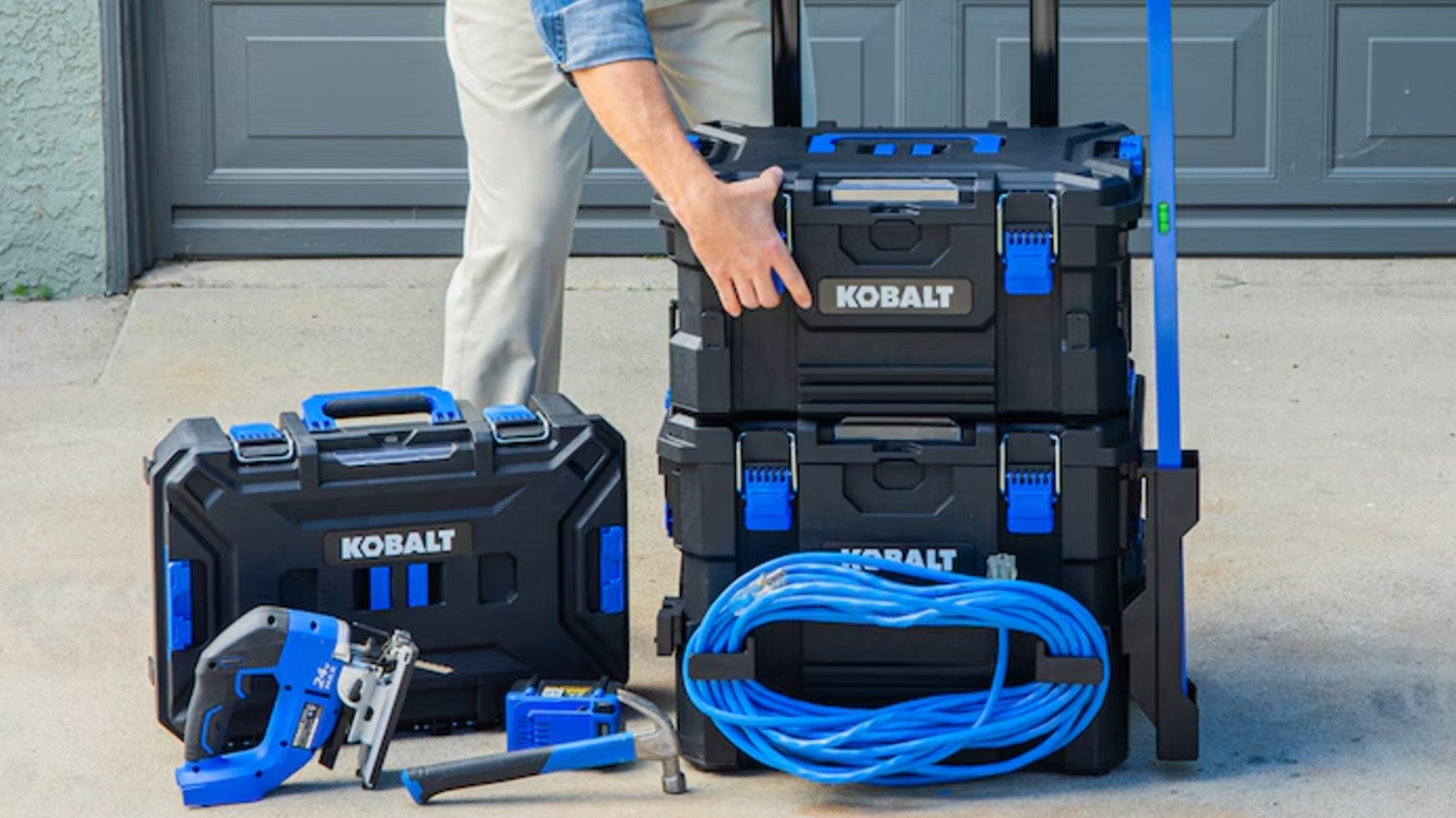
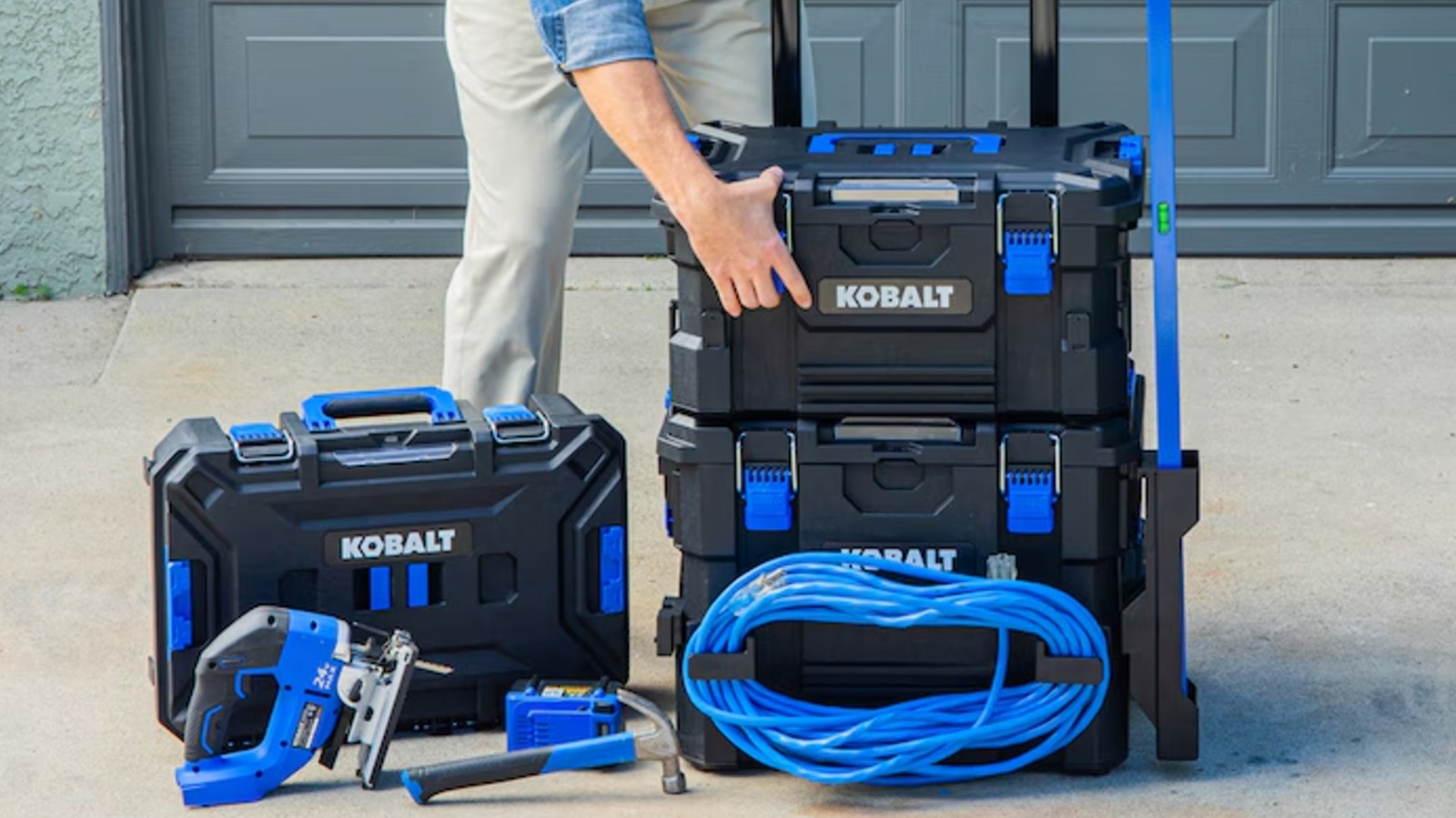
Modular storage systems have become increasingly popular in recent years, with product lines like Milwaukee’s Packout and DeWalt’s ToughSystem letting users combine storage products and accessories to suit their needs. Customizable tool storage has become so popular that even retailers are getting in on the action, with chains like Walmart selling their own modular tool storage options. Lowe’s has its own system, too, with its house brand Kobalt offering a range of CaseStack products.

Lowe’s first introduced its CaseStack system in 2022, although a seeming shift in priorities led several products in the line to go out of stock or be discontinued as of mid-2026. However, the second generation of CaseStack products, announced in early 2026, is set to revive the system with several new cases and accessories. So it’s as good a time as any to start building out a CaseStack setup.

Advertisement

CaseStack 2.0 is backward-compatible with the older gear, so you don’t have to worry about any new products rendering old ones obsolete. Spanning both generations, here are eight CaseStack products from Lowe’s to organize your tool setup. More information on how we selected these products is available at the end of this list.

Advertisement

Two-drawer toolbox

The best modular tool boxes with drawers, which offer something in between a portable toolbox and a more traditional pull-out chest, come in a range of sizes (and prices). Lowe’s offers a mid-size option that might hit the Goldilocks zone for many tool users: the Kobalt CaseStack two-drawer black plastic tool box. The case is 14.16x21x13.5 inches, and its heavy-duty polymer construction allows for a 50-pound load capacity.

Its two front-facing drawers mean it works well in the lower or middle sections of a tool stack, since you can retrieve gear without removing anything that’s on top of it. The drawers are 4.5 inches deep, which is enough room for many power tools, and have durable metal drawer slides for repeated use. It has a total interior capacity of 1,600 cubic inches, or a little less than one cubic foot.

The toolbox comes with dividers that can split the two drawers into nine separate compartments, allowing you to micromanage its contents. Label pockets are also included, so you can easily keep track of everything. It can be used with a padlock for security, and its sliding lock latch keeps drawers from opening as you move the box around. It’s fully compatible with other CaseStack modular products and sports multiple CaseStack connection points. Availability is a bit spotty, but you should be able to get the Kobalt CaseStack two-drawer black plastic toolbox (model #KCSA-2DRW1-03) from Lowe’s for $129.

Advertisement

Modular storage box

Whether or not stacking tool boxes are worth it for you may come down to how well you organize them. Modular tool storage systems aren’t built just to hold a bunch of stuff, but also to make it easier and more efficient for users to access necessary items without disrupting their workflow. The Kobalt CaseStack toolbox full organizer allows users to keep small items, like screws, washers, and drill bits, neatly organised in their CaseStack. It contains 15 individual bins in a hard case that’s 14x 21×5.1 inches.

Heavy-duty latches keep the lid secure and prevent the contents from spilling out, while an integrated handle makes it easier to carry around or remove from your stack. The transparent lid allows users to see what’s inside at a glance. Kobalt’s CaseStack Tool Box Full Organizer can hold up to 35 pounds of gear and is IP65 dust- and water-resistant. In addition to all-weather protection, it’s also built to be impact-resistant.

Advertisement

The organizer is compatible with all CaseStack modular products and has multiple attachment points for connecting to your setup. It also includes larger bins for longer tools like screwdrivers, which are designed to hang off the discontinued CaseStack Tool Rack Rail attachment if you have one. The Kobalt CaseStack toolbox full organizer (model #KCSA-FORG1-03) is currently available from Lowe’s for $55 to $60 depending on the store, although availability is somewhat inconsistent.

Advertisement

Small storage toolbox

The Kobalt CaseStack small toolbox doesn’t have all the bells and whistles the best portable toolbox brands may offer, but sometimes keeping it simple is exactly the right call. The straightforward design means it works almost anywhere, whether you’re traveling for a job or just heading up to make repairs in the attic. It also balances well with larger cases when used in the same stack.

Lowe’s may consider this a small box, but it still offers a decent 922 cubic inches of space, which is more than half of what the Kobalt CaseStack two-drawer toolbox offers. It measures 21.25x7x14 inches and can carry up to 50 pounds of hardware. Two interior bins with transparent lids and dividers are included to provide some organization within the case as well.

Like other hard storage options in the CaseStack line, this small toolbox is equipped with heavy-duty steel latches and quick-connect sliding locks. Multiple connection points are available for CaseStack accessories. The case is also rated IP65 dust- and water-resistant and has a foldable handle for portability and to help load and unload the box on and off your stack. The Kobalt CaseStack Small Storage Tool Box (model KCS-SSBOX1-03) is currently available from Lowe’s for $60.

Advertisement

Kobalt CaseStack starter kit

For those interested in the CaseStack system but don’t want to build a stack up piece by piece, there’s the Kobalt CaseStack starter kit. The bundle includes the Kobalt CaseStack rolling toolbox, which is currently unavailable to buy separately. The rolling toolbox measures 21.5×26.7×17.2 inches and has a load capacity of 110 pounds, making it a solid base for the rest of your CaseStack.

In addition to the rolling toolbox, the kit comes with another discontinued storage option — the CaseStack medium toolbox, which can carry 38 pounds more than its smaller sibling. Together, the included storage solutions offer a nearly 200-pound load capacity and provide a great basis for other CaseStack products.

Advertisement

The CaseStack starter kit doesn’t just include toolboxes, either — it also comes with three power tools from Lowe’s in-house tool brand. These cordless tools include the Kobalt 24V 6 ½-inch cordless circular saw, a ½-inch drill/driver, and a ¼-inch impact driver. You also get a 2Ah battery and charger to power the brushless devices (though you may want a larger battery for the circular saw). Everything you need to store, transport, and use the tools is provided in the Kobalt CaseStack Starter Kit. Lowe’s sells the Kobalt CaseStack Starter Kit for $328, though you can find it for as low as $238.

Advertisement

New CaseStack accessories

For fans of the original system, the second-gen CaseStack pieces are some of the most exciting new Lowe’s products coming out in 2026 that aren’t power tools. These include upgraded storage cases with auto-locking mechanisms and other new features, but perhaps more interesting are new attachments that offer previously unavailable functions. For example, there’s a rotating cord wrap holder, which is especially helpful for those working with extension cables.

Other storage accessories can be added to the sides of tool chests and cases as well, offering additional storage space. These include a molded tool tray, a bin with a transparent lid, and a magnetic bar that holds metal items like screwdrivers and scissors. Another new attachment leans more toward convenience than anything else: a side-mounted cup holder for storing your coffee or ice water. The seven CaseStack 2.0 accessories are backward-compatible and can be used with both the old and new toolboxes. They connect via the attachment points built into the cases.

Advertisement

How we selected these CaseStack products

Most of the products included on this list are from the first-generation Kobalt CaseStack system. As the next-generation lineup of CaseStack products isn’t available at the time of this writing, with no official product pages on the Lowe’s website, we relied on video footage from popular hardware YouTube channels, such as The Den of Tools, for information on these upcoming (as of May 2026) items.

With Lowe’s focusing on CaseStack 2.0, several original CaseStack products still listed on its website have been out of stock for some time. Thus, we limited our selection to CaseStack 1.0 products that are still available from the retailer. Discontinued products may still be available from third-party sellers or as pre-owned items, but were not considered for this list regardless.

Advertisement


Source link

Advertisement
Continue Reading

Tech

Liquid Glass Tweaks Are Reportedly Coming In The Next macOS

Published

on


Sorry Liquid Glass critics, the upcoming macOS 27 won’t be getting rid of Apple’s latest design language. Instead, the MacBook maker is introducing a “slight redesign” to Liquid Glass with the next macOS, according to Bloomberg‘s Mark Gurman.

On top of user complaints about poor text readability and inconsistent looks between apps, Gurman explained that Liquid Glass hasn’t seen a smooth transition onto the larger displays we see on desktops or laptops. According to Gurman, that’s due in part to Liquid Glass being created with OLED technology in mind, while most Macs still run on LCD panels. To address these issues, Gurman said Apple will target the weird “shadows and transparency quirks” of Liquid Glass with macOS 27. On the hardware side, the Liquid Glass interface could look a lot better on the expected OLED touchscreen MacBook that could arrive as soon as this year.

Advertisement

Gurman reported that these upcoming Liquid Glass tweaks on macOS are supposed to represent how the Apple design team wanted it to look from the start, attributing the issues to “a not-completely-baked implementation from Apple’s software engineering team.” However, it’s not the first time Apple made changes to Liquid Glass, since iOS 26.1, iPadOS 26.1 and macOS 26.1 added an option to frost the interface for more opacity and contrast. Besides the Liquid Glass tweaks coming in the next macOS, Gurman added that Apple is working on “bug fixes, battery-life upgrades and performance improvements,” which will be officially unveiled at the next WWDC on June 8.


Advertisement

Source link

Continue Reading

Tech

How AI Is reshaping cross-border accounting & financial advisory

Published

on

TL;DR

Tohme Accounting believes AI is becoming essential in cross-border accounting as firms manage growing regulatory complexity, faster reporting demands, and larger volumes of financial data. The firm uses a customized in-house AI system to support workflow management, data analysis, and advisory services while maintaining human oversight for strategic decision-making.


Advertisement

Tohme Accounting, a cross-border tax and advisory firm serving clients throughout Canada and the United States, sees artificial intelligence becoming increasingly influential in modern accounting. It observes that as financial activity expands across jurisdictions and regulatory frameworks continue to evolve, firms are adapting to larger volumes of data, faster reporting expectations, and more complex compliance requirements. 


You can see the shift in cross‑border accounting today. Companies are juggling multiple tax systems at once, and the firms supporting them are trying to keep up with rules that change constantly. Clients want answers fast, and they expect those answers to be backed by real‑time information,” founder Samer Tohme says. He adds that as these demands continue to increase, conversations around AI have moved beyond experimentation and into broader operational use.


Recent industry research reflects that momentum. According to a survey, 59% of finance leaders reported using AI within their finance functions, while organizations with more advanced implementations expressed growing confidence in the technology’s long-term value. Additionally, many finance leaders continue facing obstacles related to technical expertise, operational integration, and data management, illustrating how AI adoption involves much more than introducing a new platform into an existing workflow.

Advertisement


The implementation challenges continue to appear across the accounting field, where longstanding processes and structured workflows are common. Because of that foundation, transitions to new technologies naturally take time,” Tohme says. He notes that many firms are still assessing how AI fits within their operational models, especially when dealing with compliance-sensitive work that requires precision and review. Tohme adds that in some cases, uncertainty surrounding customization, oversight, and practical application has slowed adoption, even as demand for faster and more integrated financial guidance continues rising.


He believes much of the conversation surrounding AI becomes more meaningful when viewed through the lens of integration instead of replacement. “Accounting involves understanding context, identifying patterns, and interpreting how financial decisions connect to larger business objectives,” Tohme says. “AI expands the ability to organize information quickly, but professional judgment remains essential in translating that information into advice that fits the client’s situation.

Advertisement


That perspective has influenced how the firm developed its technology infrastructure. Instead of depending entirely on widely available third-party software, Tohme Accounting built a customized in-house AI system tailored to its internal workflows and client needs. The platform supports operational functions including organization, workflow management, data analysis, and client communication, while remaining under the firm’s direct oversight.


This level of control, Tohme explains, has become especially important in cross-border accounting, where businesses often navigate Canadian provincial regulations alongside U.S. federal and state tax requirements. He notes that legislative updates, filing obligations, and reporting standards can vary significantly between jurisdictions, creating an environment where information changes quickly and precision becomes increasingly important.

Advertisement


Within Tohme Accounting’s workflow, AI assists with organizing financial information, identifying regulatory developments, and interpreting quantitative data in real time. This allows the firm to evaluate how changes in tax legislation or reporting requirements may influence specific clients across multiple jurisdictions. As a result, advisors can dedicate more time to strategic analysis and personalized planning instead of manual data organization.


To work across borders effectively, you need visibility into how multiple systems connect at the same time,” Tohme states. “AI can help organize those moving parts efficiently, which creates more opportunity for meaningful discussions around planning, operations, and long-term financial decisions.

Advertisement


The growing volume of financial data has also changed how firms think about personalization, according to Tohme. Business owners seem to be increasingly expecting accounting relationships to reflect their operational priorities, timelines, and growth objectives. Maintaining that level of customization across hundreds of clients can become difficult without integrated systems supporting the process behind the scenes.


Tohme Accounting uses AI to organize client-specific information, operational details, reporting timelines, and strategic objectives so advisory recommendations remain connected to each client’s broader financial goals. That integration, as Tohme notes, also contributes to faster documentation processes, more efficient reporting preparation, and improved coordination across ongoing tax and accounting work.

Advertisement


At the same time, the firm maintains active oversight throughout the process. Tohme emphasizes that AI functions most effectively when paired with technical expertise and continuous review. “Technology can process information quickly, but accounting still depends on interpretation, experience, and accuracy,” he says. “Professional oversight remains an important part of ensuring the information supports the right financial decisions.”


As firms continue integrating AI into their workflows, Tohme notes that the profession itself is also evolving. He observes that more accounting professionals are spending time on advisory, analysis, and strategic planning while automated systems assist with repetitive administrative tasks.

Advertisement


Industry research suggests this transformation is becoming more widespread. According to an industry report, AI adoption among accounting firms increased from 9% in 2024 to 41% in 2025, with many firms integrating AI into workflows designed to improve operational efficiency, financial insight generation, and client service. The report also notes that firms are increasing investment in integrated technologies and advisory-focused services as client expectations continue evolving across international markets.


Tohme believes the future of accounting will continue combining technological capability with human expertise. “Clients value insight that connects financial information to practical business decisions,” he says. “AI contributes analytical speed and organizational support, while accountants provide interpretation, strategy, and perspective informed by experience.” Through its customized AI infrastructure and advisory-focused model, Tohme Accounting continues refining how technology can support precision, responsiveness, and personalized financial guidance within an increasingly international accounting landscape.

Advertisement

Source link

Continue Reading

Tech

Samsung Galaxy S25 series just landed the big One UI 8.5 update in the US

Published

on

Samsung Galaxy S25 users in the United States are finally getting the One UI 8.5 update. After rolling out to newer devices, the update is now making its way to last year’s Galaxy S25 series, bringing a solid list of improvements worth knowing about.

Users on X have reported receiving this update on their Samsung Galaxy S25 devices, so if you own one, now might be the time to go into the software update settings and get the latest update. 

What’s new in One UI 8.5?

One UI 8.5 is bringing several new features and a bunch of UI improvements. The biggest visual change is to the quick settings panel. You can now grab, resize, and drag individual controls wherever you want. The volume and brightness sliders can go vertical, and the media control can expand to a larger size. 

The lock screen also got some love. There are new clock fonts with animations, and a thickness slider lets you fine-tune your clock’s look. A weather toggle now shows live weather animations on your wallpaper, which is a small but genuinely fun touch.

One UI 8.5 also brings a bunch of AI-powered photo editing tools, including erase, move, create, and style. Erase removes objects cleanly, move lets you reposition elements in a shot, create adds sketched objects using AI, and style transforms selfies into cartoon versions of yourself.

Are there any missing features?

While last year’s Galaxy S25 models are finally getting the One UI 8.5 update, it’s not all good news. It seems that there are several missing features in One UI 8.5 that the older models are not getting. 

Advertisement

Users at Korean Samsung forums have discovered as many as nine missing features, with the two biggest being the Now Nudge and 24MP camera mode. Other glaring omissions include Notification Highlights, Finder shortcut on the Home Screen, Samsung Browser’s Ask AI, and more. 

It doesn’t feel like any of these features depend on the new hardware of the Samsung Galaxy S26 series. They are just feature gatekeeping on Samsung’s part to force users to upgrade to new devices. 

I criticize Apple every year for gatekeeping new camera features on the latest iPhone models. It seems that Samsung is not only following in Apple’s footsteps but also pushing things much further.

Source link

Advertisement
Continue Reading

Tech

Safari’s Latest Trick Could Be Automatically Organizing Your Tabs Into Groups

Published

on


For those of us who keep hundreds of Safari tabs open, Apple is reportedly testing out a new feature that can organize all of it automatically. According to Bloomberg‘s Mark Gurman, Apple is working on a Safari feature called “Organize Tabs” that will debut with iOS 27, iPadOS 27 and macOS 27. As the name suggests, the new feature will automatically organize your Safari tabs, but Gurman added that it won’t carry the Apple Intelligence label, even though it’s likely using some form of artificial intelligence. Once the feature is live, Safari users will be able to choose if they want the grouping to be automatic or not, according to Gurman.

This Organize Tabs feature adds onto the Tab Groups option that was introduced to Safari 15 back in 2021. Of course, Google already debuted a similar capability on Chrome in January 2024, called Organize Similar Tabs, marketing it as one of its new generative AI features. However, Apple has been known to lag behind its competitors when it comes to AI-powered features. According to Gurman, we could get our first look at the Organize Tabs feature at WWDC26, which is scheduled to kick off on June 8.

Advertisement


Source link

Advertisement
Continue Reading

Trending

Copyright © 2025