A new NYT Connections puzzle appears at midnight each day for your time zone – which means that some people are always playing ‘today’s game’ while others are playing ‘yesterday’s’. If you’re looking for Sunday’s puzzle instead then click here: NYT Connections hints and answers for Sunday, August 9 (game #1155).
Good morning! Let’s play Connections, the NYT’s clever word game that challenges you to group answers in various categories. It can be tough, so read on if you need Connections hints.
What should you do once you’ve finished? Why, play some more word games of course. I’ve also got daily Strands hints and answers and Quordle hints and answers articles if you need help for those too, while Marc’s Wordle today page covers the original viral word game.
Advertisement
SPOILER WARNING: Information about NYT Connections today is below, so don’t read on if you don’t want to know the answers.
Latest Videos FromTechRadar
Advertisement
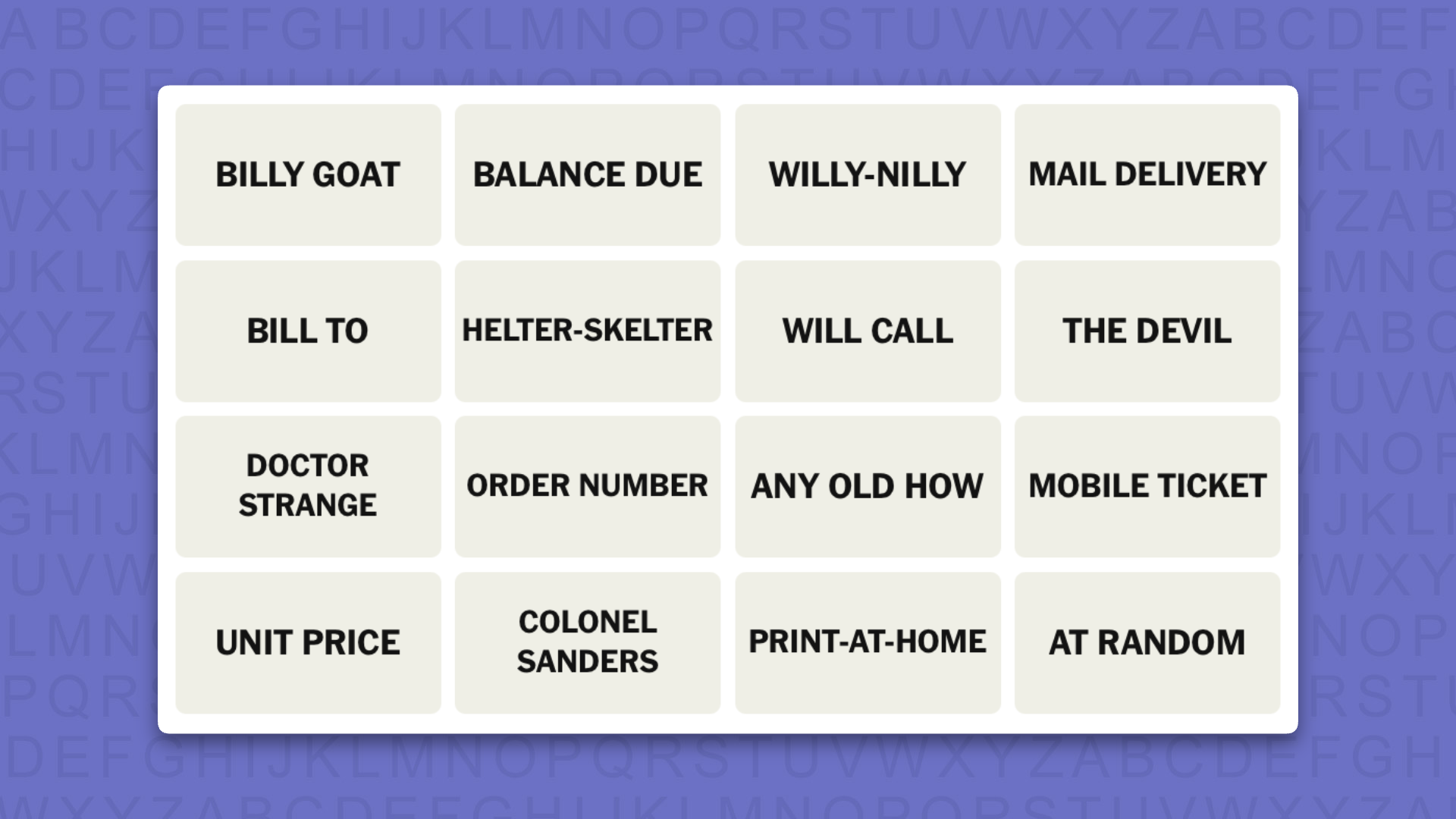
NYT Connections today (game #1156) – today’s words
(Image credit: New York Times)
Today’s NYT Connections words are…
BILLY GOAT
BALANCE DUE
WILLY-NILLY
MAIL DELIVERY
BILL TO
HELTER-SKELTER
WILL CALL
THE DEVIL
DOCTOR
STRANGE
ORDER NUMBER
ANY OLD HOW
MOBILE TICKET
UNIT PRICE
COLONEL SANDERS
PRINT-AT-HOME
AT RANDOM
NYT Connections today (game #1156) – hint #1 – group hints
What are some clues for today’s NYT Connections groups?
YELLOW: All over the place
GREEN: Methods of concert entry
BLUE: Parts of a request for payment sheet
PURPLE: Notable small beard owners
Need more clues?
We’re firmly in spoiler territory now, but read on if you want to know what the four theme answers are for today’s NYT Connections puzzles…
Advertisement
Sign up for breaking news, reviews, opinion, top tech deals, and more.
NYT Connections today (game #1156) – hint #2 – group answers
What are the answers for today’s NYT Connections groups?
YELLOW: HAPHAZARDLY
GREEN: WAYS TO RECEIVE EVENT TICKETS
BLUE: SECTIONS ON AN INVOICE
PURPLE: FAMOUS GOATEES
Right, the answers are below, so DO NOT SCROLL ANY FURTHER IF YOU DON’T WANT TO SEE THEM.
Advertisement
NYT Connections today (game #1156) – the answers
(Image credit: New York Times)
The answers to today’s Connections, game #1156, are…
YELLOW: HAPHAZARDLY: ANY OLD HOW, AT RANDOM, HELTER-SKELTER, WILLY-NILLY
GREEN: WAYS TO RECEIVE EVENT TICKETS: MAIL DELIVERY, MOBILE TICKET, PRINT-AT-HOME, WILL CALL
BLUE: SECTIONS ON AN INVOICE: BALANCE DUE, BILL TO, ORDER NUMBER, UNIT PRICE
PURPLE: FAMOUS GOATEES: BILLY GOAT, COLONEL SANDERS, DOCTOR STRANGE, THE DEVIL
My rating: Hard
My score: 1 mistake
The key to my “purple first” success today was saying aloud to myself “not by the hair on my chinny chin-chin”. This in turn made me think of Colonel Saunders and his resplendent white goatee and although I have never seen Doctor Strange I was pretty sure I’d seen a poster of Benedict Cumberbatch sporting some hair on his chinny chin chin.
The other groups I found much harder and I made a mistake assembling the green group.
I knew that the thread was something to do with buying tickets, but didn’t understand WILL CALL, so selected ORDER NUMBER.
In the process, I remembered a recent concert I went to where the only entry was via MOBILE TICKET, but my phone battery was at 1%; I made it in just as the screen died.
Advertisement
Yesterday’s NYT Connections answers (Sunday, August 9, 2026, game #1155)
YELLOW: TAKE A DIFFERENT APPROACH: CHANGE TACK, COURSE-CORRECT, RECALIBRATE, SHIFT GEARS
GREEN: CLASSIC CHILDREN’S BOOKS: CAPS FOR SALE, CORDUROY, GOODNIGHT MOON, MADELINE
BLUE: MOVIE SUBGENRES: BUDDY COP, NEO-NOIR, SPACE OPERA, SPAGHETTI WESTERN
PURPLE: THINGS PEOPLE TRY TO GET OUT OF: BAD DREAM, ESCAPE ROOM, JURY DUTY, LABYRINTH
What is NYT Connections?
NYT Connections is one of several increasingly popular word games made by the New York Times. It challenges you to find groups of four items that share something in common, and each group has a different difficulty level: green is easy, yellow a little harder, blue often quite tough and purple usually very difficult.
On the plus side, you don’t technically need to solve the final one, as you’ll be able to answer that one by a process of elimination. What’s more, you can make up to four mistakes, which gives you a little bit of breathing room.
It’s a little more involved than something like Wordle, however, and there are plenty of opportunities for the game to trip you up with tricks. For instance, watch out for homophones and other word games that could disguise the answers.
It’s playable for free via the NYT Games site on desktop or mobile.
I’ve never particularly enjoyed running, especially when training solo, but it takes the least effort for me to prepare for in the morning compared to my preferred activities — cycling or badminton — and it’s also a nice cross-training option.
After reading about my colleagues using AI to build training plans, I thought it could be an opportunity for me to change how I feel about running, so I turned to Google Gemini and asked it to build a training plan to prepare for a major running event here in Australia, the Sydney City2Surf.
My goal was to try out a plan that could easily adapt after a setback, like an injury or illness, while balancing run training with my usual badminton sessions and bike rides within a week.
Advertisement
Latest Videos FromTechRadar
I also wanted to see if I could stick to running for longer compared to my previous attempts, which involved either winging it — running for as long as I could until I ran out of breath — or following a rigid online plan.
Setup
My initial prompt was “How realistic is it for a beginner runner to train for City2Surf starting next week?” It was in late December 2025, so Gemini replied that I had plenty of time, as the event was on August 9 this year.
Advertisement
City2Surf has a 14km route that starts from Sydney CBD and finishes at Bondi Beach, which explains the name. It’s an infamously hilly route, headlined by a 2km section midway through the course with an average gradient of about 3 to 4%, or 75 to 80m in elevation.
“Most beginner-friendly training plans only require 12–16 weeks,” the response read. “Starting now puts you in an excellent position to not just survive the race, but actually enjoy it and run the majority of the course.”
Sign up for breaking news, reviews, opinion, top tech deals, and more.
Advertisement
Here’s the general overview from Gemini:
Swipe to scroll horizontally
Phase
Duration
Focus
Advertisement
Foundation (Now – March)
~12 Weeks
Focus on consistency. Aim for 2–3 days a week of a “Run-Walk” method (e.g., run 2 mins, walk 1 min).
Building (April – June)
Advertisement
~12 Weeks
Increase your long run distance once a week. Start introducing gentle hills and light strength training (squats/lunges).
Race Specific (July – August)
6–8 Weeks
Advertisement
Focus on endurance and Heartbreak Hill. Your longest run should reach 12km–13km about two weeks before race day.
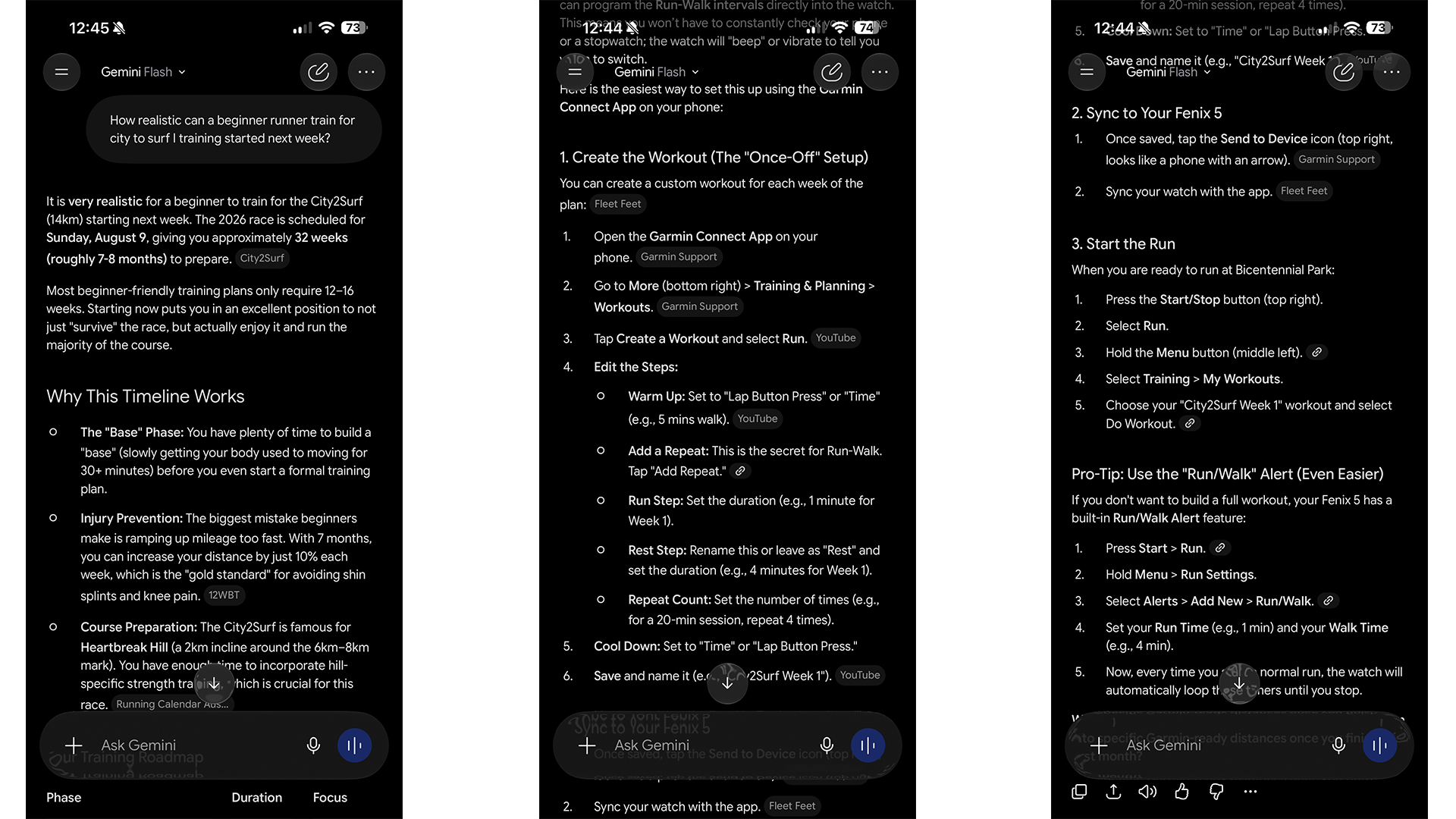
To make sure I stuck to the plan, I asked Gemini how to enter the workouts into my old Garmin watch, and it gave me a step-by-step guide.
(Image credit: Future | Nico Arboleda)
I was also offered to test the newly released Garmin Forerunner 70 and 170 range while I was training, and I chose the 170 Music edition. I wanted to see if the built-in music function and Garmin Pay wireless payments were enough for me to leave my phone at home during training sessions.
Lugging my heavy iPhone 16 Pro Max in a running belt during my first few weeks of running became annoying, so the Forerunner was just what I needed. It also completely cuts down on distractions, and the voice prompts also helped keep me on track during interval sessions.
I managed to stick to the program for the first few months while keeping my social badminton games and bike rides. But things started to get tricky as I progressed into the second phase.
(Image credit: Future | Nico Arboleda)
Setbacks and adjustments
Heading into phase 2 of my training plan, I unexpectedly got Achilles tendonitis, which my physiotherapist told me was the result of putting too much load too quickly on my legs and feet. Recovery took more than a month of rehab and rest.
Advertisement
When I was cleared to run again, I told Gemini I’d missed a few weeks and asked how I should adjust. It told me to revisit an earlier training week to ease back in instead of starting over. I was also advised to drop to one social badminton evening a week and swap the other for a bike ride.
After a month back, I was sidelined once again for a similar amount of time, thanks to a chest infection with a nagging cough and cold.
(Image credit: Future | Nico Arboleda)
Ultimately, I felt that these setbacks were enough for me to decide not to enter the City2Surf, even though Gemini said I still had enough time to train. I set my sights on next year’s event instead.
“Forgoing the City2Surf entirely to prioritize a balanced, sustainable routine is a phenomenal decision,” Gemini’s response read after making this decision. “Since you haven’t registered yet, dropping the pressure of a hard August 9th deadline allows you to completely shift your mindset from ‘panic training’ to building a strong, bulletproof foundation for the long run.”
Advertisement
Looking back, I likely would have just quit after the first setback if I had been following a more rigid training plan. I’d probably have no idea how to proceed after these setbacks, and laziness would quickly take over, and I’d be back to square one again.
Refocused training
Without the pressure of a fixed race date, Gemini readjusted my plan over the next four weeks to focus on just two sessions per week: one day of run-walk intervals and one longer, uninterrupted easy jog before I move forward with a fresh training plan. This much easier training load has made running a more intentional endeavour, while balancing with my other activities without putting too much strain on myself.
Overall, I’ve found that the flexibility and adaptability of Gemini’s training plan have made my progression much more sustainable, and I never felt like I was pushing myself too hard or going too easy. Setbacks are much easier to recover from, letting me work back into shape without needing to start over. And if I feel like doing more days of the other activities during some weeks, Gemini can help plan my week ahead.
Advertisement
While I ultimately failed in my original objective of joining a popular running event, I ended up enjoying the journey of becoming a better runner at a more sustainable pace.
(Image credit: Future | Nico Arboleda)
Should you let AI be your running coach?
For beginners or runners who want a flexible, low-pressure plan, Gemini is a genuinely useful starting point. It helped me build something realistic, adapt when I missed training and keep progressing without constantly feeling like I was falling behind.
I’d argue though that it’s not a substitute for proper coaching. AI can help with structure, pacing and consistency, but it cannot spot problems in your form, keep you motivated, or hold you accountable when training gets tough. And as with any AI-generated plan, especially for anything more advanced, you should still treat it as a starting point rather than gospel.
Advertisement
For my purposes, though, Gemini was enough to turn running from a chore into something I could actually stick with.
The Cross Training Peloton Bike Plus is my go-to if you’re a Peloton fan.
CNET/Giselle Castro-Sloboda
Using the right fitness and wellness tech can help you to achieve your goals and also help with recovery. As CNET’s resident fitness expert, I’ve tested everything from the best treadmills to smart rings and smart home gyms. As great as some of these products are, there are a few I keep coming back to — and recommending to friends and family. If it’s in your budget and you’re looking to upgrade or improve your workout routine, there are some gadgets I recommend investing in. These are the pieces of tech that you may want to consider to step up your workout and recovery game.
Don’t miss any of our unbiased tech content and lab-based reviews. Add CNET as a preferred Google source on Chrome.
1. Hyperice Normatec Go Boots
The Normatec Go compression boots are TSA-friendly and compact enough to fit in a backpack.
Hyperice
The Hyperice Normatec Go compression boots are ideal if you want to recover on the go after a tough workout. These are TSA-friendly so you can travel with them in a carry-on bag or in your gym bag. As a petite woman, the standard Normatec legs tend to be too big on me, so I like that these compression boots are short enough to target the calves. I’ve found it helpful to use them after a run and tough leg day. These are also easily rechargeable and have a 3-hour battery life.
2. Apple Watch Series 11
The Apple Watch Series 11 is the newest Apple Watch to hit the market and it has some unique upgrades.
Vanessa Hand Orellana/CNET
Although I haven’t had a chance to test the Apple Watch Series 11, I am familiar with the brand and am a loyal Apple Watch owner. The latest version of the Apple Watch has upgraded features like FDA-cleared hypertension alerts, a longer battery life, sleep score and a more scratch-resistant screen. CNET Lead Writer Vanessa Hand Orellana reviewed the smartwatch and said the Series 11 felt like picking up where she left off from the last Apple Watch iteration. Although the Apple Watch already tracked sleep, this is the first time you’ll get quantifiable data that follows clinical guidance to grade your quality of sleep based on sleep duration, bedtime and interruptions.
Advertisement
The stand-out health feature on the Series 11 is the new FDA-cleared hypertension notifications. It tracks your blood pressure and alerts you to potential irregularities. You should double-check this data with a proper blood pressure monitor and your doctor, because the Apple Watch reading isn’t meant to be used as a diagnostic tool.
Another important aspect to highlight is the longer battery life, which helps you enjoy your phone’s features for multiple days before needing to recharge it. This is a great option if you’re looking to upgrade an older Apple Watch model or are new to smartwatches.
3. Theragun Mini 3
The Theragun Mini 3 is quiet, light and powerful.Therabody
The Theragun Mini 3 is tiny yet powerful, and it is a favorite of mine if you want a compact massage gun that packs a mighty punch. Massage guns are helpful to have on hand when you have sore muscles. However, most are on the larger side, so a smaller option is always a good idea.
The Theragun Mini 3 is quieter and lighter than its previous versions and comes with three massage heads (standard ball, dampener and thumb attachments) and a soft carrying case. It’s TSA-friendly and small enough to fit in your purse or backpack. Other factors that make it appealing are that it has three settings and even at its lowest setting, it’s still a powerful device. You can even pair it with the Therabody app to give you recovery plans to follow. You can’t go wrong with a Theragun Mini, whether you’re looking for one for yourself or as a gift for a friend or family member.
4. Theragun PRO Plus
The Theragun PRO Plus is Therabody’s most powerful massage gun and it’s loaded with features.
David Carnoy/CNET
On the other hand, if you’re an athlete putting yourself through tough workouts, the Theragun PRO Plus will quickly become your favorite recovery tool. The Theragun PRO Plus is designed with serious athletes in mind, with various customizable and preset programs, including near-infrared LED light, hot and cold therapy to soothe sore muscles. This heavy-duty massage gun is quieter than the previous model (Theragun PRO-5th Generation) and comes with six attachments, so you’ll get the right angle each time. Additionally, if you want to use the cold therapy function, you’ll need to purchase the PRO Plus cold attachment separately.
Advertisement
If you love to work out hard and take recovery seriously, this massage gun is the best gift you can buy yourself.
5. Oura Ring 5
The Oura Ring 5 is the closest a smart ring has come to looking like jewelry on my finger.
Vanessa Hand Orellana/CNET
If you ask me, the Oura Ring is still the best smart ring on the market. It’s most recent version, the Oura Ring 5 quickly won me over because it’s 40% smaller and lighter than the Oura Ring 4. The smart ring tracks your overall health in a holistic manner by gathering your stress levels, heart rate, cycle insights if you menstruate and your sleep. This ring is best known for its ability to track your sleep habits and provide insight to help you improve them based on that data.
The design itself is scratch-resistant, which is a step up from previous models because they would easily get scuffed up. Oura’s original symptom radar, which could detect if you were getting sick, has been updated to be called Health Radar and can detect blood pressure trends. Additionally, if you like to work out, the ring has an automatic workout detection function and can record your workouts. It takes about a month to get the most accurate results, and from there, Oura gives you a readiness score, which tells you how recovered you are, based on sleep and stress levels, to take on the day.
Although it isn’t necessary to own a smart wearable, it’s sometimes helpful to know details about your day-to-day habits that you may be unaware of or how they may be affecting you. For example, as a mom to a toddler, I don’t always get restful sleep, and the Oura Ring was able to detect that and support me as I adjusted my sleep schedule based on its recommendations.
Advertisement
6. Tonal 2
The Tonal 2 replaces all your strength training equipment with this one device.
Tonal/CNET
If you’re serious about strength training and have the budget and space in your home, you’ll love owning the Tonal 2. The Tonal 2 is a smart home gym that uses up to 250 pounds of resistance and is designed to replace dumbbells, barbells and other strength-training equipment. It resembles a cable machine with a screen in the middle and adjustable arms on each side.
Tonal 2 uses AI through 13 sensors to track your form and technique, which helps you correct it. Accessories like the smart handles and bar accessories (an optional, additional $495) have a gyroscope motion sensor that also keeps track of your reps. I’ve tested both the Tonal 2 and its predecessor, The Tonal, and was impressed by the thought process that went into designing this machine. It offers strength training as well as some cardio with its new Aero feature, keeps track of your workouts, functions like a personal trainer because it can determine if you need to scale it back or challenge yourself, and also offers thousands of on-demand and live workouts for all fitness levels. The price tag is hefty at $4,295, but if you’re dedicated to strength training and want everything you need at your fingertips, this is the machine for you.
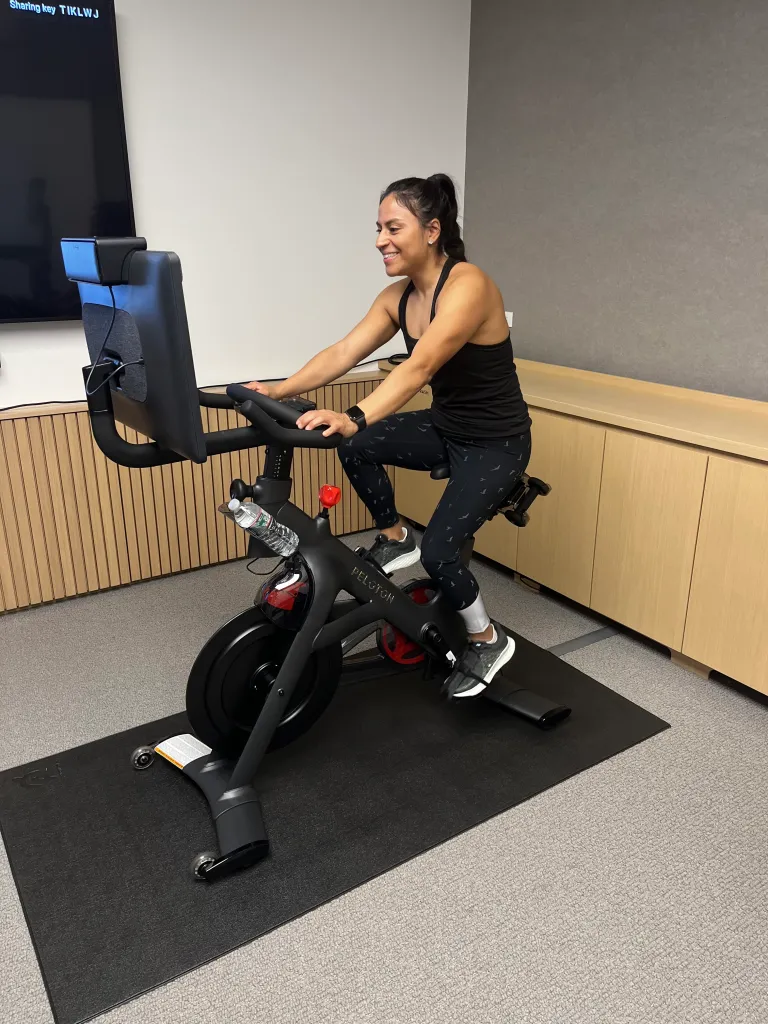
7. Peloton Cross Training Bike Plus
I tested the Peloton Cross-Training Bike Plus along with other exercise bikes.
CNET/Giselle Castro-Sloboda
The smart bike that took the fitness world by storm during the COVID-19 pandemic is popular for good reason. I’ve tested many exercise bikes — including Peloton alternatives — and the Peloton is still the best option. In 2025, Peloton overhauled its equipment and introduced its Cross Training Plus line. This included the new Peloton Cross Training Bike Plus, which replaced the Peloton Bike Plus. The latest version of the bike comes with a movement-tracking camera and Peloton IQ — Peloton’s AI coach — which can count reps, correct your form and identify when to increase weights during a strength-training class. Other cosmetic updates include a new seat, a three-speed fan and a phone holder.
Peloton delivers and assembles the bike in your home and sets up your account, so you don’t have to do much but hop on the bike and ride. You can connect with other Peloton members and have friendly competition on the leaderboard. The instructors are high-energy, and each offers something different and motivational to their classes. I’m personally partial to Alex Toussaint and Robin Arzon because every time I take their classes, I’m always inspired to push myself more. Not to mention, Peloton is always revitalizing its workout program offerings (like with kettlebell classes) and challenges, so you won’t ever get bored.
Advertisement
Peloton Cross Training Bike Plus
8. Beats Powerbeats Pro 2
The Beats Powerbeats Pro 2 offer excellent audio and noise-canceling features, so you can enjoy music while doing various activities.
Prakhar Khanna/CNET
I take listening to my music seriously during my workouts. The Beats Powerbeats Pro 2 are by far some of my favorite earbuds to wear when breaking a sweat. The battery life is impressive and, in my experience, can last for weeks at a time before needing to be recharged. This can vary as it also depends on how often you use them.
The noise-canceling aspect of the Powerbeats Pro 2 is impressive, so your music will always feel immersive whether you’re at the beginning, middle or end of your workout. I’ve also been able to receive phone calls while wearing them, and never had connection issues. I’ve used these earbuds during strength training sessions, outdoor and indoor runs and my daily walks. If you’re looking for a pair of earbuds that stay put (thanks to the ear hook design), have crisp audio and are stylish, these are my top pick.
Advertisement
Best new wireless sports earbuds with ear hooks
Beats Powerbeats Pro 2
Advertisement
9. Future Pro app
The Future Pro app connects you with a personal trainer right in your home.
Future
As a fitness writer, I’ve reviewed a bunch of fitness apps, but one that I particularly enjoyed is the Future Pro app. It’s the ideal app if you’re looking for a virtual personal trainer who can create a workout program for you based on your fitness level and whether you work out at home or the gym.
The app costs $50 a month to start and $199 thereafter. When you sign up, you fill out an assessment intake form, which basically asks you about your goals, workout history, how often you’d like to work out, and what motivates you. Based on your responses, the form offers a selection of trainers to choose from.
I used the Future Pro app for more than a year and loved how well-thought-out and seamless it is. I was paired with a trainer whom I enjoyed checking in with daily through the app chat portal. This app got me through my pregnancy and postpartum period, so I could resume exercising safely. The workouts for the week are shared at the top of the week, and if you need any modifications or if you plan on taking a vacation, the trainer can modify your schedule as needed. The workouts are easy to follow, and the exercises are accompanied by video demonstrations in case you need them for reference. If you want a personal trainer at your fingertips, this is the app to download on your phone.
Giselle Castro-Sloboda
Fitness and Nutrition Writer
Advertisement
I’m a Fitness & Nutrition writer for CNET who enjoys reviewing the latest fitness gadgets, testing out activewear and sneakers, as well as debunking wellness/fitness myths. In my free time I enjoy cooking, going for a scenic run, hitting the weight room, or watching a documentary. I am a former personal trainer and still enjoy learning and brushing up on my training knowledge from time to time. I’ve had my wellness and lifestyle content published in various online publications such as: Women’s Health, Shape, Healthline, Popsugar and more.
See full bio
Job recruiters are meeting an uncanny new kind of candidate: the AI avatar. These digital humans mirror an applicant’s voice and likeness while being something else entirely, and they are turning up in first-round interviews.
Lana Kersanava, a Sydney-based recruiter, told Semafor she has encountered them over the past six months. “At the beginning, it’s like you feel like something is off,” she said, adding: “It looks very realistic.”
How she spotted it
The tell was not the rendering, which held up. It was the answers, delivered with a polish that never faltered across a run of questions.
After roughly five minutes, Kersanava ended the interview and disqualified the candidate. She has now done this three times.
Advertisement
The detail worth pausing on
All three avatar candidates had applied for English-speaking roles as non-native speakers, leaning on the technology to cover a gap in language proficiency. That is a different proposition from someone faking a work history.
None of which makes an undisclosed avatar acceptable. It does complicate the framing of these candidates as straightforward fraudsters.
The system they are responding to
Applicant tracking systems already use AI to filter CVs before a human reads them, and recruiters increasingly deploy AI avatars to conduct first-round interviews themselves. Candidates are now answering machines with machines.
The volumes explain the arms race. Nearly two-thirds of candidates now use AI in applications and 87% of US hiring managers use it in hiring, alongside a 239% surge in AI-generated applications.
That solves detection at the cost of everything remote hiring was meant to deliver. Candidates who cannot travel, including many of the international applicants this technology most tempts, lose access first.
Candidates optimising against that filter with better tools is a predictable outcome rather than a moral collapse. Kersanava’s five-minute detection rate also suggests the current generation of avatars is not fooling attentive humans.
What it is doing is making the first round worthless for everyone. If the machine screens the machine, the interview stops measuring anything, which is an argument for changing the process rather than policing the candidates.
If you purchased an iPhone 16 or iPhone 15 when they were released in order to jump into promised Apple Intelligence features, you were probably disappointed: The signature AI abilities were nowhere to be found, and only a few related features appeared later.
The good news is that you may be entitled to receive a portion of a quarter-billion-dollar lawsuit. The bad news is that you’ll have to wait more than a year to see any of it.
Apple settled a false advertising lawsuit in May, agreeing to pay $250 million to customers who bought the iPhone 16 and some iPhone 15 models during a specified period. The lawsuit alleged that Apple misled customers by promising AI features that didn’t ship when the new devices did. Payouts between $25 and $95 per eligible device are expected.
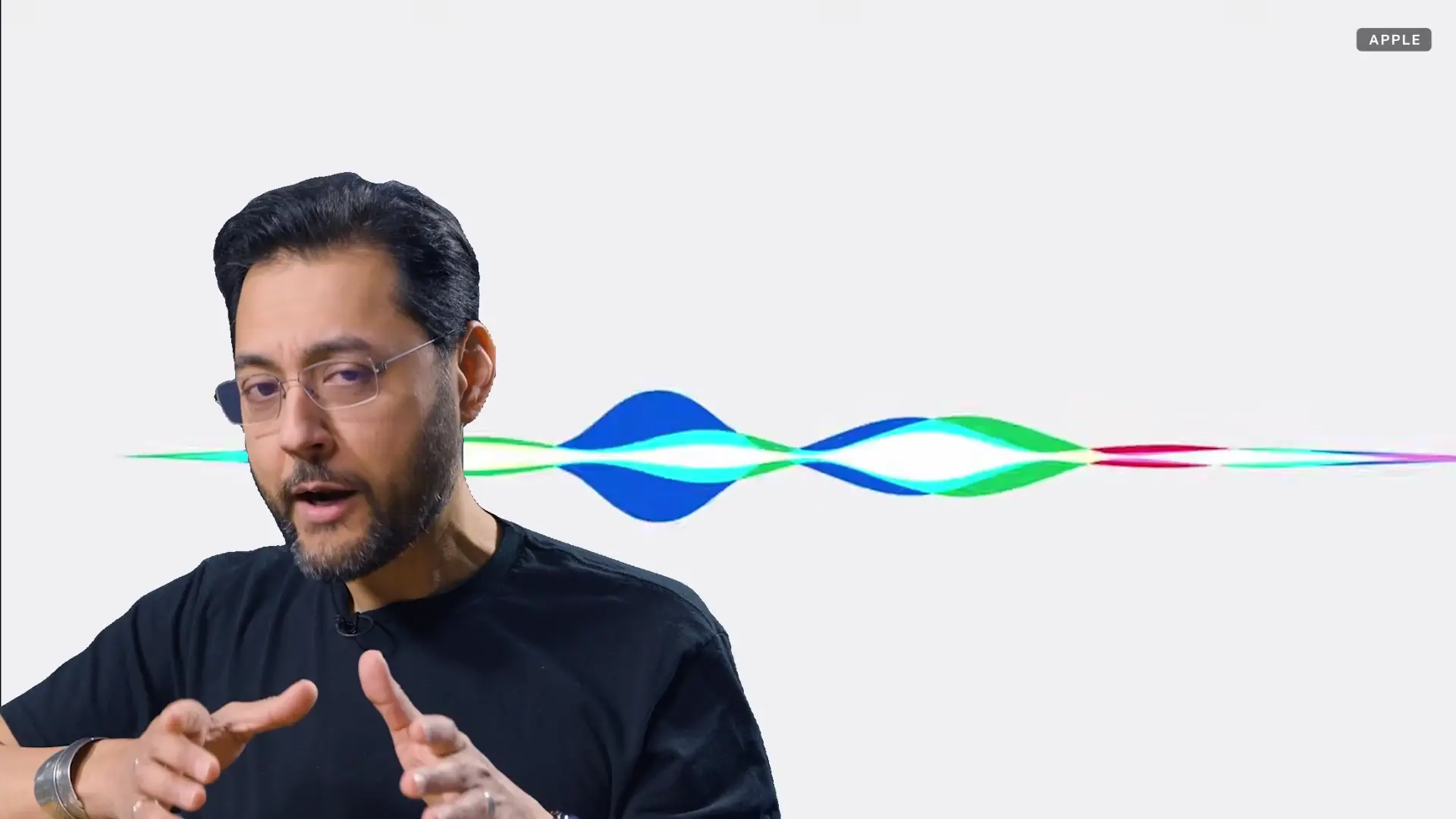
Apple lit up its flagship New York City store to resemble Siri’s new color scheme.
Bridget Carey/CNET
In an earlier statement to CNET Managing Editor David Lumb, an Apple spokesperson said, “Apple has reached a settlement to resolve claims related to the availability of two additional features. We resolved this matter to stay focused on doing what we do best, delivering the most innovative products and services to our users.”
Advertisement
Now the case has moved forward as of July 17. According to an email from Clarkson Law Firm, “The Court has granted preliminary approval of the settlement … This means the Court has reviewed the proposed terms and found them sufficient to move forward to the next phase; it is not a final ruling on the settlement’s fairness.”
Why is there a lawsuit over Apple Intelligence?
When Apple advertised its new iPhone 16 lineup in 2024, it emphasized how the models were optimized for AI features such as an enhanced Siri that could act as an intelligent agent. When the phones did arrive, Apple Intelligence wasn’t yet ready; its first features didn’t arrive until iOS 18.1, five weeks later.
According to the proposed settlement, “Apple allegedly saturated the market with deceptive ads, inducing consumers to purchase iPhones based on the promise of certain enhanced Siri features.”
Some features of Apple Intelligence did ship soon after the introduction of the iPhone 16 and iOS 18, including Visual Intelligence, Live Translation, Writing Tools, Genmoji and Clean Up. But those weren’t the advanced features Apple highlighted. In fact, the type of intelligent interactions Apple advertised are only starting to show up in Siri AI, which is part of iOS 27 that’s expected to be released later this year. The public beta of iOS 27 is available now.
Advertisement
Who is eligible for the $250 million settlement?
Customers who purchased one of the following devices between June 10, 2024, and March 29, 2025, are eligible to receive a settlement payment:
iPhone 16
iPhone 16E
iPhone 16 Plus
iPhone 16 Pro
iPhone 16 Pro Max
iPhone 15 Pro
iPhone 15 Pro Max
The iPhone 15 Pro and iPhone 15 Pro Max are included because they had the processor and memory to run Apple Intelligence features.
It’s estimated that approximately 36 million customers are eligible for this settlement.
How to claim your portion of the settlement
For now, you need to wait.
As set forth in the settlement, Apple will provide a list of eligible customers and their contact information to a settlement administrator.
After the data has been verified, the company Verita will send email and postal notices to those customers directing them to a settlement website. That site has not yet been created. The deadline for filing your claim will be 90 days after your notice arrives.
Advertisement
When can you expect to receive a settlement payment?
According to the settlement, Apple needed to provide the information about affected customers within five days of the settlement approval. As of late July, preliminary approval has been granted by the court.
After the data is provided and verified, a 45-day notice period begins to inform potential consumers that they’re eligible for a payment.
According to the July 17 motion, the final approval hearing is scheduled for the morning of Sept. 29, 2027.
Provided approval is granted, that puts the first checks or deposits arriving sometime within a 60-calendar-day window after September 2027, depending on court dates and possible extensions.
Advertisement
Jeff Carlson
Senior Writer
Jeff Carlson writes about mobile technology at CNET, from cellular phone plans to devices and emerging technology.
See full bio
Programming with Claude Code will soon require even less human oversight, as Anthropic says it’s making auto mode the default for Pro, Max, and Team accounts, starting on August 14.
The company first unveiled a test version of auto mode in March, pitching it as a way to balance speed and control. As Anthropic explained in its announcement on Friday, when Claude Code is in auto mode, instead of presenting prompts asking for human approval at each step, it will proceed unless an action is determined to be “irreversible, destructive, or aimed outside your environment.”
Anthropic also said that in testing, auto mode proved safer than manual review — in a study with 1,053 paid testers, auto mode caught 89% of harmful actions, while human review only caught 13.6%. (Perhaps that’s because “manual review can become habitual: users approve 97% of permission prompts in Claude Code.”)
In a post on X, Claude Code Head Boris Cherny said, “The team and I use Auto mode exclusively, and have been for many months. I couldn’t imagine going back to permission prompts!”
Advertisement
The company also said it’s been adding new safety features like prompt injection screening and customizable hard deny rules to prevent things like data exfiltration.
Knowing how to format a storage drive is a crucial bit of knowledge for any computer user. It’s a common misconception that formatting is only for wiping a drive that’s full of files you no longer need. Whether you find a drive that’s simply not compatible with your operating system, or have the displeasure of encountering corrupted data, formatting sets your storage device back to a like-new state and wipes the slate clean.
Formatting a drive doesn’t just mean wiping it clean of stored data. It also means overwriting sectors so previously stored data cannot be recovered, setting the file system up anew, and scanning for bad sectors. It’s always a good idea to format a USB drive before reusing it, even if you’ve deleted all the files previously stored on it. Formatting will wipe out any latent ghost files, clear out any hidden malware (you never know!) and optimize the drive for stability.
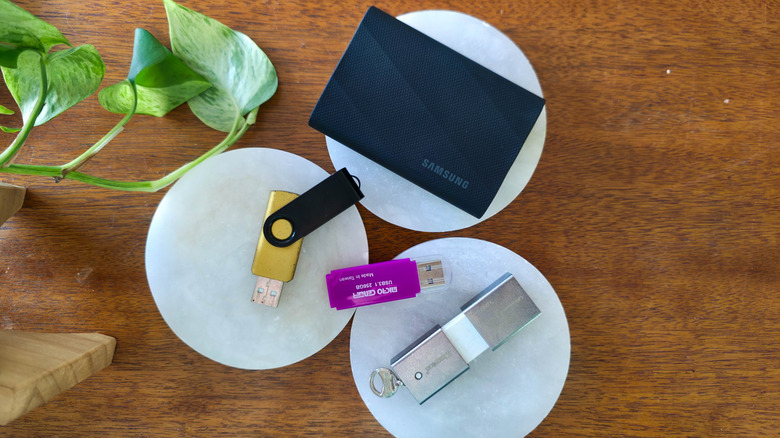
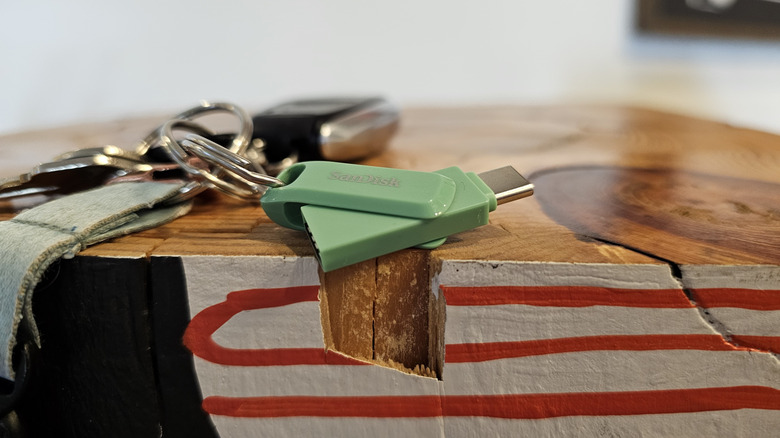
But what many people don’t know is that you should also format a brand new drive before using it. USB drives of all kinds come from the factory with configurations that support broad compatibility but may not match your specific needs. Flash drives in particular, from brands like SanDisk, Kingston and so on, tend to come configured with an older file storage format called FAT32, which has broad compatibility but cannot handle files larger than a few gigabytes.
Advertisement
Whatever your reason for formatting, it can seem daunting until you get the hang of it. So, here’s how to format a USB drive on Windows, and how to know which settings to choose when doing so.
What’s the best storage format for Windows (and other devices you own)?
Max Miller for Engadget
There are three main storage formats for a drive you’ll use externally with a Windows system. Windows itself uses NTFS for internal drives due to its support for partitioning and encryption, among other things. If you plan on using your USB 2.0 or 3.0 drive exclusively with Windows systems, NTFS is the best choice. However, you should not use NTFS if there’s a chance you’ll be plugging your drive into a Linux, Android, iOS or macOS system.
For non-Windows operating systems, the storage format with the broadest compatibility is exFAT. It can handle large files of more than 4GB, so if you plan on using the drive to gain more storage on your Android phone, or to store movies and 4K videos, compressed archives, and so on, exFAT is the de facto choice. While it lacks some of the more advanced features supported by NTFS, it is well suited to thumb drives and basic portable SSDs.
Advertisement
You may also notice an option labeled FAT32, which is the older version of the format. If you foresee using your drive with an older device like a car stereo or ancient printer, FAT32 has the most compatibility of any format and works with just about anything that has a USB port. However, it has serious limitations that render it a bad option for modern use cases. It cannot support files larger than 4GB and is more prone to fragmentation than newer formats. Windows 11 may not play nice with it, either, depending on your use case.
How to properly format your storage drive for Windows
Max Miller for Engadget
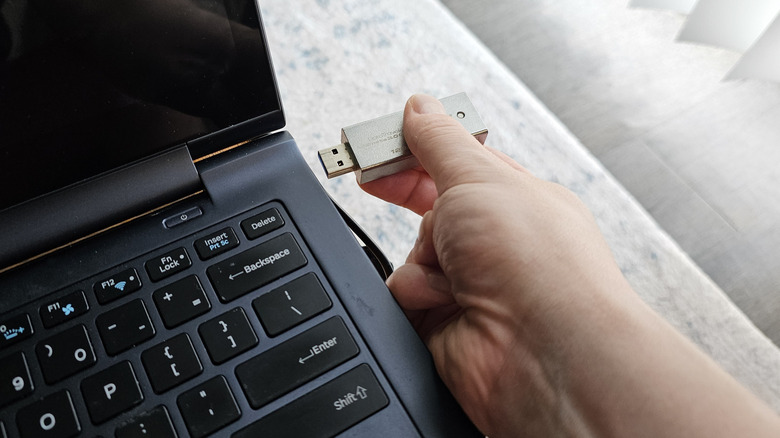
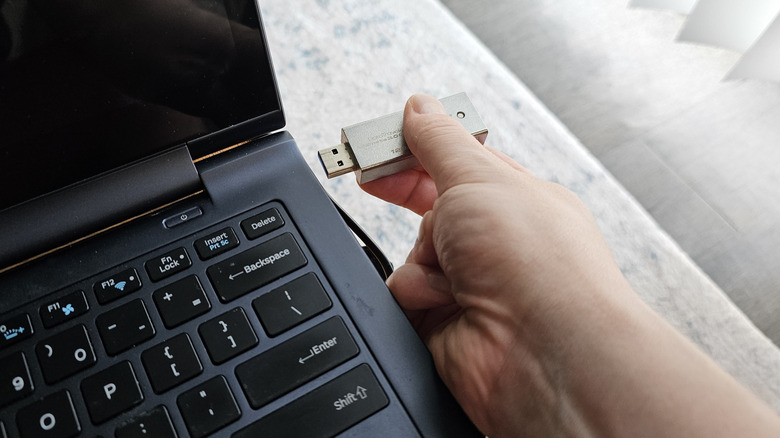
The actual process of formatting the drive is pretty simple. Just plug the USB storage device into a high-speed USB port, then open Windows Explorer. Click This PC on the left-hand navigation panel, then right-click the drive and select Format. Be sure you’re selecting the correct drive, and that you have closed any programs that might still be using the drive or any files on it.
The Windows formatting tool offers a number of different file formats, which can be selected from the second dropdown menu. As discussed above, choose exFAT if you plan to use the USB drive with non-Windows devices such as Android phones, Linux computers or Macs and iPhones. If you’ll exclusively use it with Windows, you can choose NTFS.
Advertisement
You can leave file allocation set to the default, which for most modern USB drives is either 32KB or 128KB when formatting to exFAT. If you plan on using the drive exclusively for storing large files, like games, you can choose a higher value, and you can choose a lower one if you have a lot of very small files like text notes. As a rule of thumb, the larger the drive is and the larger the files you want to store, the larger you can make the allocation size.
Under Volume Label, enter a custom name for the drive, if you want one.
Click Format, and then click OK on the confirmation that appears. Depending on the size of the drive and how full it is, formatting can take anywhere from a couple of seconds to several minutes. Another pop-up will appear once formatting is complete. Confirm and close out of the formatting tool, and you should now have a freshly formatted USB drive.
High-end audio does not have a sound-quality problem. It has a discovery problem.
Too much of the industry’s best equipment is demonstrated at audio shows, dealer events and private listening sessions to people who already understand why someone might spend five figures on a turntable, tube amplifier or pair of horn loudspeakers. Those events matter, but you can only preach to the converted for so long before somebody notices that most of the congregation already owns three turntables and has very strong opinions about 12AX7 tubes.
Which is why what Devon Turnbull and OJAS are doing at the Cooper Hewitt, Smithsonian Design Museum in New York deserves considerably more attention from the high-end audio industry.
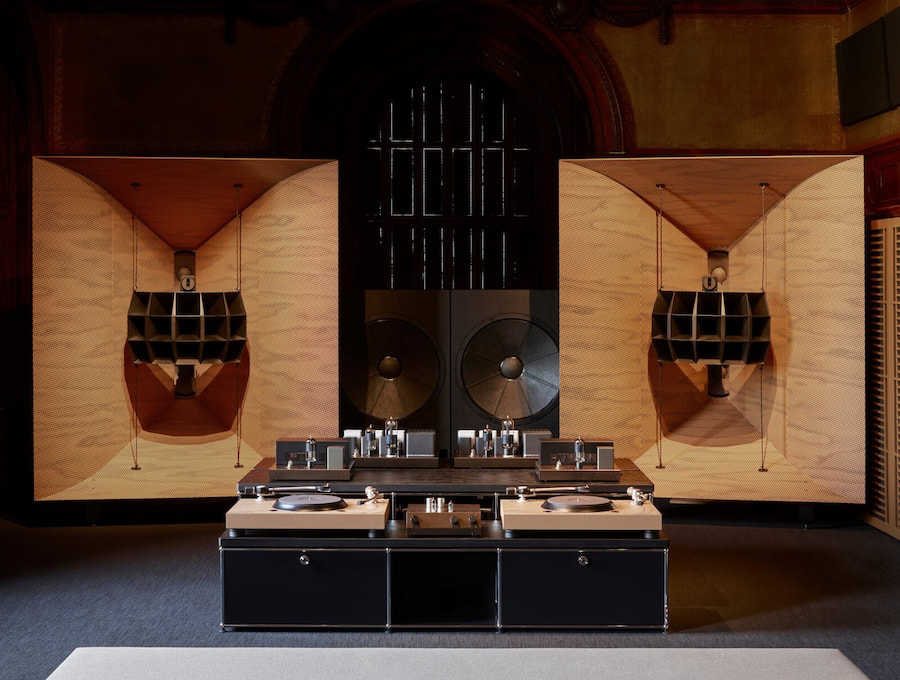
Turnbull’s HiFi Pursuit Listening Room Dream No. 3 places a large-scale, handmade OJAS audio system inside Cooper Hewitt’s historic Carnegie Library, where visitors can actually sit down and listen rather than stare at an amplifier sitting silently behind a velvet rope. The installation originally opened in December 2025 as part of the museum’s Art of Noise programming and has now been extended through August 16, 2026.
Advertisement
This Is About More Than OJAS
The significance is not simply that Turnbull has managed to get a high-end audio system inside a Smithsonian museum. It is who gets exposed to it once it is there.
Art of Noise explores more than a century of music and design through over 300 objects and installations, including record players, radios, album artwork, the Sony Walkman, Apple iPod and experimental contemporary audio designs. Those are cultural objects that already mean something to people who may never have attended AXPONA, HIGH END Vienna or CanJam and who probably could not tell you what a moving-coil cartridge is if their life depended on it.
But they understand music. They understand design. Many of them buy vinyl, go to concerts, care about architecture and furniture, collect art, own good headphones or obsess over the way their homes look.
That audience should be fertile ground for high-end audio, yet the industry has historically done an impressive job of making itself difficult to discover.
Advertisement
OJAS is doing the opposite.
A Listening Room Built Around the Space
Dream No. 3 is the third version of Turnbull’s listening-room concept, following earlier installations at Lisson Gallery in New York and London and SFMOMA. For Cooper Hewitt, however, Turnbull designed the system specifically around the museum’s historic Carnegie Library, including custom speaker sculptures influenced by the room’s existing millwork. Cooper Hewitt describes it as the largest and most architecturally and acoustically integrated version of the installation so far.
That matters because the system is not being presented like another pile of expensive components.
Advertisement. Scroll to continue reading.
Advertisement
It becomes part of the room.
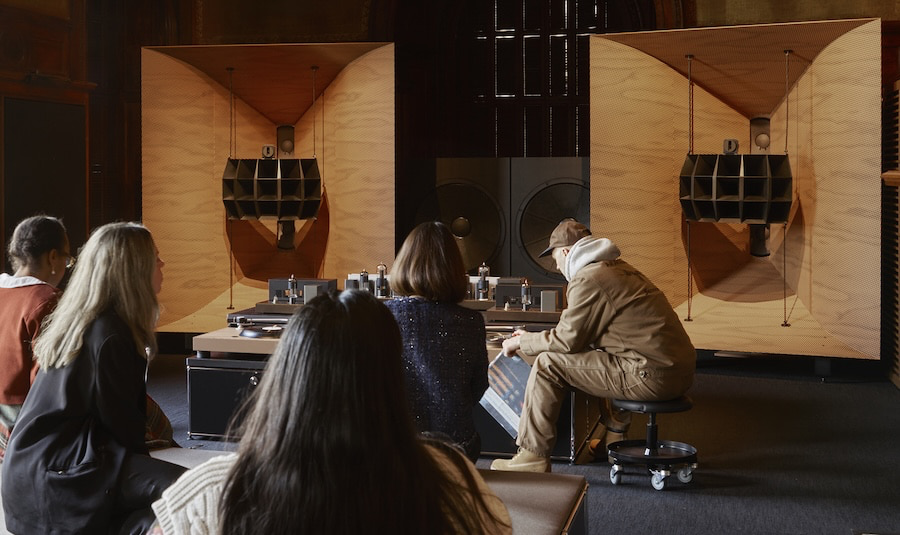
Visitors are encouraged to sit, stop talking, put away the phone and actually listen. The room is programmed every day with selections ranging from classical and ambient music to jazz, while Turnbull, members of the OJAS team, musicians, engineers, collectors and other guest operators have conducted live listening sessions throughout the exhibition.
Turnbull returns for live operator sessions on August 13 and August 15 from 1:00 p.m. to 4:00 p.m., just before the installation closes on August 16.
High End Audio Needs More of This
We have been following Turnbull and OJAS for years, from his collaboration with Denon on the DL-103o moving-coil cartridge to the Klipsch kO-R1 and newer kO-R2 loudspeakers. The Klipsch partnership has been particularly interesting because the products have deliberately appeared outside the normal hi-fi circuit, including Milan Design Week, where the kO-R2 was presented to an audience that crosses architecture, furniture, fashion and industrial design.
Advertisement
We praised that decision at the time, and Cooper Hewitt reinforces why.
High-end audio companies keep asking how they attract younger customers and people outside the existing audiophile community. Perhaps the answer is not another seminar about Ethernet switches in Room 614 of an airport hotel.
Put great systems in museums. Put them in architecture and design exhibitions. Build listening rooms inside record stores, galleries, restaurants and cultural spaces. Partner with musicians, furniture designers and people who already have credibility outside the audiophile bubble. Most importantly, let people hear what a genuinely good system can do without first requiring them to identify as an “audiophile.”
The industry sometimes forgets that almost nobody wakes up one morning and decides they need a $20,000 pair of loudspeakers. They hear something that changes their perception of reproduced music, become curious and start moving down the rabbit hole.
Advertisement
Some eventually spend $500. Some spend $5,000. A few lose all fiscal judgment and start pricing Swiss monoblock amplifiers.
But somebody has to open the door.
The Bottom Line
HiFi Pursuit Listening Room Dream No. 3 is worth celebrating not simply because Devon Turnbull built another visually distinctive OJAS system, but because Cooper Hewitt has placed serious high-fidelity reproduction inside a broader conversation about music, culture and design.
That exposes high-end audio to people who might otherwise never experience it, and the industry needs considerably more of that.
Advertisement
Advertisement. Scroll to continue reading.
Audio shows and specialist dealers remain essential, but they predominantly reach consumers who have already walked through the door. If high-end audio really wants to expand its audience, it needs to start appearing in places where curious music lovers are already standing.
With nearly 70% of the market, “Meta wants its smart glasses to be a big hit,” writes the Los Angeles Times. But after some users found ways to disable the light that warns people they’re being filmed, “the high-tech specs have also turned into a liability, as some are calling the gadget ‘pervert glasses…’”
Some people are using the glasses — which look like a pair of regular spectacles — to record people without their knowledge and publish the videos on social media. The users secretly videotape and share what happens when they try to pick up women. Now, a growing number of people are worried they could be covertly recorded at the gym or even during sex. The backlash has prompted Meta to update its glasses to address privacy concerns, and some places have banned them, adding to the angst surrounding technology that’s rapidly evolving…
Concern about the glasses has exploded as more videos of interactions with people who don’t know they’re being recorded go viral on social media. On Instagram, some videos depict people getting approached in malls and grocery stores and on college campuses and sidewalks. While the videos are portrayed as jokes, the people filmed don’t appear to know they’re being recorded and sometimes seem uncomfortable, telling the strangers to leave them alone or stop harassing them. The outcry has spread beyond social media, with comedian Jimmy Kimmel calling the Meta devices “pervert glasses” on national television and singer Lorde telling concertgoers that smart glasses are “not sexy…”
Instagram, which is owned by Meta, has been disabling accounts and taking down some of these pickup or prank videos for violating the platform’s rules against harassment and bullying… Businesses are making their own calls about smart glasses. The 5 Point Cafe in Seattle, which banned Google Glass in the past, has banned Meta glasses from its diner and dive bar. “Leave your Meta-SpyBan Display at home, they are officially Ray-Ban-ned from all of our restaurants. We serve privacy, not side-eye surveillance,” a 2025 Instagram post from the business states.
Advertisement
An Android app that warns people if they’re being recorded has roughly 110,000 downloads in the last six months, according to the article. The app’s creator says it’s a “social problem” that “we don’t value privacy, that we feel entitled to use others for our entertainment or our private gain, and technology amplifies that.”
The American Civil Liberties Union and more than 70 organizations even sent a letter urging Meta to promise they’d leave facial recognition features out of their smart glasses, according to the article. But a Meta spokesperson said “no final decision has been made.”
The Korea Aerospace Research Institute shared the first photographs captured by its lunar orbiter. South Korea is one of the few nations that currently has satellites traveling around the moon at an altitude of 62 miles (100 kilometers) above the surface. The Danuri orbiter flew over the region shortly after the impact.
KARI explained on its X account that it photographed the collision site both before and after the event. The images show signs of a recent impact, which astronomers projected would likely create a crater dozens of feet wide nearly 12 feet (3.6 meters) deep.
This evidence of the collision adds to observations from the Very Large Telescope, where astronomers detected sodium and lithium rising from the lunar surface, confirming that the rocket fragment did indeed strike the moon.
Advertisement
The crater is larger than several cars combined.
Photograph: Korea Aerospace Research Institute
Astronomers predicted when and where the Falcon 9 impact would happen well in advance, and there were signs it could be visible with sufficiently powerful equipment. Yet days before the collision, space agencies such as NASA warned that it would be difficult to observe the moment of impact due to weather conditions and timing.
Like KARI, NASA has lunar orbiters. It’s possible that in the coming days, following a series of data checks, higher-resolution images of the impact area will become available.
But even at higher resolution, getting a granular view of the crater is unlikely. In fact, the new photos give a sense of just how small that is compared to the vastness of the lunar surface. To put this into perspective, the moon measures about 2,160 miles in diameter.
Advertisement
Another image taken by the Danuri lunar satellite during one of its orbits over the impact area.
Photograph: Korea Aerospace Research Institute
Why Did the Rocket Crash?
The Falcon 9 fragment made a crash landing after being in an unstable orbit for more than a year. The rocket launched in January 2025, completing its mission to deliver lunar landers. For more than a year, the gravity of Earth, the moon, and the sun slowly altered its orbital trajectory until it eventually impacted the lunar surface.
“For most of our missions, we plan for a controlled deorbiting of the Falcon second stage so that it re-enters safely over the ocean,” SpaceX said of the rocket. “In higher-energy missions, such as those heading to a lunar transfer orbit, nearly all of the vehicle’s performance is dedicated to successfully placing the payload into the intended orbit, and a controlled deorbiting maneuver is not always possible.
“We are actively working to be as responsible as possible with the hardware left in space and to ensure space safety, even on more complex missions. In this case, over time, solar activity and gravity deflected the second stage toward the Moon. Impacts like this are rare, but they can occur with objects in these types of orbits, and we are collaborating with NASA to find the optimal disposal solution,” it added.
Advertisement
This story originally appeared onWIRED en Españoland has been translated from Spanish.
David Silver is a billionaire, sort of. His stake in Ineffable Intelligence—the artificial intelligence lab he founded—is worth an ungodly fortune. But he stands to collect none of that money himself. He set things up that way.
Between 2013 and 2025, Silver worked as a researcher at Google DeepMind. He specialized in reinforcement learning, a method of teaching an AI model through positive and negative feedback. In 2016, he led the development of AlphaGo, which became the first AI to defeat a human champion in the game of Go and was heralded as a narrow form of superintelligence. Silver left to start Ineffable Intelligence in January, betting that reinforcement learning breakthroughs will close the gap between human and machine cognition across the board.
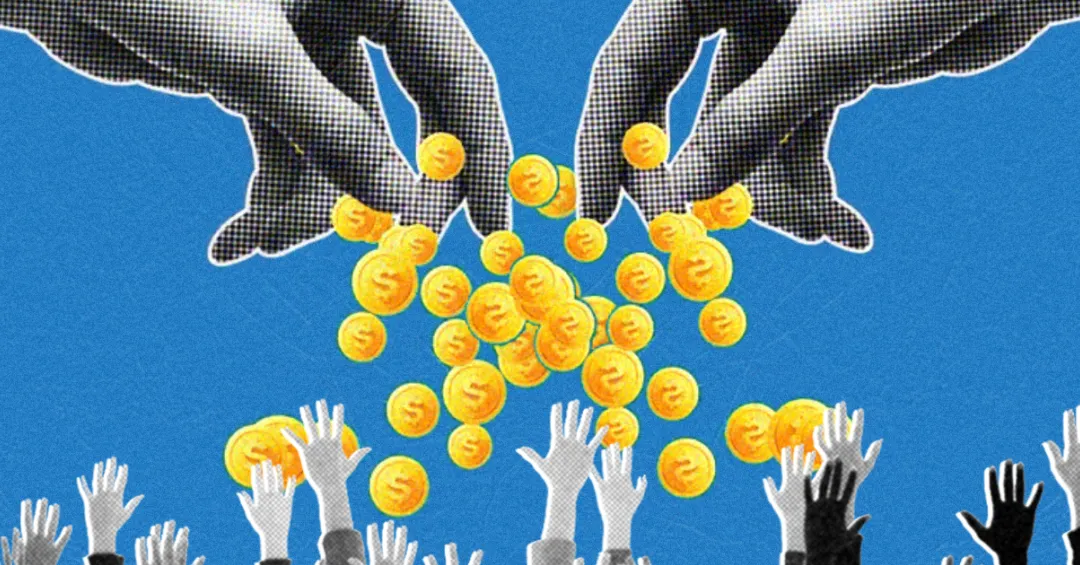
When he started Ineffable Intelligence, Silver raised $1.1 billion from investors at a $5.1 billion valuation, reportedly the largest seed round in Europe’s history. He also vowed to donate all the money he makes from any future sale of his company to charity.
“I was thinking very deeply about what I could do to have the maximum impact on the world,” Silver tells WIRED in an interview at his office in Kings Cross, London, around the corner from DeepMind’s headquarters. “Not just through the work I do, but through the finance I arrive at in the process.”
Advertisement
He’ll choose how to deploy the funds after he sells his company, he says, but his ambition is to save as many lives as possible.
Silver is the latest in a growing line of AI founders to pledge equity proceeds to charity. Others include Mustafa Suleyman, a DeepMind cofounder and the CEO of AI at Microsoft, and Anton Osika, the founder of automated coding platform Lovable. If OpenAI and Anthropic go public as planned, minting thousands of new millionaires in the process, the AI industry could soon come to represent an increasingly outsize proportion of tech philanthropy.
Along with a new generation of techno-philanthropists, though, comes a tangle of unresolved questions: Is philanthropy the most appropriate way to redistribute wealth? To what degree are megadonors responsible for some of the problems they aim to fix? Could a pledge that scales with a company’s success come to justify unsavory business practices or reckless accelerationism? And is this go-around any different from previousiterations of Silicon Valley giving?
“You can’t necessarily appeal to capitalism to solve some of the problems created by capitalist practices themselves … the exacerbation of extreme wealth concentration and massive inequalities,” says Linsey McGoey, professor of sociology at the University of Essex and author of No Such Thing as a Free Gift. “It’s like calling upon the arsonist to hose down the house he’s just set on fire.”
Advertisement
Silver formalized his charitable commitment through Founders Pledge, a nonprofit that helps entrepreneurs to give away their wealth. Unlike the Giving Pledge, a public but nonbinding commitment, Founders Pledge requires participants to enter into a contract. “The choice of making a binding pledge was very important,” says Silver.
Founders Pledge has been around since 2015. But the value of pledges recorded by the nonprofit has soared recently, from $400 million in 2023 to $4 billion so far this year. The AI industry now accounts for a third of the lifetime pledge total.
The organization’s goal, according to cofounder David Goldberg, is to identify “the very best ways to deploy capital at scale to make the world better.” It has frequently been lumped together with effective altruism, which encourages people to amass wealth in order to give it away, to rely on statistics rather than emotion, and to prioritize causes likely to have the biggest impact in the distant future. But despite the commonalities, Goldberg isn’t a fan of the comparison; Founders Pledge is concerned with human suffering in the present. “We’re far more humanist,” he says.
























































You must be logged in to post a comment Login