Hiro is shutting down on 20 April and deleting all user data by 13 May. Founder Ethan Bloch previously sold Digit to Oportun for more than $200M. Terms of the deal were not disclosed.
OpenAI, the San Francisco AI lab behind ChatGPT, has acquired Hiro Finance, an AI-powered personal finance planning startup, with founder Ethan Bloch and his staff moving to OpenAI. Bloch announced the deal on LinkedIn and OpenAI confirmed it.
Terms were not disclosed, nor did Hiro ever publicly disclose how much it had raised. Hiro had approximately ten employees, all of whom are joining OpenAI. Bloch did not respond to a request for further comment.
Hiro was founded in 2023 and launched its AI tool roughly five months ago. The app offered AI-powered financial planning for consumers: users entered information about their salary, debts, and monthly costs, and the platform modelled different what-if scenarios to support financial decision-making.
A notable design choice was a verification option that allowed users to check the accuracy of the AI’s financial maths, a deliberate feature at a time when large language models had a documented weakness with numerical reasoning.
Advertisement
The startup was backed by Ribbit Capital, General Catalyst, and Restive.
Bloch is a serial entrepreneur with a consistent track record in fintech and consumer software. He sold Flowtown, a social media SaaS tool launched in 2009, for $5 million. He subsequently founded Digit, a digital-only bank designed to automate saving for consumers, which was acquired by Oportun in 2021 for more than 00 million.
He has described Hiro as his fifteenth project, having started building products as a 13-year-old, with the first thirteen failing. This acquisition is his third exit.
This is not OpenAI’s first acquisition in the financial services space, and the company already markets ChatGPT as a tool for business finance teams. The Hiro deal adds focused talent in consumer financial planning, a category where specialised AI reasoning around budgets, debt paydown sequencing, and savings optimisation requires a different product approach than general-purpose chat.
Advertisement
Whether OpenAI intends to build a dedicated consumer financial planning product or fold the expertise into its broader platform is not yet clear.
Google’s long-running face unlock comeback story may have hit another wall. A recent Pixel 11 series leak claims that Project Toscana, Google’s rumored infrared face unlock system, likely will not debut on the Pixel 11 lineup because it is still not ready for release.
The feature was expected to give future Pixel phones a stronger rival to Apple’s Face ID. Earlier reports said Project Toscana was tested on both Pixel phones and Chromebooks, with Face ID-like speed and better low-light performance. The latest leak suggests Pixel users may have to wait beyond the 2026 lineup for that upgrade.
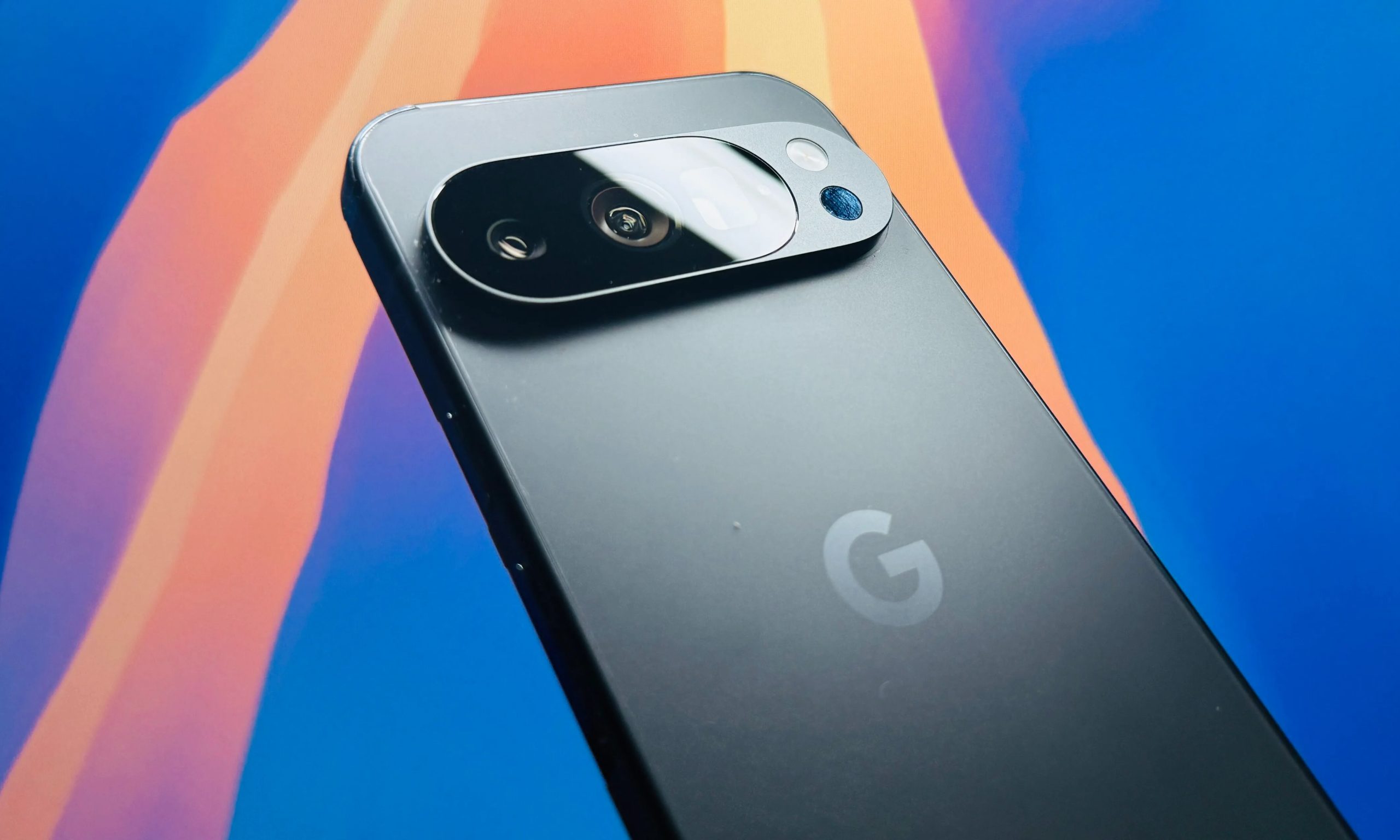
Nadeem Sarwar / Digital Trends
Is Google delaying its Face ID rival again?
Based on the latest Pixel 11 leak, yes. Project Toscana is now said to be unlikely for the Pixel 11 series, even though Google was reportedly testing the system for months.
The system was described as an iPhone-like face unlock setup using hybrid near-infrared sensors and possible under-display infrared hardware. It was meant to improve speed, security, and low-light unlocking, areas where Apple’s Face ID still has an advantage.
Google has already tried a serious face unlock system on Pixel phones. The Pixel 4 series used dedicated hardware, including Soli radar, to sense when a user was reaching for the phone and prepare face authentication before the screen was fully active. Google said the system worked in almost any orientation and could be used for secure payments and app sign-ins.
Advertisement
The feature quickly ran into trouble. Soon after launch, users found that the Pixel 4 could unlock even when a person’s eyes were closed, raising security concerns. Google later issued an update that added an “eyes open” requirement, but the company moved away from dedicated 3D face unlock hardware after the Pixel 4 generation.
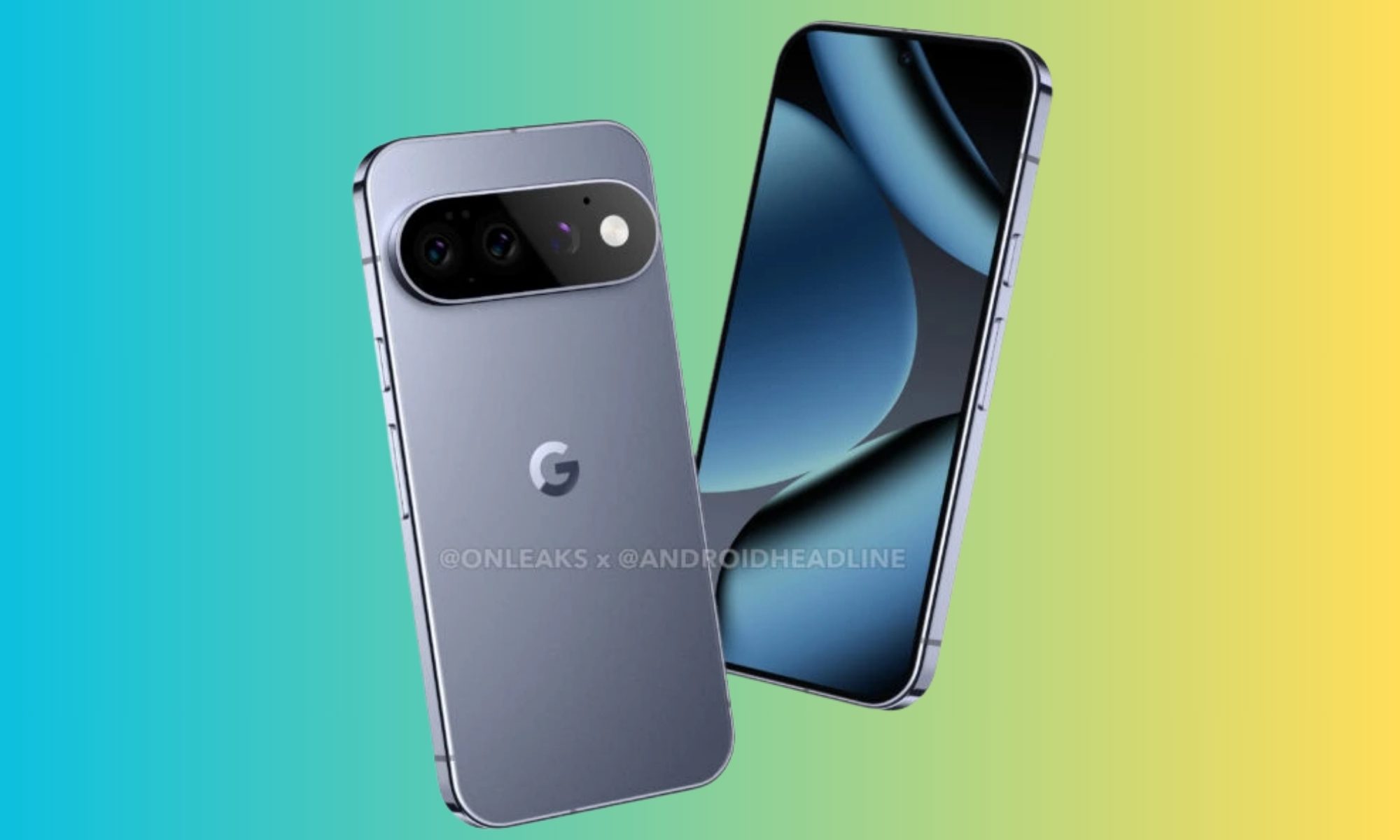
Android Headlines
Why does this sting for Pixel fans?
Newer Pixel phones brought face unlock back in a more limited form. Project Toscana looked like Google’s chance to close that gap and bring a hardware-backed face unlock system to future Pixels.
The same Pixel 11 leak still points to several hardware changes. The lineup is expected to use the Tensor G6 chip, new cameras, brighter OLED displays, a MediaTek M90 modem, and an RGB LED array in the camera bar on Pro models. The leak also claims the thermometer may be removed from the Pixel 11 Pro, Pixel 11 Pro XL, and Pixel 11 Pro Fold.
The delay is disappointing, but a rushed launch would be worse. Face unlock is not just a convenience feature when it is tied to payments, banking apps, and device security. If Project Toscana needs more time, the next Pixel generation is a better landing place than a half-ready rollout. For privacy and security, it should arrive only when it works correctly and feels bulletproof.
A severe security vulnerability affecting almost every version of the Linux operating system has caught defenders off-guard and scrambling to patch after security researchers publicly released exploit code that allows attackers to take complete control of vulnerable systems.
The U.S. government says the bug, dubbed “CopyFail,” is now being exploited in the wild, meaning it’s being actively used in malicious hacking campaigns.
The bug, officially tracked as CVE-2026-31431 and discovered in Linux kernel versions 7.0 and earlier, was disclosed to the Linux kernel security team in late March, and patched after about a week. But the patches have yet to fully trickle down to the many Linux distributions that rely on the vulnerable kernel, leaving any system running an affected Linux version at risk of compromise.
Linux is widely used in enterprise settings, running the computers that operate much of the world’s data centers.
Advertisement
The CopyFail website says that the same short Python script “roots every Linux distribution shipped since 2017.” According to security firm Theori, which discovered CopyFail, the vulnerability was verified in several widely used versions of Linux including Red Hat Enterprise Linux 10.1, Ubuntu 24.04 (LTS), Amazon Linux 2023, as well as SUSE 16.
DevOps engineer and developer Jorijn Schrijvershof wrote in a blog post that the exploit works on Debian and Fedora versions, as well as Kubernetes, which relies on the Linux kernel. Schrijvershof described the bug as having an “unusually big blast radius” as it works on “nearly every modern distribution” of Linux.
The bug is called CopyFail because the affected component in the Linux kernel, the core of the operating system that has virtually complete access to the entire device, does not copy certain data when it should. This corrupts sensitive data within the kernel, allowing the attacker to piggyback the kernel’s access to the rest of the system, including its data.
If exploited, the bug is particularly problematic because it allows a regular, limited-access user to gain full-administrator access on an affected Linux system. A successful compromise of a server in a data center could allow an attacker to gain access to every application, server, and database of numerous corporate customers, and potentially gain access to other systems on the same network or data center.
Advertisement
The CopyFail bug cannot be exploited over the internet on its own, but can be weaponized if used in conjunction with an exploit that works over the internet. Per Microsoft, if the CopyFail bug is chained together with another vulnerability that can be delivered over the internet, an attacker could use the flaw to gain root access to an affected server. A user operating a Linux computer with a vulnerable kernel could also be tricked into opening a malicious link or attachment that triggers the vulnerability.
The bug could also be injected by way of supply chain attacks, in which malicious actors hack into an open source developer’s account and plant the malware in their code in order to compromise a large number of devices in one go.
Given the risk to the federal enterprise network, U.S. cybersecurity agency CISA has ordered all civilian federal agencies to patch any affected systems by May 15.
When you purchase through links in our articles, we may earn a small commission. This doesn’t affect our editorial independence.
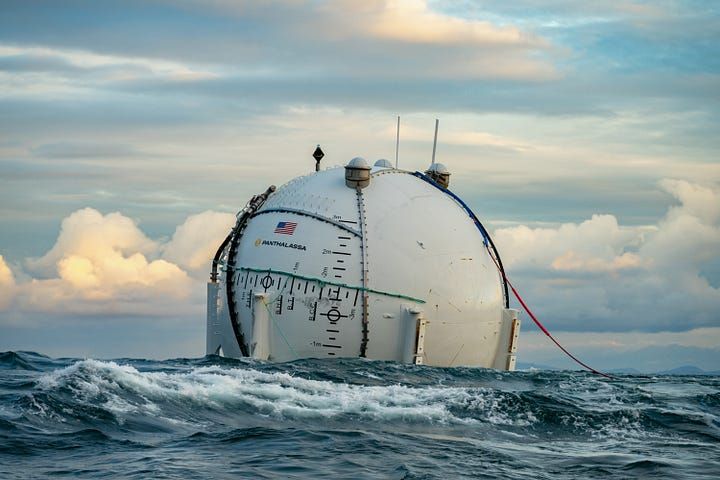
A Panthalassa wave energy system. (LinkedIn Photo)
Wave energy had largely been bobbing around in the background of the U.S. clean energy sector — until now. On Monday, Oregon-based Panthalassaannounced a $140 million round led by Peter Thiel.
The new funding from the PayPal co-founder and others will allow the startup to finish building its pilot manufacturing facility near Portland. Panthalassa is developing technology that pairs wave power generated by massive floating orbs with onsite AI computing. The systems transmit data via low-Earth-orbit satellites.
“We’ve built a technology platform that operates in the planet’s most energy-dense wave regions, far from shore, and turns that resource into reliable clean power,” said Garth Sheldon-Coulson, Panthalassa’s co-founder and CEO, in a statement. “We’re now ready to build factories, deploy fleets, and provide a sustainable new source of energy for humanity.”
The planet is scrambling to find new energy sources to meet demand from data centers and electrified transportation, building heating and cooling, and industrial applications.
One of the biggest challenges historically with wave power is the need to build costly infrastructure to move energy from the ocean to where it’s needed. Panthalassa’s approach sidesteps that problem by using power onsite to run already-trained AI models, while tapping cold ocean water to cool the hardware — solving two problems at once.
Advertisement
The strategy shares parallels with surging interest in space-based data centers that harness solar energy. In March, Starcloud, a Redmond, Wash.-based startup, announced $170 million in new funding, vaulting it to unicorn status with a $1.1 billion valuation.
“The future demands more compute than we can imagine,” said Peter Thiel. “Extra-terrestrial solutions are no longer science fiction. Panthalassa has opened the ocean frontier.”
A Panthalassa energy system in port. (LinkedIn Photo)
Founded in 2016 as a public benefit corporation, Panthalassa has spent nearly a decade developing power generation, propulsion, autonomous operations and computing technology. That work has included prototypes — Ocean-1, Ocean-2 and Wavehopper — deployed in sea trials in 2021 and 2024. The company is now preparing to deploy its Ocean-3 pilot series this year, with commercial systems planned for 2027.
Sheldon-Coulson previously served as a senior investment associate at Bridgewater Associates. Chief Innovation Officer Brian Moffat, listed as a co-founder by Lowercarbon Capital, developed a novel wave energy system for Spindrift Energy before launching Panthalassa. The company has approximately 108 employees, according to PitchBook.
Other Pacific Northwest companies pursuing wave energy include Seattle’s Oscilla Power and Oregon State University spinout C-Power. Wave energy startups that have exceeded $100 million in investment globally include Sweden’s CorPower Ocean and the United Kingdom’s Marine Power Systems.
Advertisement
The Series B round included participation from new investors John Doerr, Marc Benioff’s TIME Ventures, Max Levchin’s SciFi Ventures, Susquehanna Sustainable Investments, Hanwha Group, Anthony Pratt, Fortescue Ventures, Future Positive, WTI, Nimble Partners, Super Micro Computer, Sozo Ventures, Dylan Field, Planetary VC, Leblon Capital, Resilience Reserve, Portland Seed Fund, and the Intrepid Oregon Fund.
Returning investors include Founders Fund, Gigascale Capital, Lowercarbon Capital, Unless and WovenEarth. Panthalassa previously raised $78 million, according to PitchBook.
Hackers have been exploiting a critical vulnerability (CVE-2026-22679) in the Weaver E-cology office automation since mid-March to run discovery commands.
The attacks started five days after the software vendor released a security update to address the issue, and two weeks before disclosing it publicly.
Researchers at threat intelligence company Vega documented the malicious activity and reported that the attacks lasted roughly a week, each with several distinct phases.
Weaver E-cology is an enterprise office automation (OA) and collaboration platform used for workflows, document management, HR, and internal business processes. The product is primarily used by Chinese organizations.
Advertisement
CVE-2026-22679 is a critical unauthenticated remote code execution flaw affecting E-cology 10.0 builds prior to March 12.
The flaw is caused by an exposed debug API endpoint that improperly allows user-supplied parameters to reach backend Remote Procedure Call (RPC) functionality without authentication or input validation.
This lets attackers pass crafted values that are ultimately executed as system commands on the server, effectively turning the endpoint into a remote command execution interface.
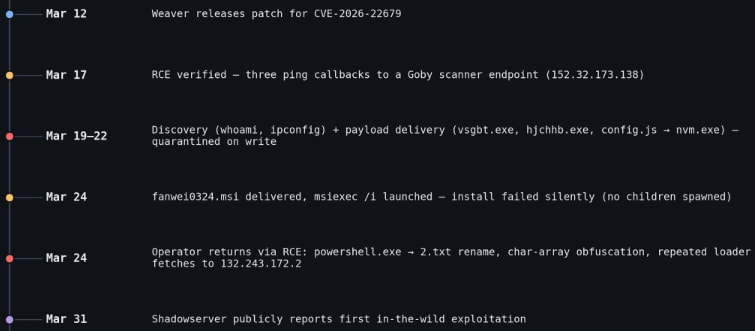
According to Vega, the attackers first checked for remote code execution (RCE) capabilities by triggering ping commands from the Java process to a Goby-linked callback, and then proceeded to multiple PowerShell-based payload downloads. However, all these were blocked by endpoint defenses.
Advertisement
Next, they attempted to deploy a target-aware MSI installer (fanwei0324.msi), but this failed to execute properly, and no follow-up activity was observed.
After those failed attempts, the attackers reverted to the RCE endpoint, using obfuscated and fileless PowerShell to repeatedly fetch remote scripts.
Throughout all attack phases, the threat actors executed reconnaissance commands, such as whoami, ipconfig, and tasklist.
Activity timeline Source: Vega
Vega explains that although the attackers had the RCE opportunity by exploiting CVE-2026-22679, they never established a persistent session on the targeted host.
Users of Weaver E-cology 10.0 are recommended to apply the security updates available through the vendor’s site as soon as possible.
Advertisement
“Every attacker process we observed is parented by java.exe (Weaver’s Tomcat-bundled Java Virtual Machine), with no preceding authentication,” explained Vega, adding that “the vendor fix (build 20260312) removes the debug endpoint entirely.”
No alternative mitigations or workarounds are listed in the official bulletin, so upgrading is the only recommendation.
AI chained four zero-days into one exploit that bypassed both renderer and OS sandboxes. A wave of new exploits is coming.
At the Autonomous Validation Summit (May 12 & 14), see how autonomous, context-rich validation finds what’s exploitable, proves controls hold, and closes the remediation loop.
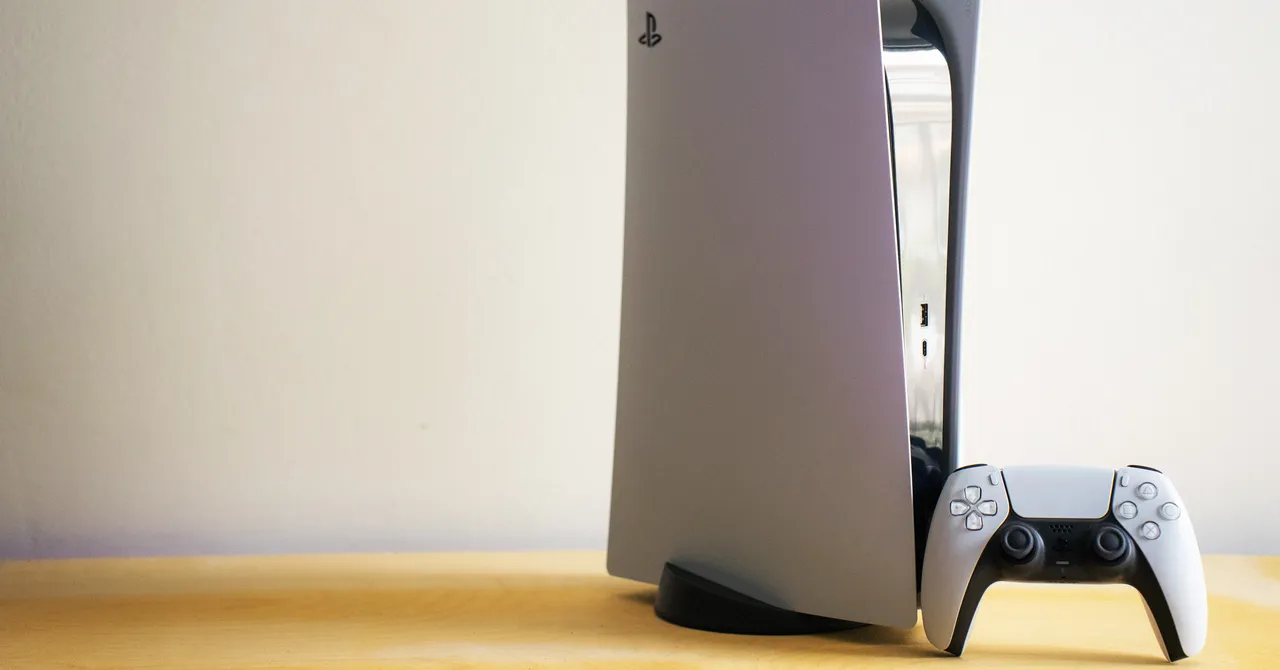
Sony, owner of the PlayStation brand, has been accused of antitrust practices. The lawsuit was originally settled in 2024 but was rejected twice during the approval process. Last week, a judge approved a preliminary reopening of the settlement.
The suit, brought before the San Francisco division of the United States District Court for the Northern District of California, accuses the company of allegedly limiting third-party retailers from selling PlayStation titles via “game-specific vouchers.” That means preventing customers from buying games elsewhere and forcing them to make digital purchases solely on Sony’s PlayStation Network, where it controls prices without worrying about competitors.
The settlement means the company won’t admit to any wrongdoing, but it will have to pay nearly $8 million to affected players. Unfortunately, that might take quite a while.
Here’s what to know about the settlement and whether you’ll be able to get any money out of it. (The full details are at the PlayStation Digital Games Settlement website.)
Advertisement
Am I Eligible for a Payout?
If you bought a digital game on PlayStation Network between April 1, 2019, and December 31, 2023, then yes, you are likely eligible for a cut of the settlement.
What Games Are Covered?
You can find a full list here of games that are eligible for a settlement payout.
If you’ve played anything around that time and bought it from the PSN store, chances are you’ll have a shot at being included. Games include The Last of Us, Resident Evil 4, and lots of sports games, such as several generations of Madden, NBA 2K, and FIFA
How Do I Get Paid?
Thankfully, you won’t have to do very much. When the settlement finally goes through, the funds will be deposited into the payment accounts linked to all of the eligible PSN profiles.
Advertisement
If you’d like to exclude yourself from the payout, or object to it entirely, you can do so by filing out a written request. That’s not necessary unless you have a moral issue with the payout, or you plan to sue Sony about this very same issue later. Accepting the payout now by default means you waive the right to sue Sony for this in the future.
What If I Don’t Have My PSN Account Anymore?
If your PSN account is deactivated or otherwise MIA, but you know you’ve bought games that meet the conditions of this settlement, you still have options for getting some recompense. You can call (877) 777-9145 or email [email protected]. You can also send your qualifying purchase information and current address to:
PSN Digital Game Settlement P.O. Box 17304 Milwaukee, WI 53217
The deadline to submit that request for a check is August 27, 2026.
Advertisement
How Much Money Will I Get?
Probably not a lot. That $7.85 million will be split across legal representatives who argued the settlement, then evenly spread across potentially millions of people’s PSN accounts. It’s hard to tell exactly how much that will amount to, but it’s likely to be a few dollars at best.
I’ll Take What I Can Get. When Will That Cash Roll In?
The settlement hearing won’t happen until after a so-called fairness hearing takes place, which is currently scheduled for October 15, 2026. If that is finalized, the money could take additional weeks or months to be doled out.
Class action lawsuits aren’t super consumer-friendly most of the time. They certainly don’t tend to be timely. This particular settlement was first arranged in December 2024, but two requests for approval had been rejected. The language in the settlement originally said the payments would be distributed after April 1, 2025. As you can probably tell, the wait isn’t over yet.
A long-serving military vessel is a unique piece of a country’s naval history. Sadly, several iconic U.S. Navy ships are set to be decommissioned in 2026, and still others are stuck in increasingly delayed renovation projects. The formidable U.S.S. Dwight D. Eisenhower aircraft carrier, however, is finally set to return to naval service.
This huge Nimitz-class carrier, measuring 1,092 feet long and displacing 101,600 long tons, will mark its 50th birthday in 2027. With aircraft carriers being such a crucial component of global power projection, the venerable ship was returned to Virginia’s Norfolk Naval Shipyard in January 2025, for an extensive period of PIA (Planned Incremental Availability).
Advertisement
This is an extended inspection, evaluation, and modernization process, a daunting job for a vessel of this size. It was completed ahead of schedule in April 2026, and Commander Jason Downs, Project Superintendent, hailed the collaborative effort. He said, a Navy release reports, “The entirety of the project team mustered more than 4,000 people daily, all with one common vision–deliver IKE, fully mission capable, back to the fleet before our commitment date.”
The extensive effort included unique tasks like repairing and improving the carrier’s catapult system, a vital feature that allows for the launch of aircraft. Commander Downs went on to boast that this was “the SECOND consecutive early finish of an aircraft carrier availability at Norfolk Naval Shipyard,” with U.S.S. George H.W. Bush’s own period of PIA concluding in late 2024.
Advertisement
U.S.S Dwight D. Eisenhower’s long career to date
U.S.S. Dwight D. Eisenhower was christened in October 1975, by Mamie Doud-Eisenhower herself. Commissioned two years later, it operated in the Red Sea in 1990 and during Operation Desert Storm the following year. It remained active throughout the 1990s, with a role in other key operations including Operations Uphold Democracy, Southern Watch, and Deny Flight, the latter being a NATO effort to maintain the no-fly zone in Bosnian airspace.
Into the 2000s and 2010s, it would be deployed during Operations Enduring Freedom and Inherent Resolve. Between February and August 2020, its courageous crew remained aboard, achieving a new record for continuous time spent at sea without docking: 260 days. It was called upon again in 2021 and 2023, for Operations including Inherent Resolve and Prosperity Guardian.
It’s been a stalwart presence in the oceans for almost half a century, and its newly completed period of intensive maintenance and refitting was not its first. A previous period of PIA started in August 2022 and lasted for just over a year. It’s been treated to a lot of maintenance and upgrades over its long career, with an October 1985 to April 1987 stop in Newport News Shipbuilding perhaps being the most significant. During this period, it was equipped with an Anti-Submarine Warfare Module, NATO Sea Sparrow Missiles, and a range of sophisticated communications features.
Advertisement
The U.S.S. Dwight D. Eisenhower may not be the most advanced aircraft carrier in the world, but it’s a sophisticated model and powerhouse nonetheless. The next chapter in its history is sure to be significant, wherever it’s deployed next.
Elon Musk has reached a settlement with the Securities and Exchange Commission (SEC) after a years-long dispute with the regulator over the timing of his disclosure that he had acquired a significant stake in Twitter. Musk agreed to pay a $1.5 million fee without admitting wrongdoing in exchange for the SEC dropping its case, the regulator said.
If the settlement is approved by a court, it will bring to an end the drawn out battle over how he began his $44 billion takeover of Twitter in 2022. The SEC began investigating Musk that same year over his 11-day delay in disclosing that he had acquired a more than 5 percent stake in the company. That lag, the SEC argued in a lawsuit, ultimately saved Musk more than $150 million at the expense of Twitter shareholders.
During the course of its investigation, the SEC accused Musk of using “gamesmanship” to stall its probe as he repeatedly dodged the regulator’s subpoena. Musk, in turn, accused then-SEC chair Gary Gensler of “harassment.” Gensler left his post days after the lawsuit against Musk was filed as President Donald Trump took office.
Advertisement
The 1.5 million penalty is “the largest in SEC history for the type of violation he was accused of,” according toReuters.
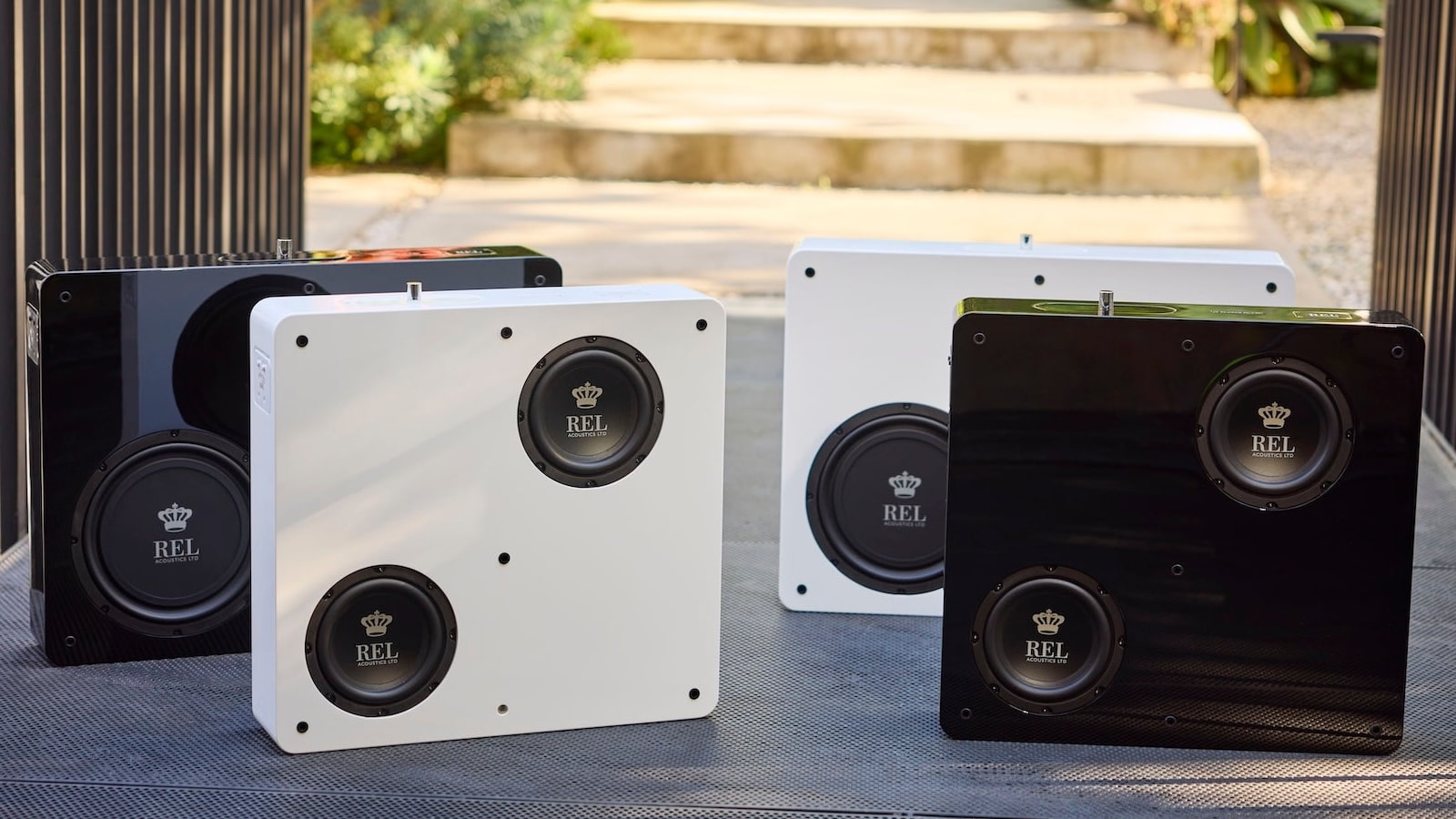
REL Acoustics is taking aim at one of the biggest reasons people avoid subwoofers: placement. The new Planar Series moves the sub off the floor and onto the wall with two thin models, the PL-1 and PL-2, each measuring just 5.7 inches deep and using a mix of active and passive drivers to generate low-frequency output without the usual big black cube parked in the corner like it pays rent. The larger PL-2 uses an 8-inch active woofer with a 10-inch passive radiator, while the smaller PL-1 uses dual 6.5-inch active drivers with the same 10-inch rear passive radiator.
That makes the concept especially interesting for hi-fi and home theater users who want bass support without sacrificing floor space or triggering a domestic zoning dispute. But the idea also raises real questions about installation, wall vibration, apartment and rental use, and whether on-wall bass can deliver the impact and integration REL is known for.
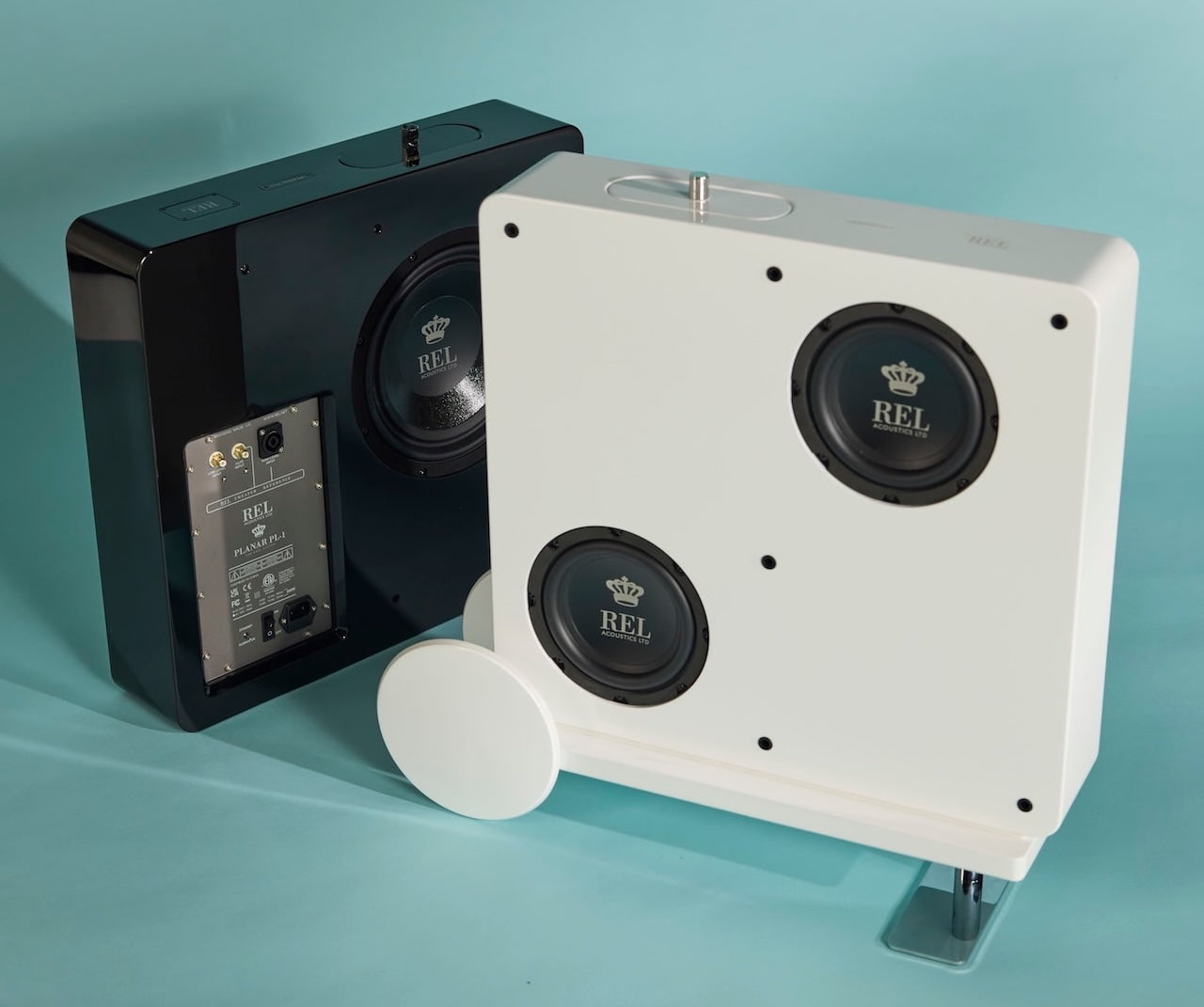
REL Planar PL-2 (left) with grille and PL-1 (right) without grille
Both units weigh under 50 pounds, making DIY wall mounting a realistic option for users who are comfortable with the installation. REL also offers an optional cart wheel, allowing the Planar models to be moved more easily before final placement or mounting.
Update: In our conversation with a REL representative, we have confirmed a few things. Both REL Planar subwoofers include built-in wireless connectivity and come with an AirShip Direct transmitter module ($399 value). The wireless receiving module is cleverly concealed in the side panel, and swappable should technology change.
A wall-mount is included with purchase, but the cart/wheel/stand will cost extra (price TBD). Wall-mounting is the preferred implementation because it sets the wall gap for maximum performance. Alternatively, cart setups for floor placement solve two issues: wall spacing and stability. An included spacer ensures ideal proximity to back wall, while the cart/stand raises the unit off the floor for improved fidelity.
Advertisement
How low can they go? Because the PL-1 and PL-2 are designed for proximity-to-wall or on-wall placement, REL uses that boundary reinforcement to its advantage. The PL-2 is rated down to 27Hz, while the PL-1 reaches 38Hz, both measured at -6dB. That gives the larger model a clear advantage for deeper bass extension, while the smaller model is aimed more at systems where space, placement flexibility, and visual discretion matter just as much as output.
REL Planar Subwoofer Comparison
PL-2
PL-1
Active Drivers
1 x 8-inch (205mm), FlatPiston active long-throw, steel chassis
2 x 6.5-inch (165mm), FibreAlloy cone, long-throw, steel chassis
Passive Driver
1 x 10-inch (250mm), FibreAlloy cone, steel chassis
1 x 10 inch (250mm), FibreAlloy cone, steel chassis
Low Frequency Extension
-6 dB at 27 Hz, in room
-6 dB at 38 Hz, in room
Dimensions (W x H x D)
25.6 x 18.9 x 5.7 in. (650 x 480 x 144mm)
20.6 x 19.4 x 5.7 in. (522 x 492 x 144mm)
Net Weight
44.6 lbs (20.25 kg)
41.6 lbs (18.9 kg)
REL Planar PL-1 (front row) and PL-2 (back row)REL Planar PL-2 with white cloth grille
The Bottom Line
REL’s Planar PL-1 and PL-2 are not just “thin subwoofers.” They rethink where a subwoofer can live in a hi-fi or home theater system. With walnut or white grille options, a 5.7-inch-deep cabinet, on-wall placement, active/passive driver designs, and claimed extension down to 27Hz or 38Hz depending on model, the Planar Series is clearly aimed at listeners who want real bass support without a large box taking over the room like it won the lease in court.
What we don’t know yet matters: pricing and how they perform in real rooms. Although they can be connected wirelessly, they are not completely cable-free solutions because its power cable still requires a nearby outlet. Custom integrators, however, should have a field day with these. For homeowners building cleaner media rooms, living rooms, or lifestyle-friendly hi-fi systems, REL may have found a smarter way to hide the subwoofer in plain sight.
REL Planar PL-1 (back in black, front in white)
Price & Availability
REL Acoustics’ all-new Planar PL-1 and PL-2 subwoofers will be available May 20, 2026. However, pricing has yet to be announced. We’ll update this story as soon as it’s released.
Silicon Ranch tests cattle grazing beneath active solar power infrastructure
Software-controlled panels create space for large livestock movement safely
Cattle rotation enables simultaneous grazing and electricity generation across paddocks
This small solar farm in Christiana, Tennessee, looks like many others from a distance – but beneath its black panels lies lush pasture instead of gravel.
The 40-acre facility, owned by Silicon Ranch, allows a small herd of cattle to spend their days munching grass and resting in the shade.
The ranch is testing whether cattle can coexist with power generation without removing farmland from active use, with a setup that introduces a variation of agrivoltaics, which extends beyond crops and sheep into larger livestock systems.
Article continues below
Advertisement
Ingenious software solves the size problem
This project, which debuted in late April 2026, represents the first serious attempt to integrate cattle grazing with solar energy production on a working farm.
Nick de Vries, the company’s chief technology officer, acknowledged that “we know it works, but you need to prove it to other people.”
Advertisement
Cattle present a unique challenge for solar facilities because these animals can weigh more than half a ton and might damage expensive equipment.
Solar panels normally pivot to near-vertical angles to capture the sun’s rays, leaving very little room underneath for large livestock.
Sign up to the TechRadar Pro newsletter to get all the top news, opinion, features and guidance your business needs to succeed!
Simply raising the panels would require prohibitively large amounts of steel and drive up construction costs dramatically.
Advertisement
Silicon Ranch solved this problem by developing custom software that workers activate to turn the panels close to horizontal whenever cattle are grazing.
The system currently rotates 10 cows and their calves between different paddocks every few days.
This allows ungrazed sections to generate roughly 5 megawatts of electricity for a rural electric cooperative.
Advertisement
Financial pressures make this an urgent experiment
American agriculture faces a genuinely difficult moment for farmers due to trade wars, climate extremes, and increased costs.
The USDA forecasts total animal product cash receipts will decline by $17 billion in 2026, with chicken egg revenues dropping 66% and milk falling nearly 13%.
“Agriculture is in a really tough spot right now,” said Ethan Winter from the American Farmland Trust.
Advertisement
“So maybe this is our moment where we can be helping states meet their energy needs and do that in a way that’s providing new opportunities for farmers.”
Farmers can earn about $1,000 per acre by leasing their land for solar installations, which is roughly 10 times more than regular agriculture typically generates.
Anna Clare Monlezun, a rangeland scientist working on the Tennessee project, observed that “there are more win-wins than trade-offs” in this arrangement.
Pasture beneath solar panels retains more moisture and becomes more drought-tolerant, while grazing in the shade leaves cattle less prone to heat stress.
Advertisement
These animals can gain more weight and drink less water compared to cattle in open pastures.
As of 2024, sheep have already grazed on more than 130,000 acres of solar sites across America.
However, scaling up to cattle requires overcoming additional design challenges and developing appropriate economic incentives for ranchers.
The soaring electricity demand from rapidly expanding data centers requires new power sources that do not emit carbon.
Advertisement
If this Tennessee experiment proves successful, advocates believe solar projects integrated with cattle grazing could “help cattle producers hold onto their land and livelihoods” while offsetting billions in financial pressure.
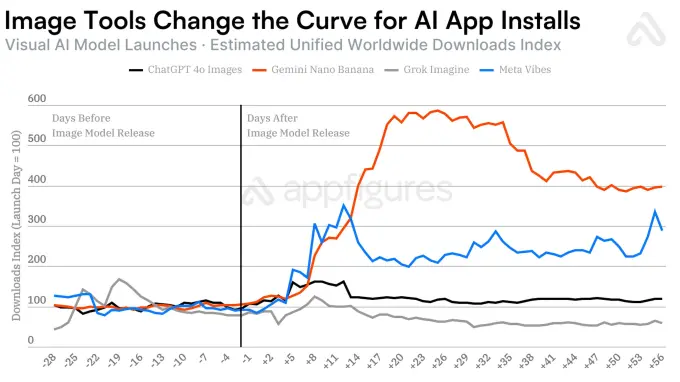
Image model releases are driving growth for AI mobile apps, generating 6.5x more downloads than traditional model updates, according to a new report from app intelligence provider Appfigures.
For instance, ChatGPT and Gemini each added tens of millions of new downloads after releasing their respective image models, Appfigures found.
For Google’s Gemini, the release of its image model Nano Banana drove an additional 22+ million downloads in the 28 days following the introduction of the Gemini 2.5 Flash image model last August. This launch lifted the app’s downloads by more than 4x over that period, the data showed.
Advertisement
Image Credits:Appfigures
Meanwhile, ChatGPT added more than 12 million incremental installs in the 28 days after the introduction of its GPT-4o image model in March of last year. That’s roughly 4.5x more downloads than it saw for its GPT-4o, GPT-4.5, and GPT-5 model releases, Appfigures pointed out.
Other model releases followed similar trends, though on a smaller scale. Meta AI’s introduction of its AI video feed Vibes added an estimated 2.6 million incremental downloads in the 28 days after its September 2025 release. (Yes, technically, this is a video model, but it’s ultimately about visual content, not just text.)
Image Credits:Appfigures
Still, the report cautioned, additional downloads don’t always translate into increased mobile revenue.
Techcrunch event
San Francisco, CA | October 13-15, 2026
Advertisement
Instead, new image model releases give people a reason to install the app and try out its improved image-generation capabilities. That doesn’t mean they’ll necessarily convert to paying subscribers. For example, Appfigures noted that Nano Banana drove only $181,000 in estimated gross consumer spending during the 28-day window following its release, even though it produced a larger spike in downloads than ChatGPT’s 4o image model release.
Meta AI’s launch of Vibes also led to additional downloads, but no meaningful revenue.
Among the three, only ChatGPT turned the increased attention into actual dollars.
Advertisement
OpenAI’s 4o image-generation model led to an estimated $70 million in gross consumer spending over the 28 days after its launch, compared with its prior baseline, Appfigures said.
Image Credits:Appfigures
The company also looked at DeepSeek in its analysis, but it didn’t fit the pattern.
While DeepSeek R1 drove 28 million downloads after its January 2025 release, it wasn’t a typical model comparison event. This was DeepSeek’s breakout moment, when it went from being relatively unknown to an overnight sensation as the tech industry learned about the techniques it used to train its AI models at a fraction of the cost of its competitors. This case highlights how curiosity can drive downloads — though in this instance, the interest wasn’t tied to an image model.
When you purchase through links in our articles, we may earn a small commission. This doesn’t affect our editorial independence.


























































You must be logged in to post a comment Login