On Wednesday, OpenAI CEO Sam Altman and Chief Marketing Officer Kate Rouch complained on X after rival AI lab Anthropic released four commercials, two of which will run during the Super Bowl on Sunday, mocking the idea of including ads in AI chatbot conversations. Anthropic’s campaign seemingly touched a nerve at OpenAI just weeks after the ChatGPT maker began testing ads in a lower-cost tier of its chatbot.
Altman called Anthropic’s ads “clearly dishonest,” accused the company of being “authoritarian,” and said it “serves an expensive product to rich people,” while Rouch wrote, “Real betrayal isn’t ads. It’s control.”
Anthropic’s four commercials, part of a campaign called “A Time and a Place,” each open with a single word splashed across the screen: “Betrayal,” “Violation,” “Deception,” and “Treachery.” They depict scenarios where a person asks a human stand-in for an AI chatbot for personal advice, only to get blindsided by a product pitch.
Advertisement
Anthropic’s 2026 Super Bowl commercial.
In one spot, a man asks a therapist-style chatbot (a woman sitting in a chair) how to communicate better with his mom. The bot offers a few suggestions, then pivots to promoting a fictional cougar-dating site called Golden Encounters.
In another spot, a skinny man looking for fitness tips instead gets served an ad for height-boosting insoles. Each ad ends with the tagline: “Ads are coming to AI. But not to Claude.” Anthropic plans to air a 30-second version during Super Bowl LX, with a 60-second cut running in the pregame, according to CNBC.
Advertisement
In the X posts, the OpenAI executives argue that these commercials are misleading because the planned ChatGPT ads will appear labeled at the bottom of conversational responses in banners and will not alter the chatbot’s answers.
But there’s a slight twist: OpenAI’s own blog post about its ad plans states that the company will “test ads at the bottom of answers in ChatGPT when there’s a relevant sponsored product or service based on your current conversation,” meaning the ads will be conversation-specific.
The financial backdrop explains some of the tension over ads in chatbots. As Ars previously reported, OpenAI struck more than $1.4 trillion in infrastructure deals in 2025 and expects to burn roughly $9 billion this year while generating about $13 billion in revenue. Only about 5 percent of ChatGPT’s 800 million weekly users pay for subscriptions. Anthropic is also not yet profitable, but it relies on enterprise contracts and paid subscriptions rather than advertising, and it has not taken on infrastructure commitments at the same scale as OpenAI.
Arm, one of the world’s leading chip design firms, announced Tuesday that it is producing its own semiconductors. The move is a departure from its long-standing model of licensing intellectual property to companies that manufacture and sell chips themselves. Speaking to a live audience in San Francisco, Arm CEO Rene Haas made his pitch for how the new Arm CPU could benefit the tech industry and why this is the right time for the company to step outside of its lane and go head-to-head with other chipmakers.
“Let me be clear: We are now in a new business for ARM, and we are supplying CPUs,” Haas said, holding up one of the company’s new chips. Arm’s primary reason for moving in this direction, Haas said, is demand from customers.. But as artificial intelligence proliferates throughout the economy and demand for computing resources skyrockets, Arm is also trying to capture a sliver of the growing AI CPU market.
Arm’s in-house chip efforts had long been rumored, but now the company is finally offering a clearer picture of what it’s doing. The new chip is called the Arm AGI CPU, a nod to artificial general intelligence, an often-invoked but still hypothetical form of AI that could match human performance across domains. It’s designed to be coupled with other chips in high-performance servers inside data centers and to handle agentic AI tasks. The chip is being fabricated by Taiwan Semiconductor Manufacturing Corporation, the world’s leading semiconductor foundry, and is being built using TSMC’s 3nm process.
At the chip reveal event, Arm executives emphasized the company’s history of designing energy-efficient chips and claimed that its new AGI CPU will be the world’s “most efficient agentic CPU on the market.” Compared to competitors like the latest x86 chips made by Intel and AMD, Arm says this chip will deliver better performance per watt, or the amount of energy a computer uses to operate, and could save customers billions of dollars in electricity spending.
Advertisement
The first major customer of Arm’s new chip is Meta, which the company says has received samples of the CPU. OpenAI, SAP, Cerebras, and Cloudflare, as well as the Korean tech firms SK Telecom and Rebellions, have also agreed to buy the chip. Arm projects its AGI CPU will reach “full production availability” in the second half of this year.
Santosh Janardhan, Meta’s head of infrastructure, appeared on stage and said he thought the Arm chip was going to “expand the [chip] industry on multiple axes.” As Meta pushes toward “personal superintelligence”—AI that will make its apps deeply personalized—Janardhan said the company needs more silicon, and is especially interested in power efficiency.
OpenAI’s vice president of science and former chief product officer, Kevin Weil, also showed up on stage alongside Haas. “One of the most common things I hear inside of OpenAI: ‘I need more compute,’” Weil said. “It’s kind of the coin of the realm.”
Nvidia CEO Jensen Huang, Amazon senior vice president and distinguished engineer James Hamilton, and Google AI infrastructure chief Amin Vahdat appeared in pretaped video testimonials praising Arm’s new hardware. None committed to buying it, but all three tech giants already use Arm’s designs in their own processors.
Advertisement
Arm’s history traces back to the late 1970s, when it was known as Acorn and produced microprocessors. In the 1990s the entity changed its name to ARM (Advanced RISC Machines) and its then-CEO began licensing the firm’s chip designs to other companies. Arm, which has since dropped the all-caps “ARM” branding, saw its business boom during the mobile revolution. By the 2010s many of the world’s largest tech companies, including Apple, Nvidia, Microsoft, Amazon, Samsung, and Tesla, were all relying on its technology.
Linux gamers are seeing massive performance gains with Wine’s new NTSYNC support, “which is a feature that has been years in the making and rewrites how Wine handles one of the most performance-sensitive operations in modern gaming,” reports XDA Developers. Not every game will see a night-and-day difference, but for the games that do benefit from these changes, “the improvements range from noticeable to absurd.” Combined with improvements to Wayland, graphics, and compatibility, as well as a major WoW64 architecture overhaul, the release looks less like an incremental update and more like one of Wine’s most important upgrades in years. From the report: The numbers are wild. In developer benchmarks, Dirt 3 went from 110.6 FPS to 860.7 FPS, which is an impressive 678% improvement. Resident Evil 2 jumped from 26 FPS to 77 FPS. Call of Juarez went from 99.8 FPS to 224.1 FPS. Tiny Tina’s Wonderlands saw gains from 130 FPS to 360 FPS. As well, Call of Duty: Black Ops I is now actually playable on Linux, too. Those benchmarks compare Wine NTSYNC against upstream vanilla Wine, which means there’s no fsync or esync either. Gamers who use fsync are not going to see such a leap in performance in most games.
The games that benefit most from NTSYNC are the ones that were struggling before, such as titles with heavy multi-threaded workloads where the synchronization overhead was a genuine bottleneck. For those games, the difference is night and day. And unlike fsync, NTSYNC is in the mainline kernel, meaning you don’t need any custom patches or out-of-tree modules for it work. Any distro shipping kernel 6.14 or later, which at this point includes Fedora 42, Ubuntu 25.04, and more recent releases, will support it. Valve has already added the NTSYNC kernel driver to SteamOS 3.7.20 beta, loading the module by default, and an unofficial Proton fork, Proton GE, already has it enabled. When Valve’s official Proton rebases on Wine 11, every Steam Deck owner gets this for free.
All of this is what makes NTSYNC such a big deal, as it’s not simply a run-of-the-mill performance patch. Instead, it’s something much bigger: this is the first time Wine’s synchronization has been correct at the kernel level, implemented in the mainline Linux kernel, and available to everyone without jumping through hoops.
Security cameras can be a real money pit because you have to deal with wiring, batteries that need to be replaced on a regular basis, and membership fees that add up every month. What if I told you there’s a way to bypass all that hassle for less than $60? The TP-Link Tapo SolarCam C402 Kit accomplishes exactly that, and at full price, it’s typically a good deal. When it is on sale (like now), you can get it for about $40.
Setting up the camera is simple, and anyone can do it in under an hour. Simply launch the Tapo app on your phone, scan the code on the camera, and connect it to your home Wi-Fi. Simply screw the accompanying bracket to a wall or eave using the template and hardware provided. If you want to get more out of your solar panel, simply clip it somewhere with adequate sunshine or extend the cable up to 13 feet. Simply put the camera onto the mount and plug the panel in. There is no need to consult an electrician, and no outlet is necessary; simply screw it into place.
【Endless Power from Solar Energy】The Tapo SolarCam C402 KIT harnesses the power of the sun to keep your security system running smoothly. The…
【Easy Wire-Free Installation – Install Anywhere】Enjoy the flexibility of wire-free installation with the Tapo SolarCam C402 KIT. Free from outlet…
【Prioritize What Matters】Eliminate unnecessary notifications by defining activity zones specifically monitoring for motion or people. Receive…
When daylight hits, the footage is remarkably vivid and clear, with a 125-degree field of vision. Faces can still be recognized from 20 to 30 feet away, and registration plates on your driveway read correctly. Any motion triggers will send you a message within seconds, and the app will even put a blue box around whatever moved so you can see exactly what caused the alert. The free built-in detection is really quite useful; it separates people, vehicles, and dogs from random movement, so you don’t get notified by every stray car that drives by.
Advertisement
At night, this camera has a unique trick up its sleeve. When movement begins, the two spotlights will instantly activate and highlight the entire area in color from roughly 30 feet out. The colors are little weaker than you might think, but they are still rather clear to read, especially when compared to the standard black and white infrared on most inexpensive devices. If you’re not utilizing the lights, simply turn them off in the app, and the device will fallback to regular infrared for times when it’s entirely dark outside. And whether you need to speak with the delivery guy or shoo away a stray animal, the two-way audio works perfectly.
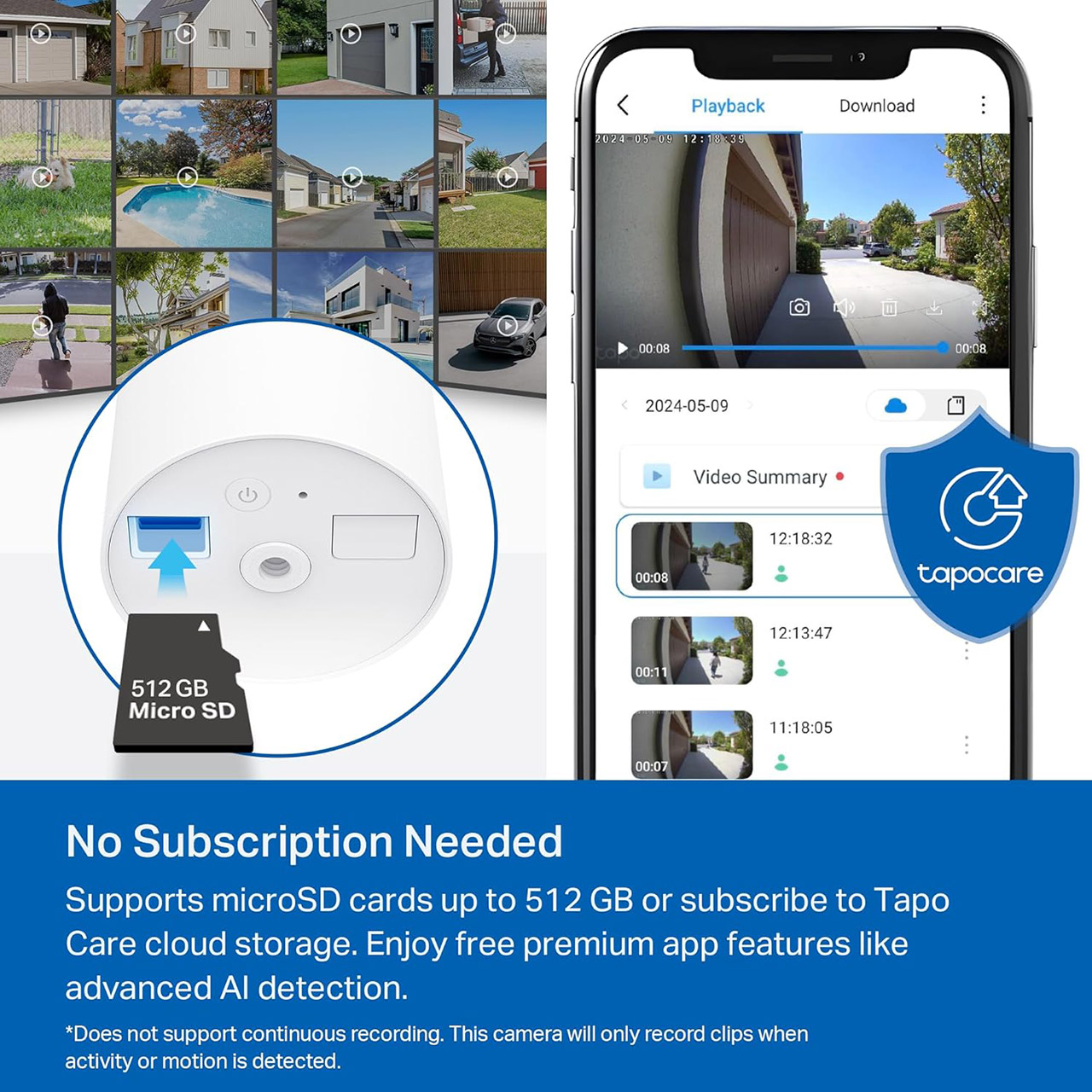
The solar panel should keep the 6,400mAh battery charged after only 45 minutes of direct sunlight per day. Even if you don’t receive any sunlight, the battery should last up to 6 months, depending on your usage. Another benefit is that you won’t have to worry about storage space. Simply insert a microSD card (up to 512GB) to record private local videos. The program allows you to watch, download, and delete events directly from the timeline. If you want cloud backup, you can purchase the Tapo care plan, which includes 30 days of history and more advanced sorting. However, none of the basic alerts or live view require additional payment.
Then there’s voice control, as the Tapo app integrates perfectly with Alexa or Google Assistant, so you can simply ask your Echo Show to display the stream from the front porch, and it will appear. If you want to get even more creative, IFTTT recipes can do a variety of things, such as flashing a smart lamp when motion is detected or recording events to a spreadsheet.
The Ugreen NASync iDX6011 Pro AI NAS is overkill for average consumer and small business network storage needs, but its capabilities will be attractive to enthusiasts — even if the AI isn’t great yet.
Ugreen NASync iDX6011 Pro NAS review
Over the years, AppleInsider has seen network-attached storage options grow in scope. Effectively a cut-down computer that focused on storage above all else, the format has evolved to bring more utility. Apps allowed users to do things like run Plex servers or other services on their home network. This was previously in a restrained manner, due to the limitations of the included hardware in most cases. Continue Reading on AppleInsider | Discuss on our Forums
Whether you’re an experienced vinyl collector or just getting started on your journey, we recommend the Audio-Technica AT-LP120XUSB. This excellent record player comes with great connectivity and a built-in phono preamp, and it has the backing of one of the biggest players in home and professional audio. You can currently pick up the LP120XUSB for just $398 on Amazon, a $51 markdown from the usual price.
Courtesy of Audio Technica
The AT-LP120XUSB features basically everything you could want from a modern, upgraded turntable. The built-in phono preamp lets you easily swap the turntable from your headphones to your speakers without any extra steps or hardware, or you can disable it if you’d prefer to use an existing dedicated preamp. The direct-drive motor should be longer lasting and more consistent than belt-driven options, while handling 33⅓-, 45-, and 78-rpm vinyl.
It also features adjustable dynamic anti-skate control, an S-shaped tonearm for better balance, and quartz speed lock for perfect playback. If you don’t like the components, Audio-Technica turntables are impressively modular, so you can swap out parts and tweak to get everything dialed in for your favorite album. The included cartridge is a Dual-Magnet AT-VM95E, a great starting point for any listener, with the option to upgrade to any of the other VM95 series cartridges.
One feature that you aren’t likely to find on every turntable is a USB connection. While it might seem odd at first, this important plug lets you pipe the audio from your favorite records to your computer, letting you back them up for archival purposes, or taking that special live album that isn’t on streaming services with you to work. Of course it has traditional RCA jacks as well for hooking it up to the rest of your home audio system, if you already have a set of bookshelf speakers or a high-end headset you prefer.
Blake Resnick, founder and CEO of Brinc Drones, with the company’s new Guardian public safety drone in Seattle. (GeekWire Photo / Kurt Schlosser)
Brinc Drones founder and CEO Blake Resnick has a big vision for what the company’s largest-ever drone can accomplish.
“To replace the police helicopter,” Resnick said with a smile when asked about his goal for the device. “And to build the most capable 911 response drone ever.”
The Seattle-based maker of first-responder drones for police, fire and other emergency services unveiled its new Guardian drone during a celebration at its also newly revealed headquarters and factory in the Queen Anne neighborhood on Tuesday.
“Getting this out is a big deal for me,” Resnick said. “I’ve wanted to build this product for the better part of a decade, it’s just taken a while to build up the organizational capacity to really do that. It feels great to finally be here.”
Guardian is the world’s first Starlink-connected drone. An integrated panel on top of the device gives the drone unlimited range anywhere in the world, maintaining a reliable data link when traditional cellular or terrestrial infrastructure is unavailable.
Advertisement
The drone can also be paired with Guardian Station, a robotic charging nest that automatically swaps batteries and helps the drone quickly redeploy to a new mission without having to wait for any charging downtime.
Other features and highlights include:
Flight time: 62 minutes.
Range: Up to eight miles, versus three miles for current systems.
Top speed: 60 mph.
Cameras: Two 4K cameras with 640x optical zoom; two 1280-resolution HD thermal cameras with 64x total zoom (largely lossless).
Autonomy: Integrates with computer-aided dispatch; can auto-launch on 911 call with GPS coordinate.
Guardian’s imaging capabilities are designed to provide crystal-clear visuals day or night. The drone also features a built-in laser rangefinder, a speaker that’s three times louder than a police siren, and a ballistic parachute with its own technology for independent deployment in an emergency.
The same robotic system that is used to swap batteries can be used to load different payloads onto Guardian, such as a defibrillator for a heart attack victim, a flotation device for someone who is drowning, or emergency medication such as Narcan for an overdose victim.
A closer look at the camera technology on the Guardian from Brinc Drones. (Brinc Drones Photo)
Guardian measures 75 inches wide when fully unfolded and weighs 38.6 pounds, with a max takeoff weight of 48.6 pounds.
Guardian has about 900 current customers, most of which are in the U.S. Resnick points to a huge market ahead of 20,000 police departments, 30,000 fire departments, and 80,000 police and fire stations. If half of those buildings have $100,000 response drones and recharging pods on the roof, he thinks Brinc will be very successful.
Advertisement
A new police helicopter can cost upwards of $4 million. Add in thousands of dollars per flight hour, engine maintenance, fuel costs, etc., and Resnick is bullish about Guardian’s potential to be called on to chase a stolen car or zoom in on a burning building.
“When you compare the cost, we’re in a different universe,” he said.
A massive heat wave has broken heat records in 14 states, including Arizona and California, reaching up to 112 degrees Fahrenheit in some areas. Now it’s creeping eastward, according to the National Weather Service.
The heat wave is continuing its journey through the Midwestern United States and is projected to affect anywhere from one-quarter to one-third of the 48 mainland states, National Weather Service meteorologist Gregg Gallina told The Associated Press. The highest temperatures recorded today are in Arizona, New Mexico and Texas — what the National Weather Service refers to as the Southern Rockies region. But the hot air is on the move.
The reason these high temperatures persist is the “heat dome” phenomenon, in which high pressure prevents hot air from rising, trapping it in a bubble above a region. As the dome of pressure moves, so too does the hot air — and right now, it’s barreling east.
Advertisement
The states that will be smothered by the heat dome in the coming days include those in the Southern and Central Plains regions. This means residents of Texas, Colorado, Oklahoma, Kansas and Nebraska can expect to sweat as the heat blankets them on its eastbound journey.
What the heat dome means for climate change and our health
According to Climate Central, the US has experienced rising blackout rates over the past 20 years, largely due to weather-related issues and an aging electrical grid.
As of August 2025, the US Environmental Protection Agency states that heat is the leading weather-related cause of death in the US. The World Health Organization reports that between 2000 and 2019, about 489,000 heat-related deaths occurred each year.
Fortunately, humidity levels are not as high during a summer heat wave. As humidity can contribute to dehydration, body strain and breathing difficulties, lower humidity makes this heat dome somewhat less dangerous for workers in affected areas.
Advertisement
The World Weather Attribution, an initiative formed by international climate change researchers and climate scientists, determined that the heat dome would be “virtually impossible without human-induced climate change.”
In a world where weather events like these cease to be impossibilities, you’ll want to prepare for future heat waves properly. Here’s how to stay safe during the heat dome.
It might be too late to install a heat pump for this current heat dome weather event, but this energy-efficient HVAC addition can save you a pretty penny and make your home more comfortable during future heat waves.
Advertisement
Joe Giddens/PA Images/Getty Images
How to prepare for the heat dome before it hits your state
There’s nothing you can do to beat the heat outside, aside from following heat safety best practices. You’ll just need to stay hydrated, wear breathable, light-colored clothing and wait out the potentially dangerous heat dome, which is expected to dissipate by the end of next week when April begins. But you can do things to batten down the hatches before the sweltering heat reaches your home.
Even if you don’t have much prep time, a couple of small items can make your home safer (and far more comfortable). Cooling towels, portable fans and countertop ice makers are must-haves during a heat wave, especially if you aren’t looking to crank the thermostat down and spend a pretty penny.
Heat waves are also extremely costly due to the sheer amount of energy used — it’s expensive to stay cool. Depending on your living situation, though, you might want to invest in heat pump installation. These HVAC system additions are extremely energy efficient, which means you can keep more money in your pocket while beating the heat.
During the middle of the heat wave, when everyone has their AC running, there’s also the potential for an early brownout (a temporary drop in electrical voltage, causing lighting to dim) or even a blackout (a complete loss of power). It’s common to feel helpless during power outages, but you can get ahead of the curve by preparing a summer blackout kit with portable chargers and alternative light sources before the heat wave hits.
Advertisement
Even if the historic heat wave doesn’t hit your home, these tips will help you prepare as the summer season bears down on the US in a couple of months.
Epic Games, the gaming giant behind Fortnite, is laying off 82 employees at its Bellevue, Wash.-based office, according to a WARN notice filed with Washington state regulators.
Epic announced Tuesday that it is laying off 1,000 employees across the company, or about 20% of its workforce, citing reduced engagement with Fortnite.
“This layoff, together with over $500 million of identified cost savings in contracting, marketing, and closing some open roles puts us in a more stable place,” Epic Games CEO Tim Sweeney said in the announcement. He cited challenges including tougher cost economics, slowing console sales, and competition “against other increasingly-engaging forms of entertainment.” He noted that the layoffs are not related to AI.
Epic has 349 employees in the Seattle region, according to LinkedIn. The company opened an office in Bellevue more than a decade ago. It previously laid off 39 employees in 2023 at its Bellevue office.
“Market conditions today are the most extreme we’ve seen since those early days, with massive upheaval in the industry accompanied by massive opportunity for the companies that come out as winners on the other side,” Sweeney wrote in his announcement.
Several tech companies have cut staff in the Seattle area this year, including Amazon, Expedia, T-Mobile, Smartsheet, Atlassian, MicroVision, and others. Many corporations are slashing headcount to address pandemic-fueled corporate “bloat” while juggling economic uncertainty and impact from AI tools.
Over the years, the iPhone has evolved into the perfect everyday carry gadget. You could always make phone calls or text with it, but now you can record high-quality videos using its industry-leading camera system or play AAA titles like “Death Stranding” on the go. Despite the hardware continually improving, it’s the software that unlocks most of what the iPhone lets you do.
The App Store is home to almost two million apps, and it’s pretty easy to find a tool that does exactly what you’re looking for. Anything your iPhone can’t do out of the box, third-party app developers have likely already built a solution for it. That said, as time has passed, Apple’s own library of apps and services has grown.
The iPhone comes preloaded with essentials like Phone, Messages, Camera, and Clock — but it also has a handful of lesser-known apps tucked away on other pages. Some of them are mundane productivity-oriented offerings like Keynote, Pages, or Numbers — but we’re about to highlight five interesting apps by Apple you should try using on your iPhone.
Advertisement
Passwords
Adnan Ahmed/SlashGear
As our lives continue to move online, the number of credentials we create and manage also keeps on increasing. Using the same password across all your accounts is a terrible idea — but so is jotting them down on a piece of paper or an unencrypted notes app. There are several password managers out there, but if you primarily use Apple devices, you don’t need to chip in extra for a subscription to a third-party service anymore. The built-in Passwords app acts as a secure vault where you can store your login details.
Starting with iOS 18, any password you save will be automatically added to the Passwords app. It can also help you create stronger passwords. Saved credentials will then pop up when you try logging in to a website or app on your iPhone. You might need to enable Password AutoFill for this to work. To do so, navigate to Settings > General > AutoFill & Passwords, and flick the toggle on.
Advertisement
You will find all saved passwords within the app, which is guarded by Face ID or Touch ID on launch. The app also lets you manage Apple Passkeys, which offer a more secure and faster form of authentication. The Passwords app alerts you to any security concerns as well. For instance, there’s an orange exclamation icon for reused passwords and a red one for those that have appeared in password breaches.
Advertisement
Apple Games
Adnan Ahmed/SlashGear
Modern iPhones ship with some of the fastest mobile processors. The A19 Pro found in the iPhone 17 Pro family features a six-core CPU, 12GB of RAM, and a GPU powerful enough to run console-quality games. The previous few generations of flagship iPhones have also been advertised with gaming in mind. Popular AAA titles available for the iPhone include “Red Dead Redemption” and “Alien: Isolation,” but modern games like “Genshin Impact” are also a great measure of how capable the iPhone has become. Consequently, you may have noticed an Apple Games app on your device, which now comes preinstalled with iOS 26.
This is not to be confused with Apple Arcade, which is a paid subscription service that unlocks a catalog of games in the App Store. Instead, the Apple Games app acts more like a game launcher and curator — much like Steam on Windows computers. The “Library” tab displays all currently and previously installed games on your iPhone, with a quick shortcut to launch them. Tapping on a game will expand its page with additional information like recent updates, achievements, or ongoing in-game events.
The “Friends” tab lets you invite friends to play multiplayer titles like “Call of Duty: Mobile” together. You can also challenge your friends in supported games. If you have an Apple Arcade subscription, you can navigate to it faster using the Apple Games app. The “Home” tab lets you jump into recently played titles more quickly and lets you discover new games.
Advertisement
Journal
Adnan Ahmed/SlashGear
The Notes app on your iPhone does a really good job of letting you quickly jot down thoughts, make lists, or even create well-formatted documents on the go. It has good integration with Apple Intelligence’s Writing Tools, and you can even lock sensitive notes using Face ID or a passcode. While you could totally use it for journaling, Apple actually added a purpose-built solution for that. The Journal app comes preinstalled and offers a better interface for keeping a log of your memories.
You can create as many entries as you want and complement them with images, videos, audio snippets, and location details to add more context to your memories. The Journal app uses on-device machine learning to suggest content when you create new entries. This usually includes photos of a recent outing, which your iPhone recognizes as a notable event worth remembering. It can even suggest people you’ve hung out with.
We’ve covered the Journal app for iPhone in slightly more detail before, but it has since received a fresh coat of paint with the Liquid Glass design in iOS 26. You can also create separate journals for different aspects of your life. Once you’ve populated enough entries, the search function makes it easy to dig up old memories. All data within the Journal app is encrypted when your device is locked, but you can also add another layer of authentication to prevent those around you from peeping at your entries.
Advertisement
Apple Invites
Adnan Ahmed/SlashGear
Those who attend or throw a lot of parties know how the most chaotic part is planning and organizing the entire event. Sure, a curated text invitation containing details of the event and the location of the venue sent via iMessage often does the trick, but there’s got to be a more elegant way of doing it. That’s exactly what Apple Invites set out to solve. It’s a relatively new inclusion, and unlike other services on the list, it isn’t pre-installed on the iPhone — though you can grab it for free via the App Store.
Apple Invites lets you create, manage, or join invitations to events. You can invite people using their email address or share a joinable link. The app lets you create visually pleasing cards, with Apple Intelligence integration that lets you create images on the fly. You can add details about the venue, the day, and the time, and the app will lay out all the information neatly for all attendees to see. Though you can join invitations for free, you do need an iCloud+ subscription to create and send out invites.
Apple Invites works on Android and the web as well. The app features deep integration with Apple Music and allows you to create a shared playlist with other members. Participants can also chime in on the shared album and dump all photos from the day. This is a less messy version of spamming group chats with images.
Advertisement
Measure
Adnan Ahmed/SlashGear
Beyond apps for communication, gaming, and productivity, the iPhone comes preloaded with a few utilitarian services as well. Apps like Clock, Calendar, and Voice Memos are frequently used, but did you know you could also use your iPhone as a measuring instrument? The Measure app lets you use your iPhone’s camera and AR features to measure objects with surprisingly good accuracy.
The built-in Measure tool is as interesting as utility apps get. Any iPhone running iOS 12 or newer can be used as a measuring tool. Your iPhone can also automatically display measurements for rectangular objects when it detects them. For every other object, you can start a manual measurement by tapping the “+” button and panning your iPhone around.
Advertisement
There is better accuracy on iPhones with a LiDAR sensor. Guides appear on the edges of objects, making it easier for you to measure them more precisely. Once you’re done measuring, you can tap on the shutter button. This will save the image in your gallery with the measurements annotated. The app serves two functions — everything we’ve highlighted above falls under its measurement mode. If you switch to the “Level” tab, you can use your iPhone as a spirit level as well. This mode lets you check how horizontal a surface is.
Most carpenters and woodworkers find themselves with the problem of disposing of all the sawdust they create when performing their craft. There are lots of creative solutions to this problem, such as adding it compost, using it as groundcover in a garden, adding it as filler in a composting toilet, or pressing it into bricks to burn in a stove. All of these have their uses, but involve either transporting the sawdust somewhere or performing some intermediate step to process it. [Greenhill Forge] wanted to make more direct use of it so he built this stove which can burn the sawdust directly and which provides enough heat for his woodshop.
The design is based on one which is somewhat common in Japan and involves building a vessel with a central tube for airflow, with the sawdust packed around it. The tube is made from a hardware cloth or screen to allow air to reach the sawdust. The fire is lit from the top, closed, and then allowed to burn through the stack. [Greenhill Forge] welded the entire stove from various pieces of sheet metal and bar stock, with a glass plate at the top of the stove to close off the fire and a baffle to control the airflow and rate of burn.
Initially, [Greenhill Forge] thought that the fire would burn from the top down, but this turned out to create a smoldery, messy fire instead of a hot, clean burn. Eventually, though, an ember fell down to the bottom and let the stack burn from the top up, and then it started generating serious heat. He estimates that with around 5 kg of sawdust burning for three hours that it’s about equivalent to a 6 kW stove. While a woodworker might not have enough sawdust to run this stove every day, it could be good to have on hand to use once every few weeks when the sawdust builds up enough. [Greenhill Forge] has been hard at work building unique wood burning stoves lately, like this one we recently featured which generates and then uses charcoal as fuel.



























































You must be logged in to post a comment Login