
Tech
OpenAI is retiring famous GPT-4o model, says GPT 5.2 is good enough



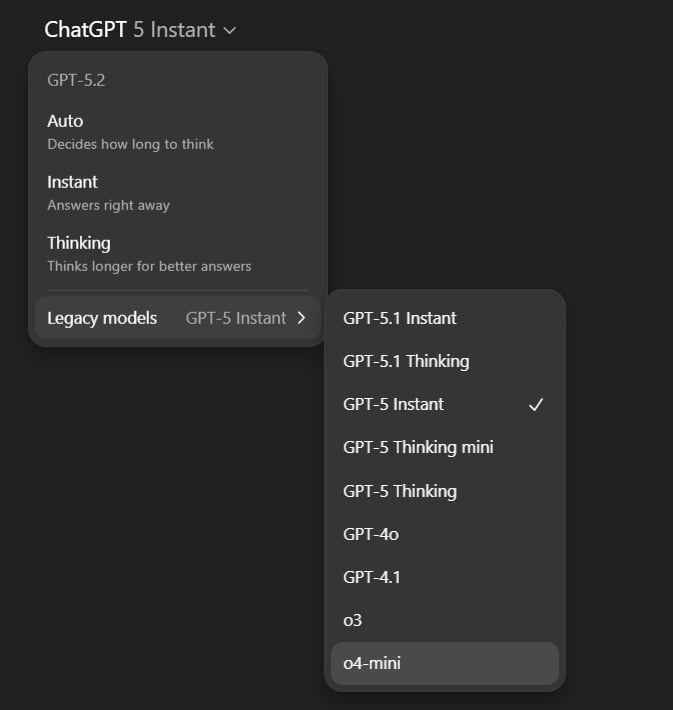
OpenAI has confirmed that it’s retiring ChatGPT’s most popular model, called GPT-4o, and several other models, including GPT-5 Instant, GPT-5 Thinking, GPT-4.1, GPT-4.1 mini, and o4-mini.
In a support document, OpenAI confirmed that it made the ultimate decision to retire GPT-4o after GPT 5.2 started to live up to expectations.
“On February 13, 2026, alongside the previously announced retirement of GPT-5 (Instant and Thinking), we will retire GPT-4o, GPT-4.1, GPT-4.1 mini, and OpenAI o4-mini from ChatGPT. In the API, there are no changes at this time,” OpenAI said in a statement.

GPT-4o is a special model because it felt more personal and warm. In fact, OpenAI had to bring it back after user backlash.
“We brought GPT-4o back after hearing clear feedback from a subset of Plus and Pro users, who told us they needed more time to transition key use cases, like creative ideation, and that they preferred GPT-4o’s conversational style and warmth.”
OpenAI says feedback from those who love and still use GPT-4o shaped the development of GPT 5.1 and GPT 5.2, but now it’s time to say goodbye to the old model.
Source: BleepingComputer
Ahead of the retirement, OpenAI already rolled out the Personality feature, which also makes it easier to customize your AI experience and bring it in line with GPT-4o.
However, unlike GPT 5.2, which plays safe, GPT-4o was unhinged, and that explains why users preferred it over newer models, such as GPT 5, 5.1, or even GPT 5.2.
“We’re announcing the upcoming retirement of GPT-4o today because these improvements are now in place, and because the vast majority of usage has shifted to GPT-5.2, with only 0.1% of users still choosing GPT-4o each day,” the company said.
OpenAI plans to continue working on ChatGPT personalization and integrating new safeguards.

Modern IT infrastructure moves faster than manual workflows can handle.
In this new Tines guide, learn how your team can reduce hidden manual delays, improve reliability through automated response, and build and scale intelligent workflows on top of tools you already use.



In short: Meow Technologies has launched what it describes as the world’s first agentic banking platform, enabling AI agents to open business bank accounts, issue cards, send payments, and manage day-to-day account activity on behalf of users, with no human required to initiate any action.
The platform supports Claude, ChatGPT, Cursor, Gemini, and other leading AI tools, and is built on a permissioned architecture that prevents agents from moving money unilaterally by default. The announcement marks a significant step in the race among fintech firms to become the default financial infrastructure layer of the emerging agent economy.
The agentic stack reaches financial services
By the spring of 2026, AI agents had gained the ability to write and publish blog posts, manage customer service queues, redesign marketing workflows, and co-ordinate tasks across enterprise software. Banking was the conspicuous exception: every other layer of business operations was being handed to autonomous agents, but financial accounts still required a human to log in, click through dashboards, and authorise transactions.
Meow Technologies, a San Francisco-based fintech founded in 2021, announced on April 8, 2026, that it intends to close that gap. The company launched what it is calling the first agentic banking platform, allowing users to instruct an AI agent in natural language to open a business checking account on their behalf, with the agent then capable of issuing virtual and physical corporate cards, checking balances, sending and receiving payments, and managing invoicing, all without returning to a human for each step.
The announcement lands at a moment when Zendesk acquired the self-improving agentic AI platform Forethought on the expectation that 2026 will be the year AI agents handle more enterprise operations than people do, and when Canva acquired the agentic AI platform Simtheory to extend agents across its marketing and design workflows. Meow’s claim is that financial operations belong in the same category as those other business functions and that the infrastructure to make that possible has now arrived.
What the platform does
A user connecting a supported AI tool to Meow’s platform can issue a single natural language prompt, such as “open a business account for my new project”, and have the agent complete the account-opening process, configure settings, and prepare it for use. The platform is integrated with Claude, ChatGPT, Cursor, and Gemini, and exposes an MCP endpoint at meow.com/mcp that allows any Model Context Protocol-compatible agent to connect to the banking infrastructure directly. Once an account is open, the agent can issue corporate cards in virtual or physical form, execute transfers to vendors or team members, pull balance and transaction data for audit or reporting purposes, and handle invoicing without requiring the account holder to log into a dashboard. Brandon Arvanaghi, Meow’s chief executive, described the ambition as a fundamental shift in how business banking is consumed.
“Autonomous finance has arrived,” he said. “With Meow, AI agents can handle everything from opening accounts to managing day-to-day activity.” The MCP integration is significant context. The Model Context Protocol had grown to more than 6,400 registered servers by February 2026, establishing itself as the dominant standard for connecting AI agents to external systems and services. By building its own MCP server, Meow positions its banking infrastructure as a native citizen of that ecosystem rather than a bolt-on integration, meaning any agent or development environment that already speaks MCP can reach Meow’s accounts without custom code. The supported tools, Claude, ChatGPT, Cursor, and Gemini, collectively cover most of the agent frameworks in active business use, suggesting that Meow’s addressable market is effectively the full population of businesses already running agentic workflows.
Guardrails and the trust architecture
The central anxiety around agentic finance is obvious: AI agents that can autonomously move money create a novel attack surface, whether through prompt injection, misaligned instructions, or simple error.
Meow has built its permissioning architecture around the principle that agents should operate within the same rule set that governs human employees, and in some respects a stricter one. By default, agents cannot move money unilaterally: every transfer requires the same initiator-and-approver workflow that would govern a human employee in a finance team, and the platform enforces transfer limits, two-factor authentication requirements, and role-based permissions at the infrastructure level rather than relying on the agent to self-police.
Every transaction is logged and fully auditable. WordPress.com’s March 2026 decision to grant AI agents write and publish access across its platform illustrated how rapidly agent permissions are expanding across business-critical systems, but also the governance questions that come with them.
Meow’s response to those governance questions is a configurable controls layer that businesses can adapt to their own risk tolerance: an e-commerce company running a high-volume payments workflow can configure higher transfer thresholds and fewer approval steps, while a professional services firm with more conservative treasury policies can require human sign-off above any meaningful sum. Arvanaghi framed the direction of travel as irreversible rather than optional. “We believe banking will rapidly shift away from apps and dashboards toward a seamless, automated experience through AI agents,” he said.
The race for agentic financial rails
Meow is not the only company that has identified AI agents as the next major customer segment for financial infrastructure. Stripe announced a machine payments preview integrating stablecoin settlement for agent-to-agent transactions in early 2026; Mastercard launched its Agent Pay programme in April 2025; PayPal and Google announced a joint Agent Payments Protocol; and Visa is developing tokenisation infrastructure designed specifically for autonomous purchasing. What distinguishes Meow’s announcement is its scope: the platform does not merely allow agents to complete a payment, it allows an agent to create and fully administer a business bank account from scratch.
That is a materially broader set of permissions than any of the card network or major payments platform programmes have offered to date, and it reflects Meow’s positioning as a business banking provider rather than a payments processor. The company was founded in 2021 by a team of former cryptocurrency engineers and launched initially as a corporate treasury platform offering businesses access to high-yield investments and DeFi-adjacent yield products. It has since evolved into a full business banking service, with checking accounts, invoicing, and bill pay, and describes itself as holding over one billion dollars in assets on its platform.
The company has raised approximately 30 million dollars in venture funding from Tiger Global, QED Investors, Lux Capital, Slow Ventures, Coinbase Ventures, and Gemini Frontier Fund. Whether Meow’s “world’s first” claim holds under scrutiny or is quickly overtaken by a larger incumbent is less consequential than the direction the announcement confirms: the agent economy needs financial rails, and the fintech firms that build them earliest will occupy a structurally advantaged position. 2025 confirmed AI agents as the next major computing paradigm, and Meow’s April 2026 announcement suggests the financial infrastructure to match that paradigm is now being built in earnest.

Stoves come in three basic types: gas, electric and induction. There are significant differences among them, which we’ve outlined in this guide to stoves. For me, it’s never been a question; gas was the only fuel professional chefs in the kitchens I worked in growing up used, ergo gas was the only stove I ever considered. That all changed when I bought my first house.
Moving into a new home with an aging stove forced me to ask a question I thought I knew the answer to. My instinct, honed by years of experience with gas, was to stick with what I knew. But my day job complicated things. As a home tech reporter who covers large appliances and the health risks tied to cooking with gas indoors, I couldn’t ignore what I’d been writing about.
I switched to a smart induction stove, and I couldn’t be happier.
I’ve had asthma my entire life, one of the conditions thought to be aggravated by gas stove emissions, particularly in children. And my new kitchen, somewhat cut off from the rest of the house, made ventilation less an afterthought and more an urgent concern.
Ultimately, I opted for induction — Samsung’s feature-rich smart induction stove. After more than a year of use, peace of mind about air quality is just one of many reasons I’m happy I did. It’s faster, safer, cleaner and more energy efficient to boot.
Here are the five big reasons I made the switch with no intentions of going back.
1. Air quality was the biggest factor
I was a gas stove purist — until I wasn’t.
What pushed me to move on from gas has nothing to do with cooking. Study after study has shown that natural gas stoves pose a real risk of environmental contamination. While the scuttlebutt over whether gas stoves are safe and what regulatory guardrails should be in place has largely quieted, the science remains.
Gas stoves are shown to leak more than previously thought, and those leaks have been shown to cause respiratory issues, particularly in children. As a lifelong sufferer of asthma and the owner of a new but not-so-well-ventilated kitchen, it didn’t seem worth the risk, even if most agree that more research is needed.
2. Induction heats up freakishly fast
My induction stove boils a 60-ounce pot of water in less than 5 minutes. A gas stove takes about 8.
Modern induction heat is fast. Like, really fast. The Samsung Bespoke brings a pot of water to a boil in less than 5 minutes. A gas stove takes closer to 8. That may not seem like a big difference, but after returning home from a frantic day, and pasta is the only way to turn it around, you’ll notice.
The digital dials took some getting used to but the heat responds with lightning speed to adjustments.
The quick heat comes in handy for more than just boiling water. Getting a cast-iron skillet really hot for searing steaks, chicken and burgers takes seconds, not minutes. Calibrating the temperature without a visible flame took some time and practice, but since I got the settings down, there hasn’t been an effect on my cooking. Plus, the temperature adjusts instantly with a slide of a finger on the touchscreen.
The number of oven cooking modes is probably overkill and the air fryer function is just OK.
The oven is fast, too. It preheats to 350 degrees Fahrenheit in just over 9 minutes. A gentle ding or an alert on your phone lets you know when it’s preheated or when a timed cooking session is complete.
3. I don’t worry about having left the stove on
I buy into smart home features, here and there, but I’m not one who strives for connectivity in all my home electronics and appliances. My ice maker has app compatibility, for instance, but it’s never crossed my mind to use it.
However, being able to monitor certain aspects of your oven and stove remotely is a no-brainer. Case in point: I was recently an hour into a long drive when I became utterly convinced I’d left a pot with food on a still-running burner. So sure was I that I pulled over, intending to reroute back home.
That’s when I remembered to check the SmartThings app.
The stove’s connectivity saved me hours of driving.
To my surprise, the app and range were still connected, even though I hadn’t logged in for weeks. The view showed all burners set to “off.” A sigh of relief and I was back on my way. Even if one had been errantly left on, I could have toggled it off right there from the interstate rest stop.
There are other, less dire uses for the smart app integration, like preheating the oven or dialing down the heat on a simmering sauce from another room. I admit I don’t use my range’s remote control daily or even weekly, but in that moment of uncertainty, the stovetop’s connectivity paid for itself.
You can pull up YouTube cooking videos on the touchscreen, although I seldom do.
The range’s touchscreen hub can also connect to your phone via Bluetooth to play music or scan the internet for recipes and YouTube cooking videos, and display them for you as you cook along. I don’t find myself engaging often, but I can see why some cooks would.
4. Induction stoves are easier to clean
Considering how easy induction stovetops are to clean, there really is no reason to cry over spilled milk.
The most welcome surprise in my switch to induction is the cleanup — or should I say, the lack thereof. Anyone who uses gas burners tucked under grates knows there’s just no keeping that stovetop clean, no matter how careful you are while cooking.
The scratch-free range, which has remained scratch-free for more than a year of use, takes no more than a wipe with a damp towel or sponge to clean, no matter how much of that night’s recipe rained down upon it.
A year of regular use and there’s not a scratch in sight.
An involved cleanup after a long day, labor-intensive recipe or while hosting a gathering is one of the biggest buzzkills when cooking at home. Eliminating one inevitable and unenviable task is a big boon for induction.
5. Cookware compatibility was not an issue for me
My existing cookware was all induction-compatible.
One of the biggest drawbacks of switching to induction is the lack of compatibility with cookware. Induction doesn’t work (or work well) with copper and aluminum pots and pans.
Most stainless steel, cast iron and ceramic cookware is compatible. I only use pots and pans made from those materials, so I have had no compatibility issues.
Quality kitchen brands always indicate whether their pans are induction-compatible. If you’re making the switch to induction, do some research and ensure you don’t have to buy new cookware after the fact.
If I could do it over, I’d skip the in-oven camera
The Samsung Bespoke Smart induction range I chose costs north of $2,000, about twice as much as a similar, less feature-heavy Samsung model. The key differences are that mine has “more advanced” AI-powered cooking modes and an internal oven camera, so you can monitor food remotely via phone and share time-lapse videos. I don’t use or rely on either of these.
The control panels are also different, with the pricier model featuring an LCD. In my experience, LCDs have more issues and glitches than simpler digital interfaces, although mine has been great so far.
If I could do it again, I’d opt for this far cheaper but slightly less smart induction stove.
For my money, the $1,100 Samsung Bespoke 30-inch Smart Induction Range, which has all the features I care about, as outlined above in this article, is the better buy.

An anonymous reader quotes a report from The Drive: An auto dealer software company is pitching AI-powered kiosks designed to replace car salesmen on showroom floors. Automotive News says the industry is “skeptical.” But be honest — would you really rather deal with the average car lot shark than a computer?
Epikar, a South Korean company that cooks up digital management solutions for car dealers, has named its new AI invention the Pikar Genie. The idea is that customers can talk to this device, ask it product questions, and basically do everything you’d do with a car salesman except for actually closing the deal and signing paperwork. Renault, BMW, and Volvo are already using some Epikar products at South Korean dealerships, but this new customer-facing AI product is still in its infancy.
AN reported that “Renault assigns three salespeople to its Seoul showroom enhanced with Epikar automation compared with six for other Renault showrooms in South Korea,” according to Epikar CEO Bosuk Han. The company’s now looking to expand into America and is apparently already testing its products at at least one dealership stateside. Car-dealer consultant Fleming Ford (Director of Strategic Growth at NCM Associates) said U.S. dealerships “aren’t ready for fully automated showrooms.”
“The showroom isn’t just where you buy a car,” Automotive News quoted him saying. “It’s where you decide who to trust to help you to choose the right car.”


An interesting story unfolded in the world of classic Nintendo games just yesterday, and it has already sent shockwaves across all of the retro gaming groups. A mysterious buyer paid $60,000 for a cartridge containing an early prototype of Punch-Out for the NES, and here’s where things get interesting. Rather than simply taking this unusual find home and storing it, the buyer collaborated with the Video Game History Foundation to extract the game data and upload the entire ROM online.
Frank Cifaldi of the Video Game History Foundation created a video walkthrough that takes you through every nook and cranny of the build, demonstrating how different it feels from the final product that fans all remember. TThe cartridge itself bears a mock-up label in Nintendo’s traditional black-box style, along with a plainly mismatched product code stamped on the mask ROM chips inside. This indicates that these chips are not the same as the rewritable Eproms often seen in test cartridges, hinting at a more advanced stage of testing than most prototypes reach.

So in this build, you only receive four boxers on the roster, and they appear in a predetermined order that never changes. Glass Joe enters the ring first, followed by Bald Bull, King Hippo, and Don Flamenco. Finish the match against Don Flamenco, and the screen cuts to a training sequence in which Little Mac appears in his humble training gear – then a password appears, and the entire loop begins again, with Glass Joe waiting in the wings. That’s it; there is no one else on the roster, and forget about Mike Tyson; this build predates his involvement.

You’ll be playing through this entire thing in complete silence because none of the code that’s supposed to manage music sound effects and speech clips made it into this release, so all of the matches are just a constant beat with no notes or grunts to be heard. The pre-match graphics lack some of the text that fans expect, and the major title bout announcement never appears after a streak of victories. For example, Bald Bull lacks the dramatic bull charge animation that he became famous for later on, while some other fighters rely on placeholder animations that are simply a couple of lines created initially for Glass Joe and replayed over and again.

One of the fun aspects of this build is that there are some hidden debug settings that allow players to take control of opponents who have never received a full programming treatment and cycle through their movesets at will. Yes, the controls cause some strange visual abnormalities, but they also open up a portal to characters who vanished before the game’s release. For example, if you select a fighter named Von Kaiser, all you get is a simple animation test while the credits roll, listing some of the names that have changed over time. Vodka Drunkenski appears where Soda Popinski would eventually be, Piston Hurricane replaces Piston Honda, and there are two additional submissions, Pizza Pasta Rockyhead and Mongol Khan, neither of which made it into the final game.

from the 24/7-agitprop dept
Last month FCC boss Brendan Carr illegally ignored remaining U.S. media consolidation laws to rubber stamp Nexstar’s $6.2 billion purchase of Tegna. It’s part of the generational Republican quest to steadily consolidate media, then replace whatever journalism remains with a soggy mish mash of lazy infotainment and right wing propaganda (see: Sinclair Broadcasting).
But there’s trouble in paradise: a judge issued a temporary restraining order blocking the merger from proceeding. For now.
“Defendants must immediately cease all ongoing actions relating to integration and consolidation of Nexstar and Tegna,” wrote Troy Nunley, the chief judge in US District Court for the Eastern District of California.
The savior in this case is curiously DirecTV, not-long-ago spun off from its own disastrous union with AT&T. DirecTV filed suit saying that the consolidation in local broadcast TV will erode what’s left of competition in the local broadcast TV sector, harming product quality, opinion diversity, and labor, while resulting in higher overall prices (for everyone) in exchange for even worse product.
From the restraining order:
“Nexstar admits the merger will greatly increase its already huge “scale” and its “leverage,” i.e., the ability to force its TV distribution customers, including Plaintiff, to pay even
higher fees for local news, live sports, and other content they distribute to their subscribers.
Plaintiff alleges Nexstar will also shut down local newsrooms in dozens of markets, reducing the amount, variety, and quality of local broadcast news that Americans rely on for trusted
information about their communities. Plaintiff asserts those harms from reduced
competition are precisely what antitrust laws are designed to prevent.”
Nexstar was so certain the merger was a done deal, it had begun changing the physical signs and logos on many of the acquired stations it had begun integrating, something it’s since been forced to reverse. The company has also tried to insist it can’t comply with some of the Judge’s demands because some aspects of the early integration “can’t be undone.”
The deal would combine Nexstar’s stable of more than local 200 stations with Tegna’s 65 outlets in major markets nationwide, blowing past restrictions that no company can control more than 39 percent of households (the new combined company reaches 54.5 percent). In addition to the NexStar lawsuit, the companies are also being sued by a coalition of eight attorneys general and consumer groups.
Since Rupert Murdoch convinced Ronald Reagan to eliminate laws preventing one mogul from owning a paper and TV station in one market, Republican policies (and corporations) have pushed relentlessly to pursue the goal of a monolithic, highly consolidated media in exclusive service to the extraction class and corporate power. The result has been anything but subtle.
Media scholars have been warning about the perils of this for decades, but only recently, under the ham-fisted efforts of Trumpism, have people truly begun seeing the full outline of the threat. The media sector (like most U.S. sectors) desperately needs an antitrust renaissance; and if the federal government is no longer willing to engage in adult supervision, other parties will have to fill the void.
Filed Under: agitprop, antitrust, competition, consolidation, fcc, mergers, propaganda, republican, troy nunley, tv
Companies: nexstar, tegna

France is moving on from Microsoft Windows. The country said it plans to move its government computers currently running Windows to the open-source operating system Linux to further reduce its reliance on U.S. technology.
Linux is an open-source operating system that is free to download and use, with various customized distributions that are tailored and designed for specific use cases or operations.
In a statement, French minister David Amiel said (translated) that the effort was to “regain control of our digital destiny” by relying less on U.S. tech companies. Amiel said that the French government can no longer accept that it doesn’t have control over its data and digital infrastructure.
France did not provide a specific timeline for the switchover, or which distributions it was considering. Microsoft did not immediately comment on the news.
This is the latest effort by France to reduce its dependence on U.S. tech giants and use technology and cloud services originated within its borders, known as digital sovereignty, following growing instability and unpredictability on the part of the Trump administration.
Lawmakers and government leaders across Europe are growing more aware of the looming threat facing them at home, and their over-reliance on U.S. technology. In January, the European Parliament voted to adopt a report directing the European Commission to identify areas where the EU can reduce its reliance on foreign providers.
Since taking office in January 2025, Trump has upped his attacks on world leaders — straight out capturing one and aiding in the killing of another. He has also weaponized sanctions against his critics, who include judges on the International Criminal Court, effectively cutting them off from transacting with U.S. companies. Those who have been sanctioned have reported having their bank accounts closed and access to U.S. tech services terminated, as well as being blocked from any other U.S. service.
France’s decision to ditch Windows comes months after the government announced it would stop using Microsoft Teams for video conferencing in favor of French-made Visio, a tool based on the open-source end-to-end encrypted video meeting tool Jitsi.
The French government said it also plans to migrate its health data platform to a new trusted platform by the end of the year.

Not everyone needs a $1,000 soundbar. It’s easy to argue the sonic superiority of those flagship models from Samsung, Sonos and Sony, but for some people a simple boost to their TV speakers can provide a world of difference. As part of its 2026 soundbar lineup, Sony debuted the Bravia Theater Bar 5: a $350 entry-level model that covers the basics and comes with a wireless subwoofer in the box. The real question here is how many features are you willing to live without.

Sony
Sony’s latest compact soundbar can boost TV volume, but it has constrained directional audio and offers limited features.
- Compact design
- Crisp, clear sound with boomy bass
- Constrained Atmos performance
- Limited features
The good: Sound quality, bass performance and setup
The Theater Bar 5 is the most compact soundbar among Sony’s new models, measuring just 35.5 inches wide. For comparison, that’s still about 10 inches wider than the second-gen Sonos Beam, but nearly 16 inches smaller than Sony’s flagship Theater Bar 9. This stature makes the Bar 5 well-suited for smaller spaces with smaller TVs. In fact, Sony says the soundbar will fit between the legs of Bravia TVs with multi-position stands. Plus, the Bar 5 is just over 2.5 inches tall, slightly shorter than the Beam, so it won’t block the bottom edge of most TVs.
Despite its small size, the Bar 5 cranks out some excellent sound. There’s plenty of crisp, clear audio from the 3.1-channel configuration, and the included subwoofer provides an ample amount of booming bass. The Bar 5 supports Dolby Atmos and DTS:X, but it doesn’t have up-firing drivers. Instead, the soundbar relies on Sony’s Vertical Surround Engine and S-Force Pro Front Surround tech to virtualize much of the directional and overhead audio. More on that in a bit.
While watching Netflix’s Drive to Survive, I experienced the excitement of F1 cars zooming around various circuits as the Bar 5 does well with general movement. The soundbar’s wide soundstage, excellent detail and booming bass provide some degree of immersion that doesn’t rely on audio projected overhead. That overall clarity and powerful bass are also great for listening to music, as the Bar 5 can handle a range of genres with ease.
The Bravia Theater Bar 5 has a basic, compact design (Billy Steele for Engadget)

From Kieran Behden & William Tyler’s acoustic/electronic 41 Longfield Street Late ‘80s to Thursday’s screamo masterpiece Full Collapse, the soundbar performs admirably. Although with heavier genres, I preferred to dial down the bass slightly. Tucker Rule’s kick drum on Full Collapse, for example, was a bit much for the standard tuning here.
After struggling with the setup on LG’s Sound Suite, I was thankful that configuring the Bar 5 was super easy. It’s very much a plug-and-play situation, and the Bravia Connect app guides you through the initial steps. It takes about five minutes to get up and running and I’d wager even the least tech-savvy person in your life can probably figure this out. You can also opt for Night mode (less bass), Sound Field (enhanced audio) and Voice mode (louder dialogue) in the Bravia Connect app.
All of this certainly makes the Bar 5 a solid option for someone who doesn’t need a lot of features, but stands to benefit from augmenting the sound from their TV alone.
The not so good: Constrained Dolby Atmos and limited features
While the Bar 5 supports Dolby Atmos and DTS:X immersive audio, Sony’s virtualization tech was a disappointment. There’s some side-to-side directional sound, but I noticed almost no simulated overhead noise. The Bar 5’s sonic clarity makes it a solid option for boosting living room audio, just don’t expect the enveloping effects that more robust (and more expensive) soundbars would offer.
There are several features you won’t find on the Theater Bar 5, starting with the lack of onboard controls. I’m well aware that those buttons on top of soundbars don’t get used much, but if you’re like me, you still reach for them occasionally. There were several times during my testing when I tried to blindly tap the non-existent volume controls on the Bar 5. Other than a power button on the right side, your options for controlling this soundbar are a remote and the Bravia Connect app.
The power button on the right side (Billy Steele for Engadget)

You also won’t find a Wi-Fi connection on the Bar 5. This means that AirPlay and Google Cast aren’t available to easily beam audio from your devices to the soundbar. There is Bluetooth 5.3, so you do have an option for music and podcasts from your phone or laptop if you need it. However, pairing your devices to the soundbar via Bluetooth isn’t as quick as selecting the soundbar in your streaming app when AirPlay or Cast are on the spec sheet.
Lastly, Sony doesn’t offer any type of room calibration on Theater Bar 5. Sure, a smaller soundbar like this is better in smaller spaces, but it would still be nice to have the system dial in the audio for the aspects of the room. After all, not every living room is a perfect rectangle. I can understand why the company left this feature out of a $350 model, since the tool would require extra components like microphones. This is certainly one of the more noticeable trade-offs for saving some money.
Wrap-up
Sometimes the basics are all you need. Sony’s Bravia Theater Bar 5 provides an entry-level boost to TV audio that will be fine for people looking for just that. While there is support for immersive audio, the soundbar’s 3.1-channel setup isn’t the best for Dolby Atmos and DTS:X performance, and that’s really the biggest knock against the Bar 5. However, this model’s excellent audio quality, especially the powerful bass, will suffice for customers just looking to hear their TVs better.
The Bravia Theater Bar 5’s included subwoofer (Billy Steele for Engadget)

If you want a compact soundbar that provides respectable Atmos performance, the second-gen Sonos Beam is your best bet. Sure, it’s more expensive at $499 and it doesn’t come with a subwoofer, but its additional drivers, tweeter and passive radiators offer more robust audio from the soundbar alone. You also get Trueplay room calibration and Wi-Fi connectivity there.
The Theater Bar 5 will certainly improve your living room audio compared to your TV speakers alone, but with a few more features and improved Atmos virtualization, Sony could’ve had a real winner.
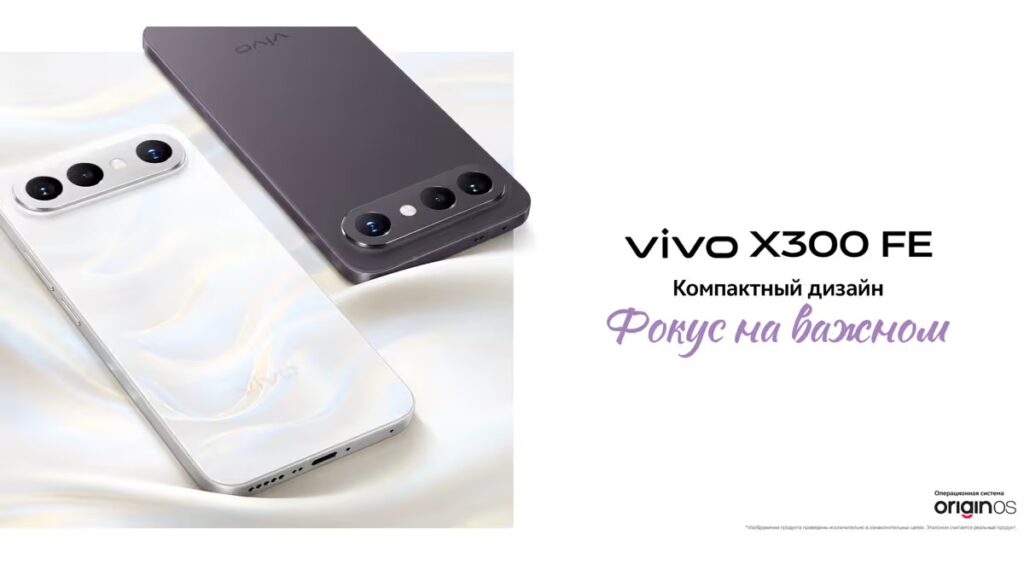
vivo may soon launch its X series lineup in India with the vivo X300 FE. The smartphone debuted globally earlier this year, and reports now suggest its India release is not far away. According to the latest leaks, the vivo X300 FE might launch in India in early May. The expected timeline has been shared by a trusted tipster, giving a fair idea of when to expect it. However, without official confirmation, the launch date is still not final.
Another important highlight of the vivo X300 FE includes its new green color variant. The green color variant of the phone will reportedly be available only in India, and hence, it will provide something special to the Indian users. Apart from the green variant, it is also available in black and purple.
Design, Display, and Software

In the upcoming vivo X300 FE, you are going to get a 6.31-inch LTPO AMOLED display. In addition, the phone might have a 120Hz refresh rate, which should ensure a smooth experience when scrolling through pages and playing games. It could also be protected by IP68/IP69 ratings against dust and water damage.
In terms of performance, it may feature the Snapdragon 8 Gen 5 processor. It is also expected to offer 12GB of RAM and up to 512GB of storage for a smooth, fast experience. The device could run on OriginOS 6 based on Android 16. Overall, this combination should be good enough for gaming and daily use.
Camera and Battery
The vivo X300 FE is likely to come with a strong camera setup. It may include three rear cameras: a 50MP primary sensor, a 50MP telephoto lens, and an 8MP ultra-wide camera. Zeiss branding is also expected, which generally improves image quality. On the front, users could get a 50MP selfie shooter. Moreover, there have also been reports of a telephoto kit.
Battery performance could be another strong point of the vivo X300 FE. The phone is expected to include a 6,500mAh battery along with support for 90W wired and 40W wireless charging. This combination should help users get long usage time without worrying much about charging.
Expected Price in India
In international markets, the vivo X300 FE comes with an introductory price tag of around RUB 60,299 (equivalent to Rs 71,000). Similar pricing can be expected in the Indian market as well; however, the exact figure has not yet been confirmed. vivo is likely to reveal the final pricing details during the official launch.
Tech
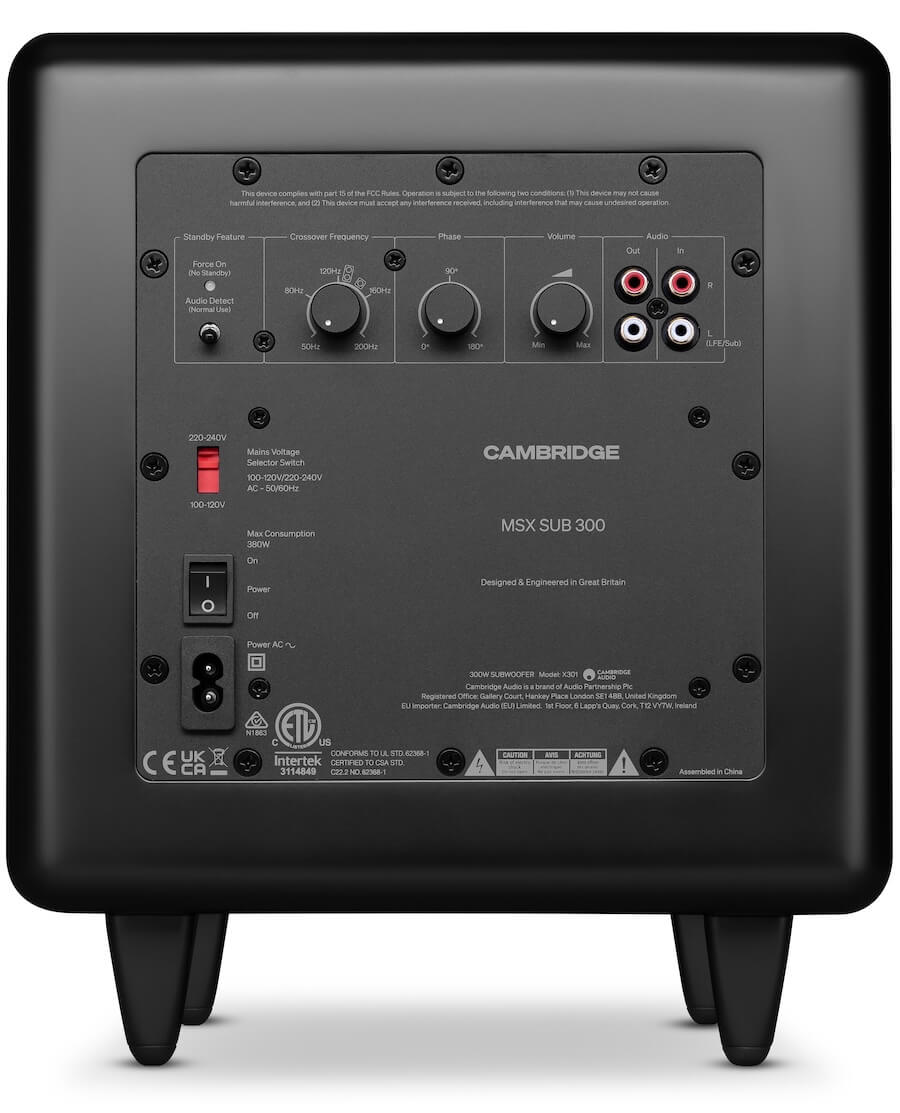
Cambridge Audio MSX Series Reborn: The Modular Naughty Minx Speaker System Returns with a Modern Edge
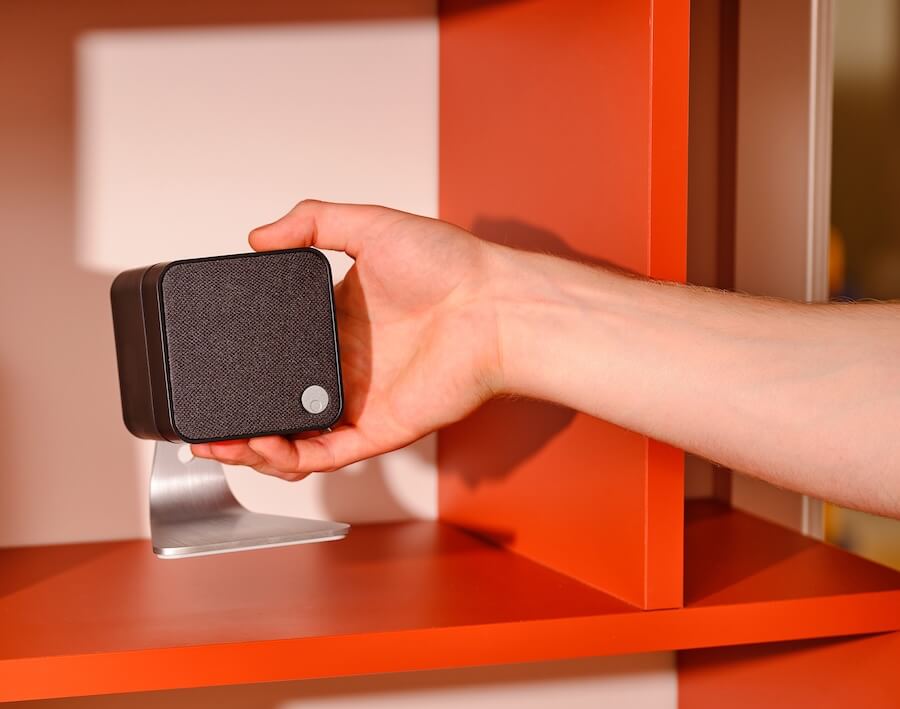
Cambridge Audio isn’t reinventing the wheel here. It’s doing something far more sensible, which already puts it ahead of half the industry. The new MSX Series is a clean reboot of the long running Minx lineup, keeping the formula intact while dragging the naming and design into the present day without unnecessary theatrics. Same idea: ultra compact satellites, wide dispersion, and sound that refuses to behave like it lives in a tiny little box.
What’s changed is mostly what needed changing. The branding now aligns with Cambridge’s current range, the finishes are properly modern in matte black or white, and the lineup has been streamlined into MSX10 and MSX20 satellites with Sub 200 and Sub 300 handling low end duties. It’s modular, flexible, and designed for people who want real stereo or surround sound without turning their living room into a shrine to oversized cabinets.
Cambridge Audio has kept the MSX Series firmly in the affordable lane, with pricing that makes a full system far more attainable than most compact hi-fi or home theater setups. The MSX10 starts at $99 each, the MSX20 at $129 each, while the Sub 200 and Sub 300 come in at $399 and $499 respectively.
That puts a flexible stereo or surround system within reach without immediately crossing into four figure territory. It also undercuts most of Cambridge’s newer L/R wireless range, which leans more premium overall, with the exception of the L/R S at $549 per pair.
The trade off is clear: the L/R Series offers a simpler, all in one path with amplification and streaming built in, fewer boxes, and arguably better out of the box performance. The MSX system takes the more traditional route, requiring an external amp or receiver, but gives users more control over how the system is built and expanded over time.

Compact Cabinets, Engineered for Wide Dispersion and Real World Placement
At the core of the MSX Series is Cambridge Audio’s Balanced Mode Radiator (BMR) driver. It combines conventional driver movement with bending wave dispersion, allowing a single driver to cover a wider range while maintaining consistent output across the room. The goal is straightforward: more even sound distribution without relying on a narrow listening position.
The MSX10 uses a fourth generation BMR driver, with refinements aimed at improving efficiency, extending treble response, and smoothing overall integration. At 8cm, it remains very compact and easy to place in smaller spaces.
The MSX20 builds on that platform by adding a dedicated woofer alongside the same BMR driver. This provides additional low frequency support and improved dynamic range, making it better suited for larger rooms or listeners who want a fuller presentation.
Compact Subwoofers with DSP Control
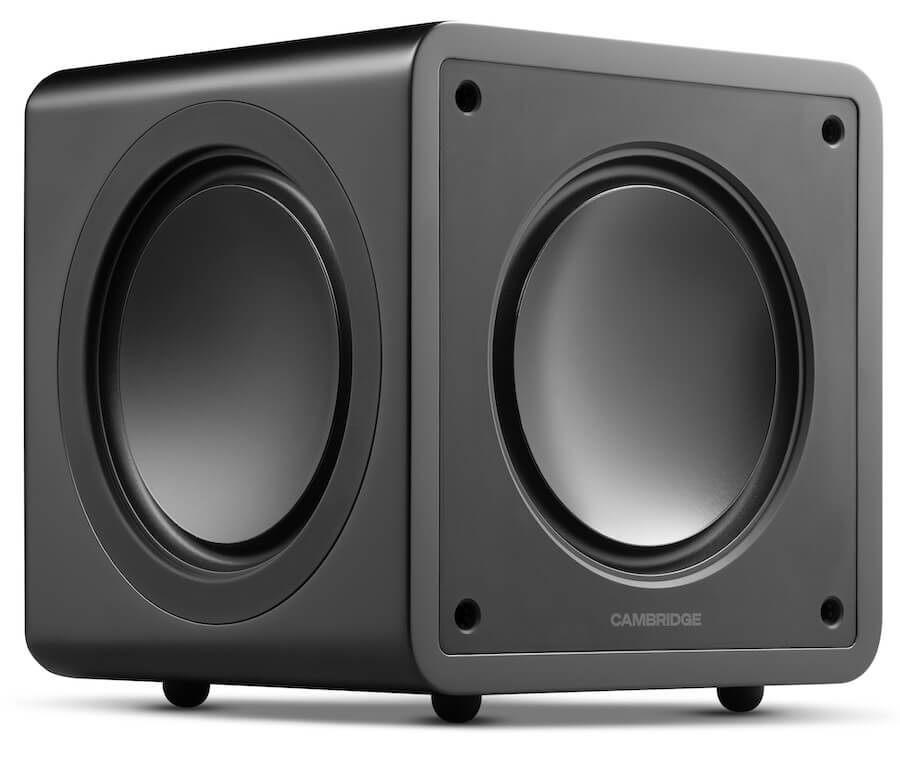
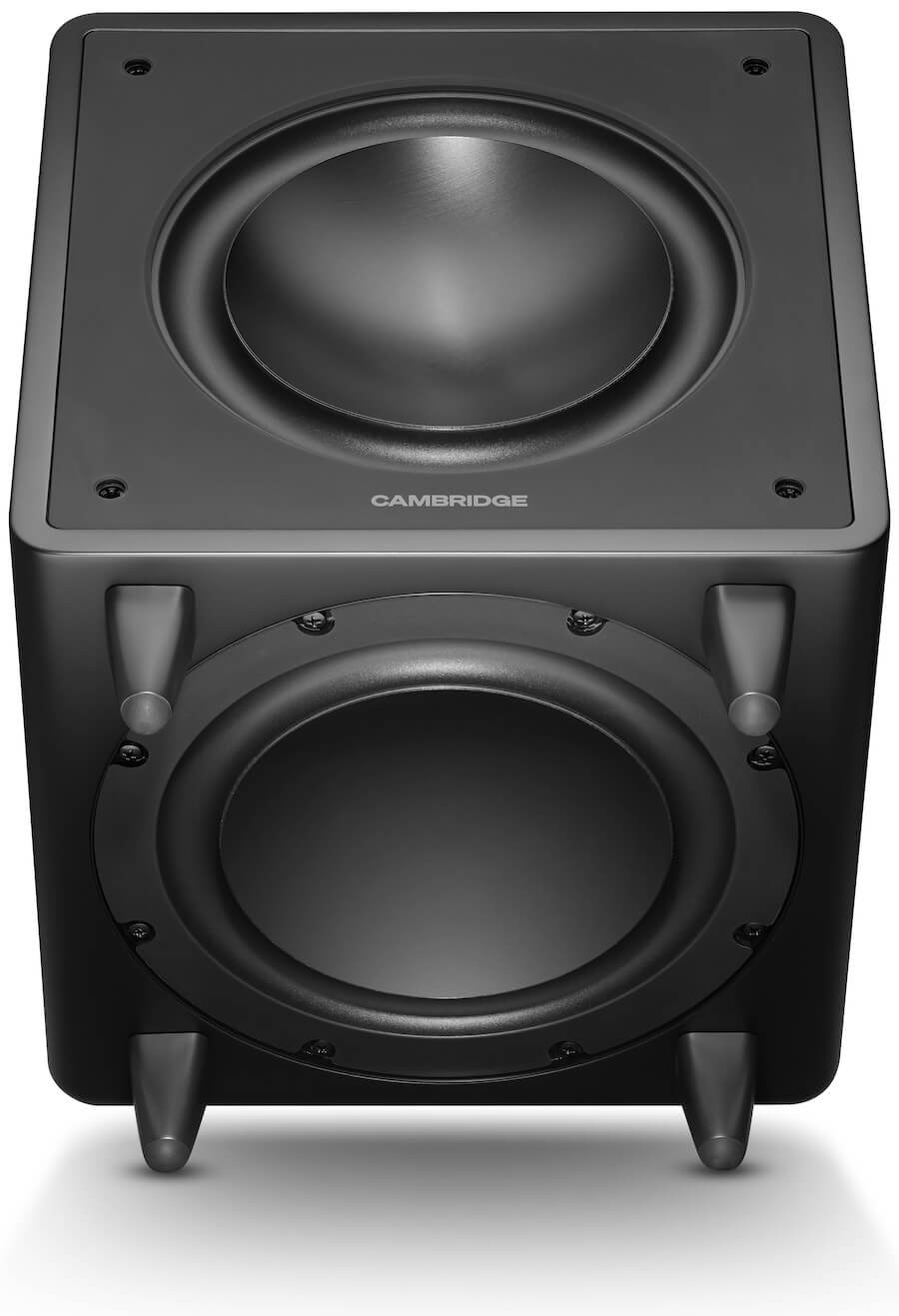
Low frequencies are handled by the MSX Sub 200 and MSX Sub 300, two compact subwoofers designed to add depth without taking over the room. Both use forward firing drivers, auxiliary bass radiators, and DSP to keep output controlled and consistent, even as volume increases.
The MSX Sub 200 pairs a 200 watt amplifier with a 6.5 inch active woofer and dual ABRs. It is the smaller option, aimed at tighter spaces where placement and restraint matter as much as output.
The MSX Sub 300 increases power to 300 watts and moves to an 8 inch active woofer in a larger cabinet. It delivers more low end extension and headroom, making it a better fit for bigger rooms or systems where a bit more impact is required.
Clean Design. Flexible Placement. Passive by Design.
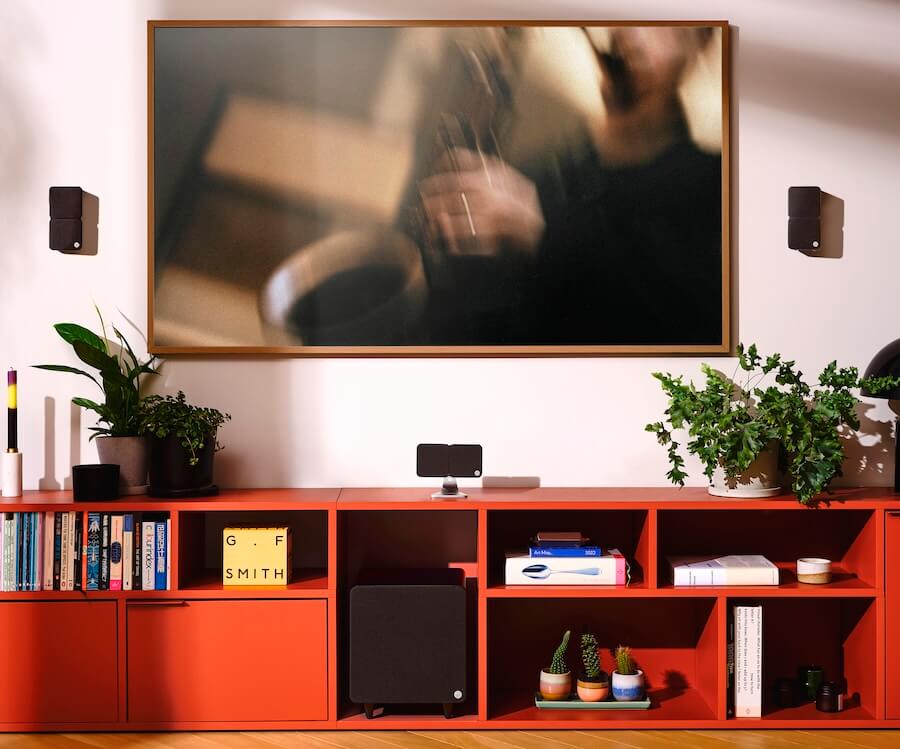
Not every room is built around speakers, and Cambridge Audio has designed the MSX Series to integrate easily into shared living spaces.
Finish options are limited to matt black or matt white, keeping the look simple and consistent whether the speakers are placed on a shelf or mounted on a wall. These are passive speakers, so they require an external amplifier or AV receiver. There is no built in amplification or streaming.
Connections are standard. The terminals support 4mm banana plugs, with no proprietary cabling required. Each satellite can be wall mounted or placed on furniture as standard, with optional pivoting mounts and table stands available for more flexible positioning.
The Bottom Line
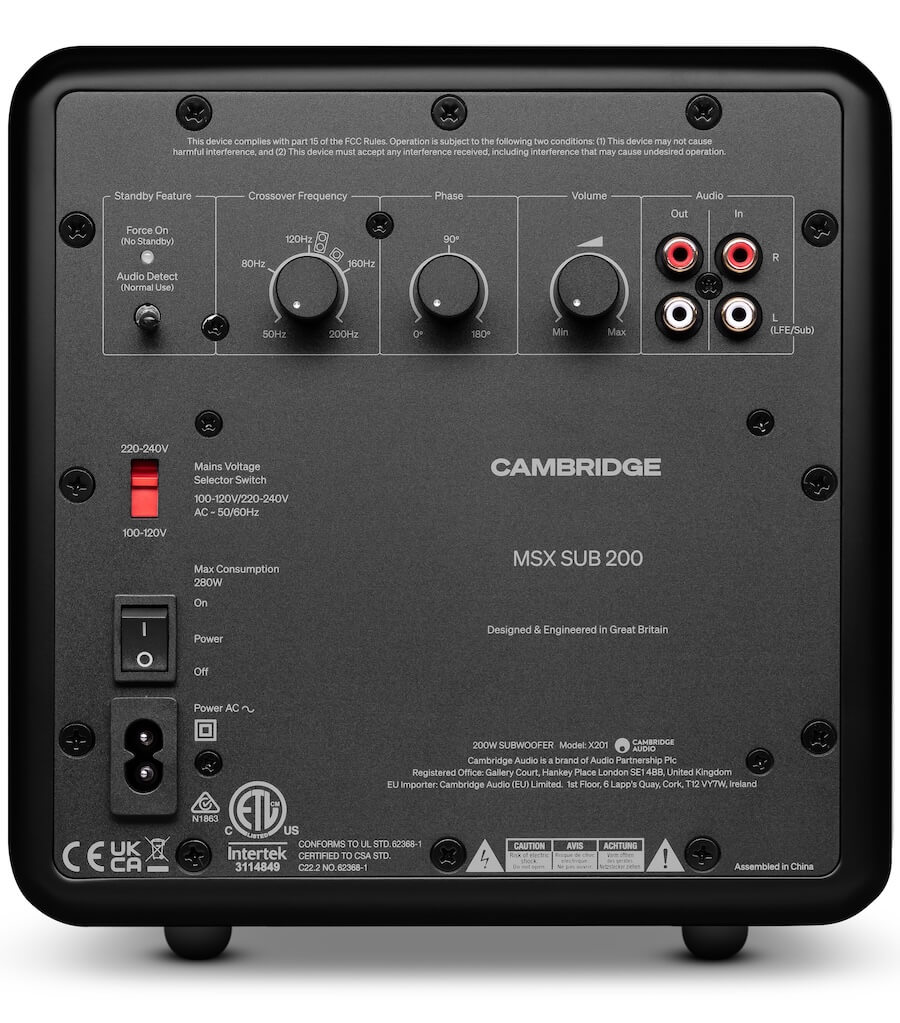
The MSX Series keeps things simple on the surface, but system matching still matters. These are passive speakers paired with active subwoofers, so your amplifier or receiver needs to support proper sub integration. That means a dedicated subwoofer output or usable pre-outs. Without one of those, you’re not getting the system to behave as intended.
Within Cambridge Audio’s own lineup, models like the CXA61, CXA81, and EXA100 make the most sense, offering proper subwoofer outputs and system flexibility. The AXR100 can also work, but its fixed crossover limits how precisely you can integrate the subwoofers.
You are not locked into Cambridge, however. Amplifiers and streaming amps from NAD, Arcam, Rotel, and Audiolab all offer compatible options with subwoofer outputs or pre-outs. Even newer entries like WiiM’s streaming amplifiers can work in a compact system like this, provided they include proper bass management or sub connectivity.
The takeaway is straightforward: the MSX system is flexible, but only if the electronics are chosen with the same level of care.
Price & Availability
Cambridge Audio MSX will be available from April 2026 at Cambridge Audio’s website and approved retailers at the following prices:
Related Reading:

Meta released its new Muse Spark AI model on Wednesday as part of a major overhaul of its AI efforts. It’s do-or-die time for Meta — the company cannot afford another billion-dollar investment into something that doesn’t pan out, like the metaverse. Well, maybe they literally can afford it, but it’d be pretty damaging, not to mention embarrassing.
Speaking of embarrassing: imagine a bunch of your friends, family, and strangers you met once in college getting a notification that you use the Meta AI app. I have lived this humiliation, and I am here to warn you that it could happen to you, too.
Meta’s Muse Spark model might be new, but the Meta AI app is not. It came out last April, and at the time, I wrote an article about the app’s launch. As one does when reporting on an app, I downloaded the app. I used it.
At some point, Meta started sending people Instagram notifications about which of their friends were using the Meta AI app, presumably to encourage them to download it. It has been almost a year. I continue to get texts from my friends in which they alert me that Instagram told them I am on the Meta AI app. This is generally considered to be uncool behavior.

In its first month and a half in the App Store, only 6.5 million people had downloaded the app, market intelligence provider Appfigures told us at the time. That’s a lot of people, but not for a company that counts an estimated 42% of the entire world as daily users of at least one of its apps.
Perhaps that’s why in the early days of the Meta AI app, I stuck out on my friends’ Instagram notification feeds. (Yes, your friends will get a whole notification devoted to your use of the app, displayed as prominently as a new follower.)

Things are looking up for the Meta AI app, though. It is seeing a spike in downloads after releasing its revamped chatbot, now charting at No. 5 on the U.S. App Store, up from No. 57, per Appfigures. That’s also why I must warn you now about the horrors you may face if you use this app and Instagram tells your friends.
As much as I don’t want people to know I installed an app with an AI-generated “vibes” feed, this issue runs deeper. Meta’s apps are so interconnected that it’s hard to keep up with what data we’re sharing, where, and with whom. Why would I think that my Instagram mutuals would know I’m on the Meta AI app? (At least X didn’t tell people that I used Grok’s anime waifu — which was also for work.)

In order to access the Meta AI app, you have to log in with a Meta account — so, I joined using the same account I’ve had since I was a teenager, which connects to my Instagram and Facebook. Meta will continue to use whatever I do on Instagram, Facebook, and yes, now even the Meta AI app, to show me targeted ads. So, if I were to confide in Meta AI about an issue with my menstruation, Instagram might show me ads for period panties.
The Meta AI app never asked permission to notify people about my use of the app, nor has it asked if I want my AI chats to be used as advertising fodder. But it doesn’t have to, because I probably implicitly opted into it in some terms of service agreement that I never actually read. I mean, I also learned via Instagram that my brother was weirdly invested in Eurovision last year, since we can all see each other’s liked Reels. We all know too much about each other, and yet, Meta knows even more.
In a sense, I’m lucky that the only thing that people knew about my Meta AI usage was that I was on the app. Some users had unwittingly shared much more incriminating information about themselves: their AI chatlogs.
As a grizzled veteran of the Meta AI app, I can tell you that back in my day (over the summer), Meta experimented with a Discover feed on the app. Meta did not account for the fact that a lot of boomers use its app, and they are sometimes bad at using technology. Combine that with the fact that, since AI is not real, people will use chatbots to discuss things that they find too intimate or embarrassing to share with others. Then, you have a disaster on your hands.
Soon, people like a16z partner Justine Moore began to notice that the Meta AI discover feed was mostly filled with older users who didn’t realize that they were sharing their AI conversations with the world.
Sometimes, these shared conversations were benign: at the time, I encountered a man with a Southern accent who asked, “Hey, Meta, why do some farts stink more than other farts?” In other cases, we saw people share their personal home address, information about medical issues, and intimate concerns about their marriage.
To give Meta some credit, these users did have to manually press publish on these chats. But enough people seemed to accidentally share private information that, clearly, there was a design issue to address. (Meta has since removed this Discover feed.)
At least if using the Meta AI app turns out to be a hot new trend, I will get to rub it in my friends’ faces that I was there first. But I would not bet on that future. There is still that “Vibes” feed, after all.
Canary Capital’s Spot PEPE ETF Filing Puts Meme Coins Back in Focus as Maxi Doge Presale Nears $6M

Pakistan’s defence minister calls Israel ‘curse for humanity’ on X

Josh Hazlewood Returns For RCB vs RR In IPL 2026


-

 Fashion7 days ago
Weekend Open Thread: Spanx – Corporette.com
-

 Business5 days ago
Three Gulf funds agree to back Paramount’s $81 billion takeover of Warner, WSJ reports
-

 Sports6 days ago
India men’s 4x400m and mixed 4x100m relay teams register big progress | Other Sports News
-

 Business6 days ago
Expert Picks for Every Need
-

 Tech3 days ago
How Long Can You Drive With Expired Registration? What Florida Law Says
-

 Business5 days ago
No Jackpot Winner, Prize to Climb to $231 Million
-

 Fashion4 days ago
Massimo Dutti Offers Inspiration for Your Summer Mood Board
-

 Fashion3 days ago
Let’s Discuss: DEI in 2026
-

 Crypto World2 days ago
Bitcoin recovers as US and Iran Agree a Ceasefire Deal
-

 Business6 days ago
Akebia Therapeutics, Inc. (AKBA) Discusses Pipeline Progress and Strategic Focus on Kidney Disease Treatments at R&D Day – Slideshow
-

 Crypto World1 day ago
Canary Capital Files SEC Registration for PEPE ETF
-

 Politics6 days ago
The UK should not pay a penny in slavery reparations
-

 Tech4 days ago
Samsung just gave up on its own Messages app
-

 Tech4 days ago
Haier is betting big that your next TV purchase will be one of these
-

 Fashion7 days ago
Weekly News Update, 4.3.26 – Corporette.com
-
Sports7 days ago
A Kevin O’Connell Theory Can Now Be Retired
-

 NewsBeat7 days ago
Kemi Badenoch talks ‘spring cleaning’ Reform defections
-

 Tech4 days ago
Gamer Restores the Original PlayStation Portal From Two Decades Ago
-

 Business4 hours ago
OpenAI Halts Stargate UK Data Centre Project Over Energy Costs and Copyright Row
-

 Tech4 days ago
The Xiaomi 17 Ultra has some impressive add-ons that make snapping photos really fun
You must be logged in to post a comment Login