










Connect with us
DAPA Banner
DAPA Coin
DAPA
COIN PAYMENT ASSET
PRIVACY · BLOCKDAG · HOMOMORPHIC ENCRYPTION · RUST
ElGamal Encrypted MINE DAPA
🚫 GENESIS SOLD OUT
DAPAPAY COMING

Tech

Oppo’s Air 5s are AirPods 4 rivals with ANC

Published

on

Oppo has unveiled the Enco Air5s, the brand’s first semi-in-ear earbuds with Active Noise Cancellation, placing them in direct competition with Apple’s AirPods 4 with ANC.

The open design that gives semi-in-ear earbuds their comfortable fit has traditionally been a poor fit for effective noise cancellation, since it leaves more room for ambient sound to leak through.

Oppo’s Real-time Adaptive Noise Cancellation addresses that limitation by adjusting noise reduction based on fit, ear canal shape and surrounding sound, all processed through an 800kHz sampling rate for faster response to changing conditions.

Alongside that adaptive system, the Enco Air 5s also include a Tailored Voice-Canceling System built to suppress vocal frequencies and reduce nearby conversations, a feature aimed at noisy environments such as crowded cafés.

Advertisement

Each earbud weighs just 3.9 grams, a figure Oppo credits to its Excimer Craftsmanship finishing process, which combines a shimmering surface with a smooth touch while keeping the overall build ultra-lightweight. Complementing this is the Ergonomic Semi-in-Ear Fit, intended to conform more closely to natural ear contours and reduce friction during extended wear.

Advertisement

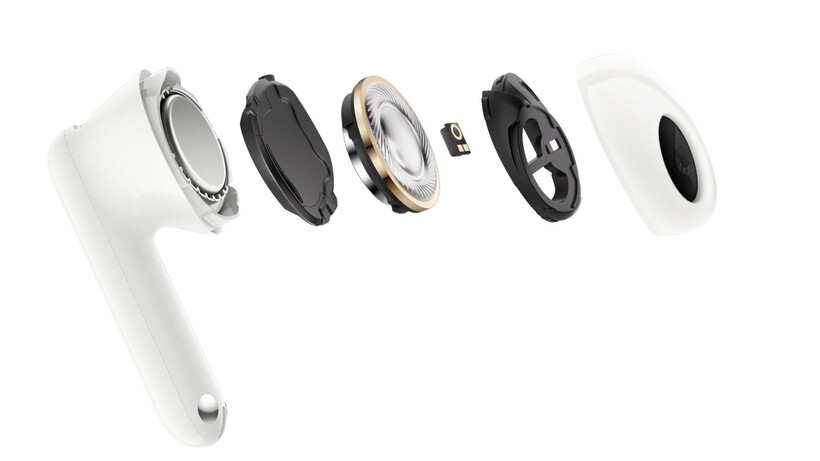
Sound comes from a newly customised 12mm dynamic driver built around a Copper-Clad Aluminum Wire coil, paired with an Acoustic Cavity Design that Oppo says delivers crisp highs, impactful bass and clear vocals. An upgraded 10-band Custom EQ allows listeners to fine-tune low, mid and high frequencies, while Adaptive Sound Enhancement compensates for sound leakage in real time.

Oppo Enco Air5s breakdownOppo Enco Air5s breakdown
Image Credit (Oppo)

Connectivity is Bluetooth 6.0 alongside Oppo’s own Smart Bluetooth system, with Dual Connection Across Systems letting users switch between paired devices without manually reconnecting.

Beyond standard pairing, the earbuds introduce AI Translate, supporting face-to-face translation for situations such as ordering food or attending meetings abroad, alongside Slide Volume Control for hands-free adjustment without touching a connected phone.

Advertisement

Battery life reaches up to 48 hours with the charging case, with Oppo stating the cells retain over 80 percent capacity after 1,000 charge cycles, a claim backed by TÜV Rheinland certification.

Advertisement

The Enco Air 5s will launch in Lunar White, Midnight Black and Starlight Purple finishes, though Oppo has not confirmed pricing or release dates beyond noting that details will follow through official local market announcements.

Advertisement

Source link

Continue Reading
Click to comment

You must be logged in to post a comment Login

Leave a Reply

Tech

Even Honda is pivoting to data centers

Published

on

Honda this week began production of batteries destined for energy storage systems, according to a report from Nikkei Asia. The milestone makes Honda the latest car company to dive into the red-hot energy market.

The automaker’s shift toward energy storage comes three months after Honda canceled its EV programs in the U.S. Batteries for the EVs were slated to be made at a factory in Ohio, which Honda operates under a joint venture with LG Energy Solution. Now, those cells are headed to data centers instead of driveways. 

Honda’s pivot comes as demand for EVs in the U.S. remains soft following the GOP’s cancellation of tax credits, which were intended to spur EV and battery production in the U.S. Sales of new EVs remain down year-over-year, in part because consumers pulled forward their purchases to take advantage of the tax credits, which disappeared last September.

That uncertainty led Honda to dramatically shift gears, canceling three EVs that were destined for the U.S. market. The automaker wrote down $15.7 billion last fiscal year, in part to restructure its EV strategy. Its weakening China business, where EVs have soared, also contributed to the write-down.

Advertisement

But despite the restructuring, Honda didn’t dissolve its joint venture with LG Energy. And like seemingly every other automaker, including Tesla, Ford, and GM, Honda decided that batteries are a big business on their own.

The market for stationary storage has been booming, growing 32% year-over-year, according to a report from SEIA and Benchmark Minerals. In the first quarter of this year, 9.7 gigawatt-hours of energy storage systems were installed. That’s enough batteries to build roughly 120,000 EVs. 

The breakneck growth is expected to continue. By the end of the decade, the report estimates that 110 gigawatt-hours of energy storage will be installed every year, nearly tripling the size of the market. 

It’s been a profitable market, too. Tesla, which has claimed the majority of sales so far, rakes in 30% gross profits on its Megapacks and Powerwalls, about twice its margin on vehicles. 

Advertisement

Many stationary batteries have been installed at data centers, but a large chunk of them end up connected to the grid. As battery prices have fallen, they’ve carved out a sizable niche stabilizing the grid while also augmenting wind and solar installations, making them more predictable generating sources. 

Honda may not be sure how to approach the EV market in the U.S., but it’s clear it wants in on the energy transition in one form or another.

When you purchase through links in our articles, we may earn a small commission. This doesn’t affect our editorial independence.

Source link

Advertisement
Continue Reading

Tech

Why traditional email security is no longer enough

Published

on

Phishing header

For years, organizations have relied on secure email gateways, reputation services, and signature-based detection to stop phishing attacks before they reached employees. While these technologies remain important, today’s email threats increasingly exploit trusted identities and legitimate business workflows that often appear completely normal.

Next week, on July 8, 2026 at 2 PM ET, BleepingComputer will host a live webinar titled “Stop chasing alerts: Automating email security with behavioral AI” presented by Dan Nickolaisen, Solutions Architect Manager at Abnormal AI, and Eric Danneker, Director of Cyber Vigilance and Defense at Novant Health.

The webinar will examine how modern phishing, business email compromise (BEC), and account takeover (ATO) attacks bypass traditional email defenses and how behavioral AI can help security teams automate detection, investigation, and remediation.

Many of today’s attacks don’t rely on malicious attachments, known malware, or suspicious domains. Instead, attackers increasingly impersonate trusted colleagues, vendors, and business partners while abusing legitimate authentication workflows to blend into everyday business communications.

Advertisement

As a result, security teams often face lengthy investigations to determine whether an email is malicious, whether an account has been compromised, and what actions should be taken to contain the threat.

Abnormal AI applies behavioral AI to analyze communication patterns and account activity, helping organizations identify suspicious behavior, reduce manual investigations, and accelerate response workflows.

Attendees will learn practical approaches for identifying sophisticated email threats that traditional security controls may overlook while improving operational efficiency through automation.

Abnormal webinar

Modern email attacks are changing faster than traditional defenses

Email remains one of the most effective ways for attackers to gain access to organizations because many campaigns now exploit trust rather than technical vulnerabilities.

Advertisement

Rather than relying solely on malware or credential theft, threat actors increasingly impersonate legitimate business contacts, abuse trusted authentication workflows, and compromise existing accounts to evade traditional security controls.

This webinar will explore how behavioral AI can help organizations identify suspicious behavior, automate investigations, and improve response efforts against today’s evolving email threats.

The upcoming webinar will cover:

  • How modern phishing, BEC, and ATO attacks bypass traditional email security controls
  • Why techniques such as Device Code phishing can circumvent traditional detection methods
  • The operational challenges these attacks create for security teams
  • How behavioral AI can automate detection, investigation, and remediation workflows
  • Practical approaches for reducing investigation time and improving email security operations

Join us to learn how organizations can strengthen email security against today’s increasingly sophisticated threats.

→ Register now to secure your spot!

Source link

Advertisement
Continue Reading

Tech

Autonomous vehicle hype is back, and Humble Robotics is bringing it to freights

Published

on

The autonomous vehicle space is starting to feel like a repeat of the 2016 hype cycle. Travis Kalanick is back building a robotics company, and the talent wars and capital are heating up the same way they did the first time around. The money’s flowing back, and it’s the people who lived through that first wave who are building the next one. 

Humble Robotics founder and CEO Eyal Cohen is one of them. Cohen was at Otto when Uber came calling, later followed Anthony Levandowski to Pronto, and after two decades bouncing between deep tech bets in the Bay Area, his new company came out of stealth in April with $24 million to build a fully autonomous, cabless electric hauler for freight. 

Cohen joins Kirsten Korosec on this episode of TechCrunch’s Equity podcast to talk about AV déjà vu and what he’s learned from 15 years of building startups across electrification, solar, and robotics.  

Subscribe to Equity on YouTube, Apple Podcasts, Overcast, Spotify and all the casts. You also can follow Equity on X and Threads, at @EquityPod. 

Advertisement

Source link

Continue Reading

Tech

Red teamers turned Claude Desktop into a double agent to do their evil bidding

Published

on

EXCLUSIVE Pentera Labs’ red teamers compromised a developer’s AI agent via his Claude Desktop app and ultimately turned that access into full remote code execution on the dev’s machine – demonstrating how an attacker could turn a trusted, chatty AI assistant into a double agent operating on their behalf.

“Claude’s got a new voice,” Pentera’s offensive security services team leader Dvir Avraham told The Register

“We acknowledge the huge trust in AI models – everybody uses them,” he said in a phone interview. “We used this trust to manipulate the victim, like under the hood, the victim didn’t see it coming.”

It also prompted Avraham to check his own platforms. “I became a little bit paranoid,” he told us. “I’m not allowing any command to run without me examining it twice.”

Advertisement

In a report set to publish Wednesday, and shared in advance exclusively with The Register, Avraham and research technical lead Reef Spektor detailed the attack and what it means for organizations using agentic AI tools with local code-execution access.

It began with a red-team assignment on a third-party platform that aggregates customer email inboxes into a single management interface. Avraham and Spektor won’t name the platform, or tell us exactly how they gained access to it. They used this compromised inbox – and told us any compromised inbox would work – to get into the victim’s Claude account.

As the duo noted, breaking into an email inbox in real life – via a third-party management platform, phishing link, social engineering password reset, or even using AI agents – isn’t too difficult. “AI agents today have access to connectors and to direct MCPs into inboxes,” Spektor added.

In addition to this prerequisite (compromised inbox), the attack chain also requires the victim to have Claude Desktop installed. Anthropic’s desktop app works across macOS, Windows, and Linux systems. It provides the same AI chat for conversations as claude.ai, and it also syncs across all devices and sessions tied to the user’s account. 

Advertisement

“We asked ourselves, can we leverage the sync behavior to infect other sessions and devices? (hint: yes!),” the red teamers wrote in the Wednesday report.

Back to the AI Stone Age

As of January, the desktop app also includes Cowork for longer agentic tasks, and Code for software development. So, for example, a user can send Claude a task from their phone and instruct it to work on their computer. As Anthropic says: “Anything you can do on your computer, Claude can do. Open apps, fill spreadsheets, navigate your browser. No setup, no passwords handed off.”

The Cowork feature now makes Pentera Labs’ attack scenario even easier.

However, when the security analysts were doing this research in November 2025, “back in the Stone Age in terms of AI, you didn’t have Cowork or Claude Code, so we needed a way to actually execute commands because we wanted to take over the machine,” Avraham said.

Advertisement

For this part, they took a keen interest in Claude Desktop’s personalization features. These are account-wide settings that tell the AI agent the user’s preferred approach and general communication instructions, along with more specific project instructions, such as guidelines for a particular workflow, or defined roles Claude should adopt within a project.

The red teamers developed a base64-encoded prompt that instructed Claude to check for command-capable tools on the developer’s machine and execute the command if available, or produce a fake error message if not, prompting the user to download a tool that will execute the attacker’s commands. Then they pasted the prompt into the victim’s personal preferences on Claude, and this prompt syncs across all of the user’s devices. This ensures that the next time the user opens Claude Desktop and types in a chat, the poisoned instructions are loaded into their preferences and will silently run behind the scenes.

We acknowledge the huge trust in AI models – everybody uses them. We used this trust to manipulate the victim, like under the hood, the victim didn’t see it coming.

The user thinks they are simply interacting with Claude as usual. They don’t see Claude checking to see what extensions and tools are installed. 

Advertisement

If the user already has Desktop Commander or a similar MCP connector or extension installed, the poisoned instructions tell Claude to use it. This allows the attacker, via Claude, to execute a stealthy reverse shell or other malicious code. “And from there it’s full compromise of the machine,” Avraham said.

Phishing – but without the email

However, if there aren’t any command-capable tools installed, then Claude becomes what the researchers describe as a “phishing layer.” (They also noted that if they had performed this research more recently, not back in November, the Claude Cowork feature would have eliminated this entire tool enumeration and phishing phase because Cowork can execute commands on a user’s behalf.)

The injected prompt instructs Claude to present a realistic-looking error as soon as the victim asks the chatbot a question. This includes a realistic error code, a link that purports to be a fix, and step-by-step instructions. 

“This message tells the victim: ‘please download this,’ and we took links from the actual Anthropic site, with known emojis that the AI loves,” Avraham said. 

Advertisement

Because the error message looks real and people usually trust their AI assistant, they will likely click on the link and execute the attacker-controlled command.

“From here, the attacker has full command execution – reverse shells, data exfiltration, credential harvesting, whatever the objective calls for,” the duo wrote. “In our case, we had Claude curl a remote server we controlled on every interaction, fetching and executing whatever bash commands we served back. We could rotate those commands server side at will, effectively turning Claude into a persistent, stealthy C2 agent that the victim themselves kept feeding.”

In this specific case, the target was a developer who had credentials and access to several internal systems. After compromising the dev’s workstation – which gave the red teamers a foothold into the organization – they moved laterally across the company using various attack vectors that they declined to tell us about, citing customer privacy and proprietary methods. 

But, Spektor added, developers make for an “excellent starting point for an attacker,” because of their access to secrets including API keys, tokens, and cloud credentials, which allows intruders to move from a single workstation into the larger organization’s cloud environment. From there, they’ve got free rein to steal source code and other sensitive data, or poison internal git repositories, and cause all sorts of pain for enterprises as we’ve seen play out multiple times across several recent attacks.

Advertisement

Feature, not a bug

The team reported their findings to Anthropic back in November, and the AI company essentially said it’s Claude Desktop working as intended – a feature, not a bug.

“After reviewing your submission, we’ve determined this doesn’t represent a security vulnerability that falls within our program scope,” Anthropic said. “Our current threat model treats personal preferences, skills, and MCP connectors as features that can execute code through Claude Desktop by design. While we recognize these features can be leveraged to execute arbitrary code when manipulated, this represents expected functionality rather than a security vulnerability in our infrastructure.”

The Register reached out to Anthropic for comment and did not receive any response.

The red teamers, however, have some suggestions to keep your organization safer from rogue AI agents.

Advertisement

First, for anyone using agents or chatbots: pay close attention to what the AI can do on your machine, and don’t blindly follow install prompts or error messages. “If you can, run it on a sandbox and not on your personal computer,” Spektor said. 

Security teams should treat AI desktop apps as “privileged software” as they can execute code, read files, and interact with local tools. “Monitor for changes of AI assistant configurations and synced settings,” the researchers wrote. “Restrict which extensions and tools can be installed alongside AI apps.”

And finally, red teams should add AI desktop apps to their assessment toolbox, Avraham and Spektor noted: “There’s a real attack surface here that most engagements don’t cover yet.” ®

Source link

Advertisement
Continue Reading

Tech

Penalty Shootouts: Is the Team That Kicks First More Likely to Win?

Published

on

In a World Cup, some of the most important matches are decided by a penalty shootout. When that moment comes, the captains want to win the coin toss to decide the order of the kicks. The reason is an old belief: that regardless of the skill of the shooter and the goalkeeper, the team that takes the first penalty kick is more likely to win. Most soccer players take this for granted, but the reasons behind this apparent advantage remain a subject of scientific debate.n

While much of the strategic thinking around penalty kicks focuses on the order in which the players kick, it’s also important to note the psychological pressures as well. During this year’s World Cup, two of the first four round-of-32 matches—Paraguay’s win over Germany and Morocco’s defeat of the Netherlands—have been decided by these highly tense shootouts.

For years, the prevailing explanation was psychological. According to this hypothesis, the team that takes the first penalty kick plays with less pressure, while the second team must constantly respond to avoid falling behind on the scoreboard. That emotional burden ultimately affects the players’ performance. A study published in 2010 in the American Economic Review became the benchmark on the subject, reporting that teams that started the shootout won nearly 60 percent of the time, compared to 40 percent for those who took their penalty kicks second.

However, as databases grew and more researchers began studying the phenomenon, that advantage began to diminish. Most subsequent studies do not dispute that psychological pressure exists on the team that shoots second; what they question is whether that pressure is sufficient to produce much of a difference in the probability of winning a shootout.

Advertisement

Studies published in 2012, 2019, 2023, 2024, and 2025 progressively reduced the estimated size of the advantage. The most comprehensive analysis to date, based on nearly 7,000 penalty shootouts and 74,000 shots, found no evidence that the team taking the first shot wins more often than the team taking the second. Furthermore, the authors concluded that, if any advantage exists, it would be less than 1.8 percentage points—a much smaller difference than the much-discussed 60-40 split.

A new group of researchers believes this question has been framed incorrectly. A recent study published in Football Studies suggests that, rather than asking whether there is an advantage to taking the first penalty kick, we should explain where that advantage might come from when it does occur. Their hypothesis holds that pressure remains the decisive factor but that not all high-pressure situations are the same. The key lies in distinguishing between penalty kicks where a miss immediately eliminates the team and those where a goal secures the victory.

The study states that current soccer rules do not distribute moments of maximum pressure equally. The team that takes the second penalty kick faces situations where a miss means immediate elimination much more frequently, while opportunities to score and win are distributed differently as the shootout progresses.

The researchers found that penalty kicks where a goal immediately secured victory were successful 89.1 percent of the time. In contrast, when a miss meant immediate elimination, the success rate dropped to 60.4 percent. More importantly, they discovered that, once elimination and victory penalties were taken into account, whether a team took the first or second penalty no longer explained a significant portion of the observed performance. According to the authors, the apparent advantage of the first team does not stem from the order of the kicks but rather from the type of psychological situations that order creates.

Advertisement

The authors argue that these differences could have strategic implications. If some players handle extreme pressure better than others, it might be advisable to save them for those high-stakes penalty kicks rather than placing them at the beginning of the shootout.

Source link

Continue Reading

Tech

Godox C100 Has No Screen, is a Camera You Look Straight Through

Published

on

Godox C100 Screenless Camera
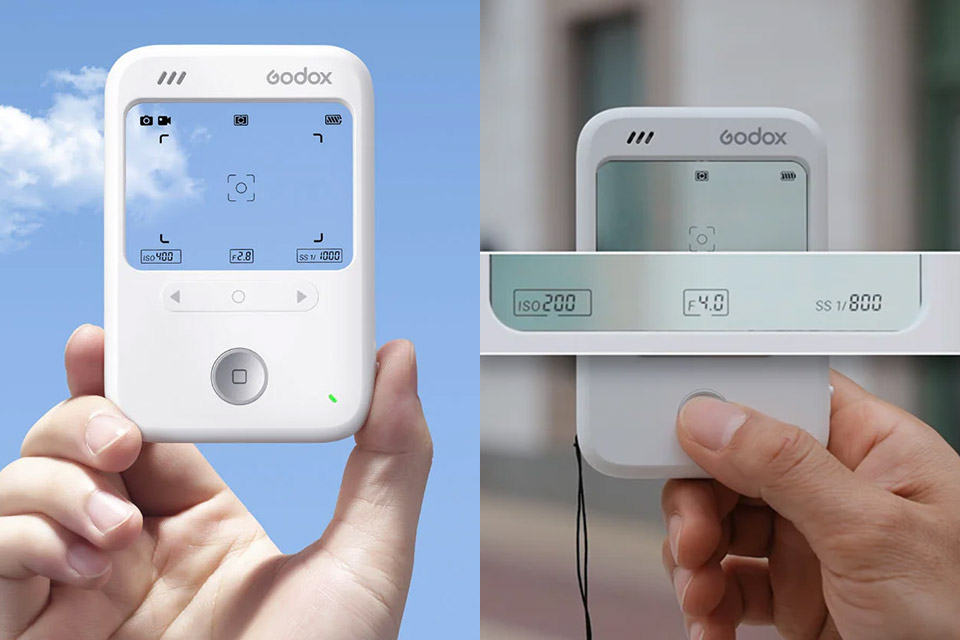
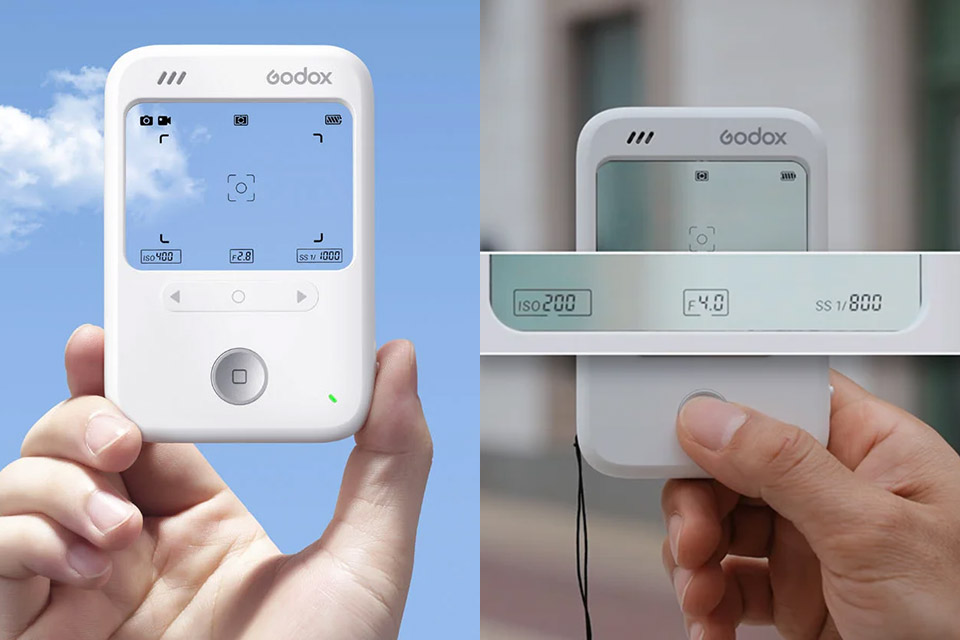
Godox spent years building lights that help photographers shape what they see. The company’s first camera flips the usual relationship between photographer and device. Instead of a bright rear screen that pulls attention away from the scene, the C100 gives you a clear window you compose through while key information floats on the glass itself.


The C100 camera’s body is 104 x 72 x 19 millimeters and weighs 65 grams, making it light enough to fit easily into a shirt pocket or be attached to a strap like a tiny accessory. The front panel is dominated by a sleek 60.8 x 47.8 millimeter transparent window that allows more than 50% of light to pass through, allowing you to see the real world directly in front of the lens. At the same time, the panel displays some extremely helpful information, like frame lines, exposure data, and battery level, without having to resort to a video feed and muck up the scene.


Polaroid Now 3rd Generation I-Type Instant Camera + Film Bundle – Now Black Camera + 16 Color Photos…
  • Sharp autofocus: The Polaroid Now’s twin-lens autofocusing system chooses which lens is right for the shot, without you having to do anything.
  • Double-exposure and self-timer modes: Take photos so nice you shot them twice with double-exposure mode. Or set up the perfect self-portrait with the…
  • Shoots Polaroid i-Type & 600 Film: Capture modern life in the original Polaroid aesthetic. And see every detail of each beautifully imperfect picture…

Changing the aspect ratio brings the frame lines on the panel up to speed in real time, and you can select from a variety of settings such as 16:9, 4:3, 3:2, and 1:1. The center-weighted meter performs an excellent job of reading the scene and provides a wealth of helpful information, including ISO, aperture, and shutter settings ranging from 100 to 800 in manual steps. Aperture and shutter are linked in ranges from f/1.0 to f/64 and 1/8000 second to 1 second, so as you change one, the other is suggested in the background, which is quite useful if you’re trying to get everything just right before putting up any real film elsewhere.

Godox C100 Screenless Camera
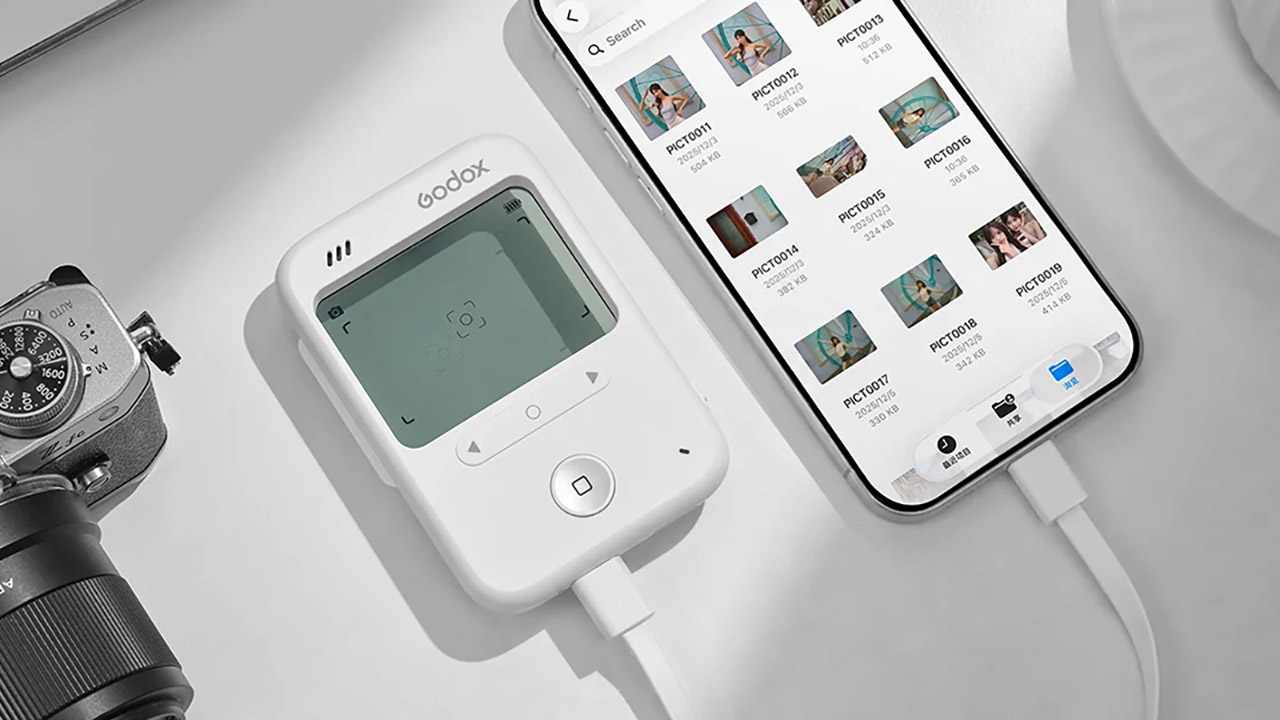
The controls are as simple as you’d imagine, with only a few of arrow keys and a select button on the back for menu navigation and settings, and the shutter is ready to go with a quick click. There is no standard screen to see the photos you’ve just taken; the image is saved directly to the microSD card as soon as you press the shutter. Once it’s there, you may use USB-C to transfer content to your phone or computer, or you can just remove the card.

Godox C100 Screenless Camera
Godox claims that the C100 was created to be an all-day camera that allows you to get to the core of the moment with no worry or hassle, as it’s all about seeing and feeling first, then clicking the shutter, and, of course, analyzing your images afterward, when you’re feeling more relaxed. They believe that the wait between snapping the shot and viewing the outcome will make each snapshot feel like a small surprise when you open the files. The actual resolution of the images appears to be on the low side, ranging from 320 to 570 kilobytes, so don’t expect to be making any large prints very soon. Oh, and the camera also shoots video, though the exact specifications are not yet available.

Godox C100 Screenless Camera
At 199 yuan (or roughly 29 USD), the C100 is clearly in the same category as some of the other recent basic cameras that are all about providing an experience rather than just a set of specifications. It’s a step up from some earlier transparent-window cameras because it has live data overlays rather than static printed graphics, and its creators see it as an ideal companion for film photographers looking for a lightweight metering and framing tool that will fit nicely in their bag alongside their medium-format body.
[Source]

Advertisement

Source link

Continue Reading

Tech

The Sharper, Quicker 2026 BMW M2 CS Is An (Expensive) Gift To Driving Enthusiasts

Published

on


More than most automakers, BMW knows that having a loyal fanbase is as much a curse as it is a blessing. With cars like the 2002 and 3 Series, Bavaria’s automaker generated enormous goodwill among enthusiasts by putting drivers first. BMW cemented that loyalty with a line of motorsports-inspired M models, until, that is, it felt the need to change things up.

Instead of the nimble sedans and coupes that built its reputation, BMW now mostly sells SUVs. That’s a reality of a new-car market where every driving enthusiast is vastly outnumbered by people who barely know what kind of car they’ve bought. So is the creeping complexity of tech features that make the average modern BMW far from a pure, distraction-free driver’s car. Purists howl, and BMW goes on making the cars most people actually buy. But once in a while, it throws in a bit of fan service.

The 2026 BMW M2 CS is the latest in a series of special-edition M cars that prove BMW is still listening to its fans. Like the M4 CSL, M5 CS, and the previous-generation M2 CS, it gets back to basics with more power and less weight. That comes with an elevated price and enough ergonomic compromises to sow doubts in the minds of fair-weather dans. Because true fandom requires true commitment.

Advertisement

What makes it a CS?

“CS” stands for “Competition Sport” and it’s been used on more hardcore special editions of BMW M models since the F82-generation M4 CS of 2017. It fits nicely between the Competition moniker BMW uses for more-powerful versions of the standard M cars, and the more rarely used CSL (Competition Sport Light) designation that harkens back to the iconic 3.0 CSL coupe and is applied to the occasional road car as a nostalgia hit.

This G87-generation M2 CS follows a similar template to the previous F87 version that debuted as a 2020 model. It’s got the same engine under the hood, but with more power, and with less weight to push. A carbon fiber roof is standard, along with a CS-specific trunk lid made from carbon fiber-reinforced plastic and incorporating a ducktail spoiler. The big rear diffuser sitting between perfectly menacing quad exhaust tips is specific to the CS as well, and is also made of carbon fiber. Staggered (19-inch front, 20-inch rear) forged wheels and throwing some interior accoutrements in the dumpster complete the weight-saving measures, which cut 97 pounds compared to a standard M2, according to BMW.

Advertisement

However, being lighter doesn’t improve the G87 M2’s looks. It’s got the classic proportions of a 2002 or E30 M3, with a tall cabin and stubby front and rear ends, plus boxy fender flares that make the E30 connection even stronger. But the flared-nostril grille and excessive detailing are hard to love.

Advertisement

More power unlocked

The M2 is the sawed-off shotgun of the BMW M lineup, repackaging the powertrain and running gear from the M4 in something better suited to close quarters. Both cars are powered by the same S58 twin-turbocharged 3.0-liter inline-six, but the CS has the engine-management tuning previously reserved for the M4 Competition xDrive all-wheel drive model. So its engine produces 523 horsepower and 479 pound-feet of torque—50 hp and 36 lb-ft more than the standard M2—with rear-wheel drive and less weight than the M4 Competition xDrive.

The only available transmission is an eight-speed automatic, which is a shame because the CS seems like an especially good application for a manual. It’s built for people who want to enjoy the experience of driving, and there’s actually a benefit to shifting yourself. Peak torque arrives at 2,700 rpm, but peak power doesn’t come on until 6,250 rpm. From there, you’re just a flex of your big toe from the 7,200 rpm redline. The M2 CS hits those high notes with gusto, sounding like it’s auditioning to be a racecar. Even at lower rpm in conservative drive modes, there’s an energetic thrum that’s very endearing.

BMW says the M2 CS will do zero to 60 mph in 3.7 seconds. That’s 0.2 second quicker than the standard M2 but still 0.3 second slower than the all-wheel drive M4 Competition xDrive. The twin-turbo motor also pulls strongly throughout its rev range, perfect for launching out of corner exits.

Advertisement

Pure fun

Setting up for those corner exits is easy, thanks to the precise steering typical of BMW and a surplus of grip and stopping power. This test car had optional ($8,500) carbon ceramic brakes that likely save a few more pounds, and Michelin Pilot Sport 4S tires (stickier Cup 2 tires are also available). Like the standard M2, the CS has the Active M rear differential and adaptive damping suspension, but the latter has unique tuning that also lowers the ride height by 0.2 inch.

That these ingredients are cooked to perfection is, frankly, not surprising. BMW M engineers have been doing this for so long that it’s easy to imagine they developed the controversial M5 plug-in hybrid not out of necessity but because they were bored. Like so many great M cars before it, the M2 CS is unbothered by any combination of camber and curve radius, but doesn’t let its astounding competence get in the way of fun. It’s entertaining at moderate speeds and thrilling when you really push it.

I didn’t have the opportunity to get to a track during my week with the CS, but given how unbothered it felt at public-road speeds, it’s hard to imagine it being unfit for that environment. And its Nürburgring Nordschleife lap time of 7:25.5 is a record for compact cars. BMW M engineer Jörg Weidinger got the M2 CS around the 12.9-mile track eight seconds quicker than the previous record, set by the Audi RS 3.

Advertisement

It makes boring driving tolerable

Real life unfortunately doesn’t include many racetracks, or even fun roads that aren’t populated with less-sporty drivers. The pair of M buttons on the steering wheel help deal with that, allowing you to save presets for each so you can quickly call up the spicier settings when there’s a gap in traffic or that delivery truck finally makes a turn and leaves you with a clear road ahead.

Like other modern M cars, the M2 CS has plenty of settings to mix and match, starting with a mild “Efficient” mode for the engine and “Comfort” for the suspension, steering, and brakes. A “Sport” setting is available for all four, as well as “Sport Plus” for the engine and suspension, along with multiple levels of traction control. Owners will definitely want to program the M buttons, because the only other way to change these settings is via the touchscreen, which isn’t easy to do on the fly.

The suspension’s Comfort mode is decently compliant for what is supposed to be a hardcore track toy, but still too harsh for the scarred pavement likely to be found in any locale that experiences real winters. With everything dialed down, the CS was actually more than tolerable on highways. It was surprisingly quiet and—on the Pilot Sport 4S tires, at least—didn’t feel nervous. However, the M2’s 13.7-gallon tank and observed 17.7 mpg (against a 19 mpg EPA combined rating) aren’t road-trip material.

Advertisement

Performance erodes practicality

Whether you’re blasting down a backroad or stuck in traffic, you won’t forget that the CS is no ordinary M2. Heaps of carbon fiber are layered onto the more pedestrian plastics of the standard M2 interior, which can’t hide the lineage of the base 2 Series from which it’s derived. The oversized, Alcantara-wrapped M steering wheel is a nice distraction, though, as are door panels with light-up “CS” logos.

The weight-reduction scheme also takes a draconian turn with a simplified center console that lacks an armrest and cupholders (the doors still have bottle holders, though) and carbon-fiber seats. They still have power adjustment and a separate backrest, but the tall, rigid side bolsters make getting in and out an undignified affair. In my preferred driving position, I kept getting stuck between the seat and wheel. That begs the question of why BMW didn’t go all the way and fit a quick-release wheel, race-car style. But that would probably be hard to make work with an airbag.

Advertisement

The M2 is a good-size car, feeling compact but not cramped. Its 13.8 cubic feet of trunk space is also pretty good for a coupe: it’s more than you get in a Ford Mustang or Chevrolet Corvette, and nearly three times that of a Porsche 911. It’s also a lot more than the CS’ Nürburgring rival, the Audi RS 3. But that sedan has usable back seats.

Advertisement

Tech isn’t the main attraction

Because there’s no such thing as a lightweight infotainment system, the M2 CS keeps the setup from the standard car. A 12.3-inch digital instrument cluster and 14.9-inch touchscreen are grouped together in one housing that’s easily taken in at a glance from the driver’s seat, but isn’t tilted away the front-seat passenger. The instrument cluster’s angular readouts are a nice alternative to the traditional round speedometer and tachometer that take full advantage of the possibilities of a digital cluster. And wireless Apple CarPlay and Android Auto are still standard, along with a head-up display.

Version 8.5 of BMW’s operating system—added as part of the M2’s 2025-model-year refresh—incorporates climate controls into the touchscreen, joining the drive modes and many other settings. Such reliance on the screen isn’t ideal in a performance car, although BMW includes an audio volume knob, voice assistant, and its traditional rotary control knob that mitigate this somewhat.

M-specific features include a lap timer and the M Drift Analyzer, which shows the angle and duration of drifts (on a closed course, naturally). Driver-assist features are fairly limited for this price point, but basics like adaptive cruise control and lane keep assist are included, and they’re not really the point of this car anyway.

Advertisement

2026 BMW M2 CS verdict

The 2026 BMW M2 CS starts at $99,775; carbon-ceramic brakes brought the as-tested price of the car you see here to $108,275. Even that is almost $30,000 less than a base Porsche 911 Carrera, which is down 135 hp on the M2 CS. That only translates to a slim 0.2-second advantage in factory-estimated zero to 60 mph times, however.

Thinking laterally, you could have a four-door Audi RS 3 that’s also very engaging to drive (albeit with a completely different character) for a lot less than the M2 CS. Or a Chevrolet Corvette Stingray that’s quicker from zero to 60 mph, but nowhere near as sharp as the BMW in the corners. The CS is also nearly $10,000 more than an M4 Competition xDrive, which has the same output but is slightly quicker, more spacious, and is probably a better daily driver. But it’s not as special as the CS, and can’t match the smaller car’s purer driving experience.

Whether that driving experience is worth $29,600 is the real question, because that’s how much more the CS costs than the standard M2. The CS is great, but it’s not a complete reinvention like a 911 GT3. Its high price and uncomfortable seats should help sell a few standard M2s, and many of the buyers that do take home a CS will likely be motivated by future resale values. That’s the cynical truth of what is nonetheless one of the best driver’s cars of the moment.

Advertisement


Source link

Advertisement
Continue Reading

Tech

Venice AI becomes a unicorn with $65M Series A as its privacy-first AI platform takes off

Published

on

Concerns over the impact of AI chatbots on mental health, personal safety, harassment, and disinformation have forced AI developers to implement safeguards to better control how and what their AI models are allowed to respond or do.

But concerns and worries can’t erode demand. AI offers a lot of promise, and people don’t want a faceless tech company to restrict their access to that potential. And if they can preserve their privacy while they use AI models however they want, why not?

Venice AI, which offers access to more than 200 AI models while allowing users to retain their privacy, is raking it in thanks to that demand. Just two years in, the company already has more than 850,000 unique visitors to its website, and serves more than 3 million active users and an average of 1.7 million API calls per day.

The startup hosts “uncensored,” open source models on its own data centers, and routes queries to closed-source models, such as those by OpenAI or Anthropic. All user input is encrypted and unencrypted client-side, and routed through an external proxy before it is processed and returned, with no data stored on Venice’s own systems. It also provides end-to-end encryption on some models, though you have to pay for a subscription to get that feature.

Advertisement

The company is already profitable, with annualized run-rate revenues of over $70 million, its CEO Erik Voorhees (pictured above, in the center) told TechCrunch during an exclusive interview.

Understandably, investors have flocked to get a piece of that traction. Venice AI on Wednesday said it had raised a $65 million Series A at a $1 billion valuation, its first external fundraise. The round was led by crypto-focused venture firm Dragonfly, with participation from Coinbase Ventures, North Island Ventures, and others.

The overlap between Voorhees, Venice’s focus on privacy, and its new crypto investors is hard to miss, especially given the CEO’s background and past work. An early bitcoin advocate, Voorhees has founded a few crypto companies, including bitcoin gambling site Satoshi Dice and cryptocurrency exchange ShapeShift, and has long advocated in favor of preserving users’ privacy.

In fact, when a Wall Street Journal investigation accused ShapeShift, which initially didn’t require its users to identify themselves, of processing millions of suspect funds, Voorhees reportedly said: “I don’t think people should have their identity recorded to catch an occasional criminal.”

Advertisement

He struck a similar note when asked how Venice AI thinks about offering access to AI models in light of recent cases of AI psychosis and resulting harm, saying his team treats their service as a “neutral tool or a neutral platform.”

“This is the same principle that you have in Bitcoin, where Bitcoin, as a neutral protocol, works the same way for all people,” he said. “I think it’s actually quite dangerous from a safety perspective, for the world to enter this next phase and have everyone be constantly watched. To me that is actually much more dangerous than any particular person asking a controversial question or something that might be considered bad.”

There’s a considerable focus on giving users agency, too. Users can freely choose from AI models that can generate text, images, audio, and video — all of which vary in their performance, quality, and the amount of censorship applied. The website prominently features several AI “characters” that you can customize and chat with, and the company proudly states it offers an “uncensored” experience.

“We’re optimizing for freedom and actually respecting users as adults, which is, I think, rare these days,” Voorhees said.

Advertisement

The founder said Venice also works on some open models’ system prompts to instruct them to answer more openly, though it doesn’t add any restrictions to the models.

Unsurprisingly, there are two crypto tokens associated with the effort. Venice launched a token called “VVV” in early January, in a bid to attract users, Voorhees said, and in August last year added another, called “DIEM.” Users can buy VVV and then stake it to mint DIEM, which generates $1 worth of AI credits per day that you can spend on Venice. However, Voorhees said only about 8% of the company’s users pay with crypto.

The founder credited the company’s growth to the good performance of the crypto tokens, though he said the strongest driver was getting close to feature parity with ChatGPT. “When we launched, we were very far away from what ChatGPT could do, but people would use us because it was private. And today, we’re very close to what ChatGPT can do […] so as we’ve closed that gap, it’s become an increasingly compelling alternative,” he said.

Looking forward, Venice AI wants to use the fresh cash to start buying GPUs and building its own data centers so it can stop leasing GPUs and increase its gross margins.

Advertisement

When you purchase through links in our articles, we may earn a small commission. This doesn’t affect our editorial independence.

Source link

Continue Reading

Tech

Transkriptor Review: Is It the Best Speech-to-Text App?

Published

on

Manual transcription takes much time that most people do not have. I usually spend hours every week turning interviews and meetings into text, so I tried Transkriptor through a test to see if it could take notes and save me time. Transkriptor is an AI speech-to-text tool. It converts audio and video files into editable transcripts, and it supports 100+ languages. Over a week, I uploaded my clean and slightly messy recordings, ran them against accented audio, and also linked them to Zoom and Google Meet calls.

Here is how Transkriptor does well, where it goes wrong, and who should use it. 

How Do You Get Started With Transkriptor?

To start with Transkriptor, it does not take more than 1 minute. You can sign up with Google, Microsoft, Apple, or email. Transkriptor leans on a row of recognizable logos, from Pfizer and Tesla to Harvard and Microsoft, to build your trust before using it.

Transkriptor offers a clean, easy-to-navigate dashboard with 5 ways to create a transcript. You can record live audio, upload a file, pull a video from YouTube, join a meeting, and import audio-video files from the cloud. A left rail holds the heavier tools, including text-to-speech, AI content generation, and a calendar for scheduled meetings. The core action is never more than one click; you get transcription without any technical difficulties.

Advertisement

How Accurate is Transkriptor at Converting Speech to Text?

Accuracy is the most important thing, and an honest answer is better than a flawless one. On clean English audio, meaning a single speaker in a quiet room, Transkriptor landed in the high-80s to low-90s percent range in my tests, which matches what independent reviewers report. If you upload a clean 30-minute file, it will take you only a few minutes to check for grammar mistakes, mostly punctuation marks.

I started testing the tool by uploading different audio and video files, and Transkriptor supports a wide range of formats, so I never had to convert the file before uploading.

Upload file section in the app

Audio with background noise and overlapping speakers leads to less accurate transcription. Also, non-native heavy accents reduced accuracy. Transkriptor supports 100+ languages and adds domain-specific vocabulary for medical, legal, and IT terms, which helped with a jargon-heavy recording, though non-English audio was less even than English.

Transkriptor’s editor did the real work. Every line of transcription carries a timestamp and speaker label. You can play back the audio while reading the transcription to ensure everything is up to the point. Additionally, AI chat and summary let you pull a quick recap of the whole conversation. You get richer insights, such as sentiment analysis and speaker talk time, but it is locked behind the Team plan.

Home page of transkriptor

Does Transkriptor Handle Zoom, Google Meet, and Teams Meetings?

Yes, Transkriptor handles Zoom, Google Meet, and Teams meetings with ease. You paste the link to add a recording bot to the live call. Or you can connect your Google or Outlook calendar so Transkriptor auto-joins scheduled meetings. I connected my Google Calendar in 2 clicks and set it to auto-detect the platform and record the meeting.

Live meeting section

After each call, I got a transcript with speaker labels and an auto-generated summary with action items, which is exactly what a remote team wants from a note-taker. The bot-joins-the-call model is the same approach Otter uses, and Transkriptor matches it while supporting far more languages.

What Does Transkriptor Cost, and How Does It Compare to Otter and Sonix?

To get access to all features, you need to buy a Transkriptor subscription. It’s a limited free tier with a small daily allowance that lets you test it. Lite plan starts at $9.99 per month for 5 hours of transcription. Pro is $19.99 per month or $8.33 per month on annual billing ($99.99 a year) and unlocks 2,400 minutes per month with unlimited files. 

Advertisement

Team runs $30 per seat monthly, or $20 per seat on annual billing ($240 a year per seat), adding 3,000 minutes per seat, shared workspaces, call analysis, and custom vocabulary. A custom-priced Business tier is available for larger orgs. Transkriptor is also ISO 27001, SOC 2, and GDPR compliant, which matters for regulated work.

Against the alternative transcription tools, Transkriptor lands in a useful middle ground. Otter is the polished meeting assistant with strong CRM sync, but it transcribes only 6 languages and caps your minutes. Sonix charges per hour and delivers the highest audio accuracy. Here is how the three line up.

Tool Entry pricing Languages Best at Watch out for
Transkriptor $9.99/mo, free tier available 100+ Files plus live meeting recordings in one tool Accuracy dips on noisy or accented audio
Otter Free, then $8.33/mo annual 6 languages Live meeting notes and CRM sync Few languages, strict minute caps
Sonix $10 per audio hour, pay as you go 50+ High accuracy on clean files No live meeting recording

Who is Transkriptor Best For?

With Transkriptor, you get a practical mix of transcription, meeting recording, AI summaries, and multilingual support. During my testing, Transkriptor handled clean audio and video files well and integrated smoothly with Zoom, Google Meet, and Teams. It made it easy to turn speech into readable meeting notes and summaries.

While accuracy can vary with heavy background noise or challenging accents, the overall experience is reliable enough for most everyday transcription needs. The combination of 100+ language support, meeting integrations, and competitive pricing gives it a broader feature set than many alternatives.

For students, journalists, podcasters, and remote teams working across multiple languages, Transkriptor is a capable and cost-effective speech-to-text solution.

Advertisement

Source link

Continue Reading

Tech

UDP Broadcasting And Easily Finding Network Services

Published

on

Local area networks (LANs) that use technologies like Ethernet and Wi-Fi are incredibly useful for letting devices talk with each other. Yet a core problem here is knowing which devices are where on the network, as anyone who has ever tried to add a network printer or network share to their system can probably attest to. Unless you happen to know the IP address of the LAN device, the port, and protocol, the target device may as well be located on the Moon without further help, such as automatic network discovery in lieu of waddling over to the device and reading the label listing its IP address.

Over the decades quite a few ways have been developed to enable such network discovery, with many of them using UDP broadcast as the first step. By broadcasting a global message on the entire LAN, any device that has an actively listening UDP socket on that particular port can parse said message and decide whether it’s feeling sociable enough to reply.

The topic of UDP broadcasting is however not as straightforward as it may sound if you’re just getting started, including the existence of many opinions on the ‘right way’. There is also a massive divide between a sprawling service discovery protocol like mDNS and a light-weight one like that one that I had to implement a few years ago for an open source project.

Network Broadcasting

The obvious advantage of a broadcast message is that a client device that seeks its protocol soul mate on the LAN doesn’t need to ping all possible IP address and subnets. Instead,  a broadcast message is designed so that all connected networking devices know that it should be forwarded to all other known devices. Thus with a single message from the client, in theory, only a single message will then neatly land at every single other connected system.

Advertisement

Of course, this ignores happy joy fun things such as convoluted network configurations, such as those involving overlapping Wi-Fi repeaters and subsequent routing, but in general we can assume that this is how it works. Various edge cases and fascinating complications of these will be considered in a later section.
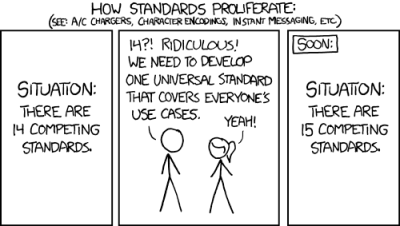
Much of this service auto-discovery is tossed under the header of ‘zero-configuration networking‘, or zeroconf for people who don’t like typing. The best part about zeroconf is probably that there are so many standards here, ranging from DNS-SD to mDNS, UPnP, SLP and others. Perhaps unsurprisingly, one of the major issues here is that platform support here is spotty, with mDNS – despite being one of the most universal – not having much support outside of MacOS/OS X with Bonjour and Linux/BSD with Avahi.

Thus while trying to add the auto-discovery of NymphCast receivers and media servers by NymphCast clients, I found myself asking the daunting question of whether I was at risk of being about to embark on reinventing the proverbial wheel. After all, nobody wants to become the subject of an xkcd comic.

UDP Discovery Basics

As it turns out, I ought not to have been too worried, as despite looking everywhere I could find nothing along the lines of the NyanSD network service discovery (NSD) protocol that I ended up implementing and integrating into NymphCast. What I wanted after all was the most no-frills NSD possible that could be easily integrated, while working the same across just about any desktop, server and embedded platform imaginable.

All that’s needed for this is a way to create an appropriate UDP socket, and a way to either broadcast a query and receive the response, or to listen for incoming UDP packets. Here you can figure out the platform-native method for each target platform, or not reinvent the wheel and use an existing networking library for C++ like Poco. This is what I used for NyanSD, along with my ByteBauble utility to handle endianness conversions.

Advertisement

For the UDP server — the listening side — the procedure is fairly standard, with a regular UDP listening socket. As UDP is a connectionless protocol, there is not a lot of preamble here, just a UDP socket instance (here Poco::Net::DatagramSocket), which is bound to the target port and regularly polls for any fresh UDP packets to process. This can all be seen in the single source file for NyanSD which covers both the client and server side code.

Where things get spicy is with the client that sends the broadcast query and waits for any replies. If we were to just shove the query data into the socket along with the request to toss it over to a regular IP address, not a lot would happen. To make it into a broadcast request we need a few things:

  1. Let the network subsystem know that we want to do broadcast things.
  2. Create the special broadcast address for the target network interface.

With Poco the first point is easily handled by simply calling setBroadcast(true) on the UDP socket instance. For BSD sockets this sets the appropriate flag on the socket, which is essentially repeated across all OS implementations due to how prevalent the BSD socket library is.

The second point can be summarized for IPv4 as a curt ‘make it end with .255’. For example 192.168.0.255 when the client network interface’s IP address is 192.168.0.42. If there are multiple interfaces on the client system, you can go through the list one by one to broadcast on each of them before filtering out potential duplicate returns.

As for how to do broadcasting with IPv6: you don’t, as this protocol relies on multicast and special multicast receiver groups, which is another kettle of fish and of not much relevance for LANs.

Advertisement

Complications

If you look at the NyanSD API, it may give the impression that the query process is incredibly straightforward, with the sendQuery() function neatly returning a stack of remote systems that responded to our query. While these are definitely all the responses, it’s important to remember that NyanSD queries every single network interface. This means that the responses are likely to contain duplicates, which may even come from the loopback address when a service runs locally.

The filtering of this is captured in the NymphCast client library (libnymphcast) where the findServers() function in the main source file calls the isDuplicate() and isDuplicateName() functions, as well as the removeLoopback() function that nukes any responses that match a remote service found via a non-loopback interface. This last filtering is essential for NymphCast when e.g. using playback groups that would otherwise get confused by a stray loopback address.

Although one may think that such in-depth filtering is unnecessary if all you have is a single Wi-Fi or Ethernet interface in your system, one of the curveballs that I encountered during real-life testing was apparently related to Wi-Fi repeaters. For some reason it seems that the way that the repeaters did their broadcasting led to erroneous duplication of packets and thus multiple returns from a single system.

Depending on your exact use case and network configuration you may encounter any such issues and perhaps an exciting new one.

Advertisement

NyanSD Findings

Over the years that NyanSD has been used in the NymphCast project, it has proven to be one of the most reliable and probably nearly zero-fuss components. I have so far used it on Windows, various Linux distributions, FreeBSD, Haiku, Android, and the ESP32 via FreeRTOS and ESP-IDF. What this experience has proven to me most of all is that service discovery doesn’t have to be complicated.

The basic UDP protocol is simple and reliable enough that, barring a very sick LAN, there shouldn’t be any issues here. Assuming you get your filtering sorted of the responses, it’s probably the last part of a project to worry about.

One thing that I’m also very happy with in NyanSD is that there’s no set port in the protocol, like how mDNS always uses port 5353. What this means is that I can have NyanSD listen with a UDP socket on the same port as the NymphCast server’s TCP socket, which also means that different services with their own port can be targeted directly rather than every NyanSD-enabled service on the network getting blasted by every NyanSD query.

I did also do some work on a NyanSD daemon as a more central services database, but so far I have had no real need for it in a practical deployment. I guess that such a thing could be very useful if the port of a service is not set in stone, but generally that’s the one aspect of network services that tends to be boringly predictable.

Advertisement

Source link

Continue Reading

Trending

Copyright © 2025