Connect with us

Tech

Our first Google Pixel 11 design leak may have revealed a change coming to the iconic camera bar

Published

on


  • A case for the Pixel 11 Pro XL has already shown up online
  • We may get a bigger but thinner camera bar
  • These handsets could well be launching around August time

The chunky camera bar sitting around the back of Google‘s flagship Pixel phones certainly makes them stand out, but it seems there may be a design tweak on the way with the Pixel 11 series that’s expected later this year.

Case maker ThinBorne (via Android Authority) has already posted a listing for a Pixel 11 Pro XL case, which gives us some idea of what might be coming. The case design suggests the phone’s camera bar may cover a slightly larger area, and protrude a little less.

Source link

Advertisement
Continue Reading
Click to comment

Leave a Reply

Your email address will not be published. Required fields are marked *

Tech

GeekWire Podcast on location at OpenAI in Bellevue, with CTO of Applications Vijaye Raji

Published

on

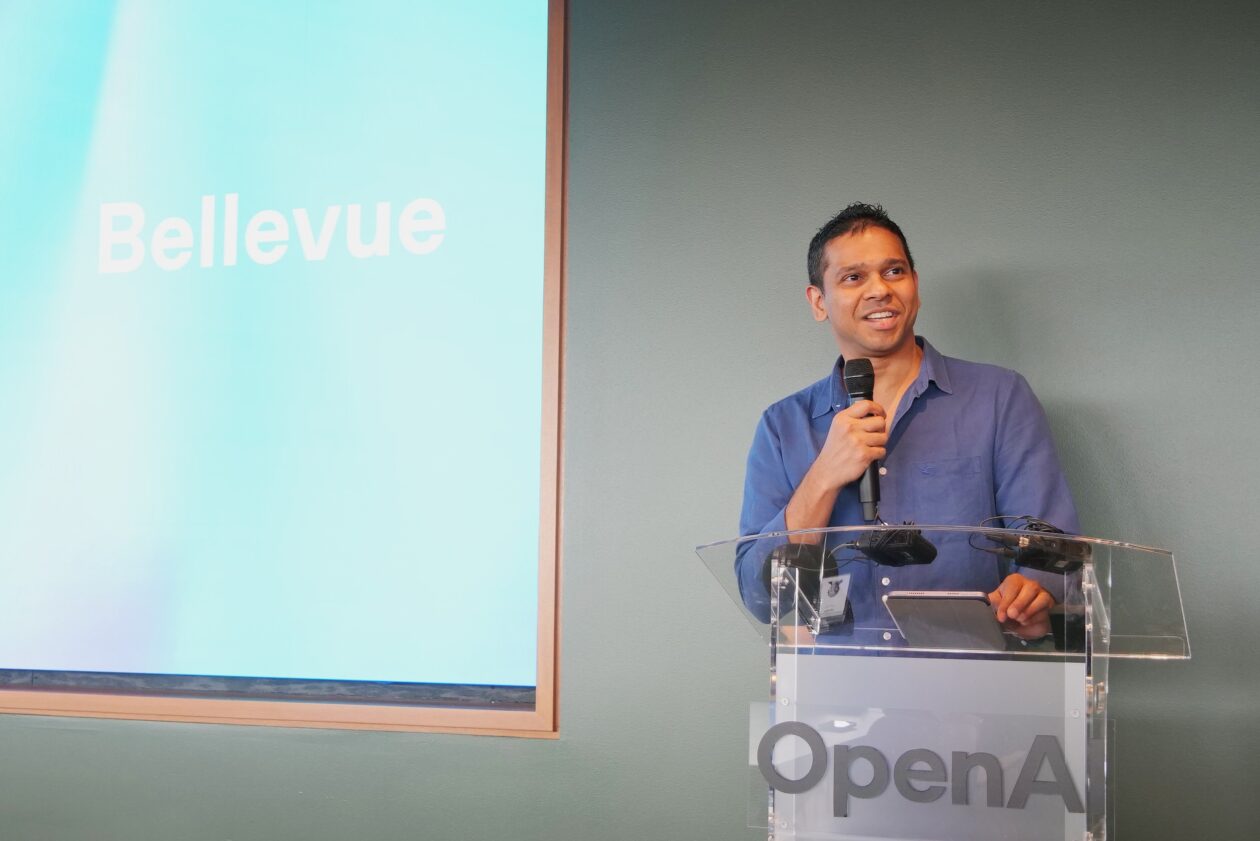
Vijaye Raji, OpenAI’s CTO of Applications, speaks at the company’s Bellevue office opening. (GeekWire Photo / Todd Bishop)

OpenAI just opened its largest office outside San Francisco, in downtown Bellevue, Wash., and we were there for the grand opening to tour the space, check out the vibe, and record this week’s GeekWire Podcast.

Chatting inside the OpenAI game room, we share our observations about the Mad Men-meets-Pacific Northwest aesthetic — which features open floor plans and a wide variety of common areas — and try to figure out what it all says about OpenAI’s culture. 

Plus, a conversation with Vijaye Raji, former Statsig CEO and now OpenAI’s CTO of applications, about Codex, infrastructure, hiring, and the evolution and growth of Silicon Valley tech giants in the region. 

In our final segment, it’s the return of the GeekWire trivia challenge, with a question focusing on one of the earliest tech giants to establish an outpost in the Seattle area. 

‘Hard to imagine going back’

One of the most interesting moments in the conversation with Raji came when he described how OpenAI’s own Codex tool has changed his day-to-day work, to the point where he’s personally making software again, or at least he’s prompting the software to make software.

Advertisement

“Codex has made coding a lot more delightful,” Raji said. “I’m back coding.”

He described a new daily rhythm: “Before you hop into a meeting, you ask it to go do a set of tasks, and then you jump into a meeting, and then when you come back, it’s done, and then you review it,” he said. “It’s so cool.”

OpenAI CTO of Applications Vijaye Raji (left) and Bellevue Mayor Mo Malakoutian just after cutting the ribbon at the opening of OpenAI’s new Bellevue office. (GeekWire Photo / Todd Bishop)

Internally, Raji said teams using Codex are seeing 2-3x productivity gains in terms of code output. Beyond engineering, the tool has found its way into marketing, sales, and operations.

“It’s very hard for me to imagine going back to the way we used to write code anymore,” he said. “It’s fundamentally changed.”

OpenAI’s Codex, which got a Windows app this week, is part of an explosion of AI coding tools including GitHub Copilot (Microsoft), Amazon Q Developer, Google’s Gemini Code Assist, Anthropic’s Claude Code and others, all promising significant developer productivity gains.

Advertisement

A template for other OpenAI offices

As for the Bellevue office, Raji sees it as a potential model for OpenAI’s expansion elsewhere. The proximity to San Francisco headquarters, the shared time zone, the short distance from OpenAI partners Microsoft and Amazon, and the depth of local infrastructure talent make it an ideal test case.

A seating area at OpenAI’s new Bellevue office, featuring the retro-modern aesthetic that runs throughout the space. (Trevor Tondro Photo for OpenAI)

“If we can make Seattle very, very successful, we can take that formula and apply it to more offices,” he said.

OpenAI currently has 250 employees in Bellevue, with room to grow to 1,400. The office houses teams working on infrastructure, ChatGPT, research, advertising, and partnerships.

Raji will be speaking at GeekWire’s AI event, Agents of Transformation, March 24. More info and tickets.

Subscribe to GeekWire in Apple Podcasts, Spotify, or wherever you listen.

Advertisement

Related coverage: Inside OpenAI’s new Bellevue office: A swanky statement about AI’s impact on the Seattle region

Audio editing by Curt Milton.

Source link

Advertisement
Continue Reading

Tech

OpenAI delays ChatGPT’s ‘adult mode’ again

Published

on

OpenAI has delayed the launch of “adult mode,” a ChatGPT feature that will give verified adult users access to erotica and other adult content.

OpenAI CEO Sam Altman first announced the feature in October, writing, “In December, as we roll out age-gating more fully and as part of our ‘treat adult users like adults’ principle, we will allow even more, like erotica for verified adults.”

The launch had already been delayed once, from December — when Altman reportedly sent an internal memo declaring a “code red” and calling for teams to focus on the core ChatGPT experience — until the first quarter of this year. 

Now an OpenAI spokesperson has told Axios that the company is  “pushing out the launch of adult mode” in order to “focus on work that is a higher priority for more users right now,” such as work on aspects like intelligence, personality, and making the chatbot “more proactive.”

Advertisement

“We still believe in the principle of treating adults like adults, but getting the experience right will take more time, ” the spokesperson said.

It’s not clear how long the delay is expected to last. The news was first reported by Sources.

Source link

Advertisement
Continue Reading

Tech

Mozilla says Claude AI uncovered over 100 Firefox bugs in just two weeks, including 14 high-severity flaws

Published

on


Mozilla is now working with Anthropic’s Frontier Red Team to identify and patch potentially dangerous security vulnerabilities in Firefox. According to Mozilla, the AI company approached them a few weeks ago with results from a newly developed, AI-assisted bug-hunting method. The approach appears to work, Mozilla said, and could ultimately…
Read Entire Article
Source link

Continue Reading

Tech

Why People Keep Attacking & Vandalizing These Specific Traffic Cameras

Published

on


Have you spotted a Flock camera on your daily commute yet? If not, it’s possible somebody knocked the things down. Over 80,000 of these surveillance traffic cameras have been installed across the US so far, making them one of the most widespread forms of surveillance in the country. Unsurprisingly, not everyone’s thrilled by that unsettling fact. It’s led to a number of Flock cams getting vandalized, dismantled, or outright destroyed.

Incidents of vandalism against the cameras have been reported across multiple states so far, including Connecticut, Illinois, Virginia, California, and Oregon. Damage has ranged from smashed equipment to devices being cut down from poles or even reportedly being shot. The more cameras get installed, the more backlash we might see — especially considering Flock’s role in immigration enforcement.

Ostensibly, Flock Safety scores contracts to install these cameras to serve as automated license plate readers for local law enforcement. The cameras photograph license plates on public roads and let law enforcement agencies search the images to pin down vehicles with possible ties to criminal investigations. Similar to the debate over red light cameras, critics say this is just plain unconstitutional. And like the argument against doorbell cameras, there’s also the fact that Flock can (and has!) used its large network to track people’s driving habits, including following where and when they travel. Just look at one Virginia driver who was tracked over 500 times.

Advertisement

What Flock has to say for itself

Given Flock’s contracts with law enforcement agencies, there are legitimate privacy concerns and fears about how that information’s being shared between agencies. Still, Flock insists its system is far from mass surveillance. The company says its cameras only capture point-in-time images of license plates from public roadways and can’t actually track individuals or vehicles, especially not continuously over time. The company also claims most images collected are never accessed by investigators and are eventually deleted after a set retention period. Flock defends itself even further by saying they have safeguards in place (like audit logs, geofencing, and role-based access controls) to limit misuse of the system, too.

But Flock’s actions tell a different story, especially their roundabout support for anti-immigration efforts being carried out by U.S. Immigration and Customs Enforcement. The agency has been dependent on Flock to help locate people during raids and deportation efforts by way of local law enforcement agencies with access to the data. It’s something Flock knows about and has admitted as much. That affiliation (however far removed) has added fuel to the fire at city meetings, during public protests, and, in some cases, in direct action by residents that believe there’s enough evidence to say Flock breaks the law and threatens civil liberties.

Advertisement


Source link

Advertisement
Continue Reading

Tech

We’re Training Students To Write Worse To Prove They’re Not Robots, And It’s Pushing Them To Use More AI

Published

on

from the can-someone-ask-an-ai-about-incentives dept

About a year and a half ago, I wrote about my kid’s experience with an AI checker tool that was pre-installed on a school-issued Chromebook. The assignment had been to write an essay about Kurt Vonnegut’s Harrison Bergeron—a story about a dystopian society that enforces “equality” by handicapping anyone who excels—and the AI detection tool flagged the essay as “18% AI written.” The culprit? Using the word “devoid.” When the word was swapped out for “without,” the score magically dropped to 0%.

The irony of being forced to dumb down an essay about a story warning against the forced suppression of excellence was not lost on me. Or on my kid, who spent a frustrating afternoon removing words and testing sentences one at a time, trying to figure out what invisible tripwire the algorithm had set. The lesson the kid absorbed was clear: write less creatively, use simpler vocabulary, and don’t sound too good, because sounding good is now suspicious.

At the time, I worried this was going to become a much bigger problem. That the fear of AI “cheating” would create a culture that actively punished good writing and pushed students toward mediocrity. I was hoping I’d be wrong about that.

Turns out… I was not wrong.

Advertisement

Dadland Maye, a writing instructor who has taught at many universities, has published a piece in the Chronicle of Higher Education documenting exactly how this has played out across his classrooms—and it’s even worse than what I described. Because the AI detection regime hasn’t just pushed students to write worse. It has actively pushed students who never used AI to start using it.

This fall, a student told me she began using generative AI only after learning that stylistic features such as em dashes were rumored to trigger AI detectors. To protect herself from being flagged, she started running her writing through AI tools to see how it would register.

A student who was writing her own work, with her own words, started using AI tools defensively—not to cheat, but to make sure her own writing wouldn’t be accused of cheating. The tool designed to prevent AI use became the reason she started using AI.

This is the Cobra Effect in its purest form. The British colonial government in India offered a bounty for dead cobras to reduce the cobra population. People started breeding cobras to collect the bounty. When the government scrapped the program, the breeders released their now-worthless cobras, making the problem worse than before. AI detection tools are our cobra bounty. They were supposed to reduce AI use. Instead, they’re incentivizing it.

And this goes well beyond one student’s experience. Maye describes a pattern spreading across his classrooms:

Advertisement

One student, a native English speaker, had long been praised for writing above grade level. This semester, a transfer to a new college brought a new concern. Professors unfamiliar with her work would have no way of knowing that her confident voice had been earned. She turned to Google Gemini with a pointed inquiry about what raises red flags for college instructors. That inquiry opened a door. She learned how prompts shape outputs, when certain sentence patterns attract scrutiny, and ways in which stylistic confidence trigger doubt. The tool became a way to supplement coursework and clarify difficult material. Still, the practice felt wrong. “I feel like I’m cheating,” she told me, although the impulse that led her there had been defensive.

A student praised for years for being an exceptional writer now feels like a cheater because she had to learn how AI detection works in order to protect herself from being falsely accused. The surveillance apparatus has turned writing talent into a liability.

Then there’s this:

After being accused of using AI in a different course, another student came to me. The accusation was unfounded, yet the paper went ungraded. What followed unsettled me. “I feel like I have to stay abreast of the technology that placed me in that situation,” the student said, “so I can protect myself from it.” Protection took the form of immersion. Multiple AI subscriptions. Careful study of how detection works. A fluency in tools the student had never planned to use. The experience ended with a decision. Other professors would not be informed. “I don’t believe they will view me favorably.”

The false accusation resulted in the student subscribing to multiple AI services and studying how the detection systems work. Not because they wanted to cheat, but because they felt they had no other option for self-defense. And then they decided to keep quiet about it, because telling professors about their AI literacy would only invite more suspicion.

Look, I get it: some students are absolutely using AI to cheat, and that’s a real issue educators have to deal with. But the detection-first approach has created an incentive structure that’s almost perfectly backwards. Students who don’t use AI are punished for writing too well. Students who are falsely accused learn that the only defense is to become fluent in the very tools they’re accused of using. And the students savvy enough to actually cheat? They’re the ones best equipped to game the detectors. The tools aren’t catching the cheaters—they’re radicalizing the honest kids.

Advertisement

As Maye explains, this dynamic is especially brutal at open-access institutions like CUNY, where students already face enormous pressures:

At CUNY, many students work 20 to 40 hours a week. Many are multilingual. They encounter a different AI policy in nearly every course. When one professor bans AI entirely and another encourages its use, students learn to stay quiet rather than risk a misstep. The burden of inconsistency falls on them, and it takes a concrete form: time, revision, and self-surveillance. One student described spending hours rephrasing sentences that detectors flagged as AI-generated even though every word was original. “I revise and revise,” the student said. “It takes too much time.”

Just like my kid and the school-provided AI checker, Maye’s student spent a bunch of wasted time “revising” to avoid being flagged.

Students spending hours rewriting their own original work—work that they wrote—because an algorithm decided it sounded too much like a machine. That’s time taken away from studying, working, caring for family, or, you know, actually learning to write better.

Learning to revise is a key part of learning to write. But revisions should be done to serve the intent of the writing. Not to appease a sketchy bot checker.

Advertisement

What Maye articulates so well is that the damage here goes beyond false positives and wasted time. The deeper problem is what these tools teach students about writing:

Detection tools communicate, even when instructors do not, that writing is a performance to be managed rather than a practice to be developed. Students learn that style can count against them, and that fluency invites suspicion.

We are teaching an entire generation of students that the goal of writing is to sound sufficiently unremarkable! Not to express an original thought, develop an argument, find your voice, or communicate with clarity and power—but to produce text bland enough that a statistical model doesn’t flag it.

The word “devoid” is too risky. Em dashes are suspicious. Confident prose is a red flag.

My kid’s Harrison Bergeron experience was, in retrospect, a perfect preview of all of this. Vonnegut warned about a society that forces everyone down to the lowest common denominator by handicapping anyone who shows ability. And here we are, with AI detection tools functioning as the Handicapper General of student writing, punishing fluency, penalizing vocabulary, and training students to sound as mediocre as possible to avoid triggering an algorithm that can’t even tell the difference between a thoughtful essay and a ChatGPT output.

Advertisement

Maye eventually did the only sensible thing: he stopped playing the game.

Midway through the semester, I stopped requiring students to disclose their AI use. My syllabi had asked for transparency, yet the expectation had become incoherent. The boundary between using AI and navigating the internet had blurred beyond recognition. Asking students to document every encounter with the technology would have turned writing into an accounting exercise. I shifted my approach. I told students they could use AI for research and outlining, while drafting had to remain their own. I taught them how to prompt responsibly and how to recognize when a tool began replacing their thinking.

Rather than taking a “guilt-first” approach, he took one that dealt with reality and focused on what would actually be best for the learning environment: teach students to use the tools appropriately, not as a shortcut, and don’t start from a position of suspicion.

The atmosphere in my classroom changed. Students approached me after class to ask how to use these tools well. One wanted to know how to prompt for research without copying output. Another asked how to tell when a summary drifted too far from its source. These conversations were pedagogical in nature. They became possible only after AI use stopped functioning as a disclosure problem and began functioning as a subject of instruction.

Once the surveillance regime was lifted, students could actually learn. They asked genuine questions about how to use tools effectively and ethically. They engaged with the technology as a subject worth understanding rather than a minefield to navigate. The teacher-student relationship shifted from adversarial to educational, which is, you know, kind of the whole point of school.

That line Maye uses: “these conversations were pedagogical in nature” keeps sticking in my brain. The fear of AI undermining teaching made it impossible to teach. Getting past that fear brought back the pedagogy. Incredible.

Advertisement

This piece should be required reading for every educator thinking that “catching” students using AI is the most important thing.

As Maye discovered through painful experience, the answer is to stop treating AI as a policing problem and start treating it as an educational one. Teach students how to write. Teach them how to think critically about AI tools. Teach them when those tools are helpful, when they’re harmful, and when they’re a crutch. And for the love of all that is good, stop deploying detection tools that punish good writers and push everyone toward a bland, algorithmic mean.

We are, quite literally, limiting our students’ writing to satisfy a machine that can’t tell the difference. Vonnegut would have had a field day.

Filed Under: ai, ai detection, cheating, dadland maye, students

Advertisement

Source link

Continue Reading

Tech

Modder Turns PS5 Into a Linux-Based Steam Machine

Published

on

Andy Nguyen PS5 Linux Steam Machine Mod
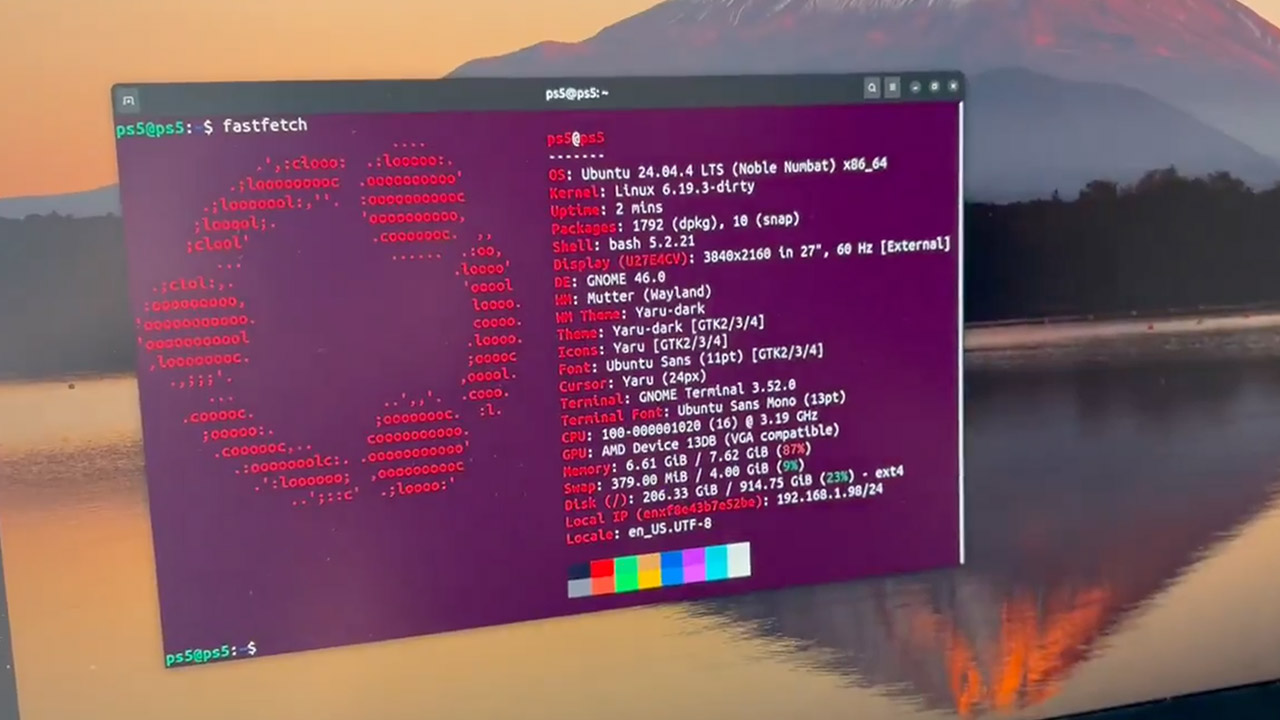
One modder has done something rather impressive with a PS5, transforming a device that was never supposed to be more than a Sony console into a fully-fledged Linux gaming system with a fairly intriguing twist: it runs PC titles via Steam. Andy Nguyen, known online as theflow0, is the modder in issue, as he is the one who got it operating and gave the console serious gaming credentials.

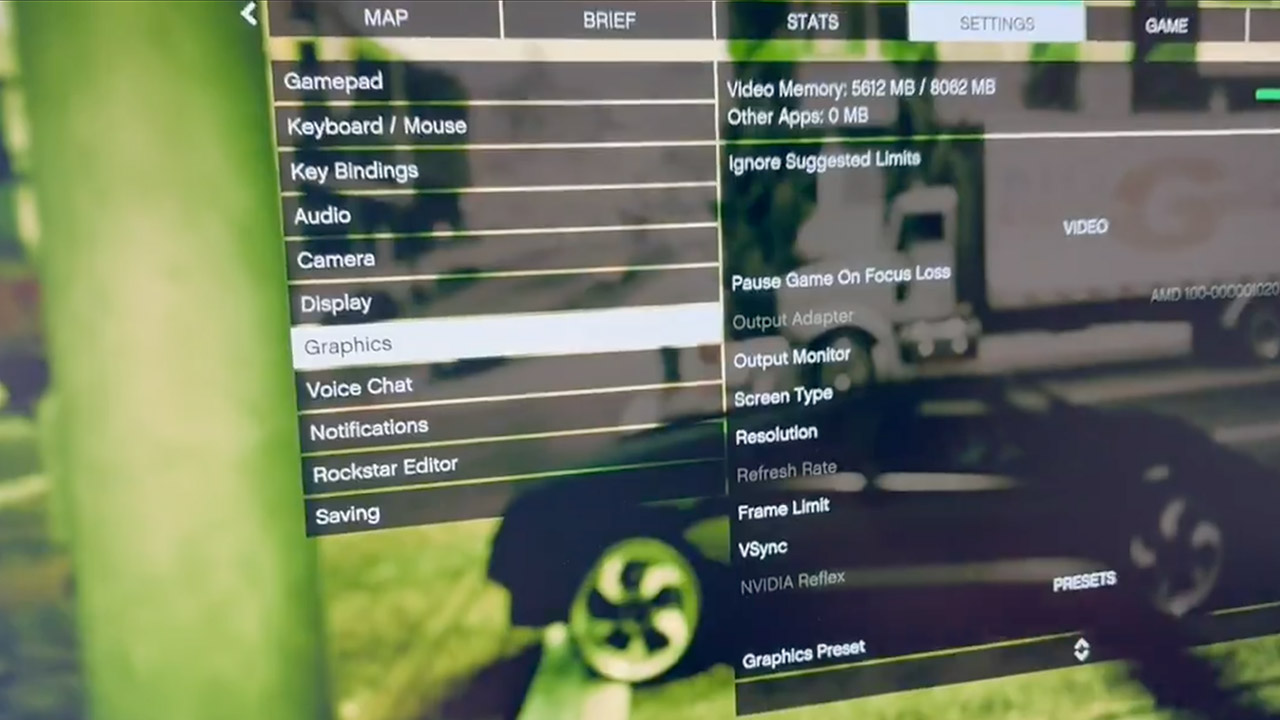
Nguyen proceeded to boot up a full Linux system on the console hardware and managed to load Grand Theft Auto V in Enhanced mode with ray tracing enabled, all while keeping the game running smoothly at a rock-solid 60 fps per second in 1440p resolution. That’s far superior to the basic demo you’d expect from someone experimenting with this type of technology.

There are some catches, as this configuration only works on older PS5 units with outdated firmware, ranging from 1.xx to 2.xx. Newer firmware simply eliminates the attack chain Nguyen used, a well-known one called Byepervisor, and Sony has a pretty solid grip on preventing people from utilizing this type of workaround. Anyone who has updated since those early builds will be unable to get the mod to work unless they roll back, an option that Sony has long blocked.

Andy Nguyen PS5 Linux Steam Machine Mod
Nguyen contributed significantly to the open-source Mesa graphics project in order to make the PS5’s GPU to run correctly under Linux. As a result, the console’s AMD hardware is functioning smoothly, and the speeds he’s achieving are no joke: 3.2 GHz on the CPU and 2.0 GHz on the GPU.

If you push the limitations even further, up to 3.5 GHz on the CPU and 2.23 GHz on the GPU, you’ll most likely wind up with an overheating PS5 Slim. Still, HDMI works perfectly for outputting 4K video and audio. All of the USB ports appear to be working normally. Steam even integrates with the entire setup in Big Picture mode, transforming the PS5 into a living-room Steam machine. Plus, Proton works to make PC games such as GTA V playable on consoles.

Andy Nguyen PS5 Linux Steam Machine Mod
Of course, there are risks to all of this, as the entire technique is based on a full attack chain, with no simple software toggle in sight. By choosing this path, you are essentially voiding your warranty, and there is a potential that you may end up with a console that cannot be used at all if all goes wrong. To make matters worse, the little window of opportunity for completing all of this is shrinking as people continue to update their consoles.
[Source]

Advertisement

Source link

Continue Reading

Tech

Laser 3D Printing Could Build Lunar Base Structures

Published

on

Through the Artemis Program, NASA hopes to establish a permanent human presence on the Moon in its southern polar region. China, Russia, and the European Space Agency (ESA) have similar plans, all of which involve building bases near the permanently shadowed regions (PSRs)craters that contain water icethat dot the South Pole-Aitken Basin. For these and other agencies, it is vital that these bases be as self-sufficient as possible since resupply missions cannot be launched regularly and take several days to arrive.

Therefore, any plan for a lunar base must come down to harvesting local resources to meet the needs of its crews as much as possiblea process known as In-Situ Resource Utilization (ISRU). In a recent study, researchers at The Ohio State University (OSU) proposed using a specialized laser-based 3D printing method to turn lunar regolith into hardened building material. According to their findings, this method can produce durable structures that withstand radiation and other harsh conditions on the lunar surface.

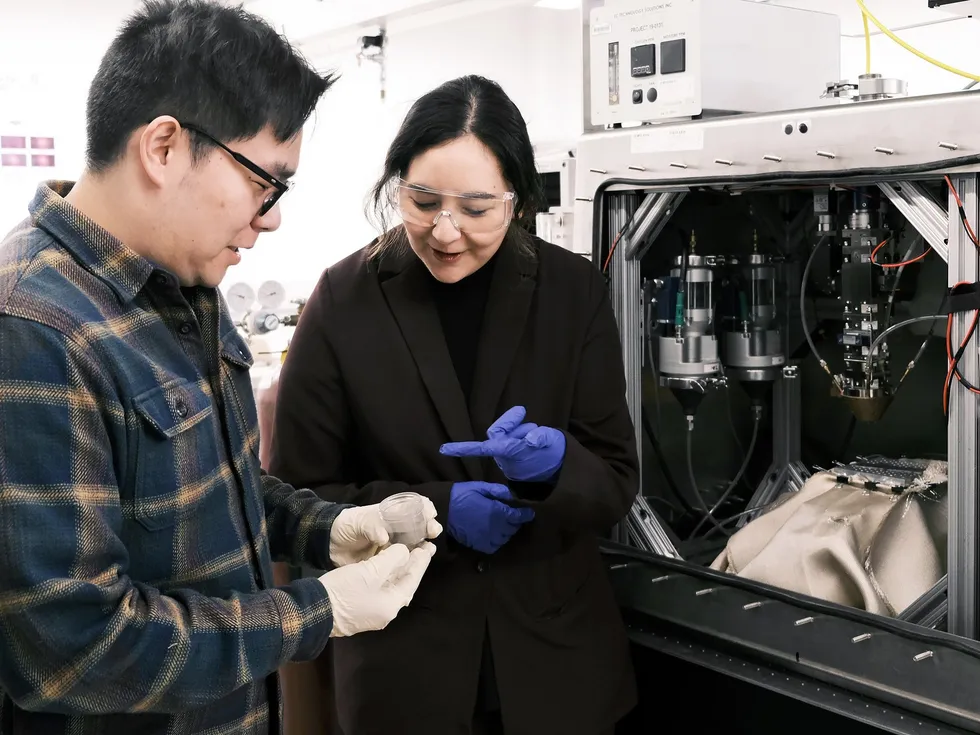
The research team was led by Sizhe Xu, a graduate research associate at OSU. He was joined by colleagues from OSU’s Department of Integrated Systems Engineering, Mechanical and Aerospace Engineering, and Materials Science & Engineering. Their paper, “Laser directed energy deposition additive manufacturing of lunar highland regolith simulant,” appeared in the journal Acta Astronautica.

Challenges of Lunar 3D Printing

The importance of ISRU for human exploration has prompted the rapid development of additive manufacturing systems, or 3D printing. These systems have proven effective at fabricating tools, structures, and habitats, effectively reducing dependence on supplies delivered from Earth. Developing such systems for long-duration missions is one of the most challenging aspects of the process, as they must be engineered to operate in the extreme environment on the Moon. This includes the lack of an atmosphere, massive temperature variations, and the ever-present problem of Moon dust.

Advertisement

Scientists use two types of lunar regolith for their experiments and research: Lunar Highlands Simulant (LHS-1) and Lunar Mare Simulant (LMS-1). As part of their research, the team used LHS-1, which is rich in basaltic minerals, similar to rock samples obtained by the Apollo missions. They melted this regolith with a laser to produce layers of material and fused them onto a base surface of stainless steel or glass. To assess how well these objects would fare in the lunar environment, the team tested their fabrication process under a range of different environmental conditions.

One thing they noticed was that the fused regolith adhered well to alumina-silicate ceramic, possibly because the two compounds form crystals that enhance heat resistance and mechanical strength. This revealed that the overall quality of the printed material is largely dependent on the surface onto which the regolith is printed. Other environmental factors, such as atmospheric oxygen levels, laser power, and printing speed, also affected the stability of the printed material.

Where 3D-Printed Material Could Help

Deployed to the Moon’s surface, this process could help build habitats and tools that are strong, resilient, and capable of handling the lunar environment. This has the added benefit of increasing independence from Earth, which is key to realizing long-duration missions on the Moon. In addition to assisting astronauts exploring the Moon in the near future (as part of NASA’s Artemis Program), this technology could also lead to resilient habitats that will enable a long-term human presence on the Moon, Mars, and beyond.

However, there are several unknown environmental factors that could limit the effectiveness of these systems on other worlds, and more data is needed before they can be addressed. In their study, the team suggests that instead of being powered by electricity, future scaled-up versions of their method could rely on solar or hybrid power systems. Nevertheless, the potential for space exploration is clear, and the technology also has applications for life here on Earth. Sarah Wolff, an assistant professor in mechanical and aerospace engineering and a lead author on the study, explained:

Advertisement

There are conditions that happen in space that are really hard to emulate in a simulant. It may work in the lab, but in a resource-scarce environment, you have to try everything to maximize the flexibility of a machine for different scenarios. If we can successfully manufacture things in space using very few resources, that means we can also achieve better sustainability on Earth. To that end, improving the machine’s flexibility for different scenarios is a goal we’re working really hard toward.

As the saying goes, “solving for space solves for Earth.” In environments where materials and resources are limited, laser-based 3D printing is one of several technologies that could support sustainable living. This applies equally to extraterrestrial environments and to regions on Earth experiencing the effects of climate change.

From Your Site Articles

Related Articles Around the Web

Source link

Advertisement
Continue Reading

Tech

Modder turns a PS5 into a Linux Steam Machine, runs GTA V with ray tracing

Published

on


Nguyen, known online as theflow0, has turned a retail PlayStation 5 into a Linux gaming box powerful enough to run Grand Theft Auto V Enhanced with ray tracing at 1440p and 60 frames per second.
Read Entire Article
Source link

Continue Reading

Tech

Leading by example: Embracing tools internally before shipping them externally

Published

on

As innovation accelerates and software teams face more pressure than ever to ship quickly, an essential step in the innovation process is often overlooked in favor of speed.

While traditional quality assurance practices are important, the real transformation happens when developers go beyond their role as builders and become genuine users of their products. This shift from creator to customer changes how product value is understood, validated and delivered.

Thomas Reisenbichler

VP of Delivery, Reliability & Security at Dynatrace.

Source link

Continue Reading

Tech

Galaxy S26 Ultra, Galaxy Buds 4, Dell XPS 14 and more

Published

on

It’s a busy time for the reviews team and Engadget, and with Apple announcing new devices this week, we aren’t letting up any time soon. New products from Samsung, Dell, Google and ASUS headline the roundup this time, and we’ve got a few unique items to discuss as well. Read on to catch up on anything you might’ve missed, including the latest installment of Pokémon.

Samsung Galaxy S26 Ultra

Image for the large product module

Samsung / Engadget

While the S26 Ultra might not wow you with a ton of major improvements, it brings subtle upgrades across the board along with a new standout display for anyone who cares about privacy.

Pros
Advertisement
  • Superb Privacy Display
  • Great performance
  • Strong battery life
  • Wider aperture for main and 5x telephoto lenses
Cons
  • Expensive
  • S-Pen is unchanged
  • No built-in magnetic ring for Qi2 accessories

This year’s Samsung flagship phone may not impress you with a load of new features, but there’s one in particular that senior reporter Sam Rutherford was wowed by. “This goes double for the S26 Ultra, whose biggest upgrade — the Privacy Display — is something meant to stop other people from snooping at what you’re doing.,” he said. “When it’s on, you probably won’t even be able to tell, which is kind of the point.”

Samsung Galaxy Buds 4 and 4 Pro

Image for the large product module

Samsung/Engadget

The Galaxy Buds 4 Pro are the best earbuds for Samsung’s phones, due to device-specific features and the combination of great sound quality and capable ANC.

Pros
  • Refined design
  • Excellent audio
  • Lots of features
Cons
  • Design is still unoriginal
  • ANC performance is good, not great
  • Many features require a Samsung phone

Samsung went all-in with with AirPods mimicry last year, and that continues on the Galaxy Buds 4 and 4 Pro. However, despite big improvements to sound quality and the continued addition of new features, Samsung could certainly do more. “The company is really only lagging behind Apple in two areas: hearing health and heart-rate tracking,” I wrote. “Samsung currently offers the option to amplify voices on its earbuds, but it hasn’t built a hearing test or the hearing protection tools Apple has. The biggest update on the AirPods Pro 3 was the addition of heart-rate tracking last year, which would be a great foundation for a fitness-focused version of the Galaxy Buds.”

Dell XPS 14 (2026)

Image for the large product module

Dell

Advertisement

Dell’s revamped XPS 14 is lighter and more powerful than ever, but it’s hampered by an annoying keyboard.

Pros
  • Gorgeous and light design
  • Powerful Intel chips
  • Lovely OLED screen
  • Fixes previous design mistakes
Cons
  • Baffling keyboard issues
  • Expensive for beefy configs
  • Mediocre battery life

We review a lot of devices that are almost excellent, except for one big flaw. That’s the case with the new XPS 14, where senior reporter Devindra Hardawar had a hard time with very basic functionality. “If I were to judge the XPS 14 based purely on its specs and design alone, it would be my favorite Windows laptop available today,” he wrote. “Dell is so close to making a PC that’s a true MacBook Pro competitor, it’s a shame a simple keyboard issue holds the XPS 14 back from true greatness.”

Google Pixel 10a

Image for the large product module

Google / Engadget

Despite few upgrades, the Pixel 10a remains an excellent option for those looking for an affordable smartphone.

Advertisement
Pros
  • Bright, vivid 120Hz display
  • Great camera software
  • Satellite SOS included
  • Available in a handful of lovely colors
Cons
  • Slow wired and wireless charging
  • No Pixelsnap support

Google’s A-series devices have consistently been a great option if you’re looking to spend less on phone but still want a capable handset. Despite minimal upgrades on the Pixel 10a, that sentiment still holds true. “On the one hand, part of me wants to dock points because Google has added so few updates,” senior reporter Igor Bonifacic said. “On the other, the 10a is still a great phone for $500, and at a time when consumer electronics are becoming more expensive by the day, the fact it hasn’t gone up in price is a small miracle.”

ASUS ProArt GoPro Edition PX13

Image for the large product module

ASUS/Engadget

The ASUS ProArt GoPro Edition is the best Windows creator laptop on the market, thanks to the excellent blend of performance and battery life. However, it’s quite expensive at $3,000.

Advertisement
Pros
  • Excellent performance
  • Good battery life
  • OLED touchscreen with accurate colors and rich blacks
  • Good keyboard and trackpad
Cons
  • Display lacks brightness
  • High price
  • Fans are loud under load

Creators often need a combination of power and display quality in a laptop that would be overkill for most of us. For those who do need it, contributing reporter Steven Dent found the ASUS ProArt GoPro Edition PX13 nearly checked all the boxes. “ASUS is one of the few PC manufacturers trying to compete with Apple in the creator market, and with the ProArt GoPro Edition laptop, it has largely succeeded,” he said. “This model offers excellent performance and battery life, a huge amount of memory, a very nice OLED HDR display, a nice range of ports and an excellent keyboard and trackpad.”

Ambient Dreamie, Seattle Ultrasonics and more

We also recently reviewed a couple of off-beat gadgets, both of which earned high marks from our team. The Ambient Dreamie is a “bedside companion” that functions as an alarm clock with both bedtime and morning routines. Weekend editor Cheyenne MacDonald was so impressed by how it improved her sleep that she bought one for herself. And the Seattle Ultrasonics C-200 was dubbed “the future of kitchen knives” by Sam.

Sam also played a few hours of Pokémon Pokopia and he was charmed by the new take on gameplay for the series. Lastly, Devindra put the Falcon Northwest FragBox through its paces, discovering a powerful gaming rig in machine that looks a bit like a box of fried chicken

Source link

Advertisement
Continue Reading

Trending

Copyright © 2025