It never seems like smartphones have enough storage. Even as we see Apple finally admit that 128GB isn’t enough — the iPhone 17 and iPhone 17 Pro now start at 256GB — that space still somehow magically gets eaten up by high-resolution photos and mobile games. We’ve previously covered all sorts of ways to get more storage on an iPhone or to use your Android’s microSD card to pick up the slack, but the best way to reclaim space is to do a bit of spring cleaning. Apps on your phone tend to get gummed up as time goes by, hoarding data and often failing to declutter automatically.
You can see which apps are the culprits easily on both Android and iOS. On Android, head to Settings > Storage > Apps; on iOS, go to Settings > General > iPhone Storage. Both list apps by size, so you know right away which ones are the worst offenders. Android lets you go to town clearing out storage and cache, and the iPhone lets you offload apps, but hold your horses. Here’s a list of apps that tend to hog storage and how to trim them down without doing anything too drastic. We’ll look at apps on both Android and iPhone.
Advertisement
Messaging apps
Jordan Wirth/SlashGear
Your preferred messaging app (or apps) is where you exchange gigabytes of messages, photos, videos, and files with family and friends over the years. Anecdotally, I’ve sometimes seen these apps cling onto several dozen gigabytes of data alone. Google Messages, iMessage, WhatsApp, Telegram, Messenger, it doesn’t matter which one you use, head into its in-app settings and start clearing house.
We’ll use WhatsApp as our primary example. In the app settings, go to Storage and data > Manage storage. Here, you’ll see how much each chat is taking. Open the biggest chats on the list one by one and delete the largest videos, photos, and files within — at least the ones you don’t mind parting with. You might want to back up your chat history in Settings > Chats > Chat Backup beforehand to ensure anything important isn’t lost. Unfortunately, the only way to have WhatsApp automatically clear up storage is by enabling disappearing messages, which permanently deletes old chats after a certain period.
Some apps will make this process easier than others. Telegram, for example, lets you set a hard local storage ceiling and automatically removes any local storage of chats after a certain date. The app will never go beyond that storage ceiling, and you won’t lose your messages either. Go to Settings > Data and Storage > Storage Usage, and then choose how long before each chat type (especially private and group chats) is automatically removed. We’d recommend setting the maximum cache size to a lower threshold, like 5GB. Note that some apps — like iMessage — have their storage-clearing options in your phone’s settings, not in-app. If your preferred messaging app hasn’t been mentioned here, check its in-app settings and you’ll likely find some means of clearing out storage.
Advertisement
Streaming service apps
Jordan Wirth/SlashGear
You’ve probably got one or two of the best streaming service platforms on your phone. Depending on the one you use — Netflix, HBO Max, Apple TV — a good chunk of your storage could be quietly taken up there. Any time you save movies or TV shows for offline viewing, unwatched downloads generally remain unless manually removed.
Let’s look at Netflix. The app’s offline downloads expire, though they remain on your phone rather than being automatically deleted. You have to manually go in and delete them one by one. It’s the same situation with other streaming services, like HBO Max and Hulu. Anecdotally, these downloads pile up fast if you don’t keep an eye on them; if you’re the sort of person who frequently downloads something with the intention of watching it later, then you might have gigabytes of unwatched media. Note: On iPhone, you can delete these directly from Settings with the “Review Downloaded Videos” option in iPhone Storage.
Advertisement
If you’re really tight on storage, we’d recommend disabling any automatic downloads. For example, Netflix has its “Smart Downloads” feature, which downloads content it thinks you might like for offline watching. Also take advantage of apps that let you choose the download quality going forward. HBO Max allows for selecting a trim “Good” video option that — while it looks like DVD quality — can be a fraction of “Better” or “Best,” which might consume 2GB for a single movie or episode.
Advertisement
Map apps
Jordan Wirth/SlashGear
Map apps do a lot more than just provide directions these days. Apple Maps, for example, can be invaluable for daily commuters who need to make sure they’re taking the right train, especially when paired with offline maps. These are a boon on vacations, when you might be in a foreign city with limited or no internet access and need to navigate a confusing transit system. But you guessed it, offline maps eat up storage like no one’s business; the city I live in takes up half a gigabyte on its own.
Similar to streaming apps, offline maps don’t usually automatically delete themselves. In Google Maps, for example, an offline map that you download will last a year before expiring, and Google does not have an option to automatically delete unused offline maps. So if you took a vacation six months ago and downloaded the offline map for that area, the download is still sitting there, wasting your space. If the map app you use does have the option to automatically delete them, enable it; Apple Maps has an “Optimize Storage” option in iPhone Storage.
Advertisement
Photos apps
Jordan Wirth/SlashGear
The default photos app where you keep your pics and videos will likely be the biggest offender on this list. Luckily, cloud storage options these days are cheap. Provided you have a reliable internet connection, offloading your entire photo library to the cloud comes with minimal downsides.
On iPhone, simply go to Settings > iCloud > Photos, and make sure the “Optimize iPhone Storage” option is enabled. From that moment on, your iPhone only keeps small, storage-efficient copies and downloads the full-resolution ones on demand. In Google Photos, find the “Free up space on this device” option under your account profile photo. Deleted photos and videos will remain in the cloud. You can downgrade your media to “Storage saver” quality, which is helpful if you still want to keep those photos on-device, or you’re limited to Google’s free 15GB of storage.
Besides the obvious stuff like deleting large video files, another option available to you is to merge duplicates. On iPhone, simply go to Utilities > Duplicates in the Photos app and merge them one by one, or select all to merge them all; you won’t see this option if you don’t have any. If you have duplicates in Google Photos, you will need to manually review them with Google Photos’ stacking feature.
Advertisement
Cloud storage
Jordan Wirth/SlashGear
You know the drill by now. Your cloud storage app of preference — Google Drive, iCloud, OneDrive, etc. — may be storing files offline that you forgot about. If you’ve been working with large files (or a lot of files) on your smartphone, double-check that they are not still lingering in storage.
In Google Drive, you can hit “Make available offline” next to any file, and it will appear in Menu > Offline. This includes Google Workspace documents, like Google Docs, making this a one-stop shop to delete offline files from multiple apps. OneDrive does things similarly. Files can be stored on your device with the “Keep Offline” option and found later in the “Files Available Offline” section of your profile.
The iPhone has a similar feature with iCloud, where choosing “Keep Downloaded” in the context menu for a file leaves it stored on your device. Unfortunately, there doesn’t appear to be a single, easy place to find these offline files; in iPhone Storage settings, you’ll only see how much data is being kept offline, but not file names or folders. Also, it appears that, in order to remove a file you’ve selected “Keep Downloaded” for, you need to go back to that specific file itself and uncheck “Keep Downloaded” to remove it locally. Luckily, nested files and folders show a “Show Downloaded File” option to find them. Still, you’ll have to go through manually and remove files you’ve previously kept downloaded. Look for the cloud with a down arrow symbol, which means it’s stored in the cloud, compared to a checkmark, which means it’s on your device.
Advertisement
Music apps
Jordan Wirth/SlashGear
The debate will likely rage on for years over whether Spotify is better than Apple Music, but we’re not here to weigh in on that today. If you download your music offline to listen to later, then your favorite playlist could easily take up dozens of gigabytes. Let’s look at deleting unwanted songs from your device in Spotify, Apple Music, and YouTube Music.
In Spotify, you can manually remove any downloads by hitting the green arrow and selecting “Remove.” Otherwise, you can delete everything in Settings and Privacy > Data-saving and offline > Storage > Remove all downloads. For YouTube Music, go to Settings > Downloads & storage and hit “Clear downloads” to remove any you don’t want.
The easiest way to delete all music downloads in Apple Music is to go to Settings > Apps > Music and then individually delete songs, or delete them all. If you want to be more aggressive, make sure the “Optimize Storage” setting is turned on and “Automatic Downloads” is off. We’d also recommend toggling off “Dolby Atmos,” since this uses more storage. In Apple Music, you can tap and hold individual items — or entire playlists — and choose “Remove download.” Make sure not to choose “Delete from Library” by accident.
Advertisement
Podcast apps
Jordan Wirth/SlashGear
Who doesn’t love a good podcast? Here are five tech podcasts we recommend adding to your rotation. Problem is, a podcast that’s an hour long (or longer) is going to take up space on your storage if you save it for offline listening. I’ve noticed anecdotally that podcasts can pile up really fast since you download new ones as they release with the intent of listening to them later, then forget. If you use Spotify to listen to your podcasts, then you can manage downloaded podcasts in the same place as music downloads. Third-party podcast apps also make this pretty easy. In Overcast, for example, just go to Settings > Manage Storage.
Apple Podcasts arguably makes this even easier since you can delete podcasts directly from Settings > General > iPhone Storage. You may also wish to go to Settings > Apps > Podcasts and turn off the “Automatically Download” setting, especially the new “Download Video” setting. Make sure “Remove Played Downloads” is also on.
Advertisement
Inside the Podcasts app, you can individually delete downloaded episodes. Or tap the three-dot icon in the downloaded section and choose “Remove All Downloads.” If there’s a show you still want to get automatic downloads for, then we’d recommend going to that show (or shows) specifically and turning on the “Automatically Download” option for it alone.
Advertisement
YouTube
Jordan Wirth/SlashGear
YouTube Premium might be expensive, but at least it beats Netflix in customer satisfaction. And one of the best parts of YouTube Premium is being able to download videos for offline watching, similar to the offline downloads for other streaming services. But if you’re like me, you have the same issue with YouTube Premium as you do with podcasts: you download a whole bunch of them that you think you’ll watch later, then forget about them and wonder why your storage space is running out.
To find your downloaded videos, press your profile picture and scroll down to the Downloads section. To delete them, press the three-dot button and choose the “Delete from downloads” option that appears at the bottom. Note, you can also delete the download of a video you’re currently watching by tapping the “Downloaded” button beneath it.
If you’re low on space, we recommend getting rid of those longer videos, like explainers and video essays, particularly the ones that get up to an hour or longer; deleting them is going to be like deleting a movie. Or you can delete all the downloads by going to Settings > Background & downloads > Delete downloads and then confirm with the pop-up. If you want to keep your storage trim going forward, change the “Download quality” in the same section to 720p — or lower, if you can stomach it.
Advertisement
Browsers
Jordan Wirth/SlashGear
Browsers can silently take up gigabytes of space when you account for their bookmarks, browsing history, and extensions. That’s something you don’t normally think about on desktop, but it makes a bigger impact on smartphones where storage tends to be more limited. Chrome users on mobile, if you haven’t done so in a while, open the app and delete old browsing history and the cache — but avoid deleting cookies, as that’s what stores your logins. We’d recommend the same for basically any other browser, like Microsoft Edge, Firefox, and Brave. Some browsers, like Vivaldi — an excellent browser you should ditch Chrome for — include the option to “Clear browsing data on exit” to keep it clean.
For Safari on iOS, the process is a bit different. Go to Settings > General > iPhone Storage, find Safari on the list, tap the Website Data option, and clear it out. Anecdotally speaking, it’s good to do this about once every six months since the data steadily piles up with regular usage.
Advertisement
Social media apps
Jordan Wirth/SlashGear
Social media apps — TikTok, Instagram, X — are also prime targets for a storage cleanup. They use a cache similar to a web browser, which over time can balloon in size without you realizing it’s so large; I’ve personally seen some of my social media apps reach almost ten gigabytes in size, despite sparing usage and no offline media.
Some apps, like TikTok, make it easy to clear the cache. In your profile, go to Settings and privacy > Free up space and use the “Clear” buttons to quickly get rid of both the cache and any downloaded TikToks, if you have them. Some apps make it a bit harder. X (formerly Twitter) buries it deep in the settings. You’ll have to go to Settings and privacy > Accessibility, display, and languages > Data usage > Media storage > Clear media storage. While you’re in that section of settings, you might also hit “Clear web storage.”
Some, like Instagram, make clearing their cache basically impossible within the app. You’re in luck if you have Android, because you can just go to the app in Settings and delete its cache. On iPhone, you have no such option. You’ll have to delete the app entirely, then redownload it. It’s annoying, but fortunately, Instagram saves your login details so you can log in immediately once you redownload. If any other app you use is unnecessarily bloated on iPhone, then deleting and reinstalling is a surefire way to clear it.
Advertisement
Translate apps
Jordan Wirth/SlashGear
Major translation apps like Google Translate and Apple Translate allow you to download language packs for offline use, which is a lifesaver when traveling abroad without the assurance of a solid internet connection. But over the years, it’s entirely possible that you’ve downloaded a dozen different language packs here or there for foreign travels or when taking a stab at a new Duolingo course. It doesn’t hurt to check. As far as I can tell, the languages will just sit there downloaded forever until you remove them manually.
If you’re using Google Translate, go to Menu > Downloaded languages and then hit the trash can icon for any you don’t want. For Apple Translate, tap the three-dot icon, Languages, and then swipe left to delete any offline ones — or hit the Edit button to delete all. Admittedly, the packs don’t take up much space — usually less than 100 MB, if that — but deleting half a dozen of them to secure about half a gigabyte of space is not bad.
Advertisement
E-reader apps
Jordan Wirth/SlashGear
For a while now, it hasn’t been necessary to buy a Kindle or a non-Kindle e-reader to enjoy digital copies of your books. Kindle, Apple Books, and other apps have every advantage over e-readers other than e-ink screens, and we’re spoiled with excellent reader apps for converting ebooks and managing libraries. However, if you’re an avid reader, that offline downloaded media could stack up as years go by — particularly for unread content that you haven’t gotten around to.
On the Kindle app, simply navigate to your Library and switch over to the “Downloaded” tab. Books with checkmarks are downloaded. Open the context menu and make sure you choose “Remove Download” so the book stays in your library. And you’re done. For Apple Books, you cannot delete books conveniently from the iPhone storage section like in other apps. Instead, simply open Apple Books, go to Library, select any downloaded books with the context menu, and choose “Remove Download.” Note, you can have Apple Books automatically remove books as you finish them.
Of course, ebooks only amount to a few megabytes. The real space hogs will be any audiobooks. In Audible, for example, go to your library, find an unwanted audiobook, and choose “Remove download.” In Apple Books, audiobooks are stored in the same library as other books, so the same deletion process as above will work.
Last year, Spotify removed more than 75m spam tracks from its platform.
The world’s biggest music streaming platform, Spotify, does not ban AI-generated music, but does admit that it finds it hard to detect it.
In its latest attempt to tackle growing AI spam on the platform, Spotify is introducing a vetted artist verification badge to help users identify human-made music from AI-generated ones.
Fraudulent music distribution is especially an issue for the platform, whose total artist payouts have grown from $1bn in 2014 to $10bn in 2024. However, artist payout per stream has reduced on average since 2021, further incentivising spam music to increase earnings.
Advertisement
Artists who receive this verification badge are understood to show consistent listener activity and engagement, compliance with Spotify’s policies and signal a human artist behind the account. The company said that it would also look for off-platform presence such as concert dates and social media accounts.
It added that at launch, “profiles that appear to primarily represent AI-generated or AI-persona artists are not eligible for verification”.
The new badges will begin rolling out in the coming weeks, Spotify said. These will appear next to artist names in search, represented with a light green checkmark icon.
“In today’s music landscape, the concept of artist authenticity is complex and quickly evolving, and we’ll continue to develop our approach over time,” Spotify said in a blogpost on 30 April.
Advertisement
“At launch, we have ensured that more than 99pc of the artists Spotify listeners actively search for will be verified, representing hundreds of thousands of artists – the majority independent – spanning genres, career stages and geographies.”
The company already has a number of other features, including ‘expanded song credits’, ‘about the song’ sections and AI credits, which help listeners find more information about the artists they listen to.
The new standards for verification, according to the company, would be paired with human reviews to identify “real artists” behaving in good faith, Spotify said. It also has an AI impersonation policy, as well as mechanisms to “better” stop fraudulent music distribution.
Last year, Spotify said that it removed more than 75m spam tracks from its platform. It acknowledged that AI is used by bad actors and content farms to create deepfakes and spam to deceive artists, pushing “slop” into the ecosystem. Spam tactics also include mass uploads, duplicates, SEO hacks and artificially short track abuse.
Advertisement
The verification badge comes after publisher Sony Music requested the removal of 135,000 songs by fraudsters impersonating its artists on streaming services.
Meanwhile, direct-to-fan music platform Bandcamp took a more aggressive approach in January by outright banning songs “generated wholly or in substantial part by AI”.
“Any use of AI tools to impersonate other artists or styles is strictly prohibited,” the company said in a post on Reddit. Spotify, however, allows artist impersonations as long as consent is provided.
Orreco uses AI, computer vision and biomarker data to optimise athlete performance, predict injury risk and accelerate recovery, according to the company.
Galway-based athletic bio-analytics company Orreco is to participate in the third edition of Major League Soccer (MLS)’s Innovation Lab, the North American professional football league’s initiative striving to advance the next generation of sports technology.
Orreco uses AI, computer vision and biomarker data to optimise athlete performance, predict injury risk and accelerate recovery, and is “trusted by elite teams and athletes across major leagues worldwide”, according to the company.
The programme cites key areas of focus in attempting to evolve technology around football as fan engagement, media technology and on-field development. MLS said it has chosen five AI-focused companies for the lab to “deploy solutions designed to address real challenges across the soccer ecosystem, creating a direct pathway from innovation to implementation”.
Advertisement
“It’s a privilege to be chosen for this year’s MLS Innovation Lab cohort and to play a role in advancing both MLS and the global game,” said Dr Brian Moore, co-founder and CEO of Orreco.
The company said its team includes 20 PhDs and that the team has published more than 400 peer-reviewed scientific papers. It works with elite athletes “to optimise performance, accelerate recovery and extend playing careers” in sports such as football, basketball, ice hockey, American football, golf and motor racing.
The company said it was selected for the initiative – which will allow the participants to test and scale their technologies in real-world MLS game environments – “following a rigorous evaluation process which vetted hundreds of companies from around the world”.
The other participants chosen for the upcoming cohort are Springbok Analytics, which uses AI to transform scan data into detailed 3D muscle analytics; Fit:Match, a player identification and assessment platform that uses mobile devices, AI and computer vision to capture detailed body data; Advanced Image Robotics, which aims to make broadcast-grade sports video production more accessible using AI-powered robotic camera systems; and WMT AI Ticketing, which claims to optimise pricing and distribution in real time by analysing fan behaviour, demand and market dynamics.
Advertisement
Chris Schlosser, MLS senior vice-president of emerging ventures, said: “With each new cohort, MLS Innovation Lab continues to surface technologies that have the potential to meaningfully impact how the game is played, experienced and consumed.
“This group represents a strong mix of real-world AI technologies that can have immediate impact across athlete performance, television production and fan-focused innovation.”
Orreco was founded in 2010 by sports scientist Moore and haematologist Dr Andrew Hodgson. The company utilises applied physiology, biostatistics and cognitive computing to better inform coaches, medical teams and athletes with actionable insights that help improve performance.
In January, the company acquired British Olympian Jessica Ennis-Hill’s ‘Jennis’ women’s health and performance platform. At the end of 2025, Orreco raised $4m in a funding round that included participation from Enterprise Ireland and television personality and billionaire investor Mark Cuban, as well as athletes and existing investors.
Advertisement
Don’t miss out on the knowledge you need to succeed. Sign up for the Daily Brief, Silicon Republic’s digest of need-to-know sci-tech news.
Microsoft is rolling out Xbox mode to all Windows 11 PCs, bringing a full-screen Xbox PC app interface similar to Steam’s Big Picture Mode. “Some players in select markets will be able to download the Xbox mode experience today, with availability expanding to more players in those markets over the next several weeks,” says the Xbox team. The Verge reports: Xbox mode aims to try and bridge the gap between Xbox consoles and Windows, but its original debut felt like a beta on the Xbox Ally devices. “Since first introducing Xbox mode, formerly known as ‘full screen experience,’ on Windows handhelds, we’ve been listening closely to player feedback and continuing to evolve the experience across devices,” says the Xbox team. “Those learnings directly shaped Xbox mode on Windows 11 PCs.”
Microsoft is also rolling out improvements to the Xbox Ally X handheld today, including a preview of its Auto SR upscaling technology. Xbox console owners are also getting a new dashboard update today, with the ability to disable Quick Resume on individual games and a feature to add custom colors to the dashboard.
Just last night, I was scrolling through endless Pinterest boards and online sites to find a dress for my best friend’s engagement party. I was deep into scrolling before deciding to just wear something I already have. So I went to my Photos app on my phone and started scrolling to see what formal outfits I’ve worn in the past for inspiration.
If you find yourself doing this often (I do it at least once a week), a new Google Photos AI feature might help with this by cataloging the clothes you’re wearing in photos saved to the app. From there, it will organize your clothes into a digital collection, so you can style, mix and match and try on clothes virtually.
The Google Photos wardrobe feature is rolling out this summer, first to Android and then iOS.
Advertisement
How Google’s AI-driven wardrobe feature works
The wardrobe feature uses AI to scan the photos in your camera roll to create a digital closet based on pieces you’ve worn in the past. With this saved collection, you can filter by category, such as “jewelry” or “tops” to find that one particular item.
Google also seems to be taking a page from Pinterest with the ability to create digital mood boards. Rather than pulling out your entire closet and trying on 10-plus outfits that you send to your friends to see what they like best, you can use the wardrobe feature to mix and match items into outfit ideas that you can then save to a shareable mood board. You can save these mood boards for different categories or occasions, like “wedding guest” or “work outfits.”
With the wardrobe feature, you’ll also be able to “try on” clothes virtually to save time getting dressed. You can select clothing items saved in your collection, then click “Try it on” for a preview of how it will look on your body. Something to keep in mind is that the AI doesn’t really know what size clothes are or how they’re cut, so it’s at best a rough approximation of how any particular article will fit on a particular person.
CNET’s Abrar Al-Heeti tested the Search try-on feature last year and found it would, in fact, generate bare arms to show off a sleeveless dress. A similar feature on the Samsung Galaxy S26 and Google’s Pixel phones, called “Find the Look,” adds this function to Circle to Search. That means you can take a screenshot or a photo and get an idea of what you might look like wearing it.
Amjad Masad has been building Replit for a decade, but the last 18 months have been something else entirely. The AI coding assistant company went from $2.8 million in revenue in all of 2024 to tracking toward what Masad describes as a billion-dollar annual run rate.
At TechCrunch’s sold-out StrictlyVC event in San Francisco on Thursday night, we covered a lot of ground in a short time, beginning with the question everyone in the industry is asking right now: in a world where rival Cursor is reportedly in talks to be acquired by SpaceX for $60 billion, is Replit also bound to sell? We also got into Replit’s net revenue retention — a measure of how much existing customers expand their spending — which Masad says is reaching as high as 300%, his willingness to take Apple to court over what he called outright lies in its App Store battle with Replit, and the possibility of the company beginning to invest in its own customers.
On the question of independence, Masad was unambiguous. Unlike Cursor, which he said has been operating at negative 23% gross margins, he argued Replit has the economics to make that path viable — even if he stopped short of ruling out a sale entirely.
The following has been edited for length and clarity:
Advertisement
TC: Cursor’s reported SpaceX deal was the talk of the industry last week. What did you make of it?
AM: It’s kind of hard being an independent, smaller AI company that’s building on foundation models, especially if you’re burning a ton of cash. Part of the reporting suggested Cursor has negative 23% margins, and if you’re also wanting to invest in training models, that makes it incredibly hard to stay independent.
For us at Replit, partly because we target a different customer set, we’ve been able to run the business more rationally. We’ve been gross margin positive for over a year. We’re slightly more expensive, but we provide a lot more. Our audience tends to be mostly non-technical users who previously haven’t been able to create any software. We provide an end-to-end platform — from the prompt all the way to a deployed application that can scale. We handle security, databases, database migration. And we’ve been doing this long enough that we’ve built a lot of those primitives into the platform.
Techcrunch event
Advertisement
San Francisco, CA | October 13-15, 2026
Is Replit for sale? I would assume you are talking with potential acquirers all the time; it’s your fiduciary responsibility.
Advertisement
Yeah. We have amazing partners, and they sometimes bring up these topics. But we’re going to try to stay independent. I would love for us to remain an independent company. We’ve been around for 10 years, before it was even accepted that you could make apps just from ideas. We were talking about creating a billion software creators back in 2018 at YC, and people sometimes actually laughed at that dream. Now that dream is possible, and we kicked off this revolution with our agentic coding experience in September 2024. It just feels like we can take it much further.
You work closely with Anthropic, Google, and OpenAI. If you had to rank them — who’s doing it best?
Anthropic is still undefeated on the core agentic loop. They have the best tool calling; the agent can stay coherent much longer. GPT-5 is catching up quickly. Google’s Flash family of models is just amazing on price-performance. If you want something fast and cheap, they’re actually beating open source right now. We use all three, and honestly I wouldn’t discount the newer labs either. Reflection AI is coming out with open-source models we’re hearing great things about. And the Chinese models are impressive — Kimi is as good as an Anthropic-generation model from January, so it’s only about three months behind.
When you’re in a bake-off for an enterprise deal, what wins it for you?
Advertisement
Most of our sales are inbound or organic — very product-led. We’ve acquired customers like Zillow and Meta purely through people adopting the product and then raising their hand to buy an enterprise plan. When it does go top-down and there’s a formal bake-off, we usually win on product. But even in cases where we might be missing a feature, once it hits the C-suite and the IT group, Replit wins on security. A lot of vibe-coding tools will generate a website and connect it to an external database — great products, but it makes security much harder, because the database is open to the public and you need to configure row-level security, which is especially difficult for non-technical builders. Replit being full stack, with the database built into the project and not open to the public — that makes the app inherently more secure.
We also spent 10 years battling crypto scammers and hackers, so our cybersecurity function is as good as a dedicated cybersecurity startup. Every time you deploy an app on Replit, we create an entirely new isolated project on Google Cloud. We inherit Google’s security model.
Can we talk about churn? How long do you hold onto customers if the best prototypes eventually get rebuilt into a company’s existing stack?
Churn is very, very low, and net retention is incredibly high — 300% in some cases. What we actually hear from customers is that when engineers get nervous and try to rebuild an app into their own stack, they often make it worse. Once enterprises get comfortable with the full Replit stack — especially when we set up a single-tenant environment for them — they keep the apps on Replit. Bain & Company, for example, replaced Tableau and Power BI with Replit and Databricks.
Advertisement
There’s a growing concern about AI bloat — non-technical users generate far more code and burn through far more tokens. That’s good for you [given your usage-based fees]. What about your customers?
We don’t have a lot of regrettable spend. Enterprises are very ROI conscious, and they tell us about the returns they’re getting. For the most part they feel the investment is totally worth it — often one, two, three orders of magnitude. If they spend $100,000 a month with Replit, they’re usually generating $2 million, $3 million, $10 million in some kind of return.
Let’s talk about Apple. Another rival, Lovable, just got an app-building app approved by the App Store this week. Replit has been in App Store purgatory, with Apple blocking your updates for months. How much does that hurt you?
It’s not life or death — we could lose the app and it wouldn’t do anything meaningful to our business. But it’s an app people genuinely love. We’ve been on the App Store for four years. Kids in underprivileged communities learn to code on Replit on their Android devices. Executives use it in meetings.
Advertisement
The reason Replit got blocked when others weren’t, we believe, is that Replit makes iOS apps. When we launched that capability in December, there were charts going around showing how many apps were getting into the App Store through us. We think Apple feels threatened by that.
Apple’s stated reason is that you’re downloading new code to the device [after the approval process], which violates their guidelines.
That’s a lie. And we can prove it in court if we have to.
Is that going to happen?
Advertisement
I hope not. I’m a fan of Apple, and I’d love to collaborate and build something great together. We’re happy to send customers to Xcode [Apple’s own development environment]. But you can’t run a marketplace that a billion people have access to and make decisions that are discriminatory or based on whims.
Just wondering if, like Nvidia, OpenAI and others, you’re thinking about investing in your own customers in exchange for equity.
We’ve thought a lot about it, and it is a consideration. I’ve personally invested in a few startups that started on Replit before they made any money. Some of them, like Magic School — a teacher decided to take his time during COVID to learn a little bit of vibe coding and built an AI app for other teachers. He found this problem that in America, we burn out a lot of teachers. He wanted to use AI to reduce the workload. He did that, and he made $20 million in the first year. Other companies that started on Replit, I think, are valued at half a billion dollars. The entrepreneurship happening on Replit right now is genuinely exciting. We integrated with Stripe a few months ago, and the transactions flowing through Replit are growing triple digits month over month. Pretty soon, our customers will be making more revenue than we are.
You can watch our full conversation with Masad below:
Advertisement
When you purchase through links in our articles, we may earn a small commission. This doesn’t affect our editorial independence.
Microsoft Word is getting an AI legal agent, which sounds helpful until you remember how badly this has gone before. The new Legal Agent can review contracts, suggest edits, compare versions, and flag risky clauses inside Word. On paper, these features sound quite useful and convenient, however, cases of generative AI tools hallucinating and inventing entire cases, citations and quotes from thin air have dragged some real people in real court trouble before.
What can Microsoft’s Legal Agent do?
Microsoft says Legal Agent is available through Copilot in Word for users in its Frontier program in the U.S. It currently works on Word for Windows desktop. There is no separate app or installation required, though some users may need to restart Word before the agent appears.
Legal Agent is meant for contract and document review. Microsoft says it can check a contract clause by clause against a legal playbook, review a full agreement, compare different versions, flag risks and obligations, and suggest edits with tracked changes. It is also keeps the original formatting, tables, lists, and negotiation history intact.
Advertisement
The company is also trying to avoid the obvious nightmare scenario for its users and itself. The feature has built-in safeguards like providing citations linked to source language, so reviewers can check suggestions before using them, along with clear disclaimers that it does not provide legal advice, may produce inaccurate content, and still requires review by a qualified legal professional before anything is relied on.
Microsoft
Why should lawyers still be nervous?
There is already precedent for AI going rogue in legal settings as two New York lawyers were sanctioned in 2023 and ordered to pay a $5,000 fine after submitting a court filing that included fake cases generated by ChatGPT. Michael Cohen, Donald Trump’s former lawyer, also admitted that he unknowingly gave his attorney fake case citations generated by Google Bard. While Cohen was not sanctioned, the judge still called the episode embarrassing and stressed the need for skepticism when using AI in legal work.
The bigger problem is that hallucinations remain unresolved. AI chatbots can still produce answers that sound confident while being partly or completely wrong. In legal work, that is especially dangerous, because a made-up citation or invented case can end up in a filing and create serious consequences.
Microsoft has put many safeguards on Legal Agent to prevent these issues, however, the lesson is already written in court records. AI can speed up legal work, but the responsibility of fact checking still falls on the lawyer.
The ACSI has a trio of heavy-hitters on top for 2026: Home Depot, Lowe’s, and Menards. Each company earned a score of 81 out of 100. Both Home Depot and Lowe’s scored higher than the year before, while Menards was slightly lower. The ACSI 2026 rankings place these companies ahead of other well-known home improvement retailers, including Tractor Supply – which has been in business since 1938 – and Ace Hardware, which took a notable hit in this year’s index after being the highest-ranked last year.
The ACSI uses customer interviews to inform its rankings rather than relying on a single rating. Those interviews are fed into a model that measures customer satisfaction through a specific set of drivers. Those drivers include customer expectations, perceived quality, and perceived value. The results are then connected with customer complaints and customer loyalty to determine the final satisfaction score. This makes it possible for companies within the same industry to be compared using the same measurement system.
Advertisement
Understanding the differences in customer satisfaction scores
PJ McDonnell/Shutterstock
The American Customer Satisfaction Index for 2025 looked much different for home improvement retailers than it did just one year later. Menards ranked higher and was actually tied for the top spot with Ace Hardware. Home Depot was in second place, and Lowe’s, where some people hate to shop, came in dead last. Tractor Supply Company, which ranked in 2026, was not part of the ACSI in 2025.
The ACSI doesn’t reveal exactly what caused customers to rate their personal experiences differently from one year to the next. However, scores are definitely impacted by even the slightest change in customer responses. This means that small differences can lead to big shifts, especially when those changes show up consistently across multiple survey responses rather than in just one area. This was reflected in the rankings from 2025 to 2026. Additionally, the ACSI represents one set of survey results that perhaps do not accurately tell the whole story across the board.
Advertisement
For example, the J.D. Power 2025 U.S. Home Improvement Retailer Satisfaction Study ranked Lowe’s highest in customer satisfaction. Ace Hardware came in a close second, while Home Depot and Menards followed behind. In this case, J.D. Power measured satisfaction across eight areas, including store experience, product availability, digital tools, and value for price paid, among others. Responses from more than 2,000 customers who had recently made home improvement purchases were used to determine the results.
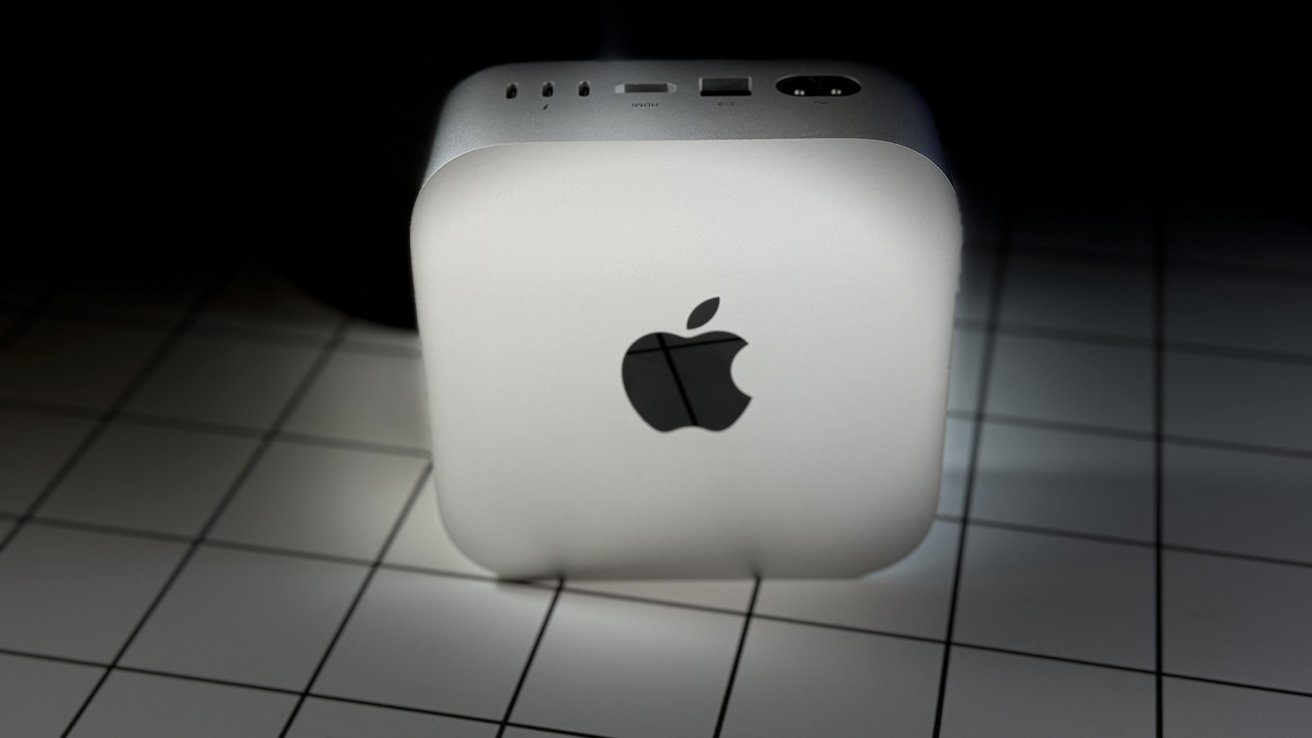
Apple has quietly pushed the Mac mini entry price higher, as the once-standard $599 base model is no longer available on its U.S. online store.
As of May 1, the $599 Mac mini configuration isn’t available to order through Apple’s primary online store. The 256GB model doesn’t appear as a selectable option there.
Higher-priced configurations now define the main lineup, with listed pricing starting at $799, though availability across configurations continues to fluctuate.
The 256GB configuration is also absent from Apple’s education and military storefronts, with no way to order or backorder it.
Advertisement
Refurbished listings still include lower-priced Mac mini configurations when inventory is available, but those units are limited and inconsistent.
When the M4 Mac mini launched on October 29, 2024, Apple positioned it as the company’s most affordable Mac, with a $599 starting price, 16GB of memory, and 256GB of storage.
Other configurations also show extended shipping delays or limited availability, indicating the constraint affects more than a single model.
The base model was out of stock for roughly two weeks before disappearing from the online store. This change aligns with supply constraints affecting the Mac mini lineup.
Advertisement
Going to be months before supply equals demand
During Apple’s fiscal second-quarter earnings call on April 30, 2026, CEO Tim Cook said demand for Mac mini and Mac Studio has outpaced supply and will take months to stabilize. Rising interest in running AI workloads locally has increased demand for compact Macs and added pressure to already constrained supply.
For buyers, the Mac mini no longer offers a reliable $599 entry point into macOS, with that role now shifting to the MacBook Neo. Mac mini configurations now start closer to $799 in most purchasing scenarios.
From Apple’s side, the move reflects a combination of supply constraints and product positioning. Removing the lowest-cost configuration pushes buyers toward higher-priced models and supports higher average selling prices.
Whether the change, as spotted by MacRumors, is temporary or a longer-term adjustment remains unclear. Earlier reporting points to a Mac mini update later in 2026, but exact timing is uncertain and current availability issues may still affect Apple’s supply chain.
The launch of the Epic Games Store follows the full implementation of the Mobile Software Competition Act, which was passed by lawmakers in Japan in December 2025. The new law is similar to the Digital Markets Act, requiring support for alternative app distribution and payment systems across digital platforms. Read Entire Article Source link
Runners frequently struggle to strike the perfect balance when it comes to listening to music or podcasts on long runs: they want to be able to zone out from the world while also remaining aware for approaching cars or chatter from fellow trail-goers without having to rip out their headphones at every little sound. The Shokz OpenRun Pro 2 bone conduction headphones, priced at $139.95 (was $180), solve that exact problem with a design that sits snugly against your cheekbones while leaving both ears open for full awareness.
A lightweight frame weighing only 30g clips on and stays put across uneven terrain or gym circuits thanks to a clever combination of a nickel-titanium wire and soft ear hooks that follow the natural contours of your head for comfort. Reviewers swear they can wear these for hours without experiencing the normal pressure areas and shifting that requires frequent fussing with the fit.
Unparalleled Audio and Premium sound – Dual drivers combine the clear highs of Bone Conduction Tech with the deep bass of Air Conduction Tech for…
Open-Ear Awareness – SHOKZ’s signature open-ear design helps you power through your workouts while keeping you safely aware of your surroundings…
Secure Stable, Lightweight Fit – The weight-optimized design of this unibody frame integrates a Ni-Ti alloy memory wire and ergonomic ear hooks. The…
The sound quality is quite impressive, with bone conduction handling the clear mids and highs and a small air conduction speaker providing a nice boost of low-end weight that previous models could only dream of. As a result, music and audiobooks sound full and balanced even at moderate volumes. It’s also incredibly simple to change up your sound with a simple app that provides rapid access to preset modes for noisy streets or a pure open-ear listening experience.
You get a good 12 hours of fun on a single charge, which is equivalent to a full day of action without having to stop halfway through to recharge. If you do need to recharge, plugging them in for five minutes via USB-C will give you an extra 2.5 hours of music, and phone calls sound crystal clear even on windy days or on crowded sidewalks. The dual microphones are angled such that they cut through all of the background wind noise, allowing the person on the other end to hear what you’re saying clearly rather than simply the sound of traffic or your breathing.
In terms of durability, these headphones have an IP55 rating, which means they can survive light rain and even perspiration without missing a beat. There’s also a reflective strip along the frame to keep you visible in low light, but you won’t have to bother with other equipment. If you already own an earlier Shokz model, you’ll feel the difference right away, as the switch to standard USB-C charging is a modest but welcome change, and the added low-end weight and reduced vibration make them more comfortable for extended listening.

































































You must be logged in to post a comment Login