
Tech
Raspberry Pi Shares Its Official Tutorial For Making a Cyberdeck


Raspberry Pi has published an official guide for building a cyberdeck, leaning into a viral trend of homemade portable computers built from repurposed cases, purses, and other oddball hardware. The guide uses a Raspberry Pi 5, keyboard, battery, and Pelican-style case. The Verge reports: Raspberry Pi’s head of social, Ashley Whittaker, acknowledged the cyberdeck trend today, saying “we haven’t been able to get away from cyberdecks this year.” Raspberry Pi has also increased its prices multiple times this year due to rising costs for RAM and other components, which could be another reason to support this growing market of active and would-be hobbyists. The 16GB version of the Raspberry Pi 5 included in the company’s official cyberdeck guide got a $100 price hike in April, nearly as much as the board’s original $120 price.


Read more of this story at Slashdot.

The Trump administration is proposing to make permanent a $103,265 fee on certain new H-1B visas, dramatically increasing costs for employers that rely on highly skilled foreign workers in tech, education, and research. “A federal judge in June ruled that the fee was illegal and blocked the Trump administration from collecting it,” reports Reuters. “A Boston-based appeals court is reviewing that decision while a different court considers whether a judge properly rejected a challenge to the fee by a major business group.” From the report: Trump’s temporary fee increase expires in September, one year after it was issued. The proposed rule by the U.S. Department of Homeland Security, posted in the Federal Register on Monday, would make a fee of $103,265 permanent. It could be finalized by the end of the year. The H-1B program allows U.S. employers to hire foreign workers with training in specialty fields and offers 65,000 visas annually, with another 20,000 for workers with advanced degrees, approved for three to six years. Those visas typically came with fees between $2,000 and $5,000 before Trump’s order. The fee would not apply to visas granted to foreign citizens already in the United States on student visas, who make up a large share of new H-1B recipients, or to renewals of current visas.
Read more of this story at Slashdot.


For most of my career, my IEEE membership sat quietly in the background—a line on my résumé, a discount code for a conference registration, and access to the IEEE Xplore digital library, which I underutilized. I didn’t think much about the grade of membership available above that of the regular member. I assumed senior membership was reserved for people further along in their career than I was. They published more papers, had more gray hair, and had worked longer in the field.
I was wrong on all three counts. The misunderstanding cost me an important validation of my skills and professional competency.
I suspect a lot of other qualified members are where I was one year ago: eligible but unaware of the benefits of senior membership, and one application away from a meaningful career credential.
The myths that almost stopped me
Here are a few of the misconceptions about senior membership:
It’s mostly for academics and longtime IEEE volunteers. It isn’t. The grade is explicitly built around a person’s professional engineering experience. Plenty of successful applicants have never published a paper. Industry experience counts for a lot.
You need a graduate degree. You don’t. A bachelor’s degree plus enough years of qualifying experience is sufficient on its own. An advanced degree simply offsets some of the required years of experience.
If I’m not well-known in my field, I won’t qualify. Senior membership isn’t a popularity contest. Rather, it hinges on whether you meet specific experience metrics. The requirement is “sustained, significant technical contribution,” not “known beyond your organization.”
I should wait until I have more significant achievements to point to. I believed this for longer than I should have. If you meet the 10-year experience threshold with five years of significant performance, you’re already eligible. Waiting doesn’t strengthen a qualifying application; it just delays getting a credential you’ve already earned.
Why I applied for senior membership
The push to apply came from a practical need. As a senior data scientist at Apple in Austin, Texas, I work in applied machine learning, building large-scale systems that affect customer-support operations. I already had started taking on more peer-review work—checking papers for journals including Neural Networks and IEEE Transactions on Knowledge and Data Engineering, mentoring at Apple, and writing on public platforms such as Medium and SimpleTalk.
I wanted a credential that reflected that shift from “engineer who codes” to “engineer who helps shape the field.”
The IEEE senior member grade turned out to be the validation of my work I was looking for. It’s not an award for a single achievement. You have to apply for it, and it’s a peer-evaluated process that confirms you’ve sustained a meaningful level of professional contributions over time.
That distinction matters. Having a research paper published or being granted a patent proves a moment in time. Senior membership reflects a pattern of continuous contributions.
The benefits to my career happened faster than I expected. It strengthened how search committees, IEEE conference organizers, and IEEE awards panels viewed me. Only senior members can hold certain IEEE leadership positions.
The senior grade also opened doors to editorial and reviewer roles I hadn’t even pursued before. Journal editors and conference organizers often look for reviewers with a track record they can verify quickly, and senior membership gives them that signal without extra vetting on their end. It also gave me a credential I could point to in professional contexts, including, in my case, supporting documentation for a U.S. employment-based immigration petition, where third-party peer recognition carries real evidentiary weight.
Navigating the process
The process for applying for senior membership is easier than the title might suggest. To qualify, you need a combination of professional and academic experience in an IEEE-designated field: engineering, computer science, information technology, physical sciences, mathematics, or technical communications. The two must total at least 10 years, with at least five of them showing significant performance. Crucially, experience isn’t limited to job titles. Graduate research, technical leadership, and progressively responsible engineering work all count toward the total number of years. I’d been quietly accumulating qualifying years without ever framing them that way.
“I suspect a lot of other qualified members are exactly where I was a year ago: eligible but unaware of the benefits of senior membership, and one application away from a meaningful career credential.”
You submit your application through IEEE’s member portal, mapped against the experience requirement, along with three references from current IEEE members—at least two of whom must be senior members or IEEE Fellows who can vouch for the credibility of your work.
The IEEE member grade evaluation committee reviews applications and renders decisions.
How to find references
The part everyone underestimates is references. Applications can stall at this point. References must be IEEE members in good standing, and at least two need to be IEEE senior members—which means you can’t necessarily ask people who know you best. You need to find references who are both willing to vouch for you and are grade-eligible.
My advice is to identify and confirm all three references before you submit your application. It might be difficult to add or swap a reference during the process, and a stalled reference could delay your file.
Where to find references is the part I worried most about. But it turned out to be far easier than I expected.
Here are several sources:
- IEEE Collabratec. This is IEEE’s professional networking platform and, in my opinion, is an underused resource. You can search by technical interest, geography, or society membership and message members directly. I found several of my eventual references this way—colleagues I’d never have thought to ask simply because we hadn’t worked together directly, but ones who knew my technical work through shared communities or conference circles.
- Coworkers and colleagues, current and former. If you’ve worked alongside IEEE members—especially ones senior to you—they’re often the most natural fit because they can speak specifically to your day-to-day technical contributions.
- Former professors. If you did graduate work, your advisor or committee members are usually IEEE members and are well positioned to speak to your research contributions, even years later.
- LinkedIn. A surprising number of my qualifying references came from reconnecting with people on LinkedIn I’d lost touch with professionally. A short, specific, polite message explaining what you’re applying for and why you thought of the person can go a long way.
A pattern I noticed when looking for references is that people are generally glad to be asked. Serving as a reference is a small lift for them and a meaningful one for you. Most senior engineers remember someone doing the same for them and are happy to pay it forward.
If you’re on the fence
If you’ve been in the field for a decade or more, doing real technical work, and IEEE membership has been sitting quietly in the background of your career the way it did in mine, it’s worth 10 minutes to check the eligibility criteria against your history. You might find, as I did, that you qualified for the membership upgrade a while ago.
From Your Site Articles
Related Articles Around the Web
What is Google TV and how does it work? Is Google TV free to use, or do you need to pay a subscription fee?
We explain all you need to know about Google TV including where you can access the platform, the included channels and how it works.
Once you’re finished here, make sure you visit our round-up of the best TVs and best streaming devices too.
What is Google TV?
Google TV is a smart TV interface that holds over 10,000 apps and offers access to over 400,000 episodes and movies in one place. These apps include the likes of Netflix, Disney Plus, BT Sport and even Spotify.

You can set up multiple profiles on Google TV and see your own personalised recommendations based on what you’ve watched in the past. Apps can be downloaded to specific profiles, and there’s supervision for children with Kid’s profiles where apps can be blocked or unblocked, viewing time limited and activity controlled via The Family Link app.
In addition, each profile also has access to its own watchlist, which allows you to save shows and films for later.
Or, if you know exactly what you want to watch but can’t find it, you can simply ask Google Assistant to fetch it for you – though you will need a compatible TV with a voice remote.
Despite its name, Google TV isn’t just for watching content. In fact, it can double as a smart home hub for controlling compatible products like smart light bulbs and the thermostat. You can also receive doorbell notifications from your TV and see a live view from your security cameras too.
Essentially, Google TV isn’t its own streaming platform that offers original content. Instead, it’s an interface that brings content from lots of different apps and platforms together into one place.
Is Google TV free?
Yes, the Google TV interface is completely free to access. Just remember that you will need to pay for any subscription costs from third-party platforms.
How does Google TV work?
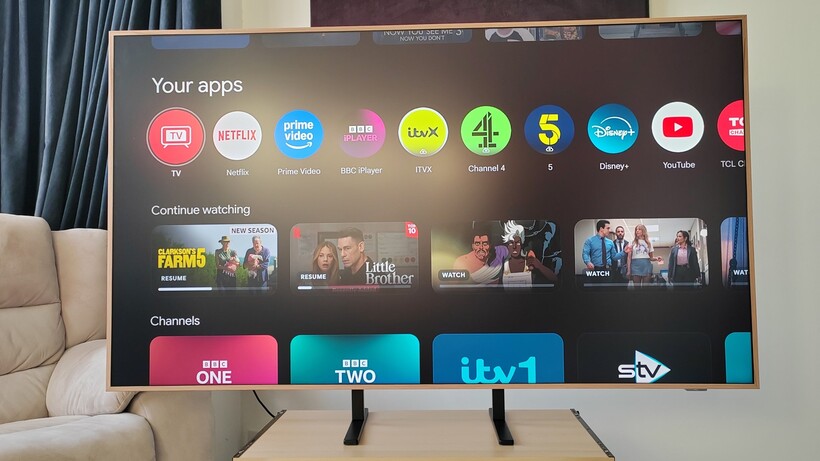
At the top of the screen is a row of tabs such as ‘Search’, ‘For You’ and ‘Library’ to make it easier and faster for users to jump back into what they were watching or start something new.
Below that is a curated row of personal ‘top picks’ recommendations based on what you’ve watched and what you’re interested in. It also puts those recommendations in the ‘For You’ tab, which is aggregated from your subscriptions and content in other apps.

Beneath that row are apps you’ve downloaded. Any app available on Android TV is available on Google TV, which means YouTube, Netflix, Disney+, Prime Video, ITV Hub, My 5, Prime Video and more work with the interface.
You can also ask “What should I watch” and be presented with a list of popular films and TV episodes with options of how you can watch the content (stream, rent or buy). You can also click onto a title’s landing page and be met with a bevy of similar content, sending you down the rabbit hole for films and TV shows to watch.
Google TV vs Android TV: What’s the difference now?
There’s been some confusion in the past surrounding how Google TV differs from Android TV. While many have assumed that Google TV has taken over from Android TV, this actually isn’t the case. Instead, Google TV is powered by Android TV operating system (OS). That means there are other smart TVs and streaming sticks that are also powered by Android TV OS but don’t share the Google TV interface – called Android TV devices.
It’s a bit like the best Android phones, where they all run on Android OS but different manufacturers like Samsung or Google use different skins or interfaces.
What devices support Google TV?
There are a couple of ways to get Google TV. Firstly, if you already have a compatible TV set then you can plug in a Google TV Streamer to access the platform. This is a great way to make use of your existing TV without buying a new one – though make sure that your TV has an HDMI port, is near a plug socket and can access the internet.
If, on the other hand, you’d prefer to upgrade then you can simply buy a new TV with Google TV built-in. At the time of writing, you can enjoy Google TV built into models from the following brands:
Whether you’re using a Streamer or a dedicated Google TV device, you’ll need to ensure you have an internet connection and a Google account.
The Google TV app
There’s also a dedicated Google TV app that’s available for both iOS and Android devices. Once you’ve signed into your Google account, you’ll be able to find movies and TV series to stream from across different platforms. When choosing something to watch, you’ll be redirected to either the corresponding app or to the App Store where you’ll be prompted to download the platform.
You can also use the app as a remote control, and can move from watching on your phone to a nearby TV on the same Wi-Fi network.

Zillow and Redfin have reached a settlement with the Federal Trade Commission (FTC) and five states, ending a legal fight over a 2025 partnership that the FTC claimed hurt competition in the rental-listing market. The settlement was announced on Monday, just as the case was scheduled to head toward trial this morning.
The case stems from a deal announced last year in which Redfin agreed to display Zillow’s rental listings on its websites rather than compete directly with Zillow for rental advertisers. The arrangement could have kept Redfin out of the rental advertising business for as long as nine years. Redfin owns Rent.com and ApartmentGuide.com, two major rental-listing platforms.
According to the FTC and attorneys general from Arizona, Connecticut, New York, Virginia, and Washington, Zillow agreed to pay Redfin $100 million to keep Redfin from competing with Zillow.
The companies defended the partnership as a way to give renters access to a larger pool of listings. The FTC, however, argued that Zillow was paying one of its largest competitors to stop competing, potentially allowing the company to charge higher prices and provide less favorable terms to property managers. It could have also reduced the quality of rental listings available to consumers.
Under the proposed settlement, Redfin will be required to reenter the rental advertising business. The order also removes restrictions that previously limited Redfin’s ability to compete independently for property-management customers.
The settlement doesn’t completely end the relationship between the two companies. Redfin can continue displaying Zillow’s rental listings, but it will once again be able to compete for its own customers. Redfin will be able to sell advertising, display listings from its own clients, and pursue new rental customers without being required to share sensitive business information with Zillow.
The Zillow-Redfin case comes just months after the DOJ’s settlement with Ticketmaster, another antitrust case involving allegations that a dominant company used its power to suppress competition. However, 26 of the 30 state attorneys general who initially sued Live Nation alongside the DOJ chose to continue pursuing the case and won their lawsuit in April.
When you purchase through links in our articles, we may earn a small commission. This doesn’t affect our editorial independence.


The United States Navy has been hard at work replacing its aging Los Angeles-class and Ohio-class nuclear submarines with the newer and more advanced Virginia-class fast attack submarines, of which 25 have been constructed as of this writing. The latest boat to come out of the shipyards and enter the inventory is the USS Massachusetts (SSN-709), which is the eighth U.S. vessel named after the state. On the surface, pun definitely intended, the USS Massachusetts is like its preceding 24 Virginia-class submarines, but on August 17, 2026, it skipped a pivotal step in the process from construction to service.
After completing shakedown trials, the Navy determined that it was ready to proceed with fleet tasking, meaning that it could begin serving immediately. What’s interesting about this is the fact that the Massachusetts will not have to undergo its post-shakedown availability (PSA), thanks to its combat readiness and the boat’s superb construction. This move is a calculated risk, but as far as the Navy is concerned, the Massachusetts’ shakedown proved it was ready to join the fight.
Chief of Naval Operations Adm. Daryl Caudle explained that the “USS Massachusetts is ready to fight, and that is exactly where we need her, in the hands of our Sailors and available to the Fleet. Waiving this availability reflects the exceptional condition of the ship and our determination to deliver combat-ready capability faster.” The Massachusetts’ delivery to the Navy is surprising, as SlashGear previously reported about its then-forthcoming shakedown period that is no longer happening. Regardless, the Massachusetts is now expected to begin fleet operations as soon as possible.
Skipping the post-shakedown is an unusual move for the Navy
The process to build, commission, undergo sea trials, and perform a PSA is a tried-and-true method the Navy has employed since World War II. Because of this, it’s unusual to skip any of those steps, especially the PSA prior to passing the new vessel into the fleet. When a new sub finishes its sea trials, and before it’s ready for combat operations, the PSA is designed to address any maintenance or performance issues that arise.
Because the USS Massachusetts didn’t reveal any problems, it skipped the step. That’s significant, as it can take a year or more to move through the PSA in drydock to service entry. Because the USS Massachusetts skipped that step, it indicates that the boat is ready, but it’s also concerning, as it suggests that the Navy is rushing the sub through the customary process. All new U.S. Navy vessels undergo their PSA, which often requires a great deal of maintenance in a shipyard.
Any design flaws or issues are taken care of during the PSA, and while the Navy allowed the Massachusetts to skip it, it’s unlikely that no problems arose. Still, if there were concerns, they were likely minor and could be addressed during normal submarine operations. No other Virginia-class submarines skipped their PSAs, so the Navy’s decision has raised eyebrows. There are benefits beyond receiving the sub early, as freeing it from its PSA also frees up shipbuilding and maintenance facilities and personnel who can work on other vessels instead, so there are several positives resulting from this decision.
The USS Massachusetts (SSN-709) Virginia-class fast attack sub
Now that the USS Massachusetts is ready to join the fleet, it brings a great deal of undersea capability to the Navy’s submarine force. The U.S. Navy’s submarine fleet is big, and it includes several different types of boats. As the 25th Virginia-class submarine and the 7th built under the Block IV program, the Massachusetts is one of the most advanced and potentially lethal subs in the world. The Virginia-class program is expected to produce 45 total boats for the U.S. Navy, though three were sold to the Royal Australian Navy with an option to purchase additional subs in the future.
The Massachusetts is an impressive vessel that displaces 7,800 tons of seawater, stretches 377 feet in length, and can reach speeds of up to 29 mph. It will be crewed by 120 enlisted submariners and 15 officers. Thanks to its nuclear reactor and auxiliary diesel engine, the Massachusetts has an unlimited range and will not require refueling. Previous nuclear-powered submarines underwent mid-life refueling at 15 years, extending a boat’s service life to 30 years after modernization upgrades and enhancements.
The Virginia-class was built specifically to eliminate this need, and it’s expected to retire after 33 years. As a Block IV vessel, the Massachusetts utilizes the Virginia Payload Tube (VPT), a revolver-type vertical launcher system, of which it has two, whereas earlier blocks used 12 vertical launch systems. Each VPT can house and fire six Tomahawk cruise missiles. The boat is also outfitted with four torpedo tubes, enhanced acoustics and stealth capabilities, and advanced combat systems that make the USS Massachusetts an impressive boat.

Talk about sticker shock. Amazon just raised the prices of some of its most popular electronics — including Kindles, Echos, Fire TVs and more — by up to 60%.
You can thank the so-called RAMageddon for the across-the-board hikes, according to a company spokesperson, who blamed the rising prices on “significant increases in memory and storage component costs.”
The hardware component shortage isn’t new. The AI industry has been gobbling up the world’s supply of memory and storage for more than a year now, hacking away at the budget laptop and smartphone industries as tech companies scramble to allocate the remaining resources in the supply chains.
Now the buck is being passed to consumers buying e-readers, smart home products and more. Amazon’s largest price hikes affected its most inexpensive electronics, making entry-level products less affordable. The Echo Dot smart speaker jumped from $50 to $80, representing a startling 60% price increase. Other base-level products, such as the starter Kindle and Fire TV Stick HD, saw price hikes of 36% and 14%, respectively.
Read more: Best Smart Home Devices of 2026: Everyday Upgrades
An Amazon spokesperson told CNET that the company is still trying to figure out more accessible pricing, but that increases were needed to account for hardware costs. “After absorbing these increases for as long as we could, we recently adjusted pricing across our product lines,” the spokesperson said.
Conspicuously missing from the recent round of price hikes were Amazon’s Ring doorbell cameras. The $220 Echo Studio smart speaker was also spared from a price increase, though almost every other Echo product saw a hike of between 10% and 60%.
Amazon is far from the only company raising prices in response to the supply chain squeeze. Gamers have been brutalized by back-to-back console price increases and an ugly Steam Machine starting price. Folks looking for a new laptop have been routinely pummeled year-round.
Other smart home companies have struggled to keep up with rising component costs, too — which means consumers are besieged on all sides by rising consumer tech prices. Roku, a direct competitor to Amazon’s Fire TV streaming products, raised its prices by up to 60% just last month. Apple recently raised the price of its HomePod Mini smart speaker by 30%, and there are likely more price hikes on the way.
Here’s a full list of Amazon’s recent electronics price increases, by product type:
Product name
Former price
New price
Echo Dot (5th Gen)
$50
$80
Echo Spot
$80
$110
Echo Dot Max
$100
$120
Echo Show 8
$180
$200
Echo Show 11
$220
$250
Echo Show 15
$300
$350
Echo Show 21
$400
$500
Fire TV Stick HD
$35
$40
Fire TV Stick 4K Max
$60
$85
Kindle (16 GB)
$110
$150
Kindle Paperwhite (16GB)
$160
$200
Eero 7 (3-pack)
$350
$400
Eero Pro 7 (3-pack)
$700
$800

Tech
Cyberleek Keeps Feeding the GTA 6 Fire with New Leaks Showcasing Bullet Holes and Bathroom Breaks


Rockstar and parent company Take-Two Interactive have spent the past week watching pieces of GTA 6 slip into public view one short clip at a time. A figure or group operating under the name Cyberleek began posting what looks like real gameplay footage on August 18. By the middle of this week the videos had piled up past a half-dozen, some of them still circulating even after the main website and Telegram channel went dark.
New GTA 6 leaked gameplay video:
– The clip ends with a “Return to Lucia” objective.
– Gore and dismemberment are present, with an NPC appearing to lose a leg after Jason runs him over with the truck.
– The NPC’s reactions show detailed ragdoll physics as he attempts to fight… pic.twitter.com/G5q4kapjDI— GTA 6 Updates (@gtasix_) August 23, 2026
A lot of the action takes place from Jason’s perspective, one of the two main characters. Early on, you see him playing hoops outside a familiar house, climbing into vehicles, and even getting a little combative with a truck driver, whipping out a wrench and subsequently tasing and kicking him while he’s down on the ground. Jason spends some time behind the wheel of a high-performance sports car, cruising down the highway with no actual excitement, simply the act of driving itself. Another scene has him soaring through the skies in a jet at night, the radio blaring, city lights below him, and the shoreline extending out in all directions. Near the end of that flight, he fires a gun at a wall, and bullets with the word “LEEK” written on them appear, and that single detail led many people to believe the person recording had obtained a playable version rather than stolen pre-rendered clips.

PlayStation®5 Digital Edition – 825GB
- Slim Design, players get powerful gaming technology packed inside a sleek and compact console design.
- 825GB of storage, keep your favorite games raeady and waiting for you to jump in and play
- Ultra-High Speed SSD, maximize yoru play sessions with near instant load times for installed PS5 games
Gas stations have become a common location, and in one of the most recent clips, Jason appears, watches as someone puts fuel into a tub resting in the back of a pickup truck, and then steals the vehicle. The owner tries to stop him, and Jason ends up driving him over, resulting in blood and a severed leg, before crashing with another car, displaying the classic “Wasted” warning for the first time in these leaks. A brief toilet sequence follows, and after it concludes, there is a prompt on the screen telling you to “Return to Lucia,” which is the first time we’ve seen the second main character in whatever build the leaker is playing.
Cyberleek has framed all of this as a protest. They have said that the lack of a physical disk for GTA 6 is a concern, and that digital releases and exclusive material for special editions constitute a rip-off. At the same time, every video they release includes watermarks and QR codes for a crypto currency called $CYBERLEEK, and they promise to release more footage if the token’s value rises. To be honest, it’s a bit of a mixed message, with elements of protest and sales pitch.
Despite the leaked footage, Rockstar has not adjusted its release plans, with an Extended Look on Netflix on August 27 and the complete game scheduled for November 19 for the PS5 and Xbox Series X/S. Cyberleek’s footage appears to be quite ancient, with early build animation issues and unfinished scenery throughout. There are minimal story moments, with only a few short sequences and a hint of a second character in the prompt to “Return to Lucia.” Cyberleek promises more, but Take-Two is attempting to shut them down. However, for the time being, the leaks continue to flow.
[Source]
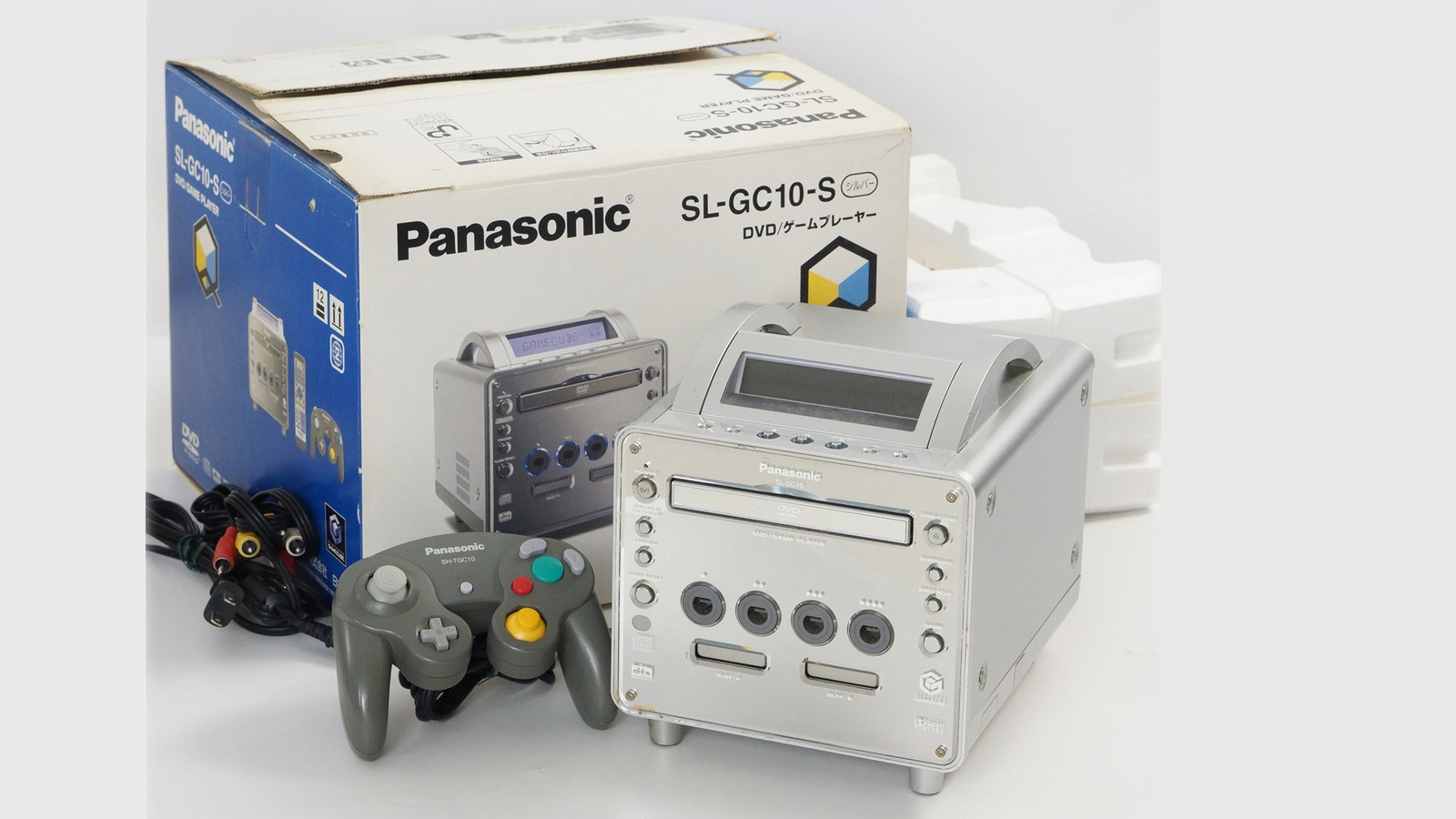
The Panasonic Q was a bizarre mashup. Its motorized disc tray accepted GameCube discs, DVDs and audio CDs. The company took the home theater part seriously. The Q had a Cinema mode for picture processing, along with audio features like Dolby Digital, DTS (Digital Theater Systems) for surround sound, Dialogue Enhancer and Bass Plus.
Those home theater features sure must have been nice for games like Super Mario Sunshine or Metroid Prime, right? Unfortunately, no. That’s because the Q’s home theater features were split off from the game console. Game audio was limited to the GameCube’s standard analog connections. There was even a hardware button to manually switch between the two modes because it wouldn’t change automatically based on the disc type. When it was time to switch, the system effectively powered down one side and restarted the other.
The Q also came with Panasonic-branded accessories reflecting the product’s duality. There’s a gray GameCube controller with Panasonic branding for games and a matching gray remote control for the DVD player. This wasn’t so much a hybrid device as it was two distinct machines from two companies sharing the same chassis. Oh, early oughts, how we miss you.
Setting aside the exterior, the gaming half of the Q was no different from a standard GameCube. You could pop in Super Smash Bros. Melee or Mario Kart: Double Dash!! and have an identical experience to your friend with the regular version. It had the same controller ports, memory card slots and full compatibility with the GameCube library (although unmodified models were region-locked to Japan).
The weird industrial design did lead to one tradeoff: the GameCube’s Game Boy Player didn’t fit. The optional accessory, which let you play Game Boy, Game Boy Color and Game Boy Advance games, lodged underneath Nintendo’s system. But because the Q’s base was different, Panasonic had to release a modified version of the Game Boy Player designed for its shiny, weird console.
Despite all of that effort, the Panasonic Q struggled to find an audience — mostly because it was damn expensive. It launched in Japan at ¥39,800 (roughly $313 at the time) — a lot of money for such an oddball product. Although that matches the PS2’s Japanese launch price, Sony’s console arrived nearly two years earlier, had already built a huge audience and made the DVD player a central selling point. Not to mention, you didn’t have to reboot your console to switch between the two modes. Plenty of modded imported units made it overseas, but the Q never launched outside of Japan.
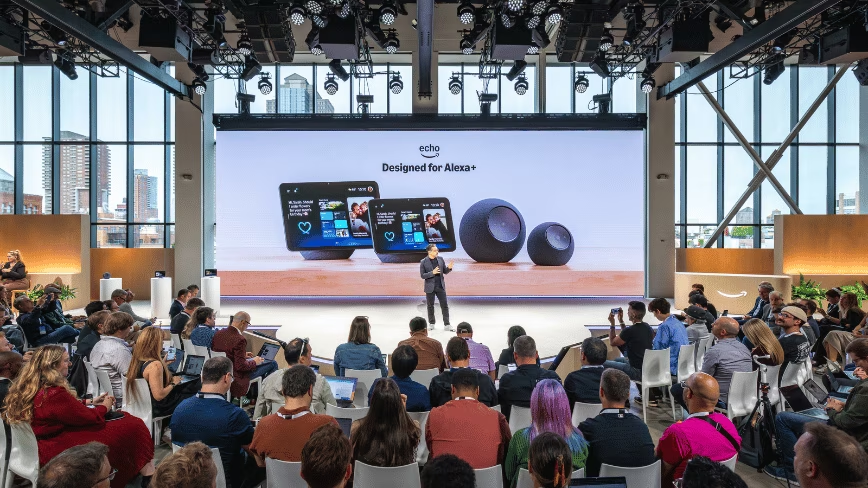
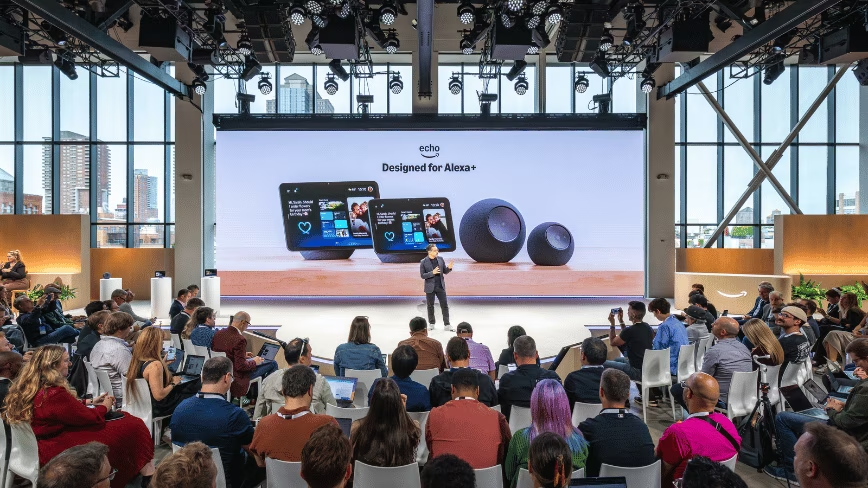
Amazon raised the price of its own devices overnight on 21 August. The increases run to 60% on the cheapest product in the range, and they were not announced.
Fortune reported the change across the hardware line. Pocket-lint had reported the Fire TV increases earlier the same day. Amazon confirmed the rises and blamed memory and storage costs.
What Amazon said
Kristy Schmidt, senior communications manager for Amazon Devices and Services, gave The Verge the statement the company issued to every outlet that asked.
“The consumer electronics industry is facing significant increases in memory and storage component costs,” it reads. “After absorbing these increases for as long as we could, we recently adjusted pricing across our product lines. Our approach has always been to offer great products at accessible prices, and that commitment hasn’t changed.”
Amazon told Fortune it will run promotions across the lineup through the year.
The speakers
The Echo Dot went from $49.99 to $79.99. That is a 60% rise on the cheapest way into Amazon’s smart home range.
The Echo Spot rose from $79.99 to $109.99. The Echo Dot Max, which launched last year, went from $99.99 to $119.99. The Echo Show 8 rose to $199.99, the Echo Show 11 to $249.99, the Echo Show 15 to $349.99 and the Echo Show 21 to $499.99.
The e-readers
The 16GB Kindle went from $109.99 to $149.99, a rise of about 36%. The 16GB Kindle Paperwhite went from $159.99 to $199.99.
The streaming sticks
Pocket-lint listed the Fire TV range in full. The Fire TV Stick 4K Max rose from $60 to $85. The 4K Plus went from $50 to $70, the 4K Select from $40 to $50, and the HD model from $35 to $40.
The largest single increase in dollars was the Fire TV Cube, which went from $140 to $200. That device does not appear in the table The Verge published.
The Wi-Fi kit
The eero 7 three-pack rose from $349.99 to $399.99. The eero Pro 7 three-pack went from $699.99 to $799.99. Both are increases of about 14%.
What did not move
Ring cameras and video doorbells kept their prices, according to Fortune and The Verge. So did the Echo Studio, Amazon’s $219.99 speaker.
The Verge notes that Google has held the Home Speaker at $99.99. Pocket-lint notes that Google has held the TV Streamer at $100.
How the change was made
Amazon issued no announcement. Pocket-lint’s reporter found the increase by opening the Amazon app and noticing that the Fire TV Stick 4K Max was listed at $85.
Price history shows the Fire TV rises took effect across the board on 21 August, according to Pocket-lint, which contrasts that with Apple and Roku announcing theirs in advance.
Roku did this in July
Roku raised streaming device prices by up to 60% last month, and gave the same reason. The desk covered that increase on 26 July.
Engadget puts the Roku rises at up to $50.
The others who have raised prices
Apple raised Mac and iPad prices in June. Chief executive Tim Cook called the situation “a 100-year flood on memory pricing”. The desk covered the MacBook Air rise on 3 August. Apple also moved the HomePod Mini to $129 from $99.99 this summer.
Microsoft is raising Xbox console prices by $100 to $150 depending on the version, Fortune reports, and has stopped selling the 2TB configuration. Dell, HP, Lenovo and Asus have raised prices or cut the memory in their products.
The same squeeze in other categories
Nvidia’s largest customers were told that servers containing its AI chips will cost more than 15% more. The desk covered that rise on 22 August.
Chinese carmakers say printed circuit boards and multilayer ceramic capacitors are 20% to 30% short globally. The desk covered the carmakers’ shortage on 22 August. Xiaomi’s profit fell again last quarter as memory costs pushed up what its phones cost to build, which the desk covered as the memory crunch on 19 August.
Where the shortage started
The squeeze traces back to demand for memory from AI data centres. Counterpoint Research has warned that the surge threatens supply of broadband routers and set-top boxes, the same class of device Amazon has just repriced.
Two of the repriced Fire TV models, the 4K Select and the HD, run Vega OS, the Linux-based operating system Amazon introduced to replace Android on its cheaper hardware.
What Amazon told investors about memory
Andy Jassy raised the company’s capital expenditure guidance in late July. Amazon now expects to spend $220bn this year, up from a prior estimate of $200bn, mostly on data centres, and Jassy attributed part of the increase to higher memory costs.
He also told investors the company would not “have enough capacity to meet all the demand we have in 2026”, and added: “I believe this dynamic will also be true in 2027, too.”
Amazon Web Services took $42.2bn in the second quarter, up 37% from $30.9bn a year earlier. Jassy called it the fifth consecutive quarter of accelerated growth.
What the coverage does not settle
Amazon has not said how long the new prices hold, or which components drove which increase. It has not explained why Ring and the Echo Studio were left alone.
The two published price tables do not fully match. The Verge lists thirteen products with percentage changes. Pocket-lint lists five Fire TV models, including a Cube increase the other table omits. Neither is Amazon’s own list, because Amazon did not publish one.
The company has a device event coming this autumn, Fortune notes.
One number is worth holding lightly. The 60% headline applies to a single product, the Echo Dot. Most of the range moved between 11% and 25%, on The Verge’s figures.


Mexican jumping beans have long intrigued people with their capacity to twitch and hop across a table when touched by a hand or exposed to sunlight. A little moth larva within a hollow seed pod is responsible for the motion. Heat drives the larva to pull on silk threads, propelling the entire pod into rolls, flips, and short hops in search of cooler shade. Researchers at the Italian Institute of Technology’s Bioinspired Soft Robotics department have developed a robot that exhibits the same restless behavior without the usage of motors, batteries, circuits, or an onboard computer.
BeanBot the device is an electronics-free, entirely untethered marvel, as its movement is powered by some very fascinating temperature-responsive polymers that change shape when heated. However, those tweaks will not get the robot very far since the magic happens when the body begins to bounce, press, and slide against whatever surface it is sitting on. The beauty is that different surfaces yield completely diverse effects. On one terrain, the robot is on a rollercoaster ride, jumping and soaring. On another, it’s a death-defying stunt show, flipping end over end. Elsewhere, it’s a pleasant cruise, sliding and rolling around the ground. Even a slight slope will cause it to ascend, or the robot will pick itself up and dust itself off after a tumble. The publication reporting this discovery refers to all of this as “stochastic locomotion,” which results from the robot’s interaction with its environment.
Sale

Dingdongwu Smart Robot Dog – Interactive STEM Pet with Voice Control, 30+ Actions & APP Programming…
- 🤖30+ Lifelike Actions & Voice Commands: Watch your robot pet perform Kung Fu, handshakes, somersaults, and hilarious “pee attack” pranks! Control…
- 💻STEM Learning & Custom Programming: Spark creativity with coding mode! Kids can design custom action sequences, building logic skills while…
- 📱Parent-Friendly APP & Multi-Control: Manage playtime effortlessly with the free iOS/Android APP: adjust volume, switch languages (CN/EN), or lock…

The design of BeanBot is fairly simple. Heat activates the actuators; that’s it. The geometry and friction will take care of the rest. There is no complicated programming telling the robot what move to make next. It’s all decided in real time by a combination of material response and physical contact. It’s like a small tadpole inside a real jumping bean, with no notion what the ground is like or what will happen next; all it wants to do is get away from the heat. The ultimate result is a gadget that can continue to operate in a variety of situations when wires become tangled and batteries run out.
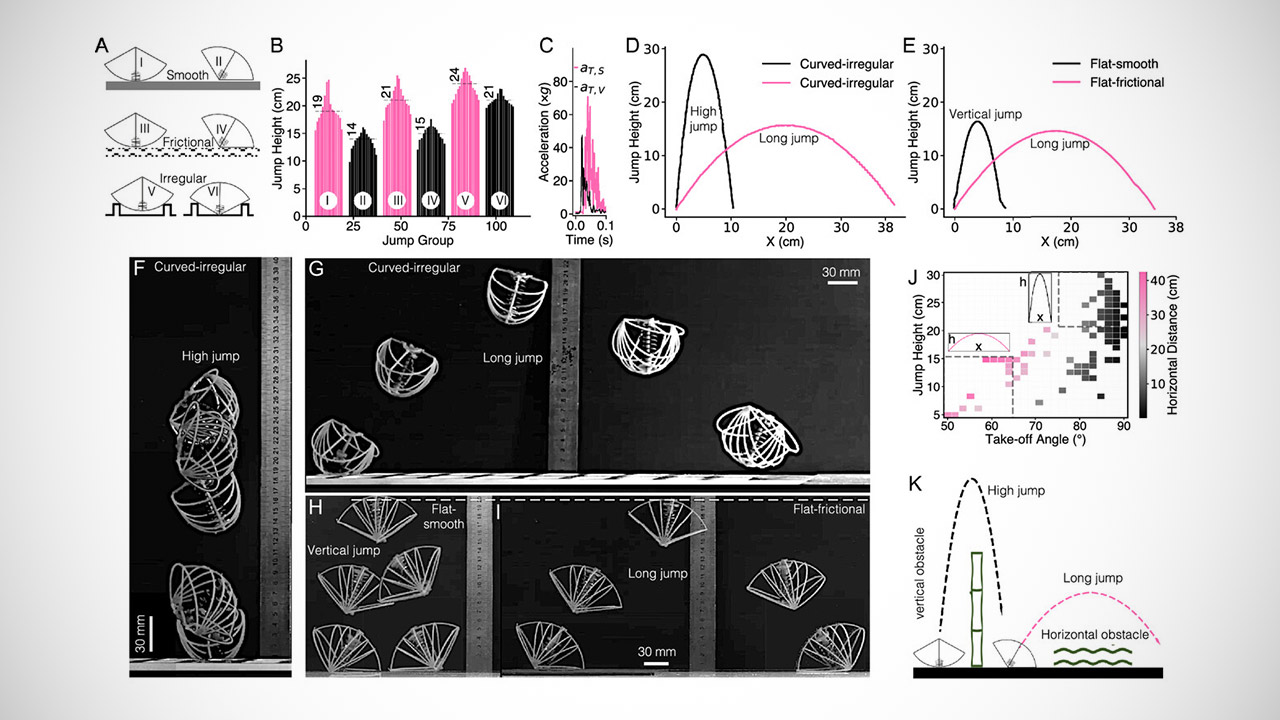
Tests demonstrate that the thing can handle a wide range of surfaces and slopes, and that if it falls over, it can recover and continue moving. Furthermore, because there are no electronics, the whole thing remains lightweight and durable. Researchers are already considering utilizing large numbers of these robots to replace one or more traditional machinery. Consider a swarm of them released into a tough outdoor setting or a cramped inside space, with each one hopping and rolling around on its own, adapting to whatever its local surroundings are, and not requiring any central boss to tell it what to do.

BeanBot is not a super robot because it is neither the strongest or fastest thing on the market, but its true worth rests in demonstrating that effective motion can be created by just combining the correct materials and shape with the right surface. The Mexican leaping bean has been doing this for generations, and the Italian team has recently given it a modern body that operates on demand.
[Source]

7 Book Authors Without Many Movie or TV Adaptations

‘We started poorly’: Craig Fulton rues slow start as India crash out of Hockey World Cup semis | Hockey News
Trump Admin Moves to Impose More Than $100K Fee For H-1B Worker Visas





-

 Fashion3 days ago
Weekend Open Thread: Madewell – Corporette.com
-

 Business2 days ago
Musk’s Tesla, SpaceX Confirm $16.8 Billion ‘Terafab’ Chip Plant as World’s Largest Building in Texas
-

 Business6 days ago
SMA Solar Technology AG (SMTGY) Q2 2026 Earnings Call Transcript
-

 Crypto World3 days ago
anatomy of crypto’s biggest liquidation event since 2021
-

 Tech7 days ago
Qwen3.8-27B runs frontier-class coding agents and reasoning locally, no cloud API required
-

 Crypto World7 days ago
OCC Greenlights Trump Family Crypto Firm for Trust Charter
-

 Politics2 days ago
6 months on, Irish renters crushed by effects of government housing bill
-
 NewsBeat3 days ago
The ‘Lucky Dip Gang’ causing carnage for clicks: After five thugs were killed speeding in the wrong direction on a motorway, GUY ADAMS investigates a sick new trend… and why police aren’t even allowed to pursue them
-

 Crypto World7 days ago
NAVI Prime launches institutional lending framework on Sui
-

 Tech6 days ago
GLM-5.3 hits the API at $1.4/$4.4 per million tokens
-

 News Videos5 days ago
Don’t Leave Your Financial Future To Chance | August 19, 2026
-
Tech7 days ago
5 Of The Most Reliable Car Brands To Consider If You’re Buying A Used SUV
-
 Crypto World7 days ago
Dow’s 3-Year Winning Run Isn’t a Crash Signal, Still 49% Odds of Double-Digit Gains
-

 Business1 day ago
Mystery AI Model ‘Ox Alpha’ Draws Developers With Free Access as Chinese Lab Origins Remain Debated
-

 Tech7 days ago
Keychron K8 Ultra 8K review: a great value keyboard with comfort issues
-
 Tech7 days ago
Nvidia discloses $21B stake in SpaceX
-

 Business6 days ago
Stock Market Today: Tech Futures Slide As Treasury Yields Jump; Nvidia, Micron, Sandisk Sell Off
-

 Business5 days ago
Marvell Shares Jump 7% as Google Chip Deal Confirms Custom AI Silicon Partnership, Analysts
-

 Business4 days ago
Five Below: Kids Discount Retailer Reaps Rich Rewards
-
Business7 days ago
Fabrinet (FN) Q4 2026 Earnings Call Transcript
You must be logged in to post a comment Login