The fintech announced a $182m investment in the country over the next five years.
Revolut has applied for a Swiss banking licence as part of its continued global expansion campaign. The UK fintech has established or is aiming to set up authorised banking entities across the globe, including in Colombia, the US, France, Peru, the UK, Australia and Mexico.
Revolut already has more than 1.3m customers in Switzerland, currently served by Revolut Bank UAB, which is licensed in Lithuania. Obtaining a Swiss banking licence would mean the fintech can offer its customers Swiss IBANs, salary accounts, e-bills, merchant acquiring and deposit protection under the country’s strict standards.
The company also announced plans to invest more than 150m Swiss francs ($182m) in Switzerland over the next five years to create local jobs and support product development. Revolut also intends to make a number of senior leadership appointments to further strengthen its local banking build-out.
Advertisement
“Together with our existing banking licences and regulatory infrastructure across Europe, this would further strengthen our compliance, governance and regulatory framework,” said David Tirado, Revolut’s chief commercial officer.
Julian Biegmann, Revolut’s general manager for Switzerland, added: “Revolut is already Switzerland’s leading fintech. With our own banking licence, we would become a true Swiss bank, able to offer our more than 1.3m customers our leading Revolut banking product with a Swiss finish.”
Earlier this year, reports suggested that the fintech was on its way to a $200bn valuation in an eventual initial public offering expected around 2028. It was last valued at $75bn after a major share sale last November.
News of the company’s continued expansion comes just days after it disclosed a data breach that is understood to have affected nearly 700 customers globally, including 12 in Ireland.
Advertisement
In a community alert last week, the company explained that it disclosed sensitive customer data to an unauthorised fraudulent party after receiving requests for information from an email with a government agency domain.
The company mistakenly fulfilled the data requests before realising that the sender was phishing for data, it said. The disclosed data included full names, dates of birth, occupations, addresses, contact details, passports, drivers’ licences, financial statements and facial verification images.
Don’t miss out on the knowledge you need to succeed. Sign up for the Daily Brief, Silicon Republic’s digest of need-to-know sci-tech news.
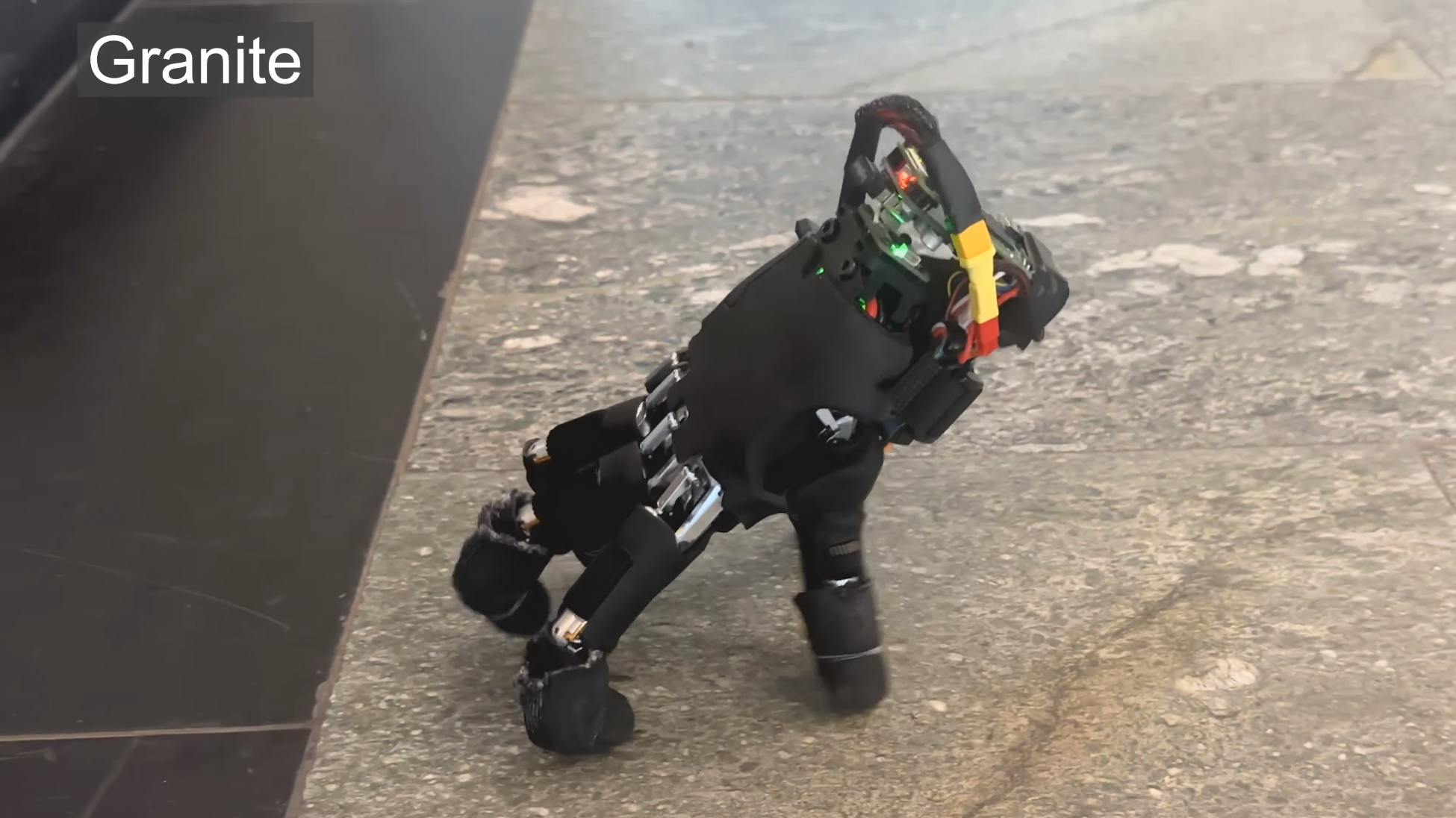
Although it wasn’t apparently designed with this in mind, it seems particularly fortuitous that this walking robotic hand was released in time for Halloween. Designed by researchers from ETH Zurich, the slightly unsettling disembodied hand can use its fingers as legs to traverse terrain, push small objects around, and operate a keyboard.
The researchers started from commercially-available robot hand, equipped it with a battery and Raspberry Pi Zero 2 W, and developed neural net-based software to control it. The hand has twenty joints, four per finger, and the neural net iteratively outputs the next joint state, based on previous movements, the state of the hand, and the hand’s current goal. To train the net, the researchers built a simulated model, then used this for reinforcement learning; this yielded a faster walking speed than an adapted quadrupedal motion model did.
The hand was trained to move in a straight line, turn, recover from a fall, and press the keys of a keyboard (since it doesn’t have a camera, though, it can’t operate a keyboard by itself). The fall recovery is impressive to watch: in 21 out of 25 tests, it was able to right itself within twenty seconds. Due to the hand’s geometry, it drifts to the right while walking, so a constant correction needed to be applied. It did, however, manage to successfully cross fourteen varying surfaces, ranging in roughness from a rubber mat to gravel and grass. It even managed to push light objects toward goals.
The authors envision this kind of autonomous hand enabling greater freedom for a larger robot, such as a robot arm: if it needs to reach something farther away, the hand simply detaches and walks over. Regardless of the use to which they put in, such a project is already within reach of hackers; we’ve seen a few robotic hand projects here over the years.
When I’m asked about smart home gadgets, I typically suggest people start at their front door, such as with a video doorbell or smart lock. Smart locks, in particular, are an obvious first step (and only step, if you prefer) into smart home tech, and they can benefit nearly anyone with a front door.
But many people without a smart lock in their lives still don’t know what it is, how it works or why they should spend money on one. It’s time for a clear explanation of this important home technology, and why I’m such a fan.
These powerful, connected locks are useful every day. We’ve tested the latest to find the best.
Advertisement
Smart lock basics
Retrofits typically only require replacing the thumb turn.
Amazon
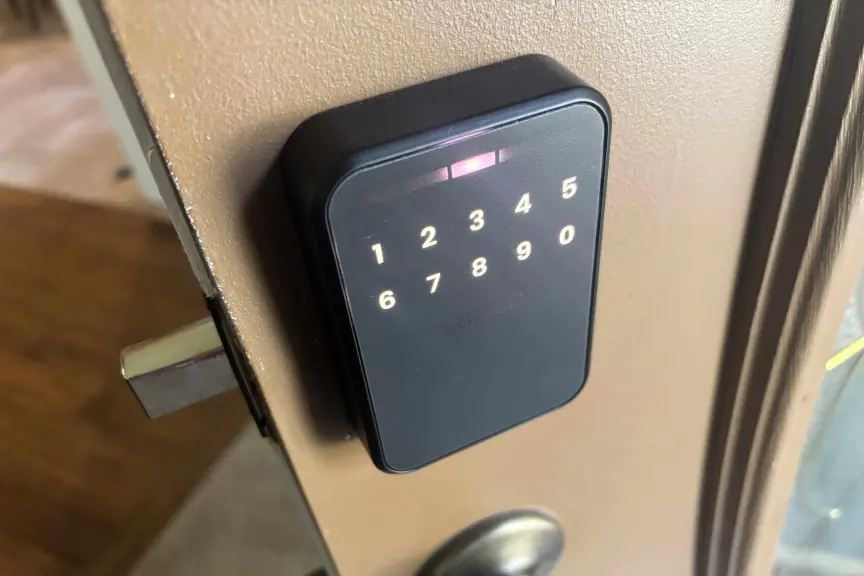
A smart lock replaces the standard deadbolt found on nearly any front door (and many other doors) in a residential building. Many models replace the deadbolt entirely, which tends to allow extra features like keypads and fingerprint readers. Other types replace only the indoor thumb turn, the knob used to move the deadbolt — a smart lock style called a retrofit — which is often cheaper and easier to install. Either way, the door handle below the lock is usually left untouched.
Once set up, the smart lock connects to your Wi-Fi router and lets you control it from your phone using a corresponding app. This allows you to operate the lock remotely, anywhere you can connect to the internet (like at work, or on vacation). That ability comes with several valuable tricks.
The inside thumbturn is usually the only part of a lock replaced in a retrofit.Tyler Lacoma/CNET
With remote locking and unlocking, you don’t have to be at home to let a pet sitter or guest inside. Most smart lock apps also let you create temporary passcodes or digital passkeys for guests, which grant access and then auto-delete after the timeframe ends.
These locks can also send alerts to your phone, notifying you when the door is locked or unlocked. You can review a history of locking/unlocking in the app, or even set the door to automatically lock after a set amount of time, so no one ever forgets to lock the door again. Those features are also handy for keeping track of someone in an aging-in-place situation.
Advertisement
That’s only the start of what a high-quality smart lock can do.
Smart lock access methods
From keypads and digital wallet keys to fingerprints, smart locks offer new ways to protect your home.Schlage
Another one of my favorite things about smart locks is the different access methods they open up (heh), some of which may be far better for your daily life than the classic key.
Most locks not only have app controls but can sense when an authenticated mobile device is near, and automatically unlock with a swipe. That’s getting both easier and more common now that the Aliro protocol has been established this year, helping smart locks connect to digital wallets (Google, Apple, Samsung and so on) that you probably already use, making pass management very easy.
Other locks focus on fingerprint scanners, a biometric option that I found highly accurate and quite speedy in all my testing. It takes only a couple of minutes to add your family’s fingerprints, and then you don’t have to worry about people losing their keys or needing access to the home when you aren’t around.
More advanced smart locks can do a little of everything.Tyler Lacoma/CNET
Some people may prefer to stick with the classic keypad, another common component of smart locks. Keypads let you change and swap codes and issue temporary codes to workers or visitors, which isn’t as easy to manage with a fingerprint sensor. Both work well in my testing, but keypads take longer to set up and the different designs may confuse some first-time users.
A number of smart locks combine all these access options and more, so you can choose your preferred method. Most include an emergency key slot or standard key slot, too. However, some of the most advanced models I’ve tested skip old-school keys entirely, so users don’t have to worry about anyone picking the lock.
Advertisement
Smart lock installation and compatibility
Smart lock installation is surprisingly easy if you’ve got a screwdriver and a little time.Tyler Lacoma/CNET
Don’t worry about how difficult a smart lock is to install. As I mentioned, they’ll work with most standard deadbolt designs, and are typically a DIY project. You shouldn’t need more than a sturdy screwdriver for a full deadbolt replacement.
Most locks have alternative options for slightly different deadbolt placements. Take a look at my guide on how to install a smart lock to learn – well, everything you need to know.
Important note: Renters should also check their lease and see what their landlord or property management company says. Typically, installing a new deadbolt is a step too far for tenants, although a retrofit may be more permissible. But landlords usually prefer to handle anything related to locks themselves. There are even smart locks made specifically for them.
Battery life and smart locks
Batteries are always installed on the inside housing, typically AAs.
Tyler Lacoma/CNET
How do smart locks accomplish all their tricks and maintain their Wi-Fi connections? The lock’s indoor housing also houses the battery. Some locks run on two to four AA batteries. Others use proprietary rechargeable batteries that you need to remove and recharge from time to time.
Either way, these batteries typically last at least a few months and up to a year, depending on how often the door is activated. Apps generally give you warnings or alerts when battery power is low. Some models are designed to last longer, like Lockly’s Lyro Lasta, which packs in eight batteries and adds a sleep mode to help the lock last up to three years.
Advertisement
Smart locks include emergency ways to charge up and unlock the deadbolt when necessary, like if your Wi-Fi is down or the batteries suddenly fail.
After testing smart locks from all the top brands, I’ve found the best picks for you and your wallet.
Advertisement
Smart lock costs
So, I’ve praised this home add-on pretty thoroughly, but how much will something like this cost? Smart locks aren’t especially cheap, but they offer a wide range of prices and models, so most buyers can find an option that works for them.
If you’re focused on your budget and want to save money, I suggest looking for a retrofit model for your current deadbolt. Basic retrofits only cost around $70 to $100, as you can see on my best affordable smart locks list. You can even find some full deadbolt replacements for around $100, such as from Wyze, but these are rarer.
The most compact and advanced the lock, the more expensive they tend to be.Tyler Lacoma/CNEt
In the $150 to $200 range, smart locks start gaining many more capabilities, including advanced access options, better durability ratings and more compact sizes. I suggest most homeowners start here if they’re looking for a worthwhile upgrade with plenty of useful capabilities.
Head over to my smart lock buying guide for much more information on picking a lock that’s right for you, and what to consider when buying. Many companies offer smart locks, so you’ll have your pick of options. Some of my favorites that I’ve personally tested are Schlage, Yale, Level and August, all reliable brands with a history in locking technologies.
Advertisement
Since many locks are compatible with the smart home standard Matter, you don’t always have to use the brand’s own app to control them. Locks tend to work well with Apple Home, Google Home, Alexa and SmartThings, although you find your control options more limited when it comes to complex settings.
Now you know everything important about smart locks, so when are you going to get your own? My guide to the best smart locks is one of the best spots to get started.
Tyler Lacoma
Senior Editor / Home Security and Smart Home
Tyler has worked on, lived with and tested all types of smart home and security technology for over a dozen years, explaining the latest features, privacy tricks, and top recommendations.
With degrees in Business Management, Literature and Technical Writing, Tyler takes every opportunity to play with the latest AI technology, push smart devices to their limits and occasionally throw cameras off his roof, all to find the best devices to trust in your life. He always checks with the renters (and pets) in his life to see what smart products can work for everyone, in every living situation.
Living in beautiful Bend, Oregon gives Tyler plenty of opportunities to test the latest tech in every kind of weather and temperature. But when not at work, he can be found hiking the trails, trying out a new food recipe for his loved ones, keeping up on his favorite reading, or gaming with good friends.
See full bio
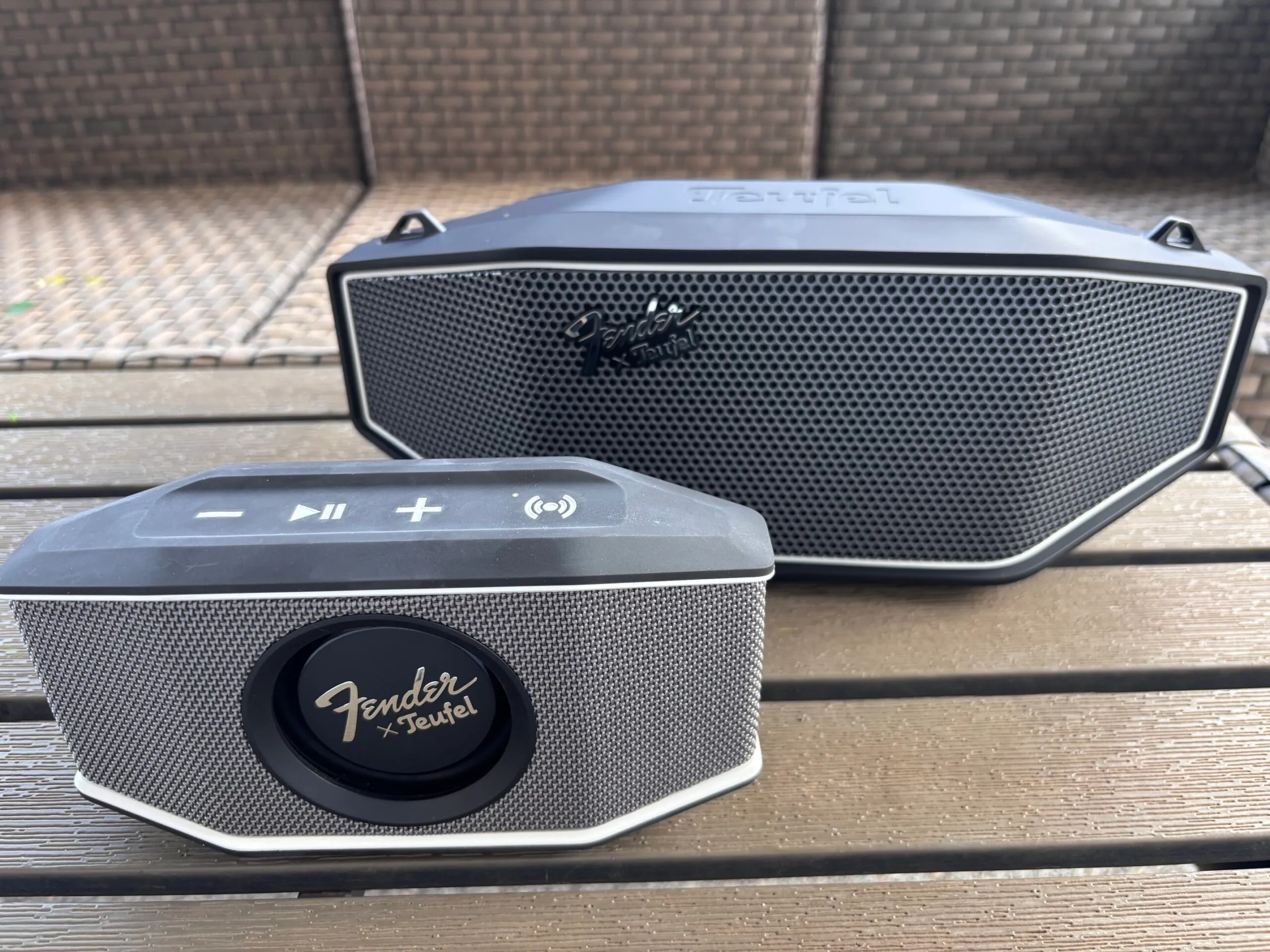
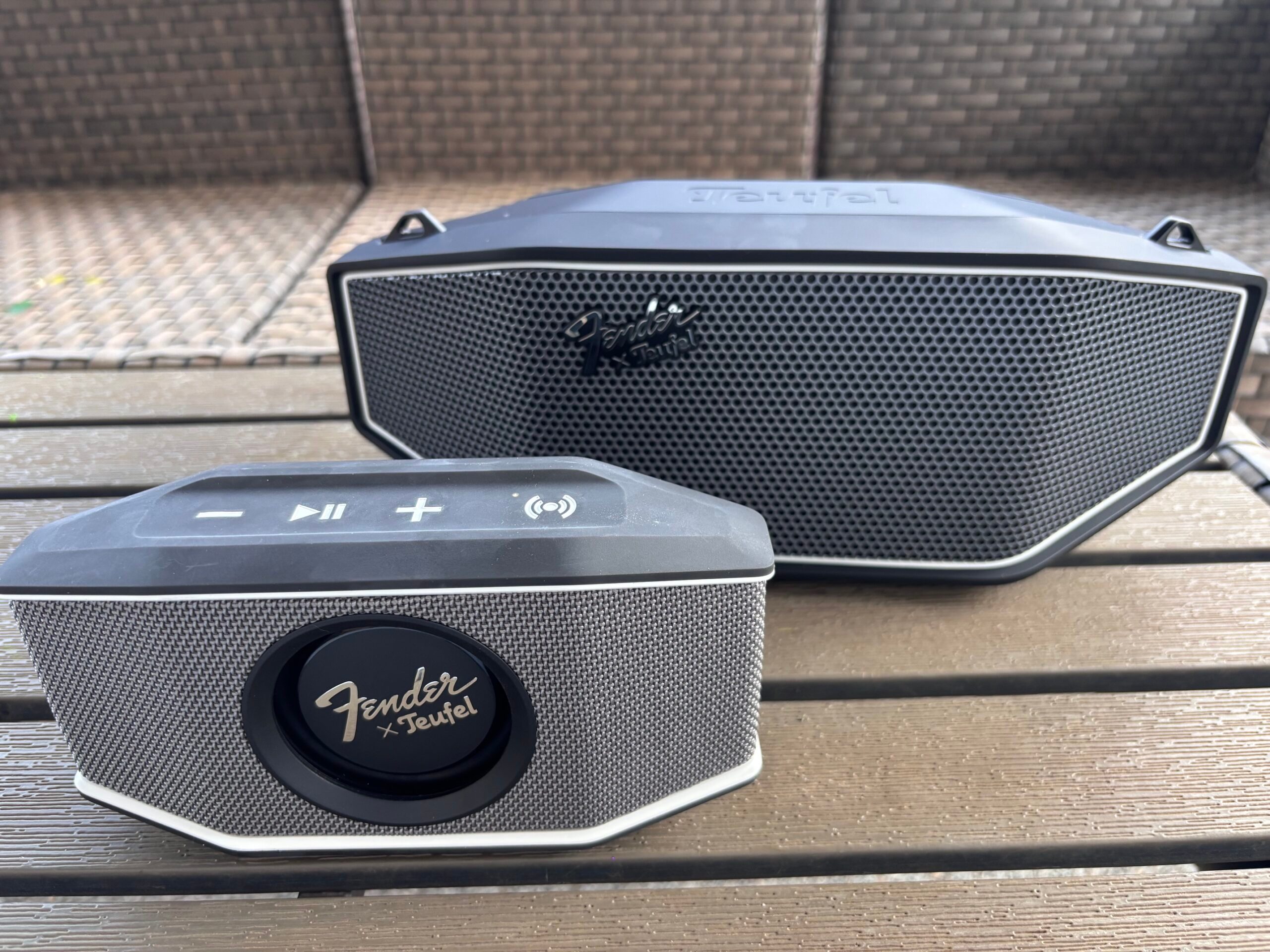
Fender is a name synonymous with music, but Bluetooth speakers aren’t exactly the first thing that comes to mind when you think of the brand. That’s where German audio company Teufel comes in. The two have teamed up for the ROCKSTER series, combining Teufel’s audio engineering with the unmistakable design influence of Fender.
The lineup includes three speakers, ranging from the ultra-portable ROCKSTER GO 2 to the much more powerful ROCKSTER AIR 2. I spent time with the two models that will probably make the most sense for everyday listeners: the ROCKSTER GO 2 ($99.99) and the ROCKSTER CROSS ($199.99). Both manage to produce surprisingly punchy sound without giving up the portability that makes a Bluetooth speaker convenient in the first place.
The ROCKSTER GO 2 is small, but definitely not quiet
The ROCKSTER GO 2 is the smaller of the two, measuring just 8.3 inches wide and weighing 1.6 pounds. At that size, it’s incredibly easy to take just about anywhere. I could easily toss it into a beach bag or backpack for a day out without having to think much about the extra space or weight.
What surprised me was just how loud it gets. During my testing, I had the GO 2 playing downstairs and could still hear it upstairs over the dryer. That’s a lot of volume from something this compact. I also think it would be perfect for a garage gym, where you want enough volume to compete with other noise without dedicating much space to a speaker.
Advertisement
Inside are two 50mm aluminum full-range drivers paired with a passive bass radiator on the front. That radiator also happens to be one of my favorite design details. You can actually watch it move along with the music, particularly when the bass kicks in. It’s a small touch, but it gives the GO 2 a little more personality than the average portable Bluetooth speaker.
Its size also makes the GO 2 particularly well suited to outdoor use. It has an IP67 rating for dust and water protection, making it a practical option for the beach, camping, or just spending time outside. Teufel rates the battery for 15 hours at medium volume, with up to 28 hours available in Eco Mode.
Setup couldn’t have been much easier. I paired the GO 2 directly with my phone over Bluetooth and started listening. I didn’t need to download an app or work through any additional setup first.
The ROCKSTER CROSS takes things up a notch
The ROCKSTER CROSS is the larger of the two, but I still wouldn’t call it a big speaker. It measures 15 inches wide and weighs 5.3 pounds, and the included Fender guitar-style carrying strap makes it easy enough to move around when you want to take it outside or bring it along somewhere.
Advertisement
The difference I noticed immediately was the sound. The CROSS sounds fuller and clearer than the GO 2, with considerably more bass behind it. Inside my house, it had no trouble carrying from room to room. I could hear it throughout the entire house without an issue, and I could even hear it clearly over the vacuum while I was cleaning. That isn’t usually the case.
The bass was probably the biggest surprise. The CROSS uses a 5-inch woofer along with two passive radiators, and you can absolutely hear the difference. The bass is surprisingly powerful for a speaker that’s still relatively compact and easy to carry around.
But sheer volume isn’t what impressed me most about the CROSS. It’s the clarity that comes along with it. Even when I really turned it up, the sound stayed crisp and clear instead of tearing too much at high volume levels.
Taking it outside only made its power more apparent. There’s enough volume here that I can’t imagine needing much more for a backyard party or larger gathering. Teufel also includes an Outdoor Mode designed to improve the listening experience outside.
Advertisement
Like the GO 2, the CROSS was simple to get running. I connected it directly to my phone over Bluetooth and started listening. It also has an IPX5 rating for water resistance and a battery rated for up to 16 hours at medium volume.
So, which one would I choose?
Digital Trends
The reason to pick between these two has as much to do with where you’re going to use them as it does sound quality.
I’d grab the GO 2 for the beach, camping, a day at the park, or a garage gym. It’s small enough that bringing it along doesn’t require much thought, yet it gets loud enough that I never felt like I was listening to a tiny speaker. The CROSS is the one I’d reach for at home or for a backyard party.
You’re giving up some of the GO 2’s grab-and-go convenience, but in return you’re getting noticeably better bass, more clarity, and enough output to cover a much larger space. The Fender influence is easy to spot on both speakers, from the branding and design details to the guitar-style carrying strap included with the CROSS.
With the GO 2, I get a speaker small enough to take practically anywhere without constantly wishing it had more volume. The CROSS gives me the bass and power I’d want for a party without requiring a massive speaker to get there. And after spending time with both, that’s what surprised me most about this collaboration: Fender and Teufel didn’t just make Bluetooth speakers that look the part. They made two speakers that make you want to keep the music going.
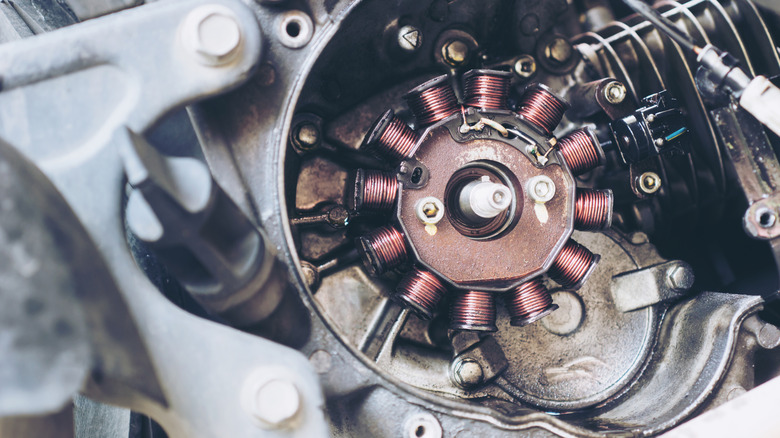
Even when looking up must-know motorcycle maintenance tips, there’s often not much attention paid to the electrical components. Sure, you’re advised to check the battery, but even a pristine battery won’t stand a chance if your bike has electrical issues. That’s why it helps to know both what a stator is and what it does. In the most basic terms, it’s the part of the system that turns the engine’s movement into usable electrical power.
Located deep inside the engine, the stator uses the engine’s rotation to create an alternating current. From there, the rectifier or regulator turns the alternating current into the direct current needed to power the motorcycle. That direct electrical current (or DC) can serve several different purposes, including replenishing the battery while the engine runs, powering the lights and ignition system, and providing juice for the bike’s electronic accessories.
You might be wondering about the difference between an alternator and a stator. Generally speaking, cars and trucks use external, self-contained alternators, but most motorcycles divide this job between several components, including the stator, a rotating magnet assembly, a rectifier, and a regulator.
Advertisement
How a stator generates electricity
Weeraa/Getty Images
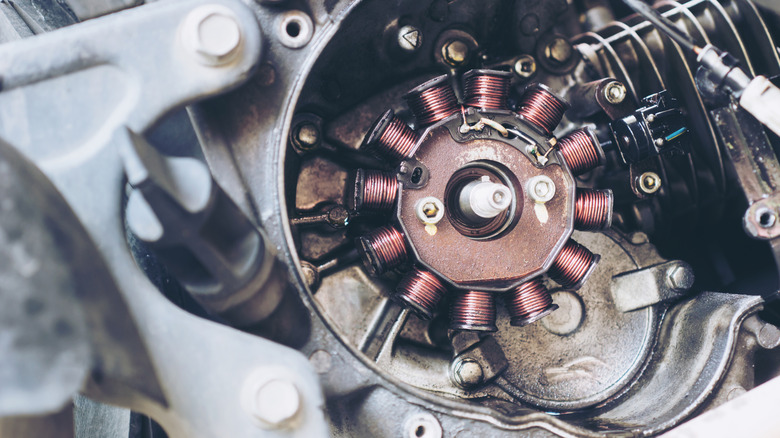
The stator consists of wire coils positioned around a rotating magnetic component. The magnet moves as the engine turns, generating AC electricity in the coils, and the amount produced increases with engine speed. Rather than sending all that electricity straight to the motorcycle’s electrical components, however, the motorcycle’s charging system manages the output using the rectifier and regulator. There, the AC output is converted into DC power and regulated down to a suitable, consistent supply.
Stator designs aren’t universal because different motorcycles have different electrical needs. Depending on the motorcycle’s design, a stator can either produce electricity for the ignition alone or to supply power for the entire bike. Some motorcycles also incorporate a pickup coil, which can tell the motorcycle’s crank position and send that information to the ignition computer to determine spark timing. All these responsibilities are split up among the motorcycle’s ignition system, starting system, and charging system.
The Financial Times reported that OpenAI expects negative free cash flow of $278bn between 2026 and 2030, from a July presentation prepared for a computing deal. That figure is an improvement on the roughly $305bn the company projected in May, while the compute and infrastructure line has risen to about $856bn against the roughly $600bn target it gave investors publicly in February. Spending can rise while burn falls because much of the build is financed by partners rather than by OpenAI.
The Financial Times reported that OpenAI expects negative free cash flow of $278bn between 2026 and the end of 2030, citing a company presentation prepared in July for a computing deal. Samantha Oltman wrote up the figures for Bloomberg, which corrected its story shortly after publication.
The same materials put revenue at $350bn in 2030, against roughly $36bn this year, and compute and infrastructure at about $856bn across the period. Three numbers, and the smallest one is getting the headlines.
The burn figure is a downward revision
An earlier projection in May put negative free cash flow for the same period at roughly $305bn. The July version is $278bn.
So the number being reported as alarming is an improvement of about $27bn on OpenAI’s own previous estimate. That does not make it small, and it does make the framing odd.
Five months later a private presentation carries $856bn. That is roughly 43% higher than the number given publicly in February.
One caveat belongs here. The February figure was described as compute and the July figure as computing power and infrastructure, so the categories may not be identical, and part of the gap could be definitional rather than real.
How both movements happen at once
Spending rises, burn falls. That combination is possible when the spending does not sit on your own balance sheet.
Free cash flow is a measure of money leaving a specific entity. It is not a measure of obligations created, and the two diverge sharply when a build is financed by vendors, landlords and partners.
Advertisement
That is why $856bn of compute can coexist with $278bn of burn. The difference is being carried by somebody.
When banks retreat from a name like Oracle, the terms available further down the chain are worse. The guarantees and warrants are not elegance, they are what the market required.
The number that should be interrogated
Revenue rising from about $36bn to $350bn by 2030 is close to a tenfold increase in four years. Every other figure in the presentation is downstream of it.
Advertisement
The burn is not an independent forecast. It is what remains after the revenue assumption is subtracted from the spending assumption, so a revenue miss does not shave the burn, it compounds it.
Reporting the $278bn as the headline risk inverts the logic. The spending is largely contracted, and the revenue is the part that has to show up.
The clock is the other story
OpenAI raised $122bn in March at an $852bn valuation, and the FT reports it is on track to exhaust that by 2028. The projection period runs two years beyond the money.
That is the context for the listing timetable and for talks the FT describes as valuing the company at about $1.2 trillion. A company that needs capital before 2028 has a reason to be in the market before then.
Projects get delayed and targets get rewritten, which is an argument for treating any single figure with caution. It applies to $856bn as much as to $278bn.
What to watch
Watch whether the $856bn figure appears anywhere OpenAI can be held to it. A number in a deal presentation and a number in a listing prospectus carry different consequences.
Watch the guarantees. If partner balance sheets are carrying the difference between the spending and the burn, the exposure worth tracking is theirs.
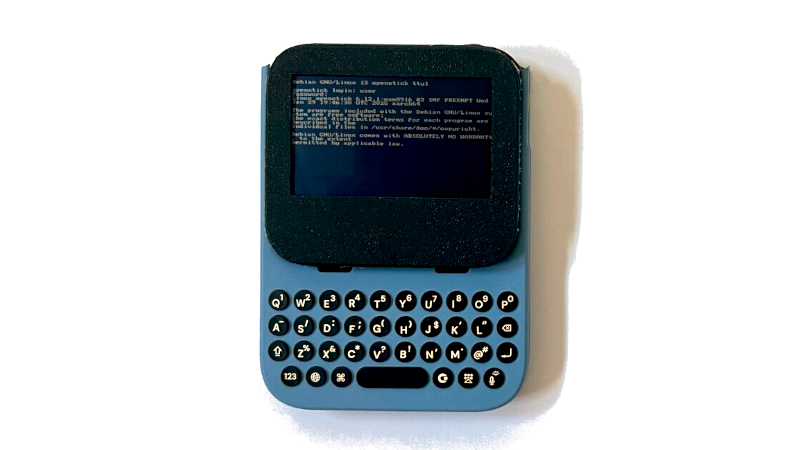
A Linux handheld computer is, in theory, easy and inexpensive given the availability of single-board computers, but in practice the budget invariably edges well into three figures. There’s an interesting alternative from [bkovac] that won’t break the bank as much, using a cheap 4G wireless hotspot, an iPhone USB keyboard case accessory, and, though a cheaper display could suffice, a fancy Adafruit Sharp memory display.
The hotspot is available from AliExpress for around 20 dollars/Euros/pounds, and it’s referred to by its model number, MF800. It’s powered by a Qualcomm MSM8916, also known as the Snapdragon 410, which you might have found in a budget cellphone early in the last decade. Importantly, though, it’s supported by mainstream Linux, and while it’s by no means the fastest on the block, it can be a poor man’s alternative to a Raspberry Pi. It comes with a small SPI display, but this project replaces it with a much bigger Sharp SPI memory display.
The build walks through a few case mods and a PCB mod on the modem, getting the keyboard to fit, and making a custom power board. Perhaps the software setup is the most interesting part, because this isn’t a simple case of installing a distro. Instead, there’s quite a bit of hackery to get the display working.
Advertisement
We really like this project because while a Linux handheld is nothing new, it’s making one using an unexpected starting point. It reminds us of the old days of running Linux on an old router.
An alleged benchmark for the M6 Pro has surfaced on Geekbench, calling into question earlier rumors about a shorter Apple Silicon generation that skips the Pro and Max variants altogether.
Before the introduction of the M6 Mac mini, the rumor mill was dead set on the idea that Apple will be shortening the M6 generation of Apple Silicon in favor of moving to M7 faster. After the launch, a benchmark result may have indicated that there will be more to the M6 generation than previously expected.
A Geekbench 7 score surfacing on Reddit for a “Mac18,6” dated September 18 2026 is claimed to run on an “Apple M6 Pro” with one processor and 18 cores. This is apparently split into two clusters of six cores and 12 cores, which may refer to “Super” performance core and efficiency core counts.
The listing adds there is a base frequency of 4.78GHz, which would correlate to the Super cores in use. The version tested also has 48 gigabytes of memory.
Advertisement
A moderate improvement
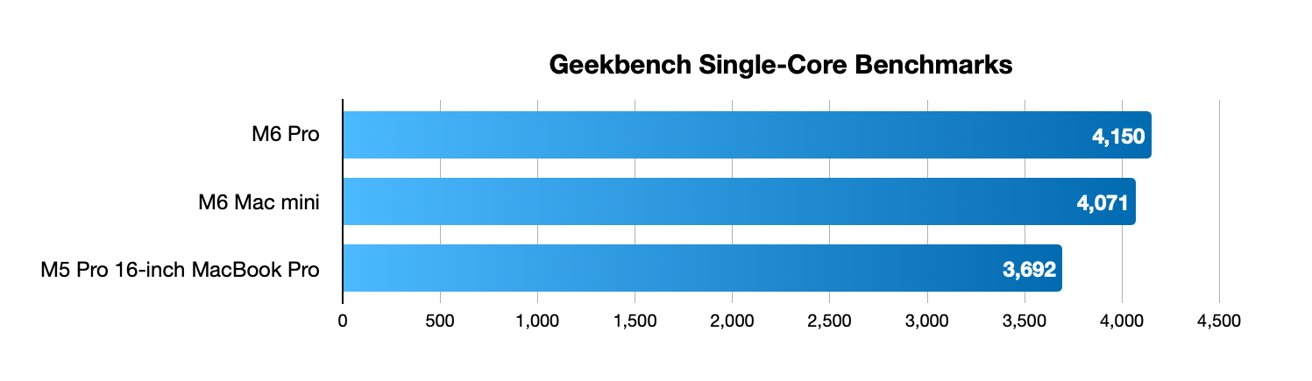
If genuine, the posted results for the M6 Pro include a single-core score of 4,150 and a multi-core of 37,565.
The M6 Mac mini results that were leaked earlier have a similar single-core score of 4,071, which would be expected here. It would be a result based on the fastest available core.
The alleged M6 Pro single-core benchmark against the leaked M6 Mac mini and the M5 Pro
It is an improvement on the M5 Pro included in the 16-inch MacBook Pro, which scores 3,692.
Advertisement
For multi-core, the number of cores matter for the result. That would explain how the M6 Pro figures are far higher than the 22,783 from the M6 Mac mini and its 12 CPU cores.
Multi-core benchmarks of the M6 Pro against the M6 and the M5 Pro
It is more in the ballpark of the M5 Pro, which also has 18 cores and has a slightly smaller 33,595 score. The generational difference here is expected due to the M6 Pro having better, faster cores.
More life than expected
Despite its plausibility, it’s entirely possible that someone faked the result and posted it to Geekbench. True or not, it’s something that will cause some observers to consider how Apple will be treating the rest of the M6’s lifespan.
Advertisement
Reports in June and July, chiefly from Bloomberg’s Mark Gurman, insist that Apple will only run the M6 era for a mere six months. This is an ultra-short lifespan compared to other Apple Silicon generations.
Gurman also said that there won’t be an M6 Pro, M6 Max, nor M6 Ultra release in the generation.
Instead, Apple is supposedly planning to bring the M7 out in the first half of 2027, so that Macs can benefit from the AI-centric chip designs. In that generation, M7 Pro and M7 Max chips would come out later in the same year.
If true, the benchmark may be a precursor to the launch of other Mac models under the M6 generation. It may also be a sign that we have a bit of a longer wait before M7 comes along.
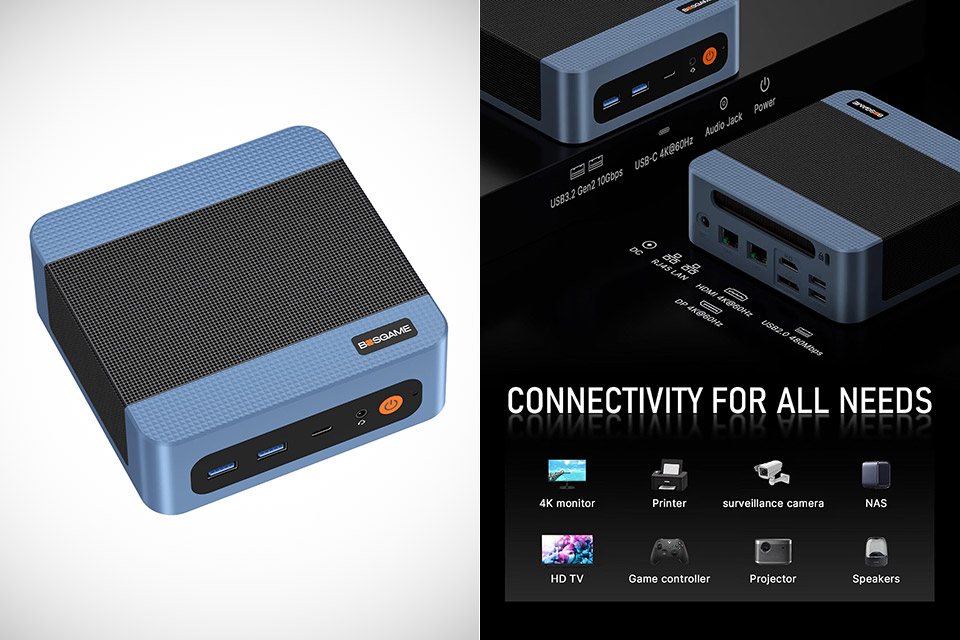
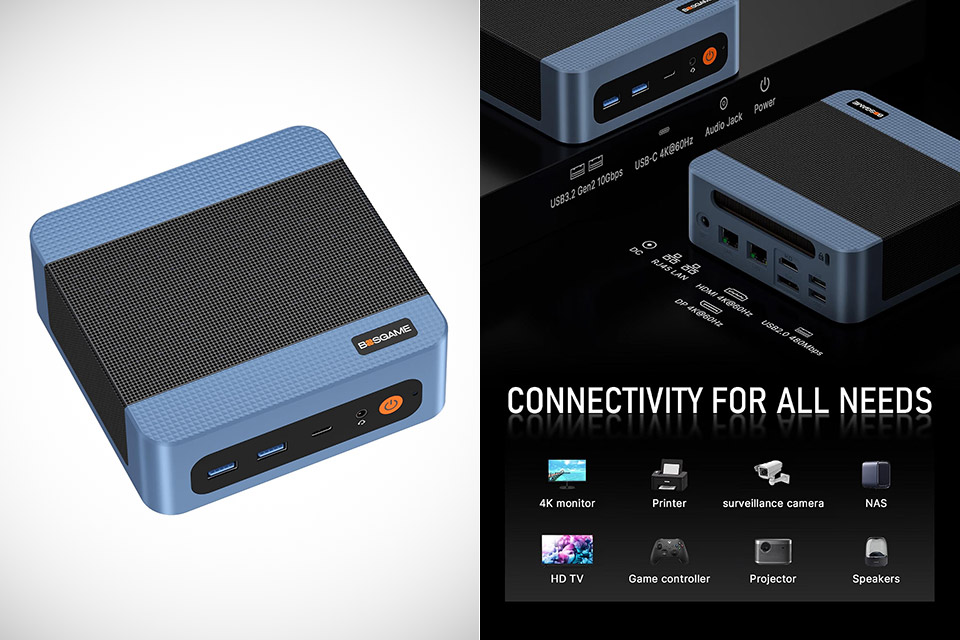
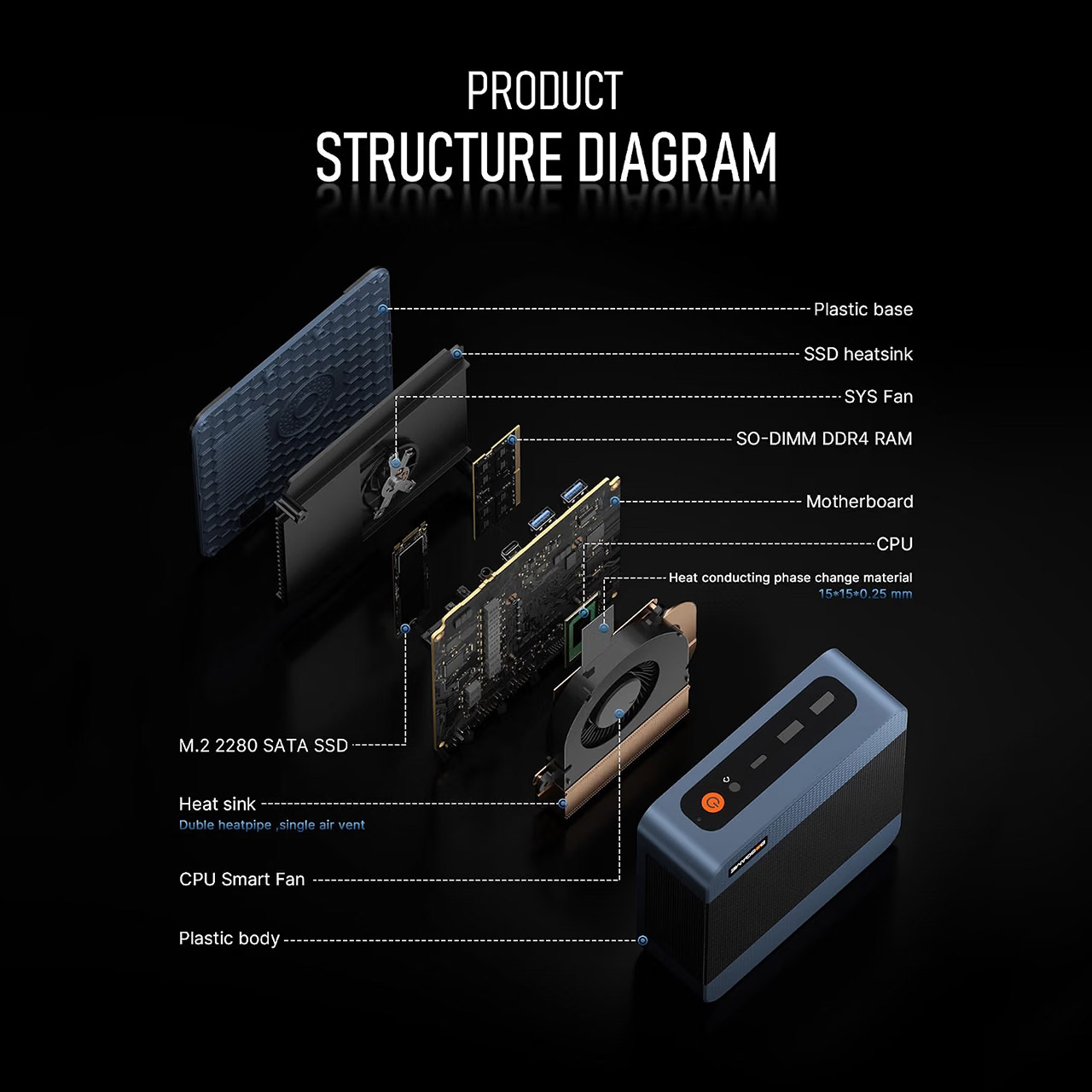
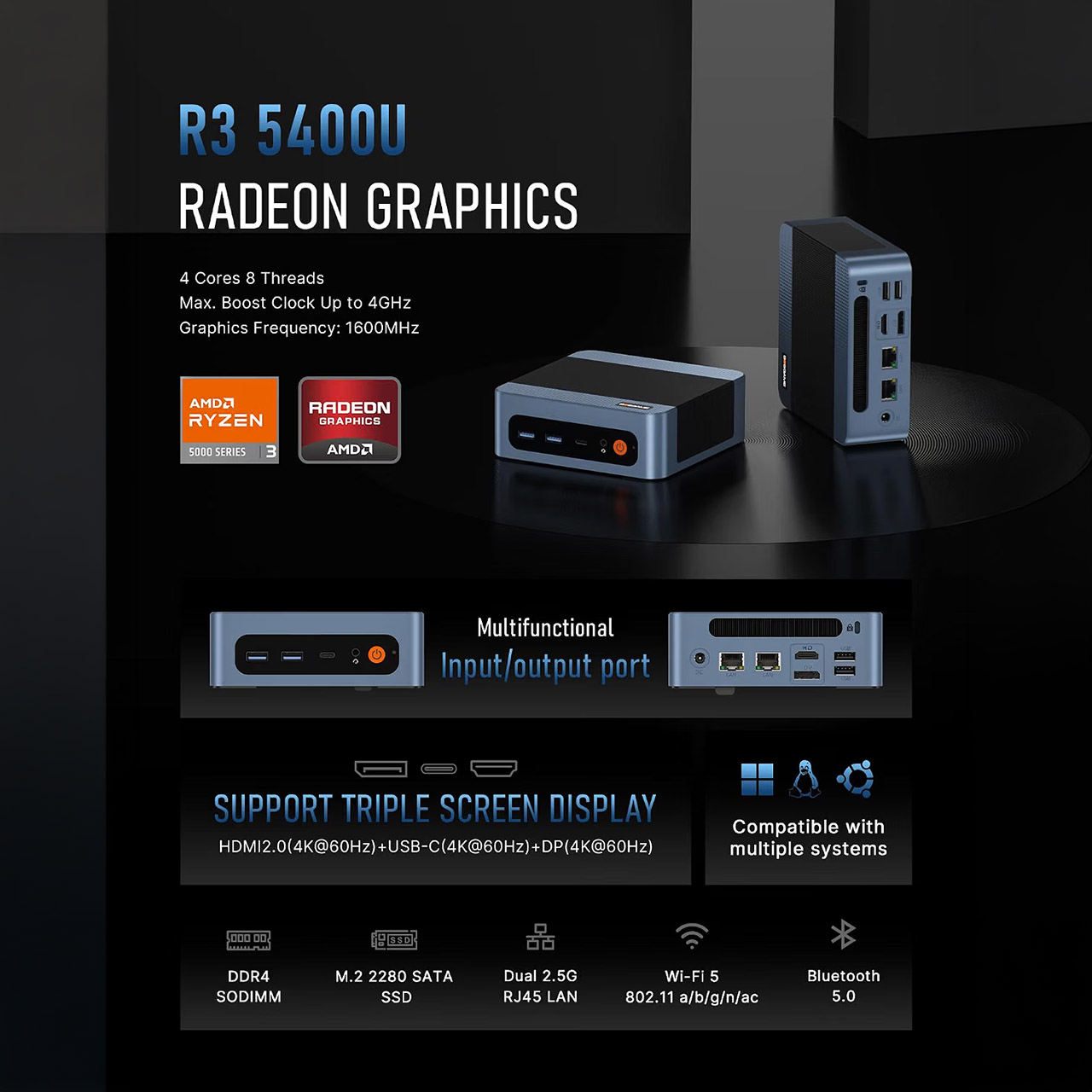
BOSGAME E5 Mini PC, priced at $186.99 with promotion code: 5400U45 (was $340), keeps showing up in deal threads because a machine this small almost never arrives with two 2.5-gigabit Ethernet ports, three 4K outputs, and a licensed copy of Windows 11 Pro for less than $300. Inside is a 15 watt laptop processor, a Ryzen 3 5400U with 4 cores and 8 threads to get the work done.
The Ryzen 3 5400U can reach 4.0GHz and has an impressive 8MB of L3 cache, all owing to AMD’s Zen 3 design. In contrast, the Ryzen 3 5300U, utilized in other SKUs, has a maximum clock speed of 3.8GHz and 4MB of L3 cache on the slightly older Zen 2 configuration. What exactly do you get out of that? The E5 has a little more oomph than the Intel N150 and N100 boxes that are widely available in this price range, which is why reviewers continue to use it as an office PC, a light virtualization host, and for any quiet box job such as spreadsheets, browser tabs, and video calls.
【AMD Ryzen 3 5300U CPU: Outperforms N150 & 3500U】 BOSGAME E5 mini PC is powered by the TSMC 7nm FinFET architecture AMD Ryzen 3 5300U processor…
【8GB DDR4 RAM & 256GB NVMe SSD Storage】 Installed with high-speed 8GB DDR4 dual-channel memory and a fast 256GB M.2 2280 SSD, eliminating slow…
【High-Capacity Dual M.2 SSD Storage Expansion】 Never worry about running out of space for your business files. In addition to the pre-installed…
However, memory and storage are where things become interesting. The 8GB base units can easily be upgraded with a matching SODIMM to achieve dual-channel speed. There are two slots for accomplishing this, each of which can support up to 32GB of DDR4-3200 RAM, which is important if you’re running virtual machines or a software firewall on the side. Storage amounts to 256GB out of the box, but you do get a second empty M.2 2280 socket, allowing you to swap out the factory SSD for a new NVMe drive (up to 4TB) without having to open the chassis. Even if you open the case, this 8GB/256GB machine can be transformed into a fine daily driver with a $30 memory upgrade and a larger SSD.
On the back, you’ll discover a couple of Realtek RTL8125 ports, which, believe it or not, are the reason this model is still suggested for home laboratories. Each port operates at 2.5Gbps, allowing you to connect one cable to the WAN and one to the LAN and run pfSense or OPNsense without a cumbersome USB adaptor. Want to run a small NAS or link-aggregate your network? Same ports, same story. However, the most important element here is wired speed. Wireless is kind of a compromise. According to the boxes, this device features Wi-Fi 5 and Bluetooth 5.0, which is fine; after all, you wouldn’t expect Wi-Fi 6 at this price.
Advertisement
The graphics don’t skimp out. You get HDMI 2.0, DisplayPort, and a full-function USB-C port, so you can connect three 4K panels at 60Hz without a problem. The Vega 6 graphics can manage that load with ease, and it even decodes 4K video like nobody’s business. Want to play older games or imitate them? You can do this at 1080p with low settings.
The USB ports are quite mixed. You’ll find a front USB-C port as well as a handful of USB 3.2 Gen 2 Type-A ports, allowing you to connect disks and docks to the front panel. The rear panel also includes two USB 2.0 connections and a 3.5mm combo jack. To top it all off, the chassis measures approximately 130mm square and 46mm height, making it compact enough to hide behind your monitor even if you don’t already have a VESA plate.
The steepest discount can be found on several Apple Watch Ultra 4 styles, though, which are $20 off. Both the Natural Titanium and Black Titanium Case options are eligible for the markdown, with qualifying band colors and sizes changing rapidly.
Advertisement
Apple Watch Series 12 – 42mm
Apple Watch Series 12 – 46mm
Apple Watch Ultra 4 – 49mm
Black Titanium Case, Translucent Black Ocean Band, GPS + Cellular: $779.99 ($20 off)
First look: Valve has open-sourced Lepton, the Android compatibility layer built for the Steam Frame headset, giving VR developers a way to bring existing Android games to the device without rebuilding them for an entirely different platform. The newly available code also offers a detailed look at how Valve tailors an Android environment for VR gaming on SteamOS, covering everything from graphics access to development and profiling tools.
The release follows the Steam Frame’s launch and builds on Valve’s March announcement of Lepton alongside the Steam Frame Verified certification requirements.
In purpose, the project resembles Proton, Valve’s tool for running Windows games on SteamOS and Linux, though it takes a different technical route: rather than translating Windows software interfaces, Lepton provides a purpose-built, game-tuned Android environment.
Advertisement
Valve has kept that environment deliberately narrow. Lepton isn’t designed to turn Steam Frame into a general-purpose Android device, nor does it aim to support every Android app. To keep overhead low, the software disables Android services that aren’t needed for gaming – a trade-off that can affect apps relying on those services.
Lepton is built to work closely with the SteamOS host system, mounting host libraries for graphics drivers, Steam and Steamworks, and Vulkan layers. Valve lists support for graphics stacks including Mesa and Zink, along with Vulkan tooling for foveated rendering and render-pass optimization.
Those capabilities are crucial for VR games, where rendering efficiency and stable frame delivery are central to comfort and image quality. By exposing the host graphics stack to the Android environment, Valve appears to be avoiding some of the overhead that can come with a more isolated container approach.
The project also ships with tools aimed at developers porting games to the platform, including support for debuggers such as strace, GDB, LLDB and RenderDoc, plus Perfetto for performance profiling. The flatscreen application window stays hidden by default, though developers can surface it for testing and troubleshooting.
Advertisement
Valve says Lepton runs without root access or root-level setup tools, with every process inside a Lepton instance running as the same non-root user. Per the project’s documentation, there’s no enforced isolation between apps within an instance, so each app is expected to run in its own separate Android container.
For developers, the open-sourced code offers a clear window into Valve’s approach to Android game support on SteamOS, including its use of host graphics libraries, Vulkan layers and a reduced Android software stack. It also gives Linux developers a base for experimenting with other uses, though Valve cautioned that those are outside Lepton’s main purpose.



















































You must be logged in to post a comment Login