The ShinyHunters extortion group stole personal information from 1.6 million RingCentral accounts after hacking the company in July, according to the data breach notification service Have I Been Pwned.
RingCentral is a cloud-based collaboration and communication platform used by over 600,000 businesses for services such as calling, messaging, and voicemail.
The company disclosed the incident on July 28, revealing that its systems were compromised following what it described as a “sophisticated social engineering campaign.”
“We have not seen any new unauthorized activity since taking these remediation efforts. To date, this incident has affected data for a limited portion of RingCentral customers, and we are communicating with affected customers directly,” it noted.
“If you are not contacted by RingCentral, you are not affected. This incident did not impact the core RingCentral platform, and our services continue to operate without disruption.”
Advertisement
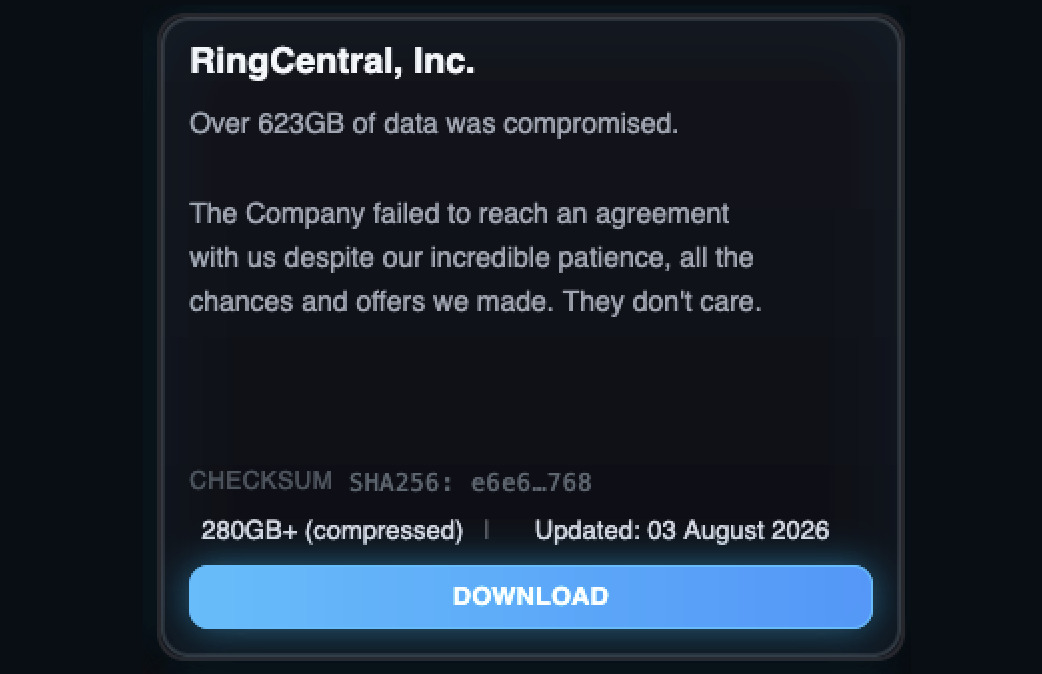
Although RingCentral has not attributed the breach to a specific threat actor or hacking group and has yet to share further details on the incident, the ShinyHunters extortion gang claimed responsibility on July 27, claiming they had stolen 623GB of data.
RingCentral entry on ShinyHunters’ data leak site (BleepingComputer)
After the company refused to pay a ransom to have the stolen data destroyed, the cybercrime group leaked a compressed archive containing 280GB worth of files on their dark web leak site.
While a RingCentral spokesperson didn’t immediately reply when contacted by BleepingComputer to confirm ShinyHunters’ claims, Have I Been Pwned confirmed the link after analyzing the leaked data and said on Thursday that it contained records for 1.6 million accounts, including names, email addresses, phone numbers, and physical addresses.
“In July 2026, the cloud-based business communications platform RingCentral was the target of a ShinyHunters ‘pay or leak’ extortion campaign,” it said.
Although RingCentral has yet to share exactly how the threat actors gained access to its systems, ShinyHunters has claimed breaches at hundreds of Salesforce customers over the past year, saying they’ve stolen over 1.5 billion records in Salesloft Drift and Salesforce Aura campaigns.
When Disney announced back in May that Millennium Falcon: Smuggler’s Run in both Disneyland and Hollywood Studios was getting an update with new missions, it was widely viewed as a welcomed but fairly minor update to the popular attraction. At its D23 conference this weekend, Disney Imagineers are offering a deep dive into how that update happened and a peek behind the curtain at all the tools used to make that update a reality.
For the uninitiated, there’s quite a bit of sleight of hand involved in how Smuggler’s Run works. Each version of this ride has multiple cockpits that rotate around on a massive set of plates, so more people can quickly get on and off the ride. This means there are 28 iterations of the same ride environment inside both the California and Florida versions of the Star Wars: Galaxy’s Edge attraction. According to Disney Imagineers Asa Kalama and Angela Jay, each one of those 28 cockpits is powered by five 4K projectors driven by eight graphics cards to make the whole thing work.
The upgrade to Smuggler’s Run back in May added a lot of complexity to the ride, allowing riders to choose between different worlds to travel to for your unique adventure. To make something like that possible, every single one of the 224 graphics cards was upgraded to a new Nvidia Blackwell card and the whole game was updated to Unreal Engine 5. This allowed the platform as a whole to be more flexible, but it also allowed the testing environment to get an upgrade as well.
Advertisement
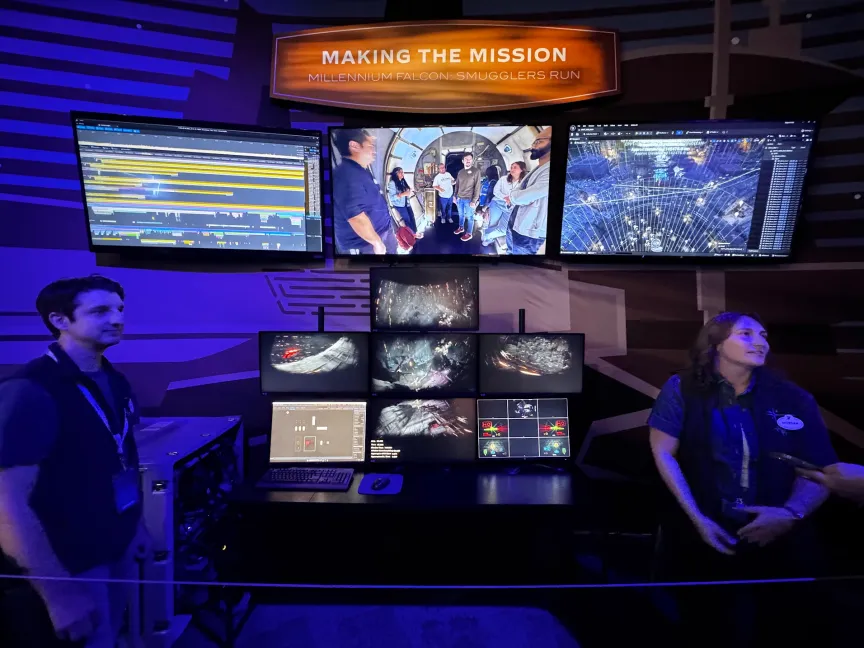
A big part of the Imagineering Pavilion at D23 this year is dedicated to a live demo of the developer console used to test Smuggler’s Run and its many new updates. This includes virtual buttons to simulate all the functions in the cockpit, screens dedicated to all the readouts you see while on the ride and, of course, multiple perspectives of the game itself.
Some testing is done within virtual reality headsets so they can see the same way you would by sitting in the ride, while other times people are sat in an office with a phone or tablet that has all the buttons laid out. Nearly all of it happens on a computer just like the one in the ride to make sure everyone gets the same experience.
One other important thing to know about Smuggler’s Run is how incredibly popular it is. If you’re a regular in either theme park, you know this ride always has a line, and nobody likes it when a popular ride is offline, even if it’s for very cool upgrades. That’s why Imagineers set off working overnight for weeks to successfully update the hardware and the software for this ride, and the result was zero downtime.
It’s clear from the way Kalama and Jay talked about the work on Smuggler’s Run in 2026 that more is coming for the most famous hunk of junk in the galaxy. It’s clear this work wasn’t just for helping the Mandalorian and Grogu take out Imperials, as made clear by a new partnership with Fortnite where your gameplay in Smuggler’s Run will carry over. This ride has now not only been future-proofed for more upgrades later on, but the success of what seemed at first like a fairly minor update to the software likely means Smuggler’s Run will be able to feel new and interesting for years. If you’re not sure why that’s important, remember that Indiana Jones in Disneyland is still running Windows XP.
Russell Holly is a Managing Editor on the Commerce team at CNET. He works with all of CNET to assemble top recommendations as well as helping everyone find the best way to buy anything at the best price. When not writing for CNET you can find him riding a bike, running around in Jedi robes, or contributing to WOSU public radio’s Tech Tuesday segment.
See full bio
Although stock launchers give you a clean setup for your phone’s home screen, they’re pretty limited in terms of customization. The cracks start showing up when you try to move widgets to any part of your screen, change the icons, or even change how your app drawer behaves. While brands like Samsung do provide a good deal of customization with their skin, One UI, there are still many features that these Android skins do not touch upon. That’s an issue that a third-party launcher can easily resolve, and Android has been generous in letting you swap yours.
The Google Play Store is filled with great launchers, with some of them like Nova Launcher attaining legendary status. But that is also a problem. With so many launchers available both through official and third-party sources, it becomes extremely difficult to pick the right one. Things get tricky because most of them behave the same way as the other, while others get abandoned by their developers within a year or two. The good thing is that we have done the heavy lifting of finding the best Android launchers for you, so you don’t have to go through the hassle.
The five Android launchers below take a genuinely different approach to what your home screen should look and feel like. So, if you’re bored with your stock home screen and want something fresh, here are the best Android launchers you must try in 2026.
Advertisement
Smart Launcher 6
Most launchers hand you a blank grid and expect you to organize it yourself. Smart Launcher 6 skips that step and actually behaves smartly. It automatically sorts every app you install into categories, making it easier for you to locate apps in the sea of apps you have on your phone. So, your games get grouped, messaging apps and communication apps get grouped, and tools get grouped. Most of us love grouping similar apps, but on other launchers, that needs to be done manually. With Smart Launcher 6, this tedious task is done automatically.
Advertisement
It has been downloaded more than 50 million times, which shows how widely used this launcher is worldwide. In fact, I’m also using Smart Launcher 6 on my Galaxy S24 Ultra, ditching the Samsung One UI, which is known to have a few features that you should turn off immediately. This launcher also throws in a customizable news reader with RSS support. This ensures that headlines can sit right on your home screen alongside your apps. One of the best things about Smart Launcher 6 is that it pulls matching colors from your wallpaper to its icons, folders, and search bar.
This ensures the phone looks cohesive rather than mismatched. It’s one of those customization options that you’d have to set manually in other launchers, but Smart Launcher 6 handles it automatically. You can also change fonts; the search bar doubles as a shortcut for contacts and calculations, and the free tier includes a customizable dock and unlimited home pages.
Advertisement
Niagara Launcher
If Smart Launcher 6 is about organizing apps, Niagara Launcher is about ditching most of them. Instead of a home screen full of tiles, app icons, and folders, Niagara Launcher gives you a plain, alphabetical list of apps running down one side. These apps are reachable with your thumb no matter how big your phone is. It’s built for one-hand use, and everything else about this launcher follows from this idea. The animations are fluid, and we like how the letters animate in a diagonal cascade as you scroll through the list of apps.
If you’re tired of the layout your phone offers, Niagara Launcher offers a new layout, which is a strong fit for foldables and other unusually shaped phones (like the Galaxy Z Fold8), since a scrolling list adapts to an odd aspect ratio far better than a fixed grid ever could. The app comes with a limited but good library of themes, which you can apply in just a single tap. You can swipe right on the home screen to reveal extra shortcuts without leaving the home screen.
When it comes to customization, you can change app icons, clock style, fonts, add a widget stack, customize the gestures (like double-tap to turn off the screen), and much more. The best thing about Niagara Launcher is that you don’t get a single ad, even in the free version of the app, which is rare to see.
Advertisement
Octopi Launcher
Octopi Launcher is fairly new compared to the others in this list. It markets itself as “the home screen launcher that tries to be different,” and it earns that line. It lets you organize your app drawer with tags instead of folders, run auto-scrolling widget stacks, and pin a widget so it floats on top of your home screen instead of taking up a fixed spot. Another nice thing about Octopi Launcher is that you can have separate layouts in portrait and landscape modes, or go a step further and have different setups for each screen of a foldable phone.
Advertisement
You can resize icons, and swiping on one in a particular direction can open a second app entirely, a small touch that saves a surprising number of taps for your most used pair of apps. If you have a foldable, then you’ll love Octopi Launcher since it gives you the option to have different layouts for the inner and outer display. While some prefer having that extended home screen setup when they switch from the outer to the inner display, there are many people who like to keep the outer display less distracting and have everything else for the bigger inner display.
Octopi Launcher also comes with the option to hide the status and navigation bars, the index bar, and enable reachability mode for the app drawer, with private space and work profile support as well. You can unlock additional features by opting for a one-time payment.
Advertisement
Lawnchair
If you love how your friend’s Google Pixel launcher looks, but you have a Samsung Galaxy phone, you don’t need to look anywhere else, as Lawnchair does the job perfectly. On its official website, it says “no clever tagline needed,” which is true because it gives you a Pixel-style launcher that ships on Pixel phones minus the restrictions. You get the same clean look as the official Pixel launcher, the same At a Glance widget, and full support for Material You’s wallpaper-based theming.
Because it is open-source, Lawnchair picks up new Pixel Launcher features almost as fast as Google ships them, since the code is public and the community can track new changes. No root access is required to enjoy Pixel Launcher features, which makes it highly approachable for people who haven’t touched a custom ROM and want that Pixel-like experience. If icon customization is your thing, Lawnchair does that pretty well, too.
Lawnchair supports QuickSwitch, a community add-on that improves the recent-apps screen for anyone running a Magisk-modified phone. Though this part is optional, most people will never need it. Lawnchair is entirely free, and there’s no subscription plan to remove ads or unlock features. It’s actively maintained on GitHub with regular releases and is also available on the Play Store.
Advertisement
Kvaesitso
I love trying out new launchers as I love customizing my phone. One of the best launchers that I have recently tried aside from the Octopi Launcher is Kvaesitso. While the name is pretty complicated, the idea behind this launcher is pretty simple — it treats search as the main way to interact with your phone, not a fallback for when you can’t find an icon. Open the Kvaesitso launcher, and you are handed a search field first. You can type in to pull up apps, contacts, calculator results, calendar entries, and even files in your phone’s internal storage.
Advertisement
This negates the need to open the app drawer, open the app and then perform the tasks you want to. Kvaesitso is fully open-source, comes with no ads, no tracking, and no reliance on Google Play services, which makes it a perfect choice among users who install their apps through Play Store alternatives like F-Droid. Kvaesitso is one of the fastest Android launchers you must try, since it has a small installer, minimal background overhead, and it gets out of the way instead of adding unnecessary animations for its own sake.
To be honest, Kvaesitso won’t please those audiences who want a heavily decorated home screen setup. It’s meant for those who are looking for productivity and want to strip away unnecessary bloat that most modern launchers rely on.
While Flock announced changes for its AI-powered traffic cameras, “Several of the proposed changes Flock is touting are merely retreads of previous ,” complains the American Civil Liberties Union. “Flock’s latest announcement still appears more focused on addressing a perceived PR problem than the significant harms its products create… [T]his is hardly the step forward Flock wants us to think it is ”
The ACLU continues to urge that default retention periods be shortened to 48 hours — not one week. And they warn Flock allows longer retention to any police department that asks for it, or when police officers activate “Evidence Mode” (the scope of which is not yet clear):
Even if “Evidence Mode’s” data retention hold only applies to hits returned on a given search, it would still retain significant amounts of location data on persons and vehicles who law enforcement do not suspect have engaged in any wrongdoing…
Flock claims that its changes will provide “more local control,” meaning local police can decide what types of offenses other Flock customers can search their data for… This is not new. Flock has attempted this before, and the security measure failed because users were easily able to circumvent the system’s requirement that police input the purpose of their search. For example, on June 12, 2025 Flock started claiming its new “Proactive Search Term Tool” would block any “impermissible” searches, such as abortion-related searches in states like Illinois that prohibit sharing reproductive healthcare data. But police officers quickly realized they could just input “investigation” or even “hehehe” as a search reason and it would be approved. Flock later switched from an open text box to a drop-down menu of reasons, but that just offered police a list of acceptable purposes they could choose from, whether it was accurate or not. Until Flock demonstrates they can develop a reliable, workable system to prevent improper searches, this promise of local control provides nothing more than a false sense of security…
Advertisement
While providing “Audit Assistance” to all departments makes sense, there is no evidence that the tool works consistently to address what the Washington Post observed is a growing pattern of police officers turning Flock into a personal stalking tool. While dozens of officers have recently been arrested, fired, or otherwise disciplined for misusing Flock for personal reasons, Flock claims these arrests are proof its auditing tool works. However, unless we know the number of officers misusing the system, we cannot conclude if Flock and its auditing tools are catching 95 percent of violators or 5 percent. Flock needs to have its auditing tool analyzed by an independent evaluator to determine its actual effectiveness. Until then, we don’t know if the tool is a real security measure or just window dressing.
Perhaps the oddest part of Flock’s announcement is its claims that “now every search will require” police to input a case code… While claiming that a “search without a reason is a search that shouldn’t happen in the first place,” Flock’s announcement fails to note how easily users have circumvented “search reason” security measures in the past… This leaves the public wondering how making an ineffective voluntary security measure mandatory will improve its functionality.
Flock’s “nearly $1 billion in venture capitalist funding has locked it into an operational model that seeks to trade our privacy for massive profits,” concludes the ACLU’s statement, as they promise to continue “The ACLU is fighting alongside communities to cancel local ALPR contracts and push lawmakers to protect our rights from this surveillance nightmare…”
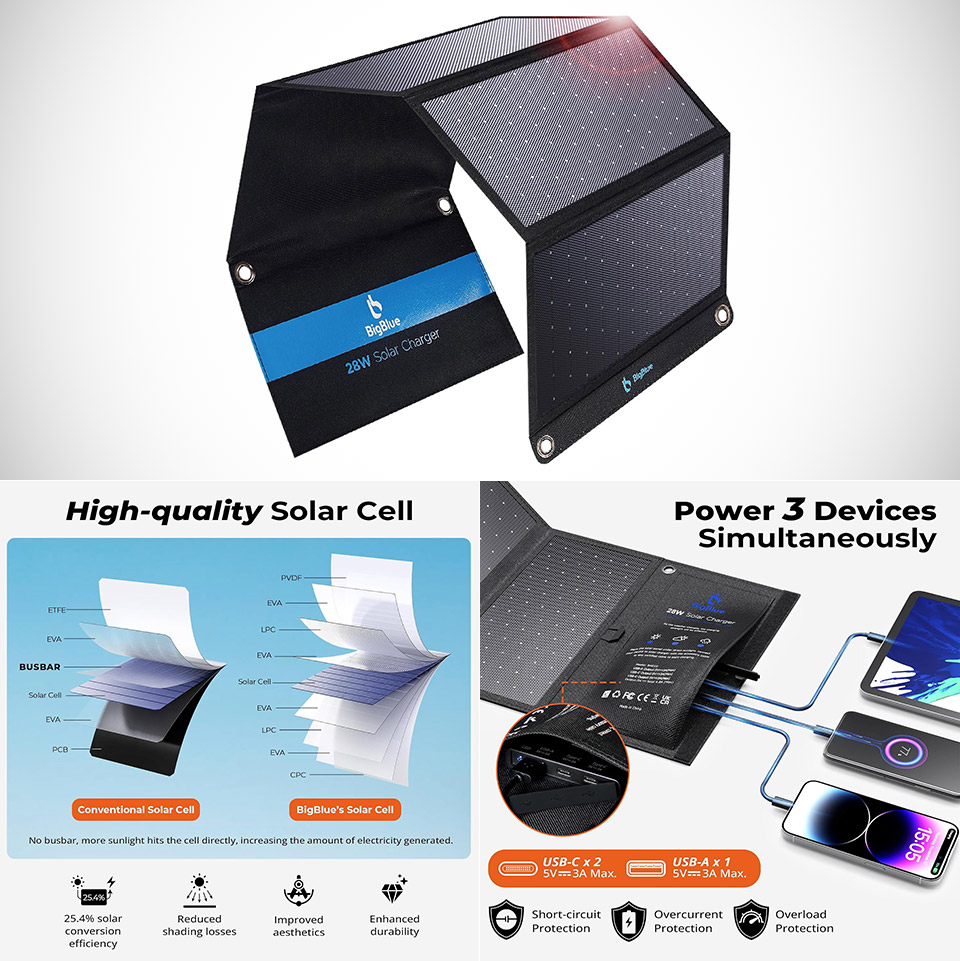
Sunny days still stretch long enough to make a portable solar panel feel practical again. BigBlue’s 28W high-efficiency model, priced at $59.97 (was $68), turns that light into usable power for phones, tablets, power banks, and small gadgets without needing a wall outlet or a heavy generator.
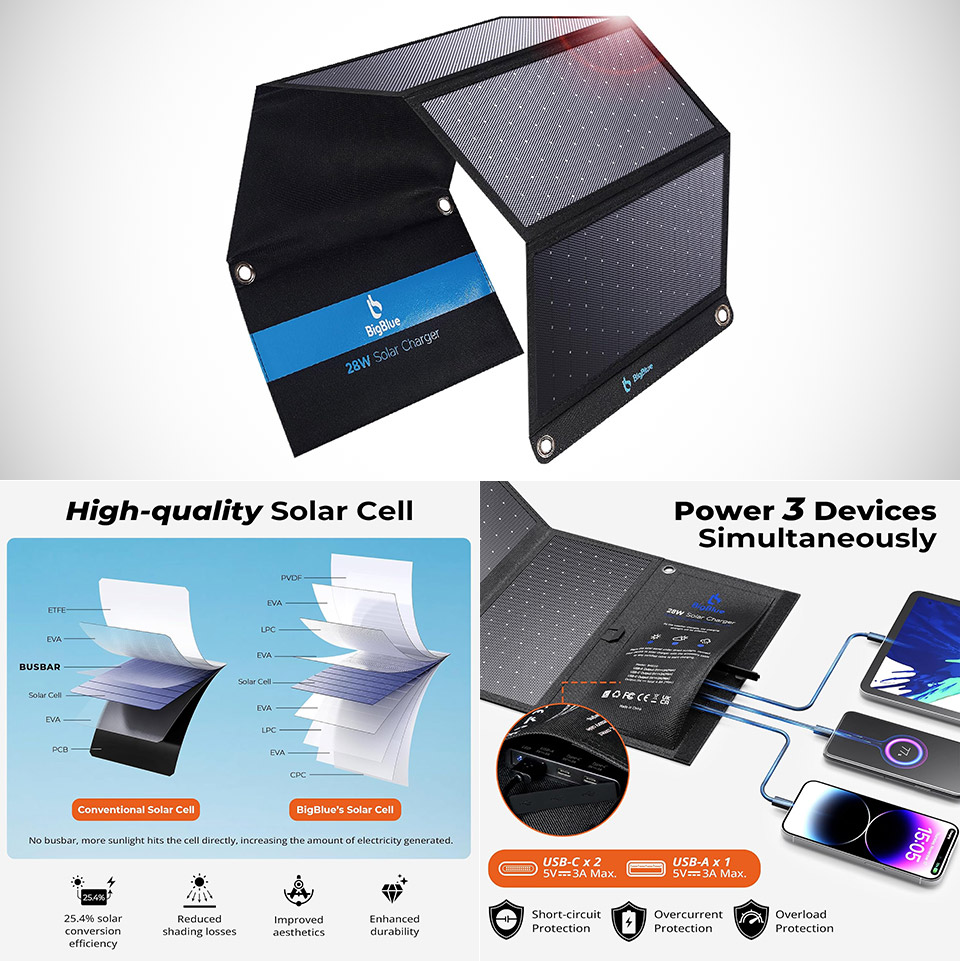
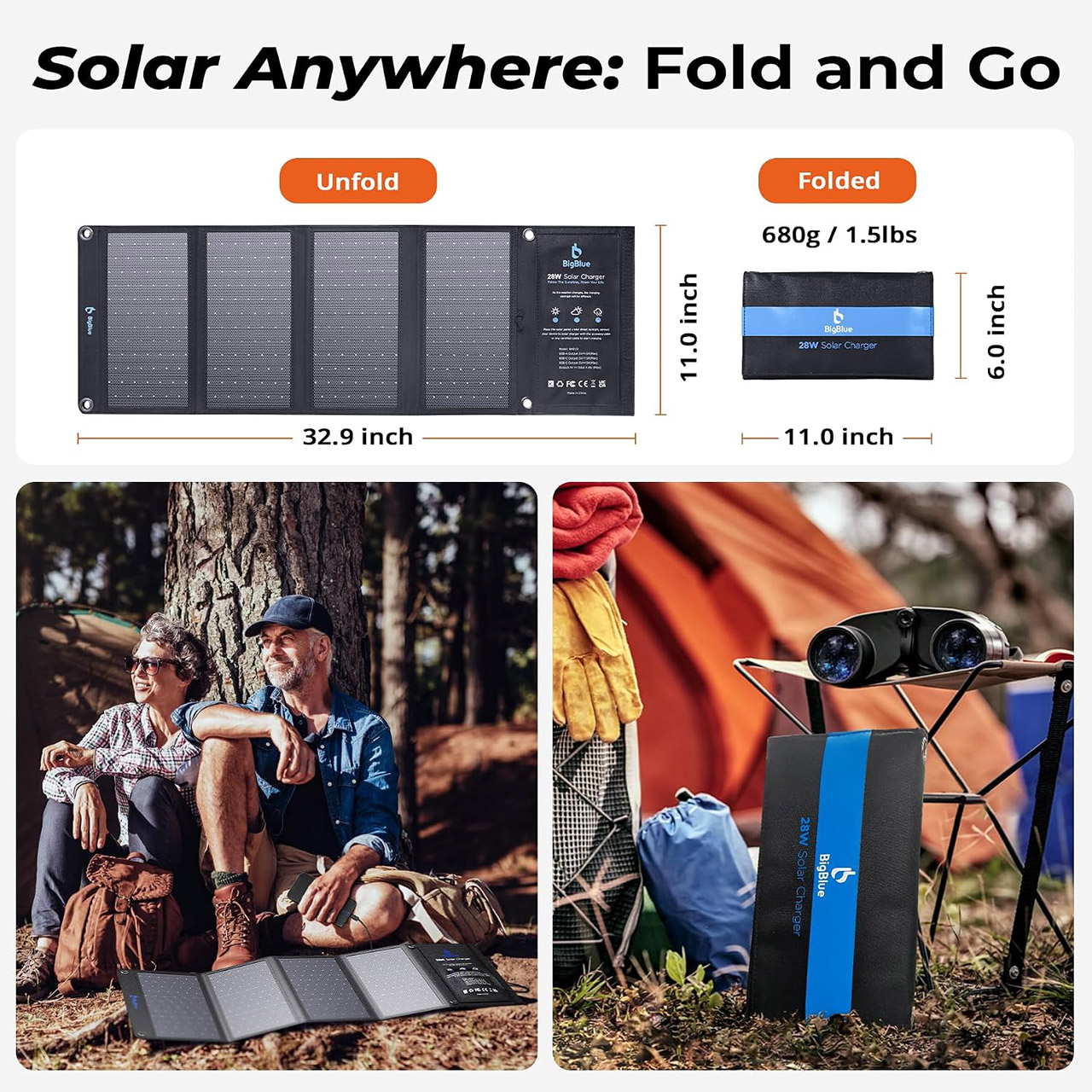
This panel comes in a compact 4-section fold, measuring approximately 11.1 by 6.3 by 1.4 inches when folded up, and weighing approximately 1.5 pounds. When fully opened, the surface measures 33 by 11 inches. Their panels feature monocrystalline cells with a conversion rate of up to 25.4%. The front surface design has no metal grid lines to block off the sun’s rays, which is ideal for extracting every last bit of energy from even a cloudy sky.
Advanced Performance: BigBlue 28W portable solar charger provides 20% more power from every ray, thanks to shadow-free surface design (No metal lines…
Upgraded Triple-Port: Dual USB-C and one USB-A ports deliver a maximum output of 5V/3A each, collectively achieving 5V/4.8A. This solar panel charger…
High-Efficiency & IP44 Waterproof: 28W USB solar panel phone charger converts 25.4% sunlight into free energy – industry-leading efficiency. Our…
Three USB ports are ready to go: two USB-C and one USB-A. On its own, each can deliver up to 5 volts at 3 amps, and when combined, the three can deliver up to 5 volts at 4.8 amps. They employ sophisticated chips inside to detect what device you’re attempting to charge and regulate the power accordingly, which is useful for keeping things safe and reasonably fast. Phones, power banks, and other such devices function normally.
Advertisement
The one thing you won’t find is a battery, as everything is powered by the sun’s rays and connected to whatever device needs to be charged. The bad news is that clouds or even a small amount of shade will significantly slow things down, but it includes a helpful automatic restart option to get the panel back up and running when the sun comes out. Just keep in mind that the actual output is determined by a variety of factors, including how directly the sun is striking the panel, the temperature outside, and how clear the sky is.
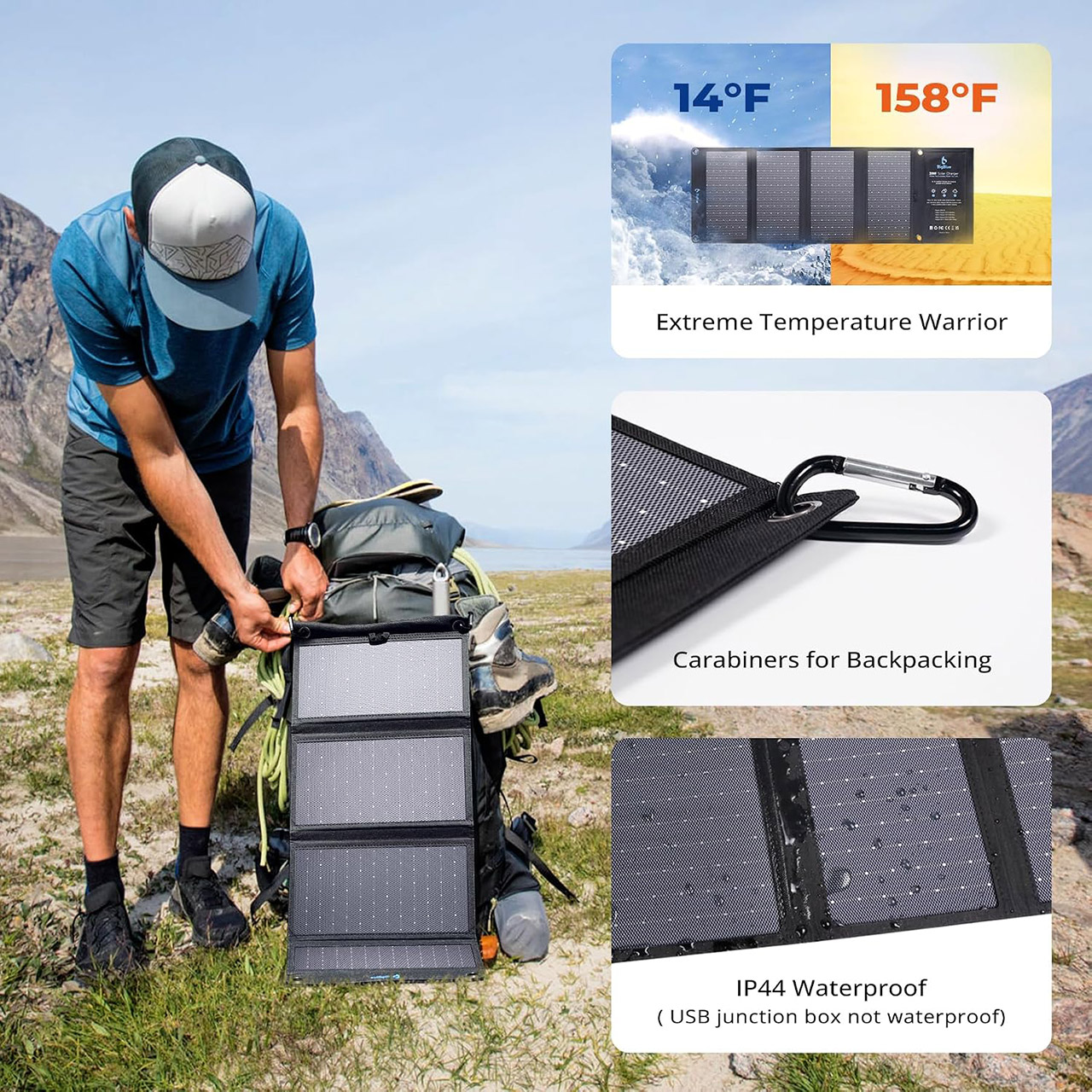
They’ve paid great attention to durability, since the surface is constructed of a durable polymer and reinforced cloth with an IP44 classification for rain and splashes. When the unit is wet, make sure to take care of the small portion that extends out (the box that contains the USB connection). Four steel carabiners and extra reinforced grommets make it simple to hang the entire thing from a backpack, a tent, or even a tree branch, and if you need to store some cables and carabiners when it’s folded up, there are some handy little zipped pockets for that.
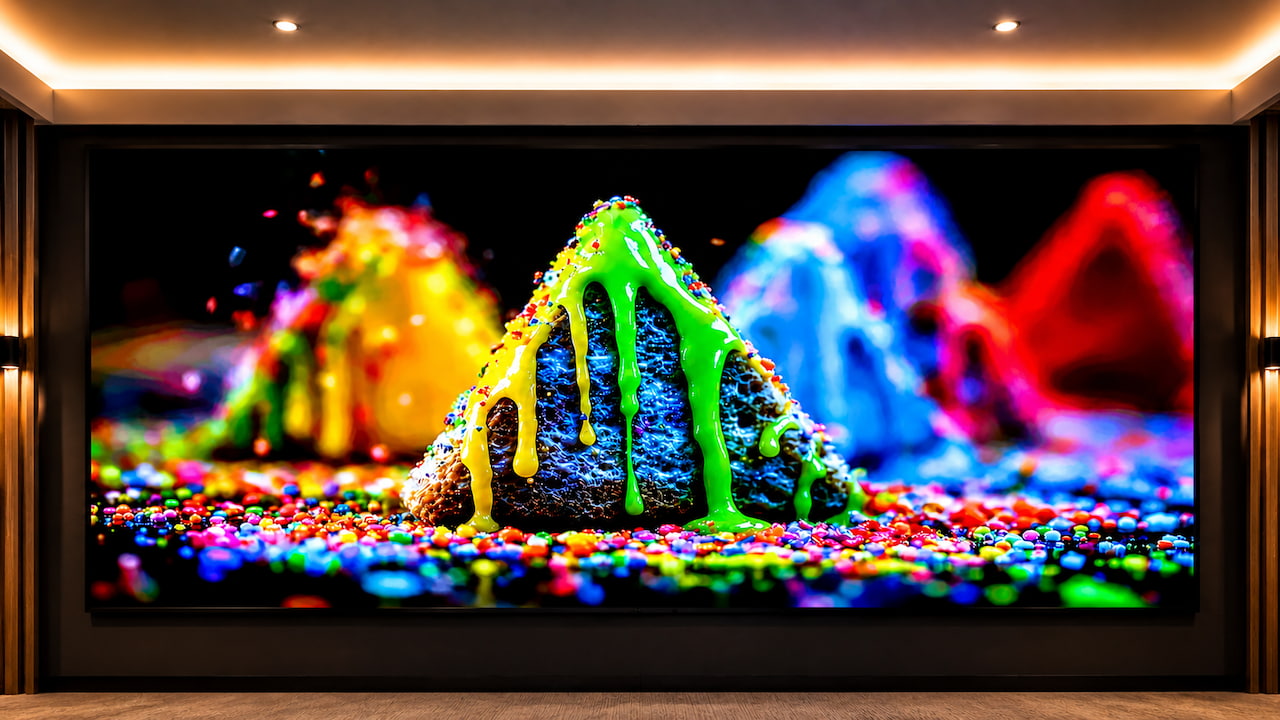
The ultra-premium home theater display market is getting crowded, and projectors are no longer the only way to fill an entire wall with an image. DreamWall, a U.S.-based display company founded in 2025, will make its CEDIA Expo debut in Denver with the Elite Series Platinum P0.7, a direct-view COB MicroLED system aimed at luxury home theaters, media rooms, and commercial installations.
DreamWall is entering a market already populated by Samsung, LG, Hisense, Quantum Media Systems, and a growing number of custom video-wall specialists. What makes the Platinum P0.7 interesting is not simply its enormous size or MicroLED architecture, but DreamWall’s attempt to address two persistent problems with large direct-view LED installations: heat and installation complexity.
Related Review:
DreamWall Elite Series Platinum P0.7
The Platinum P0.7 uses Chip-on-Board (COB) MicroLED technology with a 0.7mm pixel pitch, allowing DreamWall to create a true 4K configuration at approximately 121 inches. The display also supports true 10-bit HDR, an ultra-high refresh rate, advanced video processing, and a low-reflective surface designed to preserve image visibility in rooms with ambient light.
That last point matters because direct-view MicroLED systems are increasingly being positioned not only for completely dark dedicated theaters, but also for media rooms and multipurpose living spaces where projection can struggle against daylight or room lighting.
Advertisement
DreamWall’s indoor CooLED platform is available in 0.7, 0.9, and 1.25mm pixel pitches, with 16:9 and 21:9 configurations and screen sizes ranging from 108 to 216 inches. Custom installations can go larger.
What Makes DreamWall Different?
The more interesting technology may be hiding behind the pixels.
DreamWall calls its thermal-management platform CooLED, and the company claims many of its indoor cabinets consume only 50 watts at maximum output while producing sufficiently little heat that supplemental HVAC or active display cooling is not required. DreamWall says many installations can operate from a single 20-amp circuit.
Advertisement
That could be a meaningful advantage in residential installations. Giant LED walls can generate considerable heat, and once a theater requires additional cooling, electrical work, and HVAC capacity just to accommodate the display, installation costs and complexity escalate quickly.
DreamWall is also approaching the product as a complete custom-installation solution rather than shipping cabinets and leaving the integrator to figure everything out. Each system is configured around viewing distance, screen size, brightness, room conditions, and installation requirements, while the company provides installation assistance, calibration, U.S.-based technical support, and up to a five-year warranty on select products.
That may not sound as exciting as another million pixels, but anyone spending six figures on a wall-sized television probably wants something more reassuring than a tracking number and an installation manual.
Why Does This Matter?
eCoustics saw firsthand at CEDIA Expo 2025 how compelling a properly executed MicroLED video wall can be. Quantum Media Systems’ approximately 20-foot-wide Cinematic XDR delivered exceptional brightness, black levels, color, and image uniformity while making the seams between individual modules essentially disappear. It ultimately earned our Best Ultra Large TV recognition, despite pricing that started around $350,000.
Advertisement
Advertisement. Scroll to continue reading.
DreamWall is entering the same broader category from a slightly different direction. Its emphasis on lower heat generation, reduced power requirements, custom sizing, and integrator support suggests the company wants to make large direct-view LED installations easier to specify and deploy rather than simply chase the highest possible specifications.
MicroLED still sits at the extreme end of the residential market, but competition is expanding quickly. LG’s 136-inch MAGNIT Active Micro LED offers 4K resolution and Active Matrix pixel control, while Hisense sells a 136-inch MicroLED display and demonstrated an even larger 163-inch RGBY MicroLED system at CES 2026. Samsung’s The Wall remains one of the best-known names in the category, while Quantum Media Systems and other custom-installation specialists continue pushing screen sizes well beyond conventional televisions.
The larger issue for home theater is obvious: how long can projection remain the default solution for screens larger than 120 inches?
Advertisement
High-end projectors still offer enormous images for far less money and retain an important advantage with acoustically transparent screens, which allow the center and front speakers to sit directly behind the picture. MicroLED walls complicate speaker placement because you cannot put conventional loudspeakers behind an opaque LED display.
But direct-view displays counter with substantially higher brightness, deep blacks, strong HDR performance, and the ability to work in rooms that do not resemble underground bunkers.
Who Is It For?
The DreamWall Elite Series Platinum P0.7 is designed for high-end custom residential installations, including dedicated theaters, luxury media rooms, sports-oriented entertainment spaces, and homes where a conventional 100- or 115-inch television is simply not large enough. Commercial installations, private clubs, hospitality spaces, and executive environments are also part of the target market.
Advertisement
This is not a television you order online. DreamWall does not sell directly to consumers and does not publish consumer MSRP, instead working through dealers and custom integrators on project-specific configurations.
The Bottom Line
The DreamWall Elite Series Platinum P0.7 is entering a rapidly expanding ultra-large display market where Quantum, Samsung, LG, Hisense, and others are already demonstrating what direct-view MicroLED can do.
Its 0.7mm pixel pitch and 121-inch 4K capability are impressive, but DreamWall’s more meaningful differentiator may be the CooLED architecture and dealer-focused installation model, which are designed to reduce heat, power consumption, and some of the headaches associated with building an enormous modular display into a luxury home.
We already know from our CEDIA 2025 experience with Quantum that a properly installed MicroLED wall can deliver spectacular results. The question at CEDIA 2026 will be whether DreamWall can deliver comparable visual impact while making the technology easier — and potentially less expensive — to install.
Diary of an excuse hound: Pie charts make us hungry for pizza
EPISODE 15: The Boss has popped into Mission Control to remind us to send him the numbers he needs for his monthly management report.
Once’s he’s gone the PFY sighs, makes up a set of numbers, appends believable exponents, adds some fancy sounding units to the end and then sends them to through a script file to convert them into something the Boss can use.
Advertisement
None of it matters, as no one cares about the numbers anyway. At Management level there’s likely to be more interest in the undigested-meat portion of the Boss’ stool sample than our uptime stats, firewall throughput, or the Company’s online storage totals…
Still, the PFY will fabricate the data, extrude it through a Perl script to create a graphic panel complete with a pie chart or two, and maybe a Venn diagram, then send it to the Boss. The Boss then pastes it into the top right corner of his report document, which gets sent on to the higher-ups, month after month, year after year.
The real shame is that none of the higher ups has ever taken the time to flip through the Boss’ reports chronologically – and thereby view the PACMAN-like animation the PFY’s data has been so diligently creating all this time.
You’ve got to make your own fun in this job.
Advertisement
And no one cares if the numbers are wildly inaccurate. Back in the old days, someone might wonder how we’d achieved 117 percent uptime, or whether 17.6267 terafleptules was a real thing or not, but at this point no one will ask any questions so long as the pie chart isn’t a single color.
As stated, we stopped producing real data years ago, and, on the rare occasion we’re questioned about the validity of the data, we have an excuse close at hand.
For a good part of the ’90s we leaned heavily on blaming “The internet” for faulty data, though from ’97 till around 2001, “Y2K” was solid gold.
In recent times – i.e. the data-faking era – “Blockchain implementation” was surprisingly short-lived as an excuse – but we got a good four years out of “It’s a COVID thing,” before flipping between quantum computing and privacy restrictions for a bit.
Advertisement
If pressed, we’ll occasionally just shake our heads and quietly murmur “Viruses”, “Hackers” or “Zero day attacks”, as that covers a multitude of sins, and both the PFY and myself can ramble aimlessly for hours about viruses we have known, and what they might have done to our systems. The only thing we’d be missing in a scenarios like that would the onions in our belts, but no one would notice that while they were thinking up a good excuse to leave the room…
“AI” has at least another two years in it – unless of course AI becomes sentient during that time and kills us all… Still, AI might need someone to produce fake stats about how well they’re doing…
…
The Boss is back surprisingly fast with a query.
Advertisement
“I was just looking at the graph and I think there might be a data error.” He says, pointing to the graphic. “See there, where is says Terafloptules.”
“Uh-huh.” the PFY says.
“Is that a spelling mistake? Only I can’t find the work Terafloptules on Google. And last month it was in Terafloctules, not Terafloptules, but I can’t find Terafloctules either.”
“Well, you wouldn’t would you. I mean Google looks up data after the fact.”
Advertisement
“I’m not sure I follow.”
“Well, say you created a word. Idiomanagement, say. Will Google know about it?”
“Yes?”
“No, it won’t. It won’t notice it until it becomes a commonplace word or phrase. In the interim period, before it gets accepted and has a wider use, Google will simply skip over it, assuming it’s a spelling mistake of some similar word.”
Advertisement
“So… we’re… using a word that doesn’t exist?” the Boss asks.
“No, we’re using a word that doesn’t exist in common usage. It’s like DVD Player in 1996. If someone saw that written down then, they might have thought it was DUD player and thought you were referring to Aly Dia. Now though, the word’s in common usage.”
“So is there a word we could use that people would be more familiar with?”
“I guess we could use Gigafloptules, but then I’d have to mention on the legend that the units are in thousands.”
Advertisement
“What is a gigafloptule?” “I’m glad you asked!” the PFY blurts happily. “To get to the bottom of that you really need to know a little bit about the parsec measurement of the speeds of data – but don’t worry, it’s not nearly as complicated as it sounds! You see, when Rutherford split the neutron with a nitrogen atom back in the 1850s, he noticed that a small amount of energy, a floptule, was ejected from the uranium positron…
I leave the PFY rambling while I pop up to the cafeteria to see if they have any onions. Yellow ones, because of the war…
Kioxia’s GP1 reaches 10 million IOPS using PCIe 6.0 and XL-FLASH technology
Its 50 DWPD rating indicates substantial endurance for sustained enterprise workloads
A hypothetical 3TB model could theoretically withstand 109.5 PB written
KIOXIA Europe GmbH has unveiled the GP1 Series, a PCIe 6.0 NVMe SSD engineered for direct GPU access within demanding AI infrastructure — the first product in the KIOXIA GP Series introduced in early 2026.
Built to PCIe 6.0 and NVMe 2.2 specifications, the SSD carries an endurance rating of up to 50 drive writes per day (DWPD).
Latest Videos FromTechRadar
Advertisement
Why IOPS performance matters
The GP1 Series is intended to support emerging AI storage architectures that extend high-bandwidth memory using a flash-based tier for capacity.
This approach allows AI systems to access considerably larger datasets at a lower cost than continually adding more high-bandwidth memory.
The company states that this method also improves GPU utilization by keeping processing units supplied with data instead of waiting idle.
IOPS measure how many read and write requests a storage device can process every second, directly shaping how quickly GPUs receive fresh data.
Sign up to the TechRadar Pro newsletter to get all the top news, opinion, features and guidance your business needs to succeed!
In AI training and inference, thousands of parallel operations must move between storage and processing units without introducing costly delays.
Advertisement
Higher IOPS therefore reduce the risk of GPUs sitting idle while waiting for data, which can otherwise limit overall system performance.
KIOXIA’s endurance claims for the GP1 Series offer a further measure of how the drive is positioned for sustained AI workloads.
Assuming a two-year warranty and a 3TB capacity, a 50 DWPD rating would translate into roughly 109.5 PB of total write endurance over that period.
Advertisement
By comparison, Gigabyte’s AI TOP 100E drive claims an endurance rating of 219 PB, equivalent to a full year of continuous writing at maximum speed.
That endurance figure is notable partly because the Gigabyte drive relies on TLC NAND rather than the SLC-based flash found in KIOXIA’s design.
Form factors and industry context
The KIOXIA GP1 Series will ship in E3.S and E1.S form factors, available in both 9.5 mm and 15 mm heights.
Advertisement
These variants support cold-plate liquid cooling on the E3.S and 9.5 mm E1.S options, while every configuration also works in standard air-cooled setups.
Evaluation samples will be available to select customers by the end of 2026, ahead of a showcase at the FMS conference in California.
“The growing performance and memory demands of AI infrastructure require a broader memory hierarchy that can keep GPUs supplied with data efficiently,” said Paul Rowan, Vice President & Chief Marketing Officer at KIOXIA Europe GmbH.
“The KIOXIA GP1 Series enables flash-based memory extension and GPU direct access, helping to reduce latency and CPU overhead while increasing throughput for AI, HPC and data analytics workloads.”
Advertisement
The GP1 Series architecture is designed to scale well beyond current levels, with future generations aiming for as much as 100 million IOPS.
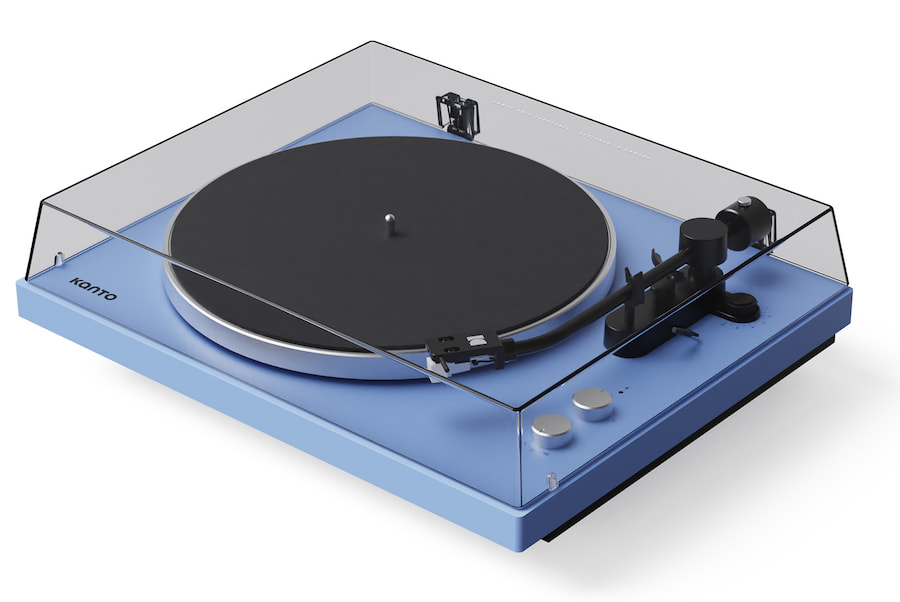
Ten months is not a very long product cycle for a turntable. Kanto introduced its first record player, the Obi3, in October 2025 for $199.99, and less than a year later the Canadian manufacturer is already replacing it with the Obi3G2 for $249.99. That might sound like the kind of generational update that involves a new finish, a revised logo, and some marketing copy, but Kanto has actually addressed several of the original model’s limitations.
The Obi3G2 remains an entry-level belt-drive turntable with Bluetooth 5.3, a switchable phono preamp, weighted aluminum platter, engineered-wood plinth, aluminum J-shaped tonearm, and pre-installed Audio-Technica AT3600L moving-magnet cartridge. However, Kanto has added a sensor-controlled drive system, adjustable tracking force and anti-skate, electronic speed selection, cue-activated start, and auto-stop while increasing the mass of the turntable considerably.
For an extra $50, that is substantially more interesting than another color.
Related Reviews:
What Changed From the Original Kanto Obi3?
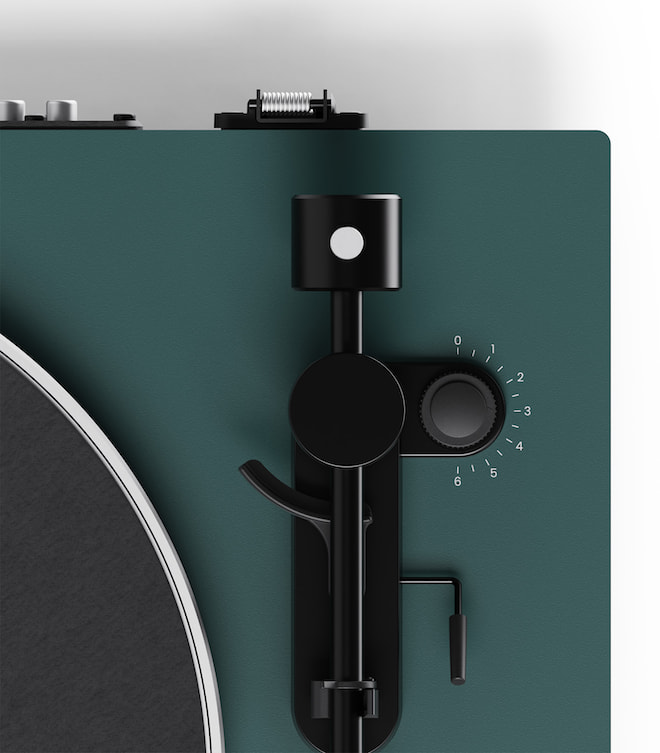
The original Obi3 offered a fixed counterweight and internally preset, non-adjustable anti-skate. That kept setup simple, but it also removed much of the adjustment that separates a traditional turntable from a more appliance-like record player. The Obi3G2 replaces both with an adjustable counterweight and dedicated anti-skate control, allowing owners to properly set tracking force and make adjustments themselves.
Advertisement
Kanto Obi3G2
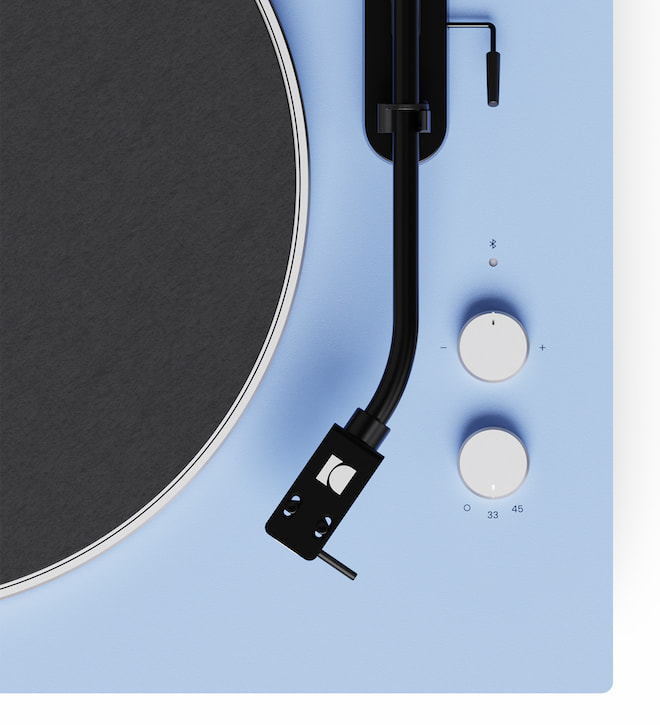
Kanto has also replaced the original belt-drive system with a sensor-controlled belt drive that continuously monitors motor speed. Electronic selection switches between 33⅓ and 45 RPM without requiring users to move the belt manually, while Kanto specifies wow and flutter at less than 0.15% WRMS. The ±10% pitch adjustment from the original model remains.
Auto-stop is another useful addition. The Obi3G2 remains a manual turntable, so users still position and lower the tonearm themselves, but the platter stops at the end of a record rather than leaving the stylus running indefinitely in the lead-out groove. That provides some of the convenience beginners may want without turning the Obi3G2 into a fully automatic design.
Kanto Obi3G2
The physical changes are also substantial. The original Obi3 weighed 8.6 pounds (3.9 kg), while the Obi3G2 weighs 12.1 pounds (5.5 kg). Kanto attributes the additional mass and more substantial plinth to improved vibration control. The G2 is also slightly larger at 17 x 14.3 x 4.9 inches compared with 15.7 x 14 x 3.7 inches for the original.
What Hasn’t Changed?
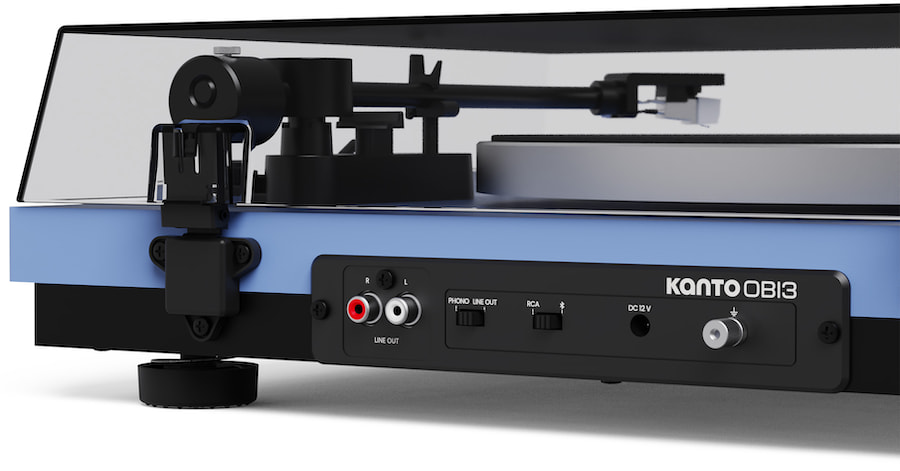
Kanto wisely left some things alone. The Obi3G2 retains the Audio-Technica AT3600L, a basic but proven moving-magnet cartridge commonly found on affordable turntables. It also retains the weighted aluminum platter, J-shaped aluminum tonearm, cue lever, Bluetooth 5.3 output, ±10% pitch control, and switchable phono preamp.
That last feature makes the Obi3G2 particularly flexible. Set the output to line level and it can connect directly to powered loudspeakers or any amplifier with a standard analog input. Switch the internal preamp out of the signal path and it can be connected to an integrated amplifier, receiver, or external phono preamp with a dedicated phono input. Bluetooth 5.3 also allows wireless playback through compatible powered speakers or headphones.
Kanto has not specified support for higher-quality Bluetooth codecs such as aptX or LDAC, however, and there is no USB output for digitizing records. Buyers looking for those features will need to consider alternatives.
Advertisement
Kanto Obi3G2 Specifications:
Drive: Belt drive with speed sensor
Speeds: 33⅓ and 45 RPM
Wow & Flutter: <0.15% WRMS, DIN weighted
Pitch Control: ±10%
Cartridge: Audio-Technica AT3600L
Tonearm: Aluminum J-shaped
Counterweight: Adjustable
Anti-Skate: Adjustable
Operation: Manual cueing with cue-activated start and auto-stop
Platter: Weighted aluminum
Plinth: Engineered wood
Phono Preamp: Built-in, switchable
Wireless: Bluetooth 5.3 output
Wired Output: RCA
Dimensions: 17 x 14.3 x 4.9 inches
Weight: 12.1 pounds
Finishes: Black, White, Green, Ice Blue, Walnut
What Makes the Obi3G2 Different?
No single feature on the Obi3G2 is revolutionary. The combination at $249.99 is what makes it interesting.
Advertisement. Scroll to continue reading.
Most entry-level turntables lean toward one of two approaches. Some emphasize convenience with fully automatic operation, fixed tonearm settings, built-in phono stages, and Bluetooth. Others provide a more traditional manual experience but eliminate Bluetooth and often charge extra for an internal phono preamp.
The Obi3G2 lands between those two camps. Buyers get Bluetooth and a built-in phono stage, but they also get an adjustable counterweight, adjustable anti-skate, manual cueing, electronic speed selection, sensor-controlled speed regulation, auto-stop, and an aluminum platter.
That gives beginners something they can learn on without requiring them to replace the entire turntable as soon as they become more comfortable with analog playback.
Advertisement
The Competition
The Audio-Technica AT-LP70XBT ($299 at Crutchfield) is probably the most obvious mainstream rival at $299. It is fully automatic, includes Bluetooth with aptX Adaptive, has a switchable phono preamp, and uses Audio-Technica’s AT-VM95C cartridge body, which supports the company’s broad VM95 stylus family. The tradeoff is that its cartridge body is fixed and the turntable is designed around simplicity rather than user-adjustable tracking force and anti-skate.
The U-Turn Orbit Basic starts at the same $249 price and takes the opposite approach. It is a more traditional analog design with U-Turn’s new OA3 magnesium tonearm, adjustable counterweight, internal anti-skate, and AT91B cartridge, but the standard $249 configuration does not include Bluetooth, a phono preamp, or even a cue lever. Those can matter less to experienced listeners but make the Obi3G2 considerably more complete out of the box.
Sony’s new PS-LX3BT is another alternative for buyers who prioritize convenience. It is fully automatic, includes Bluetooth and a built-in phono EQ, and carries a $399.99 regular price, although Sony is currently selling it for $349.99. It requires considerably less interaction from the user, but it also costs substantially more than the Kanto.
Pro-Ject’s E1 family represents another step toward the traditional audiophile approach, with manual belt-drive operation and versions offering an internal phono stage or Bluetooth. The E1 BT includes Bluetooth 5.0, a phono preamp, electronic 33/45 RPM switching, an aluminum tonearm, and Ortofon OM5e cartridge, but it is fundamentally aimed at buyers who favor a more conventional European turntable design.
Advertisement
Kanto Obi3G2
Who Should Consider the Kanto Obi3G2?
The Obi3G2 makes the most sense for first-time turntable buyers who want convenience without buying something they will immediately outgrow. Bluetooth makes it easy to use with wireless headphones or powered speakers, while the internal phono stage removes the need for another component when getting started.
The adjustable tonearm setup also gives new vinyl listeners an opportunity to learn how tracking force and anti-skate actually work. That matters if the goal is eventually to move into better cartridges, external phono stages, amplifiers, and more ambitious systems rather than treating the turntable as another wireless appliance.
Buyers who want completely automatic operation should look toward Audio-Technica or Sony. Those primarily interested in maximizing traditional analog performance and who have no use for Bluetooth may find the U-Turn Orbit Basic or an entry-level Pro-Ject more appealing.
The Bottom Line
When we covered the original Obi3 in October 2025, we wondered whether Kanto had created one of the first new turntables under $200 actually worth considering. The Obi3G2 costs $50 more, but the additional money buys considerably more than a new badge.
Advertisement
The sensor-controlled motor, adjustable counterweight and anti-skate, electronic speed selection, auto-stop, and heavier construction address meaningful weaknesses of the first generation while retaining Bluetooth, a switchable phono stage, and the AT3600L cartridge.
Advertisement. Scroll to continue reading.
At $249.99, the Obi3G2 faces stronger competition, but its combination of manual turntable control and modern convenience is unusual at the price. It is not the best choice for someone who wants one-button automatic operation, nor is it pretending to be an audiophile turntable costing three times as much. For someone building a first real record system and wanting enough adjustability to learn along the way, however, Kanto has made the second generation considerably more convincing than the first.
Price & Availability
The Kanto Obi3G2 is available now for $249.99 at Amazon. Worldwide availability is scheduled for early September at £179.99 in the UK, €199.99 in Europe, and AU$349.99 in Australia.
Multiple distributed denial-of-service (DDoS) attacks targeted the Threema secure messaging service earlier this week, causing severe disruptions to communications.
Organizations using Threema On-Prem did not experience any issues because they rely on their own infrastructure.
In a post-mortem report on Friday, the end-to-end encrypted instant messaging service said that the attacks were difficult to defend against because the threat actor constantly changed patterns.
Threema is a paid messaging application developed by the Swiss technology company of the same name, with a heavy focus on security and privacy.
The service relies on its own server infrastructure in various locations in Switzerland and promises “no ads, no profiling, no hidden data analyses.”
Advertisement
On Tuesday around 6 PM UTC, users started to report service interruptions. The company responded about an hour later, saying that based on the information available at the time, the cause was “a network outage on our colocation partner’s side.”
“Now Threema network status saying ‘Connecting’ instead of ‘Connected,’ welp… 10mins later, now it’s back to saying ‘Connected,’ yet msgs are still very much not sending right away & very delayed,” one user complained.
About three hours later, Threema said it was working to restore all of its services after its partner reported that the network issue had been resolved.
The next day, users in Switzerland, India, and China continued to report that the service was down, despite Threema’s status page showing no problems.
Advertisement
However, the company confirmed that it was being targeted by a series of DDoS attacks it was working to mitigate, and warned users that intermittent outages were likely to occur.
Threema explains that the attacks made its service “temporarily unavailable or only partially available on Tuesday evening and Wednesday morning.”
Typically, DDoS attacks are mitigated without any noticeable impact due to effective defenses that adapt to the attack’s patterns, Threema said.
The attacks this week were large-scale, though, and targeted both Threema and its colocation partner, Nine.
Advertisement
“It is not entirely clear whether Threema was the primary target or whether the attacks were directed at multiple targets,” the company notes.
Defending against the attacks proved challenging because they persisted for an extended period, while the threat actor continually changed its tactics to circumvent mitigation measures.
An unrelated technical issue prevented the company from updating the current system status page, and the company decided to take it offline until the problem was fixed.
“Business customers using Threema Work were informed via email on Wednesday morning about the unstable service conditions, and account managers provided information on the current situation in response to inquiries.”
Advertisement
To avoid similar incidents, the Swiss company has implemented “specialized DDoS protection as an additional measure” to filter attack traffic upstream and reduce the load on its infrastructure.
Overall prevention scores can hide what happens after initial access. Once attackers are using valid credentials, prevention drops sharply.
The Blue Report 2026 measures defenses technique by technique across 338 million simulations run in customer production environments.
One of the oddest things about macOS is the installation dance. Dealing with disk images, dragging and dropping—it’s the main way of installing software from outside the Mac App Store, and it’s annoying.
You download a DMG file, open it to mount a virtual disk, and drag the application from there to your Applications folder. Then, to keep things tidy, you need to unmount the virtual disk and delete the DMG file. It’s … convoluted. To be fair, it was relatively streamlined back in 2001 when it became the main way to install applications on the then-new Mac OS X. But that was a quarter-century ago, and there has to be a better way by now.
Developer Jeff Schumann agrees, so he built a tool that does all these steps for you: EasyDMG. This completely free app has an adorable hamster mascot and the slogan “Created out of spite.” It lets you double-click DMGs to install software, the way it always should have worked.
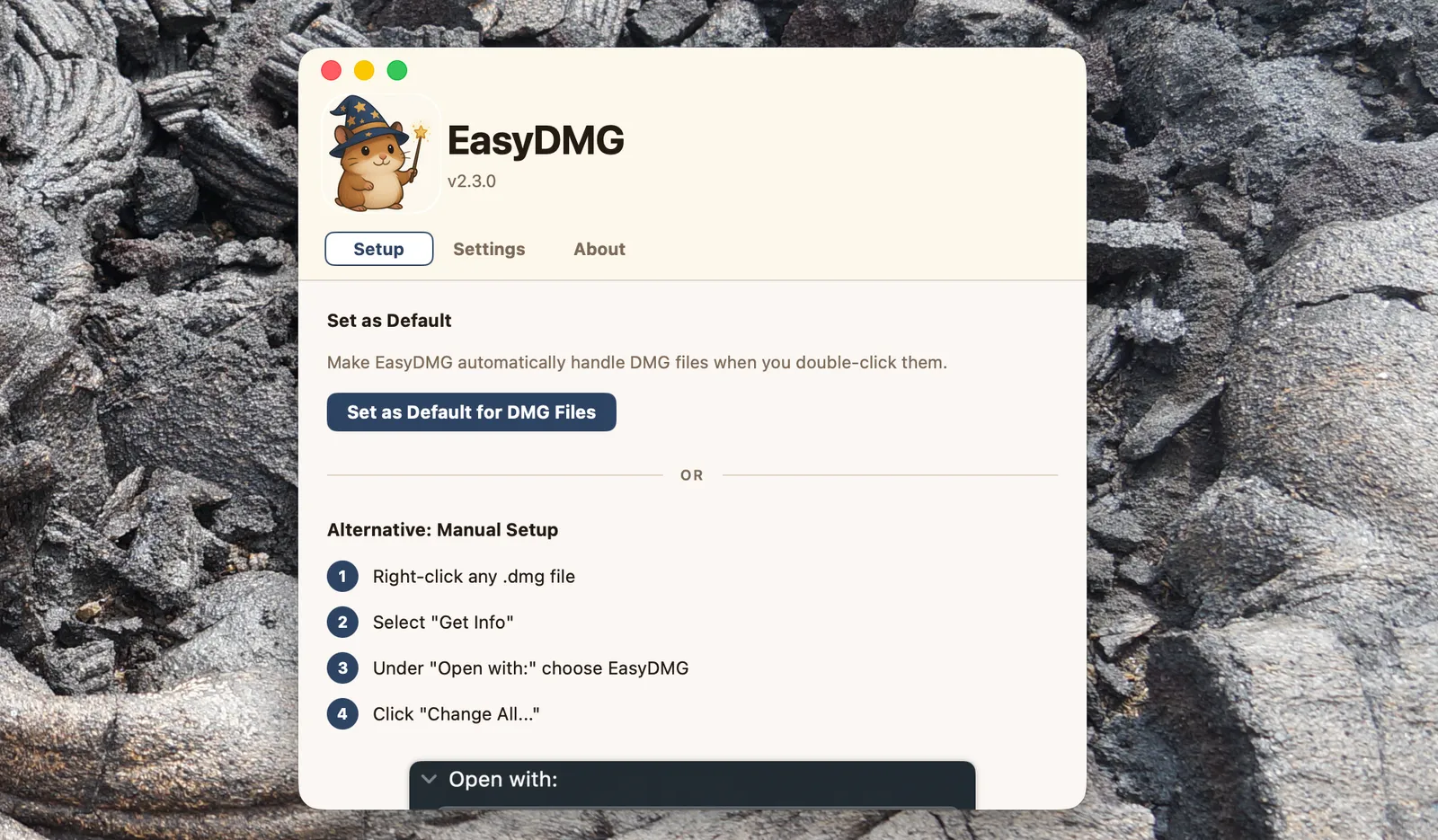
To get started, simply download the application and install it using the very same installation dance you’re trying to avoid. (Ironic, sure, but hopefully this is the last time.) After that you need to set EasyDMG as the default application for opening DMG files—there’s a button right in the settings that will do this for you.
Advertisement
Courtesy of Justin Pot
Do that and you’re basically done. The next time you need to install software from a DMG file you’ll see EasyDMG pop up instead of the virtual disk. A window with a progress bar will let you know how the process is going, from mounting the virtual disk to verifying the application to doing the actual installation.

















































You must be logged in to post a comment Login