Samsung’s first ‘affordable’ Micro RGB TV confirms the technology has a bright future
Unprecedented colour response
Uncompromising Filmmaker Mode
Exceptional backlighting
No Dolby Vision support
Slight motion blur
Expensive for an LCD TV
Squirrel Widget
Advertisement
Key Features
Micro RGB screen
Replaces the traditional white or blue light shone through colour filters LED TV approach with tiny, separate red, green and blue LEDs
Advertisement
Up to 8 HDMI inputs
You can buy an optional Wireless One Connect box for the set that adds another four that send picture and sound to the TV wirelessly
Advertisement
Tizen smart system with AI
Comprehensive collection of streaming apps and lots of AI support for content searching and learning your viewing habits
Advertisement
Introduction
Having dipped a (very big) toe into Micro RGB technology waters towards the end of 2025 with an ultra-expensive 115-inch model, Samsung has now followed that up with the much more affordable (though still premium) R95H TV series.
Does the technology still feel as exciting and cutting edge on smaller, more affordable screens? And is the huge colour gamut it’s capable of delivering really worth worrying about?
Advertisement
Price
The 75R95H costs £4299 in the UK, and $4499 in the US. The 65-inch model that’s also available from the range’s launch goes for £3399 and $3199.
Advertisement
This means Samsung is pitching the R95H range below – albeit only slightly – its flagship S99H OLED TVs. Though the closest screen size to the QE75R95H in the S99H range is two inches bigger.
While this shows that Samsung sees its QD OLED TVs as the absolute pinnacle of its TV performance, the still-premium pricing of the R95H series suggests Samsung believes Micro RGB capable of doing some pretty special things.
Design
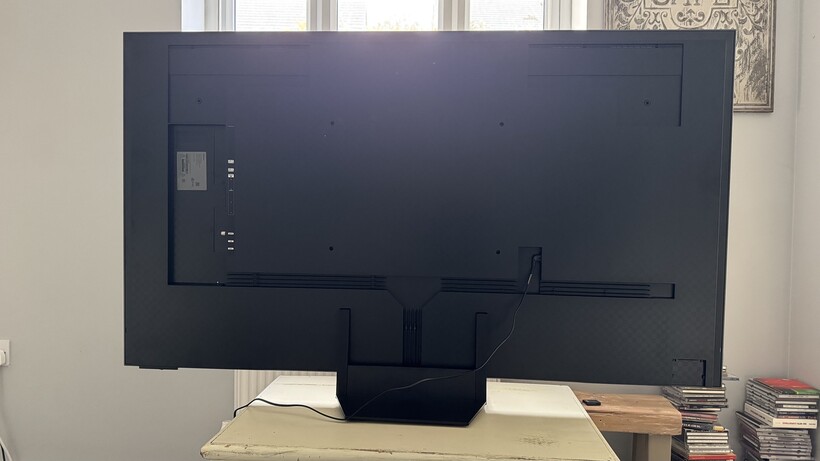
Slender sides and rear
Centrally mounted stand with floating effect
Anti-reflection screen and Art Store create an artwork effect
The R95H has no truck with the wide frame Samsung added to the S99H OLED series. In fact, both the R95H’s screen frame and rear are exceptionally slim by LCD TV standards.
This makes it a great all hanging option – thoughh it actually ships with a desktop stand. This stand slots without screws into to grooves near the centre of the bottom edge, meaning the TV can be placed on even quite narrow bits of furniture. The neck of this stand wears a mirrored finish that creates the optical illusion that the screen is somehow just hovering above the base plate.
Advertisement
Advertisement
Image Credit (Trusted Reviews)
The TV carries well defined and extensive cable channelling on its rear panel to try and stop dangling cables from spoiling the 75R95H’s minimalist chic. Though actually, in a highly unusual move, it’s possible to connect four sources to the TV without any cabling if you add one of Samsung’s new, optional Wireless One Connect boxes to the R95H.
This lets you attach up to four HDMI sources to it, and then broadcasts their pictures and sound wirelessly to the TV from potentially metres away.
One last unusual design feature is the 75R95H’s combination of Samsung’s digital store of digital art screensavers, and an extremely effective anti-reflection screen. Put these together and you can make the TV look like a painting when you’re not watching it.
Image Credit (Trusted Reviews)
Connectivity
Wireless One Connect box option
Four gaming-friendly HDMI 2.1 ports as standard
Wi-Fi, Bluetooth and Airplay 2 support
Advertisement
I’ve already obliquely covered the R95H’s main connection story: Its potential for adding an optional Wireless One Connect Box. This warrants further attention, though, for as well as opening up the potential for cable free connection of up to four external sources to the TV, it also opens up the possibility of the QE75R95H taking in as many as eight HDMI sources at once.
The four HDMI ports built into the R95H’s bodywork and the four on the optional Wireless One Connect box are all fully HDMI 2.1 specified – something I’ll come back to in the Gaming section.
Advertisement
Image Credit (Trusted Reviews)
The Wireless One Connect hosts a couple of USB ports too, again doubling the number of those available.
There are also optical digital audio outputs on the TV and Wireless One Connect box, while the TV’s own ‘built in’ wireless capabilities include Wi-Fi, Bluetooth and AirPlay 2.
Image Credit (Trusted Reviews)
Advertisement
User Experience
Tizen OS smart system
Voice and Gesture control
Two remote controls
The Tizen OS that provides your main interface with the R95H’s smart features is pretty effective. The appearance of the home screen has been improved by shifting the usual roster of sub-menu links from down the side to along the top of the screen, and Samsung has also added a new AI home menu accessed via a direct button now included on the smart remote control.
This AI menu provides manual access to the third-party Co-Pilot and Perplexity AI systems, as well as a Generative AI image creation system that lets you create your own images from a few prompts.
The R95H’s extensive use of AI extends to its support for both the Bixby and Alexa voice recognition systems, and impressively sophisticated tools for coming up with relevant content recommendations based on your viewing habits. This can include the viewing habits of other members of your household, too, thanks to the TV supporting multiple individual user profiles.
Tizen carries a huge array of apps and streaming services, including the individual catch up apps for the UK’s main terrestrial broadcasters. Though there’s no support for Freely ‘wrappers’ carried by some rival brands these days.
Advertisement
Image Credit (Trusted Reviews)
Advertisement
The R95H ships with two remote controls: One traditional button-heavy one, and a much more slender affair with a stripped back button count and a solar panel on its rear that means you’ll never have to change its batteries again. This ‘smart’ remote also carries a built-in mic and Samsung’s new AI button when the other remote doesn’t, so all in all I’m confident this smart remote will be the one most users stick with.
The R95H can also be controlled to some extent via gestures if you’re wearing a Samsung Galaxy Watch, or you can add the TV to Samsung’s SmartThings app for iOS and Android devices, and then control it from your phone via a ‘virtual remote’
The sophistication of the R95H’s Tizen OS makes it a little intimidating initially, but after exploring it for a little while you start to appreciate its depths. Its biggest flaw, ultimately, is its desire to get you to accept adverts on the UI. You can opt out of these during the initial install, but if you do the basic layout of the UI remains unchanged, leaving areas where ads might have appeared often feeling like a fairly substantial waste of space.
Features
Micro RGB panel
Local dimming
Dedicated Micro RGB AI processor
The R95H is the second TV Samsung has released to use Micro RGB technology. This new tech, which is set to appear in 2026 from other brands too, under different names such as RGB LED, Mini RGB and True RGB, replaces conventional LCD TV lighting systems, which shine white or blue lights through colour filters, with dedicated red, green and blue LEDs.
This an approach which has the potential to greatly increase colour gamuts, colour volumes (colour plus brightness), power efficiency and general brightness
Advertisement
Advertisement
The Micro RGB lights on the QE75R95H are working within a VA type of panel, backed up by a potent local dimming system. In the QE75R95H’s case this local dimming zone system operates across a commanding 1792 individually controlled LED clusters. On top of this, of course, there’s the extra dimming effect you can get from each red, green and blue LED.
Image Credit (Trusted Reviews)
Samsung has created a dedicated Micro RGB AI processing system for its new screen technology to, among other things, drive the backlighting system, deliver high-level upscaling of HD sources, and apply the huge colour gamut the screen can provide to real-world content.
The R95H supports the HDR10, HLG and HDR10+ HDR formats, and will eventually, following a firmware update later this year, support the new HDR10+ Advanced format (designed to take on the recently announced Dolby Vision 2 format) by boosting brightness, cloud gaming, motion and the approach the TV takes to different content genres. As ever with Samsung TVs, the R95H doesn’t support Dolby Vision in either of its formats.
Gaming
Up to 165Hz frame rate support
VRR support including AMD FreeSync
Game Hub source screen and dedicated Game menu screen
The R95H leaves no stone unturned on the gaming front. For starters all four onboard and all optional Wireless One Connect HDMI ports support high frame rates for gaming up to 165Hz. They also all support variable refresh rates right across its frame rate range, with the VRR support encompassing the AMD FreeSync Premium Pro format.
Advertisement
Advertisement
Auto low latency support enables the R95H to automatically switch to its Game mode, in which mode the time the screen takes to render graphics drops to 10.4ms. Slightly higher than the S99H OLED, but not by enough for even the most competitive gamer to notice.
Where lag might become an issue, though, is if you’ve connected your console or PC to one of the HDMI inputs on an optional Wireless One Connect Box. The wireless transmission process associated with these boxes adds just under 20ms extra lag time.
The R95H helpfully organises all of your game sources, be they connected by HDMI or streamed via the many cloud gaming services Samsung support, onto a dedicated Game Hub home screen within the Tizen OS GUI, and also calls up a dedicated gaming menu if you press and hold the play button on the remote while playing a game.
Image Credit (Trusted Reviews)
This menu provides detailed information on the incoming gaming feed, and provides a host of cheats – sorry, gaming aids – such as mini map zooming, brightening dark areas so enemies are easier to spot, calling up an onscreen crosshair, and calling in different levels of motion smoothing for those (increasingly rare) occasions where you find yourself playing a low frame rate game.
As a tasty prelude to the video picture quality we’re going to cover in the next section, gaming on the Samsung R95H is a mostly a fantastically fun but also seriously immersive experience. The huge colour vibrancy the Micro RGB screen can achieve (I measured almost 150% of the DCI-P3 colour spectrum) together with brightness that hits peaks as high as around 2200 nits, results in colours that explode off the screen, making titles as varied as Crimson Desert, Forza Horizon and Rayman Legends look radiantly engaging to a degree they’ve seldom looked before.
Advertisement
Advertisement
HDR titles are handled well, with the screen doing a good job of optimising game HDR engines to its capabilities without the results looking clipped or unstable, and gaming feels responsive via the TV’s built-in HDMI ports.
My only gripes with gaming are that blooming around stand-out bright objects seems a little more noticeable if you’re sat off to the side of the screen than it does with video, and that fast pans and rapidly moving objects can look a touch soft compared with the S99H. Though they do look equally fluid.
Picture Quality
Remarkable colour range
High brightness
Excellent backlight controls
While we’ve become pretty accustomed now to TVs that push brightness far beyond the levels commonly used by content creators, doing the same thing for colour is for me much more noticeable – and, therefore, trickier to do convincingly.
Samsung’s Micro RGB AI processor, though, makes a remarkably good job of it. Especially considering it’s dealing with such a new technology.
Advertisement
Starting with just how aggressively the R95H leans into Micro RGB’s wider colour gamut capabilities, measurements taken using Portrait Displays’ Calman Ultimate software, G1 signal generator and C6 HDR5000 light meter reveal that the screen can deliver essentially 150% of the DCI-P3 colour range. An unprecedented figure that at least some of Samsung’s picture presets seek to venture into when showing today’s more constrained HDR images.
Advertisement
The Dynamic preset really goes for it, and is worth checking out for the fullest evidence of the sort of spectacle Samsung’s TV can deliver. While this mode is surprisingly even-handed in how it expands colours across the spectrum, and how little noise it suffers with compared with some rival similar modes I’ve seen on some early Micro RGB/Mini RGB samples, it still looks forced sometimes, particularly when it comes to skin tones.
The Standard preset, while certainly not measuring accurately, is for the most part a joy to watch. I watched multiple favourite 4K Blu-ray test discs in this default mode (having turned off the interfering Eco and ambient sensor-related modes) and for most of the time was both dazzled by seeing such familiar titles looking like they’d been remastered in some new next-gen HDR format, and amazed at how well this ‘expansion’ of their native images had been achieved.
Advertisement
Image Credit (Trusted Reviews)
Especially when it came to avoiding such potentially distracting nasties as exaggerated colour noise, certain tones suddenly jumping out of the picture more than others, and saturations so extreme that the screen is no longer able to express the sort of subtle colour blends required to make objects feel three-dimensional and natural.
Just as importantly as the spectacular but surprisingly authentic feeling colours to the Standard mode’s appeal is the prowess of the Samsung R95H’s backlight system. The more than 1700 local dimming zones in the QE75R95H’s screen together with the extra light control created by using separate red, green and blue LEDs for each lighting ‘unit’ creates light control mechanics which, under the watchful eye of Samsung’s dedicated Micro RGB processor, deliver both fantastically deep black colours by LCD TV standards, but also impressive stability and freedom from either general clouding and backlight blooming around stand-out bright objects.
What’s more, even when a little blooming can occur around extremely bright, colourful objects, unlike normal LED TVs the blooming actually adopts the chief colour tone of the ‘offending’ object. This makes it much less noticeable than the usual grey blooming effect, as your eye more often than not perceives the bloom as natural colour radiance.
Advertisement
Making the capabilities of the backlight controls even more impressive is the fact that the R95H can deliver its deep black colours and clean local dimming effects despite it also being extremely bright.
Advertisement
Calman Ultimate tests reveal brightness peaks of nearly 2300 nits on 10% and more than 660 nits on full 100% light windows, which contributes to an outstanding HDR sensation in terms of baseline brightness and the intensity of classic HDR highlights like sunlight reflecting on glass or metal, or bright streetlights against a night sky.
This impressive brightness doesn’t remotely start to overwhelm the screen’s huge colour capabilities. In fact, far from any tones looking faded or pallid in bright areas, the screen delivers huge levels of colour volume that complete the sense that RGB TVs are in a world of their own where colour is concerned.
Exciting though all of this is, many home cinema fans will still want the QE75R95H to be able to handle movies in a much more ‘as the director intended’ fashion as well, at least for serious film nights.
As with its S99H OLED flagships, Samsung has again managed to cater for this need much more successfully than we might have expected given the extravagant capabilities of the R95H’s screen. Right out of the box, the Filmmaker Mode achieves DeltaE 2000 average measurements with every Calman Ultimate HDR test I tried it with bar one below the 3.0 level beyond which deviations from industry standards might potentially be visible to the human eye. And even on that one test where it strays further than three, it only does so by a half mark.
Advertisement
Filmmaker Mode images inevitably look much less bright and much less vibrant than Standard mode, simply because sticking to today’s common mastering standards means using much less of what the screen can do. But this is as it should be – and the demands of switching into accurate settings don’t cause subjective viewing issues such as pale colour tones, heavily reduced backlight controls or poor dynamic peaking of bright light sources.
Advertisement
Image Credit (Trusted Reviews)
The R95H delivers SDR content in the Standard mode with just as much measurable and subjectively enjoyable precision, while again managing to drastically open SDR up in terms of brightness and colour in the Standard mode – and/or when using a pretty effective SDR to HDR conversion option – without the results looking gaudy.
Inevitably the R95H isn’t perfect. Sometimes the mostly excellent Standard mode can push skin tones, especially in dark scenes, too much, that they look too ripe. A slight pinkish tone can sometimes appear over bright shots in Standard mode too, and very occasionally subtle colour differences, especially over misty backgrounds, can become too overt.
Blooming around bright objects, while disguised by its colour component versus regular LED TVs, is present in a way it isn’t with OLED, and becomes slightly more noticeable if you’re watching the TV from an angle. The Standard mode can sometimes exhibit obvious baseline brightness ‘jumps’ during hard cuts between dark and light shots.
Advertisement
Motion looks slightly softer than it does on Samsung’s regular premium LCD TVs, as well as looking too smooth and noisy if you leave the Standard present’s default Picture Clarity settings in play.
Finally, while for the majority of the time I think most viewers in typical home viewing conditions will love the way the R95H’s anti-glare filter suppresses basically all reflections, it can flatten black levels a little in really extreme bright ambient light.
Advertisement
Upscaling
Well controlled processing side effects
Impressive, 4K-like sharpness and detail
Good noise suppression
The potent, heavily AI-influenced processors in Samsung’s premium TVs over the past few years have consistently delivered some of the best upscaling around – a handy benefit, I suspect, of Samsung’s longer devotion to the 8K TV cause than any other brand.
This trend continues with the Micro RGB AI processor, happily, as the R95H turns HD and even SD into convincing 4K look-a-like territory when it comes to detailing and clarity, without exaggerating source noise or grain, or generating distracting side effects such as colour shift or haloing around hard object edges.
Advertisement
The fact that the upscaling holds up well on a screen as big as 75-inches underlines how effective Samsung’s processing is, too.
Sound Quality
Object Tracking Sound works well
Good power and soundstage creation
Can struggle with sustained deep bass
For most of the time the R95H sounds good. Despite its slender bodywork, for starters, it manages to produce impressive volume levels capable of satisfying pretty substantial rooms. Especially as the sound is projected well beyond the TV’s physical extremities, creating a soundstage larger than even the 75-inch screen.
Advertisement
This large soundstage is exceptionally coherent, too, thanks to the ear-catching efforts of Samsung’s Object Tracking Sound system. Combining clever audio processing with a multi-speaker set up that places speakers all around the screen, OTS does a remarkably accurate job of placing key effects in the right place.
Image Credit (Trusted Reviews)
This applies to everything from dialogue to gunfire and engine noise from moving vehicles, and the number of objects that the OTS engine is capable of handling in any given scene is remarkable.
There’s a lovely crisp, clean but also rounded quality to the QE75R95H’s detailing, and shrill trebles sound controlled, even and free of warbling or buzzing distortions.
Advertisement
The R95H doesn’t quite hold it together at the low frequency end of the sound spectrum, though. Short, impactful bass sounds hit fine, but where there are longer, really deep and pressurised rumbles to handle the pair of dedicated low frequency speakers can descend into various distortions, including buzzing noise, crackling, and a general coarsening of the low frequency sound as the speakers try to push beyond what they’re really capable of achieving.
Squirrel Widget
Advertisement
Should you buy it?
Advertisement
It delivers colours like you’ve never seen before
With a measured ability to cover nearly 150% of the DCI-P3 colour spectrum and nearly 95% of the most extreme BT2020 colour spectrum, and equipped with presets that actually venture into such colour extremes, the 75R95H can deliver some genuinely remarkable colour extremes
Advertisement
Content needs to catch up
While the 75R95H delivers an unprecedented LCD colour response, there’s no real content out there that can fully exploit such wide colour. Though Samsung’s processing does a very good job in some picture presets of mapping current pictures to the TV’s capabilities.
Advertisement
Final Thoughts
With the QE75R95H Samsung has not only proven that Micro RGB and similar technology is relevant even in a world where content doesn’t yet exist that could fully unlock its capabilities, it’s delivered a TV that also breaks new ground with its LCD backlight control and AI features.
And which does things in the colour department that even Samsung’s S99H OLED can’t but that’s not to say you should necessarily buy it over the S99H. There are also areas, inevitably, where the pixel-level light control of OLED remains unmatched.
But the fact that the 75R95H even stands as a credible alternative to a TV as brilliant as the S99H is an outstanding achievement for such a new technology.
How We Test
The R95H was tested over a period of 10 days in both dark test room and regular living room environments.
It was fed a wide variety of content, including console games, 4K Blu-rays, streams of various resolutions and HDR formats from all of the main streaming platforms, as well as broadcast tuner footage.
All of this content was watched on the 75R95H in both daylight and dark conditions, and we explored all of the TV’s many picture setting options to find the best set ups for both regular living room environments and blacked out home cinemas.
Finally, the Samsung 75R95H was tested for both SDR and HDR playback in multiple presets using Portrait Display’s Calman Ultimate software, G1 processor and a C6 HDR5000 colorimeter.
Advertisement
Tested in dark and bright room settings
Tested with real-world content
Benchmarked with Portrait Displays’ Calman Ultimate Software, G1 signal generator and KC6 HDR5000 colorimeter
Gaming input lag was measured with a Leo Bodnar signal generator
FAQs
What HDR formats does the Samsung R95H support?
The 75R95H supports HDR10, HLG, and HDR10+ right away, and the new HDR10+ Advanced system will be added via firmware update later in the year.
What panel technology does the Samsung R95H use?
The QE75R95H uses Samsung Display’s second generation Micro RGB display, applied to a VA panel with more than 1700 local dimming zones.
Advertisement
Test Data
Samsung QE75R95H
Input lag (ms)
10.4 ms
Peak brightness (nits) 5%
2190 nits
Peak brightness (nits) 2%
2000 nits
Peak brightness (nits) 100%
654 nits
Set up TV (timed)
360 Seconds
Full Specs
Samsung QE75R95H Review
UK RRP
£4299
USA RRP
$4499
Manufacturer
Samsung
Screen Size
74.5 inches
Size (Dimensions)
1658.8 x 349.1 x 1019.2 MM
Size (Dimensions without stand)
946.2 x 1658.8 x 29.8 MM
Weight
30.1 KG
Operating System
Tizen
Release Date
2026
Resolution
3840 x 2160
HDR
Yes
Types of HDR
HDR10, HLG, HDR10+, HDR10+ Advanced
Refresh Rate TVs
48 – 165 Hz
Ports
Four HDMI 2.1, two USB, Ethernet, RF input, optical digital audio output; (optional wireless One Connect box) – four HDMI 2.1 ports, two USBs, optical audio port, RF and satellite tuner inputs
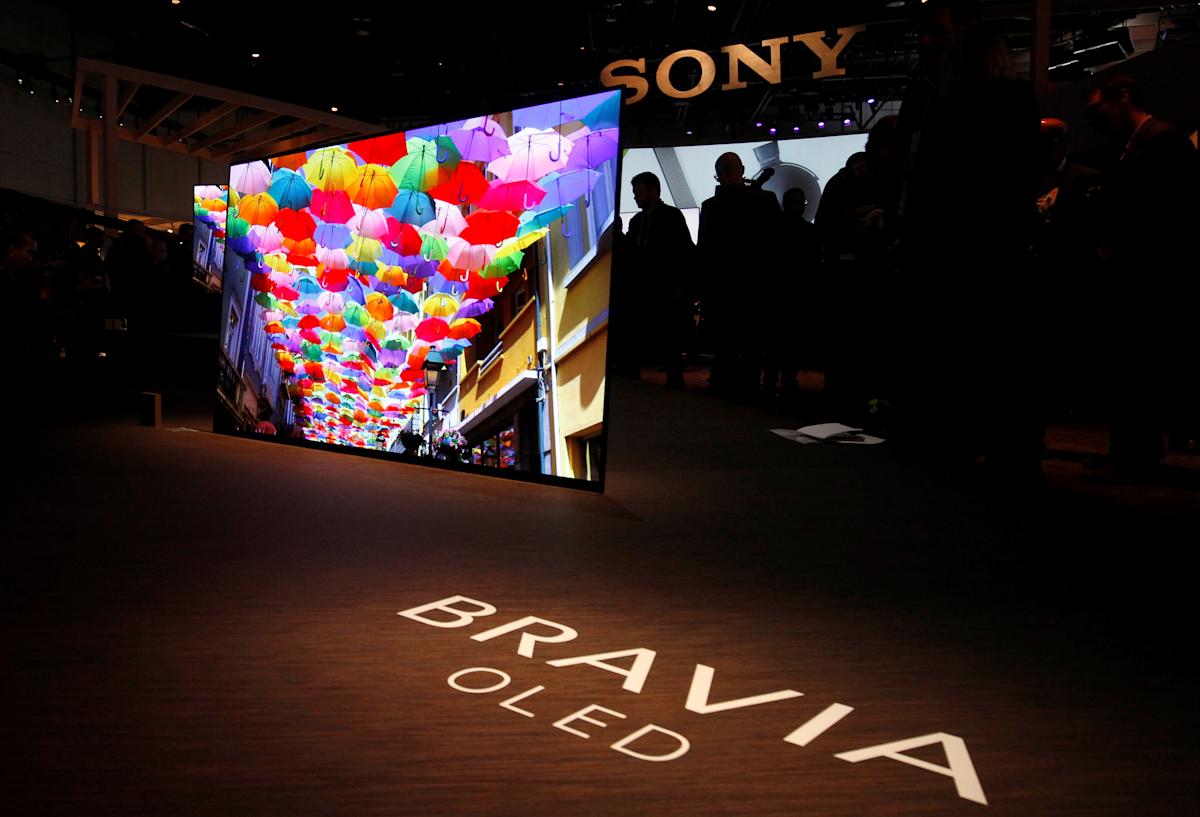
Sony is removing some features from its TV guide and program guide displays for channels received by an over the air TV antenna on select models of Bravia televisions from 2023-2025. Cord Cutters News reported on the changes, which will take effect in late May.
Channel logos and thumbnail images in program descriptions are going away from the built-in TV Guide for antenna TV channels. Only programs from recently watched channels will be shown in the guide, and depending on the channel, program information may not be displayed. Change is also coming for set top box users, with the dedicated Set Top Box TV menu being removed and replaced by a Control menu. This setup will also not show program thumbnail images any longer.
This is an admittedly narrow use case in the age of both streaming and cable TV, but Sony didn’t provide any reason for making the change. And for those people who are impacted, this could be an unpleasant surprise next month that makes the TV guide and program guide much less helpful.
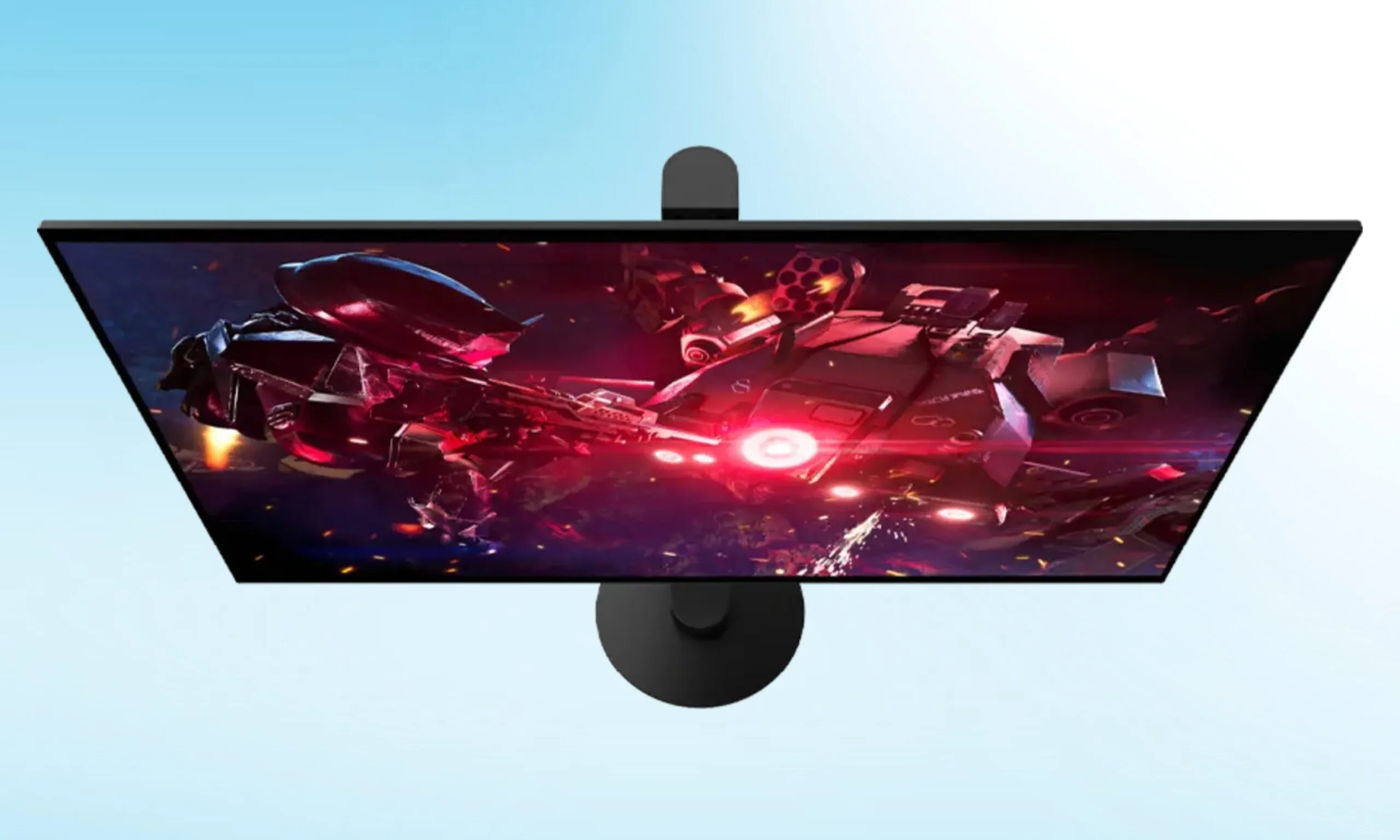
Sony just joined the ultra-fast gaming monitor party, and though it was a bit late, it could potentially turn a lot of heads there. On April 14, the company announced the INZONE M10S II, a 27-inch QHD OLED gaming monitor featuring a tandem OLED panel sourced from LG.
Like other ultra-fast gaming monitors, the Sony gaming monitor pulls double duty between two modes: 540Hz at QHD, and a staggering 720Hz at HD. Developed in collaboration with esports powerhouse Fnatic, the monitor is a successor of the M10S.
Sony has priced the M10S II gaming monitor at $1,099.99. Availability, however, is expected later this year.
Sony
But what does 720Hz actually do for you?
For everyday users, the monitor should offer razor-sharp visuals in QHD resolution at a 540Hz refresh rate with virtually no motion blur and the visual richness of an OLED panel. At this setting, the monitor offers 0.02 ms response time, which is exceptionally good.
However, the 720Hz HD mode is reserved for hardcore, professional, competitive gamers, who’d rather sacrifice the resolution for pure speed. While I personally don’t know anyone who can make use of such speed, tournament-level FPS gamers, whose fate is determined at the last possible millisecond, could surely put it to good use.
Advertisement
The monitor also features a new Motion Blur Reduction algorithm that unlocks extra brightness during frames. So, instead of going dark, fast on-screen movements remain vivid.
Sony
What else did Sony launch with the monitor?
Sony didn’t stop at the INZONE MS10S II monitor; the company also launched INZONE H6 Air, an open-back wired gaming headphone, which is priced at $199.99, inspired by the studio-grade MDR-MV1 headphones and weighing just 199 grams.
Rounding up the launch are new Fnatic Edition accessories, which include Mouse-A, Mat-F, and Mat-D, along with a new translucent Glass Purple finish of the INZONE Buds wireless earbuds, which are all available now.
Like many engineers, Sarang Gupta spent his childhood tinkering with everyday items around the house. From a young age he gravitated to projects that could make a difference in someone’s everyday life.
When the family’s microwave plug broke, Gupta and his father figured out how to fix it. When a drawer handle started jiggling annoyingly, the youngster made sure it didn’t do so for long.
Sarang Gupta
Employer
Advertisement
OpenAI in San Francisco
Job
Data science staff member
Member grade
Advertisement
Senior member
Alma maters
The Hong Kong University of Science and Technology; Columbia
By age 11, his interest expanded from nuts and bolts to software. He learned programming languages such as Basic and Logo and designed simple programs including one that helped a local restaurant automate online ordering and billing.
Advertisement
Gupta, an IEEE senior member, brings his mix of curiosity, hands-on problem-solving, and a desire to make things work better to his role as member of the data science staff at OpenAI in San Francisco. He works with the go-to-market (GTM) team to help businesses adopt ChatGPT and other products. He builds data-driven models and systems that support the sales and marketing divisions.
Gupta says he tries to ensure his work has an impact. When making decisions about his career, he says, he thinks about what AI solutions he can unlock to improve people’s lives.
“If I were to sum up my overall goal in one sentence,” he says, “it’s that I want AI’s benefits to reach as many people as possible.”
“I was interested in engineering, including the theoretical part of it,” Gupta says, “But I was always more interested in the applications: how to sell that technology or how it ties to the real world.”
In his spare time, Gupta built a smartphone app that let students upload their class schedules and find classmates to eat lunch with. The app didn’t take off, he says, but he enjoyed developing it. He also launched Pulp Ads, a business that printed advertisements for student groups on tissues and paper napkins, which were distributed in the school’s cafeterias. He made some money, he says, but shuttered the business after about a year.
After graduating from the university in 2016, he decided to work in Hong Kong’s financial hub and joined Goldman Sachs as an analyst in the bank’s operations division.
Advertisement
From finance to process optimization at scale
After two parties agree on securities transactions, the bank’s operations division ensures that the trade details are recorded correctly, the securities and payments are ready to transfer, and the transaction settles accurately and on time.
As an analyst, Gupta’s task was to find bottlenecks in the bank’s workflows and fix them. He identified an opportunity to automate trade reconciliation: when analysts would manually compare data across spreadsheets and systems to make sure a transaction’s details were consistent. The process helped ensure financial transactions were recorded accurately and settled correctly.
Gupta built internal automation tools that pulled trade data from different systems, ran validation checks, and generated reports highlighting any discrepancies.
“Instead of analysts manually checking large datasets, the tools automatically flagged only the cases that required investigation,” he says. “This helped the team spend less time on repetitive verification tasks and more time resolving complex issues. It was also my first real exposure to how software and data systems could dramatically improve operational workflows.”
Advertisement
“Whether it’s helping a person improve a trait like that or driving efficiencies at a business, AI just has so much potential to help. I’m excited to be a little part of that.”
The experience made him realize he wanted to work more deeply in technology and data-driven systems, he says. He decided to return to school in 2018 to study data science and AI, when the fields were just beginning to surge into broader awareness.
He discovered that Columbia offered a dedicated master’s degree program in data science with a focus on AI. After being accepted in 2019, he moved to New York City.
One of his major academic highlights, he says, was a project he did in 2019 with the Brown Institute, a joint research lab between Columbia and Stanford focused on using technology to improve journalism. The team worked with The Philadelphia Inquirerto help the newsroom staff better understand their coverage from a geographic and social standpoint. The project highlighted “news deserts”—underserved communities for which the newspaper was not providing much coverage—so the publication could redirect its reporting resources.
“Journalism was an interesting problem set for me, because I really like to read the news every day,” Gupta says. “It was an opportunity to work with a real newsroom on a problem that felt really impactful for both the business and the local community.”
The GenAI inflection point
After earning his master’s degree in 2020, Gupta moved to San Francisco to join Asana, the company that developed the work management platform by the same name. He was drawn to the opportunity to work for a relatively small company where he could have end-to-end ownership of projects. He joined the organization as a product data scientist, focusing on A/B testing for new platform features.
Advertisement
Two years later, a new opportunity emerged: He was asked to lead the launch of Asana Intelligence, an internal machine learning team building AI-powered features into the company’s products.
“I felt I didn’t have enough experience to be the founding data scientist,” he says. “But I was also really interested in the space, and spinning up a whole machine learning program was an opportunity I couldn’t turn down.”
The Asana Intelligence team was given six months to build several machine learning–powered features to help customers work more efficiently. They included automatic summaries of project updates, insights about potential risks or delays, and recommendations for next steps.
The team met that goal and launched several other features including Smart Status, an AI tool that analyzes a project’s tasks, deadlines, and activity, then generates a status update.
Advertisement
“When you finally launch the thing you’ve been working on, and you see the usage go up, it’s exhilarating,” he says. “You feel like that’s what you were building toward: users actually seeing and benefiting from what you made.”
Gupta and his team also translated that first wave of work into reusable frameworks and documentation to make it easier to create machine learning features at Asana. He and his colleagues filed several U.S. patents.
At the time he took on that role, OpenAI launched ChatGPT. The mainstreaming of generative AI and large language models shifted much of his work at Asana from model development to assessing LLMs.
OpenAI captured the attention of people around the world, including Gupta. In September 2025 he left Asana to join OpenAI’s data science team.
Advertisement
The transition has been both energizing and humbling, he says. At OpenAI, he works closely with the marketing team to help guide strategic decisions. His work focuses on developing models to understand the efficiency of different marketing channels, to measure what’s driving impact, and to help the company better reach and serve its customers.
“The pace is very different from my previous work. Things move quickly,” he says. “The industry is extremely competitive, and there’s a strong expectation to deliver fast. It’s been a great learning experience.”
Gupta says he plans to stay in the AI space. With technology evolving so rapidly, he says, he sees enormous potential for task automation across industries. AI has already transformed his core software engineering work, he says, and it’s helped him enhance areas that aren’t natural strengths.
“I’m not a good writer, and AI has been huge in helping me frame my words better and present my work more clearly,” he says. “Whether it’s helping a person improve a trait like that or driving efficiencies at a business, AI just has so much potential to help. I’m excited to be a little part of that.”
Advertisement
Gupta has been an IEEE member since 2024, and he values the organization as both a technical resource and a professional network.
IEEE’s member directory tools are another valuable resource that he uses often, he says.
“It’s been a great way to connect with other engineers in the same or similar fields,” he says. “I love sharing and hearing about what folks are working on. It brings me outside of what I’m doing day to day.
Advertisement
“It inspires me, and it’s something I really enjoy and cherish.”
A few years ago agricultural equipment giant John Deere found itself on the receiving end of multiple state, federal, and class action lawsuits for its efforts to monopolize tractor repair. The lawsuits noted that the company consistently purchased competing repair centers in order to consolidate the sector and force customers into using the company’s own repair facilities, driving up costs and logistical hurdles dramatically for farmers.
“As we continue to innovate industry leading equipment and technology solutions supported by our world-class dealer network, we are equally committed to providing customers and other service providers with access to repair resources,” said Denver Caldwell, vice president, Aftermarket & Customer Support. “We’re pleased that this resolution allows us to move forward and remain focused on what matters most – serving our customers.”
Except if John Deere had cared about customer service, they wouldn’t be in this predicament.
In addition to intentionally acquiring repair alternatives to monopolize repair and drive up consumer costs, John Deere also routinely makes repair difficult and costly through the act of software locks, obnoxious DRM restrictions, and “parts pairing” — which involves only allowing the installation of company-certified replacement parts — or mandatory collections of company-blessed components.
More recently, the company had been striking meaningless “memorandums of understanding” with key trade groups, pinky swearing to stop their bad behavior if the groups agree to not support state or federal right to repair legislation. Several such groups backed off their criticism, only to have John Deere continue its monopolistic behavior, the FTC’s complaint notes.
The annoyance at John Deere’s behavior has driven a broad, bipartisan movement that’s in very vocal support for state and federal guidelines enshrining “right to repair” protections into law. Unfortunately, while all fifty states have at least flirted with the idea of a state law, only Massachusetts, New York, Texas, Minnesota, Colorado, California, Oregon, and Washington have actually passed laws.
Advertisement
And among those, not one has taken any substantive action to actually enforce the new law, something that needs to change if the movement is to obtain and retain meaningful policy momentum.
As a company, Fluke has been making electronic test equipment longer than the bipolar junction transistor has been around for. In that time they’ve developed a fairly stellar reputation for quality and consistency, but like any company they don’t support their products indefinitely. [ogdento] owns a Fluke meter that isn’t nearly as old as the BJT but still has an age well outside of the support window, and since the main problem was the broken LCD display they set about building a replacement for this retro multimeter.
Initially, [ogdento] had plans to retrofit this classic multimeter with a modern OLED, but could not find enough space for the display or a way to drive it easily. The next attempt to get something working was to build a custom one-off LCD using a drill press as an end mill, which didn’t work either. But after seeing a Charlieplexed display from [bobricius] as well as this video from EEVblog about designing custom LCDs, [ogdento] was able to not only design a custom PCB and LCD display to match the original meter, but was able to get a manufacturer in China to build them.
The new displays have a few improvements over the old; mostly they are more stylistically inspired by later Fluke models and have a few modern improvements to the LCD itself. There were are few issues during prototyping but nothing that was too hard to sort out, such as ordering the wrong size elastomeric strips initially. For anyone who needs to replace a custom LCD and can’t find replacement parts anymore, this project would be a great starting point for figuring out the process from the ground up.
If you have been waiting for Gemini to actually feel like it knows you, your wait is almost over. Google’s Personal Intelligence, which launched earlier this year for paid US subscribers, is now rolling out globally.
What is Gemini Personal Intelligence and what can it do?
Google
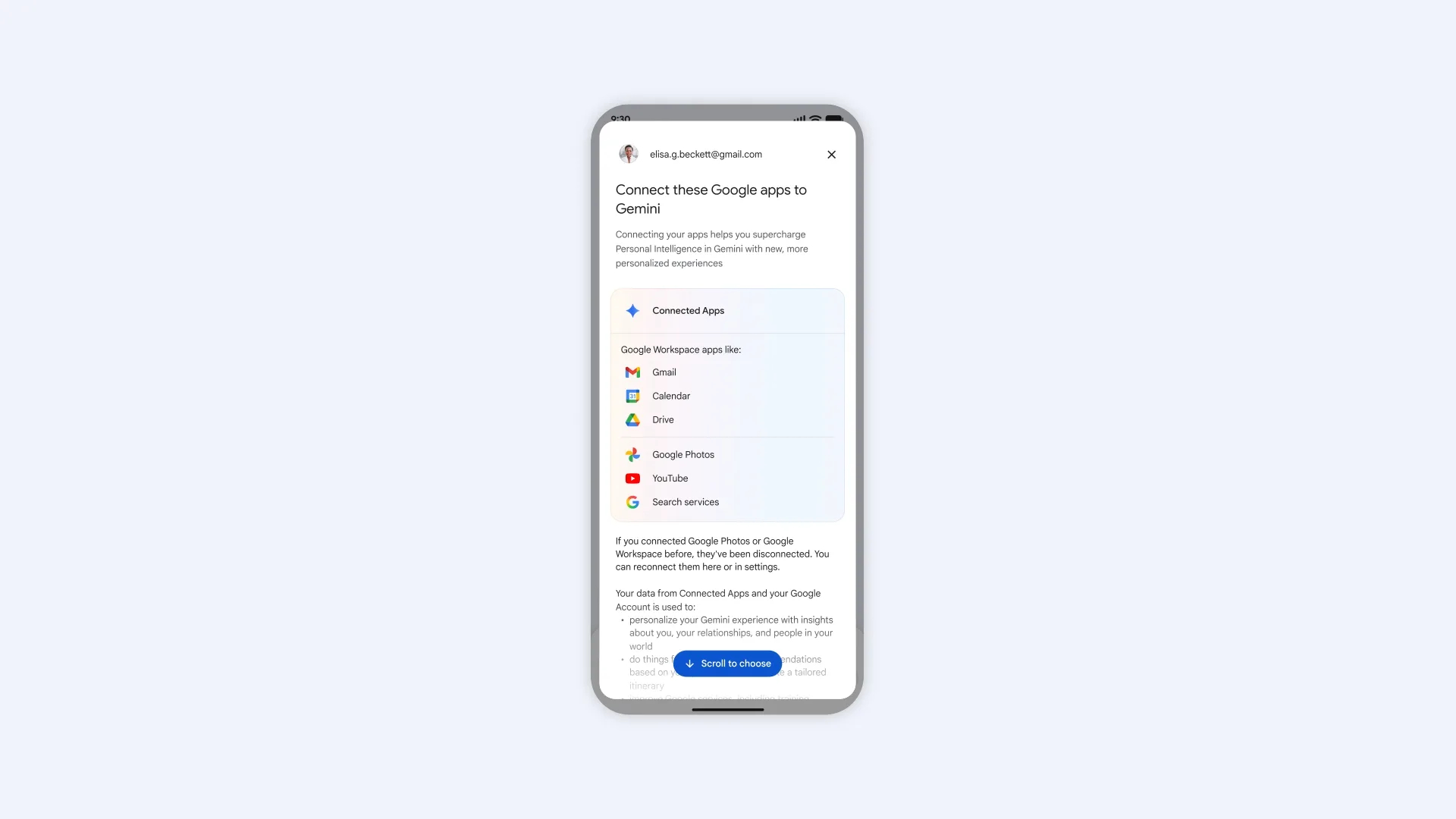
Personal Intelligence connects Gemini to your Google apps. Think Gmail, Google Photos, YouTube, Search, Maps, Calendar, Drive, and more. It uses your existing data to give smarter, more tailored responses without requiring you to explain everything each time.
The use cases are genuinely impressive. Ask Gemini for shopping recommendations, and it will factor in your recent purchases and style preferences. Stuck troubleshooting a device you do not remember buying? It can pull the exact model from your purchase receipts in Gmail.
Google
If you are planning a trip with a tight layover, Gemini can use Personal Intelligence to check your gates, walking time, and meal preferences all at once. It can even suggest a new hobby based on patterns it notices across your activity.
Google says this is an opt-in feature, so you choose which apps to connect. Importantly, Gemini does not train directly on your Gmail or Photos data. It references them to answer your questions, but keeps the underlying personal content separate from model training.
Who can use Gemini’s Personal Intelligence feature?
Personal Intelligence works across desktop, Android, and iOS with languages supported by Gemini. The global rollout is now live for Google AI Plus, Pro, and Ultra subscribers everywhere except the European Economic Area, Switzerland, and the UK. Free Gemini users globally will get access within the next few weeks.
Advertisement
Why does this matter?
Google
Personal Intelligence is probably the most significant thing Google has done with Gemini so far. Gemini is slowly becoming the kind of AI assistant that actually understands your life, not just the internet.
With access to Gmail, Photos, Maps, and more, Gemini will no longer feel like a generic chatbot and behave like a genuine personal assistant. No other AI assistant comes close to having this kind of data advantage baked in from the start.
The partnership will bring together Bull’s supercomputing infrastructure and Equal1’s ‘breakthrough’ silicon-spin quantum computers.
Bull, a Paris-based high-performance computing (HPC), artificial intelligence and quantum technology company, is to partner with Dublin start-up Equal1, a silicon-powered quantum computing technology provider.
Equal1 and Bull stated that their deal will “advance the next generation of hybrid quantum-classical technologies with European solutions”, at a time when quantum computing is beginning to transition from promise to practical reality.
The pair said the partnership will combine Bull’s supercomputing infrastructure and quantum emulation expertise with Equal1’s breakthrough silicon-spin quantum computers, as agreed in a memorandum of understanding.
Advertisement
The collaboration will focus on three core pillars – technical integration, joint research and development to advance innovation, and a focus on sovereign European projects whereby both companies will collaborate on EU-led quantum initiatives amid the global quantum race.
Commenting on the announcement, Bruno Lecointe, the senior vice-president and global head of HPC, AI and quantum at Bull, said: “The convergence of high-performance computing and quantum technologies is redefining how we address the world’s most complex challenges.
“10 years after launching the first quantum emulator of the market, innovation has always been part of Bull’s DNA and we remain committed to designing hybrid architectures that help translate emerging technologies into operational capability.
“By integrating Equal1’s silicon-spin quantum servers into our Qaptiva ecosystem, we are enabling a seamless bridge between HPC, quantum emulation and quantum execution. This alliance ensures our customers can leverage quantum-centric supercomputing to achieve real-world outcomes with unprecedented efficiency and performance.”
Advertisement
Jason Lynch, the CEO of Equal1, added: “By building quantum processors on standard silicon, we are turning quantum from bespoke laboratory hardware into deployable infrastructure. This collaboration with Bull is a vital step in bridging the gap between breakthrough hardware innovation and industrial workloads.
“Together, we are positioning our joint solutions as the standard for high-performance computing, enabling seamless integration into existing data centres and driving a more sustainable digital future.”
Earlier this year, Equal1 announced it had raised $60m in a funding round led by Ireland Strategic Investment Fund, with participation from Atlantic Bridge, the European Innovation Council Fund, Matterwave Ventures, Enterprise Ireland, Elkstone and TNO Ventures.
At the time, Equal1 said that the investment would enable deployment to HPC centres – including to the European Space Agency’s Phi-lab in Italy – advance the roadmap towards “millions” of on-chip qubits, scale manufacturing and grow its team.
Apple sometimes closes retail stores. The company always has private and public reasons why, but the communities and workers that are impacted don’t care much about what they are.
Apple Trumbull – Image Credit: Apple
On April 9, it was revealed that Apple was preparing to close three of its stores in the United States in June. The group consists of Apple North County in Escondido, California, Apple Towson Town Center in Towson, Maryland, and Apple Trumbull in Trumbull, Connecticut. After the initial shock of the closures, people are still expressing their feelings about the store closures. However, as usual, nothing is straightforward in the court of public opinion. Continue Reading on AppleInsider | Discuss on our Forums
Oh sure, you’ve got calculators. There’s that phone program of course, and the one that comes with your OS, and the TI-86 and possibly RPN numbers you’ve had since high school.
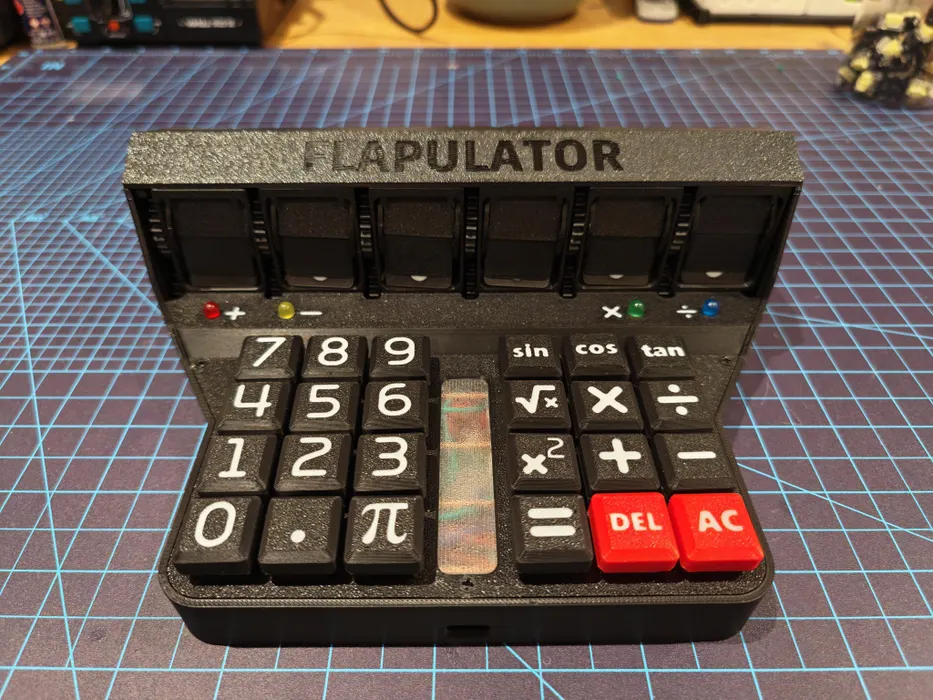
But what you don’t have is a Flapulator, at least not until you build one. Possibly the be-all, end-all of physical calculating devices, the Flapulator does its calculating live on a split-flap display. It’s kind of slow and the accuracy is questionable, but the tactility is oh, so good.
This baby boasts a 6-digit display, where the decimal point and negative sign each require one digit. Inside is a Raspberry Pi Pico, which can calculate for around 4 hours on a full charge. But the coolest part (aside from the split-flap display, naturally) has got to be the 24-key, hand-wired mechanical keyboard. There’s also a couple of LEDs that light up to keep track of the current mathematical operation.
Advertisement
The story behind this one is kind of interesting. [Applepie1928] found out that one of their favorite mathematician-comedian-pi-lovers who is known for signing calculators was coming to town. With four weeks to whip something up, this was, amazingly, the result. Check it out in action after the break.
Intel and Google signed a multi-year deal to keep Xeon in cloud infrastructure
Google Cloud instances C4 and N4 already run on Xeon 6 processors
Intel and Google are co-developing custom IPUs for networking and storage
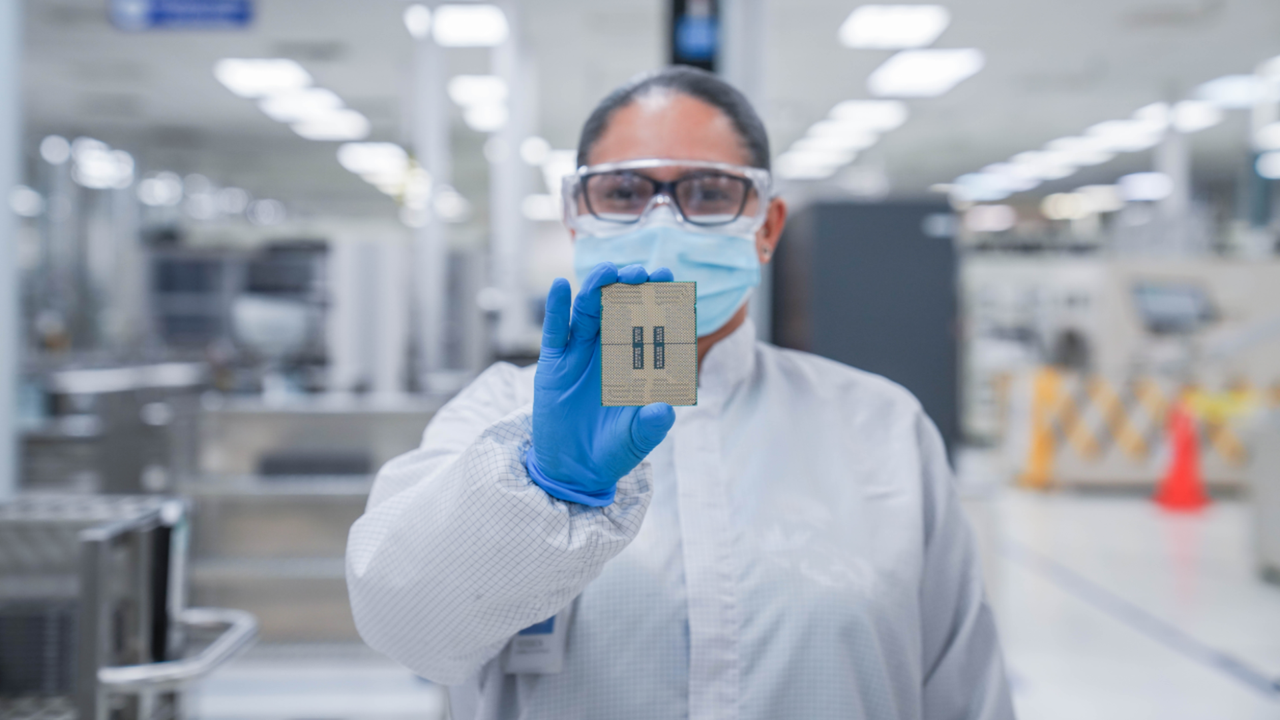
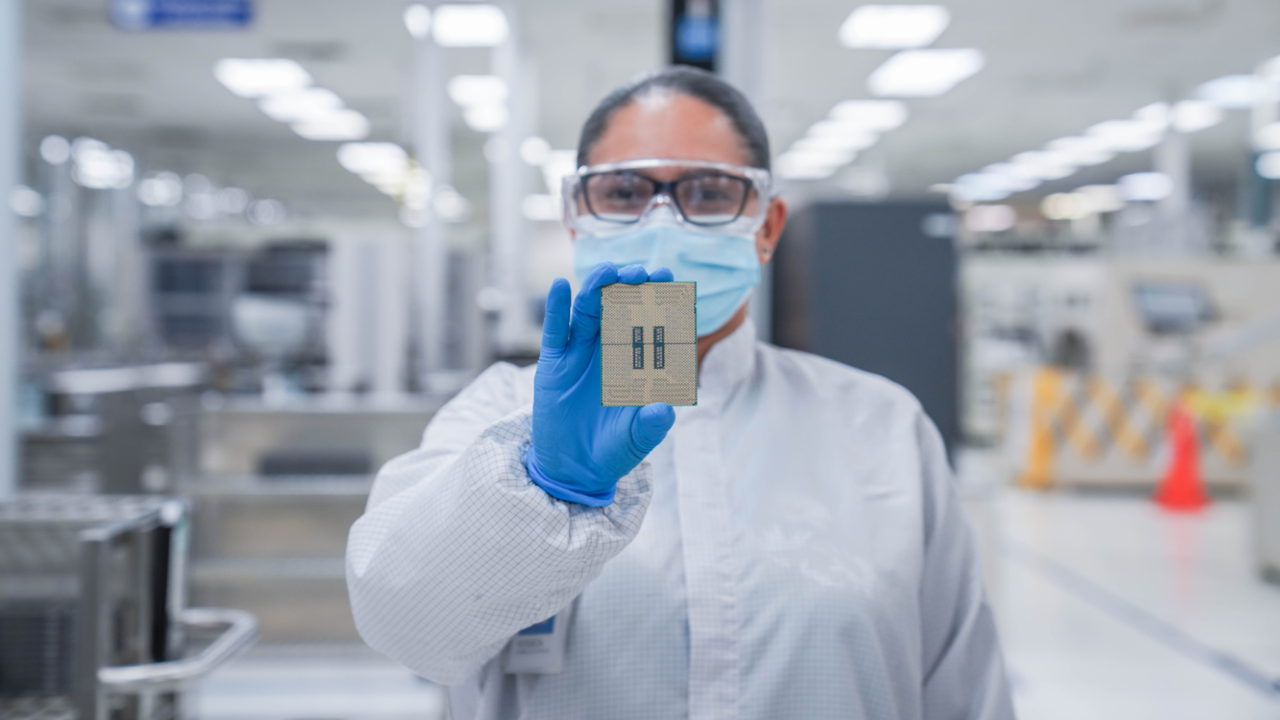
Intel and Google have announced a multi-year collaboration that will keep Intel Xeon processors at the heart of Google Cloud infrastructure for the foreseeable future.
The agreement spans multiple generations of Xeon chips and includes systems used for AI workloads, inference tasks, and general-purpose computing across Google’s global data centers.
Google Cloud instances such as C4 and N4 already rely on Xeon 6 processors, and this deal ensures that pattern continues.
Article continues below
Advertisement
Why CPUs still matter in an era of specialized AI hardware
“AI is reshaping how infrastructure is built and scaled,” said Lip-Bu Tan, CEO of Intel.
“Scaling AI requires more than accelerators — it requires balanced systems. CPUs and IPUs are central to delivering the performance, efficiency, and flexibility modern AI workloads demand.”
Advertisement
The announcement comes at a time when many hyperscalers are accelerating adoption of custom Arm-based processors for AI tasks.
Counterpoint Research recently claimed 90% of AI servers running custom silicon will rely on the Arm instruction set architecture, leaving x86 with only a small share of new deployments.
Sign up to the TechRadar Pro newsletter to get all the top news, opinion, features and guidance your business needs to succeed!
To ensure Xeon remains relevant, Intel and Google are also jointly developing custom infrastructure processing units designed to handle networking, storage, and security workloads.
Advertisement
These IPUs operate as ASIC-based accelerators that move infrastructure tasks away from host CPUs, freeing Xeon processors to focus on application execution.
This separation improves system efficiency and resource allocation across large cloud deployments running AI tools, AI agents, and large language models.
CPUs and infrastructure acceleration remain a cornerstone of AI systems — from training orchestration to inference and deployment,” said Amin Vahdat, SVP and Chief Technologist for AI Infrastructure at Google.
Advertisement
Google currently uses both Xeon 5 and Xeon 6 processors across multiple service layers alongside its own custom Arm-based Axion processors.
These deployments continue alongside Google’s own custom processors used in other parts of its infrastructure stack.
Intel and Google state that collaboration across CPUs and IPUs will continue across future system generations, covering ongoing integration efforts across cloud infrastructure layers.
They maintain that CPUs and infrastructure accelerators remain part of current cloud design patterns across distributed systems.
Advertisement
Many workloads running in Google’s data centers require backward compatibility with x86 architecture, while others need maximum single-thread performance that Xeon CPUs deliver.
These requirements are expected to persist for years, which explains why Intel and Google signed this multi-year agreement.

























































You must be logged in to post a comment Login