Samsung advances floating data center project with first Texas engineering agreement
Floating facilities promise 50MW capacity while reducing traditional construction timelines significantly
Texas grid review creates fresh uncertainty for expanding data center developments statewide
Samsung Heavy Industries and Dallas-based Mousterian Corporation have signed an engineering contract covering their first floating data center project planned for deployment in Texas.
The deal advances their partnership into the engineering phase, with both companies jointly responsible for the project’s basic design, detailed engineering, and production planning.
Each proposed floating facility is expected to provide 50 MW of critical IT capacity while operating on water instead of occupying conventional land-based development sites.
Latest Videos FromTechRadar
Advertisement
A shipyard-built facility moored beside a power plant
The pilot site is expected to sit next to an existing combined-cycle gas turbine power plant located in Houston, according to reporting on the plan.
Mousterian believes the shipyard construction approach could shorten delivery schedules compared with conventional land-based developments.
“Because the facility is built in a shipyard, fabrication advances in parallel with sitework rather than after it, a schedule and scale that conventional delivery methods cannot match,” said Min Suh, chief executive of Mousterian.
Samsung Heavy Industries brings five decades of offshore and maritime engineering experience into the venture, according to its chief executive.
Sign up to the TechRadar Pro newsletter to get all the top news, opinion, features and guidance your business needs to succeed!
“Together with Mousterian, we intend to deliver floating datacenters with the same rigor, quality, and schedule certainty that define our maritime track record,” said Sung-an Choi, chief executive of Samsung Heavy Industries.
Advertisement
Mousterian says its cooling approach avoids drawing on potable water supplies entirely and sends no discharge back into surrounding waterways.
Removing air-cooled chillers and fans from the design is also expected to considerably cut down on noise pollution near the site.
The American Bureau of Shipping is expected to classify these waterborne facilities once formal engineering work moves further.
Advertisement
Grid access in Texas remains an open question
The proposed location beside an existing gas-fired power plant may not shield the project from broader regulatory challenges affecting new data center developments.
Texas Governor Greg Abbott has paused approvals for new Electric Reliability Council of Texas (ERCOT) grid connections while state authorities review pending applications.
ERCOT is reviewing requests covering more than 474 GW of proposed new connections, a figure Abbott says is over five times peak state demand.
Advertisement
Data centers alone account for roughly 90% of those pending connection requests currently sitting before regulators.
State regulators are now asking project developers whether they plan to generate their own power or depend fully on the shared grid.
Officials also want detailed water consumption estimates from each project before any new connection request receives approval going forward.
Any project that fails to meet these new disclosure requirements will simply be denied a grid connection outright.
Advertisement
Floating infrastructure could sidestep competition for scarce buildable land near major cities, while offering built-in access to water for cooling.
Whether Texas regulators treat water-borne facilities differently from land-based ones under the new audit rules remains unclear for now.
Gen Xers who feel triggered by this should remember to unplug the network cable and call the cops
Turns out the fastest way to get a company to consider paying a ransom isn’t calling the CEO – it’s targeting the 46-year-old IT manager.
That’s according to Zscaler, whose ThreatLabz researchers tracked 351 victims across 334 organizations caught up in a single ransomware campaign over the course of a month.
Advertisement
The data suggests today’s ransomware crews have become oddly specific about their preferred victim profile: nearly two-thirds of victims held manager-level titles or above, the average victim was a 46-year-old Gen Xer, and three-quarters worked in accounting and finance, sales, operations, HR, or marketing. Half worked in the industrial or IT sectors.
Rather than blasting the same extortion email across an organization, attackers are doing their homework first. Zscaler says they combine information from compromised systems with publicly available data to map reporting lines and identify the employees most likely to influence a company’s response.
“The ransomware landscape has shifted from indiscriminate attacks to highly targeted extortion campaigns,” the security outfit wrote. “Rather than targeting executives directly, attackers are increasingly focusing on managers and other key personnel with the authority or influence to accelerate payment decisions.”
That shift reflects what Zscaler calls “business privilege” rather than technical privilege. Security teams have traditionally focused on privileged users with administrator rights. Attackers, meanwhile, are after employees whose day jobs give them access to invoices, payment approvals, budgets, supplier contracts, customer accounts, HR records, or other sensitive business processes.
Advertisement
“The value of a compromised managerial account lies in the breadth of business access associated with the position,” the researchers wrote. “Managers may approve payments, oversee budgets and vendors, review contracts, access sensitive records, or coordinate work across business units.”
The Gen X skew is probably no coincidence either. Zscaler says many workers in their forties and fifties have reached established management positions, giving attackers access to valuable systems, sensitive information, and people with decision-making authority without needing to compromise the executive suite.
It also found more than a dozen organizations said multiple employees were compromised during the campaign, suggesting attackers weren’t content with a single foothold once inside a network. Instead, they appeared to work their way through different business functions to increase the chances of reaching valuable data and the people capable of influencing a ransom payment.
The wider report points to a ransomware ecosystem that is becoming increasingly focused on extortion rather than encryption alone. Zscaler said ransomware attempts blocked across its cloud platform increased 146 percent over the past year, while public extortion cases rose 70 percent and the volume of data stolen from victims climbed 92 percent.
Advertisement
By the time the ransom note lands, the crooks may already know who approves invoices, who signs contracts, who runs HR, and who reports to whom. The encryption is just the bit that victims notice. ®
Kasquez just released a complete fan recreation of Donkey Kong Land that runs natively on Windows. The 1995 Game Boy original from Rare now exists as a standalone PC build with visuals, audio, and movement drawn straight from the style of Donkey Kong Country. Over thirty full-sized levels wait, along with the usual banana collecting, secret hunting, and a fresh trip to reclaim the hoard from King K. Rool.
Rare spent a lot of time converting the handheld game from the ground up rather than simply copying the Super Nintendo version, but let’s be honest, the hardware limitations meant the original game was always going to be a little rough, with shorter stages, only one Kong on screen at a time, fewer animal friends, and monochrome graphics that still managed to flex some impressive pre-rendered detail. Nonetheless, the game leaned into its new ideas and restrictions, so much so that levels relied on set pieces like cliff rockfalls and big ol’ tornado enemies, without losing that same basic roll-and-jump momentum that made the game so much fun, and even tho it was half the length, the game still clocked up nearly four million sales and received glowing reviews for squeezing so much personality out of its tiny green screen.
BUILDABLE ARCADE CABINET – Relive the fun of playing an iconic arcade game with the LEGO Donkey Kong Arcade (72051) building set for adults ages…
AUTHENTIC ARCADE GAME DETAILS – Create a Donkey Kong arcade level featuring Jumpman, Donkey Kong and Lady, including iconic details like the…
WORKING JUMP AND DODGE PLAY – Pull the lever on the left side of the base to release one barrel at a time, then move Jumpman with the joystick and…
This new release effectively removes all of those limits. Stages can be as long as they need to be, leaving plenty of area for platforming sequences, hidden paths, and the vertical and horizontal exploration that seemed constrained in the original. Donkey Kong Country’s richer colors and sprite presence improve character and landscape art, making jungles, reefs, mountains, and the climactic pirate ship appear and feel more like the SNES game than a clone. Backgrounds are also given a nice polish, making them seem natural on current monitors. Music and sound effects follow suit, replacing the Game Boy’s limited sound with true, full-fat versions that can compete with vintage console tunes.
The controls are also smooth and tight, as they are built for gamepads or keyboards rather than the handheld’s two-button configuration, so movement remains quick and responsive. Rolling, jumping, and barrel-blasting all feel immediate, which is exactly what you need when the game opens up and demands precise timing over longer stretches. There are still plenty of secrets to find, bonus rooms, alternate paths, and collectibles that will entice you to return and explore every nook and cranny just like you did in 1995, but this time with a camera and resolution that actually allows you to see what’s going on.
It all delivers as a self-contained Unity package, so you won’t need the original ROM because all of the assets are included in the download. That’s a good convenience, but it opens the door to Nintendo’s proclivity to shut down ventures that leverage its intellectual property. So the Google Drive link may have a limited shelf life, as Kasquez has included a quick how-to video that talks you thru the setup and choices, and folks have already reported that it plays well and the physics are spot on for the console game. [Source]
The French and British came marching into Raleigh this weekend, although thankfully nobody brought muskets, red coats or plans to retake the colonies. The city has survived British taxation, Sherman marching through North Carolina and generations of arguments over which barbecue sauce constitutes an act of treason.
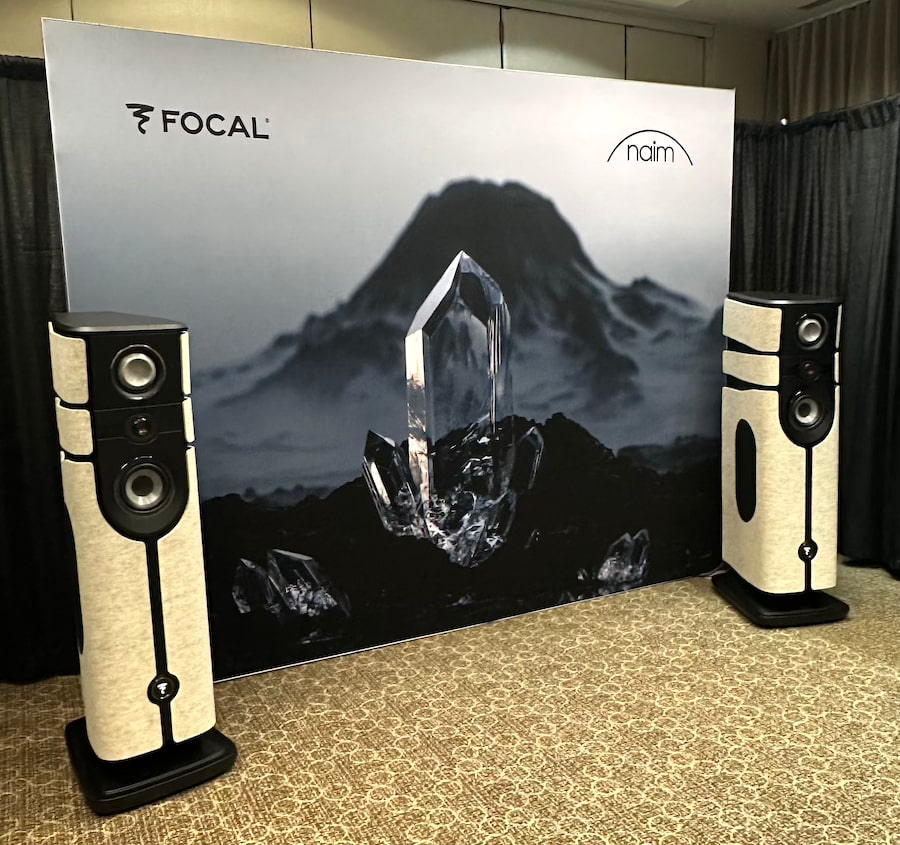
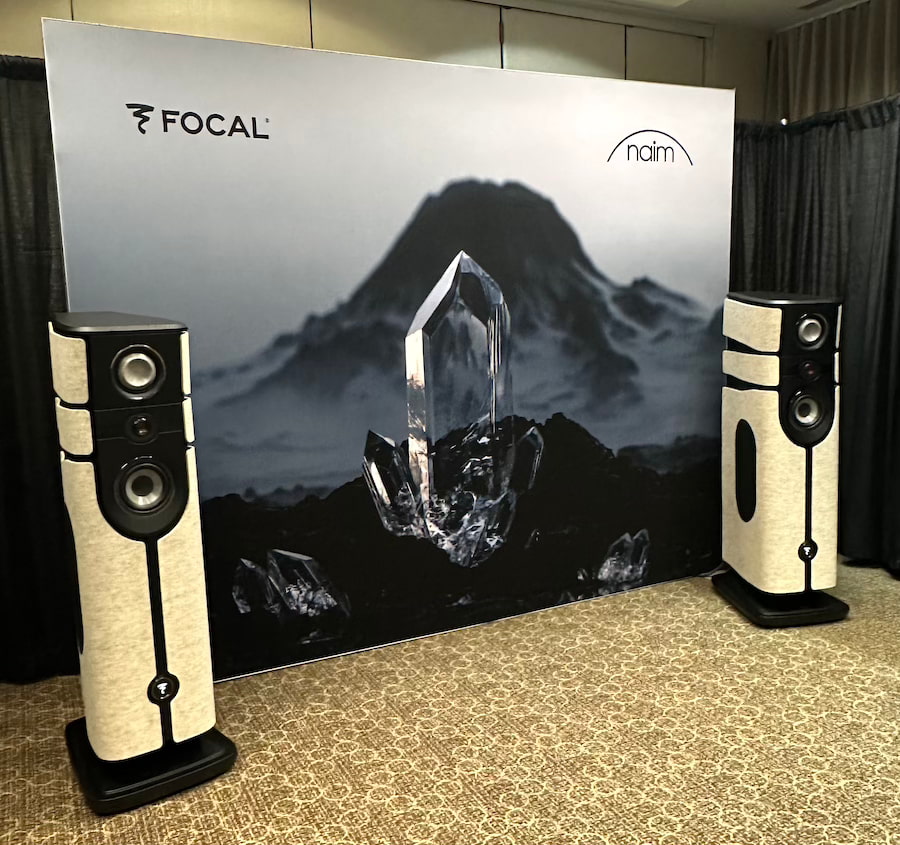
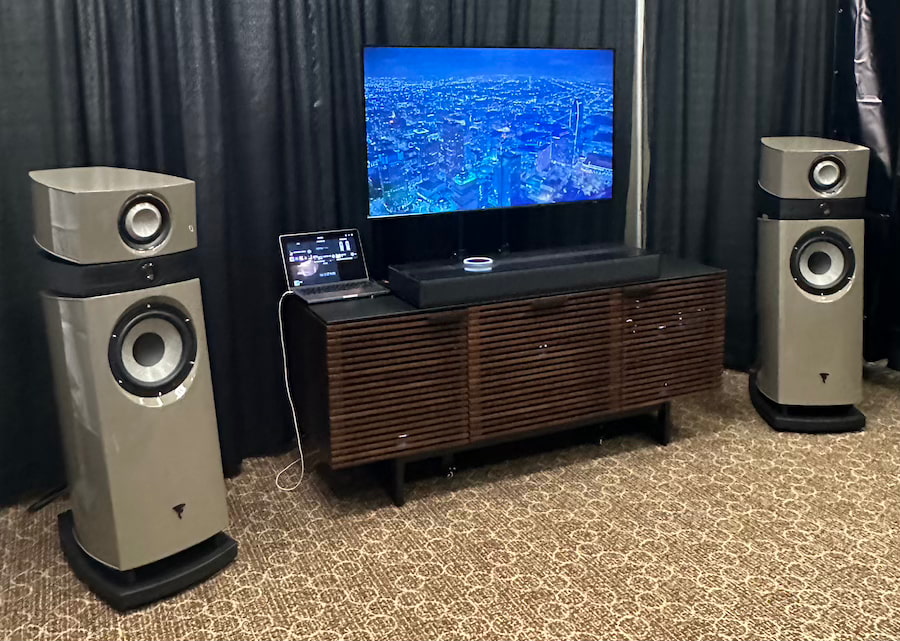
Focal and Naim instead invaded Audio Advice Live 2026 with something considerably more dangerous to the average audiophile’s bank account: four very different systems spanning custom installation, immersive home audio and some of the most ambitious high-end loudspeakers either company has ever produced.
Now in its fifth year, the Raleigh event packed more than 60 experience rooms and over 10 immersive Dolby Atmos theater systems into the Sheraton Raleigh Hotel from August 7 through 9. More importantly, this is a consumer-facing show where people can actually hear the equipment, ask the people selling it why it costs what it does, and decide whether any of it belongs in their homes.
That matters even more with Audio Advice itself in expansion mode beyond its traditional North Carolina footprint, including its moves into St. Louis, Miami and Las Vegas. The Raleigh show increasingly feels less like an oversized dealer event and more like a very public statement about where the retailer thinks the premium A/V market is headed.
Advertisement
Focal and Naim apparently got the memo.
Rather than bringing one obscenely expensive system and calling it a weekend, the two brands demonstrated products ranging from the $5,597 Focal Omada/Naim CI system all the way to the $210,000 Diva Alta Utopia active wireless flagship.
That is quite a walk across the financial spectrum before you’ve even finished your sweet tea. Better bring a pitcher for Coach Brind’Amour. Rod the Bod just brought the Stanley Cup back to Raleigh, although judging by the man’s conditioning, he probably considers sugar a controlled substance.
Related Reading:
Focal Diva Alta Utopia: $210,000 and Almost Everything Is Inside
The unquestioned headliner was the Focal Diva Alta Utopia, launched on June 17 for $210,000 per pair. It is Focal’s flagship active wireless loudspeaker and arguably one of the more audacious products introduced in high-end audio this year.
Calling it a wireless loudspeaker does not really explain what Focal and Naim have built.
Advertisement
Each 235-pound loudspeaker uses a four-way architecture with seven drivers, including four 8-inch W-cone woofers in a push-push configuration, an M-profile W midrange driver and Focal’s new PRISM tweeter. Each enclosure also contains 600 watts of Naim Class AB amplification, along with the DAC, DSP and streaming electronics required to make the system essentially self-contained.
The two loudspeakers can communicate over Ultra Wideband wireless technology, while Focal supplies a wired high-resolution connection for users who want 24-bit/192 kHz communication between them. HDMI eARC, optical and analog inputs are also included, along with Wi-Fi 6, Ethernet and support for high-resolution streaming.
Advertisement. Scroll to continue reading.
That is the real point of the Diva Alta Utopia. A conventional Focal Utopia/Naim system at this performance and price level normally involves loudspeakers, amplifiers, digital sources, racks, cabling and enough boxes to make your electrician wonder whether you are opening a small data center.
Advertisement
The Diva Alta Utopia puts almost all of it inside the loudspeakers.
At $210,000, simplicity has apparently become a luxury feature.
Focal Scala Utopia Evo M Makes Its North American Debut
The Focal Scala Utopia Evo M was arguably the more important traditional high-end demonstration because Audio Advice Live marked its North American debut.
Introduced July 2, the three-way bass-reflex floorstander represents a substantial evolution of one of Focal’s best-known Utopia models rather than a cosmetic refresh with a French accent.
The Scala Utopia Evo M incorporates the new PRISM inverted-dome tweeter, an M-profile W-cone midrange derived from Focal’s professional Utopia Main monitors, a redesigned 10.6-inch W-cone woofer with dual ferrite magnets, TMD suspension and Focal’s OPC+ crossover system. The loudspeaker is rated at 92 dB sensitivity with a 27 Hz to 40 kHz frequency response.
Advertisement
Pricing starts at $50,000 per pair for Black High Gloss, Off White High Gloss and Warm Taupe High Gloss. Light Walnut with an Off White front panel and Dark Walnut with a Sepia Brown front panel increase the price to $56,000 per pair.
Focal paired the Scala Utopia Evo M demonstration with Naim’s NSS 333 high-resolution streamer ($10,999), NSC 222 streaming preamplifier ($8,999) and two NAP 350 monoblock power amplifiers ($8,499 each).
Using the $50,000 Scala finish, that makes the demonstrated system $86,996, not including whatever cables and supporting furniture were used in the room. Select one of the wood finishes and the price rises to $92,996.
Nobody walking into this room accidentally bought one after lunch. Or did they?
Advertisement
Focal Mu-so Hekla Brings Dolby Atmos Without the Speaker Farm
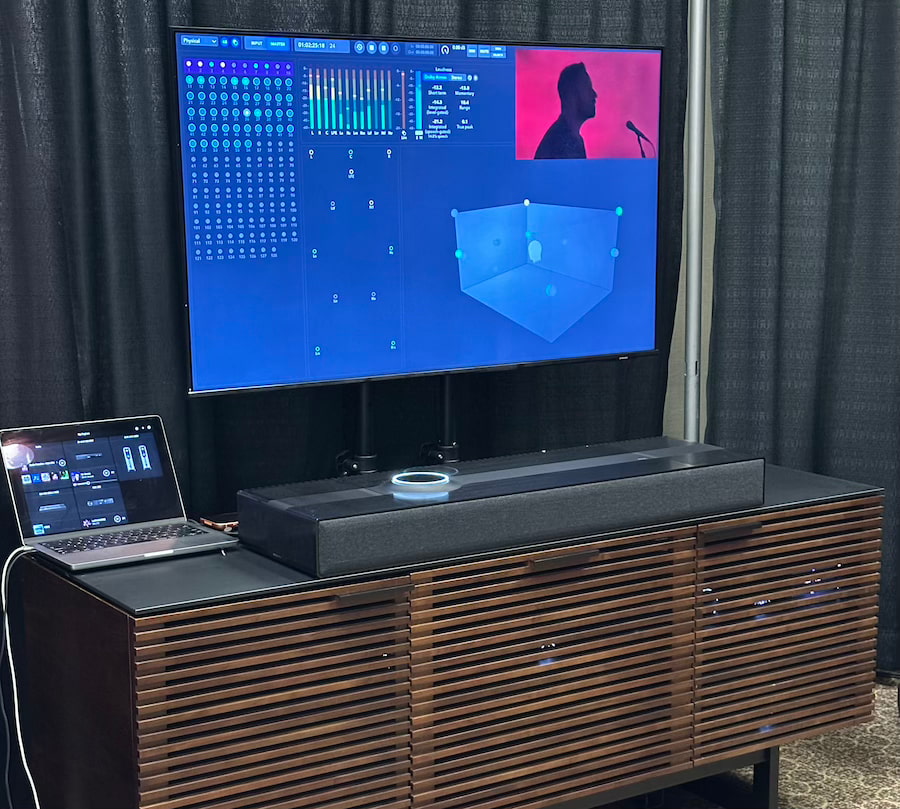
Focal and Naim also demonstrated the $3,600 Mu-so Hekla, which might actually have been the most relevant product in the room for a much larger percentage of attendees.
Focal remains adamant that Hekla is not merely a soundbar, and after hearing it previously at CES and AXPONA, we understand why the company keeps making that distinction. It is a single-box immersive audio system built around 15 drivers, 660 watts of amplification and Dolby Atmos, with HDMI eARC and extensive network streaming support.
Advertisement. Scroll to continue reading.
Hekla also uses Focal’s ADAPT room calibration system, which allows users to enter room dimensions and listening distances through the Focal & Naim app so the system can adjust its presentation for the space. Streaming support includes AirPlay 2, Chromecast, Qobuz, Spotify Connect, TIDAL Connect and UPnP, along with Dolby Atmos music support from compatible services.
You get immersive sound without running speaker wire through the ceiling, which in most homes means one fewer argument and considerably less drywall dust.
Advertisement
And no, Focal still doesn’t want us calling it a soundbar.
Fine. Raleigh has enough arguments about barbecue already.
The $5,297 Focal/Naim System Might Be the Most Important One
At the opposite end of the room from Utopia pricing was a combination that demonstrates why Focal and Naim’s strategy has become much broader than exotic two-channel audio.
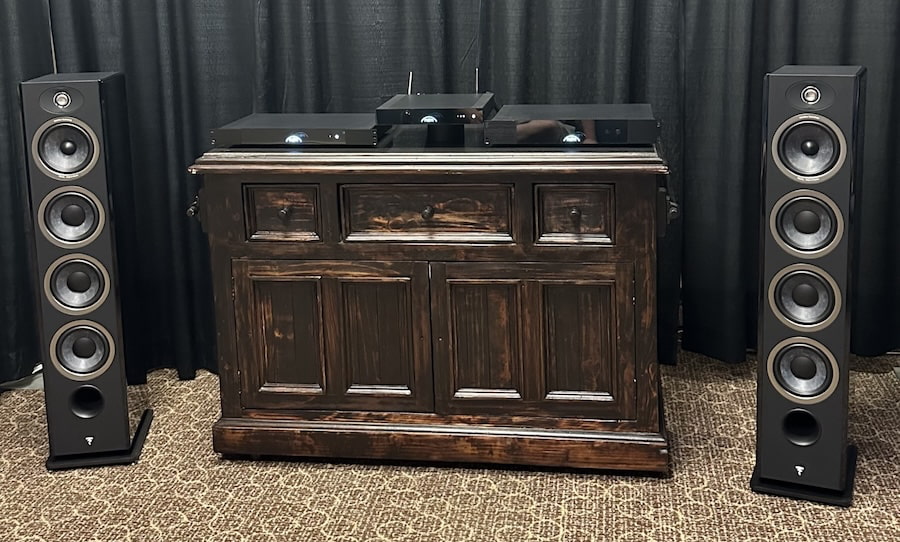
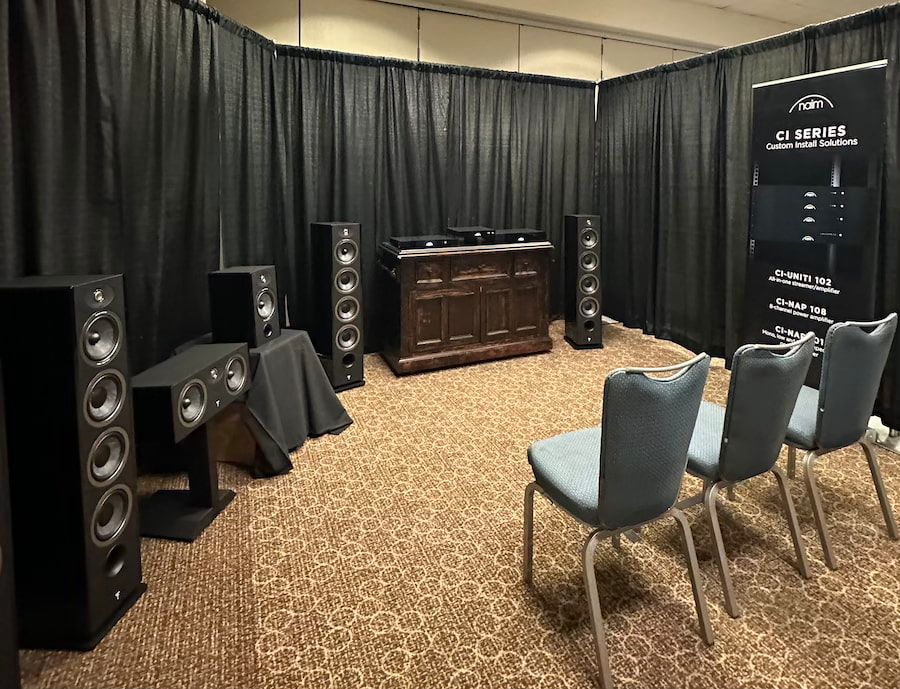
The active demonstration paired the Focal Omada Nº3 floorstanding loudspeakers ($3,798/pair) with the Naim CI-Uniti 102 streamer amplifier ($1,799) for a complete system price of $5,597.
The CI-Uniti 102 combines network streaming and amplification in a compact integration-oriented chassis and can be configured using Focal & Naim Manager software with loudspeaker profiles for different installations. It also supports integration platforms including Crestron, Control4, RTI, Savant and Elan.
Advertisement
Focal says the Omada range is offered in the United States through participating ProSource dealers, which includes Audio Advice. Also on display in Raleigh were the Omada Nº1 ($1,398/pair), Omada Nº4 ($4,598/pair), Omada Center ($699) and matching Center Stand ($169), along with Naim’s CI-NAP 101 mono amplifier ($1,999) and CI-NAP 108 eight-channel power amplifier ($3,499).
That demonstration may lack the gravitational pull of a $210,000 pair of Utopias, but strategically it matters. Focal and Naim clearly want to be involved in more than dedicated audiophile rooms; they also want a larger piece of the integrated whole-home, media-room and custom-installation market. Naim specifically positions its CI range as the electronics counterpart to Focal’s integrated loudspeaker products.
The Bottom Line
What made Focal and Naim’s Audio Advice Live 2026 presentation work was not simply the price of the Diva Alta Utopia or the North American debut of the Scala Utopia Evo M. It was the enormous distance between those products and the $5,597 Omada/CI system sitting elsewhere in the same demonstration portfolio.
That is also why Audio Advice Live matters.
Advertisement
You could walk from a compact Naim-powered Focal system that a reasonably committed enthusiast might actually purchase, to Hekla’s single-box Dolby Atmos solution, to an $86,996 Scala Utopia Evo M system, and finally to a $210,000 pair of wireless active loudspeakers. More importantly, you could hear all of them rather than stare at photographs while someone explained that the magic really starts after 300 hours of break-in.
Advertisement. Scroll to continue reading.
Focal and Naim brought four very different answers to the same question: how much equipment do you really want between yourself and the music?
In Raleigh, the answer ranged from almost none to please call my family office.
Anthropic’s chatbot can be very vocal, if you want it to be.
Igor Bonifacic for Engadget
Since 2025, Anthropic has offered a voice mode through Claude, allowing you to speak to its chatbot instead of writing out your prompts. This past July, the company updated the feature to make it more useful. Before, voice mode limited users to speaking to Claude through Haiku, Anthropic’s least powerful model. This was done to reduce latency. Now, voice mode also works through the company’s more powerful models, including Sonnet and Opus, and can even pull context from your connected apps and services.
If you’re a frequent Claude user and want to give the feature a try, here’s how to do it.
Advertisement
How to use Claude voice
Igor Bonifacic for Engadget
Voice mode is available through the Claude mobile (Android and iOS) and desktop apps, as well as through the web. Anthropic says the feature works best from your phone.
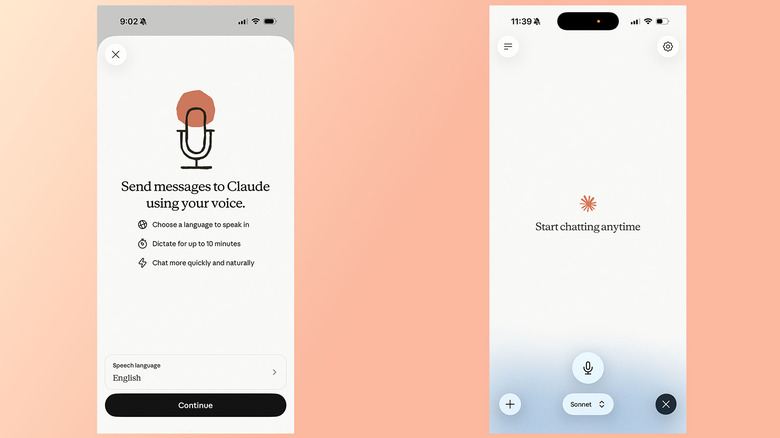
To use voice mode on mobile:
Open the Claude app.
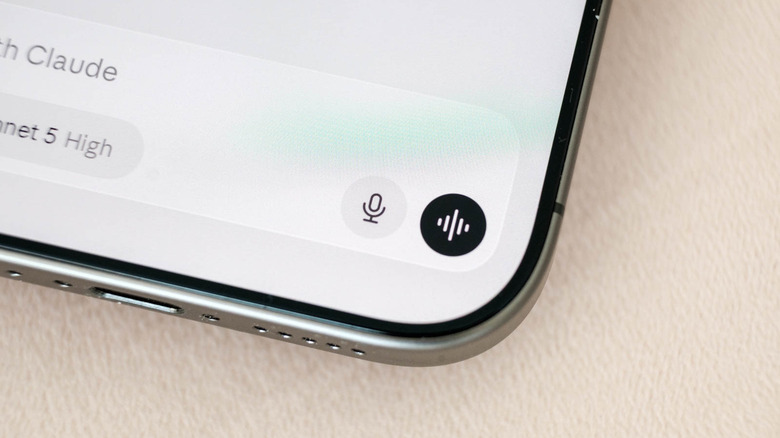
Tap the black waveform icon in the lower right corner of the interface (not the microphone icon right next to it).
Grant the app microphone permissions if necessary.
Start talking. Claude will generate a response once you finish a prompt.
Claude will remain in voice mode until you tap Stop.
One thing to keep in mind is Claude’s voice mode uses a “turn-based” architecture, meaning the chatbot will listen to you before it generates a response. This is different from ChatGPT’s voice mode, which OpenAI recently updated to use a “duplex” architecture. That system gives its GPT-Live models the ability to simultaneously process speech and generate outputs.
In practice, that means voice mode sometimes confuses a brief pause for the end of a question or prompt. For that reason, Anthropic recommends asking multi-part questions one at a time instead of all at once.
Advertisement
How to select different models
Igor Bonifacic for Engadget
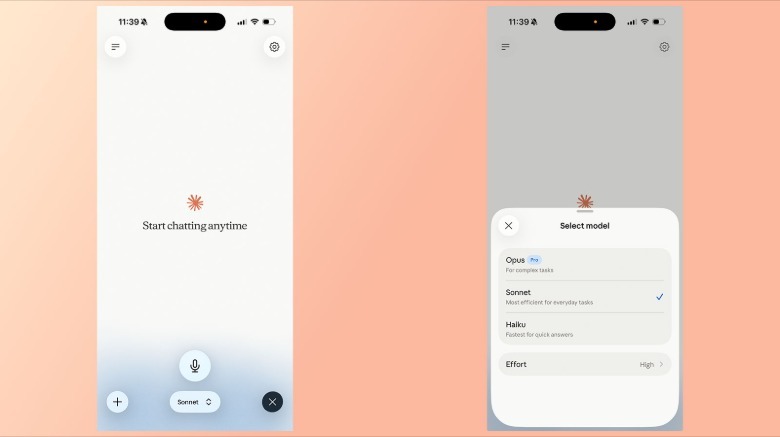
You can change the model Claude will use to generate a response from the model picker at the bottom of the interface. See below for a list of available models, followed by a short description from Anthropic.
Haiku: Fastest for quick answers
Sonnet: Most efficient for everyday tasks
Opus: For complex tasks. Only available to paid accounts.
How to use your connected apps
Like with text chat, voice mode can access apps and services you’ve connected to Claude, including Gmail, Google Calendar and Slack. For example, you can ask Claude to summarize your recent emails. Simply tell Claude the app you want it to use as part of a prompt. If you’re accessing a third-party app for the first time, you will need to grant Claude permission to use it.
How to change Claude’s voice and language
Igor Bonifacic for Engadget
As of July 2026, Anthropic offers Voice Mode support in 14 different languages, with a handful of those available in additional dialects. The language you select will affect your choice of Claude’s voice. In English, for instance, you can select from five different options, while Japanese users are limited to just two. Below is the full list of languages Voice Mode currently supports:
English
English (India)
English (United Kingdom)
Chinese (Simplified)
Cantonese
French
French (Canada)
German
German (Austria)
Hindi
Italian
Japanese
Korean
Portuguese
Portuguese (Brazil)
Portuguese (Portugal)
Russian
Spanish
Spanish (Latin America)
Turkish
Ukrainian
One limitation of Voice Mode is that Claude cannot detect if switch between languages mid-sentence. If you’re about to speak in another language, state that intent out loud, or change Claude’s language from the Settings menu.
Advertisement
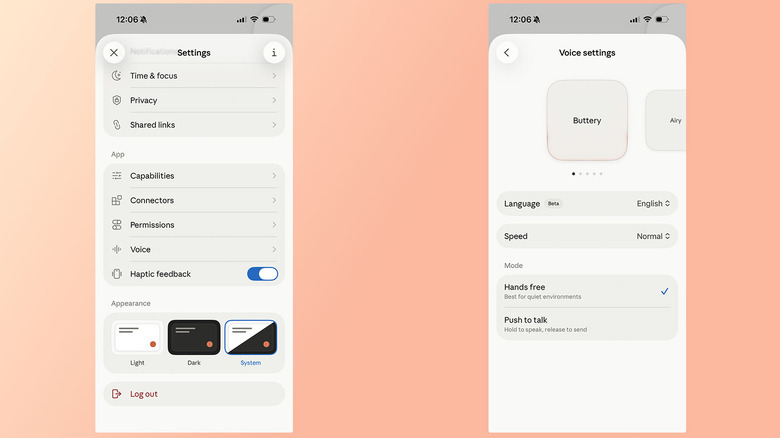
To change Claude’s voice and language, open the Settings page and tap Voice (located below the App section of the menu). You can hear a preview of each by swiping through the carousel at the top. In English, you have the following options:
Buttery
Airy
Mellow
Glassy
Rounded
Additionally, you can also adjust the speed of Claude’s cadence. There, your options are Slow, Normal and Fast. Lastly, Anthropic offers two different ways of recording your prompts: Hands free and Push to talk. Anthropic suggests the former is best used in quiet environments.
Advertisement
Do you need a paid account to use Claude Voice?
Igor Bonifacic for Engadget
You don’t need to pay for a Pro or Max subscription to access Claude Voice, but Anthropic limits free accounts to using the tool through its Haiku and Sonnet models. For most prompts, Sonnet should offer more than enough intelligence. To route your prompts through Anthropic’s more Opus powerful model, a paid subscription is required. Voice mode conversations count against your usage limits.
Anthropic also limits free accounts to a single connection, though you can use the tool in all the languages it currently supports.
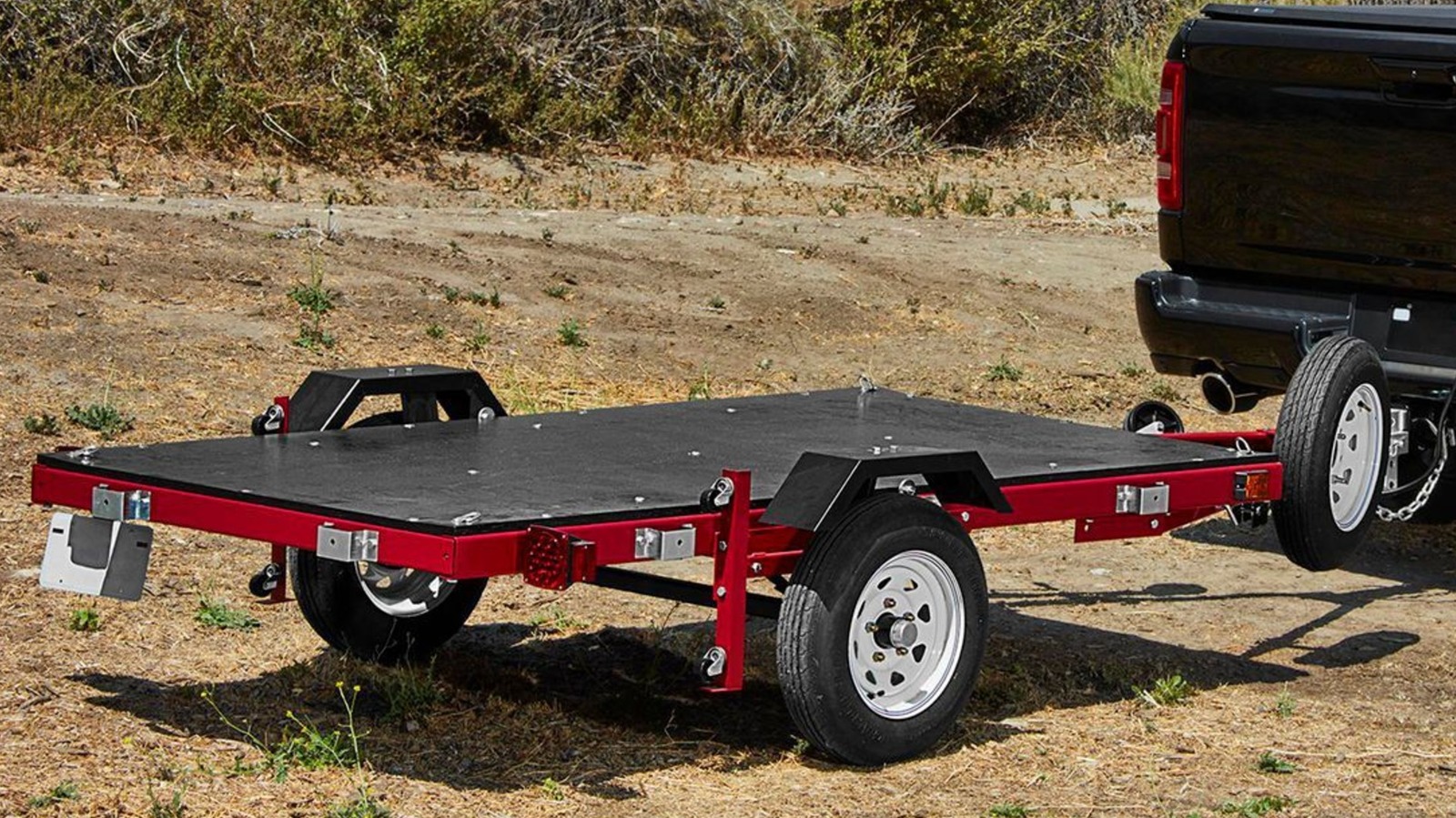
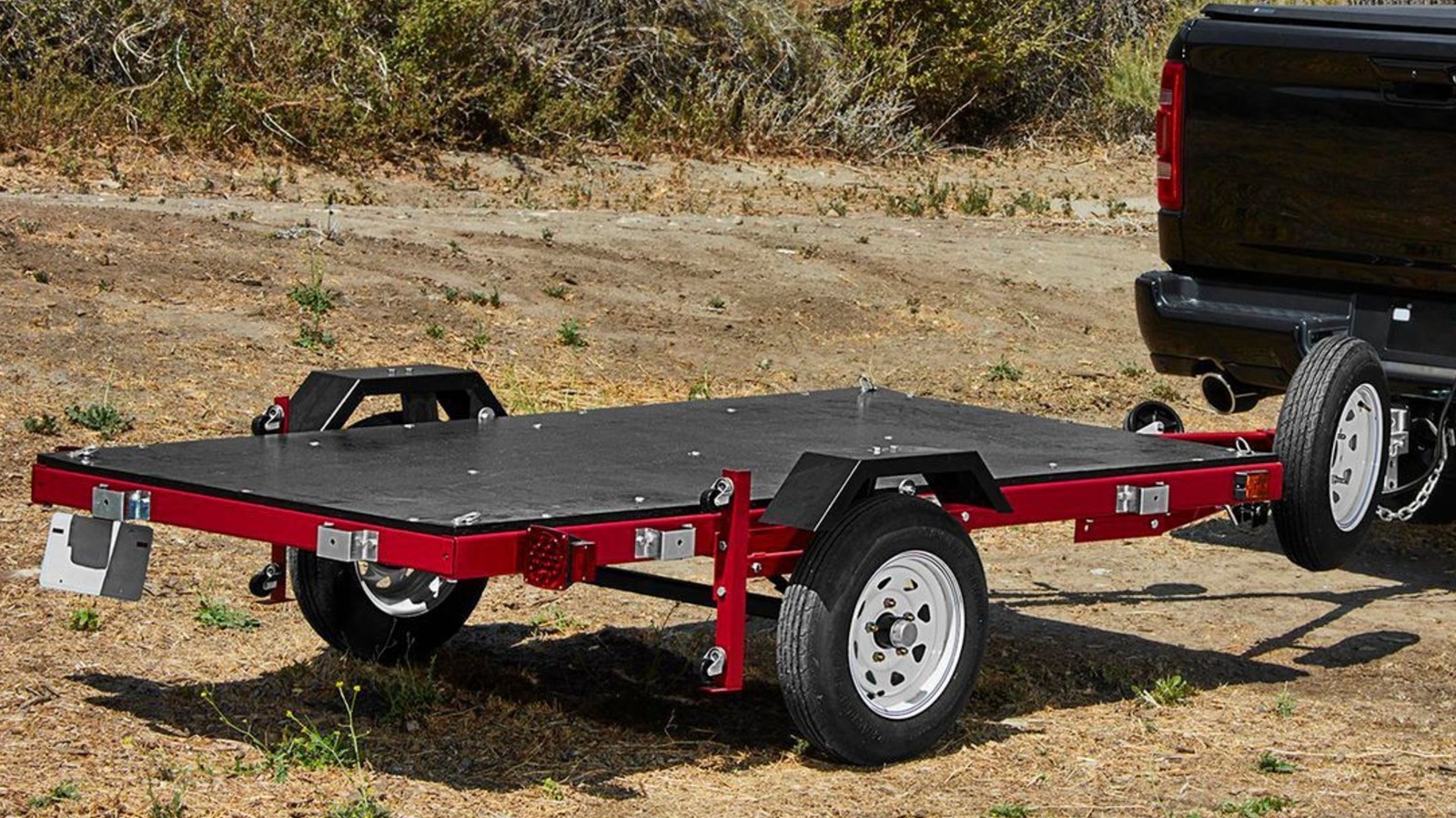
While many consider Harbor Freight to be the mecca for affordable tools and parking lot sales, its line of Haul-Master Utility Trailers may fly under the radar of DIY-ers. These DOT-compliant trailers, such as the mid-size 1720 model, feature a heavy duty steel construction, a 4-foot by 8-foot bed (plywood is sold separately), a pair of wheels and tires, leaf spring suspension, and all necessary lighting and wiring.
With a weight capacity of 1,720 pounds, this trailer is perfect for household projects, Facebook Marketplace finds, lawn care equipment, and even your ATV. Harbor Freight also offers a variety of trailer accessories that can greatly improve your hauling experience. Best of all, they’re aggressively priced, making them ideal for even the most budget shoppers. Since you already have to assemble this trailer yourself (for those unaware, Harbor Freight just sells you all the components in a box), it’s the perfect opportunity to add on some useful accessories while your tools are already out!
Advertisement
Haul-Master Steel Trailer Ramps
If you plan on using your new trailer to haul something with wheels, you’ll likely want to consider picking up a set of trailer ramps. These Haul-Master Steel Trailer Ramps feature a 2,000 pound capacity, which is actually 250 pounds more than the trailer’s max load, so they’ll safely handle anything you plan on loading.
Advertisement
Even though they’re only $89.97, these ramps utilize a powder-coated steel construction, offering superior corrosion resistance. Each ramp is 14 inches wide, making them compatible with the tires found on most any lawnmower, ATV, UTV, or golf cart. They also utilize an anti-skid embossing design, which should help improve traction and prevent water from pooling. Looking to load and tow a motorcycle? These ramps can be used individually, with a single ramp supporting 1,000 pounds; plenty strong for even the heaviest cruiser and touring bikes.
These ramps can be used without requiring any screws or permanent modifications to your new trailer. Simply line up the tongue edge to be fully flush against the trailer, connect the included safety straps to the trailer frame to prevent slippage, and you’re ready to load. Once finished, just lift straight up. At under 4 feet in length, you can easily store these ramps on the trailer beside your toy or in your truck bed when not in use.
Advertisement
Badland 2,000-pound Utility Trailer Winch
One of the most important safety rules for loading or unloading a trailer is to never drive up and down the ramps. Some larger vehicles however may be a little too heavy to push, even with the help of a trusted friend. That’s where the Badland 2,000-pound Utility Trailer Winch comes in. Capable of safely pulling a ton, this winch will be a perfect addition for anyone regularly hauling heavier, wheeled loads. The winch’s maximum capacity is also slightly above the trailer’s load limit, giving you enough power to safely overcome steeper ramps.
Thanks to Harbor Freight’s budget-friendly approach, this winch is significantly cheaper than you’d expect, with an MSRP of only $59.99 before any coupons or potential Inside Club discounts. Weighing under 15 pounds, you don’t have to worry about cutting into your trailer’s maximum capacity too much. The winch cable is zinc-plated, which should help keep the metal fibers from weathering and fraying from repeated use. The included 4-foot wired remote controller allows you to safely operate this winch off to the side, out of harm’s way. Harbor Freight even includes mounting hardware, although the mounting plate is sold separately.
Advertisement
Haul-Master 5,000-pound Capacity A-Frame Trailer Jack
Chances are, your new trailer will primarily be disconnected from your truck or SUV. While this Haul-Master trailer does fold for easier storage, this functionality is lost once you add a plywood floor. The Haul-Master 5,000-pound Capacity A-Frame Trailer Jack, priced at $49.99, will be put to work whenever you’re unhitched. When looking to re-attach, you’ll be able to finely dial in the height of your trailer’s receiver to match your vehicle’s hitch. When disconnected, this jack will keep your trailer level and safely support all of the tongue weight. It’ll also help stabilize and prevent shifting when loading or unloading heavier cargo.
With a 5,000-pound capacity, this jack will be able to safely handle a fully loaded trailer with plenty of room to spare. It supports both bolt-on and welded-on installation, making it an easy modification, regardless of skill level. The solid steel construction is powder-coated to help this trailer jack last for years to come. With a lift range of 9-24 inches, you’ll easily be able to connect to a variety of trucks and SUVs as well. Please note that a foot plate or caster wheel is sold separately.
Advertisement
Haul-Master Trailer Spare Tire Carrier
Although road trips can be a blast, a single errant nail can quickly leave you stranded on the side of the highway for hours. A lot of roadside assistance plans exclude trailers, leaving you with the option of paying out of pocket for a tow truck (and waiting hours for the pleasure) or disconnecting the trailer, leaving your cargo sitting unsupervised, and driving back to town for a fix. You can avoid all of this by equipping your trailer with the Haul-Master Trailer Spare Tire Carrier, which is currently priced at only $29.99.
Advertisement
A heavy-duty welded steel construction should resist rust while providing long-term durability, regardless of your towing conditions and environment. Included zinc-plated tire mounting hardware will help keep the tire ready for use at a moment’s notice. This particular carrier fits all trailer tongues up to 3 inches in diameter, so you might want to consider picking up a second or third for any other trailers in your fleet. The mount is also compatible with most all 4 and 5 lug trailer wheels; although the actual spare is once again not included with this carrier.
One of the major keys to success is being prepared. When we’re talking towing, that means having all of your necessary tools, like tie-downs, ratchet straps, and even gloves within easy reach. If your tow vehicle is already fully loaded, you might struggle to accommodate additional gear. And if you aren’t regularly towing, you won’t want it taking up precious interior space either. That’s where Haul-Master and its 2.31 cubic-feet Steel Trailer Tongue Box can help.
A formed steel construction is complete with a weatherproof seal to keep your gear dry and protected. It also includes a cam lock and key mechanism, allowing you to lock up your valuable tools when not in use. The lid includes a gas strut for easy one-handed access. All mounting hardware is also included, so you can have this handy storage container installed in minutes. Once attached, you’ll have over 2.25 cubic feet of storage; plenty for all of your essentials. With a price of $89.99, Harbor Freight undercuts the competition by over $200!
Despite its ferocious popularity, people still tend to swear off anime entirely. These are usually the people whose reference of the medium pertains to a certain stereotype or to the few seconds of anime they once saw on a computer somewhere in the early 2000s.
But Japan has been producing some of the most emotionally resonant and visually audacious storytelling in contemporary media for half a century, and a great deal of it looks nothing at all like the stereotype it holds.
So here’s a case for the uninitiated. Start with self-contained films you can knock out in a single evening before graduating to series worth committing wholly to. The common thread, if you’re keeping score, is that not one of these requires you to know anything about anime, or Japan for that matter, going in.
Note that many of these picks are available in both the original Japanese audio with subtitles or as “dubs” with dialog dubbed by English voice actors. Dive in however you’d like.
Advertisement
Solo Leveling
If you want something fast, slick and unapologetically addictive, start here. Adapted from a South Korean web novel and webtoon by the Japanese animation studio A-1 Pictures, Solo Leveling follows Sung Jinwoo, an E-rank hunter regarded as the weakest of his profession. After being slaughtered during a dungeon expedition, he awakens with access to a mysterious system that only he can see–and which allows him to become stronger in a world where everyone else’s abilities are effectively fixed. Watching him transform from expendable underdog into an overwhelmingly powerful fighter is pure wish fulfillment, driven by propulsive pacing and enormous battles.
The Girl Who Leapt Through Time
This 2006 film is one of the softest possible landings into anime, with a concept that is simple to follow. Makoto is an ordinary teenager who unexpectedly discovers that she can leap backward through time. She initially uses the ability to redo poor test results, avoid awkward confessions, and correct everyday embarrassments. But manipulating time has consequences for the people around her, forcing Makoto to confront a future she may not be able to reverse.
Frieren: Beyond Journey’s End
Most fantasy stories end when the heroes defeat the great evil. Frieren begins there. After completing a decade-long quest, the elven mage takes off on a solitary journey, returning after 50 years to find that her human companions have aged while she has remained unchanged. Regret at missing out on reconnecting earlier and the pain of witnessing the death of one of her friends sets her on a journey of self-discovery. The result is a quiet, beautifully animated meditation on memory, mortality, and the meaning we find in seemingly fleeting relationships.
Nausicaä of the Valley of the Wind
Take a trip back to the anime of the ’80s, when writer-director Hayao Miyazaki was helping redefine what Japanese animation could accomplish—even before he cofounded Studio Ghibli. Set in a world poisoned by ecological catastrophe, the film follows Princess Nausicaä as she tries to prevent a war between human kingdoms while understanding the enormous toxic forest spreading across the planet. It is a postapocalyptic adventure but also a remarkably prescient story about environmental destruction and humanity’s impulse to conquer what it fears.
Advertisement
Death Note
For viewers who think anime means sprawling fights and exaggerated superpowers, Death Note offers a psychological thriller instead. High school student Light Yagami discovers a supernatural notebook that allows him to kill anyone whose name he writes inside it, provided he knows their face. With this discovery, he launches a crusade to eliminate criminals. What follows is a compulsive, morally murky battle of wits about justice, power, and how quickly idealism can become tyranny.
The Colors Within
Totsuko is a Catholic girls’ school student with an ability to see people’s emotions as colors. She joins a band with two people whose auras she’s drawn to, and so unfolds a musical odyssey of emotion and connection, tuned to classic anime characteristics. This 2024 Japanese drama film is a great watch if you’re after something with a bit more depth.
Jujutsu Kaisen
For anyone who wants supernatural horror with spectacular action, Jujutsu Kaisen is an easy gateway. High school student Yuji Itadori swallows a cursed finger to save a classmate and becomes the vessel of Ryomen Sukuna, a reincarnated sorcerer known as the King of Curses. Yuji is brought into the secretive world of jujutsu sorcerers, who fight supernatural beings created from humanity’s negative emotions. The series becomes considerably darker as it progresses, but its humor, memorable characters, and inventive battles make the commitment worthwhile.
The Tale of the Princess Kaguya
Japan’s most famous folklore reimagined in a hand-drawn masterpiece by Isao Takahata took eight years to make. As if sketched in real time, the story unfolds with a bamboo cutter who discovers a tiny girl inside a stalk. He raises her and watches her transform into a woman of impossible beauty. But the girl is slowly suffocated by everyone else’s plans for her, including five noble suitors competing for her hand.
Advertisement
Kiki’s Delivery Service
Even if you have never explored anime, you have probably encountered this one. Hayao Miyazaki’s 1989 fantasy follows Kiki, a 13-year-old witch who leaves home as part of her training and settles in a seaside city with her talking cat, Jiji. She begins supporting herself by running an airborne delivery service, only to find her confidence—and her ability to fly—beginning to disappear. Ostensibly a children’s film, it is also an unusually perceptive story about independence, loneliness, and creative burnout.
Spirited Away
Hayao Miyazaki’s 2001 masterpiece remains one of the strongest arguments for animation as serious cinema. Ten-year-old Chihiro unknowingly enters a mysterious spirit world where her parents eat food at an abandoned amusement park and are transformed into pigs. She then finds work in a magical bathhouse as she searches for a way to save them.
UI changes, lost productivity, untransferrable knowledge… Long-time Slashdot reader theodp notes the folly of switching to an unfamiliar new environment to be “more productive”…
Champions of the switch often insist workers will be able to hit the ground running and get the same or even more work done from the get-go in the new unfamiliar environment because it’s ‘more productive’, a conclusion often shaped by conventional wisdom or their ‘gut’ feeling. Decision makers may also mistake their own ‘light-user experience’ for universal experience and believe all platforms are fungible.
And while it’s one thing for a business to delay their delivery dates and increase costs of by introducing a switch in computing environments that’s of unquantified and possibly dubious value, how about when a switch in computing environments is made that affects schoolchildren’s ability to learn for a period of time?
While a MacBook Neo is indeed cute, what might be the possible consequences of a decision to move 25,000 students off Windows and onto MacBook Neos…? Or even the impact on a single kid who moves from a MacBook school to a Windows or Chrome school (or whose home computing environment isn’t aligned with their school). Or students whose teachers decide learning in their classrooms should now additionally require an understanding of the Minecraft computing platform/UI (used in over 40,000 school systems.). Learning Management Systems and now various AI Edtech tools used by schoolkids are also subject to change.
Advertisement
“Even if students and schools eventually benefit from a new platform, one wonders how much learning is lost during the switch,” theodp asks, “and what the financial and educational ROI and payback period look like.” Are there bigger problems than we realize? Share your own thoughts and experiences in the comments.
What are the costs of switching between Windows, MacOS, and Chrome?
Between reviewing tech for a living and spending most of my day in front of a screen, free time is a luxury. Yet almost every evening, I somehow find myself queueing up for two or three ranked Valorant games. My peak rank is Ascendant 1, and while I’m far from going pro, competitive FPS titles are where I put hundreds of hours every year.
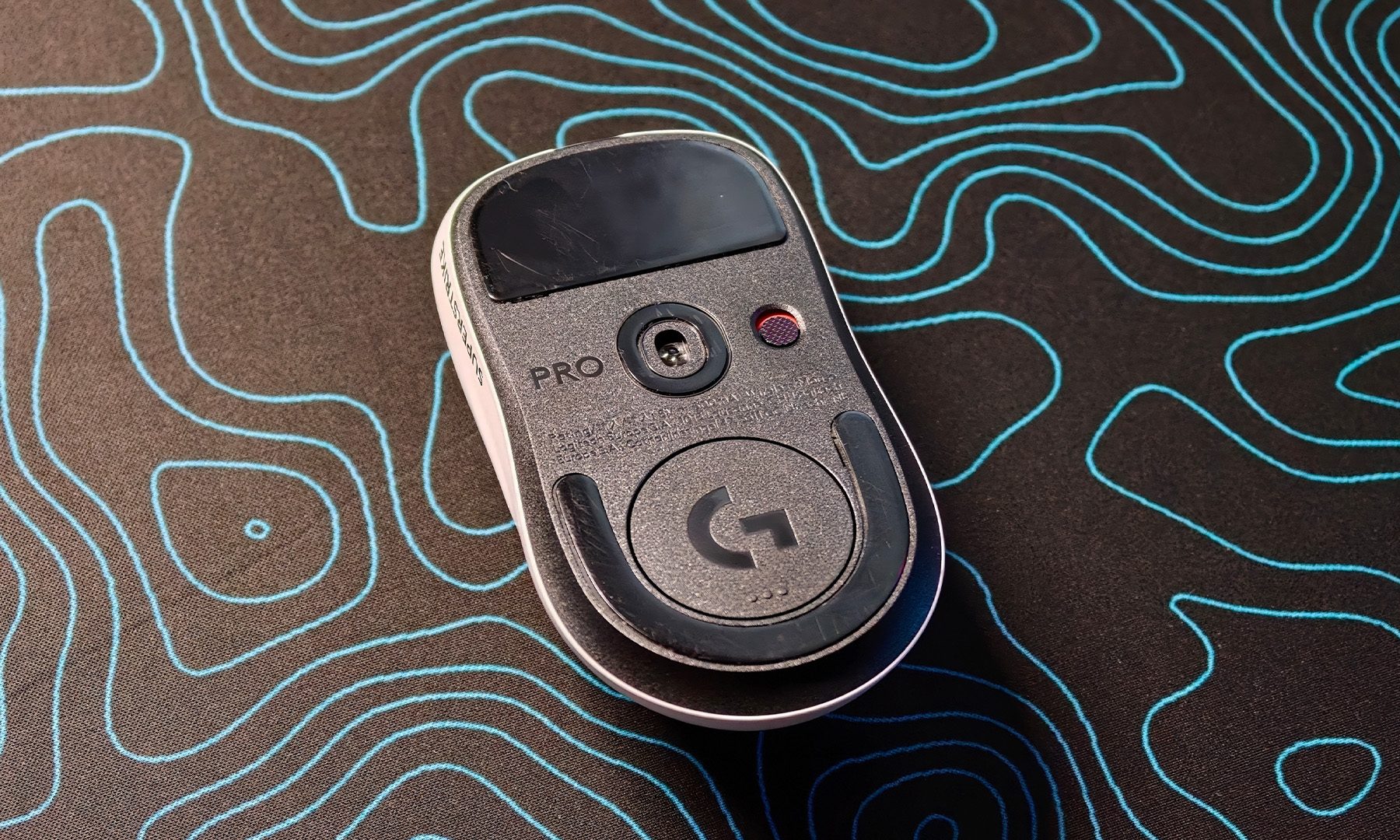
For the longest time, my trusty Logitech G502 X Plus LIGHTSPEED was always waiting on my desk. It wasn’t the lightest mouse around, but it felt dependable. I’d flirt with lightweight esports mice now and then, only to come crawling back a few days later. Most of them either felt too hollow, too small, or simply lacked the reassuring heft I had grown accustomed to. Then the Logitech PRO X2 SUPERSTRIKE showed up, and for the first time, my G502 has been gathering dust.
Lightweight doesn’t have to feel… light
At around 61 grams, the PRO X2 SUPERSTRIKE couldn’t be more different from the G502. On paper, it sounds like exactly the kind of ultralight mouse I’d normally abandon after a week. Instead, it struck a balance I didn’t know I was looking for.
Varun Mirchandani / Digital Trends
The shape fits naturally in my hand, making long Valorant sessions surprisingly comfortable, while the weight feels almost tailor-made for my low-DPI playstyle. Wide arm movements, quick flicks, and frequent mouse lifts require very little effort, but the mouse never feels flimsy or toy-like. There’s a surprising solidity to the chassis that makes it feel premium, even though it’s one of the lightest mice I’ve used. That’s probably the biggest reason it stuck around. It finally delivered the speed benefits of an ultralight mouse without making me feel like I was holding an empty plastic shell.
HITS made me relearn how to click
However, as much as I appreciate the weight and shape, they’re not why this mouse deserves attention. That credit goes to Logitech’s Haptic Inductive Trigger System, or HITS.
Advertisement
Varun Mirchandani / Digital Trends
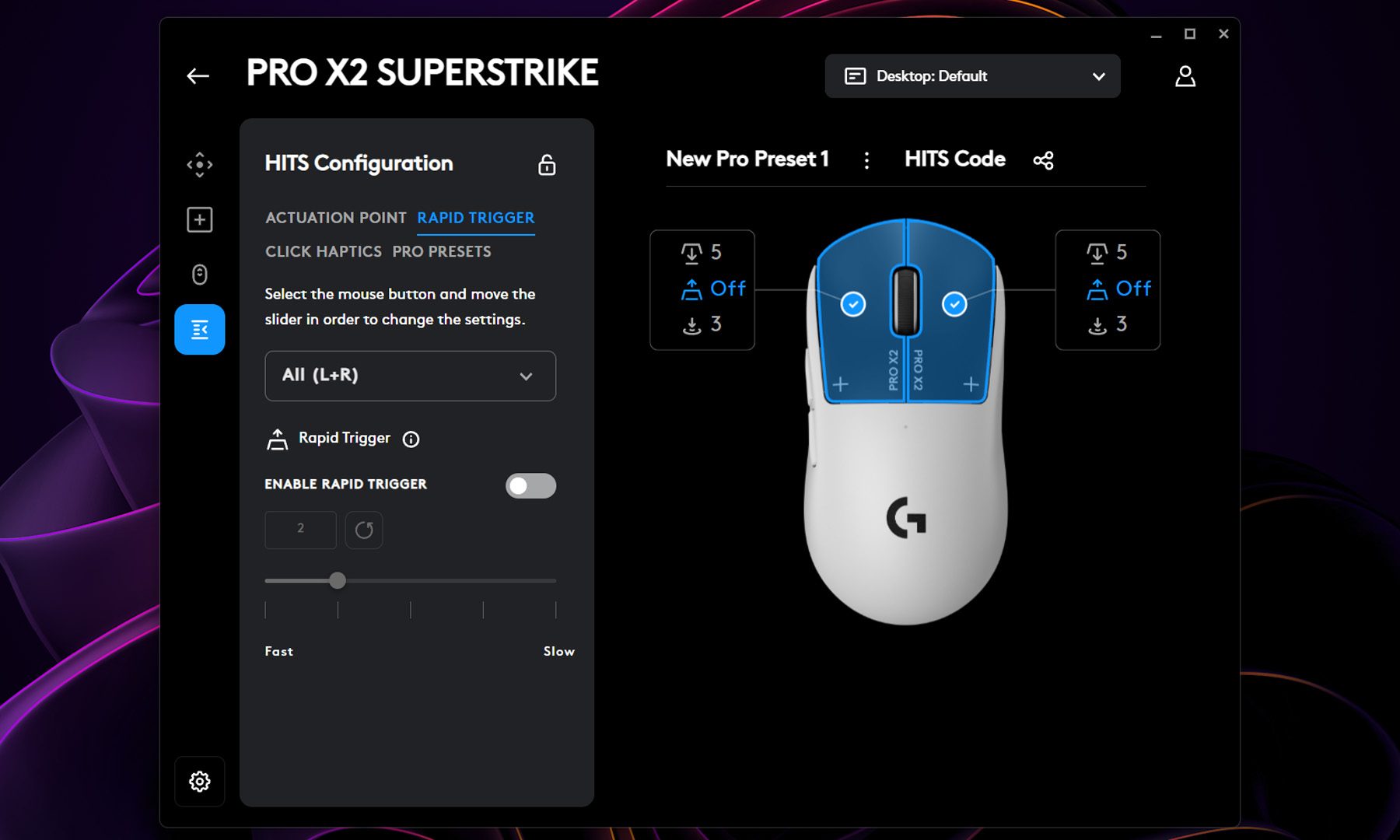
If there’s one comparison that immediately clicked in my head, it was Hall Effect keyboards like the Wooting. Just as those keyboards let gamers adjust actuation points and use features like Rapid Trigger, HITS applies the same philosophy to mouse buttons. Instead of relying on traditional mechanical or optical switches, the PRO X2 SUPERSTRIKE continuously tracks button movement using inductive sensing and recreates the click using haptic feedback. The actuation point, reset point, and even the strength of the tactile feedback can all be adjusted through software.
Varun Mirchandani / Digital Trends
The first time I switched the mouse off, I genuinely thought something had broken. The buttons suddenly felt lifeless, with almost no tactile click to speak of. Turn it back on, though, and the haptics instantly trick your brain into believing there’s a physical switch underneath.
It’s weird. It’s clever. And for the first couple of days, it’s surprisingly difficult to trust.
Years of muscle memory had taught my fingers exactly how a mechanical switch should feel. HITS delivers a softer, more refined tactile pulse instead. It doesn’t try to imitate a traditional click perfectly, and honestly, I’m glad it doesn’t. It ends up creating its own identity rather than pretending to be something else.
Varun Mirchandani / Digital Trends
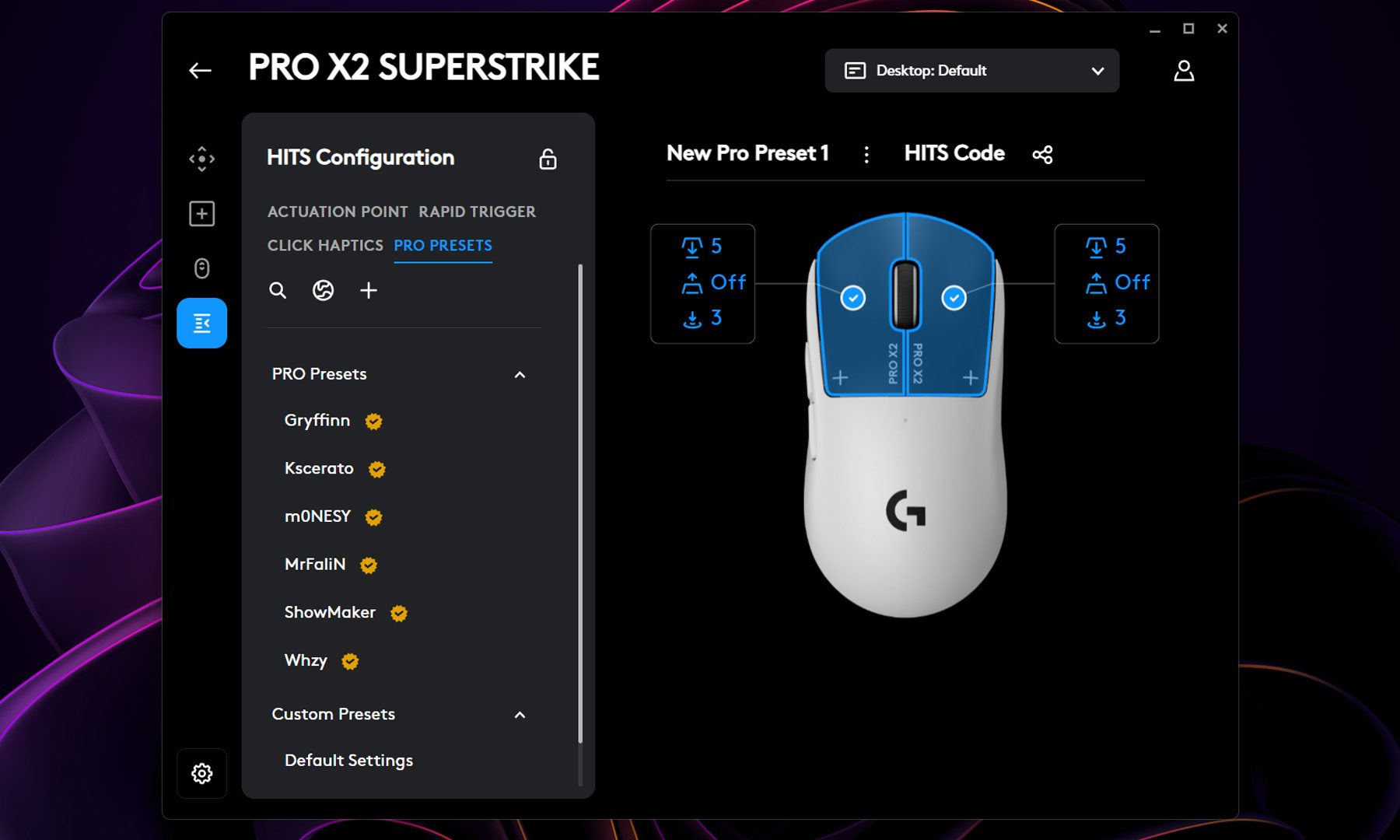
Of course, the best part is that there’s plenty of customizability underneath too. While the Logitech G Hub isn’t the most lightweight application out there, I will give credit to it for seamlessly transitioning my profile from the G502 to the PRO X2 SUPERSTRIKE. That said, since it’s a new mouse in itself, I didn’t find my ideal settings immediately. After almost every ranked session, I’d tweak the actuation point by a notch, lower the haptic strength, play a few more matches, then change it all over again the next evening. It became part of my routine.
Eventually, I landed on a setup that felt completely natural. That’s when it hit me. We’ve spent years obsessing over DPI, polling rates, and sensor performance, yet the mouse click itself has remained surprisingly primitive. HITS finally changes that. Instead of adapting to a fixed switch, I was gradually shaping the mouse around the way I play.
No, it didn’t magically make me Radiant
Whenever new gaming hardware pushes input technology forward, the internet inevitably starts arguing about whether it’s “cheating.” We’ve seen it with Rapid Trigger keyboards, Snap Tap, SOCD discussions, and now HITS. Personally, I think that misses the point.
Varun Mirchandani / Digital Trends
The PRO X2 SUPERSTRIKE didn’t suddenly improve my aim or carry me through Ascendant lobbies. It didn’t start winning my Sheriff duels or fix my questionable decision-making when I inevitably dry peek an Operator. What it did change was how connected I felt to every click. Knowing I could fine-tune the actuation point instead of living with a fixed mechanical switch made the mouse feel uniquely mine. It wasn’t about finding an unfair advantage. It was about removing one more layer between my hand and what happened on screen.
The mouse that finally retired my G502
After more than a month of playing ranked Valorant almost every day, I can confidently say the PRO X2 SUPERSTRIKE is the first lightweight gaming mouse that has permanently replaced my G502 X Plus LIGHTSPEED. Not because it’s lighter. Not because it’s faster. And not because HITS suddenly transformed me into a better player.
Advertisement
Varun Mirchandani / Digital Trends
It’s because, for the first time, I felt like the mouse adapted to me instead of the other way around. Once I stopped thinking about the technology and simply enjoyed playing, going back to a traditional mechanical switch started to feel strangely limiting. Mechanical switches aren’t disappearing anytime soon, and plenty of gamers will still prefer that familiar tactile snap. But after living with HITS for over a month, I’m convinced Logitech has stumbled onto something genuinely exciting.
It’s been a long time since a gaming mouse made me rethink something as fundamental as clicking. HITS did exactly that, and now every time I pick up a traditional mouse, a tiny part of me wonders why its clicks are still stuck in the past.
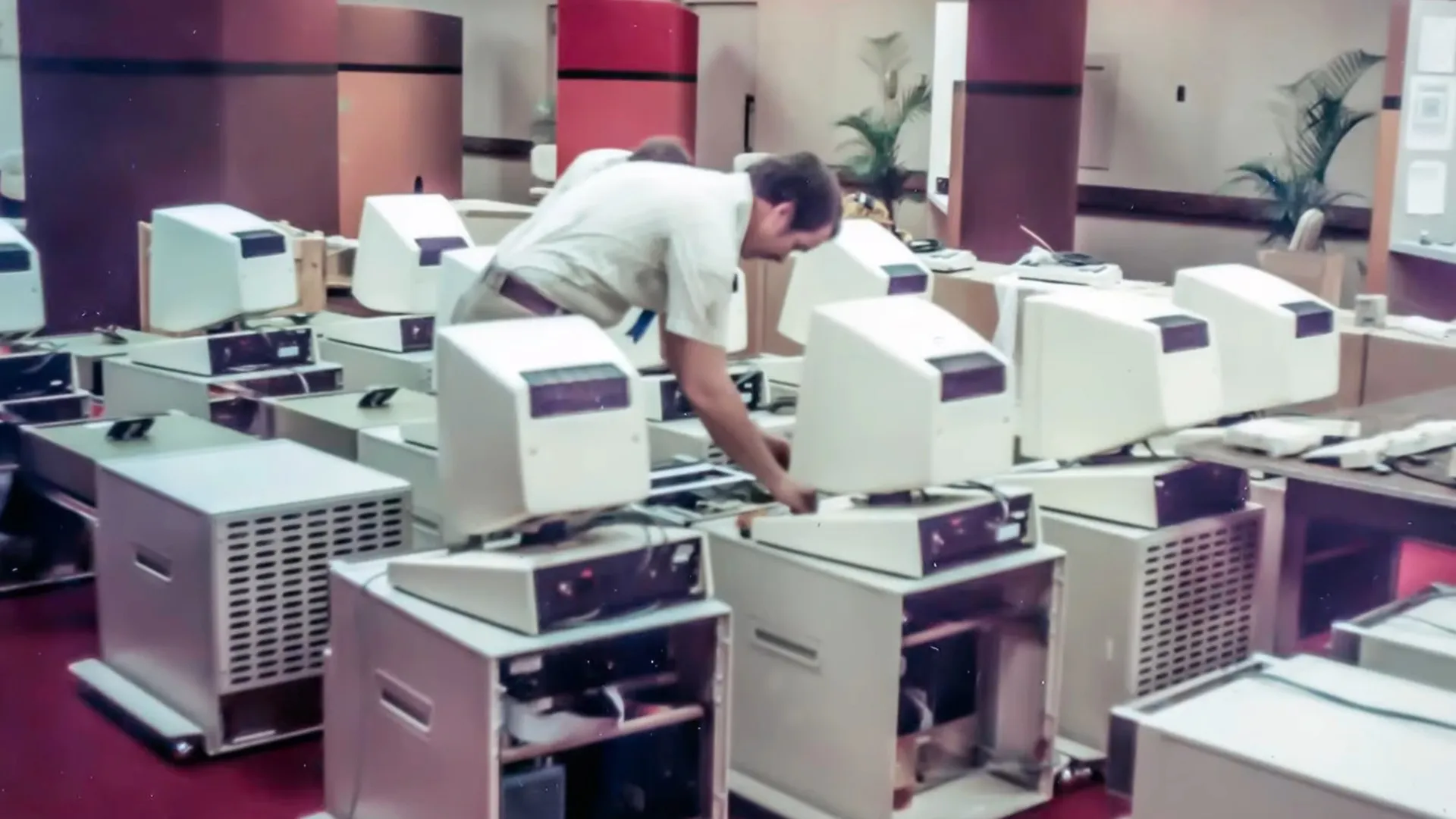
You’ve almost certainly heard of the Xerox Alto, the machine that pioneered the desktop-mouse-keyboard interface and inspired Steve Jobs to produce the Apple Lisa and Macintosh computers. It wasn’t just having a desktop, though– so much of our modern computing paradigm was invented on these machines. Given that, why aren’t we all using Xerox clones instead of Apples or PCs descended from the IBM compatibles? [Ctrl+Alt+Fail] has a video that answers the question: whatever happened to the computer of tomorrow, anyway?
It goes through the whole story of the Alto, from its introduction at Xerox PARC in the 1970s to its demise. At the introduction, the engineers showed of the What You See Is What You Get word processor, networked the machines together to show off e-mail and that anyone could use the office laser printer. It all seems very familiar now, but at the time, it was a revolution. An expensive one. The monitor sitting on the desk wasn’t the computer, after all: that was a large filing-cabinet sized desk sitting underneath. Only about 2000 were ever built, so what happened?
It wasn’t just that the first units cost twelve grand USD to build in 1973 money– about 90 large today by CPI, or for the gold bugs that’s 96 oz or 2.7 kg. It wasn’t worth its weight in gold, but it was close. Still, that wasn’t the problem: later models would be cheaper. The problem was that Xerox refused to sell the thing in the 70s. They saw the potential of a paperless office, and it scared them. Sure, they could sell a computer, once. They wouldn’t get a monthly service fee, nor the cost of the toner, drums and other consumables the Alto wouldn’t need. So they sat on it, and let others like Steve Jobs who didn’t have an existing business empire to lose take their ideas and run with them.
It seems shortsighted, but Xerox had already lost millions on big iron computing around the same time the Alto came along, and every business decision after that was carefully weighed on its projected revenue. Compared to a copier that printed money for Xerox as surely as it printed paper, the Alto just didn’t look like it could pay for itself. It looked likely to lose them a lot of money, which, in fact the adoption of the personal computer ultimately did. Hindsight is 20/20 and it’s easy to play Monday Morning Quarterback and say these developments were inevitable and Xerox should have run out in front, but [Ctrl+Alt+Fail] does a good job of explaining the logic from the Xerox boards’ point of view, which makes the video very much worth a watch.
Synology lowers NAS entry costs without removing future hardware upgrade flexibility
Four new NAS models arrive with expandable memory and familiar hardware
Lower default memory creates cheaper starting prices across the new lineup
Synology has introduced the DiskStation neo+ Series, a new lineup built to give buyers more flexibility over cost and performance from the outset.
The series includes four models — the DS1825neo+, the DS1525neo+, the DS925neo+, and the DS725neo+ — each sharing hardware with existing Plus units.
The company says each new unit is built on the same platform as its Plus Series counterpart but ships with a different default memory setup and price tag.
Latest Videos FromTechRadar
Advertisement
Synology created room for future upgrades
All four models rely on AMDprocessors with 64-bit architecture and include a hardware encryption engine.
The DS725neo+ uses an AMD Ryzen R1600 processor featuring 2 cores, 4 threads, and clock speeds of 2.6 GHz with a boost reaching 3.1 GHz.
Meanwhile, the DS925neo+, DS1525neo+, and DS1825neo+ all rely on the AMD Ryzen V1500B processor, offering 4 cores, 8 threads, and a 2.2 GHz operating frequency.
In terms of memory, the four-bay DS925neo+, five-bay DS1525neo+, eight-bay DS1825neo+, and two-bay DS725neo+ ship with 4GB memory but are expandable up to 32GB.
Sign up to the TechRadar Pro newsletter to get all the top news, opinion, features and guidance your business needs to succeed!
The larger DS1825neo+ and DS1525neo+ models include PCIe 3.0 expansion slots supporting optional 10GbE or 25GbE networking cards, while built-in M.2 slots provide SSDcaching capabilities.
Advertisement
All models include 2.5GbE networking and expansion support through the DX525 unit, allowing storage capacity to increase as requirements become more demanding.
Buyers searching for the best NAS may still need to compare memory configurations carefully because the standard Plus models offer higher default ECC memory on selected versions.
Synology believes that the new memory approach broadens purchasing options by allowing buyers to select lower initial costs while retaining the ability to increase capacity later.
Advertisement
“Desktop models remain at the heart of our NAS ecosystem,” said Bie-I Chu, Executive Vice President of the Synology NAS Group.
“As memory market dynamics shift, the neo+ Series reinforces our commitment to accessibility, giving customers the freedom to scale hardware according to their immediate budget and future growth.”
The company has confirmed that the neo+ products will remain alongside the existing Plus Series instead of replacing those systems, giving buyers additional configuration choices.
Advertisement
DSM software remains unchanged across the new range
Although hardware memory differs from several Plus models, the software environment remains unchanged. Every neo+ device runs the same Synology DiskStation Manager (DSM) operating system.
DSM includes Synology Drive for private cloud access, cross-platform file synchronization, and site-to-site replication for organizations operating across multiple locations with shared storage requirements.
Active Backup Suite protects Windows, Linux, macOS systems, virtual machines, and cloud accounts while supporting off-site backup strategies intended to improve data resilience.
Surveillance Station also enables each compatible NAS to function as an on-premises network video recorder for monitoring multiple security locations from one interface.
Advertisement
The DiskStation neo+ Series is now available through Synology’s global distribution channels, though there are no official prices for these models.





























































You must be logged in to post a comment Login