Educators have seen wave after wave of “innovative” solutions promise to address long-standing challenges — from personalization and engagement to college- and career-readiness — yet many issues remain stubbornly unresolved. Too often, solutions are developed and scaled without a clear understanding of how challenges show up in daily classroom experiences or how students, families and educators define the problems.
Understanding the everyday barriers that students, families, practitioners and administrators identify ensures that potential solutions — whether technological, instructional or relational — are grounded in real needs rather than assumptions.
What These Challenges Look Like in Classrooms and Systems
In Digital Promise’s co-research and co-design work with communities across the country, students and educators describe challenges that are neither new nor isolated, but reflect enduring gaps in how learning environments are designed and supported. Looking closely at how these challenges surface through our Challenge Map reveals the deep connections between instructional practice, student engagement and systems-level supports — and why tackling one without the others often falls short.
Together, these experiences shape whether students feel their learning opportunities are future-forward, adaptable to their goals, needs and circumstances, and equip them to exercise agency in their education and career journeys.
Advertisement
Supporting individualized learning, for example, requires systems that give educators the time, tools and structures to understand and respond to each learner’s growth. Without those conditions, personalization requires extraordinary effort — making it difficult to sustain as a routine part of instructional practice.
Similar structural challenges constrain college- and career-readiness efforts. Educators consistently pointed to the need for more holistic, student-centered pathways. One educator described the importance of a “multi-tiered career program in which students engage in self-exploration of their skills, abilities and interests” to connect learning to concrete opportunities and transferable skills they can use after high school.
Engagement, Agency and the Conditions for Learning
At the crux of learning lies student engagement — shaped by both classroom practices and the broader systems in which learning occurs. Community members and educators both highlighted that academic success depends on students’ well-being.
Students shared that learning is most meaningful when it connects to their interests and allows them to have a voice in shaping their educational experiences. Educators echoed this perspective, underscoring the importance of agency in fostering meaningful learning. As one educator reflected, ensuring educational excellence requires continually redefining educational systems in ways that “give every student access to their own version of success.”
Advertisement
Engagement is not simply a matter of student effort or teacher technique, but a product of the environments and systems that shape learning opportunities.
Learning Does Not Stop at the Schoolhouse Door
Students, families and educators who contributed to Digital Promise’s Challenge Map identified supports that go beyond the schoolhouse, offering insight into the social conditions shaping learning. Suggestions for home stability, physical and emotional safety, and balancing responsibilities inside and outside of school highlight how deeply schooling is intertwined with young people’s lives beyond the classroom.
Other insights were deceptively simple yet profound: One group of students suggested creating regular feedback loops in schools so they could share concerns, inform changes to physical spaces and course offerings, and shape how resources are used. Even these straightforward ideas, however, call for systemic shifts in how schools operate and how student voices are embedded in decision-making.
The transformative power of co-research, co-design and student voice in education.
What It Means to Put People at the Center of Innovation
Education remains a fundamentally human endeavor. As long as the goal is to prepare young people to navigate their futures with skill, agency and well-being, the conditions and relationships that shape students’ opportunity and engagement remain essential.
Advertisement
At a time when education research and development (R&D) is often synonymous with emerging technologies, shifting the focus to problem-solving — driven by the perspectives of those living the challenges — expands what counts as innovation. Existing technologies may play an important role, but they should not be scaled simply because they are novel.
Rather, the starting point for innovation should be: What is the central problem that needs to be solved, for and with whom, and what are the resulting outcomes if the problem is addressed successfully? Only then should existing tools or new solution development enter into the equation. Addressing these challenges requires shifts in mindsets and power dynamics so that both students and educators learn how student voice should shape learning and curriculum.
Why Education Research and Development Needs a Systems Lens
As education R&D evolves, the field is increasingly recognizing that local district systems and community engagement have often been missing from innovation efforts. In policy and education leadership circles, there is a growing call for education R&D that strengthens young people’s futures and, by extension, the nation’s long-term economic and civic well-being.
When schools and local communities are meaningfully engaged in R&D, their perspectives consistently point to persistent challenges that require a systems-level response. These challenges are not isolated problems to be solved with standalone interventions, but signals of deeper misalignments in policies, incentives and assumptions across the education ecosystem.
Advertisement
Questions for Building Lasting Change
Solution developers, policymakers and funders drive change through their respective products and investments. Recognizing these challenges as persistent problems and indicators of necessary systems change, they might consider:
How well do solutions capture the actual problems they aim to solve, rather than the technological possibilities they allow?
To what extent do local policies and incentives support the development of solutions that center students, families, communities and educators experiencing the challenge?
How are the perspectives of those living the challenges incorporated throughout the research, solution design and implementation process?
How do technological solutions reflect the relational and mindset shifts required across the system?
How can the evaluation of challenges in education take a systems approach that not only accounts for easily identifiable policies, resources, and practices but also for underlying relationships and assumptions?
Above all, lasting educational innovation depends on a shared conviction: The voices and experiences of students, families, community members and educators must shape how problems are defined and solutions are developed.
Since Donald Trump’s war on Iran started more than three weeks ago, United States military forces have allegedly attacked more than 9,000 sites, creating a climate of fear and constant uncertainty for Iranians in Tehran and across the country. Without an advanced warning system from the government, and amid the longest internet shutdown in Iran’s history, Iranians are left in an information void.
Even before Israel and the United States began dropping bombs, Iran’s lack of a public emergency alert tool and severe state-controlled digital oppression has impacted tens of millions of citizens. Since the 12-day Israel-Iran war last year, though, a group of Iranian digital rights activists and volunteers has been working to fill the gap with a dynamic, regularly updated mapping platform called Mahsa Alert. The project can’t replace real-time early alerts that could come from a coordinated government service, but the tool sends push notifications when Israeli forces warn about attacks, details some confirmed strike locations, and offers offline mapping capabilities.
“There is no emergency alert in Iran,” says Ahmad Ahmadian, the president and CEO of US-based digital rights group Holistic Resilience, which is behind Mahsa Alert and has been developing the platform since last summer. “This was where we saw the traction, we saw the need, and we continued working on it with the volunteers, with some [open source intelligence] experts, and used this to map the repression machinery ecosystem of Iran and surveillance.”
Mahsa Alert is a website but also has Android and iOS apps, which were intentionally designed to be lightweight and easy to use on any device. Given the heavy government connectivity control inside Iran and erratic access to the internet, volunteers also prioritized engineering the platform for offline use. And it can be easily updated if a user does get connectivity for a brief period by downloading APK files that contain new data. The team works to keep these updates extremely small; a recent release was 60 kilobytes, and Ahmadian says they are typically no more than 100 kilobytes.
Advertisement
One overlay on Mahsa Alerts plots the locations of “confirmed attacks” that Ahmadian says his team or other OSINT investigators have verified, using video footage or images that are submitted to a Telegram bot or shared on social media. There are also warnings about areas where Israeli forces have issued evacuation alerts, along with the crucial component of people submitting reports on what is happening around them.
“We have to go through a due diligence and verification process and tag them before putting them on the map,” Ahmadian says of the reported attacks and incidents, adding that the team has a backlog of more than 3,000 reports that it is working through or is unable to verify. Along with attempting to map strikes, the team behind Mahsa Alert have also plotted “danger zones” that could be at risk of attack—such as sites linked to Iran’s nuclear program or military—so ordinary citizens can stay away from them. Ahmadian claims 90 percent of attacks it has confirmed were at sites that were already present on the map. “Some of them that we can confirm, we do it because [a user] has shared a photo or they have shared some details that makes them verifiable,” he says.
The map also includes locations of thousands of CCTV cameras, suspected government checkpoints, and other domestic infrastructure. Medical facilities, such as hospitals and pharmacies, are included on the map along with other resources like the locations of religious sites and past protests.
Mahsa Alert has become more visible on global social media feeds as Iranians around the world share details from the map, encouragingpeopleto look into the service and flagging it for friends and family who could use it as a resource. “The app went from near zero to over 100,000 daily active users in a matter of days,” Ahmadian says, adding that in total there have been around 335,000 users this year, with people first turning to the app during the Iranian regime’s brutal crackdown on anti-government protesters in January. Through the limited user information the app collects, Ahmadian claims there are signs that 28 percent of users are accessing the platform from inside Iran.
Last week’s Nvidia GTC conference highlighted new chip architectures to power AI. But as the chips become faster and more powerful, the remainder of data center infrastructure is playing catchup. The power delivery community is responding: Announcements from Delta, Vertiv, and Eaton showcased new designs for the AI era. Complex and inefficient AC to DC power conversions are gradually being replaced by DC configurations, at least in hyperscale data centers.
“While AC distribution remains deeply entrenched, advances in power electronics and the rising demands of AI infrastructure are accelerating interest in DC architectures,” says Chris Thompson, vice president of advanced technology and global microgrids at Vertiv.
AC to DC Conversion Challenges
Today, nearly all data centers are designed around AC utility power. The electrical path includes multiple conversions before power reaches the compute load. Power typically enters the data center as medium-voltage AC (1kV to 35kV), is stepped down to low-voltage AC (480V or 415V) using a transformer, converted to DC inside an uninterruptible power supply (UPS) for battery storage, converted back to AC, and converted again to low-voltage DC (typically 54 V DC) at the server, supplying the DC power computing chips actually require.
“The double conversion process ensures the output AC is clean, stable and suitable for data center servers,” says Luiz Fernando Huet de Bacellar, vice president of engineering and technology at Eaton.
Advertisement
That setup worked well enough for the amounts of power required by traditional data centers. Traditional data center computational racks draw on the order of 10 kW each. For AI, that is starting to approach 1 MW. At that scale, the energy losses, current levels, and copper requirements of AC to DC conversions become increasingly difficult to justify. Every conversion incurs some power loss. On top of that, as the amount of power that needs to be delivered grows, the sheer size of the convertors, as well as the connector requirements of copper busbars, becomes untenable. According to an Nvidiablog, a 1 MW rack could require as much as 200 kg of copper busbar. For a 1 GW data center, it could amount to 200,000 kg of copper.
Benefits of High-Voltage DC Power
By converting 13.8 kV AC grid power directly to 800 VDC at the data center perimeter, most intermediate conversion steps are eliminated. This reduces the number of fans and power supply units, and leads to higher system reliability, lower heat dissipation, improved energy efficiency, and a smaller equipment footprint.
“Each power conversion between the electric grid or power source and the silicon chips inside the servers causes some energy loss,” says Fernando.
Switching from 415 V AC to 800 V DC in electrical distribution enables 85 percent more power to be transmitted through the same conductor size. This happens because higher voltage reduces current demand, lowering resistive losses and making power transfer more efficient. Thinner conductors can handle the same load, reducing copper requirements by 45 percent, a 5 percent improvement in efficiency, and 30 percent lower total cost of ownership for GW-scale facilities.
Advertisement
“In a high-voltage DC architecture, power from the grid is converted from medium-voltage AC to roughly 800 V DC and then distributed throughout the facility on a DC bus,” said Vertiv’s Thompson. “At the rack, compact DC-DC converters step that voltage down for GPUs and CPUs.”
A report from technology advisory group Omdia claims that higher voltage DC data centers have already appeared in China. In the Americas, the Mt. Diablo Initiative (a collaboration among Meta, Microsoft, and the Open Compute Project) is a 400 V DC rack power distribution experiment.
A handful of vendors are trying to get ahead of the game. Vertiv’s 800 V DC ecosystem that integrate with NVIDIA Vera Rubin Ultra Kyber platforms will be commercially available in the second half of 2026. Eaton, too, is well advanced in its 800 V DC systems innovation courtesy of a medium-voltage solid-state transformer (SST) that will sit at the heart of DC power distribution system. Meanwhile Delta, has released 800 V DC in-row 660kW power racks with a total of 480 kW of embedded battery backup units. And, SolarEdge is hard at work on a 99%-efficient SST that will be paired with a native DC UPS and a DC power distribution layer.
But much of the industry is far behind. Patrick Hughes, senior vice president of strategy, technical, and industry affairs for the National Electrical Manufacturers Association, says most innovation is happening at the 400 V DC level, though some are preparing 800 V DC. He believes the industry needs a complete, coordinated ecosystem, including power electronics, protection, connectors, sensing, and service‑safe components that scale together rather than in isolation. That, in turn, requires retooling manufacturing capacity for DC‑specific equipment, expanding semiconductor and materials supply, and clear, long‑term demand commitments that justify major capital investment across the value chain.
Advertisement
“Many are taking a cautious approach, offering limited or adapted solutions while waiting for clearer standards, safety frameworks, and customer commitments,” said Hughes. “Building the supply chain will hinge on stabilizing standards and safety frameworks so suppliers can design, certify, manufacture, and install equipment with confidence.”
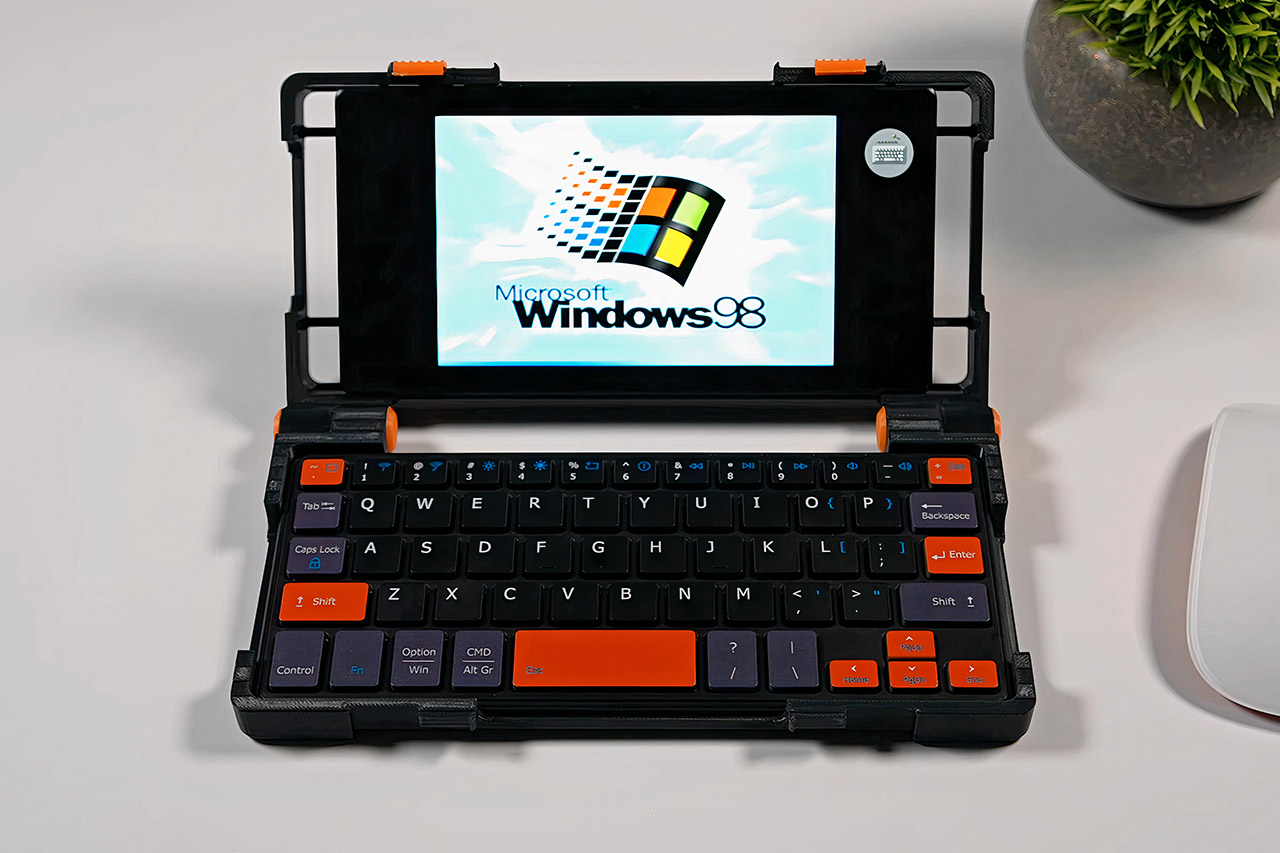
Gamers have long been searching for a computer that can be slipped into a coat pocket and used to complete tasks, a dream that now appears to be within reach due to a creative designer who wrapped a Razer Edge tablet within a custom 3D printed shell.
Flip the lid open and a familiar tablet screen greets you, cleanly framed in black plastic with just enough orange trim to make its intentions clear. A compact Bluetooth keyboard sits snugly in the base, and when everything is folded shut the whole thing is no bigger than a large phone, slim enough to disappear into a pocket or bag without a second glance. Those orange accents on the hinges and keycaps are a quiet reminder that this is anything but an ordinary device.
XBOX EXPERIENCE BROUGHT TO LIFE BY ROG The Xbox gaming legacy meets ROG’s decades of premium hardware design in the ROG Xbox Ally. Boot straight into…
XBOX GAME BAR INTEGRATION Launch Game Bar with a tap of the Xbox button or play your favorite titles natively from platforms like Xbox Game Pass…
ALL YOUR GAMES, ALL YOUR PROGRESS Powered by Windows 11, the ROG Xbox Ally gives you access to your full library of PC games from Xbox and other game…
The project started with a Razer Edge picked up for around $80, a tablet that had largely faded from the spotlight since its release but still packed a capable Qualcomm Snapdragon G3x Gen 1 processor, plenty of RAM, and Android 12 under the hood. It came without the original controllers, but at that price it was too good a candidate to pass up.
There were already some design files floating around online for modular clamshells that could hold a phone, so it was just a matter of modifying them a little to fit the Razer Edge. Then it was simply a matter of using free editing software to make the necessary changes and printing them on a regular consumer printer. This all came together with simple screws and pins for the hinges, and a few lock sliders on the front keep the whole thing shut securely when you’re traveling.
The major challenge was getting the tablet inside without damaging it. A metal ring affixed to the rear of the Razer Edge, combined with a MagSafe-style adaptor on the case, locked everything together with powerful magnets that can be peeled away with some moderate coaxing. The tablet can leave the shell in seconds and return to becoming a tablet whenever it feels like it. The keyboard simply fits into a little tray in the bottom and automatically pairs over Bluetooth. Given its size, the layout is quite decent, and all of the shortcuts for doing daily tasks are available. When the lid closes, everything tucks neatly against the screen.
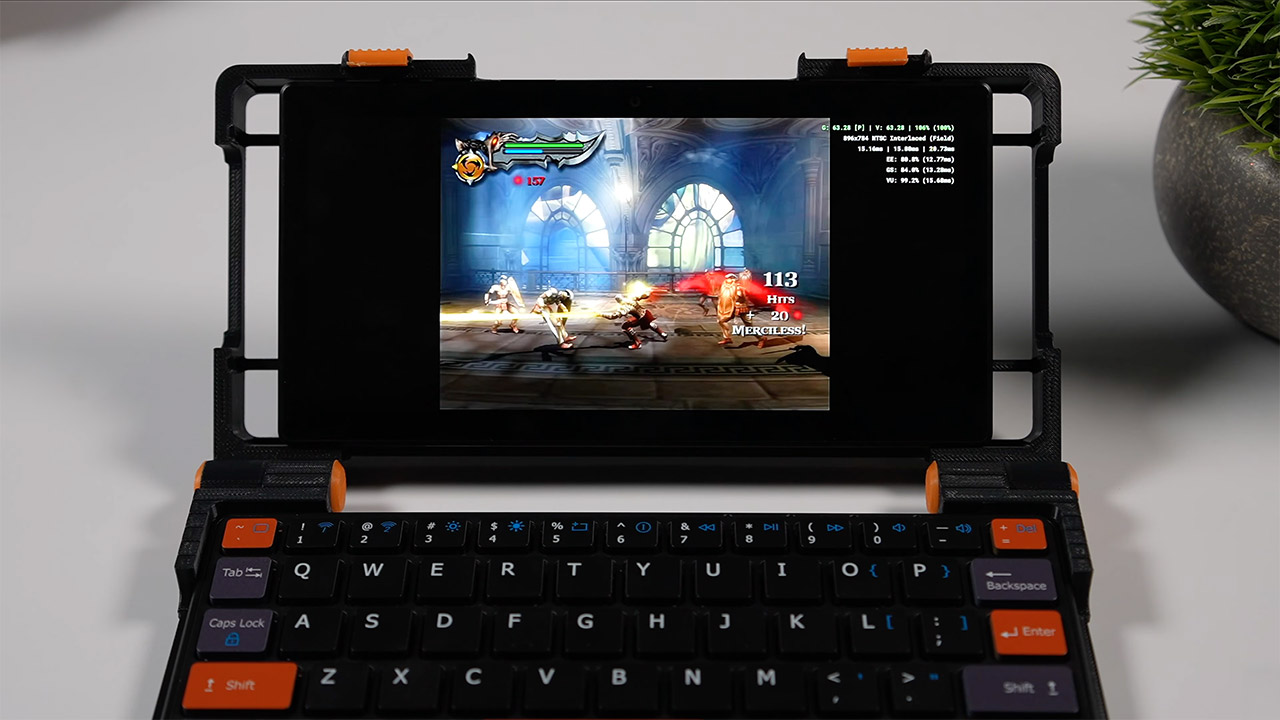
Power it up and things get interesting fast. Android 12 handles all the everyday essentials without breaking a sweat, and cloud streaming over Wi-Fi or mobile broadband opens up a much bigger games library on top of that. Emulation is where it really shines though, running GameCube titles at 720p with a solid frame rate and pushing PlayStation 2 games to 1.75 times their native resolution on many titles. Lighter PC games load up through dedicated apps and run without issue, and for anyone feeling nostalgic there is even a Windows 98 simulator tucked in there for good measure. [Source]
The brand expects the store to break even in two years
Singaporean furniture retailer Castlery will open a showroom in New York on May 15, making it one of the very few homegrown companies to establish a permanent retail presence there. This marks the next phase of growth for the company in the United States, following six years of operating online-only in the market.
Co-founder Declan Ee called the brick-and-mortar flagship outlet, a first in the US, as a “natural progression” from its digital retail model.
“The goal was always to create a best-in-class experience for our customers… and the final piece of this experience is completed when we have an offline store,” he said.
The 3,000-square-foot showroom in Manhattan’s Chelsea neighbourhood represents a seven-figure investment on a 10-year lease. Ee’s team scouted over 200 sites over two years before choosing this one.
Advertisement
The showroom features 17 fully furnished room settings and a complimentary interior styling service that will advise customers on space planning, furniture selection and interior layout.
Ee told The Business Times that he expects the store to break even within 1.5 years to 2 years, or even within a year if sales are strong.
The opening of the store in the Big Apple marks Castlery’s fourth showroom worldwide, following the opening of its third in Brisbane last Aug. Its Sydney store was set up in 2024 and expanded in 2025, while its 24,000 sq ft flagship store in Liat Towers was established in 2022.
Castlery is in 5 markets, with most sales coming from the US
Castlery’s showrooms at Liat Towers in Singapore (left) and Brisbane, Australia (right)./ Image Credit: Castlery
Castlery was founded in 2013 by Ee and his co-founders, Fred Ji, Zhou Zhiwei and Travers Tan, as a digital retail furniture brand. It currently employs more than 500 staff worldwide, with 200 in its Singapore headquarters.
To date, the brand has sold more than 1 million pieces of furniture and introduced more than 7,000 products.
The brand entered the US in 2019 during the COVID-19 pandemic as an online brand, starting with two warehouses in New Jersey and Los Angeles, California. Today, Castlery reaches all 50 states from six US warehouses, with the addition of sites in Seattle and Georgia in 2023, and then Texas and Chicago in 2024.
Ee noted that this has reduced delivery times to its US customers, many of whom rent their homes and need furniture delivered with short lead times.
Advertisement
“We were very aggressive in the first two to three years, when we were scaling the business online in the US,” he said.
The US currently makes up Castlery’s largest market by contributing to 65% of the company’s overall sales. Australia comes in second at 17%, followed by Singapore at 15%. The UK and Canada, where Castlery expanded online in 2025, make up the remaining 3%.
The New York store will serve as a testing ground amid evolving market conditions
Castlery’s New York showroom./ Image Credit: Castlery
With this offline expansion, Ee said Castlery will take a “measured” approach given evolving global developments and geopolitical tensions.
The New York showroom will be a testing ground for Castlery before it decides to commit to more showrooms in the country.
Well aware of New York’s competitive retail scene with players such as West Elm and Crate & Barrel that have multiple outlets, Ee acknowledged that this will give consumers plenty of options.
Advertisement
“There’s a lot of room for us to grow in the US, but we’re taking things step by step because one’s perspective changes after opening the first store. You get data, you see how customers react and their basket size—all these things,” he explained.
As more than half the brand’s products were being manufactured in China and then shipped directly to US customers, Castlery saw its Chinese imports slapped with the highest tariff rates of close to 30%.
Castlery has since diversified its supply chain to reduce its exposure to tariffs. It has moved some of its manufacturing from China to places such as Vietnam, Thailand, and India, leaving only about 20% of its production in China today.
Advertisement
After diversifying its supply chains, Ee said production costs have risen, given higher minimum-order quantities.
This has caused profits to fall by 1% to 3%, which Ee noted is not a negligible amount for a growing furniture brand that typically enjoys margins of 4% to 8%. The tariffs also created consumer uncertainty, leading to a six-month dip in sales, though they have since recovered.
Besides the tariffs, geopolitical tensions have put additional pressure on Castlery’s bottom line. Rising fuel prices amid the ongoing Middle East conflict have squeezed its profit margins.
Taking all these factors into account, Ee expects Castlery’s revenue growth for the current FY2026 ending in Mar to be “flat or in the single-digit” range, down from FY2025’s 10% to 15% year-on-year growth.
Advertisement
A step closer to Castlery’s global ambitions
Declan Ee is Castlery’s co-founder and President./ Image Credit: Castlery
That said, Ee is still “cautiously optimistic” about Castlery’s growth prospects.
“We control what we can. You don’t know where the wind will blow, so you build the sail to catch it,” he said.
“In our case, it’s about being close to the customer and creating products that they would want to buy, even in difficult economic times.”
The opening of the New York store brings the brand a step closer to its global ambitions.
By 2029, Ee aims to have eight to 12 showrooms in key cities worldwide, including Washington, D.C, Los Angeles, San Francisco and Seattle, as well as in Melbourne and Perth in Australia.
Advertisement
Ee is actively scouting for retail locations in London as well, seeing Castlery’s UK online sales double month-on-month until Nov 2025 following a pop-up it held at the London Design Festival in Sep that year.
Ee explained: “Unlike the US, there are not so many big furniture brands in the UK. So we think there’s space for us to enter the market, not to mention that the sales pick-up from customers has been very encouraging.”
Achieving its expansion plans would place Castlery “on track” to evolve from a digital-first furniture retailer into a “proper global retail brand.”
“If we’re nationwide (in a single market), it gives customers a sense of assurance that we’re not just an online challenger brand, but a serious operator.”
For the past three years, every data center conversation has started and ended with GPUs. Training clusters and inference racks and accelerator roadmaps. If you worked in data center silicon and you were not talking about GPUs, people looked at you like you were lost. Read Entire Article Source link
As many of the AI stories on Walled Culture attest, one of the most contentious areas in the latest stage of AI development concerns the sourcing of training data. To create high-quality large language models (LLMs) massive quantities of training data are required. In the current genAI stampede, many companies are simply scraping everything they can off the Internet. Quite how that will work out in legal terms is not yet clear. Although a few court cases involving the use of copyright material for training have been decided, many have not, and the detailed contours of the legal landscape remain uncertain.
However, there is an alternative to this “grab it all” approach. It involves using materials that are either in the public domain or released under a “permissive” license that allows LLMs to be trained on them without any problems. There’s plenty of such material online, but its scattered nature puts it at a serious disadvantage compared to downloading everything without worrying about licensing issues. To address that, the Common Corpus was created and released just over a year ago by the French startup Pleias. A press release from the AI Alliance explains the key characteristics of the Common Corpus:
Truly Open: contains only data that is permissively licensed and provenance is documented
Multilingual: mostly representing English and French data, but contains at least 1[billion] tokens for over 30 languages
Diverse: consisting of scientific articles, government and legal documents, code, and cultural heritage data, including books and newspapers
Advertisement
Extensively Curated: spelling and formatting has been corrected from digitized texts, harmful and toxic content has been removed, and content with low educational content has also been removed.
There are five main categories of material: OpenGovernment, OpenCulture, OpenScience, OpenWeb, and OpenSource:
OpenGovernment contains Finance Commons, a dataset of financial documents from a range of governmental and regulatory bodies. Finance Commons is a multimodal dataset, including both text and PDF corpora. OpenGovernment also contains Legal Commons, a dataset of legal and administrative texts. OpenCulture contains cultural heritage data like books and newspapers. Many of these texts come from the 18th and 19th centuries, or even earlier.
OpenScience data primarily comes from publicly available academic and scientific publications, which are most often released as PDFs. OpenWeb contains datasets from YouTube Commons, a dataset of transcripts from public domain YouTube videos, and websites like Stack Exchange. Finally, OpenSource comprises code collected from GitHub repositories which were permissibly licensed.
The initial release contained over 2 trillion tokens – the usual way of measuring the volume of training material, where tokens can be whole words and parts of words. A significant recent update of the corpus has taken that to over 2.267 trillion tokens. Just as important as the greater size, is the wider reach: there are major additions of material from China, Japan, Korea, Brazil, India, Africa and South-East Asia. Specifically, the latest release contains data for eight languages with more than 10 billion tokens (English, French, German, Spanish, Italian, Polish, Greek, Latin) and 33 languages with more than 1 billion tokens. Because of the way the dataset has been selected and curated, it is possible to train LLMs on fully open data, which leads to auditable models. Moreover, as the original press release explains:
Advertisement
By providing clear provenance and using permissibly licensed data, Common Corpus exceeds the requirements of even the strictest regulations on AI training data, such as the EU AI Act. Pleias has also taken extensive steps to ensure GDPR compliance, by developing custom procedures to enable personally identifiable information (PII) removal for multilingual data. This makes Common Corpus an ideal foundation for secure, enterprise-grade models. Models trained on Common Corpus will be resilient to an increasingly regulated industry.
Another advantage for many users is that material with high “toxicity scores” has already been removed, thus ensuring that any LLMs trained on the Common Corpus will have fewer problems in this regard.
The Common Corpus is a great demonstration of the power of openness and permissive copyright licensing, and how they bring benefits that other approaches can’t match. For example: “Common Corpus makes it possible to train models compatible with the Open Source Initiative’s definition of open-source AI, which includes openness of use, meaning use is permitted for ‘any purpose and without having to ask for permission’. ” That fact, along with the multilingual nature of the Common Corpus, would make the latest version a great fit for any EU move to create “public AI” systems, something advocated on this blog a few months back. The French government is already backing the project, as are other organizations supporting openness:
The Corpus was built up with the support and concerted efforts of the AI Alliance, the French Ministry of Culture as part of the prefiguration of the service offering of the Alliance for Language technologies EDIC (ALT-EDIC).
This dataset was also made in partnership with Wikimedia Enterprise and Wikidata/Wikimedia Germany. We’re also thankful to our partner Libraries Without Borders for continuous assistance on extending low resource language support.
The corpus was stored and processed with the generous support of the AI Alliance, Jean Zay (Eviden, Idris), Tracto AI, Mozilla.
Advertisement
The unique advantages of the Common Corpus mean that more governments should be supporting it as an alternative to proprietary systems, which generally remain black boxes in terms of where their training data comes from. Publishers too would also be wise to fund it, since it offers a powerful resource explicitly designed to avoid some of the thorniest copyright issues plaguing the generative AI field today.
The polarization over any and all uses of artificial intelligence and machine learning continues. And, to be clear, I very much understand why this is all so controversial. Any new technology that has the chance to be transformative will also necessarily be disruptive and that causes fear. Fear that is not entirely unfounded, no matter your other opinions on the matter. If that’s you, cool, I get it.
I’ll start this off by pointing to the latest edition of the Techdirt podcast in which both Mike and Karl engaged in a fantastic discussion about the use of AI. I’ve listened to it twice now; it’s that good. And, while I found myself arguing out loud with the both of them at certain points during the podcast, despite the fact that neither of them could hear my retorts, it presents a grounded, often nuanced conversation, which we need much more of in this space.
And now, in what might be a subconscious attempt by this writer to commit suicide by comments section, let’s talk about that controversial demo of NVIDIA’s forthcoming DLSS 5 technology. What DLSS 5 does compared with previous versions of the technology is indeed new, but what is not new is the introduction of AI and machine learning into the equation. DLSS 2 and 3 had that already, in the form of pixel reconstruction and frame generation. DLSS 5, however, introduced what is being labeled as “neural rendering”, which uses machine learning to alter the lighting and detailed appearances in environments and, most importantly, character rendering over the engine on top of the 2D image output. Here’s the video demo that got everyone talking.
Advertisement
The backlash to the video was wide, immediate, and furious. There was a great deal of talk about the alteration of artistic intent, about whether this changed what the original developers were attempting to portray when they created the games, and, of course, industry jobs. I want to talk about the major complaint pillars seen across many outlets below, but this backlash also supposedly came with death threats foisted upon NVIDIA employees. I would very much hope we could all at least agree that any threats of that nature are completely inappropriate and absurd.
With that, here is what I’ve seen in the backlash and what I’d want to say about it.
Get your damned AI out of my games!
Perhaps not the most common pushback I saw in all of this, but a very common one. And a silly one, too. As I mentioned above, DLSS versions already used some version of AI and machine learning. That isn’t new. How it’s applied is certainly new, but that isn’t the same as the demand to keep AI entirely out of the video game industry.
Advertisement
And if that’s where you are, go ahead and shake your fist at the clouds in the sky. AI is a tool and, as I’ve now said repeatedly, the conversation we should be having is how it’s used in gaming, not if it’s used. That’s because its use is largely a foregone conclusion and it is an open question as to whether its use will be a net benefit or negative overall to the industry. Dogmatic purists on AI have a stance that is understandable, but also untenable. We’re too far down this road to turn around and go home. And if the tech were able to lower the barriers of entry to the gaming industry, acting as the fertilizer that allows a thousand indie studios to sprout roots, would that really be so bad for the gaming ecosystem?
I can appreciate the purists’ point of view. I really can. I just don’t see where they have a place in the conversation when it comes to gaming.
It overrides artistic intent!
Does it? If it did, then hell yes that’s bad. But if it doesn’t, then this concern goes away entirely.
Advertisement
DLSS 5 is built with options and customizable sliders for game developers. That’s really, really important here. At the macro level, a developer that has decided to use DLSS 5, or decided and customized how it’s used in their games, is exercising consent over their products. That should be obvious.
But then we get into really interesting questions of art, the actual artist, and the ownership of that art, because those last two are very different things. As Digital Foundry outlines:
It may even raise consent and other questions surrounding artistic integrity. On site and witnessing the demos in motion, concerns about this seemed less of a problem when the games we saw had been signed off by the studios that made them – the contentious assets we’ve seen, likewise. Nothing from the DLSS 5 reveal released by Nvidia has not been approved by the studios that own those games. But perhaps the issue isn’t just about specific approvals by specific developers on agreed DLSS 5 integrations, but rather the whole concept of a GPU reinterpreting game visuals according to a neural model that has its own ideas about what photo-realism should look like.
While we’ve seen endorsements from Bethesda’s Todd Howard and Capcom’s Jun Takeuchi, to what extent does that consent apply to the entire development team and other artists associated with the production? And by extension, there is also the question of whether now is the right time to launch DLSS 5 at a time when the games industry is under enormous pressure, jobs are on the line and cost-cutting is a major focus in the triple-A space. The technology itself cannot function without the work of game creators – it needs final game imagery to work at all – but the extent to which it could be viewed as a worrying sign of “things to come” cannot be overstated bearing in mind the reactions elsewhere to generative AI.
That strikes me as a valid and interesting ethical question when it comes to the use of this technology, but one that is probably overwrought. Individual artists who work on video games already have their artistic output live at the pleasure of the game developers they contract with. Those developers already can use this game art in all kinds of ways that the individual artist may not have had in mind when creating it, or indeed have even considered such possibilities. DLSS 5 is just one more version of that, with the main difference being that it involves AI making changes to game images. That’s an important thing to consider, sure, but there are cousins to this ethical question that we’ve all come to accept already. This strikes me more as part of the “all AI is bad all the time” crowd finding a foothold in something other than dogma to grab onto.
Advertisement
Developers and publishers own their games. If they want to use DLSS 5 in those games, there is little other than specific work for hire or other contractual stipulations with individual artists that would keep them from implementing it. If artists don’t like that, I completely understand that point of view, but that’s what contract negotiations and language are for.
Bottom line: I have been as vocal as anyone arguing that video games are a form of art for well over a decade now and I struggle to agree that an optional technology that has approved buy in from game developers and publishers equates to “overriding artistic intent”, writ large.
The faces in these examples look like shit, are “yassified”, or suffer from the uncanny valley effect!
Look, here we’re going to get into matters of opinion. I have to say that when I viewed the demo video myself, I had the opposite reaction. And, yes, this opens me up to claims that I am somehow a massive fan of AI-created pornography (this is where the yassified comments come in), or that I just want all the characters to look “hot” (I’m too old for that shit), or that my older age of 44 means I’ve lost touch with what video games should look like. Despite my genuine respect for the dissenting opinions here, allow me to say this: bullshit.
Advertisement
The caveat to all of this is that the demo revealed very little in the way of this technology working within these games in motion. It’s also certainly true that NVIDIA chose the best potential images to show off its new technology. If the DLSS 5 rendering sucks out loud in a larger in-motion game, or if the images it creates end up being inconsistent throughout gameplay, or if it does just end up looking shitty, then I’ll be right there with you with a torch and pitchfork in hand.
And here’s the other thing to consider with this particular complaint, combined with the previous one about artistic intent: do any of you use visual mods in your games? I do. A ton of them. For a variety of reasons. I have used them to alter the faces and models for games like Starfield and Skyrim, among many others. Do I need to feel bad for altering the artist’s intent? Do I need to apologize for incorporating mods to make characters and environments appear in a way that helps me better connect with the game I’m playing?
Because I’m not going to do either. And I don’t expect you to. Nor do I expect game developers that choose to use this optional technology to beg for forgiveness for their own output.
The hardware demands to run all of this are insane!
Advertisement
Fine, then you’ll get what you want and nobody will be able to use this technology anyway. But I don’t think that will be the case. NVIDIA knows what it will take to run this tech once it leaves the demo stage and goes into production. The idea that they would hype up technology that nobody can use strikes me as unlikely in the extreme.
Conclusion: everyone take a breath
This still strikes me as more of a “all AI is bad” crowd grasping at lots of other things to buttress their pushback than anything else. AI has plenty, plenty of potential pitfalls. Worried about jobs in the gaming industry and elsewhere? Me too! But if you’re not also looking at the potential upsides for the industry, then you’re engaging in dogma, not conversation.
Will DLSS 5 be good? I have no idea and neither do you. Will DLSS 5 alter previously released games in a way that fundamentally alters how we play these games? I have no idea and neither do you. Will it negatively impact the gaming industry when it comes to the number of jobs within it? I have no idea and neither do you.
Advertisement
This was a tech demo. Details on how it works are still trickling out. Most recently, there has been some clarification as to the 2D rendering nature of the technology and what that means for the output on the screen. As an early demo of the technology, feedback is going to be important, so long as it’s informed and reasonable feedback.
The technology may end up being trash and hated for reasons other than “all AI is bad all the time.” If that ends up being the case, I trust the gaming market to work that out for itself. But a lot of the hand-wringing here looks to me to be speculative at best.
The US Federal Communications Commission (FCC) is tasked with regulating both wired and wireless communications, which also includes a national security component. This is how previously the FCC tossed networking gear made by Huawei and foreign-manufactured drones onto its Covered List, effectively banning it from sale in the US. Now foreign-made consumer routers have been added to this list, barring explicit conditional approval on said list that would exempt them during a ‘transition phase’.
As per the FCC fact sheet, this follows after determination by an interagency body that such routers “pose unacceptable risks to the national security of the United States [..]”. This document points us to the National Security Determination PDF, which attempts to lay out the reasoning. In it is noted that routers are an integral part of every day life, and compromised routers are a major risk factor, ergo it follows that only US-manufactured routers are to be trusted.
These – so far fictional – US-manufactured consumer routers would have to feature ‘trusted supply chains’, which would seem to imply onshoring a large industrial base, though without specifying how deep this would have to go it’s hard to say what would be involved. The ‘supporting evidence’ section also only talks about firmware-related vulnerabilities, which would imply that US firmware developers do not produce CVEs.
Currently there do not appear to be any specific details on what router manufacturers are supposed to do about this whole issue, though they can continue to sell previously FCC-approved routers in the US.
Although hardware backdoors are definitely a possibility, this requires a fair bit of effort within the supply chain that should generally also fairly easily to detect. Yet after for example Bloomberg claimed in 2018 that Supermicro gear had been infested with hardware backdoors, this started a years-long controversy.
Advertisement
Meanwhile actually verified issues with Supermicro hardware are boringly due to software CVEs. In that particular issue from 2024 two CVEs were discovered involving a lack of validation of a newly uploaded firmware image.
All of which is reminiscent of an early 2024 White House ‘memory safety appeal’ that smelled very strongly of red herring. Although it’s easy to point at compromised hardware with scary backdoors and sneaky software backdoors hidden deep inside firmware of servers and networking devices, the truth of the matter is that sloppy input validation is still by far the #1 cause of fresh CVEs each year, especially if you look at the CVEs that are actually being actively exploited.
As for this de-facto ban on new routers being sold in the US, this will correspondingly not change much here. The best defense against issues with networking equipment is still to practice network hygiene by keeping tabs on what is being sent on the LAN and WAN sides, while a government could e.g. force consumer routers to pass a strict independent hardware and software audit paid for by the manufacturer.
Speaking as someone who used to run DIY routers for the longest time built around FreeSCO and Smoothwall Linux, there’s also always the option of turning any old PC into a router by putting a bunch of NICs and WNICs into it and run SmoothWall, OpenWRT, etc.. A router is after all just a specialized computer, regardless of what the government feels that it identifies as.
When Daredevil: Born Again resurrected the Marvel hero on Disney Plus last year, one thing was clearly established: This series would be as ruthlessly violent as its Netflix predecessor. It’s delivered and then some, reintroducing Matt Murdock, Wilson Fisk and the grim themes that made the superhero crime drama so compelling. While the first season took time building its interconnected storylines up to its climax (and memorable finale), season 2 has an energetic momentum that allows the show to keep its clout and keep you on edge from the first episode to the very end.
Debuting Tuesday night on the streamer, it’s suspenseful, graphic and intelligent, with eight well-knit episodes playing out fluidly like a really long, really good movie.
Before the main credits start rolling in the first episode of the sophomore season of Daredevil: Born Again, a video from street reporter BB Urich (Genneya Walton) paints a picture of what’s happening in the city under Mayor Fisk/Kingpin (Vincent D’Onofrio). Remember when he declared martial law in last season’s finale? Well, it’s all good vibes on camera: New York Born Again is the slogan plastered on posters around Manhattan, and citizens give the mayor a thumbs up. In fact, Fisk’s face is on many of the posters, hanging around town like ornaments, letting people know what a great job he’s doing making NYC safe.
Advertisement
Action happening at night tells a different story, when a black-suited Daredevil — yes, THAT black suit with two red D’s emblazoned on the chest — boards a cargo boat on the river and starts battering its armed guards. Blood splatter flies everywhere (including the screen), broken limbs crack, and the mysterious cargo is revealed: illegal weapons. The first half of episode 1 sets up the entire season with this doomed, sinking ship that Daredevil barely escapes.
Look at Daredevil’s suit!
JoJo Whilden
We have a politician who turns a band of law enforcement officers into his personal army that targets his enemies, everyday citizens and rebellious “vigilantes” he’s deemed as terrorists. Kingpin is in power, always ready to use fear to instill loyalty, dole out bloody assaults and put people in cages. His Anti-Vigilante Task Force (AVTF) is looking for fugitives like Karen Page and Daredevil, whom he’s publicly named as being responsible for the ship debacle. The bloodthirsty AVTF is hunting for them and anyone who detracts (or distracts) from Kingpin’s agenda.
Advertisement
It’s a treat to watch Daredevil and The Punisher beat people up, and seeing Bullseye’s tricks feeds my affinity for stylish assassins, but the core of this series’ first two seasons is Matt Murdock versus Wilson Fisk, or Daredevil versus Kingpin. There are two people who are always worried about what the other one is up to. Several characters are now in the mix who shake things up this season, including Jessica Jones (Krysten Ritter), Mr. Charles (Matthew Lillard) and the governor of New York, Marge McCaffrey (Lili Taylor). Villains and heroes come from unassuming places — and so does backup.
Jessica Jones in Daredevil: Born Again.
Marvel Television
Jessica’s leap to this reboot opens up so many questions, but this show isn’t about her. The former Defender is here to help, so there’s not much catching up we get to do about what’s been happening in her life since 2019 (when Jessica Jones aired its series finale). Believe me, there are questions. Despite that, it’s good to see someone on Matt’s side when we don’t know Frank Castle’s current whereabouts.
Advertisement
D’Onofrio and Cox bring their undeniable gravitas to the screen once more, with their characters’ complicated dynamic setting the tone. Stunt-work and camera shots show off Daredevil’s nimbleness and sharp auditory skills, along with Kingpin’s brawn.
The mayor of New York City, y’all: Wilson Fisk.
Marvel Television
Yet Deborah Ann Woll, Wilson Bethel (as Bullseye, aka Benjamin “Dex” Poindexter), and Ayelet Zurer (who plays Vanessa Fisk) nail scene-stealing performances that ramp up the narrative’s intensity. There’s a diner sequence involving Bullseye that I haven’t been able to get out of my head, a reminder of how the fight choreography and cinematography in this series complement each character to a tee.
Advertisement
Kick-butt Karen is on a warpath, Vanessa is scheming alongside her husband, and Fisk faces new challenges to his power outside of Matt. That doesn’t mean Kingpin isn’t surrounded by loyalists like Daniel, Buck and Dr. Heather Glenn, whose story arcs take interesting turns. As the tension and action unfold throughout every episode, a lot of people end up hurt, deceived or dead. An unbelievably gruesome season finale is the R-rated delight you expect from Daredevil: Born Again.
Karen and Daredevil, on the move.
Marvel Television
Where season 1 dove into Fisk and Matt’s darkest natures, season 2 examines whether redemption and true justice can exist. Pay attention: even Daredevil’s armor reflects the story. The show still has its imperfections; a few minor details about the crime at the center of the plot are inconsistent. And Heather’s storyline gets a little weird, but maybe this will pay off in season 3.
Advertisement
Until then, enjoy wincing at bloody scenes, DIY sleuthing and the jaw-dropping surprises that Daredevil: Born Again serves up in season 2. And if you have time to check out the Marvel shows that were originally on Netflix, I think you’ll appreciate this season, all of its Easter eggs and winks at the MCU even more.
The Samsung Galaxy Book6 Ultra is a fantastic pro-grade Windows laptop with immense battery life, a lovely OLED screen and a hefty industrial feel, complete with a snappy keyboard, huge trackpad and solid port selection. I am left a little underwhelmed by its performance, though, not least with the very hefty price tag that’s attached to this laptop.
Stylish aluminium chassis
Surprisingly long battery life
Lovely OLED screen
Expensive
Rivals can have more power
Key Features
Advertisement
RTX 5070 inside
The Galaxy Book6 Ultra features a beefy mid-range Nvidia GPU for extra graphical oomph alongside a new Intel Panther Lake processor.
Advertisement
16-inch 3K 120Hz OLED screen
It also features a large, detailed and smooth OLED screen that’s ideal for creatives.
Advertisement
83Whr battery
This Samsung laptop also has surprisingly strong endurance that puts a lot of its rivals to shame.
Introduction
The Samsung Galaxy Book 6 Ultra feels like the South Korean brand is doing its best MacBook Pro impression.
Advertisement
It takes a fair amount of cues from Apple’s laptop, with a redesigned keyboard and trackpad arrangement, plus a similarly industrial chassis. Otherwise, this Samsung laptop is beefed up with the latest Intel Panther Lake processors and an RTX 5070 GPU inside for extra graphical oomph.
For good measure, Samsung has stuck with a lovely 16-inch 3K resolution 120Hz OLED screen, and you get a large 83Whr battery inside to keep this laptop chugging. All of this won’t come cheap, though, with this laptop coming in at £3099/$2999.99.
The Galaxy Book 6 Ultra continues Samsung’s industrial-chic design for its top-end laptops, with a lovely dark grey aluminium finish that feels excellent. As is typical with the brand’s laptops, there is a MacBook Pro flavour to its look, which fits the Ultra namesake rather well here.
At 1.89kg, this is a heavy brute of a laptop, weighing some 300g more than the Galaxy Book6 Pro, although we are packing a discrete GPU and therefore more cooling as a result. This mass is slightly reduced against an equivalent-sized MacBook Pro, although a near 2kg laptop isn’t necessarily what I’d call ‘portable’. For a lightweight, large-screened laptop, the LG Gram Pro 16 is hard to beat.
Image Credit (Trusted Reviews)
Advertisement
As for ports, the Galaxy Book 6 Ultra is bestowed with a vast selection, with the left side having a pair of Thunderbolt 4-capable USB-C ports alongside an HDMI 2.1 port. On the right, there’s a headphone jack, a singular USB-A and a full-size SD card reader. That exceeds the MacBook Pro by a simple USB-A port – thanks, Samsung.
Against the previous model, Samsung has changed the keyboard layout of this laptop. The number pad is gone, and the keyboard has been centralised, a la MacBook Pro. The layout also mimics Apple’s keyboard, with arrow keys in the bottom right corner, a button in the top right that doubles as a fingerprint sensor for Windows Hello, and a feature-rich function row across the top. It’s a functional and tactile keyboard with a short and positive travel that feels very similar to the Galaxy Book6 Pro.
Image Credit (Trusted Reviews)
The haptic trackpad of this latest model has also been enlarged to MacBook levels of size, providing your fingers with some serious real estate for navigation and gestures. It’s also as smooth as silk, and very pleasant to use.
Display and Sound
Smooth and detailed OLED panel
Excellent black level, contrast and colours
Upgraded, beefier speaker array
Samsung has stuck with a large 16-inch 2880×1800 resolution OLED screen with a 120Hz refresh rate on the Galaxy Book6 Ultra, which is immensely detailed, smooth and rather ideal for creative workloads.
Advertisement
Advertisement
We’ve got deep blacks and fantastic contrast, as measured by my colorimeter, with results of 0.01 and 25470:1. The 6800K colour temperature is also pretty good.
Image Credit (Trusted Reviews)
The virtually perfect colour accuracy here is also no surprise, given this is an OLED screen. To be specific, we’re getting 100% coverage of both the mainstream sRGB and creative DCI-P3 gamuts, while Adobe RGB coverage at 92% is also excellent, making this screen an ideal pairing for both mainstream and more colour-sensitive workloads.
Against some of Samsung’s older large-screen laptops, the Galaxy Book6 Ultra benefits from a boosted brightness figure with a peak HDR brightness of 1000 nits. There is also a bump up in SDR brightness, as I noted with my colorimeter, with a peak of 484.4 nits, which is some 25% brighter than the peak of the old panel, for even punchier images.
Image Credit (Trusted Reviews)
Samsung has also upgraded the speaker system of this laptop compared to the other Book6 models, kitting this top model out with two upfiring tweeters and four force-cancelling woofers. It’s one of the better speaker systems I’ve dealt with on a Windows laptop, with good clarity and depth, and a surprisingly meaty sound.
Advertisement
Performance
A new powerful Panther Lake chip inside
Underwhelming graphical performance from an RTX 5070
Fast SSD and sensible RAM capacity
The Galaxy Book6 Ultra can be specced as high as the top-end Intel Core Ultra X9 388H Panther Lake chip if you’ve got a bottomless pit of money, although my sample is a little more stripped back in terms of its processor choice.
Here, we’ve got a 16-core/16-thread Intel Core Ultra 7 356H, which is designed to be the follow-up to the Core Ultra 7 255H Arrow Lake-H chip that powered some of my favourite laptops from last year, such as the Acer Aspire Vero 16 (2025).
Advertisement
The performance in Geekbench 6 and Cinebench R23 didn’t move the needle much against this chip’s predecessor, although it was still immensely strong for a pro-grade ultrabook. It’s in the multi-threaded scores where the extra cores count, making the Core Ultra 7 356H a powerful chip against AMD’s Ryzen AI 9 HX 370 with fewer cores but more threads, and pulling even further ahead of the Core Ultra 200V chips.
Image Credit (Trusted Reviews)
To help the graphical capabilities of this laptop, the Galaxy Book6 Ultra can be specced with up to an RTX 5070 discrete GPU, which my sample has. This aids in this laptop posting a solid 3DMark Time Spy benchmark score, and increasing its credentials for more graphically intensive workloads such as video editing and gaming.
Advertisement
With this in mind, the gaming numbers aren’t as strong as other RTX 5070-powered gaming laptops such as the Medion Erazer Deputy 15 P1. For instance, at 1080p, we’re seeing 73.55fps in Cyberpunk 2077 and 82fps in Returnal, which are around 20-25% down on fully-fledged gaming laptops, although the 121fps in Rainbow Six Extraction is enough to max out the 120Hz refresh rate of the display.
Moving up to 1440p, results drop down to 46.13fps in Cyberpunk 2077 and 60fps in Returnal, the latter of which is much more playable. The lighter Rainbow Six Extraction remains decent at 81fps.
Advertisement
Image Credit (Trusted Reviews)
Adding DLSS in Cyberpunk 2077 put it up to 84.35fps at 1080p, and also took the gruelling RT: Ultra preset from 32.73fps without it to 55.56fps with it, making the game rather playable even at tough settings. Ray-traced Cyberpunk 2077 at this laptop’s native resolution did turn things into a slideshow, though.
Being a 50-series laptop also means this Galaxy Book6 Ultra can benefit from Nvidia’s clever multi-frame-gen tech with the 5070 that’s present. With this, it adds up to three ‘fake frames’ for every ‘real’ frame rendered to increase your FPS to play well with high-refresh-rate screens. The results are reliant upon there being a high enough base frame rate to prevent displayed images from being choppy or there being horrible latency.
For whatever reason, running this test on RT: Ultra at native resolution didn’t yield any real return, although at 1080p, it took Cyberpunk 2077 to 163.28fps. Likewise, on the Ultra preset used otherwise and the maximum 4x frame gen, Cyberpunk 2077 went all the way up to 234.53fps at 1080p and 140.25fps at native resolution.
Advertisement
Image Credit (Trusted Reviews)
My sample of the Galaxy Book6 Ultra came with a solid 32GB of RAM plus a very generous 2TB SSD at this mid-range price. It’s also a decently brisk SSD in my testing, with reads and writes of 7071.93 MB/s and 5855.31 MB/s, respectively.
Software
Windows’ typical AI functions are all present and correct
Some handy extras, including webcam effects
Lots of integration with Samsung Galaxy phones
This Galaxy Book6 Ultra also has the usual AI features that its contemporaries have, and is a Copilot+ PC, as the Panther Lake chip inside has enough AI horsepower. This includes image creation features in Photos and Paint, as well as the clever blurred background, auto framing and eye contact tools with the Windows Studio webcam effects.
Samsung’s laptop also naturally comes with some of the brand’s own software, including Galaxy Book Experience, which is a central hub of sorts for accessing features such as SmartThings control for any smart home devices, or Live Wallpaper for keeping your desktop fresh with a new wallpaper every two weeks. There is also Samsung Studio inside the Galaxy Book experience app, which gives you access to a decent video editor, and an AI Select tool that can be used for everything from translation to identifying things in pictures.
Advertisement
Image Credit (Trusted Reviews)
Advertisement
Naturally, you can also hook up a Galaxy handset to reap even more benefits with the Galaxy Book6 Ultra’s software, including handy features such as Transcript Assist, which can convert recorded meetings into written summaries, and Chat Assist, which can provide quick replies to conversations to keep things easy. These only work when your phone is connected to Microsoft Phone Link, which turns the laptop’s panel into a large phone screen.
Battery Life
Lasted for 15 hours 34 minutes in the battery test
Capable of lasting for two working days
Samsung is very optimistic about the rated endurance of the Galaxy Book6 Ultra, rating it to last for up to 30 hours on a charge while video streaming. From a laptop with an 83Whr battery and a beefy CPU and GPU combo, that’s virtually unheard of around here.
Nonetheless, for testing the laptop’s battery life, I took the brightness down to the requisite 150 nits and streamed a 1080p video until it conked out. In this test, Samsung’s candidate managed half of runtime it claimed – some 15 hours and 34 minutes. As much as that is only half, it’s still a fantastic result for a laptop with a discrete GPU, and means you’ll be able to get through two working days before needing to charge the laptop back up.
As for recharging, this is where things get a bit funny. Owing to new EU laws (which the UK has signed up to), the Galaxy Book6 Ultra doesn’t come with an included charger, although it should come with a 140W USB-C power brick if you’re in a place where it comes supplied. Luckily, my MacBook Pro charger is 140W, and with it, it took this Samsung laptop just 30 minutes to get back to 50%, while a full charge took 75 minutes – that’s very speedy.
Advertisement
Advertisement
Should you buy it?
You want surprisingly long battery life:
The Galaxy Book6 Ultra impresses with some fantastic endurance for a laptop with a discrete GPU and a hungry OLED screen that puts its rivals to shame.
Advertisement
This Samsung laptop feels a little less ‘Ultra’ against its rivals owing to some underpowered benchmark results that could leave demanding users wanting a little extra.
Advertisement
Final Thoughts
The Samsung Galaxy Book 6 Ultra is a fantastic pro-grade Windows laptop with immense battery life, a lovely OLED screen and a hefty industrial feel, complete with a snappy keyboard, huge trackpad and solid port selection. I am left a little underwhelmed by its performance, though, not least with the very hefty price tag that’s attached to this laptop.
For similar money, you can get a very tricked-out Apple MacBook Pro that’s likely to have a faster processor (although it may skimp out on graphical power) or the Asus ProArt P16 (4K Lumina Pro OLED) that has more graphical grunt and a richer, more detailed tandem OLED panel, although at the expense of half the battery life.
The Galaxy Book6 Ultra is a lovely Windows laptop for pros that blends performance and portability well, although that price tag leaves me wincing a tad, just like it did on the Samsung Galaxy Book6 Pro and the Asus Zenbook Duo (2026). For more choices, check out our list of the best laptops we’ve tested.
How We Test
This Samsung laptop has been put through a series of uniform checks designed to gauge key factors, including build quality, performance, screen quality and battery life. These include formal synthetic benchmarks and scripted tests, plus a series of real-world checks, such as how well it runs popular apps and extensive gaming testing.
Advertisement
FAQs
How much does the Samsung Galaxy Book6 Ultra weigh?
The Samsung Galaxy Book6 Ultra weighs 1.89kg, making it quite heavy for a 16-inch laptop.



















 Currently there do not appear to be any specific details on what router manufacturers are supposed to do about this whole issue, though they can continue to sell previously FCC-approved routers in the US.










































You must be logged in to post a comment Login