

Join Mikko Hyppönen and security leaders from the NFL, CHANEL, and Atlassian for a two-hour digital summit on what AI-speed attacks change, what defenders should stop doing, and how to validate, decide, fix, and re-validate at machine speed.
Tech
Sony PlayStation Pulse and Pulse Edge Go All In on Planar Magnetic Gaming Audio


Sony Interactive Entertainment is refreshing its PlayStation headset lineup with the PlayStation Pulse Wireless Headset and premium Pulse Edge Wireless Headset, and the company is making one thing rather clear: planar magnetic drivers are no longer being reserved for audiophiles willing to explain planar magnetic drivers to everyone else at dinner.
Both new models use larger custom planar magnetic drivers than the existing Pulse Elite, support lossless ultra-low-latency PlayStation Link, can maintain a simultaneous Bluetooth connection, and incorporate AI-enhanced microphone noise rejection. The regular Pulse arrives in select markets during the 2026 holiday season, while Pulse Edge follows in early 2027. Sony has not announced pricing, preorder dates or exact launch dates yet.
Related Reading:
Sony’s Audeze Strategy Is Becoming Much Easier to See

The new headsets continue a path Sony started with the $149.99 Pulse Elite, its first PlayStation wireless headset with planar magnetic drivers and PlayStation Link. Our Pulse Elite review found it delivered an unusually high level of sound quality for the price and worked surprisingly well beyond gaming.
There is also a much larger story behind that headset.
Sony acquired planar magnetic specialist Audeze in 2023, and we reported last month that Audeze is now deeply involved in the development of future PlayStation audio hardware. That does not mean we can state that Audeze designed the specific drivers inside Pulse or Pulse Edge; Sony has not made that claim. What we can say is that planar magnetic technology is clearly becoming central to Sony’s PlayStation audio strategy rather than remaining an expensive audiophile sideshow.
That strategy has already expanded beyond headphones. Sony’s upcoming Pulse Elevate wireless speakers also use planar magnetic drivers with PlayStation Link, pushing the technology into desktop gaming audio as well.
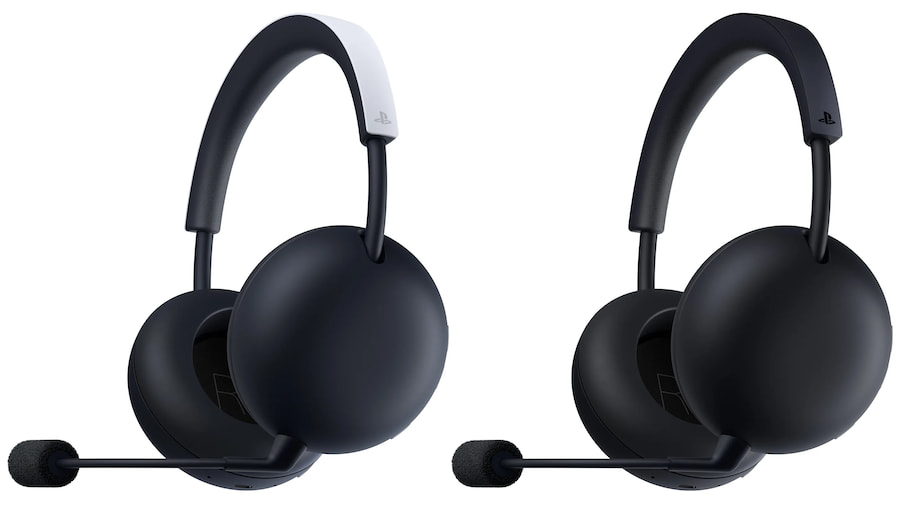
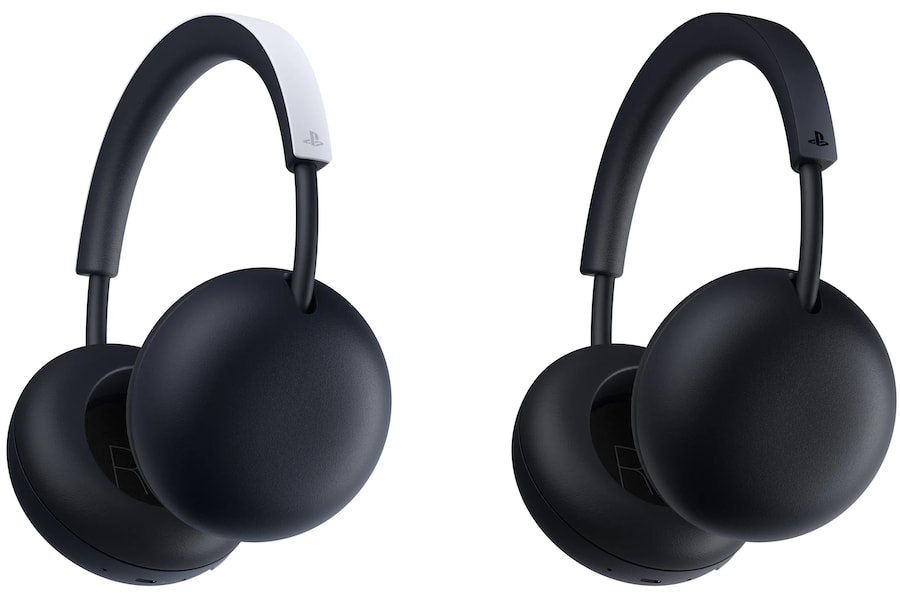
PlayStation Pulse Wireless Headset
The standard PlayStation Pulse gets larger planar magnetic drivers with four magnets per driver. Sony says the increased driver size produces fuller and deeper bass while maintaining the detail and separation associated with the Pulse Elite. No actual driver diameter has been disclosed, so resist the temptation to turn internet speculation into a specification.
PlayStation Link is supplied through an included USB-C adapter and supports lossless, ultra-low-latency wireless audio. An integrated microphone uses AI-enhanced noise rejection to filter background sound, while rotating earcups allow the headset to lie flat when you are not wearing it.
The regular Pulse is clearly the simpler model. It does not include ANC, PS5 game/chat balance controls, an analog audio/microphone jack or carrying case. Sony has also not disclosed battery life, Bluetooth codecs, weight or frequency response.
PlayStation Pulse Key Features
- Larger custom planar magnetic drivers
- 4 magnets per driver
- Lossless, ultra-low-latency PlayStation Link
- USB-C PlayStation Link adapter included
- Simultaneous Bluetooth connectivity
- Integrated microphone
- AI-enhanced microphone noise rejection
- Built-in volume control
- Rotating earcups
- White or Midnight Black
- Launching in select markets during Holiday 2026
- Price not yet announced
PlayStation Pulse Edge: Eight Magnets, ANC and a Proper Boom Mic
The Pulse Edge is where Sony starts spending more of the engineering budget.
Each planar magnetic driver uses eight magnets rather than four, which Sony describes as double the magnet volume of the standard Pulse. The objective is greater bass output without sacrificing the speed, separation and spatial precision that make planar drivers attractive for gaming in the first place.
Edge also adds active noise cancellation, along with a detachable boom microphone for voice chat. Remove the boom and a hidden microphone remains available, so you do not have to wander around looking like you are directing aircraft when listening to music.
There are also dedicated game/chat balance controls for PS5, an analog audio/microphone jack, more premium materials and an included carrying case. Those additions make Pulse Edge considerably more than a Pulse with ANC bolted onto the side.
PlayStation Pulse Edge Key Features
- Larger custom planar magnetic drivers
- 8 magnets per driver
- Double the magnet volume of PlayStation Pulse
- Active noise cancellation
- Lossless, ultra-low-latency PlayStation Link
- USB-C PlayStation Link adapter included
- Simultaneous Bluetooth connectivity
- Detachable boom microphone
- Hidden microphone when boom is removed
- AI-enhanced microphone noise rejection
- PS5 game/chat balance controls
- Built-in volume control
- Analog audio/microphone jack
- Rotating earcups
- Carrying case
- White or Midnight Black
- Launching in early 2027
- Price not yet announced
What Can You Use Them With?
Sony has officially confirmed PlayStation Link support with PS5, PlayStation Portal, Windows PC and Mac. Both headsets can also connect simultaneously to a supported Bluetooth device, meaning you can maintain the low-latency PlayStation Link connection while handling audio from something such as a smartphone.
Platform
Pulse
Pulse Edge
PS5
PlayStation Link
PlayStation Link
PlayStation Portal
PlayStation Link
PlayStation Link
Windows PC
PlayStation Link
PlayStation Link
Mac
PlayStation Link
PlayStation Link
Bluetooth Devices
Yes
Yes
Simultaneous PS Link + Bluetooth
Yes
Yes
Analog/Wired
Not listed
Audio/mic jack
Xbox
Not announced
Not announced
Nintendo Switch/Switch 2
Not specified
Not specified
That last part is important. Sony has not announced Xbox support, and PlayStation Link is not an Xbox wireless standard. Pulse Edge’s analog jack may broaden wired possibilities, but Sony has not yet published enough compatibility information for us to start declaring support for platforms it has not named.
What Makes These Different?
Planar magnetic gaming headsets are no longer unheard of, but having Sony make the technology standard across an expanding first-party PlayStation ecosystem is significant.
The advantage is not merely the word “planar” on the box. Gaming depends heavily on transient response, separation and spatial placement; hearing precisely where a footstep, reload or approaching opponent is located can matter rather more than whether the cymbal on track seven has sufficient air around it.
Sony is pairing those drivers with its own lossless low-latency wireless system, first-party PS5 integration and simultaneous Bluetooth. Pulse Edge adds ANC and a more serious microphone implementation without abandoning that architecture.
In other words, Sony is starting to treat gaming headsets like actual audio products. What a radical concept but it had to happen eventually.
The Competition
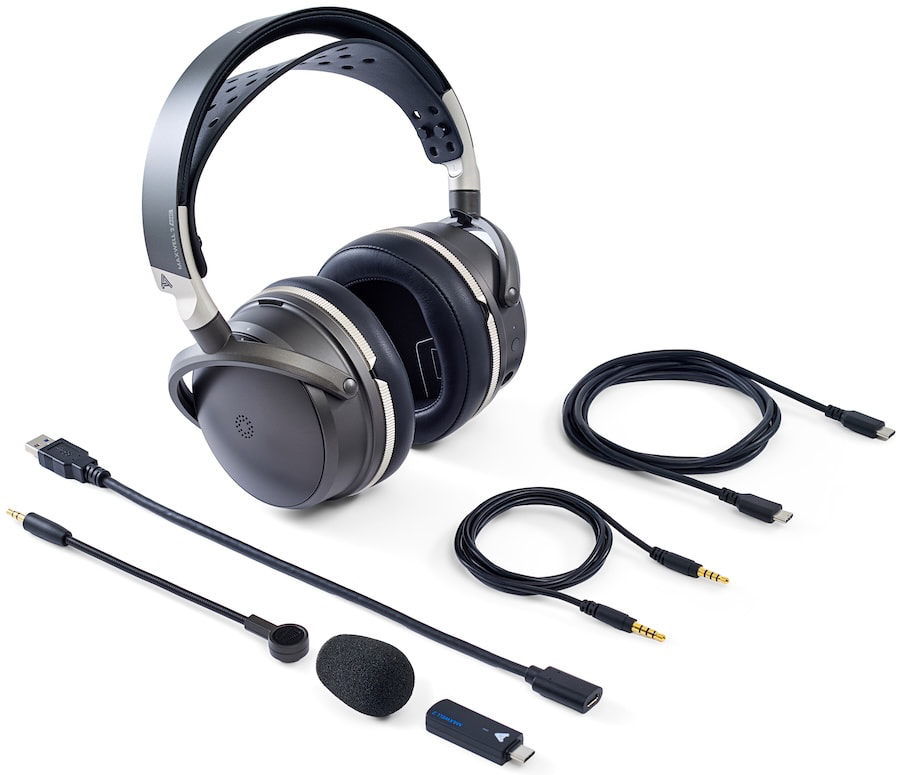
The obvious reference point is the $329 Audeze Maxwell 2, which uses 90mm planar magnetic drivers, supports low-latency wireless playback up to 24-bit/96kHz and offers more than 80 hours of claimed battery life. It remains one of the strongest examples of what happens when an audiophile headphone company decides gamers deserve something better than booming bass and flashing lights; which is why Sony purchased Audeze to begin with.
The $199.99 SteelSeries Arctis Nova 7 Gen 2 takes a different approach with broader platform options, simultaneous 2.4GHz/Bluetooth audio, more than 200 game-specific presets and up to 54 hours of battery life. It does not use planar magnetic drivers, but its flexibility makes it an obvious alternative for gamers who do not live entirely inside Sony’s ecosystem.
Pricing will ultimately determine where Pulse and Pulse Edge fit between those two approaches.
The Bottom Line
Sony’s acquisition of Audeze in 2023 made sense when it happened, but the larger strategy is becoming much easier to see three years later. Audeze was allowed to continue developing its own multi-platform products, while Sony gained access to a company with deep planar magnetic engineering expertise and a gaming business that had already become a major part of its success.
The Pulse Elite was an early indication of where this was going. Pulse Elevate pushed planar magnetic technology into desktop speakers. The new PlayStation Pulse and Pulse Edge now make larger planar drivers the foundation of Sony’s next generation of first-party gaming headsets. This is starting to look less like technology trickling down from Audeze and more like a deliberate attempt to raise the audio standard across the entire PlayStation ecosystem.
Which creates a rather entertaining problem for Sony.
The Audeze Maxwell 2 is already sitting there at $329 for PlayStation and $349 for Xbox, with 90mm planar magnetic drivers, more than 80 hours of claimed battery life, USB-C low-latency wireless, Bluetooth 5.3 and support across Windows, macOS, Android, iOS and Nintendo Switch. We have also spent enough time using the Maxwell 2 across multiple platforms to know that this is not some gaming headset wearing an audiophile costume. It is a seriously capable headphone.
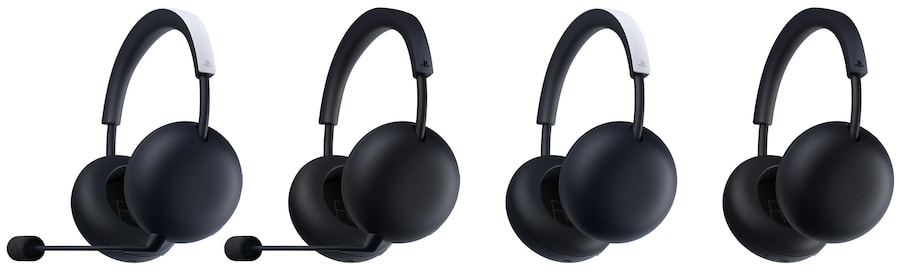
Will Pulse Edge compete directly with it? Very likely in terms of target customer and technology, although Sony’s refusal to disclose pricing makes a proper value comparison premature. Pulse Edge counters with deeper PlayStation integration, PlayStation Link, ANC, simultaneous Bluetooth and dedicated PS5 game/chat controls. Maxwell 2 answers with broader platform compatibility, extraordinary battery life and Audeze’s already proven planar magnetic implementation.
Having used the Maxwell 2 on more than a few platforms, I would not assume that is a fight the Pulse Edge automatically wins.
Then again, Sony may have constructed the rare competitive battle where the parent company has reasons to smile whichever headset you take home. Buy Pulse Edge and you are buying Sony’s increasingly ambitious first-party PlayStation audio platform. Buy Maxwell 2 and you are buying from Audeze, which Sony Interactive Entertainment acquired three years ago.
Heads Sony wins. Tails Sony checks the receipt.
That is the bigger story here and potentially a much more important one than whether Pulse Edge has eight magnets instead of four.
For more information, visit the product pages for PlayStation Pulse Wireless headset and Pulse Edge.
Related Reading:
Continue Reading

The best free legal streaming services in 2026 include Tubi, Pluto TV, Plex, The Roku Channel, Sling Freestream, Xumo Play, YouTube’s Free Primetime catalog, Kanopy, Hoopla, and PBS. The right choice depends on your country and whether you want on-demand movies, scheduled live channels, library-supported access, or public-service programming.
Quick Take
- Tubi is a strong choice for straightforward free on-demand movies and TV.
- Pluto TV, Sling Freestream, and Xumo Play are better suited to channel-style viewing alongside on-demand content.
- Plex combines free streaming with personal-media features and has comparatively broad international availability.
- Kanopy and Hoopla are worth checking if your public library, college, or university participates.
- YouTube and PBS provide legitimate free programming, but their free catalogs and geographic availability are more limited than their broader platforms might suggest.
Best Free Legal Streaming Services at a Glance
Most legal free streaming uses one of three funding models. Ad-supported video on demand, often shortened to AVOD, lets you choose a title and watch it with advertising. Free ad-supported streaming television, or FAST, uses scheduled channels that behave more like traditional television. Library-supported services are funded through participating institutions rather than a personal entertainment subscription.
Info
Free does not mean worldwide. Streaming rights, channels, and even access methods differ by country, so confirm availability in your location before choosing a service.
The comparison below focuses on the core free offering rather than optional paid upgrades. Exact catalogs can change as licensing agreements change.
| Service | Free model and access | Main viewing style | Geographic availability | Main limitation |
|---|---|---|---|---|
| Tubi | Supported by advertising; no paid subscription required, although some events may require a free account | On demand | Available in several countries and regions | Advertising and a changing catalogue |
| Pluto TV | Supported by advertising with free access | Live channels and on-demand viewing | Availability and content depend on the market | Scheduled channels provide less playback control |
| Plex | Supported by advertising; free streaming does not require Plex Pass | On demand and live channels | Available in most countries, but the catalogue varies by location | Available content differs by location |
| The Roku Channel | Supported by advertising; access depends on the region | Live channels and on-demand viewing | Available in the United States, Canada, and the United Kingdom; available in Mexico on Roku devices only | Limited geographic availability |
| Sling Freestream | Supported by advertising; no account required for basic Freestream viewing | Live channels and on-demand viewing | Available in the United States and Puerto Rico | Strong geographic restriction to the United States and Puerto Rico |
| Xumo Play | Supported by advertising; no subscription or login required for basic use | Live channels and on-demand viewing | Available in the United States, Canada, the United Kingdom, and Ireland under current terms | Territory and device availability vary |
| YouTube | Supported by advertising through the Google and YouTube platform | Free movies, with free television available in selected countries | Free movies are available in the United States, Australia, Japan, Germany, and the United Kingdom; free television is available in the United States and Australia | Free and paid content coexist on the same platform |
| Kanopy | Access through a participating library, college, or university | On demand | Availability depends on participation by the user’s library or educational institution | Institutional eligibility is required |
| Hoopla | Access through a participating public library and library card | Digital borrowing | Availability depends on participation by the user’s public library | Borrowing limits vary by library |
| PBS | Public-service funding with member-supported extras; many videos are free without an account, while some content requires PBS Passport | On-demand viewing and local livestreams | Online viewing rights are primarily focused on the United States | Some programs require PBS Passport or have regional restrictions |
How These Services Were Selected
Each service in this list had to meet four basic requirements: an official, verifiable service had to exist in September 2026; the core recommendation had to be available without a mandatory recurring entertainment subscription; its free access model had to be supported by the provider’s own documentation; and it needed either a broad catalog or a clearly distinct use case.
That excludes free trials because they become paid subscriptions after a temporary period. It also excludes unofficial streaming mirrors and stale brand names whose current status cannot be verified. Catalog size alone was not used as a ranking method because providers count channels and titles differently and those totals change frequently.
If a free site asks you to install unknown players, bypass security warnings, or download unfamiliar apps, streaming-site safety depends on more than whether the video itself costs money.
1 Best for: Straightforward free on-demand movies and television.
Tubi is an ad-supported streaming service with no paid subscription requirement. Tubi’s official help center states that its content is free to watch and that it does not require credit-card information for the streaming service.
Tubi also has broader geographic reach than many U.S.-centric free services. Its current device documentation lists supported access in markets including Canada, Australia, Mexico, the United Kingdom, Puerto Rico, and several Latin American countries, although available titles and supported devices can differ by region.
Important limitation: Advertising supports the service and the catalog changes with licensing. Some special live events can also require a free signed-in account even though ordinary access does not require a paid subscription. 2
Best for: Free channel surfing with additional on-demand viewing.
Pluto TV combines scheduled linear channels with an on-demand library. A linear channel continuously plays a programmed schedule, so the experience is closer to traditional television than selecting every episode individually.
Pluto TV’s official service description presents the platform as a free streaming service offering live channels and on-demand programming. Important limitation: Live channels give you less control over exactly when a program starts, and channel availability varies by market.
3
Best for: Free streaming plus personal-media tools and broad international access.
Plex provides free ad-supported movies and television on demand as well as free live channels. Plex’s Free vs Paid documentation confirms that those streaming features are available without Plex Pass. Plex is also distinct because it combines its online free catalog with software for organizing personal media. Its support documentation says users in almost every country can access its free ad-supported catalog, although titles and channels differ by location.
Important limitation: Plex Pass does not remove ads from Plex’s free ad-supported streaming catalog, and the platform’s mixture of streaming and personal-media features can be more complex than a single-purpose app.
4
Best for: Free live and on-demand programming in supported Roku Channel markets. The Roku Channel offers free television, films, Roku Originals, and live channels. You do not always need a Roku streaming player because web and mobile access are available in supported countries.
Roku’s current support page says the service is available in the United States, Canada, and the United Kingdom on Roku devices, web, and mobile. Mexico currently has Roku-device access only.
Important limitation: Geographic support is much narrower than Plex’s, and Roku’s wider ecosystem also contains premium subscriptions, so not everything visible through Roku is part of the free catalog.
5 Best for: A large free live-channel lineup in the United States and Puerto Rico.
Sling Freestream is Sling’s free ad-supported service for live channels and on-demand programming. Sling’s Freestream documentation currently advertises more than 600 live channels and says basic viewing does not require a subscription, credit card, or Sling account.
Creating a free account adds functions such as favorites, watchlists, profiles, and parental controls, but it is not necessary for basic Freestream access.
Important limitation: Sling says its streaming service is geo-gated to the 50 United States and Puerto Rico, making Freestream unsuitable as an international recommendation. 6
Best for: Instant live and on-demand streaming without a login.
Xumo Play provides free ad-supported live channels and on-demand programming without requiring a subscription or login for its basic service. Xumo’s current site describes the platform as a free service with hundreds of channels and a substantial on-demand catalog.
Its current Terms of Service limit Xumo Play to users in the United States, Canada, the United Kingdom, and Ireland, including their territories and possessions. Important limitation: Availability is territory-dependent, and channel or device support can differ even within supported markets.
7
Best for: Official free movies inside a familiar streaming platform.
YouTube has an official ad-supported Primetime program rather than relying on user uploads for this recommendation. YouTube’s current help page says free Primetime movies are available in the United States, Australia, Japan, Germany, and the United Kingdom. Free ad-supported TV shows under the same program are currently available in the United States and Australia. YouTube says the catalog updates regularly.
Important limitation: YouTube mixes free Primetime content with rentals, purchases, paid Primetime Channels, trailers, clips, and user uploads, so the presence of a title on YouTube does not mean the full program is officially free.
8
Best for: Public-library and university users with participating institutional access. Kanopy uses a library and educational-institution model rather than a conventional entertainment subscription. Its official signup page asks public-library users to find a participating library and authenticate with library credentials, while students and professors can search for a participating college or university.
That makes Kanopy especially useful when access is already included through an institution you belong to.
Important limitation: Not every library, college, or university offers Kanopy, and institutional rules can affect what you can watch.
9 Best for: Library users who want movies and television alongside other digital media.
Hoopla provides television and movies through participating libraries while also offering ebooks, audiobooks, music, and comics. Hoopla’s official television page describes the service as free with a library card.
The borrowing model is useful if your local library already participates because there is no separate monthly entertainment subscription to buy.
Important limitation: Library participation, catalog access, and borrowing limits vary, so another person’s Hoopla experience may not match yours. 10
Best for: U.S. public television, documentaries, news, educational programming, and local-station viewing.
PBS is not an all-purpose movie service, but it offers a meaningful amount of free programming through its website and app. PBS says many videos can be watched without a fee or PBS account, and viewers can stream their local PBS station where rights allow.
Some episodes are available free only for a limited period. PBS Passport is a separate member benefit that provides extended access to selected programming. Important limitation: PBS streaming rights are primarily U.S.-focused, local-station livestreams are geographically restricted, and some programming is reserved for Passport members.
Our Recommendations
Tubi
Pluto TV
Plex
The Roku Channel
Sling Freestream
Xumo Play
YouTube Free Primetime Movies & Shows
Kanopy
Hoopla
PBS
How to Find One Specific Movie or Show for Free
A service comparison is less useful when you already know the exact movie or television series you want. Licensing changes frequently, so a title that is free on one provider today can move, become paid, or disappear later.
JustWatch is useful as a discovery tool rather than another streaming-service recommendation. According to JustWatch’s current service description, its free guide shows legal offers across subscription services, free streaming, ad-supported streaming, rentals, and purchases.
Choose the correct country, search for the title, and filter the results for free or ad-supported options. Then verify the offer on the destination service before watching because streaming rights can change.
A fuller workflow for finding where a particular movie or TV show is streaming can also help distinguish free access from rentals, purchases, and subscriptions when several offers appear together.
JustWatch’s own streaming product should not be confused with the guide itself. JustWatch TV was still being presented as a beta product ahead of a planned October 2026 full launch when this article was researched, so it is not treated as one of the established core services above.
Choose this if: You want a straightforward free on-demand catalog and Tubi operates in your region.
Avoid this if: You mainly want traditional channel surfing. Main trade-off: Free access means advertising and a changing licensed catalog.
Choose this if: You like turning on scheduled channels and watching what is already playing.
Avoid this if: Precise control over every program and start time matters most.
Main trade-off: FAST channels recreate some of the convenience of traditional television but remain heavily dependent on region and licensing. Choose this if: You want both free streaming and personal-media features, especially outside the narrowest U.S.-only markets.
Avoid this if: You want the simplest possible streaming-only interface.
Main trade-off: Plex offers several different media functions, which adds flexibility but also complexity.
Choose this if: You already use Roku or live in one of its supported Roku Channel markets. Avoid this if: You need a broadly international service.
Main trade-off: A useful mix of free live and on-demand content comes with significant geographic restrictions.
Choose this if: You want official free movies without installing another unfamiliar streaming app and live in a supported country.
Avoid this if: You expect every movie or show appearing in YouTube search to be part of the free licensed program. Main trade-off: Free, paid, rental, subscription, and user-uploaded material share the same platform.
Choose this if: Your library, college, or university already provides access.
Avoid this if: Your institution does not participate or its borrowing limits do not fit your viewing habits.
Main trade-off: You avoid a consumer subscription, but access depends on institutional eligibility and local rules. Choose this if: You specifically want public television, news, documentaries, educational programming, or local PBS content in the United States.
Avoid this if: You want a broad general-entertainment movie catalog.
Main trade-off: Strong public-service programming comes with narrower geographic rights and some Passport-restricted content.
Choose this if: You already know the exact title and only need to discover which legal provider currently offers it free. Avoid this if: You want a catalog to browse rather than a discovery tool.
Main trade-off: JustWatch helps locate an offer but generally sends you to another service to watch it.
Which Free Streaming Service Should You Choose?
Tubi
Pluto TV, Sling Freestream, or Xumo Play
Plex
The Roku Channel
YouTube Free Primetime
Kanopy or Hoopla
PBS
JustWatch First
The main trade-off in free streaming is not simply ads versus no ads. Geography, library eligibility, live versus on-demand viewing, account requirements, and catalog stability matter just as much. Understanding what free streaming gives up compared with paid streaming can help determine whether a free service is enough for your viewing habits.

“Ubuntu has managed to do away with GNU Core Utilities in its default stack,” reports the blog It’s FOSS.
The last three utilities — cp, mv and rm — have been moved to versions from the uutils project (which reimplements utilities in Rust).
Everything else, from ls and cat to chmod and du, made that jump in earlier releases… Canonical started “oxidizing” Ubuntu last year, and Ubuntu 25.10 became the first release to ship [ the uutils project’s] coreutils as the default. That release also made sudo-rs the default privilege tool, replacing a command that had been in place for decades.
26.04 was the release where the plan did slow down quite a bit, as Canonical kept cp, mv, and rm on their GNU versions due to a bunch of TOCTOU issues that were blocking the full implementation. These were caught during an audit, when Canonical commissioned Zellic for two rounds between December 2025 and March 2026, focusing on the most security-sensitive utilities first. Across both rounds, Zellic raised 113 issues, and 44 of them were assigned CVEs. Canonical says the vast majority have been resolved.
Getting here has had its ups and downs, and the last stretch was not clean. In July, uutils cp went back into the archive and came straight out again after it broke live image builds. The fix was quick; as the developers marked it “Critical,” the fix went upstream, and the migration landed in time for 26.10.
When typing commands, nothing changes for you on the surface. uutils coreutils is designed to be a drop-in replacement for essential GNU tools, and the project treats any divergence from GNU as a bug, further pointing out that some options may still be missing or behave differently. So if you prefer staying on the GNU version, you have the option to install the coreutils-from-gnu package that houses all the required components.


Read more of this story at Slashdot.


Google has released the September 2026 security patches to address 110 vulnerabilities affecting its Pixel devices, including one zero-day flaw actively exploited in targeted attacks.
“There are indications that CVE-2026-58704 may be under limited, targeted exploitation,” the company warned on Wednesday.
“All supported Google devices will receive an update to the 2026-09-05 patch level. We encourage all customers to accept these updates to their devices.”
This high-severity security flaw stems from improper authorization and protection mechanism failure weaknesses affecting the Modem subcomponent. Successful exploitation can allow attackers with access to an adjacent network and basic privileges on the targeted device to escalate privileges in low-complexity attacks that don’t require user interaction.
“In Cellular Modem, there is a possible permission bypass due to a logic error in the code,” a security advisory issued today says. “This could lead to remote (proximal/adjacent) escalation of privilege with no additional execution privileges needed.”
Google tagged 109 other security issues in this month’s Pixel update bulletin, including 12 remote code execution and 89 privilege escalation vulnerabilities rated critical or high severity.
Although Google Pixel devices also run Android, they receive separate security updates and bug fixes from the standard monthly patches distributed to Android OEMs because of the unique hardware platform Google controls directly and its exclusive features and capabilities.
To apply this month’s security updates, Pixel users must go to Settings > Security & privacy > System & updates > Security update, tap Install, and restart their devices to complete the update process.
You can find more information on the September 2026 updates for Pixel devices in the security bulletin for Google’s smartphone range.
In June, Google also addressed an Android Framework zero-day flaw (CVE-2025-48595) that was actively exploited in targeted attacks and could let attackers gain code execution and escalate privileges on devices running Android 14 or later.
One month earlier, the company announced an overhaul of its Android and Chrome vulnerability rewards programs, scaling back payouts for flaws that are easier to find using artificial intelligence (AI) while offering bounties of up to $1.5 million for some Android exploits.



Mike Lake wanted a Porsche 992 GT3 RS and refused to wait for a lottery allocation or a secondhand bill north of $750,000 Australian ($535,000). He bought a tired 986 Boxster for about $13,000, drove two thousand kilometers to collect it, and set out to wrap that mid-engine roadster in a full-size printed replica. He calls the result GT3D. Consumer printers, PETG filament, and a garage in Melbourne did the rest.
After taking a huge gamble with a Facebook purchase, files for the corpse appeared. Lake disassembled each panel into tiny components small enough to fit in a couple of machines costing only a few hundred dollars each. When they were counting them previously, they estimated that the entire kit contained 477 parts, 62 kg of plastic, and approximately 2,000 hours of print time. When you come to the end of the build, the data was updated to nearly 1,500 hours and 80 kg of PETG, and that doesn’t include any failure prints or revisions they made later on. One front bumper alone required sixty-one parts, 381 hours of printing time, and more than 10 kg of plastic. Only one fender took 55 hours to complete. The roof was the most difficult single piece of assembly because it came from a convertible donor. It required 41 or 42 printed parts and another 120 hours before it even saw a drop of resin.
Sale

LEGO Speed Champions Porsche 911 GT3 RS Super Car Toy – Model Kit & Pretend Play Toy for Boys & Girls…
- BUILD A RACING LEGEND – Boys and girls ages 9 years old and up can construct the LEGO Speed Champions Porsche 911 GT3 RS Super Car (77239) building…
- AUTHENTIC PORSCHE DETAILS – Young builders can recreate the real-life vehicle’s signature elements including the famous rear wing, air intake…
- 1 PORSCHE DRIVER MINIFIGURE – Kids can place the driver minifigure with helmet and red Porsche Track Day Experience outfit behind the wheel to stage…

So the printed sections were assembled using plastic welding and strengthened slightly. They used pool noodles cut up as interior formers for their early roof work. Lake eventually figured out how add some fiberglass fabric and resin across full panels after confirming the concept with a single quarter panel test, which demonstrated that adding the extra skin provided a lot of extra rigidity for a tiny bit more thickness. The B pillars were strengthened just in case, and the chassis points were braced so the wide printed arches wouldn’t flex all over the place, and moving the radiators out of the way to fit in the larger wheels proved to be a sensible decision once the car left the garage.

Among all the printed parts, there were a few genuine pieces of hardware. There’s a true 992 light bar out back, and the headlights are from a 991.1 because the newer 992 units required a camber system that Lake didn’t have lying around, and then there’s the carbon fiber 992 mirror covers that simply snap onto the printed hybrid housing. The door handles, fuel filling, and the rest of it all remained Boxster parts, inserted into printed surrounds, so the car still opens and closes like the donor. Artka’s custom two-piece forged wheels fill the arches at GT3 RS widths without the need for spacers, and Plastics for Performance windows are 50% lighter than factory glass. The first time they tinted them, the plastic went a little crazy in the sunlight and became all bubbly, but a second film fixed that right away.

Aero received the same treatment, with Ryan from the Fat Lip Collective designing the active DRS wing from scratch. Aluminum rods pass directly through the printed blades, while the electric actuators sit on the stands, seemingly unconcerned, communicating with a Haltech ECU. The first time they hooked it all up, it just worked without any fuss. The profile is completed by the Project Eero front lip and the printed ducktail, and because a proper car has some flare, they added some Sequoia Media stickers and a 3D printed badge that says GT3D rather than GT3 RS.

Under the hood, the Boxster flat-six retains all of its power, albeit with a Turbosmart 5862 turbo, some Legacy Fab piping, a top-mounted Phoenix intercooler, and a set of titanium exhaust tips held on by V-band clamps. There are already videos of the first start-ups, but they need to put it on the dyno to get a real look at the figures. The paint work is a peach Hammer Coatings job over some primed and textured surfaces, followed by some satin black on the doors and under the bonnet, then a lovely clear coat to bring out the color. Six crazy days of assembly got it all done just in time for World Time Attack at Sydney Motorsport Park in September, and when the crowds saw it, they thought it was a proper factory GT3 RS until they got close enough to see all the layer lines they’d managed to hide so well in the bodywork.

A hot potato: Warrantless database searches are a central part of the growing controversy around Flock’s AI-powered camera surveillance network. As police officers keep getting caught abusing the company’s license plate readers, a new analysis of its search records suggests the problem runs deeper than isolated incidents and hint at the true scale of the issue.
Search logs from Flock’s Automatic License Plate Reader (ALPR) database show that, over the past few years, officers across the US have routinely searched the system without offering any legitimate justification. And the company’s own fix for the problem may have made it worse.
The records, obtained by the EFF through a public records request, show officers repeatedly typing flippant or nonsensical answers into the mandatory “reason for search” field. Common entries included “LMAO,” “lol,” “idk,” and outright strings of random keyboard mashing.
Flock’s ALPRs, now deployed across thousands of US communities, use AI to log passing vehicles’ plates into a searchable cloud database that officers can use to reconstruct people’s movements. Unlike a search of someone’s cell phone location history, pulling data from Flock’s database does not require a warrant.

Officers are supposed to document a reason for every search, but plenty have simply ignored that requirement. It’s one of the core complaints about Flock’s system, alongside the dozens of officers who’ve been caught using it to stalk women.
The throwaway search justifications span roughly 2023 into 2026, even after Flock began pushing officers toward a drop-down menu of pre-set reasons in late 2025 instead of a free-text field. However, instead of fixing the issue, the change might have pushed officers to obscure random searches behind seemingly legitimate causes. Many simply select “other.”
Concerns about mass surveillance and false positives have pushed numerous towns to cancel their Flock contracts. People are also regularly caught destroying the company’s cameras outright, and rival ALPR vendors are trying to distance themselves from Flock’s reputation while marketing hardware that does essentially the same thing.
Flock, for its part, says new contracts far outnumber cancellations – and in at least one case, the company reinstalled its cameras without permission after a city had already removed them. Flock and its competitors are also expanding beyond stationary plate readers: the company’s fastest-growing business is now drones that read license plates from the sky, and police departments nationwide are increasingly using them for live surveillance, often for calls that aren’t emergencies at all.
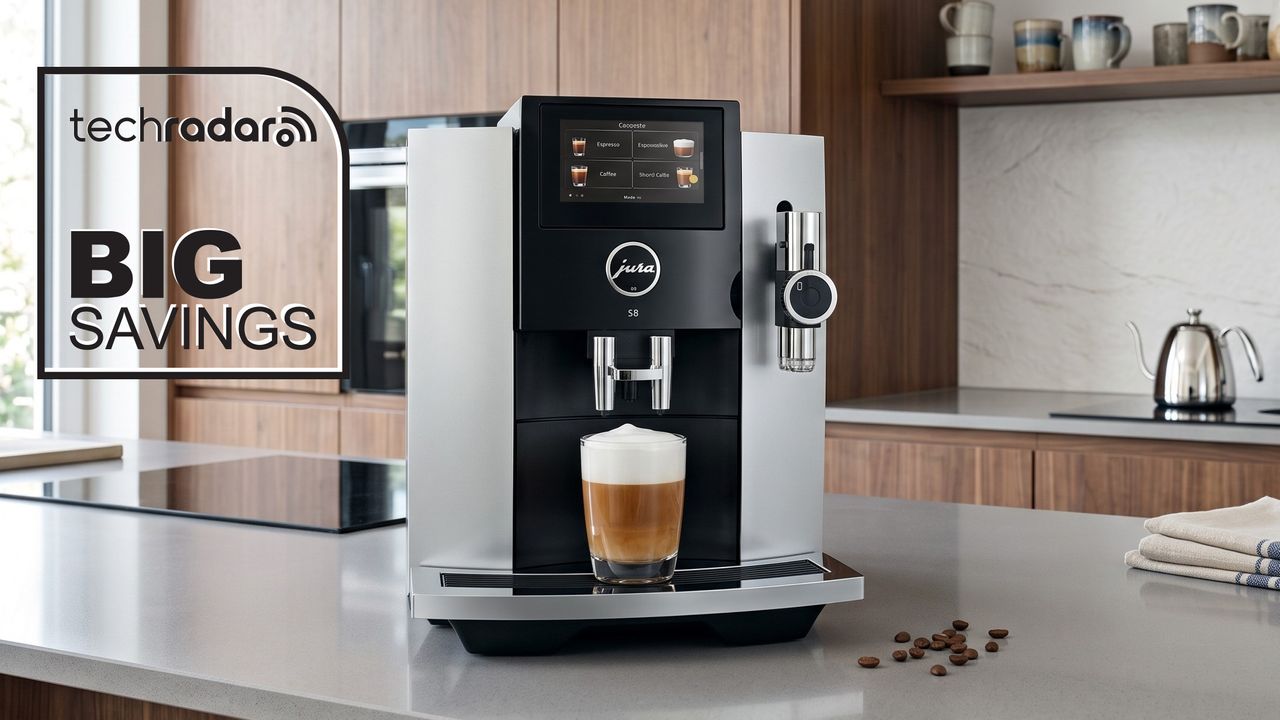
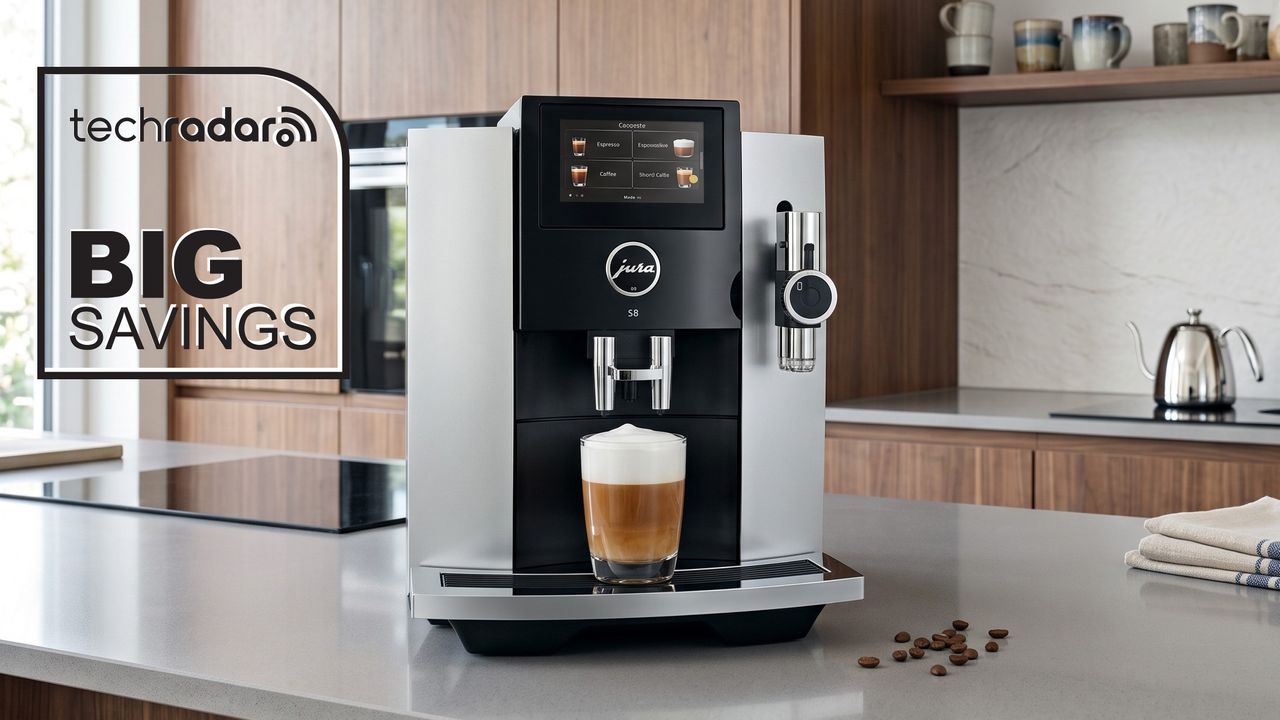
As TechRadar’s coffee expert and custodian of our guide to the best coffee machines in Australia, you can rest assured I make it my mission to trial as many espresso machines as possible. One brand that has, so far, eluded me, however, is Jura.
Judging by our Jura J10 and Jura Z10 reviews, that’s clearly a shame, as the Swiss brand is an expert in all things automatic coffee machines. And that’s exactly why a massive 57% discount on the Jura S8 at The Good Guys piqued my curiosity and made me do a double take.
Plummeting from AU$3,690 to AU$1,589, this is a prime opportunity to snap up an uber-premium bean-to-cup machine to take pride of place in your kitchen for years to come.
While I do enjoy getting hands on with a coffee machine — I’m a huge fan of the KitchenAid Semi-Automatic, for example — in my mind an automatic model is ideal. I can press a couple of buttons, pull up a saved recipe and have my coffee brewing whilst attending to other tasks.
The Jura S8 therefore looks like it could be my new best friend for a number of reasons. Firstly, Jura has been making automatic coffee machines for around 40 years, so it arguably has the expertise to understand what makes a decent cuppa.
That experience extends to proprietary technologies, including its P.A.G.2 grinder with its seven selectable grind levels, an eighth-generation 3D brewing unit that passes water through coffee on multiple levels for a more even extraction and the use of the Pulse Extraction Process (P.E.P.) that pushes water through the puck in pulses rather than one uninterrupted flow, to optimise extraction time.
The 27 drinks can be customised to a great extent too, with 10 strength settings, programmable water and milk quantities and three brewing-temperature settings. And, as mentioned earlier, the S8 can produce Sweet Foam — milk foamed with flavoured syrup during preparation. My colleague Cat Ellis has said the results are “delicious” in her Jura J10 review. Plus, the large 4.3-inch touchscreen looks glorious in pictures.
On paper then, the Jura S8 looks to be the perfect coffee machine for me. Not only does it promise top-tier performance, but I also think it’s a bit of a looker compared to many other machines that are more akin to black boxes.
This huge AU$2,101 saving at The Good Guys lists an end date of September 30, so while you do have a little bit of time to take advantage, it could transpire that stock could run out before then!
Want more suggestions?
If spending over AU$1,500 on an automatic coffee machine is too much for your budget, fret not, as there plenty of excellent models available for less. And, in some cases, you can actually find a machine that offers even more features than the Jura, for less money. Here are some other top-rated alternatives.
Mac owners upgrading to macOS 27 will need to replace their AirPort Time Capsule for Time Machine backups. We picked five diskless NAS enclosures that cost less than $300 to fit the bill.
Apple released macOS 27 Golden Gate on September 14 without support for Apple Filing Protocol, or AFP. AirPort Time Capsule and AirPort Disk depend on AFP for Time Machine backups.
The company’s updated support document says Time Machine continues to work with third-party network-attached storage devices that support Server Message Block, or SMB. The five options below support network backups from a Mac, although availability and sale prices can change.
These prices cover the enclosures rather than complete storage systems. Buyers must add at least one compatible drive and connect the NAS to an existing router through Ethernet.
The macOS change doesn’t disable the AirPort’s router or Wi-Fi hardware. It specifically prevents Macs running macOS 27 from using an AirPort Time Capsule or AirPort Disk as a Time Machine destination.
Some of these will work as routers, properly configured. We leave this, and a debate about the security of doing this, as an exercise for the reader
They also don’t provide Wi-Fi, like a Time Capsile does. The Time Capsule is so far out of support at this point, though, you’ve probably already moved on from that.
Anyone with files stored only in an existing Time Capsule backup should restore them before upgrading. Keep the old backup intact until the replacement NAS has completed a full backup and successfully restored a test file.
Here’s what we’ve done. We took the original retail price of the fifth generation Time Capsule, adjusted to 2026 dollars, and subtracted a bit more than $100 for the drive of your choice, and rounded down to $300.
All of these network attached storage devices come in under that cost.
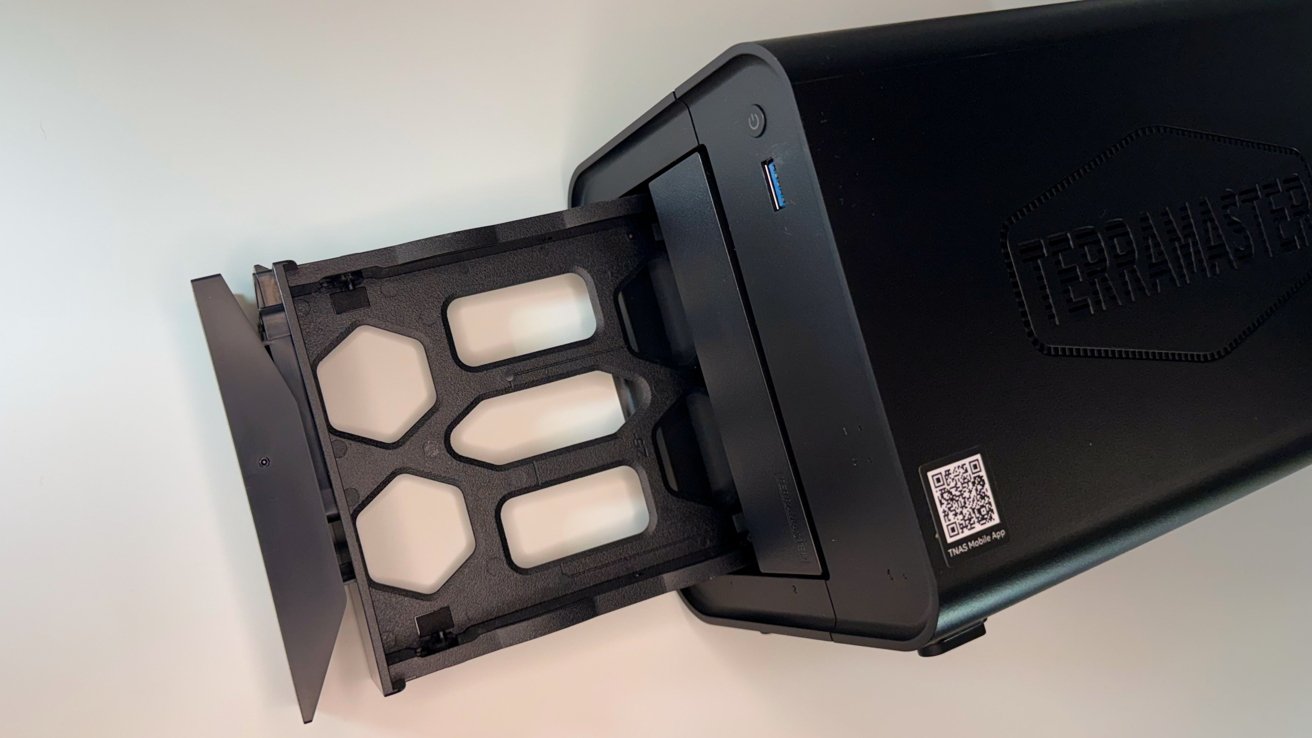
TerraMaster F2-425 offers the most processing headroom
The TerraMaster F2-425 provides two SATA drive bays, an Intel N5095 quad-core processor, 4GB of DDR4 memory, and 2.5GbE networking.
TerraMaster allows owners to expand the memory to 16GB, giving the F2-425 room for services beyond file storage. It supports Docker, hardware-assisted 4K video transcoding, and TerraMaster’s TRAID storage system.
TOS 7 includes a Time Machine Backup tool that turns an authorized folder into a network backup destination. Time Machine Backup is disabled by default and must be enabled during setup.
 TerraMaster F2-425 2-Bay NAS review: It uses two bays with tool-free sleds
Our review gave the F2-425 four out of five stars for its performance, memory expansion, and virtualization support. Its two-drive limit restricts the available RAID configurations, but RAID 1 can protect a Time Machine volume against the failure of one drive.
The F2-425 is the strongest option for someone who needs network backups now and may later add a media server, Home Assistant, or other self-hosted software.
The TerraMaster F2-425 is available from B&H Photo and Amazon.com for $254.99 at press time, down from $299.99.
Ugreen NASync DH2300 is the easiest starting point
The Ugreen DH2300 targets people buying their first NAS. Its iPhone-assisted setup removes much of the address hunting and browser configuration that can make network storage intimidating.
An eight-core Rockchip RK3576 processor and 4GB of fixed memory run UGOS Pro. Connectivity includes Gigabit Ethernet, USB-C, two USB-A ports, and an HDMI output capable of driving a 4K display.
 Ugreen NASync DH2300 top-down view of the two drive bays
UGOS Pro supports Time Machine backups from a Mac over SMB. Ugreen also includes phone backups, remote file access, media applications, and local photo organization.
The DH2300 doesn’t support Docker or memory upgrades, so it isn’t intended to become a demanding home server. Our review awarded it four out of five stars and found that its hardware was fast enough for secure file serving and ordinary household backups.
The DH2300 is the most approachable choice for someone who wants automatic Mac backups without extensive NAS administration.
The Ugreen NASync DH2300 is available from Ugreen direct for $227.99 and from Amazon.com, where pricing can vary.
LincStation E1 combines SATA and NVMe storage
The LincStation E1 combines two SATA drive bays and two M.2 NVMe slots. LincPlus calls it a four-bay NAS, although only two bays accept conventional hard drives.
The combination supports inexpensive hard drives alongside faster solid-state storage. A Rockchip RK3568 quad-core processor and 4GB of fixed memory run LincOS.
The enclosure also provides 2.5GbE, HDMI, Wi-Fi 5, and three USB-A connections.
 LincPlus LincStation E1 rear USB-A, HDMI, and Ethernet ports
Time Machine worked with the unit we tested, but LincPlus doesn’t document the feature as clearly as TerraMaster, Ugreen, Synology, or Qnap. Buyers should confirm that current LincOS firmware still exposes an SMB-compatible Time Machine destination.
LincPlus doesn’t offer a macOS management client. Mac owners must administer the NAS through its local web interface, while the company’s iPhone, iPad, Android, or Windows software handles built-in remote access.
The unusual mix of SATA and NVMe storage gives the E1 more flexibility than a conventional two-bay NAS. Its limited processor and developing software make it a better fit for basic storage than demanding server applications.
The LincStation E1 is listed through the LincPlus store for $169, down from $219. An Amazon listing is also available, with price and stock subject to change.
Synology DiskStation DS223j emphasizes mature software
The Synology DS223j is a two-bay diskless enclosure. Its 1GB of fixed memory and Gigabit Ethernet limit heavier workloads, but Synology’s established DiskStation Manager software remains its main advantage.
The DS223j uses a 1.7GHz Realtek RTD1619B quad-core processor. Both bays accept 3.5-inch SATA hard drives, while 2.5-inch drives require optional holders.
 Synology also supports Btrfs and snapshots on the DS223j
DiskStation Manager supports Time Machine through SMB and lets an administrator place storage quotas on individual backup users. Quotas prevent one Mac’s backup history from consuming the entire shared volume.
Buy Synology DiskStation DS223j
Synology also supports Btrfs and snapshots on the DS223j. File self-healing requires a storage pool with redundant data, such as mirrored drives, rather than Btrfs alone.
The DS223j is the conservative choice for users who value documentation, software maturity, and a large application ecosystem more than faster networking.
The Synology DiskStation DS223j is available from B&H Photo for $209.99 and from Amazon.com, where pricing can vary.
QNAP TS-216G puts 2.5GbE near the price limit
The Qnap TS-216G combines two SATA drive bays with a 2.5GbE port. It uses a 2GHz Arm Cortex-A55 quad-core processor and 4GB of memory.
Qnap recorded SMB transfers of up to 291MB per second in laboratory testing with SATA SSDs, RAID 1, 2.5GbE, and a Windows Server client. A Mac connected through ordinary Gigabit Ethernet won’t reach those speeds.
The TS-216G officially supports Time Machine, and Qnap provides instructions for creating a dedicated backup user and shared folder through QTS. Its setup guide directs users to enable SMB 3 before selecting the shared folder in Time Machine.
Qnap also includes snapshots, mobile photo backups, USB one-touch copying, and an NPU for recognizing faces and objects in stored photos. Its hot-swappable bays allow a failed drive to be replaced without shutting down the NAS when the storage configuration can tolerate the failure.
The TS-216G is the best fit for a household with several Macs or an existing 2.5GbE network. Its extensive settings and applications provide flexibility, but they also create a steeper learning curve.
 Qnap recorded SMB transfers of up to 291MB per second
The Qnap TS-216G is available from B&H Photo and Amazon.com for $299.
A drive connected to your router isn’t a universal replacement
Some consumer routers can share an attached USB drive as a Time Machine destination, but support and safety depends on the exact model. Check the router’s manual for explicit Time Machine over SMB support before relying on it for macOS 27 backups.
Owners who bought and configured their own routers may have compatible hardware. Most ISP-provided gateways don’t offer the required storage and backup controls, so customers using one probably won’t have much luck there.
Drives and RAID increase the final cost
All five NAS devices above are sold without user storage. Adding one drive provides the lowest initial cost, while two matching drives allow RAID 1 to preserve access if one drive fails.
RAID 1 writes the same data to both drives, but it doesn’t protect against deletion, theft, fire, malware, or failure of the NAS itself. Irreplaceable files still need another local or off-site copy.
The AirPort Time Capsule combined a router and a hard drive, making a Time Machine destination in one device. We’re still testing the third-party patch that adds SMB3 to the older units, making them compatible again.
Ultimately, they are just too old to keep relying on.
These replacements require more setup, but they are much newer, provide replaceable drives, larger potential capacities, modern SMB support, and more control over Mac backups.
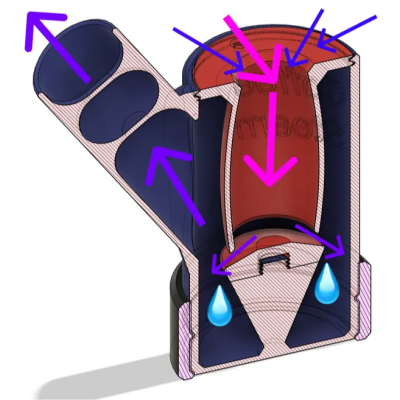
Sometimes a hacker has a specific sort of problem, and uses the tools they have to solve it in a way that just might be helpful to someone else. That’s the case with [Matvey Kukuy]’s Coffee Steam Dryer (V2), which performs the very specific job of safely swallowing up expelled steam and water from an espresso machine’s steam wand.
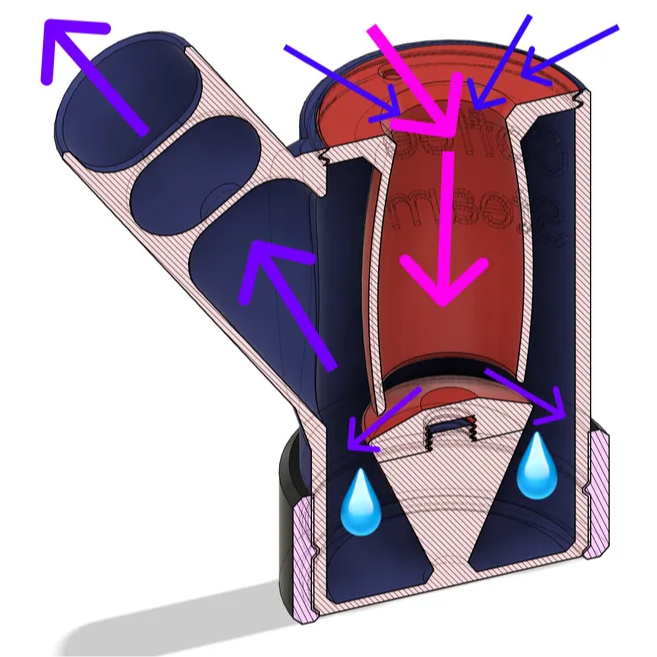
Steam wands are used to froth milk into a velvety texture, and some machines require purging the wand before using it for best results. Where does the resulting jet of steam and spatter of superhot water droplets go? Not the machine’s problem. That’s for the user to deal with, and [Matvey] decided to address it by designing and 3D printing a tool.
The pipe-like object works by having steam jet into the open top (printed in ABS or ASA for heat resistance) where the device redirects the hot gas and captures any expelled water in the process. The steam flows through expansion chambers, dragging cool air along with it in the process, until it ultimately gets redirected away from the user.
By the time steam exits the outlet, some has condensed and the remainder has cooled and slowed down enough to not be a worry.
It’s the second version of the device, and we like how it has no moving parts and can be disassembled for cleaning and drying.
Coffee is an area that is rich with hacker activity, from 3D-printed micro-brew machines to completely DIY roasters but tools like this show how improving the coffee workflow can also be beneficial.
Tech
I love Garmin’s new Forerunner 170 Music smartwatch, but this deal for the superior Forerunner 265 makes it the better buy


Garmin’s Forerunner 170 is a solid running watch that brings great performance and smart features, all in a light and small package, and I particularly loved the Music version for phoneless short runs and activities. The watch was even found to be very accurate, according to my colleague Matt Evans’ testing.
At AU$479 (or AU$549 for the Music version), however, it isn’t the most affordable as far as fitness smartwatches go — so when I found the older (but higher-tier) Forerunner 265 discounted by 38% on Amazon, I knew this was a deal too tempting to pass up.
Featuring a more accurate dual-band GPS technology, 13 days of battery life, more size options and on-watch music storage, the Forerunner 265 is hard to beat for just AU$498.
The Garmin Forerunner 265 was the first small Forerunner model with a touchscreen AMOLED display, replacing its predecessor’s monochrome memory-in-pixel display, to make it look and feel similar to something like an Apple Watch or a Samsung Galaxy Watch.
It also features dual-band or multi-frequency GPS for high-precision tracking in dense cities or heavy tree cover, which is technically superior to the Forerunner 170’s single-frequency multi-GNSS tracking.
The 170 is only available in the single 43mm size, while the 265 comes in 46mm and the smaller 265S is 42mm, providing more options for different wrist sizes.
The biggest criticism from our reviewer is the Forerunner 265’s price hike over its predecessor, and slightly worse battery life, which can be credited to the switch to an AMOLED display, but this discount takes care of the former in spades.
Interested in other Garmin products? Check out the latest Garmin Australia coupons here.
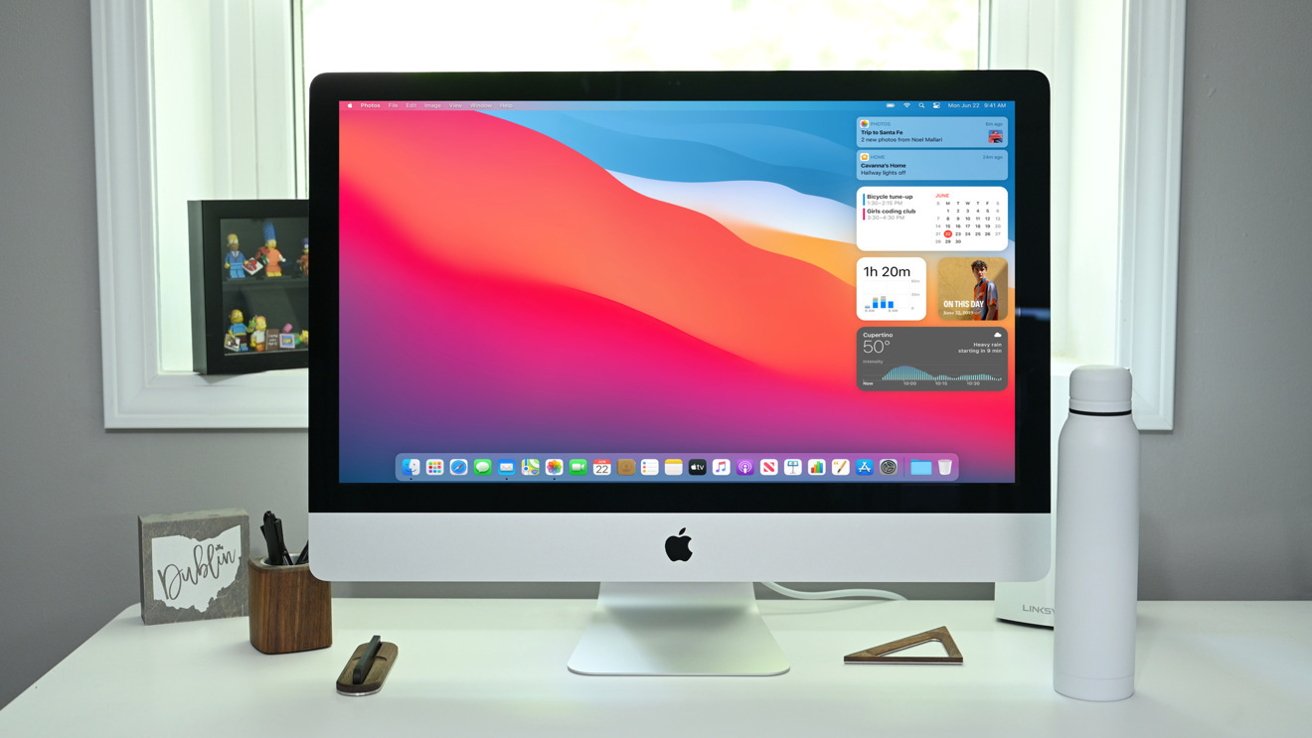
The age of the Intel Mac is coming to an end in every sense, as Apple now classifies the last 21.5-inch Intel-based iMac as a “vintage product.”
In 2019, Apple updated the aging Intel iMac with eighth-generation Intel processors and new AMD Radeon graphics cards. It shipped in the same slim chassis Apple introduced back in 2012, and Apple still offered then-outdated options like the 1TB Fusion Drive.
It was already a mediocre upgrade in its own right, but the arrival of Apple Silicon the following year made it even less desirable. Now, macOS Golden Gate has ended software support for Intel Macs, and the 2019 21.5-inch iMac has made its way to Apple’s “vintage products” list.
Apple considers a product “vintage” when it stopped distributing it for sale more than five years ago but less than seven years ago. The company provides service and parts for vintage products for up to seven years, assuming the necessary parts are available.
Once a product hasn’t been sold new for more than seven years, it’s then classified as “obsolete.” In short, the 2019 21.5-inch iMac is still eligible for repairs from Apple and its authorized service providers, assuming the required parts are available.
While the 2019 21.5-inch iMac will officially be obsolete in 2028, meaning repairs will no longer be offered, that doesn’t mean the computer won’t be serviceable at all. Apple’s older Intel iMacs feature upgradeable storage, RAM, and a socketed CPU, assuming you’re willing to remove the display with the proper tools.
Software-wise, the last 21.5-inch Intel iMac will likely forever be stuck on macOS Sequoia, though Apple is still expected to release security updates through 2027.

Entertainment1 minute ago
Macklemore Fans Cry Hypocrisy Over Kanye West Show

Politics3 minutes ago
Politics Home | A tax raid that Britain’s high streets and leisure venues cannot afford

Sports5 minutes ago
Messi Included In Argentina Squad For Final Farewell Match



-

 Fashion5 days ago
Weekend Open Thread – Corporette.com
-

 Business6 days ago
Micron Stock Climbs Above $1,031 as AI Memory Crunch and a $50 Billion Outlook Fuel the Rally
-

 Tech3 days ago
The Latest Weird Thing to Play Doom Is the Mapped-Out Brain of a Fruit Fly
-

 Business6 days ago
AMD Stock Climbs After Management Lifts 2027 Data Center Outlook Toward $70 Billion in AI Sales
-

 Crypto World5 days ago
XAG/USD: Silver’s Short-Term Rally Meets Its Moment of Truth
-

 Business5 days ago
10 Most-Streamed Songs On Spotify In 2026 So Far, Led By Ella Langley’s Dominant Run On The Charts This Year
-

 Crypto World6 days ago
2 Chip Stocks Broke Out This Week. Neither Was Nvidia
-

 Crypto World6 days ago
Pi Network ships Protocol 27 on a network with 14 million users and zero DeFi
-

 Tech6 days ago
Battery life is the only iPhone 18 Pro and iPhone Duo upgrade I care about. Apple didn’t disappoint
-

 Crypto World5 days ago
OKX launches 10x OpenAI, Anthropic X-Perps in Europe
-

 Crypto World5 days ago
Diesel Tops $6 a Gallon for the First Time as 28 States Set Records
-
 Tech6 days ago
Apple Watch Ultra 4 vs Watch Ultra 3: Should you really spend another $799?
-

 News Videos5 days ago
Facing Financial Fears
-

 Crypto World6 days ago
Bitcoin price risks $70K if $78K neckline breaks
-

 Entertainment6 days ago
Case Sees Major Update As Jury Deliberations Begin
-

 Business3 days ago
Rivals Sam Altman and Elon Musk Rally Behind Dario Amodei’s Call for a Slowdown in AI Development
-

 Crypto World2 days ago
Elon Musk Drops a Bombshell: Grok 5 Could Be the AGI Breakthrough
-
Crypto World5 days ago
Ethereum Price Analysis: Consolidation at $2.5K Tests Momentum as On-Chain Activity Surges
-
Crypto World7 days ago
Ripple Price Prediction: What to Expect for XRP as a Major Macro Week Approaches
-

 Business6 days ago
Western Digital Slips 2.7% as AI Storage Rally Cools After Record Cash and Guidance
You must be logged in to post a comment Login