An exercise bike is a great tool if you’re looking to get cardio in at home or at the gym. However, if you don’t properly set it up or do too much too soon, it can ruin progress. Even if you’ve been cycling for years, it helps to get a refresher on the best cycling practices.
To make sure you’re using an exercise bike properly and doing the right workouts, I spoke with several cycling experts. They break down the common mistakes you’re likely making on an exercise bike and how to fix it.
1. Your seat is too low
One of the first lessons I learned when I started taking group cycling classes was that you need to properly adjust the seat height. Aviron coach and certified indoor cycling instructor John Steventon says the right seat height is key.
Advertisement
“[If the seat is] too low, they won’t be able to get full extension of the legs, often needing to cycle with their knees splayed outward to make room for them,” Steventon explains. This leads to a loss of potential power and a compressed and uncomfortable pedal stroke. “If the seat is too high, the rider will risk bouncing from side to side as they lean off the side of the saddle, trying to get the right extension of the legs.”
According to Matt Wilpers, the saddle should be positioned high enough that your knee is slightly bent and not locked.
Erik Isakson/Getty Images
Peloton instructor Matt Wilpers offers a couple of tips to keep in mind when setting up your seat. “When riding, bring your one foot to the bottom of the pedal stroke (6 o’clock),” he says. “The saddle should be positioned high enough that there is a slight bend in the knee so that the knee is soft and not locked.” This will prevent you from feeling cramped or having to reach for the bottom of the pedal stroke.
Advertisement
Steventon points out that how the foot sits on the pedal is important, too. “The center spindle that the pedal rotates around should be underneath the ball of the foot because I’ve seen people who ride on their toes, and people who ride on their heels — both reduce power and efficiency of the stroke.”
Wilpers advises trying the “heel test,” which is when you unclip the foot at 6 o’clock to see if your heel can touch the pedal when your leg is straight.
You don’t want the seat too far or too close to the handlebars.
Advertisement
Andrii Borodai/Getty Images
2. The saddle isn’t the right distance from the handlebars
Another factor to consider when setting up your exercise bike’s saddle is its distance from the handlebars. Wilpers says the goal here is to get the knee stacked over the pedal, especially when the pedal is at 3 o’clock. “I usually start with the saddle pushed toward the handlebars and then adjust accordingly when I ride,” he recommends. The problem is that when your seat is too far forward, your knees take on the pressure, and if it’s too far back, the stress lands on the heels.
3. The handlebars are too high
Besides the seat, make sure the handlebars are at the right height. “In general, it’s recommended to keep the handlebars at the level of your saddle or just above,” says Wilpers. “Many competitive cyclists like their handlebars at or slightly below saddle height because it better optimizes both performance and aerodynamics when cycling outdoors.”
Make sure the handlebars are aligned with the saddle on your bike.
Advertisement
Konstantin Ushakov/Getty Images
However, Wilpers says that in some cases, such as if you have back problems, raising your handlebars even further is advised.
4. You skip the warm-up or cool-down
If you’re eager to jump on your bike and get a quick workout in, chances are you’re skipping a warm-up or cool-down. Steventon says that if you want to get your body ready for your workout, spending 10 minutes increasing resistance and cadence before a longer or more intense ride will prime the muscles.
“Rather than slowly working up from 60 revolutions per minute to 110 rpm during the warmup, 30-second bursts at gradually higher reps in between 30 seconds of easy pedalling will allow the warmup to be effective without draining energy before the main workout,” he explains.
Some warm-up exercises Wilpers recommends include:
Advertisement
Hip openers like 90/90s (a stretch that uses internal and external hip mobility), pigeon pose and lateral lunges
Quadruped thoracic rotations (this exercise stretches out your spine)
World’s Greatest Stretch (a full body mobility exercise that targets hips, hamstrings, and spine)
Exercises to wake up the ankles and feet, such as ankle-controlled articular rotations (slow rotational movement of the ankle to improve ankle mobility) and performing the downward dog stretch while pedaling out the calves
If you skip a warm-up or cool-down, you’re missing out on some important steps.
Wera Rodsawang/Getty Images
The cool-down shouldn’t be neglected either. “In some cases, after a particularly hard workout, stopping suddenly can cause the blood to pool in the legs, and the cyclist may get dizzy,” warns Steventon. He recommends spending 5 minutes slowing your cadence to help the muscles keep pumping blood and oxygen as you ease out of the strain of the main workout.
You should also stretch the muscles used during a ride, such as your hamstrings, quads, hip flexors and calves. “Triceps, shoulders and wrists shouldn’t be ignored either,” Steventon says. “These muscles are soaking up the mass of the upper body, bouncing up and down, left and right on the handlebars.”
If you’re riding a bike with a screen, the screen’s position can sometimes lead to neck pain. In those circumstances, Steventon recommends gentle neck stretches to ease off the tension after a workout.
Advertisement
5. Your bike workouts aren’t planned out
If you don’t have a general workout program or structure, you may be using your bike inefficiently. It’s important to make sure that you’re riding with intention if you want to get the most out of it. “Everyone has the same three training variables to manipulate in order to get what they want out of their training: frequency, duration and intensity,” Wilpers says.
Frequency relates to how often you work out, since it’s important to have a consistent riding schedule. “Cycling is great because it’s low impact, meaning it’s easier to recover from it and therefore you can ride more often without much fear of injury,” Wilpers says.
If you’re a newbie, it’s best to focus on easy rides. Steventon recommends new riders aim for two to three rides per week and take a rest day between each cycling workout to let their bodies recover from the workout the day before. “Not only for the muscles, but depending on the length of the ride, there’s an element of saddle discomfort that rest will help,” Steventon explains.
Once you have a riding schedule established, you can focus on duration. This is when you start increasing the length of your sessions.
Advertisement
Finally, once you’ve become comfortable with your bike, you can increase the intensity to improve your fitness. Steventon says more experienced riders are capable of putting in four to five workouts a week.
“The importance of foundation building zone 2 heart rate [exercise performed at 60% to 70% of your maximum heart rate] during longer rides is the same for all riders, but with three more workouts to play with,” Steventon explains. “They can add in some tempo and sprint interval workouts too, pushing the cardio harder, and working at a mix of cadence and resistance through these workouts.”
Below are different ways you can structure your workout depending on your goals:
Advertisement
You should have a plan, whether cycling is your main form of cardio or your choice of cross-training.
Westend61/Getty Images
As the main form of cardio
If cycling is your main focus, Wilpers recommends riding three to five days per week, with one to two intense days, one long day and the remainder as easier rides. Aim to ride for 30 minutes to 2 hours or longer.
As part of a strength-training program
If you’re prioritizing strength training but want to include cycling as your preferred form of cardio, Steventon and Wilpers advise aiming for two to three sessions at a zone 2 heart rate for 20 to 45 minutes.
As part of a cross-training plan
You can also use an exercise bike for cross-training. This could be ideal for runners or other athletes who want a hybrid workout schedule during the week. Steventon says, “Cross-training utilization of cycling can be a very effective way to keep cardio topped up without the impact problems of constantly running.” Wilpers recommends cross-training once or twice per week for 20 to 45 minutes, as long as you’re healthy.
Advertisement
If you have injuries or certain aches from running, you can shift your training to cycling two to four times per week for 20- to 45-minute sessions. Steventon recommends that runners cycle whenever their bodies need to recover from running. “Long, slow rides will keep your fitness foundation strong, with harder sprint intervals tapping into VO2 max improvements,” Steventon says. VO2 max is the maximum rate at which your body consumes oxygen during exercise.
Riding distracted is just as bad as doing too much during a ride.
DaniGonzalez/Getty Images
6. Doing too much or too little on the bike
One of the biggest mistakes people make when riding an exercise bike is either doing too much too soon or coasting while distracted. “Many people seem to think that unless they wake up sore, nothing was accomplished, and on the other end of the spectrum, I see people just pedaling and texting,” says Wilpers.
Advertisement
When riding, remember to focus on the workout at hand. Distractions like texting or answering emails can get in the way of making progress. “Have a purpose and plan before getting on the bike so that your time is structured,” Wilpers suggests. “This will help you stay focused and get the most out of your time.”
Steventon notes that the best way to use a bike or any fitness machine is to mix up the intensities to avoid hitting a plateau. “Long, slow rides, short sprint intervals and tempo rides (moderately hard ride) including hard, long intervals will improve the mitochondria-building, zone 2, foundation end of fitness, while the shorter sprints will help improve the VO2 max end, and the tempo rides are where mental resilience is built,” he says.
7. Wearing the wrong cycling shoes
Wearing the right cycling shoes can improve your riding experience. Depending on the bike, you may need specific cycling shoes, like carbon-fiber cleats, road bike shoes, clip-in shoes, mountain bike shoes or even everyday shoes.
When choosing a cycling shoe, you want to make sure it’s comfortable because they don’t come cheap. Steventon recommends mountain bike shoes if you aren’t sure what to pick. “These are a little bit more flexible and have recessed cleats, making it a lot easier to move around, providing stability in situations where ‘off bike’ moves like squats or weights are included in a cycling class.”
Advertisement
The right shoes can improve your cycling experience.
Getty Images
Wilpers favors clip-in cycling shoes because they’re stiff and lead to better energy transfer from the body to the bike. However, the shoe you pick will depend on the type of bike you’re using, and most importantly, you want the shoe to fit well.
Steventon says everyday gym sneakers are acceptable, but that they may not be the best option. “The pedal efficiency may be compromised even with toe clips that hold these shoes in place on the pedal,” he explains, pointing out that because these shoes tend to be soft-soled, it can be uncomfortable to use for long periods of time.
Advertisement
Wilpers notes that some cycling shoe brands are much narrower than others, so it depends on your needs and comfort. “Lastly, I think it’s worth noting that a good set of road cycling shoes can cost hundreds of dollars, but these shoes typically last up to five years,” he says.
8. You’re not braking correctly
Usually, when you stop an exercise bike, you’re either pressing down the emergency brake or using the resistance knob to slow it down. “Trying to suddenly stop the flywheel or unclip feet while the heavy flywheel still wants to turn has great potential for injury,” warns Steventon. “Always use the resistance knob or emergency brake to slow things down properly, and wait until the flywheel has stopped before unclipping.”
If you aren’t properly braking, you risk injuring yourself.
Advertisement
D_Zheleva/Getty Images
9. You don’t maintain or clean your bike
It’s easy to forget that you need to do maintenance and clean your bike every so often. Wilpers reminds us that all bikes need to be cleaned and maintained. “Cyclists are known for constantly cleaning and occasionally replacing parts on their bikes because this is what it takes to keep your bike working great for many years,” he explains.
Keeping your bike in good condition is important if you want it to last a long time.
Getty Images
One thing people often overlook is adjusting their bike settings annually. “Think about how much your body can change in a year,” explains Wilpers. “You may get stronger, weaker, heavier, lighter, tighter, more flexible and so on.” By adhering to bike settings, you’ll not only have a more comfortable ride but also one that’s customized to your changing needs.
The new updates will give developers additional options to distribute iOS apps to Brazilian users via alternative app marketplaces, Apple said. Third-party app stores will need to be approved by Apple first, and will need to meet “ongoing requirements to serve developers and users”.
Advertisement
Additionally, Apple will also allow developers to include alternative payment processing methods in their apps or guide consumers to external sites to complete transactions.
These new payment options will appear alongside Apple’s own in-app purchasing. However, purchase history and subscription management will not reflect payments made using third-party methods, the company clarified.
Apple said it will also not provide refunds for transactions conducted outside its ecosystem, and will have less ability to support customers encountering issues, scams or fraud.
In 2025, Brazil’s regulator, Conselho Administrativo de Defesa Econômica (CADE), found Apple to be guilty of anticompetitive conduct within its iOS ecosystem.
Its investigation revealed that Apple prohibited the sale of services from third parties, and required developers to exclusively use the iOS payment system for transactions with customers.
The watchdog found that these practices created “artificial entry barriers” for competitors selling apps and other tools to iOS users.
Later that year, Apple and CADE entered into an agreement to implement anticompetitive measures. The agreement’s requirements are set to last for three years from when Apple announces changes to iOS in Brazil.
Advertisement
The agreement also reduces the commission Apple charges to sell apps on the App Store from 30pc to 10pc for members of the Small Business programme, Video Partner programme, Mini Apps Partner programme, and for subscriptions following their first year – and 21pc for the rest. Apple says a “vast majority” of developers will pay the lower fee.
Some of the developers steering transactions to websites outside iOS will pay a commission of 15pc, while iOS apps being distributed outside the App Store in Brazil will be charged a 5pc commission.
Apple also highlighted a number of cybersecurity issues emerging from opening up iOS to third-party markets and payment platforms.
The company said that it has worked with CADE to introduce new protections against potential malware, fraud or scam threats from third-party services, including an authorisation process for app marketplaces and baseline reviews for all iOS apps.
Advertisement
Don’t miss out on the knowledge you need to succeed. Sign up for the Daily Brief, Silicon Republic’s digest of need-to-know sci-tech news.
Apple TV has a treat for Formula 1 fans. The platform is streaming the Austrian Grand Prix, with all sessions available to watch. This includes practice rounds, qualifiers and the race itself. Even better? It’s free and I don’t mean “free for subscribers.” Anyone can pop open the app and watch, subscription or not.
Events start on June 26 at 7:30AM ET with the first practice round. There’s another practice round later that day at 11AM ET. The qualifying round begins on June 27 at 10AM ET and the race starts at 9AM ET on June 28.
REMINDER ‼️
Apple TV will make the entire Formula 1 Austrian Grand Prix race weekend available FREE to viewers in the U.S., with live coverage from June 26–28. pic.twitter.com/uJ4b1Xp4wP
The company is also dipping its toes into other sports. It streamed a Major League Soccer game captured entirely with iPhones and now airs Major League Baseball doubleheaders on Friday evenings.
Apple is bringing alternative app marketplaces and payment options to iPhone users in Brazil under an agreement with the country’s antitrust regulator, extending App Store changes that were previously limited to the European Union.
The changes reflect an agreement with Brazil’s competition regulator, the Conselho Administrativo de Defesa Economica, known as CADE, and will arrive as part of iOS 26.5. Developers can begin integrating the new capabilities immediately.
Developers in Brazil will be able to distribute iPhone apps through marketplaces outside the App Store. Marketplace operators must receive authorization from Apple and comply with ongoing requirements.
Apple will also require apps distributed through alternative marketplaces to pass a notarization process. The company said the review combines automated checks and human oversight designed to identify malware and other known security threats.
Advertisement
Apple is also introducing a revised business model for developers in Brazil. The new structure applies to App Store distribution, alternative payments, and app distribution outside the App Store.
Developers with iOS apps on the App Store in Brazil will pay a reduced commission of either 10% or 21% on sales of digital goods and services, depending on eligibility. Those who continue using Apple In-App Purchase will also pay an additional 5% payment processing fee.
Apple will charge a 15% Store Services Commission on purchases completed through developer websites linked from apps, with some developers qualifying for a reduced 10% rate. Apps distributed outside the App Store will face a 5% Core Technology Commission on sales of digital goods and services.
Developers who sell digital goods and services in Brazil will pay the same amount or less than they do today under the new business terms. Apple will require alternative payment options to appear alongside its own payment system.
Advertisement
The company said the requirement will help users distinguish between purchases processed by Apple and those handled by third parties.
Users who continue using Apple In-App Purchase will retain access to subscription management, refund requests, payment history, and fraud reporting tools. Purchases completed through alternative payment systems or external websites won’t receive the same support features.
Apple will have less ability to assist customers who encounter scams, fraud, or payment disputes involving third-party payment systems. Users may also need to share payment information with additional companies.
Brazil adopts changes similar to Apple’s European framework
Many of the changes mirror Apple’s response to the European Union’s Digital Markets Act. Alternative app marketplaces, app notarization, and external payment options already exist under the company’s EU rules.
Advertisement
Many of the changes mirror Apple’s response to the European Union’s Digital Markets Act
Apple first built much of the underlying framework to comply with European regulations. Brazil is the first major market outside Europe to receive a similar set of marketplace and payment changes.
The company also drew a sharp distinction between Brazil’s agreement and the European Union’s Digital Markets Act. CADE and Japan’s Mobile Software Competition Act allowed safeguards around parental controls, payment choices, and marketplace authorization to remain in place.
Those protections, Apple argued, weren’t possible under the EU framework. One example is Brazil’s requirement that app distribution flow through authorized marketplace operators.
Another is the decision to keep Apple In-App Purchase available alongside alternative payment systems. Together, those measures help address some of the security and fraud risks associated with alternative app distribution and payments, according to Apple.
The U.S. has taken a different approach. Litigation involving Epic Games focused largely on payment steering and restrictions on directing users to outside purchasing options.
Advertisement
The Justice Department’s antitrust case challenges broader questions about competition within the iPhone ecosystem. Neither effort has produced nationwide requirements for alternative app marketplaces.
Apple emphasizes security, child safety, and fees
Apple devoted much of its announcement to security, fraud, and child safety concerns tied to alternative app distribution and payment systems. Apps distributed outside the App Store don’t go through the same review process as App Store apps.
Alternative distribution and payment systems can increase exposure to scams, fraud, malware, and objectionable content. Apple also pointed to pornography apps that became available after similar regulatory changes in Europe and Japan.
Apple preserved several safeguards for younger users in Brazil. Apps in the Kids category can’t use external payment links, and alternative payment systems must include parental gates for users under 18.
Advertisement
Users under 18 also won’t be able to access web-based payment flows from App Store apps. Apple is developing APIs that would allow parents to monitor and approve purchases completed outside Apple In-App Purchase.
Apple is pairing the new marketplace and payment options with alternative fees and commissions. The company used a similar approach in Europe when it introduced marketplace distribution and external payment options.
Security researcher Justin O’Leary says Google initially accepted his Config Connector privilege-escalation report as a high-priority, high-severity bug, then denied a bounty by declaring the behavior “working as intended.” “Google initially rated the bug high priority and high severity, with a rep telling O’Leary ‘Nice Catch!’ Then, the cloud giant changed course and told O’Leary […] that there’s no vulnerability, so no fix and no reward payout,” reports The Register. “The bug report, however, is still marked high-priority and accepted.” The alleged flaw, dubbed ConfigConfusion, could let a Kubernetes namespace user exploit an overprivileged service account to become a GCP organization owner with only a few lines of YAML and little apparent audit visibility. O’Leary details the incident in a blog post. The Register reports: According to O’Leary, Config Connector doesn’t perform an authorization check, and this allows any Config Connector service account with org-level permissions to bypass Identity and Access Management (IAM) authorization and gain the highest level of control (roles/owner) to an entire GCP Organization — the root node of all of a company’s resources within Google Cloud. On March 27, a Google security engineer accepted O’Leary’s report and told him: “Nice catch!” The employee said that they filed a bug based on O’Leary’s report with the relevant product team and assured him the Chocolate Factory’s security squad would work with relevant Google Cloud people to fix the flaw. “We’ll work with the product team to ensure this issue is address. We’ll let you know when the issue was fixed,” the engineer said. “In the meantime, review the payment option selected in your bughunters.google.com profile.”
Google assigned the bug P1 priority and S1 severity, signifying a flaw worthy of urgent repair because it affects a large percentage of users and can disrupt core organizational functions. “I figured that was the end of that,” O’Leary said in a phone interview with The Register. Eleven days later, on April 7, he received a new message from a Google Security Bot reversing the earlier decision. The Reg viewed the email, and O’Leary included a screenshot in his Thursday writeup. The message said that the Cloud Vulnerability Reward Program panel decided that the “security impact of this issue does not meet the criteria to qualify for a reward.”
After reviewing the bug report, Google determined the software “is working as intended,” the message continued. It also noted that the program’s decision not to pay a bounty “does not mean that the product team won’t fix the issue.” Nearly three months later, the case remains P1/S1 with the status “in progress (accepted).” Google hasn’t assigned a CVE or issued a fix. O’Leary didn’t receive any reward for his research. […] “This is a pattern,” O’Leary told [The Register]. “This is just how these trillion-dollar companies deal with people like me. In my day job, we use GKE, and it’s incredibly frustrating on my end, when I find a critical vulnerability in the system that’s being widely used, and I can’t even get the vendor to patch their own stuff.” A Google spokesperson told The Register: “The issue reported does not qualify for a reward because the GCP IAM authorization bypass is only exploitable if an attacker has access to a Config Connector Service Account that’s been granted the Organization Admin role by the organization (i.e., it is privileged). Additionally, an attacker would first need to gain entry to an organization’s environment (e.g., an exposed container) in order to leverage the privileged Config Connector instance and execute commands with administrative authority, such as the IAM bypass. Granting this level of access to the Config Connector Service Account goes against Google Cloud’s publicly shared best practices and the principle of least privilege.”
Rockstar Games released the official cover artwork for Grand Theft Auto VI on June 18. The image puts the two central characters, Lucia and Jason, in the foreground while surrounding them with scenes and figures that hint at the world ahead.
Lucia and Jason are standing side by side in a pose that captures their partnership. Jason has his gun pointing forward, and Lucia is ready to go with her own firearm and briefcase in hand. A helicopter whizzes by in the top of the frame, as Rockstar has done on almost every mainstream cover since Grand Theft Auto III, which came out 25 years ago. The rest of the scene is wonderfully detailed without being overly busy. A police boat moves across the water below, with palm trees and the Vice City cityscape rising in the distance under a huge sky. The whole thing combines the main characters with some environmental storytelling in the style of the well-known series.
PlayStation 5 Console – 1TB, includes wireless controller, 1TBSSD, Disc Drive, 2 Horizontal Stand Feet, HDMI cable, AC power cord, USB cable, printed…
1TB of Storage, keep your favorite games ready and waiting for you to jump in and play
Ultra-High Speed SSD, maximize you play sessions with near instant load times for installed PS5 games
Other small details appear all over the place in this artwork. A motorcycle is performing a trick here, while a police car is hanging out over there. You also have an alligator and a speedboat carrying a flamingo in one corner, and it’s not even on land, and there’s a woman wearing a necklace that says “siempre”. Then there’s the cameos, which include Boobie Ike, a well-known real estate billionaire and club owner, and Raul Bautista, a Vice City veteran with extensive experience in heists.
Advertisement
Grand Theft Auto VI will be available for pre-order on June 25th via the PlayStation Store, Xbox digital marketplaces, and a few select merchants. That is where they will disclose pricing information for the PS5 and Xbox Series and S models. Then, on November 19th, the game is released, and Vice City returns, but this time it is set in the fictional state of Leonida. The official description describes this site “the darkest side of the sunniest place in America” and adds the tagline “Only in Leonida.” Lucia and Jason begin with a simple heist, but things rapidly become difficult as they find themselves in the midst of a much larger conspiracy with far more at risk. [Source]
Adobe has announced a major expansion of its “creative agent” across its flagship Creative Cloud suite and upgraded Firefly AI studio.
Available in public beta starting today across Premiere Pro, Photoshop, Illustrator, InDesign, and Frame.io, the agent is designed to serve everyone from individual creators to enterprise marketing teams.
Unlike first-generation generative AI tools that simply output flat media from a chat interface, Adobe’s embedded assistant acts as an orchestration layer.
It interprets natural language prompts and directly accesses the underlying software’s APIs to execute complex, multi-step production workflows—from batch-renaming video sequences to dynamically updating brand assets across print layouts—while leaving the final aesthetic decisions entirely in the hands of the human designer.
Advertisement
Technology: Contextual Memory and DOM Manipulation
At the core of this release is a significant technical upgrade to how Adobe’s AI handles persistent memory and context window management. In its upgraded Firefly creative AI studio—currently in private beta—Adobe has introduced two foundational architectural components: “Elements” and “Projects”.
Elements functions as a visual variables library, allowing users to save and reuse specific characters, locations, and objects across multiple generations to ensure strict visual consistency as campaigns scale.
Projects acts as the contextual memory layer, storing assets, generations, and session history in a unified space so users can pick up where they left off without rebuilding their prompt context.
Beyond pixel generation, the system’s most critical technological leap is its ability to operate seamlessly within the complex document structures of desktop applications. “Our Adobe Creative Agent can leverage the decades of powerful features, workflows, APIs that we’ve brought into our application and exposed through tooling that can now be invoked through a creative agent,” an Adobe representative explained.
Product: Automating the Tedious, Expanding the Canvas
The practical application of this technology fundamentally alters standard production workflows. Adobe is positioning the human user as a “creative director” capable of delegating repetitive, labor-intensive tasks to the AI. The rollout introduces highly specific specialist agents tailored to the logic of each application:
Premiere Pro: The agent handles tedious project setup, analyzing and sorting source media into bins, batch renaming clips, identifying interview questions, and assembling a rough working starting point.
Illustrator: The assistant automates mathematical and multi-step design tasks, such as generating 50 versioned files from a spreadsheet or running pre-flight checks to flag color mode errors before printing. It can even programmatically duplicate a vector shape 100 times, randomize its position, and change its size based on its z-depth and transparency.
Photoshop & InDesign: The agent executes batch background removals, dynamic layer organization, and applies brand updates across multi-page layouts.
Furthermore, Adobe is actively integrating its creative agent into major third-party enterprise platforms, including OpenAI’s ChatGPT, Anthropic’s Claude, Microsoft 365 Copilot, and soon, Google Gemini and Slack.
Advertisement
Licensing: Commercial SaaS and Enterprise Implications
Unlike open-source orchestration frameworks or models released under MIT or Apache licenses, Adobe’s creative agent operates strictly within a proprietary, commercial SaaS ecosystem. For enterprise decision-makers, this carries specific implications. Because the agent relies on Adobe’s proprietary APIs to manipulate project files, it requires an active Creative Cloud commercial license. Additionally, by bringing the “Adobe for creativity connector” to platforms like Slack and Microsoft Copilot , enterprise IT and systems architects must consider how internal chat tools will interface with Adobe’s cloud processing environments to support enterprise creative and marketing teams securely.
The Enterprise Unknowns: APIs, Governance, and Architecture
While Adobe’s announcements highlight a powerful user interface and deep integration within its own flagship applications, several critical questions remain for enterprise technical decision-makers tasked with building bespoke AI systems. VentureBeat has reached out to Adobe for clarification on these infrastructure-level details and will update this coverage as we learn more.
For AI system architects, the value of a creative agent lies not just in a native application UI, but in its extensibility. It remains unclear if Adobe plans to expose these new agentic capabilities via API, or if the company will support the Model Context Protocol (MCP). Without MCP support or direct API access, enterprise teams will face friction integrating Adobe’s tools into their own custom task-routing frameworks and internal LLM pipelines.
Adobe’s new “Elements” feature promises to solve the generative AI consistency problem by anchoring characters and objects across generations.
Advertisement
However, the backend architecture driving this persistent memory is not yet detailed. Whether Adobe is leveraging on-the-fly Low-Rank Adaptation (LoRA) based on user uploads or utilizing a form of visual Retrieval-Augmented Generation (RAG) is a critical distinction for technology leaders managing compute costs, model evaluations, and enterprise-grade inference pipelines.
As organizations build out “Projects” and define brand-specific “Elements”, security and data decision-makers require strict guarantees regarding data provenance and storage. It is currently unknown exactly where this contextual workflow and vector data lives—specifically, whether it remains strictly sandboxed within the customer’s enterprise Creative Cloud instance on Adobe servers, and how role-based permissions apply to these new agentic workflows.
Finally, as lightning-fast, developer-first, multi-model AI creative platforms like fal.ai gain significant traction among enterprises and developers, Adobe’s position in the broader developer ecosystem remains a point of interest.
Whether Adobe views these infrastructure-level API providers as direct competitors to its Firefly AI studio or as potential integration points for bespoke enterprise environments has yet to be seen.
Advertisement
Community Reactions: The Tension Between Automation and Craft
The integration of agentic AI touches on the tension between eliminating drudgery and surrendering creative control. According to Adobe’s recent Creators’ Toolkit Report, which surveyed over 16,000 creators globally, the market is highly receptive to AI as an operational assistant rather than an autonomous creator.
75 percent of surveyed creators describe creative AI as integrated or essential to their current workflows.
85 percent emphasized that the final creative decision must always remain in human hands.
This sentiment is central to Adobe’s messaging. By focusing the agent’s capabilities on file organization, layer management, and brand compliance, Adobe aims to automate what a spokesperson called the “tedious parts of their workflow”. The goal, according to Adobe executive David Wadhwani, is to let creatives focus on the craft so they can “apply their taste and make the calls that only they can”.
‘Most organizations do not have an AI investment problem, they have a data problem’: New study warns infrastructure demands could be what’s really holding AI back
Confluent research reveals firms aren’t worried about the scale of AI investments – the ambitions are there
Instead, companies are struggling with legacy data systems
We just didn’t know that we needed support for continuous intelligence back then
Businesses are still investing heavily in AI while they figure out where it can be used best, but Confluent believes the volume of investment isn’t a blocker anymore. Instead, it’s the quality of the data AI systems rely on that’s letting them down.
Three in four (72%) IT leaders say poor real-time data infrastructure is preventing them from being able to scale properly.
Real-time data processing (72%), data lineage uncertainty (66%) and fragmented data ownership (65%) are among the biggest challenges that companies face when trying to implement AI.
Latest Videos From
AI’s biggest blocker is data
These challenges have ultimately led to lower-than-expected AI deployments and poor ROI – only 32% say they have agentic AI in production, and the majority instead experience delays.
Advertisement
To fix it, 80% say they’re now prioritizing using enterprise data to drive AI-based systems, with data streaming platforms cited as one of the biggest supports by 88% of IT leaders. In fact, it’s more of a priority than AI and ML (82%), indicating that leaders are increasingly aware of how they could fix the problem.
“Models need to be connected to the systems, events and signals that reflect what is happening across the business,” Chief Product Officer Shaun Clowes wrote, referencing the currently fragmented data systems. But Clowes acknowledged that it’s not necessarily organizations’ faults that AI systems are failing.
Clowes explained that current infrastructures weren’t designed for continuous intelligence, which is why all companies regardless of sector or size are facing the same issues.
Advertisement
Sign up to the TechRadar Pro newsletter to get all the top news, opinion, features and guidance your business needs to succeed!
“The companies making the most progress are investing not only in AI itself, but in the data foundations needed to support it,” he concluded.
For a long time organizations like the Southern Environmental Law Center (SELC) have noted how Elon Musk’s xAI data center in Memphis disproportionately pollutes the air in minority neighborhoods. A joint lawsuit by SELC, Earthjustice, and the NAACP filed last April argued that Musk and friends didn’t even bother to get the necessary permits to run the turbines at its xAI’s Colossus 2 data center.
The lawsuit also notes how these 27 turbines (which has ballooned to 57 turbines since the lawsuit was filed) belch all manner of contaminants, including formaldehyde, into minority neighborhoods already seeing some of the highest asthma rates in the country, violating the Clean Air Act.
But this being Elon Musk, he apparently has been able to leverage the presidency he helped purchase to get those pesky Memphis minorities off of his back. In a filing this week obtained by Wired, the DOJ is trying to claim the lawsuit can’t proceed because xAI and Grok are highly tethered to the country’s national security efforts:
“In a filing, the agency sided with Elon Musk’s company, saying attempts to stop xAI from running the natural gas turbines “threatens American national, economic, and energy security by seeking to shut off the power supply for artificial-intelligence innovation that supports the Department of War’s military operations.”
Musk and his friends at the DOJ are asking the courts to dismiss the lawsuit. In May, the NAACP filed a request for a preliminary injunction, stating that the climbing rates of environmental pollution “increases risks of asthma attacks and heart disease” in communities that already face significant pollution thanks to regulatory capture and systemic racism.
Advertisement
Over on Elon Musk’s right wing propaganda website, Marc Andreessen pretended to not understand why a civil rights group might be upset that unregulated data centers are pumping pollution into minority Memphis neighborhoods:
It’s worth noting that when Musk built the Colossus 2 data center near Memphis, he promised that the facility would largely re-use water via a next-generation water-recycling plant as to not strain the area water supply. But curiously, construction of that part of the project has stalled out completely. Musk says the company needs to focus on finishing their other data center in the region, then will finish construction. But, well, it’s Musk. The guy always saying we’re *this close* to settling Mars.
The youth movement has tethered AI to the country’s growing fascist, racist corruption and income inequality (and the tech sector that openly embraced it at almost every turn), and it’s going to take a lot more than sloppy CBS propaganda and new software updates to shift the perception. I’m not sure the tech sector truly groks what their enthusiastic support of Trumpism will ultimately reap them.
This is the future we’ve built in a country too corrupt to have functional regulatory oversight of obscenely rich men and corporate power. Without a meaningful ethical renaissance and profound political sea change, it only gets uglier and more violent from here.
One desktop computer sat in the back of the room, usually reserved for Accelerated Reader quizzes, and a computer lab down the hall hosted weekly keyboarding lessons. When laptop carts arrived, it felt like the future had rolled in on wheels.
My principal believed in slow, intentional adoption. The first month, she handed each teacher a laptop and said, “Keep it on your desk. Turn it on. That is all you have to do.” No pressure. No mandates. Just familiarity.
For most teachers across the country, the shift looked nothing like this. Schools scrambled to adopt technology, sometimes for learning, sometimes simply to keep up.
Advertisement
Debates emerged: Should we still teach cursive if students will be typing anyway? Should computer labs disappear? Should every student have a device?
As the years progressed, students arrived more digitally fluent than ever and quickly outpaced teachers despite ongoing professional development.
Districts kept adding more software, more platforms, more bells and whistles. Learning management systems became central to instruction. Individually, each tool was an advancement. Collectively, they created noise.
COVID accelerated everything, but it was not the sole cause of technology fatigue. By 2021, 90% of schools had adopted at least one new digital platform, but fewer than half provided sustained professional development to support its use. Teachers were overwhelmed. Parents were unprepared. Students were distracted.
Advertisement
So where did we go wrong, and how do we get back on track?
1. We Adopted Technology Without Guardrails or Purpose
Before adopting any tool, districts must answer a simple question: Is this for learning, productivity, accessibility, or innovation? The distinction matters. Digitizing worksheets is not innovation.
Tools should help students create, collaborate, and solve problems—the very skills the future workforce will require. Guardrails also mean limiting screen time to when it is instructionally essential. Unstructured screen time can reduce attention and retention. Technology should amplify learning, not replace thinking. So how do we make sure we are using tech with purpose? Classroom teachers should decide when, how, and why to use a tech tool.
Advertisement
For example:
If your students are in a 1: 1 environment, establish clear norms for when devices should be open or closed, and teach these routines from day one.
A simple visual cue—like a device GO or CLOSED sign—helps students internalize expectations without constant reminders.
Before anyone opens a laptop or iPad, model the steps students will take. This 30-second preview prevents the
“Tech scramble” that derails lessons and keeps the focus on learning instead of troubleshooting.
Start every class with a short, analog bell-ringer in a composition notebook to signal from the very beginning that attention and thinking come first.
When students learn this routine on day one, it becomes clear that devices stay closed until the learning calls for them.
In elementary classrooms, station rotation can quickly become device-heavy if every center includes a screen.
Build in intentional no-tech stations for word work, manipulatives, partner games, writing, or read-to-self so students practice foundational skills without device distraction. This helps young learners build stamina, independence, and social interaction while keeping technology in its proper place as just one part of the rotation, not the default.
2. We Overspent on Redundant Tools Instead of Building Coherent Ecosystems
Schools often pay for multiple tools that serve the same purpose.
Gimkit and Kahoot? Pick one.
Nearpod and Pear Deck? Pick one.
Three reading platforms that all claim to personalize learning? Pick one.
Districts use an average of 2,739 edtech tools per year. A lean ecosystem increases fidelity, clarity, and impact.
Advertisement
This year, model the same intentional learning you want for your students. Choose one tool you truly want to master and commit to it. Consistent use builds coherence, reduces cognitive load, and strengthens instructional impact.
Attend professional development, watch videos, learn from colleagues and even your students, and look for ways to integrate the tool across units. Becoming deeply skilled with one platform is far more powerful than dabbling in many.
Admin and district tech leaders, work with your curriculum departments to evaluate actual usage data and efficacy of redundant tools. Consider budgets and which tools have the most impact for their cost.
3. We Removed Agency from Teachers and Students
Advertisement
Forced technology use backfires. When a tool does not meet the needs of the teacher or learner, it becomes a barrier rather than a bridge. Teacher autonomy is directly linked to higher instructional quality and student engagement. Agency builds ownership, and ownership builds authentic use.
Teachers, when it’s instructionally appropriate, give students the choice to work digitally or on paper. Choice builds ownership and reduces frustration. For example, some students prefer reading a novel on a device because they rely on accessibility tools, while others focus better with a print copy. Offering both options, when feasible, helps students select the format that supports their learning needs.
Administrators and coaches should classrooms with the intention of learning and gathering information. Pay attention to how long navigation takes, where students get stuck, and when technology supports or interrupts the learning goal.
Use these observations as data to shape coaching and professional development, and give teachers choice within required platforms so they can align tools with their instructional purpose.
Advertisement
4. We Went All-In on Technology Instead of Balancing It with Authentic Methods
In the rush to modernize, we saturated the system with software, tools, and devices. Teachers became device managers. Students became tab switchers. Parents became technology police.
Blended instruction, not technology-heavy instruction, produces the strongest learning gains. Students need both the tactile and the digital, the concrete and the abstract, the human and the automated.
To find it:
Advertisement
Seek clarity on expectations. Professional development on tech does not automatically mean mandatory use.
If a tool feels unrealistic for your students, ask your administrator to clarify how and when it should be used. Alignment with student needs matters more than checking a box.
Set a time limit for digital tasks and compare it to the analog alternative. Choose the method that protects instructional time.
Model the workflow before students touch devices so the focus stays on thinking, not troubleshooting.
Build in device-free moments during the lesson such as discussion, think-pair-share, and modeling to keep the cognitive load on the learning, not the screen.
5. We Failed to Adapt Quickly Enough, Especially to AI
It took years to reach basic technology integration, and now AI has changed everything overnight. AI literacy is now considered a foundational skill. Districts must embrace AI as a learning partner, train teachers to use it for planning and feedback, teach students to use it ethically, and encourage experimentation. Adaptation is the new literacy, and we need to strike while the iron is hot.
Don’t wait for a district policy to start building your own AI fluency. Experiment with low-stakes, everyday tasks such as planning a trip, organizing a grocery list, or drafting a message so you can explore features without pressure. Take advantage of free professional learning from Microsoft Elevate for Educators, Grow with Google, Code.org’s AI 101 for Teachers, and many others.
And the most important thing you can do right now: be open-minded.
Advertisement
The Train Has Not Left the Station
Edtech did not fail us. We failed edtech by implementing it without vision, guardrails, balance, or humanity.
But we can get back on track. We can return to what my early principal modeled: slow, intentional, joyful integration that starts with people rather than devices. We can build systems where technology supports learning rather than drives it.
The future of education is not defined by more devices or apps. It is defined by smarter systems, thoughtful integration, streamlined tools, and curriculum guiding the choices we make.
How did they do it? Is there some magical technology or technique that unlocked this performance? How did they beat the significantly better-known Unitree (who reportedly had to supply an ice backpack to try and complete the race without overheating)? My doctoral thesis involved building and controlling hopping and running robots, and since then I’ve tried to design and build efficient commercial legged robots, giving me a decent idea of the constraints involved. In this article, we take a look at the fundamental underlying constraints to try and answer these questions.
The Physics of Running
Running consists of alternating phases of a leg pushing against the ground (“stance phase”) and the body flying through the air (“aerial phase”). In the aerial phase, the body falls due to gravity, losing vertical momentum. The leg in stance phase pushes against the ground to redirect the vertical momentum upward, while the other leg swings forward to reposition for the next foothold.
Electric motors use energy to produce torque- the higher the torque, the more energy lost as heat. Adding a geartrain after the motor amplifies its torque and reduces its speed. A large reduction helps with torque production, but since the rotor of the motor itself has to spin faster, it becomes very sluggish at accelerating its output. This is obviously bad for the swing phase described above. These competing effects mean that for a particular motor, there is usually a sweet spot for the gear ratio:
Advertisement
The power consumed by a robot leg is minimized at an optimal gear ratio (30:1 in this example).Avik De/Datawrapper
How Honor Did It
While the Lightning’s motor specifications are not published, the hip and knee motors roughly have a 110-150mm outer diameter. For an approximate set of motor parameters, I looked to the ILM115x25 motor due to its relevant size and detailed specifications.
We can use a simple physics model to estimate the power consumption for running at 7 m/s (the Lightning’s average half marathon speed) as gear ratio varies:
The light blue curve shows how to pick the optimal gearing (45:1). The dark blue curve shows how much heat will be produced in the knee motor, ~150W for the optimal gearing.Avik De/Datawrapper
We see that the drivetrain is not magical: with a gear ratio chosen for this task (we’ll return to this below), the approximate robot power consumption would be a very reasonable 400W.
However, the dissipated knee power ( typically the main thermal limiting factor) is ~150W. This is almost an unavoidable consequence — running at human speeds with a humanoid-sized robot will inevitably generate this amount of heat! Over a prolonged period, keeping the motor from overheating would be a challenge, but the Lightning has a trick up its sleeve:
Advertisement
According to Honor, the liquid – cooling pipes penetrate deep into the motors like capillaries. The high – power liquid pump has a heat – exchange flow rate of more than 4 liters per minute. Each of the four drive motors in the lower limbs is equipped with an independent liquid – cooling circuit.
Liquid cooling is not new, but it’s definitely not a commodity. It has shown up in research periodically, and on the commercial side Apptronik tried it for a few of their prototypes but (to my knowledge) does not use it on their main Apollo platform. Basic air convection-based cooling would not continuously be able to extract 150W out of the knee motor, and so the cooling technology is a key enabler of this type of performance.
We can use the same model to generate an equivalent energetics plot for walking at 1.5 m/s, a much more modest but potentially more common activity for a commercial humanoid robot:
The solid and dashed light blue lines show a running-optimized design, while green lines show a walking-optimized design. The optimal ratio for walking is much lower (30:1 vs 45:1). However, the power dissipated in the knee motor while running (dark blue) is much higher at 30:1 vs 45:1—the price to pay for running with a walking-optimized design.Avik De/Datawrapper
The plot adds a new green curve for the walking power, and the optimal gearing is significantly different!
Advertisement
Let’s say you design your robot to excel at the normal walking task and choose the green design with 30:1 gearing. The knee motor power to run a half marathon is over 300W (red arrow), more than 2x what we had with the running-optimized design. It wouldn’t be so surprising to need ice packs!
Conversely, visually following the green curve shows that the running-optimized robot wastes more power for walking. Using larger motors sized for running increases the weight of the robot and wastes power when it is standing or walking. The larger motors also pose practical issues like bumping into objects while operating in homes or factories.
Closing Thoughts
Honor’s half marathon performance was an impressive engineering effort and result. It didn’t need any magical leaps in technology, but the deployment of the capillary motor cooling solution is a notable advance without which this running pace would have been unsustainable. The cooling, weight optimization, and robustness advances may well be useful for more practical purposes like carrying heavy payloads down the line.
The Honor Lighting robot [right] has much larger motors driving its legs than the Unitree H1 robot [left], making it a more efficient runner but a less efficient walker.Left: Wei Zhiyang/Zhejiang Daily Press Group/VCG/Getty Images; Right: VCG/Getty Images
However, the Lightning is not as well-suited to other tasks as a robot designed for greater versatility. Engineering is always characterized by tradeoffs, and making the correct ones separates good products from great ones. With consistently improving AI language models, this very human skill is becoming the most valuable one an engineer can have.
Advertisement
The news coverage seemed to overly focus on the fact that the human half-marathon record had been broken by a robot. Machines and humans have very different capabilities and constraints, so why should we ever have expected the half marathon time for a robot and human to be related? As in Deep Blue’s 1997 defeat of Garry Kasparov in chess, where it couldn’t physically move the pieces, the Honor robot’s capabilities are much narrower than a human running elbow-to-elbow with other runners while visually navigating the course without GPS. Comparing the robot runner to a human runner is just an apples-to-oranges comparison, and only risks diminishing Honor’s engineering achievement on one hand, and human athletic achievement on the other.

























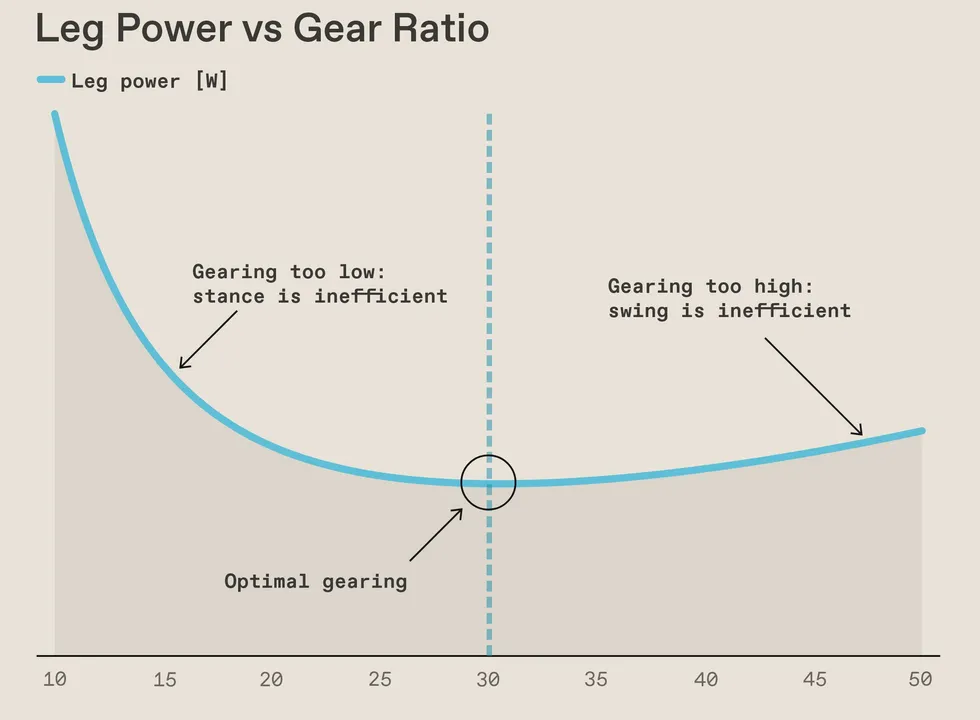
 The power consumed by a robot leg is minimized at an optimal gear ratio (30:1 in this example).Avik De/Datawrapper
 The light blue curve shows how to pick the optimal gearing (45:1). The dark blue curve shows how much heat will be produced in the knee motor, ~150W for the optimal gearing.Avik De/Datawrapper
 The solid and dashed light blue lines show a running-optimized design, while green lines show a walking-optimized design. The optimal ratio for walking is much lower (30:1 vs 45:1). However, the power dissipated in the knee motor while running (dark blue) is much higher at 30:1 vs 45:1—the price to pay for running with a walking-optimized design.Avik De/Datawrapper
 The Honor Lighting robot [right] has much larger motors driving its legs than the Unitree H1 robot [left], making it a more efficient runner but a less efficient walker.Left: Wei Zhiyang/Zhejiang Daily Press Group/VCG/Getty Images; Right: VCG/Getty Images





























You must be logged in to post a comment Login