




















Connect with us
DAPA Banner

Tech

‘Tetris’ comes to Apple Vision Pro via Apple Arcade

Published

on

Relive the magic of the 1980s by stepping inside a classic Japanese arcade and playing “Tetris” on the Apple Vision Pro.

Tetris may not be the first video game, but it’s hard to think of any other franchise that is as iconic. In fact, Tetris ranks number two on the best-selling video game franchise list, seconded only to everyone’s favorite plumber, Mario.

And now you can relive the magic of classic Tetris on the Apple Vision Pro, thanks to Retrocade.

This isn’t technically Tetris’ first appearance on Retrocade. Initially, the classic title featured as an Easter egg in the in-game back office.

Advertisement

But now it’s joined the growing list of classic titles showing up on Retrocade. Currently, Tetris is exclusive to Retrocade for the Apple Vision Pro, and comes with a brand new Japanese arcade environment.

Resolution Games’ Retrocade was added to Apple Arcade in February. As the name implies, it’s an app that aims to give the arcade experience to a modern audience by including a selection of classic titles to play.

Currently the list of games available for Retrocade include:

  • Asteroids
  • Bubble Bobble
  • Breakout
  • Centipede
  • Dig Dug
  • Frogger
  • Galaga
  • Haunted Castle
  • Pac-Man
  • Space Invaders
  • Tempest
  • Tetris
  • Track & Field

While most games are also available for iPhone and iPad, Tetris is exclusively available for the Apple Vision Pro. Retrocade is available via an Apple Arcade subscription, which costs $6.99 per month or $49.99per year.

Apple Arcade can be shared with up to six family members. It is also included in every Apple One tier.

Advertisement

Source link

Continue Reading
Click to comment

You must be logged in to post a comment Login

Leave a Reply

Tech

The Air Filter Mistake That Makes Your Chainsaw Perform Worse

Published

on


Some people might tell you that a good chainsaw is one of those tools that you don’t know you need until you actually need one. They’d likely also tell you that adding one to your power tool arsenal can seriously up your lawn care game. While that may be true, that only applies if you take care of it properly.

Maintenance is likely one area where many power tool owners fall short, especially in light the rigors those devices face on the job. Such maintenance is, perhaps, more important with chainsaws than with some smaller tools, as they have several moving parts that, if not properly maintained, could lead to an under-performing tool — and a potentially dangerous one.

Advertisement

Given the stakes, you’d be wise to ensure your chainsaw is clean and oiled before every use, among other essential chainsaw maintenance tips. As for performance, there’s another step you can take to ensure your chainsaw is delivering the goods when you put it to use. That step is the regular cleaning of the tool’s air filter. This filter limits the amount of debris that enters the motor, and thus ensures maximum output during usage. And yes, failure to clean that filter will eventually lead to an underperforming or non-starting device. Here’s how to clean your chainsaw’s air filter. 

Advertisement

How to clean your chainsaw’s air filter

The air filter on your chainsaw is pretty easy to clean, which is a good thing considering some companies recommend doing so after every use. The process may vary slightly with different chainsaws, but you’ll likely need a socket wrench, a screwdriver, and a small bowl of warm soapy water for the job. If you’re unsure where the air filter is on your device, consult your owner’s manual for help. Otherwise, follow these steps to clean your chainsaw’s air filter.

For a sponge filter:

  1. Loosen the bolts holding the chainsaw’s cover in place and remove them.
  2. Remove the cover itself.
  3. Use the screwdriver or another suitable tool to loosen and remove the filter.
  4. Once the filter is removed, soak it in the soapy water and thoroughly clean it.
  5. Rinse the filter clean and tamp it dry with a clean cloth.
  6. Allow it to completely dry before re-installing it.

For a pleated or paper filter:

  1. Loosen and remove the bolts on the chainsaw’s cover and lift it out of place.
  2. Remove the filter using a screwdriver or a suitable tool. Extra screws and fasteners may be holding the filter in place.
  3. Clean the filter by hand using warm, soapy water. A clean, delicate brush may also work.
  4. Allow the filter to completely dry before reinstalling it and operating the chainsaw.

Regardless of the filter type, you should inspect it closely for holes or tears when cleaning. If you believe the filter is damaged, simply replace it with a new one.

Advertisement


Source link

Continue Reading

Tech

Ubuntu is adding AI features, and it's on a collision course with its own user base

Published

on


Earlier this week, Canonical VP Engineering Jon Seager unveiled the company’s plan for integrating AI solutions into Ubuntu. The open source operating system, one of the most popular Linux distros for general desktop usage and cloud instances, is going to adopt many AI-based features for accessibility and other tasks. Users…
Read Entire Article
Source link

Continue Reading

Tech

This Might be the World’s First AI-Enhanced Talking C-3PO Head

Published

on

AI Talking C-3PO Head
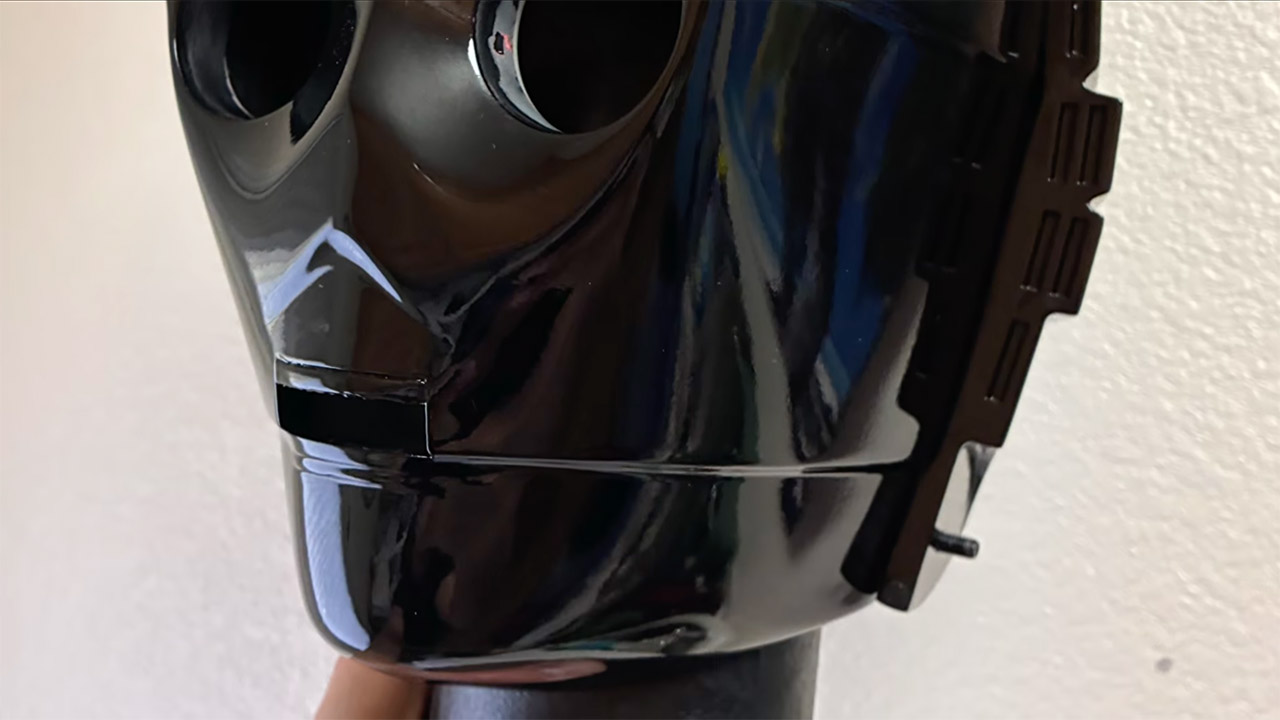
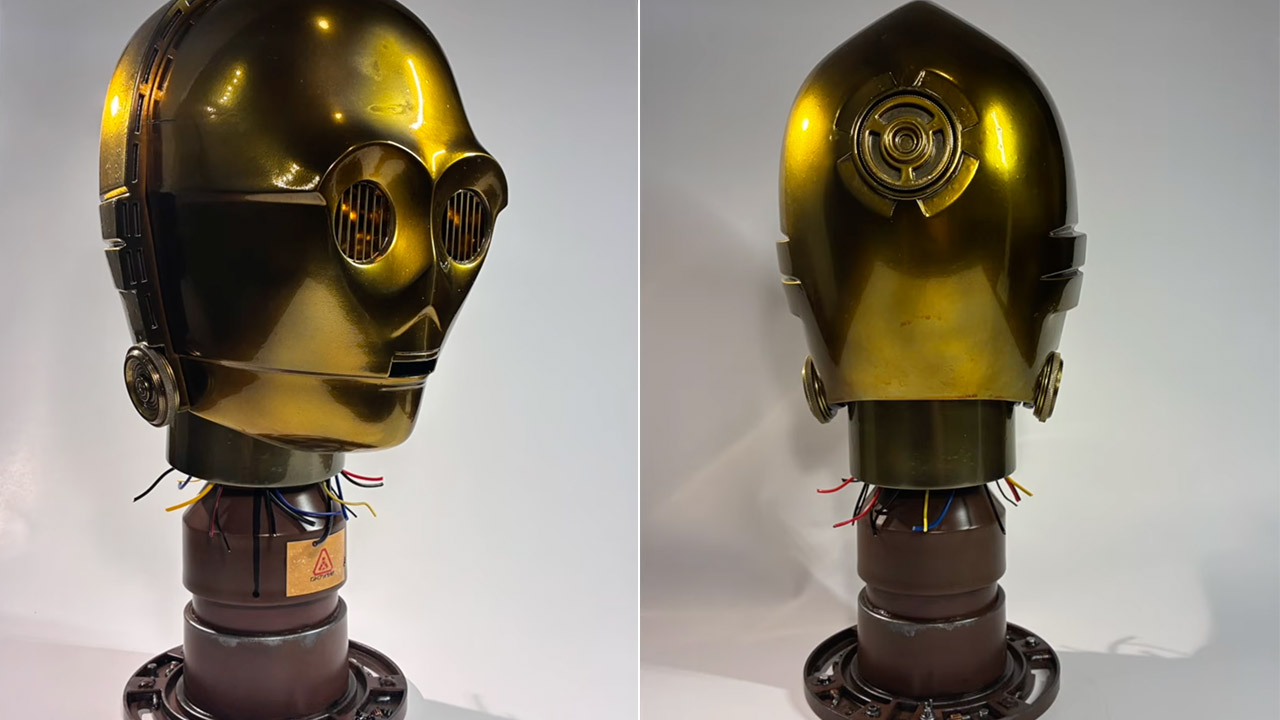
Samuel Potozkin spent months shaping a life-size C-3PO head from plastic filament and careful layers of paint. What started as a simple Star Wars fan project grew into a working machine that listens to spoken words and replies in the droid’s familiar voice. Anyone who has ever wished the golden protocol droid from Star Wars could answer back now has a real version sitting on a shelf or desk.


Potozkin printed the head on a Prusa Core 1 machine with PETG filament and a few wobbly layers. Hours of hand sanding later, the curves are velvety smooth. Primer was then used, followed by many layers of Alclad II chrome paint to achieve the desired reflecting gold surface. To achieve that movie-accurate gloss, apply a final layer of yellow-orange color and seal with clear 2K resin. There was a hiccup when the object fell off the desk and a crack formed, but a dab of glue and putty fixed it and work resumed as usual.

Sale


Bambu Lab A1 mini 3D Printer + LED Lamp Kit, Set Up in 20 Mins, High Speed & Precision, Full-Auto…
  • A1 mini + LED Lamp Kit for Functional Light Projects: Bambu Lab A1 mini + LED Lamp Kit lets you create illuminated models. Simply print compatible…
  • High-Speed Precision: Experience unparalleled speed and precision with the Bambu Lab A1 Mini 3D Printer. With an impressive acceleration of…
  • Multi-Color Printing with AMS lite: Unlock your creativity with vibrant and multi-colored 3D prints. The Bambu Lab A1 Mini 3D printers make…

AI Talking C-3PO Head
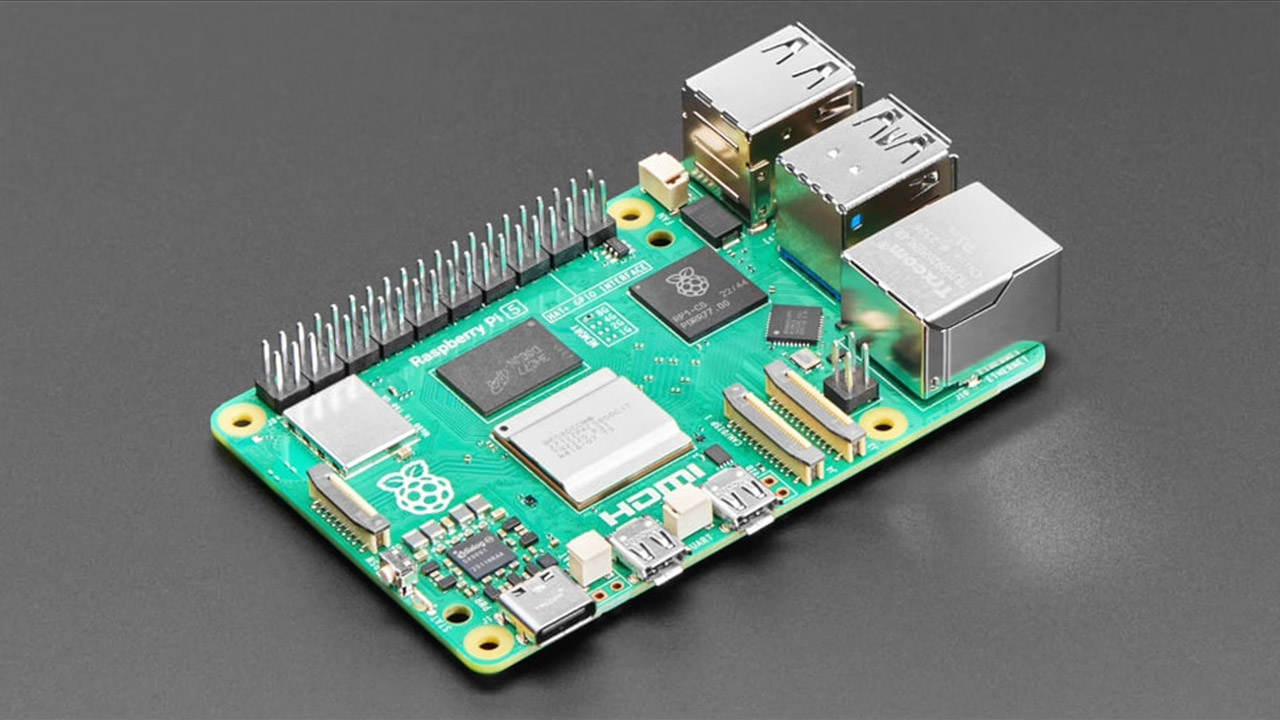
Inside the hollow head, there’s a Raspberry Pi 5, a tiny microphone, and a speaker, all neatly wired. The Pi runs a special piece of programming that manages the conversation. The sound from the microphone is routed through a Whisper-based speech-to-text system and then to a large language model, which generates a response in the style of C-3PO, the bot from the films. A voice-synthesis layer then converts the text into proper speech that sounds similar to Anthony Daniels’ original performance, with a speaker pushing it all out so the head appears to be speaking to you.

AI Talking C-3PO Head
Conversations with the head feel natural, even if there is a small delay between asking and receiving an answer. Ask who the droid is, and you’ll get a nice protocol-droid response. When you ask about Earth, it regales you with statistics in the same super-formal tone that fans associate with the films. The lag was a bit of an issue at first, but with a few code modifications, everything is fine again. When it comes to running the device, no further equipment is required because it is completely self-contained and does not require a separate computer or smartphone app.

AI Talking C-3PO Head
He’s also made the complete code and 3D files available on GitHub so that anyone can try their hand at creating their own version. If you’re curious about how the software pipeline works, there’s a lengthy paper on the same repository that explains everything. Potozkin believes that this effort is simply a modest step toward machines that can sit with humans in the real world rather than merely live on a screen all the time.
[Source]?

Advertisement

Source link

Continue Reading

Tech

Gordon Freeman Steps Into Leon Kennedy’s Boots in Resident Evil Requiem for Ravenholm

Published

on

Resident Evil Requiem for Ravenholm Half-Life Mod
Fans of survival horror and classic shooters now have a unique way to experience the latest Resident Evil title. A fresh mod called Requiem for Ravenholm arrived in early access and it transforms Resident Evil Requiem using assets pulled straight from the Half-Life series. Created by FlamingosPeak Workshop the project replaces key elements throughout the game.


Weapons, props, and even the enemies are all given a Half-Life makeover, which means you’re now walking through places that were once populated with standard infected who are now stumbling around with Headcrabs clinging to their heads. Meanwhile, Combine soldiers wait in the shadows, just as they did in Half-Life 2. The Ravenholm name is a dead giveaway, as this mod recreates the desperate, isolated mood that made Half-Life 2 so unforgettable, but set within Requiem’s lovingly constructed locales.

Sale


ASUS ROG Xbox Ally – 7” 1080p 120Hz Touchscreen Gaming Handheld, 3-month Xbox Game Pass Premium…
  • XBOX EXPERIENCE BROUGHT TO LIFE BY ROG The Xbox gaming legacy meets ROG’s decades of premium hardware design in the ROG Xbox Ally. Boot straight into…
  • XBOX GAME BAR INTEGRATION Launch Game Bar with a tap of the Xbox button or play your favorite titles natively from platforms like Xbox Game Pass…
  • ALL YOUR GAMES, ALL YOUR PROGRESS Powered by Windows 11, the ROG Xbox Ally gives you access to your full library of PC games from Xbox and other game…

Resident Evil Requiem for Ravenholm Half-Life Mod
The gameplay remains the same as in the original, with alternating perspectives between the characters and careful resource management, but every time you pick up a crowbar to whack some zombies instead of using your standard melee option, or find yourself creeping through a dark corridor feeling that familiar (and a little creepy) sci-fi dread creeping over you, it feels completely new.

Resident Evil Requiem for Ravenholm Half-Life Mod
The mod is still in early access, so expect some rough edges, especially in the opening scene, where it first interacts with the source game’s code. The team is working on an earlier version of Requiem, so anticipate the occasional issue to appear, but they invite you to report them on the Nexus page so they can be corrected, and yes, updates will be released over time to iron out the bugs. This mod is simple to download and install; simply navigate to the Resident Evil Requiem Nexus Mods page and you’re ready to go.
[Source]

Advertisement

Source link

Continue Reading

Tech

A Professional Bike Fitting Will Make You Want to Ride Even More

Published

on

I’ve been into cycling for decades—riding with grade-school buddies, kicking around in college, then city commuting in Boston, Paris, Barcelona, New York, and now Seattle. Somehow only in the last 10 years, when I became a volunteer mechanic at a bike-centric Seattle nonprofit, did I think about adjusting anything more than the seat height. Now I’m diligent about making sure I have the right bike and that it’s fit for my body and my riding style.

I wish I could have figured that stuff out sooner, so for this story, I wanted to gather expert advice on the basics of what people should look for and what questions to ask when buying a bike. (My colleague Michael Venutolo-Mantovani has more advice if you’re going that route.) After that, I’d take my own bike to a professional fitter and go deep into the nitty-gritty of bike fit to find out what it means to have a tailored ride.

I start with no bike at all. I walk to meet Rebekah Ko, the community resources director at Seattle’s Bike Works, the nonprofit where I volunteer. Ko previously ran the sales floor as general manager at the city’s Mend Bicycles, and for the purposes of this story we pretend like I am in the market for a bike that I’d use for transportation and general kicking-around fun. We make sure it’s unlike my own bike, so I won’t be comparing the two in the back of my mind.

Bike Works sells new bikes and refurbished older bikes, and after a round of questions about what I was looking for, particularly about how and how often I planned to use it, Ko wheels out a Trek Multitrack 7200, a sturdy hybrid likely from the late aughts. This Trek is upright and handsome and silver and blue, with a short wheelbase, flat bars, grip shifters, and a big, squishy seat, all of which are very different from what I’m used to.

Advertisement

“Hybrids are a soft landing ground for many people looking to get into cycling,” she explains.

She checks for about two inches of standover clearance between me and the top of the frame. She then has me put a thumb on top of my left hip and extend my hand out flat in the air next to it, setting the initial seat height just beneath it. With Ko bracing the bike, I hop on, so she can fine-tune the saddle height, making sure I have a slight bend in my knee with the pedal at its lowest point.

“That slight bend helps make sure we are engaging the larger muscles—the glutes and the thighs—where the power comes from,” she says. “It also helps keep pressure off of the knees.”

From there, it’s time to grab the bars, which can typically be raised, lowered, and pivoted. We then adjust the brake lever angle to make sure my hands rest on them in a relaxed position.

Advertisement

Ko makes sure I look comfortable, not overreached, without locked elbows or a pinched neck, not scrunched into what some call “meerkat position,” with a straight back and the wrists and elbows very bent like you’re peering over the top of them.

After these adjustments, it’s generally a good time for some preliminary stock-taking, as you’ll hopefully be spending a lot of time on this bike. So how’s your keister feel? If the saddle feels wonky, consider a different one. If it feels good, it’s time for a test drive.

I hop on the Trek and pedal around a parking lot, first noticing that giant squishy seat, which is kind of weird … but kinda fun! It fits the bike’s vibe, and I like it. The brakes are nice and grabby. The whole thing feels surprisingly nimble.

Source link

Advertisement
Continue Reading

Tech

Ask.com Has Shut Down, Marking The Official Farewell To The Internet’s Favorite Butler

Published

on


Ask.com, the search engine previously known for its butler mascot named Jeeves, has officially shut down. While Ask Jeeves was rebranded to Ask.com in 2006 by its new owner at the time, InterActiveCorp, this latest closure puts an end to the entirety of the company’s search business.

“As IAC continues to sharpen its focus, we have made the decision to discontinue our search business, which includes Ask.com,” the statement on the website reads. “After 25 years of answering the world’s questions, Ask.com officially closed on May 1, 2026.”

The statement ended by thanking its millions of users, and saying, “Jeeves’ spirit endures.” As sad as it is to see a relic of the early Internet days fade into obscurity, we still have Ask Jeeves to thank for why some users still punch in full questions when querying Google. On top of that, Jeeves was built to provide detailed answers in natural language, which could have arguably acted as a precursor to today’s AI chatbots like ChatGPT.

Advertisement

Now, Ask.com joins the Internet graveyard that includes competitors like AltaVista, which shut down in 2013. With Ask.com gone, alongside AIM and AOL dial-up services also sunsetting, we’re truly coming to an end of a specific era of the Internet.


Advertisement

Source link

Continue Reading

Tech

Coway Airmega Mighty2 Review: The Sequel Is Better Than the Original

Published

on

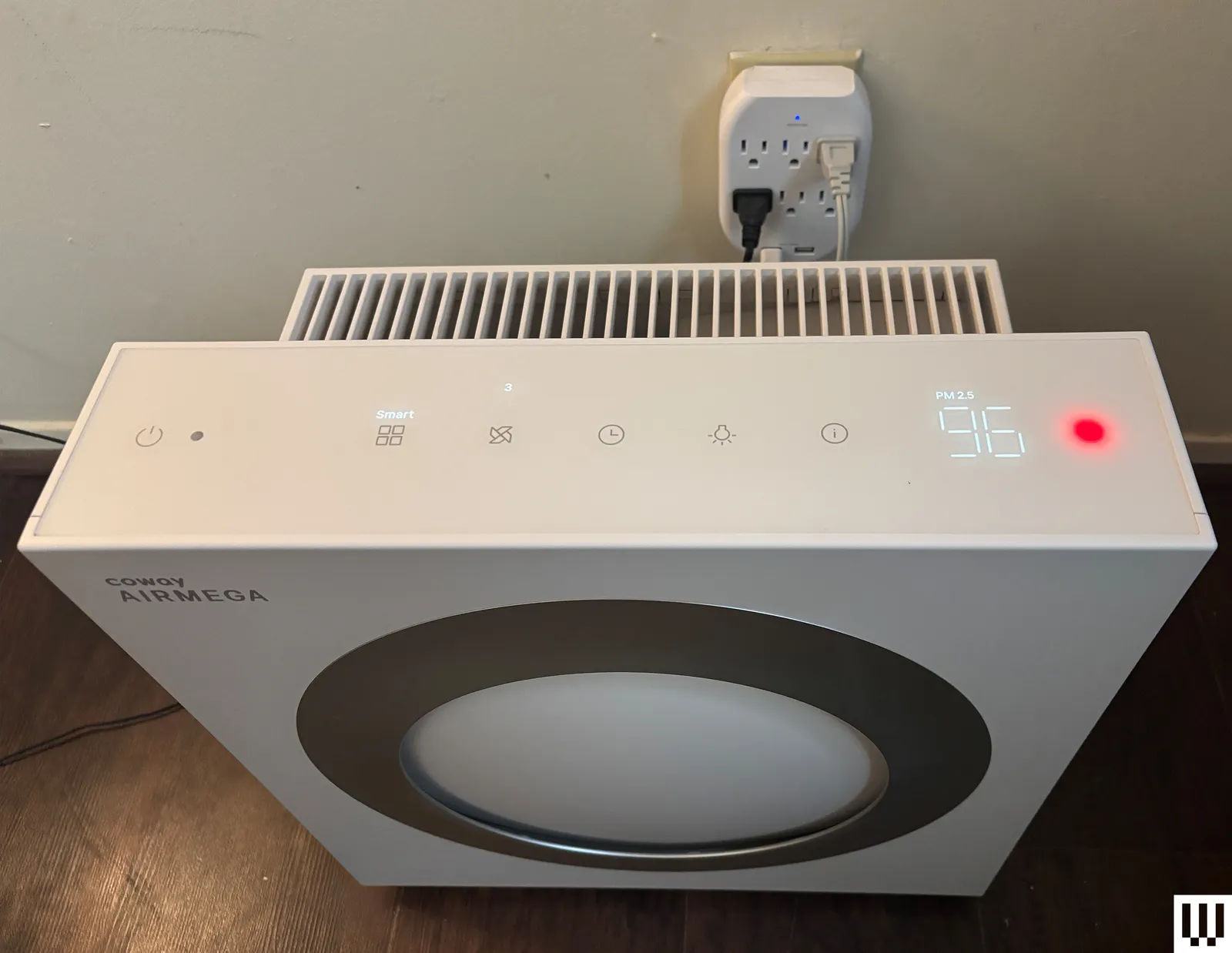
The Mighty2 has a built-in AQI (air quality index) monitor and a MegaScan laser sensor to automatically detect three distinct air particle sizes: bacteria and microplastics; fumes, smoke, allergens, and fine dust; and dust mites, pollen, pet dander, and mold. The monitor can quantify in real time how much pollution is in the air, including large and ultrafine particles.

Coway uses its own air-quality color-coding system, but the Mighty2 uses different colors from the OG Mighty model. Now the air quality light flashes blue for clean air, green for moderate, orange for unhealthy, and red for very unhealthy. Coway’s color-coding system is a bit confusing, considering that it differs from the US air quality index standards of green for good, red for unhealthy, and purple for very unhealthy. At a glance, I was often confused by what the color was signifying about my home’s air. Using the built-in air sensors, the Mighty2 automatically adjusts its fan speed (in auto mode) to most effectively purify the air in response to air quality changes.

Coway Airmega Mighty2 Review The Sequel Is Better Than the Original

Photograph: Molly Higgins

When I tested, I mostly used it in my bedroom near my cats’ litter boxes; near my living room window, which has lots of outside exhaust and pollutants; and in my kitchen while cooking on my gas stove, which doesn’t have proper ventilation. I tested this model for several weeks, moving around my home and letting the air purifier automatically adjust for various situations where air quality periodically became unhealthy. Although I most often used the auto feature, I also tested the timer and sleep features, which worked as expected every time, and I appreciated the auto-enabled sleep mode when dark, when I forgot to change settings at night.

For all air purifiers, I manually test the air with my own air quality monitor in various situations, and use a decibel monitor to measure how loud the purifier is on the highest setting. I also use a sealed tent and smoke pellets to see how quickly each air purifier clears the pellet smoke (and returns the air to healthy quality) inside the tent when in auto mode. For the smoke test, the Mighty2 took 50 seconds for the smoke to visually clear, and another three minutes and 20 seconds for the built-in air quality sensor light to read that the air was back to healthy on auto mode (from red to blue indication light). In a test with the slightly cheaper Levoit Vital 200S, the smoke cleared in about 40 seconds and took another four and a half minutes to read back as healthy air. Although the statistics are comparable, the Mighty2 was a bit faster overall. However, I really appreciated having the Levoit’s app to check air quality and purification through my phone (since the purifier was visually covered in smoke), and the app notified me when it had reached clean air status again.

Advertisement

According to my decibel reader, the Mighty2 hovered around a moderate 65 to 70 dB on the highest fan setting, and was about 35 dB on sleep mode, not even registering on the reader above the ambient noises of my home. For reference, the hum of a refrigerator is somewhere between 40 and 50 decibels, and a conversation is around 60 decibels. Even on the highest setting, it didn’t feel egregiously loud and provided white noise. Ideally, an air purifier should be able to clean the air in your room five times an hour without reaching the noise levels of a conversation. On auto modes and sleep mode, the fan noise was virtually undetectable.

If you’re a fan of Coway’s air purifiers, or want to upgrade your air purifier from the previous model, the Mighty2 is a solid choice. It’s only $30 more than the previous model, can effectively purify more square feet per hour, and its filters last twice as long as the previous model’s. The upgrade to the Mighty2 will pay for itself in a year of use through filters alone. It’s easy to clean and disassemble, and the purifier helped to keep the residual dust from my cats’ litter down, reduce dander during shedding season, and improve the overall quality of the air around their toilet/general living space.

Source link

Advertisement
Continue Reading

Tech

The TI-84 Evo Revives a Classroom Legend with Fresh Power and Clarity

Published

on

TI-84 Evo Graphing Calculator
Students everywhere once pulled the same trusty graphing calculator from their backpacks for every math class. Texas Instruments just released the TI-84 Evo, a direct update that keeps everything people already know and like while fixing the slow spots that frustrated users for years.


You can see the color selections straight away: a pure clean white, a gentle raspberry, mint, lavender, teal, silver, pink, and a bright yellow. Each one includes a matching slide cover and a compact USB-C cable, all neatly bundled together. It still feels substantial in the hand, same like the earlier TI-84 Plus CE models, but it now has a nicer keypad layout with much clearer labeling, making it a lot easier to use.

The TI-84 Evo is powered by an ARM Cortex CPU that runs at 156 megahertz. This single adjustment provides you three times the speed of the old devices. No more waiting for graphs to load; they are now drawn quickly. Complex equations are solved faster, and you can switch between panels without detecting any pauses.


The screen still boasts 320 by 240 pixels, but Texas Instruments has managed to shoehorn in a larger graphing window to make the most of the display. The result is an additional 50% of area to play with, and it truly makes a difference: curves appear nicer, labels are lot simpler to read at a glance, and kids can discover patterns faster because nothing is packed in and butchered anymore.

You get a much smoother experience from the moment you switch it on. A pleasant, large icon-based home screen welcomes you with clear tiles for the most common functions. Menus now have smaller wording and shorter explanations, requiring fewer button pushes to get to your desired destination. The graphing menu has been completely overhauled, and helpful status notes are now displayed at the top of each screen, right where you need them.

Advertisement

TI-84 Evo Graphing Calculator
There are some fresh new math features included in, such as the points of interest trace, which automatically follows any curve and highlights critical areas. The Lines and Conics app has also been updated to make it easier to navigate those difficult themes. Both of these modifications save time by eliminating the need to browse through menus the old way.

TI-84 Evo Graphing Calculator
Python is now included alongside the classic TI-BASIC language. Students can build basic scripts and connect them directly to the calculator’s math engine, allowing coding lessons to be completed without leaving the device. Furthermore, because the operating system enables USB upgrades, new features and fixes will be available long after your purchase.

TI-84 Evo Graphing Calculator
The TI-84 Evo remains eligible for the SAT, ACT, AP examinations, IB programs, and all other important standardized assessments. Teachers like a tool that is purely focused on math and does not try to lure pupils with social media or games. It’s priced at $160, but schools can contact the company to negotiate a bulk sale at a cheaper rate. Availability began immediately following the April announcement, so the new units are currently available at major shops including Amazon.

Source link

Continue Reading

Tech

The best life advice I ever followed was deleting Instagram, and it soothed my frustrated soul

Published

on

I won’t lie, I got addicted to Instagram. And for a long time, I didn’t even realize how much it was messing with my head. It sounds dramatic when you say it out loud, but it really crept up on me. I got so used to watching Instagram reels all the time that my brain just stopped having patience for anything longer. A full YouTube video felt like a commitment, and reading something without checking my phone in between felt impossible. And the worst part was, I knew exactly why it was happening.

I tried fixing it the usual ways — set app timers, try apps that stop you from doomscrolling, and tell myself I’d cut down. Some days it worked, most days it didn’t. I’d still find myself opening Instagram without even thinking about it. So one day, I stopped trying to control it and just deleted the app from my iPhone. And honestly, that one small decision did more for me than everything else I had tried.

The first few days were strangely uncomfortable

I thought I’d feel relieved right away, but that’s not how it went. The first thing I noticed was how often I reached for it without thinking. I’d unlock my phone and instinctively swipe to where Instagram used to be — my thumb just knew the spot. It made me realize how deeply the habit had settled in. I kept picking up my phone for no reason, opening it, finding nothing to scroll, and putting it back down. It felt like something was missing, even though I knew I hadn’t lost anything important.

There was this low, constant restlessness. But that phase didn’t last as long as I expected. After a few days, the urge started to weaken. I still had the habit, but it didn’t pull me in the same way. And slowly, that restlessness turned into something quieter. My phone stopped feeling like something I needed to check all the time.

I didn’t realize how much it was affecting how I saw my own life

This part took a little longer to sink in. Instagram has a way of making you feel like you’re just keeping up with people. That’s what I used to tell myself. I’m just scrolling, catching up, passing time, but it really wasn’t that simple.

Advertisement

Every time I opened the app, I saw people traveling, celebrating, looking their best, living what looked like better versions of their lives. And even if I wasn’t consciously comparing, it still affected me. It created this constant background feeling that I was somehow behind. That other people had figured things out better than I had. I didn’t actively think about it, but it was always there, shaping how I felt. Once Instagram was gone, that feeling didn’t have anything to feed on anymore. And slowly, it faded.

My attention span came back, and I actually noticed it

This is something I didn’t expect at all. A couple of weeks in, I sat down to watch a 20-minute video and didn’t feel the urge to skip through it. I just watched it. This sounds like a small thing, but it didn’t feel small to me. Before that, my brain needed constant stimulation. If something didn’t grab me instantly, I’d lose interest. That’s what reels had trained me to expect.

Without that constant loop, things started to change. I could sit with something a little longer. Then a little longer than that. I started reading again, properly reading. Not jumping between paragraphs, not getting distracted every few minutes. It felt like getting a part of my focus back that I didn’t even realize I had lost.

I stopped comparing my life without even trying to

When Instagram was part of my daily routine, I was constantly exposed to other people’s best moments. Trips, milestones, perfect photos, everything looking effortless. I told myself it didn’t affect me that much. But once it was gone, I realized it had been affecting me all along. Because suddenly, there was nothing to compare against.

No constant reminders of what I should be doing or how my life should look. No silent pressure to measure up. And in that space, something changed — I felt more at ease with my own life. Not because anything big had happened, but because I wasn’t constantly looking at someone else’s version of “better.” It was just a steady sense of being okay with where I am.

The quiet I didn’t know I was missing

Deleting Instagram didn’t suddenly turn my life around. I didn’t wake up the next day feeling more productive, more focused, or completely at peace. That kind of overnight change is a myth. What actually happened was much simpler. At first, it just felt like there was less happening. Fewer distractions, fewer impulses to pick up my phone, fewer moments where my attention got pulled away without me realizing it. My days didn’t become perfect, but they became easier to sit through. I wasn’t constantly interrupting myself. Over time, that started to add up.

I noticed I could stay with a thought a little longer. I didn’t feel the need to fill every gap with something to watch. Even boredom felt different; it wasn’t something I needed to escape immediately. Sometimes I just let it be, and that in itself felt new. There was also this unexpected sense of relief. Not loud or overwhelming, just a steady feeling in the background. Like I had stopped carrying something heavy without realizing I was carrying it in the first place. And maybe that’s what changed the most. It wasn’t about gaining something extraordinary; it was actually about losing something unnecessary. The constant noise, the low-level comparison, the habit of reaching for my phone without thinking. All of it slowly faded out. My life didn’t become more exciting. It just became more mine — clearer, calmer, and a lot less crowded in my head.

Advertisement

Source link

Continue Reading

Tech

Norton VPN enters the AI agent space with ‘first truly AI native’ VPN for agents

Published

on


  • Norton VPN has launched “first truly AI native” VPN for Agents
  • It is fundamentally integrated with AI agent activities
  • It offers multi-tunnel support

Norton VPN has launched VPN for Agents, its AI-native VPN built for autonomous AI.

Traditionally, the best VPNs have been designed for users browsing the web, forcing AI agents to share your VPN and internet settings. The setup so far hasn’t been ideal, with AI Agents performing tasks on your behalf, either not being able to utilise VPNs when necessary or, at best, necessarily dictating your host’s entire VPN settings.

Source link

Advertisement
Continue Reading

Trending

Copyright © 2025