

Tech
Coway Airmega Mighty2 Review: The Sequel Is Better Than the Original


The Mighty2 has a built-in AQI (air quality index) monitor and a MegaScan laser sensor to automatically detect three distinct air particle sizes: bacteria and microplastics; fumes, smoke, allergens, and fine dust; and dust mites, pollen, pet dander, and mold. The monitor can quantify in real time how much pollution is in the air, including large and ultrafine particles.
Coway uses its own air-quality color-coding system, but the Mighty2 uses different colors from the OG Mighty model. Now the air quality light flashes blue for clean air, green for moderate, orange for unhealthy, and red for very unhealthy. Coway’s color-coding system is a bit confusing, considering that it differs from the US air quality index standards of green for good, red for unhealthy, and purple for very unhealthy. At a glance, I was often confused by what the color was signifying about my home’s air. Using the built-in air sensors, the Mighty2 automatically adjusts its fan speed (in auto mode) to most effectively purify the air in response to air quality changes.
Photograph: Molly Higgins
.jpg)
When I tested, I mostly used it in my bedroom near my cats’ litter boxes; near my living room window, which has lots of outside exhaust and pollutants; and in my kitchen while cooking on my gas stove, which doesn’t have proper ventilation. I tested this model for several weeks, moving around my home and letting the air purifier automatically adjust for various situations where air quality periodically became unhealthy. Although I most often used the auto feature, I also tested the timer and sleep features, which worked as expected every time, and I appreciated the auto-enabled sleep mode when dark, when I forgot to change settings at night.
For all air purifiers, I manually test the air with my own air quality monitor in various situations, and use a decibel monitor to measure how loud the purifier is on the highest setting. I also use a sealed tent and smoke pellets to see how quickly each air purifier clears the pellet smoke (and returns the air to healthy quality) inside the tent when in auto mode. For the smoke test, the Mighty2 took 50 seconds for the smoke to visually clear, and another three minutes and 20 seconds for the built-in air quality sensor light to read that the air was back to healthy on auto mode (from red to blue indication light). In a test with the slightly cheaper Levoit Vital 200S, the smoke cleared in about 40 seconds and took another four and a half minutes to read back as healthy air. Although the statistics are comparable, the Mighty2 was a bit faster overall. However, I really appreciated having the Levoit’s app to check air quality and purification through my phone (since the purifier was visually covered in smoke), and the app notified me when it had reached clean air status again.
According to my decibel reader, the Mighty2 hovered around a moderate 65 to 70 dB on the highest fan setting, and was about 35 dB on sleep mode, not even registering on the reader above the ambient noises of my home. For reference, the hum of a refrigerator is somewhere between 40 and 50 decibels, and a conversation is around 60 decibels. Even on the highest setting, it didn’t feel egregiously loud and provided white noise. Ideally, an air purifier should be able to clean the air in your room five times an hour without reaching the noise levels of a conversation. On auto modes and sleep mode, the fan noise was virtually undetectable.
If you’re a fan of Coway’s air purifiers, or want to upgrade your air purifier from the previous model, the Mighty2 is a solid choice. It’s only $30 more than the previous model, can effectively purify more square feet per hour, and its filters last twice as long as the previous model’s. The upgrade to the Mighty2 will pay for itself in a year of use through filters alone. It’s easy to clean and disassemble, and the purifier helped to keep the residual dust from my cats’ litter down, reduce dander during shedding season, and improve the overall quality of the air around their toilet/general living space.


In this week’s “Sunday Reboot,” Apple shoots soccer with iPhones, Epic Games misses the mark with its messaging, and Plex’s astounding price rise.
Sunday Reboot is a weekly column covering some of the lighter stories within the Apple reality distortion field from the past seven days. All to get the next week underway with a good first step.
This week, Apple faced protests over the closure of the Apple Towson Town Center store, the first unionized store. It also elected to continue the never-ending lawsuit with Epic Games via the Supreme Court, and it turns out some server schematics were stolen in the May cyberattack of Foxconn.
Fortnite returns to iPhone with a misguided celebration
The lawsuit between Epic Games and Apple has been excruciatingly long, painfully expensive, and seems like it just won’t end. And yet, somehow, Epic has taken what should’ve been a happy promotional event and made it melodramatic.
Fortnite, the game that started the whole lawsuit shenanigans, is back in the App Store in most countries. That’s a big thing for Epic to go on about, and it did, complete with an Apple-like social media ad.
This is something we can expect from Epic Games. It’s a big song and (video-based) dance, promoting its moneymaker by shaking its moneymaker
This is great for gamers, but it is overshadowed by two things. First, that Australia is excluded from the revival due to cases still being processed in the country.
The second and more unfortunate thing, is the press release that Epic created. One that ominously says “The Final Battle Approaches.”
This is in reference to how the U.S. federal court will “force” Apple to be transparent over its App Store fees. Epic believes that regulators around the world “will not allow Apple junk fees to stand.”
It goes on to say it will continue to challenge Apple on its alleged anticompetitive practices, like banning alternative stores and payment systems.
It’s an astoundingly contrasting approach, depending on where you view it from. Gamers get a bright and colorful celebration, while simultaneously, there’s the highly corporate and completely stark threat.
If we’re talking from a Star Wars perspective (a property that is being incorporated into Fortnite at the time of publication,) Epic is somehow trying to be the Rebel Alliance and the Empire at the same time.
Separately, they work fine. Bring them together, and it all feels a bit off.
Epic could’ve just stuck with the jovial messaging and kept quiet about what it wanted to do in the courtroom for another time. And it should’ve.
Given Epic chief Tim Sweeney’s public posting habits, we would’ve inevitably heard something about that side of things eventually.
Inevitable: MLS uses iPhone 17 Pro to broadcast a game
On May 21, it was announced that the iPhone 17 Pro would play a very important part in Apple TV‘s coverage of the LA Galaxy vs Houston Dynamo FC MLS game the following Saturday.
All shots from the game would be shot live on the iPhone 17 Pro, from team warmups to scoring goals. Apple said it would bring “dynamic new perspectives that bring viewers closer to the action,” because an iPhone is so much smaller than a regular camera.

Apple TV shot its first MLS game entirely on an iPhone – image credit: Apple
While this may sound like the usual broadcast crew were waving iPhones around, everyone knows deep down that there’s more to it than that. With its extensive use in commercial projects, you can count on the use of specialist rigs and lens setups to augment the capabilities of the iPhone.
The fact that the iPhone is being used for a live soccer match is also entirely unsurprising. It was an inevitability.
It’s been used for some coverage during Friday Night Baseball back in September 2025, so Apple TV’s team has some experience already.
Away from the pitch, there’s also feature film work, including the iPhone 15 Pro Max for the Danny Boyle horror “28 Years Later.”
It’s also been used in a few ways for live broadcasts. The BBC used them for livestreams during the 2024 UK General Election, while NBC used two iPhones and an iPad for the “Today Show” during COVID times.
Replacing every camera for a sports broadcast with iPhones is an interesting move. It’s also a big advertising play by Apple, since it shows others what the iPhone is capable of doing.
Even so, it’s something that we all knew would happen eventually.
Per-Plex-ing sticker shock
Everyone is very aware that inflation is a thing. Over time, the cost of products and services trends upward, making things gradually more expensive.
Sometimes, those price rises are high but not too much to swallow. Other times, they can be beyond belief.
On May 19, Plex said that it was raising the price of its Lifetime Plex Pass from its current $249.99 price to $749.99. That’s a $500 increase, which is almost a MacBook Neo.
The lifetime Plex Pass is not great value at $749.99
That is a considerably massive increase, which Plex justified by saying it needs to sustain long-term development. The new price “reflects the real, ongoing value of the software we’re committed to building and maintaining for years to come.”
It almost sounds justifiable until you start working out the math.
The current Plex Pass costs $69.99 per year, ignoring any price rises that may apply to that plan in the future. You would have to be using Plex for more than ten years under the annual Plex Pass to pay the equivalent of the Lifetime Plex Pass cost, post rise on July 1.
Given that not a lot of software survives a decade of market forces anyway, it seems like a hard deal to really accept as a consumer. It’s questionable whether there will still be a Plex service available to use in ten years time.
Indeed, there’s more incentive for consumers to pay for the annual Plex Pass, simply because of choice. After five years, they could easily switch to another platform entirely, saving some $375 in the process from not having to pay Plex more.
What the sticker shock upgrade should do is give consumers the opportunity to think about their options.
A big one is Jellyfin, which requires a bit of effort and some knowledge to get up and running. It’s free and open-source, and what you pay with is your own sweat.
Of course, free is a very attractive price point, and extremely hard for Plex to compete against.
Plex may well have good intentions to keep the software development of its platform going for years to come. To a consumer, it probably seems insane.
Last week’s Sunday Reboot covered Liquid Glass getting an award, Tim Cook being taken to China one more time, and Cats and HomeKit.
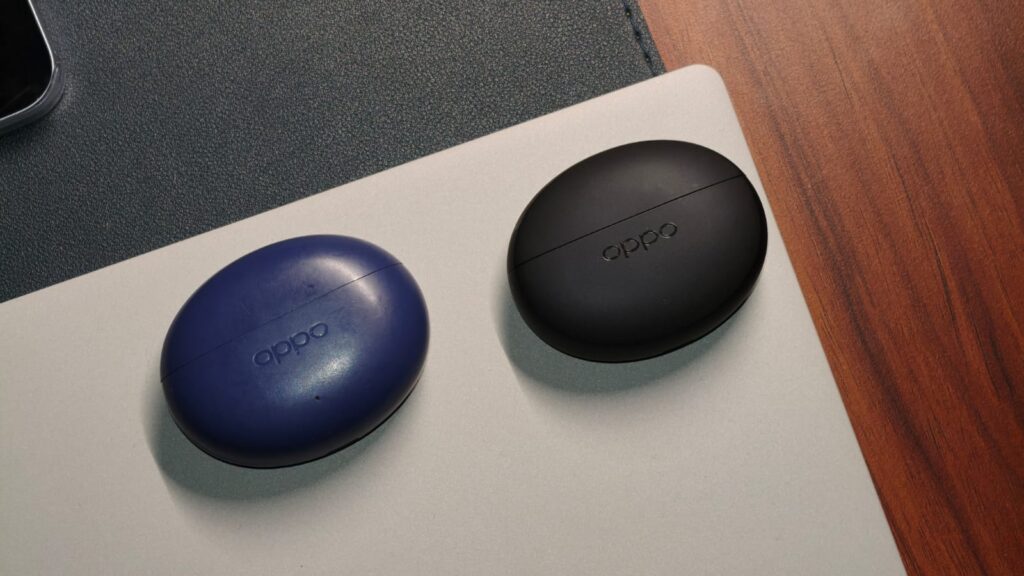
What actually makes a good pair of budget earbuds? I’ll say it’s sound quality, mixed with simplicity, with a sprinkle of some useful features. In my years of reviewing tech, there has been just one brand that’s been following this recipe perfectly, and that’s OPPO. Their Enco earbuds, as people would say these days, hit the spot, and I’m a fan, so much so that I’m still daily driving the Enco Buds 3 Pro+ from the last review. A few days back, the Chinese maker announced the all-new Enco Air 5 Pro, promising even better 55dB ANC, Bluetooth 6.0 support, and LHDC 5.0.
As expected, OPPO sent over the 5 Pro a couple of weeks back. Since then, I’ve made them my primary set of earbuds, taking them to the gym every day, using them while working, and also on a short flight to Delhi to test their ANC capabilities. Spoiler alert: They are my new favorite pair of earbuds. Here’s why.
OPPO Enco Air 5 Pro Review
Summary
The OPPO Enco Air 5 Pro are probably the easiest-to-recommend earbuds I’ve ever tested, simply because they don’t put a foot wrong. The design has been refined to feel even more premium, and the case no longer picks up smudges. Comfort is top-tier across all ear sizes. The sound feels super balanced, with clear vocals and controlled mids and highs. Not to mention the awesome ANC, which can dampen any aircraft noise without issues, helping you zone out into the music. Controls are intuitive and easy to understand for just about everyone.
Design & Comfort

If you remember the previous Enco Air 3 Pro+, they were a pretty handy pair of earphones. They weren’t too big, and the matte finish looked pretty at first. But over the past few months, I’ve noticed permanent smudge marks on them that won’t go away. Very fortunately, that won’t be the case for the Enco 5 Pro. OPPO has redesigned almost every part, and I’m a fan. You still get the pill-shaped case, but OPPO has trimmed the dimensions. It’s now even more portable, which is great news.
Next on the redesign list is the finish. It’s a soft-touch black powder coat that feels really nice in the hand. It only picks up small smudges, and they can be wiped away with a wet towel in seconds. The opening/closing mechanism is still super satisfying, meaning I was using it as a fidget toy. Thankfully, OPPO hasn’t done away with the physical pairing button, so you won’t have to perform finger gymnastics to pair with a new phone.

Comfort has always been tricky for me. I have small ears, so anything that’s bulky just slips out after a few minutes. That’s exactly why I couldn’t daily drive the Noise Master Buds 2. Surprisingly, OPPO is the only brand that’s stayed in my ears just fine, and I’m glad to report the same about the Enco Air 5 Pro. They are lightweight and supremely comfortable, meaning I could wear them on a long flight without any hiccups and carry them out while doing my daily chores, forgetting they are in my ears.
OPPO has also bundled a couple of differently sized tips, so if the pre-applied ones feel small or large, you can experiment with others. The buds are IP55 certified, meaning they’ll withstand a sweaty gym session without a hitch, but submersion will be a problem; keep an eye out for that.
Sound Quality & ANC

The OPPO Enco Air 5 Pro comes with 12mm Titanium-Coated Diaphragm drivers and support for LHDC 5.0, and Bluetooth 6.0. All my testing was done on the Ultimate Sound preset, but there are a couple of other presets available, along with a full equalizer, which we will talk about soon. To put the Enco 5 Pro through its paces, I started my listening session with Michael Jackson’s “Billie Jean” and “Heartless” by The Weeknd. The earbuds are tuned to be balanced, irrespective of what song you listen to. The Hi-Fi vocals sound clear without distortion at higher volumes, and the background drums on Heartless have a little thump, which is always appreciated. The highs don’t screech your ears, and OPPO has even managed to hit the treble on point.
I also found that all the instruments have very good separation, but if you’d like them placed all around you, OPPO has its Live Audio feature. I’m not the biggest fan of this tech, but I’d be lying if I said the experience was bad. The Enco Air 5 Pro places different elements perfectly around you. For all my movie fanatics, I watched a couple of episodes of Better Call Saul with the earbuds connected to my Mac. The latency wasn’t an issue, as the dialogue was in sync with the lips and the audio quality was clean. Calls have been improved quite a bit compared to the predecessor, with crisper audio and better noise reduction.

As far as ANC is concerned, its biggest test is flights. That rumble of the jet engine can get annoying fast, and I absolutely don’t like it. Since I was due to attend an event in Delhi, I took the 5 Pro with me, and the experience did not disappoint. At 55dB of ANC, I’d say the buds canceled about 85% of the jet engine rumble, without any music on. That’s really good compared to the 3 Pro+, which were around the 40% mark. With any music on at around half volume, most engine noise disappears, and the experience is the same as if you were sitting in your living room. It is important to note that high-pitched noises, such as a couple arguing, will still make their way through.
OPPO claims about 13 hours of battery life on a single charge for the earbuds, and while my 8 hours is less than the claimed number, it’s still plenty good, especially with ANC turned on at all times. The case provides a couple of extra charges, so the total output should be around 24-25 hours, depending on your use case. Still, battery life is great overall.
Controls & Companion App
Controls can, at least for me, make or break the experience. Thankfully, the Enco Air 5 Pro gets this right, which has some of the best controls I’ve tested so far. Headlining it all is the new volume adjustment settings, which lets you slide up/down on both earbuds to raise or lower the volume. It works super effectively and doesn’t mess up the fit much. Beyond that, you get the basics like double-tap to play/pause the music, triple-tap to skip forward/rewind, and tap and hold to turn on ANC. All of these are customizable to your liking.
The earbuds can be controlled via the HeyMelody app or directly from the Bluetooth settings page if you’re using an OPPO or OnePlus phone. The app is slick and responsive, and this time OPPO has debuted the new Spotify Tap feature. For those unaware, it connects to your Spotify app and plays a song according to your taste whenever you tap your earbuds. I’m an Apple Music user, but I do see the appeal. There’s also Sound Space, which includes different white noises, like waves crashing on the shore, morning sunshine, and night camping. All of which can help you better concentrate at work or sleep better. Last but not least, a full 10-band equalizer lets you tune the sound output precisely to your liking. I did try it, but since I’m no musician, I left it in OPPO’s hands with the different presets.
Verdict

At ₹4,999, the OPPO Enco Air 5 Pro are probably the easiest-to-recommend earbuds I’ve ever tested, simply because they don’t put a foot wrong. The design has been refined to feel even more premium, and the case no longer picks up smudges. Comfort is top-tier across all ear sizes. The sound feels super balanced, with clear vocals and controlled mids and highs. Not to mention the awesome ANC, which can dampen any aircraft noise without issues, helping you zone out into the music. Controls are intuitive and easy to understand for just about everyone. They get a solid recommendation from me and should absolutely be on your radar.

Marshals, a new Yellowstone spinoff starring Luke Grimes as Kayce Dutton, is airing on CBS right now. You can also tune in with Paramount Plus. The Yellowstone sequel series sees Grimes’ former Navy SEAL join an elite unit of US Marshals to bring range justice to Montana, according to a synopsis from CBS.
The show includes Yellowstone actors Gil Birmingham as Thomas Rainwater, Mo Brings Plenty as Mo and Brecken Merrill as Tate. Spencer Hudnut is the showrunner of Marshals — formerly known as Y: Marshals — and Taylor Sheridan is an executive producer.
When to watch new Marshals episodes on Paramount Plus
Episode 13 of Marshals airs on CBS on Sunday, May 24. Viewing options for Paramount Plus customers vary by subscription tier. You can watch the episode live if you have Paramount Plus Premium, which includes your local CBS station. If you subscribe to Paramount Plus Essential, you can watch the installment on demand the following Monday, but not live on Sunday.
- Episode 13, Wolves at the Door: Premieres on CBS/Paramount Plus Premium on May 24 at 8 p.m. ET/8 p.m. PT/7 p.m. CT. Streams on Paramount Plus Essential on May 25.
You can also watch CBS and the finale of Marshals without cable with a live TV streaming service such as YouTube TV, Hulu Plus Live TV or the DirecTV MyNews skinny bundle. In addition to offering a lower-cost option, Paramount Plus lets you watch the other three Yellowstone spinoffs: the prequels 1883 and 1923 and the sequel Dutton Ranch.
After a price increase in early 2026, the ad-supported Essential version runs $9 per month or $90 per year. The ad-free Premium version runs $14 per month or $140 per year. Paying more for Premium gives you downloads, the ability to watch more Showtime programming than Essential and access to your live, local CBS station.
The Gulfstream family of aircraft is commonly used by A-listers for private jets. The manufacturer boasts a fleet of aircraft ranging from the G300, with a range of 3,600 nautical miles and high-speed cruise capabilities of Mach 0.84, to the G800, with a dramatically increased range of 8,200 nautical miles and the ability to hit Mach 0.90. Gulfstream prides itself on creating luxurious aircraft for business travel, and the Gulfstream IV in particular is one of the more iconic models in its catalog. It’s not one of the newer ones, though, with production beginning in the 1980s. The civilian jet is capable of flight at up to Mach 0.80, and boasts a range of approximately 4,150 nautical miles. On its introduction, it debuted twin Tay 611-8 engines from Rolls-Royce, offering a total of 27,700 pounds of thrust.
1993’s GIV SP (Special Performance) model upgraded elements like the brakes and wheels, as well as giving fliers more freedom to customize the model and carry more weight. Some celebrities prefer newer private jets like the Gulfstream G650, but the IV and its SP variant are still quite popular. Though it’s no longer produced, it continues to have a sizable celebrity following, with some superstars from a range of fields, from the biggest actors to the most celebrated athletes, owning one or previously having owned one. From Floyd Mayweather to Oprah Winfrey, let’s take a look at these stars and the planes they fly in.
Tom Cruise
Tom Cruise has everything you could ask for in a private jet owner. For one thing, the “Mission Impossible” superstar is absurdly wealthy. According to AOL in April 2026, his net worth stands at approximately $600 million, and he signed a deal that month for $135 million to return to the role of Maverick in the upcoming third Top Gun movie. This is perhaps the highest-paid Hollywood role ever, and underscores the fact that Cruise is quite the airplane enthusiast, just like Maverick himself.
Unsurprisingly for the impetuous Cruise, who is well-known for performing his own stunts in his movies, he is a registered pilot (though he did not fly Top Gun’s legendary F-14 himself). Tom Cruise owns several aircraft, and one of the coolest in his fleet is a Gulfstream IV.
The model has a Jacuzzi and a private little cinema room, Forbes reported in 2012, and was reportedly an ostentatious wedding gift (costing a cool $20 million) for Cruise’s third wife Katie Holmes. Though the pair are no longer married, they certainly spent considerable time in the air while they were together. In 2007, The Sunday Times reported that while they lived together in Beverley Hills, Holmes was playing the role of Jackie Truman in the movie “Mad Money,” which was being filmed about 1,500 miles away in Louisiana. That’s quite a commute, but then-husband and avid aviator Cruise had stepped in by taking her there in his Gulfstream IV. This being Tom Cruise, he didn’t simply accompany her on the flight but took on the pilot’s role himself.
Oprah Winfrey
Oprah Winfrey’s gigantic net worth, according to Forbes, stands at $3.4 billion. She bought her first private aircraft, a Gulfstream IV, in 1991, for $25 million. She did so after an encounter with a fan at a commercial airport, she told The Hollywood Reporter in 2019. The fan had accused her of being unfriendly, not offering a warm embrace as she famously does on her show. “I stood up and I gave her a hug and then I went to the phone and called my lawyer,” she stated. “This is going to be my last time waiting four hours in the Chicago O’Hare Airport.’”
The Gulfstream model was used by Oprah for some years, with an incident in December 2005 in which the aircraft was just beginning a flight from Santa Barbara Municipal Airport in California when it was seemingly struck by a bird and grounded until its windshield underwent essential repairs. Later that month, it was concluded that the cause of the damage was different. John Ahlman, Battalion Chief with the Santa Barbara City Fire Department, reported, according to Today, “There was no bird involved, but the pilot did tell my captain that he felt it was a fatigue thing with the glass.” Whether she was unsettled by the experience or simply wanted a different aircraft, she replaced her first Gulfstream with a Bombardier Aerospace Global Express XRS in 2006.
Later, Oprah would add other aircraft to her fleet. They would include, Jettly goes on, several newer Gulfstream models. Throughout the 2010s, she would acquire a G550, a member of the G650 family, and the G700. The latter was added to Oprah’s repertoire in 2024, a model that costs in the region of $70 million and was engineered to be fully customizable to the owner’s requirements.
Floyd Mayweather
In 2018, the BBC reported that Floyd Mayweather reclaimed his crown as the highest-paid athlete on the planet. With a $275 million paycheck for his much-awaited bout as Conor McGregor, it’s no surprise at all that Money Mayweather has a private jet fleet of his own. He owns a Gulfstream IV registered as N305DG, which he demonstrated in an Instagram post from jetsace in October 2024. “Carbon fiber, come check this out,” Mayweather Jr. says from the tarmac, beckoning the camera closer and declaring the aircraft to be “not bad for a high school dropout.”
The exterior, naturally, is fully emblazoned with the former boxer’s brand. His name, Mayweather, is emblazoned across its body in bright red, with both nose and tail featuring the TMT logo. The Money Team, true to its name, represents the finer things, and this Gulfstream is just one private jet Mayweather has owned. He also has a Gulfsteam G650, and the famed “Air Mayweather” features a roomy interior, bright, opulent styling, and more than a few nods to Mayweather’s perfect boxing record. The Sun shared a showcase from Mayweather in 2018, gleefully revealing his attention to detail: Even the pilot’s uniform features a proud “50-0” legend on the sleeve. Needless to say, there have also been some very expensive cars in Floyd Mayweather’s collection.
Dan Bilzerian
Actor and poker player Dan Bilzerian isn’t a man to shy away from the limelight. In September 2014, he shared the fact that he had bought a Gulfstream IV. The announcement was posted on Instagram, accompanied by a dramatically-lit nighttime photograph of the aircraft. His father, apparently, was not so impressed. Bilzerian joked on the post, “I told my Dad I bought this G4, he said ‘congratulations son, by your age I had 3.’”
The plane, as is common with private jets, was soon detailed to take his tastes into account. Registration numbers, a little like vanity plates on cars, can be customized somewhat to suit their owner, and Bilzerian left his own mark on his model with the registration N701DB, emblazoning his own name upon it.
With that complete, there was another important registration job to take care of. Bilzerian’s GOAT Airways, tying in with his branding in other business ventures, was used to register the aircraft, and so the tail of the aircraft was emblazoned with the goat design. Bilzerian posted on Facebook in November 2014 that this was added during a weekend stay in Los Angeles. In 2020, the model was outfitted in a sleek all-black look. Having been originally manufactured in 1987, perhaps it’s no surprise that Bilzerian felt it was time for a new look.
Alex Rodriguez
Former MLB star Alex Rodriguez made $275 million in his decade with the New York Yankees alone, and according to Times of India, his shared net worth with Jaclyn Cordeiro stands at approximately $353 million. When A-Rod travels for appearances, to support his business concerns, and so on, he has done so in a Gulfstream IV, among other aircraft.
The baseball maestro has, in fact, owned multiple Gulfstream IVs. In February 2009, the New York Post reported that a 1987 model co-owned by A-Rod and his pilot, Craig Frost, had been put up for sale. The pair sought $16-$20 million for it. The whole affair, however, did not dampen Rodriguez’s enthusiasm for the plane, which is clear when you consider how he outfitted his second Gulfstream IV. Sports Illustrated was given a window into the luxury that awaits, reporting in June 2019 that it boasts “10 plush seats and a bed, as well as endless healthy snacks arrayed next to a single white orchid, WiFi, delicious shrimp cocktail and salmon filets served on green-rimmed Limoges china, and a smooth sound system that plays Rodriguez’s favorite bands.”
It’s undeniably luxurious, but Rodriguez’s plush plane is also a necessity. Because of business commitments, the magazine goes on, he was spending approximately three weeks out of every year in flight, and it would have been difficult for a celebrity of his status to navigate busy public airports that much.
Tech
In a market where Mac has been aspirational, it’s somehow a better deal than windows machines now

For a long time, the laptop buying advice was simple enough. Windows had a more versatile portfolio that brought you affordable, mid-range, high-end, and even gaming options, while MacBooks were known as the easy premium recommendation.
But owing to the pricing circus caused by memory shortages and component price hikes, the equation makes no sense anymore.
Apple has always had an aspirational pull with its products, including the Mac. The appeal was the sleek hardware, the tighter software experience, and an ecosystem that makes you feel comfortable after getting in. Pricing was the one aspect that pushed people back towards Windows. Don’t get me wrong, Windows does have its strong points. But for many people, the argument was always the same. The Mac is nice, but look at what you can get on the PC side for less money.

In 2026, this doesn’t hold true anymore. The MacBook Neo has changed the entry point for Apple’s laptop lineup. The Mac now starts from $599 with an A18 Pro chip, a 13-inch Liquid Retina display, and macOS Tahoe. It ships with 8GB of unified memory and starts with 256GB of storage, which are still obvious constraints in 2026. And yet, the value it offers is much better than its competitors at this price range.
Windows laptops are getting squeezed
The Windows side is dealing with a very big problem. Memory prices have become a serious pressure point across the PC industry. Windows laptop makers such as HP, Dell, Asus, and others are hiking prices because of the global memory chip shortage. And the worst part is, the memory prices might not fall until next year. The current RAM crunch is making Apple look like the sensible laptop choice.

This is something Apple has navigated skillfully. Thanks to its deep supply chain leverage and its highly effective chip strategy, the iPhone maker has avoided the issue plaguing its Windows rivals. Microsoft’s latest Surface for Business lineup is a great example. These are powerful new laptops, sure, but the pricing is frankly disappointing.
After years of pushing Windows 11 and Copilot, both of which require at least 16GB of RAM, the company is selling its very own Surface Laptop with 8GB for $1,299. In comparison, the brand-new M5 MacBook Air only costs $1,099, and Apple packs 16GB of RAM in it.

Still no answer to the MacBook Neo
At $599 in the US, Apple suddenly has a Mac that sits in a space Windows should have owned comfortably. Just pit it against the 13-inch Surface Laptop, and the massive price gap alone would win any arguments. Aside from a few rare models, the MacBook Neo stays uncontested.
You get a clean aluminum design, a sharp 13-inch display, long battery life, Apple Intelligence support, and enough everyday performance for students, families, and basic creative work. Sure, the Surface has advantages like touch, better battery claims, and stronger multicore performance, but that’s the same kind of argument people have made against the MacBook when Windows was cheaper. What mattered the most was what a buyer was willing to compromise on for the price. The only difference now is that I find myself defending the MacBook.

Apple is now the practical choice
The MacBook Neo is not without trade-offs. It is not the machine for heavy video editors, serious multitaskers, or anyone who refuses to buy an 8GB laptop in 2026. But it gives mainstream buyers the thing Apple usually reserved for higher price brackets, which is a proper Mac experience at a price that no longer feels absurd.
Meanwhile, the Windows market is getting squeezed. Memory costs are rising; every new laptop is much more expensive than the previous-gen models, and the budget-to-midrange space barely exists. Still, MacBooks aren’t the right choice for everyone. Windows maintains a solid lead in gaming, repair variety, hardware choice, and much more. Yet, in 2026, Apple’s cheapest MacBook now looks like the laptop you don’t have to justify with emotions, only math.
There is a category of production incident that engineering teams are not tracking yet — because it doesn’t fit any existing postmortem template.
The agent initiated an action. The action was technically correct given the agent’s context. The context was incomplete. The infrastructure cascaded. And, by the time the incident review happened, three teams were arguing about whether it was an agent failure or an infrastructure failure, because the frameworks for thinking about these two things have never been connected.
The scale of this exposure is no longer theoretical. Seventy-nine percent of organizations now have some form of AI agent in production, with 96% planning expansion. Gartner predicts 33% of enterprise software will include agentic AI by 2028, but separately warns that 40% of those projects will be canceled due to poor risk controls.
What neither statistic captures is the failure mode happening between those two numbers: Agents that are running, that are not canceled, and that are quietly generating infrastructure events no one has categorized as risk.
I’ve spent six years building infrastructure automation systems at enterprise scale, first at Cisco (leading AI-driven lifecycle platforms deployed across 20-plus global enterprise customers), then at Splunk (designing AI-assisted root cause analysis and observability workflows across thousands of enterprise environments).
During that time I also filed a patent on intent-based chaos engineering methodology. And across all of it, I kept watching organizations make the same structural mistake: Treating autonomous agents and chaos engineering as separate disciplines. They are not. They are the same discipline, and the gap between them is quietly generating the next wave of major production incidents.
The judgment call that agents skip
To understand why this matters, you need to understand what’s actually broken in how enterprises govern chaos today, before you add agents to the picture.
Most mature engineering organizations have invested in chaos engineering programs. Game days, blast radius controls, SLO-gated experiments. When a human engineer initiates a chaos experiment, the sequence has a critical property: A human is making a judgment call about whether the system has capacity to absorb the perturbation right now. They check dashboards. They look at the error budget burn rate. They assess whether dependencies are stable. It’s imperfect and often intuitive, but there is at least a person in the loop asking the right question before anything runs.
When you introduce an autonomous remediation agent, one that can restart services, reroute traffic, scale resources, or modify configurations in response to detected anomalies, that question disappears. The agent sees an anomaly. The agent takes an action. The action is a chaos event. No SLO burn rate check. No blast radius calculation. No human judgment about whether right now is the right moment to introduce additional stress into a system that may already be under pressure from three other directions.
Here is the specific failure mode I have watched play out. A remediation agent detects elevated latency on a microservice and responds by restarting the service cluster; a reasonable action given its training data and its narrow view of the incident. What the agent doesn’t know: Three other services are in the middle of handling peak traffic. The shared connection pool is already at 87% utilization. A dependent database is running a background index rebuild. The restart triggers a thundering herd against the recovering service.
What started as a latency spike the agent was designed to fix becomes a cascade the agent was never designed to model. The blast radius of that agent action was not the service restart. It was everything downstream of the restart, in a system state the agent had no complete picture of.
Nobody’s chaos engineering program had tested for that specific combination. Nobody’s blast radius calculation had included the agent as an actor. Because we don’t think of agents as chaos injectors. We should.
According to the AI Incidents Database, reported AI-related incidents rose 21% from 2024 to 2025. That count almost certainly understates the actual exposure, because most organizations have no incident classification that captures an autonomous agent action as the initiating cause of a cascade. The incident gets logged as a service restart, a connection pool saturation, or a latency event. The agent is invisible in the postmortem.
Absorb capacity is a resource; most systems don’t treat it that way
The underlying problem is that enterprise systems have no shared language for absorb capacity — the real-time estimate of how much additional stress a system can take before it breaches its SLO commitments. Chaos engineering programs manage it implicitly, through human judgment and static thresholds that fire after a limit has already been crossed. Agents don’t manage it at all.
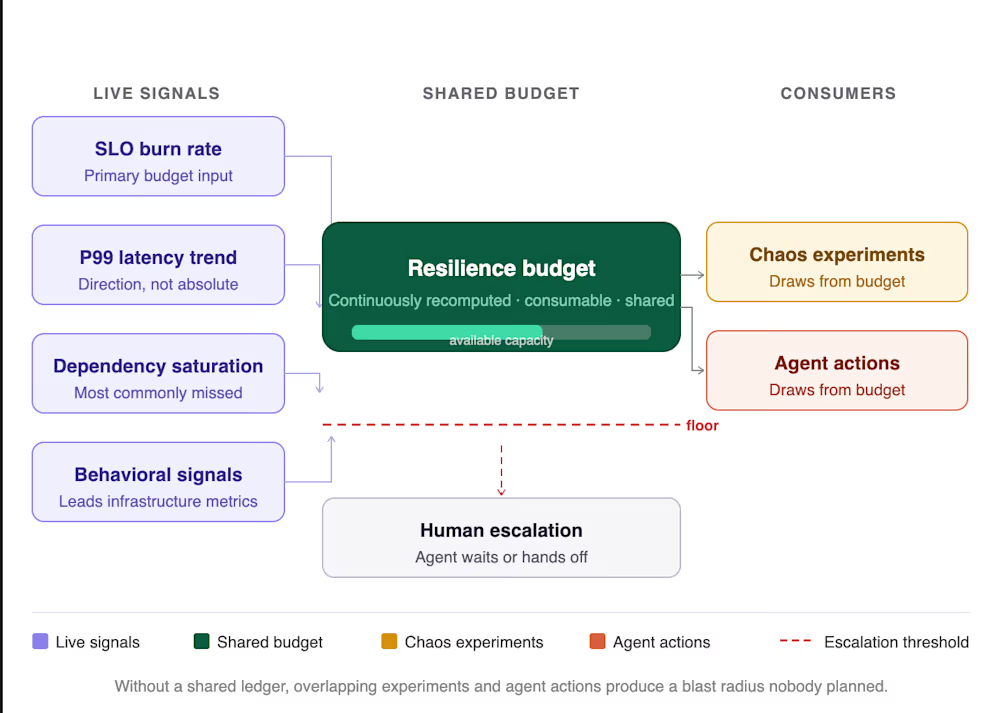
Through structured primary research with site reliability engineering (SRE) and platform engineering practitioners across organizations including Intuit and GPTZero, I’ve been developing a resilience budget model. The core idea is to treat absorb capacity as a continuously recomputed, consumable resource rather than a static threshold you try not to breach.
A resilience budget draws on four live signal classes.
-
SLO burn rate is the primary input, because it directly encodes the distance between current system behavior and the commitment that actually matters. If a system is burning its monthly error budget at five times the expected rate, the resilience budget is near zero regardless of what CPU utilization looks like.
-
P99 latency trend matters more than absolute latency, because a service trending upward over forty minutes tells you something different than a service that has been stable at the same absolute value.
-
Dependency saturation state is the most commonly missed signal; a chaos experiment or an agent action that assumes a shared connection pool is freely available when it’s sitting at 87% will produce failure modes that nobody designed for.
-
Application behavioral signals, session completion rates, API call pattern shifts, conversion degradation, and surface system stress earlier than infrastructure metrics do, because users feel the degradation before Prometheus reports it.
What makes this a budget rather than a threshold is that it is consumable. Every chaos experiment draws from the available capacity. Every agent action draws from it. In multi-team organizations where multiple experiments and multiple agents may be acting simultaneously, the budget is shared.
Without a shared ledger of consumption, two teams running experiments against overlapping dependencies produce a combined blast radius that neither team planned. Add autonomous agents acting completely outside the ledger, and the accounting collapses.

Where language models help, and exactly where they fail
Several engineering organizations are now running experiments using large language models (LLMs) to generate chaos hypotheses from dependency graphs and incident postmortem corpora. The results are directionally useful. Language models surface plausible failure modes that experienced SREs recognize as worth testing, and they generate hypotheses faster than manual processes, particularly when working from rich postmortem history.
The limit is dependency graph staleness, and it is a hard limit. A hypothesis generated from a graph that doesn’t reflect last month’s service extraction, or a new shared library dependency added two sprints ago, will propose an experiment with incorrect blast radius assumptions. The problem is not that the model makes a mistake, it’s that the model doesn’t know it’s making one. It will be confidently incorrect about a system boundary that no longer exists, and in chaos engineering, confident incorrectness in production means an unplanned outage.
Stanford’s Trustworthy AI Research Lab found that model-level guardrails alone are insufficient: Fine-tuning attacks bypassed leading models in the majority of tested cases. The implication for chaos hypothesis generation is direct, a model that cannot reliably hold its own safety boundaries cannot be trusted to accurately model the blast radius of an action it has never seen in a dependency graph it has not verified.
When hypothesis generation draws instead from postmortem corpora, the staleness problem shrinks considerably. Postmortems describe failures that actually occurred in the system at a specific moment in time. The signal is inherently validated by production reality. This is the tractable near-term AI application in this space, and it is genuinely useful for organizations with mature incident documentation practices.
What AI cannot do, and should not be asked to do, is make the execution decision when signals are ambiguous. That judgment requires awareness of things that live entirely outside any monitoring system: Pending deployments that changed the dependency landscape an hour ago, on-call staffing levels on a holiday weekend, a customer commitment that makes any additional risk unacceptable until Monday.
A model without access to that context should not be making that call. This is not a temporary limitation pending a more capable model. It is a structural constraint of what machine observability can represent, and building an agent architecture that ignores it is building one that will eventually make a consequential decision with incomplete information — and no human in the loop to catch it.
What this means for how enterprises govern agents in production
The governance implication is straightforward to describe and harder to implement than it sounds. Every autonomous agent action that touches infrastructure needs to register against the same live signal layer that governs chaos experiments. The same SLO burn rates, latency trends, dependency saturation states that a human engineer would check before initiating an experiment should gate what an agent is permitted to do and when. If the resilience budget is below a defined floor, the agent waits or escalates. It does not act.
Agent actions also need to be modeled as experiments, not just logged as events. When an agent restarts a service, the question isn’t only whether the restart completed successfully. It’s whether the blast radius of that action was proportionate to the available absorb capacity, and what cascading effects it produced across dependencies. That is chaos engineering data. It belongs in the budget model, feeding the next decision the agent or the team needs to make.
And when signals are genuinely ambiguous, when the budget score is unclear, when a recent deployment has changed the topology in ways the agent’s context window doesn’t capture, when dependency states are in flux, the execution decision needs to go to a human. Not as a permanent limitation on agent autonomy, but as a hard engineering requirement for the current state of the technology.
A circuit breaker that hands ambiguous cases to a human is not a weakness in the agent architecture. It is the thing that makes the architecture trustworthy enough to actually run in production. Intent-based verification formalizes exactly this: Defining what correct agent behavior looks like before deployment, then continuously probing whether those boundaries hold under live system conditions.
The organizations that operate autonomous agents reliably at scale are not the ones with the most sophisticated models. They are the ones that understood, before something went badly wrong, that every agent action is a chaos event and built their governance layer accordingly.
The practical first step is unglamorous: Audit every autonomous agent currently touching infrastructure, map its action surface against your live SLO burn rate signals, and define explicit floor conditions below which the agent is required to wait or escalate. That audit will surface agents acting entirely outside your resilience accounting.
Most organizations running agents at scale today have several. Find them before production does.
Sayali Patil has spent 6-plus years at Cisco Systems and Splunk building the reliability and automation systems that keep enterprise AI infrastructure running at scale.
Welcome to the VentureBeat community!
Our guest posting program is where technical experts share insights and provide neutral, non-vested deep dives on AI, data infrastructure, cybersecurity and other cutting-edge technologies shaping the future of enterprise.
Read more from our guest post program — and check out our guidelines if you’re interested in contributing an article of your own!
KETTLE Google I/O has ostensibly been an AI show for a few years running, but this year’s announcements have taken the cake, which Google seems all to happy to let its users eat as it reshapes the web.
On this week’s episode of The Kettle, host Brandon Vigliarolo is joined by El Reg senior reporter Tom Claburn and open source reporter Liam Proven to discuss how Google’s bevy of AI announcements, and declaration that we’re entering the era of AI search, might not play well with customers.
From an enlarged AI mode, to AI ads stuffed into AI answers, and pushing AI devs onto closed-source tools after shuttering open-source ones, Google is leaning hard into its version of the future of the internet no matter what users might think, and we wonder whether that might finally crack Google’s stranglehold on the web.
You can listen to The Kettle here, as well as on Spotify and Apple Music, or read the transcript of the latest episode below. It’s been lightly edited for clarity.
Brandon (00:04)
Welcome back to another episode of The Register‘s Kettle Podcast. I’m your host Brandon Vigliarolo, and you’ve likely heard about this week’s topic if you’ve paid any attention to the internet in the past week. Google said at its annual I/O event that it’s reinventing search for the AI era. But from an outsider perspective, it seems a lot more like Google’s leaning into AI as an excuse to reshape the web and Gemini’s image, regardless of how that might affect access to the open web. Unpredictably, there are a lot of people calling foul over that and other recent AI moves made by Google.
With me to discuss this is El Reg Senior Reporter Tom Claburn. And joining us for the first time on this iteration of the kettle is our open source guru Liam Proven. Thanks to both of you for being here.
Thomas Claburn (00:45)
Thanks.
Liam Proven (00:46)
Thank you.
Brandon (00:46)
So hey, Google’s AI-ification of search was the big news to come out of I/O this week. Tom, you tuned into the keynote and wrote about this. So what exactly did Google say it’s going to do and why is everyone so up in arms over this?
Thomas Claburn (01:01)
I mean, it’s just more encroachment of AI into search and they, you know, they have their AI Overviews, which are the little summaries that they put up on top of search results. And then they also have separate thing that’s very similarly named, but different called AI Mode, which is available through a tab and you click on it that’s sort of a deeper version of AI, I think it ties into some, Google knowledge graph and it has sort of a broader thing, but you often get similar results, but basically they’re going to be showing more of the AI Overviews and, it’s not always clear when these happen, but basically for longer queries, it’s more likely to be handed off to an AI model.
Brandon (01:44)
Mm-hmm.
Thomas Claburn (01:45)
And it’s a problem for a lot of people because people’s relationship with Google began with: you go to Google, you find stuff, and then you leave. And increasingly, it’s you go to Google and you’re stuck there like it’s a tar pit. And you’re just trying to figure out where did they get this information? And they’ll put up a summary. And of course, they have the disclaimer, well, you know, maybe it’s not accurate. You’ll have to check on that. How are you going to check on it? I’ll go to the links that we didn’t show you. It’s, you know, people I think are a little bit – I mean, part of it is just people don’t like change, but part of it is just AI really is not the right answer for a lot of things, at least in my opinion. I think there are certain kinds of queries that it can be useful for. And I think that largely though, if people are going to look for documents, they need to be able to find reputable sites and be able to make trust decisions. And a lot of that information is getting obscured or put into little teeny citation chips that you have to click on to figure out, where is this information coming from?
Brandon (02:49)
Yeah, and sometimes when you click on one site, it’ll give you four or five links and be like, well, here’s the sources we use to compile this information. Like a lot of times, I’ll admit, I do use the AI Overviews every once in a while when they pop up, especially for simple questions like on my smartphone or something. But they’ll give you, cite their sources and you click on them. But sometimes that’s just as big a pain in the butt as assuming that the AI Overview is just correct. I’d much rather just have a list of blue links, which Google did clarify to me and to Avram, our US editor, earlier this week, that traditional search engine result pages are not going away.
Thomas Claburn (03:24)
Yeah, they’re not going away. They’re just going to get buried under more AI. You have to work harder to find them. And then there was some other interesting stuff too, where their Gemini Spark, which is their agent… in the Gemini app, they’re also going to be pushing these long-running AI tasks that you’ll be able to do, and they’re eventually going hook it up to the regular Google account or search or whatever. So you can basically run a chron job with, you know, an AI model essentially, to go do things for you. And I think that the think they talk about it for is shopping. It’s gonna, of course, plan your travel itinerary and do stuff for you in the background, and somehow you’re gonna be happy with results. It’s not clear how you’re gonna pay for that because someone has to run this stuff, maybe this all comes out of the hide of advertisers who are gonna sort of get shoveled into these results, who knows?
Brandon (04:20)
Right, and that’s actually kind of segues really well into one of the stories that I wrote about I/O this week, and that was Google’s new AI advertisements that they’re kind of injecting in. They… I see we’re doing audio, but I see Liam on the other side of the camera just putting his hand in his hands, you know, my God. We talk about where the cash is going to come from from this, and it’s obviously going to come from this, right? There were two particular kinds of AI advertisements that Google said they were going to add soon to AI mode. There were some ads that were going to be basically in line. If you ask a query, you get your responses back from the AI. In that list of results is going to be ads. And Google said they’re going to be at the bottom of the list, but they’re still going to be presented in line. And I think there might be some indicator about them being a sponsored element of the post, but they’re still putting them in line with results that are ostensibly grabbed from the web and are supposed to be factual.
The other one that I found a little more concerning personally was conversational discovery ads. So basically the way Google described this is, you ask a complicated question and it will use Gemini to figure out what products you need to solve your problems. And the example they gave was, oh well, your house smells kind of musty and you want to make it smell more like a spa. Well, I feel like if I were to go onto Google right now and type in, my house smells musty and I don’t want it to.
Some of the first things you might get are things like, put some baking soda in some water, make a 50-50 mixture of vinegar and water, and you can deodorize and clean for pennies on the dollar. But Google sees this as a way to inject products in front of you…. I was picturing going in there and asking for tips on cleaning my house and deodorizing it and getting a whole bunch of ads for $20 reed diffusers, expensive plug-in units.
Liam Proven (05:55)
Mm-hmm.
Brandon (06:08)
That’s how I see this, right? And I don’t know if that’s entirely correct, but Google’s not doing a lot to kind of say that that’s not the case.
Liam Proven (06:17)
I feel like the great prophet Cory Doctorow kind of nailed this a couple of years ago now with this word, enshittification. I was baffled when Google announced that it was going to start deliberately degrading search results in the interest of keeping people on the page and on the site longer. And it feels like they’re not leaning in, they dived off the board and jumping in, pinch the nose and throw yourself in. I do not see how this is going to pay long term, but, on the one hand maybe there’s some genius there with playing playing four-dimensional chess, maybe they’re just… they’ve drunk the Kool-Aid and cannot imagine anything else now
Brandon (07:05)
Yeah, it just feels like an attempt. I mean, it was the same thing with Google saying that they were introducing, I think, some commerce protocols earlier this year that were designed to basically allow Gemini to check out for you. So you don’t even need to go to a company’s website to buy a product now. You can do it all right through Gemini. So that, again, that’s starving a company of web views so that Google can make a few more cents on a transaction.
Thomas Claburn (07:28)
Yeah.
Brandon (07:29)
And I don’t see how this is any different, right? It’s injecting more ads, getting more things in front of you, and burying actual web results below this in the hopes that you never get to that point.
Thomas Claburn (07:36)
And the one thing it’s going to incentivize is that everyone who actually wants to use an AI model is going to think, how can I use this to block ads? How can I use it to get this stuff out of my Google search results and get something that’s closer to whatever, some kind of neutral or less commercial standard? At least if you put up with it, if you don’t just turn it off entirely and think, I’m going to figure out – I’m going to go back to Yahoo and get a list of curated sites and just stay there.
Brandon (08:06)
I think about it sometimes in terms of, you know, well, Google Search was never giving me an objective view of what’s on the internet, right? It’s always filtered through Google’s algorithm or whoever’s. But I feel like there’s a difference between filtering it through an algorithm and making me do the legwork and just assuming that whatever Gemini is serving to me is going to be exactly what I need because Google thinks that’s what I need.
Liam Proven (08:31)
Maybe you take a, what’s the expression, a 30,000 foot view, but I think we’ve got to go a lot higher and take a low earth orbit view. This is going to be very good news for the wider software community as it drives improvements in ad blocking technology, Google-free browsers, Google-free search engines, Google-free anything, please, anything that can get this stuff out of our face.
Thomas Claburn (08:56)
Europe is already partway there with the sort digital sovereignty stuff. I mean, this is just another sort of data point in the rationale for moving. perhaps we’ll finally see some innovation where Google kills its own search business. And it’s not like search was doing so well anyway. Even before the AI boom, was a lot of complaints that there were just lacks about policing, spam farms and things like that. There was a lot of lifting you had to do even just as a 10 blue links user to sort through the junk. And if they really cared about delivering quality editorial to people, the web would look a lot different.
Brandon (09:35)
You just wrote an op-ed, Tom, that kind of covers some of that, right? You asked Google’s own AIs why Google search results were getting worse, and it pretty much was like, yeah, hey, they are. Mea culpa here, you know, it was…
Thomas Claburn (09:39)
Right. It’s unfair, but it’s also, kind of telling that this is what we’ve come to where, we’re going to source stuff off of a couple of Reddit opinions and blogs. And then, when you ask it, when you frame it in a nice way, “why is Google search great?” It goes to Google’s own blog posts to source that. I guess that works for some people, but it’s really just a poisonous media ecosystem. I who wants to even be a part of that? I mean, I think all of this just drives a lot of sane people away. And the only people who are left are gonna be sort of hucksters and grifters and people who are trying to game the system for whatever commercial intent they have.
Liam Proven (10:27)
It is. Yeah, it’s going to. think one possible effect will be driving the creation, the fragmentation of the Internet, maybe not exactly layering, which is what I thought might be happening a decade or so ago. But in the same way that there are sites like Conservapedia and so on that try to present a U.S. right wing Moral Majority type view of Wikipedia, that there will be a fragmentation into the AI-driven web and the little indie, we’re trying to keep this out, AI-free web. There already was this attempt the other Gemini, Gemini the protocol, it was launched about a decade or so ago now.
Brandon (11:19)
Yeah, really quick, remind us what that is?
Liam Proven (11:22)
It’s an extremely lightweight protocol and markup language for serving pages of hyperlinked content, that’s not the web. And you needed to run a Gemini server and you needed to use a Gemini browser to access it. And it gave you kind of like a markdown view of the web. So you got, bold, italic, and underline and nothing else … you have no color, you have no fonts, you have no images and really, really stripping back the online hypertext experience to like an early nineties view. It’s kind of faltered in recent years, but it’s people choosing this very minimalist and stripped-back experience and much as it seems, I think, to baffle marketing executives, I think a lot of people would choose an un-augmented AI-free view of the web these days.
Brandon (12:18)
I mean, just think about, good Lord, the videos coming out of college graduations recently, right? know, everyone, I think Liam, you mentioned earlier, everyone except Woz has been booed to hell and back in the past couple of weeks for making AI claims. I think there’s a lot of dissatisfaction with it, right? I think you’re right. I think there’ll be a lot of people.
Thomas Claburn (12:36)
The irony is that this should be the moment to shine for the social media networks that are notionally about people and connections, which haven’t been with Meta and Facebook. I mean, it’s turning into the same AI slop engine as everything else and is driving people away. There’s theoretically room for some kind of network that humans can interact with because it’s just not pleasant to be with bots. I mean, nobody wants to get AI communication. No one wants to deal with it. And you just cannot operate in the same space as a bot. They operate on a velocity that people can’t deal with. And it’s just frustrating. So I don’t know how people are going to want to participate in this.
Liam Proven (13:14)
I’ve gone through a little unexpected voyage in recent months because oddly enough, as a professional writer, and I also read a very great deal and have since childhood, I kept reading people saying, “this text is AI generated. I’m not going on any further because I read the first couple of lines and I just knew. It’s full of AI tells.”
And so I started asking people, you know, what are the tells? What are the signs? Oh it’s, it’s, it’s just obvious. It’s redolent. Okay. But can you give me a clue here? You know, what, what are the things that give it away for you? And I have not yet been able to get anybody when pressed to give me a nice clear list. You know, a lot of it boils down to em-dashes and I’ve been using them for years, but
Brandon (14:04)
I wasgonna say I love the dash, so it really kind of throws a wrench in my work.
Proven (14:06)
Right?
You know, I learned there are a handful of actual fairly concrete things, you know, the “not only, but also” kind of structure that the bots do overuse. But I’m seeing people going, “I’m not going to read that because it’s obviously bot-generated.” And then somebody else pops up and goes, “Hi, I wrote that. That’s my site. I don’t use any bots. That was all just me.”
One guy recently I was reading said, “Look, I’ve got the git history with the 19 commits, because it’s not a very long site, you know, as I wrote it. Would you like me to show you the process by which I wrote every word?”
And of course the guy challenged goes, “Well, I don’t know. I’m not sure I believe you.”
And he’s like, “Okay. So you’ve gone from a certainty to doubt. I guess I’ll take that.”
But I watched with interest the relaunch of the Digg social network over the last year or so. And Digg was very much like Reddit about 15 years ago, coming up to 20 years ago, it was a site with lots of special interest groups where you posted interesting stuff, but was driven by threaded conversation.
Brandon (15:12)
Yeah, I remember Digg. It was great. When it went under I just moved to Reddit.
Liam Proven (15:20)
And, and, the guy, I think it’s Kevin Rose that owned it, got it back and relaunched it very much in the old model, but without the ability to create your own groups and stuff. So he was trying to keep it a bit smaller.
And I joined, because I had a Digg account in the day and thought, this is strangely bland and anodyne. You know, it’s full of people being nice to each other and saying nice things. And it seems to be largely content-free. Well, it shut down again earlier this year. And he said, “We got infiltrated by bots. We got loads and loads of people posting bot-generated content until a lot of the discussions were bots talking to other bots.”
That would kind of explain what I saw, you know, but I’m still on Twitter, call it Twitter. I’m still on Twitter and I have a block list, which is like six pages long now of words and phrases. And it makes it kind of tolerable, but it is very odd to watch the interchange and they’ve changed it recently so that you can block accounts, block and mute accounts which are serving ads and yeah, if those are paying, paying advertisers, they ignore your blocks. You get them anyway. ⁓ all right. Yeah.
Brandon (16:30)
Yeah, of course. I have the same thing on Reddit, right? I’ve blocked multiple advertisers and I go in to see, well, why am I seeing this? I want to block this account again. It’s like, no, you already got this account blocked. And it’s like, well, then why am I seeing your ad?
Liam Proven (16:39)
Yeah, yeah.
And yet, you know, it’s still actually quite lively and there’s a lot of discussion and there are still interesting people and some of the interesting people I followed years ago still are still posting and the discussions are still good. Some people are choosing this experience and it’s not just because they’re paying for it. Some people will choose this experience for reasons that escape me.
Thomas Claburn (17:01)
People build up, you know, it’s the follower structure. You build up an audience and it’s costly to rebuild that. So a lot of people have stuck with X and there are now political reasons to stay with X and a lot of people have done that. And even journalists – I mean, I would have loved to given up my X account, but it’s useful because there are still people who post interesting things.
Brandon (17:28)
Yeah, I don’t really post on there anymore, but I still have my account.
Thomas Claburn (17:30)
Yeah, it’s worth it for sort of source finding. People, I think that they flee the AI influence when they see it. If they don’t leave the site, they figure out a way to filter it. So I think it’s going to be a very difficult few years as some kind of new equilibrium emerges because the old sort of systems where people and bots mix is just not satisfying to people.
Liam Proven (17:54)
And as X declines, I’m watching Mastodon, the Fediverse grow and get more interesting and get more feedback and interesting discussions. I still find Lemmy kind of a pain to deal with. I don’t really like the presentation, which is like the activity pub-driven version of Reddit, kind of, but I’m getting lots of interesting comments and feedback and, I don’t like this word, but engagement. People are engaging on Mastodon in a way they used to on Twitter and some of the other sites.
Brandon (18:26)
Fleeing before AI, and hopefully it won’t come to those platforms either. But back to some of the things that Google’s been doing, and I guess we can speak more to the alienation aspect here, Another story that I covered this week out of I/O was that Google – a lot of people probably are familiar with the Gemini command line interface, allows you to at least use Gemini to look at code and do some various programming tasks. And that’s an open source tool that Google’s had for, I think, about a year now. But in classic Google fashion, they’re deprecating it in favor of the new one that they announced at I/O this week, Antigravity CLI, which has, you know, some, I think, feature improvements over Gemini CLI, right? Gemini CLI is Gemini. Antigravity is, I think, a little more model-agnostic. But it’s closed source. And that means that basically anyone who was using Gemini CLI is going to not be able to use it come June 18th. It’s just going to stop working. Google’s not ending their maintenance of Gemini CLI. They’re just restricting it to high-tier enterprise customers. So it’s still there. It’s still an open-source product. You’ve just got to pay to use it now.
I found it interesting that a lot of developers, when I was reading some threads about this, were saying that they were particularly upset about the fact that they felt like they had spent their time and their effort to help improve Gemini CLI through bug reports and things on GitHub, right? And now all that work is essentially being closed-sourced in a new product and sold back to them. You know, I wonder again, right, is this Google kind of leaning into another AI product that’s just gonna piss more people off?
Thomas Claburn (20:00)
Right. Well, I mean, the first lesson is never, never bet on a Google product because they kill them off mercilessly. It’s also, the amount of damage that the AI has done to the open source community, we’re going to be dealing with it for years…I’ve had a couple of projects where I think like, do I even want to make this public because I’m just going to get, if anyone uses it, I’ll just get AI bug reports. And in a sense, all of open source has been captured in these models anyway. And you can just ask the model to regenerate all this unlawfully captured labor that is latent in these things. And we haven’t figured out a way to deal with that. I hope that some of the software lawsuits make progress because it’s really transparent that people’s labor has been captured in ways licenses did not condone or anticipate. People are just reselling that labor at increasingly high prices.
Brandon (21:00)
Yeah. Liam, you cover open source stuff a lot. What has the developer community been saying about AI and its influence.
Liam Proven (21:06)
Again, I think. Obviously this, has to be a super generalization, but it, seems to me that it’s, it’s splitting and factionating. And on one side, there’s a group of people who embrace the tools, say that it’s delivering unprecedented levels of productivity and so on. And on the other side, on the, the other faction, there’s a group of people saying, no, we will not allow this anywhere near any product that we use, run, develop. There are a handful of people who are kind of still in the middle like looking from side to side and I recently wrote about the new version of OpenBSD and it’s faced such a problem which is that OpenBSD incorporates tmux, a text mode terminal multiplexer. So you can have windows in your terminal and different stuff going on. And tmux started allowing Claude-assisted code contributions. And that means they got grandfathered into OpenBSD.
But the OpenBSD project has said we won’t allow AI-generated code because we can’t copyright it. We can’t put a firm license on it because we can’t say where it came from.
So on the one hand, we can’t allow you to contribute authored code. On the other hand, here’s an externally maintained project, which is using AI-authored code. So they’re kind of stuck in the middle.
The most interesting study I’ve seen on this where somebody tried to put numbers on it was from an organization called [METR ]. And they published the results of a study they did. They did a controlled trial with a whole bunch of developers given various programming tasks. And one half of the subjects were allowed to use AI tools and the other one not.
And at the end of it, they asked the developers, how was it for you? You know, was it helpful? And all the people using bots went, it’s great. We estimate it’s taken about 20% of the time off the process of developing this feature and getting it working. And then they compared it with the other developers who weren’t using any kind of code generation. And in fact, the people not using the tools were 20% quicker. In other words, it feels like you’re going faster, but actually you’re going slower, but you sit there and watch the code unfold on your screen. I don’t know. I’ve never used any of these tools. I’m an AI vegan. I avoid the whole thing, but you sit there and watch the bot write code and go, well, that was quick. All I’ve got to do is make sure it works. And four hours later it works, but you could have written it in three hours.
And the odd thing is I saw this report and I linked it and shared it and cited it. And then I bothered to go and look at who [METR] is. And [METR] is a pro AI advocacy group. They are AI boosters, but they decided let’s get some proof of how much quicker it makes you.
Well, we said we’re going to do it, so we’re going to publish. Respect to them for that. I do wonder if all of the AI assisted projects, the ones that are really leaning in, are going to come up with a nasty surprise. Either this didn’t really help and we got a load of stuff we can’t debug, or actually this is taking longer, or the price of this tool I’m using just went up, it just gained a zero and it’s going to go up again and damn it, I can’t afford to use this anymore.
Thomas Claburn (25:00)
Well, there was just a report recently that Microsoft canceled its internal cloud licenses because of the price hikes. I the price is going to go up and ⁓ the problems aren’t necessarily going to be evident right away.
Brandon (25:15)
I’ve heard multiple instances of companies basically saying, well, these AI products are doing fine, but at the end of the day, they’re more expensive than a new developer fresh out of college. So why would we use them? So it’s interesting.
So before we wrap up, I wanna touch really quick on something that you wrote too, Liam, it was a couple of weeks ago, but I think it still plays into this whole idea of Google’s. AI-ification thing. that Chrome was quietly installing large language models on users’ machines without expressive consent. So I understand you can flag that and turn it off. It’s an opt-out thing. But is that still happening? Did Google change tack on that after this was reported on at all?
Liam Proven (25:55)
As far as I know, no, I have not checked because I didn’t have it anyway. Every time any app offers me any kind of AI integration, I just turn it off as soon as I can. And I’m not even sure what boxes I ticked in Chrome and when, but when I found out about this, I went looking and no, not on my –I have my Google Chrome profile synced onto Windows and Linux and Macs, and it wasn’t there on any of them.
But on the one hand, I’m noticing in the open source world, some projects are belatedly embracing this, but they’re talking very much about local first, open source models. Let’s keep it on your machine, private. There’s no risk of any leaks. And actually that is kind of what Gemini Nano was supposed to do. It’s a tiny model, four gigabytes, a tiny model that wouldn’t fit into memory on an x8632 box, but hey, a nano model that ran on your machine so there was no risk that anything could leak. Well, that is actually a good thing, I guess.
Brandon (27:06)
Sure, yeah.
Liam Proven (27:10)
But it did it on phones as well. And now, okay, you know, I’m cheap. I use very low-end, mostly Chinese phones. But you know what? I live on a little island in the middle of the Irish Sea. I fly a lot more than I used to these days. And a couple of months ago, I was about to make a trip and I thought, I’ll put some new music on my phone. The only time I use my fancy noise-canceling headphones is on planes. Oh, my phone’s full. And this current one doesn’t have a card. I have to sync over a cable. So that’s weird. I haven’t got that much music on it. I discovered about a dozen or 20 feature films on my phone I have no recollection of ever downloading. I’ve never seen these films. I guess some search term somewhere synced something. I deleted them.
Brandon (27:58)
Better an MP4 than an AI model, I suppose, right?
Liam Proven (28:00)
Yeah, but at least it was something I could sit and watch on the plane. I deleted them all, fitted a bunch more albums on there and all was good. But yeah, even with my cheap-ass 300 buck phone, okay, four gig here or there is kind of nothing. But even so, I’d rather that space was for my stuff. If you’re going to take that much ask.
Brandon (28:23)
Yeah, local LLMs are good idea, but ask me first.
Thomas Claburn (28:27)
It also raises the issue of what’s the difference between that and a crypto miner if someone else is using it, external server is using it. I’m fine with providing storage for something that’s going to benefit me, but when some entity that I have a relationship with, or don’t, is running stuff locally using my storage capacity and my processor for their benefit, I don’t know about that.
Liam Proven (28:53)
Yeah, exactly.
It’s like one of those proof-of-stake cryptocurrencies rather than a proof-of-work one, you know.
OK, I said earlier I don’t use any AI tooling. There’s one exception for that, which is I do use language translation tools, and I use them quite a lot and I’ve got a choice of them. I spent nine years living in the Czech Republic, a country with a brutally hard language I still can’t read worth a damn. So if they said, like the deal with Firefox, we’re going to put a model in your browser, but it’ll translate stuff on your device and it won’t go to the cloud. Well, okay, that could actually be useful. It’s not quite at the point where I could use my phone to translate a menu while I’m offline on a plane or something, but you can see that is not far off. But you know what? I want to know why, I want to know what your what you’re extracting from me and what I get in return, and make my own choice. And increasingly that is a choice we’re just not getting.
I personally do not think that open source products like Ubuntu, like Fedora, including even optionally, open source models, which are privacy first and local and … No for me, that’s not good enough. I don’t want that. And I’m not really interested in any product that includes that. And I appreciate they’re trying to do the right thing, but I think they are going to be shocked by the level of hostility. Fedora is already backing down from its moves to attempt to become the best Linux for AI development because to their great surprise, there was a user outcry. I think Ubuntu cares rather less about what its community thinks. They just try and do what they think is best. But I think they’re going to be surprised by the pushback, as probably Google was.
Brandon (30:53)
Google obviously, they might be surprised by the pushback, but the question is, will they care? It seems like by and large, Google’s – I think it was 2018 when they formally abandoned the “Don’t Be Evil” slogan, I think, right? And it just feels like with these announcements lately that they’re really just making sure that it’s fully whited out and erased from memory here.
I mean, I don’t know, putting an AI wall between people and the open internet, secretly uploading LLMs to people’s machines, forcing people onto closed source products. I mean, any thoughts on what’s gonna happen here? Any thoughts, guys, before we wrap this up? Like, is Google gonna face blowback? Are they too big to fail?
Thomas Claburn (31:37)
Not for nothing is there all this excitement about someone finally being able to sort of take some of Google’s business. I the whole internet AI thing took off when everyone saw a weakness in search and said, hey, we can provide something that will break Google’s stranglehold. Frankly, this is a story about the years of failed know, antitrust work that, you know, should have been dealt with many years ago and wasn’t and so Google basically just controls a large sector of the internet along with, you know, along with Meta now for advertising. And that’s starting to break up a little bit, but it remains to be seen whether AI is going to be an advertising medium that’s equivalently lucrative to search, but who knows? going to give it a shot, but users are going to get sacrificed in the process.
Liam Proven (32:27)
It’s like an eternal verity of life in the technology market that, you know, if it’s true, there’s probably an XKCD about it. And there was an XKCD years ago, 1118.
“Remember when we prosecuted Microsoft for bundling a browser with an OS? Imagine the future we’d live in if we’d been willing to let one tech company amass that much power.”
“Thank God we nipped that in the bud.”
Nobody is too big to fail. And the bigger they come, the harder they fall. I think some mighty industries worth hundreds of billions are going to come to grief over this stuff. And I haven’t got lot of sympathy.
Brandon (33:08)
I guess we’ll see. We’ll see if this will be enough to, you know, clean some of that enshittification off the walls of the internet in the coming years.
Liam Proven (33:16)
What a beautiful phrase, well said.
Brandon (33:08) But hey, no matter, yeah, no matter if it happens or not, we’ll probably still be here and we’ll probably still be talking about it the Kettle, so be sure to tune in. Thanks for joining us. ®


A USB cable is not typically something that raises eyebrows. Most people plug one in and move on. But a Kickstarter device is challenging that assumption by packing a surprising amount of computing power into something that looks completely ordinary.
Read Entire Article
Source link


Telecoms giant files suit in Golden State so it doesn’t have to maintain network it claims is hardly used
AT&T wants to ditch its traditional copper phone line infrastructure
in California in favor of fiber everywhere, claiming it has to spend $1 billion
each year on a telephone network that a tiny percentage of customers use.
The US telecoms giant announced plans this week to invest $19
billion in The Golden State between now and the end of the decade to bring
fiber to more than 4 million additional households and businesses, upgrading customers
to the newer infrastructure.
As part of its plans, the telco has filed a lawsuit [PDF] against
several state officials seeking a court order to overturn California rules that
require AT&T to continue offering a “plain old telephone service” (POTS).
AT&T points out that the Federal Communications
Commission (FCC) recently adopted
rules that encourage telcos to retire their aging copper lines.
The Washington-based telecoms regulator said the expansion
of fiber cabling is hindered by “the need for carriers to divert precious
resources to the maintenance of deteriorating legacy networks that deliver
outdated services to an ever-decreasing number of subscribers.”
In its court filing, AT&T says “the copper wires
that once served every home now serve just 3 percent of households in
AT&T’s California territory,” but complains that state-level “Carrier of Last
Resort” (COLR) rules require it to continue supporting and maintaining POTS
even after the FCC has authorized the service to be phased out. Under basic pre-emption
principles, those COLR rules cannot stand, it asserts.
But while the telco likes to portray this as bringing
faster and more reliable modern network technology to all California residents,
critics say rushing to phase out the old phone network could
leave some users behind.
A nonprofit public interest group, Public Knowledge, previously warned the FCC directive could impact consumers in rural areas, the
elderly, those with disabilities, and anyone who relies on specialized medical
equipment that uses phone lines.
As The Register has previously covered, the UK’s former state-level
operator BT was forced to delay plans to turn off the public switched telephone network
(PSTN) and replace it all with all-fiber infrastructure after similar concerns
were raised. This followed the introduction of a government charter to protect
vulnerable customers, particularly those using TeleCare, which supports alarms
that the elderly or infirm can trigger if they need emergency assistance.
AT&T said it will take “a thoughtful, phased
approach to upgrade customers,” and claimed “no customer will be left
without access to phone or 911 service.”
However, Public Knowledge said the FCC order relaxes or
entirely drops various safeguards put in place by previous US administrations, including the requirement to prove through engineering tests that a new service adequately replaces the old for medical equipment and alarm systems.
®
I recently had the opportunity to sit down with Francis de Souza, COO of Google Cloud, backstage at an event in Los Angeles. Amid the din around us, de Souza, who speaks in the calm, measured manner of a university professor, offered useful advice for companies navigating the AI security moment we’re all living through, noting that “there’ll be a transition period, and then I think we get to this better place.”
He wasn’t speaking about Google at that moment, but it’s clear that even Google is still figuring things out.
De Souza’s core message was one security professionals have been trying to get executives to internalize for years, now made urgent by AI: security can’t be an afterthought. “As companies embark on this AI journey, they need to take a platform approach,” he said. “Security is not something you can bolt on later, and it’s not something you can leave up to employees to do on their own.” He warned specifically about “shadow AI” — employees reaching for consumer tools without organizational oversight — and argued that companies need to demand security, governance, and auditability from their platforms from the start. “There’s no such thing as an AI strategy without a data strategy and a security strategy. They need to go hand in hand.”
Worth noting: he wasn’t pitching Google Cloud alone. When I observed that his advice sounded like a Google advertisement, he pushed back. Google, he said, is committed to a multicloud approach, and he made the case that companies that think they’re operating on a single cloud almost certainly aren’t. “Even if they pick a single cloud, they’re relying on SaaS applications, there are business partners that may be using different clouds,” he said. “It’s important for companies to have a security posture that is consistent across clouds, across models.”
He also made the case that the threat landscape has changed so fundamentally that old defensive models are too slow. He noted that the average time between an initial breach and the handoff to the next stage of an attack has dropped from eight hours to 22 seconds, and that the attack surface has expanded well beyond the traditional network perimeter. “In addition to your usual estate, you have models now. You have data pipelines used to train the models. You have agents, you have prompts. All of this needs to be protected.”
One threat de Souza flagged that doesn’t get enough attention: agents moving through a company’s internal systems can surface forgotten data repositories that nobody has thought about in years. “A lot of organizations have old SharePoint servers [and access controls] they haven’t really updated, but it didn’t matter because nobody really knew where they were. But agents roaming your enterprise will find those data assets and will expose the data on them.”
The answer, in his view, is to meet machine speed with machine speed. “We’re now seeing the emergence of an AI-native, fully agentic defense where organizations can run agents driving their defense,” he said. “Instead of having a human-led defense or even a human in the loop, you can now have humans overseeing a fully agentic defense.” He added that this has become a leadership issue, not just a technology one. “This is a board-level issue and an executive team issue. It’s not just a security team’s issue.”
But even as AI takes on more of the defensive workload, the people qualified to oversee it are in short supply — and the vulnerabilities that AI itself is introducing are multiplying faster than security teams can address them. “We’re going to need people to deal with the bug-pocalypse,” LinkedIn’s chief information security officer Lea Kissner told the New York Times this week, adding that she doesn’t expect the industry to understand AI security in any sustainable long-term way for at least several years.
Which brings us back to the platform providers themselves. The Register has published a series of reports over the past several weeks documenting a wave of Google Cloud developers hit with five-figure bills following unauthorized API calls to Gemini models — services many of them had never used or intentionally enabled. The cases followed a familiar pattern: API keys originally deployed for Google Maps, placed publicly per Google’s own instructions, had quietly become capable of accessing Gemini after Google expanded their scope without clearly disclosing the change.
Rod Danan, CEO of interview-prep platform Prentus, said his bill hit $10,138 in roughly 30 minutes after attackers exploited his compromised API key. Isuru Fonseka, a Sydney-based developer whose account was similarly compromised, woke up to charges of roughly AUD $17,000 despite believing he had a $250 spending cap in place. What neither knew was that Google’s automated systems had upgraded their billing tiers based on account history, raising their effective ceilings to as high as $100,000 without explicit consent.
Google refunded both after The Register published its initial report. Still, Google told The Register it has no plans to change its automatic tier-upgrade policy, saying it prioritizes preventing service outages over enforcing users’ stated budget preferences.
In the meantime, there is the separate question of what happens when a developer tries to shut things down. The Register reported this week on research by security firm Aikido finding that even developers who catch a compromised key and immediately delete it may not be safe. According to Aikido’s findings, attackers can apparently continue using that key for up to 23 minutes because Google’s revocation propagates gradually across its infrastructure. Aikido researcher Joseph Leon told The Register that during that window, success rates are unpredictable — in some minutes over 90% of requests still authenticated — and attackers can use the time to exfiltrate files and cached conversation data from Gemini.
Leon also noted that Google’s own newer credential formats don’t appear to have the same problem: service account API credentials revoke in about five seconds, and Gemini’s newer AQ-prefixed key format takes about a minute. “Both run at Google scale,” he wrote in Aikido’s related paper. “Both suggest this is technically solvable for Google API keys, too.” In short, according to Leon, the 23-minute window isn’t an engineering constraint but a matter of priorities for the company.
That’s worth considering when reading de Souza’s advice, which is sound and should be taken very seriously. He’s not wrong, but there is currently a gap between the platforms are prescribing and how fast they are themselves adapating, and it’s good to be aware of this, too.
When you purchase through links in our articles, we may earn a small commission. This doesn’t affect our editorial independence.

Stadium iPhones, Epic messaging fail, and Plex

Fulham 2-0 Newcastle: Cottagers end season with a win as Eddie Howe comes in for more scrutiny

Nifty likely to trade in a range; 23,800 a key breakout hurdle


-

 Crypto World3 days ago
Blockchain.com files with SEC for U.S. IPO
-

 Fashion2 days ago
Holiday Weekend Open Thread – Corporette.com
-

 Crypto World3 days ago
Bitcoin Accumulation Weakens as BTC Realized Losses Hit $600M
-

 Business2 days ago
Dell Technologies DELL Stock Surges 15% on AI Server Momentum and Analyst Upgrades in 2026
-

 Crypto World2 days ago
Space X IPO Is ‘Bad News’ for Tech Stocks: But What About Bitcoin?
-

 Politics2 days ago
Makerfield: a tale of two social-media histories
-

 Crypto World3 days ago
MicroStrategy’s Saylor Says Miners No Longer Set Bitcoin Price, Another Force Has Taken Over
-

 Crypto World2 days ago
Robinhood crypto COO Tanya Denisova exits
-

 Business6 hours ago
NYT Strands Answers May 24 2026 Revealed for Puzzle No. 812 Theme Summer Essentials
-

 Tech3 days ago
WhatsApp ads could make Irish debut after discussions with DPC
-
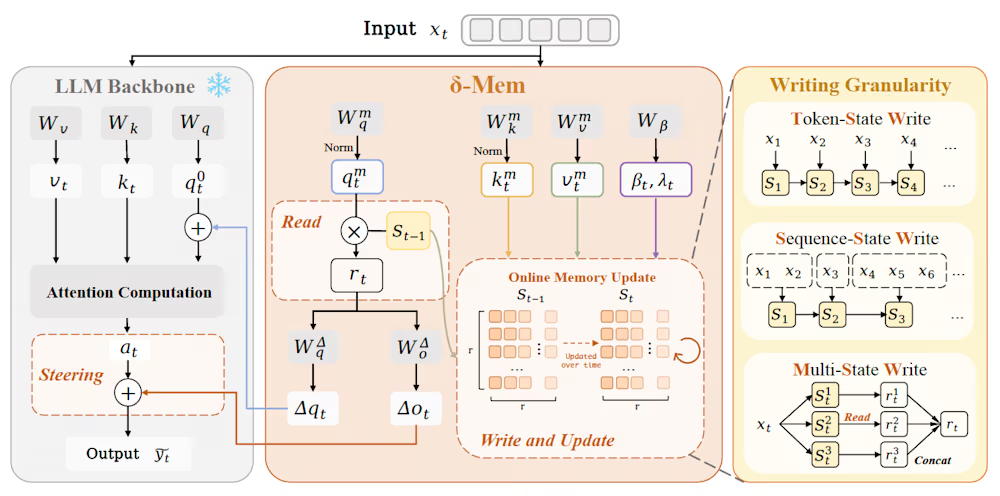 Tech2 days ago
A 0.12% parameter add-on gives AI agents the working memory RAG can’t
-

 Crypto World2 days ago
AI infrastructure race heats up as IREN pitches full-stack strategy, WhiteFiber lands $160M deal
-

 Business3 days ago
Trump Invests $1M-$5M in Kura Sushi USA Chain With 27 California Locations
-

 Tech3 days ago
You Can Now Add ChatGPT To PowerPoint
-
 Crypto World6 days ago
Revolut Launches Dogecoin Debit Card Across UK and EU
-
 NewsBeat4 days ago
Charity run by Reform leader Malcolm Offord accused of ‘law breaking’ over Scottish registration
-

 Sports3 days ago
2026 CJ Cup Byron Nelson leaderboard: Brooks Koepka finds putting stroke in Round 1
-

 Crypto World3 days ago
Trump Media’s Bitcoin Stash Shrinks Again as 2,650 BTC Lands on Crypto.com
-
Business3 days ago
Goldman Sachs reinstates Ageas stock coverage with neutral rating
-

 Crypto World4 days ago
Exa Labs raises $250 million in funding led by a16z
You must be logged in to post a comment Login