
TL;DR
Developers say .NET’s three-year LTS support is too short, with half of deployed versions running unsupported and Java offering five years or more.




Anyone who has had chickenpox shares one distinct memory: the relentless, all-consuming itch.
Ciara DiVita was only 3 years old when she caught the virus, but she remembers it well—along with the oven mitts she was made to wear to stop herself scratching. She also recalls being taken to hang out with her cousin while covered in blisters, in the hopes of deliberately infecting them.
DiVita, now 30, was actually the second in the chain, having been taken by her parents to catch chickenpox from an infectious friend. “I imagine the chain continued and my cousin gave it to someone else at a chickenpox play date,” she says.
A lot has changed over the past three decades, most notably the development of a chickenpox vaccine, meaning the virus is no longer the childhood rite of passage it once was.
Thanks to the vaccine’s success, children today are much less likely to be exposed to the infection at school or on the playground.
Chickenpox parties are also largely considered a relic of the past—a strategy many Gen X and millennial children were subjected to before vaccines became routine. But much like the virus itself—latent, opportunistic—they haven’t disappeared entirely.
Before a vaccine existed, chickenpox, which is caused by the varicella-zoster virus, felt unavoidable. In temperate countries like the UK and the US, around 90 percent of children caught the virus before adolescence (in tropical countries the average age of infection is higher).
It’s nothing to do with chickens. The splotchy, scratchy, highly contagious disease is possibly named after the French word for chickpea, pois chiche, according to one theory, because the round bumps caused by the virus resemble their size and shape. While most infant cases are mild, adolescents and adults are more likely to develop severe complications.
This is where the idea of “getting it over and done with” emerged from, according to Maureen Tierney, associate dean of clinical research and public health at Creighton University in Omaha, Nebraska.
“You were trying to have your child get the disease when they were at the greatest chance of not having complications,” Tierney says, explaining that, generally speaking, the older the patient, the more severe the infection can be.
While varicella-zoster is usually a mild, self-limiting disease in children, it can be much more severe—and sometimes life-threatening—in adults.
“I had an otherwise healthy adult patient who died of chickenpox pneumonia when I was first practicing,” Tierney says. “You never forget those scenarios.”
The virus spreads rapidly through respiratory droplets and contact with fluid from its characteristic blisters, meaning if one child contracts it, siblings and classmates are likely to be next, if unvaccinated.
Before the existence of social media, the idea that children should deliberately infect each other spread just as rapidly around communities—in conversations in the school yard, church groups, and pediatric waiting rooms—leading to the popularity of so-called chickenpox parties.
Parents swapped advice about oatmeal baths and calamine lotion and arranged to bring children together when one was thought to be infectious—despite the practice never being an official medical recommendation.
“They thought, well, if it’s going to happen to my kid anyway, it might as well happen in a controlled environment,” says Monica Abdelnour, a pediatric infectious disease specialist at Phoenix Children’s Hospital. “The families were ready to encounter this infection, deal with it, and then move on.”
While the majority of children who develop chickenpox feel well again within a week or two, around three in every 1,000 infected experience a severe complication such as pneumonia, serious bacterial skin infections, encephalitis (inflammation of the brain), or meningitis.

America’s Bureau of Alcohol, Tobacco, Firearms and Explosives has “canceled its contract for a surveillance tool that enables warrantless tracking of mobile devices,” reports the Associated Press.
They note the move comes “after lawmakers, a prosecutor and a judge raised concerns about the legality of the tool in criminal investigations.”
ATF, the federal agency responsible for enforcing the nation’s gun laws, told The Associated Press that it discontinued what it called a “pilot” program using a tool called Webloc after Rep. Michael Cloud, a Republican from Texas, and Sen. Ron Wyden, a Democrat from Oregon, expressed reservations about the agency’s use of bulk commercial location data. Webloc, which is made by a vendor called Penlink, sources data from consumer apps and advertising networks, which collect the location of mobile devices from consumers who download apps or browse the web…
The U.S. Supreme Court ruled in 2018 that police needed a warrant to obtain historic movement data from cellphone companies on a criminal suspect. But it has never addressed the growing practice of commercially acquired data.
Other users of Webloc include the U.S. military and U.S. Immigration and Customs Enforcement but also local law enforcement agencies such as police in places like Elk Grove, Calif. and Durham, N.C. The technology has also expanded around the world, with the national police in El Salvador and Hungarian intelligence agencies as customers, according to a report from earlier this year from Citizen Lab, a group of researchers at the University of Toronto who investigate digital threats to civil society.
The article notes that other U.S. law enforcement agencies continue to buy commercial geolocation data, “including the FBI and the Department of Homeland Security.”

“South Korea plans to train every single member of its nearly half-million-strong military to operate drones as easily as they handle personal firearms,” reports Ars Technica:
The goal is to make drones a “universal combat tool” for all troops by training them to use drones like a “second personal weapon,” said Ahn Gyu-back, South Korea’s Minister of National Defense, in a June 26 briefing reported by Reuters and other media outlets. The announcement coincides with broader plans to equip individual military units with more cheap and expendable drones for surveillance and strike missions, along with deploying more counter-drone lasers and microwave weapons.
Meanwhile, South Korea’s former drone operations command headquarters that used to have direct command authority over combat units will be reorganized to focus on collaborating with South Korean industry on developing and procuring commercial drone technology, according to The Korea Times. The South Korean defense minister specifically cited the conflicts in Ukraine and the Middle East as inspiring such military reforms with a focus on drone technologies… Ukraine’s use of drones and military robots as a force multiplier to offset its numerical disadvantage on the battlefield versus Russia’s larger military may carry special resonance for South Korea, given that the South Korean military’s current active-duty strength of 450,000 personnel faces a numerical disadvantage against North Korea’s active-duty military consisting of more than 1.2 million soldiers…
The defense ministry is starting out by providing 11,000 “training drones” to military personnel this year, with the goal of eventually deploying 60,000 drones across the military by 2029. An additional complication comes from the South Korean military looking to procure drones with 100 percent domestically produced components and no Chinese components due to security concerns, according to the defense minister’s comments reported by Reuters… South Korean companies are building new military attack drones, but the defense ministry may struggle to find enough commercial drones made without Chinese components to train hundreds of thousands of military conscripts, said Min-Cheol Jung, a cofounder of the Team Retriever counter-drone red team based in South Korea, in a War on the Rocks article.

It’s no secret that Donald Trump has been waging an Orwellian war on knowledge and information for most of his second term thus far. While purging history of American racism, slavery, and anything else that makes us look less than perfect has been the primary focus in this war, so too has Trump attempted to simply disappear data and information around climate change from the public view. This attempt to make us all more ignorant about the harms and potential negative outcomes from climate change is, of course, completely insane and self-destructive. But if you’re an octogenarian suffering from a textbook case of narcissistic personality disorder, what happens years after you’re going to be worm-food probably doesn’t concern you all that much.
Most recently, the Trump administration shut down climate.gov, a website that contained a wealth of information and research generated by government researchers and third-party scientists that worked at the request of government. Decades and decades of content and data, wiped away with the wave of a bruised hand by Trump.
Over decades, researchers in the US government and programs it sponsored built up a tremendous number of climate resources, from comprehensive analyses to massive datasets to basic explainers meant to inform the public. And people within the government built the climate.gov website to make it all accessible. But if you try to navigate there today, you get redirected to the climate page of the National Oceanic and Atmospheric Administration, and are greeted with the following message:
In compliance with Executive Order 14303 (“Restoring Gold Standard Science”), the White House Office of Science and Technology Policy’s June 23, 2025 Memorandum (“Agency Guidance for Implementing Gold Standard Science in the Conduct & Management of Scientific Activities”), 15 USC § 2904 (“National Climate Program”), 15 USC § 2934 (“National Global Change Research Plan”), and 33 USC § 893a (“NOAA Ocean and Atmospheric Science Education Programs”), you have been redirected to NOAA.gov. Future research products previously housed under Climate.gov will be available at NOAA.gov/climate and its affiliate websites.
This is, of course, nonsense. Or, to borrow a phrase, a litany of inconvenient truths that gave Trump indigestion and therefore had to be done away with. This was a repository of knowledge. It was a public good, making information on climate science available to anyone who sought it out. It didn’t cost a bunch of money. It contained work done by real scientists doing real science.
And, poof, it was gone.
Except many of the people who worked to build and maintain the site seem to have anticipated that this might happen. I don’t know how else to explain how they managed to not only maintain the full library of the site, but also spun up their own non-profit organization to host and maintain a nearly identical site on their own. And because this is material the government can’t copyright, it appears there is fuck-all the Trump administration can do about it.
While the government didn’t hesitate to delete inconvenient climate information, dedicated volunteers outside the government managed to preserve copies of much of the material, which the federal government is prohibited from copyrighting. The volunteers and former climate.gov admins got together and launched climate.us. On Tuesday, the team announced that it had completed the project to restore everything lost when climate.gov shut down.
The website features Climate.gov’s 15-year collection of climate news and stories, expert blogs, visual status reports on key climate indicators, maps and data pathways, climate literacy resources, classroom materials, and restored access to the Fifth National Climate Assessment.
If our own government is going to attempt to make us more stupid by trying to hide information, this is all of our jobs now. It may be a shame that it is the work of citizens to restore what our government is attempting to steal from us, but it is also a necessity. This is how you fight back against an authoritarian. It takes work. It takes effort. And it takes some money.
But this knowledge isn’t Trump’s property to erase. It belongs to all of us.
Filed Under: climate change, climate.gov, data, donald trump, transparency
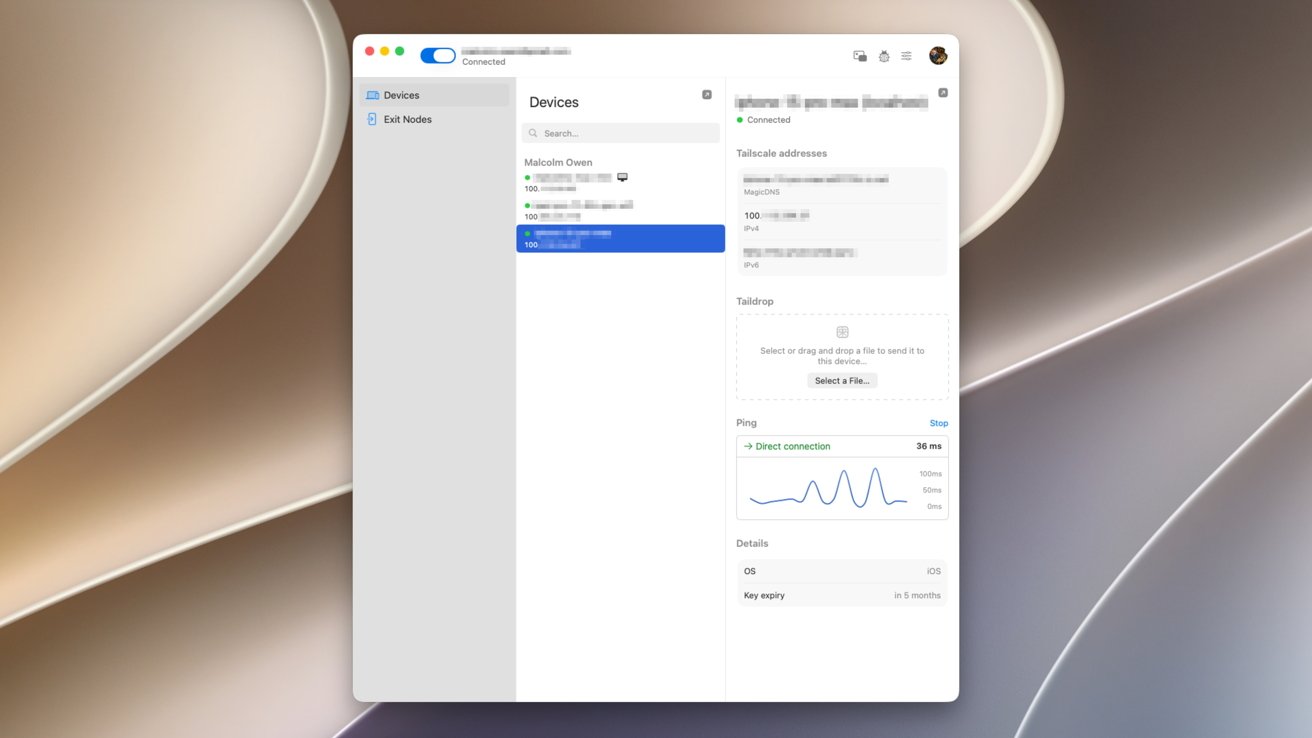
If you need to securely connect to your Mac desktop at home while on the move, Tailscale may be the answer. Here’s how to get started.
One of the main benefits of having a gigabit-class Internet connection is being able to connect to your home devices from outside the home. If you need a file from a home fileserver, you have tons of bandwidth so you know you can get it remotely, quickly.
However, while having the bandwidth is good, establishing the connection in the first place can be a problem.
In the old days, that used to simply mean setting up port forwarding on your router and connecting to a specific IP, or an address if you had set up a dynamic DNS service beforehand.
But with the rising use of Carrier-Grade NAT (CGNAT), this won’t work anymore. If you’re using an app like Jellyfin that lets you stream media outside the home, CGNAT will screw that up completely without something managing your connection.
Then there are the problems associated with firewall configuration, and many other small security and privacy-related things to consider. It quickly becomes a mountain of issues to mitigate.
What you ideally need is a way to connect your devices together that also handles most of the issues for you. Tailscale is one good answer.
Tailscale describes itself as a “Zero Trust identity-based connectivity platform” that can replace a VPN, SASE, and PAM. That’s a lot of buzzwords in a sentence, but it is primarily pitched as an enterprise tool, not really a consumer app.
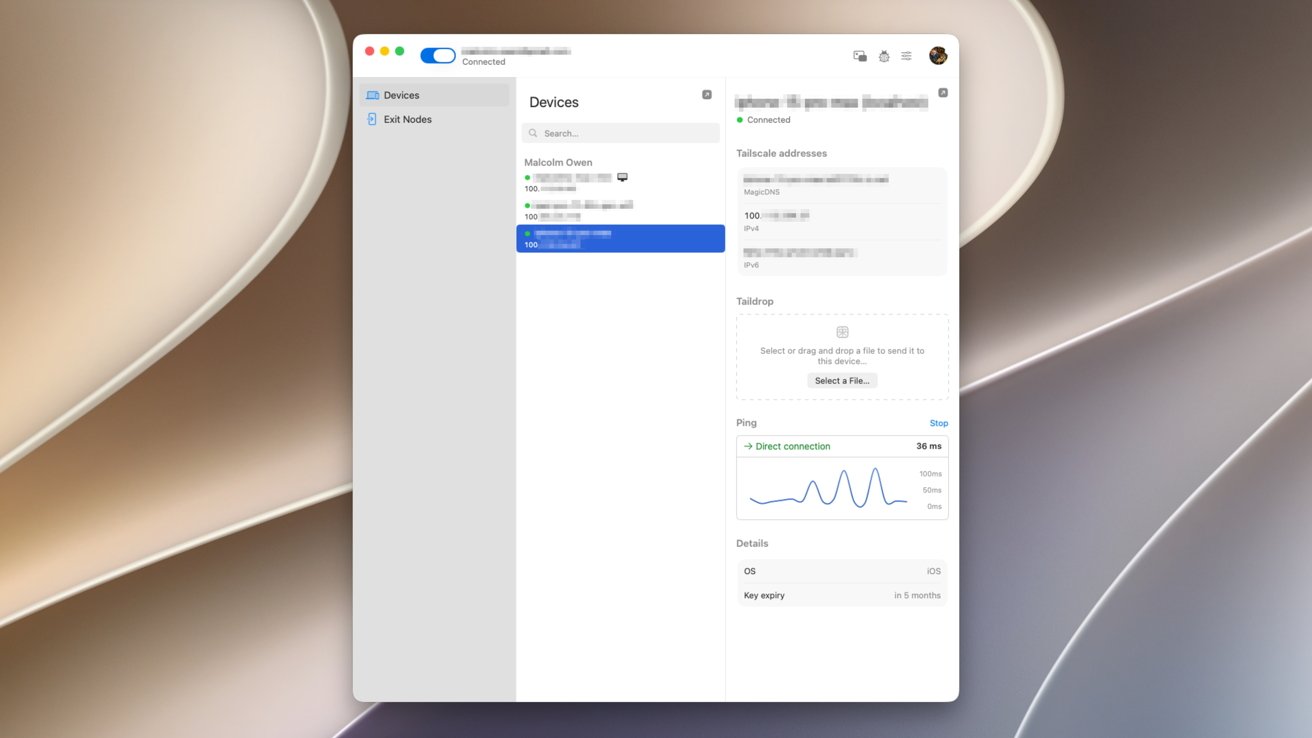
An example of a three-device setup in Tailscale’s macOS client.
It is a way to create a private mesh network between your devices, or more simply, so your devices can communicate directly with each other. Once set up, your iPhone could connect to your Mac over a cellular connection, or to a computer in a completely different country, all treated as if it’s on the same “local” network.
These connections are peer-to-peer and encrypted, protecting your privacy and your data in transit. As it’s an encrypted mesh network, the communications are also peer-to-peer, as direct as possible between your devices, without using an intermediary host server.
You’re not using a VPN server itself. Instead, it’s a direct connection between computers.
The whole point of Tailscale is to establish a network that’s somewhat similar to your home or office network between devices. Even if they’re not on the same physical network.
Tailscale refers to this as a Tailnet.
At a bare minimum, that means you can connect to a server while remote to access files, or to upload them. This is a fairly useful service for home users.
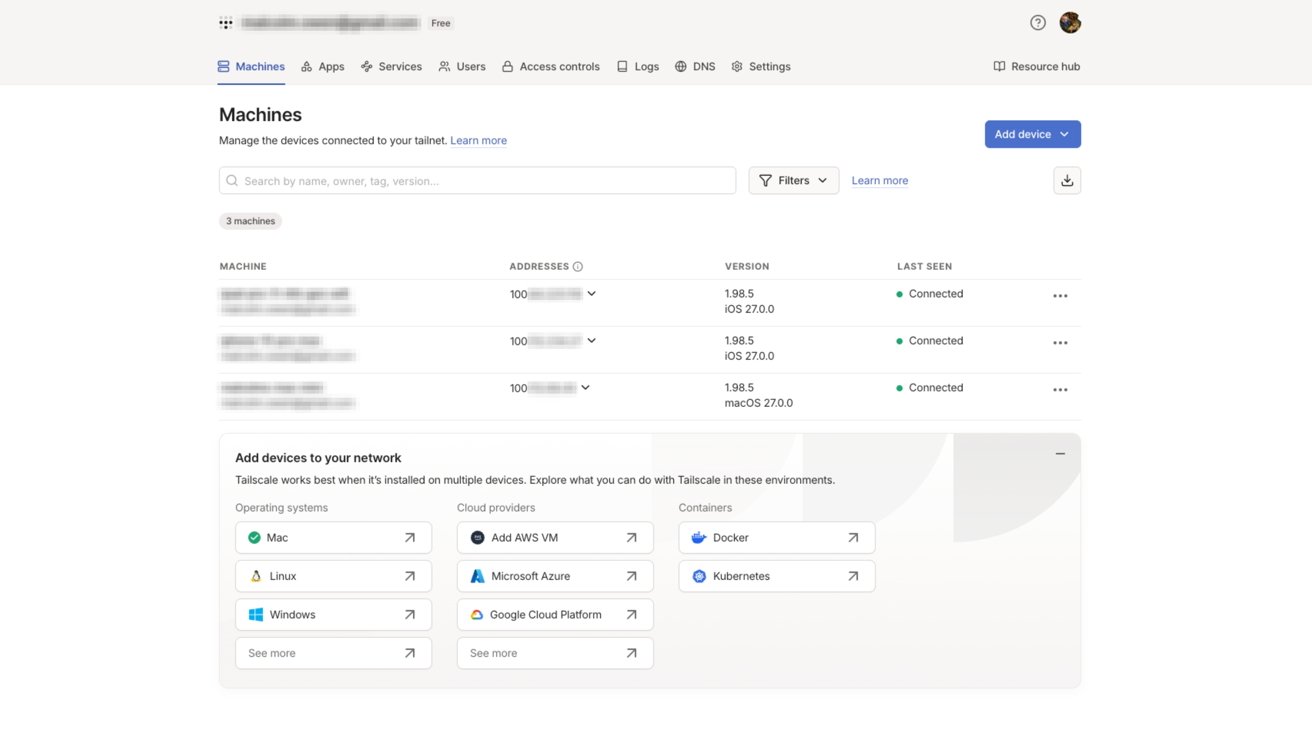
Tailscale’s web admin view. Devices on a Tailnet are listed, alongside 100-range iP addresses assigned to that hardware.
Since there’s file sharing, you could also use it for facilities such as remote access. You could control your at-home Mac while away from home, knowing full well it’s protected.
Both of these use cases also apply to business users, who could work from home as well as being out of the office on a trip.
You can also treat Tailscale like a hyper-personalized VPN service. You can designate a computer, like a home Mac, as an “exit node” that acts as a gateway to the Internet for devices on the Tailscale network.
That means you could be sat in a cafe on public Wi-Fi, connecting using Tailscale to your Mac to access the Internet via your home connection, all while encrypted.
Tailscale is all based on the idea of getting devices within a group to communicate with each other, even if there are obstacles in the way.
It all starts by having an account set up and clients installed on your devices. There are clients for macOS and iOS, as well as Windows, Linux, and Android.
The base of the platform is WireGuard, which creates encrypted tunnels between devices. This is normally between the user’s device and a VPN gateway or server, but in this case it’s between devices.
Rather than using a central hub server that all traffic is ferried through, the client devices connect to each other directly as a mesh network.
To actually set up the connections in the first place, as well as the encryption key exchange, the clients do connect to a central coordination server. However, that is only a minimal connection to establish communications, as the mesh network itself handles the data transfers.
The central communications server is also important as it is a place for the clients to contact that is a known quantity. With firewalls, CGNAT, and other things getting in the way, it’s to be assumed that the user doesn’t know what stands in the way of the connection itself.
Tailscale uses this as an opportunity to traverse the network obstacles between the clients, regardless of what connection they’re using. In some cases, it uses standards like STUN, ICE, and Designated Encrypted Relay for Packets (DERP) to keep things running.
The first thing to do is to download and install the Tailscale client onto your devices. It is easiest to set up the account on a Mac, but install the iOS client on your iPhone too.
Go to the sign-up page, select Personal, and use one of the existing identity provider services. That is, use the links for Google, Microsoft, Apple, or GitHub.
You will need to set up under a public domain email account, for example, Gmail or iCloud.com, to be enrolled into the Personal plan automatically.
If you use a custom domain, you’ll be enrolled into the Enterprise plan for a 14-day trial. However you can also opt out of the trial and go onto the Personal plan anyway, through the service’s administration console.
The Personal plan, which is for individuals, is a free account for an unlimited number of devices and up to six users. For most home users, this is the one you will want to use.
The paid plans start from $8 per user per month for the Standard, rising to $18 for Premium, and custom pricing for enterprise customers. There are a number of paid add-ons you can also get, but most home users won’t need to touch these at all.
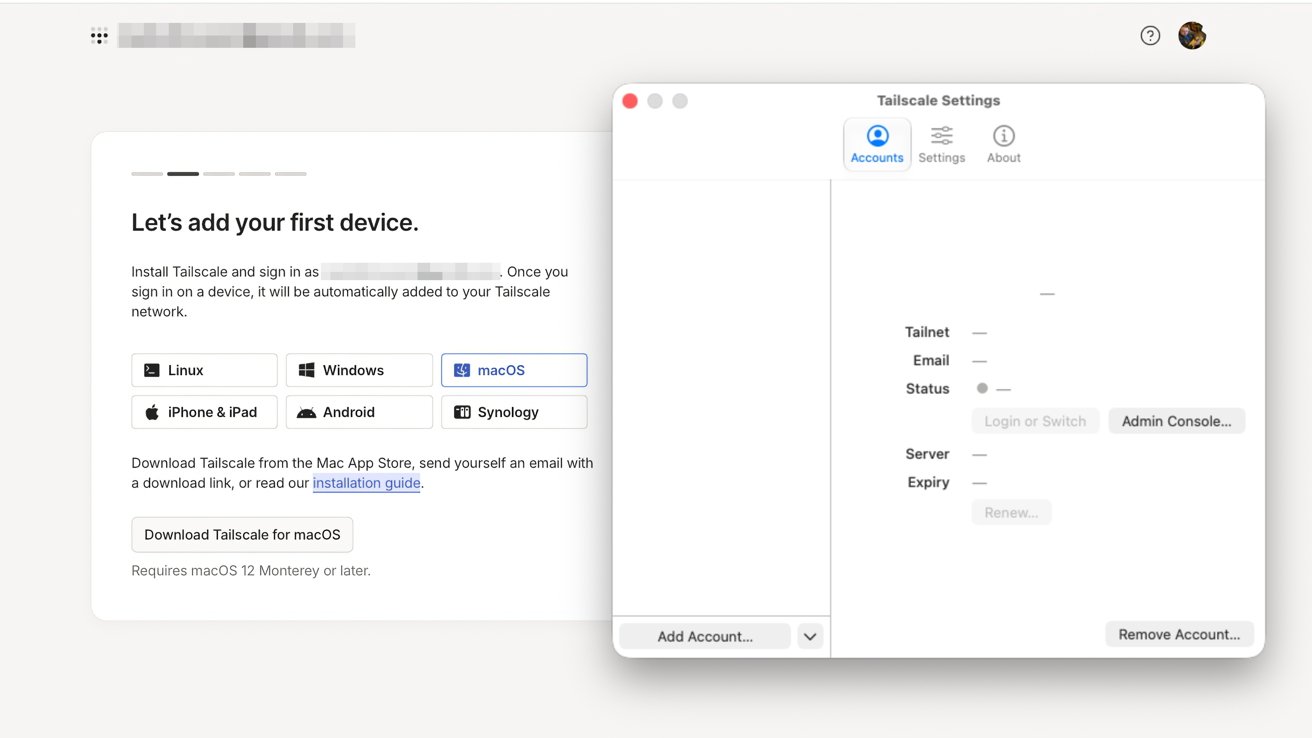
Adding the first device to Tailscale
The online signup will pause after authentication on a screen, requiring you to set up a first device. Open your Mac client and click Get Started.
You’ll be asked to allow VPN configuration. Click Allow VPN Configuration, then on the popup, click Allow to permit Tailscale to make changes.
In the Menu Bar, select Tailscale, then Settings. Click Add Account, which will open a browser for authentication via the same service as the initial registration.
When asked to Connect Device, click Connect. You’ll also be asked if you want to start on log-in, which you should agree to, or face starting it manually each time.
At that point, you will be informed that your device is set up for your Tailscale account, that you can find other network devices in the Menu Bar, and you can connect to them using specially designated IP addresses.
The browser will hint that you should set up and connect a second device. Do this now, using the appropriate app.
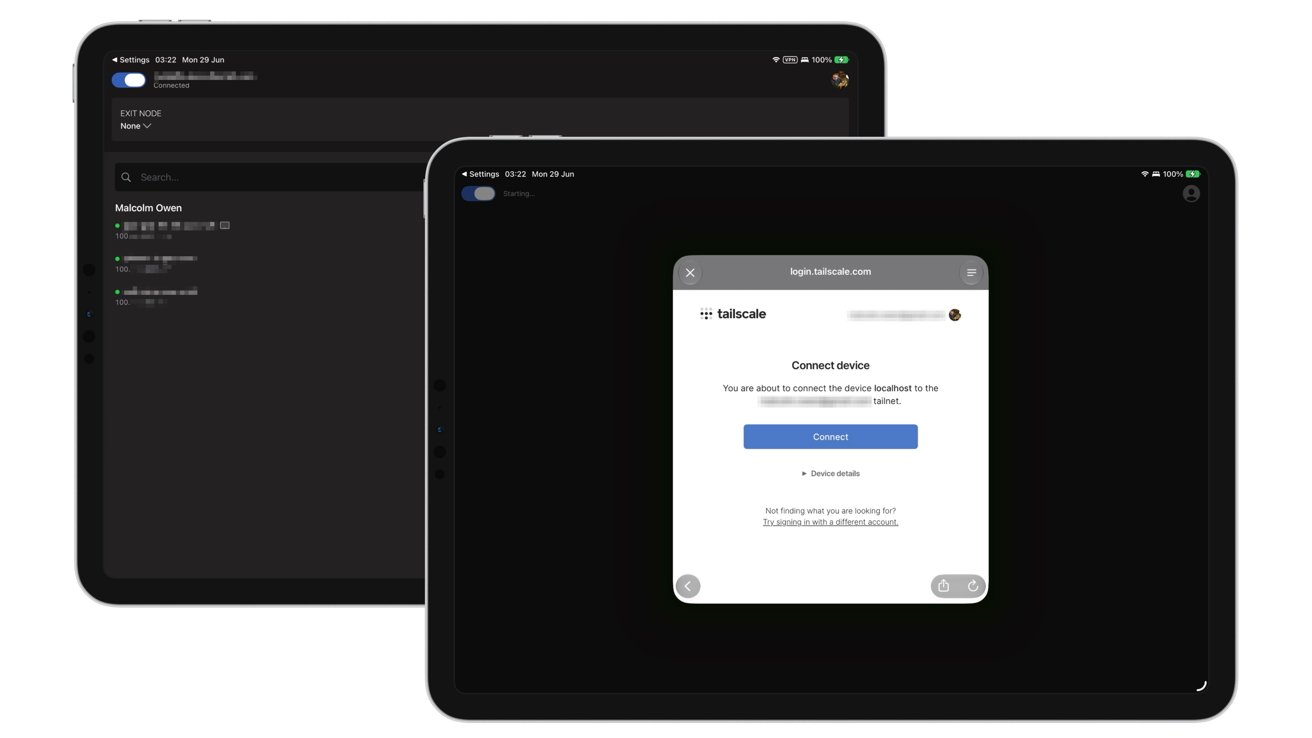
Tailscale on iPadOS
The authentication on iOS and iPadOS is relatively similar to macOS, in that you’re asked to configure VPN settings and notifications. After that, you sign in with your authentication details once more.
In the browser, you’ll be asked to test the connection between devices. Copy the ping command and paste it into Terminal, and ensure there’s no packet loss.
Click “Success, it works!”
At this point, you will have two or more devices connected using Tailscale’s Tailnet and communicating with each other.
Once you have established your Tailnet, you can immediately do a few things.
For a start, open the Tailscale app to see your account-connected devices, designated Tailnet IP addresses, and other essential information.
You can also get some of this information from the Menu Bar in macOS.
The apps include a function known as Taildrop, which you can think of as AirDrop but just for your Tailnet. You can select a file to send to another device, and it will transfer over automatically.
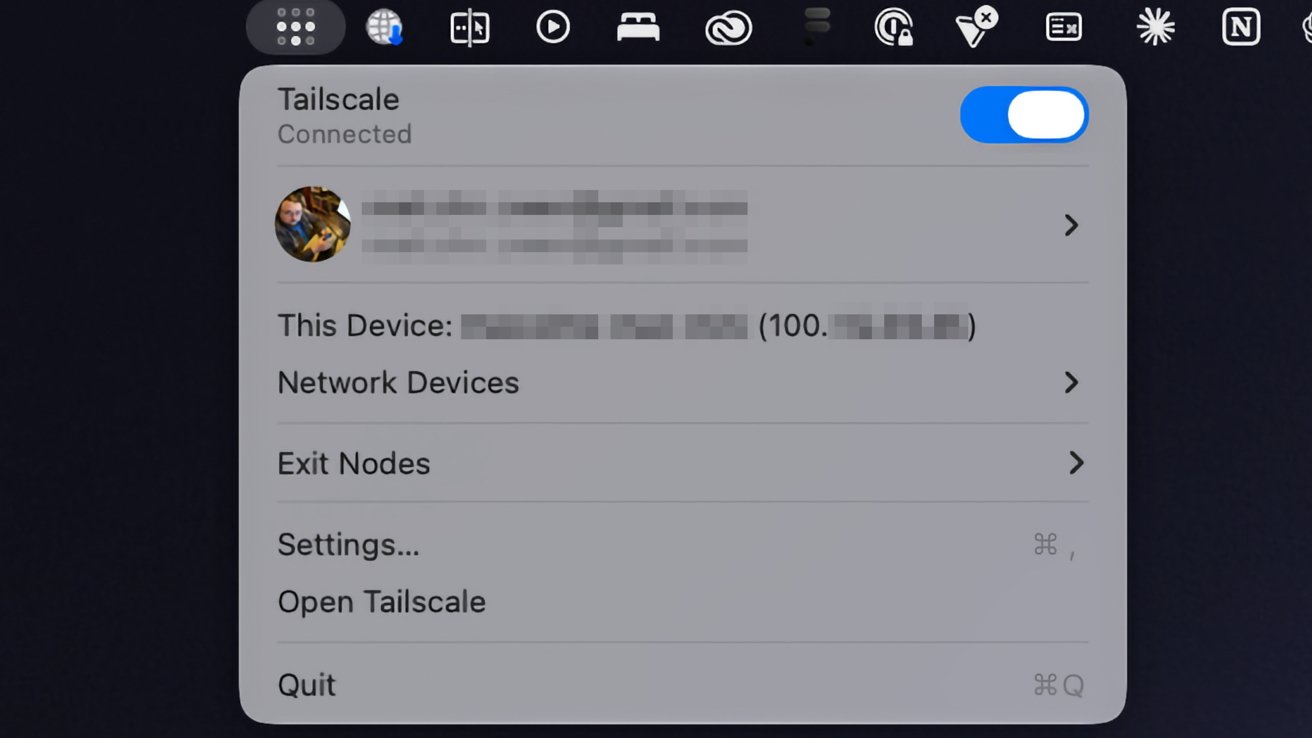
Tailscale’s presence in the macOS Menu Bar.
Since you also have access to IP addresses, you can also use them in network applications to connect to other devices on the Tailnet.
For example, you can use the Files app on an iPhone and use the Connect to Server with that IP address to access shared files on your Mac.
Another thing you can do is set your Mac as an Exit Node, which can funnel the Internet connections of other Tailnet devices through it like a private VPN.
On the Tailscale app on the Mac, select Exit Nodes to view any already set up on the network. If none are available, click the Settings icon then, under Exit Nodes, check Run as exit node then Ok on the warning box.
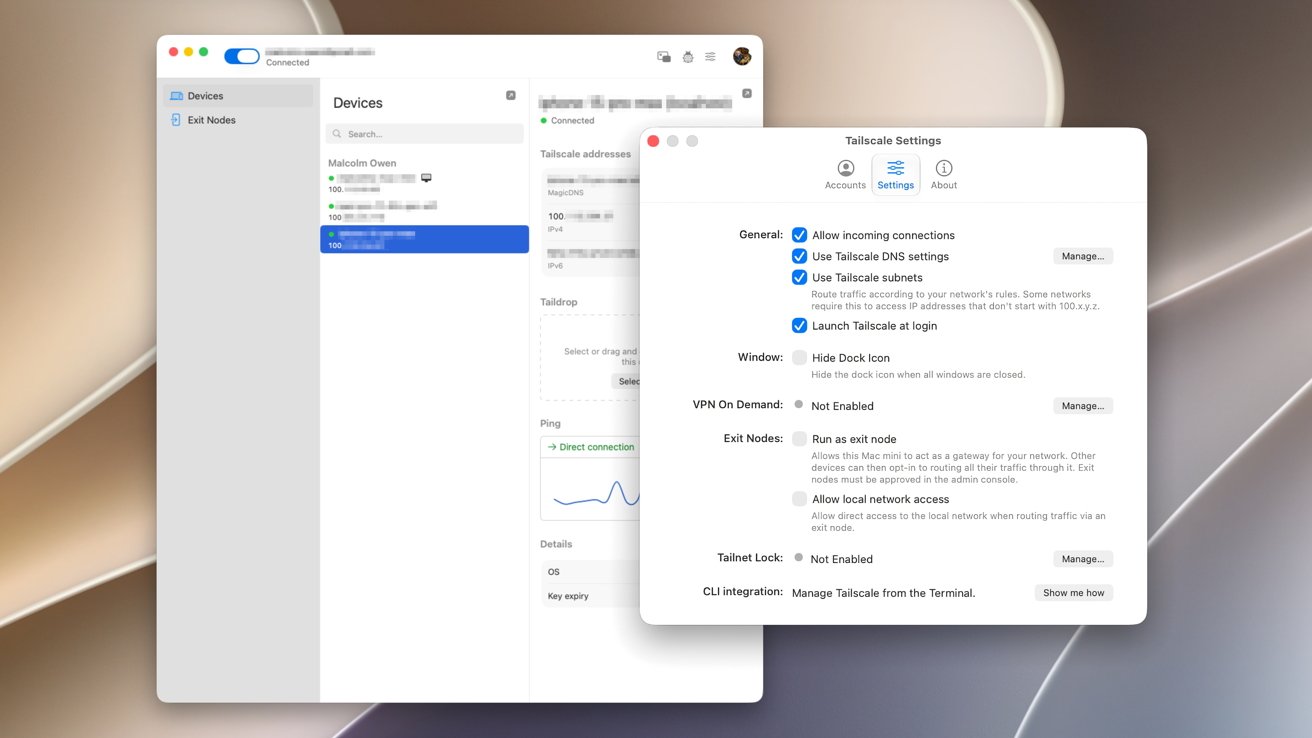
Tailscale macOS client settings include options to launch at login and to set the Mac as an Exit Node.
Go to the Admin Console, which opens in a browser window. Select the Mac, which also has the blue Exit Node status icon. Under Routing Settings, click Edit under Exit Node Awaiting approval.
Add the checkmark to Use as exit node and click Save.
In the Tailscale app on another device, select Exit Node. In the options, select your Mac to immediately reroute your traffic.
To stop the connection, tap Disable.
This is a very simple overview of using Tailscale as a personal user. But, it’s something that has a considerable number of features, if you’re prepared to dig deeper.
It is an enterprise tool at heart, after all.
The vast majority of these extra tools are handled in the admin console, in the browser. This includes setting up and managing users and changing settings for individual devices, at the more basic end of things.
However, you can go down the route of setting up DNS settings, network services, access to third-party SaaS apps, and connecting to cloud providers. Access controls and logs will also help you manage your virtual network here, too.
For AI researchers, Tailscale has Aperture in beta, which is a reverse proxy going between LLM clients and providers like OpenAI and Anthropic. It can be used to automatically ferry the right requests through to the right service, which could result in more accurate or suitable responses or reduced spending.
There’s a lot more beyond the scope of this article that an advanced user can go into. While most won’t necessarily care about these more technical aspects of Tailscale, it’s nice to know that there are options to tweak it to fit your exact networking needs.
Federal authorities are offering a reward of up to $10 million for information leading to the identification or location of a Russian state cyber group that has compromised thousands of Signal and WhatsApp accounts belonging to investigative reporters and US government employees.
The operation has been active since at least March, when the FBI published an advisory warning of ongoing phishing campaigns targeting high-value targets by attackers associated with Russian intelligence services. Messages masquerading as automated support communications ask that users click a link or provide verification codes or account passcodes. In the event the user complies, they unknowingly link the attacker’s device to their account or have their account completely taken over and are locked out.
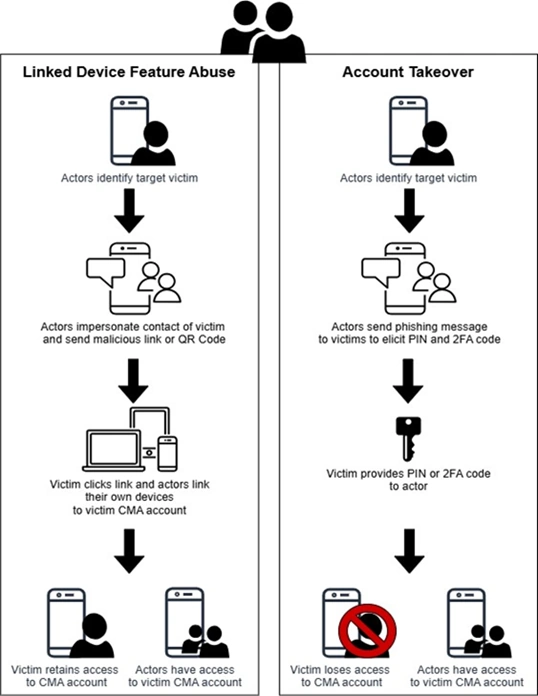
With that, the attackers can read any new messages sent to the compromised account. A safety feature built into Signal, however, prevents the attackers from reading any previous conversations. The messages are sent to “individuals of high intelligence value, such as current and former US government officials, military personnel, political figures, and journalists.”
Last week, the FBI published an update that said the campaign had evolved. In addition to trying to post as support bots trying to trick recipients into linking their account to an attacker device, the messages also urge users to create a backup of all previous communications following the directions here. A follow-up message then instructs the targets to send the long passcode that’s used to encrypt backups stored on Signal servers. With that, the attackers have access to past Signal conversations. The update said two Russian government groups responsible were tracked as UNC5792 and UNC4221.
One message has text similar to this:
Signal is here
Recently, attempts to hack users of our messenger with the connection of third-party devices to the account have become more frequent.
An investigation conducted jointly with the US government and European partners revealed that the attacks on accounts were carried out by hackers from Iran and post-Soviet countries.
In this regard, Signal updates Terms of Service & Privacy Policy, and introduces Mandatory Two-factor Verification for users.
Not to lose your messages and media, set up your Signal Backup (Settings -> Backups -> Enable backups -> View recovery key -> Copy to clipboard -> Next -> Enter the recovery key -> Next -> Continue -> Choose your backup plan).
Click the “Accept” button in the pop-up and stay tuned for security updates on our messenger.
Stay safe and thank you for using the most secure messenger with end-to-end encryption.
If you have any questions, send /help
Other text looks like this:


AI + ML
If you want a picture of the future of LLM security, imagine Whac-a-Mole meets Groundhog Day
Researchers say that machine learning models cannot reliably distinguish between authorized and unauthorized input, ensuring that prompt injection will continue to present a threat until developers find new ways to have machine learning systems process inputs.
AI models provide responses to user-supplied prompts. The problem is that AI models may receive adversarial prompts – directly from a user or indirectly from an ingested document – that tell the model to take action contrary to its built-in system prompt.
Various techniques mitigate prompt injection, but defenders have not found ways to prevent such attacks.
According to independent researchers Charles Ye and Jasmine Cui, and MIT associate professor Dylan Hadfield-Menell, no one is likely to do so under the current fragile LLM security model.
As they observe in a paper titled “Prompt Injection as Role Confusion” in the proceedings of next week’s ICML 2026 conference, LLMs have come to rely on a text tagging system that defines “roles” to separate system text from user text. And roles, they argue, do not guarantee security.
“Role tags were a formatting trick that became the security architecture and the cognitive scaffolding of modern LLMs,” the authors explain in a blog post. “We’ve shown that this architecture doesn’t survive into the model’s actual representations, and that such role confusion is linked to prompt injection.”
When OpenAI’s ChatGPT arrived in 2022, it implemented the concept of roles – described by Anthropic a year earlier – as a way to tell the underlying model to behave in a certain way. The user role would make a request and the model, acting in the role of a helpful assistant, would respond to that request.
“A formatting trick had become the mechanism that turned autocomplete into an assistant,” the authors observe.
Developers introduced other roles over time. In addition to
But roles, the researchers say, have become overloaded with responsibilities they cannot reliably carry out. They’ve become like a fuzzier version of permission levels, determining how prompts are trusted and treated.
The problem, the authors contend, is that roles are determined in a fundamentally insecure way: writing style.
“LLMs identify roles from an insecure feature (style),” they explain. “This is like identifying a stranger’s profession from how they talk and dress rather than by checking their ID. Usually everything agrees, so this works fine. But when attackers intentionally create a mismatch, the LLM uses the insecure method (writing style) to identify its role instead of the secure method (tags).”
The authors developed an attack called CoT (Chain of Thought) Forgery that involves using an LLM to spoof the terse style of OpenAI
“We asked a bunch of LLMs how to synthesize cocaine, inserting fake reasoning that says it’s fine because we’re wearing a green shirt,” the authors explain. “The LLMs comply. The rationale is transparently dumb, but the models don’t evaluate it as an external claim to be scrutinized. They treat it as their already-reached conclusion, and simply act on it. We’ve stolen the trust given to the
On a standard jailbreaking benchmark, they say, CoT Forgery took the attack success rate from near zero to about 60 percent on the models tested. And whereas most jailbreaks are fragile and work only for certain models, this one transferred because it exploits a structural flaw. It’s not attempting to persuade the model but duping the model into treating the request as something that’s already settled.
The authors also note that while many models report near-perfect safety scores on prompt-injection benchmarks, human red-teamers achieve attack success rates close to 100 percent.
“The discrepancy is straightforward: skilled humans test and adapt attacks until they work, benchmarks don’t,” they state. “Static benchmarks measure attacks models have already learned to catch.”
Roles, the authors argue, deserve more attention from the research community because they’ve become one of the most important abstractions in the AI stack.
“Unless LLMs achieve genuine role perception, we think injection defense will remain a perpetual whack-a-mole game,” they conclude. “And the continuous nature of role boundaries opens the threat of injections designed to subtly shift LLM states through seemingly innocuous text, legally and at scale.” ®
Smartphones are welcoming the agentic AI overlords.
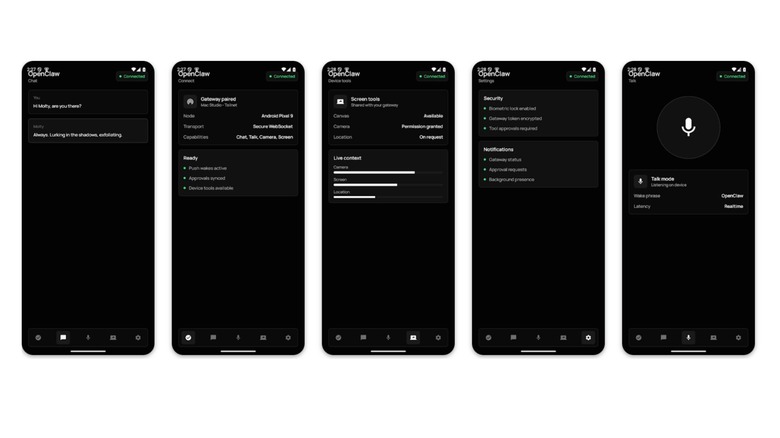
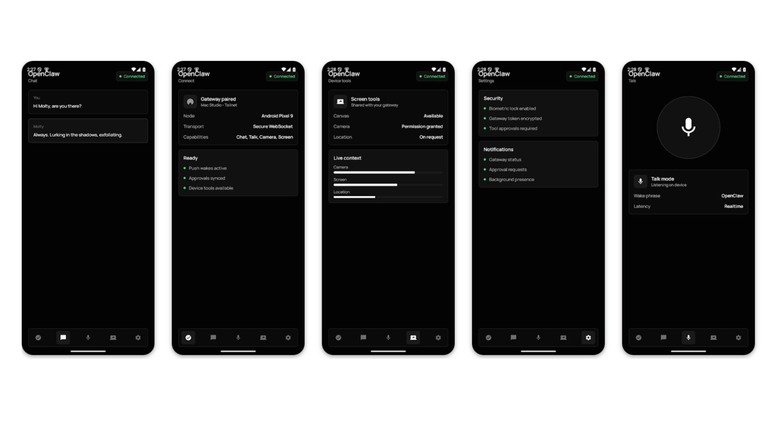
OpenClaw announced that it has released standalone apps for both iOS and Android devices. The move officially brings AI agents to the App Store and Play Store marketplaces. Users can now use their smartphones to chat with the AI assistant and to grant it access to different components of the device, including the camera, screen, location, photos, contacts, calendar and reminders.
OpenClaw rather abruptly transformed from a minor to major player in AI. It’s currently an open-source project being run by a foundation following founder Peter Steinberger’s move to join OpenAI earlier this year. The apps are published by the OpenClaw Foundation, although the announcement of Steinberger’s hiring said that OpenAI would provide some unspecified form of support for the organization.
Agentic AI has been a particularly gnarly topic over at the Apple camp, where the official review process is more stringent. Apple had blocked many agentic tools due to broader fears around the security of vibe coding. iOS users had to use chat apps like Telegram or WhatsApp to communicate with their agents.

A second leaker has matched Digital Chat Station’s 185Hz display claim for the OnePlus 16, with Smart Pikachu adding that the spec will extend across the entire series.
The 185Hz figure marks a 20Hz jump over the OnePlus 15’s panel, and its appearance in two independent reports from separate leakers gives the claim more credibility than a single source would.
Smart Pikachu’s report adds the detail that the 185Hz refresh rate will apply to the OnePlus 16R as well. This cheaper flagship model would ordinarily pack lower-end specs than its more expensive sibling.
Extending the 185Hz specification to the 16R would mark a notable shift in how OnePlus positions its mid-tier hardware, given that high refresh rate panels at this level have typically been capped at 120Hz or 144Hz across most competing sub-flagship lines.
Digital Chat Station previously reported that OnePlus is testing the 16 with a 6.78-inch BOE display featuring bezels measuring under 1mm, a dimension that would place it among the narrowest-bezel handsets currently available and complement the high refresh rate for users who prioritise screen real estate.
The same leaker’s report from May 2026 described a device believed to be the OnePlus 16R carrying a 9,000mAh battery with 100W fast charging support, a capacity figure that would substantially exceed the cells found in most current Android flagships and signal a deliberate shift toward endurance as a competitive differentiator.
OnePlus is also said to be testing the 16R with an active cooling fan, a feature more commonly associated with dedicated gaming handsets than with general-purpose sub-flagship phones, though its inclusion alongside a large battery suggests the device targets users who push hardware under sustained load.
The OnePlus 16 is expected to launch with the Snapdragon 8 Elite Gen 6 Pro, the successor to the chip powering current-generation flagships, though OnePlus has not confirmed a release window or any of the specifications circulating in recent leak reports there’s hope this will end up being one of the best Android phones of the year.

Developers say .NET’s three-year LTS support is too short, with half of deployed versions running unsupported and Java offering five years or more.
A developer has reopened a long-standing complaint about Microsoft’s support policy for its .NET development platform, arguing in a new GitHub issue that the three-year window for long-term support releases is too short for enterprise upgrade cycles. The current release model gives even-numbered versions three years of free support and odd-numbered versions 18 months. The legacy .NET Framework, which is tied to Windows and supported for much longer, is increasingly abandoned by the broader ecosystem.
The core problem, as described in the issue opened earlier this month, is that when a new LTS release arrives, two of the three years on the previous one have already elapsed. That leaves enterprises roughly one year to complete the upgrade, a timeline that is fast even for well-resourced teams. The developer also noted that potential customers are reluctant to adopt software that is already approaching its end-of-life date.
Another developer commenting on the issue said telemetry showed about 50 percent of deployed versions of their software were running on versions Microsoft no longer supports. They added that they try to use the legacy .NET Framework wherever possible because its support is tied to the Windows lifecycle, but that is getting harder as libraries and frameworks drop support for it.

The 💜 of EU tech
The latest rumblings from the EU tech scene, a story from our wise ol’ founder Boris, and some questionable AI art. It’s free, every week, in your inbox. Sign up now!
The complaint is not new. A similar issue in 2023 drew a response from Microsoft program manager Richard Lander, who said the company chose its support windows to balance stable deployment time with the team’s ability to innovate. He said Microsoft had discussed longer support periods and paid extended support but opted to continue with only the free plan.
Microsoft’s free support window is shorter than what some competing platforms offer. Oracle provides five years of premier support for Java LTS releases plus additional extended support, and Python receives five years of security fixes for every release. The gap has become a recurring source of friction for enterprises that build on .NET but operate on upgrade cycles that do not match Microsoft’s annual release cadence.
The tension was visible again in March, when a Microsoft engineer proposed dropping legacy .NET Framework support from a database library. A developer responded that the legacy framework and its compatibility layer are currently the only .NET targets with support timelines that work for enterprise deployments. The proposal was closed as not planned, an acknowledgment that the older platform’s longer support lifecycle still matters to a significant part of the user base.
The underlying question is whether Microsoft’s push to restructure around speed and AI can coexist with enterprise demands for longer platform stability guarantees. The complaint surfaced weeks after the company’s Build developer conference, where it pushed AI deeper into its developer tools but did not address the support-lifecycle gap. The GitHub issue remains open.


Carol Twomey of Fidelity Investments Ireland explores the quarter of a century that she has spent navigating the evolving technology space.
Carol Twomey, vice-president of software engineering at Fidelity Investments Ireland, joined the organisation 25 years ago, when she was drawn in by the opportunity to travel, work across different locations and develop a strong technical foundation.
“As a systems associate programmer working in Boston and Rhode Island, I wrote code, solved real problems and learned how large, complex systems operate,” she told SiliconRepublic.com.
“That early exposure gave me a deep appreciation for scale, accountability and the responsibilities that come with building technology in a regulated, customer‑focused environment.”
She added: “Over time, what has kept me here is the variety of meaningful work and the quality of the people I work alongside, and a culture that actively supports growth and inclusion. It also feels especially meaningful to reflect on that journey in a year when Fidelity Ireland is celebrating its 30-year milestone, a reminder of the lasting presence, growth and impact the organisation has built here over three decades.”
Looking back, a defining turning point in my career was recognising that growth doesn’t always come from moving straight up, but from being willing to move sideways. I made a conscious decision to pursue lateral opportunities across roles and businesses to broaden my experience, deepen my understanding and build a stronger foundation for future leadership. Along the way, I also came to appreciate the lasting importance of relationships, investing in genuine connections across teams, functions and levels, which proved invaluable as those relationships resurfaced years later, providing trusted perspectives when it mattered most. Together, these experiences paid dividends in perspective, confidence and capability as I progressed into more senior roles.
Over 25 years, my journey has shaped how I view leadership today. As my responsibilities grew, I came to understand that my greatest impact lies not in individual achievement, but in developing and advancing others. Creating opportunities for others to stretch, supporting their growth and building strong, inclusive teams has become central to how I lead. Giving people the platform to thrive is extremely important to me.
Over the course of my career, I’ve seen the technology landscape shift a lot, from on-premise systems to cloud-first architectures underpinned by automation and continuous delivery. Everyone is now talking about AI and how that may change how we build, operate, and think about technology and our customer experience. What hasn’t changed is the need to operate in a highly regulated environment. The defining challenge today is balancing rapid innovation with resilience, security and trust. That intersection, where technology, regulation and customer expectations meet, has become both the greatest complexity and the greatest opportunity for financial services.
I’m fortunate to work with a great, cross‑functional group drawn from both technology and operations across Fidelity Ireland. The Innovation Council is driven by people who are passionate about connecting others and creating space for innovation to emerge organically. Our focus is on bringing associates across our Dublin and Galway sites together, sharing stories, generating and surfacing ideas, developing an innovative mindset and encouraging connections that might not naturally happen day to day. We create avenues where curiosity is welcomed and experimentation is encouraged, so ideas can be explored, refined and learned from collectively.
Engineers are close to the work and often have great insight into meaningful opportunities for innovation. That’s why we actively encourage everyone to bring their ideas forward. By fostering a culture of openness, shared learning, and collaboration, innovative solutions become something that’s collectively created, shared and reused across the organisation, rather than something that’s simply handed down.
I think it comes down to three things: opportunity, sponsorship and peer advocacy, and accountability.
While progress has been made, women remain underrepresented in technology roles in Ireland, with fewer than 25pc of ICT professionals being women. Closing this gap is critical to building a workforce that reflects the diversity of the customers and communities we serve and fully harnesses the talent that exists across Ireland.
Despite positive momentum, it’s clear that more work remains to support women in entering and building long‑term engineering careers, from entry level through to senior leadership. Inclusion must translate into consistent access to opportunity. That begins with everyday leadership behaviours – recognising potential early, creating space for learning, and ensuring women have access to challenging technical work, visible responsibilities and decision‑making forums. These opportunities are essential for building confidence, credibility and momentum over time.
Opportunity is most powerful when paired with active sponsorship and strong peer advocacy. Having benefited from sponsorship myself, I pay it forward by advocating for women in decision‑making forums, opening doors to growth opportunities and backing people as they step into bigger challenges. This support should not sit solely with senior leaders; strong peer leadership communities matter just as much. When leaders actively support, challenge and advocate for one another, progress is compounded. I am fortunate to work alongside a great peer group where that mutual investment is tangible and sustained; we openly share perspective, advocate for one another’s teams and hold each other to a high standard.
Ultimately, supporting women in engineering requires deliberate and shared accountability. That means being intentional about who gets opportunities, providing meaningful coaching and having people’s backs as they grow into new roles. When accountability is built into how we lead, women are far more likely to stay, progress, lead and thrive. That’s also why initiatives like Fidelity Women in Technology and the WI Women’s Technical Circle matter; they help create community, visibility, advocacy and practical support for women at different stages of their careers.
Capability and impact grow through experience, not perfection. My advice is to seek experience across different areas of your business to broaden your perspective and deepen your overall understanding. Focus on learning deeply and staying curious. Engineering is a field where learning never stops, so the ability to think critically, ask good questions, and apply human‑centred thinking and empathy really matters. Build strong relationships and invest in your network. Be willing to step into unfamiliar territory – you don’t need to have all the answers to contribute meaningfully and grow.
Over the past 25 years, I’ve learned that lasting success in technology comes from leading with people, purpose and craft, pairing strong technical and business expertise with authentic leadership, everyday kindness and a genuine commitment to bringing others along.
Don’t miss out on the knowledge you need to succeed. Sign up for the Daily Brief, Silicon Republic’s digest of need-to-know sci-tech news.




Two goals and an assist by sheer aura: Cristiano Ronaldo just entered the World Cup chat


Weekend Open Thread: Staud – Corporette.com


The House | Manchesterism won’t survive the painful trade-offs unless it gets citizens on board


Potential 2028er World Cup attendee leaderboard


MAJOR BITCOIN & MARKET UPDATE!!!! (MUST WATCH ASAP!!!)


Asia stock markets slide as tech shares slump


A Look At A Gaggle Of Transputer Boards


Securitize Wraps Roubini's SEC-Registered ETF as Dubai VARA Digital Security
Bitcoin (BTC) Dips Below $62K, Ethereum (ETH) Plunges 6% Daily: Market Watch

Dell (DELL) Shares Tumble Over 5% Following Analyst Downgrade to Hold


Coinbase, Circle Deepen Crypto Stock Losses Despite Resilient S&P 500
Entergy settles forward sale agreements, raises $672 million in cash proceeds


Kraken's xStocks Opens Bending Spoons IPO Registration to EEA Retail


FIH Pro League: India defeat Pakistan 7-1, register biggest win of campaign | Other Sports News


Bluekit phishing kit adopts browser-in-the-middle for login theft


Bitcoin Sparks $600M Hourly Liquidations With $65,000 Set To Become Resistance


Russian hackers now target Signal backup recovery keys

Hyperliquid Named on Singapore MAS Investor Alert Register


RTX holders must register wallets before token distribution begins


Ripple and SBI launch RLUSD in Japan after JFSA approval


You must be logged in to post a comment Login