Last year’s trip to CanJam London was something of a nightmare, with lengthy train delays and torrential rain pouring over the London Eye and Westminster Bridge.
This time, the journey into the heart of the city could not have been easier. There were no travel hiccups, and the sun managed to find its way through every available gap between the buildings, buses and cars.
Inside the Park Plaza Hotel, the air conditioning was working overtime, which was just as well. Attendance was clearly up compared with 2025, and there were noticeably more brands and exhibitors. So many, in fact, that I simply could not see everything on offer over the two days.
Following our recent coverage of CanJam NYC 2026, and with the eCoustics team heading to CanJam SoCal at the end of the summer, London offered another useful snapshot of where personal audio is heading. With my trusty Sendy Audio Egret in tow, I focused on the products that stood out most. We begin with my personal highlights among the DACs, headphone amplifiers and DAPs at CanJam London 2026.
Advertisement
Related Reading:
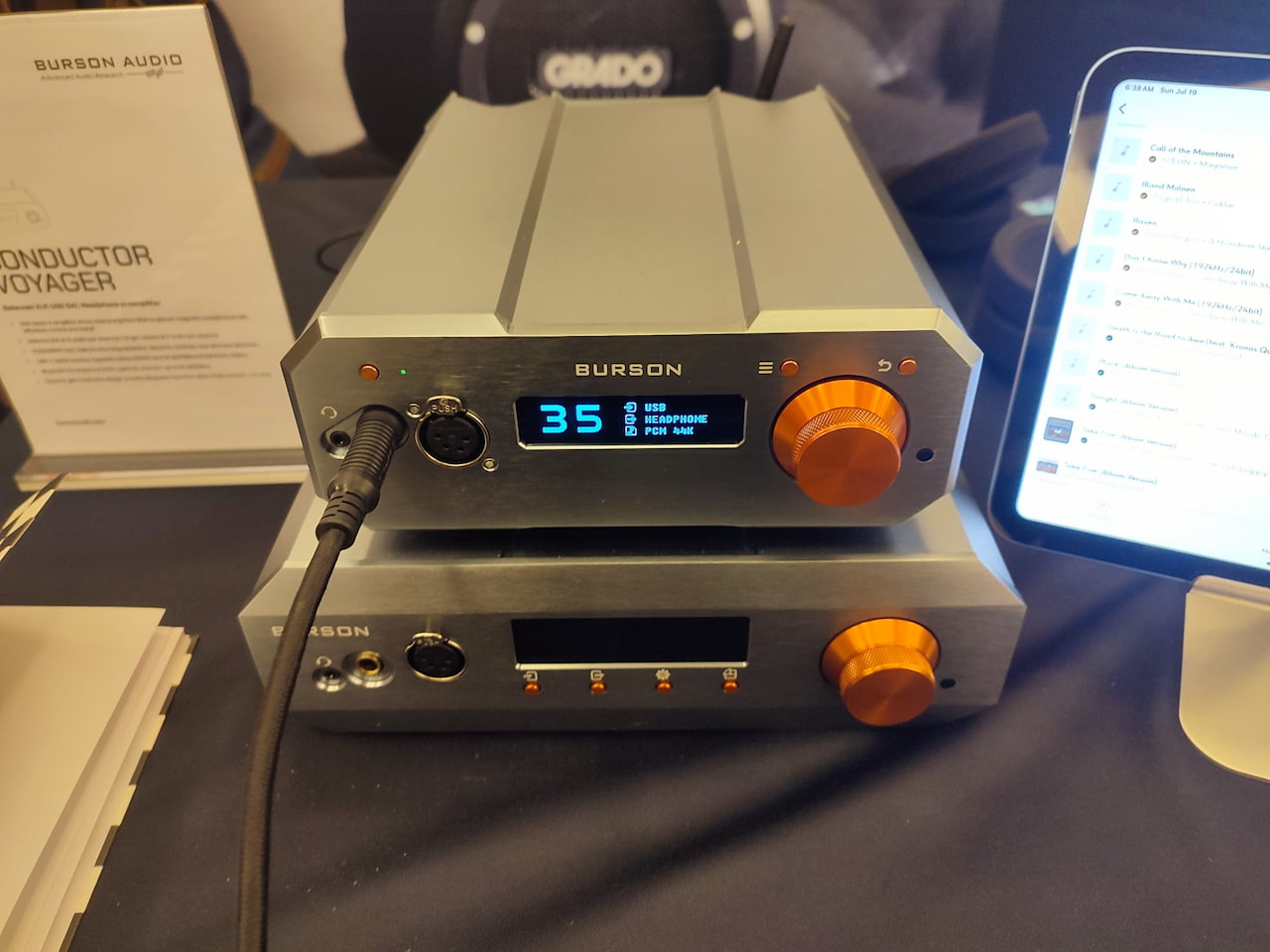
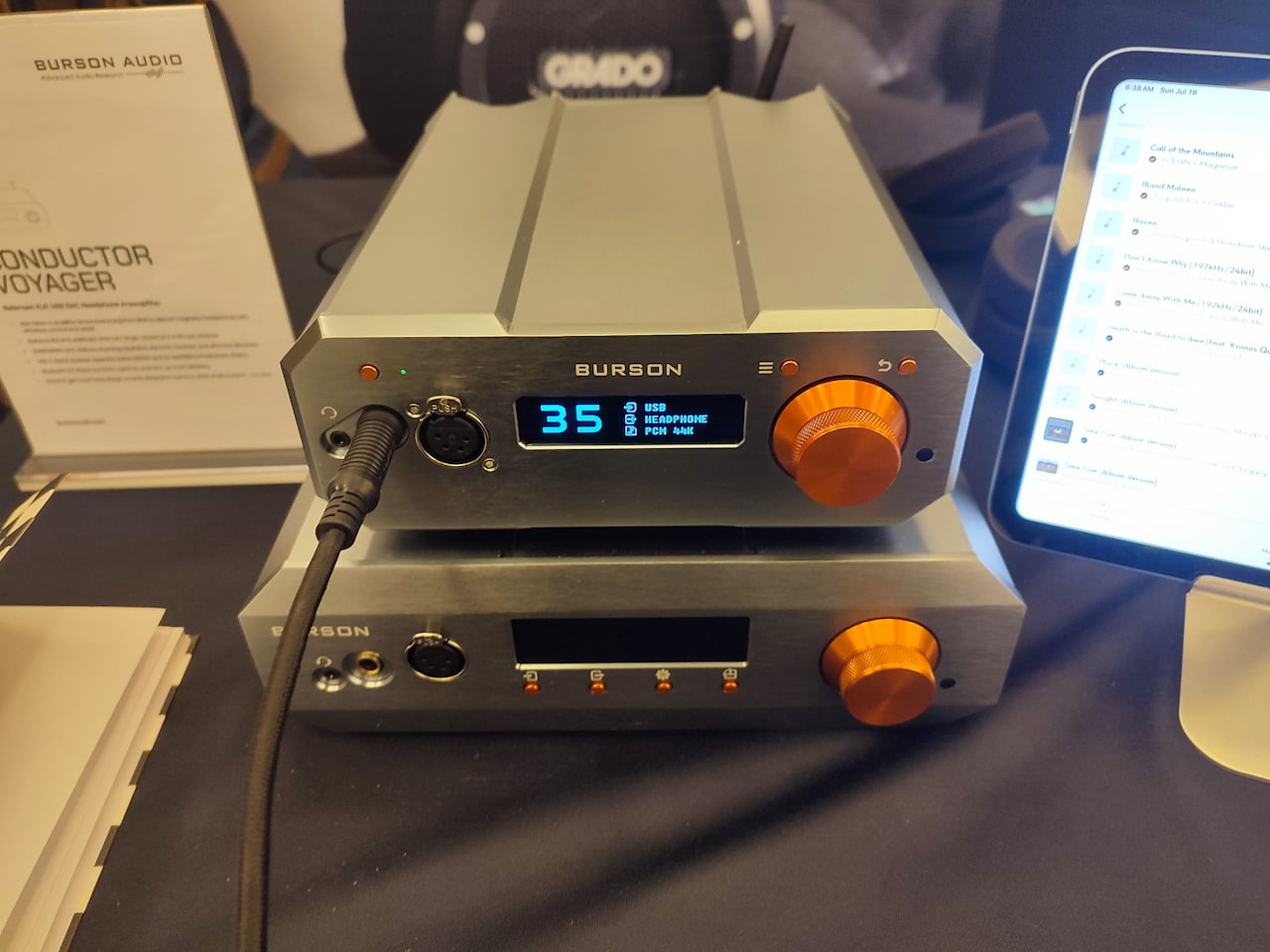
Burson Audio Conductor Stellar
Australian audio brand Burson has seemingly come out with a smaller, more compact Conductor Voyager that costs less and offers almost the same level of performance.
You get two watts less of Class A amplification, at eight watts rather than ten, but you won’t notice that unless you’re using a particularly difficult-to-drive pair of cans. What’s more, the Stellar has a dedicated IEM amplifier stage, so you can drive your sensitive in-ears with ease.
Despite being Class A, I found the Stellar to be wholly neutral, albeit with excellent dynamics and an impactful bass line. As a pure headphone listener, I’d go for this instead of the Voyager unless you need the extra I/O that the latter offers at the back.
Fosi Audio ZH1
I’ve always been a fan of Fosi Audio’s budget-conscious approach to personal audio, and its upcoming ZH1 certainly sticks to that philosophy.
Expected to arrive around September for approximately £130, the ZH1 is a compact desktop DAC and headphone amplifier built around a pair of Cirrus Logic CS43131 DAC chips and Fosi Audio’s own headphone amplifier circuit. Its unusual hexagonal chassis also helps it stand out from the endless procession of small black boxes competing for space on your desk.
That oversized volume knob definitely takes centre stage. It makes quick adjustments easy, while the lighting underneath can be changed to suit your setup. Some audiophiles will undoubtedly switch it off immediately, but I imagine the colourful presentation will make the ZH1 particularly popular with gamers and younger listeners.
Advertisement
This is not merely a piece of affordable desktop decoration, either. With more than one watt of output power available, the ZH1 should have enough muscle for a broad range of headphones rather than being limited to sensitive IEMs and easy-to-drive models. It certainly had no difficulty with my Sendy Audio Egret at the show.
Advertisement. Scroll to continue reading.
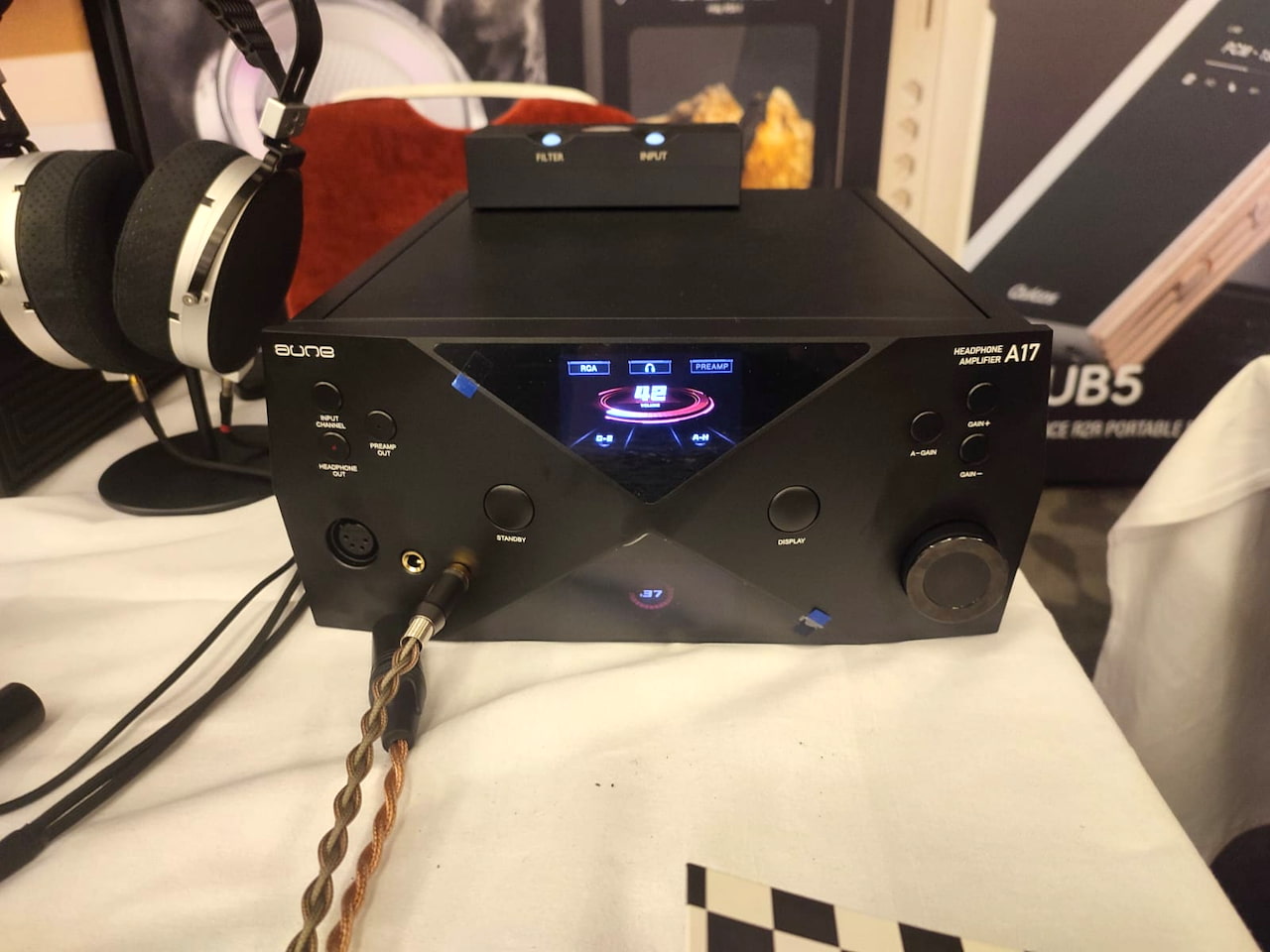
Aune A17
Next up is this absolute behemoth of an amplifier. I’ve reviewed a few of Aune’s products in the past, but nothing has come close to the sheer heft of this beast, which weighs an astonishing 18 kg.
It has the power to back up its size, too, delivering almost 12 watts from its balanced output. That translates rather directly into its sonic performance, as my main takeaway was the exceptionally high level of control it maintained across the entire audible spectrum.
It also costs upwards of £2,000 ($2,399 at Amazon), and while you certainly get a lot of material and componentry for the money, I found the design rather uninspiring and, dare I say it, slightly cheap-looking.
Advertisement
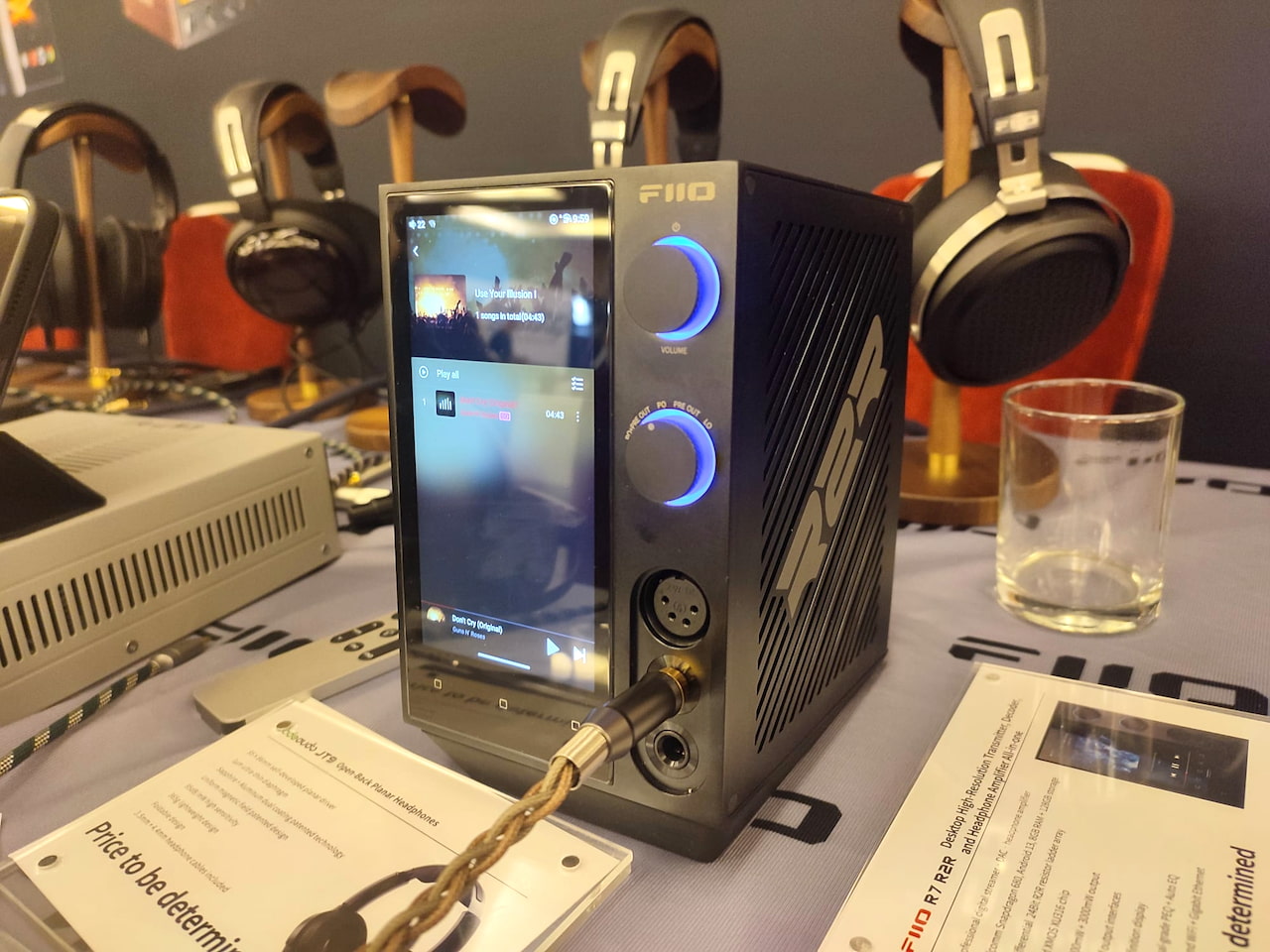
FiiO R7 R2R
The FiiO R7 R2R is expected to cost the same as its original sibling at around $700, but replaces the standard R7’s ESS ES9068AS delta-sigma DAC architecture with an R2R resistor-ladder conversion stage.
The rest of the formula remains familiar. It is still a compact, all-in-one desktop streamer, DAC, preamplifier and headphone amplifier, with a vertical touchscreen, Android-based access to streaming services and support for local playback. The standard R7 also offers Wi-Fi, Bluetooth, AirPlay and Roon Ready connectivity, alongside balanced 4.4 mm and four-pin XLR headphone outputs and a 6.35 mm single-ended connection.
To me, the move to R2R represents a clear upgrade. I noticed the difference immediately, with greater bass impact, more warmth and a fuller overall presentation than I heard from the standard R7.
I love that FiiO continues to refine and expand its range of all-in-one streamers, DACs and headphone amplifiers rather than abandoning successful products after a single generation. The R7 R2R does not reinvent the original, but it sounds like another worthwhile incremental improvement to one of FiiO’s most versatile desktop components.
FiiO Class A
Shuffling further down the FiiO booth, I spotted another as-yet-unreleased product: a dedicated headphone amplifier called the CLASS A. The name rather gives the game away.
This is a fully discrete, pure Class A design that delivers one watt per channel. That might not sound particularly dramatic on paper, but it sounded considerably more powerful than the figures suggested, driving my headphones with plenty of authority and control.
Advertisement
Inside is a custom 60-watt toroidal transformer and a discrete regulated power supply, while five selectable gain levels should make it suitable for a wide range of headphones. Outputs include 3.5 mm, balanced 4.4 mm and four-pin XLR connections, with both RCA and balanced XLR line-level connectivity also provided.
More importantly, it delivered the warmth and sweetness I tend to associate with Class A amplification without sounding overly soft or sluggish. I was also a fan of the physical bass and treble controls, which make it easy to fine-tune the sound without opening an app or disappearing into a menu. You do not see enough of those nowadays.
FiiO has yet to confirm the final international release date or pricing. I was quoted a provisional Chinese price of approximately 3,000 RMB, which converts to around $450, although taxes, distribution costs and regional pricing will inevitably have their say.
Advertisement. Scroll to continue reading.
Advertisement
Even allowing for that, the CLASS A looks like excellent value for money.
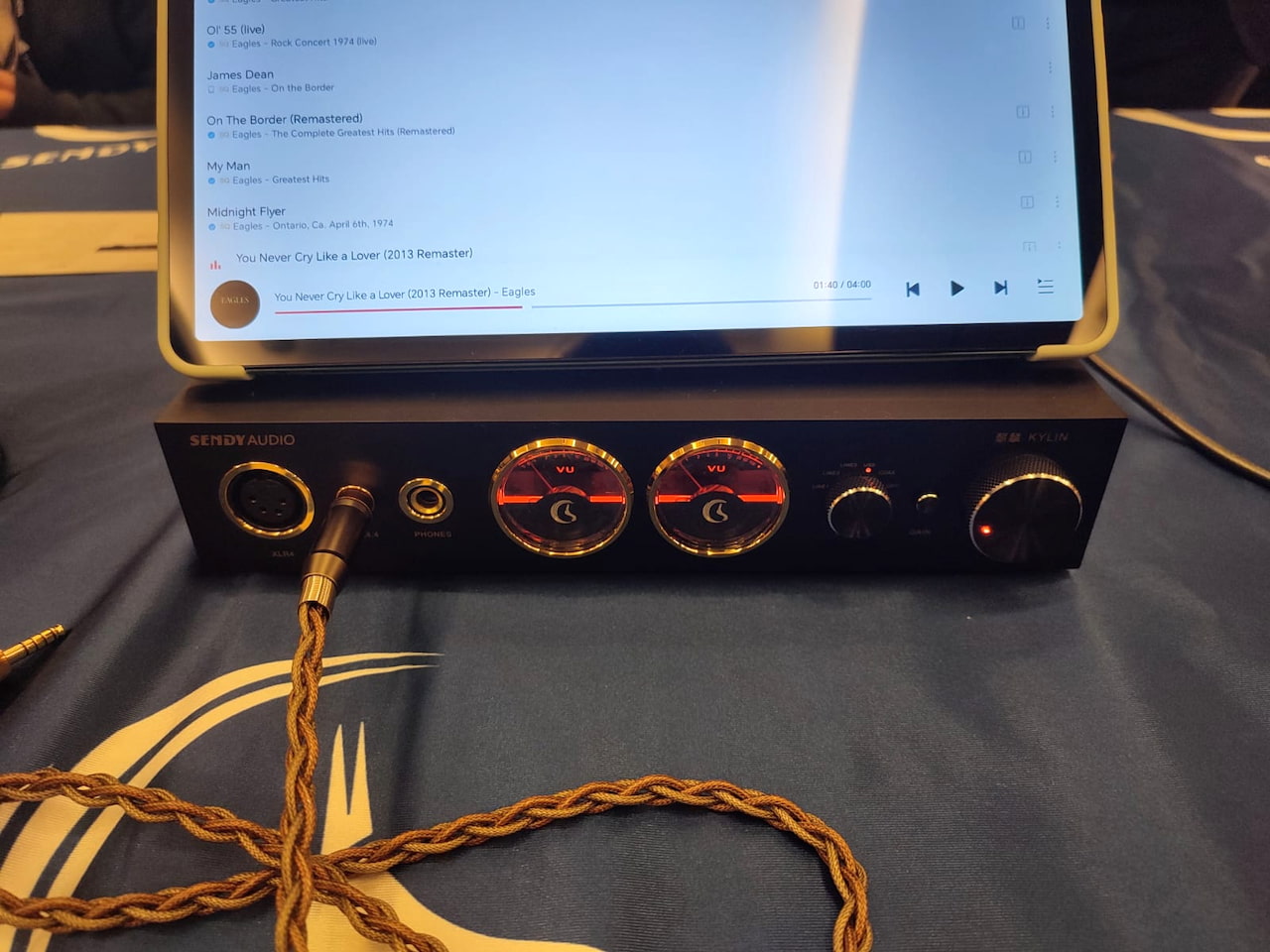
Sendy Audio Kylin
I listened to the Sendy Audio Kylin at last year’s show and was so impressed that I named it Best in Show in the midrange price category.
One year later, my impressions have not changed one jot. Some of its specifications might not look especially impressive on paper, particularly beside amplifiers boasting increasingly ridiculous power figures, but the Kylin sounds absolutely gorgeous.
Vocals and guitars were rich, full-bodied and wonderfully expressive, while the presentation remained spacious, punchy and highly dynamic. There was enough warmth to make everything sound inviting, but not so much that the music became soft or overly relaxed.
Under the bonnet, the Kylin combines an XMOS USB stage with an ESS ES9038Q2M DAC, native DSD512 decoding and a pure Class A headphone amplifier using matched Hitachi transistors. It also offers balanced 4.4 mm and four-pin XLR headphone outputs, alongside a 6.35 mm single-ended connection.
Advertisement
None of that fully explains why I enjoyed listening to it so much, which rather proves the point. Numbers are useful, but they are not everything in the world of audio.
Astell&Kern A&Ultima SP4000T
The Astell&Kern SP4000T is, very loosely speaking, an SP4000 with four Raytheon JAN6418 vacuum tubes bolted on. There is rather more going on beneath the surface, but the description gets the general point across.
Those four military-specification tubes are arranged in a differential configuration, with two dedicated to each channel. The SP4000T also lets you choose between Triode, Ultra Linear and Pentode tube modes, along with OP AMP, Tube AMP and adjustable Hybrid amplification. Factor in three selectable tube-current settings, and there are plenty of ways to tailor its presentation.
It costs an eye-watering £3,200 and weighs an equally shocking 565 grams, making the word “portable” feel rather generous. You are not slipping this into the pocket of your jeans unless you would also like to explain the resulting wardrobe malfunction.
You do, however, get your money’s worth sonically. The SP4000T delivered a bombastic, commanding presentation that, to my ears, holds its own against many desktop DAC and headphone amplifier stacks costing similar money. There was plenty of scale and low-end authority, but it never sounded uncontrolled or clumsy.
Advertisement
The rest of the package feels suitably premium, with a smooth interface, responsive touchscreen and full Android support for direct access to streaming apps. Anyone seeking the best of the best in portable DAPs will undoubtedly consider it, although at 565 grams, they may also want to consider a stronger bag.
Fosi Audio DAP Neo
Back at the Fosi Audio booth, I was introduced to another prototype on display: the DAP Neo.
Advertisement. Scroll to continue reading.
This is a deliberately simple, offline digital audio player. It does not connect to the internet, which means no Spotify, Apple Music, TIDAL or other streaming services. You load your music onto the player and listen to it. That may sound rather old-fashioned in 2026, but sometimes removing notifications, apps and endless choices is exactly the point. It allows you to focus on the music and nothing else.
The compact design looks more than a little like one of Apple’s classic iPods, which is hardly the worst place to draw inspiration from. It felt straightforward to operate and refreshingly uncomplicated beside the increasingly large and expensive Android players found elsewhere at the show.
Advertisement
Fosi expects the DAP Neo to cost less than $100, although the final price and specifications have yet to be confirmed. It sounded solid during my brief demonstration and powered my Sendy Audio Egret comfortably, with enough weight and clarity to make listening enjoyable.
At this price, I am not asking for a desktop-class powerhouse or a miniature smartphone. Give me reliable local playback, a usable interface and enough power for a sensible pair of headphones, and there is not much more I could ask for.
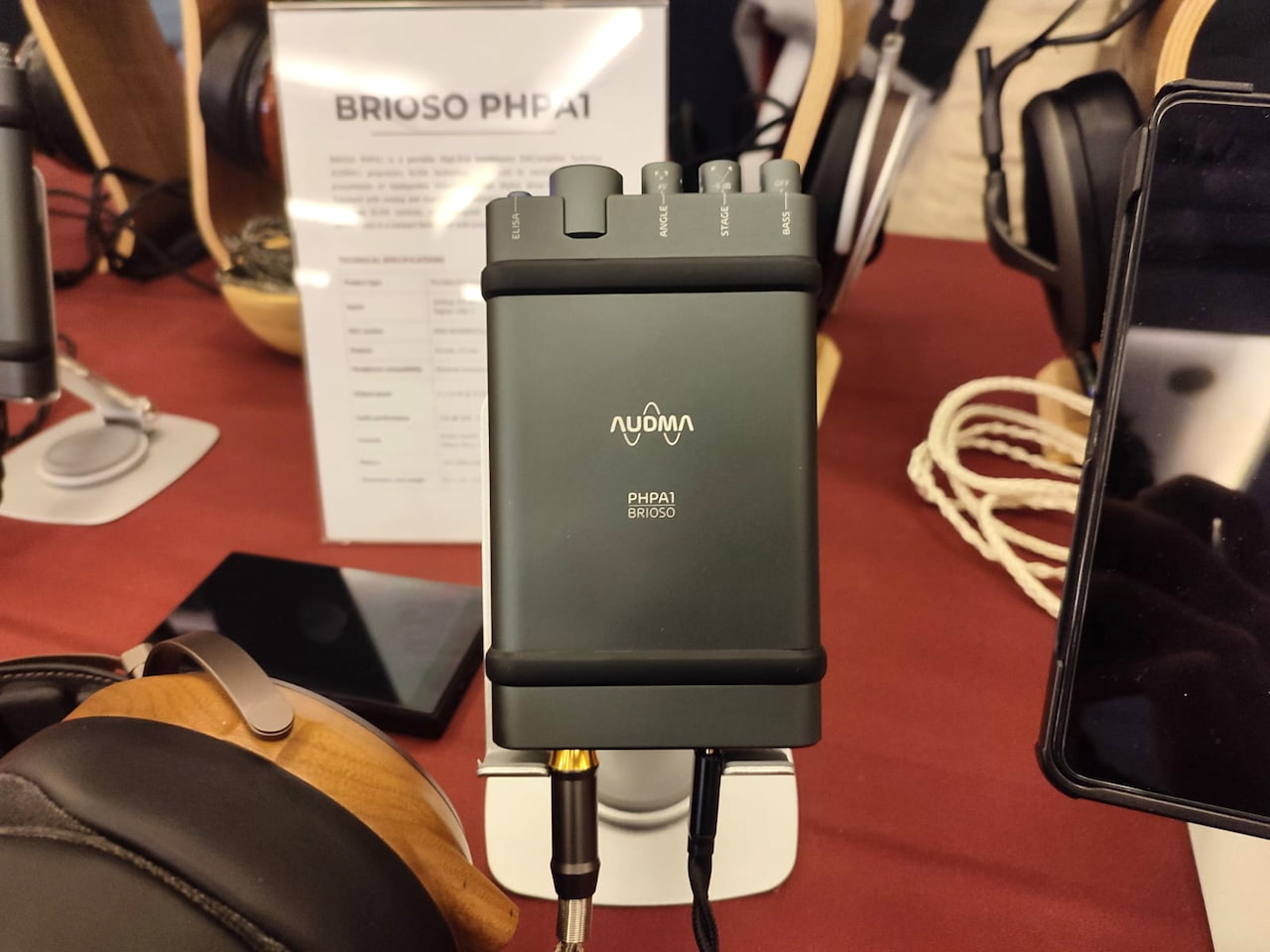
Best Portable DAC/Amp: Audma Brioso PHPA1
Admittedly, the Audma Brioso PHPA1 was the only portable DAC and headphone amplifier I listened to at CanJam London this year, but that does not make it any less deserving of our Best in Show award.
Audma is based in the same region of Italy that my father comes from, and the company is responsible for developing its patented ELISA circuitry. The technology is designed to recreate some of the spatial characteristics of listening to a pair of loudspeakers, including the small timing differences between the sound reaching each ear.
The Brioso lets you adjust the perceived distance and width of the presentation using its Stage and Angle controls. It is also a serious portable DAC and amplifier in its own right, using AKM’s flagship AK4499EXEQ DAC alongside the AK4191EQ digital filter and modulator. It supports USB-C digital playback, balanced and unbalanced analog inputs and up to five hours of battery-powered listening.
Advertisement
I tried the Brioso with ELISA switched both on and off, and the difference was immediately noticeable. With it engaged, the soundstage appeared to move in front of me rather than extending mainly to either side of my head. The effect was not subtle, and I still find it rather extraordinary that carefully controlled differences in timing and spatial information can change the presentation so convincingly.
The fact that Audma has managed to achieve this inside a genuinely portable device makes the Brioso even more impressive.
Mind you, it costs almost £4,400, so it probably should be.
Best DAP: FiiO M25 R2R
As we recently reported, FiiO brought two forthcoming DAPs to CanJam London: the M25 and M25 R2R. Positioned below the flagship M27 and above the more affordable M33 R2R and M21, the new models should help bridge what has become a rather substantial gap in FiiO’s portable player lineup.
The standard M25 uses AKM’s flagship separated-DAC architecture, combining an AK4191 digital filter with two AK4499EX DACs. The M25 R2R takes a very different approach, replacing those chips with the second generation of FiiO’s proprietary R2R PRO resistor-ladder technology.
Advertisement
Advertisement. Scroll to continue reading.
Both versions use Qualcomm’s Dragonwing QCS6490 processor, supported by 8GB of RAM and 128GB of internal storage. They also include a 31-band parametric equalizer, Auto EQ and FiiO’s Desktop Mode, which allows the player to draw power from an external supply rather than continually cycling the internal battery.
I listened to the resistor-ladder version, and it struck a fine balance between naturalness and sweetness without sacrificing clarity. Vocals and instruments had a fuller, more organic quality, but the presentation never became overly soft or syrupy.
My only minor gripe was the absence of a physical volume wheel. FiiO has opted for a conventional rocker instead, which works perfectly well, but perhaps I am simply one of those people who still prefers turning a proper dial.
Advertisement
Both M25 models remain unreleased, with final international pricing and availability yet to be confirmed.
Best Budget DAC: Topping E50 II
At the Electromod booth was the Topping E50 II, the Chinese manufacturer’s revision of its well-regarded E50 DAC. Priced at $199 at Apos Audio and Amazon ( £199 or €199), depending on the market, I am astounded by how much functionality Topping has squeezed into such a small and affordable unit.
The E50 II uses AKM’s AK4497S DAC chip alongside an XMOS XU316 USB interface, with support for PCM playback up to 32-bit/768kHz and native DSD512. Inputs include USB-C, coaxial, optical and Bluetooth, with LDAC, aptX HD and aptX Adaptive support. It also offers RCA and balanced 6.35 mm TRS outputs, which can operate simultaneously, and can be used as either a fixed-output DAC or a digital preamplifier.
The star of the show is its parametric EQ, which can be configured through the Topping Home app and stored on the unit for offline use. That is a considerable amount of flexibility for a $199 DAC, particularly for listeners who want to correct a headphone’s tonal balance or make smaller adjustments to suit their system and personal preferences.
In terms of listening, the E50 II has a no-nonsense, neutral sound signature, but with just enough musicality to prevent it from sounding flat, sterile or boring. It does not attempt to impose much of its own personality, which is exactly what many listeners will want from an affordable desktop DAC.
Advertisement
For $199, what’s not to like?
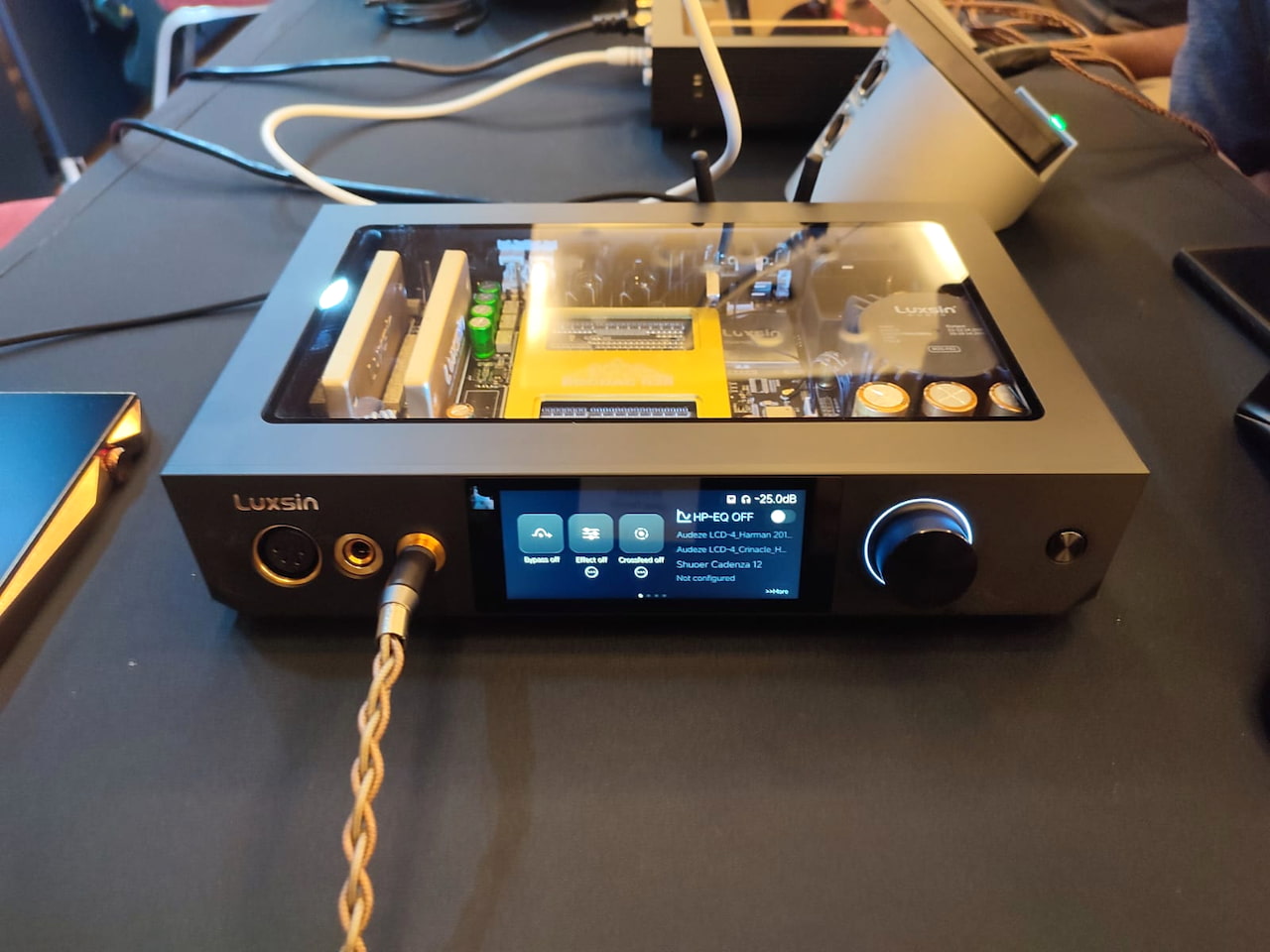
Best Midrange DAC/Amp: Luxsin B9
This was one product I was not expecting to see in London. For all intents and purposes, the Luxsin B9 is an R2R interpretation of the X9, although this was my first experience with any of the company’s products.
The engineering sample combines Luxsin’s proprietary discrete R2R DAC architecture with a headphone amplifier and preamplifier in a single desktop unit. Luxsin has not published the complete production specifications yet, but the B9 is expected to deliver up to six watts of headphone output power and cost around $1,500 when it is released.
The prototype also included some genuinely clever features. Luxsin’s HP-EQ system lets you select a correction profile for your headphones, adjust it to suit your own preferences and save the results. There is also a hearing compensation function that tests the sensitivity of each ear across different frequencies before creating separate correction curves for the left and right channels.
Advertisement. Scroll to continue reading.
Advertisement
I was not able to test either feature properly at the show, but the concept is far more useful than adding another digital filter that most owners will try once and never touch again.
The B9 is also beautifully designed, with sharply angled casework and a bright, vibrant touchscreen that makes most competing desktop DACs look rather ordinary. More importantly, its R2R presentation was exciting and expressive without becoming aggressive or fatiguing. It made a considerable impression on me during a relatively brief listen.
For a product I was not expecting to see, the Luxsin B9 became one of the more memorable electronics demonstrations of the weekend.
Best High-end Amp: MASS-Kobo Model 491
And finally, we come to MASS-Kobo, a Japanese audio brand whose amplifiers are hand-built and assembled to order in Shizuoka under the direction of Masuda-san. I was glad to spend a few minutes brushing up on my Japanese with him and the rest of the team at their booth.
The Model 491 ($20,000 USD) is the successor to the flagship Model 465 ($19,000 USD) and looks very similar at first glance, with the most obvious external change being the addition of a 4.4 mm balanced headphone output. It sits alongside four-pin XLR, separate three-pin XLR outputs for the left and right channels, and a 6.35 mm single-ended connection.
Advertisement
Inside, the 491 uses a twin-balanced monoblock design with four amplifier stages, two for each channel, and fully independent left and right power supplies. It delivers at least 3.5 watts per channel into 32 ohms through its balanced outputs, which should be enough for even the most stubborn planar magnetic headphones.
Being the flagship amplifier from a boutique high-end brand, it costs a barely believable £16,599 through Elise Audio. Most of that money is going into the circuit design, component selection and the highly trained ears of Mr. Masuda, rather than a touchscreen, app support or an unnecessarily complicated menu system. The amplifier itself is sturdily built, but it does not offer much in the way of bells and whistles.
And my goodness, does the 491 sound stunning.
I tend to prefer more neutral-sounding equipment, and the latest MASS-Kobo certainly falls into that category. However, it walks the line between analytical precision and musicality more successfully than almost any headphone amplifier I have heard. Sounds appeared to drift in and out of thin air, as though there were nothing standing between the music and my ears.
Advertisement
It came remarkably close to creating the impression of listening to a live performance rather than a pair of headphones. I arrived with very high expectations, yet the Model 491 managed to exceed them anyway.
The Bottom Line
CanJam London 2026 made one thing very clear: personal audio has never offered more choice. From sub-$100 offline DAPs and $200 DACs to £16,599 hand-built amplifiers, the show covered almost every conceivable use case and price point.
I could not hear everything, but the products above were the ones that made me stop, listen and return for another track. Roll on CanJam London 2027.
Apple has quietly increased the price of Apple Music in the US, with individual subscriptions now costing $11.99 per month instead of $10.99.
The change also affects Family and Student plans. In addition, several Apple One bundles are impacted. The price rise comes almost four years after Apple last increased Apple Music subscription fees in October 2022.
The biggest jump is for the Apple Music Family plan, which now costs $19.99 per month, up from $16.99. The Student plan has also increased by $1, bringing the monthly fee to $6.99.
Apple has also adjusted pricing for two of its Apple One bundles. While the Individual plan remains unchanged, the Family tier now costs $27.95 per month, up by $2. Meanwhile, the Premier plan has increased to $39.95 per month. Apple has also confirmed similar price increases in Brazil.
Advertisement
In a statement to Music Business Worldwide, Apple said the latest changes are “the result of rising licensing costs,” suggesting that higher payments to rights holders and music labels are behind the increase.
Advertisement
The price hike means Apple Music now sits closer to many of its biggest streaming rivals. However, the service continues to distinguish itself with features such as Lossless Audio, Hi-Res Lossless, Spatial Audio with Dolby Atmos, live radio stations and a catalogue of more than 100 million songs.
For existing subscribers, the increase is relatively modest on the Individual plan, but families will notice a more significant jump. Moreover, an extra $3 each month adds up to $36 more per year. This makes it one of the largest increases Apple has introduced for the service.
Advertisement
Spotify, YouTube Music and other services have all introduced price increases in recent years. As a result, premium music subscriptions are becoming steadily more expensive across the board.
If you’re already subscribed, the updated pricing should appear on your next billing cycle. New customers signing up from today will pay the new rates immediately. Meanwhile, anyone considering Apple’s wider ecosystem may want to compare whether an Apple One bundle now offers better overall value than paying for Apple Music on its own.
Bats are remarkable creatures, able to fly at night or inside the confines of caves without light to guide their way. A team of researchers at Worcester Polytechnic Institute (WPI) has determined how to use low power ultrasonic sensors to guide drones in obscured environments.
While radar, lidar, and GPS are all great for navigation and sensing, they can run into issues when light is obscured or can take too much power to be practical for the limited battery life of a drone. The researchers found that a dual sonar array could be used to implement a much lower power sensing system for a drone that performs well in environments that would stymie a computer vision system.
A shield placed behind the array cuts down on the sound of the propellers that would otherwise drown out the signal, and further signal analysis via a neural net separates the echoes of objects in front of the drone from the background. The prototype could navigate in various simulated environments like forests, smoke, and snow. It looks like it even got a chance to go for a flight in the actual woods. All the code and hardware designs are Open Source, so have at it!
Chris Fall, the director of the Center for AI Standards and Innovation (CAISI), has resigned, the agency confirmed to multiple news outlets.
He was appointed just three months ago after the last appointee, Collin Burns, left in less than a week, The Washington Post reported at the time. Burns was reportedly “pushed out” of the job in April because he previously worked for Anthropic and the Trump administration had been battling with the company, sources told the Post.
No reason was given for Fall’s departure. Prior to leading CAISI, Fall was the director of the Department of Energy’s Office of Science during the first Trump administration and had been the acting director of the DOE’s Advanced Research Projects Agency-Energy. He worked in the DOE’s Office of Naval Research (ONR) prior to that.
Before Burns and Fall, the agency was led by venture capitalist David Sacks, whose title at the time was White House AI and crypto czar. Sacks stepped down in March.
Advertisement
CAISI, which operates under the National Institute of Standards and Technology, is the primary organization for developing technical standards and testing methods for AI models as well as assessing cybersecurity risks. Yet it was not the agency at the center of the most recent model-risk brouhaha.
That occurred in June when the U.S. Commerce Department invoked an obscure export control directive that effectively forced Anthropic to pull its Mythos and Fable models from the market. The ban was lifted by the end of the month, when Secretary of Commerce Howard Lutnick said he was satisfied with Anthropic’s safety plans.
Earlier this month, the White House also signed an executive order for a new AI safety oversight program called “Gold Eagle” that creates a clearinghouse for cybersecurity vulnerability coordination. A host of federal organizations were named as part of the program, including the Commerce Department and Department of Homeland Security. But, as CNBC pointed out, CAISI was not among the federal organizations mentioned.
Meanwhile, after Anthropic’s models were freed from the ban, Google DeepMind CEO Demis Hassabis began calling for the creation of an independent, industry-run standards body to regulate frontier AI modeled after FINRA — the same sort of mission that CAISI was formed to tackle.
Advertisement
Fall’s resignation also follows this weekend’s handwringing over Chinese AI lab Moonshot’s new version of its open model Kimi, which performed competitively against flagship frontier models. The administration was weighing efforts to somehow ban Chinese open models, Axios reported. This sparked immediate debate and outrage over the weekend, including from Sacks, who argued that regulations shouldn’t be used as a protectionism strategy for U.S. proprietary AI labs.
While CAISI has released a few reports on the capabilities of Chinese open-weight models Z.ai’s GLM-5.2 and DeepSeek V4 Pro, it hasn’t talked much about its processes for testing. (Open weight means these models can be publicly downloaded and run locally, but its training code and datasets are not available). Since July 9, TechCrunch has sent multiple inquiries to both the DoC and NIST about how its LLM evaluations work and has not received a response.
When you purchase through links in our articles, we may earn a small commission. This doesn’t affect our editorial independence.
A new NYT Connections puzzle appears at midnight each day for your time zone – which means that some people are always playing ‘today’s game’ while others are playing ‘yesterday’s’. If you’re looking for Monday’s puzzle instead then click here: NYT Connections hints and answers for Monday, July 20 (game #1135).
Good morning! Let’s play Connections, the NYT’s clever word game that challenges you to group answers in various categories. It can be tough, so read on if you need Connections hints.
What should you do once you’ve finished? Why, play some more word games of course. I’ve also got daily Strands hints and answers and Quordle hints and answers articles if you need help for those too, while Marc’s Wordle today page covers the original viral word game.
Advertisement
SPOILER WARNING: Information about NYT Connections today is below, so don’t read on if you don’t want to know the answers.
Latest Videos From
NYT Connections today (game #1136) – today’s words
(Image credit: New York Times)
Today’s NYT Connections words are…
MUSIC
GRAM
DRIVER
VISION
TUBE
CROP
BOOK
APP
ORCHESTRATION
EXTENSION
TANK
KINESIS
PROMPTER
HALTER
LYRICS
PLUGIN
NYT Connections today (game #1136) – hint #1 – group hints
What are some clues for today’s NYT Connections groups?
Advertisement
YELLOW: Types of a similar garment
GREEN: Computer terms
BLUE: Parts of a composition
PURPLE: Begin with word that rhymes with Nelly
Need more clues?
We’re firmly in spoiler territory now, but read on if you want to know what the four theme answers are for today’s NYT Connections puzzles…
Sign up for breaking news, reviews, opinion, top tech deals, and more.
NYT Connections today (game #1136) – hint #2 – group answers
What are the answers for today’s NYT Connections groups?
Advertisement
YELLOW: KINDS OF TOPS
GREEN: SOFTWARE DOWNLOADS
BLUE: ELEMENTS OF A MUSICAL
PURPLE: TELE____
Right, the answers are below, so DO NOT SCROLL ANY FURTHER IF YOU DON’T WANT TO SEE THEM.
NYT Connections today (game #1136) – the answers
(Image credit: New York Times)
The answers to today’s Connections, game #1136, are…
BLUE: ELEMENTS OF A MUSICAL: BOOK, LYRICS, MUSIC, ORCHESTRATION
PURPLE: TELE____: GRAM, KINESIS, PROMPTER, VISION
My rating: Easy
My score: Perfect
This happens very rarely to me, but I saw the hardest group immediately today, with PROMPTER and VISION helping me connect GRAM and KINESIS.
It felt like an easy purple, but maybe telegram caught a few people out seeing as they are now a fairly pointless form of communication.
Regardless, I was rewarded with my 50th Purple First badge — it has taken me a while to reach this milestone, with my haphazard play style instead being to just connect the first group I see, rather than looking for the most likely to be a purple. I can’t imagine being that tactical with Connections.
In truth, this felt like a game where any of the groups could have been yellow on any other day, although all of the groups did contain things that have largely disappeared.
Advertisement
Yesterday’s NYT Connections answers (Monday, July 20, 2026, game #1135)
YELLOW: ANNOUNCE: BLARE, HERALD, SOUND, TRUMPET
GREEN: THINGS TO CLICK: BUTTON, ICON, LINK, MENU
BLUE: ASSOCIATED WITH PEARLS: BUBBLE TEA, OYSTER, SWINE, WISDOM
PURPLE: STARTING WITH ALCOHOLIC BEVERAGES: ALEXA, MEADOW, PORTOBELLO, SAKES
What is NYT Connections?
NYT Connections is one of several increasingly popular word games made by the New York Times. It challenges you to find groups of four items that share something in common, and each group has a different difficulty level: green is easy, yellow a little harder, blue often quite tough and purple usually very difficult.
On the plus side, you don’t technically need to solve the final one, as you’ll be able to answer that one by a process of elimination. What’s more, you can make up to four mistakes, which gives you a little bit of breathing room.
It’s a little more involved than something like Wordle, however, and there are plenty of opportunities for the game to trip you up with tricks. For instance, watch out for homophones and other word games that could disguise the answers.
It’s playable for free via the NYT Games site on desktop or mobile.
We all know that Google and other big players pick and choose what information people see, but we sometimes overlook it outside of the search and social media space. [Lauren Leek] decided to take a look at how Google Maps picks winners and losers in the restaurant scene in London.
Building a machine learning model to determine a new restaurant recommendation (as one does), [Leek] uncovered interesting, and perhaps concerning, elements of how Google Maps ranks restaurants. Broken down by relevance, proximity, and prominence, many new restaurants face the issue of not drawing traffic without reviews and vice-versa causing a vicious cycle. Relevance and proximity are fairly straightforward, but what goes into “prominence?”
[Leek] found that “it is not just what people think of a place – it is how often people interact with it, talk about it, and already recognise it.” This leads to chains and high foot traffic areas awash in reviews while more out-of-the-way places find it more difficult to draw traffic. Some of this is expected and would be happening even when word of mouth was the primary way to find out where to eat, but as with many things, the algorithm amplifies this, along with the undisclosed paid placement of restaurants in Maps results.
While still in its infancy, [Leek] built a public dashboard where people can sort restaurants in the city. The machine learning algorithm is designed to identify places that are hidden gems that punch above their Google Maps weight and may make you look like the trendy one (if you live in London).
Advertisement
Zooming out further, [Leek] found larger clusters that revealed restaurant “diversity, in other words, is not just about taste. It is about where families settled, which high streets remained affordable long enough for a second generation to open businesses, and which parts of the city experienced displacement before culinary ecosystems could mature.”
We spend hours testing every product or service we review, so you can be sure you’re buying the best. Find out more about how we test.
Adobe is a popular brand when it comes to all things creative, including AI content generation and editing. With its newly improved Firefly tool, Adobe has taken AI content generation a step further with realistic, real-time outputs.
In addition to being highly accurate, Firefly is also one of the most affordable tools on the market today. But is it the best AI video editor for your needs? Read on to find out. In this article, we’ve put Firefly to the test, examining its features, pricing, ease of use, and overall value for money.
Advertisement
Adobe Firefly: Plans and pricing
Adobe Firefly is available online by clicking here, as well as part of the Creative Cloud suite of apps.
Latest Videos From
It offers one of the most generous free video editing software we’ve seen. Instead of capping your monthly or one-time usage, Adobe allows you to generate a limited number of images and videos each day. This means you can continue using Firefly for a longer period, provided you stay within the daily limits.
What we like about the free plan is that Firefly does not lock its image or video editing features behind paywalls. Even on the free plan, you get access to features such as Generative Fill, Background Removal, AI Markup, video upscaling, text-based editing, as well as audio features such as generating soundtracks, speech, text-to-avatar, and more. Unlike other platforms, Firefly’s free plan can actually come in handy for limited individual use.
(Image credit: Adobe Firefly)
Its paid plans are also among the most inexpensive we’ve seen in the category, with the Standard plan starting at $8.49 per month when billed annually, which comes with 2,000 credits.
Advertisement
With this plan, you get access to all the AI models Firefly has to offer, with hard upper limits on the number of images and videos you can generate with each model. Videos, however, are capped at a maximum duration of five seconds, which might not be enough for users looking to generate long-form content. Besides this, you get access to unlimited Firefly Boards, while the remaining features stay the same as those in the free plan.
Sign up to the TechRadar Pro newsletter to get all the top news, opinion, features and guidance your business needs to succeed!
Next is the Pro plan at $16.99 per month (4,000 credits), billed annually, where you get unlimited access to several AI models such as Gemini 2.5 Flash, FLUX.1 Kontext, and others. The maximum number of images and videos you can generate is also higher than in the Standard plan.
Then there’s the Pro Plus plan, priced at $29.38 per month, where you get up to 10,000 credits and higher limits on image and video generation. In this plan, a wider range of models comes with unlimited access, including Gemini 3.0, ChatGPT Image, Runway Gen-4.5, and Gemini 3 Nano Banana Pro 2K.
Advertisement
Finally, there’s the Premium plan at $118.93 per month, offering 50,000 credits and unlimited access to almost all AI models except a few. This plan is ideal for large content creation and creative teams.
Adobe Firefly: Features
Right off the bat, what impressed us most about Firefly is its brainstorming and early-stage concepting feature called Firefly Boards. It is essentially an infinite-canvas mood board and ideation workspace that lets you upload your own images, sketches, or stock images, or generate new ones.
You can select multiple assets and combine elements while brainstorming ideas with your creative team. This is similar to Midjourney- or Discord-style iteration, giving remote creative teams a space to flesh out new ideas.
Advertisement
(Image credit: Adobe Firefly)
Moreover, Firefly offers access to more than 10 popular video, audio, and image models, each with its own limits on the amount of content you can generate. Some notable features are Generative Expand and Generative Fill, which let you expand the canvas of an image or video after it has been generated using Adobe’s AI engine. Similarly, there’s also Generative Remove, which helps you remove elements from a piece of content.
Firefly also throws in a range of audio features, such as the ability to generate speech, translate videos from one language to another, or add text-to-sound effects to your content. However, we were a bit disappointed with its video editing features, such as trimming, arranging, and refining content, all of which are still in beta. Its AI assistant is also at a very early stage and currently supports only one conversation at a time.
You also have the option to upload an image to provide Firefly with a style or structure reference and create a consistent look across a batch of images. Unlike many other AI tools, Firefly allows you to use your own images to train its AI models and create custom models. This is still an early-stage feature, and we expect it to improve over the next year or so.
Firefly has also expanded its multilingual reach and now supports prompts in more than 100 languages, along with translations in more than 20 languages. There’s also an option for bulk actions such as background removal, color grading, and cropping.
Advertisement
Its mobile apps have also improved a lot over the past year and now offer native iOS and Android apps with an experience that’s very close to the web interface. And of course, Firefly is part of Adobe’s broader AI-powered content generation and editing ecosystem, integrating directly with apps like Photoshop and Illustrator.
Adobe Firefly: Interface and in use
Adobe Firefly is by far one of the most improved image and video editing software we have seen in a long time. One of the biggest criticisms of Firefly was that it did not offer any option to edit the images it generated. However, all that has changed with its revamped user interface.
Not only did it generate a pretty high-quality image for us, but it also provided several editing options. We especially liked its Tune feature, which is currently in beta and allows you to change the look of an image by selecting from a list of preconfigured options.
Advertisement
There is also a prompt option, which lets you keep fine-tuning your generated image with follow-up prompts.
(Image credit: Future)
However, if that is too much work, there are several fine-grained controls available. For instance, there is a Fill feature that lets you fill any blank spaces in the image with an element of your choice. Similarly, there’s the Remove feature, which lets you remove any element you do not want in the final result.
What we liked the most is its Select feature, where you can select a particular element in an image or video and then type a prompt to edit only that selected portion. This helps avoid unwanted changes in other parts of the image or video and ensures that the edit is applied only to the section you selected.
(Image credit: Future)
The generation interface itself is pretty simple. You’ll see a prompt box at the bottom of your screen, along with a panel on the left-hand side where you can control the generation settings.
Advertisement
For instance, you can select the model you want to use, the resolution, the aspect ratio (16:9 or 9:16), and the duration of the video. There is also an advanced setting where you can enter a random seed value to experiment with the AI engine settings.
What we found particularly eye-catching is the prompt enhancement feature, which lets you improve your prompts before generating an image or video. This helps you create more detailed prompts, which in turn result in more accurate outputs.
Adobe Firefly: How we tested
We tried the free version of Adobe Firefly over several days and were quite impressed with the results. We first tried to create an AI image with the following prompt:
Advertisement
“A tired line cook in a stained white apron, frowning with exhaustion, wiping sweat off his forehead while chopping six carrots on a wooden cutting board. Behind him, a dim, cluttered restaurant kitchen with steam rising from a pot. Photorealistic, dramatic low lighting, shot on 35mm film.”
As soon as we hit Generate, Firefly got to work and produced a pretty impressive image that closely matched our prompt.
(Image credit: Future)
However, it’s worth noting that Firefly is a tad slower compared to the likes of Fliki or Kapwing. That said, the accuracy of the results is worth the wait.
Once the image was generated, we clicked on it to open the editing panel and played around with the settings. For instance, we selected the burning steel pot behind the cook and prompted Firefly to change it to a wooden pot instead.
Advertisement
Rather than simply making the change, Adobe gave us an Edit Strength slider, allowing us to control how strongly the wooden effect was applied to the pot.
(Image credit: Future)
We then tried the Remove feature by selecting a bunch of carrots and asking Firefly to remove them. Adobe once again impressed us, as it accurately removed the carrots without distorting the chopping board around them.
(Image credit: Future)
Lastly, we used the Upscale feature to improve the quality of the image. This took the longest, more time than it took to generate the image in the first place. However, we were once again very satisfied with the final result.
We also generated an AI video using the following prompt:
Advertisement
“A woman in a red coat walks across a rain-soaked city street at night, neon signs reflecting in the puddles, camera slowly tracking alongside her.”
(Image credit: Future)
The results were again highly accurate, the colors were vibrant, and we were impressed by how closely Firefly followed the prompt without significantly diverging from the intended output.
Adobe Firefly: Alternatives
Although Adobe Firefly is a much-improved product, it does have a few shortcomings, which is why you may want to consider some alternatives. For instance, Adobe isn’t the best choice if you want to generate AI avatars. Although it offers the feature in a limited capacity, the results are not what you’d expect from a dedicated AI avatar generation tool.
Advertisement
In that case, you can try Kapwing, which offers one of the most extensive collections of AI avatars. You can choose from a wide range of characters, including traditional human-inspired faces and more outlandish options such as aliens, Cupid, demons, cyborgs, Dracula, and more.
Kapwing produces some of the best photorealistic AI avatars we have seen in the industry. It is also one of the few tools that can render videos in 4K quality. That said, it is a bit on the expensive side, with plans starting at $16 per month.
If you need a dedicated AI assistant to help with content generation and editing, you can try Fliki, which offers an AI Copilot that understands natural language inputs and helps you achieve your desired results more effortlessly. It also includes licensed YouTube music and advanced video generation options such as stop-motion videos.
Fliki also offers a wider range of customization options compared to Adobe Firefly, such as choosing the format and template, customizing the type of character, selecting the AI model you want to use, and adding voiceovers, captions, and AI avatars.
Advertisement
Adobe Firefly: Final verdict
Adobe Firefly is one of the best-known names in the content creation industry, and its recent improvements put it right at the top of our list of the best AI video editors. Firefly offers more than 10 AI models for image, video, and audio generation, helping you create photorealistic images, videos, and audio with simple prompts.
We were particularly impressed by Firefly Boards, which helps you brainstorm ideas on an endless online canvas in real time while collaborating with your content team. Firefly has also improved its editing interface and tools and now supports follow-up prompt editing, along with features like Generative Fill and Generative Remove.
That said, it has a few drawbacks, such as the lack of mature video editing tools, which are still in beta, and rather limited AI avatar generation capabilities. That said, if you already use Adobe tools like Illustrator or Photoshop, adding Firefly to your repertoire is a no-brainer.
Single datacenter and just three services taken down by ‘upstream’ power problem, while the rest of a zone and region kept humming
Google Cloud last week experienced an outage that analysts say demonstrates that not all promises of cloudy resilience are created equal.
Google’s incident report explained that three services – the VMware Engine (GCVE), NetApp Volumes, and Bare Metal Solutions (BMS) – experienced a 15-hour outage due to a cooling failure in its europe-west4-a zone.
Advertisement
The report includes the following detail: “The datacenter serving europe-west4-a for GCVE, BMS, and NetApp has experienced a power failure, which subsequently caused a cooling failure.”
The important detail there is that Google uses a discrete datacenter for those three services.
Another notable element of the incident report is the admission that “An electrical fault occurred on the utility grid upstream of the datacenter, disrupting the electrical distribution gear and cooling equipment.”
Google hasn’t explained how an upstream failure caused that disruption but did say it “proactively turned down workloads in order to protect customer data from any risks posed by running infrastructure in a high temperature environment.”
Advertisement
Whenever your correspondent talks to hyperscalers or datacenter operators about how they ensure resilience, they tell me about their use of multiple redundant pieces of energy infrastructure, plus on-site generation capabilities that can keep a datacenter powered for days if necessary.
We’ve asked Google if it had generators or other energy sources at this site, and if so, why it nonetheless had to turn down workloads. We’ve not received a response at the time of writing. Google told us its incident analysis “is currently ongoing” and promised to follow up once it is available.
Hidden dependencies
We also asked Google if it advertises the fact that some of its services are tied to a single datacenter, a matter of interest because like other hyperscalers it divides its cloud into “regions” that typically comprise multiple “zones” spread across a city or other locale. Like its hyperscale peers, Google recommends placing workloads across different zones and regions to ensure resilience. Yet this incident shows some services can be tied to a single datacenter in a zone – and that those single datacenters can experience problems while the rest of the zone keeps working.
Analysts told The Register the outage shows organizations need to dig into clouds’ promises of resilience.
Advertisement
“The real issue is transparency: customers are generally told to use multiple zones and regions for resilience but are rarely given visibility into whether a particular managed service has a single-datacenter dependency within a zone,” said Biswajeet Mahapatra, principal analyst at Forrester. “As a result, many organizations assume the cloud abstraction provides more facility-level redundancy than may actually exist for specialized services.”
“The underlying architecture is not necessarily unusual,” he added. “AWS, Azure, and Google all operate services that rely on dedicated hardware, storage platforms, or tightly coupled infrastructure that may not be distributed across multiple facilities in the same way as core compute and storage services.”
Gartner Director Analyst Adrian Wong reminded The Register of the 2023 outage at Google Cloud’s europe-west9-a region, the cause of which was a water leak that Google said “originated in a non-Google portion of the facility.”
Google uses a tool called “Spanner” to replicate data across zones, but in the flooded zone Google’s Spanner configuration didn’t work once one building became unavailable.
Advertisement
“It is very hard to figure out how an individual region is architected,” Wong said. “Our customers are often surprised by that,” he added.
The incident report for last week’s outage includes an apology.
“We know how much you rely on Google Cloud, and we regret the impact on your productivity,” the document states, before promising a final incident report will detail “preventative actions.”
But as this incident shows, knowing how Google plans to avoid future incidents of this sort won’t arm customers with the knowledge to understand if those mitigations will address hidden design issues that can reduce resilience. ®
Newegg is knocking $50 off AMD’s Ryzen 7 7700X3D with promo code PKC337, bringing it down from its $329 to $279. At that price, it becomes a stronger value proposition against the Ryzen 7 7800X3D while gaming performance stays nearly identical. Our full review is coming this week.
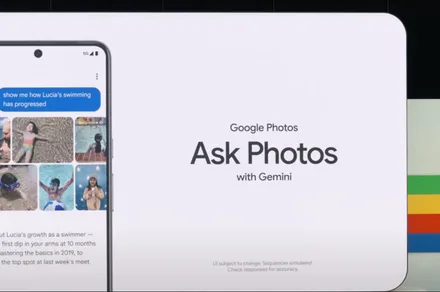
Google Photos is giving users an easier way to leave its Gemini-powered search when a simple keyword would do. A new toggle now sits at the top of the results page, letting users switch between Ask Photos and classic search without digging through settings.
The change appears to address feedback from people who opted into Ask Photos but wanted a quicker way to return to classic search when Gemini was slower or less useful for a straightforward query.
Why did Google add the toggle?
Ask Photos is built for complicated requests. It can understand natural-language questions and search for details inside images, including prompts such as “What’s my license plate?” Classic search is quicker when you only need to find a person, place, object, date, or keyword.
Reddit users complained about irrelevant results, missing keyword matches, and the disappearance of an obvious route back to classic search. Some found that the most reliable workaround was disabling Ask Photos through the Gemini settings entirely.
Advertisement
Google had already acknowledged the problems. It paused the rollout in June 2025 over latency, quality, and user-experience concerns before bringing Ask Photos back with faster handling for simple searches.
What the new toggle actually does
Users who have enabled Ask Photos will see classic search on the left and Ask Photos on the right. Google still chooses which system it believes suits the query, but either view is only a tap away. Classic search can remain selected across several basic searches. A more complicated question may switch the app back to Ask Photos, where it stays until changed manually.
People who have not opted in can continue using regular search. Google may still show them the toggle, but selecting the AI side opens the onboarding process first. Gemini still gets a prominent place in Google Photos. At least users no longer have to hunt through settings whenever classic search would work better.
A new Quordle puzzle appears at midnight each day for your time zone – which means that some people are always playing ‘today’s game’ while others are playing ‘yesterday’s’. If you’re looking for Monday’s puzzle instead then click here: Quordle hints and answers for Monday, July 20 (game #1638).
Quordle was one of the original Wordle alternatives and is still going strong now more than 1,500 games later. It offers a genuine challenge, though, so read on if you need some Quordle hints today — or scroll down further for the answers.
Enjoy playing word games? You can also check out my NYT Connections today and NYT Strands today pages for hints and answers for those puzzles, while Marc’s Wordle today column covers the original viral word game.
Advertisement
SPOILER WARNING: Information about Quordle today is below, so don’t read on if you don’t want to know the answers.
Latest Videos From
Quordle today (game #1639) — hint #1 — Vowels
How many different vowels are in Quordle today?
• The number of different vowels in Quordle today is 4*.
* Note that by vowel we mean the five standard vowels (A, E, I, O, U), not Y (which is sometimes counted as a vowel too).
Advertisement
Quordle today (game #1639) — hint #2 — repeated letters
Do any of today’s Quordle answers contain repeated letters?
• The number of Quordle answers containing a repeated letter today is 2.
Quordle today (game #1639) — hint #3 — uncommon letters
Do the letters Q, Z, X or J appear in Quordle today?
• Yes. One of Q, Z, X or J appears among today’s Quordle answers.
































































You must be logged in to post a comment Login