The 350-W panels are fairly easy to set up; though the metal fasteners on the kickstands take a bit of fiddling. Unfortunately, the 500-W panels are downright finicky. To fold down compactly, it is broken into twelve separate sections and folds out in a double row, so I found I had to wrestle with it to get the feet set up and ensure it was stable. You’ll also need to watch out at the higher angle if there’s any wind, or a gust might just catch them and flip them over. The flip side is that they fold down impressively small with a nice rubbery handle that makes them easy to carry. Setup aside, I don’t think you’ll find anything more compact for the wattage.
BougeRV
Arch Flexible Solar Panel
Lightweight and flexible, this panel is ideal for mounting on top of your RV, van, or other vehicle. You could attach it to a cabin roof or a hardtop tent too, and it can bend up to 270 degrees. Though no fixings are included, it’s possible using adhesive or strong double-sided tape and it also has holes for bolting. It’s thin, weighs just shy of 9 pounds, and boasts an IP68 rating. Conversion efficiency is 25 percent, and I was able to get 165 watts out of it when the sun was at its highest. Now, it’s not really all that portable, in that it doesn’t fold up or have a handle for easy carrying. But it’s a great option for mounting and has standard MC4 connectors. BougeRV also offers a smaller 100-W model.
Advertisement
Other Good Solar Panels I’ve Tried
Anker Solix PS200 for $450: I have tested several of Anker’s older solar panels, including the Solix PS200. These folding 200-watt panels are IP67-rated with a familiar design of molded plastic handles, folding feet, and metal fasteners. They offer 23 percent conversion efficiency and couldn’t quite hit the same highs as the Solar Saga 200 despite a higher price and weight. The reason you might pick Anker instead is the inclusion of MC4 connectors and an XT60 connector cable. Anker has just released some superior-looking bifacial panels, both PS100 ($220) and PS200 ($500), but I haven’t tested them yet. They appear more compact and efficient.
DJI IBC Power 200W for $419: DJI sent me these panels, and they have the same slide out folding feet with a strap and metal fasteners, though the molded handle is only at one end. They are IP67, came with an MC4 to XT60 cable, and produced up to 160 watts when the sun was out. Sadly, you need the DJI Power Solar Panel Adapter Module (MPPT) to use them with some DJI power stations, though they worked fine charging the Anker Solix C1000.
What I Plan to Test Next
Advertisement
The last EcoFlow panel I tested seems to be discontinued, but the latest 220W panel ($299) looks good and is reasonably priced. I haven’t been able to test any Renogy panels, but they seem to be highly rated in online reviews. Two other brands on my radar are Goal Zero and Biolite.
Portable Solar Panels: Frequently Asked Questions
What to Look For in Solar Panels
Portable solar panels come in all sorts of shapes and sizes, but they always have a stated maximum wattage they can produce. While a panel might be rated at 200 watts, it’s important to note that it will likely produce less in real-world conditions. Changing weather, the angle of the sun, the impact of temperature, and other factors can reduce the wattage your panels produce. Even in good conditions, you may only get 70 to 80 percent of the stated wattage, and it will be a lot less in challenging conditions. Solar generators will also have a stated maximum wattage that they can absorb through the solar charging port.
Advertisement
For portability, most panels fold up into a kind of briefcase design for easy carrying. They are generally rigid with fold out feet to prop them at different angles. You can also get flexible panels, like the BougeRV panel I recommend above that’s designed to be attached to an RV roof. There are also roll-up panels, though these don’t tend to be as durable or long-lasting. Make sure you check the dimensions and weight of your chosen panels before buying.
Photograph: Simon Hill
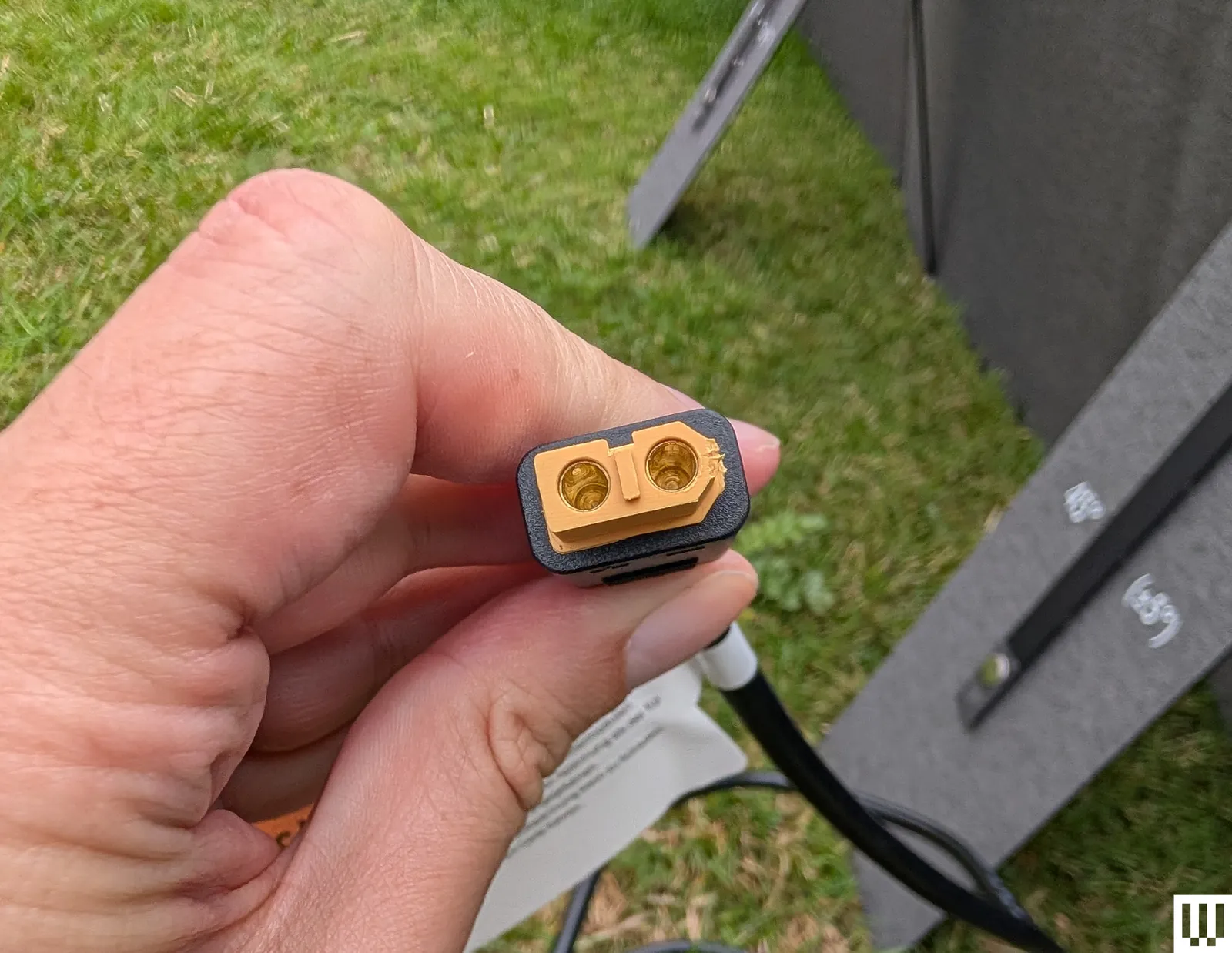
Lastly, always check the compatibility of your panels and your solar generator. It’s simplest to match panels and generators from the same manufacturer, but it’s easy to mix and match panels with generic MC4 connectors and solar generators with XT60 ports. It’s important to be careful about the voltage of your panels relative to your solar generator to avoid dangerous mishaps. Look for the open circuit voltage (OCV) for both and make sure your panels never exceed your solar generator’s range. People will sometimes overpanel, adding a higher wattage than the generator can accept to account for the fact that the panels will likely never produce their full capability. This is usually safe to do, provided you don’t exceed the OCV.
Photograph: Simon Hill
You should also favor solar generators with Maximum Power Point Tracking (MPPT), a technology designed to monitor the fluctuating input from solar panels (impacted by shade and changing weather) and maximize how much of it is converted for use.
What About Weather Do You Need for Solar Panels?
Advertisement
Most portable solar panels are designed to be left outdoors and survive a light rain shower. Look for an ingress protection (IP) rating. An IP65 rating is fine for light rain and dust, but if you want your panels to survive more serious weather, look for an IP67 or IP68 rating. While the panels and cables are generally weather-proof, be careful with your solar generator and make sure it has an IP rating if you intend to leave it outside.
I try to test portable solar panels in similar conditions using the same solar generator where possible (usually the Anker Solix C1000). I test in direct sunlight and also in partial shade. I record the highest wattage and check how much power each solar panel can produce over four and eight hour periods. I try to test every day for a week or so, weather permitting, and then compare results.
If your internet feels unstable or slow at times, it’s natural to blame the ISP or the router. A router essentially handles everything and your ISP is responsible for providing fast, seamless internet. In such cases, upgrading to a high-speed internet plan or buying a new router may seem like the perfect solution. But as surprising as it may sound, these might not be the real problems. The router could just be overloaded, and as a result, struggling to deliver optimal performance. And there are typically two router settings that can help solve the problem, QoS (Quality of Service) and SQM (Smart Queue Management). If configured correctly, this will significantly reduce slowdowns, allowing you to delay the router upgrade.
Before we delve into configuring the settings, it’s vital to understand why your router could be the bottleneck due to bufferbloat. Data transmitted over the internet is broken into small packets which your router handles, and it can only transmit a given number of packets at once. When traffic exceeds the available bandwidth, extra packets are stored in a memory buffer and wait for their turn. As the buffer grows, so does the time it takes for recent packets to be transmitted. This directly translates into increased latency. Regular internet speed tests don’t help pinpoint the problem, because they generally check for the download and upload speeds. That’s why you need to configure features like QoS and SQM.
Advertisement
Understanding QoS and SQM
Kazim Alvi/SlashGear
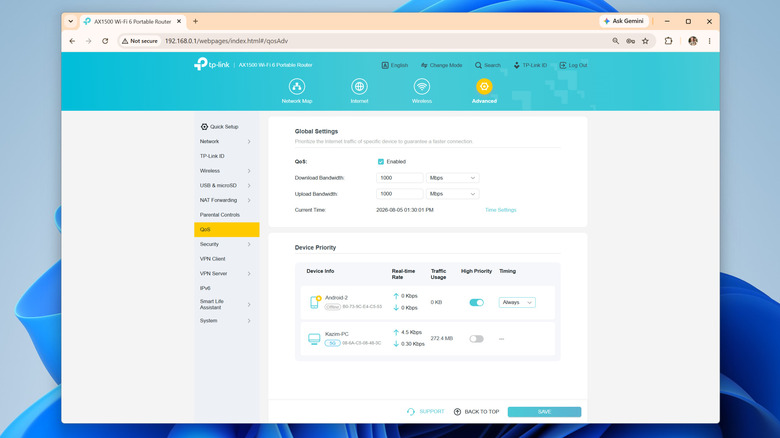
QoS or Quality of Service is a feature available on most routers that allows you to prioritize specific devices or data types on the network. For instance, you could prioritize your PC over your smartphone, or gaming over downloads and backups, and vice versa. Different router manufacturers offer different controls over QoS, but the feature is generally available on most modern routers. SQM or Smart Queue Management, on the other hand, is an advanced QoS feature designed to handle bufferbloat, which is basically the overloaded memory queue we discussed earlier. With SQM, your router prioritizes traffic from tasks that are latency-sensitive, say gaming and video calls.
If you are aiming for lower latency, SQM will help. But if download speeds are slow because multiple devices are competing for the available bandwidth, you are better off with QoS. That’s because Quality of Service lets you prioritize important devices and traffic types, which in this case is downloads. Also, on older routers, SQM may not be natively available, and you may need to install an open-source router firmware like OpenWRT to set up the feature, which is a hassle for the average user.
Turning on and setting up QoS and SQM will vary based on your hardware, so check your instruction manual to know for sure (most routers have a PDF version on the manufacturer’s website), but it generally goes like this: open your router’s admin panel, go into the QoS section (it may be under something like Advanced Settings), turn the feature on, and configure device or traffic priority. For instance, if you actively download files on your computer, prioritize it over other resource-intensive devices on the network. On routers that grant granular controls, you can specifically prioritize downloads or file transfers over other types of traffic.
Advertisement
Easy tricks to speed up downloads
New Africa/Shutterstock
Beyond QoS and SQM, there are a couple of other tips and tricks that will help improve connectivity and speed up downloads. The most important of all, and perhaps the simplest, is effective router placement. If your router is far away from the connected device, the signal strength will be low, and you will subsequently notice lower download speeds. Simply bringing the router closer to the device or using a Wi-Fi range extender or a mesh network will do the trick for most.
If physically moving the router is not an option, you can consider connecting the more important devices using an Ethernet cable. When it comes to stability and consistent speeds, Ethernet is undoubtedly a better choice over Wi-Fi, although the difference is usually less noticeable on modern routers with better coverage. In case your laptop doesn’t feature a LAN port, get a USB-to-Ethernet adapter to add the functionality.
Advertisement
Similarly, optimal band selection and minimizing interference is just as important. You should ideally have the non-critical devices, like smart plugs and security cameras, on the 2.4 GHz band, while reserving the 5 GHz band for computers, smartphones, gaming consoles, and smart TVs. As for wireless interference, move common interference-causing household appliances like microwaves and baby monitors away from both the router and the device in question.
Industrial and commercial applications accounted for more than 70pc of humanoid robot shipments.
Humanoid robot sales have skyrocketed 272pc in a year as the maturing technology proves its use in industrial settings, a new report finds.
China remains the centre of this booming industry, holding more than 97pc of the market, while representing more than 85pc of the global demand.
Sales are further expected to triple year-over-year by 2026 to around 60,000 units, reported Smart Analytics Global (SAG), with industry-wide revenue expected to hit more than $1.6bn. The sector is expected to grow from nearly $5.5bn in 2026 to more than $50bn by 2035.
Advertisement
Shipments grew from just more than 5,000 units to more than 19,000 in the first half of this year, bolstered by government led support from China – including helping developers test and deploy robots – abundant funding and emerging businesses that are expanding through public listings in the country.
Hangzhou-based Unitree’s Shangai listing received nearly 10m retail orders, marking an oversubscription of more than 5,500 times, as the company readies to become mainland China’s first publicly traded humanoid robot maker.
Advancements in physical AI are also attracting innovative robotics start-ups, major tech companies and automakers.
Domestically, Shanghai-based Agibot overtook Unitree to become the world’s largest humanoid robot vendor capturing 44pc of the global market. Together, the two vendors account for 75pc of robot sales across the world. Behind the two leaders are Beijing-based Galbot, Shenzen’s Ubtech and Guangdong-based Leju.
Advertisement
Major sellers include half-size bipedal robots, which dominated Agibot’s its humanoid portfolio and wheeled robots designed for more efficient mobility, stability and cost, over fully human-like locomotion.
Home robots still far off
Industrial and commercial applications accounted for more than 70pc of humanoid robot shipments in the first half of this year – up from 50pc in the same time last year, SAG said.
The growth comes as vendors narrow in on manufacturing, logistics, warehousing and other structured commercial environments, where robots can perform defined tasks and demonstrate measurable productivity.
Advanced use cases such as bionic humanoid robots targeting human interaction, for example, are much slower to grow on account of technology and regulatory limitations around AI, and customer acceptance.
Advertisement
The analytics firm said general-purpose home-service humanoid robots, something Meta is working towards with its recent acquisition of Assured Robot Intelligence, is unlikely to reach mass market scale in the next five years.
Reports suggest that Meta has made “significant” investments in this category with goals to create humanoid robotic hardware to help with household chores.
Recent US restrictions on foreign-made robots could create additional issues for Chinese sellers looking to expand into mature markets, the report found.
Similarly, the EU’s scrutiny over AI applications across autonomous robots in manufacturing and personal assistance also places hurdles for growth.
LG Display is reportedly developing 5-stack OLED panels rumored to be headed to the 24-inch iMac, which give ever better brightness and image quality.
Apple is clearly planning to bring OLED displays to all of its devices, potentially with the iPhone 20 Pro getting 2-stack or what the company calls Tandem OLED panels. Back in 2022, Apple was so keen on 2-stack for the iPad that it insisted an initially reluctant Samsung develop the design.
Samsung’s reluctance was because at the time, only Apple wanted the costly technology. Apple’s insistence was because 2-stack OLED has a longer life and produces a better image quality than single OLED panels.
But since January 2025, LG Display has been making 4-stack OLED television screens, and according to The Elec, it is now working on 5-stack versions. These may be used in TV sets, too, but Apple is said to have asked about a 24-inch display, clearly for a future iMac.
Advertisement
This isn’t the first time that LG has been reported to be working on 5-stack OLED. But a previous report concluded that such an iMac might not be produced until 2030.
The new report is fractionally more optimistic, predicting that a 24-inch 5-stack OLED iMac may launch in 2029.
Why Apple wants 5-stack OLED
While 2-stack OLED improves the life cycle of a display, compared to the previous single-stack version, it can still have burn-in. Familiar to Mac users from the CRT days of the 1980s and 1990s, it’s possible for a ghostly image of the menubar to appear permanently on screen.
An iMac will be at risk of this far more than an iPad or an iPhone, because it is more likely to be continually on for longer.
Advertisement
Then mounting multiple layers of OLED over one another ultimately affects brightness. To combat this, a 5-stack OLED panel will have three layers of blue LEDs instead of two.
Apple is claimed to have made requests to both LG Display and Samsung Display regarding OLED panels. Based on reports of those, the aim appears to be to get 24-inch displays with a resolution of 218 pixels per inch to 220 pixels per inch.
The technology to do this exists, but it currently comes at a cost. The panels themselves are more expensive, but they are also more complex to produce in volumes.
Or rather, they are for a large display like that of a 24-inch iMac. Or perhaps especially for TV sets where LG Display currently sells 4-stack models of up to 83 inches.
Advertisement
There is an issue of the quality of the display, which is an issue for a monitor where a user will be sitting immediately in front of it. It’s less of an issue for a TV set across the room.
Consequently, it’s possible that LG Display’s screens do not yet meet Apple’s standards for an iMac-sized screen. Yet given how Apple was pressing for 2-stack OLED back in 2022, it’s curious how it is still reported to be years away from using it in the iPhone.
Hoy wants sending something from your Mac to feel as casual as dropping a file onto someone’s desk. Instead of opening another app, you drag it onto that person’s face sitting in the menu bar.
The pre-release Mac app folds file sharing, voice notes, and screen recording into one lightweight interface. The person you’re sending something to effectively becomes the shortcut, which makes Hoy feel less like another messenger and more like a communication layer built into macOS.
How does Hoy actually work
Once someone joins a channel, Hoy puts their avatar in your Mac’s menu bar. You can drag a file onto their face, click to type, or record a voice note without first opening a full conversation window.
Hoy
Screen recording follows the same logic. Hoy can capture your display with an optional camera bubble, then send the recording directly to the recipient.
That gives it a useful spot between quick sharing and asynchronous feedback. AirDrop is still the obvious choice when someone is nearby. Hoy is built for the moments when they’re across town, working remotely, or simply checking in later.
Advertisement
Why iCloud does the heavy lifting
Hoy doesn’t run its own content server for messages or recordings. Everything moves through Apple’s CloudKit, with each channel stored against the host’s iCloud account.
That setup comes with a practical catch. Larger files and recordings count against the host’s available iCloud storage. Hoy says it can’t access the content inside those channels, while voice transcription happens locally on the Mac.
Hoy
Calling Hoy serverless would still oversell the idea. The app may avoid operating its own messaging backend, but Apple’s infrastructure is doing plenty of work behind the scenes.
Who is Hoy really for
The bigger challenge is convincing people to install it. Messages already covers many of the same basics on every Mac, so Hoy has to earn its place by making common exchanges noticeably faster.
Its strongest case right now is probably small remote teams that send quick feedback and screen recordings throughout the day. The free tier includes three hosted channels, which makes it easy enough to test without committing.
Advertisement
An iPhone companion is planned for later this year. Until then, Hoy’s appeal comes down to whether putting people directly in the menu bar saves enough friction to become a habit.
You can use Venmo to pay for Android app purchases and subscriptions.
FellowNeko/Shutterstock
You can now pay for your Google Play purchases with Venmo. Google has added the service as a payment option in the Play store, letting you purchase apps, subscriptions or in-app content with either your Venmo balance or your linked cards and bank accounts.
Similar to other payment options available in the US, such as your cards, PayPal and Cash App, you will have to set it up and link Venmo to your Play account before you can use it. Just go to payment methods in the Google Play app to add it. Once you’re done, you’ll be able to use Venmo across Google’s services, including YouTube.
Google recently opened the Play store to outside billing in the US, the UK and Europe as part of its settlement with Epic Games. That means developers can now offer you an alternative payment system or link you to their own websites for purchase when you want to buy an app or to pay for a subscription, and it’s worth noting that some of those alternative options might not take Venmo.
The United States military is filled with all kinds of standards that recruits must meet upon joining and starting training. These include several areas of physical fitness, and unlike most jobs in the U.S., there are height and weight requirements. Believe it or not, you can be either too tall or too short to enlist, with a range of 4 feet, 10 inches to 6 feet, 8 inches for both genders’ minimum and maximum height. These restrictions are meant to ensure that all personnel can safely operate military equipment, though it is possible to get a waiver in some situations.
In addition to the height limits for the general military, certain jobs have more stringent requirements across all of the services. These standards apply to personnel operating on different types of ships, airplanes, and tanks. This makes sense, as submarines, fighter jets, and armored vehicles have limited crew compartments, making it uncomfortable if not impossible for people of a certain height to take those jobs.
Advertisement
To become a tanker, which in the Army is Military Occupational Specialty (MOS) 19K, Armor Crewmember, a person cannot exceed 6 feet, 1 inch in height. Fortunately, that doesn’t limit too many applicants, as the average height of an American woman is 5 feet, 3.5 inches, while men average around 5 feet, 9 inches tall. Because the U.S. military operates the M1 Abrams Main Battle Tank, the height requirements are universal across its variants. Unlike tankers, the height requirement for MOS 19C, Bradley Crewmember, isn’t restrictive for those operating the M2 Bradley Infantry Fighting Vehicle.
Advertisement
The inside of an M1 Abrams MBT is cramped
Tanks have always been cramped, as their design requires a great deal of armor to protect the personnel inside. The vehicle also needs to be able to navigate roads, bridges, and various terrain, so making them wider isn’t typically an option, while making them higher only makes them easier to see and strike. If you look back through the history and evolution of tank design, this remains a constant, as tight quarters are the name of the game.
When looking specifically at the driver’s compartment, it sits center and to the front of the tank with a hatch that allows the driver to peer out (pictured). Just above the hatch is the forward edge of the turret ring. Inside, the driver sits on a seat and has little room for their legs. The steering-throttle control sticks up between the legs with handlebars for operating the tank, while the driver looks at a screen for information about the vehicle. The steering-throttle control is a yoke that controls acceleration and steering.
The compartment is cramped, to say the least, so there’s not a huge margin for anyone exceeding 6 feet, 1 inch in height. Even at that height, it’s not the most comfortable place in the world to work, but many tank drivers do so every day they put on their uniform and step inside their vehicle. The other positions inside the tank don’t offer much more in terms of space, though there’s a bit of room for the tank commander, gunner, and loader, as the driver is isolated from the rest in the forward hull.
For the longest time, reliability used to be the stick skeptics used to beat electric vehicles. The argument was that the things were rolling laptops, full of software and accompanying bugs that would inevitably freeze, along with batteries that would degrade into uselessness. Buy one, and you were an expensive beta tester just waiting for a problem to crop up outside of warranty.
However, we’ve found that this argument has aged rather like milk. As of 2026, electric vehicles are far more reliable than they were in 2016 — and this is to be expected, as with any nascent technology, the tech improves with time. A big plus in the EV corner is that these vehicles have a fraction of the moving parts that an ICE vehicle has, so mechanical problems are also far fewer. No timing chains, no about-to-go-bad exhaust systems, no fuel injectors that get clogged. Fewer parts, fewer problems — in one example, the vehicle used to be on Consumer Reports’ “least reliable” lists and is now on the other end of the spectrum — that’s how quickly the industry has matured.
Now, we’re not claiming that EVs don’t have their problems — far from it. Many do still have frequent glitches and bugs that prevent a smooth user experience. The charging network and speeds, though improved vastly, are still not where they need to be. However, from the lens of a relatively new technology, the notion that electric vehicles are automatically unreliable is out of date.
Advertisement
Ford F-150 Lightning
Just two years ago (at the time of writing), in 2024, the Ford F-150 Lightning electric truck earned itself a very undesirable spot on the Consumer Reports list of the most unreliable vehicles for that year. In 2024, the e-pickup got a miserably low Consumer Reports score of 28 points out of a total available 100 in the reliability metric.
In the 2025 overall Consumer Reports reliability survey, Ford vehicles got an overall score of 48, and the 2025 Ford F-150 Lightning got a reliability score of 45. That means that the blue oval EV pickup is about as reliable as the average Ford vehicle — which is a far cry from where it was two years ago. Readers should note that the 2026 Consumer Reports list of unreliable vehicles is out, and that the new F-150 Lightning is no longer on the list, which is a testament to the fact that stubborn-as-a-pack-mule Ford can still listen to customer and industry feedback when it wants to.
Advertisement
The reason we keep returning to the 2025 model is that Ford initially slowed production, and then eventually discontinued the F-150 Lightning after 2025. However, if you act fast, you might still be able to score a new F-150 Lightning from a dealer that still has one on the lot, or get one with low miles on the used market. In 2025, the F-150 Lightning had a maximum range of around 350 usable miles, and an MSRP of $65,190 (including destination).
Advertisement
Ford Mustang Mach-E
Though it carries the vaunted, historic Mustang nameplate, this thing is actually a crossover-ish SUV. Rightfully, this thing has got the purists sharpening pitchforks, but we can’t fault Ford for actually having the guts to experiment in this market. Initially revealed to the public at the end of 2019, the Mach-E SUV went on sale two short years later, as a 2021 model. A very trusted U.S. brand, J.D. Power recently released its EV ownership experience report for 2026. Historically, the Mustang Mach-E has done rather well in this comprehensive study, ranking in the top three (but never first) in 2022, 2023, and 2024. After a massive fall in rankings in 2025 (but still top ten), the Mach-E finally earned the coveted top spot for 2026.
Furthermore, the Mach-E also has insane levels of customer satisfaction, with nine out of 10 owners saying they would endorse it. For 2026, the Mustang Mach-E gets a reliability score of 74 out of a total available 100 points from the Auto Reliability Index, and 2021 models got a J.D. Power reliability score of 65, also out of a total available 100 points. The 2026 model comes with a 72 kWh battery and one motor as standard, which gives the vehicle about 264 horsepower and a range of about 250 miles. Pricing for the 2026 Mach-E begins at $37,795, on top of which a freight charge of $2,045 will be tacked on.
Advertisement
Volvo EX30
The EX30 is Volvo’s spiritual successor to the XC40 Recharge, which itself was the all-electric version of the brand’s popular small SUV, the XC40. Introduced in 2023, the EX30 had some teething problems, but it appears these have been sorted out. For 2026, the EX30 gets a respectable score of 71 out of 100 in its J.D. Power review, and an above-average 63 out of 100 in the reliability metric. The crossover SUV also got 86 out of 100 points under the driving experience metric, and 67 out of 100 in the resale value metric. For 2026, a new Volvo EX30 would sell for about $40,345 as base MSRP — including a $1,395 destination fee.
It is quite pricey for a compact-sized SUV, though proponents of the Swedish brand would argue that the excellent interiors and Volvo’s legendary safety reputation are worth the price. 2026 EX30s come with a 200 kWh battery pack as standard, along with one e-motor, which gives the car a range of about 261 miles. We should warn you that there is, however, a massive recall that affects a huge number of modern EX30s, so make sure that if you’re buying one of these, the fix has been done. Specifically, the recall was about a fire hazard from the battery igniting in about 40,000 vehicles or so.
Advertisement
Porsche Taycan
The Porsche Taycan is an all-electric, four-door car from Porsche that was very clearly intended to target buyers who wanted a Panamera, but electric. Now, no one should buy a Porsche vehicle expecting average or slightly above-average maintenance costs. It is a luxury vehicle with expensive parts and specialist labor, so the upkeep on this vehicle (and this entire class of vehicles) is meant for people for whom cost efficiency is not a top priority. And, famously, German vehicles tend to require exacting servicing standards to remain reliable — so when the Taycan gets out of warranty and its service contract, things can get extremely expensive extremely quickly.
However, while the car is being looked after by the dealer, and all preventative maintenance tasks are done on or before time, the Taycan is surprisingly reliable. For its part, J.D. Power gives the 2026 Taycan a driving experience score of 86, a resale score of 76, and a reliability score of 75. Overall, the 2026 Taycan gets a J.D. Power score of 81, with all figures out of a maximum 100 available points.
Advertisement
Consumer Reports also says that the 2026 Taycan is a “serious challenger” when pitted against the ever-popular Tesla Model S. Readers who are familiar with the Taycan will be sad to learn that the wagon body style on the Taycan, called the Taycan Cross Turismo, is being phased out, but only for America, since the model will continue to be sold overseas.
Advertisement
Hyundai IONIQ 6
The Hyundai Ioniq 6 — which also has a sporty “N” model available — is a four-door sedan from the Korean automaker that first went on sale in 2022. The 2025 model got a J.D. Power reliability score of 72 out of 100, and 79 out of 100 under the driving experience header. The resale score for the 2025 Ioniq 6 stood at 70 out of 100, which gave the vehicle an overall score of 73 out of 100 total available points for 2025. We do not have reliability scores for the 2026 Ioniq 6 — since the standard model has been axed for the 2026 model year, though the Ioniq N continues to be sold.
However, you might still be able to get a 2025 model as new or near-new from Hyundai dealers if you’re willing to shop around. Used models could be going for a steal, especially if you decide to trade in your current vehicle in some cases. For those who don’t know about the Ioniq 6, it is an all-electric model with a 53 kWh battery system in 2026 that feeds one electric motor, making about 149 hp of power.
These are standard figures for the 2026 model, which give the vehicle a range of 240 miles — though real-world usage, as with all EVs, will rarely hit that optimal-condition number. Still, for $37,850 as base MSRP ($1,745 as additional charges), it’s not too shabby a deal for a decently reliable and extremely good-looking daily driver vehicle.
Advertisement
BMW iX
It’s easy to get tangled up when reading about a BMW model; for the unaware, the BMW iX is a midsize luxury SUV intended as the electric version of the BMW X5. In 2026, the iX comes with dual e-motors powered by a 100 kWh battery system, and has space to seat five passengers in two rows. If you’re wondering, the car has about 87 MPGe (miles per gallon equivalent), which isn’t particularly striking, but then again, it’s a luxury SUV, and efficiency is rarely a concern for buyers. What might indeed be a concern is the range, which for standard iX models is a claimed 279 miles in total.
Remember that manufacturer-claimed EV ranges are under optimal conditions, which are hard to replicate in real-world use. Even for a luxury SUV, that range might be the limiting factor for buyers. J.D. Power gives the 2026 BMW iX a score of 77 out of 100 overall, and 78 out of 100 specifically for reliability, which is really good. For those looking to score a BMW iX, you should act fast, since BMW has said it will not sell the iX in the U.S. following the 2026 model year. Once again, buyers in other markets will continue to have access to the iX even beyond 2026, since the discontinuation is only here in America. The MSRP for a 2026 iX is $75,150, with $1,175 as destination.
Advertisement
Kia EV9
Kia
The Kia EV9 is the only vehicle on this list that can seat more than five people, with room for up to seven passengers across three rows of seating. With the optional captain’s chairs, total seating capacity drops to six. Power for the current 2026 model year comes from a 76.1 kWh battery that feeds a single e-motor, giving the EV9 an EPA-estimated range of 305 miles in certain high-end configurations.
The entry-level trim — which is called the “Light RWD” — drops the range to a barely usable 230 miles. J.D. Power gives the 2026 Kia EV9 an overall score of 72 out of 100, which breaks down into 67 out of 100 for reliability, 82 out of 100 for driving experience, and 77 out of 100 for resale. Another neat feature of the Kia EV9 is the fact that it is compatible with any Tesla Supercharger in the U.S., which greatly improves the charging outlook on road trips with the family, for example.
Advertisement
What’s not great about the EV9 is the price, since it starts at a base MSRP of $54,900 for 2026, which is not inclusive of a pricey $1,645 destination fee that is tacked on top of the MSRP. If you’re open to looking at used models, the 2024 EV9 (which also got a J.D. Power reliability score of 70 on 100) is selling for about $30,000 on the used market as of August 2026.
Advertisement
BMW i4
The BMW i4 is an all-electric, medium-sized executive sedan with sporty fastback styling and borrows heavily from the styling of its corporate cousin, the BMW M4. For 2026, the model has an 83.9-kWh battery and powers dual e-motors, giving the car a total range of 333 miles. However, this car is not what we’d call accessible to the average buyer, since it is somewhat hard to find at a dealer and is also prohibitively expensive to buy. 2026 models come with a starting sticker price of $57,900, plus a freight fee of $1,175. Slightly older models, like the ones from 2024, are selling for much cheaper — $40,000 at the time of writing — but you’d lose two years of warranty when buying those.
However, for those who want to scoop one up, you can console yourself knowing that you’re in one of the best-looking, best-performing cars on sale. If you’re wondering, J.D. Power has not rated the 2026, 2025, or 2024 models of the BMW i4, though 2023 models got 74 on 100 in reliability, and 78 on 100 overall. Furthermore, Consumer Reports says that the 2026 BMW iX will have about-average reliability, which is a pretty good outlook (even though it’s based on predictive data), considering that it’s an EV.
Advertisement
Lexus RZ
Surprisingly, this list has not been dominated by Japanese vehicles (which usually top every single reliability listicle out there), since Japan has tended to lean toward hybrids rather than pure EVs. This then makes the Lexus RZ the only Japanese EV to make our list, yet it smashes all metrics by which it is measured. Consumer Reports says that the 2026 Lexus RZ will be “more reliable” than your average new vehicle, which is pretty high praise from the company. The interior of the Lexus RZ is something that we absolutely have to mention, since it looks like the inside of a futuristic spaceship.
Many of the interior controls are still via buttons, making the Lexus RZ one of the rare new car models that still use buttons and knobs aplenty. This use of buttons is (arguably) even rarer on a current-generation EV, since the manufacturers want to present the car as “futuristic” — so screens are the norm. The 2026 Lexus RZ comes with a 75 kWh battery pack and has one e-motor on the base model, with a claimed range of about 301 miles.
At the time of writing, the 2026 RZ only had one outstanding recall from the NHTSA, related to a potential ECU failure. It’s also worth mentioning that J.D. Power has never rated the Lexus RZ since its release in 2023, which is why we can’t give you any scores for the same.
Advertisement
Tesla Model 3
One of the first electric vehicles — arguably the first, in fact — that really became popular was the Tesla Model 3. It is one of the oldest nameplates on our list, having been on sale since 2017 — which, for those counting, is almost a decade. Unsurprisingly, many kinks in the design and software have been worked out by now, which means that the Model 3 for 2026 is one of the most reliable electric vehicles on the market.
Advertisement
The Model 3 nabbed the top spot in the J.D. Power EV ownership study that we quoted at the beginning of this article for 2026, which is quite impressive. Tesla also has one of the best charging infrastructure networks in the U.S. for EVs, which is a big plus in the Model 3’s favor. J.D. Power gives the Tesla Model 3 a resale value of 77 on 100, a driving experience value of 92 on 100, and a reliability value of 92 on 100.
When combined, these figures give the Model 3 an overall score of 82 on 100 from J.D. Power. Pricing for the 2026 Model 3 begins with a base window sticker of $36,990, and a destination charge of $1,390 added to the MSRP. This generation comes with a 69.5 kWh battery and a single electric motor, giving the five-seater a range of about 321 miles.
Advertisement
Tesla Model Y
The Tesla Model Y is the company’s crossover SUV, and if you think it looks similar to the Model 3 that we just looked at, that’s because it is. The Model Y is actually based on the Tesla Model 3, and the two variants share many parts. For 2026, the Model Y comes with a similarly sized 60 kWh battery pack and one e-motor, making about 295 hp. All things put together, the Model Y is supposed to get a total driving range of about 321 miles, which is the same as that of the Model 3 from above.
The price is, naturally, higher for the Model Y, with the 2026 model selling for $61,990 as base MSRP, plus $1,390 for destination charge. J.D. Power gave the 2026 Model Y an overall score of 81, a driving experience score of 87, a resale score of 80, and a reliability score of 78 — all values out of 100. Consumer Reports says that the Tesla Model Y would be “much more reliable” compared to the average new vehicle on sale.
It’s worth mentioning that many of the Consumer Reports scores that we list are based on predictive modeling of past units — which we feel is fine, since there usually aren’t many mechanical differences between intra-generational models that we’ve listed. Furthermore, many models that we’ve listed are first-gen ones that will only get more reliable with time.
The U.S. Cybersecurity and Infrastructure Security Agency (CISA) warned that hackers are exploiting a critical-severity Progress Kemp LoadMaster command injection vulnerability.
Kemp LoadMaster is a very popular Application Delivery Controller (ADC) and server load balancer used by tech companies and government entities worldwide (e.g., Amazon, U.S. Air Force) to distribute incoming web traffic across multiple servers, optimize app performance, and ensure high service availability.
Progress Software says that 80% of Fortune 500 companies use its products and services, with Kemp LoadMaster having over 100,000 deployments worldwide.
Tracked as CVE-2026-8037, this critical command injection security flaw enables unauthenticated attackers to execute arbitrary commands on unpatched LoadMaster appliances by exploiting unsanitized API inputs in multiple command endpoints.
According to Internet threat watchdog Shadowserver, nearly 300 Kemp LoadMaster instances are exposed online. However, there is no information regarding how many of them are honeypots or have already been secured against CVE-2026-8037 attacks.
On Friday, CISA added the flaw to its catalog of actively exploited vulnerabilities, ordering U.S. Federal Civilian Executive Branch (FCEB) agencies to secure their servers within three days as mandated by Binding Operational Directive 26-04.
“This type of vulnerability is a frequent attack vector for malicious cyber actors and poses significant risks to the federal enterprise,” the cybersecurity agency warned.
While BOD 26-04 applies only to U.S. government agencies, CISA urged all defenders to prioritize patching the CVE-2026-8037 vulnerability to block incoming attacks.
Advertisement
Last month, Progress also emailed ShareFile customers who were using Storage Zone Controllers to immediately shut down servers after identifying what it described at the time as a “credible external security threat” targeting the on-premises secure file-sharing software.
Days later, the company released security patches for a high-severity ShareFile path traversal zero-day vulnerability, but told BleepingComputer that it had “no indication of unauthorized access to any ShareFile customer account or data, and we have not identified any active threat.”
Security teams log 54% of successful attacks and alert on just 14%. The rest move through your environment unseen.
The Picus whitepaper shows how breach and attack simulation tests your SIEM and EDR rules so threats stop slipping by detection.
Don’t like the camera bump on your foldable? Take it off
That’s what one Redditor has done with their Galaxy Z Fold 8
It now lies flat — but the selfie camera is the only camera left
How far would you go to get one of the best foldable phones looking and working exactly the way you want it? One Samsung user has taken the drastic step of cutting off the rear camera module on their new Galaxy Z Fold 8, just so it’ll lie perfectly flat when placed on a surface.
The unusual DIY hack is documented on Reddit, and has been met with one or two raised eyebrows. Apparently, the owner of the phone used a razor blade to perform the operation, and says the end result is “not bad”.
“The wobble is so annoying and I never use [the cameras] anyways” was the reason given by the user, when asked what prompted the customization — and they don’t appear to have any regrets about what they’ve done.
Latest Videos FromTechRadar
Advertisement
Our Samsung Galaxy Z Fold 8 review doesn’t mention the camera bump as being a particularly egregious problem, but we do have some praise for the performance of the dual-lens camera on the back — so it seems a shame, and a little drastic, to remove them.
The reactions in the original Reddit thread are mostly of disbelief that someone would go to these lengths just to get a phone to lie flat, while taking away their ability to capture photos and videos at the same time.
Amidst a lot of well-chosen GIFs, there are comments like “no amount of explanation justifies it” and “what a mad man”, as well as some appreciation for a tech-hack that seems to have been well done, based on the photo evidence.
Advertisement
There’s also one request for more information from another Redditor who wants to do the same to their own Galaxy Z Fold 8 — perhaps an indication that the wobble you get when the handset lies flat is annoying quite a few users.
Sign up for breaking news, reviews, opinion, top tech deals, and more.
Samsung launched the phone on July 22, and the starting price is $1,899 / £1,699 / AU$2,699. It launched alongside the slightly more expensive Galaxy Z Fold 8 Ultra and the more affordable Galaxy Z Flip 8.
Below, find a few more e-readers I like but don’t necessarily love as much as my top picks.
Boox Go 7 ($270) and Boox Go Color 7 ($290): Boox is known for its wide range of e-paper tablets, including the Boox Go 6 (Gen II) I recommend above. If you’re looking for something a little larger with a similar Android-based experience, the Go 7 and Go Color 7 are both solid choices. There are page-turner buttons, and it’s a nice square shape that’s easy to hold and use. If you, like me, don’t use color features a ton, it’s worth saving the extra money on the black-and-white model. Regardless, it’s great that the price difference between the two models isn’t steep.
Advertisement
Boox Palma 2 for $316: This is a fun, pocket-sized device, with fingerprint recognition, a faster CPU, and a newer version of Android than previous models. Former WIRED reviewer Adrienne So loved using it with the Kindle app, but she wishes it cost less. It’s currently unavailable and has been for a while; I’m not sure it’ll come back in stock, but the Boox Palma 2 Pro ($400) is next on my list to test.
The Kindle Colorsoft.
Photograph: Nena Farrell
Kindle Colorsoft Signature for $280 and Kindle Colorsoft ($250): The Kindle Colorsoft Signature (7/10, WIRED Recommends) is Amazon’s first Kindle with a color screen. It has a screen with an oxide backplane, which Amazon says delivers strong contrast and image quality. It also has custom-formulated coatings and nitride LEDs for brightness and color accuracy. But the screen is capped at 150 ppi for color images, versus 300 ppi for black-and-white, making the reading experience a little fuzzier than on the latest Paperwhite. Processing color images takes much longer than black-and-white ones on the Paperwhite, and the Colorsoft is missing features that are basically standard on other color e-readers, like page-turn buttons and stylus support. It’s not a bad Kindle, and color does enrich the e-reading experience, but I suggest waiting for a discount during an Amazon sale event.
Advertisement
Kindle Scribe (2nd Gen, 2024) for $400: The second-generation Kindle Scribe (8/10, WIRED Recommends) is a great option if you want an e-reader that doubles as a digital notebook while staying within the Kindle ecosystem. It has a 10.2-inch (300 ppi) paper-like display with features like an adjustable warm light and an auto-adjusting front light. The included Premium Pen also has a soft-tipped eraser (mimicking that of a No.2 pencil). With the Active Canvas feature and expandable margins, you can also mark up ebooks and write notes in the side panel. Amazon has launched three new Kindle Scribe models since this one, but this older edition remains my favorite Kindle e-reader with digital-notebook capabilities.
Kindle Scribe (3rd Gen, 2025) for $500: The latest Kindle Scribe (7/10, WIRED Recommends) arrived in December 2025 with a color version. It also has a new exterior design that does away with the single thicker side and standardizes bezels and frames across all sizes. It has a new homepage design that simplifies accessing your latest books and notebooks, plus a quick-notes capability that lets you pin a note to your homepage for easy note-taking. It also has a new set of AI features that can provide summaries and even send your notes to an Alexa+-powered speaker so you can ask questions about them. Overall, though, these features aren’t necessary and just drive up the price. The older Kindle Scribe (2nd Gen) is still my preferred option if you want a Kindle e-reader that doubles as a digital notebook.
Kindle Scribe (3rd Gen) on the left, and Kindle Scribe Colorsoft on the right.
Advertisement
Photograph: Nena Farrell
Kindle Scribe Colorsoft for $630: Amazon brought the color screen to the Kindle Scribe late last year, with a redesigned exterior to match the new third-gen Kindle Scribe. The Kindle Scribe Colorsoft (7/10, WIRED Recommends) works exactly as you’d expect, with a range of colors and tools you can use on the notebooks and while reading your books. There are also several AI features, which is part of why it’s so pricey. I think it’s too expensive for not being able to transform into an e-paper laptop like the ReMarkable Paper Pro (7/10, WIRED Recommends), but if you really wanted to stick with Kindle and have a colorful digital notebook and e-reader in one device, this is the one to get.
Kindle Scribe Without Front Light for $430: This is the third and final installment of Amazon’s latest generation of Kindle Scribes. It’s similar to the new base Kindle Scribe (3rd Generation), but it removes the front light and wireless charging. It has a max storage of 16 GB instead of the 32- and 64-GB options the 2025 Kindle Scribes offer. You can save some money with these cuts, but the loss of a front light is a pain if you’re a night reader like I am. If you want a cheaper Kindle Scribe, I still prefer the second-generation model, though you’ll lose out on AI reading features and the ability to connect to Google Drive and Microsoft OneDrive.
Nook GlowLight 4 Plus for $200: The 4 Plus is the only waterproof Nook in the lineup, and it has the biggest screen at 7.8 inches, along with 32 GB of storage. It also has physical page-turn buttons and a headphone jack for listening to audiobooks (you can also connect wireless earbuds via Bluetooth). Unfortunately, it was often slower than my Kindle and tended to freeze. While the large library has cheap and even free ebooks, it’s not as good of a selection as Kindle Unlimited. The process of getting a book from the library on a Nook is also frustrating. You’ll need to download either Adobe Digital Editions or Android File Transfer before physically connecting the device to your computer and then transferring the files.
Advertisement
Nook 9-inch Lenovo Tablet for $150: If you mainly read cookbooks or other color-intensive materials, and you want a dedicated reader, you might want to consider this affordable tablet from Nook and Lenovo, which has the Nook app built in. It’s a tablet rather than an e-paper device like the rest of the gadgets in this guide, so you’ll lose the E Ink screen and the distraction-free nature of an e-reader. You can at least turn off notifications while in certain apps, which I recommend doing for the Nook app. It uses Android 13 OS, and it’s not built for heavy work, like video or photo editing.
Xteink X4 for $69 and X3 for $69: These are similar to the Xteink X4 Pro above when it comes to the app and basic capabilities, but you’ll lose out on the touchscreen, home button, and front light. Instead, there are more buttons, providing a Tamagotchi-like experience as you tap them to go back and forth between menus and pages of your reading material. The X3 is super small, with just a 3.7-inch screen that fits on the back of my iPhone 16 Pro, and it has stronger magnets to put itself into place. But the standard X4 is more comfortable to read on than the X3 since it’s larger (and won’t require quite as many page turns, though it’ll still need a lot) with a 4.3-inch screen, like the X4 Pro above.
FAQs
Ebooks can be cheap, but as with regular books, the cost can add up if you’re a big reader. To keep costs low, take advantage of your library card and check out ebooks instantly from the comfort of your home. We have a detailed guide that explains How to Get Free Kindle Books With Your Library Card, but the short version is that most libraries distribute books via OverDrive. You can access these books a few ways: through Kindle or directly from OverDrive with a Kobo, or you can download the Libby app. These ebooks are automatically removed from your device and returned to the library when they’re due.
Advertisement
Each e-reader’s own book service varies in quality. My favorite is Kindle Unlimited for $12 a month, which includes millions of titles, including audiobooks and magazines. Amazon’s Prime Reading also offers a handful of free books every month, which is good to know if you already have a Prime account. You can even lend books to friends and family for a short while (or have them share a book with you). For more details on each option, check out our guide to the Best Ebook Subscription Services here.
What File Formats Do E-Readers Support?
The most widely used format is ePub, which works natively with all the e-readers in this guide except for Kindle—technically. You can still upload ePub files to your Kindle, but you’ll have to use the “Send to Kindle” feature (through Amazon, your email, or the Kindle app) to convert it to Amazon’s proprietary format called AZW. (Newer Kindles support AZW3 and KFX, specifically). Other formats that will work with these e-readers include PDF, TXT, HTML, DOC, and DOCX.
Can I Install Apps on an E-Reader?
Advertisement
Kindle, Kobo, and Nook all use proprietary operating systems that don’t allow you to install third-party apps. The Boox, on the other hand, runs Android (mainly Android 11 and newer). That means you can use it to download any apps available in the Google Play Store or side-load apps from your computer.
Do You Need an E-Reader? What About a Phone or Tablet?
You don’t have to buy a separate device to read ebooks. Smartphones and tablets are perfect for this purpose. You can use Amazon’s Kindle app to read ebooks (iOS, Android) and download OverDrive’s Libby app (iOS, Android) for library-book access. However, the E Ink screens found in e-readers are just nicer to look at. I also like that these devices are one-trick ponies; there are no distracting notifications or social media feeds ripe for doomscrolling.
If you’d still rather have one smart device you can use for reading and other purposes, take a look at our Best Tablets and Best iPads guides for recommendations.
Advertisement
What About a Digital Notebook?
I’ve tried just about every digital notebook on the market; these devices are designed for handwritten notes on an E Ink screen. E-readers with that capability usually still prioritize reading, though there are plenty of models I like that can do both. The Kobo Libra Colour is my favorite option for annotating books, and it can double as a small digital notebook. If you want a larger option, check out my full guide to every digital notebook I’ve tested.
The most important step I take when testing e-readers is to read on them! I spend hours reading books acquired in a variety of formats, including books I purchased directly from each brand’s store, downloaded from local libraries via OverDrive/Libby, and PDFs acquired for free from God knows where.
In the process, I evaluate battery life, brightness, performance lag, screen responsiveness, and text sharpness. I check for extra tools, like whether the tablet in question accommodates accessories like a stylus. I also note features like waterproofing, annotation capability, and access to exclusive subscription services.


























%2520comparison%2520Reviewer%2520Photo%2520SOURCE%2520Nena%2520Farrell.jpg)







































You must be logged in to post a comment Login