Stepping into VR is about more than strapping on a headset and loading a game. The best VR headsets today are gateways to fully realized experiences, whether that’s gaming, fitness, creative work or simply spending time inside a richly rendered virtual world. As the hardware has improved, so has the sense of presence, with sharper displays, wider fields of view and tracking systems that make movement feel more natural and responsive. The result is VR that feels less like a novelty and more like a platform you can actually spend time in.
That said, not every headset is built for the same function. Some prioritize ease of use and standalone play, while others demand a powerful PC in exchange for higher fidelity. Compatibility also matters more than ever, especially as VR begins to overlap with mixed reality and early smart glasses experiments. Whether you want a simple way to explore virtual spaces or a high-end rig that pushes immersion as far as possible, this guide breaks down the best VR headsets you can buy in 2026 and explains who each one is really for.
Storage capacity: 128GB | Battery life: 2.2 hours | Field of view: 110 degrees (horizontal), 96 degrees (vertical) | Max refresh rate: 120Hz
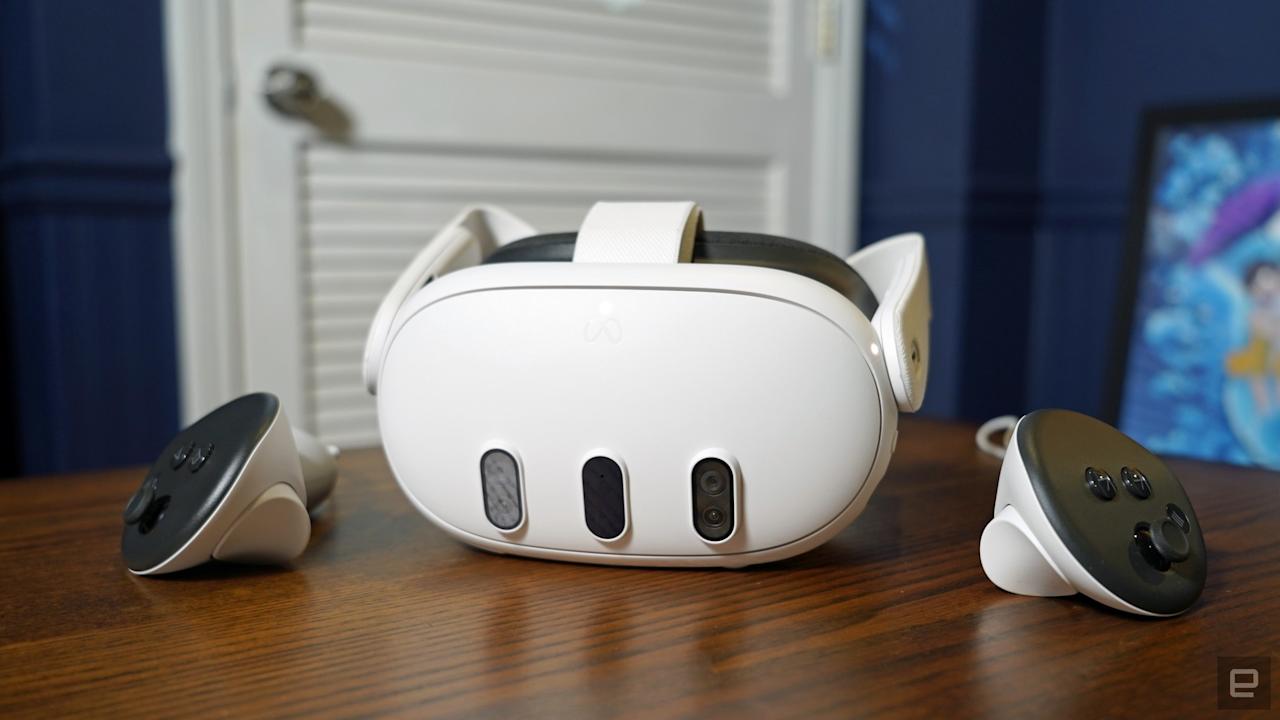
The long-awaited follow-up to the Quest 2 is an upgrade in every respect: It’s more comfortable to wear, it has higher quality screens and it has full-color mixed reality cameras, allowing you to see the real world alongside virtual elements. While it’s more expensive at $500, it’s also a far more capable headset than the Quest 2 and the new Quest 3S, with hardware and optics that will keep you happily immersed in VR for years.
The Quest 3 is powered by Qualcomm’s Snapdragon XR2 Gen 2 chip, which Meta says has double the graphics power of the Quest 2. That additional power is noticeable in games like Red Matter 2, which feature updated textures that deliver an experience closer to PC VR. The Quest 3’s new displays run at 2,064 by 2,208 pixels per eye, offering an even better experience than the PlayStation VR2. Its mixed reality cameras also let you easily see the real world, in case you need to quickly answer a text or Slack message. And they enable games that can be built around your room.
What makes the Quest 3 interesting is that it offers more than just solid VR: It also gives you a glimpse at what a mixed reality future could be, blurring the line between the real world and a virtual world. While it’s not as sharp or capable as Apple’s Vision Pro, that’s understandable. And just like previous Quest headsets, you can also plug it into a gaming PC for higher quality VR experiences, expanding its compatibility beyond standalone use.
Advertisement
Pros
Sharp new screens and lenses
Faster performance
Mixed reality cameras make it easier to see the real world
Storage capacity: Up to 1TB | Battery life: 2.5 hours | Field of view: 100 degrees | Max refresh rate: 120Hz
Apple’s first update for the Vision Pro is basically just a spec bump, but it’s at least a sign that the company hasn’t forgotten about its whole spatial computing endeavour. It’s faster and more power efficient, thanks to the M5 chip, and it also ships with a more comfortable Dual Knit Band that does a better job of balancing such a heavy headset.
With its additional power, the M5 Vision Pro can render 10 percent more pixels than the original model, and it can reach up to a faster 120Hz refresh rate for smoother scrolling. I couldn’t see a major difference in our testing, but I can confirm its Micro OLED screens still look phenomenal. They’re crisp enough for reading text on websites and a mirrored Mac, plus can also scale to extreme heights for stunning Immersive Video content.
Given its high $3,500 price and limited content, though, the Vision Pro is still clearly not meant for typical consumers, with its primary function leaning more toward development and experimentation than everyday VR use. Instead, like the original, it’s basically just a highly polished developer kit for people interested in building visionOS apps. Apple diehards will likely get a kick out of it too, but practically most people interested in AR and VR are better off buying a Meta Quest 3 alongside a gaming PC, especially as lighter smart glasses concepts continue to evolve separately from full headsets.
Storage capacity: 128GB, 256GB | Battery life: 2-3 hours | Field of view: 96 degrees | Max refresh rate: 120Hz
The Quest 3S is Meta’s latest entry-level VR headset, but don’t let its reasonable $300 price fool you: It’s also a remarkable achievement for the company. It sports the same Qualcomm Snapdragon XR2 Gen 2 chip as the Quest 3, as well as a healthy 8GB of RAM, allowing it to power the same experiences as its pricier sibling. It also features Meta’s excellent Touch Plus controllers, which deliver solid motion controls, as well as responsive joysticks and buttons.
The only major downside is that the Quest 3S isn’t nearly as sharp as the Quest 3. It features the same 1,830 by 1,920 pixel per eye screen from the Quest 2, while the Quest 3’s screen offers 30 percent more pixels (2,264 by 2,208 pixels per eye), to deliver a sharper and more realistic image.
VR newbies probably won’t notice the difference much though, and that’s what really matters. The Quest 3S is just as comfortable as the Quest 3 to wear, and it can easily access the same apps and games on the Meta Quest Store. There’s no headphone jack either, but its built-in speakers deliver solid enveloping audio for games like Maestro, and you could also plug in a USB-C to 3.5mm adapter, or just pair wireless headphones.
Advertisement
The Quest 3S can connect to gaming PCs over USB-C or wirelessly to play more intense VR experiences, giving it strong compatibility with both standalone and PC-based setups. It can also wirelessly stream your gameplay to Chromecast devices, or to AirPlay devices by mirroring the Quest app from an iPhone. If you’re still holding onto the Quest 2, or an original Quest, the Quest 3S is precisely the inexpensive upgrade you’ve been waiting for.
Storage capacity: 128GB, 256GB | Battery life: 3 hours | Field of view: 110 degrees | Max refresh rate: 120Hz
The PS VR2 is one of the best headset we’ve tested. It offers dual 2K OLED HDR screens, effectively giving you 4K quality. It’s one of the most comfortable headsets around. And it has some genuinely refreshing new features, like eye tracking and headset haptics. (Yes, it can literally rock your noggin.) Best of all, the PS VR2 delivers high-quality virtual reality without the need for a $1,000+ gaming PC – all you need is a PlayStation 5, making its core function tightly focused on console gaming.
Now, our recommendation comes with a few caveats. At $550, the PS VR2 is more expensive than the PS5 itself. And it’s unclear how quickly its game library will fill up. The initial run has only a few exclusives, like Horizon VR and Gran Turismo 7, and we haven’t seen many new titles since then. But it’s still the easiest way to experience high-end VR, and it’s a major upgrade over the original PS VR.
Storage capacity: N/A | Battery life: 7 hours | Field of view: 108 degrees | Max refresh rate: 120Hz
Valve’s Index kit remains one of the best high-end solutions on the market that provides a truly immersive VR experience. For $999 you get the Index headset, Valve’s finger tracking controllers and two SteamVR base stations. While we’ve seen higher-resolution headsets arrive in the last two years, it’s still a very solid option, with a 1,440 by 1,600 pixel resolution, an eye-watering 144Hz refresh rate and a massive 130-degree field of view. I’d gladly lose a few pixels for the Index’s smoother and more expansive screen, which are still far beyond most other consumer headsets.
As a SteamVR product, the Index requires installing two sensors at opposite corners of your room, which limits its compatibility but enables extremely precise tracking. And of course, it’s wired to your PC. But that clunkiness is worth it for the higher refresh rate and more accurate tracking, especially if you want the deepest possible sense of immersion in a virtual world. Sure, it’s not as easy to use as the Quest 3S, but at this price range, we assume you’ll suffer a bit of inconvenience to get a truly high-quality VR experience.
Valve’s finger tracking controllers are fantastic as well, with a convenient strap that locks them onto your hands. They make playing Half-Life: Alyx feel like a dream. It’s unfortunate that other VR games haven’t fully taken advantage of the finger tracking though.
Advertisement
Pros
144Hz refresh rate with a 130-degree field of view
Storage capacity: N/A | Battery life: 2 hours | Field of view: 102 degrees | Max refresh rate: 90Hz
Essentially an upgrade for the Index, the Beyond is a unique spin on a VR headset from Bigscreen, with a function that prioritizes comfort and visual fidelity over convenience, the developer of a popular app for watching video in VR. It looks more like an oversized pair of goggles than a massive VR headset. The $999 Beyond is the lightest VR option we’ve ever seen (it weighs a tad more than a deck of playing cards), and its Micro-OLED screens are sharp and offer near-perfect contrast. Unlike LCD screens, black can look genuinely black with the Beyond.
The downside, though, is that the Bigscreen Beyond is expensive. It’s $999 on its own if you’re just upgrading a Valve Index setup. If you’re starting from scratch, though, you’ll also need to buy two Steam VR base stations and a pair of Index controllers. That adds up to a whopping $1,578.
The Bigscreen Beyond also requires a custom face cushion, which is built from a 3D facescan when you place your order. Unfortunately, that makes it harder to share than other headsets. There’s also no room for glasses, since it’s so slim. You can buy prescription lens inserts from Bigscreen for an additional fee. And of course, you’ll have to live with a cable tethered to your PC, there’s none of the freedom of the cordless Meta Quest headsets.
Advertisement
For all of its complexity, though, the Bigscreen Beyond delivers the most immersive PC VR experience I’ve ever seen. Since it’s so light, you can easily wear it for hours. Together with its glorious screens, it’s the best option for VR enthusiasts who don’t mind dealing with cost and complexity for true immersion.
Pros
Incredibly light and comfortable
Sharp and bright Micro-OLED screens
Works alongside existing Valve Index accessories
Cons
Expensive
No built-in audio
Still exhibits artifacting like other VR headsets
How we test VR headsets
I tend to judge candidates for the best VR headset on a few basic criteria: Ergonomics, immersion and controls. It’s not that hard to shove a mobile display into a plastic headset and strap some cheap elastic headbands onto it. But it takes real design skill to craft something that’s well balanced, includes a supportive headstrap, and doesn’t feel uncomfortable after 30 minutes.
My test for ergonomics is fairly simple: How long can I wear a headset until I start to feel discomfort? For the most ergonomic devices, like the Quest 3, that could easily be an hour or two. But heavier PC hardware often feels cumbersome after just 15 minutes — you won’t find those kinds of devices in our list of the best VR headsets.
Advertisement
Immersion, meanwhile, comes from having high resolution screens with fast refresh rates, like a 120Hz refresh rate, helping users feel fully present inside a virtual world. Field of view is also a major element, as it describes how well VR screens can cover what you see. A narrow FOV makes it feel like you’re peering through a pair of binoculars, which limits your sense of “presence.” The best VR headsets aim for a wider field of view, helping virtual environments feel more natural and fully surround you.
A wide field of view, on the other hand, can make it seem like you’re actually flying over the globe in Google Earth. We look at a few popular video games, like Superhot, Beat Saber and Pistol Whip, on every headset to judge how immersed we feel and how enjoyable the gaming experience is overall.
The best controllers fit naturally in your hands and offer accurate tracking. The industry has basically adopted the design of Meta’s excellent touch controllers, but we’re also seeing intriguing leaps forward like Valve’s finger tracking gamepads. We judge controllers based on how easy they are to hold, how they hold up to sweaty gameplay sessions and how easily headsets can track their position in space.
However, it’s important to look at a virtual reality headset’s specs as a whole, including compatibility with your existing hardware and the kind of experiences you plan to use it for. Depending on what you’re looking for in yourVR headset, you’ll want to consider factors like your PC’s CPU and graphics card if you plan to use the headset to play the best VR games. You might not need a super powerful PC, but you should check the minimum requirements for the headset you’re looking to purchase. If you’re not looking to invest in a VR headset solely for gaming, features like head tracking allow you to explore your environment just by simply moving your head in the simulator. This often results in a more immersive and realistic experience.
Advertisement
Other VR headsets we’ve tested
HTC Vive Focus Vision
The Vive Focus Vision is a sleek premium standalone VR headset that can also deliver solid PC VR. But it’s also running aging hardware, it’s riddled with software issues and it’s expensive compared to the Meta Quest 3.
Meta Quest Pro
As great as the Meta Quest 3 is, the Quest 2 is still a very good entry-level VR headset, and it’s worth considering if it’s on sale below its current $250 list price. The Meta Quest Pro, on the the hand, is an expensive boondoggle best ignored.
HTC Vive Pro 2
Outside of Meta’s hardware, the HTC Vive Pro 2 remains a fantastic PC headset, but it’s far more expensive than the Valve Index, which is more comfortable and offers better audio.
VR headset FAQs
How do VR headsets work?
At the most basic level, a VR headset is simply a high quality screen that you’re holding up to your face. For a wired headset, the actual work of rendering a game is done on either a PC or game console. For completely wireless devices, like the Meta Quest 3, that work is handled right on the headset. They rely on either external sensors, or sensors built into the headsets, to map your physical space. While you can use a traditional gamepad or keyboard and mouse in VR, they typically use motion tracking controllers to immerse you in their 3D environments.
Advertisement
What VR headset is best for full body tracking?
While we’re still waiting for a truly great haptic VR bodysuit to arrive, you can still achieve accurate body tracking with most Steam VR-compatible PC headsets. The Valve Index and HTC Vive Pro 2 both rely on room-tracking sensors that can map your body more effectively than the built-in sensors on competitors. You can also add HTC Vive Trackers to wrist and leg straps, as well as belts, for even better coverage. The Meta Quest 3 doesn’t have any easy body tracking solutions, but you can add Vive trackers when it’s plugged into your PC to mimic a Steam VR headset.
Only a few experiences, like VRChat, take advantage of full body tracking at the moment. Currently there aren’t any body tracking solutions for the PlayStation VR and VR2, but we’re intrigued by the company’s Mocopi body trackers, which were really announced in Japan.
What VR headsets are better than Oculus?
Oculus is the previous name for Meta’s VR hardware. Currently, Meta only supports the Quest 3, Quest 3S and Quest Pro, all of which are wireless headsets. As we explain above, PC VR headsets can generally achieve better quality virtual reality, since they rely on more powerful graphics hardware.
What VR headsets work with Xbox?
Currently, Microsoft’s Xbox consoles don’t support any VR headsets.
Advertisement
Recent updates
November 2025: Updated to include the Apple Vision Pro M5.
April 2025: Updated to include review scores for our top picks, where applicable.
November 2024: Added the HTC Vive Focus Vision to the “others we tested” section.
October 2024: Updated our “best cheap VR headset” top pick to be the Meta Quest 3S.
When a need arises, many people instinctively turn to someone they know. A quick message to a friend or a brief conversation often brings clarity, shaped by shared experiences and personal understanding. According to Stanley Fulton, founder of Trusti, this pattern has long guided everyday decisions, offering a sense of familiarity that extends beyond simple information. He notes that over time, digital platforms introduced new ways to explore options, creating access to vast amounts of feedback within seconds.
The scale of online reviews reflects their growing role in decision-making. Data shows that the majority of consumers read reviews before making a purchase, and 93% say those reviews influence their decisions. “Even with how widely reviews are used today, the experience can still feel a bit scattered. People often find themselves checking multiple platforms just to feel confident, paying close attention to how recent, genuine, and thoughtfully written those reviews seem,” Fulton says. A survey highlights that consumers increasingly expect recent, high-quality reviews and timely responses from businesses, signaling a desire for engagement that feels active and personal.
Trusti was developed with this insight in mind, offering a platform where recommendations flow through micro-communities built on common experiences. These communities may include coworkers, parents, educators, or local groups, each contributing perspectives that feel relevant to their members. Fulton emphasizes that within this environment, reviews may take on a more conversational quality, echoing the way people exchange advice in daily life. The platform’s new four-click review process further supports this dynamic, allowing users to share their experiences with ease while maintaining clarity and simplicity.
To encourage engagement, Trusti incorporates a coin-based system that rewards participation across the platform. Users earn coins by sharing recommendations, contributing reviews, and engaging with their communities. These coins can be used within the Surf Shop, a marketplace where businesses introduce offerings and connect with interested audiences. This system creates a cycle of contribution and discovery, where participation supports visibility and interaction fosters connection.
Advertisement
The Surf Shop itself reflects an effort to make exploration feel dynamic and community-oriented. Members can browse recommendations, follow discussions, and encounter businesses highlighted by their networks. This environment encourages ongoing interaction, allowing users to remain connected to evolving conversations while discovering new opportunities within familiar circles.
The 💜 of EU tech
The latest rumblings from the EU tech scene, a story from our wise ol’ founder Boris, and some questionable AI art. It’s free, every week, in your inbox. Sign up now!
Another layer of insight emerges through the “Where the Pros Go” feature, which draws on professional networks to highlight trusted expertise. “Recommendations from experienced professionals tend to carry a certain level of credibility, since they come from real, hands-on knowledge. Bringing that perspective into the experience gives people a broader way to explore their options, with input from both personal connections and professional insight,” Fulton explains.
Advertisement
For businesses, particularly smaller enterprises, Trusti’s model may offer meaningful visibility. “Bigger organizations tend to gather a lot of reviews across different platforms, which makes them easier to find when people search. For smaller businesses, so much of their reputation lives in personal referrals and community connections, and that doesn’t always show up the same way online,” Fulton explains. Trusti provides a bridge by helping amplify those existing relationships in an online setting.
Fulton regards this aspect with a sense of purpose shaped by experience. “Small businesses represent effort you can feel and stories you can follow,” he remarks. “Helping them connect with people who appreciate that journey adds a different kind of value.” His view highlights the importance of creating pathways where local enterprises can be discovered through meaningful interactions, aligning digital presence with the trust they cultivate offline.
Trusti’s broader vision also connects to a nonprofit Fulton founded, The Each Child Foundation (ECF), which reflects his longstanding interest in supporting communities beyond commerce. The foundation focuses on early childhood development and family well-being, emphasizing the importance of creating environments where individuals can thrive. This connection adds another dimension to the platform’s purpose, linking everyday interactions with a wider commitment to social impact.
Overall, Trusti builds systems that align with how people naturally seek guidance, allowing digital tools to extend the reach of trusted relationships. “I like to call it HI or human intelligence, using human ingenuity to solve human pain points,” Fulton shares. This approach values both innovation and familiarity, bringing them together intuitively.
Advertisement
As digital environments continue to evolve, approaches that listen closely to human behavior offer meaningful direction. Trusti illustrates how platforms can reflect everyday patterns of trust, creating connected experiences. In doing so, it contributes to a broader conversation about how technology can support relationships, helping individuals and businesses engage with one another naturally.
A recall notice is one of those things that no vehicle owner wants to read about in the news. Alas, in the age of mass-produced cars, trucks, and SUVs, they are often unavoidable, and can sometimes even affect the overall safety of your vehicle. That may well be the case for a mass automotive recall recently initiated by Japanese automaker Toyota.
For the record, that recall does not include any Toyota-branded vehicles. Instead, it is focused on various models from Toyota’s luxury shingle, Lexus, and includes vehicles that were manufactured between the 2015 and 2022 model years. That time span reportedly covers more than 9,100 vehicles, including Lexus RCs made between 2015 and 2022, Lexus GSs manufactured between 2016 and 2020 and IS models from the 2022 class.
According to statements from the National Highway Traffic Safety Administration, the issue with the recalled vehicles is a faulty fuel pump impeller. The NHTSA statement confirms the problematic pumps — which are located in the fuel tank and are designed to pump fuel into the vehicle’s fuel injection system — contain an impeller manufactured from “a certain material” that may be prone to swelling. It may even swell to the point that it interferes with surrounding components, which could eventually cause the fuel pump to fail. Such a failure would likely cause the vehicle to stall, and as that could happen while the car is in motion, the risk for drivers being involved in a dangerous on-road crash is significantly elevated.
Advertisement
What to do if your Lexus is included in the recall
Steve Lagreca/Shutterstock
Just to re-iterate, there are no Toyota models included in the recall, so that brand’s reputation for reliability should not be affected. Likewise, for the time being, no other Lexus models are included either, with reports showing that the fuel pump issue originated from a single supplier and production facility. Per Lexus, engine failure may not be the ultimate result of the fuel pump issue, which could only produce an illuminated Check Engine light or an engine that won’t start, so you’ll want to pay attention to such issues.
Per reports, Lexus will be sending an official recall notice to the owners of any vehicles affected by the fuel pump recall. It would seem, however, that those notices are not slated to be mailed out to owners until June 8 of 2026. The question then becomes what owners of affected Lexus vehicles who don’t want to wait until June can do about the recall?
Advertisement
If your vehicle is included in the Lexus recall, your first point of order should be to reach out to Toyota’s customer service division at 1-800-331-4331 for guidance. You will likely need the recall numbers when you make that call, by the way, which are 26LB05 and 26LA05. You can, reportedly, also skip that step entirely, with outlets noting drivers can simply take their recalled Lexus directly to a local dealer. Said dealer should replace the faulty fuel pump assembly free of charge. You will, however, be without your vehicle while that repair is being made. So, be sure to plan accordingly.
Looking for the most recent Mini Crossword answer? Click here for today’s Mini Crossword hints, as well as our daily answers and hints for The New York Times Wordle, Strands, Connections and Connections: Sports Edition puzzles.
Need some help with today’s Mini Crossword? It’s kind of a fun one, and the clue for 2-Down is simply a familiar shape. Read on for all the answers. And if you could use some hints and guidance for daily solving, check out our Mini Crossword tips.
If you’re looking for today’s Wordle, Connections, Connections: Sports Edition and Strands answers, you can visit CNET’s NYT puzzle hints page.
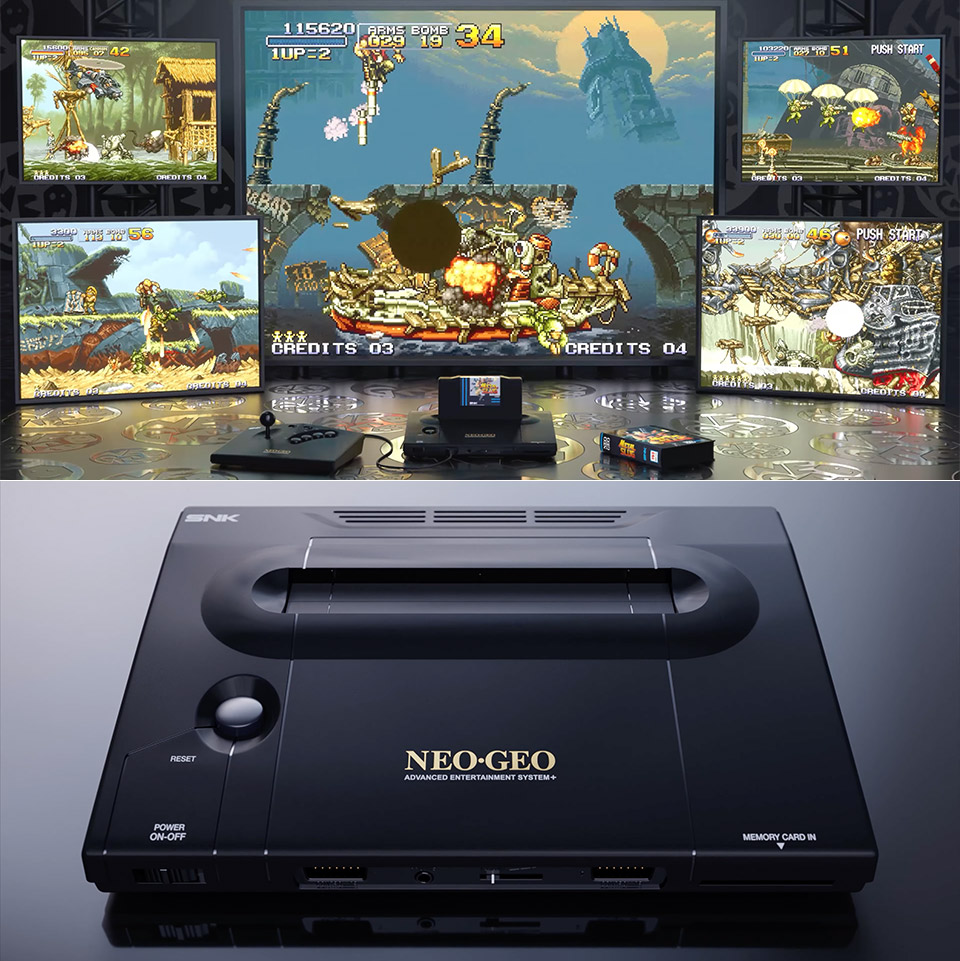
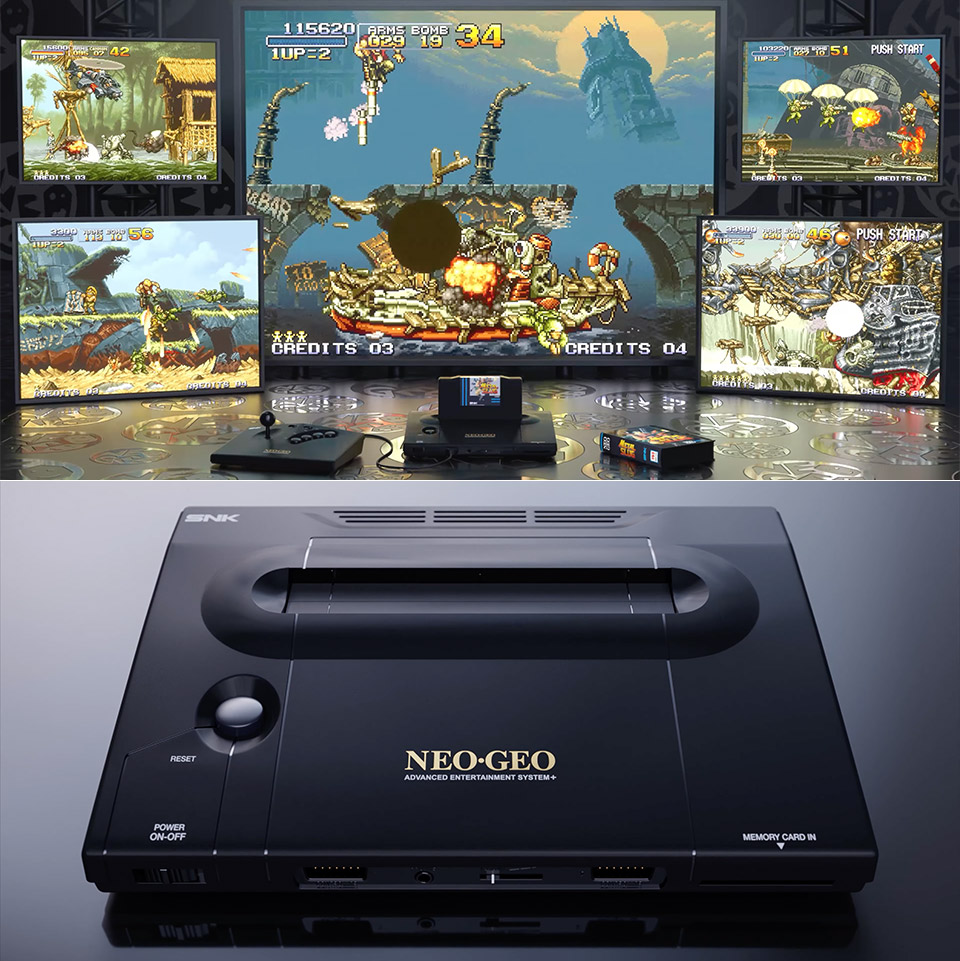
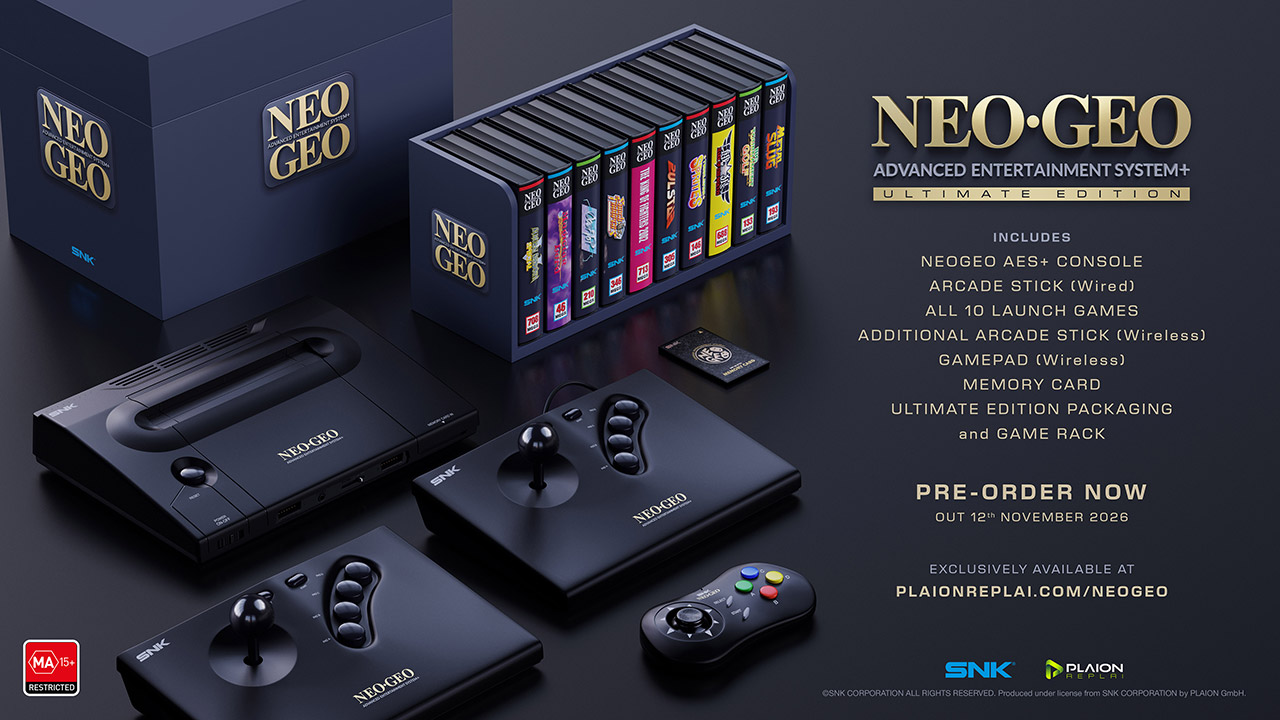
SNK and Plaion introduced an all-new NEOGEO AES+ console, allowing aficionados of the original hardware to play their old favorites in spectacular high definition on current screens. This console hits stores on November 12 and is available for preorder right now through the official website.
The console is based around re-engineered chips that copy that exact behavior of the original 1990 model rather than faking it with software, so every game operates exactly as it did in the arcades. You get access to every original NEOGEO AES cartridge ever manufactured, which is a terrific place to start; however, there are several brand-new titles designed particularly for your system. The console supports enormous games that even earlier systems can’t handle, like hundreds of megabytes, and then sends a crisp clear 1080p HDMI output to your television almost instantaneously. If you still want to use a CRT, there is an AV connector that you can plug into.
14 pre-loaded NEOGEO games including: Metal Slug X, Fatal Fury Special, Samurai Shodown II, Alpha Mission II, Blazing Star, King of the Monsters…
Works with all Evercade cartridges – this includes over 60 cartridges and 500+ games.
USB-C charging for fast charging.
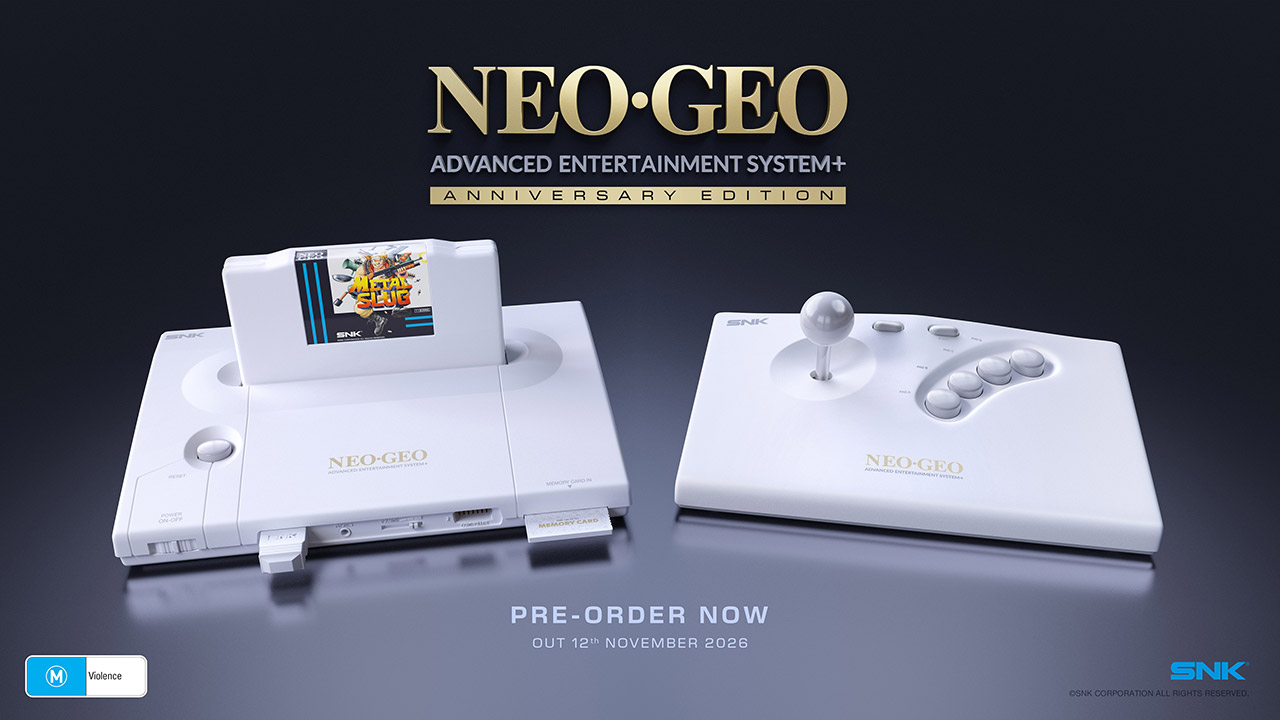
At the bottom of the console, there are small dip switches that let you to change the language settings or mess around with the display modes if that’s your thing. If you have a memory card accessible, your high scores will be preserved for good. Furthermore, the power consumption is low, allowing the console to remain cool even after extended gaming sessions. There are two versions launching at the same time: the standard black one costs $250 / £180 / €200, and the 35th Anniversary Edition, which comes in a rather fetching white finish, costs $270 / £270 / €300, and includes a very nice looking white Metal Slug cartridge that cannot be purchased separately.
Each shipment will include the console, a power supply, an HDMI cable, and one of the old wired arcade sticks, constructed to match the originals, to get you started. At launch, you can also add other peripherals, such as a wireless version of the stick, a gamepad with the conventional layout, and a memory card that does not require a battery. To give you a head start, ten games will be released alongside the hardware, including Metal Slug, The King of Fighters 2002, Garou: Mark of the Wolves, Big Tournament Golf, Shock Troopers, Samurai Shodown V Special, Pulstar, Twinkle Star Sprites, Magician Lord, and Over Top. Each one will cost roughly £70 / €80, by the way.
If you’re a collector looking for the full package, you should be able to get the Ultimate bundle, which includes the console, every single accessory in both wired and wireless form, all ten launch games, a rather nice-looking game rack, and a slew of extra cables, all wrapped up in some limited-edition packaging.
A Microsoft Surface tablet at Lumen Field in Seattle on Wednesday running Copilot as it’s seen by Seahawks and other NFL personnel who use the devices and technology during games. (GeekWire Photo / Kurt Schlosser)
When Bill Belichick famously spiked a Microsoft Surface tablet as the New England Patriots head coach in 2016, the moment was a symbol of frustration with technology on the sidelines.
But inside the company, it actually became a point of pride. Thomas Labuzienski, a senior partnerships manager at Microsoft, shared the rest of the story with us this week: the Belichick device made it back to the company — where testing showed, amazingly, that it still worked.
That rugged (and apparently indestructible) hardware remains the tech giant’s most visible presence on NFL game days. But these days, the action is inside: Copilot, AI agents, and live data tools that are changing how coaches, players, and scouts prepare and compete.
That was one of the takeaways from an event Wednesday at Seattle’s Lumen Field, where Microsoft walked content creators and this reporter through some of its latest NFL technology. High above the field, social media and YouTube influencers posed for photos and selfies with a Microsoft Surface Copilot+ PC much like NFL fans would with their favorite players.
It was an off-season glimpse into the evolution of Microsoft’s partnership with the league, which started in 2013 and was extended last summer to go deeper on AI and cloud tools.
Advertisement
Just as with business workflows, these tools are changing how teams operate on and off the field. One big benefit of AI, Microsoft says, is speed: getting the right information to the right person fast enough to shape the next play call or adjustment. But the coaches, players, and staff are ultimately still calling the plays, both literally and figuratively.
“We’re not using AI and technology to make decisions for them,” Labuzienski said. “They’re the experts. They know what they’re trying to do.”
Even with baseball and soccer well under way, Microsoft seems as excited as ever about football, especially with its hometown Seahawks coming off a Super Bowl championship.
Here’s what we saw and learned during the event:
Advertisement
In a suite at Lumen Field, Thomas Labuzienski, a senior partnerships manager at Microsoft, shows off Copilot functionality on a Surface tablet like those used by NFL players and coaches. (GeekWire Photo / Kurt Schlosser)
Copilot filtering: The NFL’s Sideline Viewing System now features Copilot-powered filters that let coaches and players instantly sort plays by down, distance, quarter, and gain type.
Labuzienski demonstrated how a play that took a minute to find manually could be located in seconds using the filters. “That five seconds can mean giving my coach the right information so they can make the right adjustment or the right play call,” he said.
Excel on the sidelines: One analyst per team has access to a real-time Excel dashboard in the coaches booth that pulls live play-by-play and player usage data from the NFL.
Coaches can load custom templates before the game and use Copilot to run analyses on the fly — tracking formation tendencies, snap counts, and player load without having to manually write formulas mid-game.
NFL Combine: Microsoft built a custom AI agent trained on 10 years of NFL Combine data, allowing scouts to query prospects using natural language. This helps teams assess players faster than ever during one of the most time-sensitive periods of the NFL calendar.
Advertisement
For example, Labuzienski said, “If I really love this defensive lineman, I can pull his data compared to other prospects over the last 10 years.”
Tablets on game days: Hardware is still a key part of the equation, of course. Labuzienski said there are 2,500 Copilot Plus PCs throughout the league on game day, with 20 on each sideline, and 10 in each coach’s booth.
Seattle Seahawks head coach Mike Macdonald. (GeekWire File Photo)
Tech as a coaching advantage: Back when Belichick got his start, NFL sidelines relied on thermal printers hardwired to stadium cameras. It was a process that took minutes, with runners ferrying photos into binders for coaches and players on the sidelines.
Technology has transformed all of that, and a new generation of coaches has grown up never knowing anything different.
Seattle Seahawks head coach Mike Macdonald, who has openly embraced his reputation as a “football nerd,” is a prime example. Labuzienski said he represents exactly the kind of coach Microsoft has built its NFL partnership around. Macdonald views technology as a differentiator across the league and has said it’s an advantage for the Seahawks to embrace it.
Advertisement
Even coaches less enthusiastic about AI are coming around, Labuzienski said, if only to avoid falling behind. “They do, sometimes begrudgingly, study up and make sure they get the most out of the technology,” he said.
A view of the new Hawks Nest seating area at the north end of Lumen Field, with a real grass playjng surface installed for the FIFA World Cup this summer. (GeekWire Photo / Kurt Schlosser)
Digital-first players: Labuzienski said he’s seen players become some of the most engaged users of sideline technology — sometimes more so than the staff around them.
“I was at the preseason game with the Bills against the Bears, and after every single drive, Josh Allen picked up this device,” Labuzienski said of the Bills QB. “He was talking with the other quarterbacks, and they were using it to go through the plays from that previous series.”
The system is designed to make that kind of real-time collaboration easy. The 20 devices on each sideline are all connected, with coaches in the booth able to write notes directly to individual player profiles — so a quarterback picking up a tablet can instantly see what his position coach upstairs is flagging, without having to radio up or wait for a break in the action.
That dynamic is likely to only deepen as younger players enter the league.
Advertisement
Microsoft was at last year’s Rookie Premier — an event where roughly 40 top draft picks gather for brand activations ahead of their first NFL season — and showed the incoming class the Sideline Viewing System for the first time. The reaction was telling.
“A lot of them really quickly picked it up and were able to click around,” Labuzienski said. “They’re very digital-first — very savvy.”
The app works with passports or ID cards, is built to be “completely anonymous” for the people who use it, works on any device (smartphones, tablets, and PCs), and is open source. “Best of all, online platforms can easily rely on our age verification app, so there are no more excuses,” said European Commission president Ursula von der Leyen at a press conference on Wednesday. “Europe offers a free and easy-to-use solution that can protect our children from harmful and illegal content.”
High Expectations
“It is our duty to protect our children in the online world just as we do in the offline world. And to do that effectively, we need a harmonized European approach,” von der Leyen said at Wednesday’s press conference. “And one of the central issues is the question, how can we ensure a technical solution for age verification that is valid throughout Europe? Today, I can announce that we have the answer.”
This answer takes the form of an open source app that any private company can repurpose, as long as it complies with European privacy standards and offers the same technical solution throughout the European Union. The user downloads the app, agrees to the terms and conditions, sets up a pin or biometric access, and proves their age through an electronic identification system, or by showing a passport or ID card (in which case biometric verification is also provided). The app does not store your name, date of birth, ID number, or any other personal information, according to the European Commission—only the fact that you are over a certain age.
Advertisement
After that, when a person using the app wants to access a social network (minimum age: 13), pornographic site (minimum age: 18), or any other age-protected content, if they are logged in from a computer, they need only scan the QR code shown on the site they want to visit. If, on the other hand, the person logs in from a smartphone, the app sends the proof of age directly. The platform does not access the document with which the user proved it in the first place.
Adoption Event
The need to introduce a common system for the entire European Union has been discussed for some time, and according to commission technicians, the technical work is now complete. Of course, it will still be possible to circumvent the system—all it takes is for an adult to lend their phone to a younger friend—but the technological architecture exists, and it will be up to EU member states to decide whether to integrate it into national digital wallets or develop independent apps.
“No More Excuses”
For the app to really be effective, platforms must be obligated to verify the age of their users—that’s where things get tricky. The Digital Services Act, which went into effect in 2024, requires “very large online platforms”—those with more than 45 million monthly users in the European Union—to take concrete steps to mitigate systemic risks related to child protection, with heavy penalties for noncompliance.
“And that’s why Europe has the DSA: to call online platforms to their responsibilities. Because Europe will not tolerate platforms making money at the expense of our children,” European Commission executive vice president Henna Virkkunen told a press conference. She added that after an investigation into TikTok, the European institutions plan to take similar action against Facebook, Instagram, and Snapchat, as well as four porn sites. “Since the platforms do not have adequate age verification tools, we developed the solution ourselves,” he concluded. In short, as von der Leyen also remarked, “there are no more excuses.”
Advertisement
Bare Minimum
So far, this is the European framework that sets the general rules. On this basis, member states can consider more restrictive measures. Italy was among the first to discuss how to regulate the use of social media by minors but has so far not landed on anything concrete. Elsewhere in the EU, France’s Emmanuel Macron has been a trailblazer on the issue, pushing France to discuss a rule to ban social networks for minors under the age of 15 entirely. So far, this measure has received broad political support—but the outcome depends largely on compatibility with the Digital Services Act and the availability of effective age verification systems like the app the European Commission just released.
This article originally appeared onWIRED Italiaand has been translated.
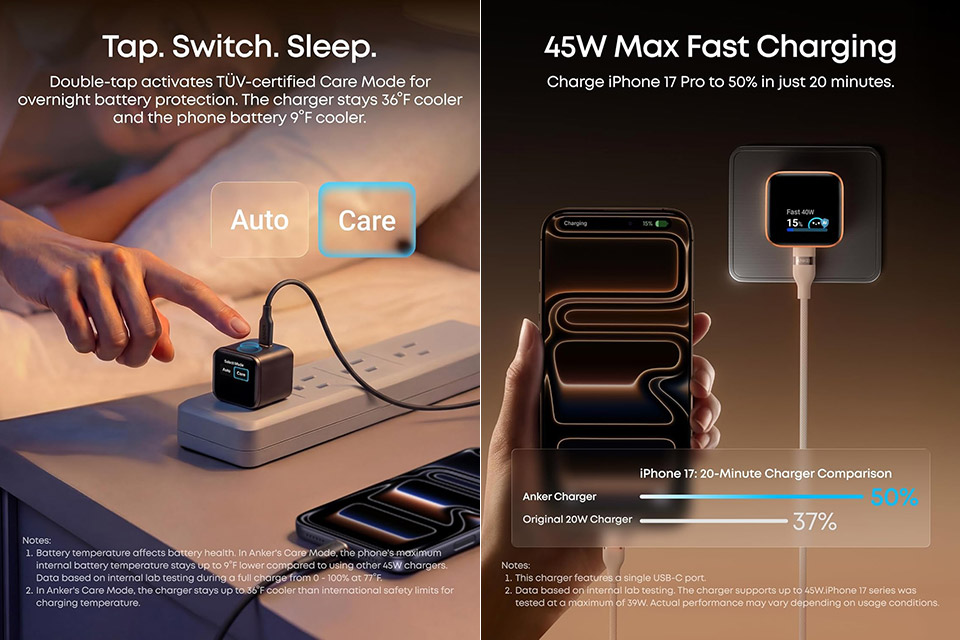
Chargers are often tucked into drawers and bags because most of us simply plug them in and forget about it, but Anker’s Nano 45W Smart Charger, priced at $27.99 (was $40), is different. Travelers are constantly looking for gear that does not take up too much room, and the Nano is a game changer. It’s small enough to put in a pocket or a carry-on, yet it delivers an impressive 45 watts of power via a single USB-C port. The prongs fold up in two directions.
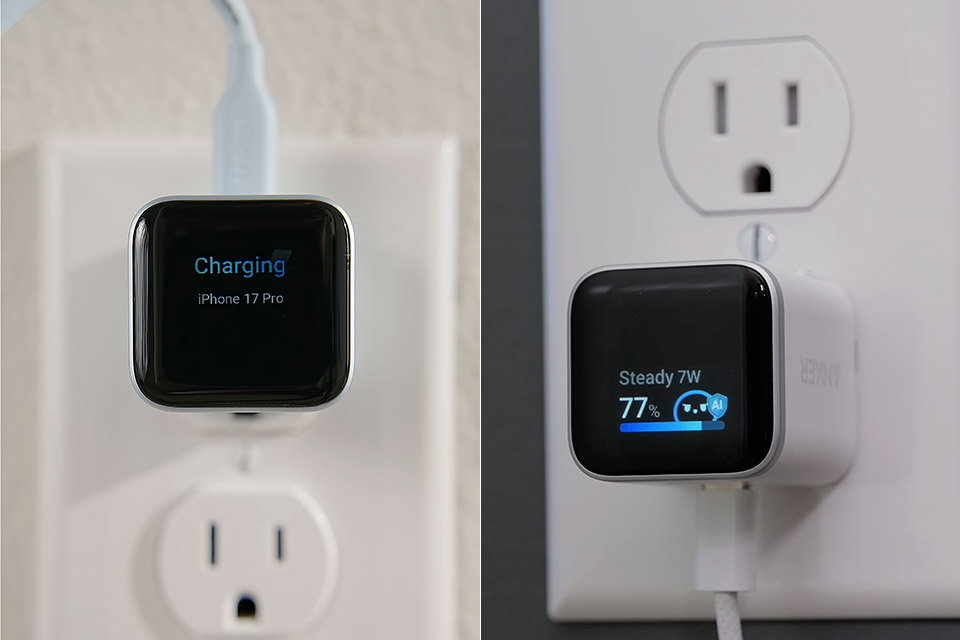
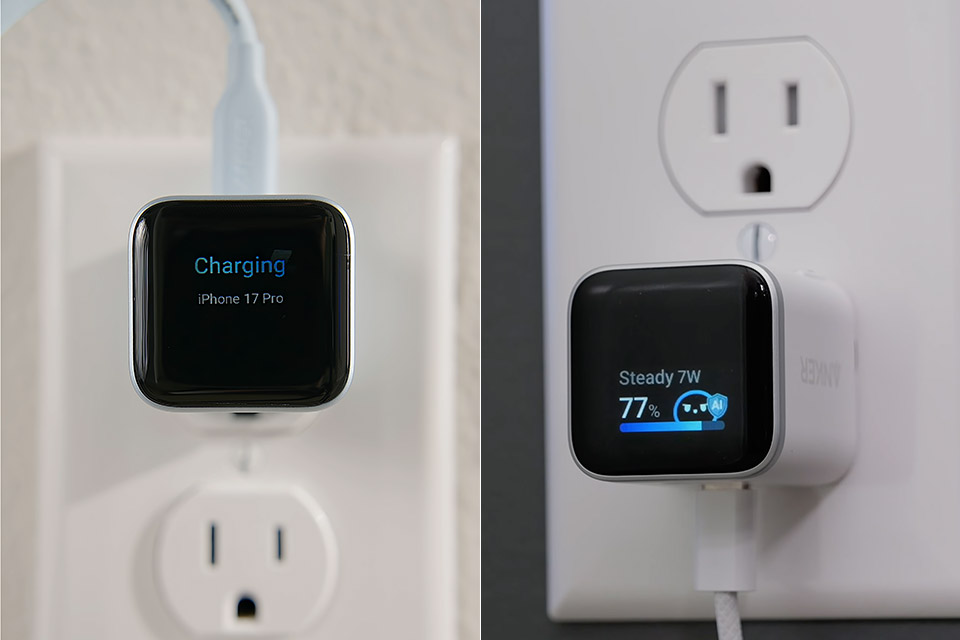
When you plug it in, the charger comes to life and displays all of the information on its small screen right in front of you. The latest iPhone models, starting with the 15 series, provide instant ID and display the actual phone name, amount of electricity coming through, battery level, and even the device’s temperature. This is very cool since it transforms what was once just a wall socket into a helpful small gadget that keeps you updated. It charges in three stages so that the charger does not overheat and you do not risk burning out your battery.
Smart iPhone Recognition with Care Mode: Automatically recognizes supported iPhone models and adjusts charging for smarter, safer power delivery…
45W Max Fast Charging with Smart Power Adjustment: Delivers up to 45W of high-speed charging while adjusting output based on your battery level…
Smart Display Controls: Tap once to view real-time charging status, double-tap to switch between modes, and press for 2 seconds to rotate the screen…
As a result, if your phone is supported, it can charge to half capacity in about 20 minutes, and this is not limited to phones. This works with tablets and lighter laptops as well, but it’s mainly designed for Apple devices because they’re always going to be the most comfortable with them. Leave it on your desk or nightstand and you’ll be able to see the status of your phone without having to unlock it. There’s no need to worry about it getting too hot or taking too long because it’ll all come naturally.
Anker definitely got it perfect with the Nano. With compatibility across a wide range of USB-C devices, it’s the one adapter that can do it all, regardless of your phone’s brand. As a result, you can travel light while remaining charged. When you go home, the same charger continues to provide you with detailed information on each session. The charger adjusts its output based on what it has learnt about your device, so your batteries will eventually care after themselves.
Advertisement
Once you’ve seen the light, or gotten used to using a smart charger, switching back to a standard charger feels sort of boring. Anker identified a genuine need for a quick, portable charger that tells you what’s happening on and simply nailed it with the Nano.
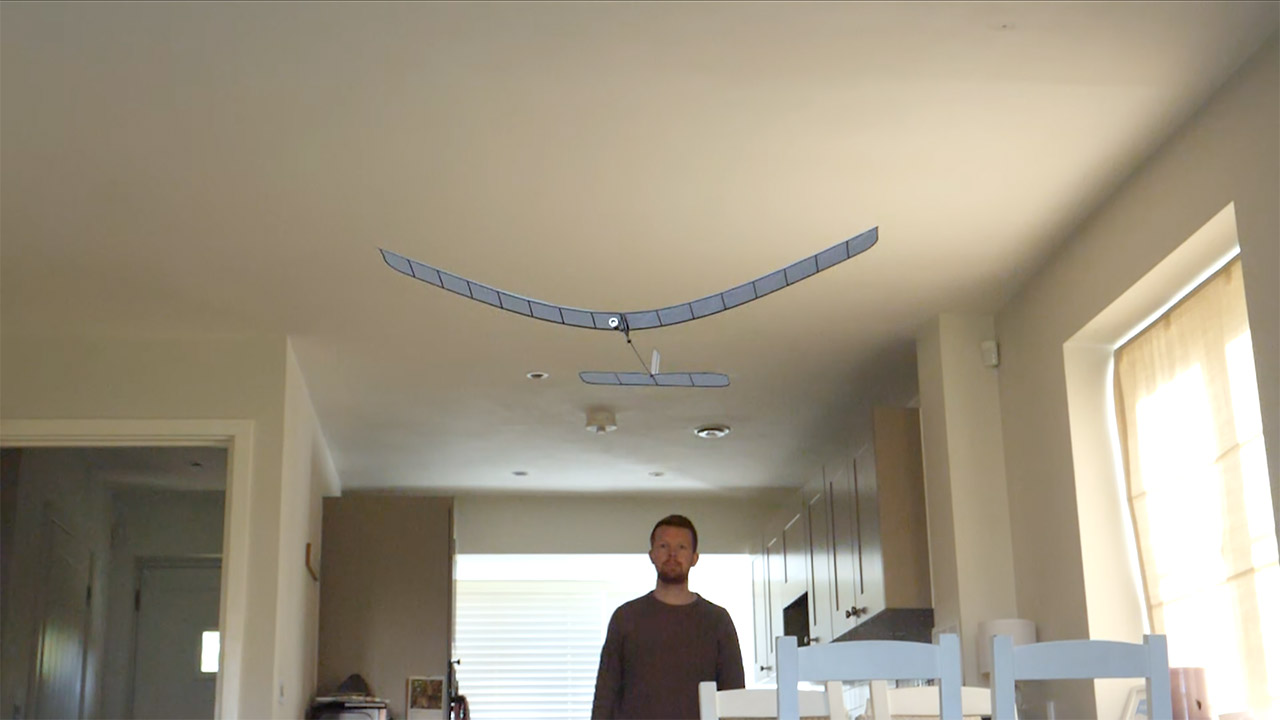
Tom Stanton has spent years fiddling with many strange flying machines. His current idea cleverly updates a traditional toy. Rubber band planes have been around forever, storing energy in twisted bands that then spin a propeller. The problem is that they must be wound up for several minutes merely to produce a short burst of flight. Stanton sought to create a flying machine that was faster, more practical, and could be built with easily accessible components.
Instead of relying on rubber bands, Stanton used supercapacitors to store energy. A hand crank generator charges the capacitors up to a 10-farad unit, which weighs just 3 grams and takes just a few seconds to charge. To keep an eye on things, an analog voltmeter is used to ensure that the voltage does not exceed 2.7 volts and destroy the capacitor. Once fully charged, the capacitor powers a small brushed motor repurposed from a toy drone, which propels a propeller engineered to work efficiently with the capacitor’s low voltages.
PILOTED FLIGHT – Grab a sheet of paper, fold it, and go! Instantly put yourself in the cockpit of an amazing smartphone controlled paper airplane that…
INCREDIBLE STABILITY – Loops, Barrel Rolls, & Hammerheads are achieved with the special Acro Mode! Your paper plane’s onboard computer automatically…
CONNECTED FLYING – Pair your plane with the POWERUP App to maneuver your plane, keep a robust flight log, compete with other flyers on the…
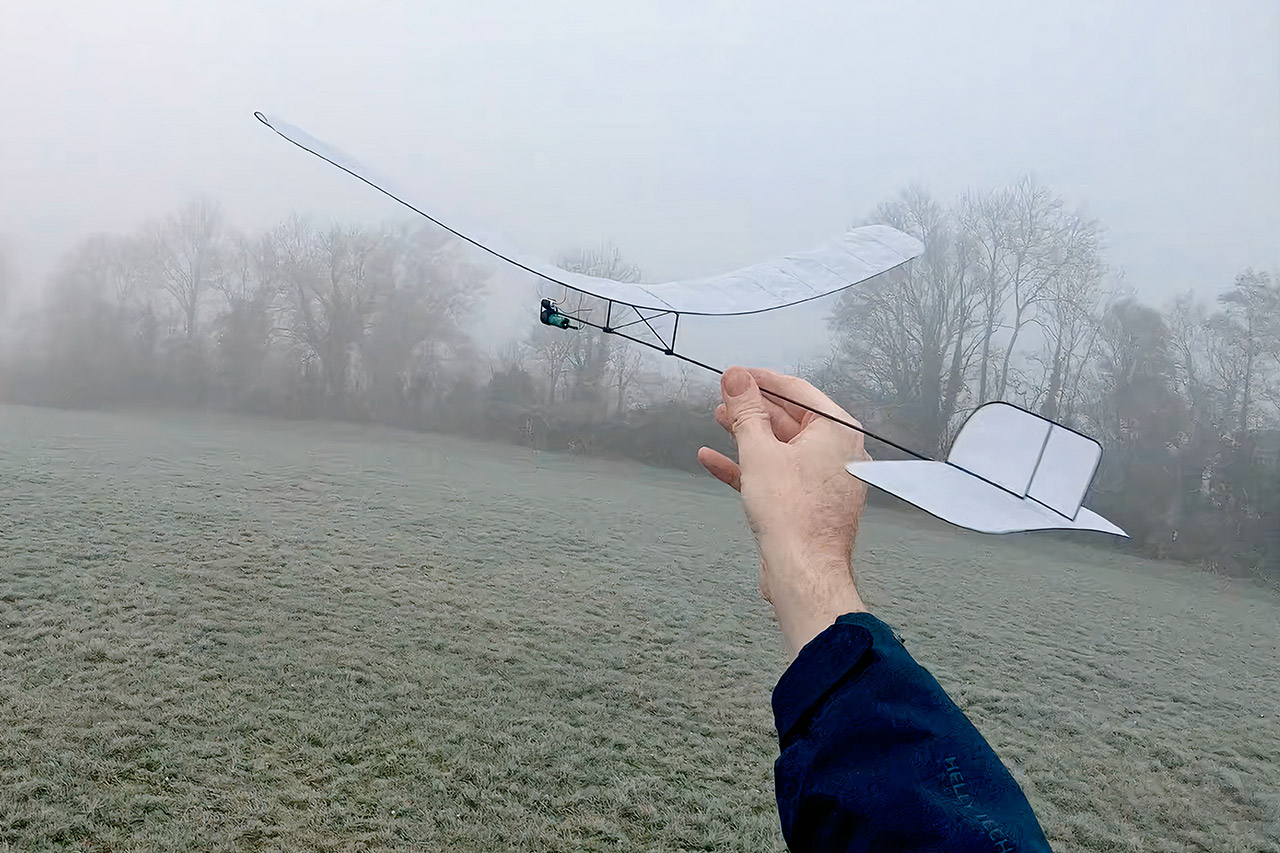
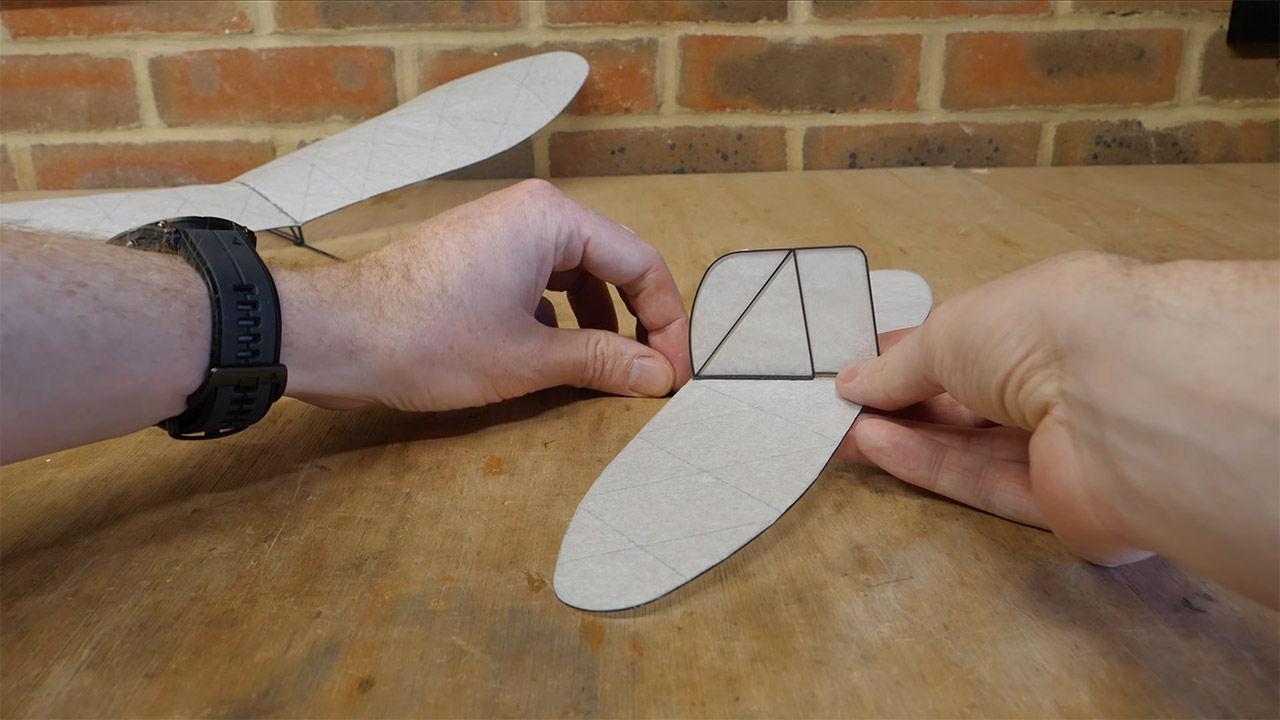
Stanton just printed the wings directly onto tissue paper. He used a textured construction plate secured with magnets so that the printer could lay down the structure without breaking the paper. After finishing the print, he simply clipped the edges, applied some adhesive, and used a heat gun to mold the paper so it could function as an airfoil. The initial effort at a wing was a disaster, as it flexed too much under load, sending the plane straight into the ground. However, later versions converted to shorter wings with a greater aspect ratio, which solved the problem by reducing flex and drag while adding minimal weight.
The plane’s fuselage is built of carbon fiber rods, which provide it strength without weighing a ton. Stanton built notches into the rod to prevent it from being drilled out of the holes, allowing the wings and tail to slip in and out with a simple friction fit, making changes easy when testing the plane. The tail is a 3D print that is glued to the back of the rod, and up front, a small steel bolt serves as the nose weight to keep everything balanced. Stanton adjusted the wing mount slightly to keep the propeller out of the line of the airflow, and a printed bracket connects the capacitor and motor and simply clips into the rod.
First, Stanton tested the basic glider on its own, as it was so light (weighing only 3.8 grams) that it flew through the air like a dream and outperformed a simple paper plane. Adding the power system increased the total weight to 15.6 grams, which isn’t terrible given it’s still lighter per square inch than most paper airplanes. When he tried it with the power system, it shot up high after launch and settled into a long, steady glide. Cranking the hand crank for 4 seconds gave him 45 seconds of flight time, but what about the charging time? It was a blazing 0.1 seconds. Stanton thought the charging-to-flight time ratio was impressive to say the least, especially since the charging process takes roughly the same amount of time as blinking.
Cold and damp air reveal one weakness: tissue paper absorbs moisture and loses rigidity quickly. The wings began to sag and the plane fought to stay aloft, as Stanton mentioned in his video, although other individuals have had success with minor repairs such as coatings on comparable planes. To be fair, the primary design of the product demonstrated that the concept works. In the end, the last plane popped right up off the ground, kept altitude far longer than I expected, and then glided down for a rather easy landing.
Stanton made the glider files accessible on Printables, allowing anyone to print their own version and try it out. The entire project is very simple, as it just requires some basic hardware: a 3D printer, a piece of tissue paper, a carbon rod, and the minimum essentials of some electronics. There are no sophisticated or high-tech materials or intricate machine work involved.
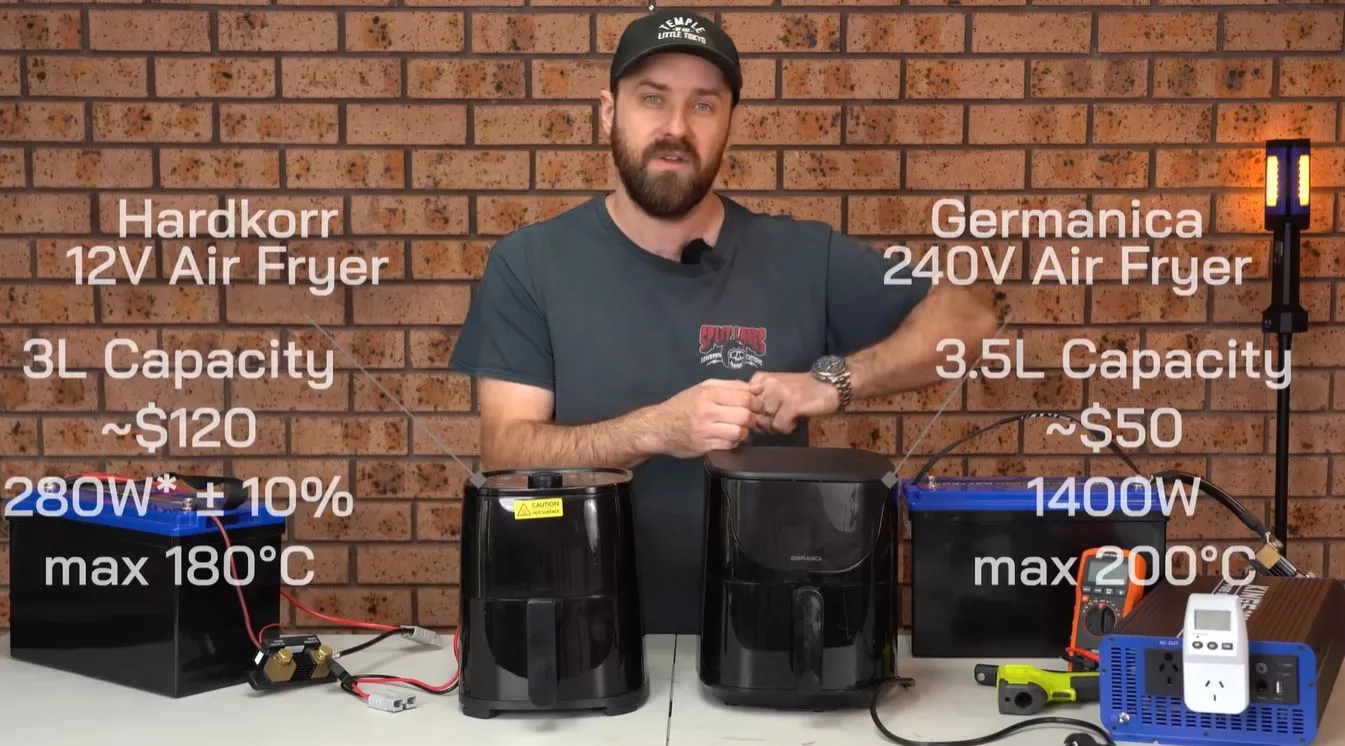
That boiling water is a contentious topic of discussion is clear, but what about hot air? When you take a 12 VDC, 280 Watt-rated air fryer and pit it against a bog-standard 240 VAC, 1400 Watt unit, which one would you want to use when you’re doing some camping or other exciting off-the-grid opportunities? Unlike with boiling water the physics aren’t as clear-cut here, so [Cahn] did some testing to figure out exactly what the efficiency numbers look like
Since air fryers rely on the transfer of thermal energy from the resistive heating element into the food, any thermal energy that’s not immediately transferred is effectively wasted. This, combined with the relatively low power rating and thus much higher time demand of the low-voltage air fryer is enough to set one’s expectations pretty low.
As scientific test samples chicken nuggets were used with the test, following a preheating period for the 12 VDC unit. Both units managed to hit a safe temperature inside the nuggets after 20 minutes, thus successfully staving off food poisoning, but the browning with the 240 VAC air fryer was much better.
As for the efficiency, the 12 VDC unit required 150 Wh for 20 minutes plus the 10 minutes of preheating, with 45 minutes total at 225 Watt to get proper browning. Meanwhile the 240 VAC unit burned through 250 Wh in 20 minutes, with no pre-heating, though only 230 Wh with no inverter losses included. As a final test, the 12 VDC unit was run at 400 Watt using 14.6 VDC input, which did indeed get it up to temperature much faster.
Advertisement
Thus both are equivalent, just with the caveat that the low-voltage unit will take considerably more time to get the same result. This mirrors the results with boiling water, where most options mostly vary in how much time they require to get water up to a boiling temperature.
An anonymous reader quotes a report from the Guardian: We may appear to have little in common with sperm whales – enormous, ocean-dwelling animals that last shared a common ancestor with humans more than 90 million years ago. But the whales’ vocalized communications are remarkably similar to our own, researchers have discovered. Not only do sperm whale have a form of “alphabet” and form vowels within their vocalizations but the structure of these vowels behaves in the same way as human speech, the new study has found.
Sperm whales communicate in a series of short clicks called codas. Analysis of these clicks shows that the whales can differentiate vowels through the short or elongated clicks or through rising or falling tones, using patterns similar to languages such as Mandarin, Latin and Slovenian. The structure of the whales’ communication has “close parallels in the phonetics and phonology of human languages, suggesting independent evolution,” the paper, published in the Proceedings B journal, states. Sperm whale coda vocalizations are “highly complex and represent one of the closest parallels to human phonology of any analyzed animal communication system,” it added.
[…] The new study shows that “sperm whale communication isn’t just about patterns of clicks — it involves multiple interacting layers of structure,” said Mauricio Cantor, a behavioral ecologist at the Marine Mammal Institute who was not involved in the research. “With this study, we’re starting to see that these signals are organized in ways we didn’t fully appreciate before.” The latest discovery around sperm whale speech has inched forward the possibility of someday fully understanding the creatures and even communicating with them. Project CETI has set a goal of being able to comprehend 20 different vocalized expressions, relating to actions such as diving and sleeping, within the next five years. A future where we’re able to fully understand what the whales are saying and be able to have a conversation with them is “totally within our grasp,” said David Gruber, founder and president of Project CETI. “We’ve already got a lot further than I thought we could. But it will take time, and funding. At the moment we are like a two-year-old, just saying a few words. In a few years’ time, maybe we will be more like a five-year-old.”


























































You must be logged in to post a comment Login