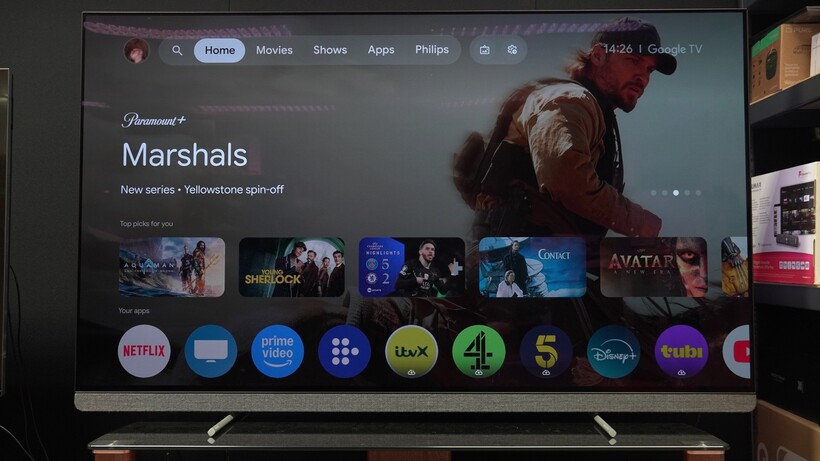
Although Philips probably didn’t use any of those words, it has said goodbye to Google TV with the 2026 TV models, and brought Titan OS into the fold as the main UX partner.
This could be a very good arrangement for Philips.
The battle for customers’ attention in the TV space will, in my view, come down to the user interface. You can throw as many specs at the wall as you want, but at the end of the day, people like a TV that’s easy to use, and while Google TV is very good, in hindsight, perhaps it wasn’t the best partner for Philips.
Advertisement
A smart change?
It’s a change that could end up being a smart move for Philips. Google TV is a big platform; it has all the global apps, it comes with integrated smarts and connectivity such as Google Assistant, Google Home and Google Cast. If you want a capable user experience, then Google TV offers that.
Advertisement
But in the UK at least, it’s had and continues to have an issue with catch-up apps and services. I’ve heard a few voices give their opinion, and at least one issue was that catch-up and on-demand services such as BBC’s iPlayer and Channel 4 did not want to let go of non-negotiables – namely their position at the top of the EPG; whereas Google wanted to bring some flexibility and change to that.
I can’t say that’s the absolute truth on the matter but an opinion that’s been floated as to why Google TV and UK TV services haven’t really got on with each other. It’s likely the reason why Panasonic, released TiVo and Fire TV models in the UK while Europe got Google TV models instead.
Advertisement
Image Credit (Trusted Reviews)
It’s likely the reason why iPlayer rarely appears on Google TV models in the UK, aside from Sony and TCL models, who seem to have gone through the trouble of negotiating their own deals (or using different TV platforms) to get these apps onboard.
Whether it’s a TV or a smart projector, Google TV is almost certainly leaving iPlayer off the list; while Channel 4’s level of support is sketchy. And let’s not beat about the bush – these are apps that many want to have included from the get-go. Not having them is a disadvantage in the minds of UK customers who want a TV that’s easy to use.
And therefore it’s a disadvantage to Philips. The Philips OLED910 is a great TV but I’ll have to highlight the fact that it doesn’t have iPlayer will annoy customers who simply want a TV packaged with everything they might need. Does anyone remember the kerfuffle customers brought up when LG TVs dropped Freeview Play? Is that important to many.
Advertisement
A titan in waiting
But switching to Titan OS makes sense. Philips has practically incubated this user platform from birth, working with them on their less expensive TVs and gradually adding to across the line to the point where it’s available on the flagship level.
Advertisement
It’s certainly not as big a brand name as Google is, but now Philips can weave a story that includes both them and Titan OS, rather than being eased out of the way by Google taking the limelight.
They can build a platform that works for Philips, with much closer collaboration. Titan themselves are looking to bring in some interesting new features, including a sports section that’s tailored to what the viewer wants to watch, rather than what the platform wants you to watch.
Image Credit (Trusted Reviews)
Say you prefer watching tennis? Based on what you’ve clicked, the platform will learn what you like, and rather than focus on shovelling association football to your eyeballs, you’ll instead be presented with tennis content instead.
Advertisement
This is a long-term goal and not something that’s going to be launched in the next few months, but it’s a sign of what can be done on a smaller scale, rather than being a smaller voice next to a global player such as Google.
Advertisement
Titan OS supports Freely, so you get all the catch-up apps and services included from the get-go. It might not have the flash or scale of Google TV, but it’s building up a base and growing in terms of recognition.
After all, what does Philips have to lose? If anything, it should be seen as what Philips can gain from such a move. I think there’s plenty of opportunity available for Philips and Titan to make their mark.
Samsung’s decision to quietly pull the plug on its most futuristic foldable might sound like a step backwards, but I don’t think it is.
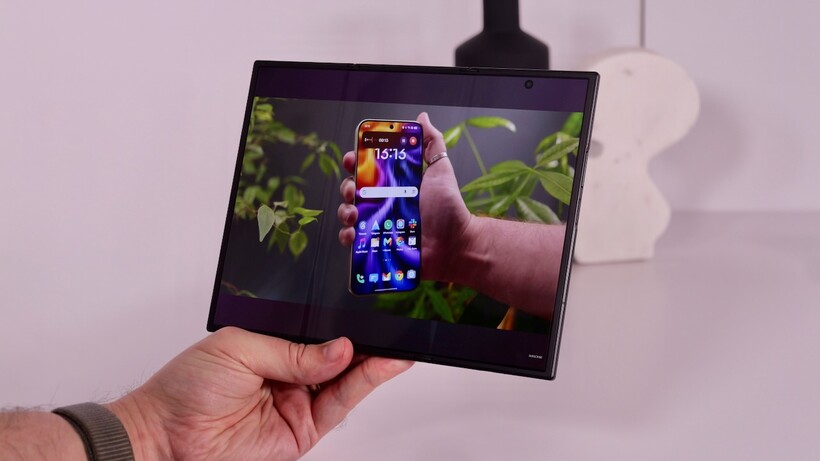
The Galaxy Z TriFold has always been less a mainstream gadget and more a very expensive proof of concept – a flashy way for Samsung to show off what its foldable tech can do. That’s why the news that Samsung is reportedly winding down production, just months after launch, shouldn’t be seen purely as a loss.
Yes, it’s frustrating for fans who’ve no doubt been refreshing product pages only to watch restocks vanish within minutes, but with skyrocketing component prices, supply chain chaos and a mobile division under pressure to justify every penny it spends, the TriFold was always going to be first on the chopping block.
In reality, shelving the TriFold now could be exactly what Samsung needs: a chance to refocus on devices that more people can actually buy, that developers will actually support, and that move foldables forward in ways that matter – like the rumoured ‘Wide Fold’ and the next-gen Z Fold.
Advertisement
Losing the snazzy TriFold might sting right now, but it could make Samsung’s foldable future all the stronger for it.
Advertisement
Samsung is reportedly winding down production of the Galaxy Z TriFold
A new report from South Korean publication Donga claimed this week that Samsung is preparing to wind down sales of the Galaxy Z TriFold, just months after its initial launch – a surprising move considering how quickly it sells out whenever stock does drop.
Per the report, Samsung is expected to release a final batch of TriFolds in its home region of South Korea this week, after which, sales could come to an end. Now it’s worth noting that the report is explicitly about sales in South Korea, with no word on whether the same pattern will play out in regions like the US – but it seems increasingly likely.
Advertisement
Image Credit (Trusted Reviews)
After all, Samsung has always been transparent about the TriFold and how it wasn’t a mass-market product, rather a showcase of what the company’s foldable tech is truly capable of.
That explains not only the incredibly high $2,899 price tag in the States, but also comments from those who have used it on build quality not quite matching that of the comparatively cheaper, mass-produced Samsung Galaxy Z Fold 7.
While that news will be disappointing for those still waiting to get their hands on the tri-folding 10-inch smartphone, the decision to stop sales isn’t all that surprising if you’ve been keeping an eye on Samsung more broadly recently.
Advertisement
Not a surprise given soaring costs
A separate report that also surfaced this week, this time from the South Korean outlet FNNews, claims that despite a record number of Galaxy S26 range pre-orders, the Device eXperience (DX) division is essentially in crisis mode. That includes not only Samsung’s smartphones, but also wearables, smart TVs and home appliances.
Advertisement
Of course, just like every other tech issue surfacing in 2026, it all seems to be down to the rapidly rising costs of components. The all-important RAM needed to power most tech has surged in the past nine months or so, with some estimates putting the rise as high as 850%, as AI data centres hoover up as much RAM as possible.
Image Credit (Trusted Reviews)
There’s also the ongoing conflict in the Middle East, which has reportedly increased logistics costs.
A Samsung spokesperson who spoke to FNNews explained that “with raw material costs under extreme pressure from rising semiconductor prices, and logistics costs increasing on top of that, we ultimately had no choice but to put the MX division under emergency management.”
With the DX division under such tight constraints, it makes sense for Samsung to stop production of the TriFold – it’s expensive and, no doubt, more difficult to manufacture than the flip- and book-style foldables the company has cranked out over the past few years – and double down on smartphones that it knows will sell well.
Advertisement
Advertisement
Samsung can now focus on more consumer-ready foldable tech – like the ‘Wide Fold’
It might sound like it’s all doom and gloom over at Samsung, but honestly, it’s probably for the best. Tighter purse strings should force Samsung to double down on its core products – both foldable and non-foldable – rather than putting increasingly limited resources into niche, hyper-expensive products like the TriFold that aren’t ready for prime time just yet.
Image Credit (Trusted Reviews)
That’s more important than usual right now, with Samsung rumoured to be working on not one but two book-style foldables for mass consumer release later this year.
The most recent reports claim that, in addition to a successor to the Galaxy Z Fold 7 that’s expected to offer a similarly slimline design and a boxy inner aspect ratio, the company is working on a second foldable, unofficially dubbed the ‘Z Wide Fold’.
The key difference, as the unofficial moniker suggests, is the shape of the foldable. While Samsung’s regular Z Fold offers a thin and narrow aspect ratio, even with big improvements on this front with the Fold 7, and an almost perfectly 1:1 inner display, the ‘Wide’ Fold is said to be more passport-shaped.
Advertisement
Advertisement
Image Credit (Trusted Reviews)
That’s not a new idea – it was used by the original Oppo Find N, as well as Google’s first-gen Pixel Fold – but it has fallen out of trend in recent times.
Samsung looks to revive it, and the foldable experience will be all the better for it; I’ve long been a fan of the passport-shaped foldable, not only because of the shorter, wider outer panel, but also because the inner screen more closely resembles a regular 4:3 tablet-sized screen.
That should hopefully put an end to apps that, even after all this time, still can’t quite handle the boxy aspect ratio of foldables. With an aspect ratio closer to a tablet or even a smartphone in horizontal orientation, it becomes almost trivial to support, with no major rejigging of the UI required.
If there were a choice between Samsung putting effort into its extremely expensive, not-quite-polished TriFold or the Wide Fold, especially under the new budget constraints, I know which I’d go for.
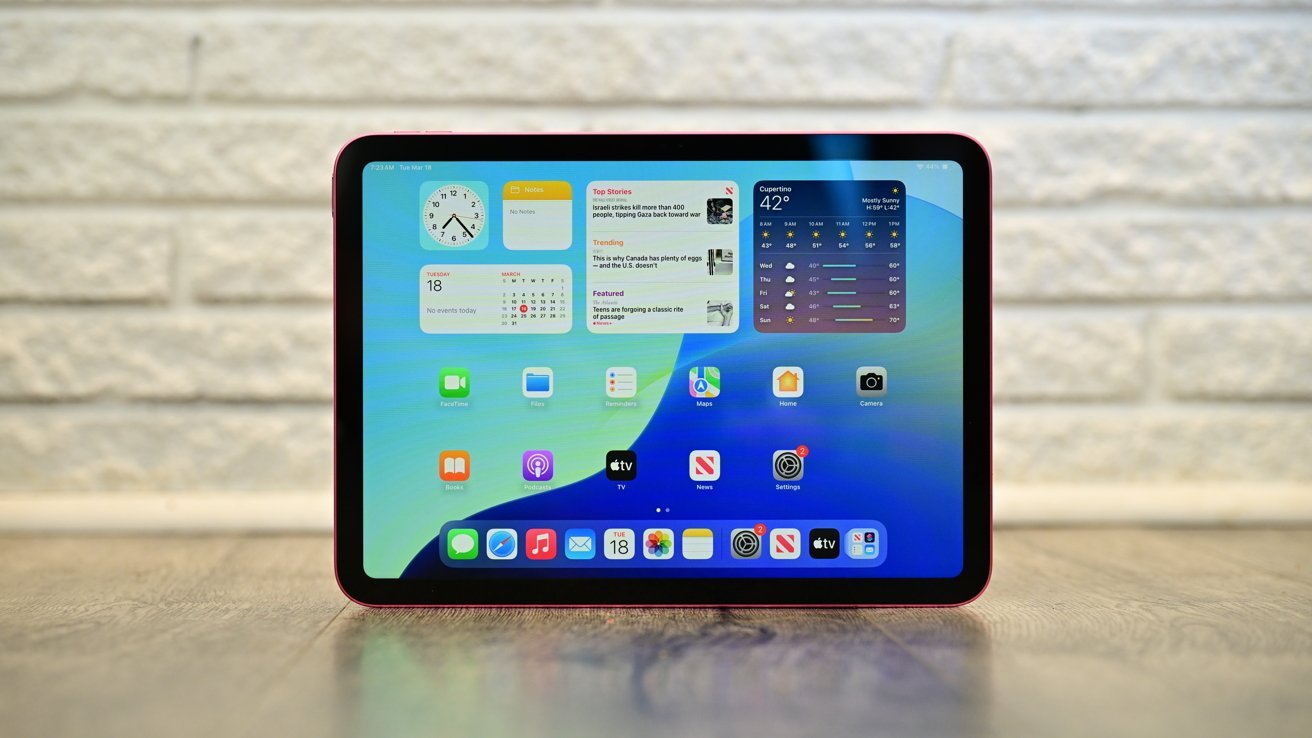
After updating its more powerful counterparts, Apple is still expected to update the base iPad with an A18 chip sometime in the first half of 2026.
The entry-level iPad may finally get Apple Intelligence support soon.
Apple’s release schedule has been busy for the earliest months of the year. However, after having already moved iPad Pro to M5 and doing a similar M4 update to the iPad Air in March, Apple can now turn its attention to the lower end of the range. According to Mark Gurman in Sunday’s “Power On” newsletter for Bloomberg, Apple is on track to refresh the entry-level iPad in the first half of 2026. Gurman doesn’t say when exactly, but that it was originally to be released at around the same time as iOS 26.4. Continue Reading on AppleInsider | Discuss on our Forums
The technology is being piloted in 40 secondary schools and is expected to impact 20,000 students from September.
Psychotherapist, broadcaster and former professional footballer Richie Sadlier has launched Let’s Talk SPHE (social personal and health education), which is reportedly Ireland’s first digital solution aligned with the updated SPHE curriculum.
By 2027, SPHE will be a mandatory subject for fifth and sixth year students. Figures from the Department of Education suggest that only 18pc of Ireland’s more than 700 secondary schools previously timetabled SPHE in fifth year.
Designed to support schools using the reformed course, Let’s Talk SPHE is being piloted in more than 40 schools and is expected to reach roughly 20,000 students from September. Established by Sadlier, as well as guidance counsellor and SPHE teacher Pam O’Leary, the subscription-based teaching solution provides structured SPHE lessons, multimedia learning and teacher guidance.
Advertisement
Commenting on the launch, Sadlier said: “When you introduce a requirement for 60 hours of structured delivery in every secondary school, that’s a significant shift for the system. It’s not a short-term initiative. By 2027, every post-primary school will be delivering a senior cycle SPHE. The question now is how prepared schools are to deliver it.
“For a long time, most education technology focused on examinable academic subjects. What this reform does is recognise that wellbeing and relationships education are just as important. That creates a responsibility to ensure schools have the right supports in place.”
The launch comes at a time when the media, via shows such as Adolescence and Louis Theroux’s Inside the Manosphere, have put an increased focus on the importance of having complex conversations with young people.
Sadlier has spent more than 10 years working with young people in workshops covering issues such as relationships, masculinity, consent and mental health. He also previously led an RTÉ documentary exploring Ireland’s sex education landscape.
Advertisement
In late February, Educate.ie, an Irish-owned publishing company, announced the creation of a new digital learning platform for the classroom called EdPal. The aim is to reduce the administrative burden for teachers, improve clarity for parents and give students a more consistent learning experience.
Developed specifically for post-primary and secondary school students, users will have access to interactive e-books, educational resources and tools to support lesson delivery, engagement and assessment.
Don’t miss out on the knowledge you need to succeed. Sign up for the Daily Brief, Silicon Republic’s digest of need-to-know sci-tech news.
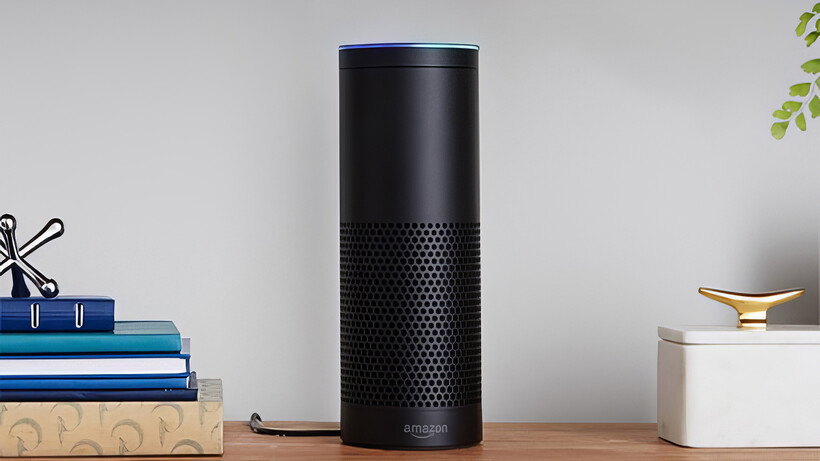
When Amazon first announced the Echo smart speaker and Alexa, it felt as though the future that Star Trek had promised us was finally upon us. Here was a computer we could interact with naturally, faster and more convenient than apps or traditional interfaces.
Unsurprisingly, Amazon sold a bucket load of Echo devices, and soon expanded the range with devices to fit in everywhere. Only, it turned out that perhaps the future wasn’t really here.
Image Credit (Trusted Reviews)
Alexa speak
As noted in my column from a few weeks ago, I largely use physical controls over voice commands alongside automated routines: it’s faster to turn a light on with a button, or to have my alarm turn off and blinds open when the office door unlocks, than it is to use a voice command for either job.
A lot of that was down to how Alexa (and other voice assistants) expected commands to be phrased. While Alexa is still the best of the bunch, its required terminology gave birth to the phrase, “Alexa speak”.
It’s that slightly unnatural way that you must phrase a command, such as, “Alexa, set the living room radiator temperature to 20°C.” That phrase doesn’t seem so bad, but it’s fraught with potential problems.
Advertisement
Advertisement
Get the order slightly wrong, and Alexa might not work; name the device you want to control incorrectly, and the command doesn’t work; or just pause while you try and think of the right words to use, and the command doesn’t work.
Outside of voice control, Alexa is good for basic requests or for answering simple questions, but it often can’t understand more complicated requests, can’t take actions on your behalf, and you still must phrase things as though you’re talking to a computer.
Natural conversations and context
Alexa+ promises to change that and, from what I’ve seen of it, delivers the end of Alexa speak, switching to natural language, so you can ask a question or issue a command as though you were talking to a real person. And Alexa+ remembers context and allows itself to be corrected.
Advertisement
At the Alexa+ UK launch event, I saw a demo where Alexa+ gave the latest Arsenal result; it knew the presenter was a fan, so it recounted the score with a positive tone.
Next, the presenter asked Alexa+ to tell someone else the Chelsea score. Alexa began retelling the loss with excitement, since the presenter hadn’t mentioned that the other person was a Chelsea fan.
A quick interruption to say that the other person was a Chelsea fan had Alexa+ start again, but with a neutral voice. There was no need to rephrase the entire question with something like, “Alexa, my friend is a Chelsea fan, tell him the latest score” or something similar.
Advertisement
Advertisement
Alexa+ understood that the change applied to the current request and adjusted its response accordingly. In addition, Alexa+ would then remember who’s a Chelsea fan for future requests.
Alexa+ is also agentic, which means it can take actions on your behalf. In the demo, Alexa+ could book a table at a restaurant using OpenTable, based on a few simple bits of information, all spoken naturally, and where the order of information was unimportant (the name of the restaurant, how many people the table was for, the date and when there was at least two hours free in the diary).
That kind of interaction seems better, easier and faster than having to search for the restaurant and do the job manually.
Not perfect, but certainly better
As part of Alexa+ launching in the UK, Amazon has fine-tuned the system to understand a wide range of British accents and to understand the way we speak. This information is also used in how Alexa+ responds. Is it perfect? No.
Advertisement
Particularly with responses about football, Alexa+ seemed to like using the word ‘mate’ a lot, which feels a bit false and over-friendly. I’m not sure I want Alexa+ to be my friend; I just want it to do what I want, when I want, with clear replies. I’ll have to see, once I have access to Alexa+ soon, if I can tone down its replies.
Then, there was a demonstration where Alexa+ was asked when the next match was for a football club. The result was right, but when asked to add the game to the diary, Alexa+ added it in for one hour from the start time.
Advertisement
Surely, if Alexa+ is so smart and understands context, it should know that a football match is 90 minutes, plus 15-minutes of halftime, plus extra time. That’s a minimum of one hour and 45 minutes, but two hours would be a safer bet.
Advertisement
I was told that because there was lots of background noise, Alexa+ might be struggling to work out what was said. It did get the match details right, and it did understand to add a calendar appointment, so we’ll have to see if Alexa+ can be smarter than this in real life.
Likewise, context can be hard to understand. When asked, on a Fire TV device, who won the Best Actress Oscar, Alexa+ correctly replied that it was Jessie Buckley for Hamnet. Next, what asked, “Can we watch it?”, I thought that would mean that Alexa+ would find a clip of the Oscar ceremony and show that. Instead, Alexa+ started to stream Hamnet from Prime Video (currently £15.99 to rent or £19.99 to buy).
Either response is correct, but does Alexa+ have a bias towards trying to sell you things, or is it just picking one option because that’s what it thinks is the right one? It’s hard to tell, as even humans can struggle with context and ambiguity.
Too many clichés?
Alexa+ also seemed to like its clichés and longer responses. When asked to recommend some coffee machines (all on Amazon, of course), it described one’s price as something that “won’t break the bank”.
Advertisement
Advertisement
Training any AI means pulling data in from lots of resources, but the issue is that lots of people use clichés, and there’s a horrible chance that any system will reinforce that behaviour.
When I used to work on a print title, our sub editor banned all clichés and had a list of banned phrases, opting for brevity, to deliver clarity. One example was ‘value for money’, as what else would something be value for? Value for cheese? Value for magic beans?
Likewise, there’s no ‘make use of’. It’s just use. You don’t say, make drive of my car, do you?
Advertisement
Nor should you overexplain and add filler words. It’s quite common to see reviews that say something like, “the best phone on the market”. What market? Portobello Road? Are you Del Boy? Are there better phones not on the market, but in shops? It’s word slop.
Commonly, people will use adjectives over a strong verb. As Stephen King explained in On Writing, you shouldn’t use “angrily closed the door” and should write “slammed the door”.
Good writing and good speech are noticeable. Lots of people may use too many words when writing or speaking, or fall back on clichés, but I want Alexa+ to be better, clearer, and more direct.
Advertisement
Advertisement
Let’s see whether that’s the case, and if it’s not, whether Alex+ can be fine-tuned not to spout clichés and if it can be made less Verbose. The original Alexa system had a Brief Mode, although this would replace a voice response with a short chime for simple request, such as asking Alexa to turn a light on. That’s too far, but a brief mode that makes Alexa+ less chatty and more to the point would be good.
Improvements will come
While there are things that I don’t like, my overall impression from seeing Alexa+ in live demonstrations is that the voice assistant is a big improvement over the old. Simply being able to talk naturally and have Alexa+ understand is a big improvement, while the ability to tweak a response partway through makes it all feel a lot more natural. As I get to try it out over the coming weeks, I’ll see if this is the future of voice communication. I do hope so.
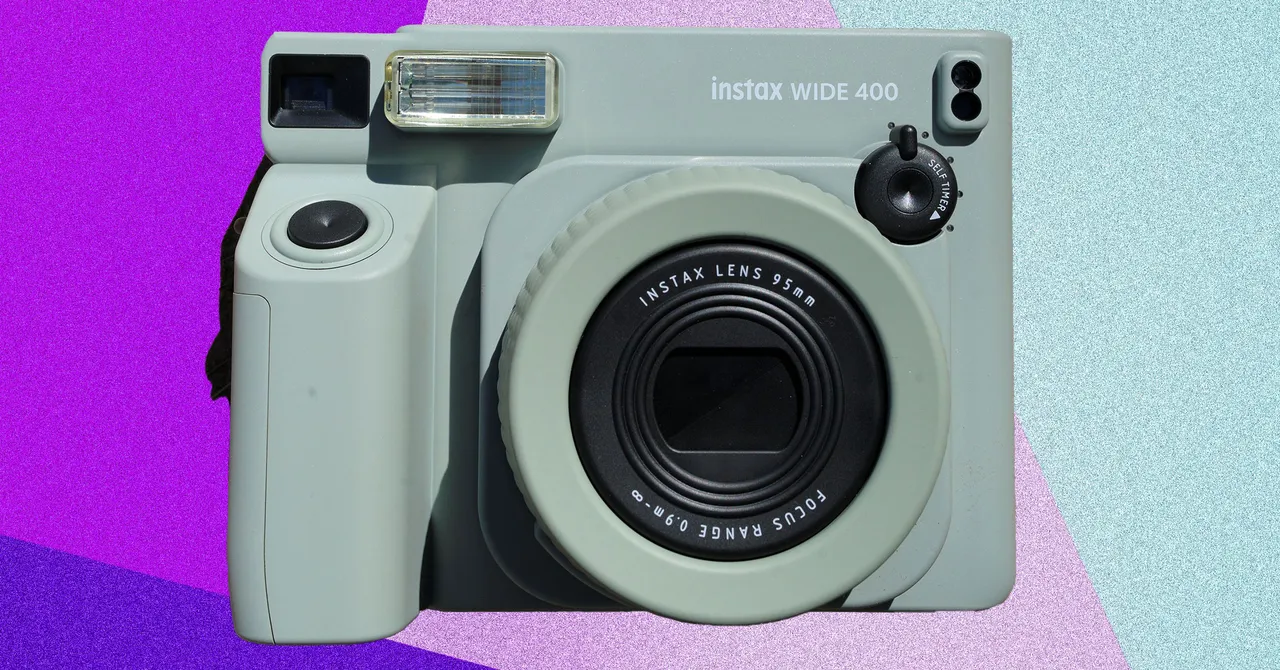
Go big or go home. The Instax Wide’s larger image has always made it the Instax of choice for photographers. Ingenious enthusiasts even figured out how to mod older models (the Wide 300) with custom lenses for even better quality images. The Instax Wide 400 is similar in most ways to the 300 that preceded it. It uses the same lens and the same full auto exposure system. If you want full exposure control, this is not the Instax for you. That said, I love this format and hence this camera.
It’s a rather chunky thing. The film is pretty good sized, so the camera is as well, but for me that just makes it easier to hold than some of the others here. There’s a nice big grip, which holds the 4 AA batteries, enough to shoot 100 images according to Fujifilm’s specs. Design-wise, the single color look is reminiscent of the SQ1 (see above), spare and simple. The 95mm f/14 lens is made of two elements (both plastic) and gives you the equivalent of a 35mm focal length on a full frame camera. Fujifilm did add a new close focus option to go with the 10 foot to infinity focus. I wish Fuji had reversed the order, as I sometimes forgot to turn the lens of the second click and ended up with out-of-focus images. Once you get used to it, though, it’s fine.
There’s not a lot to this camera, and that’s part of its appeal. The lens produces decent images, and large format makes it more fun to share with friends. I do wish there were a way to manually control … something, anything, as that would open up some more possibilities, but if you like this format this is the best camera to get.
Other Instax Wide Cameras:
Advertisement
Lomography Lomo’Instant Wide for $200: If you want to spend a bit more, Lomography’s Instant Wide shoots Instax Wide film and has some extra lenses you can add on. It shoots in both full auto and offers a programmatic shutter mode. I haven’t tested this one yet, so I can’t speak to the image quality, but the built-in 90mm Lens is roughly the same field of view.
Fujifilm Wide Evo for $409: At first glance the Wide Evo looks like a clone of our top pick, the Mini Evo, but for the wider format Instax film. Would that it were so. There are some similarities. You get the filter effects, a couple of new lens filters, and the “intensity” ring, which allows you to dial in how strong the various effects are. The lens can switch between wide angle (16-mm full-frame equivalent) and standard (28-mm full-frame equivalent), and there’s dials for controlling all the effects. The shutter button is an annoying lever-style shutter, where you flip down, rather than a button you press. This head-scratching design decision is, um, not good. It’s awkward and mars the experience of shooting in irredeemable ways in my experience. Combine that with a nasty shutter lag (even by Instax standards) and the price tag, and this one is hard to recommend. If you want a printer, go for the Instax Wide. If you want a camera, either the Wide 400 or the Lomography Lomo’Instant Wide are better deals and better cameras.
Crimson Desert looks great and runs well on most PCs, but some settings introduce visual noise and inefficiencies. We break down every option to find the best balance of image quality and performance.
This week on the GeekWire Podcast: Amazon is working on a new smartphone, code-named “Transformer,” more than a decade after the Fire Phone debacle, according to Reuters.
We dig into the connection to a past GeekWire scoop: former Microsoft Xbox leader J Allard joined Amazon’s devices team in 2024, and he’s now leading a group called ZeroOne with a mandate to create “breakthrough” gadgets. Is this an AI-native device? A companion to your iPhone? J Allard’s shot at redemption? Maybe all of the above.
Then: Microsoft shakes up its Copilot team, shifting Mustafa Suleyman to a narrower role and unifying consumer and enterprise AI under a new leader. Todd has strong feelings about Microsoft’s history of cutesy consumer tech, from Clippy to Mico.
Plus: Todd’s adventure using Claude CoWork to browse LinkedIn (and the stern warning he got in response). We also discuss King County Metro’s slick new tap-to-pay feature catches the transit system up with the modern world, the upcoming opening of cross-lake light rail, and round things out with an Amazon Treasure Truck trivia question.
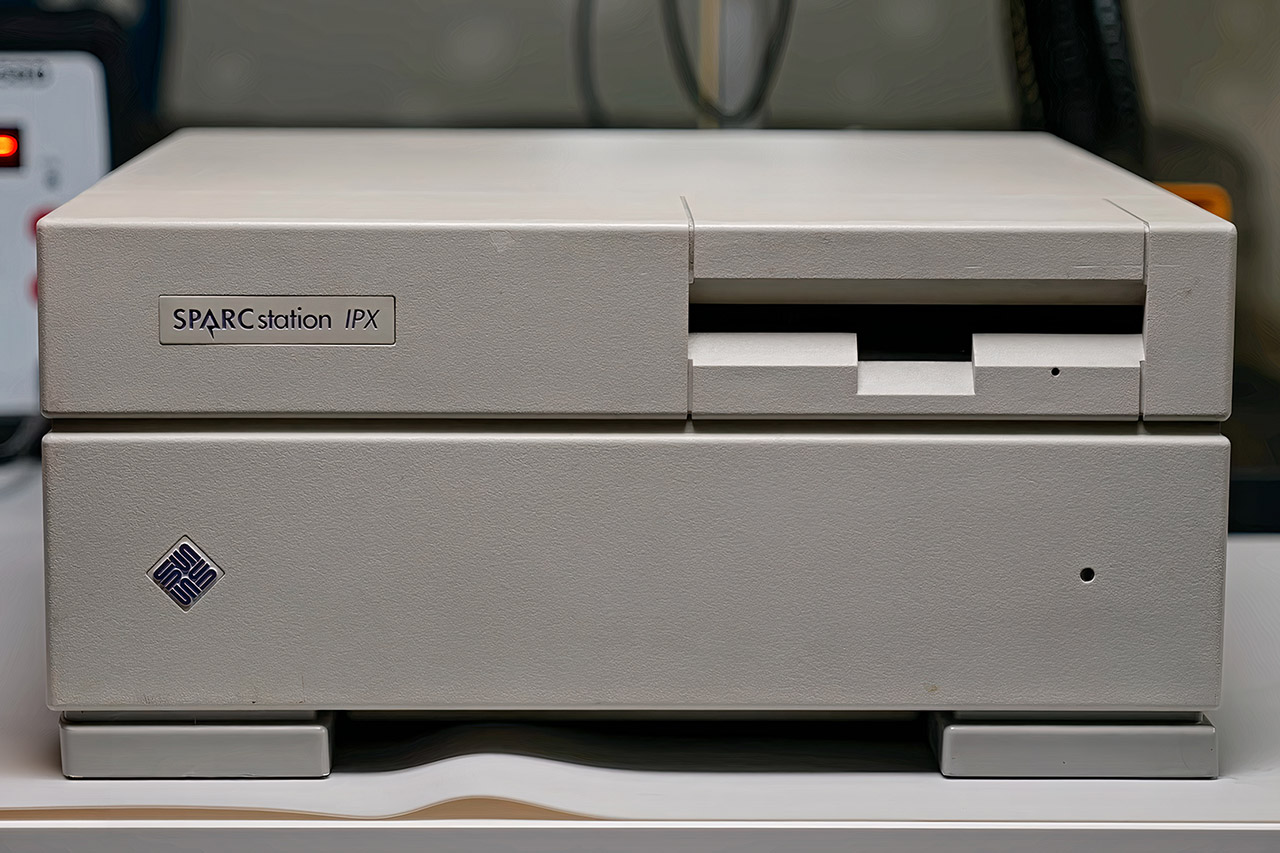
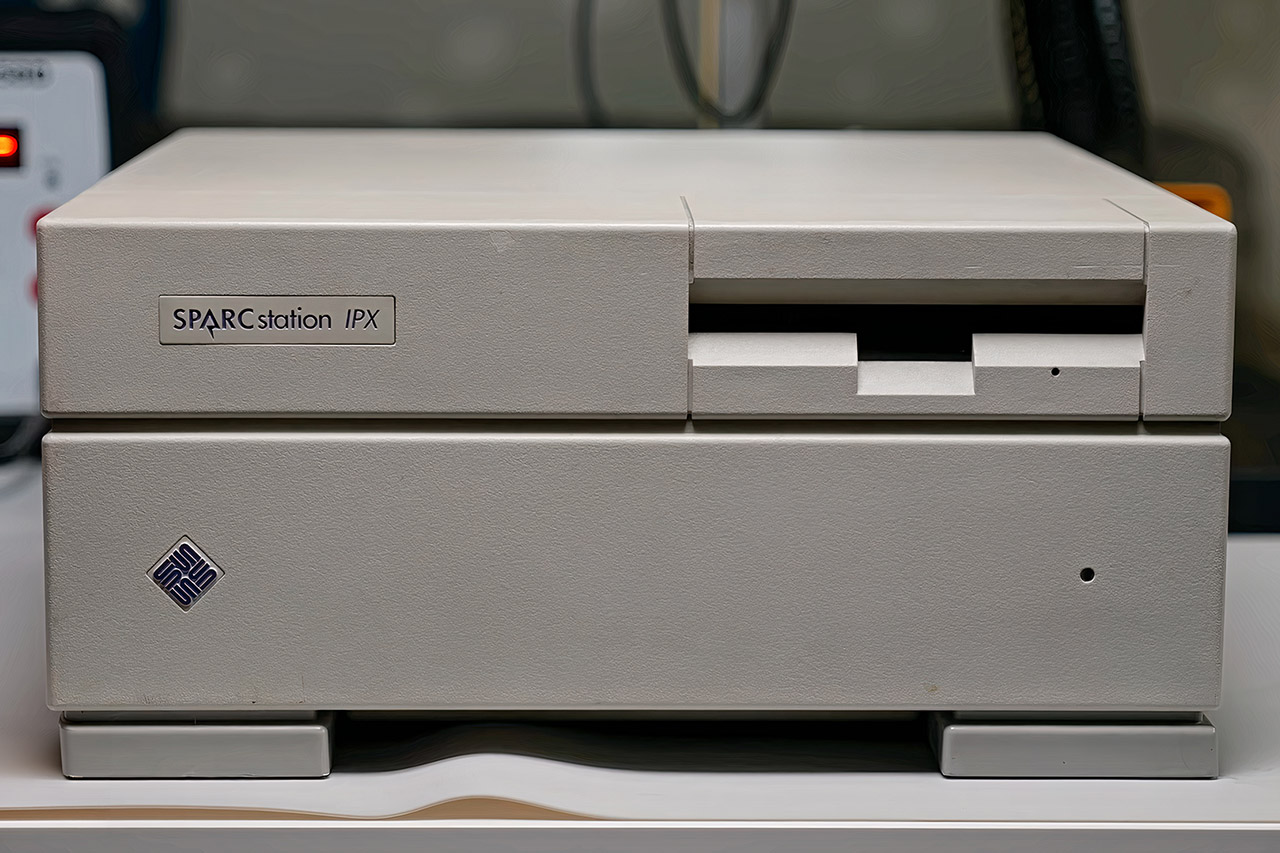
When This Does Not Compute set out to restore a Sun SPARCstation IPX computer from 1991, he was expecting a straightforward salvage project. What he got instead was weeks of stubborn resistance from a machine that seemed determined to make his life difficult. The IPX was a respectable mid-range workstation in its day, packing a 40 megahertz processor into a compact white shell, and you rarely see them in working condition anymore. By the time it was all over, he was openly admitting he had come to dislike the thing, which tells you everything you need to know about how the restoration went.
Power issues arose first, as previous maintenance had previously repaired the supply unit. Once the electricity was restored, the onboard diagnostic system lit up and delivered its verdict. The solitary 8-kilobyte static memory chip at board position 207 had failed. That little bit obstructed any boot routine.
High-Performance 14450HX Processor – Significantly outperforms H/P/U/Y series processors: The KAMRUI Hyper H2 mini PC is equipped with an 14450HX…
16GB DDR4 RAM & 512GB PCIe 4.0 NVMe SSD: This mini computer comes with 16GB of DDR4 memory and a high-speed M.2 NVMe PCIe Gen4×4 SSD, enabling…
Triple 4K Display Support: With HDMI 2.0, DP 1.4b, and a full-featured USB-C port (supporting DisplayPort Alt Mode, 10Gbps data transfer, and 15W…
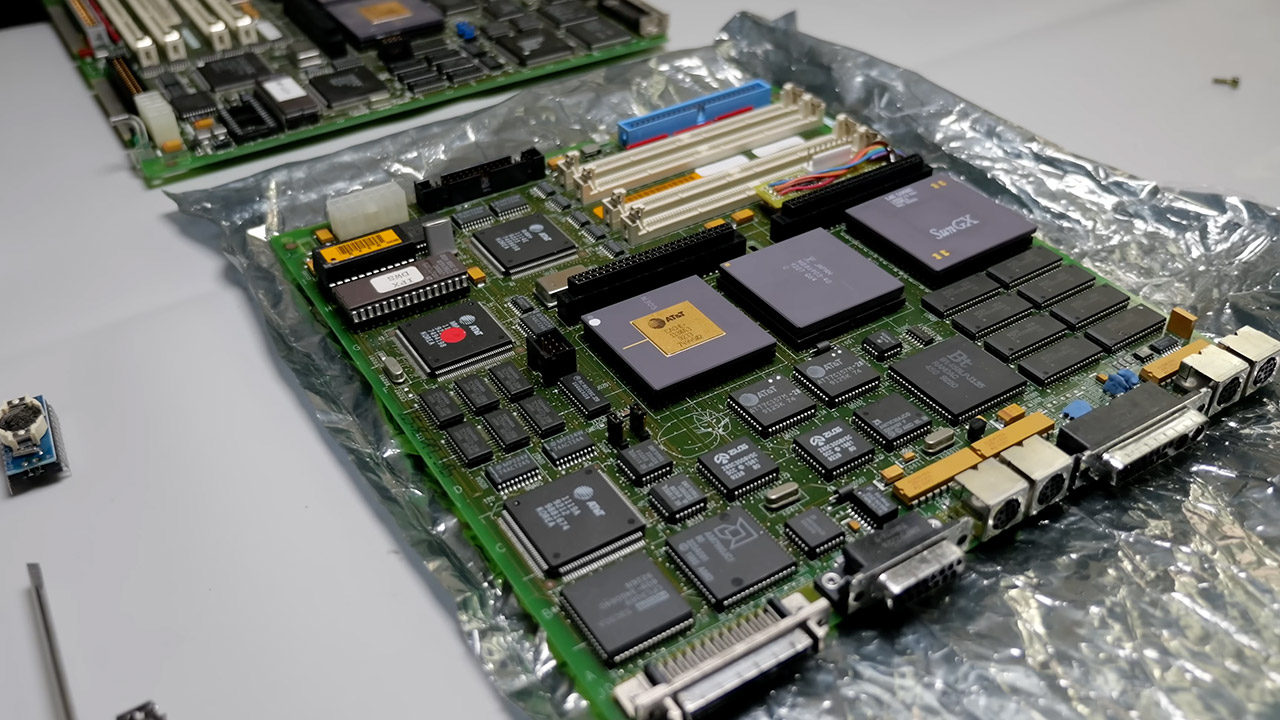
Fresh replacement chips were installed with careful soldering. The system rebooted but returned the same problem. Extra memory modules were swapped in to rule out any other possibilities, but nothing changed. Donor parts arrived next, from an unexpected source. An complete mainboard came from an earlier BriteLite laptop project. That board still included modifications from its previous life, including an SBUS card originally intended for an LCD screen and a breakout board with colorful wires attached to the bottom pins. The inventor also transferred the clock chip. Its original battery had died years ago, resetting all network addresses to FFFF. A modern coin-cell holder accurately kept time.
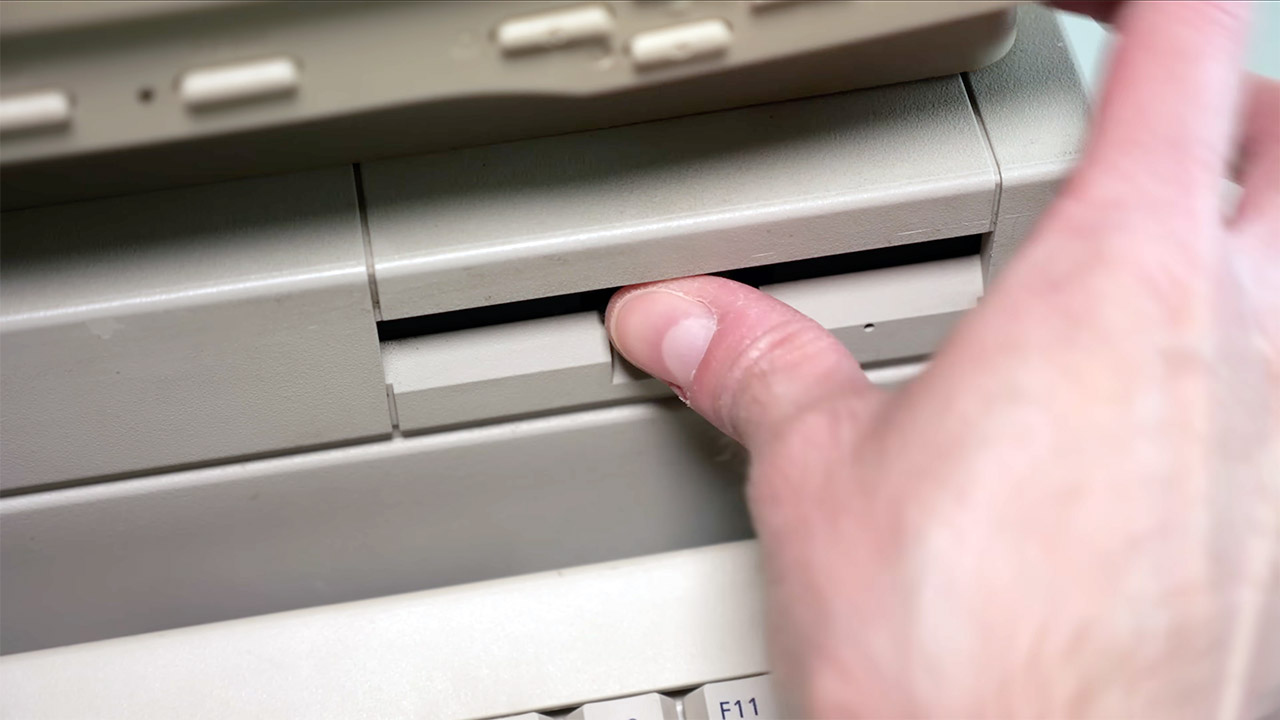
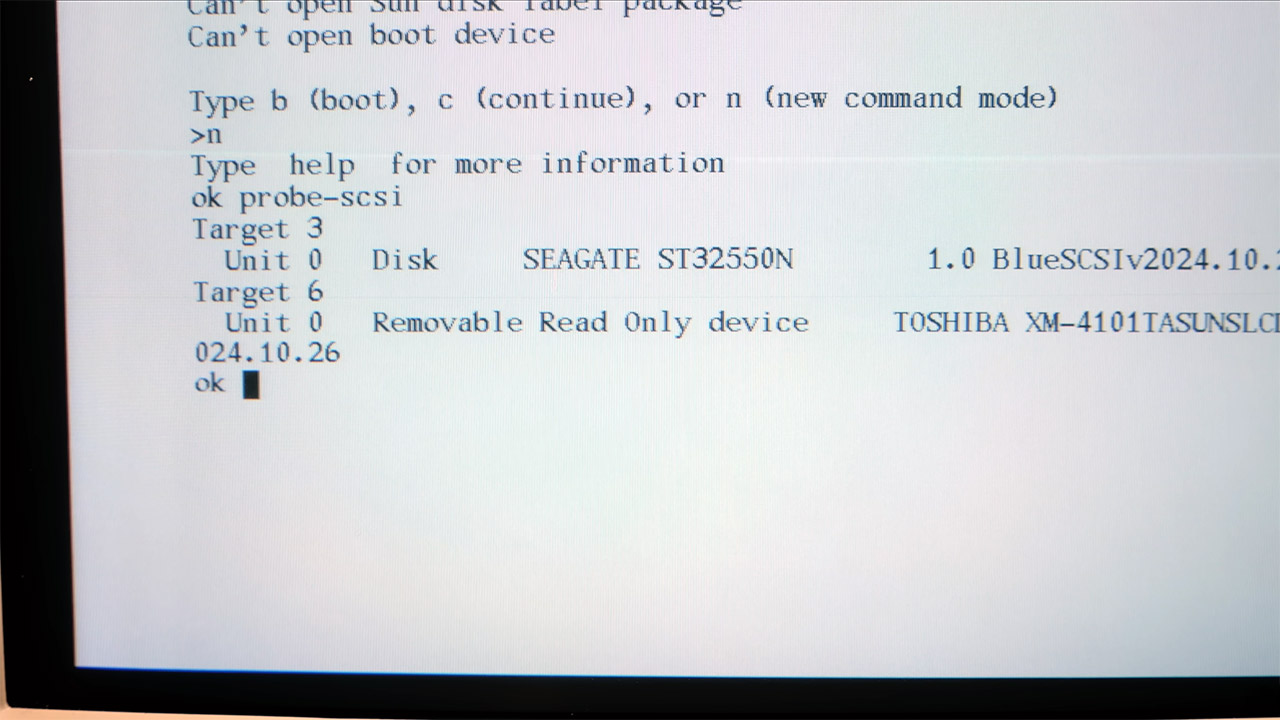
ROM chips were relocated across boards to ensure compatibility. Even after those swaps, the video output produced just vertical stripes on all connected monitors. Another used SBUS video card was inserted into an expansion slot. Clear images finally showed on the screen. Storage arrived via a clever modern addition. A BlueSCSI adaptor linked an SD card with disk images. A custom 3D-printed bracket neatly nestled the entire system inside the original casing while maintaining the aesthetics. Boot efforts began with the virtual media.
Solaris 2.3 loaded but failed to start the graphical interface. Hours were spent working in single-user mode. Switching to Solaris 2.6 finally provided the whole desktop environment. One careful adjustment in the vi text editor changed the startup file to launch the CDE window manager. Once, a wrong command bricked the installation, but a backup image quickly recovered it. Memory improvements were installed to increase speed. The machine required specialized parity-checked RAM. Self-tests on the new sticks failed, therefore the increased capacity was left out. Even without it, the system performed basic functions, but drawing simple windows felt slower than expected.
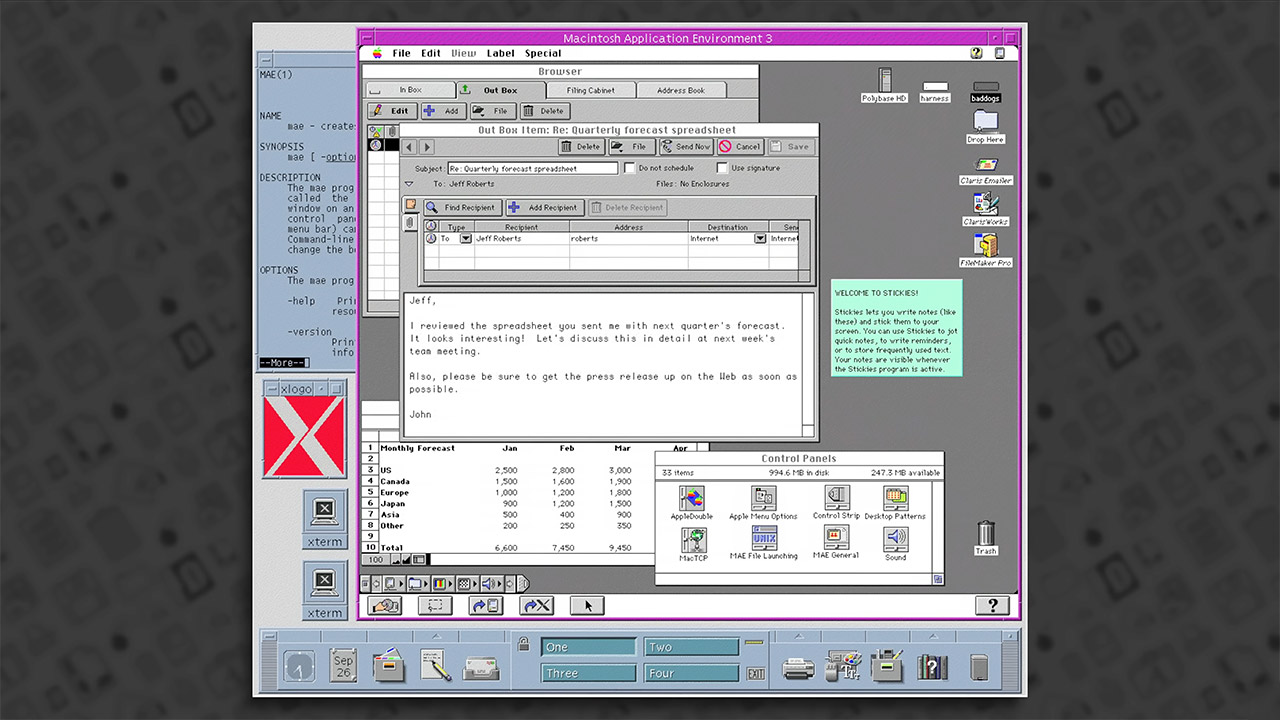
Curiosity prompted another experiment, as the developer installed the Macintosh Application Environment, an official 1994 emulation that allowed Solaris to run vintage Mac software. Applications took over 30 minutes to load and operated like a much older system. At that time, This Does Not Compute decided that continued spending even more on hard to find parts made little sense. The original enclosure components, metal brackets, and some memory modules remained, but the restored machine now runs consistently on Solaris 2.6 and has a functional CDE desktop. [Source]
Merino wool is a super fiber. The best merino wool clothing somehow manages to be comfortable in 95-degree heat, and merino base layers keep you warm well below freezing. Unlike synthetic fibers derived from petroleum, merino wool is natural and renewable.
Merino wool’s versatility means there’s a bewildering array of blends and options to choose from. Here are our favorite merino wool products that we’ve tested by wearing and washing (usually in cold water, and hung to dry, although we do machine dry them just to see what happens) over the course of months and even years in some cases. Once you’re done here, don’t forget to check out the rest of our apparel guides, like the Best Merino Wool T-Shirts, Best Base Layers, Best Puffer Jackets, Best Hoodies, and Best Hiking Boots.
Updated April 2026: We’ve changed out top pick boxers to Wool & Prince, added more hoodies, and the Ibex women’s Goat short sleeve. We also updated prices and links throughout.
Table of Contents
Advertisement
Why Is Merino Wool So Great?
Merino wool is great because you’re stealing a sheep’s ability to keep itself warm or cool based on the temperatures it’s in, a process often referred to as thermoregulation. If you’ve only ever worn the sort of itchy wool sweaters your proverbial grandmother supposedly made, you might wonder what all the fuss is. The answer is that Merino sheep have thinner, softer wool, which has evolved to keep them comfortable across a wide range of temperatures and is comfortable to wear next to your skin. Wool is sustainable, too.
One sheep can produce 4 to 5 pounds of wool per year. That’s because the sheep that make merino wool drink only the purest alpine waters and study the art of comfort under the tutelage of those stuck-up Pashmina goats, who, let’s face it, might know a thing or two about wonderfully pillowy softness. Just kidding. Merino sheep do have that softer wool though, and merino wool is a remarkable fabric that’s become the cornerstone of my wardrobe.
Merino wool comes in different weights, which you will frequently see listed as “200 gsm” or something similar. (The “gsm” refers to grams per square meter, sometimes listed as g/m.) What’s important is the scale and where your garment falls on it. At the low end, you have T-shirts and underwear, which are typically 150 gsm, though we have seen some as low as 120 gsm. Generally, anything below 200 gsm will be a good base layer or T-shirt. From 200 to 300 gsm are your mid-layers, and anything above 300 is a heavier garment.
Advertisement
If you’re more familiar with synthetic ratings like those often used on fleece, know that, in my experience, about 120–160 gsm wool corresponds to 100-weight fleece, 160–200 gsm wool roughly matches 200-weight fleece and 200+ wool is like 300-weight fleece. In every instance, the wool is warmer because it’s better at trapping heat, especially in the wind. (That said, there are reasons to go with fleece at times, like how incredibly lightweight it can be.)
Nuyarn is a merino wool/synthetic hybrid weave, wherein merino wool is wrapped around a nylon core for warmth, lightness, and extra durability. The idea is to get the temperature regulation benefits of merino, but to add some of the longevity of nylon. In my experience, Nuyarn mostly works. It’s our top pick for base layers, though I find it less necessary in more casual garments, where I prefer 100 percent wool.
How to Care for Merino Wool
Most merino products will have care instructions. Most likely it will be to wash cold and lay flat to dry. The latter is important, as hanging wool to dry will stretch it out (because of the water weight). While most merino labels say the garment can be machine washed, my experience has been that hand-washing merino will extend its life. This is particularly true of very lightweight (150 gsm) merino base layers and T-shirts. The exception is Minus33’s Microweight Raglan short sleeve T-shirt, which is machine-washable and dryer-friendly. Having done both to mine for over a year, I can vouch that it does indeed hold up.
Advertisement
I’ve never had a problem storing merino in my closet between wears, but for long-term storage, I recommend you take precautions against moths, which are notorious for eating holes in wool. I have lost merino garments to moths.
If you don’t want to smell like mothballs, there are better solutions. I make sure to wash and thoroughly dry whatever I am storing, then I seal it in a compression bag, like this. Another option is to put your merino garment in a cotton bag or otherwise wrap it in cotton and then put it in a plastic bin. It’s very important to make sure that the garment is completely dry before using any of these storage methods, otherwise your wool will smell musty and moldy. Other options include storing your garment in a cedar chest, which is a good natural deterrent for moths, or use moth traps or lavender sachets, which will repel the moths.
100 Percent Merino vs. Blends
Should you buy 100 percent merino or should you go for a blend? The answer is … it depends. On the garment in question, the use case, and your preferences. Probably the best way to find out is to try several and see what you like. One advantage to blends is that they’re stretchy, which makes them better for active pursuits like hiking, rock climbing, and the like. I like 100 percent merino for heavier mid-layers like hoodies or jackets, but I prefer blends for lighter layers. My experience has been that the closer I get to my skin, the more blend I want, with Nuyarn being my top pick for base layers.
Advertisement
There are also some alpaca blends out there that are also wonderfully soft (I love everything I’ve tried from Paka and Arms of Andes). If you’re one of the rare people who do find merino itchy, you might be allergic to lanolin, which is the skin oil produced by sheep. Alpacas don’t make lanolin, and the fibers are thinner and finer than merino. That makes alpaca warmer and softer, but it’s also more expensive.
Merino vs. Synthetic Fibers
Which is better? The answer again is … it depends (sorry). But usually merino. By synthetics, I generally mean polyester, nylon, polypropylene, rayon, or blends of these and other fabrics—everything but cotton, wool, and linen.
Synthetics generally win for wicking away sweat, which means they tend to feel drier. They also tend to dry faster, so when it comes to things like socks and underwear, even most “merino” options are often more than 50 percent synthetic. Synthetics are just better at handling moisture. How much this matters depends on a host of personal factors. For example, I feel weird and almost clammy in anything synthetic, so I don’t really care how much moisture it wicks away.
Advertisement
The downside to that moisture wicking is that synthetics retain odor. There are some chemical treatments that can help, but I’ve never tried anything synthetic that was as odor-resistant as merino wool.
Another difference is breathability. Synthetics are passable in this department, but it’s where merino really excels. If you’re hot and are hiking up an exposed slope toward an open pass and then dropping down into the cool of a forest, merino is your friend, because the breathability means less sweat to cool you when you get out of the sun. Again, how much this matters depends on your body.
The final factor worth thinking about is durability. In some cases, synthetics will last longer than pure merino, particularly in scenarios where abrasion is a major source of wear. To my mind, this is just another reason to choose a merino blend rather than going all the way to synthetics, but it’s something to think about if you do a lot of off-trail hiking or rock climbing—any activity where your clothes are going to take a beating.
Base Layers
Advertisement
To really see how remarkable merino wool is, start at the bottom, with the clothes next to your skin. Merino really shines as a base layer. It’s warmer for the weight, wicks moisture well, and unlike synthetic fabrics, merino stays stink-free for days of wear. Be sure to read our layering guide for more on how to put it all together and stay comfortable in any weather. We also have a separate guide to the best base layers if you want know all your options, but here are our top merino picks from that guide.
Best Lightweight Base Layer
Ibex
Woolies Pro Tech Crew
The Ibex Woolies Pro Tech base layer crew is the best lightweight merino base layer we’ve tested. If you want a hard-wearing shirt, this it it. Woolies are Nuyarn (see above), which is 85 percent merino wool and 15 percent nylon—the merino wool is wrapped around a nylon core, which increases the warmth while being lighter (5 oz for the men’s large) and more durable. This is my top pick for all things technical. It’s what I bring hiking, backpacking, and it’s reviews editor Adrienne So’s pick for running, climbing and other high-aerobic activities when it’s cold. I also love the Woolies Pro Tech Bottoms ($115), which are what I bring backpacking in all but the warmest of weather. There’s also a quarter zip version of the shirt if you prefer.
Advertisement
Aside from comfort and warmth, a bit part of the reason we recommend Woolies is that they last. Ibex is what passes for a heritage company in this space; the company was founded in 1997 and has been cranking out merino garment for a long time. Adrienne’s parents bought her two sets of Ibex base layers in 2001 that she still wears today, in the year of our Lord 2025. Properly cared for, Woolies will keep you comfortable warm for years to come.
Best Heavyweight Base Layer
SmartWool
Merino Classic Long-Sleeve
When I want something a bit warmer than the lightweight Woolies above, I reach for Smartwool’s Classic long sleeve base layer. These may be the most popular merino shirts around, and for good reason: They’re very comfortable, tending to the looser side, feature heavy duty seams that don’t rub, and sit off the shoulder for more comfort when wearing a pack. At 87 percent merino wool (blended with nylon), these are also very durable while remaining lightweight (10.3 oz for a men’s large). This Smartwool shirt, along with the matching pants ($125), are great for chilly winter days.
Advertisement
Courtesy of Unbound Merino
Unbound Merino
Long-Sleeve Merino Crew
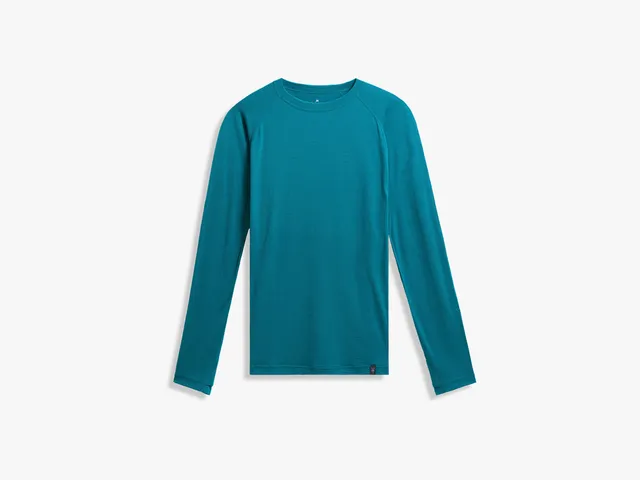
The picks above all have what my wife calls “that sporty look,” which the industry refers to as “technical.” This 100 percent merino shirt from Unbound is the opposite: it just looks like a long sleeve shirt. It’s incredibly soft and while it does pill a bit if you run it through the dryer (don’t), it’s proved itself plenty durable—I’ve been wearing it constantly for over a year now and it still looks like it did when I got it. It’s the long-sleeve, base layer twin to our favorite T-shirt (see below). It’s on the thin side for a base layer, which makes it perfect for those cool weather mornings in the shoulder seasons. It’s versatile too; it can be used as a base layer, but it also works as a T-shirt when it’s not too chilly. Fit runs true to size, and if the one you want is sold out, be patient; Unbound frequently updates its stock.
There are so many! Here’s a few more to consider, but really, go read the base layer guide.
Advertisement
Ridge Merino
Aspect High Rise Base Layer Bottoms
These are another great option fro women looking for something that can be worn around town as well as on the trail. My daughter has even worn them under shorts for no-gi juijitsu and they’ve held up great, which is a testament to their durability.
Minus33
Advertisement
Heavyweight Yukon Thermal Long Sleeve
If you’re going to be in extreme cold, New Hampshire-based Minus33 is the company to shop. Where I live winter temps regularly dip below 0F and the Yukon comes into its own. The 400 gsm weave of 100 percent merino is more like a sweatshirt than a base layer, but if you live in the north, you need it.
Turtle Fur
Merino Pipe Dream Neck Gaiter
Don’t forget your neck. I live in this Turtle Fur gaiter during the winter and I also use the lighter, superfine version for hiking at elevation in the summer to keep the sun off my neck without resorting to sunscreen. It’s wonderfully soft, not overly tight, and never smells.
Advertisement
Merino Mid Layers
Fleece has its place, but I rarely wear it these days. I prefer merino for my mid layers. It’s better at helping your body regulate its temperature. The one place fleece still wins for me is backpacking. It’s almost always lighter for comparable warmth, at least in mid layers.
Like the Northern Lights or the McRib, the thickest Ibex wool hoodie appears irregularly and with some fanfare. The Mammoth Hoodie is indeed a big, furry beast of a garment—it’s basically the weight of the classic American Giant hoodie but made of 85 percent wool cut with 15 percent nylon for added warmth and stretch. Ibex says it’s the warmest hoodie they’ve ever made, and in my week of testing, I’ve used it in place of a jacket in mid-30s temps. It has an athletic cut with zippered pockets and thumb holes. I do wear a stocking hat with it in the cold because the scuba hood is meant to fit under a helmet which means it’s too small to provide enough warmth for my large shaved head on its own. —Martin Cizmar
Although the RTL-SDR is cheap, accessible, and capable enough for many projects, it does have some important limitations. In particular, its bandwidth is limited to about 3.2 MHz, and the price of SDRs tends to scale rapidly with bandwidth. [Anders Nielsen], however, is building a modular SDR with a target price of $50 USD, and has already reached a bandwidth of almost 20 MHz.
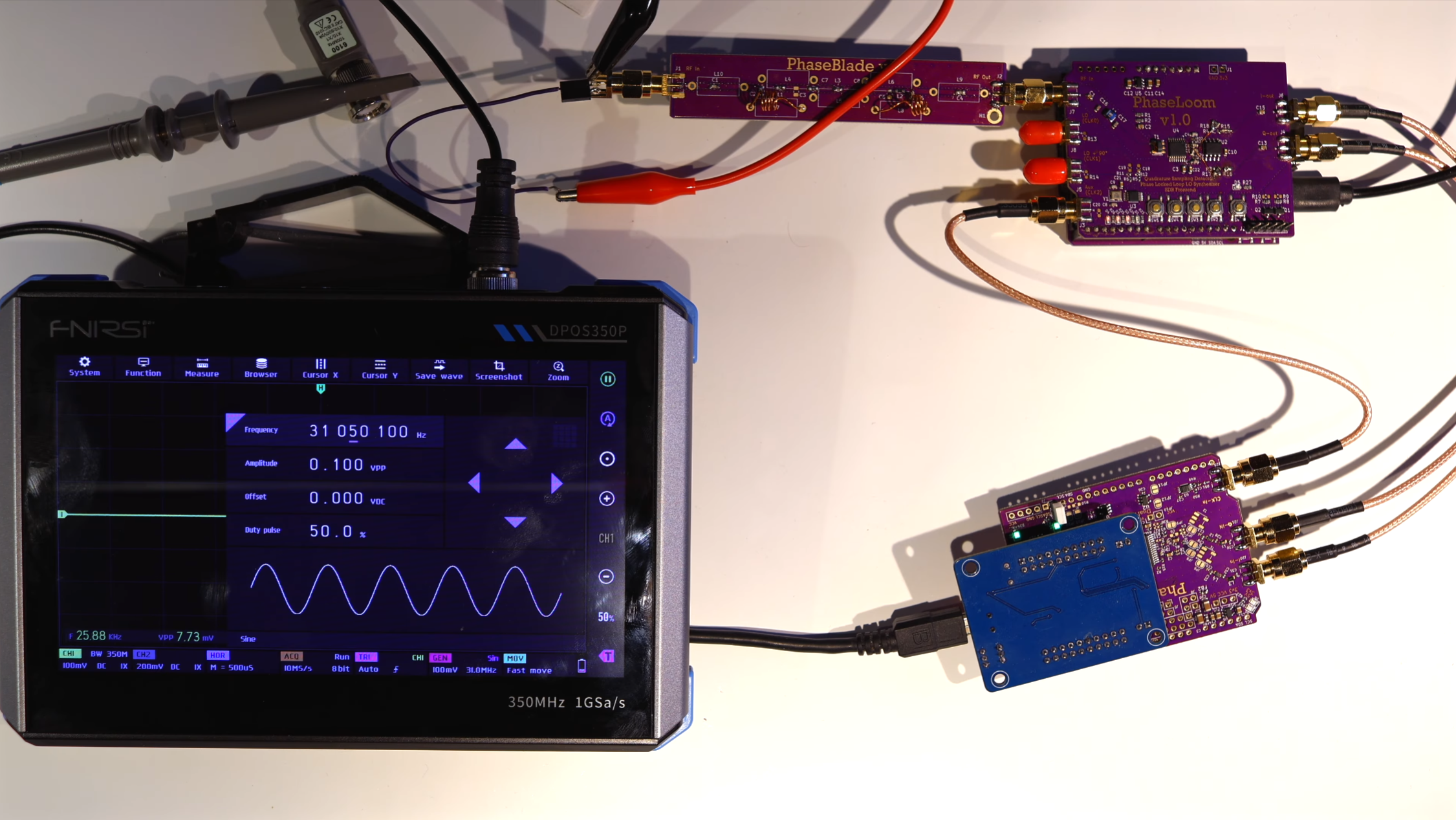
If this project looks familiar, it’s because we’ve covered an earlier iteration. At the time, [Anders] had built the PhaseLoom, which filters an incoming signal, mixes it down to baseband, and converts it to I/Q signals. The next stage is the PhaseLatch, a board housing a 20-MHz, 10-bit ADC, which samples the in-phase and quadrature signals and passes them on to a Cypress FX2LP microcontroller development board. [Anders] had previously connected the ADC to a 6502 microprocessor instead of the FX2LP, but this makes it a practical SDR. The FX2LP was a particularly good choice for this project because of its USB 2.0 interface, large buffers for streaming data, and parallel interface. It simply reads the data from the SDR and dumps it to the computer.
The FX2LP didn’t support the ADC’s clock rate, and overclocking the ADC led to issues, so [Anders] connected the ADC to an independent 20 MHz oscillator. The frequency spectrum of the SDR was oddly bell-shaped, which turned out to be due to the limited analogue bandwidth of the PhaseLoom (about 650 kHz) falling behind the digital bandwidth of 20 MHz. The PhaseLoom’s bandwidth seemed to be limited mostly by an amplifier, and decreasing its gain greatly improved matters. The SDR doesn’t yet have a 20 MHz bandwidth according to the normal definition, but it’s close enough to be practical, and further improvements will have to wait on an updated PhaseLoom board.
The Cypress development board used here is surprisingly capable – we’ve previously seen it used to build an SDR GPS decoder. Most of the custom-built SDRs we see don’t focus on technical performance, but do use such interesting components as a tube-based receiver or a custom silicon chip.















-Offwhite-Background-SOURCE-Ibex.jpg)

-SOURCE-Unbound.jpg)

-Offwhite-Background-SOURCE-Ibex.jpg)







































You must be logged in to post a comment Login