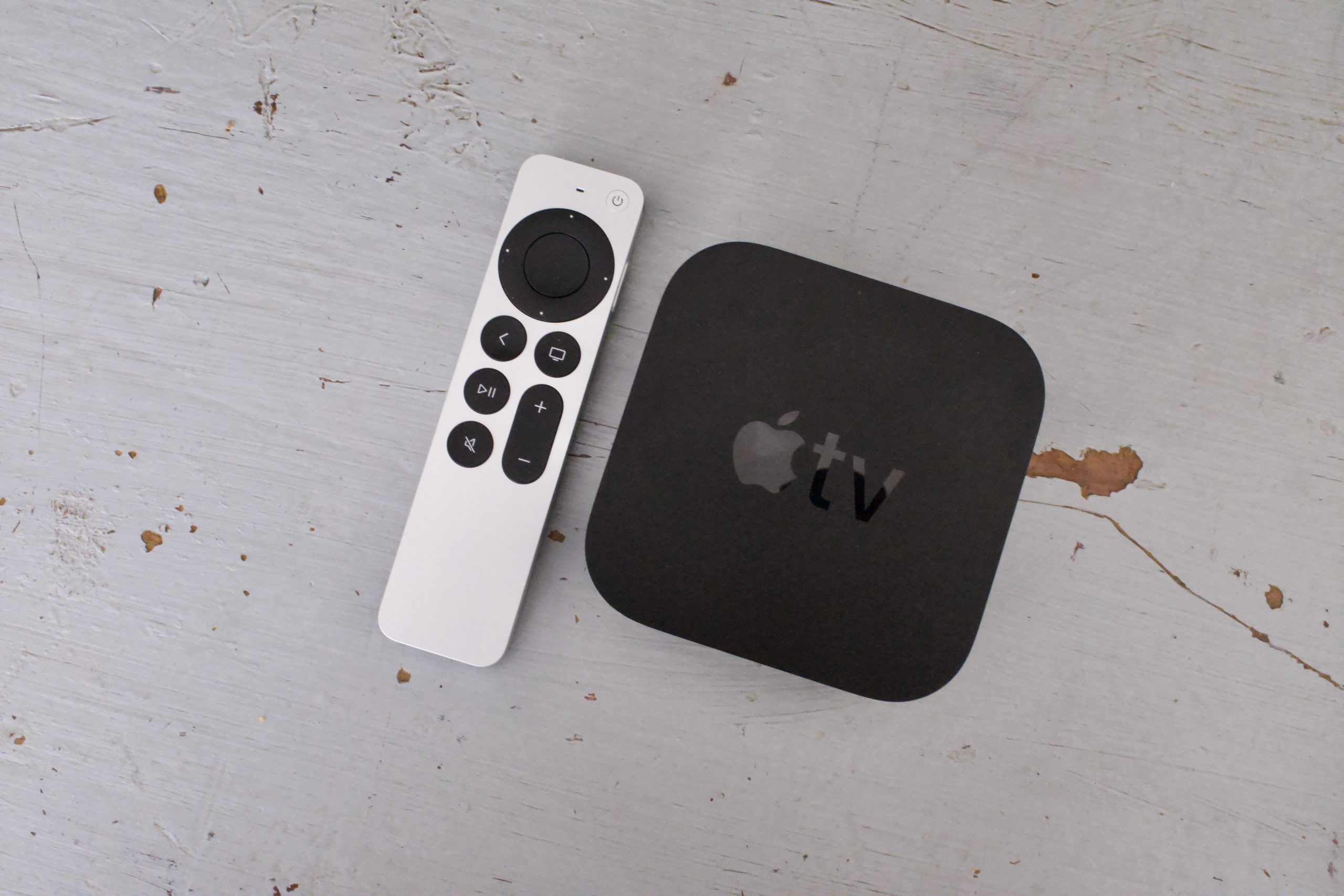
Apple’s next Apple TV 4K could arrive with a refreshed Siri Remote, according to references found in the latest macOS software.
The clue comes from ATVRemote1,5, a device identifier discovered in the macOS Tahoe 26.7 release candidate. The code appears to correspond to a new Apple TV remote, suggesting Apple is working on an updated version of its streaming box and its accompanying controller.
Unfortunately, the software doesn’t reveal what Apple has changed. There’s no indication yet of a new design, additional buttons or new functionality. Therefore, the upgraded remote remains something of a mystery.
A new Apple TV could finally be on the way
The discovery is interesting because Apple’s current Apple TV 4K has been around since 2022, despite rumours of a new model circulating for several years. The next version is expected to receive a much more significant internal upgrade, with an A17 Pro chip or newer tipped to power the device.
Advertisement
The new remote reference adds another piece to that puzzle. Rather than simply updating the Apple TV internally, Apple could be preparing a refreshed package that includes a new controller.
Advertisement
There’s no confirmed launch date, but the latest code findings point towards a potential announcement in September or October.
Apple’s macOS Tahoe 26.7 release candidate contains references to a surprisingly large number of unreleased products. Alongside the Apple TV remote, the code points towards new home accessories, AirPods, iPhones, Macs and iPads.
For now, though, ATVRemote1,5 is all we have to go on for the new Siri Remote. The code confirms the apparent existence of a new remote but doesn’t explain what makes it different from the current model.
That means it’s best not to expect a radical redesign just yet; Apple could be preparing relatively modest changes. On the other hand, the new remote could introduce features that simply aren’t exposed by the software reference.
Either way, after several years without a new Apple TV, it looks increasingly likely that Apple has an updated streaming box in the works.
Real world economic potential of tokens will depend on efficient usage of scarce compute resources, Stripe’s Patrick Collison said.
After weeks of speculation, Stripe has announced that it is acquiring New York-based AI marketplace OpenRouter.
Terms of the deal have not been disclosed, but recent reports suggest the acquisition would cost Stripe between $7bn and $10bn – dramatically higher than the $1.3bn valuation OpenRouter hit after a $113m round a few months ago.
Stripe said the acquisition will improve its services that help businesses optimise token costs – something it has undertaken over the past year. It is also gaining a user-base of more than 10m OpenRouter users globally.
Advertisement
Token optimisation is difficult, Stripe explained. “The sheer matrix of variables – which model to use for which tasks, at which speed and at what price – makes managing cost-versus-performance trade-offs in real time extremely difficult,” it said in a statement announcing the acquisition.
Founded in 2023, OpenRouter is a new type of marketplace that offers access to more than 500 large language models (LLMs), routing user requests to the best available AI provider and letting users shop around based on price, speed and reliability among other factors.
It claims to be the first of its kind of platform set up for LLMs, reflecting a growing appetite for AI models and a fast diversifying market and is already used by the likes of Nvidia, Zoom and Swedish vibe-coding start-up Lovable.
“Together, Stripe and OpenRouter will be able to help companies manage both sides of profitability in the AI era; maximising revenue and efficacy while minimising costs,” Stripe said.
Advertisement
The company’s co-founder Patrick Collison said: “Tokens are the central currency for companies building with AI and it’s clear that the real-world economic potential will depend on making good use of scarce compute resources.”
Alex Atallah, the co-founder and CEO of OpenRouter once described his company as an AI equivalent of Stripe.
“Stripe has spent over a decade building trusted, neutral infrastructure for businesses, and OpenRouter was built on the same philosophy,” he said.
“We believe intelligence will be multi-model: no single model will be optimal for every task, and developers need a neutral layer to orchestrate and manage them all. Joining Stripe lets us accelerate that mission and bring the full AI ecosystem to every business.”
Advertisement
Don’t miss out on the knowledge you need to succeed. Sign up for the Daily Brief, Silicon Republic’s digest of need-to-know sci-tech news.
There has been very little pushback against Apple’s new business terms in the EU, primarily from Epic Games, and even the European Commission has welcomed the changes.
The Digital Markets Act forced Apple to rethink its business model in the European Union, which was initially rejected due to the Core Technology Fee and confusing rates. After going back to the negotiating table, Apple seemingly has found a solution that makes almost everyone happy.
A report from Irish Independent detailed the European Commission’s response to Apple’s new business terms for the EU. They share that they welcome the changes and will monitor Apple’s implementation of the terms.
Here is the EC’s full statement:
Advertisement
“The Commission welcomes Apple’s changes to their business terms, which follow a close dialogue between the Commission and Apple after the Commission issued a non-compliance decision related to Apple’s steering terms as well as preliminary findings related to alternative app distribution, both in April 2025,” the spokesperson said.
“Following today’s announcement, the Commission will monitor Apple’s effective implementation of the new terms. Under the DMA, users in the EU have a right to full and effective choice of alternative app distribution channels.”
The point of the DMA was to open up competition and choice for developers, which the EC seems to believe Apple’s terms have accomplished. The new rates eliminate the Core Technology fee and rely upon percentages from 5% to 26% based on how the developer interfaces with Apple’s platform.
One vocal developer was not happy with the results. Predictably, it was Epic Games.
“The law makes it clear that Apple must allow developers to offer link outs to the web for purchases ‘free of charge’ and has to allow ‘effective use’ of competing stores. Apple’s terms deliberately violate the Digital Markets Act.”
Epic has made it clear in the US and the EU that any fee above 0% on purchases made outside of the App Store is too much. Given the EC’s approval of these new business terms, Epic may have to finally accept the reality of the situation.
Advertisement
Either Epic pays, or it can invent its own smartphone platform to profit from. Of course, Epic will continue to litigate until the sun expires.
We haven’t heard the last of Epic either. The lawsuit against Apple involving commission rates is still ongoing as Apple awaits the Supreme Court’s decision in October.
Software subscriptions are easy to justify one at a time.
£10 a month for cloud storage. £20 for an AI tool. £40 for security software. Another £30 for design, £50 for project management, then a few smaller subscriptions that barely seem worth thinking about.
The problem appears when you add them together.
Software has shifted decisively toward recurring billing, which means many of us no longer buy a program once and use it for five years. We maintain a collection of monthly and annual subscriptions instead. For businesses, freelancers and even individual users, those recurring software costs can become a meaningful part of the monthly budget.
Advertisement
The obvious response is to start cancelling things. That can save money, but it can also be a bad trade if you remove software that genuinely saves time or helps you work.
A better approach is to make the subscriptions you keep work harder.
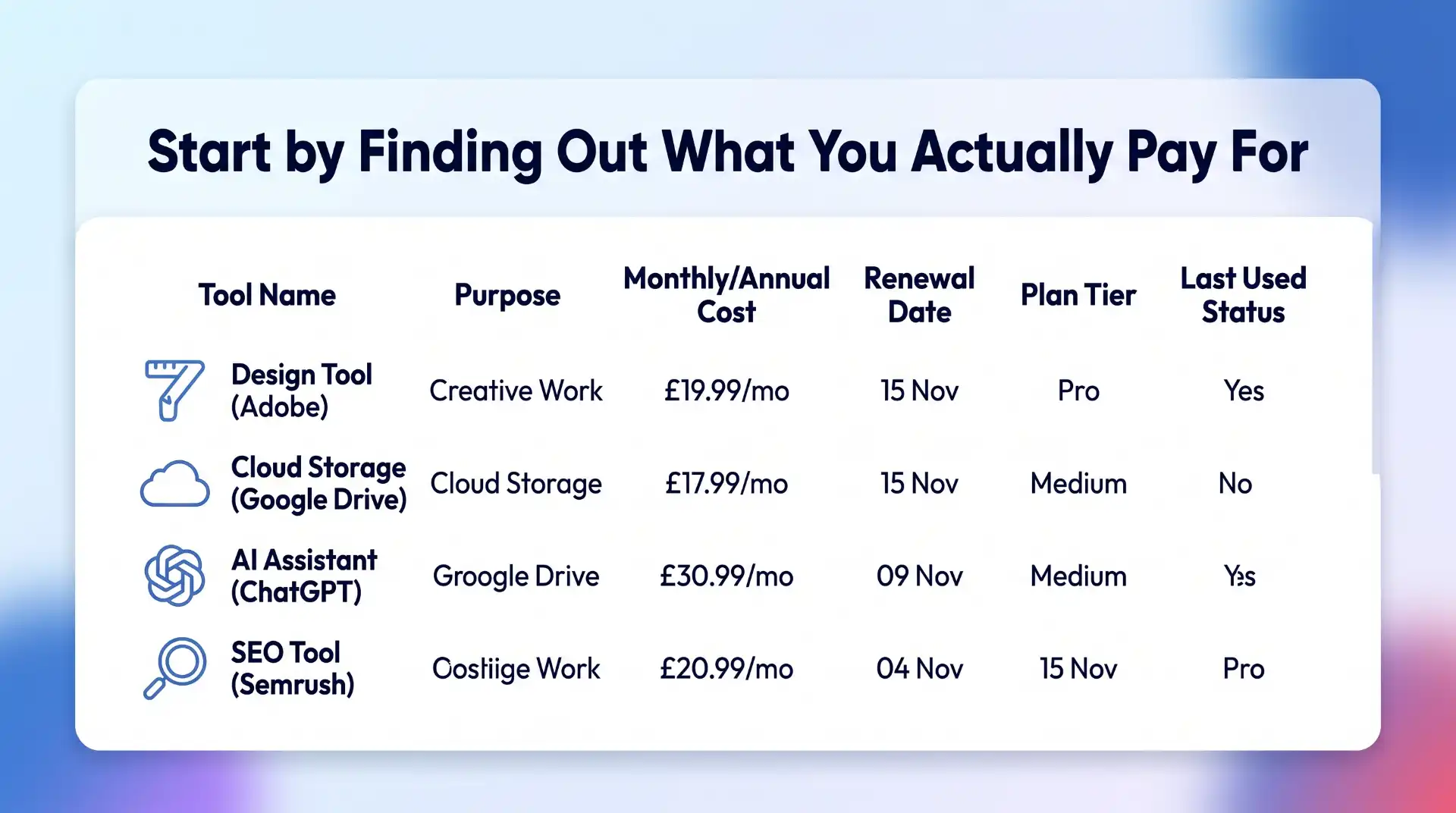
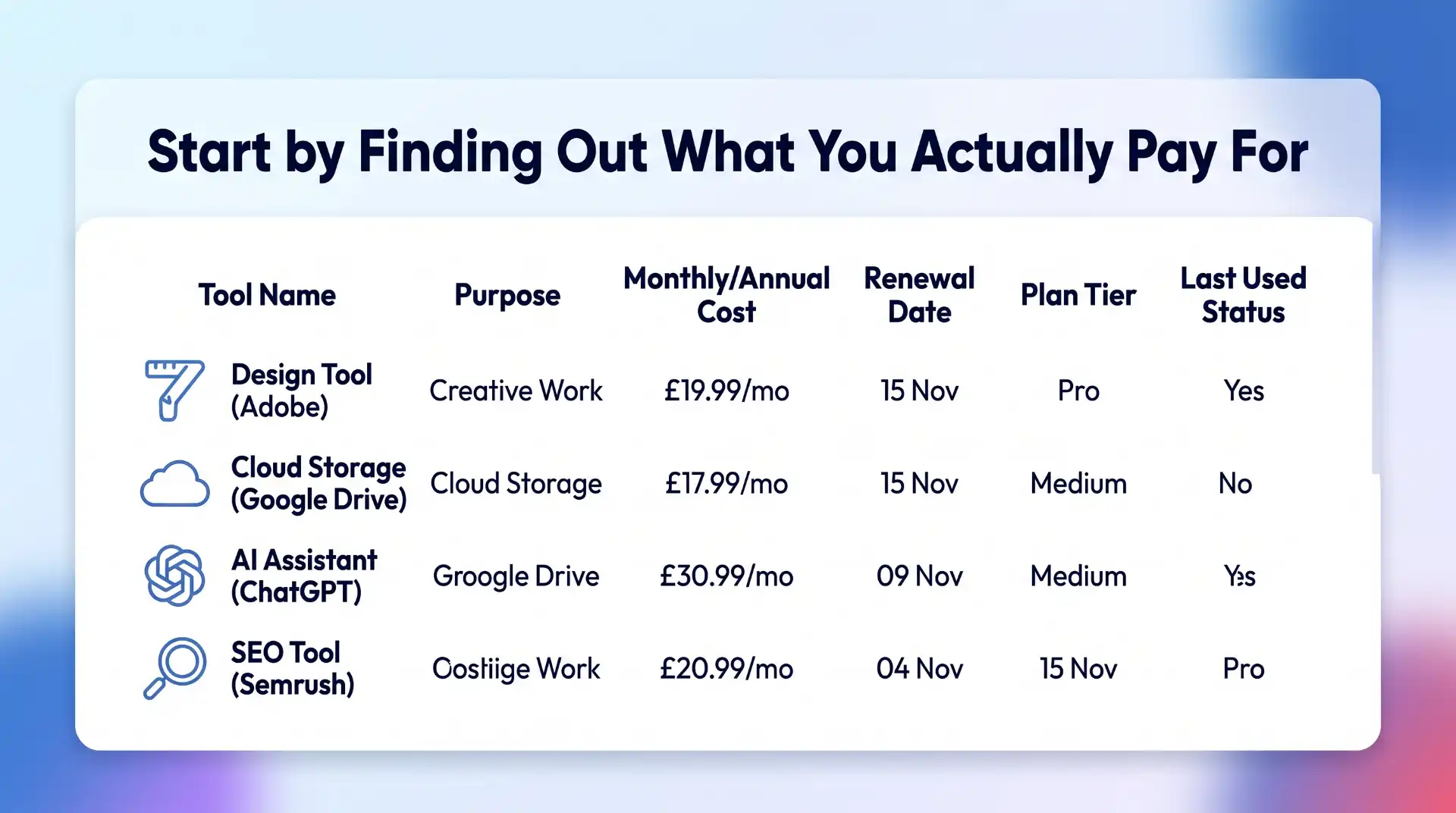
Start by Finding Out What You Actually Pay For
Before looking for cheaper software, work out what you already have.
This is less obvious than it sounds.
Advertisement
Subscriptions can be spread across credit cards, PayPal, app stores, business accounts and individual employee expenses. Annual subscriptions are particularly easy to forget because they disappear from view for eleven months before suddenly renewing.
Make a simple list containing:
Software name
Purpose
Monthly or annual price
Renewal date
Number of users
Current pricing plan
How frequently it is actually used
You do not need specialist subscription management software to do this. A spreadsheet is enough.
The important part is getting everything into one place.
Advertisement
You may find three categories almost immediately: software you use constantly, software you occasionally need, and software you forgot you were paying for.
The third category is the easiest place to start cutting.
Cancel Software You No Longer Use
Unused subscriptions are the least controversial saving.
Perhaps you needed a video editor for one project. You tested an AI research tool for a month. You signed up for a stock image service while redesigning a website.
Advertisement
The project ended. The subscription didn’t.
Small monthly payments are especially good at surviving unnoticed. A £12 subscription does not feel urgent enough to investigate, but £12 every month is £144 a year.
Multiply that across five or ten forgotten services and the numbers stop looking insignificant.
Before cancelling, check whether you have files or data stored in the platform that need to be exported. Once that is done, remove subscriptions with no current purpose.
Advertisement
There is no clever optimisation here. Stop paying for things you do not use.
Look for Overlapping Features
The next step requires a little more thought.
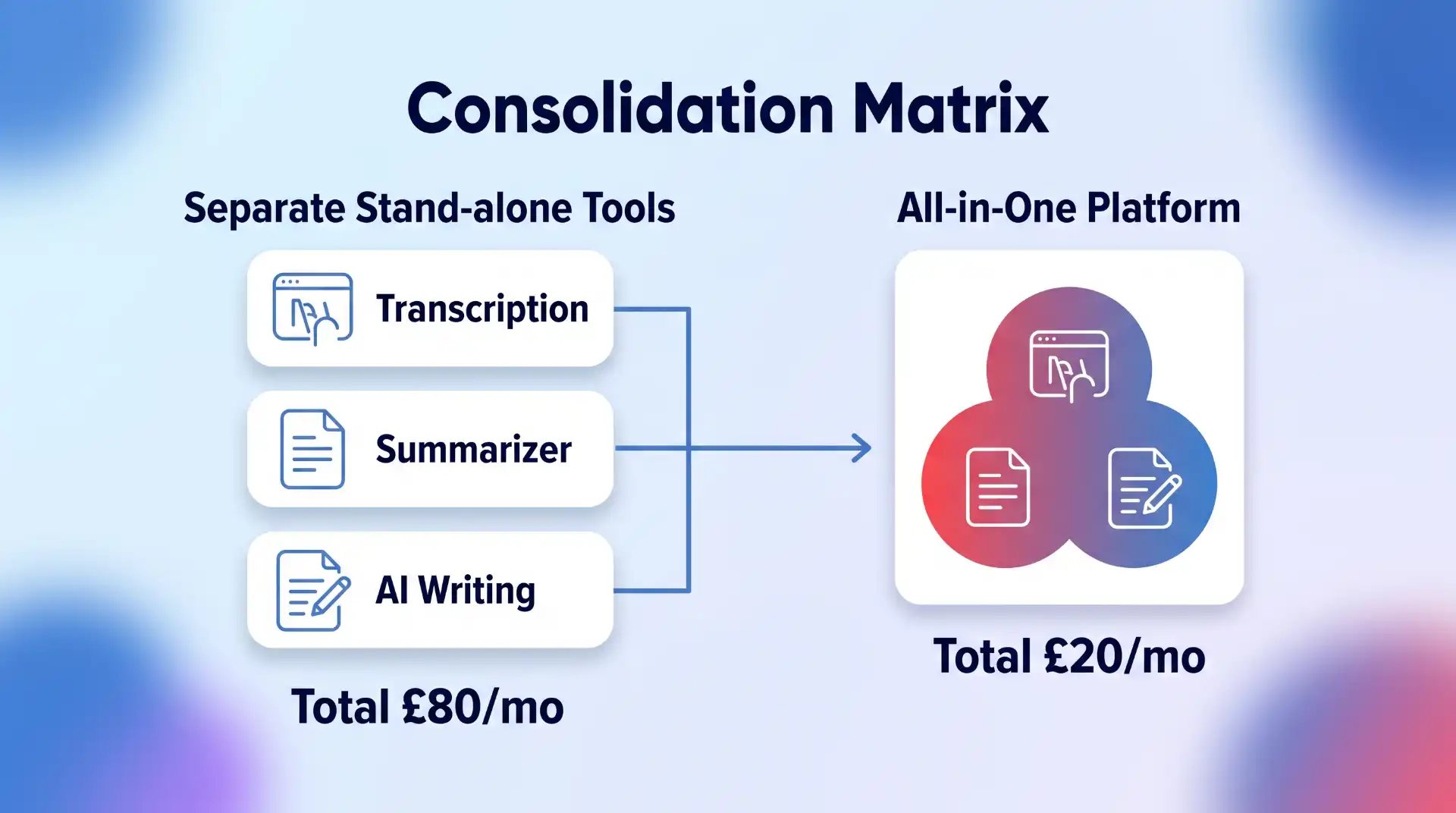
Software products rarely stay in their original lanes. Project management tools add document editing. Email platforms add CRM features. Design applications add AI image generation. SEO suites add content tools. AI platforms add research, coding and file analysis.
That means your software subscriptions may now overlap considerably.
Advertisement
Imagine paying separately for:
A meeting transcription tool
An AI assistant
A writing tool
A research platform
A document summariser
Two years ago, that might have made sense.
Today, one or two products may cover most of those jobs.
Go through the software you use and look at what each platform can actually do now, not what it could do when you first subscribed.
Advertisement
You might find that an existing subscription has quietly made another one redundant.
Do Not Replace Good Software Just Because Something Cheaper Exists
There is a trap at the other end of software cost cutting.
The cheapest subscription is not automatically the best value.
Suppose you pay £50 a month for software that saves five hours of work. Replacing it with a £20 alternative that adds two hours of manual work is unlikely to be a sensible saving.
Advertisement
Time has a cost too.
When comparing software subscriptions, consider:
Reliability
Time saved
Ease of use
Integrations
Support
Security
Export options
Collaboration features
Training required
Switching costs
This is especially important for software deeply embedded in a workflow.
Moving from one password manager to another is relatively manageable. Migrating a company CRM, automation stack or email marketing system can be considerably more disruptive.
Save money where the difference is largely financial. Be more cautious where the cheaper option creates operational problems.
Advertisement
Compare Monthly and Annual Software Plans
Once you know a product is staying, check how you are paying for it.
Many software companies charge less when customers pay annually rather than monthly.
The discount can be worthwhile, but only if you are confident you will use the software for most or all of the next year.
This creates a useful rule:
Advertisement
Use monthly billing while testing. Switch to annual billing once the software has proved itself.
Monthly plans cost more, but the flexibility has value when you are still deciding whether a product belongs in your workflow.
Annual billing makes more sense for established subscriptions.
If you have used the same software every week for three years and have no intention of replacing it, paying the monthly premium purely for flexibility probably achieves very little.
Advertisement
Check the actual saving before committing. Some annual discounts are substantial. Others barely justify paying twelve months upfront.
Compare the Real Annual Cost
Software pricing pages can make comparisons unnecessarily difficult.
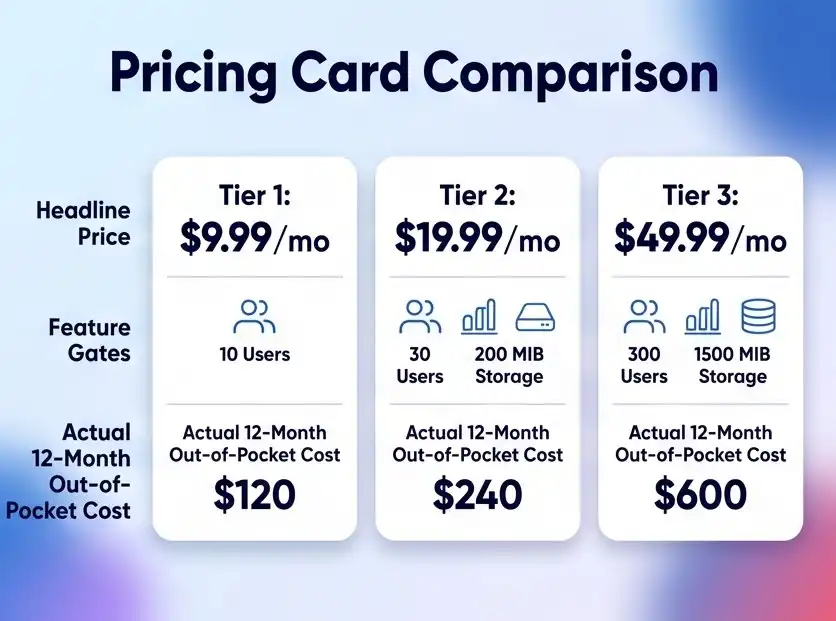
One service advertises “$9.99 per month” but requires annual payment. Another charges £14 monthly with no commitment. A third has a cheap starting plan but locks important functionality behind the next tier.
Compare the cost you will realistically pay over twelve months.
Advertisement
For example:
Software A: £10 per month billed annually = £120 upfront
Software B: £13 per month = £156 annually
Software C: £8 entry plan, but £16 for the features you need = £192 annually
Advertisement
Software A is cheapest in that example, but only if you are comfortable committing for the year.
The headline monthly price is not enough.
Look at the plan you actually need, billing frequency, taxes where applicable, user limits and any usage charges.
Review Your Pricing Tier
You may not need to change software at all.
Advertisement
You may simply be on the wrong plan.
Upgrades tend to happen for specific reasons. A team needs one premium feature. Storage reaches a limit. A business needs more users. An email list grows.
Months later, circumstances change but the expensive plan remains.
Look at the tier below your current subscription and ask what you would genuinely lose by downgrading.
Advertisement
Pay particular attention to:
Storage
Usage allowances
Number of users
AI credits
Export limits
Automations
Integrations
Reporting
Support levels
If you use premium features every day, keep them.
If you are paying an extra £40 a month for something nobody remembers using, downgrade.
Check Per-User Software Costs
Per-seat pricing can become expensive quickly.
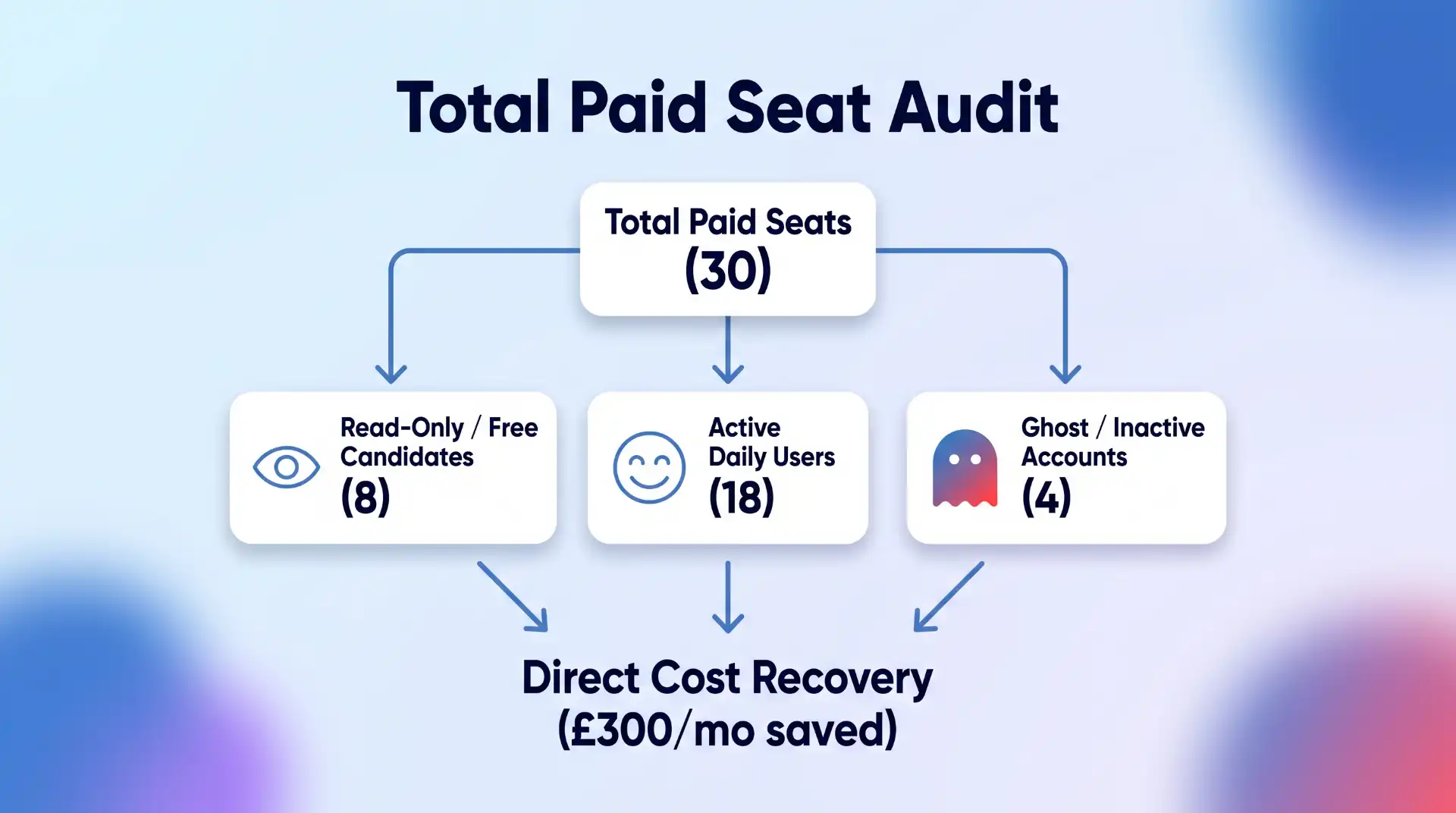
A tool that costs £25 per user looks reasonable for a team of three. At 30 users, it becomes £750 every month.
Advertisement
Regularly check who actually needs a paid account.
Former employees, temporary contractors and inactive team members sometimes remain on paid licences long after they stop using the software.
You may also find that some users only need view access or a free account.
For each major platform, compare the number of paid seats with the number of active users.
Advertisement
This is one of the simplest ways businesses can reduce software subscription costs without affecting productivity at all.
Be Careful With AI Subscription Creep
AI software deserves special attention because this market is moving unusually quickly.
It is easy to accumulate separate subscriptions for:
Writing
Research
Coding
Image generation
Video
Presentations
Transcription
Meeting notes
Search
Data analysis
The problem is that these categories increasingly overlap.
An AI platform you already pay for may have added a feature that makes a separate subscription unnecessary. Likewise, the specialist product may still be significantly better and worth keeping.
Advertisement
The point is not to consolidate everything automatically.
It is to keep checking.
AI tools can change considerably within a few months, so treating the software stack as something you review once a year may be too slow.
Compare Alternatives Before Every Major Renewal
Renewal dates create a natural opportunity to check the market.
Advertisement
If a software subscription costs £20 a month, you may decide that extensive comparison shopping is not worth your time.
If it costs £2,000 a year, the calculation changes.
Before renewing an expensive subscription, check:
What does the current plan cost now?
Has the price increased?
Are you still using all the features?
What do competing products offer?
Would switching create significant migration costs?
Is there a lower tier that now meets your needs?
Software markets change quickly.
The product that represented exceptional value three years ago may no longer be the obvious choice.
Advertisement
Equally, switching simply because a competitor is £5 cheaper is rarely worthwhile. Look at the whole package.
Look for Software Discounts Before Buying
Once you have decided which software you actually want, check whether you need to pay the full advertised price.
Depending on the product, there may be:
Annual billing discounts
Introductory offers
Student pricing
Startup programmes
Nonprofit discounts
Partner promotions
Seasonal sales
Bundled plans
Cashback offers
This step should come after choosing the software.
Buying the wrong product because it has a 30% discount is not saving money.
Advertisement
But if you were going to purchase the subscription anyway, there is little reason to ignore an available saving.
Platforms such as Rewardio offer cashback on software and digital subscriptions across categories including AI tools, marketing software, hosting, VPNs and other online services. Checking for cashback before going directly to the software provider can reduce the effective cost of a subscription without requiring you to switch to a different product.
That can be particularly useful for recurring software you already know you need.
Understand the Difference Between a Discount and Cashback
These are not quite the same thing.
Advertisement
A traditional software discount reduces the purchase price before you pay.
Cashback generally means you make an eligible purchase and receive part of the transaction value back afterwards.
For example, imagine a subscription costs £100.
A 20% discount might reduce the checkout price to £80.
Advertisement
A 20% cashback offer could mean paying £100 initially and receiving £20 back later, subject to the terms of the offer.
The economic result can be similar, but the process is different.
Always check:
Eligibility
Whether the offer applies to new or existing customers
Whether cashback is one-time or recurring
Minimum payout requirements
Tracking requirements
Excluded plans or products
Do not assume every offer works the same way.
Check Whether You Are Paying More Through an App Store
Some software subscriptions can be purchased either directly from the provider or through an app marketplace.
Advertisement
Compare the options.
Pricing, available plans and billing arrangements may differ depending on where the subscription originates.
Buying directly can sometimes give you more control over account management, billing and promotions.
There are also situations where an app-store subscription is more convenient, particularly if you actively manage multiple subscriptions through one account.
Advertisement
Convenience has value. Just make sure you know what you are paying for it.
Use Free Plans Strategically
Free software is not only for people who cannot afford paid tools.
Sometimes the free tier genuinely covers everything you need.
This is particularly common with:
Advertisement
Password managers
Cloud storage
Project management
Design tools
VPNs
Analytics
Note-taking apps
Developer tools
The mistake is assuming that “premium” automatically means “appropriate.”
For example, if you are choosing security software or a VPN, the decision should be based primarily on whether the product provides the privacy, performance and security features you need. BlogTheTech’s guide to Android VPNs is a good example of a category where both free and paid options can make sense depending on what you expect from the software.
Start with your requirements.
Then determine whether the paid tier actually solves a problem the free version does not.
Cancel Free Trials Properly
Free trials are useful because they reduce the risk of testing software.
Advertisement
They also have a tendency to become permanent subscriptions.
Whenever you begin a trial, immediately record:
Trial end date
Renewal price
Cancellation deadline
Whether payment details were required
Set a reminder several days before the trial converts.
That gives you time to decide properly rather than discovering the charge after it happens.
If you already know within two days that you do not want the product, cancel it immediately. Many services allow you to continue using the remaining trial period after cancellation.
Advertisement
Negotiate Business Software Contracts
Consumers generally pay the listed software price.
Businesses often have more room to negotiate, particularly when buying multiple licences or higher-value subscriptions.
If you are dealing with sales rather than simply entering card details at checkout, ask.
Questions worth raising include:
Advertisement
Is there a discount for annual payment?
Is there a better price for multiple seats?
Can unused features be removed?
Are there startup or small-business plans?
Is there a retention offer available?
What happens if we reduce our seat count?
Can the renewal price be fixed?
The larger the contract, the more worthwhile this becomes.
Do not assume the initial quote is necessarily the final commercial offer.
Watch Out for Introductory Pricing
A cheap first year can disguise a much more expensive long-term subscription.
Hosting companies, security software providers and other digital services sometimes advertise substantial introductory discounts.
There is nothing wrong with taking the deal.
Advertisement
Just check what happens afterwards.
If a service costs £30 in year one and renews at £120, think of it as a £120 subscription with a first-year promotion, not a permanently cheap £30 product.
Put the renewal date and standard price in your subscription list.
That prevents next year’s invoice from becoming an unpleasant surprise.
Advertisement
Do Not Ignore Software Bundles
Bundling can save money when you genuinely need several products from the same provider.
Perhaps one subscription combines:
Cloud storage
Email
Office software
Video calls
Or:
VPN
Password management
Security monitoring
Or:
Design
Photography
Video editing
Compare the bundled price with buying the components separately.
But apply the same rule as every other discount: only count features you would otherwise pay for.
A £50 bundle containing £200 worth of software is not a bargain if you only use one application that would cost £20 on its own.
Advertisement
Calculate the Cost Per Use
For smaller subscriptions, a useful test is to look at cost per use.
Suppose you pay £25 per month for a tool.
If you use it every working day, the cost per use is tiny.
If you open it twice a month, you are effectively paying £12.50 every time you use it.
Advertisement
That does not automatically mean you should cancel it. Specialist software used occasionally can still provide substantial value.
But cost per use forces you to think about whether the subscription model makes sense.
If you only need something occasionally, look for:
Pay-as-you-go alternatives
Monthly cancellation
Free versions
One-time purchase software
Open-source alternatives
A permanent recurring subscription is not always the right purchasing model.
Schedule a Software Subscription Audit Twice a Year
Software costs become difficult to control when nobody revisits them.
Advertisement
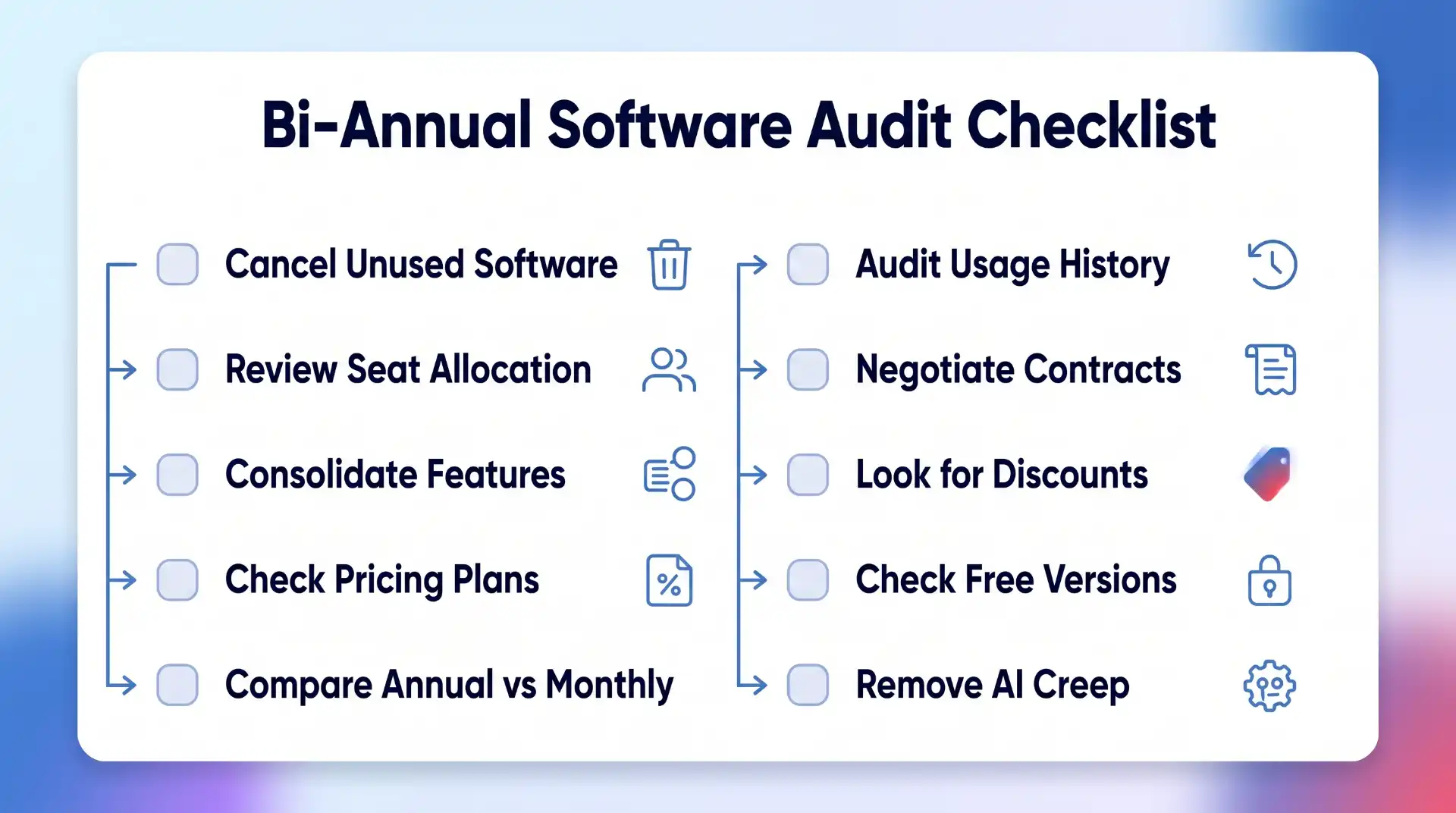
Put a recurring review in your calendar every six months.
During the review:
Cancel unused software
Remove inactive users
Check for duplicate functionality
Compare pricing tiers
Review expensive renewals
Check annual versus monthly pricing
Evaluate new alternatives
Remove unnecessary AI subscriptions
Check available discounts and cashback
Update renewal dates
For a business with a large technology stack, quarterly reviews may make more sense.
The process does not need to become bureaucratic.
Advertisement
You are simply asking whether each recurring payment still deserves to recur.
The Goal Is Better Value, Not Fewer Subscriptions
There is nothing inherently wrong with paying for a lot of software.
A developer may need several professional tools. A marketer might rely on paid SEO, analytics, design and email platforms. A business may run almost entirely on cloud applications.
Those subscriptions can be excellent investments.
Advertisement
The waste appears when software remains on the bill after it stops providing enough value.
So do not judge your software stack by how short you can make it.
Judge it by how much useful work you get for what you spend.
Keep the tools that save time, protect your data or help you earn money. Cancel the ones you forgot about. Consolidate genuine overlap. Use annual pricing where commitment makes sense. Compare competitors before major renewals. Check discounts and cashback before paying full price.
Advertisement
Software subscriptions are unlikely to disappear.
That makes learning how to manage them properly increasingly important.
A few small changes across several recurring subscriptions can produce meaningful annual savings, without giving up any of the technology you actually rely on.
Quick Share is a useful tool for flipping files between Android smart phones in a fuss-free wireless manner. [unrealJune] has now implemented the feature on Kindle devices.
You’ll need a jailbroken Kindle to use this, which is running the Kindle Unified Application Launcher and KOReader as well. You’ll also want SSH access, and a machine that has Go and Docker for you to build the project. [unrealJune] steps through the steps to compile and install the Quick Share plugin to KOReader, as well as explaining how it works. Notably, it’s receive only—so you can spit files onto the Kindle, but you can’t send them from the Kindle to other devices. The Kindle will also automatically accept files, which is worth noting if you’re security conscious. If there’s no network, the Kindle is also able to appear as its own AP if needed.
Think of this as a nifty convenience if you find yourself regularly trying to truck files on to your jailbroken Kindle. It’s also a neat to see a Quick Share implementation from the open source world. Between-device sharing still sucks, as we’ve discussed before, but there are at least attempts being made to make it better. That’s something!
Produced by Nick Matzke of Bayview Audio, “Beyond the Room” has been created to showcase the movement, dynamics, impact, and scale of high-performance home cinema systems.
“Beyond the Room” pays homage to a part of CEDIA many in the industry remember: discovering new demo material at the show, taking it back to the showroom, and having something exciting to put in front of customers. “Beyond the Room” brings that tradition back, reimagined for a new generation of listeners to discover the excitement of the classic demo disc.
As part of the Paragons of Home Cinema – Episode II 9.4.6 Channel System CEDIA Sound Room 7 experience, attendees will hear a special edition of “Beyond the Room” to open the Paragons demo. From there, the Paragons presentation will continue with a curated selection of additional clips chosen to showcase the very best in audio and video performance from NextLevel speakers, NextLevel Acoustics, and components by Lumagen, Christie, Storm Audio, Stewart Filmscreen, SpeakerPower, Simplified Acoustics, and Cinemotion Posters.
Advertisement
Why “Beyond The Room” Was Created
Rather than relying on typical regurgitated movie clips, “Beyond the Room” was created as dedicated demonstration content, with movement around and above the listener, powerful low-frequency moments, and precise placement of effects and large-scale transitions designed to make the room disappear.
“One of the things we always loved about CEDIA was finding a great new demo and bringing it back to share with friends, family, and customers,“ said Lee Weber, Co-Owner of NextLevel Acoustics. “That was the inspiration behind “Beyond the Room”. We wanted to create something people would be excited to experience at the show—and just as excited to bring home and play in their own theaters.“
In addition to the Paragons of Home Cinema Episode II demo in Sound Room 7, Beyond the Room” will also be featured at CEDIA Expo Booth 1346.
NextLevel Acoustics “Beyond The Room” FAQs
What is Beyond The Room?
Advertisement
Beyond the Room is an original 90-second demo created by NextLevel Acoustics as a modern tribute to the demo discs once handed out at shows like CEDIA. It has been designed as a fun, impactful way for dealers, calibrators, and enthusiasts to show off, demonstrate, and enjoy their surround sound systems.
How is Beyond The Room related to the Paragons of Home Cinema – Episode II demo in Sound Room SR7 at the 2026 CEDIA Expo?
In addition to providing all of the loudspeakers being featured in SR7, NextLevel Acoustics has created a special 1-minute, 47-second Paragons of Home Cinema – Episode II-branded edition of “Beyond the Room” that will serve as the opening segment of the SR7 presentation. Once the introductory clip concludes, the SR7 demo will continue with a curated selection of movie clips via Kaleidescape.
Advertisement. Scroll to continue reading.
Advertisement
When and where can I get “Beyond the Room” for dealer, calibrator, and home theater enthusiast use?
“Beyond The Room” will be available beginning September 2nd via the NextLevel Acoustics website, QR codes distributed at CEDIA for downloadable copies, and a limited number of physical copies (USB Drives) available at Booth 1346. Additional special editions and alternate versions are forthcoming. “Beyond The Room” will be available in the MP4 and MKV video formats.
Bottom Line
One of the great things about attending Audio and AV Tradehows, such as CEDIA, is taking in all the great demos that show off the latest and greatest speakers and components. However, after all the excitement dies down, many times all we have are memories of what we saw and heard.
In the past, one of the things that attendees and press always looked forward to was getting their hands on DTS, Dolby, THX, and other demo discs that they could use to test and show off the latest gear at dealers and at home.
Advertisement
The most popular test and demo discs available these days for testing and showing off gear are from Spears and Munsil and Trinnov. For 2026, Next Level Acoustics is joining in with a demo that takes users “Beyond The Room,” putting your speakers and components to the test in a home theater environment.
We won’t know the specific nature of the original audio demo clips that NextLevel that “Beyond The Room” will provide until its debut and availability begins on Sept 2nd, 2026.
China holds more than 97pc of the burgeoning humanoid robotics market despite lacking big budget VC attention.
Investors rushed to back China’s first publicly listed humanoid maker Unitree Robotics, sending the company’s share price surging by 460pc in its Shanghai trading debut today (19 August) after it raised $904m in its initial public offering (IPO).
At the peak of the spike, Unitree’s shares rose by nearly 630pc of their IPO price of 150.80 yuan – or roughly $22 – to 1,100 yuan. That figure is now down to 845 yuan.
The company said it plans to invest roughly 4.2bn yuan ($620m) from the IPO proceeds into research, innovation and development projects, and a robot manufacturing base.
Advertisement
Around 20pc of the company’s offering was allocated to select private investors, including Chinese AI research lab DeepSeek and state-owned enterprises including China National Petroleum and China Telecom.
DeepSeek has invested $20.8m in Unitree in exchange for 2.31pc of its shares. The companies have agreed to jointly develop AI models for humanoid machines.
Unitree’s prospectus showed revenue rose to 1.7bn yuan in 2025 from 392.77m yuan in 2024, with humanoid robot shipments exceeding 5,500 units in 2025.
Unitree’s listing comes amid China’s continued dominance over global humanoid robotics, with recent reports suggesting that the country alone holds more than 97pc of the burgeoning market, while also representing more than 85pc of global demand. The sector is expected to grow from nearly $5.5bn this year to more than $50bn by 2035.
Advertisement
Shanghai-based Agibot recently overtook Unitree to become the world’s largest humanoid robot vendor, capturing 44pc of the global market. Together, the two vendors account for 75pc of humanoid robot sales across the world. Behind the two leaders are Beijing-based Galbot, Shenzhen’s Ubtech and Guangdong-based Leju.
Growing advancements in physical AI are helping prove humanoids’ place in industrial settings, as global sales surged 272pc in a year, with shipments growing 14,000 units in the first half of 2026.
Venture capital funding into physical AI – the same technology behind robotaxis, drones, sensors and other industrial automation capabilities – reportedly surged fourfold in the first half of this year, compared to the six months beforehand, totalling more than $47bn across 521 deals.
Combined funding in this space between 2022 and 2024 amounted to $41.9bn, highlighting investor belief in the industry’s maturity.
Advertisement
Major VC investments in this space this year included Waymo’s $16bn Series D, defence company Anduril Industries’ $5bn raise, Germany’s Neura Robotics’ $1.4bn Series C and the UK’s Wayve securing $1.26bn.
AI2 Robotics, a Shenzhen-based start-up building wheeled humanoid robots with five-fingered hands, raised roughly $881m.
China’s humanoid advantage comes as a result of its vast network of component manufacturers and production capacity. Along with government support, this network is able to quickly develop and implement newer technologies with the economies of scale.
JP Morgan data finds that a typical humanoid robot’s materials cost roughly $46,000 in China versus $131,000 in the US. China also produces about 70pc of the global supply of actuators, a key component type in humanoids that can account for up to 50pc of a unit’s total cost.
Advertisement
Don’t miss out on the knowledge you need to succeed. Sign up for the Daily Brief, Silicon Republic’s digest of need-to-know sci-tech news.
Google is making Pixel Screenshots more useful with a new update that adds date, collection and app filters. These changes give Pixel users more control over a growing screenshot library, making it easier to find specific images without relying solely on text search.
The update arrives alongside the Pixel 11 series and expands the existing “Filter screenshots” menu. Previously, the menu was limited to tags such as Places, Articles, Events, Notes, Receipts and Tracking info.
With version 1.26.281.05, users can now filter screenshots by date range, with options covering the past 24 hours, seven days, 30 days, six months and one year. There’s also a Custom option that lets you specify a particular period when the preset ranges aren’t enough.
Google has also added Collections as a filter. Rather than opening collections individually, you can now use them to narrow down the screenshots shown in the main feed. The same filtering options are available within Collections, too.
Advertisement
The third addition is Sources, which lets you filter screenshots by the application they came from. Pixel Screenshots already records the source app and displays it in the bottom-right corner of each screenshot. Therefore, this update essentially makes that information more useful when searching through your library.
Advertisement
Together, the new filters should make it much easier to work through a large collection of screenshots. They also complement the app’s existing text search. This gives you another way to narrow down results when you know roughly when a screenshot was taken or which app it came from.
There aren’t any other major changes in this update. The previous Pixel Screenshots update, released in June, added cloud-based Private AI Compute for processing. It also introduced a “Use mobile data when processing” toggle in Settings.
Advertisement
Google is rolling out version 1.26.281.05 through the Play Store, and the update is already live on Pixel 10 devices.
Broadcom’s VCF-or-nothing licenses are coming to Azure
Microsoft has signalled it will end one of the last remaining ways to acquire VMware products outside of a big bundle.
Redmond’s main offer for Virtzillains is the Azure VMware Solution (AVS), a cloudy affair that includes vCenter, vSAN, vSphere, and NSX and licenses for them all – but not the Software-Defined Datacenter Manager tool that Broadcom uses to package its wares into a centrally-manageable hybrid cloud in its flagship Cloud Foundation (VCF) suite.
Advertisement
Since acquiring VMware, Broadcom has gone all-in on VCF and no longer sells a standalone low-end server virtualization product. The Register understands the VMware channel and sales team almost never sell licenses for vSphere Foundation, a bundle that’s useful on the edge or branch office, unless it’s part of a bigger deal that includes VCF.
Services like AVS therefore represent an alternative for orgs that want to keep using VMware, but don’t want to jump to VCF.
Broadcom isn’t keen on licensing anything other than the entire VCF bundle and made that plain with licensing changes that mean its hyperscale partners are not allowed to sell VMware licenses. The code-and-chips shop therefore requires customers to bring their own VCF licenses to any cloudy VMware service.
Microsoft this week announced that it will therefore retire the license-included version of AVS, and that customers who use the service will need to acquire a VCF license and move to a different Azure arrangement by August 30, 2027.
Advertisement
The Windows giant said it will stop selling license-included AVS from October 31, 2026 and warned users to start planning a move because their current rigs won’t work in the future.
“Allow plenty of time to purchase VCF licenses from Broadcom and complete the transition to AVS VCF BYOL,” the company advises. “For customers evaluating modernization opportunities, start assessing current AVS environments immediately, and develop a transition roadmap to ensure you have ample time to exit AVS and avoid service disruption on August 31, 2027.”
Broadcom announced the requirement for BYOL licensing late last year, and other hyperscalers have already adopted it, so VCS users should have had an inkling that change was coming.
For some, this will not be their first recent VMware migration, as Broadcom has twice made changes that meant smaller cloud providers had to discontinue service, making a move to an alternative provider or platform necessary.
Advertisement
Broadcom doesn’t mind much if smaller VMware customers move to another server virtualization vendor: it unashamedly focuses on larger customers it thinks will get the most benefit from VCF and points to most of its target customers acquiring the suite, and increased VMware revenue, as evidence its strategy is working. ®
The past 18 months have seen a significant number of health issues, perhaps crises, arise in America. Measles, cyclosporiasis, whooping cough, and more have all been in the news. RFK Jr. is either stroking his pet conspiracy theories alongside Trump, or else he’s completely out to lunch. In the meantime, Kennedy is also continuing to sow doubts about vaccines generally, while also trying to claim he’s not, which helped result in a Trump executive order to reduce vaccination schedule recommendations for children. It’s as though this administration saw before it a four alarm fire and asked out loud, “How can we make this worse?”
The Centers for Disease Control and Prevention on Monday released data on the vaccination rates of US kindergarteners in the 2025–2026 school year, revealing that rates have once again decreased from the previous school year.
Vaccination rates have been slipping since the 2019–2020 school year, when the US had obtained rates of around 95 percent, the threshold needed to keep outbreaks of vaccine-preventable diseases from spreading in communities. The latest data shows the US is moving further away from that target.
Nationally, only 92.4 percent of kindergartners were vaccinated with the measles, mumps, and rubella (MMR) vaccine in the 2025–2026 school year, down from 92.5 percent last year. Coverage with the DTaP vaccine, which covers diphtheria, tetanus, and acellular pertussis (whooping cough), similarly fell from 92.1 percent to 92.0 percent.
Advertisement
This is bad quite generally, but it’s not equally bad in every state. And it’s very easy to demonstrate that state and local policies when it comes to vaccine requirements for school and the availability for non-religious exemptions are having quite the effect. This data is partially from the last school year, for instance, but it does a nice job highlighting the differences between states. In California, where exemptions face relatively tight requirements, 95.7% of kindergartners had the MMR vaccinations. In Florida, where the DeSantis administration has attempted to end all vaccination requirements for public schools, 88.9% of kindergartners had their MMR vaccinations.
The messaging from state and local leaders matters. The same is true for federal leaders. Public and health policy matter. And when we fall below herd immunity vaccination levels, the consequences are, well, precisely what we’re seeing out in the American wild at the moment.
If the overall number of exemptions exceeds 5 percent in any given location, it means that the location will not be able to achieve the 95 percent coverage target. Currently, 24 states have exemption rates at or above 5 percent. That’s up from 14 states in the 2023–2024 school year.
The data lands as vaccine-preventable diseases continue to rise and spread in the US. The country is on the verge of losing its measles elimination status as cases have reached a 34-year high and are still ticking upward. Last week, President Trump and Kennedy continued their efforts to undermine childhood vaccines, announcing an executive order to reduce the number of recommended vaccinations. The order has no scientific basis, and at a White House signing event, Trump and Kennedy spread vaccine falsehoods, misinformation, and disinformation.
This will get worse before it gets better, in other words. And the only real question is how many people have to get sick and/or die before we correct course.
In almost every respect, the KEF LS Luxe is one of the best pound-for-pound wireless stereo speaker systems you can buy. Take care with positioning, accept the stands are less optional than KEF suggests, and deeply satisfying performance is basically guaranteed
Eloquent, balanced and assertive sound
Impressive specification includes a startling amount of power
Standard of build and finish cannot be argued with
Require careful positioning
Optional stands are not all that optional and quite expensive
More colour-dependent than most speaker designs
Key Features
Introduction
Having established something approaching domination over most of the wireless stereo speaker system market below the £2.5K price-point, KEF has set its sights further upmarket.
Advertisement
Is the LS Luxe set to continue the company’s many successes, or is it a triumph of questionable style over substance?
Design
Another KEF/Ross Lovegrove collaboration
Choice of three finishes
Bulk moulding compound allows for quite a complex cabinet shape
Advertisement
Not for the first time and not, I’m sure, for the last, a design collaboration between KEF and Ross Lovegrove has resulted in a swoopy, almost organically curvaceous product that sits at one remove from pretty much all of its nominal competitors.
The smooth, seamless, edgeless shape of the LS Luxe is possible thanks to the use of BMC (bulk moulding compound) in its construction – and the shape makes the cabinet less prone to the build-up of internal standing waves compared to boxier cabinets, too.
It also requires less internal bracing than a more traditional cabinet, which means there’s greater internal volume that is usually the case in an enclosure of these dimensions.
Advertisement
Image Credit (Trusted Reviews)
There’s some additional visual drama at the front and the rear of the cabinet, too. The front is dominated by the Uni-Q driver arrangement that’s discussed in the features section of this review, while at the rear there’s a quite complex aluminium heat-sink arrangement that uses its relatively large surface area to efficiently dissipate the heat generated by the internal electronics.
There’s also a quite sizable bass reflex port on the rear, too – its use of KEF’s Flexible Port Technology, which means the walls of the port are slightly pliant, ought to help keep internal resonance minimised.
Advertisement
The bespoke S-Luxe speaker stands are quite pricey (£799 / $799 / AU$1199), but if only for aesthetic reasons they’re worth considering.
Image Credit (Trusted Reviews)
I put the speakers on a pair of perfectly decent Soundstyle Z2 stands during this test, and they work well in sonic terms – but the way the speakers curve and taper towards the bottom of their cabinets means a lot of the (standard) top-plate of the stand is visible. It’s an inelegant look and not really in keeping with the carefully realised design of the system.
The speakers themselves are available in three finishes: dusk titanium, mineral white and the eclipse black of my review sample. I’ve seen all three, and I think it’s fair to say the LS Luxe are more colour-dependent than the vast majority of loudspeakers.
Advertisement
For my money, ‘eclipse black’ is not especially successful – it makes the speakers look lumpier than either of the other two finishes. Of course, you’re well within your rights to disagree.
Features
760 watts of power
12th-gen Uni-Q driver array
Plenty of connectivity
Advertisement
KEF’s Uni-Q driver technology that debuted back in 1988 is now a dozen generations old – and here the 12th-gen Uni-Q array consists of a 25mm aluminium tweeter behind an elaborate waveguide sitting in the throat of a 165mm aluminum mid/bass cone.
The idea behind this layout has never changed: it’s intended to deliver superior time-alignment and smooth driver integration. A rather more recent KEF creation, Metamaterial Absorption Technology, is positioned behind the tweeter where it negates the energy moving backwards from the tweeter dome and, in theory, allows for cleaner, purer treble response.
The driver module is mechanically isolated from the cabinet, and a decoupling chassis minimises vibrations from the motor system – in each case, reducing vibrations that might affect the cabinet structure is the idea.
Advertisement
Image Credit (Trusted Reviews)
Properly implemented, this arrangement ought to allow the driver array to deliver minimum distortion and maximum clarity. Elsewhere, the Velocity Control Technology first seen in KEF’s XIO soundbar, is on hand to measure the speed of movement of the mid/bass driver and compensate – in real time – for discrepancies in the expected and actual values. And tonal consistency at any and all volume levels is maintained by the company’s Music Integrity Engine.
KEF has given the LS Luxe plenty of power, and of two different types. Each tweeter is driven by 100 watts of Class A/B power, while each mid/bass driver gets 260 watts of Class D amplification – a total of 760 watts feels like it really should be plenty, while frequency response of 42Hz – 28kHz seems more than adequate too.
Advertisement
Image Credit (Trusted Reviews)
You can take control of the LS Luxe in a couple of different ways. The system is supplied with a metal-fronted remote control handset that covers off the fundamentals like power, input selection and volume control.
More extensive control is available via the KEF Connect app that’s free for iOS and Android – as well as the usual playback stuff, it allows you to search for and store internet radio stations, integrate your favourite music streaming service(s), use Expert mode to fine-tune the system’s response in relation to the specifics of the space it’s in, check for firmware updates and plenty more besides. It can sometimes take a beat before it responds, but in general it’s a stable and usable interface.
Image Credit (Trusted Reviews)
Connectivity
Bluetooth and Wi-Fi
HDMI input
There are plenty of connectivity options when the time comes to get some audio information into the hands of all these technologies. Wireless options, all under the control of KEF’s W2 wireless platform, consist of Bluetooth 5.3 and dual-band Wi-Fi – the latter means the LS Luxe is compatible with UPnP, the Connect versions of Qobuz, Spotify and TIDAL, Google Cast and AirPlay 2.
Advertisement
Advertisement
Internet radio is also available, and Roon Ready certification is expected early in 2027.
The primary speaker is in charge of wireless functionality, and it’s also where all physical connections are. An Ethernet socket offers optimum network stability, and in addition there’s an HDMI eARC socket, optical and coaxial inputs, and a 3.5mm line-level analogue input too.
An RJ45 socket allows the primary to be physically connected to the secondary speaker, the USB-C slot turns out to be just for charging external equipment, and there’s a pre-out for use with a subwoofer too. The secondary speaker has the RJ45 and a pre-out of its own, too.
Image Credit (Trusted Reviews)
The KEF is capable with resolutions of up to 24-bit/384kHz PCM and DSD218 via any of its network inputs, and can support 24-bit/192kHz via HDMI and coaxial – the optical input tops out at 24-bit/96kHz.
Connect the speakers together using the supplied cable and all audio information is scaled to 24-bit/192kHz – this drops to 24-bit/96kHz if you connect the speakers wirelessly instead.
Advertisement
Advertisement
Sound Quality
Revealing, authoritative and balanced presentation
Excellent midrange communication
Not the outright scale of sound you might be expecting
There are a couple of small caveats to everything I’m about to say about the way the KEF LS Luxe performs – I’ll save them until the end, because the uncomplicatedly good stuff is much more fun to write about.
No matter which of the KEF’s inputs you utilise – wired or wireless, digital or analogue – it’s an admirably consistent listen. Even if lower-resolution content is easy to spot next to Hi-Res stuff, the character and attitude of this system never falters. In every circumstance, it’s a beautifully balanced, eloquently revealing and profoundly enjoyable listen.
A 24-bit/96kHz Qobuz Connect FLAC file of Frank Ocean’s Super Rich kidsreveals a lot of what makes the LS Luxe such a pleasant sonic experience. The amount of detail, both broad and fine, it’s able to tease out and contextualise is straightforwardly impressive – no aspect of the recording is too subtle or too minor to escape the KEF’s attention. And it’s not revealing of detail simply for the sake of it – it’s all in the service of the overall picture.
Image Credit (Trusted Reviews)
The tonal balance is just so, and the same goes for frequency response. In both cases, the LS Luxe seems more than willing to wind its neck in and let the music it’s playing dictate terms – nothing is added and nothing is taken away when it comes to tonality, and there’s a complete disinclination to over- or underplay any area of the frequency range.
Advertisement
Advertisement
Low frequencies hit hard and with tremendous solidity, but the system is no simple thumper – bass sounds are textured and varied, and there’s such grippy control of their attack that rhythmic expression is coherent and persuasive.
The top of the frequency range is just as authoritative and just as nicely realised – treble sounds have ample crunch and bite, but they’re never in danger of hardening, and they have more than enough substance to keep the reproduction balanced.
And in the midrange, where your hearing is at its most sensitive and discerning, the KEF system communicates in the most eloquent and expressive fashion – no transient escapes the LS Luxe, no element of a vocal performance is too nuanced to elude it.
Image Credit (Trusted Reviews)
There’s energy and drive to the way the system presents music, but it’s of the considered and grown-up type rather than the eyes out on stalks alternative. That’s not to say the KEF can’t throw down hard when needs be – big upshifts in volume or intensity or attack in a recording are tracked faithfully, and even when you think the system is playing quite loudly it’s always able to get louder still. And it can move through these gears effortlessly, with no sense of stress.
So yes, caveats. The soundstage the LS Luxe presents is not the biggest you’ve ever heard – it’s open and carefully laid out and properly controlled, but there’s not quite the outright scale you might have been anticipating. And that’s the best-case scenario – the KEF LS Luxe is about as sensitive to the way its speakers are positioned as any stereo system I’ve tested.
Advertisement
Advertisement
Unlike the vast majority of stereo speakers, which prefer a little toe-in towards the listener’s seated position, the KEF are much happier when positioned almost directly straight ahead – get the positioning wrong and both the width and the height of their presentation can be quite badly impacted. So be prepared to spend a little longer than you might have expected ensuring the speakers are facing exactly the right direction…
Should you buy it?
You want a well-specified, high-performing wireless stereo speaker system that’s in no danger of being mistaken for anyone else’s wireless stereo speaker system…
Advertisement
You have a perfectly good pair of speaker stands already and don’t see the point of buying another
Advertisement
Final Thoughts
I don’t think I’ve ever had as divisive a system in my listening room – everyone who’s seen the KEF LS Luxe while I’ve been testing it has had an opinion about it before they’ve even heard it.
Obviously I’m not here to explain why the design is good, bad or indifferent – you’ll have made your own mind up about it long before now. But when you consider how pedestrian and safe the vast majority of loudspeaker designs are, KEF should be congratulated on having the neck to deliver something a little bit different.
How We Test
I put the KEF LS Luxe on my pair of Soundstyle Z2 speaker stands, and plug each one into the mains. I listen with the speakers connected wirelessly, I listen when they’re physically joined together.
I stream music using Qobuz Connect and TIDAL Connect, and I also listen to a lot of very hi-res content from the Synology BeeStation Plus NAS device on a common network. I connect a preamplified Technics SL-1300G turntable to the analogue input, a Rega Apollo CD player to the coaxial input, and a Philips OLED TV to the HDMI eARC socket.
This way I’m able to access lots of different sorts of content, in lots of different digital file types, and in a wide variety of resolutions.
Tested for several days
Tested with real world use
FAQs
Is there a choice of finishes?
You can choose between eclipse black, dusk titanium or mineral white.
Advertisement
Can I connect a turntable?
As long as it’s preamplified – the single analogue input here is at line-level.
Are the speakers supplied with grilles?
Advertisement
Certainly not – why would you want to hide away the drama of that driver array?
Advertisement
Advertisement
Full Specs
KEF LS Luxe Review
Manufacturer
KEF
Size (Dimensions)
233 x 298 x 336 MM
Weight
10 KG
Release Date
2026
Driver (s)
25mm aluminium tweeter; 165mm aluminium mid/bass
Ports
3.5mm line-level analogue; digital coaxial; digital optical; Ethernet; HDMI eARC, 2 x subwoofer pre-out; USB-C
Audio (Power output)
760 W
Connectivity
Bluetooth 5.3; Apple AirPlay 2; Google Cast; Qobuz Connect; Spotify Connect; TIDAL Connect; UPnP






















































You must be logged in to post a comment Login