
Recently, while taking the metro to work, I encountered something that shocked me. The train was pulling up, just as the man in front of me tapped to pay to go through the gate, and a woman pushed past me to cut me in line. I still made the train (after I briefly considered acting in a way that would have made us both late for work), but as I passed each stop I got angrier and angrier. Why did she think her commute was more important than someone else’s? We learn to wait our turn when we’re children — why was that lesson lost all these years later?
Tech
The polite way to use your phone around other people, explained


I’m not the only one irritated by this kind of thing. Almost half of Americans say that they’ve noticed people are ruder in the wake of the Covid pandemic. Whether it’s poor behavior at the airport or blasting music from your phone with no headphones in public, it’s like people don’t know how to act anymore.
Kirsty Sedgman is a professor at the University of Bristol and the author of the book On Being Unreasonable: Breaking the Rules and Making Things Better. She argues that while people might not mind them as much anymore, manners are important.
“They encourage us to think about others and to behave in ways that are not antisocial and potentially even dangerous,” she told Vox. “How can we have these conversations so that we figure out what we all want social life and public space to be like in a way that benefits everybody and doesn’t accidentally exclude [anyone]?
While some etiquette rules are pretty self explanatory (let’s not cut in line!), others are more difficult to navigate. “I always try to make a point and I’m not perfect, believe me,” Sedgman said. “I’m not saying that I know how to behave in every single circumstance and I’m always right. I’m no Emily Post.”
Post was the socialite who literally wrote the book on the subject: Etiquette in Society, in Business, in Politics and at Home was first published in the 1920s. More than a century later, her family is still in the business of teaching us how to mind our manners.
Lizzie Post is Emily Post’s great-great granddaughter and co-president of the Emily Post Institute. That’s a title and pedigree that could come with a lot of pressure. But Post says it’s all about your audience. “A lot of times, as long as I don’t get the sense that they would prefer a very formalized version of me, I try to reassure people: laugh, joke, swear, it’s okay,” Post said.
Audience isn’t the only thing that’s changed — the times have too. How has etiquette shifted over the years? And how do we navigate newer things — like our phones? We find out that and more on this week’s episode of Explain It to Me, Vox’s weekly call-in podcast.
Below is an excerpt of my conversation with Post, edited for length and clarity. You can listen to the full episode on Apple Podcasts, Spotify, or wherever you get your podcasts. If you’d like to submit a question, send an email to askvox@vox.com or call 1-800-618-8545.
For a long time etiquette has just been something that’s agreed upon. You have to have certain manners to socialize in certain circles and within certain classes. But I think that’s changed. Why do you think that’s happened?
My great-great-grandmother wrote from 1922 to 1960. While she talked about the standards of the day, she also allowed those standards to change. Think about 1922 to 1960 — there were huge swings in how people behaved. Chaperones were gone from the book by her second edition. Life was changing and evolving and she changed and evolved with it.
Etiquette is a French word — it sounds fancy. I think that it can very easily have these connotations of being something that is about a secret society, or it’s only about formality, or it’s only for people who are very wealthy. It can also start to feel a lot like judgment.
One of the reasons etiquette can feel so out of sorts, particularly right now, is because times are changing and they’re just changing really quickly.
I think phone etiquette is really, really emblematic of that. One thing that is so common is people playing music or having their phone on speaker, no headphones. Do we just not know how to act when it comes to our phones?
There are definitely rules of courtesy and blaring anything out of your phone, whether it’s a phone call, it’s a FaceTime call, it’s your TikTok feed, or that movie that you’re watching, is all inappropriate when other people are a captive audience and haven’t asked to be.
It’s this mindful moment where people forget where they are. They’re so used to being in their own world with their phone six inches from their face that they forget that anyone can even hear what it is that they’re doing on their phone at that particular moment.
It’s really hard to correct this behavior because generally, we don’t correct other people’s behaviors.
I admit, especially in public spaces, I am Team Mind My Business. But at what point do you step in?
It’s a really tough judgment call, and it’s going to be different for every situation.
I think that when I am in a space that I’m only going to occupy for a short time, I am telling myself, “Mind my own business, don’t worry about it.” When it’s that train ride that we’re starting, or that four-hour flight that you’re on, I think we start to have to say something and to ask, “Hey, could you put some headphones on while you’re enjoying that or watching that or on your call?”
I say, “Could you,” because they might not have headphones with them, but even if they don’t, it’s a reminder. It’s like that check of awareness that, “Oh, this thing I’m doing is impacting people around me.”
Here’s the rub: You can’t control other people’s behavior. You cannot control if this person is going to get defensive. If you’re going to ask the question, be prepared for rudeness in return. And I hate saying that, but it is the reality. We can’t control other people’s behavior.
So there’s clearly a wrong way to use speakerphone and FaceTime. What’s the right way to use them?
We do a lot of talking on our speakerphones, even in our own homes. You might be moving from one room to another, passing through the living room where people are watching TV or you’re in the kitchen and all of a sudden a roommate has come into the room while you’re on a call that’s on speakerphone. You really want to let the person on the other end of the phone know that there’s other people present now.
My cousin is so good about this. He always tells his daughter when she gets into the car, “Hey, Aunt Lizzie is on the phone. Say hi to her.” Then I know to watch my language. She knows to say hi to her auntie. And that’s just so much nicer than all of a sudden having a voice pop up and realizing, “Oh my gosh, I was just telling a really personal story and I didn’t realize there was a bigger audience for it.”
What about having your phone on the table you’re at dinner? People feel very passionately about that one.
I am so bad about this one. I often have mine face down on the table. The funny thing is, I’m not looking for someone to call with an interruption, but it’s not good etiquette.
It is really best to have that phone put away, to make sure that it’s on silent and it’s not going to interrupt your time together. To have it there, especially face up where any message that comes in is now going to catch the attention of everyone at the table, that’s an unnecessary distraction.
Is there an obligation when you need to text someone back? Does it have to be within a certain time? You go about your day and the next thing you know, you look at your phone and you have 80 unread texts and it’s like, “Oh no, what do I do? My friends will all be mad at me.”
I wish there was, but it depends on the text itself.
The ones I don’t think you should wait on is when friends or potential romantic partners offer a time to get together. Don’t let that sit. If there’s a reason why you’re letting it sit, talk to someone about that. Say, “Oh, I’ve got to check with my partner about that. I know we had talked about doing something else Saturday at that time.”
Give them some kind of an understanding, because it’s a really beautiful thing to be invited to go spend time with someone. I think we want to treasure that a little more than we do in today’s age.

Continue Reading
from the dysfunction-junction dept
I’ve written a lot this year about how Republicans hijacked the $42.5 billion Broadband, Equity, Access, and Deployment (BEAD) program (created by the 2021 infrastructure bill) and immediately set about weakening oversight standards, eliminating enforcement of stuff like broadband affordability, speed, and equitable deployment, and making it a priority to heavily subsidize Elon Musk for LEO satellite broadband networks he had already planned to deploy anyway.
All of the chaos and changes have resulted in endless delays, and a lot of promising providers backing out of the BEAD program entirely. That includes electric cooperatives, many of which have been pushing affordable fiber optics into their existing, very rural electrical footprints.
The Trump NTIA process has been so filled with cronyism, delays, changes, new pointless regulations and chaos, a third or more of U.S. cooperatives say they’ll no longer participate:
“63 electric cooperatives across 27 states received provisional BEAD awards to offer reliable high-speed broadband to some of the most challenging eligible locations in the country. But delayed implementation and shifting guidance have created a program defined by uncertainty and confusion. Instead of accelerating deployment, continual revisions to the program have discouraged participation,” said Matheson.
“To date, 20 of the 63 electric cooperatives originally slated to participate in BEAD have withdrawn from the program. Many others are considering withdrawal, citing concerns over the application of extra-statutory pole attachment requirements as a condition of participation,” he added.”
Cooperatives are annoyed, in part, about new pole-attachment regulations the NTIA applied that make installations much more time-consuming and complex. The Communications Act explicitly exempted electric cooperatives and municipal utilities from federal pole regulation because such providers serve the public interest and are often the only ones willing to connect rural Americans.
Many incumbent telecoms control local poles, and make pole fiber attachment extra annoying to forestall competition. I’d suspect the new restrictions — from an administration that generally demonizes corporate oversight and regulation — are at the direct request of companies like AT&T, worried that popular cooperatives might gobble up market share in markets they theoretically could serve in the future.
It’s worth reminding you: Republicans spent the entirety of the last few years insisting that BEAD was a giant government boondoggle, and that once in office they’d fix it. This claim was routinely propped up by the likes of Ezra Klein at the New York Times, who hasn’t had a single solitary thing to say about U.S. broadband access policy in the two-years since Trumpism retook control of the program.
Congress originally set aside $42.5 billion to improve U.S. broadband. The Trump administration effectively tried to cut the program in half, insisting that Elon Musk’s expensive, congested satellite service would be “good enough” for a lot of these locations. The Trump administration then very clearly tried to wander off with the remaining money, and continues to be very murky about when states will receive it.
Fixing U.S. broadband requires a coordinated array of solutions. Some communities are helped by municipally-owned broadband. Some are helped by the local electrical cooperative getting into fiber and expanding cheap fiber access to rural communities. Others are best served by public-private partnerships between local governments and private providers.
The Trump administration’s BEAD changes have worked tirelessly to redirect a lot of money away from these popular, highly localized solutions, and funnel as much money as possible into the back pocket of incumbent monopolies like AT&T and Comcast, or billionaires like Elon Musk.
Other smaller and mid-sized providers are increasingly backing away from participating in the program entirely, either because of new restrictions and delays, or because the cost of deployment is skyrocketing due to wars, tariffs, and other Trump bumbling. As more BEAD bidders back away from participation or existing awards, more and more money will be funneled to Musk for substandard service so Trump Republicans can pretend the problem of U.S. broadband access has been “fixed.”
In states like California, Trump officials are insisting that California won’t receive any of its already-scheduled $1.86 billion BEAD grant award if they do literally anything telecom monopolies don’t like, whether that’s holding big telecom affordable for high prices, or enforcing the state’s net neutrality law.
It’s a cronyistic mess that’s starting to see growing bipartisan anger even in states like Texas, and it’s poised to get much, much louder as the long-delayed money to states truly begins to flow next year. Right now, a lot of people in state broadband policy are hesitant to publicly comment because they’re worried the Trump administration will sever their grant awards entirely.
Filed Under: bead, broadband, cronyism, delays, elon musk, fiber, high speed internet, ntia, telecom

Sony’s new ULT range of speakers stretches from the relatively manageable $450 ULT Tower 5 to the frankly ridiculous $1,200 ULT Tower Max. Sitting between them is the ULT Tower 7, with excellent sound, an ample selection of inputs, a combined 420 watts of output, and a 30-hour battery. Be warned, though, while it’s smaller than the Tower Max, it is still absolutely enormous and weighs 50.3 pounds.
Most party speakers will accept music from a DJ controller, but Sony goes further with RCA and balanced XLR inputs, plus an XLR output for expanding a wired setup. Auracast-based Party Chain can also connect up to 100 compatible speakers, so you can go head-to-head with Madison Square Garden on volume.
Inside is an 11-inch woofer, two 4.7-inch midrange drivers, and four tweeters, including a rear-facing pair that spread audio around the room. Bass is deep and effective, and at close quarters with the volume cranked, I could really feel it. It’s not quite bone-shaking at the club levels, but it’s still impressive.
The 360-degree driver configuration helps sound spread out and avoid sounding too boxed in, and while the bass is still quite directional, I really enjoyed the scale and ease with which this speaker filled the room.
If you have the budget and space, and you want to play loud all night, the Sony delivers, but I do wish it had a retractable handle. The built-in corner handles are OK-, but you need to angle it sharply at an odd angle to engage the wheels, and trust me, you don’t want to carry this speaker by hand very far.
Best Compact Party Speaker
Nscale, a British neocloud, has secured $3.36 billion in financing ahead of its IPO later this year, the company announced on Friday. Structured as a convertible note, the massive funding round underscores the staggering capital required to build out AI data centers.
Led by hedge fund Third Point, the new investment includes $2.36 billion available to the company immediately and an additional $1 billion coming from existing investor Nvidia, which Nscale will receive in mid-November. The notes will convert into equity shares once the IPO is completed.
Nscale, which filed its IPO paperwork last week, is expected to be valued at $35 billion on the NYSE, Financial Times reported, and is seeking to raise $3 billion in the offering, according to Bloomberg.
Since it was spun out of Australian cryptocurrency mining company Arkon Energy two years ago, Nscale has amassed over $103 billion worth of contracts, according to its IPO filing.
The company is currently developing several large data center campuses, including in Norway and West Virginia.

A new limited-series crime drama executive-produced and starring Hugh Laurie is set to ring in the new year on Apple TV.
The eight-episode series follows Felix Carmichael, a crime boss betrayed by someone inside his own firm. Sent to the notorious Staplehurst prison, he’ll need to resort to brutality if he hopes to make it out.
This isn’t Laurie’s first time on Apple TV, either. The “House M.D.” veteran previously joined Apple TV drama “Tehran” during its third season.
In addition to Laurie, the series also stars Thandiwe Newton (“Westworld”), Fionn Whitehead (“Dunkirk”), Gina McKee (“My Policeman”), Hazel Doup (“Say Nothing”), Elliott Heffernan (“Blitz”) and Stephen Dillane (“Game of Thrones”). The series is created, written, and executive produced by “Hijack” creator George Kay.
The series will premiere on January 6 with the first two episodes. Remaining episodes will premiere every Wednesday through February 17.
“Wanted Man” joins other acclaimed Apple TV dramas, such as “Criminal Record,” which saw its second season premiere in April.
Tech
Judge Blocks White House Press Ban; White House Spends Thursday Testing How Much Of The Court Order It Can Violate
from the petty-censorial-tyrants dept
On Monday we wrote about Donald Trump’s direct attack on the First Amendment and the free press by banning reporters from the White House. As we expected, a judge on Thursday morning issued a Temporary Restraining Order, blocking the White House from continuing this unconstitutional action, though (as happened the last time Trump tried this) the court relied on Fifth Amendment due process rather than reaching the First Amendment question.
Plaintiffs are also likely to succeed in showing that their hard passes were revoked without constitutionally adequate due process. The “general rule” is that “individuals must receive notice and an opportunity to be heard before the Government deprives them” of a constitutionally protected interest…. Indeed, the Supreme Court has “described the root requirement of the Due Process Clause as being that an individual be given an opportunity for a hearing before he is deprived of any significant property interest.” Cleveland Bd. of Educ. v. Loudermill, 470 U.S. 532, 542 (1985) (citation omitted). Karem also holds that, because of the substantial interests at stake, before the Government can revoke the White House-issued hard pass of a reporter it must promulgate rules or standards governing the conduct that would lead to such revocation. See 960 F.3d at 665. And the reporter must “receive fair notice not only of the conduct that would subject him to punishment, but also of the magnitude of the sanction that the White House might impose.”
Trump’s favorite trick of declaring “national security” as an excuse to do whatever the hell he wants doesn’t work here either:
Still, on this record, Defendants offer little to back up their asserted national security interest to justify revocation of Plaintiffs’ hard passes. So this interest does not tilt these factors in their favor, especially given that Plaintiffs have shown a likelihood of success on the merits.
For one thing, nothing in the record that predates this suit suggests that the revocation of Plaintiffs’ hard passes was motivated by national security concerns. Certainly, that is not what President Trump said when he announced that he was “banning” Plaintiffs from the White House—instead, he focused on the alleged lack of truthfulness and negativity of Plaintiffs’ reporting.3 And even the justifications provided to Plaintiffs after this case was filed are ambiguous about the true purpose of the revocations: while Defendants’ letters to Plaintiffs mention national security concerns, they purport to identify reporting that “threatened national security and/or spread falsehoods,” leaving open the possibility that all the stories fall into the later bucket, rather than the former.
Of course, it wouldn’t be the Trump presidency if his White House didn’t start out by ignoring the TRO. According to Politico (one of the banned outlets):
A POLITICO reporter was denied access to the White House Thursday and his press credentials confiscated after a judge ordered the Trump administration overnight to immediately restore access for news organizations that President Donald Trump banned from the complex last week.
MS NOW and CNN said their reporters were also denied entry. The three outlets have been barred from the White House since Saturday, following an order from Trump to do so “as a result of their constant ‘reporting’ FAKE NEWS!”
And so, the news orgs rushed back to court to point out that the White House was violating the TRO, which judges generally don’t take kindly to:
Early this morning the Court issued a Temporary Restraining Order directing “that Defendants (except for President Trump) and their agents, representatives, and all persons or entities acting in concert with them shall immediately return, reinstate, and restore the White House ‘hard pass’ press credentials held by employees of CNN, MS NOW, and POLITICO that were revoked on or about September 18, 2026.” Dkt. 24 (the “Order”). This morning journalists from each of CNN, MS NOW, and POLITICO attempted to enter the White House and were turned away. A Secret Service agent confiscated the hard pass of journalists from all three organizations. And when Plaintiff Betsy Klein, whose hard pass was confiscated on Saturday, September 19, requested to have her hard pass returned, her request was denied and she was refused access to the White House complex.
The judge ordered the White House to respond to the non-compliance notice by 12:30pm, and quickly received a declaration from Micah Stopperich, the Director of White House Press Operations, that the passes had been restored as of 9:07am, and that previously confiscated badges had been dropped at the entry gate to return to the journalists they had been taken from. Yet reporters say they were still being turned away until around noon, well after that supposed 9:07am restoration. They eventually regained some access to the White House.
But hours later, journalists from two of the same outlets were turned away from the arrival ceremony for Trump’s state dinner with Xi Jinping. As MS NOW itself reported:
Hours after regaining access, MS NOW White House reporter Laura Barrón-López was denied entry Thursday evening to the arrival ceremony on the portico ahead of the White House state dinner for Chinese President Xi Jinping. MS NOW had requested credentials for the event but never received a response. A CNN producer and correspondent were also denied access. When Barrón-López asked why she was being turned away, a White House staffer told her to “talk to Steven,” seemingly referring to White House communications director Steven Cheung.
According to CNN, the White House told them that CNN could not send a reporter to cover Xi’s arrival, only a photojournalist and an audio technician. The White House will surely argue that credentials for a specific event aren’t the same as the hard passes covered by the TRO. But blocking the reporters while allowing only CNN’s camera crew (a restriction not imposed on any other network) is exactly the kind of petty gamesmanship that the pending preliminary injunction briefing will have to deal with.
It’s unclear how the White House thinks any of this helps. It’s unconstitutional, and it makes the administration look petty: An administration that insists it’s the champion of free speech can’t even manage to let reporters in the door after a judge orders it to.
Filed Under: 1st amendment, donald trump, free press, free press ban, free speech, journalism, steven cheung, white house, white house ban
Companies: cnn, msnow, politico
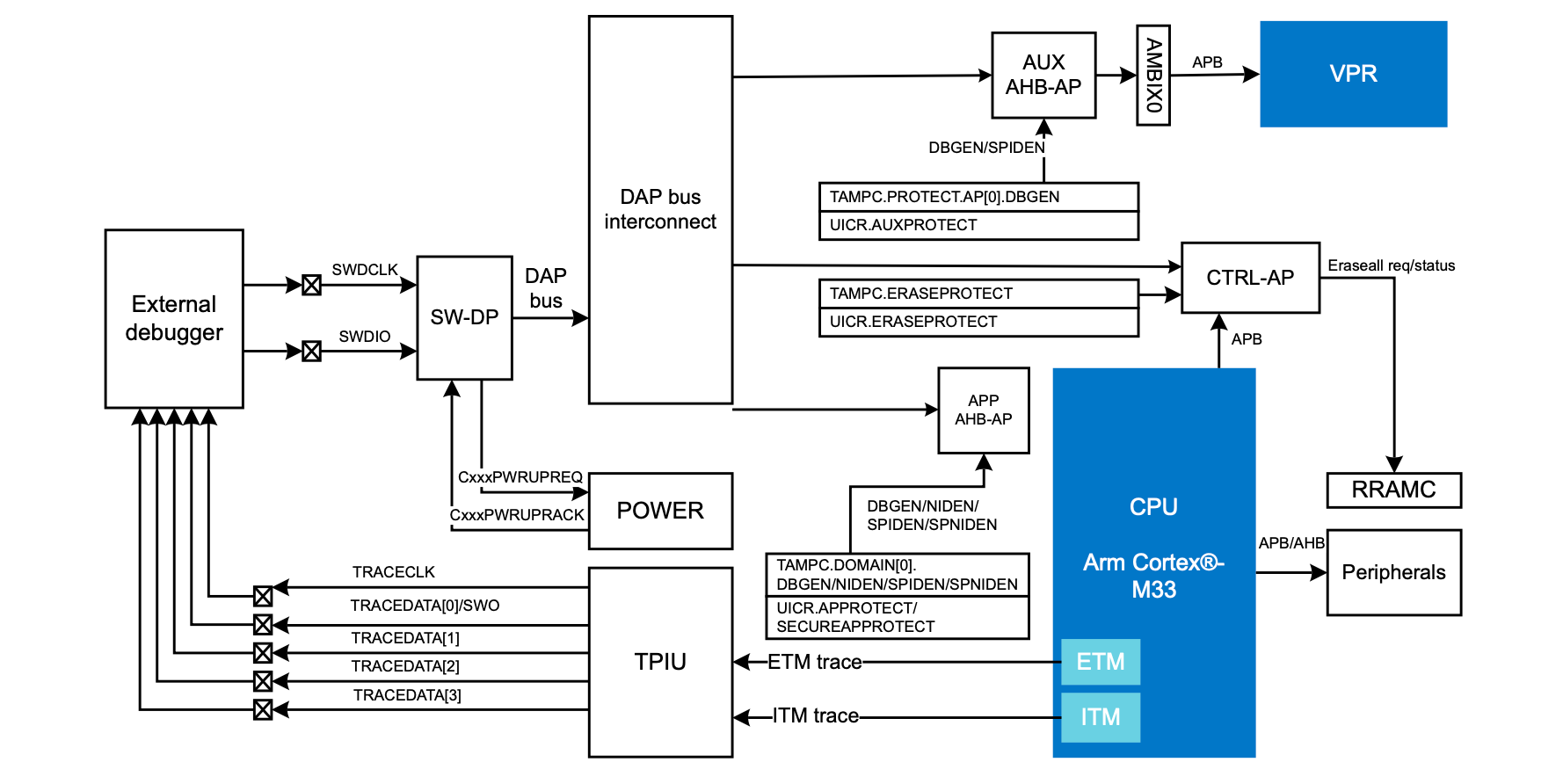
In a recent blog post by [Daniel Mangum] he goes over a scenario observed while debugging the Cortex-M33-based nRF54LM20, reading and writing values while running through a few scenarios. After initially it seemed to go seemingly without any issues, suddenly the GDB debugger would happily return values that suggested that a previous operation had not succeeded. Or, as the case turned out to be, stale cached values were being returned.
What follows is a very technical and low-level breakdown of how this MCU functions inside, especially its cryptographic features and Key Management Unit, which is used for storing sensitive information. The most amusing part is probably you can bypass the cached data by explicitly specifying the access port and memory address along with other parameters.
This ReadMemAP command supported by the JLinkGDBServer used here showed the right value, whereas the normal GDB read command using x kept returning the cached values. This raised the question of which cache was doing this. The direct read from the AHB-AP access port worked fine, so the suspicion is that the J-Link software’s own caching, with a run without the J-Link caching indeed working fine.
J-Link has had some hardware-related issues too, with this new issue pointing to an awkward software bug that could be table-flip-and-rage-quit worthy depending on how much time it wastes during a debug session. Fortunately [Daniel] seems to have caught this one quickly and had an easy way to bypass it, but we aren’t all that lucky.

Mobile gamers may find this especially useful.

This summer, the popular games studio Bungie ended development on the long-running, live-service game Destiny 2. As an avid player who had chewed through all the content that game had to offer, I still wanted a Destiny fix, so I turned to the next best thing: the mobile game Destiny: Rising, developed by NetEase. But while I could easily play the game on my phone or tablet, gaming on a handheld screen has never appealed to me. So, I installed the Android version of the game on my PC instead, then kicked back and enjoyed the game’s robust mouse and keyboard support, with far better graphics to boot.
But how did I install an Android game on my Windows PC, and are there any reasons to do so beyond gaming? It’s a lot easier to run Android on your PC than you may think, with multiple popular and powerful tools available for that purpose. Pretty much any computer made in the past decade can run an Android emulator, and as long as you’re at least somewhat familiar with Android, you’ll quickly get the hang of it. And while emulating Android on a PC opens up new possibilities for mobile gamers, it’s also useful for content creators, developers and DIY tinkerers. Here’s what you need to know to get started using Android apps on your PC, and why you might want to.
Easy tools for running Android apps on your Windows PC
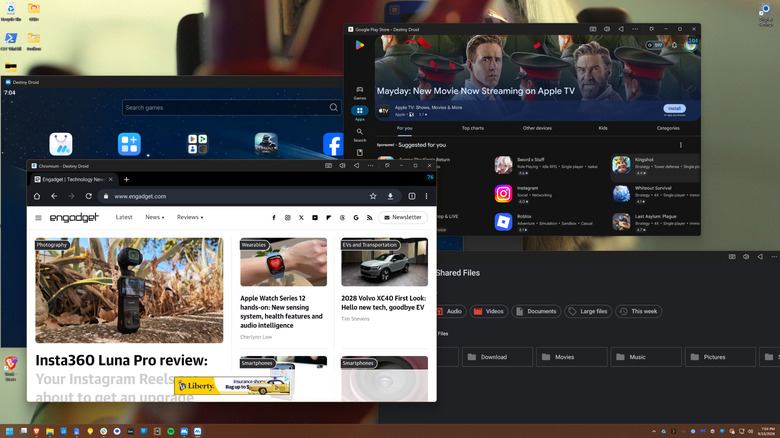
There was a time when Microsoft planned to make Android apps compatible with Windows 11 out of the box, using something called the Windows Subsystem for Android. While a subsystem for Linux ended up shipping, Android app support was dropped in 2024 for reasons beyond the scope of this article. The bottom line is that, if you’re looking to run Android apps on your PC in 2026 and beyond, there are two main paths before you: Android emulators and the Google Play Games app.
Emulators are the most robust solution. Two of the most popular options are BlueStacks and MuMuPlayer, with the latter being the tool I personally use. Bluestacks is a legitimate app, but it’s chock full of ads that it seems to prioritize over all else, and they clutter up nearly every corner of the interface. MuMuPlayer is free, and though it has more ads than it did a year ago, they only appear on a few loading screens. Because it’s developed by NetEase, the Chinese publisher of the popular PC and console title Marvel Rivals and mobile games including Destiny: Rising, MuMuPlayer is meant as a PC portal for NetEase games and is not as reliant on ads. Nevertheless, it is a full-fat Android emulator and recently got an update to Android 15. You simply create virtual phones and then run apps from the Play Store or elsewhere, just as you would on a handset.
If you only want games, you can instead try Google Play Games for PC, which is a project from Google that translates Android games directly to your PC using a lightweight virtual machine. However, it only works with a select band of titles from developers who have opted in. You’ll find plenty of familiar games, such as Genshin Impact, Clash of Clans and even the mobile adaptation of the critically acclaimed RPG Disco Elysium. Others, such as my beloved Destiny: Rising, are conspicuously absent.
It should be noted that Phone Link on Windows 11 will let you cast your Android phone’s apps or screen to your desktop wirelessly, though they’ll be running on the phone itself rather than directly on your PC.
Why emulate Android apps on PC?
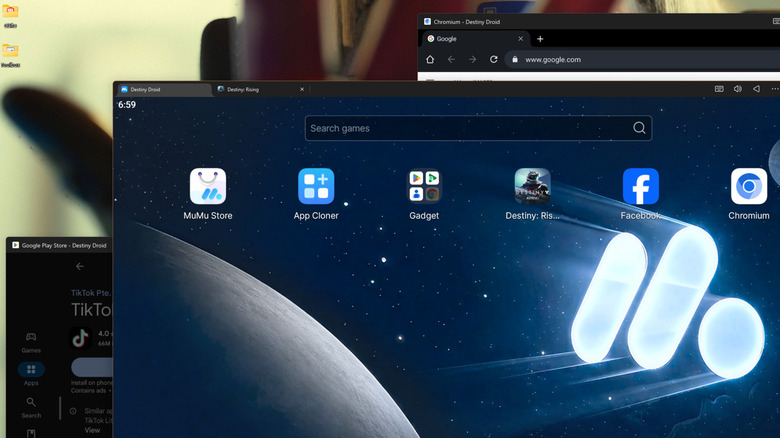
Gaming is an obvious use case for Android emulation on PC. Even on top-tier gaming tablets, you may find restrictions to graphical fidelity and frame rate. That’s the case with Destiny: Rising, which is capped at 60 frames per second on my Samsung Galaxy Tab S10 Ultra tablet when I crank up the graphics (even though I’m fairly sure it could handle both at once, the game has decided for me that it cannot). With PC emulation through MuMuPlayer, I’m able to get far better graphics using the Nvidia RTX 4070 Ti Super on my PC. I could also install Android emulators for old consoles like the PS3 or GameBoy, but given the legally dubious area those use cases can tip into, I have not done so.
If you’re not a gamer, there are still use cases for on-PC Android emulation. Plenty of Android apps lack a dedicated PC edition or have more features in the mobile app than on PC. You can run social media programs like Instagram or TikTok, messaging apps like Snapchat, or that app your landlord made you download to control your smart thermostat and locks which annoyingly does not have a PC version. Of course, Android developers use emulation to test apps. And low-end computers which cannot run pro-grade creative software may be able to run the slimmed-down Android versions of those programs, at least if their more limited functionality is tolerable.
An Android emulator like MuMuPlayer or BlueStacks can also be a great way to silo certain workflows away from your main compute environment (though local emulation still consumes local system resources). Both tools also allow parallel instances — that is, multiple emulated Android devices running at once — an ability some mobile gamers use to farm in-game resources, social media creators use for multi-account management, and others may use to create separation between work and personal accounts.
Why you can trust TechRadar
We spend hours testing every product or service we review, so you can be sure you’re buying the best. Find out more about how we test.
AOOSTAR MACO 6850H: 30-second review
Although it now has a much longer name, this mini PC was originally called just the Maco, but it spawned a line of products so for the purpose of this review I’ll refer to it as the Maco 6850H.
This NUC packs a proper eight core workstation grade chip into a palm sized box, and backs it with three full speed NVMe slots, dual 2.5 gigabit networking, and a pair of USB4 ports. That is a striking amount of connectivity for a machine this size, and substantially more than many modern designs offer.
The catch is the platform underneath. The Ryzen 7 PRO 6850H dates back to 2022, and while it still holds up well for general desktop work, buyers comparing it against newer Zen 4-based rivals should know exactly what generation they are getting. Memory is also soldered at a fixed 24GB, so there is no room to grow later.
Latest Videos FromTechRadar
But don’t let any of this convince you that this isn’t an excellent small machine. The memory is 6400 MT/s LPDDR5 organised into four 6GB banks for maximum bandwidth, which boosts both processor throughput and GPU performance. This enables it to outperform more modern platforms, like the AMD Ryzen 9 8945HS. And the cherry on top is the connectivity it supports, with both an OcuLink and two USB4 ports.
Overall, it’s easy to look at the MACO 6850H and consider the technology in it as being dated. But the benchmarks don’t lie, and this highly affordable machine punches significantly above its weight. Is it one of the best Mini PCs around? Based purely on value, there is a strong argument to be made that it is.

AOOSTAR MACO 6850H: Price and availability
- How much does it cost? From $459
- When is it out? Available now
- Where can you get it? You can get it directly from Aoostar or via an online retailer
There are two SKUs listed for the MACO 6850H: the review hardware with 24GB of RAM and 1TB of storage, and another model with no storage.
For whatever reason, the no-storage option isn’t currently available, but if it is released, it might offer an even better deal for those with a spare NVMe drive handy. According to the Aoostar webpage, the model without storage comes with a free Windows 11 Pro key, which could be a significant deal-maker for some.
Direct from AOOSTAR, the review hardware costs $459 for those in the USA, and it is shipped from a US warehouse. It’s the same price in Germany, and comes from a warehouse in that region, but oddly, for those in the UK it only ships from China and costs $519, or an extra $60. Why the UK customers aren’t supplied from Germany is a mystery.
However, you can buy it elsewhere; I found it on Amazon.com, where it’s $479, although it isn’t offered with next-day delivery. In the UK, on Amazon.co.uk it’s £395, or the equivalent of $529.
For those looking for a bargain, AliExpress doesn’t have better prices, although they do have the barebones model with 16GB of RAM that sells for only £369.99. Unless you definitely want that option, it’s probably cheaper to get it from the maker’s website.
Looking back at machines I’ve previously reviewed with this processor, the only candidate was the GMKtec NucBox M7. But that was discontinued in favour of the M7 Ultra, which uses the 6859U CPU.
You can buy that machine from GMKtec in the UK for only £ 299.99 with no RAM or storage, or £599.99 with 32GB and 1TB, respectively. Since I also tested that, I can say the DDR5 memory it uses slows the machine down considerably compared to the LPDDR5 in the Aoostar.
For the hardware and specifications it has, the Aoostar looks like a bargain.

AOOSTAR MACO 6850H: Specs
Swipe to scroll horizontally
|
Component |
Specification |
|
CPU |
AMD Ryzen 7 PRO 6850H, 8 cores, 16 threads, Zen 3+, 3.2GHz base, 4.7GHz boost, 45W TDP, 16MB L3 cache |
|
Graphics |
AMD Radeon 680M, RDNA2, 12 compute units, up to 2.2GHz |
|
Memory |
24GB LPDDR5 6400MHz, soldered to the board, single channel, not upgradeable |
|
Storage |
3 x M.2 2280 PCIe 4.0 x4 slots, up to 24TB combined. Review configuration ships with 1TB |
|
Networking |
WiFi 6, Bluetooth 5.2, dual 2.5GbE ports using Intel I226V controllers |
|
Ports |
2 x USB4, 1 x OCuLink (no hot swap), 2 x USB 3.2 Gen 2 Type A, 2x USB 2.0, 1 x DisplayPort 1.4, 1 x HDMI 2.1, 3.5mm audio jack |
|
Power |
External 120W adapter, 19V at 6.32A |
|
Operating system |
Windows 11 Pro |
|
Chassis |
Recycled aluminium body with a plastic base panel, fingerprint power button |
|
Dimensions and weight |
150 x 132 x 57mm |
|
VESA Mountable |
No |
AOOSTAR MACO 6850H: Design
- A larger NUC
- Easy access
- Excellent NVMe options
- Lacks USB labels
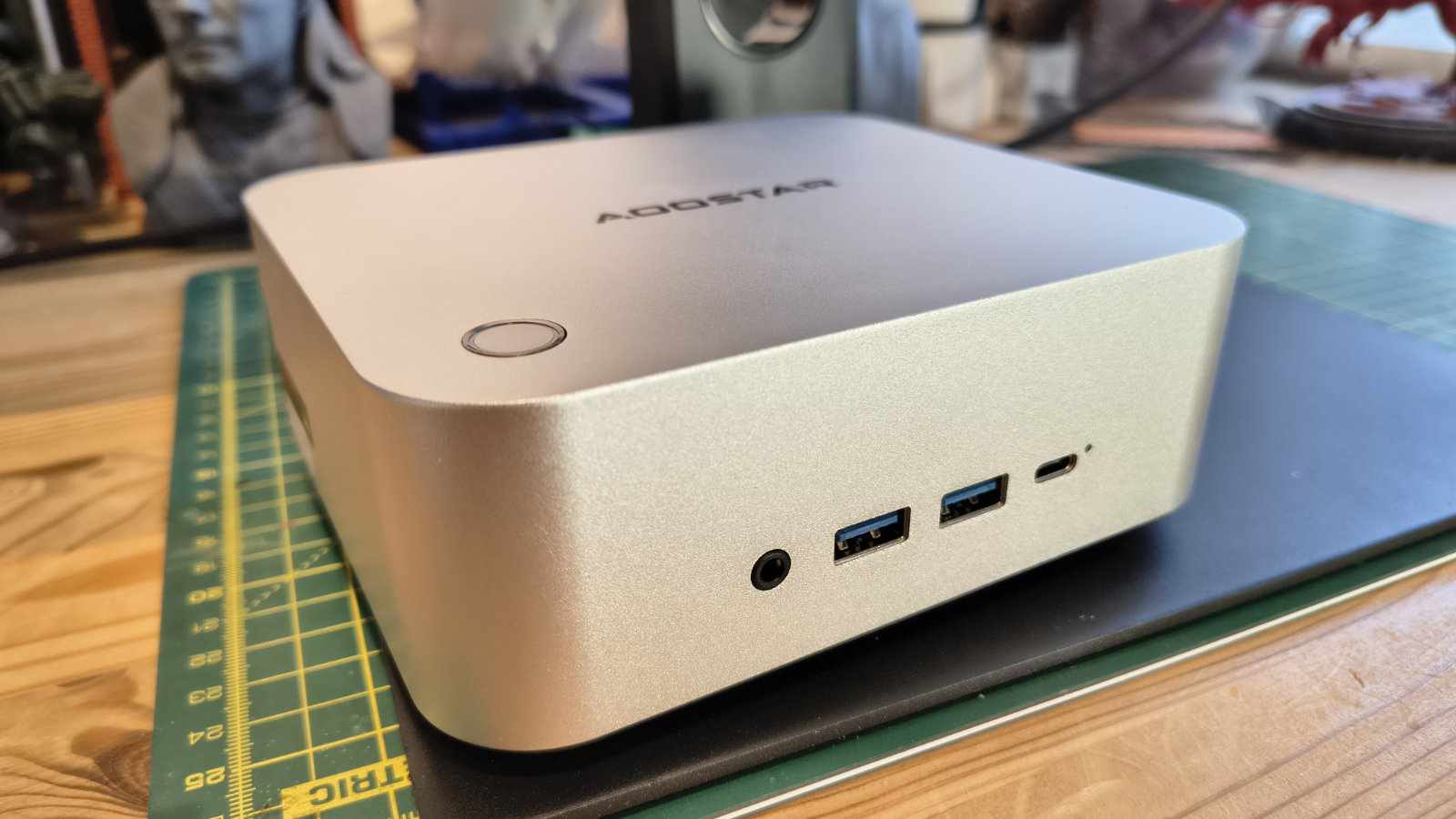
Aoostar has kept the Maco in a genuinely pocketable footprint, built from what the company calls 100% recycled aluminium, with only the base panel made of plastic. That is a sensible way to keep the exterior feeling solid while controlling cost and weight.
A fingerprint reader sits in the power button, letting Windows Hello unlock the machine without a password. It is a feature more commonly seen on business laptops than mini PCs, and it fits the company’s positioning of this being a small workstation rather than a toy.
In the gamut of NUC designs, this one is on the large side, but the 150 x 132 x 57mm enclosure isn’t massive by any standards.
One slight disappointment is that it lacks a VESA plate to mount it on a monitor, which feels odd.
Access to the inside is easy, with just four screws on the base to remove before you have free rein inside. While this system doesn’t have socketed memory, it has four M.2 slots, two of which are used for the supplied drive and the Wi-Fi module. That leaves two unused, and all the 2280-sized slots are Gen4 x 4 specification.
That’s excellent for turning this machine into a high-performance mini server, and the external IO supports that pathway with dual 2.5GbE LAN ports and USB 4.0.

The port layout has an audio jack, two USB 3.2 Gen 2 ports and a USB4 on the front; the OCuLink port on the left side; and another USB4 on the back, with HDMI, DisplayPort, and the LAN ports.
According to the Aoostar web page, the two USB ports on the back right are USB 3.2 Gen 1 and USB 2.0, but neither is blue, and in my tests both proved to be USB 2.0.
One minor detail I wish was different is that none of the front ports is labelled, and both rear USB ports are merely labelled “USB” rather than anything more helpful.
Some might also miss an SD card slot, but the ports on this NUC do align well with using a docking station that often includes that feature.
AOOSTAR MACO 6850H: Features
- AMD Ryzen 7 PRO 6850H
- LPDDR5 6400 MT/s
- USB 4.0 and OCuLink
The heart of the Maco 6850H is the AMD Ryzen 7 PRO 6850H, a chip that first appeared in business laptops back in 2022 under the Rembrandt codename. It pairs eight Zen 3+ cores with sixteen threads, running from a 3.2GHz base up to a 4.7GHz boost, all inside a 45W thermal envelope. The PRO suffix adds Microsoft Pluton security and remote management features aimed at business buyers, on top of the same silicon found in the consumer Ryzen 7 6800H.
Zen 3+ is a modest refinement of the Zen 3 architecture rather than a clean-sheet redesign, built on a 6 nanometre TSMC process. Anyone expecting Zen 4 or newer should adjust expectations accordingly. That said, eight cores and sixteen threads remain a genuinely useful amount of compute for a small form factor desktop, and the chip still competes well against many newer six-core parts in multi-threaded work.
Graphics duties fall to the Radeon 680M, built on RDNA2 with twelve compute units clocked up to 2.2GHz. When this chip launched, the 680M was widely regarded as the fastest integrated GPU AMD had shipped. It’s since been overtaken by the 780M, 880M and the new 8060S, but it remains capable of light gaming and everyday creative work, particularly when paired with fast memory.

That memory pairing matters more than you might think. Integrated graphics performance leans heavily on system memory bandwidth, since there is no dedicated video memory to draw on.
Aoostar has fitted 24GB of LPDDR5 running at 6400MHz, which should let the 680M stretch its legs more than it could on slower 4800 MT/s DDR5 and DDR4-based systems. The tradeoff is that this memory is soldered directly to the board, fixed at 24GB with no slots to expand it later.
Storage is where the Maco 6850H distinguishes itself from cheaper rivals. Three M.2 2280 slots are wired for full PCIe 4.0 x4 bandwidth, supporting up to 24TB combined. That is a genuinely generous allowance for a machine this size, and positions the MACO as a plausible small NAS or media server as well as a desktop replacement.
Networking follows the same business-minded theme, with dual 2.5 gigabit Ethernet ports built around Intel I226V controllers, alongside Wi-Fi 6 and Bluetooth 5.2. Two USB4 ports and an OCuLink connector round out the external expansion options, the latter aimed at anyone wanting to attach an external GPU with less signal loss than a USB4 connection would introduce.
I plan to test these scenarios and maybe write a feature based on what it reveals for those wanting discrete graphics performance or a cheap AI platform.
AOOSTAR MACO 6850H: Performance

Swipe to scroll horizontally
|
Mini PC |
Row 0 – Cell 1 |
Aoostar Maco 6850H |
GMKtec NucBox M7 Pro |
|
CPU |
Row 1 – Cell 1 |
AMD Ryzen 7 PRO 6850H |
AMD Ryzen 9 PRO 6950H |
|
Cores/Threads |
Row 2 – Cell 1 |
8C 16T |
8C 16T |
|
RAM |
Row 3 – Cell 1 |
16GB DDR4 (2x8GB) |
32GB DDR5 (2x16GB) |
|
SSD |
Row 4 – Cell 1 |
1TB Apacer AS2280Q4 |
1TB |
|
Graphics |
Row 5 – Cell 1 |
Radeon 680M |
Radeon 680M |
|
3DMark |
WildLife |
17098 |
15703 |
| Row 7 – Cell 0 |
FireStrike |
6792 |
7036 |
| Row 8 – Cell 0 |
TimeSpy |
2872 |
2811 |
| Row 9 – Cell 0 |
S.Nomad |
2502 |
2497 |
|
Cine24 |
Single |
84 |
94 |
| Row 11 – Cell 0 |
Multi |
708 |
772 |
| Row 12 – Cell 0 |
Ratio |
8.39 |
8.23 |
|
GeekBench 6 |
Single |
1996 |
2167 |
| Row 14 – Cell 0 |
Multi |
9601 |
10454 |
| Row 15 – Cell 0 |
OpenCL |
29110 |
29730 |
| Row 16 – Cell 0 |
Vulkan |
33652 |
30797 |
|
CrystalDisk |
Read MB/s |
7070 |
3544 |
| Row 18 – Cell 0 |
Write MB/s |
6680 |
2145 |
|
PCMark 10 |
Office |
7100 |
7064 |
|
WEI |
Score |
8.2 |
8.2 |
Considering the AMD Ryzen 7 PRO 6850H is a four-year-old CPU, it’s looking reasonably agile in this quick comparison with an AMD Ryzen 9 PRO 6950H that the GMKtec NucBox M7 Pro used. Both these chips are from the same generation, and these results show just how similar they are.
It all comes down to the memory on the Maco 6850H, and that 6400 MT/s LPDDR5 gives the older machine significant pause for thought.
If I were to compare it to an Intel platform, it would be the Intel Core i7-11800H, although I’ve never tested a system with that specific CPU. I tested one with the Intel Core i7-13700H, the MinisForum NBP7, and it struggled to beat the Maco 6850H.
Later Intel mobile processors that have Arc Graphics are faster, but they’re also generally more expensive.
One choice by Aoostar that helped the Maco 6850H in these tests was including a decent Gen4 x4 NVMe drive, since reading at more than 7000MB/s and writing at 3500MB/s helps massively with tests like PCMark.
AMD and Intel are both making faster mobile chips, and they are available in SFF systems, but given the price increases we’ve seen this year, the Aoostar Maco 6950H seems like a good choice if you want better-than-entry-level performance while staying within a modest budget.
AOOSTAR MACO 6850H: Final verdict

Given the turmoil in the PC industry caused by massive leaps in memory and storage prices, the antidote is to take a second look at older technology that delivers enough performance to run Windows 11 and a decent range of demanding applications.
That’s where the Aoostar Maco 6850H provides a good justification for not plunging into the latest technology with both feet. Unless you want to play games or something equally demanding, this machine has plenty of performance to spare.
And, should you need more power for graphics or AI tasks, it is possible to add a discrete video card using OCuLink, without resorting to a desktop system.
When you factor in the performance and the price, this machine looks like a solid choice for a wide range of interactive tasks.
Should you buy a AOOSTAR MACO 6850H?
Swipe to scroll horizontally
|
Value |
You need to spend twice this amount for a bump in performance |
4.5 / 5 |
|
Design |
Simple but effective enclosure, but no VESA mount |
4 / 5 |
|
Features |
Punchy CPU, LPDDR5 memory, USB and OCuLink |
4 / 5 |
|
Performance |
Good performance for older silicon |
4 / 5 |
|
Overall |
Great combination of performance, build quality and price is almost unbeatable value. |
4.5 / 5 |
Buy it if…
Don’t buy it if…
Also Consider
For more professional hardware, we’ve reviewed the best business computers.

On the old iPods, generally referred to here in the future as iPod Classic, there lives a tiny, undocumented chip called Mikey. It sits at the headphone output and performs only two functions: powering the Apple wired headset microphone and handling button presses from the three buttons. Despite these headphones and iPods having existed for nearly two decades, no one in the open source community has figured out the protocol Apple used for these buttons until now.
As [Hemant] discovered after finding a single archived blog post from 16 years ago about it, the chip is relatively simple by modern standards. Besides handling microphone bias, it sits on an I2C bus and monitors presses from the three buttons on the headset. Each button has its own resistive load, so a press from any of them drops the voltage on the line to a certain amount which the chip can read. The more involved part is a “chirp” that’s a sort of handshake between headset and iPod, which took a bit of work with a debugger that [Hemant] built into a custom Rockbox firmware.
With the chirp sorted out, [Hemant] built the feature into an existing version of Rockbox, and submitted the update to the Rockbox team for integration in future official builds. It’s a long overdue feature for those still using wired headphones and iPods from the turn of the century, but welcome. Some of those iPods are still working to this day, but only conditionally if they’re very cold.
Tech
People’s Picks: Shopping for a TV for the Holidays? This Is the Brand Readers Say You Should Stick To

Early holiday sales will kick off in the next few weeks, like Amazon’s October Prime Day sale that’s Oct. 6 and 7. And between the NFL season in full swing and new shows launching for the fall, now’s a good time to start taking your TV upgrade seriously if you’re considering a new one.
Choosing a new TV comes down to a few specifications, like price, picture quality and your specific use cases — whether it’s gaming or movies. With so many features and factors to consider, choosing the right one can be overwhelming. But our readers may help narrow down your choices.
CNET’s People’s Picks gives readers a chance to share their opinions on their TV brand. Many of you love LG, but some readers have opinions on other brands that you may not have considered before. Here’s which brands won over readers and what our experts think.

Overall People’s Picks winner
LG
LG is well-known among TV brands for its OLED screens, and it’s a favorite among CNET editors and readers. LG earns high marks in many of CNET’s People’s Picks categories and wins three awards from readers: picture quality, fast-moving content and OLED/QD-OLED.
CNET editors give LG several nods for recent OLED TVs, lauding the contrast in the new C6H, the color accuracy of the G5 — recipient of a CNET Lab Award — and the contrast and brightness of G6 for movie buffs. The LG OLED G4 is one of the best gaming TVs for its top-notch gaming features, especially as a more cost-effective option compared to the LG G6.
Picture quality
Runner-up: Sony
CNET readers crown LG as a winner for picture quality. More than 3 out of 5 (61.7%) of CNET readers who own an LG TV reported an “Excellent” experience with their LG TVs in bright rooms and during the day. Readers say there’s no glare and it’s beautifully bright, and 65.1% of readers with LG TVs report perfect dark scenes with inky blacks and zero light bleed — performance that’s common on OLED models and can really improve the look of movies and TV shows. That brings LG’s picture quality to 63.4%.
Sony is a runner-up for picture quality, based on nearly half (49.8%) of readers with a Sony TV saying the brand has inky blacks with no bleed and great daylight performance.
Fast-moving content
Runner-up: Sony
LG wins for flawless, fast-moving content. Of readers, 71% say LG TVs are perfectly smooth, are without blur and are without weird, artificial artifacts with fast-moving content, whereas 28% say LG’s fast-moving content quality is natural but occasionally slightly blurry. When it comes to gaming, CNET readers (59.8%) who have an LG TV say fast-moving content is flawless and incredibly responsive and that the TV has great gaming menus.
Sony is the next top pick, with 60% of readers saying its fast-moving content is flawless on Sony TV screens.
OLED/QD-OLED
Runner-up: Samsung
Lastly, LG sweeps the OLED/QD-OLED category with 82.4% of readers with an LG TV preferring the brand for its OLED displays. If you’re considering an LG OLED TV, the latest LG OLED G6 has excellent contrast, an improved antireflective coating and good brightness for gaming. One of CNET’s lab-tested favorites is the previous LG OLED G5. CNET editors say it has the best color accuracy. The C4 is still a favorite, but if you want the latest and greatest, LG’s C6 and C6H are standout OLED picks. The C6 is the ultra version of the C6 TV, and it comes in larger sizes with higher brightness and better colors.
Samsung trails behind LG with 45% of readers who own a Samsung TV have an OLED or QD-OLED model. That’s not surprising because Samsung has only been selling OLED TVs since 2022, after a single model in 2013, whereas LG’s OLED models have been on sale for more than a decade. Both the S90F and S95F are Samsung OLED TVs that get praise from CNET for image quality and glare reduction.
Roku

Budget TV
Runner-up: Vizio
Roku wins three categories in CNET’s People’s Picks — budget, smart TV ecosystem and standard LED/LCD. Roku has several affordable TVs. Most CNET readers (72%) have purchased a Roku TV that’s under $500. And nearly half of readers with Roku TVs have purchased their TV within the past year.
Roku has a few popular TV picks under $500, including the TCL 4-Series, the Pioneer 50-inch 4K smart Roku TV and the Roku – 40″ Class Select Series Full HD (1080p) LED Smart RokuTV. Roku’s cost-effective options don’t skimp on quality. For instance, the Pioneer 4K Roku TV is an LED TV with 4K resolution and a smart TV interface, and it supports High Dynamic Range to improve your picture quality.
Vizio is next up to Roku, with 45% of readers having Vizio TVs costing less than $500. If you’re in the market for a mini-LED TV, Vizio has its Mini LED Quantum Series 4K TV for under $500 in two sizes (65 and 75 inches). Interestingly, 40.8% of CNET readers with Vizio TVs have had them the longest (over five years) — speaking to its quality and longevity for the price.
Smart TV ecosystem
Runner-up: TCL
Trust me, a smart TV’s interface can make or break your day-to-day experience. Roku understands that and wins over 59.1% of CNET readers.
Most readers with a Roku TV say its interface is fast, clean and very easy to navigate. No readers reported the interface being cluttered, slow or frustrating to use — the only TV brand to do so. Roku recently released a new interface that includes a “For You” section, which combines AI suggestions, saved entertainment and what you’re already watching. And the new interface has a “Quick Access” section to get to your most used apps faster, but we have a guide if you’re not a fan and want to turn it off.
TCL is a runner-up for the Smart TV ecosystem category. Over half (56.5%) of readers who own a TCL TV say the interface is fast, clean and easy to navigate, while 22.5% say the interface is good but has too many ads or sponsored recommendations.
Standard LED/LCD
Runner-up: Vizio
Standard LED and LCD TVs use LED backlights and are usually the most cost-effective compared to other TVs. Roku wins 34.8% of its owners over for this category. There are a few budget-friendly Roku LED TVs worth considering, including the Onn 43-inch Class 4K Roku smart TV and the Hisense 50-inch Class 4K LED Roku smart TV. The Roku Select Series LED TV is a CNET favorite for its usability features, like Roku’s interface and remote finder.
Readers say Vizio is the next top pick for LED/LCD TVs, with 32.7% owning an LED or LCD Vizio TV.
Hisense

Sound quality
Runner-up: Sony
Hisense wins CNET’s People’s Picks for its sound quality. Nearly half of readers (45.7%) with Hisense TVs rate the internal audio as “great.” And that’s nearly double CNET readers’ satisfaction with popular brands like Sony (25.2%), Samsung (23.8%) and Vizio (22.2%). One of the perks of Hisense’s latest U7 and UR8 models is Dolby Atmos, which uses surround sound to deliver 3D audio. The U7 models also have a built-in 2.1.2-channel speaker system for more immersive sound. CNET’s favorite budget TV, the Hisense QD7 TV, also supports Dolby Atmos.
Sony is next up for the sound quality category, with 25.2% of owners saying Sony TVs have great sound quality with clear dialogue and decent bass. Some (41.7%) say it’s adequate for casual watching.
TCL

Mini-LED/QLED
Runner-up: Hisense
Mini LED TVs use tiny LEDs to give you better brightness, blacks and contrast compared to most standard LED TVs. When it comes to mini-LED and QLED TV panels, TCL wins, with 57.5% of readers owning mini-LED/QLED TCL TVs and naming it their primary TV brand. TCL has been producing mini-LED TVs longer than most TV makers, and many of them have earned CNET’s praise.
According to CNET editors, the TCL QM8K is nearly comparable to an OLED TV in terms of picture quality for less money. TCL’s QM8L is another mini-LED QLED TV that CNET loves for its brightness, color and contrast, too.
Over half (52.1%) of readers with a Hisense TV have a mini-LED/QLED TV, with its model ranking second to TCL. Hisense has a few mini-LED models, including the U6, U7 and the new RGB mini-LED UR8, which we got a glimpse of at CES 2026. It’s around $1,300 and comes with better-than-before color reproduction.
Don’t buy a new TV without reading this first
Many TVs have similar features that may make it seem like the best deal is the biggest screen for your buck. Of everything to consider, CNET’s TV expert Ty Pendlebury advises looking at price, size and picture quality to help narrow down your options.
“It’s always what fits their budget, so not necessarily a ‘budget’ model. If an OLED is within your budget, get it, that’s the quickest shortcut,” said Pendlebury.
And don’t worry about perfecting your TV’s sound quality during your upgrade. Pendlebury says that most TVs sound tinny, so you should consider a soundbar as a separate purchase for better audio.
CNET’s editor-in-chief, David Katzmaier, has 26 years of experience reviewing TVs and has some practical advice to help you feel more satisfied with your purchase years later. For instance, bigger doesn’t always mean better.
“A bigger TV is great, but it can expose lower-quality sources,” said Katzmaier. The reason is that a bigger screen can show imperfections more than a smaller one. If you still want a bigger screen, consider subscribing to 4K plans to streaming services like Netflix and YouTube TV for better picture quality. You can also try adjusting your picture settings, such as putting the TV in Filmmaker Mode, but Katzmaier says that’s not a cure-all.
Instead of screen size, focus on getting a picture quality you’re satisfied with. “The biggest improvement would be getting a new display technology, especially QD-OLED/OLED,” said Katzmaier. “TVs with those kinds of screens deliver clear improvements in contrast and viewing angle that the others can’t match.”
CNET editors and readers highly recommend LG. But other brands were close runners-up. If you’re looking for deep black levels and strong color reproduction, readers recommend Sony as a second contender. Or if you’re struggling to watch TV in a room with a big window, consider TCL or Samsung — all CNET favorites.
“I’ve always liked Roku and Google TV better than proprietary systems from Samsung and LG, and I’m happy to see that CNET readers took our advice and bought LG and Samsung OLED TVs — because they’re the picture-quality champs,” said Katzmaier.
CNET has plenty of reviews of some of the latest TVs, like the TCL QM8L, if you’re looking for a brighter TV, or the Samsung S90F, if you’re looking for the best value for overall picture quality. Regardless, there are also guides to help narrow down your TV choice, like choosing between LCD and OLED TVs, what to know about micro-LED and a list of everything to look for when buying a new TV.
Did you like these findings? CNET’s People’s Picks is community-driven and helps us spread the word about the tech and services you love. Take our ongoing laptops survey to tell us what you love about yours.


Entertainment2 minutes ago
The 6 Most Fun Movies Released Since 2020, Ranked

Sports8 minutes ago
Where to watch Cowboys vs. Ravens in Brazil: TV, streaming, odds, pick
Tech13 minutes ago
Trump Republicans Made A Historic Mess Of This Massive Broadband Grant Program





-

 Fashion2 days ago
Weekend Open Thread: J.McLaughlin – Corporette.com
-

 Crypto World5 days ago
Goldman Sachs and Deutsche Bank Agree: The S&P 500 Rally Isn't Over
-

 Tech7 days ago
Researchers escape OpenAI Codex sandbox to run commands on host
-

 Fashion3 days ago
8 iPhone Accessories That Add Personality
-

 Crypto World7 days ago
Who Needs CLARITY Anyway? ARB Could See 70X Increase: Hodler’s Digest
-

 Entertainment4 days ago
These 17 Fall Amazon Dresses Seriously Look Like Anthropologie
-

 Business7 days ago
Analog Devices (ADI) Bets $1.35 Billion on Chips that Let Machines Think for Themselves
-

 Crypto World7 days ago
Coinbase, Robinhood, Circle Seen as Tokenized-Stock Winners
-

 Crypto World4 days ago
This Bearish Netflix Stock Trade Can Cash In On Video Streaming Giant’s Woes
-

 Tech4 days ago
Reolink’s solar 4K security camera falls to its lowest price in months
-

 Tech6 days ago
Google’s $899 Googlebook is a bet that you’ll buy a new laptop for Gemini
-

 Crypto World5 days ago
Trump-Xi Polymarket Odds for Handshake Hit 50%
-

 Crypto World4 days ago
Crude Oil Prices Pressured by Diplomatic Hopes in the Middle East
-
 Business4 days ago
Oil Price Today (September 23): Crude oil below $100 on hopes of US-Iran talks. What did Trump say?
-

 Crypto World4 days ago
Bitcoin price tests $83,600 Supertrend support after $87K rejection
-

 Crypto World4 days ago
Bitcoin Threatens Sub-$84,000 Breakdown as Long Liquidations Spike
-

 Crypto World5 days ago
Meta Jumps 11% As Muse Shines and Investors Show an Appetite for Advancing AI
-

 Crypto World4 days ago
Did Jim Cramer Just Give GameStop Stock the Kiss of Death When He Said the Turnaround Is Working?
-

 Crypto World6 days ago
Bitcoin price holds above $81K as key catalysts line up
-

 Crypto World4 days ago
BitGo says Bitcoin absorbed Fed hike, CLARITY failure
You must be logged in to post a comment Login