
Tech
The US almost started a war due to an AI error in defense report

An AI-generated intelligence error reportedly brought the US military dangerously close to a confrontation with China after a false report claimed that a Chinese ship was transporting components linked to a nuclear weapons programme.
According to a CNN investigation published on September 18, 2026, the report circulated within the US military during the war with Iran. The intelligence triggered preparations to intercept the vessel, with armed personnel reportedly ready to board it and military aircraft already airborne.
Officials only discovered the problem shortly before the planned operation. A deeper review revealed that an analyst had used an AI chatbot to interpret intelligence about the ship’s cargo, and the system had incorrectly identified the materials being transported. One source described the report as “entirely false” and said it had “almost started a war.”
How an AI error reached a military intelligence report
The incident reportedly began when a special operations command analyst queried a chatbot about intelligence concerning the ship’s manifest. The AI system combined open-source information with classified signals intelligence and reached an inaccurate conclusion about the cargo.
The analyst then used AI again to package the findings into a formal intelligence report, which was circulated to military officials. CNN could not establish whether the chatbot was a commercial product or a government-developed tool.
The episode highlights a major problem with using AI in military decision-making: an incorrect answer can quickly move from a digital system into real-world operations.
Should AI be trusted with sensitive military decisions?
The incident raises a fundamental question: should AI be used in sensitive military procedures where a single error could escalate into conflict? AI can process intelligence rapidly, but inaccurate outputs, limited transparency and unclear accountability create serious risks.
Security experts from the US and China have called for safeguards covering nuclear systems, critical cyber operations and meaningful human oversight.
Discussions at the Xiangshan Forum also highlighted concerns about automated military responses escalating faster than humans can intervene. AI may support military analysis, but decisions involving force, nuclear systems or potential confrontation require rigorous verification, clear accountability and meaningful human control.
AI adoption raises questions about military safeguards
The US military is rapidly expanding its use of AI, including for intelligence analysis, target selection, logistics and battlefield decisions. Defence officials argue that adopting the technology quickly is necessary to remain competitive with potential adversaries.
However, the military’s AI systems reportedly operate across different departments with varying tools and safety standards. Officials told CNN that there is no single set of standards governing how AI-generated information is verified.
For the public, the incident raises questions about how much authority should be given to AI when decisions could have serious consequences. Even when humans remain involved, speed and misplaced confidence can increase the risk of mistakes.
The next steps could include closer scrutiny of AI-assisted intelligence reports and stronger verification requirements, particularly when information is used for military targeting or operations involving other countries. CNN also reported calls for an investigation into the faulty report, suggesting that accountability and safeguards could become central to the wider debate over military AI.


Don’t just hand your laptop to a friend or secondhand store; you need to protect your personal data.

There’s a lot of value in keeping an old laptop. You can hold onto it as a backup, hand it down to a family member, use it as a media server and much more. But if your old laptop doesn’t have much life left in it, you may instead decide it’s time to get rid of the old machine.
Of course, you shouldn’t throw an old laptop in the trash. The best options are selling or donating if it’s still usable, or taking it in for safe recycling otherwise. No matter what destiny you choose for your old laptop, there are a few steps you should take first. Clearing out your files and running a factory reset are both crucial, but there’s more to it. Whether you’re getting rid of a MacBook or a Windows computer, make sure you do what’s necessary to protect your private information and prepare the device for a new owner, if applicable.
Back up everything first
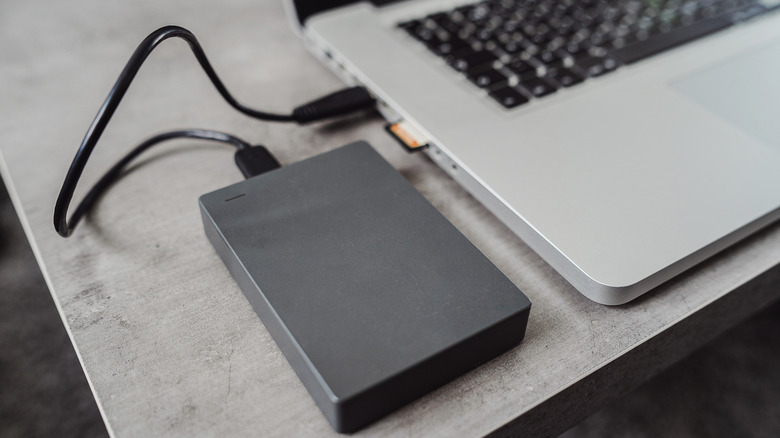
Backing up is always the important first step, even before transferring files to a new laptop. On a Windows PC, you can use Windows Backup by searching for it in the Start menu. You’ll see a list of what can be backed up to OneDrive and when you last did. While convenient, its major roadblock is that free Microsoft accounts only comes with 5GB of cloud storage. You can subscribe for more if you like; another option is making a local backup to a portable HDD or SSD. While you can copy files to the drive manually, EaseUS Todo Backup’s free version is a good choice for automating this. Since Windows Backup covers settings like account details and personalization features, a combination backup is smart.
For a MacBook, use Apple’s Time Machine. The built-in macOS backup tool can back up everything onto a USB drive so you can recover it on another computer. Visit System Settings > General > Time Machine > Add Backup Disk, then select the storage device you have connected (ideally with at least twice the storage of your MacBook) and follow the instructions. You can also use iCloud to back up some kinds of data under System Settings > [Your Name] > iCloud > Saved to iCloud. Apple offers only 5GB of free storage, but you can subscribe for more.
Third-party backup software and cloud services can also work. As a supplement to the full backup, double-check important apps, like enabling sync in your browser so you don’t lose your bookmarks. Also check the ports on your laptop to make sure you don’t leave any accessories behind, like small USB dongles or SD cards.
Before you move on, sign out of all accounts and de-authorize software licenses for tools like the Adobe suite. Some licenses can only be used on a certain number of computers, so you don’t want to have a phantom machine wasting one of your spots. If you’re not sure whether your license can be moved to a new computer by signing into your account, copy the license or product key so you can contact the provider.
Do a proper wipe of your laptop

You’re now ready to wipe the machine. While a basic factory reset is the simplest option, data you remove from a computer is still technically recoverable. Thankfully, modern versions of Windows and macOS have built-in reset tools that de-authorize your accounts, wipe the machine, reset everything and make what you had on the drive unrecoverable. Third-party software is also available if you want to make sure the drive is totally clean.
The process for wiping a Windows laptop varies by version. For Windows 11, go to Start > Settings > System > Recovery > Reset PC. Choose Remove everything, then select Cloud download or Local reinstall depending on how you want to reinstall the OS. When presented with the Additional settings page, choose Change settings and enable Clean data to securely overwrite the drive.
On Windows 10, go to Settings > Update & security > Recovery and click Get started under Reset this PC; the process is similar to Windows 11 from there. For Windows 8.1, this is under Settings > Change PC settings > Update and recovery > Recovery; click Get started under Remove everything and reinstall Windows. For Windows 7, you’ll need to use bootable media, access the manufacturer’s recovery partition or run a third-party tool to erase everything on the drive.
For a Mac running macOS Monterey or later, open System Settings > General > Transfer or Reset > Erase All Contents and Settings. You’ll have to enter your computer password as well as your Apple ID password to sign out of that. Confirm the erasure, then the computer will sign you out of iCloud, wipe and restart.
For older Intel-based Macs, you need to first sign out of iCloud manually to remove Activation Lock; you’ll find this under System Settings > [Your Name] > Sign Out or System Preferences > Apple ID > Overview > Sign Out depending on your macOS version. After that, go into Recovery Mode (hold Command + R after a restart), select Disk Utility > Continue > Erase, and choose APFS (assuming your Mac has an SSD). Finally, pick Erase Volume Group or Erase. Once it’s done, if someone else will use the computer in the future, quit Disk Utility and choose Reinstall macOS to install a fresh copy.

Angle the speakers, move the couch a bit, lay down a rug.

If your home surround system isn’t exactly performing the way you expected, then the problem probably isn’t your equipment. There’s a massive chance that the big issue is that you set your system up years ago, plugged it in and haven’t touched it since. All the while, the room itself and the way the speakers are aimed have changed completely.
The good news is that, more often than not, you don’t have to spend more money to improve your home theater experience. Before you go throwing money around, you should try out a series of small but targeted adjustments to what you already own. Adding a rug, repositioning your couch, angling your speakers, placing the subwoofer right and running the built-in calibration tool most speaker systems come with can make a world of difference.
You could, of course, use acoustic foam, call up professionals to set things up for you and buy new hardware. But why spend a ton of money when you could just try a few simple fixes that work with a basic 5.1 system or something more elaborate. Check out the whole guide to see whether there’s any advice you want to give a try.
Start by fixing room acoustics
Room acoustics are the easiest thing you can fix and often the one thing everyone overlooks. Hard surfaces like bare walls, tile floors and large windows reflect sound waves, creating muddied sound and echo that affect dialogue and sound effects. Anthony Grimani, President of Performance Media Industries and several other audio engineering firms, as well as a former sound engineer with Dolby Laboratories and Lucasfilm THX, states that more than half of what you hear in a regular room is sound bouncing off hard surfaces like ceilings, walls and hard flooring.
The fix to this problem isn’t buying foam panels that would require a whole overhaul of your living room. Instead, you can improve this with rugs, curtains, artworks and framed photos. So, start decorating!
The right way to position your speakers
Where you place your speakers is half of this equation, while the other half is how you point your speakers. The front left and right speakers need to be about a foot away from side and back walls. They also need to have about the same space between them as there is between the speakers and your seating position. The speakers should also be angled toward your main seat, so start poking at them until they’re positioned just right.
The center channel should be placed directly above or below your TV, aligned with the screen’s midpoint. Since this speaker carries most of your movie dialogue, keeping it aimed at ear level matters.
For 5.1 surround systems, you have to position the speakers to the sides of your seating area, always aiming towards your main seat, ideally at or slightly above ear level. For 7.1 surround systems, the back speakers should be placed behind your seating position. Randomly placing your speakers wherever they fit in the room will undermine every effort you make to improve sound quality.
Where should I put my subwoofer?

Subwoofer placement is one of the things that has the biggest impact on sound quality in any room. When it comes to subs, it’s not so much which direction you angle them, but rather where you put them in the room. Subwoofers are omnidirectional by nature, so a slight change in orientation won’t break your whole sound quality. You do have to ensure, however, that ported subs are not boxed in or glued to the wall because those vents need room to breathe. There’s no universal answer for the rest of the subwoofers, however, because every room has different wall materials, sizes and furniture, all of which change how bass frequencies behave. Place your subwoofer in two or three different spots and try out how it sounds.
Settings matter a lot
While the position of your speakers and subwoofer matter, settings do too. Calibration is the step most people skip because they assume it’s complicated. In reality, most modern AV receivers come with automatic calibration software. Systems from brands like Yamaha or Pioneer test tones through each speaker, measure the room’s acoustics and apply corrective filters automatically.
Of course, if you’re more hands-on, you can calibrate these things manually with a sound level meter app on your phone or an external meter. Either way, calibration is needed for each system because out-of-the-box settings don’t account for all room setups.
One thing every owner of a surround system can do is to check the audio decoding menu on each connected source and confirm it’s outputting a genuine surround format, like Dolby Digital, Dolby Atmos or DTS, rather than defaulting to plain stereo.
Other things to try out to improve sound quality

Moving your furniture around can have a big impact as well. Depending on how much free room you have, you might want to try pushing the couch a foot or two forward or backward and check the difference in clarity and bass response. If you have an older sound system, you might also want to check on those cables to ensure they’re not fraying or chewed up by one of your pets. Also, wired connections will always outperform Wi-Fi or Bluetooth when it comes to consistency and sound quality, so swap to that if at all possible.
Great surround sound doesn’t require tearing your setup apart and starting over. Addressing room acoustics, refining speaker aim, figuring out the best subwoofer placement, running calibration and adjusting your seating position will all impact how good your system sounds.
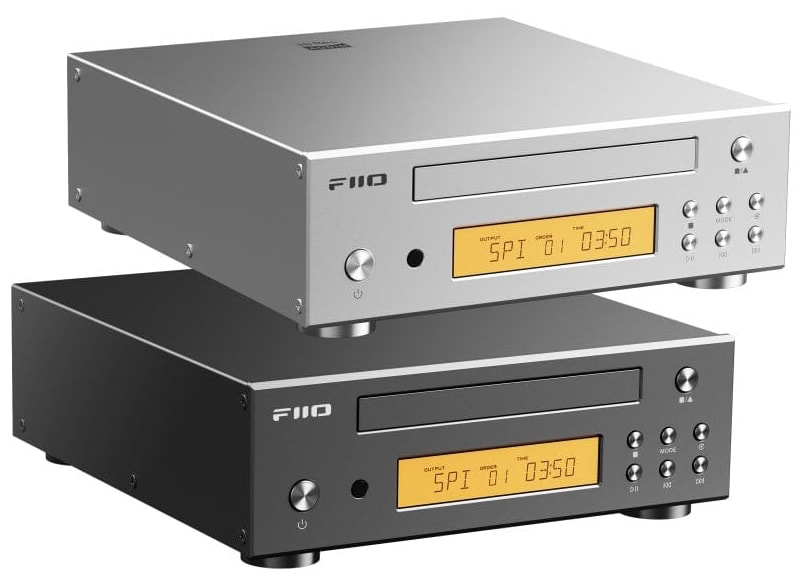
CD players are back. Back again. Tell a friend — preferably the one who dumped an entire collection at Goodwill because Spotify was supposedly the future forever.
The timing of FiiO’s new DP11 could hardly be better. Our recent look at RIAA data found U.S. CD unit volume up 45.7% to 17.5 million during the first half of 2026, while wholesale revenue jumped 58.6% to $171.1 million. Streaming still dominates music consumption, but the little silver disc is behaving rather poorly for a format that was pronounced dead years ago.
FiiO has already leaned hard into the revival with portable models including the DM13 and DM15 R2R. The DP11 takes a different approach: it is a compact desktop CD transport and player designed to sit in a proper hi-fi system.
Related Reading:
What Makes the DP11 Different?
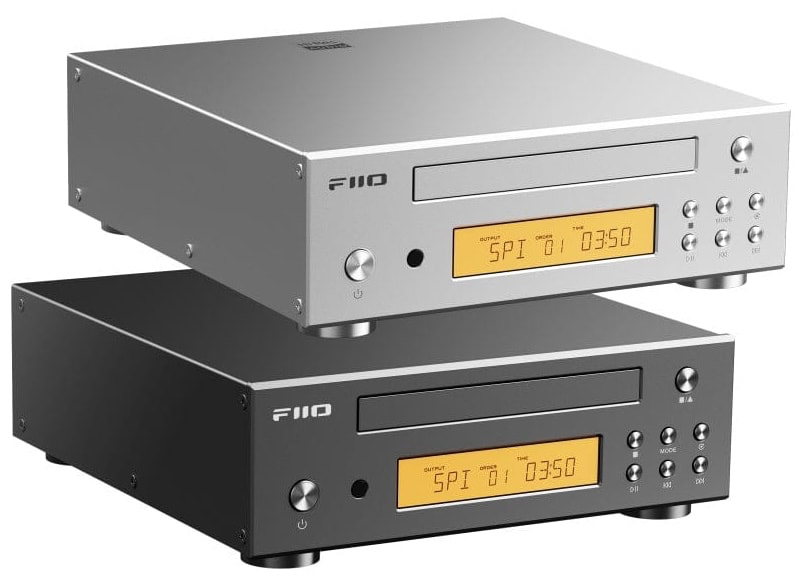
Currently listed at $169.99 through HiFiGo, the DP11 is unusually well equipped for the money. FiiO uses a custom desktop CD mechanism with optimized servo control and a support structure designed to reduce mechanical noise during playback.
The rear panel is the real story. AES, coaxial and optical digital outputs let the DP11 feed an external DAC, while an internal Cirrus Logic CS43198 DAC and stereo RCA output mean you do not actually need one. USB can also turn the DP11 into a digital interface for a computer, phone or tablet, while CDs can be ripped directly to USB storage in lossless WAV format.
Power can come from the internal AC supply or an external 12V DC supply, giving tweakers an obvious path toward an aftermarket linear power supply. Nobody required FiiO to make a $170 CD player this flexible, but here we are.

FiiO DP11 Specifications
- Type: Desktop CD player / digital transport
- Mechanism: Custom tray-loading CD drive
- DAC: Cirrus Logic CS43198
- Digital Outputs: AES, coaxial, optical
- Analog Output: Stereo RCA
- USB: Digital interface and CD ripping
- CD Ripping: Lossless WAV to USB storage
- Display: 3.71-inch LCD
- Power: Internal AC or 12V/2A DC
- Remote Control: Included
- Dimensions: 213 x 230 x 67 mm
- Weight: 1.8 kg / 4 lbs
- Finishes: Black or silver
The Bottom Line
The DP11 is not an everything box. There is no headphone output, SACD playback, Bluetooth or network streaming, so anyone wanting a Discman, streamer and headphone amplifier rolled into one should keep walking.
That focus is also part of the appeal. The $299 Shanling CR60 also rips CDs and functions as a compact transport, but requires an external DAC. The $199 Shanling EC Play adds Bluetooth 6.0, LDAC and headphone outputs, but is designed primarily as a portable player.
For listeners with shelves full of CDs and an existing amplifier or DAC, the DP11 offers an unusually complete set of connections for very little money. Considering what has happened to CD sales in 2026, FiiO may have arrived at exactly the right moment.
The CD player is back. Again. Please try to act surprised.
Where to buy:
Related Reading:

John Ternus and iPhone Duo designers reveal how ordinary paper notebooks were a key inspiration for the new foldable iPhone Duo.
Even as Apple is celebrating the arrival of the iPhone 18 Pro in stores, even its own executives are looking ahead to when the iPhone Duo comes out. CEO John Ternus, hardware executive Molly Anderson and software executive Steve Lemay have been talking to GQ magazine about having started from scratch to build the foldable.
“Steve [Jobs] talked about the intersection of technology and liberal arts,” says Ternus, “and I think iPhone Duo is a perfect example of that.”
According to Anderson, vice president of industrial design, reaching that goal meant starting with specific aims that were derived from paper notebooks.
“Everyone knows what a notebook feels like in the pocket and what it feels like to carry around,” says Anderson. “So that was a big part of the inspiration: ‘How do you get to something that gives you space but also feels compact?’”
GQ claims that the iPhone Duo’s proportions are actually based on the A-series paper system used internationally. A4 is the international nearest equivalent to US Letter size, for instance.
If the iPhone Duo’s proportions were based on that series, they’re closest to A5, which is half the size of A4. Even that isn’t an exact match, but it’s near.
Apple and most people who’ve tried the iPhone Duo out instead tend to describe it as passport-sized when closed. But of course this is a phone that is meant to be opened out, and Anderson says Apple focused intensely on how it feels to use it open.

Apple’s Steve Lemay (left) and Molly Anderson, during the iPhone Duo launch – image credit: Apple.
“We really obsessed about how it feels when you open it — it’s incredibly smooth,” she says. “The hinge is defined by a custom variable torque profile, so it’s easy to open, and then it’s actually biased so that it holds itself open and lays flat.”
Anderson says the hardware design started, at least in part, with the aim of emulating the convenience of paper notebooks, and making something new. Steve Lemay, vice president of human interface design, says that at the same time, its software grew out of all that had come before.
“You’ll see a lot of learnings from iPad in here, learnings from even Macintosh, and learnings from the existing phones,” he says. “It’s sort of the greatest hits of those products together.”
“We didn’t want it to feel like you’re starting a different operating system when you unfold it,” he continued. “And you’re never searching for the button you were just looking at.”
Pre-orders for the iPhone Duo begin on October 16, 2026. The iPhone 18 Pro is now available both online and also in Apple Stores.
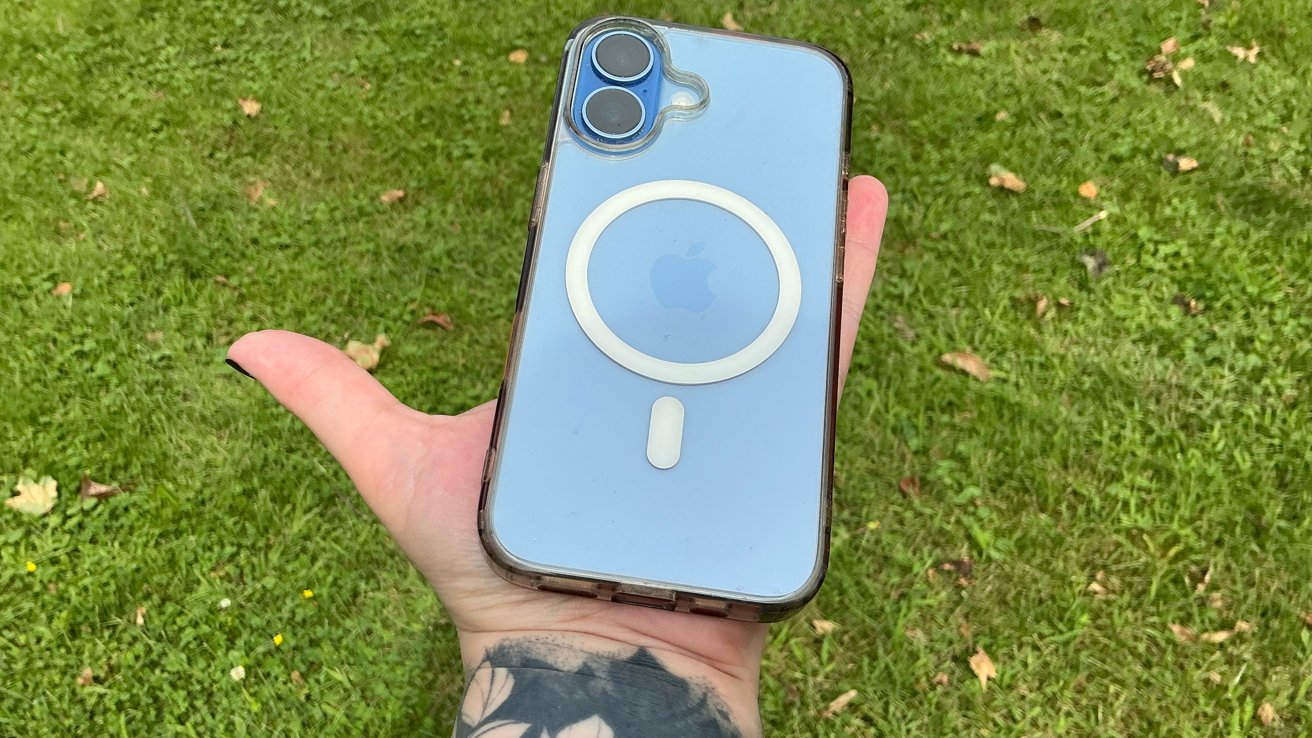
Police sought a man in an iPhone theft at a casino, and a man is accused of stealing iPads from a company that had just fired him,, all in this week’s Apple Crime Blotter.
The latest in an occasional AppleInsider series on the world of Apple-related crime.
Man in Best Buy line has iPhone stolen
A man waiting in line for nearly 40 hours at a West Hollywood Best Buy for a new Pokemon card release had his iPhone 17 Plus stolen, although he later tracked it and got it back.
According to WeHo Online, the man got in line on the afternoon of Monday the 14th for the release of Pokemon’s 30th anniversary trading cards, and was still in line on the 16th. At 7 a.m., it was reported to police that the iPhone had been stolen.
The man gave police permission to track the device, and police determined that the thief had dropped it. The man got his iPhone back and declined to press charges.
Man sought for theft of iPhone from casino
Carson City Sheriff’s Office in Nevada is looking for a man who they say stole an iPhone from a customer at the Nugget Casino.
2 News reports the theft took place August 17, and the alleged thief was “last seen wearing a purple sweatshirt, gray sweatpants, purple-and-black Nike shoes and a white headband.”
Man accused of stealing 30 iPads from company that fired him
A 43-year-old man from Hialeah, Fla., has been arrested for stealing 30 iPads, valued at $12,000, from a business that had fired him earlier that day.
According to NBC Miami, police say the theft happened on September 4, when an employee recognized the man as he was entering the warehouse. Even though the man was wearing a mask, the owner of the business was also able to recognize him on surveillance video.
The report said the man had been fired for not showing up for work the previous two days. It was later discovered he had pawned some of the iPads shortly after the theft.
iPhone left in Porsche helps catch a scammer
An elderly Connecticut woman had nearly $28,000 stolen in an identity theft scam, although an iPhone left in a Porsche led to the scammer’s arrest.
CT Post explains a scammer told the 80-year-old woman her Social Security number had been compromised, using a fake “Apple Security” alert. The man on the phone told her that she would need to pay $27,975, in cash left in a shoebox, to get a new Social Security number.
A witness provided a license plate number of a Porsche used in the scam. An iPhone left in the car was traced back to the man who was later arrested.
AirPods signal leads police to stolen car in New Jersey
Police in Englewood, N.J., arrested a man after they followed the signal from a pair of AirPods to track a stolen car.
According to News 12, police eventually found the man carrying the AirPods, after which he “made several disparaging comments and threatened one of the officers.”
He was hit with several charges, including burglary, theft, receiving stolen property, terroristic threats, resisting arrest and possession of burglary tools.
Man put on Walmart vest to steal Apple Watches, police say
A 42-year-old man walked into a Walmart store in Sarasota, Fla., put on a Walmart vest in order to impersonate a store employee, in an attempt to steal from the store.
That didn’t work, as he got out only with the vest. However, he later used that vest in a different Walmart to steal three Apple Watches, police said.
WWSB reports police caught up with him entering his vehicle, which they searched, turning up the watches and a gun. He was charged with grand theft, a felon in possession of a firearm, and burglary of an occupied structure.
Verbal disturbance report leads to arrest for thefts of iPad Pro and AirPods
A 19-year-old North Carolina man has been charged with multiple felonies after he allegedly broke into the victim’s vehicle and took an iPad Pro, AirPods, a wallet, a purse, and medication.
According to Fox Carolina, police pinged the AirPods to the man’s residence. After a verbal altercation between the man and the victim, the sheriff’s office arrived, recovered the items, and arrested the man.
Police said evidence from the man’s phone “supports the allegations of theft.” He was hit with charges of felony breaking and entering a motor vehicle, felony larceny, and felony possession of stolen goods/property.
Man arrested for AirTag stalking, threats
Police in Ohio arrested a man on charges that he used an AirTag to stalk a woman.
TiffinOhio.net writes the woman told police that the man had been following her and placed the device on her car, in addition to making threats.
The man was charged with menacing by stalking, a first-degree misdemeanor.
Man arrested in Georgia for iPhone counterfeiting
A man in Georgia, the country, was arrested for a rather crude form of iPhone counterfeiting. Police say he made a plastic object meant to resemble an iPhone and attempted to pawn it at a Tbilisi pawn shop.
According to Georgia Today, police determined that the man was part of a conspiracy that had pawned “six imitation mobile phone devices at different pawnshops, causing significant financial damage to the companies.”
He was charged with repeated fraud, attempted fraud, and the production and use of forged documents, the Interior Ministry told the outlet.

Military aircraft were already in the air this spring when U.S. officials made an alarming discovery: The intelligence driving an armed operation against a Chinese vessel had been hallucinated by an AI chatbot. The operation was aborted at the last minute, narrowly averting a potential conflict with China, CNN reported on Friday.
The episode underscores a growing concern among military officials and outside experts: As decision-makers lean more heavily on AI, the errors these systems produce can travel up the chain of command before being questioned.
The intelligence report, which circulated during the war with Iran, said the vessel was carrying components for a nuclear weapons program.
The false intelligence originated with a Special Operations Command analyst who queried an AI chatbot to synthesize open source data with classified signals intelligence. The chatbot misidentified the ship’s cargo manifest. The analyst then used the tool a second time to format the erroneous findings into an official-looking summary, which was circulated across command channels.
The near-miss comes as the U.S. military races to integrate AI to accelerate decision-making and maintain its edge over China. The Pentagon has described AI as delivering a significant advantage in speeding up its kill chain so commanders can respond in the right time. But the same speed that makes AI attractive may also allow hallucinations with insufficient human oversight.
“It’s important for service members to understand the uncertainty inherent to LLMs,” said Jake Steckler, research scholar at GovAI and veteran U.S. Army officer, in a written response to TechCrunch. “But it’s especially critical for any decisions that could lead to use of force, like targeting, intelligence analysis, or operational planning. There are life and death consequences for those decisions.”
Still, Steckler says, the incident should serve as a call to add more safeguards to AI, not a reason to avoid it. “These tools can be useful in the right contexts and with the right safeguards in place,” he said. “But prioritizing adoption speed over all else will likely lead to incidents that only make service members lose trust in these systems, which ultimately is only going to slow adoption.”
When you purchase through links in our articles, we may earn a small commission. This doesn’t affect our editorial independence.
Tech
TikTok’s settlement priced release from a 2019 privacy order at $100m. A judge has tentatively said the order stays.
A federal judge in Los Angeles has tentatively refused to lift the consent decree imposed on Musical.ly, the app ByteDance bought and turned into TikTok. Vlad Savov and Josh Sisco reported the ruling for Bloomberg, which said Judge George H. Wu intends to keep oversight of the company’s privacy practices.
Wu wrote that the order imposed obligations neither TikTok nor the government had shown to be obviated. The ruling is tentative and can change.
Why $100m is riding on it
The Justice Department announced the $400m settlement in August, resolving a children’s privacy case it filed in 2024. The structure is the part worth reading closely.
TikTok pays $300m immediately. The remaining $100m falls due only on entry of an order vacating the Musical.ly decree.
So a quarter of the headline figure is contingent on a court agreeing to stop supervising the company. Read one way, the government negotiated an extra $100m if it could deliver that. Read the other, release from oversight was worth $100m to TikTok.
What the 2019 order actually did
The Federal Trade Commission settled with Musical.ly in February 2019 for $5.7m, then the largest children’s privacy penalty it had obtained. The money was the smaller part.
The decree required the company to comply with the children’s privacy law going forward, take offline every video made by a user under 13, and destroy improperly collected data or obtain parental consent for it.
Those are continuing obligations enforceable by a court. The sum now offered to end them is roughly seventeen times the original penalty.
The government argued for ending it
The Justice Department’s own announcement made the case. It said TikTok had undergone significant changes to its ownership, management, compliance functions and privacy practices since the complaint was filed.
Those developments, it argued, had materially advanced the public interests underlying the litigation. That is an enforcement agency telling a court its supervision is no longer necessary.
Wu has tentatively disagreed with the party that brought the case. TNW reported the settlement in August, including the conditional structure now in question.
Why a judge might be unpersuaded
The record since 2019 is not thin. A Texas judge found TikTok liable for telling parents its app was safe for children while knowing it was not.
There is also the question of what the company did with a fix it already had. A sealed document showed TikTok withheld a safety feature from 15 million US users by design, keeping them as a control group.
None of that is before Wu in this proceeding. It is the context in which a court decides whether a company’s compliance improvements have made judicial supervision redundant.
The money in proportion
$400m is one of the largest recoveries ever obtained under the children’s privacy statute, which says more about the statute than the sum. Penalties are capped per violation and the law dates from 1998.
Compare the exposure elsewhere. Meta agreed to pay up to $16.68bn to settle a youth safety case brought by 29 states, roughly forty times as much.
State consumer protection law and product liability claims have proved more expensive than the federal privacy statute written for the era of the family computer.
The European position is the opposite
Brussels is adding supervision rather than removing it. The European Commission has charged TikTok with failing to protect children under the Digital Services Act.
The structural difference matters more than the amounts. A DSA proceeding produces continuing obligations under a regulator, where a US settlement converts conduct into a payment and, if the court agrees, an exit.
That is why the tentative ruling is interesting beyond this case. The judge is the only actor in the American process holding the supervisory line.
What is not decided
TikTok has admitted nothing. The Justice Department states plainly that the resolved claims are allegations only and that there has been no determination of liability.
The $300m is not affected. If the vacatur is finally refused, the government collects less and the 2019 obligations continue.
What to watch
Watch whether the tentative ruling becomes final, and what the parties file in response. A tentative ruling is an invitation to argue, and both sides have a reason to.
Watch whether the compliance terms in the settlement are treated as a substitute for the decree. The government says they strengthen age controls and parental oversight, and a court that keeps the older order will have both running at once.
Tech
To Enforce Its Proposed Social Media Ban for 450 Million Pre-Teens, EU Builds an Open Source App

The European Commission “proposed on Thursday banning children under 13 from social media, with parent-supervised accounts until 15,” reports Reuters.
“Enforcement would rely on a tool Brussels built itself” — a free, open-source age verification smartphone app “that tells a platform whether a user meets an age threshold without revealing their identity…”
If passed, the proposed Kids Act would create the world’s largest social media access restriction, covering 450 million people across 27 countries… [The EU-built age-verification app] is being rolled out through member states, with seven pilot countries: Cyprus, Denmark, France, Greece, Ireland, Italy and Spain. The Commission expects EU-wide availability by the end of 2026.
It will also be used to prove users are over 18 when accessing adult sites, a restriction already implemented under the Digital Services Act…
[T]he system itself is decentralised. Member states run it through issuers they designate, and the proofs live on the user’s phone. There is no central EU database of ages or of who verified whom… A user proves their age once to a nationally designated issuer — a body vetted by the member state, which can be a digital ID provider, a bank or a post office. At a restricted site, the app certifies that the user is above the required age threshold. The platform receives only a yes-or-no response. Issuance and verification are handled by separate entities. The proof provider is not told which service the proof was used for. Each proof works only once, preventing cross-service tracking. No identity documents or biometric data are retained. The code is open-source, allowing independent scrutiny.
The significance of the EU approach is that it provides a common age-verification mechanism rather than leaving individual platforms to develop and enforce their own systems.
“Online platforms can easily rely on our age verification app. So there are no more excuses,” [EU Commission President Ursula] von der Leyen said…
The proposal must be approved by EU member states and the European Parliament before becoming law.
Non-compliance would risk fines of up to 6% of a tech company’s global annual sales, plus supervisory fees, Reuters reported earlier.
The EU’s plan follows similar initiatives in Australia, Britain, China, India, Turkey and several European Union countries.


Read more of this story at Slashdot.

New Apple CEO John Ternus welcomed buyers of the new iPhone 18 Pro and Pro Max to the company’s flagship Fifth Avenue store in New York on Friday, and it’s likely to be just the first of several major product launches for the former hardware lead’s first year in the top job.
Dressed in a dark gray shirt and blue jeans, Ternus immediately took to taking selfies, giving handshakes and signing phone boxes for the hundreds of fans who chose to preorder the new iPhone or Apple Watch.

Ternus, formerly Apple’s senior vice president of hardware engineering, took a casual and personable approach to the launch — even gently laughing as one excited Apple fan accidentally dropped his iPhone 17 Pro Max onto the concrete while walking into the store.
“It’s fine, it’s got a little ding, no crack, thank you, Ceramic Shield,” Dallen Frutchey, 18, from Virginia, said about the accidental drop just ahead of moving his data to his new iPhone 18 Pro Max. This is his fourth time attending one of Apple’s Fifth Avenue store openings, where he had met prior CEO Tim Cook a number of times. At today’s event, he got a selfie with Ternus just before the phone drop.
“I’m excited to have someone who is down in the details with the products working on things now,” Frutchey said, wearing a blue sweater that matched his new glacier blue phone.

The very first person to come out of the Apple store — Harry Sun, 21, from New Jersey — walked out with a burgundy phone while wearing a Believe pin from the Apple TV show Ted Lasso. Eric Morgan, the second person in line, came all the way from Guatemala. He was buying several phones for his family, who also made the trip but were staying at their hotel, away from the iPhone launch-day madness.

The glacier blue hue appeared to be an early crowd favorite at this store, and Apple’s flagship location had a number of visible changes to mark the occasion. The outside of the store had a color blend of burgundy along with that shade of blue — giving no love to the more traditional silver and black color variants that are also available for the 18 Pro and Pro Max.

Inside, the Apple store took on more of a party vibe as it filled with the crowds that had been waiting outside. A DJ booth spinning Lady Gaga songs blasted in front of a large blue carpet area that served as a showroom for the new phones, as well as the Apple Watch Series 12 and Apple Watch Ultra 4.

At the opposite end of the store, without many passersby, a small photography exhibit featuring photos taken on the iPhone 18 Pro was on display in an area that formerly served as the Apple HomePod demo area. We will see over the next few months whether new products will take over that real estate, since today’s event also marks a shift in how Apple conducts its iPhone launches.

Apple’s set to do at least one more store launch like this when the iPhone Duo goes on sale on Oct. 23 — marking the company’s first entry into the foldable phone space. It’s also rumored to be launching a number of new home entertainment products, with the decreased floor space for the HomePod possibly hinting at a relaunch of the speaker now that the new Siri AI assistant is rolling out to the iPhone 15 Pro and later.
And that’s not to mention the rumors hinting that a non-Pro iPhone 18 and an iPhone Air sequel may be set up for a spring launch, anchoring what could be a new annual launch event early in the year to contrast with premium phones coming later in Apple’s typical September window.

So while this is the first iPhone launch under Ternus, it’s likely that several more of these are to come over the next year.
Bridget Carey contributed to this story.



Google Creative Lab published Gemma Translator back in August 2026 as a voice box that never phones home. Alan Yam, Shashwath Santosh, and Dan Motzenbecker built it with help from Google Antigravity, then posted the code, model scripts, and 3D-print files on GitHub under Apache 2.0. You talk into a microphone. Moonshine turns the recording into text. Gemma 4 E2B, running locally through LiteRT-LM, translates that text. Moonshine speaks the other language from a speaker. After the first download, the radio can stay off.
Jadaie Lin modified the same setup to work on PiSugar’s Whisplay HAT+. The board is roughly the same size as a Raspberry Pi 5, measuring around 2.8 inches, but it also has some serious hardware, such as a 640 x 480 DSI touchscreen, two microphones and speakers, and a few motion sensors. The original Google setup required a separate kiosk panel (480 by 320), a USB microphone, a speaker, a push-to-talk button, and a rotary knob to select the language to use. Lin completed the entire process on a Pi 5 with only one hat put on top of it.

Apple AirPods 5 Wireless Earbuds
- ACTIVE NOISE CANCELLATION—AirPods 5 offer improved Active Noise Cancellation to help reduce outside noise, at their best value yet.
- HEAR THE WORLD AROUND YOU—Adaptive Audio blends Active Noise Cancellation and Transparency for the best listening experience in any environment…
- LIVE TRANSLATION—Communicate across languages using Live Translation, enabled by Apple Intelligence.*

Audio turns up on the onboard mics, Moonshine does its magic with some sophisticated transcription, Gemma handles the translation, and the twin speakers return the outcome to you. There’s a small retro-terminal-style web UI in React and Vite that is fed via a Python API on port 3000. This displays two discussion lanes, allowing you to sit down in front of the tablet with a friend in separate languages and chat.

Lin relocated all of the old controls on the touchscreen and placed the language switching in a convenient settings panel. He also included timing to demonstrate how long each portion of the chat takes: listen, translate, and then speak.
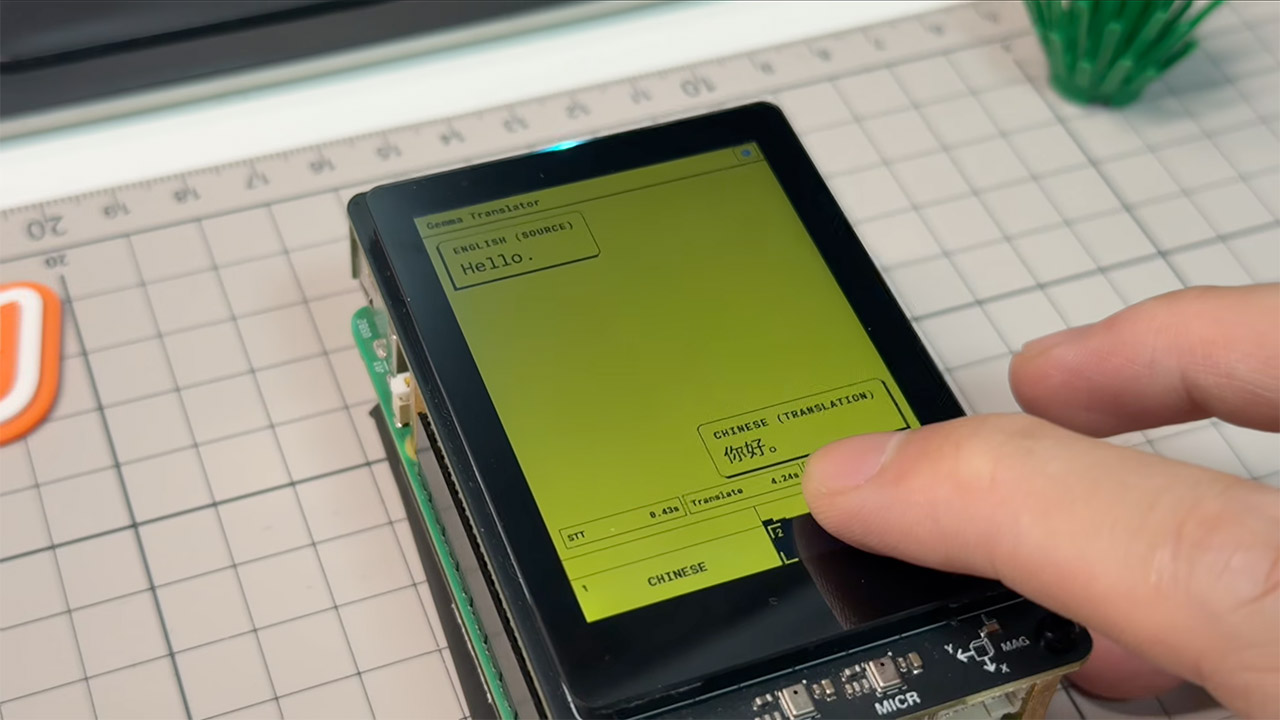
Gemma 4 E2B runs in LiteRT-LM and lives in memory, with a useful system prompt stored in the key-value cache. Tokens are transferred to the browser via server-sent events, and the UI refreshes in real time as the discussion progresses. Finished phrases are fed into the speech queue. Context resets after 3200 tokens, as there is a 4096 token limit, thus extended conversations do not simply stop working. By default, the translator loads models for Chinese and English.

To set everything up, you’ll need Python 3.10 or newer, Node 18, or newer, an 8GB Pi 5, and a one-time model fetch from Hugging Face. After that, the device will happily run without the radio, which is ideal for travel, classrooms, and other situations where you don’t want your speech to sit on someone else’s servers. Lin is treating the translation as the first app for Whisplay HAT+, and there is a wait list and a Discord channel established up while the board is still being distributed to clients. The code is available at on the Github page, and it’s basically a fork of google-gemma/gemma-translator, so you can see how everything works.

#meaning #marriage #hardwork #money

Jamie Carragher stunned ‘really poor’ Liverpool star wasn’t subbed off against Bournemouth | Football

Energy Transfer: Enough Is Enough (Rating Downgrade)




-

 Fashion2 days ago
Weekend Open Thread: Talbots – Corporette.com
-
 NewsBeat2 days ago
Trump says US has reached an agreement to take permanent control of Greenland’s security
-

 Crypto World2 days ago
Circle launches Arc Studio AI agent for building onchain apps
-

 Crypto World6 days ago
Revolut Attackers Warn of Ongoing Daily Customer Data Leaks
-

 Crypto World6 days ago
Kraken Lets xStocks Holders Earn Yield Through DeFi
-

 Crypto World5 days ago
What Is the Status of the U.S.-Iran Peace Talks? Here's What Both Sides Are Saying
-

 Crypto World5 days ago
Robinhood engineers charged over $50K crypto scheme
-

 Crypto World4 days ago
US Charges Robinhood Engineers Over Crypto Listing Trades
-

 Crypto World2 days ago
Bitcoin price breaks channel as RSI climbs to 63
-

 Crypto World6 days ago
Elon Musk Drops a Bombshell: Grok 5 Could Be the AGI Breakthrough
-

 Crypto World7 days ago
New Tesla Roadster Uses SpaceX Tech. Will It Impact the Stock Price?
-
 NewsBeat6 days ago
‘Sick conspiracy’: Trump says only guardrails AI needs is ‘a strong and smart (High IQ!) president’ in all-caps rant
-

 Crypto World5 days ago
NVIDIA Analysis: Attempted Rising Wedge Breakout Amid Pressure on the AI Sector
-
Business6 days ago
SK Hynix ADRs Fall More Than 6% as Memory Rally Breaks on Fears of Slower AI Spending
-

 Tech5 days ago
Webb’s IC 348 Mosaic Includes Two-Jupiter Dwarfs, Twin Jets, and a Nursery Still Making Worlds
-

 Crypto World6 days ago
3 Token Unlocks to Watch in the Third Week of September 2026
-
Crypto World6 days ago
Can Circle’s Arc Repeat Robinhood Chain’s Meme Coin Boom?
-

 Crypto World6 days ago
DOJ Seeks to Seize $61M in Iran Oil Funds From Binance Accounts It Vouched For
-

 Crypto World7 days ago
Goldman Sachs backs 25bp Fed hike after CPI
-

 Crypto World7 days ago
AI Safety Burden Falls on Chief Executives as Trump Prioritizes China Race
You must be logged in to post a comment Login