

The iRestore Elite Helmet + Battery is on sale, from March 15 through March 31, dropping to $1,879 ($419 off). Considering the helmet alone retails for $1,899, this deal scores you a rechargeable battery at no extra cost.
The additional battery makes the treatments far more convenient. Instead of being tethered to a wall outlet, you can move around during sessions. A single charge lasts roughly two weeks of daily 12-minute treatments, so you won’t even need to recharge often.
IRestore Elite Helmet + Battery for $1,879 ($419 off)
iRestore
Elite Helmet + Battery
Advertisement
IRestore Elite combines LEDs with its proprietary laser diodes that operate in the 655 to 680 nanometer range; the combination is designed to penetrate deeper than standard red light therapy, while the LEDs help distribute the light evenly across the scalp for maximum efficacy. Treatments take just 12 minutes a day, but like most routines, consistency is crucial. Fortunately, the included storage case makes it easy to keep up the habit even when you’re traveling.
WIRED reviewer Julia Forbes spent 16 weeks testing the iRestore Elite on both herself and her husband, who are dealing with different degrees of hair thinning and loss. Within two weeks of consistent use—alongside iRestore’s shampoo, conditioner, supplements, and serum—her husband started noticing baby hairs sprout along his receding hairline and more fullness at the crown. Forbes discovered that the treatments help prevent eczema flare-ups on her scalp.
Costco is the ultimate stop for the average shopper to fill their pantry, get a good deal on a set of tires, and even plan an affordable vacation. To shop at the warehouse store or on the company’s website, you must have a membership. Plans start at $65 a year, plus sales tax. Some may balk at the idea of paying for the privilege of shopping, but there are numerous benefits to a Costco membership.
Not only can you stock up on groceries and daily staples, you can also shop in-store or online for everything from diapers to electronics. Even if you don’t have a Costco store nearby, you can take full advantage of the warehouse store’s low prices. Costco’s website offers a large inventory of products that aren’t always available in the store, and with Costco Direct Savings, you can save even more when you bundle items. You can also take advantage of exclusive online deals, and shipping on most items is free.
Advertisement
Costco may not be the first place you think about for new gadgets, and you may not always find what you’re looking for at your local store. But there are plenty of fun options online. Here are four electronics that you can keep an eye out for the next time you stop in for a bulk pack of paper towels or are simply browsing the website for snacks and detergent.
Advertisement
Logitech G Driving Force Racing Simulator Bundle
ZHMURCHAK/Shutterstock
If you own a PlayStation 4 or PlayStation 5 and you love racing games, you may want to check out this racing bundle from Logitech, which includes a steering wheel, pedals, and a shifter. Normally priced at $399.99, this bundle is intended to take your gaming into a fully immersive experience.
The steering wheel and shifter can be mounted to a desk or other surface. The racing wheel, which is made with hand-stitched leather, provides feedback for a realistic feel. The brake pedal is made to simulate a pressure-sensitive brake system and designed not to slip on carpeted surfaces. The programmable dual-clutch system emulates launch assist in games that support this function, and the “H” shifter provides six speeds.
This system is also compatible with Xbox Series X|S or Xbox One and PCs running Windows 11 or Windows 10 or later. Compatible PS4 and PS5 games include Gran Turismo 7, the Need for Speed games, The Crew 2, and even Farming Simulator, should you enjoy driving tractors rather than race cars.
Advertisement
Solar Smart Hummingbird Feeder
You don’t always need to travel to an exotic location to see wildlife. Unless you’re determined to see a polar bear or a crocodile, all you really need is a window and a good pair of binoculars. A cardinal or a hummingbird may not have that same level of excitement, but there are more perks to bird watching than simply boosting your mental health. This simple pastime can help migrating birds, attract pollinators to your yard, and support local bird populations. You can pick up a simple hummingbird feeder at your local gardening shop, but Costco offers a more fun, high-tech option: the Evergreen Solar Smart Hummingbird Feeder. This bird feeder, priced at $114.99 at time of writing, does require a bigger upfront investment, but it boasts a 2K high-definition Wi-Fi camera with a 148-degree view.
This smart feeder has a handblown glass reservoir for easy filling, though some customers do report problems with leaks. The camera pairs with an app that allows you to watch visiting birds on your phone, even when you’re not home. It also has free cloud storage, saving 20-second video clips for three days. Along with the feeder, buyers also get a solar panel and mounting hardware.
Advertisement
Skylight 15-inch Smart Touchscreen Calendar and Organizer
The Skylight Smart Calendar may not be fun in obvious ways, but it can turn mundane tasks into an interactive experience for your entire family. It can showcase memories and help your kids positively interact with chores, routines, and upcoming events they may be looking forward to.
The Skylight Smart Touchscreen Calendar and Organizer has a 15-inch touchscreen and can sit on your countertop or desk or hang on your wall like a typical calendar. This device allows you to track family events, make to-do and grocery lists, and organize schedules. When not in use, you can convert it to a digital photo frame to display your favorite family pictures and videos. Your purchase at Costco includes one free year of Skylight Calendar Plus, which offers import features, meal planning, photo and video screensavers, and a reward system to help make chores more fun for kids. Users can sync multiple calendars into this one device, and reviewers particularly like the photo display feature and its auto-syncing capabilities. Skylight works with Google, iCloud, Outlook, Yahoo, and Cozi.
Advertisement
Singing Machine Ultimate Karaoke Party System
A karaoke machine is arguably the most “fun” gadget included on this list, though public singing is some people’s idea of a nightmare! The Ultimate Karaoke Party System from Singing Machine is a portable machine with Wi-Fi connectivity and built-in music streaming apps, including Apple Music, Spotify, Amazon Music, YouTube, and Deezer. It also has Bluetooth capability and line-in options that allow you to connect to your TV and display your videos on a larger screen.
Advertisement
After you pick your favorite song, you can personalize your performance with 22 voice effects and echo effects. There are two wireless rechargeable microphones so you can duet with a partner, and two additional mic jacks if you want to add additional microphones for a group song. For more fun, a light show synchronizes with the beat of the music. Most reviewers praised the machine’s sound and connectivity, while a few found the app interface lacking. One user called it “fun for the whole family”, and another said the machine is “simply the best I ever bought.”
Advertisement
How we chose these products
PJ McDonnell/Shutterstock
To select “fun gadgets” from Costco, we had to settle on a definition of fun. Of course, the idea of “fun” is subjective and varies from person to person. The feeling is universal, but the experiences, ideas, and even places that bring about that feeling can vary wildly from person to person. Your idea of fun — Disney World, for example — may be another person’s idea of a stressful, expensive day. Some people are thrill-seekers who thrive in high-energy activities like mountain biking, while others prefer quiet or creative hobbies, like reading or crocheting.
Additionally, Merriam-Webster defines the word “gadget” as “an often small mechanical or electronic device with a practical use but often thought of as a novelty.” With that in mind, we sought gadgets that can meet varied definitions of fun. These objects offer more than just function, bringing about enjoyment to some buyers even if it’s not everyone’s cup of tea. We also looked for at least one gadget that may be useful in daily life, combining novelty with practicality.
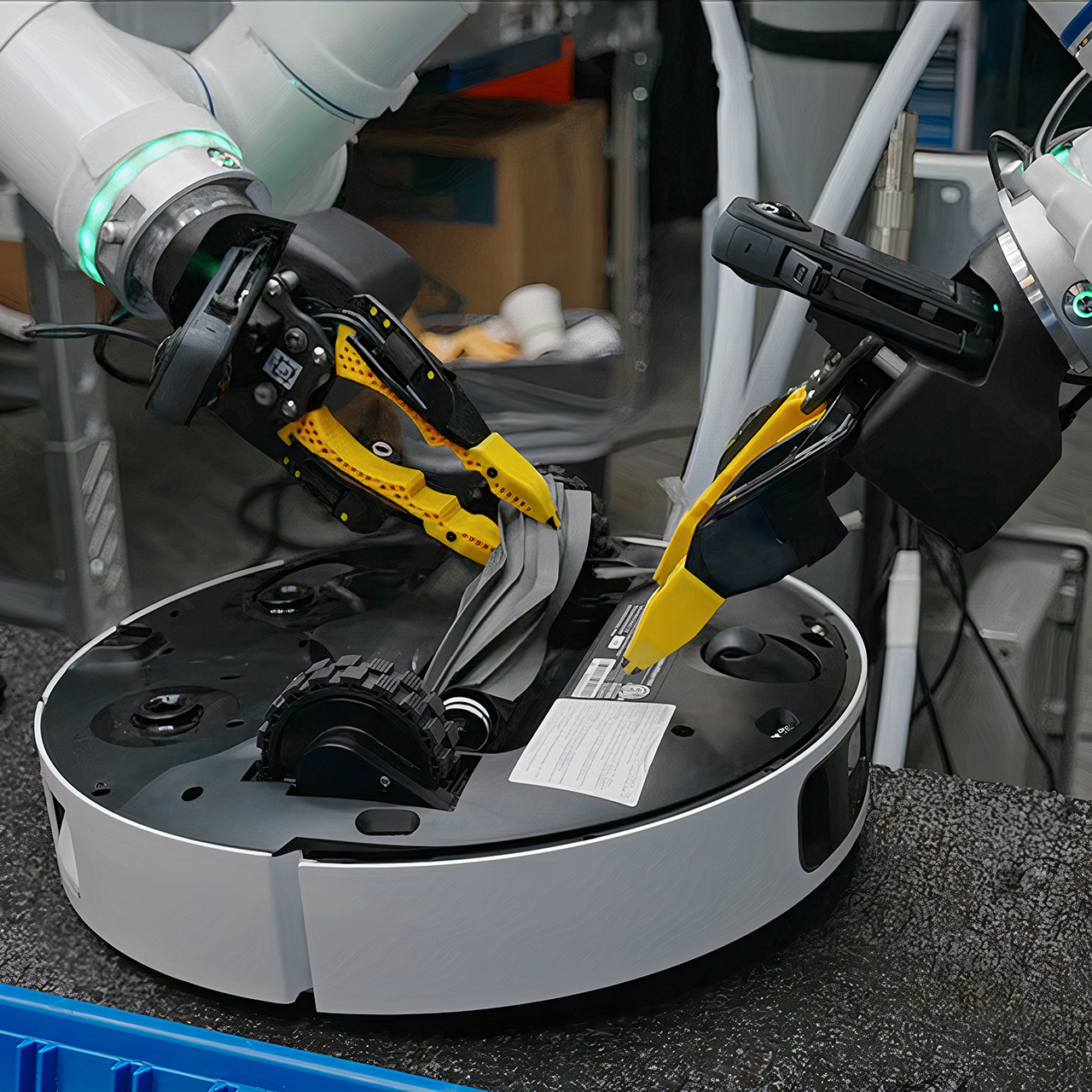
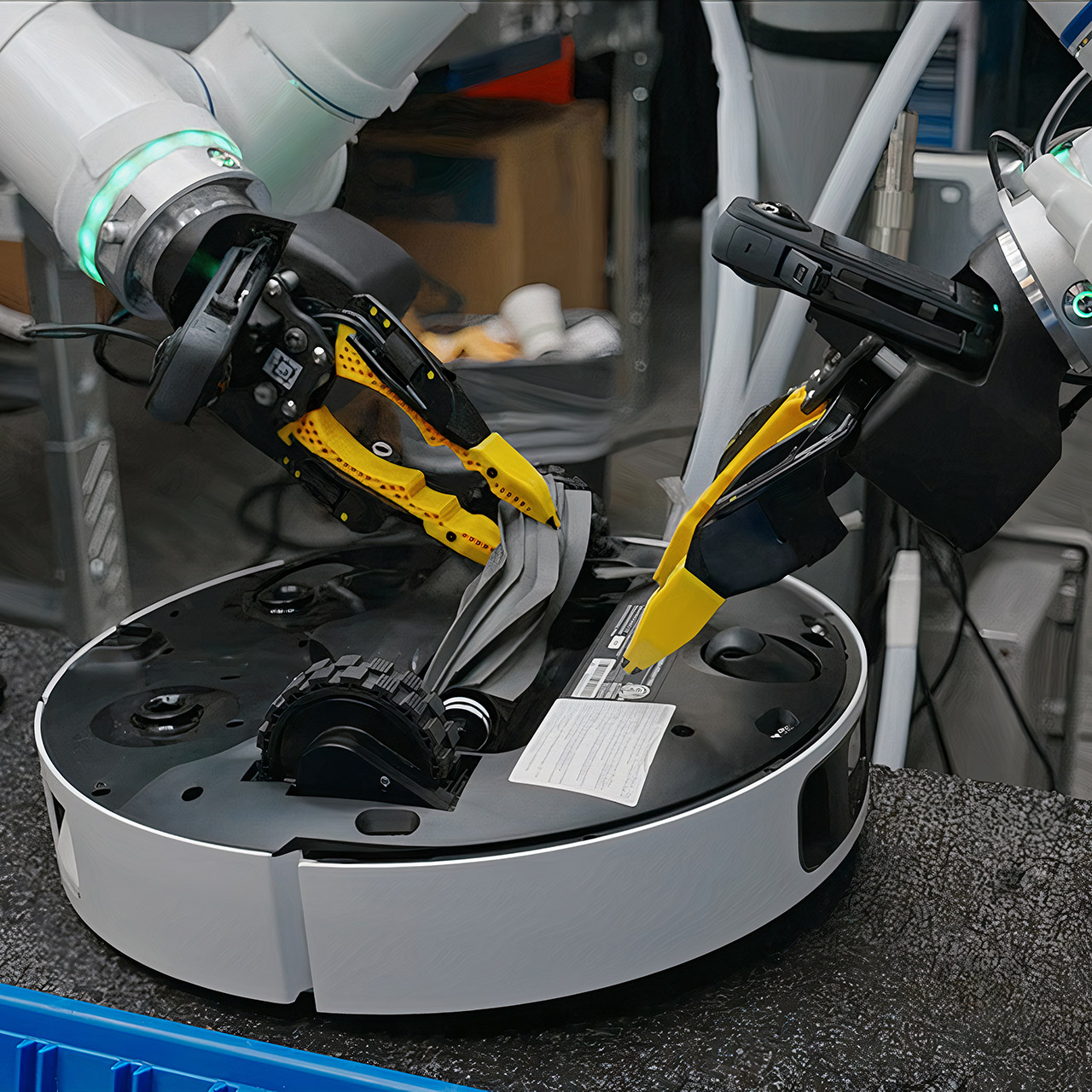
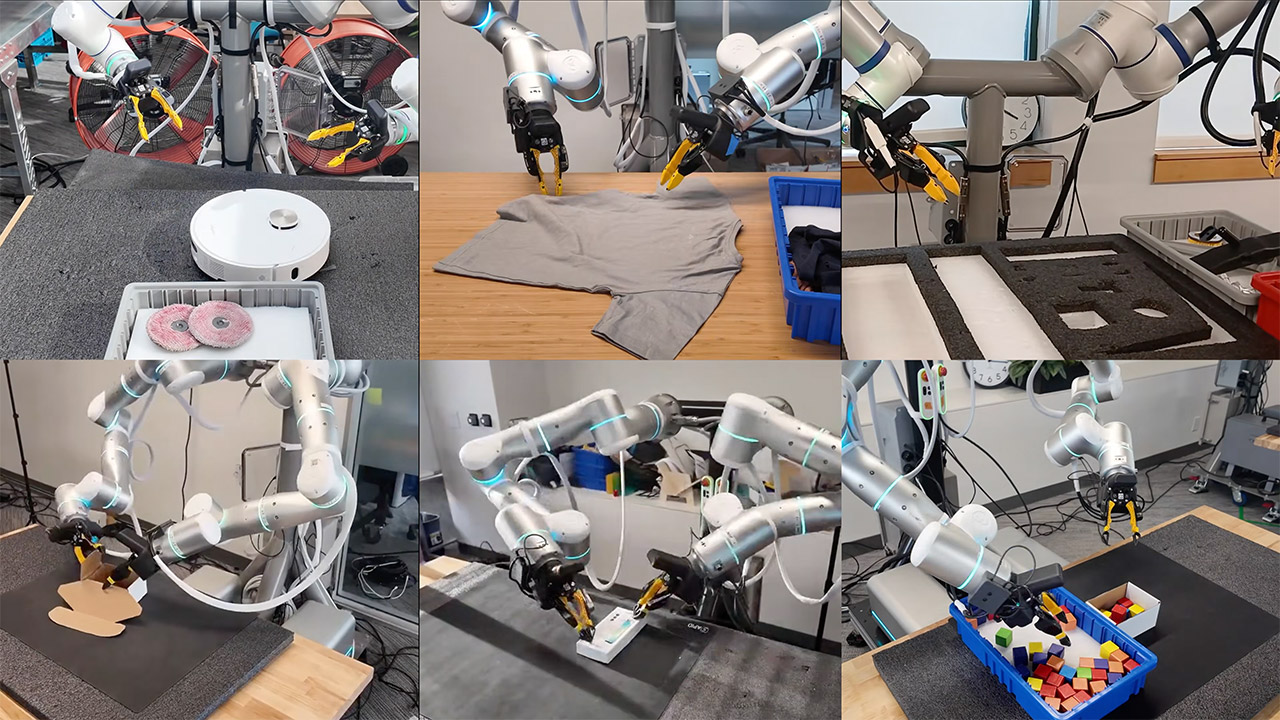
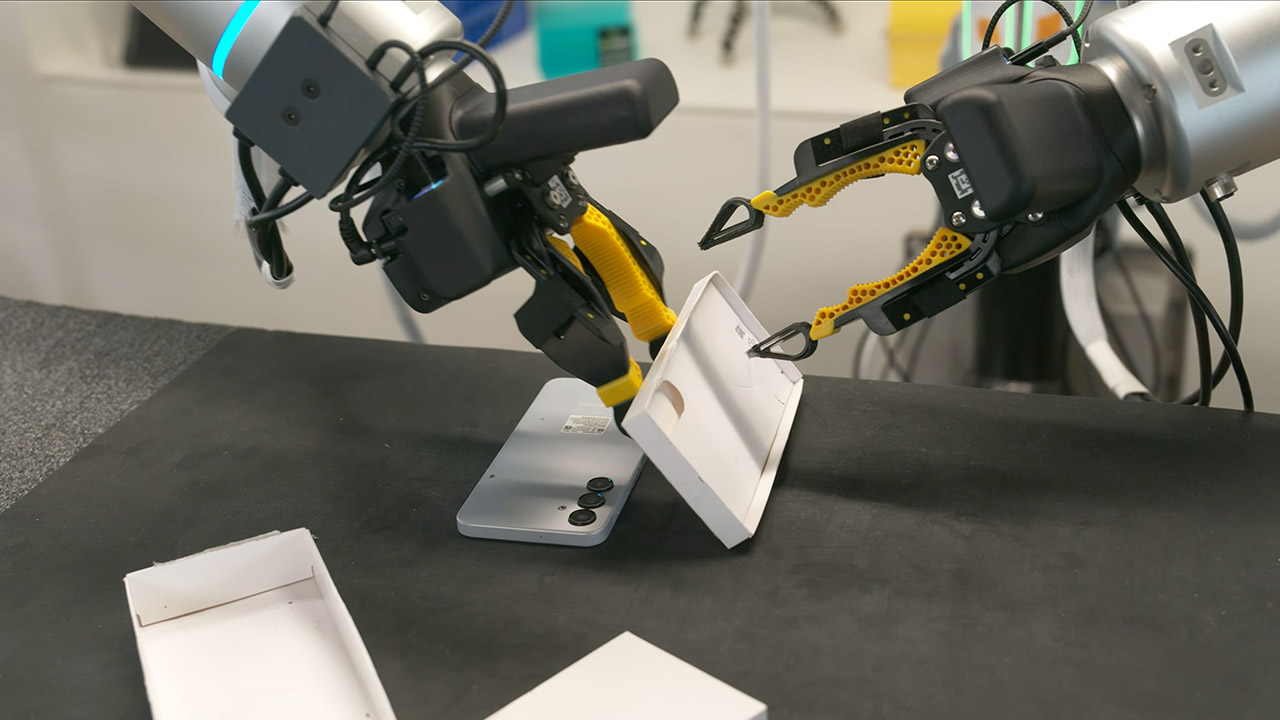
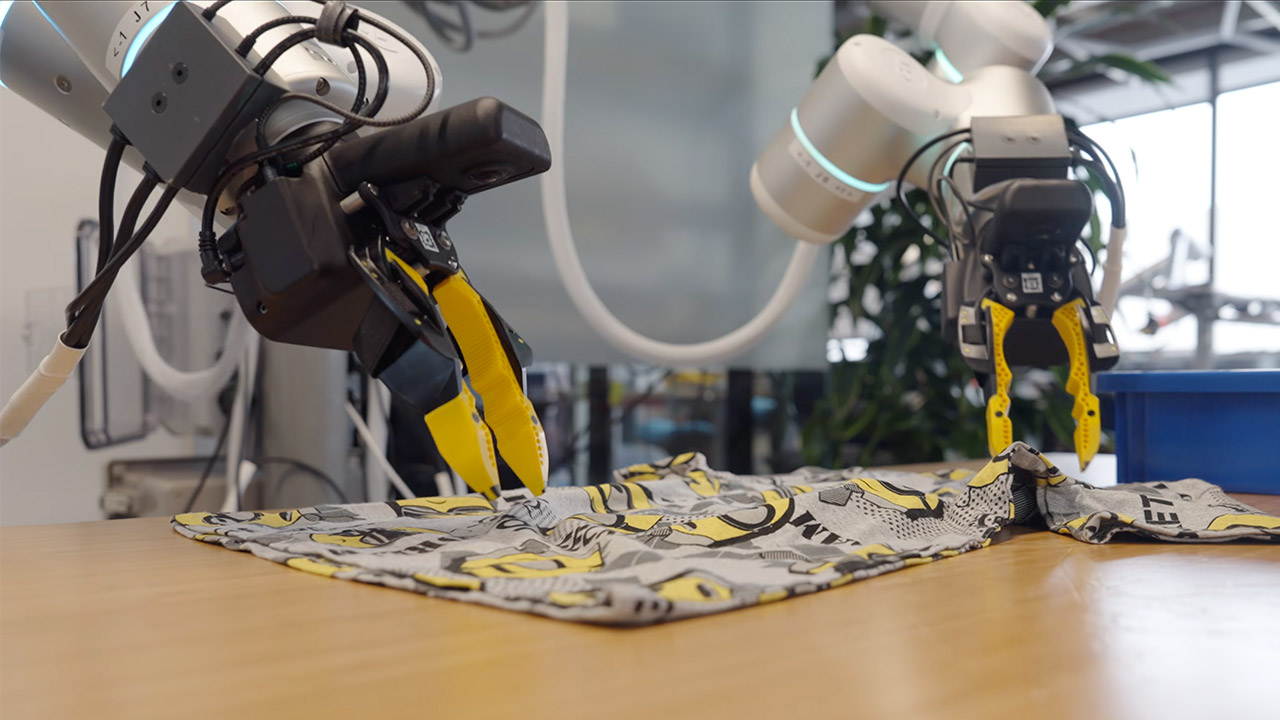
Robots equipped with Generalist AI’s new GEN-1 model have evolved into the ultimate automation workhorses, capable of completing the same simple tasks repeatedly without fail. You can witness in real time as one arm folds shirts row after row, carefully placing each one neatly into a basket, while another robot services robotic vacuums.
It’s only been a few days since Generalist AI introduced GEN-1 to the world, but this startup is already demonstrating how far AI can take robotics in a short period of time. Speaking of which, Generalist AI has only been active for two years, but the amazing work of its three creators gives us a sense of the enormous potential that awaits us here. There’s the one who worked on a key Google robotics project. Another was the creative mind who devised a completely new method of capturing data while observing someone pick up trash with a grabber. Then there’s the guy who worked for Boston Dynamics, the company that created the famously horrifying (but interesting) Big Dog robot. Together, they’ve gathered a lot of backing to pursue the idea that robots could handle the mundane activities of everyday life in the same way that flashy new chat systems handle language.
Sleek & Durable Design: Standing at 132cm tall and weighing only approx. 35kg, the G1 is constructed with aerospace-grade aluminum alloy and carbon…
High Flexibility & Safe Movement: Boasting 23 joint degrees of freedom (6 per leg, 5 per arm), it offers an extensive range of motion. For safety, it…
Smart Interaction & Connectivity: Powered by an 8-core high-performance CPU and equipped with a depth camera and 3D LiDAR. It supports Wi-Fi 6 and…
The key to all of this magic begins with some incredibly cool, and, let’s be honest, slightly strange, strap-on devices worn on their wrists. These effectively transform typical hands into miniature robot grippers, allowing you to perform a variety of normal tasks. Over time, this approach has accumulated an incredible five hundred thousand hours of genuine human interaction, and it’s all from people doing their thing in the real world.
Once that foundation is established, the engineers add a bit of robot-specific practice, as we’re only talking about one hour of robot motions each project, at most. Somehow, that’s all it takes to make this super-smart system that can see its surroundings, and then send out all the action commands it needs to get the job done, and to think, GEN-1 is built directly on top of the last model from just five months ago. It demonstrates how much further they’ve pushed the limits of what’s possible.
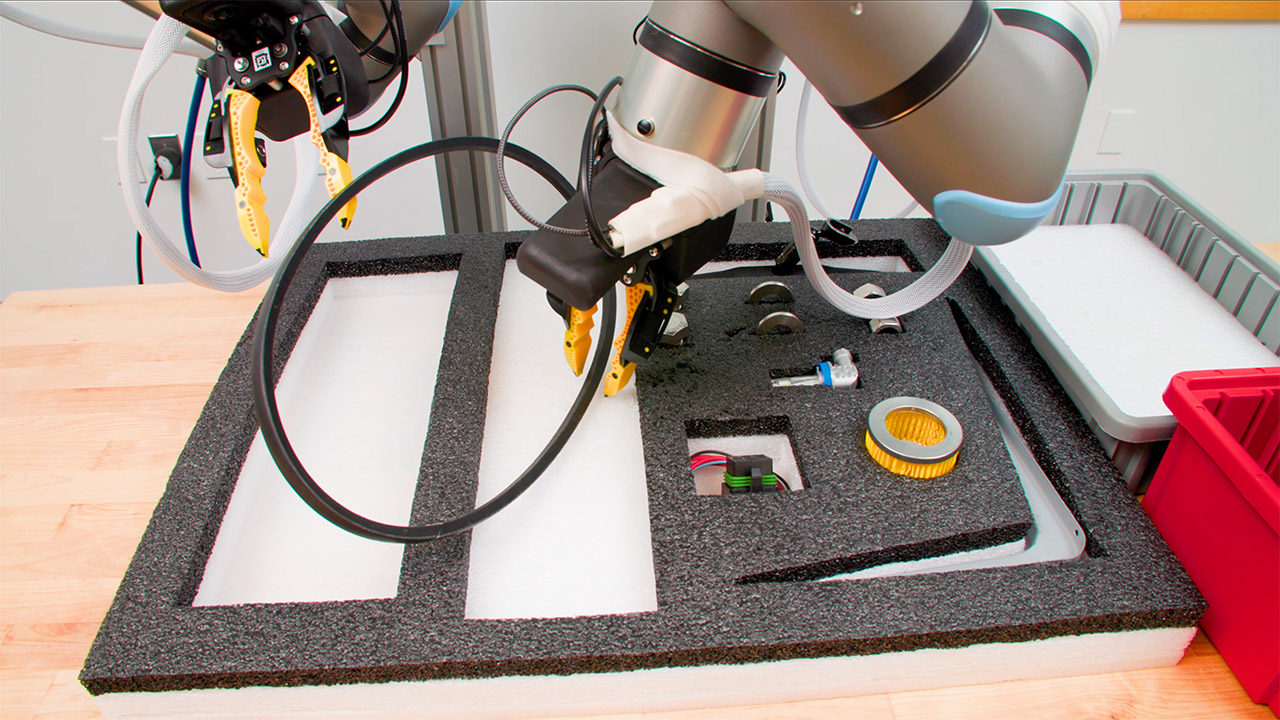
Let’s get to the figures, since that’s what matters in the end. For starters, dependability has improved dramatically. Their previous versions only got the job done approximately 64% of the time, but GEN-1 has increased that average success rate to a solid 99%. In one test, the robot worked nonstop for more than an hour, putting auto parts into kits without a single human hand lifting a finger, while in another, the robot slotted block after block into tidy little kits for an eye-watering 1800 successful cycles. When it came to packing phones, the robot surpassed 100 cycles, demonstrating an incredible level of precision and consistency.
This is significant because, at the end of the day, factories and warehouses are all about machines that simply keep working, day after day, hour after hour, without ever pausing to ask for a break. With GEN-1 at the helm, these facilities can finally rest assured that their machines will complete the task at hand, regardless of the circumstances.
Then there’s improvisation, which is the third element of the GEN-1 puzzle. When something unexpected happens, the robot simply adapts, making adjustments on the go. A washer is knocked out of place, and before you know it, the arm is reaching out with both grippers to nudge it back into place in a clever little trick. Or if a bag becomes caught in the middle of stuffing with soft toys, the machine just jiggles the bag briefly before sliding the item in without disturbance. [Source]
Finalists for the prestigious EY Entrepreneur of the Year programme include Manna’s Bobby Healy, Neurent Medical’s Brian Shields and Sisterly’s three co-founders.
It is a list that always catches the eye. The EY Entrepreneur of the Year (EOY) programme finalists for 2026 have been announced today and there’re some very familiar faces to our readers. According to EOY, the 24 companies featured collectively employ more than 3,000 people, generating revenues of close to €1bn.
It’s little surprise also to see the inclusion of Sisterly and its three co-founders Aoife Matthews, Jennifer O’Connell and Louise O’Riordan. The three seem to have captured the women’s health zeitgeist with their easy-to-use, science-backed ‘The Elevator’ supplement, which is designed specifically for women and was endorsed early by some big names like former star athlete Sonia O’Sullivan.
Advertisement
In total, there are 31 entrepreneurs representing 24 companies from across the island of Ireland shortlisted over three categories.
EOY Finalists – Emerging
Aoife Matthews, Jennifer O’Connell & Louise O’Riordan of Sisterly
Bobby Healy of Manna Air Delivery
Brian Shields of Neurent Medical
Danny Buckley of ADHDNow
Dr Harriet Tracey of Beyondbmi
Jennifer Rock of Skingredients Ltd
Laura McCarthy of Drink Botanicals Ireland
Liam Kearney of The Revive Group
EOY Finalists – Established
Tommy Kearns of Xtremepush
John Corley of Spanish Point Technologies
John Lunn of Lunn’s
Karl Zimmerer of Glanua
Oltian Dervishi of Forte Pespa
Paul Vallely and Clare Walsh of Kukoon
Robin Jones of Golden Bake
Trevor Casey of EPH Controls
EOY Finalists – International
Brian Moloney of StormHarvester
Chris Horgan of Dexgreen
David Brennan of Eastgate Engineering
Dermot O’Shea of Taoglas
Ian Morgan and Sanjay Abraham of XPress Healthcare Ltd
Maire Claire Reid of TST Group
Paul, Gary & Mike Martin of Martin Group
Ronan and Conor Burke of Inscribe
“Entrepreneurship in 2026 looks very different to even a few years ago,” said Roger Wallace, head of assurance & EY Entrepreneur of the Year, Ireland.
“We are operating in a world shaped by geopolitical instability, rapid advances in AI and a level of economic uncertainty that demands creativity as much as resilience. Our finalists this year have not only adapted to this environment, but are shaping it.”
This year’s finalists have been shortlisted by an independent judging panel of previous winners chaired by Harry Hughes, who is CEO of Portwest.
“Selecting just 24 finalists was an exceptionally difficult task,” Hughes said. “The entrepreneurs we met represent both long‑established sectors and fast‑emerging fields, but all of them are reshaping their industries with new ideas and new ways of working, and are turning challenges into opportunity.”
Advertisement
The EY Entrepreneur of the Year Ireland programme is supported by Julius Baer, Enterprise Ireland and Invest Northern Ireland.
Don’t miss out on the knowledge you need to succeed. Sign up for the Daily Brief, Silicon Republic’s digest of need-to-know sci-tech news.
When Fizz quietly debuted in Saudi Arabia in the middle of March, founder and CEO Teddy Solomon wasn’t expecting the app to catch on like it did. Within 48 hours, the app hit No. 1 overall on the App Store charts, and users in the country have since sent more than 1 million messages. For an anonymous social app that started on college campuses, it was a surprising debut.
Solomon and his co-founder, Ashton Cofer, started Fizz in 2022 while they were students at Stanford, before dropping out. After raising $40 million and launching on 700 campuses, the app has been pushing beyond its college roots with Fizz Feed, a feature that opens the platform to non-students through location-based communities. Think of it as similar to Reddit, but without the ability to create or join topic-specific communities. Saudi Arabia — where Fizz currently holds the No. 1 spot in the news category — is its first overseas test of that ambition.
“We’ve always known that our big goal is to be a generational social product, rather than a college social app, and now we’re finally executing on it,” Solomon said.
Fizz has not previously spoken about its international expansion.
Advertisement
Solomon said that when he attended a conference in Dubai, he saw the potential for Fizz’s expansion into the Middle East. Soon after, Fizz marketing analyst Michael Fonseca moved to Saudi Arabia to make connections in the area and better understand the culture, which paved the way for Fizz’s international launch.
“Mike was really welcomed with open arms,” Solomon said. “I think [Saudi Arabia] changed quite a bit in recent years.” The country is “jumping right now,” said Solomon. “Business is booming. The social scene and social landscape is booming. Snapchat’s huge there. And social apps are just massive in the region, whether it’s Snap, or WhatsApp, or TikTok — whatever other app it might be.”
Image Credits:Fizz
This shift in the country’s image is intentional. In 2016, Crown Prince Mohammed bin Salman launched a government plan called Saudi Vision 2030, which aims to decrease the country’s financial dependence on oil. This strategy involves modernizing the country’s image — women can now legally drive, for instance — and investing in Western technology companies, like Google and Uber. More recently, the crown prince launched a state-funded AI company called Humain.
Techcrunch event
San Francisco, CA | October 13-15, 2026
Advertisement
Despite these changes, Saudi Arabia remains an absolute monarchy, ruled by a royal family that suppresses free speech. In 2024, the Saudi government sentenced Manahel al-Otaibi to 11 years in prison for the “terrorist offense” of tweeting about women’s rights and posting photos on Snapchat in which she was not wearing a traditional abaya, according to Amnesty International.
Operating in Saudi Arabia, Fizz has to be aware that the monarchy could monitor its app for posts it deems offensive, demand that certain content be taken down, or even arrest someone based on their Fizz posts. Solomon doesn’t have a clear plan for how Fizz would handle such situations.
Advertisement
“The answer is, [we will] cross that bridge when we get there,” he said. “We have a lot of confidence in our guidelines. We are moderating very strictly and in a way that is satisfying people in the region and making sure that we’re abiding by the rules of the region and rules of the country.”
Solomon said that Fizz has invested heavily in Arabic natural language processing tools to support its content-moderation efforts. The company has also onboarded “hundreds” of volunteer moderators from the Saudi Arabian Fizz community. Fizz uses a similar strategy in its college communities — it uses AI content moderation tools, but it also seeks out volunteer moderators who have a better understanding of the nuances of campus culture, giving them more context when making moderation decisions.
Fizz says it has not received investment from any Saudi Arabian entities and has not communicated with any members of the government.
“There’s a lot of care for their community,” Solomon said. “There’s a lot of pride in their country, a lot of pride in the city that they live in, and they like the platform. They want to keep the platform safe, and they take a lot of honor in doing so.”
In short:Meta has suspended its collaboration with Mercor, a $10 billion AI data startup, after a supply chain attack exposed what may be the AI industry’s most closely guarded secrets: not just personal data, but the training methodologies that power the world’s leading large language models. The breach, carried out via a poisoned version of the LiteLLM open-source library, has triggered investigations at OpenAI and Anthropic, and resulted in a class action lawsuit affecting more than 40,000 people.
When hackers poisoned a widely used open-source library last month, they did not just steal personal data. According to reporting by Wired, they may have walked out with the blueprints for how some of the world’s most powerful AI models are built.
Meta has paused its work with Mercor, a San Francisco-based AI data company that generates bespoke training datasets for the biggest names in artificial intelligence, after a cyberattack exposed sensitive information about how the company, and potentially several of its other clients, actually trains its models. The pause is indefinite, and the incident has sent a ripple of anxiety through an industry that has spent billions developing the proprietary methods it was counting on keeping secret.
The startup behind the curtain
Mercor is not a household name, but it sits at a critical juncture of the AI economy. Founded in 2023 by Brendan Foody, Adarsh Hiremath, and Surya Midha, three Bay Area high school friends who competed together on the Bellarmine College Preparatory Speech and Debate team, the company recruits networks of human contractors, engineers, lawyers, doctors, bankers, and journalists, to produce high-quality, proprietary training data for AI labs. Its clients have included Meta, OpenAI, Anthropic, and Google.
The startup’s rise has been extraordinary even by Silicon Valley standards. In October 2025, Mercor closed a $350 million Series C round that valued it at $10 billion, minting all three founders as the world’s youngest self-made billionaires at the age of 22. By September 2025, the company had reached $500 million in annualised revenue, up from $100 million just six months earlier. Its business model, generating the fine-tuning and reinforcement learning data that AI labs rely on but rarely discuss publicly, made it one of the most valuable private companies in the AI supply chain.
Advertisement
That same positioning is now the source of its vulnerability.
A poisoned package, a cascade of exposure
The attack that reached Mercor originated several steps upstream. According to analysis by Wiz, Snyk, and Datadog Security Labs, a threat actor group known as TeamPCP compromised the CI/CD pipeline of LiteLLM, an open-source Python library used by millions of developers to connect applications to AI services, with 97 million monthly downloads and a presence in an estimated 36% of cloud environments.
TeamPCP had earlier used a supply chain attack on Trivy, a widely used security scanner, to obtain credentials belonging to a LiteLLM maintainer. On 27 March 2026, the group used those credentials to publish two malicious versions of the LiteLLM package, 1.82.7 and 1.82.8, directly to PyPI, the Python package repository. The tainted packages were available for roughly 40 minutes before being identified and removed.
The payload was sophisticated. Version 1.82.7 embedded base64-encoded malware directly into the library’s proxy server code, executing on import. Version 1.82.8 used a malicious path configuration file that triggered automatically on every Python process startup. Both variants were designed to harvest environment variables, API keys, SSH keys, cloud credentials across AWS, Google Cloud, and Azure, Kubernetes configurations, CI/CD secrets, and database credentials, exfiltrating everything to a server at models.litellm[.]cloud.
Advertisement
Mercor, which confirmed it was “one of thousands of companies” affected by the attack, subsequently found that the breach had exposed approximately four terabytes of data. According to court filings and claims made by the hacking groups involved, the stolen cache includes 939 gigabytes of platform source code, a 211-gigabyte user database, and roughly three terabytes of video interview recordings and identity verification documents. The exposed information may include the full names and Social Security numbers of more than 40,000 current and former Mercor contractors and customers.
The secrets that matter most
The personal data exposure would be troubling enough. But what has alarmed Meta and drawn the attention of other AI labs is a different category of information entirely.
Because Mercor sits inside the data pipelines of multiple AI companies simultaneously, the breach may have exposed details about data selection criteria, labeling protocols, and training strategies that companies have spent years and billions of dollars developing. Competitors can replicate a dataset; replicating a training methodology is harder, and it represents a genuine competitive moat. The Wired report notes that the scale of that potential exposure has prompted multiple AI labs to investigate what, precisely, may have left their orbit.
OpenAI, which also uses Mercor’s services, has said it is investigating the incident but has not paused its current projects with the company. Anthropic,which raised $3 billion in early 2026 and has been expanding its research infrastructure aggressively, has not publicly commented on its exposure. Google, which operates competing data vendor relationships of a similar kind, is also understood to be assessing the breach’s scope.
Advertisement
The incident illustrates a structural risk that the AI industry has rarely had to confront: when multiple competitors rely on the same third-party data supplier, a single breach can expose the competitive secrets of all of them at once.
Extortion and legal fallout
The threat group Lapsus$, which has previously been linked to high-profile attacks on major corporations, subsequently claimed responsibility for the Mercor breach and began auctioning the stolen data on dark web forums. Security researchers believe Lapsus$ is acting in collaboration with TeamPCP, which has emerged as a systematic threat across the AI and enterprise software ecosystem. The same group is believed responsible for awave of supply chain compromisesaffecting more than 1,000 enterprise SaaS environments via the earlier Trivy attack, including a breach of the European Commission attributed by CERT-EU to the same campaign.
On 1 April 2026, plaintiff Lisa Gill, a resident of Wahiawa, Hawaii, filed a class action complaint against Mercor.io Corp. in the US District Court for the Northern District of California. The suit alleges that Mercor failed to maintain adequate cybersecurity protections, leaving more than 40,000 people exposed to identity theft and fraud. The complaint states that the LiteLLM incident on 27 March was the entry point and that Mercor’s reliance on a compromised open-source dependency without sufficient monitoring created the conditions for the breach.
Meta, meanwhile, has said nothing publicly, a silence that speaks volumes.The company signed a $27 billion AI infrastructure deal with Nebius Group in March 2026and has forecast capital expenditures of between $115 billion and $135 billion for the year, making its AI training pipeline one of its most strategically sensitive assets. Pausing a data vendor relationship, even an important one, is the kind of decision that gets made only when the risk to proprietary methodology outweighs the operational cost of stopping work.
Advertisement
A cautionary tale for the AI supply chain
The Mercor breach is, in one sense, a conventional supply chain attack: a threat actor found a weak link in an open-source dependency and exploited it for credential theft and data exfiltration. In another sense, it is something newer and more unsettling. The AI industry has built its most valuable intellectual property on top of an interconnected web of data vendors, open-source tools, and shared infrastructure, and that web now constitutes an attack surface that no single company fully controls.
Security companies have been warning about precisely this dynamic.Aikido Security, which reached unicorn status in January 2026, built its business on the premise that open-source dependency risk had become existential for enterprise software. The Mercor incident suggests the same logic applies, perhaps more acutely, to the AI training pipeline.
For the three young founders who built one of the fastest-growing companies in tech, the coming months will test whether Mercor’s extraordinary momentum can survive a breach that exposed not just its users’ data, but its clients’ most carefully guarded secrets.The AI industry’s breakneck 2025was built on the assumption that the infrastructure underpinning it was secure enough to trust. That assumption is now under review.
For the last couple of years, Microsoft has been all-in on Copilot. It’s literally everywhere, be it Windows, Edge, Office, or even baked into core workflows where you can’t really ignore it. The messaging has been clear: this is the future of productivity, your AI assistant for getting real work done.
Microsoft
And now, suddenly, Microsoft is saying… don’t take it too seriously.
Microsoft is walking back Copilot’s “serious use” pitch
As reported first by Tom’s Hardware, the Microsoft Copilot Terms of Use state that Copilot is intended for “entertainment purposes only” and shouldn’t be relied on for important or high-stakes decisions. That includes things like financial, legal, or medical advice. Basically, the kind of stuff people are increasingly using AI for.
Copilot is for entertainment purposes only. It can make mistakes, and it may not work as intended. Don’t rely on Copilot for important advice. Use Copilot at your own risk.
On paper, this makes sense. AI can hallucinate, get things wrong, and occasionally sound far more confident than it should. From a legal standpoint, this disclaimer is almost expected, as it acts like a safety net to avoid potential liability as these tools scale.
Microsoft: Puts Copilot into every Office app under the sun
But here’s where it starts to feel a bit off. This is the same Copilot Microsoft has deeply integrated into Word, Excel, Outlook, and Teams. In fact, they’re even baked into Microsoft’s own Enterprise solutions, as pointed out by users. Tools that people use for actual work, not casual experimentation. When your AI is summarizing emails, drafting reports, or analyzing data, calling it “entertainment” feels oddly out of sync with reality.
The internet isn’t exactly buying it
Unsurprisingly, the internet isn’t exactly applauding. The reaction has mostly been confusion mixed with plenty of eye-rolls. Because let’s be honest, if Copilot isn’t meant for serious use, why is it sitting front and center inside tools people rely on to do serious work?
The lawyers finally have caught up to AI. LOL this is a way to stop lawsuits from saying “the AI made me feel bad”
It’s starting to feel less like a redefinition and more like a safety net. Push Copilot everywhere, make it unavoidable, sell it as the future, and then quietly add a “don’t rely on it” label when things get complicated. It’s a neat way to enjoy the upside of AI while sidestepping the responsibility that comes with it.
Microsoft
Now, sure, Microsoft isn’t alone here. Every AI tool comes with some version of this disclaimer buried in the fine print. But most of those tools are optional. You install them, you try them out, and you decide how much to trust them. Unfortunately, Copilot did not follow that route. It showed up across Windows and Office and made itself part of the experience, whether you asked for it or not.
And that is exactly why this feels off. After months of being told Copilot is the future of productivity, calling it “just entertainment” now feels like a strange U-turn. At this point, users are not just questioning the messaging; they are questioning the entire integration. Because if this is just for fun, maybe it should not be this hard to turn off.
Early images of the Artemis II launch showed an iPhone floating inside the spacecraft. Here’s how Apple’s smartphone got approved for spaceflight.
iPhone 17 Pro Max is now in space following NASA’s approval process
NASA is very strict when it comes to what items are flown into space with astronauts. With the Artemis II trip around the Moon, it’s marking the first time the agency is allowing the crew to carry iPhones in space. This is a big deal, as NASA has strict rules about what actually goes into space, and thorough testing to match. On Friday, the New York Timesreported on what the iPhone 17 Pro Max had to go through to be allowed in the cabin. Continue Reading on AppleInsider | Discuss on our Forums
Standing desks have gone from being niche ergonomic upgrades to mainstream workspace essentials, driven by growing awareness of the risks associated with long, uninterrupted hours of sitting.
Alternating between sitting and standing throughout the day can help reduce back strain, improve posture, and encourage better circulation, while also helping users stay more alert during extended work sessions. For many people working from home, the standing desk has become a central part of creating a healthier, more flexible workspace.
Designing a reliable standing desk, however, is far more complex than simply attaching a motor to a frame. A well-built desk must balance strength, durability, smooth movement, and visual appeal, all while fitting naturally into living spaces that now double as offices.
Advertisement
Article continues below
Designers have to consider everything from materials and structural integrity to long-term reliability and ease of use. Even small decisions — such as desktop thickness, frame construction, or component tolerances — can impact on how stable, quiet, and durable a desk feels over years of daily adjustments.
Advertisement
Ergonomics, durability, sustainability
Vernal focuses heavily on this intersection of ergonomics, durability, and home-friendly design. With more than a decade of experience in the home furnishing industry, its team approaches desk development with a strong emphasis on quality control across every stage, from research and design through testing and manufacturing.
The company also places a welcome importance on sustainability, using FSC-certified materials, recyclable packaging, and responsibly sourced desktop materials such as bamboo and recycled wood.
Its goal is to create ergonomic products that not only support healthier working habits but also blend seamlessly into modern home environments.
Sign up to the TechRadar Pro newsletter to get all the top news, opinion, features and guidance your business needs to succeed!
Advertisement
Having tested some of the best standing desks around, I wanted to better understand what actually goes into designing a modern standing desk — and the engineering decisions that shape performance, usability, and long-term reliability.
So, I spoke with Colin Han, CEO and product team lead at Vernal, about the company’s approach to building desks for today’s evolving home office.
When Vernal begins designing a new desk from scratch, what’s the absolute first technical hurdle your engineering team tackles? Do you immediately attack the industry’s ultimate curse – the ‘wobble’ at maximum height? And when solving that sway, how much of the solution comes down to frame geometry versus the raw manufacturing tolerances of the telescopic legs?
Stability is indeed the design starting point for Vernal. How stable a desk remains at its maximum height is the first challenge our engineering team set out to conquer.
Through modeling and analysis, we broke down the key factors affecting stability into the following three parts: the columns themselves account for approximately 50% of the impact, the structural stability of the feet-to-column connection accounts for approximately 30%, and the structural stability of the frame-to-column connection accounts for approximately 20%.
Advertisement
We focus on systemic optimization in both materials and structure. For material reinforcement, we increased the steel tube thickness of the crossbeams and longitudinal beams, and increased the thickness of the die-cast feet to reduce the risk of structural deformation at the source.
For structural optimization, we introduced reinforcing ribs at key joints and adopted a “grid-style” frame with integrated welding to enhance overall rigidity.
We also rigorously test our products. For instance, we perform a 100% maximum height wobble test on our column modules — a standard stricter than the industry average — to ensure every column meets our stability requirements.
Vernal fully complies with BIFMA X5.5:2021 standards and has fully benchmarked its static stiffness against the industry leader, Uplift V3 (a brand we highly respect).
Advertisement
In the future, we will continue to optimize for even lower wobble levels. Technologically, we aim to further utilize one-piece molded frames to reduce the number of manually assembled parts, thereby increasing structural strength. After all, wherever there is a joint, there are tiny gaps that can affect the perception of stability.
Beyond stability, design aesthetics is our other starting point. We are currently researching new alloy materials to achieve more elegant designs while maintaining the same stability experience. Vernal focuses on home office scenarios, and we look forward to bringing users more “warm” designs that blend seamlessly into the home.
Our bedrooms and living rooms are becoming home offices. How has the ‘resimercial’ shift influenced Vernal’s design decisions? How do you design a standing desk that’s robust enough to survive a corporate environment, but aesthetic enough that someone actually wants it in their home?
Thank you for this question; it is the “soul” of the Vernal brand. When setting up a workspace at home, many people’s first instinct is: “How do I make this desk as rugged and multi-functional as a corporate cubicle?”
In Vernal’s view, this is a dangerous misunderstanding. The home is a spiritual sanctuary; we cannot allow a cold “efficiency machine” to rudely invade our bedrooms and living rooms. Our design North Star is simple: In the home, the identity of “furniture” must always precede the identity of “tool.”
We do not claim to have invented some flawless “black tech.” Instead, we are practicing what I call a difficult “exercise in restraint.” We are working hard to strip away the jarring, industrial, and anxiety-inducing elements of traditional office gear.
Advertisement
This includes rounded-corner designs for safety and comfort, and semi-recessed hand-controllers that are intuitive yet anti-collision. Improving cable management to hide clutter is also vital. It is essential that people feel a sense of well-being; otherwise, one might as well go back to a corporate office.
To be honest, merging “tool efficiency” with “home aesthetics” is a challenging journey, and Vernal is still evolving.
We are no longer spending all our energy on a “one-size-fits-all” desk. Instead, we have split our team into specialized exploration groups: some focus on blending desks with popular styles like Mid-Century Modern (MCM); others obsess over the precision of desktop organization; and others explore new alloys that are easier to shape while balancing cost.
Most importantly, we maintain deep, ongoing dialogues with home-office users to ensure we perceive their true pain points and aspirations. This deep connection with real individuals is Vernal’s core secret.
Advertisement
Vernal’s standing desk in a home office during our review (Image credit: Future)
People often assume a standing desk is a magic cure for back pain, but the reality is we often slump, slouch, and lean against the edge. How does Vernal design its desks to encourage healthier habits, and how do you approach ‘micro-ergonomics’ to accommodate how people actually behave versus how they ‘should’ stand?
We are currently focusing on two areas. The first is desktop depth. A standing desk solves the problem of sedentary lumbar fatigue. However, other micro-experiences are often ignored. For example, while 21-27 inch monitors are common, a 24-inch deep desk is only reasonable for a 21-inch screen.
For a 27-inch monitor, a distance of about 26 inches is required. We found that many users use 24-inch depths, which fails to meet the need for a healthy distance between the eyes and the screen to reduce ocular fatigue.
This is a crucial issue that Vernal has specifically addressed in our blog post, How Deep Should Your Desk Be?. We do not sacrifice desk size to reduce packaging or shipping costs; our L-shaped desks remain consistently large to ensure a great experience even with large monitors.
The second area is Computer Vision for posture alerts, which is currently under research. Most people lose track of their posture when deeply focused, and by the time you feel pain, it is often too late.
We are exploring the use of Computer Vision (CV) to monitor and record user posture via their home-office webcams. Based on professional ergonomic advice and user feedback, the system provides proactive alerts and guidance to help users form healthier working habits.
Advertisement
Choosing the right material for a standing desk is a brutal compromise between weight, durability, aesthetic appeal, and cost. How does Vernal navigate the technical decision-making process when selecting materials – from the grade of steel in the legs to the core density of the desktop – to make sure it can survive a decade of coffee spills, monitor mounts, and constant movement?
Vernal does not blindly pursue exaggerated specs. We focus on real-world usage. For example, a 200kg weight capacity costs more than 160kg, but we found that most users’ equipment does not exceed 100kg.
Therefore, we choose a 160kg capacity and invest the saved costs into craftsmanship or the R&D of accessories that actually improve the home-office experience. This makes our accessory system streamlined yet highly effective.
Similarly, with the desk sizes mentioned earlier: larger boards mean heavier packages and higher shipping costs. However, because the experience provided by the correct size is so critical, we refuse to cut costs there.
Our decision-making is simple: Invest money where it creates a real, positive experience for the user.
Your line-up includes the Core3 and Executive models. How does the team decide which features are fundamental for a standing desk and which justify a ‘premium’ jump?
We do not segment products by “Basic, Mid, or Advanced” functions. Every series includes what we consider essential performance: stability, durability, and load capacity. Instead, we plan our series based on user preferences and needs. We make the “tool” attributes the best they can be within our capability, then distinguish series by scenario and aesthetics.
For example, Core3 is designed for those who prefer minimalist and modern styles, while the Executive Series is intended for users who want to maintain a professional “business image” while working from home.
Advertisement
That said, certain professions — like designers, creators, and those who demand high levels of spatial order — have higher functional requirements. For them, standard specs like “stability and noise” are just the baseline.
They need products that eliminate cold industrial design, use “breathing” materials like solid wood or fabric, and provide extreme cable management. These products are our “Flagships” because these users need more than just a desk — they need “fuel for inspiration.” Developing such products is far more difficult than refining a design style.
Our logic is not “low performance to high performance,” but rather: “What environment are we trying to curate for this specific individual?”
In our review of your desk, our managing editor actually sat his entire 100kg body on the desktop and rode it upwards to test your 160kg weight limit. When Vernal is testing motors and frame stability behind closed doors, what is the most extreme or ridiculous real-world stress test your engineers put these desks through before signing off?
It is always fun to see reviewers challenge the limits in the real world! At Vernal, we also perform extreme tests to understand the “redundancy” of our designs. We have established a comprehensive testing system covering mechanical structure, electronics, environment, packaging, and user experience, with over 130 cumulative test items.
Typical tests include lifting life of 10,000+ cycles under a 160kg load, desktop deflection strictly kept under 15mm under a 75kg load and returning to <5mm once released, button life of 100,000+ cycles (exceeding the 73,000 needed for 10 years of use), and control box testing with a failure rate of <0.1%, significantly better than the industry standard of 0.2%–0.5%.
Advertisement
With the launch of the new Core3 this year, we have released our comprehensive testing report. We want to be transparent and show the world exactly what a standing desk must endure — the engineering rigor it goes through—before it is deemed ready to leave our factory.
The desk our Managing Editor rode upwards to test its weight limit (Image credit: Future)
Apple has released the first public beta for iOS 26.5, just a few days after the beta for developers came out. One of the biggest changes the new operating system brings is the “Suggested Places” feature in Apple Maps. It will show you trending places to visit, such as restaurants and other establishments, near your location or based on your search history. You can see Suggested Places when you tap on the search bar in the Maps app.
iOS 26.5 beta also will also come with notifications that the company will be putting ads inside Maps. Apple confirmed in March that it was going to expand its ads outside of the App Store and Apple News apps. The ads you see will be based on your location, the search terms you’ve used and what you’re looking up on Maps. They will show up at the top of your search results and in Apple’s Suggested Places list. Apple said the ads will be clearly marked and won’t be a danger to your privacy. Your current location and the ads you interact with will not be associated with your Apple Account, and your personal data will stay on your iPhone and won’t be collected.
In addition, Apple is testing end-to-end encryption for RCS messages on iOS 26.5 beta yet again. However, the company has yet to reveal whether the feature will roll out with the operating system’s stable release. To be able to get Apple’s public beta releases, go to the Apple Beta Software Program website and sign up using your Apple credentials.
The Acer Chromebook Spin 311 (2026) is a decent small-form-factor Chromebook with solid endurance, okay power for basic tasks and a comfortable keyboard to boot. The screen here feels a little low-res in 2026, while its port selection also isn’t as strong as rivals.
Excellent battery life
Solid performance for basic tasks
Functional port selection
1366×768 resolution feels dated
Thick bezels around the screen
Squirrel Widget
Advertisement
Key Features
11.6-inch HD IPS touchscreen:
The Chromebook Spin 311 (2026) has one of the smallest touchscreens you’ll find on a laptop this affordable, making it a solid choice for the classroom.
Advertisement
MediaTek Kompanio 540 processor inside:
It also has an eight core MediaTek processor inside for reasonable performance for basic tasks.
Advertisement
1.30kg weight:
This smaller Chromebook is quite light too, making it an easy one to carry around on the go.
Advertisement
Introduction
The Acer Chromebook Spin 311 (2026) marks the latest iteration of the brand’s dinkiest ChromeOS-powered laptop.
This new model is designed strictly with efficiency and usability in mind, promising up to 15 hours of battery life and a boost in power with its new MediaTek Kompanio 540 processor, plus it has replaceable USB-C ports and a keyboard that needs two screws to remove it.
Alongside this, the 11.6-inch touch-enabled 1366×768 IPS screen is back, plus a decent port selection, snappy keyboard and more to like out of such an affordable laptop. For reference, it costs £369/$579.99, which makes it one of the cheaper Chromebooks of its kind, alongside the Acer Chromebook Spin 312 and HP Chromebook x2 11, even if US pricing pushes it up somewhat.
Advertisement
Advertisement
To see whether this little Acer laptop is one of the best Chromebooks we’ve tested, I’ve been putting it through its paces for the last week or so.
Design and Keyboard
Compact plastic frame
Meagre port selection
Snappy keyboard, but a small trackpad
Owing to its small form factor, the Chromebook Spin 311 (2026) is a very compact customer indeed, which makes it one of the most portable laptops you’ll find out there. Its all-black finish is pleasant, and the textured black plastic feel provides a semblance of durability, too. I’m not a big fan of the large bezels around the screen, though, which give this Chromebook a bit of a dated look.
There is a bit of flex at the corners when pressed, and on the keyboard deck, too, although as this is a cheaper laptop, I don’t mind too much. It tips the scales at 1.3kg, which is on the heavier side for such a small laptop. With this in mind, the 11-inch screen size and its associated form factor make this easily portable in a rucksack or bag.
Image Credit (Trusted Reviews)
Advertisement
The port selection on the Chromebook Spin 311 (2026) doesn’t set the world alight, but for such a small laptop, it’s reasonable. Each side is home to a USB-C port and a USB-A each, plus the right side has a headphone jack, too. The larger Chromebook Spin 312 model I tested last year supplements this with an HDMI and SD card reader.

The keyboard deck of this laptop is a smaller form factor, complete with arrow keys and a function row. The keys themselves have decent tactility to them, and it’s reasonably easy to get up to speed with them. There isn’t any form of backlighting for after-dark working, though.
Advertisement
Image Credit (Trusted Reviews)
I’m less enthusiastic about the trackpad, though, with its distinct lack of vertical space feeling quite restrictive. It’s reasonably accurate, although quite stiff in use.
For the benefit of repairability and because this is a device designed for harsh educational environments, the USB-C ports here are serviceable (a feature borrowed from business laptops that are a lot more expensive than this one, such as the Dell Pro Max 16 Plus), while the keyboard deck is easily replaceable, too.
Image Credit (Trusted Reviews)
Advertisement
The laptop also comes in plastic-free packaging and is somewhat assembled with PCR plastics to give it some sustainability cred.
Display and Sound
1366×768 resolution isn’t too brilliant
Reasonable brightness and colours
Okay speakers
The display here is a touch-enabled 11-6-inch IPS screen with a 1366×768 resolution and a classic 16:9 aspect ratio that feels very dated against this Chromebook’s rivals, not least with huge bezels surrounding the panel.
The problem I have is the resolution, which feels subpar in 2026. Even the Chromebook Spin 312 and other more compact choices have a Full HD screen, rather than an ‘HD Ready’ one as it were. This leaves it lacking detail, and it can feel a little fuzzy at times. Considering this is a touch-screen designed for budding creatives, it leaves a bit of a sour taste.
Image Credit (Trusted Reviews)
There isn’t a quoted brightness figure for the Chromebook Spin 311 (2026)’s display, although it feels a little dimmer than our usual 300 nit target to my eye when put at full blast. For indoor working, I think you’d be okay, although taking it outside probably isn’t the best idea. Colours look reasonable to my eye, but owing to the lower brightness, there is an element of the panel that feels a smidgen washed out.
Advertisement
Advertisement
To its credit, this Chromebook has a Corning Gorilla Glass coating for added durability, which is important considering the target audience of children, and the touchscreen nature felt surprisingly responsive.
Image Credit (Trusted Reviews)
The Chromebook Spin 311 (2026)’s speakers are downwards-firing and are mostly mids, as you’d expect from a cheaper laptop. They’re okay for casual viewing, but little beyond that. For more extended listening, utilise the headphone jack on the right hand side.
Performance
Okay performance for casual tasks
4GB of RAM is low in 2025
eMMC storage is a shame
The press release for the Chromebook Spin 311 (2026) made a lot about it being one of the first Acer Chromebook devices to ship with the MediaTek Kompanio 540 processor. This is one of MediaTek’s latest low-power mobile chips that features eight cores, including two Arm Cortex-A78 ‘big cores’ and six Arm Cortex-A55 cores, plus a dual-core GPU.
It’s not a chip that’s necessarily designed for outright grunt, and is more for zippy performance for basic tasks where it’s needed. Think of it as a competitor to Intel’s N-series of chips – quiet, but efficient.
Advertisement
Image Credit (Trusted Reviews)
In running it through the Geekbench 6 benchmark test, the Chromebook Spin 311 (2026) provided scores that were very similar to an Intel N100 in the same test. The multi-core result is a bit lower than I expected, owing to the quantity of cores this MediaTek chip has over the N100.
With this in mind, though, outright speed and performance aren’t the name of the game for the Chromebook Spin 311 (2026). Its purpose is to be a portable and efficient laptop for light productivity loads, which it performs decently well. I didn’t experience too much of a slowdown while using multiple Chrome tabs for Docs, Slack and Spotify.
Advertisement
Image Credit (Trusted Reviews)
This particular configuration also nets 4GB of RAM and 64GB of eMMC storage. For the price, I’m not too bothered about this, although it would have been nice to see solid-state storage in 2026 on a more affordable device. The RAM headroom is just enough for basic tasks, although for any extended multi-tasking, going for a model with more RAM is advisable.
Software
Lightweight and clean ChromeOS install
No Chromebook Plus features
Advertisement
The first thing to note with the Chromebook Spin 311 (2026) is that it runs ChromeOS, meaning it’s got a clean and lightweight UI with no real bloatware pre-installed, that’s easy to get your way around and jump into apps such as Google’s G-Suite of productivity apps.
This specific Chromebook Spin 311 (2026) model also doesn’t meet the Chromebook Plus minimum spec requirements, although even with those models that do, they’ve made the decision not to designate this laptop as one. This also means we aren’t getting new features such as Help Me Read, the Quick Insert key or Magic Eraser, for instance.
Image Credit (Trusted Reviews)
There is one benefit to this being a newer model, as it comes with Google’s new Quick Insert key, where the Caps Lock is, which opens a Spotlight Search-style menu which can be used for everything from inserting a link to looking up files.
Battery Life
Lasted for 13 hours 47 minutes in the battery test
Capable of lasting for between one and two working days
The Chromebook Spin 311 (2026) comes with a modest 45Whr battery, which isn’t the biggest it must be said. Owing to the increase in efficiency that MediaTek has touted from the processor inside this laptop, Acer is quoting up to 15 hours of runtime from this laptop before it’ll conk out.
Advertisement
In running a Full HD video loop test at around 50 percent brightness, this small Chromebook lasted for 13 hours and 47 minutes. That’s pretty good and isn’t too far off from Acer’s original estimates. It means you’ll be able to get through two working days with this Chromebook before needing to plug it back into the mains.
Advertisement
Image Credit (Trusted Reviews)
The Chromebook Spin 311 (2026) also comes with a dinky 45W USB-C charger that’s one of the smallest I’ve seen, and was reasonably brisk at putting charge back into the laptop’s battery. A 50 percent charge took 38 minutes, while a full charge took 86 minutes.
Squirrel Widget
Should you buy it?
You want a very small touchscreen Chromebook:
The Chromebook Spin 311 (2026) is one of the smallest touchscreen Chromebooks out there, and if you want the flexibility in a dinky chassis, this is a decent choice.
Advertisement
This Chromebook is quite limited in power with its MediaTek chip and especially with just 4GB of RAM. If you can forgive a touchscreen, the asking price goes a long way in more standard Chromebooks.
Advertisement
Final Thoughts
The Acer Chromebook Spin 311 (2026) is a decent small-form-factor Chromebook with solid endurance, okay power for basic tasks and a comfortable keyboard to boot. The screen here feels a little low-res in 2026, while its port selection also isn’t as strong as rivals.
For instance, the Acer Chromebook Spin 312 model ups the screen size a smidgen, but also brings the resolution to Full HD. It also has a much further-reaching set of ports, and matches this smaller choice in battery life. It’s also around the same price in terms of RRP, making it a bit of a no-brainer in my eyes. For more choices, check out our list of the best Chromebooks we’ve tested.
Advertisement
Advertisement
How We Test
This Acer laptop has been put through a series of uniform checks designed to gauge key factors, including build quality, performance, screen quality and battery life. These include formal synthetic benchmarks and scripted tests, plus a series of real-world checks, such as how well it runs popular apps.
FAQs
What processor does the Acer Chromebook Spin 311 (2026) have?
This sample of the Acer Chromebook Spin 311 (2026) has a new MediaTek processor inside for efficiency over outright power.
You must be logged in to post a comment Login