
Tech
Top rings for tracking your health and fitness tested and ranked

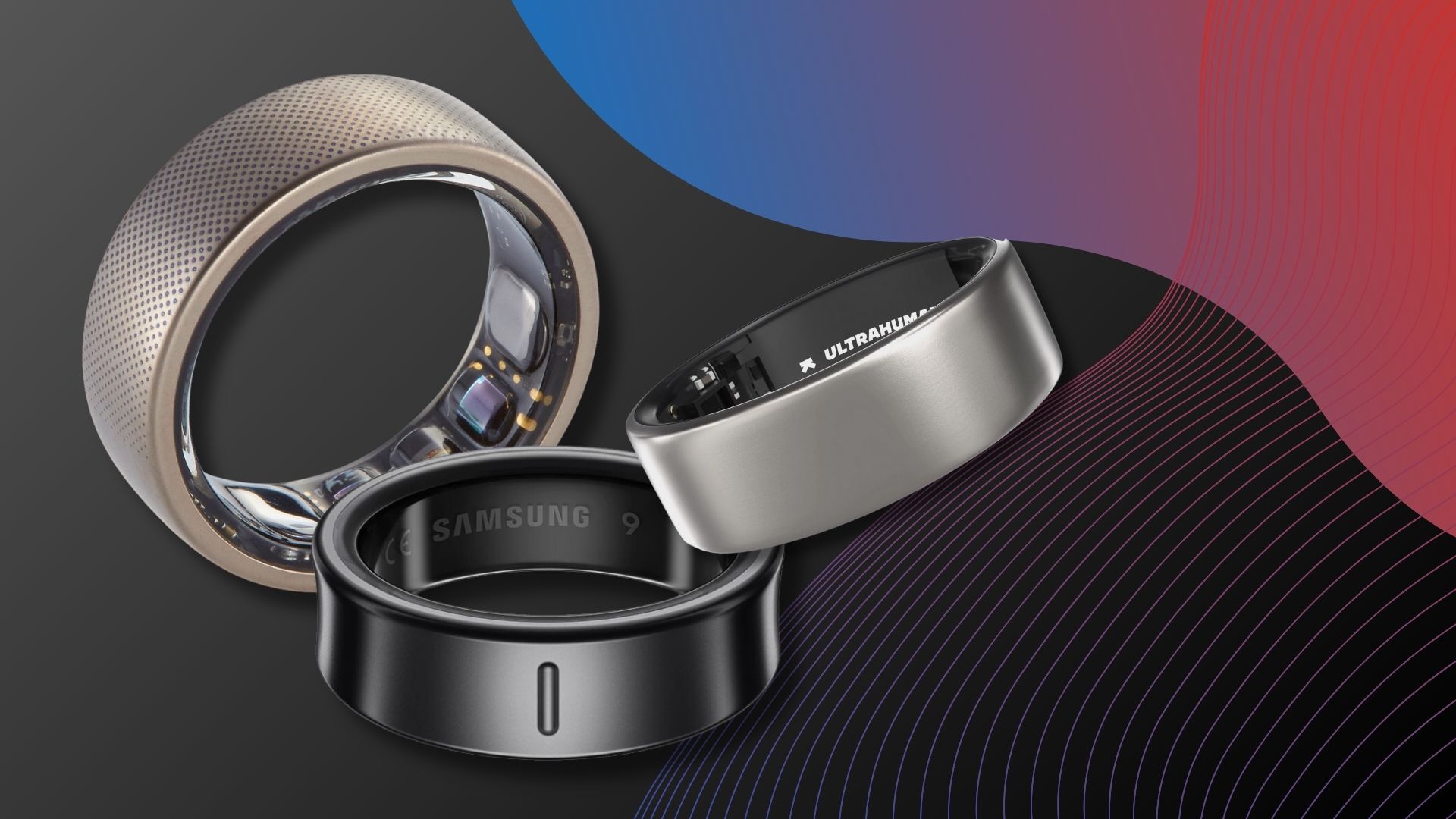
Although tracking your workouts and health metrics from your wrist isn’t new, in recent years the industry has moved towards a more discreet option for consumers: one that can be worn on your finger like a piece of jewellery. If you’re ready to see what the best smart rings have to offer, then you’re in the right place.
Whether it be the best smartwatch, best fitness tracker or the best running watch, the wearables industry at large has very much adopted wrist-based tech as the norm, but if you’re someone who doesn’t like to wear a watch, or you haven’t found one that complements your style, then you may be the exact person who would get on much better with a smart ring.
Our experts have rigorously tested and reviewed countless smart rings, with only the top-rated making it into our best list. These compact trackers can be worn, usually on a finger of your choosing, just like a typical ring, and while they lack a display that’d let you dive into their smarts on the spot, they are far more discreet but no less powerful.
Of course, if you are the type of person who enjoys having certain smart features like Google Maps directions on your wrist, then you may get along better with one of the best Apple Watches or the best Samsung Galaxy Watches.
On a similar note, marathon runners who rely on detailed GPS tracking to reach the finish line will likely find that the best Garmin Watches are designed with their needs in mind.
For everyone else, however, who simply wants to keep tabs on their core health and exercise metrics to make more positive moves towards a healthier lifestyle, a smart ring can be just the ticket. But where do you start when looking for a smart ring? That’s where we come in.
If you need more help choosing a new smart ring, scroll down to our FAQs section, where we’ve answered the most common questions about the wearable, from any required subscriptions to the best finger to wear a smart ring on.
Best smart rings at a glance
SQUIRREL_ANCHOR_LIST
Much like how we test smartches, any smart rings we come across are used by one of our experts for at least a week to give you an in-depth understanding of how they work day to day, the accuracy of their data and more. All of that information is then fed into this very list so that you can make an informed decision every time.
Fantastically compact, premium design
Great overview of health and fitness
Polished, clutter-free app experience
Excellent battery life and rapid charging
No real changes to the app
New software features are region-locked
Requires a monthly subscription
Oura has been making some of the best smart rings on the market for years now, and with the Oura Ring 5, the company has taken a significant step forward in just about every area that matters.
If you’re after the best all-round smart ring available right now, this is the one to beat.
The headline change is a design overhaul that makes the Ring 5 40% smaller than its predecessor. That means it’s thinner, lighter and narrower than before, which makes for a ring that sits comfortably on any finger and genuinely looks and feels like a piece of jewellery rather than a fitness gadget. It’s the kind of design leap that could push smart rings firmly into the mainstream.
Where the Ring 5 truly earns its place at the top of this list is in its tracking accuracy. Sleep monitoring is arguably the strongest you’ll find in any smart ring right now, picking up sleep stages and disturbances with impressive precision so that you can get a clear picture of how rested your body actually is. Workout tracking can’t quite match a smartwatch for live data, but the Ring 5 auto-detects exercise sessions and logs them, with noticeably improved movement accuracy over the previous generation. The Oura app remains a real highlight too. Key information, including a readiness score, sleep and activity scores and a stress monitor, is all laid out clearly on the main screen. If you want to dig deeper, the Vitals tab breaks down individual metrics while the My Health tab lets you keep tabs on longer-term trends.
The one thing to be aware of going in is that, just like the Ring 4, this is a subscription product. Full access to the features will cost you £5.99/$5.99 a month on top of the upfront hardware cost. Competitors like the Samsung Galaxy Ring and RingConn give you everything for a one-time fee, so the ongoing cost is worth factoring in. Battery life, at least, is genuinely impressive, with Oura claiming six to nine days per charge and our testing landing closer to eight. A full charge takes around 80 minutes.
If you want the most refined, best-looking smart ring with class-leading sleep and health tracking, the Oura Ring 5 is the one to go for. Just make sure you’re comfortable with the subscription before you commit.
SQUIRREL_PLAYLIST_10208548
Lightweight, understated design
Great health and fitness tracking
Consistent 4-day battery life
No automatic workout detection
Features can differ between iOS & Android apps
Takes a while to charge
Ultrahuman has emerged in the last few years to stake its claim in the smart ring market, taking more established brands like Oura to task. What’s impressive is that, in spite of its relative ‘newcomer’ status, Ultrahuman has managed to hit the ground running with its Ultrahuman Ring Air, which really impressed our team of experts.
In terms of the design, Ultrahuman absolutely understood the assignment here. With its very minimalist look, the Ring Air could easily be mistaken for a traditional piece of jewellery until further inspection, which is exactly why smart rings are so appealing compared to smartwatches in the first place. There are quite a few colour options available, including Raw Titanium, Matte Grey and the more recent Brushed Rose Gold edition.
Of course, the Ring Air wouldn’t have made it to this list if it had only stuck the landing where the design was concerned. When it comes to fitness tracking, there’s a lot to love here. The ring can discreetly track your effort throughout the day, using its sensors to monitor your heart rate levels, blood oxygen and more, so that, much like the Whoop MG, you can better understand how much rest you need to get in to accommodate your routine.
Speaking of rest, the sleep tracking on the Ultrahuman Ring Air is also excellent. You can clearly see how much time your body is spending in the different sleep zones, which gives you an idea of what you can do throughout the day to try to accommodate a better night’s sleep. The sleep index score is great in this regard, providing a quick understanding of whether your body is fully rested and ready for a challenging workout. The accompanying Ultrahuman app is well built, with a modern aesthetic that makes the process of monitoring your health feel a bit more exciting. In what is sure to please more budget-conscious buyers, the Ring Air has no subscription fees whatsoever, so you’ll only have to part with the initial £329/$349 asking price for the pleasure of using it.
SQUIRREL_PLAYLIST_10208056
Battery life beats the competition
Attractive look
Delivers strong fitness and sleep tracking
Battery drop when using sleep apnea monitoring
Companion app isn’t the prettiest or most helpful
As much as we love the Oura Ring 4, its subscription model can make it a bit too costly over time. To that end, the RingConn Gen 2 is the ideal alternative, offering much of the same features as Oura, but for just £349/$359 and with no subscription in sight.
Even though RingConn is a lesser-known entity in this market than Oura, the Gen 2 smart ring is still an excellent option for general workout and sleep tracking. It can pick up on all of the key metrics that you’d want to know about, including SpO2 level, your heart rate variability (which signals how well rested you are) and your stress levels. It’s all fairly comprehensive and well laid out in the accompanying app. What really separates the RingConn Gen 2 from the Oura Ring and all other competitors on the market is that it absolutely reigns supreme when it comes to battery life. Given how small smart rings are, most of them tend to suffer from lacklustre longevity, but this pick can run for up to 12 days on a single charge. That’s more than most smartwatches, and it means you won’t have to worry quite so often about crucial data being missed.
Circling back to sleep tracking, another ace up the Gen 2’s sleeve is the addition of sleep apnea detection. Given just how damaging sleep apnea can be in reducing your chance of having a solid night’s sleep, it’s no wonder that plenty of wearables have started to accommodate for it in their tracking, and it’s great to see RingConn do the same.
As you may have already noticed, RingConn’s wearable is also a stylish bit of kit. You can buy the ring in four unique colours, with a total of nine size options available for each. This makes it easy to find the right combination that’s both comfortable for daily use and fashionable enough to complement your wardrobe.
SQUIRREL_PLAYLIST_10208057
Great smart ring look
Solid tracking performance
Over a week of battery life
Some familiar software quirks with companion app
RingConn has ditched the portable charging case
The standard RingConn Gen 2 is already a bit of a bargain compared to the Oura Ring 4, but if the £349/$359 asking price was still just a bit too far out of your remit, then you’ll be glad to know that the company has a more affordable alternative in the RingConn Gen 2 Air. Despite its more affordable £239/$199 price tag, the Gen 2 Air still packs all of the key features that you’d want from a smart ring.
When it comes to the core fitness and sleep tracking experience, there’s very little that differentiates the Gen 2 Air from the full-fat Gen 2. For instance, these smart rings share the same sensors, which means that on the Gen 2 Air, you’re still getting access to your heart rate, blood oxygen levels, stress and more.
The only major feature that’s missing from the Gen 2 Air is sleep apnea tracking. While we won’t deny that it’s a useful feature to have, it’s far from being essential if you’re someone who has either already gone through the necessary steps to determine whether you have sleep apnea, or doesn’t have any major issues with getting to sleep, which would otherwise indicate that you don’t have sleep apnea.
Given that this is a more budget pick within RingConn’s range, we would have understood if the materials for the Gen 2 Air needed to be scaled back quite a bit to help reduce the price, but that isn’t the case here. Instead of a titanium build, the Gen 2 Air uses stainless steel, a significant improvement over plastic, which is more commonly associated with fitness wearables. You needn’t worry about durability either, as the watch can survive being submerged in depths of up to 10ATM, which means that it’s more than ready for a dip at the local pool.
RingConn hasn’t skimped on its greatest offering of battery life either. The Gen 2 Air can run for a total of up to 10 days on a single charge, which runs rings about the five-day longevity of the Oura Ring 4.
SQUIRREL_PLAYLIST_10208058
Colourful design
Approachable AI Coach
Nicely designed companion app
Cudis Store rewards only available in some countries
Heart rate data looked high at times
Limited app integration currently
The Cudis 002 Sporty Ring is unlike anything else on this list, and that’s very much the point. Where most smart rings lean into understated jewellery aesthetics, this one goes in the opposite direction entirely, with a chunky titanium body wrapped in a textured silicone band that you can swap out across 12 colour options. It’s a smart ring that actually looks like it belongs at the gym, which makes it a natural fit for anyone who wants their wearable to reflect a more active identity.
If you’re after a smart ring that actively tries to push you towards your fitness goals rather than simply recording what you’ve already done, this is the one to consider.
The customisable band does more than just look the part. It acts as a protective layer for the titanium body underneath, helping to keep scuffs at bay during daily wear. Sizing runs from 6 to 13, and while fit was comfortable in our testing, the ring does sit a little taller on the finger than most competitors on this list. A 5ATM water resistance rating means swimming is no problem, so you can keep it on without a second thought during pool sessions.
Core tracking covers the fundamentals well enough. Optical sensors handle sleep monitoring, resting heart rate, blood oxygen and step count, with readings landing in the right ballpark across most metrics. Heart rate did read a touch high compared to our reference devices, so it’s worth keeping that in mind if precision is a priority for you. Where the Cudis 002 genuinely stands out, and the main reason it earns its place on this list, is in its approach to motivation. The built-in AI coach works as a proper chatbot, letting you ask questions about your stats and receive contextual suggestions in return. It feels far more conversational and less scripted than the AI-driven insights you tend to find on rivals.
Alongside this, a Health Points rewards scheme dishes out points for hitting goals, which can then be redeemed for perks like free fitness classes or coupons. That said, the scheme is currently only available in a limited number of countries, which is a frustrating restriction for anyone outside those regions.
Battery life is a genuine strong suit. Expect around 10 days of regular use, or closer to two weeks with lighter day-to-day use. Charging is handled through a portable case, with a full top-up taking just under an hour.
If you want a smart ring that brings a genuine sense of fun and encouragement to your fitness routine, this is the most distinctive option available right now.
Excellent sleep tracking accuracy
Emphasizes practical sleep coaching
Energy Score is user-friendly and insightful
Sleek design and very comfortable to wear
Offers fewer features than competitors and the Galaxy Watch
High price (but no subscription fee)
Inconsistent heart rate data and unreliable SpO2 readings
Although Samsung was far from the first company to dive into the smart ring market, the Galaxy Ring has shown that it’s still a force to be reckoned with, offering up a genuine alternative to more established picks from the likes of Oura and Ultrahuman.
As much as we love those other smart rings, the Samsung Galaxy Ring is easily the go-to pick for anyone who currently uses one of the best Samsung Galaxy smartphones.
Because this is a Samsung device, the Galaxy Ring is designed with the company’s ecosystem in mind, and if you already use the Samsung Health App as a means of keeping tabs on your fitness levels, then bringing the Ring into the mix is a no-brainer. Even if you already use a Samsung Galaxy Watch, having the ring in tow means that you can leave your watch at home on occasion when you want to travel light (or would just prefer not to wear a watch to bed).
In fact, we’d argue that weaning the Galaxy Ring overnight is a smart idea given just how great its sleep tracking actually is. Far too often, we see sleep data collected and then simply regurgitated as a series of numbers and charts that don’t really mean all that much to most people – Samsung’s Ring, on the other hand, goes down a more practical route by offering tangible advice. The sleep coaching will offer actionable ways to improve the quality of your rest, and you’ll also be assigned a sleep animal, which is a fun way to better understand your nighttime habits. The data is also funnelled into an Energy Score so you can know right away whether or not your body is ready to take on a more challenging day.
Because the Samsung Galaxy Ring doesn’t work with iPhones, Apple users will need to check out the other options on this list if they are set on buying a smart ring. For Android users, it’s a great option, especially since it doesn’t require a subscription like the Oura Ring 4, and the ring itself is often available at a discount. The catch is that some features require a Samsung phone to work.
SQUIRREL_PLAYLIST_10208059
Unique smart ring design
Handy for tracking steps, sleep and daily heart rate
Data nicely presented in companion app
Just the one colour option
Battery life isn’t best in class
Comes in fewer sizes than other smart rings
Anyone who’s been reading our coverage of fitness trackers for some time will no doubt be familiar with the brand Amazit. The company has already released many great yet affordable smartwatches, including the Amazfit Active 2. Now, with the Amazfit Helio Ring, it has finally entered the world of smart rings, offering a more budget-friendly alternative to the competition. With an original launch price of £269/$199, the Helio Ring was already cheaper than most other smart rings, but in the time since it came to market, the device has seen several price cuts making it easy to find at around the £110/$150 mark. When compared to the mounting costs of the Oura Ring 4, which features both an upfront cost and a monthly subscription, Amazfit’s Helio Ring packs astonishing value.
In spite of its affordable price tag, the Helio Ring still packs a punch where it counts. The optical sensor is capable of tracking your heart rate and sleep cycle, while the EDA sensor can keep tabs on your emotions and stress levels (always handy if you find yourself getting overwhelmed at work and need some guidance).
The ring can also track your skin temperature, which is crucial for women’s health and keeping tabs on the menstrual cycle. Again, for a budget upfront cost, it’s incredible what Amazfit can provide here, and it’s hard to imagine that any adopters of the Helio Ring will feel shortchanged on the value.
All of the health data that’s collected can be easily read in the accompanying Amazfit app, and it’ll tell you right away if any of your baseline metrics are off course, which could signal a broader issue at play. The only reason why you might opt for the RingConn Gen 2 Air instead is that it provides a longer battery life than the up to four-day stint offered by Amazfit. Still, given just how much money you’re saving at the checkout, having to charge the ring a little more often is hardly a major trade-off.
Although some brands offer slightly different guidance, generally speaking, you can wear a smart ring on either your ring, middle or index finger. The choice between the fingers essentially boils down to what feels most comfortable for you. Even so, it’s recommended that you avoid fingers where your knuckle is much wider than the base.
However, Oura suggests that while the middle or ring finger should also work well for accurate tracking, the index finger offers the “best accuracy”. Even so, it’s recommended that, regardless of the smart ring you choose, you try it on both hands and different fingers to see what’s most comfortable and fits best for you.
At the time of writing, we’ve crowned the Oura Ring 5 as the best smart ring, thanks to its accuracy, well-presented data and overall comfortable design.
Some smart rings, like the Oura Ring 4, require either a monthly or yearly subscription for full access to their data and advanced features. However, there are a good number of smart rings on our list that don’t require any additional subscription fees, including the RingConn Gen 2, Gen 2 Air and the Samsung Galaxy Ring. We’d especially recommend the Ultrahuman Ring Air, which is currently our best subscription-free smart ring.
How we test smart rings
Full Specs
Oura Ring 5 Review
Ultrahuman Ring Air Review
RingConn Gen 2 Review
RingConn Gen 2 Air Review
Cudis 002 Sporty Ring Review
Samsung Galaxy Ring Review
Amazfit Helio Ring Review
Manufacturer
–
Ultra Products
–
–
–
Samsung
Amazfit
Screen Size
0 mm
–
–
–
–
–
–
IP rating
IP68
IP68
IP68
IP68
IP68
IP68
IP68
Waterproof
5ATM
N/A
10ATM
10ATM
5ATM
10ATM
10ATM
Battery
22 mAh
24 mAh
–
–
–
–
20.5 mAh
Size (Dimensions)
6.09 x 6.09 x MM
8.1 x x 8.1 MM
x x INCHES
x x INCHES
x x INCHES
x x INCHES
2.6 x x 8 MM
Weight
2 G
2.4 G
–
2.5 G
3 G
–
3.75 G
Release Date
2026
2023
2025
2025
2026
2024
2025
First Reviewed Date
08/06/2026
–
13/08/2025
12/08/2025
08/04/2026
–
14/08/2025
Colours
Black, Silver, Stealth, Brushed Silver, Gold and Deep Rose
Matte Black, Aster Black, Gold, Silver
Future Silver, Matte Black, Royal Gold, Rose Gold
Dune Gold, Galaxy Silver
–
–
Titanium
UK RRP
£399
–
–
£185
–
£399
£149.9
USA RRP
$399
$349
$359
$238.8
$399
$399
$199.99

Tech
ShinyHunters called cancer diagnostics biz and tricked staffers into giving them access. Now they’ve dumped 10.9M email addresses


CYBER-CRIME
Cancer diagnostics breach spills personal and health info as extortion crew says healthcare giant ‘should’ve paid the ransom’
Hackers have dumped data stolen from Abbott’s cancer diagnostics business after the healthcare giant apparently declined to pay up, with the leak containing 10.9 million unique email addresses alongside personal and health information.
Have I Been Pwned added the Exact Sciences breach to its database on Friday after data stolen by the ShinyHunters extortion crew was published online. The leak includes names, email and physical addresses, phone numbers, dates of birth, genders, and personal health information belonging to customers, patients, and healthcare providers.
Abbott, which acquired cancer diagnostics outfit Exact Sciences earlier this year, first disclosed the break-in on July 16. In an update on August 5, it acknowledged that some of the files accessed contained personal information and/or personal health information, but said it was still analyzing the data and had yet to determine who needed to be notified.
The company also revealed that the intrusion began with a vishing attack, and stressed that this was “not an encryption malware event.” It said only a limited number of internal systems within its cancer diagnostics business were affected, with no disruption to products, manufacturing, laboratory operations, or patient services.
ShinyHunters has a rather different way of describing what happened. On its dark web leak site, seen by The Register, the extortion crew told Abbott it “should’ve paid the ransom” and claimed the company had failed to reach an agreement despite being given multiple chances to do so.
The crooks claim that they made off with more than 30 million rows of customer information, including more than one million Social Security numbers and 7.5 million dates of birth. More concerning are claims that the haul includes 22 million-plus rows of client notes containing confidential doctor-patient conversations and health information, as well as more than 20 million medical-order records containing patient IDs, prescription types, order dates, and refill information.
ShinyHunters also claims to have siphoned more than 425 million rows of assorted data from Databricks, 130,000 files from SharePoint, and 89,000 contracts from Coupa, though those figures have not been independently verified.
Abbott has not said how the vishing attack led to the theft of the data, how long the intruders had access to its systems, or whether it received an extortion demand. Its latest update says the investigation remains ongoing and that affected individuals will be notified where required.
For those caught up in the breach, however, that review may come a little late. Whatever number Abbott eventually puts on the incident, a sizeable chunk of the stolen data is already in the wild. ®
For more than a decade, the cybersecurity industry has been assigning names to different hacking groups. Some of them, like Fancy Bear, have crossed over into the mainstream because of their prominent hacks and memorable names. Others are only known within the cybersecurity industry.
Oftentimes, even industry insiders can’t keep track. In part, that’s because every company names hacking groups differently. That’s why there are resources like this one, which attempt to be a one-stop shop where cybersecurity professionals, government officials, policymakers, journalists, and the wider public can make sense of who is who.
Last month, Google became the latest company to revamp its naming system for hacking groups.
Gone are the days APT1, APT41 or APT whatever number, which was the system adopted by Mandiant, once an independent security firm that’s now part of Google. Mandiant was the first to adopt a naming scheme.
From now on, Google’s system is relatively simple: A hacking group will have a first name that is memorable and random, and a second word whose initial indicates the country of origin: Castle for China, Ion for Iran, Neptune for North Korea, and Relic for Russia.
According to Shane Huntley, the chief technology officer of Google Threat Intelligence Group, the company’s in-house hacker hunting team, the revamp was necessary to bring clarity to security researchers both inside the company and externally.
In the early 2010s, when companies started publishing reports on cyberattacks and naming the hackers behind them, Huntley told TechCrunch that, “we were not expecting to have as many threat groups as we do today.”
It had become hard to keep track of everyone. Google now tracks more than 5,000 “activity clusters” in several countries, according to John Hultquist, chief analyst at Google Threat Intelligence Group. Huntley said that there are very few developed nations that don’t have their own cyber capabilities and hacking groups.
But what is the point of naming hacking groups? It’s not just an academic exercise, Huntley explained. The goal is to have a baseline understanding of who is attacking who, and how they are attacking them. That way organizations can recognize threats more quickly, prepare against them, ideally stop them, or at least investigate incidents more promptly.
All that, he said, it’s possible only if you name the hackers and track them consistently.
“If you actually get hacked by them or you’re dealing with some incident, knowing how that actor behaves, what they do, what they’ve done in the past, all of these details become critically important to help the response and also work out your coverage against these threats as well,” said Huntley.
Knowing how the North Korean government hackers known as the Lazarus Group behaves, what their goals usually are, and who they work for, gives defenders a starting point in dealing with these hackers.
Tracking state-sponsored hackers, while challenging, is easier than tracking cybercriminal groups and hackers-for-hire, Huntley explained. The government hackers tend to have more consistent targets and activities, while cybercriminal groups have members that come and go, sometimes splinter, and otherwise are more amorphous. Hacker-for-hire groups and spyware makers tend to have a lot of customers in different parts of the world, making them slightly harder to track.
A common criticism whenever a new naming system gets announced is: Why don’t all companies and organizations just use the same codenames? While that seems like an easy question to answer, the reality is that every company has a slightly different view of every group, based on their own sets of data and telemetry. Huntely said this is an inescapable reality that can’t be avoided just by sharing more information among companies and groups of researchers.
“No one has perfect visibility,” he said. “We are building our model and our best understanding, but we will never know everything about what’s going on.”
By unifying the naming scheme of Google’s old Threat Analysis Group, which Huntely headed, and Mandiant, at least now there’s one fewer scheme to remember. For everything else, refer to this gargantuan list.
When you purchase through links in our articles, we may earn a small commission. This doesn’t affect our editorial independence.
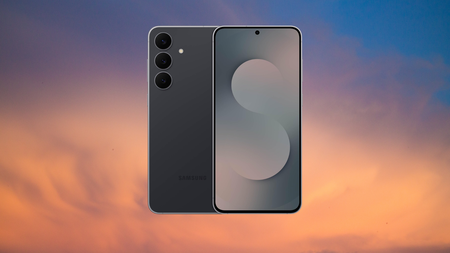
Samsung’s newest mid-ranger just landed its biggest discount yet, and you can now grab the Galaxy S25 FE for almost a third of its price off.
That drops the 256GB Samsung Galaxy S25 FE from an RRP of £699 to just £499, a straight £200 saving and the lowest this model has ever been. For a phone this recent, that’s a rare window to jump on.
Samsung Galaxy S25 FE 256GB hits its lowest price yet: £499, down from £699
Amazon just dropped the Galaxy S25 FE down to £499, Thats £200 off this recent 256GB flagship-adjacent phone.
A £200 cut is no token gesture on a handset this new, and it pushes the S25 FE well beneath where flagship-adjacent Samsungs usually sit, so you end up paying mid-range money for a phone built to stay current and supported until well into the next decade.
Our own tech expert Thomas Deehan reviewed the S25 FE and found the 6.7-inch AMOLED display perfect for entertainment, with 1,900 nits of peak brightness and a 120Hz refresh rate that keeps everything from social feeds to Call of Duty Mobile looking effortlessly smooth, likening it to carrying a mini tablet ideal for long flights or gym-session binges.
That generous screen leans on a bigger battery that saw Deehan comfortably clear a heavy day with 22% left in the tank before clawing back 67% in just half an hour thanks to the upgraded 45W wired charging.

Powering all of it is the upgraded Exynos 2400 chipset, which handled everyday multitasking and most games without stutter in Deehan’s testing, loading apps quickly and running Galaxy AI features at a reasonable pace, with only the most demanding 3D titles asking more than it could comfortably give.
The triple rear camera carries over a capable 50MP main sensor, 12MP ultrawide and 8MP telephoto, now joined by a new 12MP selfie camera that genuinely impressed Deehan. Wrapped in One UI 8, which he called the best software experience he has seen from Samsung, it feels far more premium than this price suggests.
At £499, the S25 FE makes one of the smartest value cases Samsung currently offers, and this deal window is the moment to act on it. If you want to weigh it against the rest of the range before you commit, our roundup of the best Samsung phones for 2026 is the place to start.
SQUIRREL_PLAYLIST_10148964
You may like Pages and you may tolerate Microsoft Word, but text editor BBEdit has been rightly earning devotees on the Mac for 34 years. Here’s how.
There are very few Mac apps that go back this far, and even fewer that remain both actively developed and actually beloved by its users. And there is only one with the trademark “It doesn’t suck.”
BBEdit is just a text editor, but rather than this meaning it is limited, it means that BBEdit is focused. It is and always has been a plain text editor, it does not also try to be a mind-mapping tool or an image editor or a chatbot.
This is going to read like an unqualified hymn of praise, although there are actually a few qualifications. But this is what BBEdit does to you. While there are other apps I write in for many different purposes, BBEdit does what it does extraordinarily well.
I don’t remember when I first came across it, but it would’ve been before 2000 and possibly before Steve Jobs came back to Apple. Its original version was written in 1989 because of a problem with editing text on the Mac.
After it was released as BBEdit in 1992, Bare Bones Software never stopped developing it.
The problem back then was just that Apple offered an API for handling text, but it couldn’t handle large files. The creators of BBEdit were working on a version of the Pascal programming language for Mac that effectively demanded longer files.
While Apple’s Pascal faded away, their text editor grew into this favorite for programmers and writers.
If you’ve never used it, though, it’s hard to convey just why BBEdit is so popular among its users. There are people who will never leave the Mac because there isn’t a PC version of BBEdit, for instance.
And as you use it, you have such a clear sense that so do its developers. This is not a day job or a side project, BBEdit keeps getting better because its developers add what they want it to do themselves.
“I use BBEdit for everything I produce that involves text: code (C, C++, Objective-C), web site content (HTML, Markdown, Textile), and more,” said Rich Siegel, developer of the app, in a 2011 interview. “In a very real sense, BBEdit is written using itself — my daily-use build is the same one that’s being beta tested or used in the field by our customers.”

If BBEdit’s search feature can’t find something, it isn’t there.
So an app that has been available for more than three decades, two hardware architectures ago, is still being actively developed. An app that was meant to be just a “bare bones” text editor is still simple to use, yet it has so many features a keystroke away that it’s hard not to gush about this app.
To be fair, there are actually reasons not to use it, there are writers for whom BBEdit is just the wrong choice. But if it suits your writing or it suits how you like to work, BBEdit can make you into a passionate fan.
“BBEdit is legendary because we keep improving it to serve the needs of our customers,” Siegel said on the release of version 9. It’s now on version 16, which is promoted as having “millions* of new features and refinements (*estimated).”
With marketing like that, BBEdit remains a taste of those early times with the Mac some 34 years after it was first launched. It’s serious software that doesn’t take itself too seriously.
What BBEdit does and how
The short version is that BBEdit is a text editor. That’s not the same thing as a word processor which offers formatting options like styles or margin control, as a text editor is just for getting the words down.

There aren’t countless settings you can choose in BBEdit, but there are more than you’d like to count.
As such a text editor, BBEdit is fast and responsive, and it generally doesn’t get in your way. You don’t have to set any settings, you can just open it and start typing.
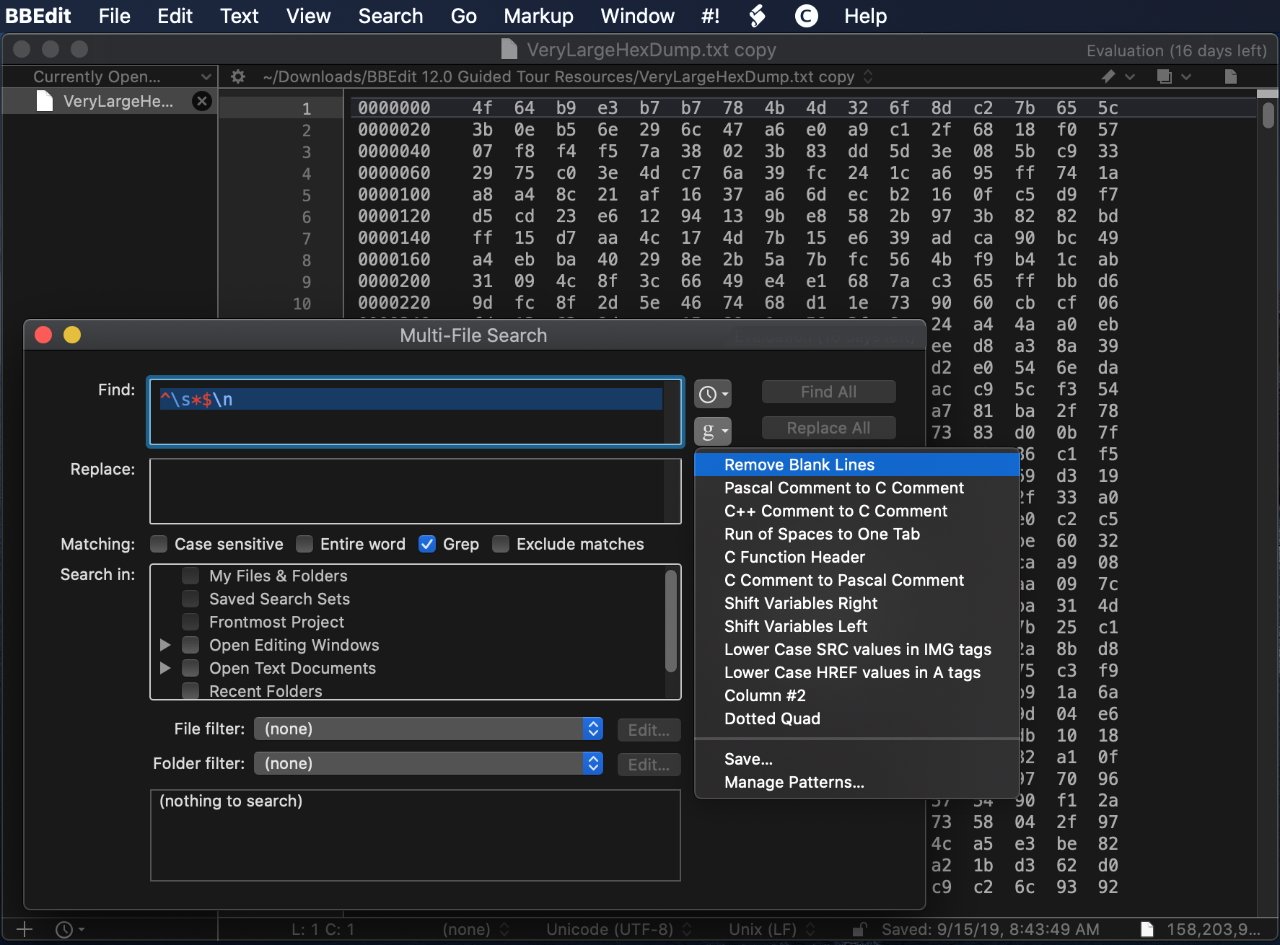
When you have written a lot of text, maybe even over several years, you will start to appreciate a feature called grep. This is a form of regular expression, the feature takes you beyond normal search and replace.
For instance, in any word processor you could search for a date like 01/12/2026. But in BBEdit, you can search for all dates in the document, matching every one of them simultaneously.
It’s a form of regular expression. As well as being powerful, though, the BBEdit version includes an on-screen guide to help you through it as simply as possible.
“Our base started as Mac software developers, scientists, system administrators, and other technical users,” Rich Siegel told Apple in 2019. “The first big change was popularity among HTML authors and web back-end developers.”

Web designs can write CSS files in BBEdit – image credit: Bare Bones Software
“As word spread, we were able to help folks understand that the internet was built with text that you could treat as data or you could treat it as a document,” he continued. “So the next wave brought in internet architects, cryptanalysts, and scientists from unexpected disciplines.”
Thos unexpected disciplines, he said, included “writers and other content creators-folks who see their text not as data but as words, and who want as little as possible between them and their words.”
Overall design
Beyond the simplicity of writing in BBEdit, part of this get-on-with-it design is in how it stores your documents. Unlike most apps other than Ulysses, BBEdit can in theory be a single repository for all of your writing.
So rather than opening and saving documents all the time, you can just open BBEdit, press Command-N and be writing in a new document. Everything you’ve written before is still there, listed in a navigation bar on the left, until you choose to close it.
You don’t even have to save that previous work before you start a new one.
But then if you want to, you can. Anything you write can remain in BBEdit’s list on the left of the screen, but you can also save any of it out to separate, individual .txt files.

You can keep all of your recent documents open in BBEdit. Or don’t even ever save them, just write in this text editor and export the final text to wherever you need it to go.
Then it might not require you to set anything up, and it might not get in your way, but BBEdit is built to help you. So for example, if you type an opening quote mark, BBedit immediately adds a closing one right after it and leaves your cursor in the middle.
It’s the same with brackets. Type an opening bracket, and you get that plus a closing one for free. That’s chiefly convenient in that it means you can’t ever forget to include a closing speech mark or bracket, you’d have to choose to delete them.
If you’re a programmer, that can also make the difference between your code working or not. It’s easy to forget to close brackets, unless you’re writing in BBEdit.
But it is also a little pain when you’re writing dialog. So often you’re going to follow a speech with a phrase like “she said,” and to do that you have to cursor over the automatically-inserted end quote mark.

You can set BBEdit to wrap words and it also supports Markdown, plus a split-screen view.
You may well have just shrugged at that, and if you did, it’s because you are the true target audience for BBEdit. While any type of writer can use it, and every type of writer does, it is best for coders and programmers.
These are people whose writing tends to be in short lines rather than paragraphs. So they may never even need to notice something about BBEdit lines that will strike a novelist or a journalist immediately.
That’s how, by default, BBEdit does not wrap text at the end of the screen or at some margin stop. You could write a novel on the same long single line if you wanted to.
But then you could alternatively go to Settings, Editor Defaults, and turn on Soft Wrap. Set it to wrap your text at a specific character count, at the width of your default page size for printing, or the width of the window.
There are hundreds upon hundreds of settings you can change, but none that you have to in order to start writing. You can readily believe the gag that it has “millions” of new features, but this is still not an app where you have to study the manual.
Although, actually, there is a manual. In another throwback to the early days of the Mac, there exists to this day a 456-page BBEdit manual, and it is constantly updated.
How it got here
BBEdit began as this way to address a problem on the Mac. Today you know TextEdit as the name of Apple’s free text editing app, but back in the day, it was what the company called its text handling API.
If you wanted to include text in your app, from a word processor to just labels on a drawing, you could use this API and it did the job. But it wouldn’t handle anything over 32K, it wouldn’t handle anything long.
BBEdit was made to show that longer files could be handled on the Mac. It did the job, it was popular, and in 1992 when it first came out, BBEdit was also free.

As well as automatically adding closing brackets for any user, if you’re a programmer or web designer then BBEdit will offer auto-completion suggestions – image credit: Bare Bones Software
That didn’t last. Around a year later, Bare Bones Software launched version 2.5 and began selling it for $99 (around $230 in today’s money). Users of the previous free ones, or owners of various programming languages such as THINK Pascal, could buy it for $49.
At the same time, Bare Bones Software released a cut-down edition called BBEdit Lite. That was free, and users of it could upgrade to the full BBEdit for $49.
They could get it on a floppy disk by mailing — not emailing, regular postal mailing — the developer on an Massachusetts address. Please enclose a check for $5.
BBEdit Lite no longer exists, and nor does its brief replacement, TextWrangler. That was released in 2003 for $49, offering what Bare Bones Software thought would be a compelling mix of BBEdit features for programmers and database administrators.
Compared to some apps, TextWrangler did well, sticking around 14 years, even if it quickly became free. It may have seemed like it spent much of that time nagging users to upgrade to BBEdit, but come 2017, there was no longer any choice.
TextWrangler was ostensibly folded back into BBEdit and users were encouraged to move to the full app.
“We promise that you will feel right at home, because BBEdit and TextWrangler are identical in every way that you’re used to,” said the company at the time. “They’re built on the same foundation, by the same developers, with the same care; and they work the same way.”
Behind the scenes, that must’ve been a reason to drop TextWrangler. Maintaining the same code base across two apps was surely taking up time that could be spent developing new features.
It certainly wasn’t the lure of cash from upgraders that made Bare Bones Software do this. As welcome as that would doubtlessly be, the company also sweetened the deal.
If you bought or upgraded to BBEdit at that time, you could use it for free for 30 days. It’s not unusual to have such a trial period, but what happens afterward is much more rare.
Bare Bones Software made it so that you could continue using the app for free, with just a limited feature set. What it left in was generous, and really it created what was effectively a new, free, BBEdit Lite in all but name.
BBEdit and Apple
If you’re a long-time Mac user, you may distantly remember technologies such as OpenDoc, but you’re unlikely to have used any of it. Bare Bones Software has, it even added OpenDoc support to BBEdit.
BBEdit has been a good Mac citizen from the start but sometimes you don’t know what you’ve got until it’s gone. That happened with Apple and BBEdit over the Mac App Store.
While it’s never really seen a fraction of the business that the iPhone App Store has, the Mac version has been around longer than you think. It debuted in 2011 and BBEDit was right there as one of the very first products on the Mac App Store.
By 2014, though, it was gone.
The reasons given at the time were not very specific, but they centered on how the Mac App Store sandboxes apps. Any app on the store is deliberately limited to prevent it being able to control the user’s Mac or other apps.
In BBEdit’s case, the app was reportedly not allowed full access to the user’s files and folders. It needed to be able to open and save wherever the user wanted, and at the time, Apple put limits on this.
There was also, though, an issue of money. While BBEdit was a one-time purchase, Bare Bones Software has always issued paid upgrades at intervals.
The Mac App Store did not allow for paid upgrades once a user had bought the app. So the company could have gained a true believer but never know it, never profit from it, and that user would never know what new features were available.
By 2019, enough developers had complained about sandboxing that Apple made some changes. They were sufficient to mean that BBEdit came back on the Mac App Store, but perhaps chiefly because there was now a solution to the upgrade problem.

Apple welcomed BBEdit back to the Mac App Store with a trio of promotions – image credit: Apple
While Apple still does not allow paid upgrades, it both allows and encourages subscriptions. So today you can buy BBEdit 16 from the developer for a one-off $60, but you can subscribe via the Mac App Store for $5/month, or $50/year.
And if you were looking when BBEdit returned to the Mac App Store in 2019, you will have seen Apple rushing to make up for arguably ignoring it. That return saw an App Store front page profile of its main developer, Siegel, plus an article about BBEdit’s search features, and another about its overall feature set.
At that time, Apple’s senior vice president of worldwide marketing was Phil Schiller, who oversaw the App Store. He tweeted a welcome back to BBEdit, although that tweet is no longer available since Schiller quit Twitter/X back in 2022.
There’s something missing
BBEdit sounds perfect. Unless you’re a novelist or a screenwriter, or perhaps even a non-fiction author, maybe it is. And if you are any of those things, you can make BBEdit work for you if its comprehensive yet no-nonsense feature set appeals.
What you can’t do is make BBEdit work on anything other than a Mac. There’s no PC version, for example, although if you cared about that you wouldn’t be reading this far into an AppleInsider article.
The real missing piece is the iPad.
It’s been some years since Bare Bones Software has talked about why it’s stayed Mac-only. So perhaps things will change, but 37 years after starting it, and 34 since it went on sale, BBEdit is a legend among macOS apps.
Enough so that it’s one of the very, very few apps I would enthuse about this much. Bare Bones Software and Naomi Pearce helped out with finding images like that ancient photo of the boxed version, but they haven’t read this prior to publication, and they certainly didn’t pay for it.
Try it out for yourself. Once again, it may not be the right writing tool for you, but if it is, you’ll become a fan.
BBEdit 16 for Mac is available for $60 direct from the developer as a one-time purchase. You can also get it from the Mac App Store on subscription for $5/month, or $50/year.

Someone has to pay for all this AI, nothing is foolproof, and Apple’s lawsuit with OpenAI is only just beginning, all on the AppleInsider Podcast.
As Wesley briefly covered on the previous episode, artificial intelligence is costing companies billions with very little return. Every new tool comes with a new cost, sometimes money, sometimes privacy.
It’s a grab bag of topics with people putting iPhones in freezers, getting Uber email scams, and Google Health gaining Apple Health syncing capabilities. There’s also talk about Apple’s lawsuit with OpenAI, which doesn’t seem to be going well for OpenAI even though court hasn’t even convened yet.
Your hosts discuss what’s expected for the iPhone 18 Pro and iPhone Fold, which should be announced in just under six weeks. The event itself could be announced at any time, but it most certainly won’t be live.
BONUS: Subscribe via Patreon or Apple Podcasts to hear AppleInsider+, the extended edition. This time, speaking of payments, the discussion is on technology and money, specifically how we need to manage our finances and how options like Apple Card can usually help.
Links from the show:
More AppleInsider podcasts
Tune in to our Smart Home Insider podcast covering the latest news, products, apps, and everything HomeKit related. Subscribe in Apple Podcasts, Overcast, or just search for HomeKit Insider wherever you get your podcasts.
Podcast artwork from Basic Apple Guy. Download the free wallpaper pack here.
Those interested in sponsoring the show can reach out to us at: [email protected].
Subscribe to AppleInsider on:
Keep up with everything Apple in the weekly AppleInsider Podcast. Just say, “Hey, Siri,” to your HomePod mini and ask for these podcasts, and our latest HomeKit Insider episode too. If you want an ad-free main AppleInsider Podcast experience, you can support the AppleInsider podcast by subscribing for $5 per month through Apple’s Podcasts app, or via Patreon if you prefer any other podcast player.
SCIENCE
MAST Upgrade installation hit highest pressure ever achieved without the super-hot plasma destabilizing
Scientists at the UK Atomic Energy Authority (UKAEA) say that they have overcome plasma instability issues standing in the way of commercial fusion power plants.
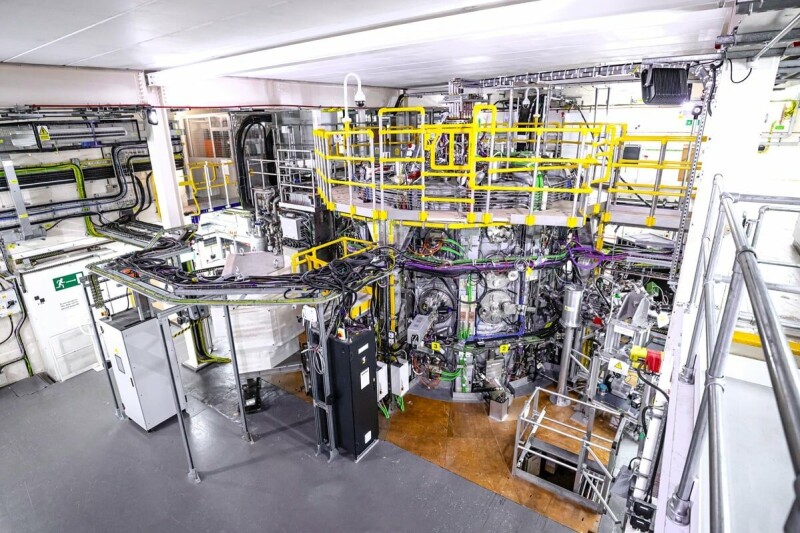
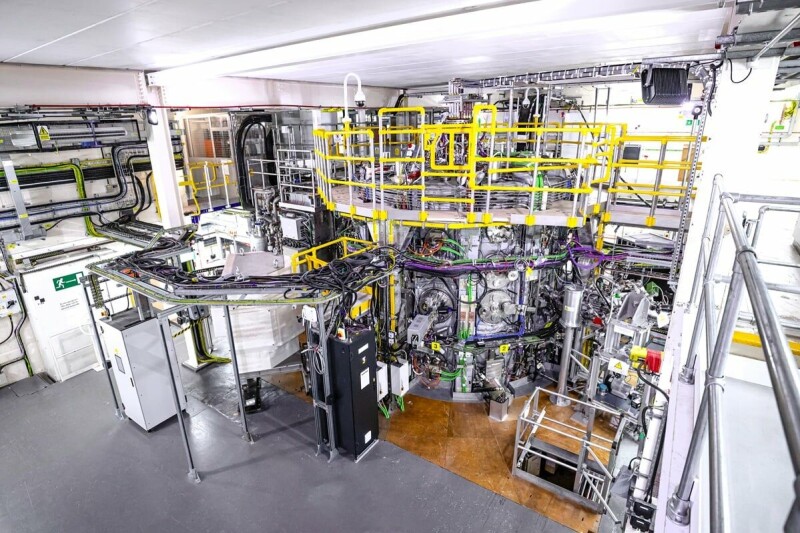
The boffins overseeing the MAST (Mega Amp Spherical Tokamak) Upgrade installation at UKAEA’s Culham Campus in Oxfordshire conducted a fifth series of experiments on it during 2025 and 2026 and produced more than 1,100 fusion plasmas.
During these experiments, the team demonstrated the highest pressure ever achieved with the MAST Upgrade machine, without the super-hot plasma destabilizing, they say.
One of the challenges they set out to address is to figure out how to suppress instabilities known as Edge Localised Modes or ELMs. These are described as “sudden bursts at the plasma’s outer edge” that can cause a loss of plasma pressure and also lose up to a tenth of its stored energy in a single event.
Over time, these occurrences will damage the tokamak’s inner wall and exhaust components, and were therefore seen as a serious obstacle to commercial viability.
To cure this, the team adopted two techniques already previously tested to avoid these damaging heat bursts; Quasi-Continuous Exhaust mode (QCE-mode) and Resonant Magnetic Perturbations (RMP).
With QCE, the plasma edge experiences high-frequency, low-amplitude filaments that act to bleed off pressure before it can build to a destructive level. Likewise, RMPs use a magnetic field to induce small perturbations at the edge of the plasma that bleed off the pressure leading to ELMs.
The team also accessed two additional stable operating regimes known as Quiescent H-mode (QH-mode) and I-mode (Intermediate-mode), improved plasma confinement techniques that deliver better energy confinement while mitigating issues associated with large ELMs.
QH-mode is understood to tackle ELM using an edge electromagnetic instability called the Edge Harmonic Oscillation (EHO) to steadily remove excess heat, while I-mode is a confinement technique that features a steep thermal barrier at the edge that allows particles to escape, again preventing the buildup of pressure.
The Culham scientists also claim to have developed a technique for controlling the plasma’s position. This involves measuring visible light created by deuterium emitted from the machine’s upper and lower outer divertors (the exhaust system), allowing minute positional imbalances to be detected in real-time.
Detecting changes in position is a step towards automated, real-time control systems that future commercial power plants will need to operate without constant manual intervention, according to the team.
The series of experiments also explored “negative triangularity” plasma shapes that allow high-power operations without ELMs. This is said to be an approach being closely watched by the international fusion community.
This MAST Upgrade installation is set to get further enhancements this year. These will include two new neutral beam injectors, doubling the machine’s heating capacity, and the installation of an Electron Bernstein Wave (EBW) system that will provide an additional 1.6 MW of heating power.
Following this further upgrade, a sixth series of experiments is planned for 2028.
EBW systems use high-frequency, electrostatic plasma waves to heat and drive currents in dense fusion plasmas, and the technology is planned for use in STEP, (Spherical Tokamak for Energy Production), the UK’s pilot fusion power plant to be built at the site of a former coal power station in Nottinghamshire.
“These findings take us another step closer to practical fusion energy,” claimed James Harrison, head of MAST Upgrade science at UKAEA.
“The results genuinely shape the design of future fusion power plants. Accessing four stable high-performance plasma regimes demonstrates that MAST Upgrade is producing science at the leading edge of what is possible.”
Earlier this year, the UKAEA published a roadmap of targets it wants scientists to hit before the end of the decade, in order to drive forward development of working commercial fusion reactors.
Reg readers will no doubt be aware of the old chestnut that working fusion power is perpetually 30 years away, but there have been developments in recent years, such as “ignition” being achieved at the National Ignition Facility (NIF) at Lawrence Livermore National Laboratory (LLNL) in California, while UK fusion firm Tokamak Energy said it expected to deliver commercial fusion energy in the next decade. ®

Amazon is again offering steep price cuts on Apple’s current MacBook Pro line, with a $500 discount in effect this weekend on a high-end M5 Max model with a spacious 2TB SSD.
This weekend’s $500 discount applies to the M5 Max MacBook Pro 14-inch with an 18-core CPU, 32-core GPU, and 36GB of RAM. The Space Black laptop also has 2TB of storage, providing extra space for files and apps over the entry-level 1TB M5 Pro.
Save $500 on M5 Max 14″ MacBook Pro
Normally retailing for $4,099, Amazon’s discounted $3,599 price is the lowest available, according to our 14-inch MacBook Pro M5 Max Price Guide, which is updated throughout the day.
If you don’t need the power of the M5 Max chip, Amazon has the 2TB M5 Pro 14-inch MacBook Pro on sale for $2,499, also $500 off.
You can save on 16-inch models too, with a loaded M5 Max spec with a 40-core GPU marked down to $4,499, a $500 discount as well.
Latest 14-inch MacBook Pro deals
- 14″ MacBook Pro M5 (10C CPU, 10C GPU, 16GB, 1TB, Standard Display): $1,847.50 ($152 off)
- 14″ MacBook Pro M5 Pro (15C CPU, 16C GPU, 24GB, 1TB, Standard Display): $2,346 ($153 off)
- 14″ MacBook Pro M5 Pro (15C CPU, 16C GPU, 24GB, 2TB, Standard Display): $2,499 ($500 off)
- 14″ MacBook Pro M5 Pro (18C CPU, 20C GPU, 24GB, 2TB, Standard Display): $2,899 ($300 off)
- 14″ MacBook Pro M5 Max (18C CPU, 32C GPU, 36GB, 2TB, Standard Display): $3,599 ($500 off)
Weekend 16-inch MacBook Pro sale
- 16″ MacBook Pro M5 Pro (18C CPU, 20C GPU, 24GB, 1TB, Standard Display): $2,758.49 ($241 off)
- 16″ MacBook Pro M5 Pro (18C CPU, 20C GPU, 48GB, 1TB, Standard Display): $3,299 ($300 off)
- 16″ MacBook Pro M5 Max (18C CPU, 32C GPU, 36GB, 2TB, Standard Display): $3,999 ($400 off)
- 16″ MacBook Pro M5 Max (18C CPU, 40C GPU, 48GB, 2TB, Standard Display): $4,499 ($500 off)

After testing the Kindle Scribe Colorsoft for two months, I found that it was made for a very specific kind of note-taker and reader. While the device is pretty and lightweight, it’s not something the everyday person needs due to its hefty price tag and size.
However, for those who have been waiting for a color Kindle that doubles as a digital notebook, the Kindle Scribe Colorsoft is worth considering.
The device starts at a steep $630 and is available in two colors: Black and Fig, a pretty purple shade. It weighs just 400 grams and features an 11-inch display that makes it similar in size to a traditional sheet of paper.
Its thin design is impressive, but its larger size means it’s not exactly something you can hold comfortably with one hand. I found it most comfortable to use when it was propped up against my knees while sitting on a bed or placed flat on a desk.
One thing I like about e-readers is that they’re usually quite portable, so I can easily pop one into my purse when I’m on the go. That wasn’t the case with the Kindle Scribe Colorsoft because its size meant I never ended up taking it out of the house. However, if you’re an avid note-taker or researcher, I could see why you’d want to put it in your work bag to take with you to the office or to a coffee shop to get some work done. Beyond those situations, it’s not a device I’d reach for during a quick trip in an Uber or while waiting at a doctor’s office.
The larger size does mean that there’s more room for writing and note-taking, or even sketches and diagrams. And of course, the larger display makes reading PDFs and other documents easier.
When it comes to reading, the larger screen has both benefits and drawbacks, as the extra space is helpful when reading books with charts or maps, but the size also gets rid of the cozy feeling that makes smaller Kindles appealing.

What I liked about the larger size was that I was able to create an easy-to-read color-coded digital planner and reading journal, especially since the device comes with templates for daily, weekly, and monthly planners. And as someone who normally has a physical reading journal, I found it quite efficient to be able to finish a book and then open up a digital notebook on the same device to log my reading.
The device comes with a Kindle Scribe Pen that attaches magnetically to the side of the e-reader. The pen feels nice in your hand and can be programmed for various actions. The eraser works smoothly and responds almost instantly.
While the color display is fun, it’s important to recognize that colors look more like soft highlighter shades rather than the vibrant tones you see on a regular tablet. That’s not necessarily an issue for note-taking, but it does mean that comics and other visual content won’t look as rich as the original colors.
The device’s color options were useful when highlighting books because I could assign specific colors to different types of notes. For example, while reading a twisty thriller, I used blue to mark details I thought I might need to remember later and red for quotes I enjoyed and wanted to note. It’s also easy to quickly switch between the different colors thanks to the device’s fast refresh rate.
As for battery life, I found it to be excellent. I only had to charge the device twice over the course of two months. It is worth noting, however, that writing uses more power than reading.
All in all, the Kindle Scribe Colorsoft makes the most sense for students, researchers, and journalers who want one device for reading, annotating, and organizing handwritten notes. For everyone else, the steep cost is hard to justify.
If you’re simply looking to upgrade an older Kindle, I don’t think the Kindle Scribe Colorsoft is worth the investment, as you’d be better off with the more reasonably priced Kindle Paperwhite, which starts at $159.99.
When you purchase through links in our articles, we may earn a small commission. This doesn’t affect our editorial independence.


security
What, you didn’t think the top gangs were busy watching agents escape their sandboxes too, did you?
Ransomware attacks jumped nearly 20 percent in July, with UK firm Comparitech counting 799 incidents, up from 668 in June.
Of those, 51 had been confirmed by victims. The tally makes July the second-busiest month of the year for ransomware, behind March, albeit just barely, when the firm recorded 805 attacks.
The most interesting data after this surging month of attacks is the targets: While news of widespread cyberattacks targeting water infrastructure in the United States may be dominating security headlines lately, those attacks aren’t ransomware, and ransomware attacks on utility companies were actually down 44 percent last month.
In addition to a decline in attacks on utilities, legal firms and government agencies also became less attractive targets, with attacks on those sectors down 31 percent and 11 percent, respectively, Comparitech said.
On the other hand, ransomware attacks increased most heavily in July against finance companies, tech firms, pharmaceutical companies and medical billers, and the education sector, with rates up 71 percent, 62 percent, 46 percent and 44 percent, respectively.
Those numbers should come as no surprise given what pentesting firm DeepStrike reported about the most frequent payers of ransomware: Manufacturing, education, healthcare, and financial sector firms are the most likely to pay out a ransom, the firm says, with even the least likely (finance) still paying ransoms 51 percent of the time. Ripe targets, in other words.
The United States was the most-targeted country, with 322 of the 799 attacks recorded last month, Comparitech said. Germany, in second place, saw just 40 incidents.
As for who’s doing the dastardly deeds, there’s a familiar name in the mix, but they’re competing with a relative newcomer who has quickly become prolific.
Qilin, the ransomware gang behind the 2024 attack on pathology provider Synnovis that disrupted NHS services in the UK, claimed 125 ransomware victims in July. The Gentlemen, a relative newcomer that has quickly become one of the most prolific ransomware operations and earlier this year claimed responsibility for an attack on UK software consultancy Adaptavist Group, led July with 135 claimed victims. Between them, the two gangs accounted for nearly 33 percent of attacks logged last month.
As for how the crims keep getting in, Comparitech provided no information on ingress routes, but given what we know of the top-tier gangs, it could be simply using stolen credentials, as Trend Micro said of The Gentlemen’s methodology, or it could be abuse of zero-day vulnerabilities, as Qilin told The Register it abused to break into Synnovis in June of 2024.
Either way, the takeaway is the same: Ensure employees are using a second secure factor to log in, keep systems updated, and be sure you’re making regular backups. All eyes may be on what AI is doing to the security landscape, but old-school threats aren’t going away. ®

Long-time Slashdot reader BrianFagioli is announcing that he’s released a new iPhone app that creates a cryptographic witness for photos without uploading the original image.
The app hashes the file, signs the hash using a dedicated identity stored in Apple Keychain, and publishes the witness to Nostr relays while keeping the photo inside the app unless the user chooses to export it.
Rather than trying to determine whether a scene was genuine, the app — named Veridenz — answers a narrower question, by verifying whether a photo file matches the one that was originally witnessed.
Users do not need a Nostr account because the app creates its own signing identity, keeping private documentation separate from a public Nostr profile.
“The developer does not collect any data from this app,” says its page in Apple’s iPhone store. The app’s tagline is “Capture. Prove. Verify.”


Read more of this story at Slashdot.

Brazen Iran makes EIGHT demands of the US as it dangles opening the Strait of Hormuz in front of Trump… while launching another attack on allied ship in crucial waterway

Wonder Takes a Gamble on Robots, Drones and AI-Generated Menus

The Art Of The Exit: Dodging Panic When Dell Stock Breached Stop


-

 Politics6 days ago
Zack Polanski: an incitement to murder Nigel Farage?
-

 Fashion2 days ago
Frugal Friday’s Workwear Report: Cap-Sleeve Pointelle Crewneck Sweater
-

 Crypto World7 days ago
Crypto PAC spending tops $2M in Michigan House race
-

 Fashion1 day ago
Weekend Open Thread: Mattifying Sunscreen
-

 Business6 days ago
DTCR: Deleveraging And A Hedge Fund Collapse Point To A Possible AI Bottom
-

 Tech7 days ago
ESET tracks rise in malicious AI skills and adaptable malware
-

 Crypto World7 days ago
XRP Ledger urges node upgrade after manifest flood
-

 Sports3 days ago
Jordan Coyle & Cordiamo take Laya Arena Stakes at RDS
-

 News Videos18 hours ago
Can Astrology Help Find Gold and Silver Trends? A Financial Astrology Guide
-
 Crypto World5 days ago
US Tech Stocks See Largest 5-Week Inflow in History: Can Nasdaq Break Its Downtrend?
-
 Business3 days ago
US stocks: Dow closes at record on Mideast optimism; SpaceX, AMD drag Nasdaq
-

 Tech7 days ago
Page Not Found | WIRED
-

 Politics3 days ago
Reform UK And Greens Sink To Lowest Favourability Ratings To Date
-

 Business4 days ago
Nvidia Stock Climbs 2.5% as Chip Sector Rally Builds Ahead of AMD Earnings, Nvidia’s Own Report Looms
-

 Crypto World5 days ago
Polymarket targets $20 billion valuation as competition heats up in prediction market sector
-

 Tech4 days ago
OpenAI, Anthropic AI agents targeted real people and systems in cyber tests
-

 Tech6 days ago
OpenAI teases Astra, its next major AI model, after it solves 10 long-standing math problems
-

 NewsBeat7 days ago
Tourist plane crash at Peru’s Nazca Lines kills all 13 on board | News World
-

 Business6 days ago
Myspace owners announce plans to relaunch the once-popular platform
-

 Business3 days ago
Supply chain issues impact Ingredion
You must be logged in to post a comment Login