After Warner Brothers balked at Larry’s competing bid and a hostile takeover attempt, Larry tried to sue Warner Brothers. With that not going anywhere, Larry and MAGA have since joined forces to try and attack the Netflix merger across right wing media, falsely claiming that “woke” Netflix is attempting a “cultural takeover” that must be stopped for the good of humanity.
With hearings on the Netflix merger looming, MAGA has ramped up those attacks with the help of some usual allies. That includes the right wing think tank the Heritage Foundation, which has apparently been circulating a bogus study around DC claiming that Netflix and Warner Brothers are “engineering millions of Americans into a predisposition to accept preferred leftwing ideological dogma”:
“Without ever saying Warner Bros or bid rival Paramount by name, the Oversight Project’s analysis, titled Fedflix: Netflix, The Federal Government, and the New Propaganda State, insists that “relevant federal agencies must scrutinize with extreme intensity any potential Netflix acquisitions of other media and entertainment companies to take into account the full ramifications of the impacts on American society and the health of the Constitutional Republic.”
Again, the goal here is to ensure that Larry Ellison can buy Netflix (and HBO and CNN). Larry, as we’ve seen vividly with his acquisitions of CBS and TikTok, is buying up new and old media to create a propaganda safe space for America’s increasingly unhinged and anti-democratic extraction class. Like Elon Musk’s acquisition of Twitter, the goal is propaganda and information control.
And like any good propagandists, MAGA has tried to invert reality, and is increasingly trying to claim it’s Netflix that covertly wants to create a left-wing propaganda empire that spreads gayness and woke:
Advertisement
“With its subtitle of “The Weaponization of Entertainment for Partisan Propaganda,” the report is tailored for the MAGA base. Full of talking points and and mentions of Stranger Things, the Lena Dunham-produced Orgasm Inc: The Story of OneTaste, the controversial Cuties docu from 2020, and the Obamas-produced American Factory, the 47-page report takes repeated swipes at any expansion of the streamer and its library of “leftwing and progressive” content.”
Of course that’s nonsense. Netflix has demonstrated that they’re primarily an opportunist, and will show whatever grabs eyeballs and makes them money (from gay military dramas that upset the pentagon to washed up anti-trans comedian hacks). And they’re certain to debase themselves further to please the Trump administration in order to gain approval of their merger.
That’s not to say that the Netflix Warner Brothers merger will be good for anybody. Most media consolidation is generally terrible for labor and consumers as we’ve seen with the AT&T–>Warner Brothers–>Discovery mergers. They almost always result in massive debt loads, tons of layoffs, higher prices, and lower quality product.
Enter an old MAGA playbook: try to convince a bunch of useful idiots that the authoritarian corporatist MAGA coalition somehow really loves antitrust reform and is looking out for the little guy, despite a long track record of coddling corporate power and monopoly control.
That’s again the game plan here by Heritage and administration mouthpieces like Brendan Carr; pretend you’re obstructing the Netflix deal for ethical and antitrust reasons, when you’re really just trying to help Larry Ellison engage in the exact sort of competitive and ideological domination you’re whining about.
Advertisement
Among the folks helping this project along is former Trump DOJ “antitrust enforcer” Makan Delrahim, who is now Paramount’s Chief Legal Officer. Delrahim played a starring role during the first Trump term in rubber stamping the hugely problematic Sprint T-Mobile merger, and attempting to block the AT&T Time Warner deal (to the benefit of Rupert Murdoch, who opposed the tie up).
And now here we are again, with many of the same folks joining forces to try and scuttle Netflix’s latest merger, simply to ensure their preferred, anti-democratic billionaire wins the prize.
Ideally, again, you’d block all media consolidation.
Since that’s clearly not happening under the corporation-coddling Trump administration, activists — and the two or three Democratic lawmakers who actually care about media reform — are probably better served by aligning themselves with Netflix. It’s most definitely a lesser of two evils scenario, with, as the chaos at CBS shows, greater Larry Ellison control of media being the worst possible outcome.
Advertisement
In any case, expect right wing propagandists and right wing media to start really lighting into Netflix in the weeks and months to come. You know, because they just really love truth and freedom and hate consolidated corporate power.
Although modern-day silvered glass mirrors have pretty much destroyed the market for bronze mirrors, these highly polished pieces of metal once were the pinnacle of mirror technology. Due to the laborious process required these mirrors saw use essentially only by the affluent. That said, how hard would it be to make a bronze mirror today with all of the modern technologies that even a hobbyist can acquire for their shed? Cue [Lundgren Bronze Studios] giving it a shot, starting by casting something flat-ish to start polishing.
Just getting that initial shape to start polishing is a chore, with hammering out the shape possibly being also a viable method. When casting metal it’s tricky to avoid having air bubbles and other defects forming, though using a sand mold seems to help a lot.
After you have the rough shape, polishing using power tools seems like cheating, but as you can see in the video even going from 50 to 8000 grit with a rotating disc left countless scratches. Amusingly, hand sanding did a much better job of removing the worst scratches, following which a polishing compound helped to bring out that literal mirror finish.
A quick glance at the Wikipedia entry for bronze mirrors shows that a tin-bronze alloy like speculum metal was used for thousands of years as it was much easier to polish to a good mirror finish. The metallurgy of what may seem like just a vanity item clearly goes deeper than just polishing up a metal surface.
Kevin Weil, OpenAI’s former chief product officer who was recently tapped to build a new AI workspace for scientists, Prism, is leaving the company, WIRED has confirmed. Weil was previously an early executive leading product at Instagram.
“Today is my last day at OpenAI, as OpenAI for Science is being decentralized into other research teams,” Weil said in a social media post on Friday, shortly after WIRED reported his departure. “It’s been a mind-expanding two years, from Chief Product Officer to joining the research team and starting OpenAI for Science.”
Weil did not immediately respond to a request for comment from WIRED.
OpenAI is also sunsetting Prism, which the company launched as a web app in January to give scientists a better way to work with AI. The company is folding the roughly 10-person team behind it under OpenAI’s head of Codex, Thibault Sottiaux, and aims to incorporate Prism’s capabilities into its desktop Codex app. An OpenAI spokesperson confirmed the changes and tells WIRED this is part of the company’s effort to unify its business and product strategy. OpenAI has broader ambitions to turn Codex, its AI coding application, into an “everything app.”
Advertisement
Weil, who joined OpenAI in June 2024, announced last September that he would be starting a new initiative inside of the company called OpenAI for Science. Now, OpenAI is dispersing those employees throughout the company’s product, research, and infrastructure teams. An OpenAI spokesperson reiterated the company’s commitment to accelerating scientific discovery and says it’s one of the clearest ways AI can benefit humanity. Earlier on Friday, the company announced a new series of AI models—GPT-Rosalind—built to help life sciences researchers work faster.
OpenAI is trying to refocus the company around a few key areas, such as enterprise offerings and coding, as the company faces increasing pressure from rivals like Anthropic and gears up to file for an IPO later this year. In March, OpenAI’s CEO of AGI deployment, Fidji Simo, told staff that the company needs to simplify its product offerings. The push to divert resources to more consequential efforts resulted in OpenAI discontinuing its Sora video-generation app.
Unrelated to Weil’s news, two other executives announced on Friday that they are departing OpenAI. OpenAI’s chief technology officer of enterprise applications, Srinivas Narayanan, announced internally that he is leaving the company to spend time with his family. Narayanan had joined OpenAI as the company’s VP of engineering. And Bill Peebles, head of Sora, posted on X that he was done at OpenAI as well.
The exits of Weil, Peebles, and Narayanan are just the latest in a series of executive shake-ups at OpenAI. The company recently announced a major reorganization of its executive team as Simo took a medical leave to focus on her health. In the same announcement, OpenAI said cofounder and president Greg Brockman would oversee the company’s products in the interim, and the company’s chief marketing officer, Kate Rouch, would take a leave of absence due to medical issues. Chief operating officer Brad Lightcap transitioned to a “special projects” role as part of the restructuring as well.
Advertisement
OpenAI CEO Sam Altman seemed to acknowledge the various upheavals in a recent blog post. “I am also very aware that OpenAI is now a major platform, not a scrappy startup, and we need to operate in a more predictable way now,” he wrote. “It has been an extremely intense, chaotic, and high-pressure few years.”
PwC research found that Irish companies are somewhat lagging behind their global peers where AI implementation and benefits are concerned.
Professional services companyPwC has released data exploring how organisational leaders are navigating AI gains across a range of areas, such as growth, revenue, investment, workflows, autonomous decisions, reinventing business models and governance, and analysing where the AI leaders are driving results.
PwC collected data for a survey from 1,217 senior executives around the world, including from Ireland, at a director level or above, at companies across 25 sectors and multiple regions worldwide.
From that information, PwC found that nearly three-quarters (74pc) of AI’s economic gains are being utilised by only 20pc of companies. According to the findings, this is indicative of a “stark and widening divide between a small group of AI leaders and the majority of businesses still stuck in pilot mode”.
Advertisement
Commenting on the report, David Lee, the chief technology leader for PwC Ireland, said, “Many companies are busy rolling out AI pilots, but only a minority are converting that activity into measurable financial returns.
“The leaders stand out because they point AI at growth, not just cost reduction, and back that ambition with the foundations that make AI scalable and reliable.”
Is Ireland keeping pace?
Ireland specifically was found to be falling behind its global peers when it comes to AI implementation and benefits.
Lee said: “Based on our previous studies, Irish companies do somewhat lag global peers where AI implementation and benefits are concerned.”
Advertisement
He added that “PwC’s 2026 Irish CEO survey reveals fewer Irish CEOs (8pc) report AI application across a range of business areas compared to global counterparts (18pc), including demand generation, products, services, experiences and strategic direction-setting”.
He noted: “Some of the benefits from AI are also taking longer to come through compared to global peers, with Irish organisations seeing the opportunities from AI, but are not yet grasping the transformative powers.
“17pc of Irish CEOs say that AI has delivered increased revenues in the past 12 months, behind global peers (29pc). Nearly a quarter (23pc) say that AI has delivered cost reductions in the past 12 months, also behind global peers (26pc).”
The companies that are leading were found to be roughly two to three times more likely to use AI to identify and pursue growth opportunities or reinvent their business model. They are also twice as likely to redesign workflows to incorporate AI rather than simply adding new AI tools.
Advertisement
They are nearly three times more likely to have increased the number of decisions made without human intervention and were shown to be going further in relation to AI governance. Within high-performing companies, trust at scalemodels were found to be effective.
The report said, “AI leaders are more likely than other companies to have mechanisms such as a responsible AI framework (1.7 times as likely as other companies) and a cross-functional AI governance board (1.5 times). As a result of their efforts, their employees are twice as likely to trust AI outputs.”
Time for a change
PwC’s report suggested that a failure to shift the current approach to the implementation of artificial intelligence by the majority would likely widen the performance gap between AI leaders and “laggards”, particularly as leading organisations continue to learn, grow, and automate safely and speedily.
Commenting on the results of the research, Martin Duffy, the head of AI and emerging technologies at PwC Ireland, said: “AI return on investment comes down to execution discipline – clear metrics, fast stop-or-scale decisions and designs built for reuse. Value shows up when AI is embedded in everyday workflows, not isolated pilots.”
Advertisement
Don’t miss out on the knowledge you need to succeed. Sign up for the Daily Brief, Silicon Republic’s digest of need-to-know sci-tech news.
A new Quordle puzzle appears at midnight each day for your time zone – which means that some people are always playing ‘today’s game’ while others are playing ‘yesterday’s’. If you’re looking for Friday’s puzzle instead then click here: Quordle hints and answers for Friday, April 17 (game #1544).
Quordle was one of the original Wordle alternatives and is still going strong now more than 1,400 games later. It offers a genuine challenge, though, so read on if you need some Quordle hints today – or scroll down further for the answers.
Enjoy playing word games? You can also check out my NYT Connections today and NYT Strands today pages for hints and answers for those puzzles, while Marc’s Wordle today column covers the original viral word game.
Advertisement
SPOILER WARNING: Information about Quordle today is below, so don’t read on if you don’t want to know the answers.
Article continues below
Quordle today (game #1545) – hint #1 – Vowels
How many different vowels are in Quordle today?
• The number of different vowels in Quordle today is 5*.
* Note that by vowel we mean the five standard vowels (A, E, I, O, U), not Y (which is sometimes counted as a vowel too).
Advertisement
Quordle today (game #1545) – hint #2 – repeated letters
Do any of today’s Quordle answers contain repeated letters?
• The number of Quordle answers containing a repeated letter today is 2.
Quordle today (game #1545) – hint #3 – uncommon letters
Do the letters Q, Z, X or J appear in Quordle today?
• No. None of Q, Z, X or J appear among today’s Quordle answers.
What letters do today’s Quordle answers start with?
• S
Advertisement
• C
• S
• B
Right, the answers are below, so DO NOT SCROLL ANY FURTHER IF YOU DON’T WANT TO SEE THEM.
Advertisement
Quordle today (game #1545) – the answers
(Image credit: Merriam-Webster)
The answers to today’s Quordle, game #1545, are…
Advertisement
Sign up for breaking news, reviews, opinion, top tech deals, and more.
Our first five-vowel game for ages and a particularly tricky one.
Two admissions. Firstly, with a word that began with S and also included the letter P, O and C I could not resist typing in “spock” (thankfully not a word) before guessing SCOOP.
Secondly, I had no idea what a BETEL is and only arrived there after having exhausted every other combination. I have since discovered it’s a plant.
Advertisement
Daily Sequence today (game #1545) – the answers
(Image credit: Merriam-Webster)
The answers to today’s Quordle Daily Sequence, game #1545, are…
Jeff Bezos, the billionaire founder of Amazon and Blue Origin, shows off a mockup of the New Shepard suborbital space capsule during a 2017 conference in Colorado. (GeekWire Photo / Kevin Lisota)
Amazon paid about $1.8 billion last year to Blue Origin, the space company owned by its founder and board chair Jeff Bezos — nearly triple the amount the year before — as the tech giant prepared to ramp up deployment of its own low-Earth orbit satellite constellation.
The increase comes as shareholders weigh a proposal calling for a mandatory independent board chair, citing Bezos’ business interests outside Amazon as potential conflicts of interest.
Bezos stepped down as Amazon’s CEO in 2021 but remains executive chairman.
According to the filing, the company paid approximately $2.2 billion total under satellite launch agreements during the past fiscal year, with an estimated $1.8 billion going to Blue Origin. The prior year’s proxy showed Blue Origin receiving about $578 million out of $1.7 billion total.
Amazon is building a constellation of 3,236 low-Earth orbit satellites under the Amazon Leo program, formerly known as Project Kuiper, to beam broadband internet to consumers and businesses. The company has deployed 243 satellites so far and has asked the FCC for a two-year extension on a July deadline to launch roughly half of the fleet.
Advertisement
The company this week also announced a $10.8 billion deal this week to acquire Globalstar, a satellite operator that has used SpaceX as its primary launch provider.
Blue Origin’s New Glenn rocket made its debut flight in January 2025 but has not yet reached the launch cadence needed for the rollout. In addition to Blue Origin, Amazon has launch agreements in place with United Launch Alliance and Arianespace, and has also tapped Blue Origin rival SpaceX’s Falcon 9 for some launches, as Reuters reported this week.
Bezos is also co-founder and co-CEO of AI startup Project Prometheus, a venture focused on applying AI to manufacturing and engineering across a variety of commercial sectors.
The shareholder proposal calling for a mandatory independent chair, submitted by the AFL-CIO Reserve Fund, points to Bezos’ expanding role outside Amazon as cause for concern.
Advertisement
“As a technology company, Project Prometheus could be a potential competitor or a business partner with our Company, raising potential conflicts of interest,” the proposal states, also citing Amazon’s multibillion-dollar launch agreements with Blue Origin as a potential conflict.
It notes that Amazon also has done business with the Bezos-owned Washington Post.
Amazon’s board recommends voting against the proposal, arguing that its lead independent director structure provides sufficient oversight. The role is currently held by Jamie Gorelick, a former U.S. Deputy Attorney General. The company’s annual meeting is set for May 20.
The Blue Origin contracts have drawn scrutiny before. A shareholder lawsuit filed in 2023 alleged Amazon’s board spent less than 40 minutes approving the launch agreements without considering SpaceX as an alternative. Delaware’s Court of Chancery dismissed the case, and the state Supreme Court affirmed that ruling in November 2025.
A new NYT Connections puzzle appears at midnight each day for your time zone – which means that some people are always playing ‘today’s game’ while others are playing ‘yesterday’s’. If you’re looking for Friday’s puzzle instead then click here: NYT Connections hints and answers for Friday, April 17 (game #1041).
Good morning! Let’s play Connections, the NYT’s clever word game that challenges you to group answers in various categories. It can be tough, so read on if you need Connections hints.
What should you do once you’ve finished? Why, play some more word games of course. I’ve also got daily Strands hints and answers and Quordle hints and answers articles if you need help for those too, while Marc’s Wordle today page covers the original viral word game.
Advertisement
SPOILER WARNING: Information about NYT Connections today is below, so don’t read on if you don’t want to know the answers.
Article continues below
NYT Connections today (game #1042) – today’s words
(Image credit: New York Times)
Today’s NYT Connections words are…
MARVEL
DC
CRUSHWORTHY
POWER
FANTAGRAPHICS
DARK HORSE
VOLTAGE
WONDER
SLEEPER
FRESCADE
STARE
LONG SHOT
PEPSINOGEN
UNDERDOG
GOGGLE
AC
NYT Connections today (game #1042) – hint #1 – group hints
What are some clues for today’s NYT Connections groups?
YELLOW: Gaze at amazing sights
GREEN: Switched on
BLUE: Surprise victor
PURPLE: Begin with a drink
Need more clues?
We’re firmly in spoiler territory now, but read on if you want to know what the four theme answers are for today’s NYT Connections puzzles…
Advertisement
Sign up for breaking news, reviews, opinion, top tech deals, and more.
NYT Connections today (game #1042) – hint #2 – group answers
What are the answers for today’s NYT Connections groups?
YELLOW: LOOK AT WITH AWE
GREEN: BASIC ELECTRICITY TERMS
BLUE: UNEXPECTED WINNER
PURPLE: STARTING WITH SODA BRANDS
Right, the answers are below, so DO NOT SCROLL ANY FURTHER IF YOU DON’T WANT TO SEE THEM.
Advertisement
NYT Connections today (game #1042) – the answers
(Image credit: New York Times)
The answers to today’s Connections, game #1042, are…
YELLOW: LOOK AT WITH AWE GOGGLE, MARVEL, STARE, WONDER
GREEN: BASIC ELECTRICITY TERMS AC, DC, POWER, VOLTAGE
BLUE: UNEXPECTED WINNER DARK HORSE, LONG SHOT, SLEEPER, UNDERDOG
PURPLE: STARTING WITH SODA BRANDS CRUSHWORTHY, FANTAGRAPHICS, FRESCADE, PEPSINOGEN
My rating: Hard
My score: 1 mistake
Even as I was pressing submit I just knew I was falling into a trap, but couldn’t help linking the comic publishers DC, MARVEL, FANTAGRAPHICS and DARK HORSE.
Down, down I fell, hook, line and sinker, punished for liking comics instead of more highbrow pursuits such as reading the New York Times.
Had I seen the inspired STARTING WITH SODA BRANDS group it would have made up for this crushing failure, but alas it slipped me by — kudos if you saw it.
Moving on, after being tricked I had a slight amount of trepidation about linking AC and DC but here, at least, the obvious assumption was also the correct one.
Advertisement
Yesterday’s NYT Connections answers (Friday, April 17, game #1041)
YELLOW: VEGETABLE PARTS BULB, LEAF, ROOT, STEM
GREEN: PREVAILING COMMON, DOMINANT, GENERAL, POPULAR
BLUE: PARTS OF A PIANO HAMMER, KEY, PEDAL, STRING
PURPLE: SECOND HALVES OF DRINK NAMES SODA, STORMY, TAN, TONIC
What is NYT Connections?
NYT Connections is one of several increasingly popular word games made by the New York Times. It challenges you to find groups of four items that share something in common, and each group has a different difficulty level: green is easy, yellow a little harder, blue often quite tough and purple usually very difficult.
On the plus side, you don’t technically need to solve the final one, as you’ll be able to answer that one by a process of elimination. What’s more, you can make up to four mistakes, which gives you a little bit of breathing room.
It’s a little more involved than something like Wordle, however, and there are plenty of opportunities for the game to trip you up with tricks. For instance, watch out for homophones and other word games that could disguise the answers.
It’s playable for free via the NYT Games site on desktop or mobile.
Grinex, a US-sanctioned cryptocurrency exchange registered in Kyrgyzstan, said it’s halting operations after experiencing a $13 million heist carried out by “western special services” hackers.
Researchers from TRM, which has confirmed the theft, put the value of stolen assets at $15 million after discovering roughly 70 drained addresses, about 16 more than Grinex reported. Neither TRM nor fellow blockchain research firm Elliptic has said how the attackers slipped past Grinex’s defenses. Grinex said it has been under almost constant attack attempts since incorporating 16 months ago. The latest attacks, it said, targeted Russian users of the exchange.
Damaging “Russia’s financial sovereignty”
“The digital footprints and nature of the attack indicate an unprecedented level of resources and technology available exclusively to the structures of unfriendly states,” Grinex said. “According to preliminary data, the attack was coordinated with the aim of causing direct damage to Russia’s financial sovereignty.”
“Due to the attack, the Grinex exchange is forced to suspend operations,” Grinex continued. “All available information has been transferred to law enforcement agencies. An application has been submitted to the location of the infrastructure to initiate a criminal case.”
Advertisement
TRM said that TokenSpot, a second Kyrgyzstan-based exchange, was also breached. Two of the exchange’s addresses sent funds to the same consolidation address used by the affected Grinex-linked wallets. What’s more, both exchanges became inoperable on Wednesday, suggesting they were hit by the same attacker.
TRM said TokenSpot was a front for Grinex, which the US Treasury Department sanctioned last year. The department’s Office of Foreign Assets Control said that Grinex, in turn, was a rebrand of Garantex, an exchange it had sanctioned in 2022. The department said then that Ganantex had “directly facilitated notorious ransomware actors and other cybercriminals by processing over $100 million in transactions linked to illicit activities since 2019.” Last year’s sanctions against Grinex came a few months after TRM said that the exchange was likely a front for Ganantex.
The dual agent AI system autonomously solved Anderson’s conjecture from 2014
Rethlas explores problem-solving strategies like a human mathematician would
Archon transforms potential proofs into projects for the Lean 4 verifier
A research team led by Peking University developed a dual-agent AI system capable of solving advanced mathematical problems while also verifying its own results.
The system resolved a conjecture proposed in 2014 by Dan Anderson, completing the process within 80 hours of runtime.
“Using this framework, we successfully solved an open problem in commutative algebra and automatically formalized the proof with essentially no human intervention,” the researchers wrote in a preprint paper published on arXiv.
Article continues below
Advertisement
How the dual-agent framework actually works
The AI tool applies a reasoning system called Rethlas, which draws from a math theorem search engine named Matlas to explore problem-solving strategies.
When Rethlas produces a potential proof, a second system called Archon uses another search engine called LeanSearch to transform that proof into a project for an interactive theorem prover.
Advertisement
The theorem prover, Lean 4, is also a programming language with a community-maintained library containing hundreds of thousands of theorems and definitions.
The researchers noted that no mathematical judgment was required from the human operator during the problem-solving process.
Sign up to the TechRadar Pro newsletter to get all the top news, opinion, features and guidance your business needs to succeed!
The AI system performed mathematical tasks faster than any human, including independently doing work that would normally require collaboration between experts in different fields.
Advertisement
However, the team also found that a mathematician could speed up the process by guiding Archon when needed.
“This work provides a concrete example of how mathematical research can be substantially automated using AI,” the researchers stated.
Mathematical proofs demand complete rigor, yet even expert-written proofs may contain subtle flaws.
Advertisement
Similarly, proofs produced by large language models are prone to hallucination and are far less reliable than formal verification methods.
The Chinese team’s framework bridges the gap between natural language reasoning and formal machine verification, allowing the AI system to both solve problems and verify its own findings.
“Our work illustrates a promising paradigm for mathematical research in which informal and formal reasoning systems operate in tandem to produce verifiable results,” the researchers noted.
The paper has not yet been peer-reviewed by experts, so independent verification is still pending.
Advertisement
Anderson’s conjecture was a relatively obscure problem in commutative algebra, which makes the AI’s achievement noteworthy.
However, this feat is not comparable to solving a millennium prize-level challenge like the Riemann Hypothesis or the P vs NP problem.
Whether this approach scales to more difficult mathematical problems remains to be seen.
That said, for a field that has resisted automation for centuries, this represents a notable milestone.
The underground market for stolen credit card data has long operated as a volatile and highly deceptive ecosystem, where even experienced actors routinely fall victim to scams, exit schemes, and compromised services.
In recent years, this environment has become even more unstable, driven by increased law enforcement pressure, internal distrust among criminals, and the rapid turnover of marketplaces. As a result, threat actors are increasingly forced to adopt more structured approaches to identifying reliable suppliers and minimizing risk within their own illicit operations.
A guide found on an underground forum by Flare analysts sheds light on how threat actors themselves navigate the volatile world of credit card (CC) marketplaces.
The document, titled “The Underground Guide to Legit CC Shops: Cutting Through the Bullshit”—provides a structured look at how actors attempt to reduce risk in an ecosystem plagued by scams, law enforcement infiltration, and short‑lived operations.
Advertisement
Analysis of the guide reveals more than just practical advice. It outlines a methodology for vetting carding shops, operational security practices, and sourcing strategies, effectively documenting how today’s fraud actors think about trust, reliability, and survivability.
While parts of the guide appear to promote specific services, suggesting a possible vested interest from its author, it still offers a valuable glimpse into the inner workings of the carding economy, and the evolving standards actors use to operate within it.
From Opportunistic Fraud to Supplier Vetting Discipline
One of the most striking aspects of the guide is how it reframes carding from opportunistic fraud into a process‑driven discipline. Rather than focusing on how to use stolen cards, the document emphasizes how to evaluate suppliers.
This shift reflects a broader evolution within underground markets, where the primary risk is no longer just operational failure, but being defrauded by other criminals or interacting with compromised infrastructure.
Advertisement
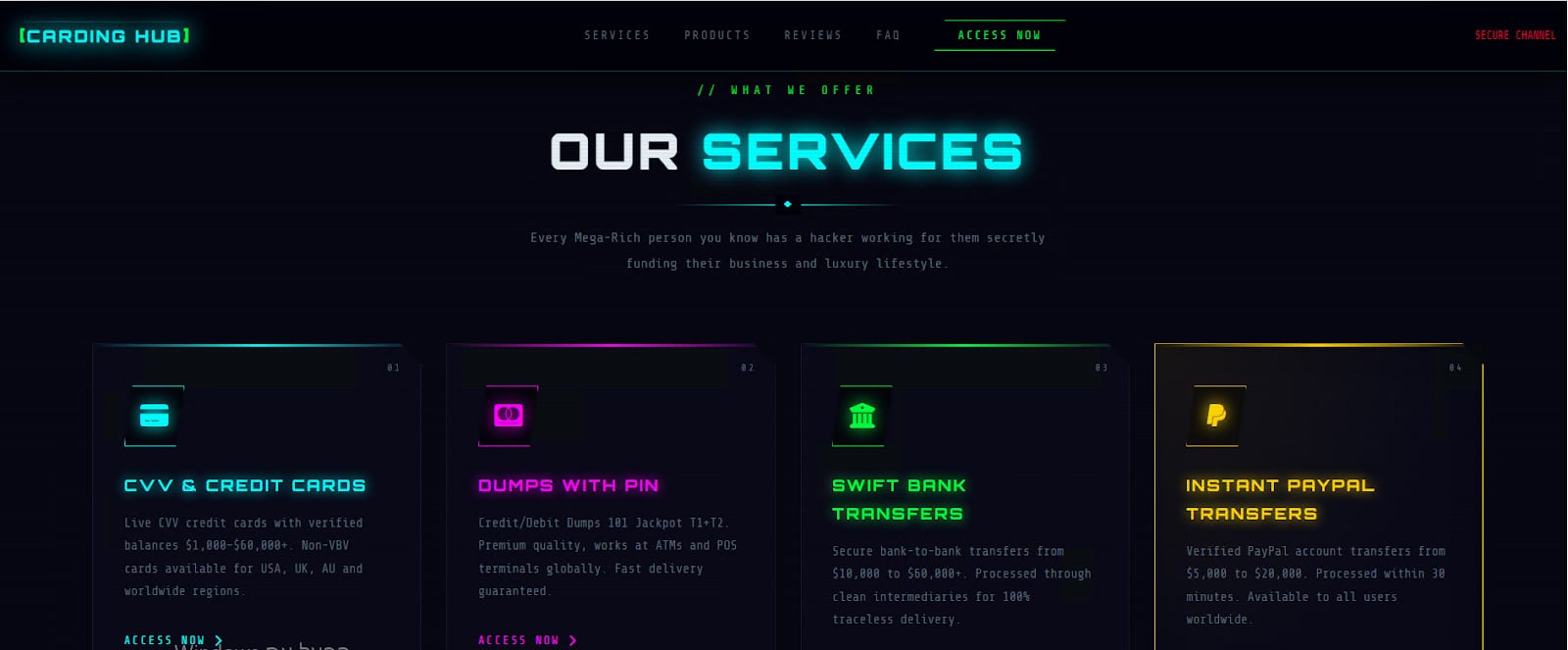
Screenshot from one of the recommended shops in the guide, named “CardingHub”
The author repeatedly stresses that legitimacy is not defined by branding or visibility, but by survivability. In other words, a “real” shop is one that continues operating over time despite law enforcement operations, scams, and internal instability.
This aligns with observed trends in underground economies, where the lifespan of marketplaces has become increasingly unpredictable, forcing actors to adopt continuous verification practices.
The guide makes it clear that what separates a “legitimate” shop from the rest isn’t branding or uptime, it’s the quality of the stolen data it delivers. References to “fresh bins” (BIN = Bank Identifiable Number) and low decline rates point directly to the sources behind the data, whether from infostealer infections, phishing campaigns, or point-of-sale breaches. In this ecosystem, reputation isn’t built on promises but on consistently providing cards that actually work.
Shops that fail to maintain reliable data sources are quickly exposed, while those with steady access to fresh compromises rise to the top.
Carding actors are adopting disciplined workflows to source and test stolen financial data.
Advertisement
Flare continuously monitors underground forums and marketplaces, giving your team early visibility into exposed credentials, compromised cards, and emerging fraud infrastructure.
Transparency is another recurring theme. The guide highlights the importance of clear pricing models, real‑time inventory, and functional support systems, including ticketing and escrow services. These characteristics closely mirror legitimate e‑commerce platforms, underscoring how leading carding shops have adopted business practices designed to build user confidence and reduce friction.
Equally important is the role of community validation. The guide dismisses on‑site testimonials as unreliable, instead directing users toward discussions in closed or invite‑only forums. This reflects a broader fragmentation of the underground landscape, where trust is increasingly tied to controlled environments and long‑standing reputations.
Actors are encouraged to look for sustained discussion threads and historical presence, rather than isolated positive feedback.
Advertisement
The document also reveals a strong awareness of adversarial pressures. The emphasis on security‑first infrastructure, such as mirror domains, DDoS protection, and the absence of tracking mechanisms, suggests that operators are actively defending against both law enforcement monitoring and competing criminal groups.
In effect, these marketplaces function not only as distribution platforms, but as hardened environments designed to ensure operational continuity.
Screenshot from one of the recommended shops in the guide, named “CardingHub”
The Technical Checklist
Beyond high‑level principles, the guide introduces a step‑by‑step vetting protocol that provides insight into how threat actors conduct due diligence. Technical checks such as domain age, WHOIS privacy, and SSL configuration are presented as baseline requirements.
While these checks are relatively simple, they demonstrate an effort to apply structured analysis to what has historically been a trust‑based decision process.
The guide also highlights the importance of identifying mirror infrastructure and backup access points, noting that established operations rarely rely on a single domain. This reflects a practical understanding of the instability of underground services, where takedowns and disruptions are common. The presence of multiple access points is framed as an indicator of operational maturity and resilience.
Advertisement
Social intelligence gathering plays an equally significant role. Rather than relying on direct interactions with vendors, users are encouraged to analyze forum discussions, track vendor histories, and identify patterns of behavior over time.
Particular attention is given to detecting coordinated endorsement campaigns, such as multiple positive reviews originating from newly created accounts, a tactic frequently associated with scams.
Operational Security
Another critical component of the guide is its focus on operational security. The recommendations provided, while framed in the context of carding, closely mirror practices observed across a wide range of cybercriminal activities. Users are advised to avoid direct connections, utilize proxy services aligned with target geographies, and compartmentalize their environments through dedicated systems or virtual machines.
The discussion of cryptocurrency usage is particularly notable. The guide strongly discourages direct transactions from regulated platforms, instead advocating for intermediary wallets and privacy‑focused assets such as Monero. This reflects a growing awareness among threat actors of blockchain analysis capabilities and the risks associated with traceable financial flows.
Advertisement
Taken together, these OPSEC recommendations highlight an important shift: actors are no longer relying solely on tools to evade detection, but are adopting layered strategies designed to reduce exposure across the entire operational chain. This level of discipline suggests that even mid‑tier actors are increasingly adopting practices once associated with more advanced threat groups.
Scale vs. Exclusivity
The guide further categorizes carding shops into distinct operational models, including large automated platforms and smaller, curated vendor groups. This segmentation reflects the diversification of the underground economy, where different actors prioritize scale, accessibility, or quality depending on their objectives.
Automated platforms are described as highly efficient environments, often featuring integrated tools and instant purchasing capabilities. These operations resemble legitimate online marketplaces in both structure and functionality, enabling users to quickly acquire and test data at scale.
In contrast, boutique vendor groups emphasize exclusivity, higher quality, and controlled access, often relying on invitation‑based systems and long‑term relationships.
Advertisement
Commercial Interests and Operational Reality
Despite its structured approach, the guide is not without bias. The inclusion of a direct endorsement for a specific platform suggests that the author may have a vested interest in promoting certain services. This is a common pattern in underground communities, where informational content is often used as a vehicle for subtle advertising or affiliate activity.
Such endorsements should be viewed with caution. However, they do not necessarily invalidate the broader insights provided by the guide. Instead, they highlight the complex interplay between information sharing and commercial interests within cybercriminal ecosystems.
From a defensive perspective, the guide offers valuable intelligence into how threat actors assess risk and make operational decisions. The emphasis on verification, community validation, and layered security reflects a level of maturity that complicates traditional disruption efforts. Rather than relying on single points of failure, actors are increasingly building redundancy and adaptability into their workflows.
Ultimately, the document serves as both a playbook and a signal. It demonstrates that the carding ecosystem became more structured, more cautious, and more resilient. For defenders, understanding these dynamics is critical to anticipating how these markets will continue to evolve, and where opportunities for disruption may still exist.
Advertisement
How Flare Can Help
Flare helps organizations stay ahead of fraud by continuously monitoring underground forums and marketplaces, revealing how threat actors source, vet, and use stolen credit card data. This provides early insight into attacker behavior, including how they optimize success rates, build trust, and adapt to defenses.
By turning this intelligence into actionable insights, Flare enables security teams to detect exposures, anticipate fraud campaigns, and disrupt attacker workflows-shifting from reactive response to proactive, intelligence-driven defense.






 Although modern-day silvered glass mirrors have pretty much destroyed the market for bronze mirrors, these highly polished pieces of metal once were the pinnacle of mirror technology. Due to the laborious process required these mirrors saw use essentially only by the affluent. That said, how hard would it be to make a bronze mirror today with all of the modern technologies that even a hobbyist can acquire for their shed? Cue [Lundgren Bronze Studios] giving it a shot, starting by casting something flat-ish to start polishing.

















































You must be logged in to post a comment Login