A digital photo frame shouldn’t be complicated. At its best, it’s just a good-looking screen that can be set up quickly that reliably shows the photos you care about. Unfortunately, that’s not always how things play out. The market is flooded with cheap digital frames that promise simplicity but end up delivering washed-out displays, clunky apps and a frustrating experience — leading you to abandon it after a week.
That’s a shame, because a good digital frame can be really enjoyable. Most of us have thousands of photos sitting on our phones that never make it beyond the camera roll, even though they’re exactly the kind of moments worth seeing every day. A solid frame gives those images a permanent home, whether it’s family photos cycling in the living room or shared albums updating automatically for relatives across the country. We’ve tested a range of smart photo frames to separate the genuinely useful options from the forgettable junk, and these are the ones that are actually worth putting on display.
Best digital picture frames for 2026
AURA
Using an Aura frame felt like the company looked at the existing digital photo frame market and said “we have to be able to do better than this.” And they have. The Carver Mat is extremely simple to set up, has a wonderful screen, feels well-constructed and inoffensive and has some smart features that elevate it beyond its competitors (most of which don’t actually cost that much less).
Advertisement
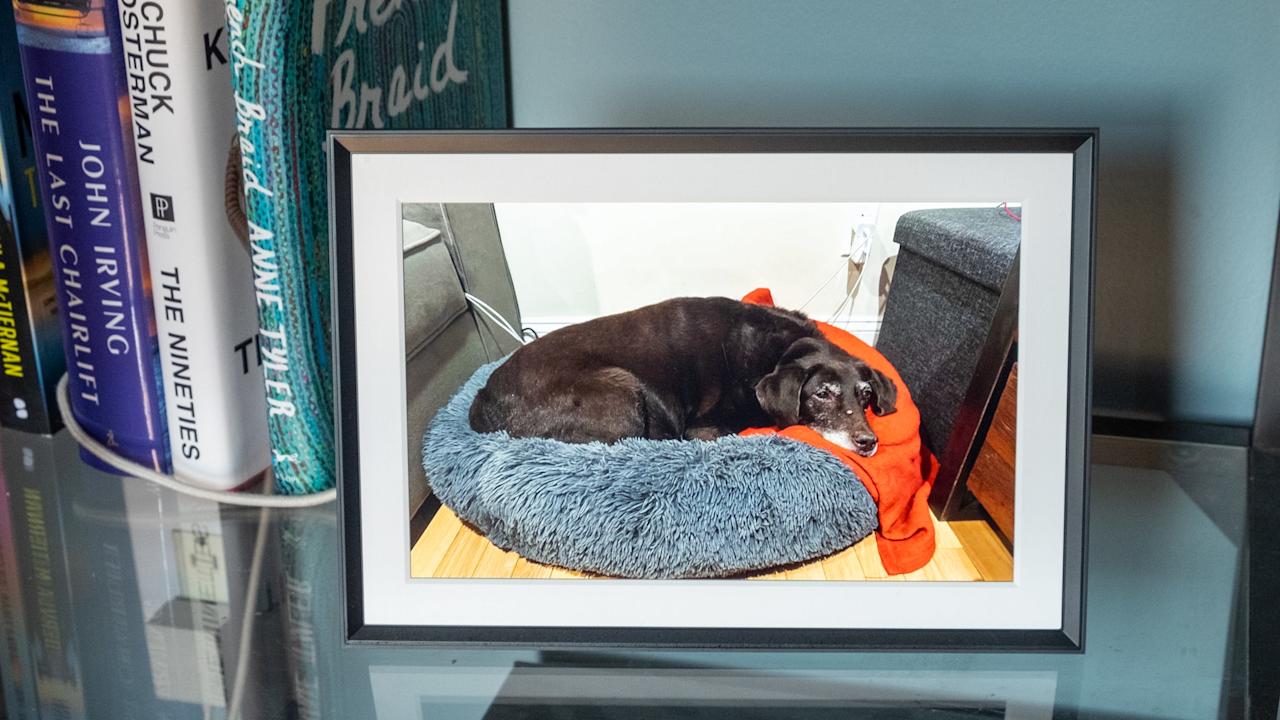
The Carver Mat reminds me a little bit of an Amazon Echo Show in its design. It’s a landscape-oriented device with a wide, angled base that tapers to a thin edge at the top. Because of this design, you can’t orient it in portrait mode, like some other frames I tried, but Aura has a software trick to get around that (more on that in a minute). The whole device is made of a matte plastic in either black or white that has a nice grip, doesn’t show fingerprints and just overall feels like an old-school photo frame.
The 10.1-inch display is the best I’ve seen on any digital photo frame I’ve tested. Yes, the 1,280 x 800 resolution is quite low by modern standards, but it provides enough detail that all of my photos look crisp and clear. Beyond the resolution, the Carver’s screen has great color reproduction and viewing angles, and deals well with glare from the sun and lights alike. It’s not a touchscreen, but that doesn’t bother me because it prevents the screen from getting covered in fingerprints — and the app takes care of everything you need so it’s not required.
One control you will find on the frame is a way to skip forwards or backwards through the images loaded on it. You do this by swiping left or right on the top of the frame; you can also double-tap this area to “love” an image. From what I can tell, there’s no real utility in this aside from notifying the person who uploaded that pic that someone else appreciated it. But the swipe backwards and forwards gestures are definitely handy if you want to skip a picture or scroll back and see something you missed.
Setting the frame up was extremely simple. Once plugged in, I just downloaded the Aura app, made an account and tapped “add frame.” From there, it asked if the frame was for me or if I was setting it up as a gift (this mode lets you pre-load images so the device is ready to go as soon as someone plugs it in). Adding images is as simple as selecting things from your phone’s photo library. I could see my iPhone camera roll and any albums I had created in my iCloud Photos library, including shared albums that other people contribute to. You can also connect your Google Photos account and use albums from there.
Advertisement
One of the smartest features Aura offers is a continuous scan of those albums — so if you have one of your kids or pets and regularly add new images to it, they’ll show up on your frame without you needing to do anything. Of course, this has the potential for misuse. If you have a shared album with someone and you assign it to your Aura frame, any pictures that someone else adds will get shared to your frame, something you may not actually want. Just something to keep in mind.
My only main caveat for the Carver Mat, and Aura in general, is that an internet connection is required and the only way to get photos on the device is via the cloud. There’s a limited selection of photos downloaded to the device, but the user has no control over that, and everything else is pulled in from the cloud. Aura says there are no limits on how many images you can add, so you don’t need to worry about running out of storage. But if you don’t want yet another device that needs to be online all the time, Aura might not be for you. Most other frames I tested let you directly load photos via an SD card or an app.
The Aura app also lets you manage settings on the frame like how often it switches images (anywhere from every 30 seconds to every 24 hours, with lots of granular choices in between) or what order to display photos (chronologically or shuffled). There’s also a “photo match” feature, which intelligently handles the issue of having lots of images in both portrait and landscape orientation. Since the Carver Mat is designed to be used in landscape, the photo match feature makes it so portrait pictures are displayed side-by-side, with two images filling the frame instead of having black bars on either side. It also tries to pull together complementary pairs of images, like displaying the same person or pulling together two pics that were shot around the same time.
Overall, the Carver Mat checks all the boxes. Great screen, simple but classy design, a good app, no subscription required. Yes, it’s a little more expensive than some competing options, but all the cheaper options are also noticeably worse in a number of ways. And if you don’t want a mat, there’s a standard Carver that costs $149 and otherwise has the same features and specs as the Caver Mat I tested.
Advertisement
Pros
High-quality display with minimal reflections
App makes set-up and management of your photos simple
You can store an unlimited number of pictures in Aura’s cloud
Good integration with Apple iCloud Photos and Google Photos
Elegant, well-constructed design
Smartly displays two portrait photos side-by-side on the landscape display
No subscription required
Cons
A little pricey
Aura’s app and cloud are the only way to get photos on the frame
Can’t be set up in portrait orientation
PhotoSpring
If you’re looking to spend less, PhotoSpring’s Classic Digital Frame is the best option I’ve seen that costs less than $100 (just barely at $99). The PhotoSpring model comes with a 10.1-inch touchscreen with the same 1,280 x 800 resolution as the Carver Mat. The screen is definitely not as good as the Carver, though, with worse viewing angles and a lot more glare from light sources. That said, images still look sharp and colorful, especially considering you’re not going to be continuously looking at this display.
Advertisement
PhotoSpring’s frames are basically Android tablets with some custom software to make them work as single-purpose photo devices. That means you’ll use the touchscreen to dig into settings, flip through photos and otherwise manipulate the device. Changing things like how often the frame changes images can’t be done in the app. While doing things on the frame itself are fine, I prefer Aura’s system of managing everything on the app.
However, PhotoSpring does have a good advantage here: you can pop in a microSD card or USB drive to transfer images directly to the frame, no internet connection required. You can also use the PhotoSpring app to sync albums and single images as well, which obviously requires the internet. But once those pics have been transferred, you’re good to go. Additionally, you can upload pictures on a computer via the PhotoSpring website or sync Google Photos albums.
As for the PhotoSpring hardware itself, it looks good from the front, giving off traditional photo frame vibes. The back is rather plasticky and doesn’t feel very premium, but overall it’s fine for the price. There’s an adjustable stand so you can set the frame up in portrait or landscape mode, and you can set the software to crop your photos or just display them with borders if the orientation doesn’t fit.
PhotoSpring also has a somewhat unusual offering: a frame that has a rechargeable battery. The $99 model just uses AC power, but a $139 option lets you unplug the frame and pass it around to people so they can swipe through your photos albums on the device. This feels like a niche use case, and I think most people will be better served saving their $40, but it’s something to consider.
Advertisement
One of my favorite things about PhotoSpring is that they don’t nickel-and-dime you with subscription services. There aren’t any limits on how many images you can sync, nor are things like Google Photos locked behind a paywall. The combo of a solid feature set, a fine display and a low entry price point make the PhotoSpring a good option if you want to save some cash.
Pros
Solid display
Works in portrait or landscape orientation
Lets you load pictures from multiple sources, including the PhotoSpring app, an SD card, USB drive or via Google Photos
Inoffensive design
No subscription required
Cons
Touchscreen controls mean the display is prone to picking up fingerprints
Display picks up more reflections than the Aura
Feels a little cheap
Software isn’t the most refined
Google
Advertisement
If you want a device that works great as a digital photo frame that can do a lot more than the above options, consider Google’s Nest Hub Max. It has a 10-inch touchscreen with a 1,280 x 800 resolution and can connect to a host of Google services and other apps to help you control your smart home devices. It also works great for playing videos from YouTube or other services, or streaming music thanks to its large built-in speaker. At $229, it’s significantly more expensive than our other options, but there’s no question it can do a lot more.
From a photos perspective, you’ll need to use Google Photos. If you’re not already using the app, switching your library over might be too much of a task to make it worthwhile. But if you do use Google Photos, signing in with your Google account when you set up the Hub Max makes accessing your images quite simple. You can pick specific albums, have it stream your entire library or pull things from various recommendations it offers up.
Once that’s set up, you can customize the slideshow as you’d expect — I set mine to come up by default after the Hub Max was dormant for a few minutes. I also removed everything from the display except the photos. By default, it shows you a clock and the weather forecast, but I wanted to just focus on the pictures. I do like the option to show a little more info, though.
As for the screen itself, it has the same relatively low resolution of the other digital photo frames I tried, but it handles glare very well. And the built-in ambient light sensor automatically adjusts brightness and color temperature, which I enjoy. It keeps the Hub Max from feeling like an overly bright screen blasting you with light; it recedes into the background well.
Advertisement
Of course, the Nest Hub Max has a lot of voice-activated tricks via the Google Assistant. My big question is how long the Hub Max will be supported, as Google is clearly planning to phase out the Assistant in favor of Gemini, and I’m not convinced that the Hub Max will ever support that new AI-powered tool. Beyond the Assistant, you can get a variety of apps on it like Netflix and YouTube, stream music from a bunch of apps, see video from your Nest Cam or make video calls via the built-in camera.
If you’re going to buy a Nest Hub Max, it shouldn’t be just for its digital photo frame features, even though those are quite solid. It’s best for someone well-entrenched in the Google ecosystem who wants a more multi-purpose device. If you fit the bill, though, the Nest Hub Max remains a capable device, even though it’s been around for almost five years.
Pros
Advertisement
Good display quality with auto-brightness and warmth settings
Getting images on it is a piece of cake, provided you use Google Photos
Plenty of ways to control smart home devices
Good-sounding speaker
Cons
Almost five years old
Google Assistant’s days are likely numbered
More expensive than a standard digital photo frame
AURA
The Aura Aspen frame is a step-up from our top pick in terms of overall quality and, unfortunately but predictably, price. For $229, you get a 1,600 x 1,200 resolution, 11.8-inch display that supports 169 pixels per inch, and the frame can be positioned in either portrait or landscape mode. There’s a physical button and touchbar on the frame’s edge that let’s you swipe through photos or change what’s currently displayed, but you can also do that remotely with Aura’s mobile app. All of the same great app features present in the Carver are here for the Aspen, including inviting others to contribute photos to your frame. The kicker here, like with all Aura frames, is the lack of a subscription necessary to keep your frame filled to the brim with updated photos. That alone may be worth paying the higher price tag for some when picking out a frame you want to be able to use freely for years to come. — Valentina Palladino, Deputy Editor
Pros
Advertisement
Elegant design
1,600 x 1,200 resolution display
Easy-to-use Aura app
Can invite others to add photos via mobile app
No subscription required
What to look for in digital picture frames
While a digital photo frame feels like a simple piece of tech, there are a number of things I considered when trying to find one worth displaying in my home. First and foremost was screen resolution and size. I was surprised to learn that most digital photo frames have a resolution around 1,200 x 800, which feels positively pixelated. (That’s for frames with screen sizes in the nine- to ten-inch range, which is primarily what I considered for this guide.)
But after trying a bunch of frames, I realized that screen resolution is not the most important factor; my favorite photos looked best on frames that excelled in reflectivity, brightness, viewing angles and color temperature. A lot of these digital photo frames were lacking in one or more of these factors; they often didn’t deal with reflections well or had poor viewing angles.
A lot of frames I tested felt cheap and looked ugly as well, which isn’t something you want in a smart device that sits openly in your home. That includes lousy stands, overly glossy plastic parts and design decisions I can only describe as strange, particularly for items that are meant to just blend into your home. The best digital photo frames don’t call attention to themselves and look like an actual “dumb” frame, so much so that those that aren’t so tech-savvy might mistake them for one.
Perhaps the most important thing outside of the display, though, is the software. Let me be blunt: a number of frames I tested had absolutely atrocious companion apps and software experiences that I would not wish on anyone. One that I tried did not have a touchscreen, but did have an IR remote (yes, like the one you controlled your TV with 30 years ago). Trying to use that with a Wi-Fi connection was painful, and when I tried instead to use a QR code, I was linked to a Google search for random numbers instead of an actual app or website. I gave up on that frame, the $140 PixStar, on the spot.
Other things were more forgivable. A lot of the frames out there are basically Android tablets with a bit of custom software slapped on the top, which worked fine but wasn’t terribly elegant. And having to interact with the photo frame via touch wasn’t great because you end up with fingerprints all over the display. The best frames I tried were smart about what features you could control on the frame itself vs. through an app, the latter of which is my preferred method.
Advertisement
Another important software note: many frames I tried require subscriptions for features that absolutely should be included out of the box. For example, one frame would only let me upload 10 photos at a time without a subscription. Others would let you link a Google Photos account, but you could only sync a single album without paying up. Yet another option didn’t let you create albums to organize the photos that were on the frame — it was just a giant scroll of photos with no way to give them order.
While some premium frames offer perks like unlimited photos or cloud storage, they often come at a cost. I can understand why certain things might go under a subscription, like if you’re getting a large amount of cloud storage, for example. But these subscriptions feel like ways for companies to make recurring revenue from a product made so cheaply they can’t make any money on the frame itself. I’d urge you to make sure your chosen frame doesn’t require a subscription (neither of the frames I recommend in this guide need a subscription for any of their features), especially if you plan on giving this device as a gift to loved ones.
How much should you spend on a digital picture frame
For a frame with a nine- or ten-inch display, expect to spend at least $100. Our budget recommendation is $99, and all of the options I tried that were cheaper were not nearly good enough to recommend. Spending $150 to $180 will get you a significantly nicer experience in all facets, from functionality to design to screen quality.
Digital frames FAQs
Are digital photo frames a good idea?
Yes, as long as you know what to expect. A digital picture frame makes it easy to enjoy your favorite shots without printing them. They’re especially nice for families who want to display new photos quickly. The key is understanding the limitations. Some frames have lower resolution displays or need a constant Wi-Fi connection to work properly, so they’re not a perfect replacement for a high-quality print on the wall. But if you want a simple way to keep memories on display and up to date, they’re a solid choice.
Advertisement
Can you upload photos to a digital frame from anywhere?
Most modern digital frames let you do this, but it depends on the model. Many connect to Wi-Fi and use apps, cloud storage or email uploads, so you can add photos from your phone no matter where you are. Some even let family members share directly, which is great for keeping grandparents updated with new pictures. That said, a few budget models only work with USB drives or memory cards, so check how the frame handles uploads before buying.
Intel and Google signed a multi-year deal to keep Xeon in cloud infrastructure
Google Cloud instances C4 and N4 already run on Xeon 6 processors
Intel and Google are co-developing custom IPUs for networking and storage
Intel and Google have announced a multi-year collaboration that will keep Intel Xeon processors at the heart of Google Cloud infrastructure for the foreseeable future.
The agreement spans multiple generations of Xeon chips and includes systems used for AI workloads, inference tasks, and general-purpose computing across Google’s global data centers.
Google Cloud instances such as C4 and N4 already rely on Xeon 6 processors, and this deal ensures that pattern continues.
Article continues below
Advertisement
Why CPUs still matter in an era of specialized AI hardware
“AI is reshaping how infrastructure is built and scaled,” said Lip-Bu Tan, CEO of Intel.
“Scaling AI requires more than accelerators — it requires balanced systems. CPUs and IPUs are central to delivering the performance, efficiency, and flexibility modern AI workloads demand.”
Advertisement
The announcement comes at a time when many hyperscalers are accelerating adoption of custom Arm-based processors for AI tasks.
Counterpoint Research recently claimed 90% of AI servers running custom silicon will rely on the Arm instruction set architecture, leaving x86 with only a small share of new deployments.
Sign up to the TechRadar Pro newsletter to get all the top news, opinion, features and guidance your business needs to succeed!
To ensure Xeon remains relevant, Intel and Google are also jointly developing custom infrastructure processing units designed to handle networking, storage, and security workloads.
Advertisement
These IPUs operate as ASIC-based accelerators that move infrastructure tasks away from host CPUs, freeing Xeon processors to focus on application execution.
This separation improves system efficiency and resource allocation across large cloud deployments running AI tools, AI agents, and large language models.
CPUs and infrastructure acceleration remain a cornerstone of AI systems — from training orchestration to inference and deployment,” said Amin Vahdat, SVP and Chief Technologist for AI Infrastructure at Google.
Advertisement
Google currently uses both Xeon 5 and Xeon 6 processors across multiple service layers alongside its own custom Arm-based Axion processors.
These deployments continue alongside Google’s own custom processors used in other parts of its infrastructure stack.
Intel and Google state that collaboration across CPUs and IPUs will continue across future system generations, covering ongoing integration efforts across cloud infrastructure layers.
They maintain that CPUs and infrastructure accelerators remain part of current cloud design patterns across distributed systems.
Advertisement
Many workloads running in Google’s data centers require backward compatibility with x86 architecture, while others need maximum single-thread performance that Xeon CPUs deliver.
These requirements are expected to persist for years, which explains why Intel and Google signed this multi-year agreement.
The Kraken cryptocurrency exchange announced that a cybercrime group is trying to extort the company by threatening to release videos showing internal systems that host client data.
The company’s Chief Security Officer, Nick Percoco, stated that the incident did not put client funds at risk and involved an insider threat, with two instances of improper access to limited customer data by support employees.
Kraken says that it will not pay or negotiate with the threat actor.
“We are currently being extorted by a criminal group threatening to release videos of our internal systems with client data shown if we do not comply with their demands,” stated Percoco.
“It’s important to start with the most important points: our systems were never breached; funds were never at risk; we will not pay these criminals; we will not ever negotiate with bad actors.”
Advertisement
Kraken is a U.S.-based cryptocurrency exchange that enables millions of users across 190 countries to buy, sell, and trade digital assets such as Bitcoin, Ethereum, and 200 others.
It is considered one of the largest and most established exchanges, with a daily trading volume of hundreds of millions of U.S. dollars.
Following a “tip from a trusted source” in February 2025 about cybercriminals circulating a video demonstrating access to its client support systems, Kraken initiated an investigation and uncovered a support employee recruited by the threat actor.
More recently, Kraken received a tip about another, more recent video showing insider access to its systems.
Advertisement
In both cases, the company reacted quickly by revoking the employee’s access, launching investigations, and strengthening controls. Where user exposure was identified, Kraken notified affected users directly.
According to Percoco, the incident affects only about 2,000 accounts, which represents 0.02% of Kraken’s user base. For this small subset, the exposed information reportedly only concerns client support data.
Kraken stated that its investigation has gathered enough evidence to legally prosecute all involved individuals attempting to blackmail them, and the company is closely working with federal law enforcement across multiple jurisdictions towards this goal.
Insider threats and malicious recruitment are a broader problem impacting multiple industries, and especially the cryptocurrency sector.
Advertisement
In mid-2025, it was revealed that another major American cryptocurrency exchange, Coinbase, suffered a data breach after hackers bribed employees of an India-based customer support agency to disclose to them private client support information.
In that case, the incident impacted 70,000 customers, with Coinbase estimating the total financial damages to be $400 million.
Automated pentesting proves the path exists. BAS proves whether your controls stop it. Most teams run one without the other.
This whitepaper maps six validation surfaces, shows where coverage ends, and provides practitioners with three diagnostic questions for any tool evaluation.
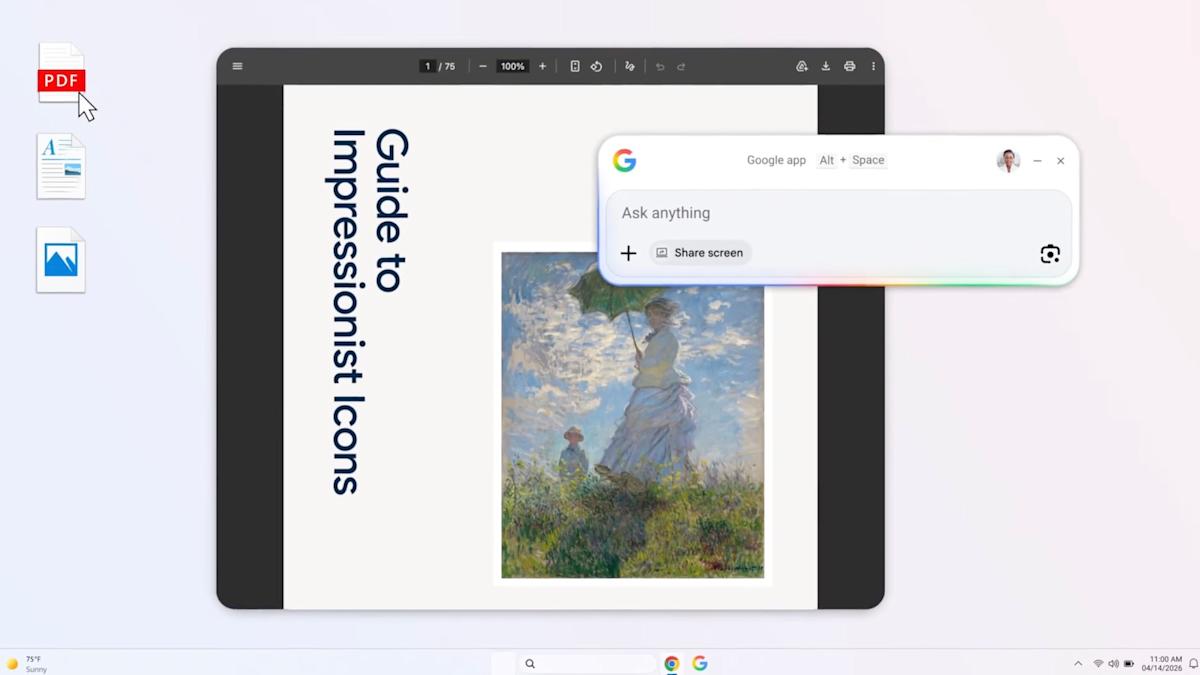
Google has introduced a new app for Windows desktops and, unsurprisingly, it puts AI front at center. If you aren’t a big fan of Google’s Gemini chatbot, then skip on past this download. For those of you who are heavy Gemini users, though, this could mean a simpler and more integrated experience on Windows machines.
Once installed, you can pull up the app’s search bar with the Alt + Space shortcut. Queries typed into this open-ended search box can hunt down information from the web like typical Google search, where AI Mode will be enabled for an extra layer of artificial intelligence for follow-up questions or a deeper dive down a rabbit hole. But the app isn’t limited to web search. It can delve into your computer’s files, other installed apps or Google Drive files to retrieve information. Screen sharing is also built into the app, which enables using Google Lens to conduct AI-powered searches on content displayed on your monitor.
The app is rolling out globally today in English. Interestingly, this hasn’t been gated to the most recent Windows 11, but it does require a machine running at least Windows 10.
Ambassador leaders, from left: COO Mark Steffler, CEO Geoff McDonald, and Chief Strategy Officer John Larson. (Ambassador Photos)
Seattle customer engagement startup Ambassador has acquired the operating assets of Tacoma-based programmatic ad platform Humming, part of a roll-up strategy that anticipates a larger shakeout among startups as major AI platforms expand their capabilities.
The deal will bring Humming’s technology for automatically buying and placing digital ads into Ambassador’s platform, which uses AI to manage and act on customer referrals, loyalty programs, surveys, and other feedback. Ambassador said the addition will improve its attribution capabilities, connecting ad spending to purchases, leads, and other customer actions.
It’s the latest in a series of acquisitions for the 22-person Seattle company, which has raised about $11 million.
The AI shakeout: Ambassador CEO Geoff McDonald said he sees more opportunities for deals in the future as AI startups that essentially built wrappers around large language models struggle to hold onto customers as Anthropic, OpenAI and others add similar capabilities.
The companies that will succeed, in McDonald’s view, are the ones sitting on years of proprietary customer data that can’t be quickly reproduced, what he calls the context layer.
Advertisement
Ambassador has been accumulating that data since well before the current AI wave, bolstered by its 2021 acquisition of a referral marketing platform from an Apollo Global Management subsidiary. It has since rebuilt the platform around AI.
Customers of relatively nascent AI startups are increasingly saying, “Oh, well, Claude just came out with this tool. I’m just going to build it internally,” McDonald said, referring to Anthropic’s popular AI assistant. “And I think that’s where we differentiate.”
Latest acquisition: The Humming deal, structured as an asset purchase, closed last week. Financial terms were not disclosed. Humming, founded in 2018, built a platform for buying and managing ad campaigns across websites, apps, and streaming services.
Based in Tacoma, the company was co-founded by Bill Herling and Jill Nealey-Moore, a psychology professor at the University of Puget Sound, and raised more than $5 million, according to Herling’s LinkedIn profile.
Advertisement
The company had more than 30 employees at its peak. Herling stepped down as CEO in 2023 and has since launched a new ad tech startup called Atrium, focused on TV advertising. He is not joining Ambassador, and Humming’s standalone product will be discontinued.
Ambassador expects to integrate Humming’s technology into its platform within 60 days, an accelerated timeline that McDonald attributed to Ambassador’s use of AI in its own engineering process. Chief Operating Officer Mark Steffler said the team has been shipping new features to customers every two weeks, crediting the company’s use of AI coding tools.
Business model: Ambassador has also shifted its approach away from traditional software subscriptions toward what McDonald calls “Results as a Service,” or RaaS — charging customers based on consumption credits tied to outcomes rather than flat fees for seats or contacts.
The model is designed so that customers pay more when the platform delivers more value, and less when it doesn’t. McDonald said he plans to apply the same pricing approach to Humming’s programmatic ad capabilities, which he described as a first for the space.
Advertisement
Zipwhip connection: Ambassador’s chief strategy officer and co-founder is John Larson, who co-founded Seattle-based business texting startup Zipwhip, which Twilio acquired for $850 million in 2021. He spent three years at Twilio after the deal before joining Ambassador full-time in mid-2024.
He was part of a $7 million funding round in December that included other former Zipwhip execs, calling the company the biggest personal investment of his career.
M&A: Larson said this week that he believes the current environment will produce more acquisition targets. While the “graveyard” of failed AI startups may not be as dire as headlines suggest, many companies with solid teams and technology simply can’t raise money, he said.
Before Humming, the company acquired Predictive Solutions, a Seattle customer data platform, and ChalkLabs, a Spokane-based semantic search startup, before buying the Ambassador referral marketing platform from Intrado, a subsidiary of Apollo Global Management, in 2021.
Advertisement
McDonald, who previously co-founded Seattle startup Element Data, a decision intelligence platform, launched the company as i2H in 2019. The holding company began doing business under the Ambassador name after completing the acquisition from the Apollo Global subsidiary.
Customers: Ambassador says it works with more than 200 companies, listing customers including Visible by Verizon, Canadian bank CIBC, and HR software company Rippling on its website. Its customers are primarily in telecom, financial services, and B2B software.
Financials: The privately held company is approaching cash-flow neutral, McDonald said, distinguishing it from many startups that are burning through their funding as they grow.
The Batman: Part II is now set for an October 1, 2027 release, following multiple delays that pushed the sequel well beyond its original 2025 window. The extended timeline reflects a longer development cycle for director Matt Reeves’ follow-up, with the script only recently completed and production now expected to begin in spring 2026.
The sequel continues Reeves’ grounded take on Gotham, which began with The Batman in 2022. That film earned over $770 million globally and established a more detective-driven version of Bruce Wayne, set within what Reeves has described as an “epic crime saga.” Part II is expected to build directly on that foundation, exploring the aftermath of Gotham’s collapse and Bruce’s evolving role within it.
The delays have been tied to both industry-wide disruptions and Reeves’ deliberate approach to the script. DC Studios co-head James Gunn has confirmed that a completed draft is now in place, allowing the project to move forward after a prolonged development phase. With production finally on the horizon, the sequel is shifting from uncertainty to execution.
Robert Pattinson will return as Bruce Wayne/Batman and there are details with regards to the other cast as well. In a recent interview to French reality show C à vous, Pattinson shared that “The new script is so, so good, I’m very excited about it.” However, that is not all there is to update about this much-talked about film and thus, here is a complete rumor roundup.
Advertisement
When is The Batman Part II releasing?
Warner Bros. Pictures
The Batman: Part II has seen several release date changes. The Batman Part II was initially supposed to premiere on October 3, 2025. Unfortunately, nothing is guaranteed in the world of filmmaking.
Yes, the world will have to wait even longer to see Pattinson suit up again, marking a five-year span between the original film and the sequel. The delays stem from a combination of factors. The writers’ and actors’ strikes slowed development across Hollywood, while Reeves took additional time to finalize the script. Given the scale and expectations surrounding the sequel, the extended timeline appears to be a deliberate choice rather than a production setback.
The result is a five-year gap between the first film and its sequel — longer than typical superhero franchise timelines, but not unusual for director-driven projects of this scope.
What’s the plot of The Batman Part II?
Warner Bros. Pictures
Plot details remain tightly under wraps, but the sequel is expected to continue directly from the events of The Batman.
The first film ended with Gotham flooded and its institutions exposed as deeply corrupt. Bruce Wayne, having begun his transformation from a symbol of vengeance into a figure of hope, now faces a city in deeper chaos. Crime is likely to rise in the power vacuum left behind, setting the stage for a more complex and unstable Gotham.
Advertisement
My money is on Batman facing Thomas Elliot, a.k.a. Hush. Once a childhood friend of Bruce Wayne, this villain is famous for teaming up with the Riddler in the comics, as well as recruiting multiple other villains to battle and torment Batman with his knowledge of the hero’s true identity. At one point, Batman was even forced to fight a brainwashed Superman because of Hush.
The Batman did have the Riddler reveal that Bruce’s father inadvertently caused the death of a reporter named Edward Elliot. Given his surname, Edward may very well be Hush’s father. Combined with online rumors, it seems likely that the sequelwill feature Hush as the main villain, seeking vengeance against Bruce for his father’s role in Edward’s murder.
Reeves also revealed that Bruce Wayne is going to have trouble being the hero Gotham needs.
“This was a time of great turmoil in the city, it’s literally the week after what happened,” he explained to Digital Spy. “Much of the city is in desperation, so police can’t get everywhere, there’s crime everywhere, it’s a very, very dangerous time. [Batman’s] out there trying to grapple with the aftermath of everything that happened, which to some degree he blames himself for.”
Advertisement
Even in the recent interactions, Reeves has indicated that the sequel will explore that instability, focusing on how both Batman and Bruce Wayne evolve in response to the city’s changing conditions.
Who is in the cast of The Batman Part II?
Warner Bros. Pictures
When Warner Bros. announced The Batman Part II in April 2022, only Pattinson was confirmed to return as Bruce Wayne/Batman. This seemed pretty obvious, given he plays the franchise’s lead character. Regardless, we’re almost 100% sure these core cast members will return: Jeffrey Wright as James Gordon and Andy Serkis as Alfred Pennyworth.
Reeves confirmed to SFX magazine that Colin Farrell’s character, Oz Cobb/The Penguin, will be part of the movie. Farrell also starred in HBO Max’s spinoff series, The Penguin, which chronicled Cobb’s rise to the top of Gotham’s criminal underworld.
Farrell already shared his expectations for the sequel and what his contract with the franchise entails. “I signed up for three Batman films, but I didn’t know if I’d be in the second film,” he told The Hollywood Reporter. “Matt Reeves is a brilliant writer and an extraordinary filmmaker, and what I’m most excited-slash-nervous about in the second film is not what Oz does – or what predicaments he finds himself in, or what moments of success he gets to experience – but what his voice is.”
“I was told I have five or six scenes. I don’t have any hopes or any expectations. I’m really an open book, and that’s the way I get excited by shit or not,” he continued. “I think sometimes actors, if they have a career that has a certain length of time, they sometimes get to make too many decisions. Which isn’t to say I won’t push back or argue or fight in Oz’s corner – I do believe I know him better than anyone now.”
Advertisement
Zoë Kravitz could return as Selina Kyle/Catwoman, but it’s also possible that Reeves will hold off on her return to give Bruce a new love interest.
Barry Keoghan had a brief cameo as The Joker in The Batman, hinting at an alliance with Paul Dano’s Riddler. While it isn’t official yet, Keoghan neither confirmed nor denied that his Clown Prince of Crime will appear, implying there is still more to come from him.
Harvey Dent/Two-Face was rumored to be the main antagonist of The Batman Part II, with actor Boyd Holbrook (Logan) hired to portray the iconic villain. However, James Gunn has since debunked those rumors on Threads. This seems to be for the best, as DC already featured a top-tier Two-Face as a core villain in 2008’s The Dark Knight.
Filming and production timeline
After an extended development period, Reeves confirmed in mid-2025 that the script for The Batman: Part II was complete. DC Studios has since indicated that filming will begin in spring 2026, giving the production a full year for shooting and post-production ahead of its 2027 release.
Advertisement
This timeline aligns with the film’s scale and the technical demands of Reeves’ grounded but visually detailed approach to Gotham.
Is there a trailer for The Batman Part II?
Warner Bros., 2022 / Warner Bros. Pictures
No. In fact, now that the film has been delayed to late 2027, audiences likely won’t see a trailer until mid-2026. The first trailer for 2025’s Superman was released seven months before its premiere. If The Batman Part II follows a similar marketing schedule, the world may not get a glimpse of the film until around March 2027.
How The Penguin connects to Part II
HBO
HBO’s The Penguin series serves as a direct continuation of The Batman, taking place shortly after the events of the film.
The series follows Oz Cobb’s rise within Gotham’s criminal hierarchy, filling the power vacuum left behind after the Riddler’s attack. That progression is expected to feed directly into The Batman: Part II, positioning Penguin as a more significant force within the city.
Reeves has emphasized that while the series adds context, the sequel will still function as a standalone story.
What’s the status of The Batman Part II’s script?
After years of waiting, Reeves finally revealed on Instagram that the script for The Batman Part II was complete on June 27, 2025. DC Studios co-CEO James Gunn has also revealed that he had received a finished draft of the script. “It’s great,” he said, without offering any additional detail on the film or who would be in it.
Advertisement
When is The Batman II going into production?
In a letter to shareholders, Warner Bros. confirmed that The Batman II would start filming in spring 2026. This aligns with the October 2027 release date and would give the movie more than a year for post-production and visual effects. Just don’t be surprised if there are more delays.
Matt Reeves was planning an entire trilogy
Warner Bros.
A lot has changed at DC since The Batman debuted in theaters. But back in 2024, Reeves was pretty insistent that he would make an entire trilogy.
“Yes, that is still the plan,” Reeves told Collider about making The Batman trilogy. “I mean, it’s sticking very closely to the path we envisioned.”
“Things kind of shifted. So, when we came up with the idea to do The Penguin, that was something where I had always intended to continue Penguin’s story and wanted to tell this story of his beginning of rise to power,” Reeves continued. “Because we know that he’s introduced in The Batman as a kind of mid-level, sort of overlooked, mocked figure, who’s not yet in anyone’s eyes the kingpin we come to know him as in the lore.”
Will there be more TV spinoffs from The Batman?
Reeves has previously mentioned two other spinoffs from The Batman: one centered on the Gotham City Police Department and the other on Arkham Asylum. Although no other shows are currently lined up, Reeves told Collider: “We are talking about doing more — I think it would be really fun.”
Advertisement
What villains are rumored to be in The Batman Part II?
DC Comics / DC Comics
When talking to SFX magazine, Reeves shot down fans’ hopes of the supervillain Gentleman Ghost appearing in the sequel, stating that the character wouldn’t fit the franchise’s world.
“What was important to me was to find a way to take these pop icons, these mythical characters that everybody knows, and translate it so that Gotham feels like a place in our world. We might push to the edge of the fantastical, but we would never go into full fantastical. It’s meant to feel quite grounded,” Reeves said.
There are other rumors that the villains Clayface, Professor Pyg, and Scarecrow will show up in the sequel, along with Batman’s young ward, Dick Grayson/Robin. Despite these claims, Gunn took to Threads to deny the rumor that Pyg and Scarecrow will join Hush, Clayface, and Robin in Part 2. However, this statement implies the latter three characters will make their debut in the franchise.
Will Barry Keoghan be back as the Joker?
Warner Bros. Pictures / Warner Bros. Pictures
Keoghan’s cameo as the Joker was one of the most-talked-about moments of The Batman. But since Keoghan’s face was obscured in the film, it wouldn’t be hard for Reeves to recast the role if he wanted to. Keoghan was recently asked about coming back during a feature with Variety, and his answer was elusive at best.
“I can’t say much,” Keoghan said. “The camera is looking right at me. We’ll see where that goes. Again, it was an incredible experience … and yeah, I can’t say.”
Andy Serkis shares filming update on The Batman Part II
Warner Bros. Pictures / Warner Bros. Pictures
In an interview with Popverse, Serkis said he hasn’t seen a script for The Batman Part II. However, Serkis believes the sequel’s screenplay will be “brilliant” because of his affinity for Reeves. Serkis then predicted The Batman Part II’s start date for filming and when fans can expect it in theaters.
“Basically, I know nothing about the movie other than that I’ve just found out that we’re probably likely to be starting filming early next year,” Serkis said. “Therefore, if you do the math, it’ll be a year and a half after that.”
Advertisement
What to expect from the sequel?
While specific story details remain under wraps, The Batman: Part II is expected to deepen the tone established in the first film.
The sequel will likely place greater emphasis on Bruce Wayne’s personal evolution while continuing to explore Gotham as a city shaped by corruption, power struggles, and shifting alliances. Rather than expanding outward, the story is expected to become more focused, building on the grounded approach that defined Reeves’ first film.
Will the sequel connect to James Gunn’s DC Universe?
No. The Batman: Part II exists separately from the main DC Universe being developed by James Gunn and Peter Safran.
Reeves originally revealed to Entertainment Weekly that The Batman, its sequels, and its spinoffs will exist in a separate universe called “The Batman Epic Crime Saga.” That means Robert Pattinson’s Batman is not expected to intersect with the broader franchise, which includes its own version of the character.
This separation dates back to before Gunn and Safran took over DC Studios, when The Batman was developed as a standalone project. Reeves has since reiterated that his films and related spinoffs are designed to exist within their own self-contained universe.
Advertisement
That said, Gunn has acknowledged that the idea of bringing Pattinson’s Batman into the wider DCU has been considered, even if no plans are currently in place. For now, The Batman: Part II remains firmly positioned outside the shared universe.
What about that other Batman movie, The Brave and the Bold?
Warner Bros. Animation
The recent delay of The Batman Part II to 2027 coincided with the delay of director Andy Muschietti’s Batman film, The Brave and the Bold, which is set in the DCU. This may lead one to wonder if Gunn will integrate The Batman Part II into the DCU after all. Gunn himself admitted on the Happy Sad Confused podcast that he floated the idea but still wishes to keep both franchises separate.
“I’ve contemplated it, yeah. I contemplate everything,” Gunn said. “I talk about everything… I’d be an idiot not to think of how can this go or how can this go, but I’m committed to both telling stories in the DCU and telling Elseworlds stories.”
Hey, DC, if Marvel could make two Spider-Man franchises at the same time, DC could do the same with two different Batmen.
The Hollywood Reporter has questioned whether the movie even exists or whether there’s someone actively working on it. Muschietti confirmed in October 2025 that the movie was still happening, but he couldn’t discuss it further for at least another two months.
Malwarebytes recently uncovered a new malicious campaign targeting the Windows Update service. Focused on French-speaking users, the campaign uses layered obfuscation techniques to deliver multiple malicious payloads built with legitimate tools. The malware’s primary goal is to steal passwords and other sensitive user data. Read Entire Article Source link
Bellevue, Wash.-based Humanly, a startup that makes AI-powered interviewing tools for employers, announced it has acquired Anthill, a platform that uses AI to help companies connect with and support frontline employees.
It’s the latest acquisition for Humanly, which scooped up three recruiting technology companies last year — Sprockets, Qualifi, and HourWork.
Humanly said Tuesday that the Anthill acquisition adds “post-hire engagement capabilities” to its offerings, which include helping organizations attract, screen, and interview job candidates.
Humanly will continue operating the Anthill platform as it explores how to integrate its capabilities into the broader Humanly platform. Terms of the deal were not disclosed.
Founded in 2018, Humanly is led by CEO Prem Kumar. The startup, ranked No. 152 on the GeekWire 200, just announced a $25 million Series B funding round last week, and has raised $52 million to date.
Advertisement
Founded in 2020 by Muriel Clauson Closs, Young-Jae Kim, and Laura Silvester, Chicago-based Anthill built technology designed to help frontline managers and distributed teams stay connected through messaging, feedback, and operational support. Anthill raised approximately $10 million in funding.
Ising models are designed to help perform quantum error correction and calibration.
Nvidia has announced a new family of open-source quantum AI models on World Quantum Day (14 April).
‘Ising’, the “world’s first” open models for building quantum processors, joins a growing list of Nvidia open-source models including ‘Alpamayo’ for autonomous vehicles, ‘Nemotron’ for agentic systems and ‘Cosmos’ for physical AI.
Ising models are designed to help researchers and enterprises perform quantum error correction and calibration.
Advertisement
The family includes Ising Calibration, a vision language model that can interpret and react to measurements from quantum processors, and Ising Decoding, two variants of a 3D convolutional neural network model that can perform real-time decoding for quantum error correction.
Ising Decoding can deliver up to two and a half-times faster performance and three-times higher accuracy than current open-source industry standards, Nvidia said. The models are available for download on GitHub, Hugging Face and Nvidia.
The Ising models are already in use at the Harvard John A Paulson School of Engineering and Applied Sciences, IQM Quantum Computers, Lawrence Berkeley National Laboratory’s Advanced Quantum Testbed, the UK National Physical Laboratory and the University of California San Diego, as well as a list of other prominent names disclosed by the company.
“AI is essential to making quantum computing practical,” said Jensen Huang, the founder and CEO of Nvidia. “With Ising, AI becomes the control plane – the operating system of quantum machines – transforming fragile qubits to scalable and reliable quantum GPU systems.”
Advertisement
Ising joins other Nvidia quantum-specific products, including the CUDA-Q quantum software platform, and the NVQ Link that connects GPU computing with quantum processors.
We’re sliding into developer conference season and one of the biggest events on the upcoming calendar is Google I/O. This year’s edition is taking place on May 19 and 20. As usual, the in-person element will happen in Mountain View, California, though many of the keynotes and sessions will be livestreamed. Google will surely make its biggest announcements during the opening keynote, which will start at 1PM ET on May 19. A developer keynote will take place later the same day.
As ever, the rumor mill will pick up speed in the leadup to Google I/O. We do have some ideas about what Google will discuss at the event. So let’s take a look at what to expect at Google I/O 2026 (we’ll update this story as we hear more credible rumors).
What’s officially on deck
Google I/O logo (Google)
When it confirmed the dates for this year’s I/O, Google revealed a little bit about what it has in store for us. As you might imagine, AI will be a major focus of the event. Google plans to share its “AI breakthroughs and updates in products across the company, from Gemini to Android, Chrome, Cloud and more,” it wrote in a blog post in February.
There will be news on Gemini model updates as well as agentic coding. Google will have some product demos too.
Advertisement
The company has released its initial schedule of keynotes and sessions, but it doesn’t provide us with a lot of specifics as yet. It has lined up discussions on what’s new in the likes of Google Play, Firebase (a mobile and web app development platform), the Gemma open model family and the open-source app development framework Flutter. Interestingly, there isn’t a dedicated session for Android XR on the schedule just yet.
What to expect
Leaked image of Google’s Aluminium OS (9to5Google)
There haven’t been many credible leaks ahead of Google I/O as yet, but we can make some educated guesses about what to expect from the event. It’s all but certain that we’ll get more details about Android 17 at I/O. Developers need time to tweak their apps ahead of the next major version of the operating system rolling out to everyone if they want to take advantage of new features as soon as possible, and they invariably get a heads up about those at I/O every year. (That said, Google has been moving away from a big annual release approach in favor of juicier Pixel Drops/Android updates, so we may not see some of the new features it unveils at I/O for some time.)
As for other operating systems, Google is planning to meld ChromeOS and Android into a unified platform. This seems to be the project that’s being referred to as Aluminium OS, which we got a first glimpse of earlier this year thanks to some leaks. I/O seems like the perfect venue for Google to start showing that off to the public.
On the AI front, a reveal of Gemini 4 could be on the docket, along with details of the latest Veo text-to-video model. Maybe we’ll hear more about Project Astra, Google’s pitch for a universal AI assistant.
Advertisement
If Google has some consumer hardware to show off at this year’s event, I suspect it’ll be an Android XR device or devices, rather than a Pixel phone or watch. There is a chance that we’ll get a tease of the Google Pixel 11 lineup. But don’t be surprised if we don’t see that or the Pixel Watch 5 until Google’s dedicated hardware event, which has taken place in August or October in recent years (Google will want to stay well away from Apple’s iPhone event, which will likely take place in September as usual).
Here’s hoping for a big surprise or two
Google
Sure, Android updates are all well and good. If Google insists on cramming Gemini and other AI tools into all of its tools and services, we’ll at least listen to what they have to say about all that.
But I have my fingers crossed for some cool surprises. Give us something new from Google X (Alphabet’s moonshot factory, not the thing that was once Twitter), an idea that could be a net benefit for humanity and boost the company’s bottom line at the same time. These events are always more fun when there’s something for us to get genuinely excited about, even if it’s something relatively niche but out there, like the Google Beam 3D video conferencing tech.
Susan Kelly discusses Technology Ireland ICT Skillnet’s tech leadership master’s programme, which is celebrating 20 years in operation.
Last week, Technology Ireland ICT Skillnet announced its plans to award four fully funded places on its MSc in Leadership, Innovation and Technology programme to celebrate 20 years since the programme’s inception.
The funding – called the ‘Big 20 Giveaway’ – is valued at €20,000 per annum per place and will cover all tuition fees of the two-year programme for four candidates.
“The Big 20 Giveaway is a celebration of the programme’s 20-year impact, but also a very practical initiative to support future talent,” says Susan Kelly, network director at Technology Ireland ICT Skillnet.
Advertisement
“What we’re really celebrating is the impact the programme has had with over 300 graduates who have gone on to lead teams, functions and transformation initiatives across Ireland’s technology landscape and beyond.
“For us it is not just about looking back, it’s about investing in what comes next.”
The programme
But what is the course actually about?
The programme, which is delivered at Technological University Dublin, is a part-time, applied master’s designed specifically for experienced professionals working in technology and innovation-led environments.
Advertisement
“Its core objective is to help people move beyond technical expertise and develop the capability to lead, whether that is leading teams, driving innovation or shaping strategy at an organisational level,” says Kelly.
She tells SiliconRepublic.com that the programme focuses on three key areas: leadership capability, innovation and transformation, and business and strategic thinking.
“What really differentiates it is that it is applied, not theoretical,” she says. “Participants work on real challenges from their own organisations, so the learning is immediately relevant and delivers tangible value both to the individual and their employer.”
The programme has been in operation since 2006, and in the 20 years since then, technology has advanced considerably.
Advertisement
Kelly explains that a course such as this is more important than ever today because “the challenge right now isn’t access to technology, it is the ability to lead with it effectively”.
“Organisations are dealing with rapid change driven by AI, digital transformation and global competition,” she says. “The professionals who will stand out are those who can connect technology, strategy and people.”
She adds that the biggest benefit of the programme is that it enables participants to make the shift “from being the person who delivers technology to the person who shapes how and why it’s used”.
“It gives them the language of business and strategy, the confidence to operate at senior levels, and the ability to lead transformation and not just contribute to it.
Advertisement
“For many, it’s the difference between continuing to grow technically and actually stepping into leadership roles with broader organisational impact.”
Who it’s for
With four fully funded places on the programme up for grabs, what constitutes an ideal candidate for the course?
Kelly says the programme is designed for what she calls the “strategic technologist”, which she explains refers to someone who is already established in their career but is ready to take the next step.
“Typically, participants are mid- to senior-level professionals working in roles like software engineering, architecture, product, project management, cybersecurity or IT leadership,” she says. “They are already technically credible but looking to expand into broader leadership or strategic roles.”
Advertisement
She says course participants are often “at a career inflection point”, where they may be leading teams or projects already but “they recognise that technical expertise alone won’t get them to the next level”.
“Many are experiencing a technical ceiling, where they are highly capable but they don’t yet have the strategic, commercial or leadership toolkit to move into senior decision-making roles. This programme is designed specifically to help them break through that barrier.”
For anyone considering applying for one of the funded positions, Kelly says the organisation is looking for motivated, ambitious people who have strong technical or functional expertise and are already operating at a high level in their organisation, and who want to have a greater impact, “not just within their team but across their organisation”.
An important criteria that she emphasises is that they’re not looking for people at the start of their careers or those looking for purely academic study.
Advertisement
“This is for professionals who are already doing significant work and want to elevate their influence and capability,” she clarifies. “We’re also looking for people who will apply what they learn in real time by bringing challenges from their workplace into the programme and using it as a platform to drive meaningful change.
“Ultimately, the strongest candidates will be those who recognise that they’ve outgrown a purely technical role and are ready to take on the responsibilities and opportunities of leadership.”
Don’t miss out on the knowledge you need to succeed. Sign up for the Daily Brief, Silicon Republic’s digest of need-to-know sci-tech news.







.png)


















































You must be logged in to post a comment Login