Connect with us
DAPA Banner
DAPA Coin
DAPA
COIN PAYMENT ASSET
PRIVACY · BLOCKDAG · HOMOMORPHIC ENCRYPTION · RUST
ElGamal Encrypted MINE DAPA
🚫 GENESIS SOLD OUT
DAPAPAY COMING

Tech

uGreen NASync DXP 4800 GT review: Price, performance

Published

on

The uGreen NASync DXP4800 GT is a four-bay NAS with dual 10GbE networking that targets creators and small teams, and is an excellent mid-range NAS for Apple users.

uGreen has built out its NAS range quickly since entering the category. AppleInsider has covered uGreen NAS hardware before, including hands-on time with the NASync IDX6011 Pro.

The DXP4800 GT is a new branch of the lineup. uGreen frames the “GT” name around Grand Touring, pitching it as built for sustained performance over long sessions.

It is the first DXP model from uGreen to use an AMD processor rather than Intel. It also brings dual 10GbE networking and U.2 SSD support to the DXP family for the first time, at a low price, compared to some other models that support the technologies.

Advertisement

uGreen NASync DXP4800 GT review: Specifications

Advertisement

Advertisement

Advertisement

Advertisement

CPU AMD Ryzen Embedded R2514 (4 cores, 8 threads)
CPU max frequency 3.7GHz
RAM (standard) 8GB DDR4
RAM slots 2 (up to 32GB each)
Max RAM 64GB
System storage 64GB eMMC
Drive bays 4 x SATA (up to 32TB each)
M.2 SSD slots 2 x M.2 NVMe (PCIe Gen3 x2)
Max storage capacity 144TB (4 x 32TB SATA plus 2 M.2)
RAID modes JBOD, Basic, RAID 0, 1, 5, 6, 10
Ethernet 2 x 10GbE
USB-A ports 2 x USB-A 3.2 Gen2, 2 x USB-A 2.0
USB-C ports 1 x USB-C 3.2 Gen2
Video out HDMI (4K at 60Hz)
Card reader SD 3.0
Operating system UGOS Pro
Bundled apps Docker, Surveillance Center, Theater media app
Dimensions (inches) 10.1 x 7 x 7
Price $659.99 MSRP ($559.99 launch, $527.99 Prime Day)

uGreen NASync DXP4800 GT review: Design

The DXP4800 GT uses a black chassis with a copper-toned front trim, in keeping with uGreen’s recent NAS styling. The four drive bays are accessed from the front, each with a numbered lockable tray.

Advertisement

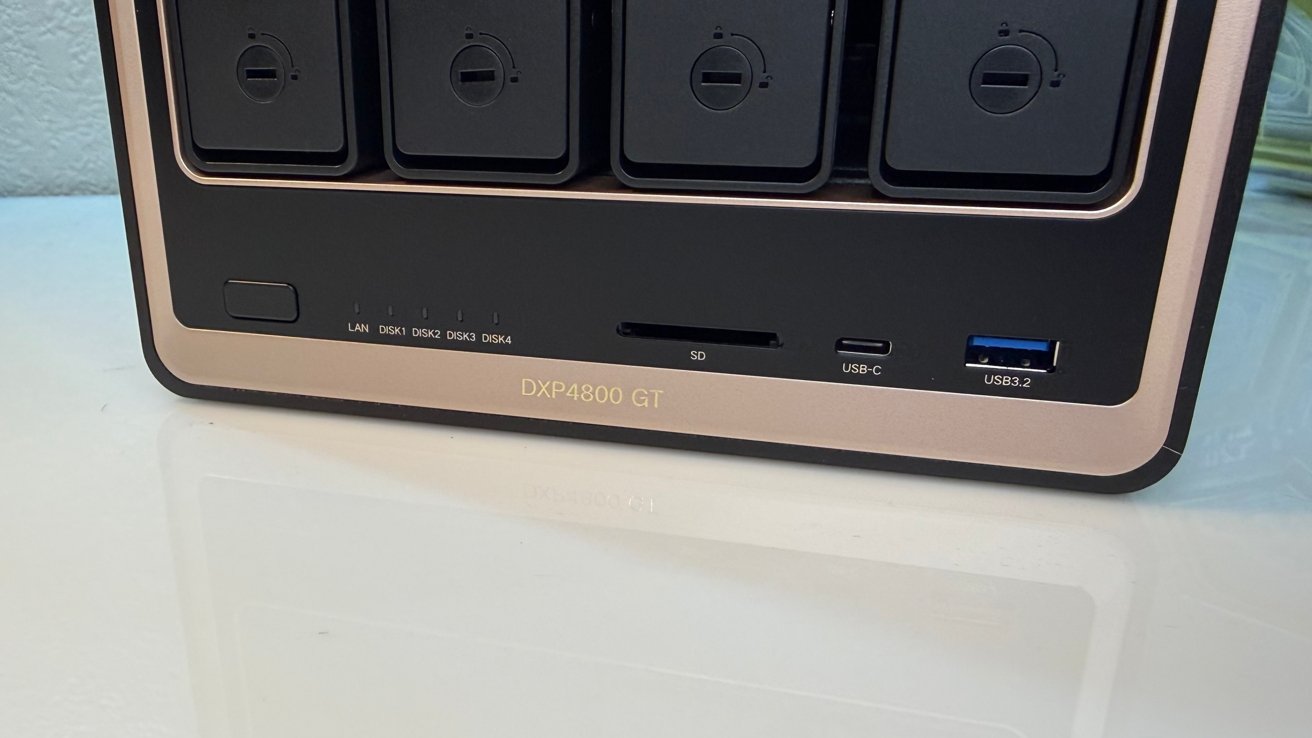
The front panel also holds a power button, status LEDs, an SD card slot, a USB-C port, and a USB-A port. This makes quick media imports easy without reaching around the back.

Front panel of a Domodo GT device with four vertical slots, status lights, and ports including USB and USB-C, resting on a glossy white surface

uGreen NASync DXP4800 GT review: The front port selection.

It’s a network-attached storage device that sits on your desk. There’s not a lot else to say about design.

The unit is quiet, expandable, and sits on a desk. It’s not a work of art, but it doesn’t have to be. HIde it in a closet or in your basement if you don’t like how it looks on your desk.

Advertisement

That is the entire point of network-attached storage, after all. It’s on your network, and not on the desk whirring away next to your head.

uGreen NASync DXP4800 GT review: Storage

The four drive bays each support SATA drives up to 32TB. That alone allows a large array of up to 128TB before any other storage is added.

Two M.2 NVMe slots supplement the main bays. Each can take up to an 8TB NVMe stick, adding 16TB of capacity.

The M.2 slots run at PCIe Gen3 x2. This is a step below the Gen4 speeds found on some higher-end models, but is fine for SSD caching, which is their main purpose here.

Advertisement
Black multi-bay storage enclosure on a desk with one numbered drive tray labeled 04 partially pulled out, revealing its slot; other bays labeled 01 and 02 remain closed in the background

uGreen NASync DXP4800 GT review: The main drive sleds.

uGreen lists a total maximum capacity of 144TB, combining spinning metal with the NVMe stick maximums. The drives can be configured in JBOD (Just a Bunch of Disks), Basic, or RAID 0, 1, 5, 6, and 10, covering the full range from maximum speed to strong redundancy.

A 64GB eMMC chip handles the operating system separately from the main bays.

We tested the unit with four 2TB Seagate Red drives provided by uGreen. We also used four 24TB WD Red Pro, which now sell for about $900 per unit on Amazon. Ouch.

Advertisement

SSDs used for testing included a pair of Samsung 990 Evo Plus drives and a pair of Samsung SSD 9100 Pro 1TB drives. You don’t need to use drives this fast. Stick with PCI-E 3.0 drives if you have them, as they’re cheaper and still provide more than enough speed.

Opened electronic device showing internal circuit board with exposed memory slot holding a Kingston RAM module, surrounded by screws, connectors, and printed warning labels on the dark outer casing

uGreen NASync DXP4800 GT review: M.2 slots and memory.

Your spinning metal drives can be formatted as Just a Bunch of Disks (JBOD) as well as RAID 0, RAID 1, RAID 5, RAID 6, and RAID 10. This gives users a lot of options, depending on whether they want to prioritize speed of access or the security of their data.

The UGOS Pro operating system allows users to add more drives to an existing RAID, which is nice. It takes time, and expect this to take a very long time, sometimes days, in the case of RAID 5.

Advertisement

uGreen NASync DXP4800 GT review: Connectivity

The headline feature is dual 10GbE networking. uGreen describes this as up to 4x faster than the more common 2.5GbE found on many consumer NAS devices.

It’s not in the real world, but it’s close enough to say that it is. In actual day-to-day use, the unit will deliver speeds consistent with your network.

For instance, on your gigabit network, expect to see the maximum you’ve ever seen from one device. The same goes for your 10-Gig network. Your mileage may vary, depending on your networking tree, and so forth.

Compact black UGREEN mini PC cube on a white desk, viewed from above, showing top ventilation grill and multiple front ports including USB, Ethernet, headphone jack, and power button

uGreen NASync DXP4800 GT review: The full rear view.

Advertisement

Used together, the two ports can serve multiple devices at high speed at once. uGreen positions this around network editing and managing several security camera feeds.

For most homes, 10-gigabit networking needs a compatible router or switch, which is not yet standard. This feature is aimed more at creative teams and prosumers with the infrastructure to use it.

And there’s a cost associated. Wi-Fi 7 routers with 10 gigabit ports are cheaper than they were when we first started reviewing network-attached storage devices, for just hundreds per, rather than a thousand. Google Fiber, or whatever it call itself now, provides a 10-gig router with your monthly fee for no cost.

But then there are switches to consider. A network switch with just a handful of ports is at least $100, and can get expensive.

Advertisement

The rear carries two USB-A 3.2 Gen2 ports, two USB-A 2.0 ports, and an HDMI output at 4K and 60Hz. The front adds a USB-C 3.2 Gen2 port and the SD 3.0 card slot.

There’s nothing remarkable to say here. These ports are used for expansion and data ingestion. They work as well as you’d expect.

The HDMI is nice, because it goes beyond setup. Using the included Player app, you can store your own media on the device and play it locally. It’s a fun extra feature.

uGreen NASync DXP4800 GT review: Processor and performance

The DXP4800 GT runs the AMD Ryzen Embedded R2514. It is a four-core, eight-thread chip rated up to 3.7GHz, and uGreen describes it as built for 24/7 use.

Advertisement

This is the first DXP model to use AMD rather than Intel. uGreen’s own figures claim a 26% performance gain over the chip in the standard DXP4800.

It feels fast enough. It’s not as fast as the uGreen NAsync iDX6011 Pro, but that unit costs more than three times as much as this one does.

Listings using the AMD Ryzen Embedded R2514 on Geekbench puts the single-core score at around 1,100. For multi-core, the score generally varies between 2,200 and 3,100.

For comparison’s sake, this is about the same single-core speed as the last of the Intel Macs. Multi-core is about the same as an Intel Mac from about 2016.

Advertisement

So, in 2026, this isn’t a great score for a computer. For network storage, it’s pretty good.

The system ships with 8GB of DDR4 memory. It can be expanded to 64GB across two slots, which is useful headroom for running multiple Docker containers or heavier workloads.

It’s running on UGOS Pro as an operating system, which works decently enough after a few years of development at this point. I’d say it’s about 90% of Synology’s offering in this respect.

While it once wasn’t, UGOS Pro is easy to set up, easy to manage, and easy to control access.

Advertisement

For typical NAS tasks like file serving, media streaming, and Docker apps, the R2514 is more than capable with no RAM upgrade.

If you need it for backups, there’s support for Time Machine, though it’s not immediately usable. We’re not going to get into the procedure here, but uGreen has a video about it. The support document is a bit better, though.

Top view of a UGREEN mini PC showing front ports: HDMI, USB-C, USB-A, dual Ethernet ports, reset button, and DC power jack on a compact black case

uGreen NASync DXP4800 GT review: The rear port selection.

Setup lacks the simplicity of the Time Capsule. The speed of the backup and restore will be far slower than a directly-connected storage device, just like that Time Capsule. It does, however, still work well in this regard.

Advertisement

The onboard software options for other tasks are what you’d expect from a typical NAS. You have your private image album library system, your video storage and playback tools, and other productivity-centric items.

If you’re into downloading large files legitimately via Bittorrent, there’s a tool built in for just that, but you can install more if you want.

A notable addition is the new Surveillance Center app in the latest UGOS Pro. It connects to ONVIF-standard IP cameras on the network for live viewing, local recording, playback, and event monitoring.

ONVIF is an open standard that lets security cameras from different brands work with third-party software. This means the DXP4800 GT can act as a local recording hub for a mixed set of cameras.

Advertisement

For Apple users, storing camera footage and photos locally keeps that data off cloud services. It is a privacy advantage over subscription-based camera and storage plans, but what it is not, is HomeKit Video.

We started testing with our normal Docker assembly and hit that 8GB RAM limit fast. If you’re doing a lot of Docker or virtual machines, get more RAM.

In mid-2026, that’s going to hurt, but so is storage. Might as well.

Yes, you can put Plex on there, and there’s full hardware-accelerated 4K transcoding on tap. It can even handle concurrent 4K streams, in both direct play and transcoded formats, so long as you have enough clients and network bandwidth.

Advertisement

I do have enough clients and network bandwidth. I tested this, and on a 10-gigabit wired network, I hit six 4K60 HDR streams to Apple TV units, using Infuse as the playback app, and direct streams without transcoding. I managed five when transcoding, which is still incredible.

There’s been a lot of strange chatter about a piece of hardware assembled in China, somehow being a spy box for the company, China, or in one particularly paranoid thread I read, the global illuminati. That was a fun one.

I can confirm that it does periodically phone home to check update status. That’s it.

If your concerns go past mine, install other network operating systems, like a full Debian install, TrueNAS, Unraid, or Proxmox. Then, there’s no chance at all

Advertisement

uGreen NASync DXP4800 GT review: A fast NAS for the subscription-averse

The DXP4800 GT makes a clear pitch. Dual 10GbE, AMD processing, and 144TB of capacity target creators and small teams who move large files and want to avoid cloud fees.

The dual 10GbE networking and U.2-class SSD support are the features most likely to matter to that audience. Both are upgrades over the standard DXP4800.

At $659.99, it is priced as a serious tool rather than a casual home purchase. The no-subscription angle is part of the value case, since cloud storage and camera plans add up over time.

For Apple households, UGOS Pro’s Time Machine support and macOS compatibility make it a workable fit. A 10-gigabit-capable Mac or switch would be needed to get the most from its networking.

Advertisement

uGreen NASync DXP4800 GT Pros

  • Dual 10GbE networking
  • AMD Ryzen processing with 64GB RAM headroom
  • No subscription fees for storage or camera management

uGreen NASync DXP4800 GT Cons

  • 10GbE needs compatible network gear to use
  • M.2 slots limited to PCIe Gen3 x2
  • UGOS Pro still trails Synology’s software

Rating: 4.5 out of 5

Scores are terrible. As always, thanks to Google for effectively making them mandatory. I waffled between 4 and 4.5 for this unit for the longest time.

But ultimately, I settled on 4.5.

Overall, it’s a cost-effective mid-range NAS, with a great deal of usage out of the box. And, if you delve further, there’s a lot you can do to make it better, with an SSD or two, more RAM, or even an operating system brain transplant.

It could use more RAM if you get heavily into Docker or the like, but it’s good that there’s not a massive price premium for more out of the gate.

Where to buy the uGreen NASync DXP4800 GT

The uGreen NAS DXP4800 GT is available from Amazon, priced at $659.99.

Advertisement

Source link

Continue Reading
Click to comment

You must be logged in to post a comment Login

Leave a Reply

Tech

watchOS 27 may have improved the Apple Watch’s AI features, but a Siri AI health coach was needed to rival the Google Fitbit Air

Published

on

Today’s WWDC 2026 conference has given Apple fans something they’ve craved for years: a powerful, agentic version of Siri, with its own dedicated app. The new Siri AI is designed to work across the entire suite of Apple tools, from powerful Macs to the smallest watch. But the AI health features we did see were lacking compared to Google’s.

One of last year’s headline Apple Watch features, Workout Buddy, has been improved: users can now get guidance and encouragement in their ears during exercise while just wearing a watch, and they don’t need to bring their phone, as they did in watchOS 26. Plus, new insights, such as heart rate zones, will be built in.

Source link

Continue Reading

Tech

What Does ‘Riding The Clutch’ Mean On A Manual Car?

Published

on


Only 2% of new cars come with a manual transmission in 2026, so if someone says “riding the clutch” that may not mean much to modern car owners. While driving a manual, you want to press the clutch pedal fully down and then use the shift lever to select a gear before lifting the pedal fully up. However, “riding the clutch” is when you have the pedal partially pressed, creating unneeded pressure. This usually happens when your foot is resting on the clutch pedal, often while driving in traffic.  

This is bound to happen sometimes; you don’t want to do this excessively since it’s a bad habit that harms your transmission. It can cause a lot of extra wear on your clutch disc, pressure plate, and release bearing. This leads to early replacements of these parts, which can cost thousands of dollars. Be on the lookout for shuddering or rattling, as well as slipping. You may even smell burnt metal as an indicator that the clutch is worn out. 

Advertisement

How to avoid riding the clutch in a manual car

Driving uses a lot of muscle memory, so you may have some bad driving habits that are tough to shake. However, if you find yourself riding the clutch a lot more than you should be, there are some things you can do to prevent it.

First, take your foot off the pedal. It may seem simple, and you may not even realize you’re doing it. Always try to put your foot on the footrest on the left rather than keeping it on the pedal itself. You may need to shift your driving position since sitting too close makes it harder to take your foot off the pedal. 

When shifting gears, try to be a bit quicker. Keeping your foot on the clutch pedal longer than necessary counts as riding the clutch, especially if you do it often. Putting the car in neutral while at a light can also help, since first gear requires you to keep your foot on the brake and clutch pedal. 

Advertisement

Finally, when your car is parked and shut off, you may still be riding the clutch. Some people will tell you to leave your car in gear when parked, but it’s better for your transmission to keep your vehicle in neutral and lift up the handbrake instead. 


Advertisement

Source link

Continue Reading

Tech

Meet ArchAstro: Ex-Stripe, Microsoft and Meta vets assemble powerhouse team for cross-company AI agents

Published

on

Vivek Sharma, Rob Masson, Tore Hanssen and Calvin Grunewald of ArchAstro (ArchAstro photo)

ArchAstro just emerged from stealth with an artificial intelligence network designed to automate complex, cross-company software deployments and integrations.

Founded earlier this year by a team of veteran engineers from Microsoft, Stripe, Statsig and Meta, the Seattle-area startup is tackling a complex problem — the prolonged period it often takes for corporate clients to integrate newly purchased software into custom enterprise environments.

ArchAstro is led by co-founder and CEO Vivek Sharma, a former Microsoft distinguished engineer who most recently worked in technical leadership roles at Meta and Stripe. 

GeekWire first got wind of the new startup back in January, when we noted Sharma’s departure from Stripe. At the time, he simply offered a cryptic message that they were using “AI’s potential to fundamentally change how people work.”

Now, more details are coming to light, including pre-seed funding of $6.2 million from a marquee list of investors. 

Advertisement

In a blog post announcing the new company, Sharma said “even the simplest B2B software requires hand-to-hand combat to properly integrate.”

Hand-to-hand combat may be an apt description of the challenging business problem that ArchAstro is looking to tackle, an endeavor that Sharma admits is “a very difficult problem.” 

Traditional artificial intelligence agents tend to operate entirely within a single organization’s firewall, while ArchAstro’s agents are designed to work across distinct corporate boundaries. 

Securely connecting these disparate systems is no easy task. That’s why the company says its “privacy-aware” AI agents — what it calls Forward Deployed Agents— are designed to handle cross-company integrations, migrations and bug fixes quickly and securely. 

Advertisement

“The key thing we’re enabling is a continuous connection enforced with code, built off the most current context across both companies,” Sharma tells GeekWire. 

Of course, there is always the concern of possible data leakage between two entities — a potential showstopper for any corporate chief information security officer. But Sharma said they are addressing that concern. 

Since customers control their own agents and how they operate, they choose how they interact. 

“Instead of moving data between companies and managing leak risk, you’re just adhering to shared ‘acceptance tests’ that ArchAstro hosted agents create and maintain across both,” Sharma said. “Code is also easy to evaluate and check for correctness. This is how engineering systems have always worked, and we’re extending that discipline between companies rather than within one.” 

Advertisement

Sharma said the ArchAstro system also could be used to help answer cross-company questions, like a custom agent assisting account managers with their customers. 

“Either way, we work with the customer to share only what’s appropriate, and our runtime enforces that with additional safeguards layered on as needed,” he said. 

In that regard, ArchAstro acts as a secure, automated translation layer, allowing two entirely different corporate systems to speak the same language and verify each other’s work instantly based on a shared set of rules. That seamless, secure flow of collaboration between companies translates directly to dollars saved.

“Product teams ship fast, but customers take months, sometimes years, to deploy what they buy,” Sharma noted. He added that delayed deployments result in revenue loss, customer churn and engineering burnout spent debugging individual setups rather than building what is next.

Advertisement

The system is designed to plug directly into existing developer workflows, including Cursor, Claude and Codex.

Given the complexities involved, Sharma’s founding engineering team includes veterans who previously worked on some thorny technical challenges: Microsoft Exchange Server and Office 365, Stripe Billing and Connect, and engineering platforms at Meta, Atlassian and Statsig.

The team includes

  • Tore Hanssen, who was a founding engineer at Statsig, the Bellevue, Wash.-based startup acquired last September by OpenAI. He previously worked at Meta.
  • Robert Masson, a senior staff data scientist in Meta’s Seattle office, who spent nearly 11 years with the company before going to Atlassian early last year.
  • Calvin Grunewald, who spent nine years as a Facebook director of engineering, based in Seattle. He was most recently at Stripe.
  • Rafael Brandao Lobo, a founding engineer who previously spent more than a decade building brand advertising and gaming products at Facebook/Meta. 
  • Bruno Garcia, an open source startup founder who previously worked at PlayCo and Sega.

Rakesh Parida, Head of Forward Deployed Engineering at Stripe, said utilizing AI agents to create strong technical connections between companies is a major strategic advantage. 

“ArchAstro is making that model repeatable at scale, enabling continuous integrations, deployments, and migrations across companies, with the security, (forward deployed engineering) oversight, and judgment that serious software partnerships require,” Parida said. “The future of software partnerships isn’t just about going live together. It’s about staying live together.”

Advertisement

Two Fortune 500 companies have already begun utilizing the platform as design partners, though Sharma declined to say who they are. There’s also the potential threat of Microsoft, Google, Amazon or others entering the market, given their interests in making sure B2B customers are satisfied in deploying agentic AI systems.
Sharma said they are fully expecting competition in the nascent sector, and in some cases they are already speaking to the big players.
“But their demand is so high that they don’t have the time or the focused energy to build a solution like ours,” he said. “We think we can accelerate their revenue and help these larger companies scale even further.”

ArchAstro is backed by venture capital firms 20VC — the London-based firm led by Harry Stebbings — and Kyber Knight — whose investments include Cruise, SpaceX and Anduril. Its angel investors include a who’s who of technology leaders:

Based in Seattle, the company employs seven people. Sharma said they are deliberately “staying lean,” adding that a smaller team forces them to be “extremely nimble and invent a path to value.”

He’s also excited to build the startup in Seattle, which he says has “some of the best engineers anywhere.”

“If you want to be a serious B2B company, at some point you have to venture up to Seattle,” he said.

Advertisement

Source link

Continue Reading

Tech

4 Electronics At Best Buy With Deep Discounts In June 2026

Published

on


We may receive a commission on purchases made from links.

You may not think of early summer as the best time to upgrade your tech. Many big-box electronics stores and popular websites offer great sales in late summer for Back-to-School sales, during major holidays like Christmas and just after Thanksgiving, and around big sporting events like the Super Bowl. If you’ve been contemplating a new TV, headphones, or laptop, Best Buy is offering deep discounts this June.

Shoppers have endless options when it comes to electronics retailers, but Best Buy offers a few perks that other stores may not. Depending on the product, you may be able to view a demo in-store, rather than simply reading specs and user reviews online. Best Buy also offers a price match guarantee, matching prices from both local and online competitors. The Geek Squad can help you select, set up, or troubleshoot your new electronics, and even provide repair services down the line if necessary. You can also look for open box deals, though these may not be included in other sales, and trade in your old devices for a Best Buy gift card that you can use on a new purchase. Here are four of the best deals at Best Buy this June.

Advertisement

1. Beats Studio Pro Wireless Over-the-Ear Headphones

Earbuds are having a moment right now, but many people still prefer traditional over-the-ear headphones for comfort, superior sound quality, and better noise cancellation. Beats is a popular brand compatible with both Apple and Android devices. Currently, these Beats Studio Pro Wireless Noise Cancelling Over-the-Ear Headphones – Black are more than 50% off at Best Buy, on sale for $169.99. Buyers will save $180, making this a hard-to-beat deal!

Advertisement

The Beats Studio Pro headphones offer active noise cancellation, a built-in microphone, and Bluetooth wireless connectivity with a maximum range of 100 feet. You can also connect via USB-C or a 3.5mm audio input. They have a battery life of up to 40 hours and a charging time of two hours. The headband is adjustable for maximum comfort, and these headphones also come with a carrying case. Beats promises an “immersive listening experience” with personalized spatial audio and dynamic head tracking for 360-degree audio. These headphones come with a one-year limited warranty covering both parts and labor, and currently have a user rating of 4.7 out of 5 stars on Best Buy’s website.

Advertisement

2. LG 77-inch OLED TV

If you missed Project Hail Mary or another blockbuster on the big screen and want to upgrade for a similar experience at home, you should consider this 77-inch LG Class B5 Series smart TV. It may be a hit to your wallet at $1,499.99, but buyers who take advantage of this deal will save $1,500 off its normal price of $2,999.99.

If you buy this television, be prepared to welcome AI into your living room. This OLED LG TV has a special processor that uses AI to automatically improve the picture and sound quality of whatever you’re watching, from sports games to your favorite binge-worthy show. It also has Perfect Black and Perfect Color technology for deeper black tones, richer colors, and enhanced contrast. The TV runs on webOS and works with Amazon Alexa, Google Home, and Apple Home. Gamers will appreciate the 0.1ms response time and 120Hz refresh rate, with four HDMI ports and Bluetooth-enabled connectivity. It also supports Dolby Atmos surround sound. The TV is well-rated by customers for picture quality, setup, and size, though some experienced connectivity issues. This LG comes with a stand and has a one-year limited warranty.

Advertisement

3. Ring outdoor camera

Outdoor cameras at home may feel invasive, but they offer more perks than simple security. They may deter a package thief or a home intruder, but they may also give you a break on your insurance premium, help you keep an eye on your children or pets, monitor traffic on a busy street, or simply give you peace of mind when you’re away from home. If cheaper security cameras simply don’t do the job, this sale at Best Buy on the Ring outdoor stick-up camera may be the deal you’ve been waiting for.

Currently $40 off and on sale for $39.99, this Ring camera from Amazon is weather-resistant and wireless. It has 1080p HD video, and buyers can activate a live view anytime from the app on their phone or tablet. This camera also has a two-way talk function. Additionally, users can receive real-time notifications when the camera detects motion. Privacy features include customizable privacy zones and audio privacy. An optional Ring Home Plan subscription offers 180 days of video event history, a search feature, and more detailed alerts. The camera comes with everything required for installation. It uses a removable, rechargeable battery pack, and you must have high-speed internet.

Advertisement

4. Dell 15.6-inch Touchscreen Laptop

If you’re in the market for a new laptop, this 15.6-inch Dell is on sale for $649.99, a savings of $450. With a near-perfect user rating on Best Buy’s website, this laptop has a 13th Generation Intel Core processor, express charge capabilities, a built-in camera, and an LED-backlit display with a touchscreen. Buyers should note that Dell describes the laptop as built for “everyday computing,” and it is not a gaming machine. It comes with 16 gigabytes of memory, an Intel UHD graphics card, and 512 gigabytes of storage capacity. It also has three USB ports, a headphone jack, and Bluetooth capability.

The keyboard has an ergonomic design for maximum comfort and includes a separate numeric keypad and a calculator hotkey. Additionally, the Dell ComfortView software is designed to reduce blue light emissions and ease eye strain during extended use. This laptop comes with Windows 11 Home installed and has a one-year warranty.

Advertisement


Source link

Advertisement
Continue Reading

Tech

Spatial Reframe in iOS 27 is a work in progress

Published

on

Apple’s Spatial Reframing tool in Photos for iOS 27 is an interesting use of Apple Intelligence, but don’t push it too far just yet.

WWDC 2025 included a neat feature for Spatial Photos that lets users convert flat images into 3D scenes. By moving the iPhone around, you could temporarily re-angle your shot and explore the scene.

It was a neat trick, but it wasn’t that much of a major feature for photographers. It did, at least, give you an idea of how a Spatial Photo would look on something like an Apple Vision Pro.

One year later, Apple has decided to try and get the feature to be more practical to iPhone users. That comes in the form of Spatial Reframing.

Advertisement

Fixing the imperfect shot

One of the problems with photography is regretting not lining up the shot perfectly. Frequently, you’ll look back at what you’ve just taken, and the background isn’t in quite the position you wanted it to be.

If you were to edit it traditionally, you would try to cut around the subject and move it over, then fill in the new empty pixels with a clone tool or something else. An expert image editor can do this, and most people won’t tell that an edit has taken place at all.

That requires time and skill, which the average photo-taker doesn’t really have or wish to invest.

Three smartphone screens show a photo editing app adjusting a nighttime photo of a person standing before a brightly lit ancient colosseum, with tools and progress bar displayed.

Spatially reframing an image in iOS 27

Advertisement

Spatial Reframing is a blend of the previous Spatial Photos feature and generative AI smarts. The idea is that you can select an image, the iPhone will analyze it, and then you can alter the angle of the camera’s view to a new one.

In theory, that would be a quick and relatively painless process, and with no issues at all. Depending on the photo you throw at it, you may just get that, but with some massive caveats.

Background filling

You can find the Reframe feature under the editing section of an image, under Tools.

Once you tap it, the screen fills up with a multi-colored filter, as it scans the shot. Once scanned, you’re instructed to touch and drag to adjust the perspective.

Advertisement

You can also use a two-finger pinch to pan, zoom, and rotate the image.

Dragging the picture around gives you a similar effect to the Spatial Photos, but to a more extreme degree. You can move the angle far enough to one side or the other that you can uncover sections of the background that simply aren’t visible in the original shot.

Side-by-side photos of a small gray tabby kitten sitting and facing forward, large eyes looking at the camera, indoors with soft blankets and folded fabrics in the background

Reframing a portrait of a kitten works well. Original on the left.

In the preview, this is filled in with a minimal generative graphic that won’t be used in the final picture. This is especially the case for the edges, which appear blurred because it’s a lot to generate on the fly, and that’s not necessary in a preview.

Advertisement

Once you have set your new angle, hitting the Reframe button sets the processing in motion. After a few seconds, you have your reframed image.

In the short time we have played with the feature, we tried it out with a pair of images, to see how it works with a close-up portrait and with a wider scene.

The portrait, which we used an old image of a kitten, was handled pretty well. It was a minor shift of the camera to the right, with a small amount of deformity to the cat’s image.

More apparent is the background, as the left-hand side of the image was completely generated by the tool. It did pretty well in its blurry state, and if I showed anyone who didn’t know the room’s layout, they wouldn’t tell.

Advertisement

Our second test was with a wide touristy photograph of the Colosseum in Rome. It’s a difficult structure with many archways, and the subjects are a distance away from the camera in the middle of the frame.

When lining up the shot, we could tell that it was trying to make a vague-but-acceptable background for the preview, which is fine.

The final image has some plusses, but also some minuses.

Two people pose together on cobblestone pavement at night in front of the illuminated Colosseum, shown in two similar sidebyside photos taken from slightly different distances

Reframing a tourist scene initially looks OK. Original on the left.

Advertisement

On the plus side, it handed generating the background really well. Arches and road that were not visible in the original shot were created and put into place in the back quite well.

Less well done are the subject faces. You can tell that, as part of the reframing, the bodies and heads are taken into account, and are similarly adjusted to match the rest of the image.

This can sometimes work well, but the resulting warp to the faces is unflattering, to put it mildly.

Caveat Emptor

Spatial Reframing, as a concept, makes perfect sense. If you have a camera system and processing that can take apart a scene, move elements around, and smartly generate missing bits, there’s no reason not to do it.

Advertisement

This would be a massive task for a human to undertake, so what it’s coming up with is pretty phenomenal for a first try.

Smiling couple posing together at night in front of an ancient stone amphitheater with arches, warmly lit in the background, man standing slightly behind woman with hands on her shoulders

Close-ups of the original [left] and the warped faces of the reframe [right]

That said, we are talking about a feature that is in a developer beta, that is months from release, and the first real attempt too. It’s expected that there will be hiccups and foibles here.

Expect more improvements in the future.

Advertisement

As it stands, it’s a nice feature that could make for some fun shot changes. Content altered by the feature is not going to make the cover of Vogue anytime soon, so professional editors can breathe a sigh of relief.

If you don’t push it too far, it’s decent enough to make your Instagram cat photos a bit better.

Source link

Advertisement
Continue Reading

Tech

AV2 promises 30% better compression than AV1 and costs nothing to use

Published

on

Open Media: After years of development, an industry consortium has published the first major release of AV2. The next-generation video encoding standard has ambitious goals, including improved compression efficiency and broader industry adoption, while remaining royalty-free.

The Alliance for Open Media (AOMedia) recently released version 1.0.0 of the AV2 specification and reference code. The finalized AV2 specification provides a baseline framework for software and hardware developers, who can now begin integrating the new video codec into products across the media and technology industries.

AOMedia introduced AV2 as a next-generation video coding standard built on the same foundations as AV1. Both codecs are royalty-free, open-source solutions for streaming, transcoding, and other media-related workloads, offering an attractive alternative to royalty-bearing formats such as AVC/H.264, HEVC/H.265, and the newer Versatile Video Coding (VVC) standard.

The final AV1 specification was released in 2018, while AV2 took longer than initially anticipated to reach completion. AV1 has since gained significant traction across the industry, with Netflix and other major players adopting the royalty-free codec at an accelerating pace. AV2 was originally expected to arrive in 2025 and promises substantial improvements over its predecessor in image quality, feature support, and compression efficiency.

Advertisement

Early testing suggests that AV2 can deliver roughly 30% better compression efficiency than AV1, while significantly outperforming older codecs such as VP9 and H.264. According to AOMedia, AV2 has been engineered to provide “superior” compression efficiency compared to AV1, enabling media companies to deliver high-quality video streams at substantially lower bitrates. Alternatively, they can maintain similar bitrates while offering higher video quality.

AV2 was designed to meet the evolving needs of the video industry, including streaming, broadcasting, and real-time video conferencing. The new format also introduces improved support for mixed-reality applications, split-screen delivery of multiple video streams, and a broader range of visual quality options.

AOMedia was founded in 2015 by major technology companies to develop open video standards capable of succeeding Google’s VP9 codec. The non-profit consortium includes industry giants such as Amazon, Google, Intel, Nvidia, and Microsoft, alongside smaller technology organizations such as Mozilla.

AOMedia created AV1 to reduce the substantial licensing costs associated with patented video standards such as AVC and HEVC, and the strategy appears to be paying off. Modern graphics processors from Nvidia and AMD fully support hardware-accelerated AV1 encoding and decoding, alongside older formats, while support for VVC remains largely absent despite the codec having been available since 2020.

Advertisement

In contrast, VVC’s adoption has been hindered by a complex licensing landscape, leading some industry observers to question its long-term prospects. While it may take years for AV2 support to arrive in GPUs and other hardware devices, software adoption is already moving forward. The VideoLAN community has released dav2d, its portable AV2 decoder, featuring architecture-specific optimizations for x86 (AVX2), ARM (AArch64 NEON), and RISC-V processors.

Source link

Advertisement
Continue Reading

Tech

Expeditors cuts 230 tech jobs in Seattle region, ending decades-long policy against layoffs

Published

on

Expeditors had previously been expanding its technology staff, according to its financial reports. (Alamy Photo / JHVEPhoto)

Expeditors International, the Seattle-area logistics company known for never laying off employees, cut about 230 technology-related jobs in the region on Monday, ending a tradition that had been a point of pride for much of the company’s history.

The layoffs hit software developers, quality-assurance testers, project managers, business analysts and others across Expeditors’ offices in downtown Seattle, Bellevue, Lynnwood and Federal Way, according to laid-off employees and others with knowledge of the situation.

Company officials did not respond to messages from GeekWire seeking comment Monday afternoon and evening. The reasons for the layoffs were not clear.

The cuts in the Seattle area represent about 15% of the company’s global tech workforce. Posts on Reddit and LinkedIn indicate that there may have been some additional job cuts outside the region. Expeditors employed about 1,500 people in information systems worldwide as of March 31, up from about 1,360 a year before, according to its first-quarter financial report.

Expeditors was founded in Seattle in 1979 as a single-office ocean freight forwarder and went public on the Nasdaq in 1984. Its stock now trades on the New York Stock Exchange. The company has about 20,000 employees worldwide and posted $11.07 billion in revenue in 2025, with profits of $810 million.

Advertisement

Under Peter J. Rose, a co-founder who served as CEO from 1988 to 2013, it built a reputation for not laying off employees. It held to that practice through the 2008-09 financial crisis and the COVID-19 pandemic, and even as a wave of layoffs swept the technology industry in 2022 and 2023.

The cuts follow major leadership changes. Daniel Wall, who started in 1987 as a messenger and worked his way up over nearly four decades, became CEO in April 2025, succeeding Jeffrey Musser. The tech organization is run by Courtney Hawkins, senior vice president and CIO, who joined Expeditors in 2024, after roles at Starbucks, Nike, Nordstrom and Zulily.

One former employee said there had been hints about the possible cuts for several months, including discussion of a restructuring plan and new job titles in the technology organization.

Another clue, in retrospect, was a change to the company’s website: As recently as January of this year, Expeditors’ online corporate history page credited “our no layoff policy” for making 2010 the company’s best year ever, according to a version of the page captured by the Internet Archive.

Advertisement

By last month, the page had been changed to call it “our short-term no layoff policy.”

Source link

Continue Reading

Tech

macOS Golden Gate menus revert to having no icons

Published

on

macOS Tahoe threw an icon on every menu item, making them impossible to distinguish at a glance. macOS Golden Gate has rectified that design taboo with blessedly iconless menus.

In Disney’s 2004 animated film The Incredibles, a very basic concept of “when everyone is special, no one is” is explored. Alan Dye must not have seen that movie or the many like it.

Well, now that he’s gone, so is his team’s decision to frustratingly place icons next to every menu item. Apple announced macOS Golden Gate on Monday, and it has fixed this problem.

macOS Tahoe introduced the controversial Liquid Glass design, but that may not have been the most hated change to the platform. Oh, the weird Finder icon was a problem Apple fixed immediately, but I’m talking about menu icons.

Advertisement

For some reason, Apple went against its own age-old design guidelines to add special little SF symbols to every menu item. Every single item in the menu got these little pictures of cogs, squares, and pencils.

The problem is, when every menu item has a little picture next to it, your brain stops distinguishing between them. They’re treated as another letter in a line of text and may as well not exist.

Well, someone got the memo because macOS Golden Gate ditches the icons again. Here’s a side-by-side of the new menu next to the previous one.

The left menu shows a lack of icons in macOS Golden Gate and the right menu shows the icons in macOS Tahoe

The left menu shows a lack of icons in macOS Golden Gate and the right menu shows the icons in macOS Tahoe

Advertisement

Apple spent a lot of its keynote addressing user complaints. Even the corner radii being mismatched was addressed directly.

WWDC 2026 is underway and AppleInsider is digging through all of the betas for every small change. Even though Apple spent most of its keynote address talking about Apple Intelligence, there are many new features and updates across every operating system.

Source link

Advertisement
Continue Reading

Tech

Why Apple’s slow-and-steady AI bet is starting to look pretty smart

Published

on

For years, Apple has been accused of being one of the biggest stragglers in the AI arms race. Doubters have argued that Apple’s lack of a clear AI strategy have cost it its edge, and Wall Street analysts have worried that the gap could start hurting iPhone sales.

Now, the company has unveiled what it is billing as its biggest AI launch to date: Siri AI, which embeds new automated capabilities (fueled by a partnership with Google Gemini) into the very spine of its software.

Is it enough to get people to stop saying that Apple is “losing” the AI race?

To be honest, nobody really knows. But the question itself may be the wrong one. A better one might be: are Apple customers actually going to use these features and, if they do, will it help Apple’s business?

Advertisement

Before we address that question, we should note that Monday’s announcements also came with an interesting comment from Craig Federighi, Apple’s senior vice president of software engineering.

“Some appear to be racing forward, seemingly pursuing AI for the sake of AI, without clear regard for the people — all of us — that it’s ultimately meant to serve,” Federighi said during his remarks. “At Apple, our mission has always been to turn the potential of advanced technology into helpful and intuitive products for everyone.”

The not-so-veiled defiance on display here seems like both a response to Apple’s “behind-on-AI” criticism and an effort to acknowledge the deeply ambivalent — and, according to some polls, increasingly negative — sentiments that many consumers have about the AI industry. It’s also a shrewd message at a moment when Americans are worried that AI will take their jobs and rot their brains. Apple is positioning itself as the AI company that’s actually on your side.

Judging by Monday’s demos, that positioning has some substance behind it. Siri can now surface information buried deep in your inbox or text history and surface helpful information and offer helpful suggestions based on it. It can use what Apple calls onscreen awareness to give you context about what you’re looking at. And — using Gemini — it can pull near-instantaneous up-to-date information from the web and deliver it right to your device.

Advertisement

Siri is also designed to work seamlessly across Apple devices, giving users increased flexibility and, like other AI chatbots, it stores chat histories so users can revisit past conversations.

By building AI functionalities into its disembodied, ethereal assistant, Apple also has the potential to eat into the advantages of competitors whose apps can only reach users through its own App Store. For those competitors, having Apple’s AI embedded at the operating system level is a meaningful threat to their distribution advantage.

The keyword here is “potential” since this version of Siri won’t be available to consumers until later this year, as a beta.

A final verdict will have to wait, but what’s already clear is that Apple is doing its best to court its audience — whether they end up going for it or not. Apple is obviously a hardware company, and these updates are designed to make that hardware incrementally more user-friendly and convenient, keeping users glued to their devices a little while longer.

Advertisement

The contrast with its competitors is instructive and maybe the most important signal in Monday’s announcements for anyone watching where the AI industry is actually headed. Take OpenAI, which, despite shipping updates at a relentless pace, has struggled to define who it’s actually selling to, oscillating between consumers and enterprises. Or Meta, which is pouring gargantuan sums into AI without a clear explanation of how it connects to the company’s core advertising business.

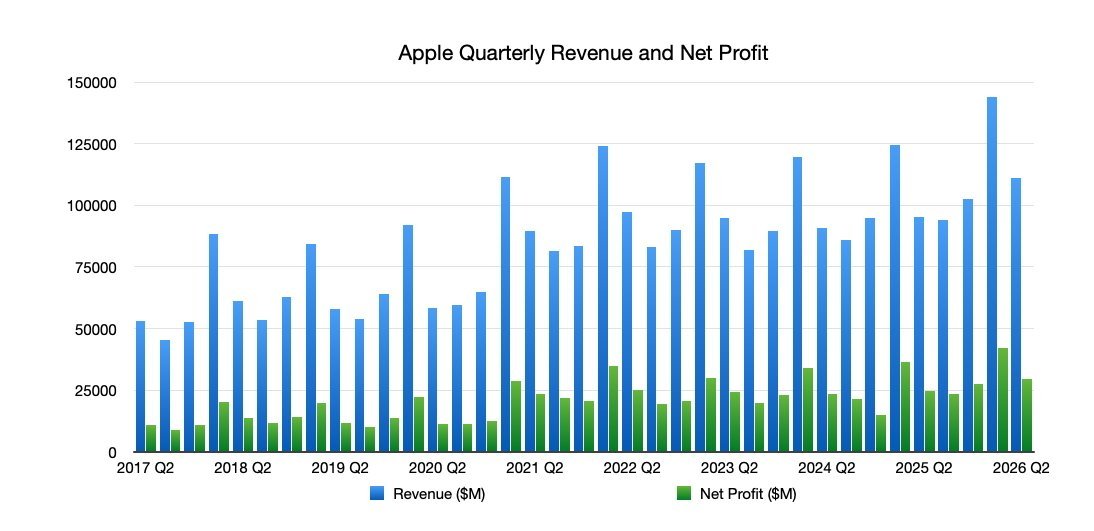
Apple’s more measured approach is starting to look optimal by comparison — and more financially sound. For the most part, Apple hasn’t needed a gangbusters AI strategy. It posted historic iPhone sales last quarter. And as questions mount over AI’s profitability and real-world utility, Apple is spending significantly less than its competitors — roughly $14 billion in capex planned this year, against a cumulative $900 billion being committed by other tech giants — while still earning huge amounts of revenue. That revenue has come from the AI industry itself via taxes on AI companies that use its App Store to platform their apps.

In short, Apple is spending less, making more, and now launched a suite of AI features that — for many iPhone users — will feel indistinguishable from the other AI applications already available to them through the App Store. If that doesn’t exactly count as “winning the AI race,” it may be the smartest way to run it.

When you purchase through links in our articles, we may earn a small commission. This doesn’t affect our editorial independence.

Advertisement

Source link

Continue Reading

Tech

Instagram Finally Lets You Reorder Posts On Your Grid

Published

on

Instagram head Adam Mosseri announced the feature a year ago.

Instagram has made it easier to pull off that grid design and aesthetic you want to achieve. The Meta-owned app has finally rolled out the ability to rearrange your grid, almost a year after Instagram head Adam Mosseri announced that the feature was coming. According to USA Today, you will be able to move posts around regardless of when you made them starting today, anywhere you are in the world. “We know this is long overdue, but we wanted to take the time to get it right,” Meta told the publication. We can confirm that we already have access to the feature. 

The ability to rearrange the Instagram grid continues to be one of the most requested features on the app, and Meta has been planning to introduced it way before Mosseri announced its arrival last year. Alessandro Paluzzi, who was known for reverse engineering apps and finding unannounced tools, discovered an “edit grid” option in the Instagram app way back in 2022. 

If you’re tired of seeing your posts in chronological order and want to move things around, simply go to your profile and long press any post. Along with “Pin to main grid” and “Archive,” you’ll now see an option that says “Reorder grid.” Tap on it to be taken to another window, where you can drag posts to rearrange your content until your profile looks exactly the way you want it to. Take note that any post you pin will remain at the top of your profile and will be blacked out in the “Reorder grid” window. 

Advertisement

Source link

Advertisement
Continue Reading

Trending

Copyright © 2025