
Tech
Unacademy to be acquired by upGrad in share-swap deal as India’s edtech sector consolidates

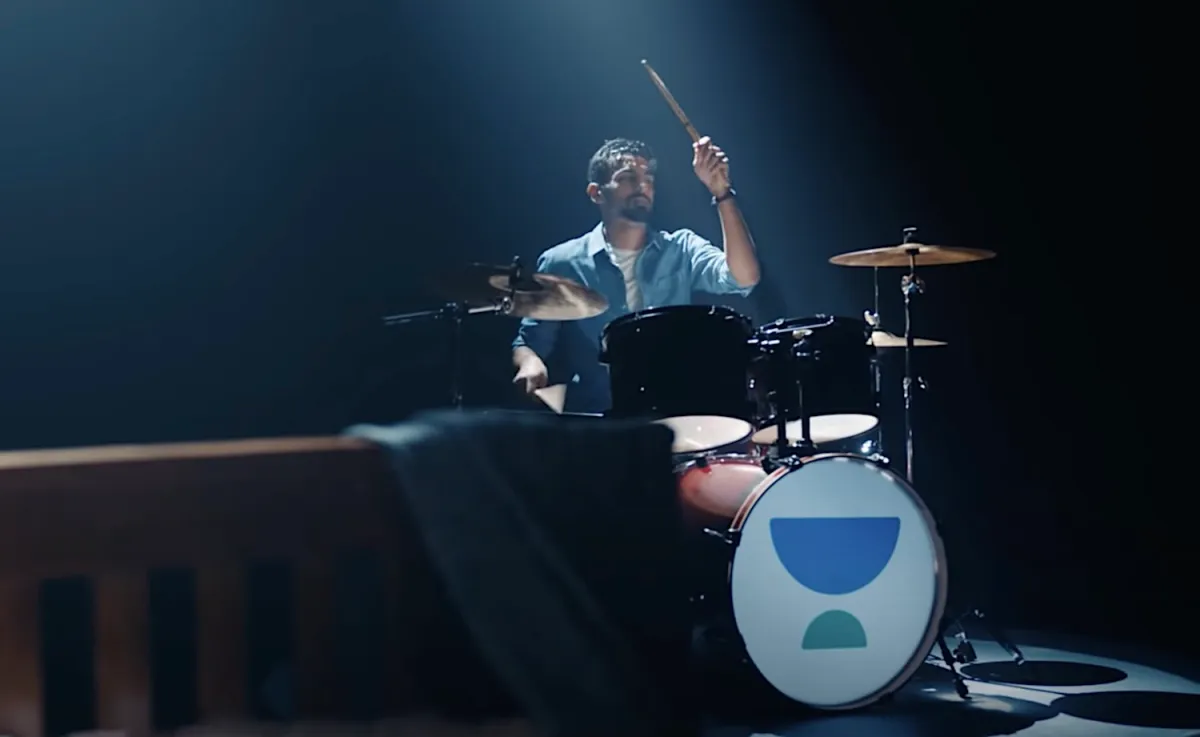
Unacademy, once a one of India’s most valuable edtech startups, is set to be acquired by rival upGrad in an all-stock deal that would bring together two major online learning platforms in the country.
On Sunday, Unacademy co-founder and CEO Gaurav Munjal said in a post on X that the companies had signed a term sheet for upGrad to acquire Unacademy in a 100% share-swap deal, adding that the valuation would not be disclosed until the transaction closes. The announcement comes more than three months after Munjal said that Unacademy’s valuation had dropped below $500 million — down roughly 85% from its pandemic-era peak of $3.5 billion in 2021.
India’s once-booming edtech sector has struggled since pandemic-era lockdowns eased, as students returned to classrooms and demand for online test prep and learning platforms cooled. Companies including Unacademy, which expanded aggressively during the pandemic, have since cut costs, scaled back offline ambitions, and refocused on core digital products.
In a separate post, upGrad co-founder Ronnie Screwvala said Munjal will continue leading Unacademy after the acquisition, adding that the combination would strengthen upGrad’s integrated model spanning K-12 education, upskilling, and lifelong learning. The companies have agreed to an undisclosed break fee if the deal does not close, Screwvala said.
“Unacademy helped invent the modern edtech playbook,” Munjal wrote. “Along the way we lost some focus and market share, and the sector itself has not seen enough real product innovation in recent years.”
Founded in 2015, Unacademy emerged as one of India’s most prominent edtech startups during the pandemic, when lockdowns drove millions of students to online learning platforms. But as demand cooled after classrooms reopened, the company reduced costs, laid off employees, and restructured parts of its business.
Munjal said Unacademy currently holds more than $100 million in cash reserves after spending the past year consolidating company-operated offline centers with franchise partners and refocusing on its core online learning products. The company also completed an employee stock buyback worth ₹500 million (about $5.40 million), with roughly 40% of former employees participating, he said.
Techcrunch event
San Francisco, CA
|
October 13-15, 2026
Unacademy has raised about $854.3 million across 13 funding rounds, according to PitchBook, and counts investors including SoftBank, Tiger Global, General Atlantic, and Peak XV Partners among its backers.
The upheaval has reshaped the competitive landscape of India’s edtech sector. Byju’s, once the country’s most valuable startup, has seen its valuation written down to effectively zero and entered insolvency proceedings in September 2024.
Meanwhile, rival Physics Wallah, once seen as an underdog in the sector, has turned profitable and continued expanding. The company made a strong debut in the public markets late last year.
In recent months, Munjal has devoted increasing attention to Airlearn, an AI-first language-learning app that imitates the gamified approach popularized by Duolingo. The shift has created friction with some Unacademy investors, who felt the core edtech business was being left adrift during a difficult phase, people familiar with the matter told TechCrunch.
Still, Munjal said Airlearn is gaining traction in markets including the United States, the United Kingdom, Germany, and Canada, and argued that artificial intelligence could unlock a new wave of innovation in education technology.



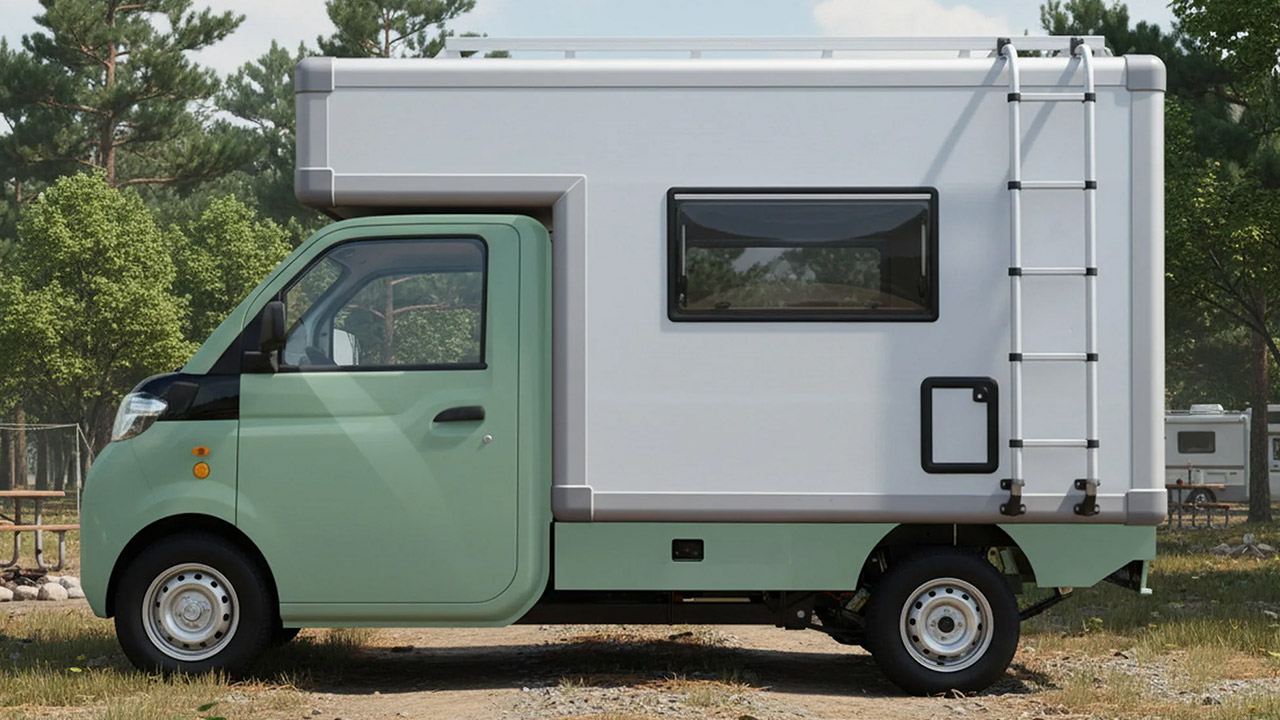
Ari Motors’ engineers have been working on the Ari 458 Pro, a compact electric camper that is redefining people’s perceptions about short vacations. At only 12.5 feet long and 4.9 feet wide, this vehicle fits into a conventional parking place and can even fit into narrow roadways where larger motorhomes cannot. You can park it almost anywhere and yet have enough room to make a spontaneous stop at a lake or a forest clear-cut, without having to worry about hookups and whatnot.
It’s based on a delivery truck platform, but an insulated box added to the back transforms the entire structure into useful living space. Inside, you have around 6 feet of headroom and approximately 30 square feet of area. Ari ships the item very much bare, so you may customize it however you like. They do the wiring for you, so you’ll have electricity outlets, solar panels on your roof, and water hookups ready to go. Simply add your own bed, table, kitchenette, and other necessities, or choose for an ultra minimalist factory conversion in Saxony.

LEGO City Holiday Adventure Camper Van Building Toy Set – Vacation Toy for Kids, Boys and Girls, Ages…
- CAMPER VAN BUILDING SET – Kids can enjoy vacations every day with this LEGO City Holiday Adventure Camper Van building set
- TOY FIGURES & CAMPER PLAYSET – This vehicle set includes everything kids need to build a camper van with a detailed living space, plus a campfire…
- FUN FEATURES – The camper van opens up for full access to an interior living space with a kitchen, toilet, 2 bunk beds, a crib and a removable…
The power comes from a single 15-kilowatt electric motor that produces around 20 horsepower. The top speed is a rather relaxed 43 mph, which is ideal for backroad cruising rather than highway driving. You may select between a 15kWh battery, which will carry you 75 to 112 miles, and a larger 23.5kWh pack, which can get you up to 143 miles. And the greatest thing is that electricity expenses are really inexpensive – approximately 4 Euro per 100 kilometers.
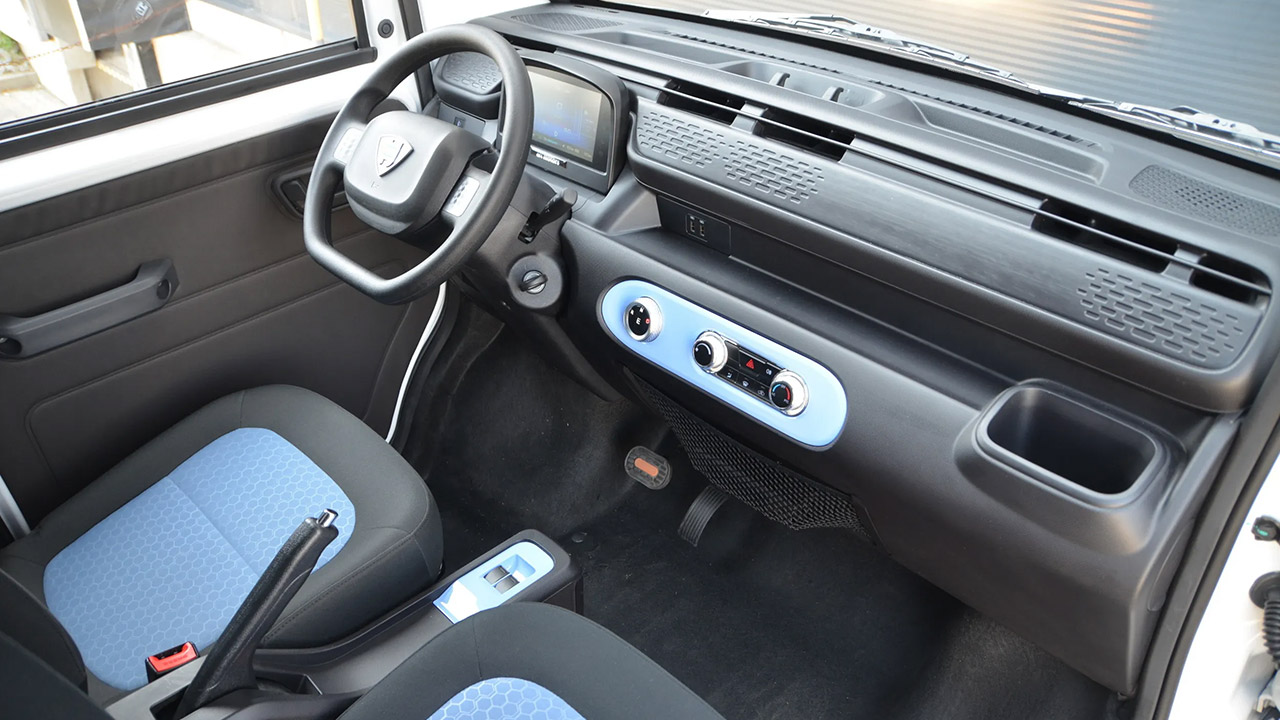
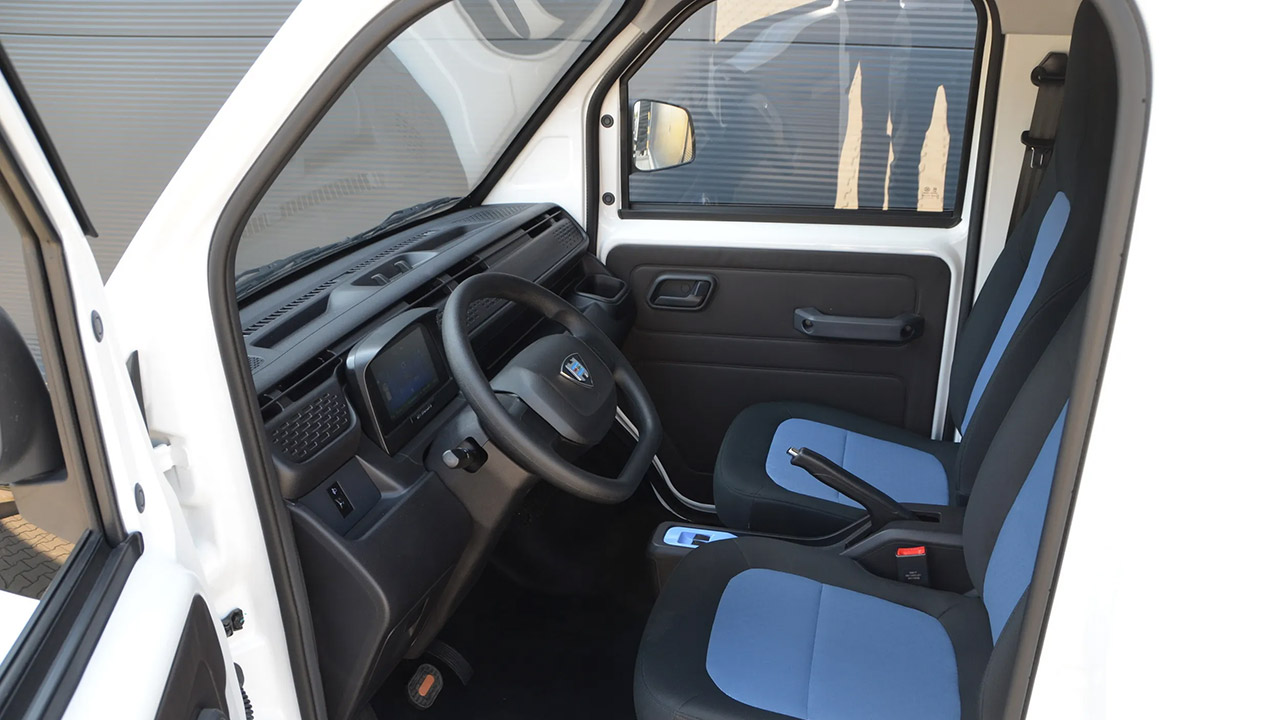
The front side features a modest interior with two seats, power windows, central locking, a digital display, a reversing camera, and Bluetooth. There’s even one cup holder thrown in for good measure. If you want to add air conditioning or a trailer to tow some light gear, that’s an option; don’t worry, it’s all L7e compatible, so it’s small and light while being safe for regular usage.
The Ari 458 Pro costs little over 30,000 euros including tax in Germany, making it much more accessible to anyone who want to get into camping. They even have a base delivery model that is slightly less expensive, but the camper setup includes all of the necessary accessories straight out of the box. Production takes place in Borna, just outside of Leipzig, with orders beginning in May. If you enjoy basic travel, you’ll appreciate how this thing is all about freedom rather than squandering your wallet on frivolous luxuries.
[Source]

The controversy around Delve appears to have cost the compliance startup its relationship with accelerator Y Combinator.
Delve is no longer listed among YC’s directory of portfolio companies, and the Delve page seems to have been removed from the YC website. In addition, the startup’s COO Selin Kocalar posted on X that “YC and Delve have parted ways.”
“I still remember the day we took our YC interview at MIT,” Kocalar said. “We’re so grateful to the community and every founder friend we’ve made.”
YC isn’t the first investor to distance themselves from Delve. Insight Partners also appears to have deleted posts about its investment in the company, although its primary blog post was later restored.
Meanwhile, Delve continues to push back against anonymous claims that it misled clients by telling them they were compliant with privacy and security regulations while allegedly skipping important requirements and auto-generating reports for “certification mills that rubber stamp reports.”
Those claims were first published in an anonymous Substack post attributed to “DeepDelver,” who described themselves as a former Delve customer who became suspicious after receiving leaked data about the startup’s clients.
DeepDelver published subsequent posts sharing what they said were Slack and video posts from the company, as well as accusing Delve of passing off an open source tool as its own, without giving credit or reaching an agreement with the developer. A security researcher also said he was able to access sensitive Delve data.
Techcrunch event
San Francisco, CA
|
October 13-15, 2026
Meanwhile, Delve became part of a related controversy when malware was discovered in an open source project developed by Delve customer LiteLLM.
In the company’s latest blog post, Delve’s COO Kocalar and CEO Karun Kaushik declared their intention to set “the record straight on anonymous attacks.” Among other things, they claimed that the company has hired a cybersecurity firm “to help us understand what happened,” and said the “evidence points to a malicious attack rather than a genuine whistleblower.”
“It appears that an attacker purchased Delve under false pretenses, maliciously exfiltrated data, including Delve’s internal company data, and used it to launch a coordinated smear campaign against us,” they said. The blog post also includes a screenshot that they said “shows the attacker exfiltrating our audit tracking spreadsheet via file.io.”
Beyond this accusation, Delve also described DeepDelver’s criticism as “a mix of fabricated claims, cherry-picked screenshots, and data taken out of context.” For example, they said DeepDelver “dismisses our AI while acknowledging it automated 70% of a security questionnaire.”
On the question of using open source tools, Delve said it “built on an Apache 2.0 open-source repository, which explicitly permits commercial use, and significantly rebuilt it for compliance use cases.”
However, the executives also said they’ve been taking steps to ensure customers “feel confident in our platform and compliance outcomes.”
Those steps supposedly include cleaning up the company’s network to remove auditing firms “that don’t meet our standards,” “offering complimentary re-audits and penetration tests to all active customers,” and making it “unambiguously clear” that Delve’s templates for things like board meeting notes “are designed to be starting points only.”
In a post on X, Kaushik made many of the same points but also said, “[W]e grew too fast and fell short of our own standard. To our customers, we deeply apologize for the inconveniences caused.”
TechCrunch has reached out to Y Combinator and DeepDelver for any response to Delve’s comments.
For the uninitiated or anyone who thinks “portable audio” means a waterproof pill clipped to a backpack, the boomboxes that ruled the streets were the original mobile music weapons. Born in the late 1960s and peaking in the late ’70s and ’80s, these weren’t just stereos you carried around; they were cultural battering rams. Think Fab 5 Freddy on your TV, Yo! MTV Raps in full rotation, the Beastie Boys causing trouble in a Brooklyn alley, and breakdancers turning flattened cardboard into battlegrounds.
Boomboxes transformed sidewalks into dance floors and backseats into clubs. These weren’t gadgets. They were attitude, wrapped in metal and plastic, blasting identity at unsafe volume levels.
Back then, a ghetto blaster wasn’t a polite lifestyle accessory with Bluetooth and passive-aggressive EQ presets. It was a war chest with woofers; loud, heavy, unapologetic. Models like the JVC RC-M90, Lasonic TRC-931, Sharp GF-777, and Panasonic RX-5600 didn’t just play music; they announced your presence and dared anyone nearby to argue with your taste. And nobody embodied that energy more than Radio Raheem, hauling his box like a sonic manifesto in Do the Right Thing.
Before playlists were swiped, skipped, and forgotten, there were mixtapes—built in real time, often straight off the radio, finger hovering over the pause button like it mattered. Because it did. A mixtape was intent. Sequencing was personal. A Maxell XLII-S with Sharpie handwriting wasn’t nostalgia; it was proof you cared enough to get it right. Boomboxes carried those tapes into the streets, and for a while, they made the world listen.
What Is a Boombox? The Original Portable Stereo Explained
A boombox is a large, portable, battery-powered audio system with built-in speakers, a radio, and a cassette player and recorder. First appearing in the late 1960s, the format hit its peak in the 1980s and early 1990s. Later versions added CD players and, much more recently, Bluetooth and USB connectivity, but the basic idea never changed. A big box, a solid handle, and enough output to make sure your music was heard whether anyone asked for it or not.
The name boombox came from its integrated stereo speakers and their ability to deliver loud, booming sound. The nickname ghetto blaster came later, born on the streets rather than in a marketing meeting. These things were not polite. They were heavy, power-hungry battery pigs that chewed through D-cells like candy, and carrying one any real distance counted as arm day. Portability was relative. You could move it, but you were going to feel it.
While the ghetto blaster became closely associated with early rap and the rise of hip-hop culture, it was never limited to a single genre. Boomboxes powered block parties, fueled breakdancing battles, and blasted everything from rap and R&B to funk, reggae, pop, and rock. For teens and twenty-somethings, the boombox was more than a way to listen to music. It was a status symbol, a social magnet, and a public declaration of taste delivered at full volume.
Let’s take a look at some of the most notable boomboxes from the era when they ruled the streets.
Norelco 22RL962
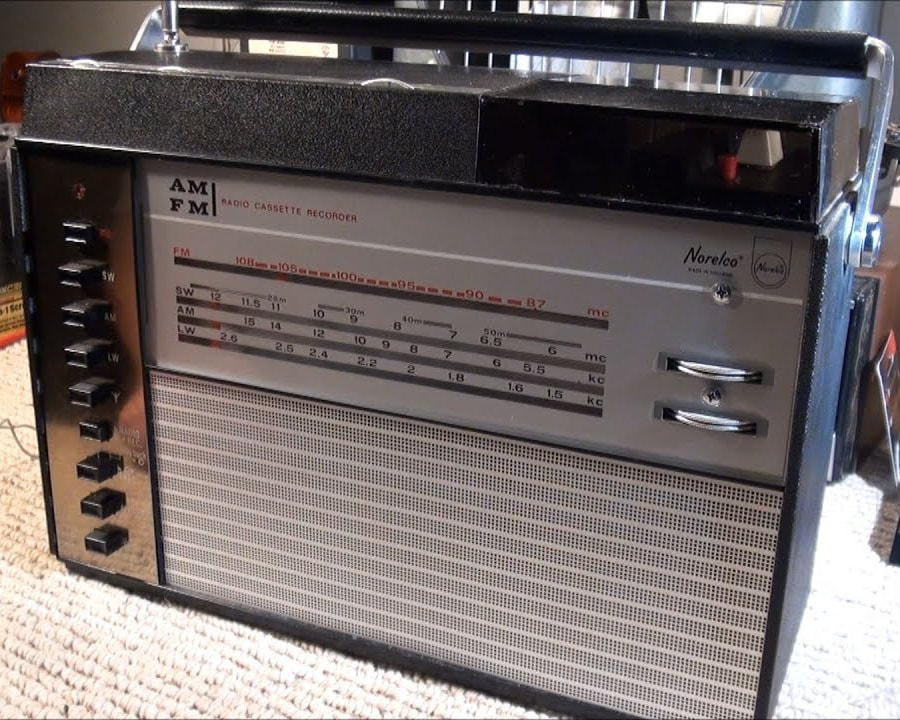
The Norelco 22RL962, made by Netherlands-based Philips (the same company that invented the compact audio cassette), is widely credited as the first true boombox. Introduced in the late 1960s, the 22RL962 established the core formula: portability, battery operation, a built-in speaker, and a single box that combined radio and tape playback.
Equipped with a carrying handle, AM/FM radio, and a compact cassette player and recorder, the 22RL962 delivered a modest 1 watt of output through its integrated speaker. Crucially, it was the first consumer audio product that allowed users to record radio broadcasts directly to cassette tape for later listening, a feature that would become central to mixtape culture in the decades that followed.
Additional connections included inputs for an external power supply, external loudspeaker or earphones, a microphone, and even a wired remote control. None of this came lightly. The 22RL962 weighed nearly 9 pounds, making it a serious haul by today’s standards and a reminder that early portability came with muscle strain included.
The original U.S. price was approximately $500, listed at 5,995 Austrian schillings at the time. Today, value depends heavily on condition, originality, and whether the unit still functions, but demand remains strong among collectors who recognize it as the box that started it all.
Check out more details from the Radio Museum or YouTube demo.
Aiwa TPR-930
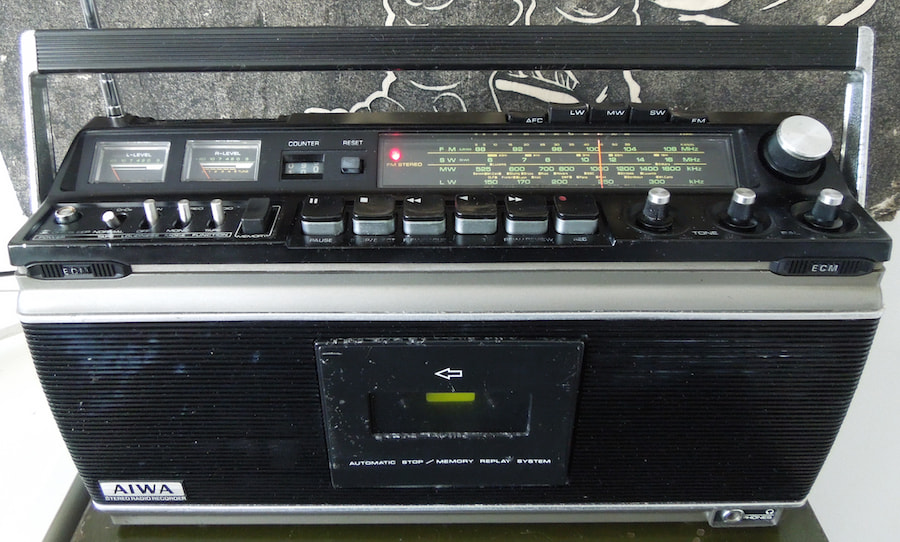
AIWA was one of the most respected audio brands of the last quarter of the 20th century, and in 1974 it entered the emerging boombox market with the TPR-930. Built like a small appliance rather than a toy, the TPR-930 reflected AIWA’s reputation for serious engineering at a time when portability still meant compromise.
Packed with 40 transistors, an integrated circuit, and a four-speaker system, the TPR-930 delivered sound quality that still earns it respect among collectors. Its heavy-duty construction came at a cost. With batteries installed, it tipped the scales at roughly 13.75 pounds, making it a true battery pig and a reminder that early boombox portability required commitment.
The TPR-930 featured a wide-band radio tuner covering SW1, SW2, AM, and FM, along with a single cassette deck. Supporting features included AIWA’s Matrix Sound System, Loudness control, AFC for more accurate radio tuning, Automatic Stop, and a Memory Replay System. It also supported CrO₂ tapes, included a three-digit analog tape counter and a built-in condenser microphone, and offered connections for external 4-ohm speakers.
Originally priced between $150 and $200 during its production run, the TPR-930 reportedly still trades in that same range today depending on condition. For collectors looking for a historically important boombox with legitimate sound quality, it remains one of the better bargains in the category.
Check out more details from the Radio Museum or YouTube demo.
National Panasonic Ambience RX-7000
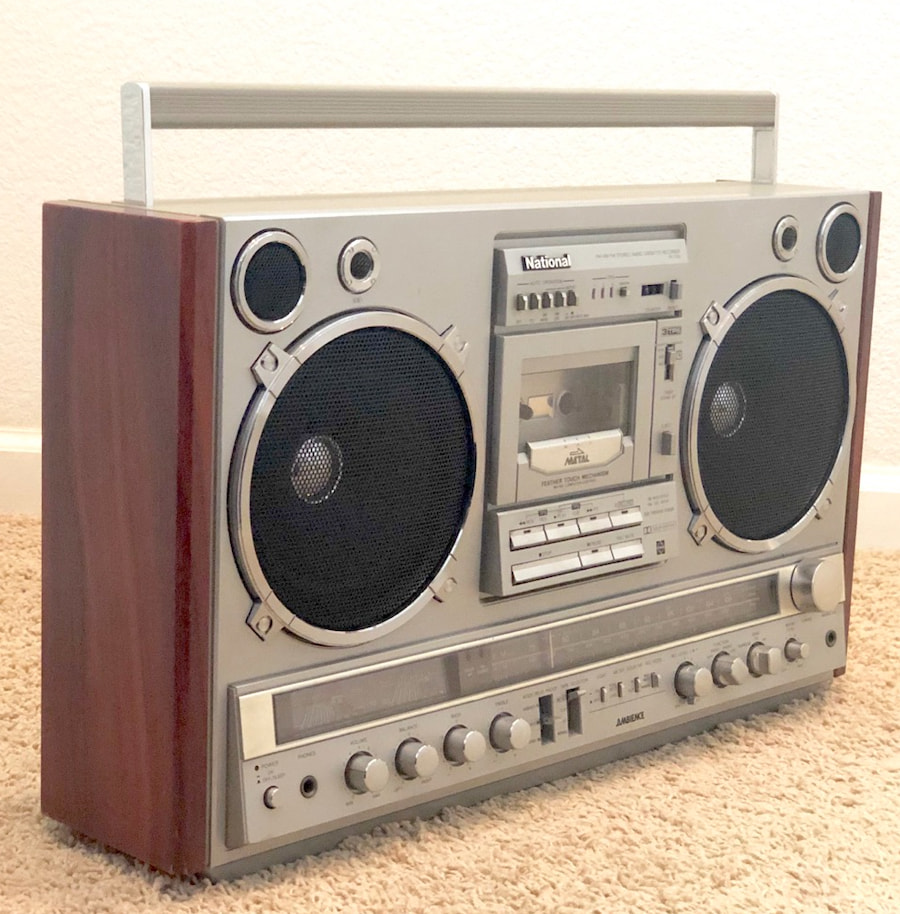
First released in the 1977-1978 timeframe, the National Panasonic Ambience RX-7000 was conceived as a high-end boombox equally comfortable anchoring a living room or making a very loud statement outside. This was not a casual portable. It was Panasonic aiming straight at the top of the category.
At its core, the RX-7000 combined an AM/FM radio with a single cassette deck, but the deck itself was unusually sophisticated for the era. Features included a tape counter, Dolby B noise reduction, Panasonic’s “3 TPS” Tape Program Sensor, a Feather Touch mechanism, microcomputer control, play and record timers, cue and review functions, manual or automatic record level control, support for Normal, FeCr, CrO₂, and Metal tapes, and a Dolby LED indicator.
Supporting features were equally comprehensive. The front panel included VU, tuning, and battery meters, mono, stereo, and Ambience (stereo-wide) listening modes, balance, bass, and treble controls, an FM stereo indicator, and a terminal for a wired remote control. Inputs were generous, with dual microphone jacks featuring mixing level control, an RCA phono input with ground terminal, and a headphone output.
One standout capability was amplification. In addition to its built-in speaker system, the RX-7000’s amplifier delivered 2 x 11 watts RMS and could power modest external speakers via dedicated terminals. The internal speaker array consisted of two 2-inch tweeters and two 6-inch woofers, reinforcing its ambitions as more than a street box.
All of that capability came with mass. The RX-7000 weighed approximately 17.6 pounds, firmly placing it in the “battery pig” category. Original pricing reflected its premium positioning, landing between $850 and $900 at launch. Today, depending on condition and completeness, demand pricing typically ranges from around $500 to well over $1,300, making it one of the most serious and collectible boomboxes of its era.
Check out more info from the Radio Museum.
Sanyo M-9994
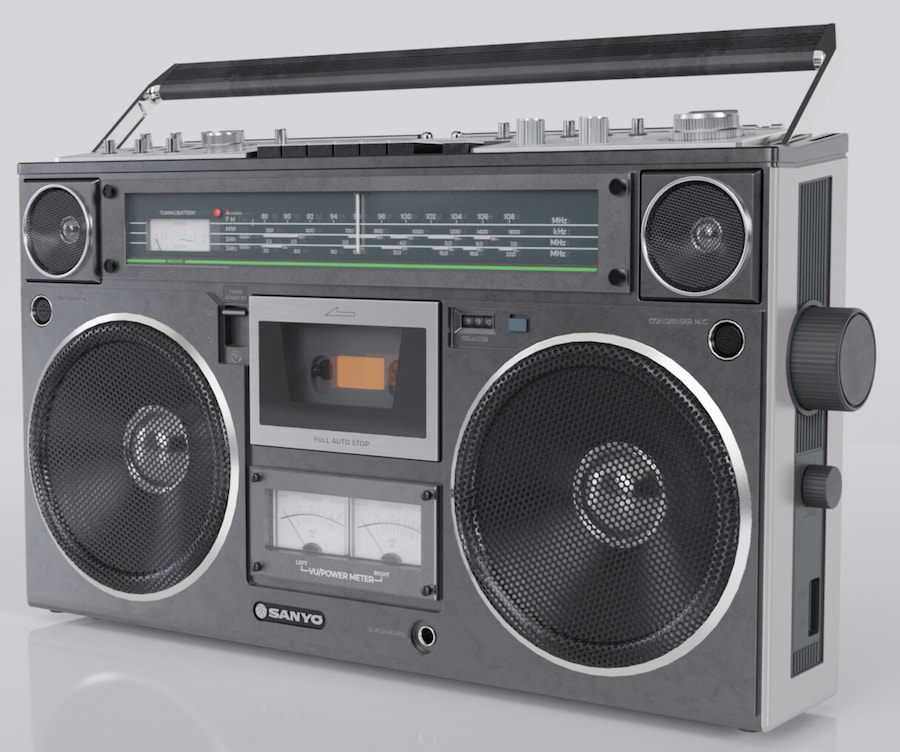
Released in 1978, the Sanyo M-9994 carved out its place in boombox culture by delivering serious sound in a relatively disciplined package. Rated at 2 x 5 watts of output power, it featured a capable speaker system with 6.3-inch woofers and 2-inch cone tweeters. Notably, the tweeters were rotatable, allowing users to improve high-frequency directionality depending on placement and listening position.
Sanyo marketed the M-9994 as a “professional edition,” and it leaned into that claim with included external handheld microphones complete with plastic desk stands. Supporting features included an Input Volume control that allowed attenuation of incoming signals from line-level or phono sources, along with a dedicated headphone output for private listening.
Originally priced between $300 and $350, the Sanyo M-9994 has appreciated significantly over time. Today, demand pricing can reach as high as $1,500 for pristine, fully functional examples, reflecting its reputation as one of Sanyo’s most desirable classic boombox designs.
Check out more info from the Radio Museum and the Sanyo M9994 Wiki Page.
Conion C-100F
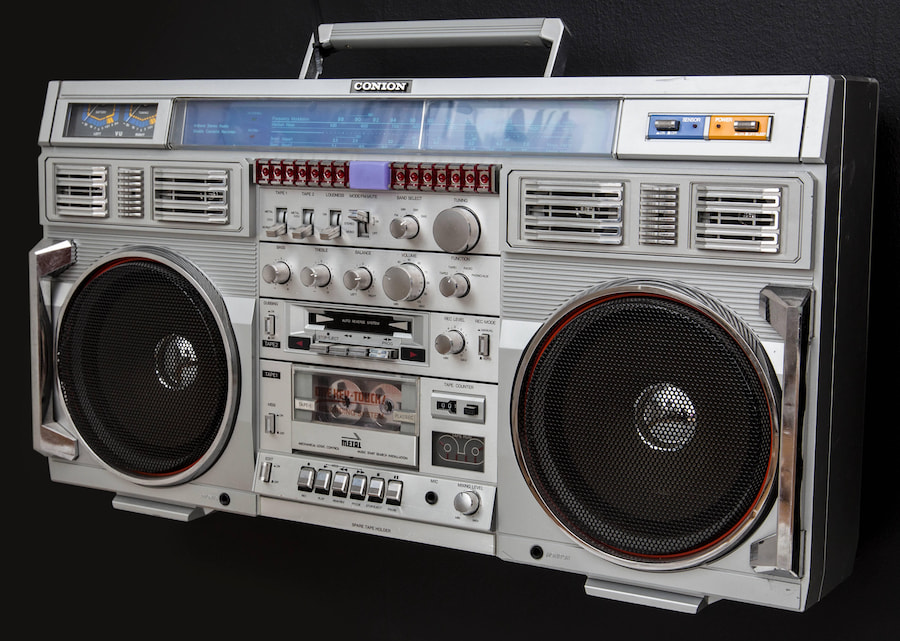
Released around 1984, the Conion C-100F is pure boombox legend and remains one of the most aggressively sought models among collectors. Oversized, overbuilt, and unapologetically loud, this was a statement piece even in an era defined by excess.
Pro Tip: The Conion brand was part of Onkyo, which helps explain why this box leaned harder into features and spectacle than restraint.
The C-100F came loaded. It featured a dual cassette deck configuration with one front-loading deck and one slot-loading deck, a four-band radio covering SW1, SW2, FM, and AM, dual VU meters, twin LED level displays, and two headphone jacks. One standout party trick was a built-in motion sensor that could be activated to trigger a security alarm if the unit was moved, a very on-brand feature for a boombox of this size and value.
The speaker array was equally ambitious, consisting of two woofers, two midrange drivers, and two tweeters. Output power was rated at 30 watts RMS at 10 percent THD, a figure that tells you everything you need to know about how hard this thing was meant to be pushed at its limits.
All of this hardware lived inside a massive 30-inch-wide chassis weighing just over 26 pounds. Portability was theoretical. Running the C-100F off batteries required ten D-cells, firmly placing it in battery-pig territory and guaranteeing that shoulder fatigue was part of the experience.
Depending on the market, the same design was also sold as the Helix HX-4365 and the Clairtone 7980. Original pricing for the Conion C-100F landed between approximately $450 and $475 in the U.S. Today, demand pricing typically ranges from around $750 to as much as $2,000, depending on condition, originality, and whether the alarm still scares the neighbors.
Find out more from the Radio Museum and Audiogon Blog.
Sharp GF-777
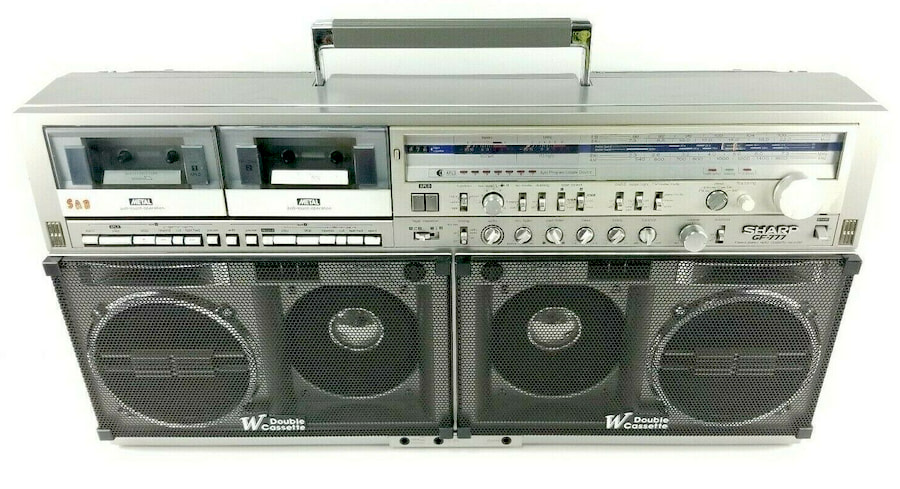
Another highly prized boombox among collectors is the Sharp GF-777, also sold in Japan as the GF-909. This model sits firmly in the heavyweight division, both in reputation and in physical presence.
The GF-777 featured a six-speaker array consisting of two woofers, two dedicated “sub” woofers, and two horn-type tweeters. Output power was rated at approximately 2 x 12 watts RMS, giving it the kind of authority that made it impossible to ignore once the play button was pressed.
Size and weight were part of the appeal. The GF-777 stretched roughly 30 inches wide and tipped the scales at about 27 pounds before batteries were added. Running it as a true portable required ten D-cell batteries, though it could also be operated on AC power for less shoulder strain and fewer trips to the battery aisle.
Originally priced at around $800, the Sharp GF-777 remains surprisingly attainable today. Depending on condition, completeness, and functionality, current demand pricing typically falls between $500 and $700, with exceptional examples commanding higher figures from collectors who know exactly what they are looking at.
Find out more from the Radio Museum and the Sharp GF777 Wiki Page.
Sharp GF-7600
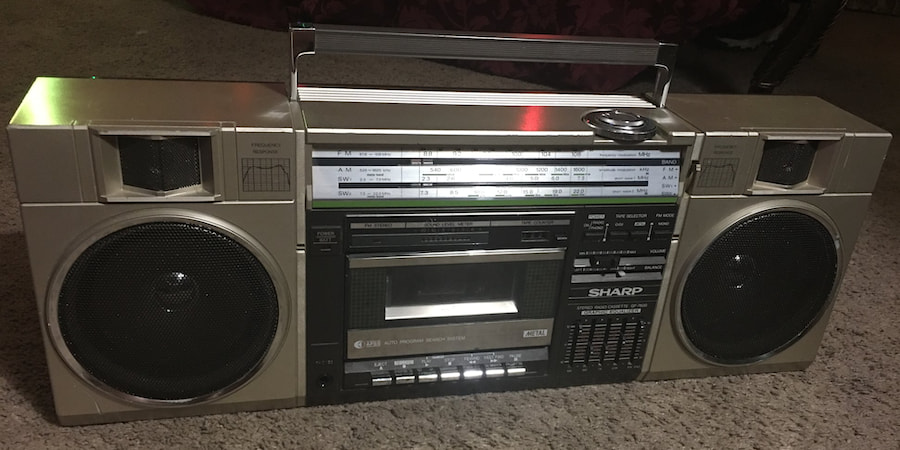
The Sharp GF-7600 is not the biggest, loudest, or most technically ambitious boombox of the 1980s, but it may be the most culturally significant. Released in 1983, it achieved permanent pop-culture status thanks to its starring role in the 1989 film Say Anything. Pity John Cusack didn’t drop it on his head.
Despite its more manageable size, the GF-7600 was surprisingly well equipped. It featured a four-band radio covering SW1, SW2, AM, and FM, a single cassette deck, a five-band graphic equalizer, an LED VU meter, line-in and line-out connections, and external microphone inputs. This was a serious feature set for a box that looked almost polite by Sharp’s usual standards.
The cassette deck supported metal tape, included full auto-stop and APSS track search, and offered a frequency response rated from 50 Hz to 16,000 Hz. Speaker duties were handled by a pair of 4.7-inch woofers and horn tweeters, while output power is generally estimated at around 5 to 6 watts per channel. Not a brute, but loud enough to make a statement—and immortal once held aloft over a rain-soaked lawn.
Original pricing varied by retailer. Today, demand pricing typically ranges from approximately $125 to $500, depending on condition, completeness, and functionality.
Find out more from the Radio Museum, Sharp GF-7600 Wiki Page, or YouTube.
Sony CFS-99
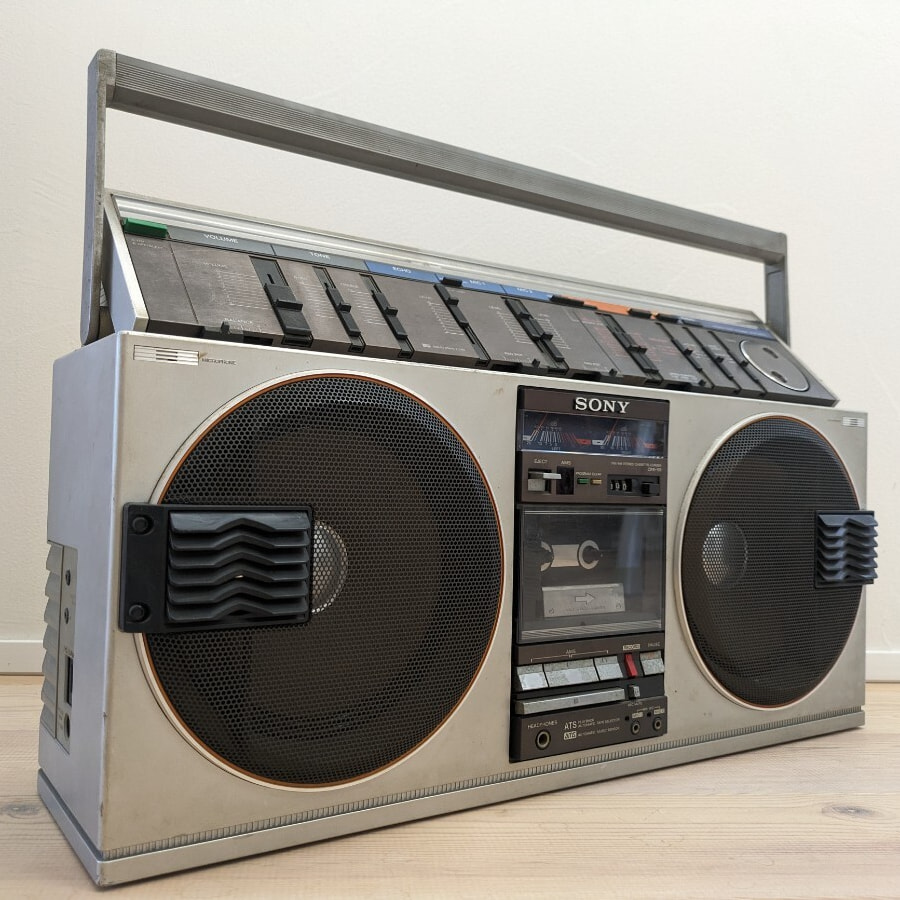
Before Sony upended personal audio with the Walkman, it was already deeply embedded in boombox culture. One of its standout entries was the Sony CFS-99, also known as the Energy 99, released in 1981. Big, loud, and unmistakably ’80s in both sound and styling, the CFS-99 paired a rugged build with serious output. It also weighed in at a back-testing 23 pounds, firmly earning its place in the heavyweight class.
Core features included an AM/FM radio and a cassette deck, with certain variants adding an LED track indicator along with dual microphone inputs featuring pan control and echo effects. Connectivity was unusually flexible for the time, offering RCA line-level inputs and outputs, while some versions also included banana speaker terminals for driving external speakers.
The original retail price is no longer well documented. Today, demand pricing typically starts around $500 and can climb higher depending on condition, originality, and whether the unit has been modified to add Bluetooth connectivity.
Find out more from the Radio Museum.
Tecsonic J-1 Super Jumbo
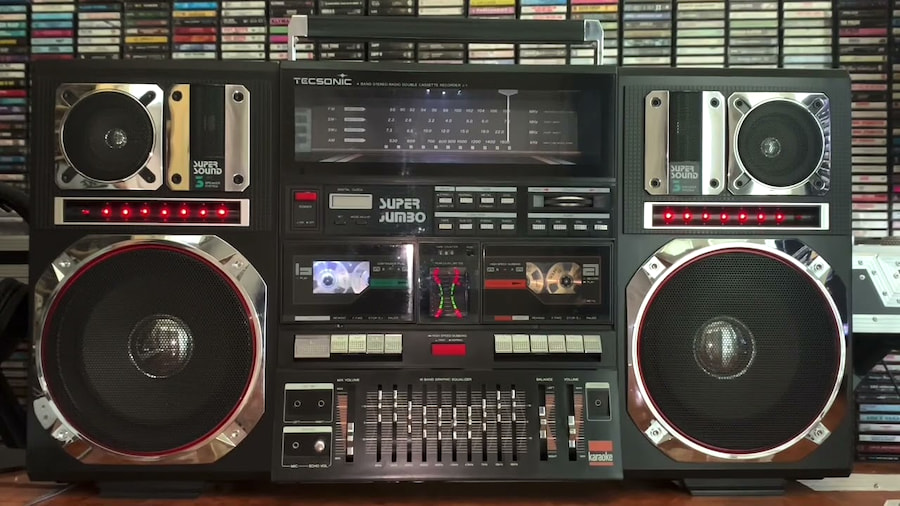
The Tecsonic J-1 Super Jumbo is another culturally significant boombox, cemented in history by its appearance in Do the Right Thing. Released in the 1987-1988 timeframe and manufactured in South Korea, the Super Jumbo wasn’t subtle. It didn’t need to be. This was a box built to be seen, heard, and remembered. Fight the Power.
The J-1 Super Jumbo featured an imposing speaker array with dual 8-inch woofers, a pair of midrange drivers, and twin tweeters. Feature-wise, it came loaded: dual cassette decks, AM/FM radio, karaoke sing-along functions, a 10-band equalizer, balance control, mixing volume, left and right front microphone inputs, a dedicated mix microphone input, phono jack, auxiliary/CD input, peak level meter, high-speed dubbing, tape counter, A/B continuous play, and an LED clock. Excess was the point.
Physically, the J-1 lived up to its name. It measured roughly 31 inches wide and 16.5 inches tall, and weighed in at around 25 pounds. Reported output power is approximately 2 x 20 watts, more than enough to back up its visual presence with real authority.
Original pricing for the Tecsonic J-1 Super Jumbo is no longer well documented. Today, demand pricing typically hovers around $1,000, depending on condition, completeness, and whether it still looks ready to be hoisted over someone’s head as a very loud act of defiance.
More details at the Radio Museum, Classic Boom Box page or YouTube.
JVC RC-M90
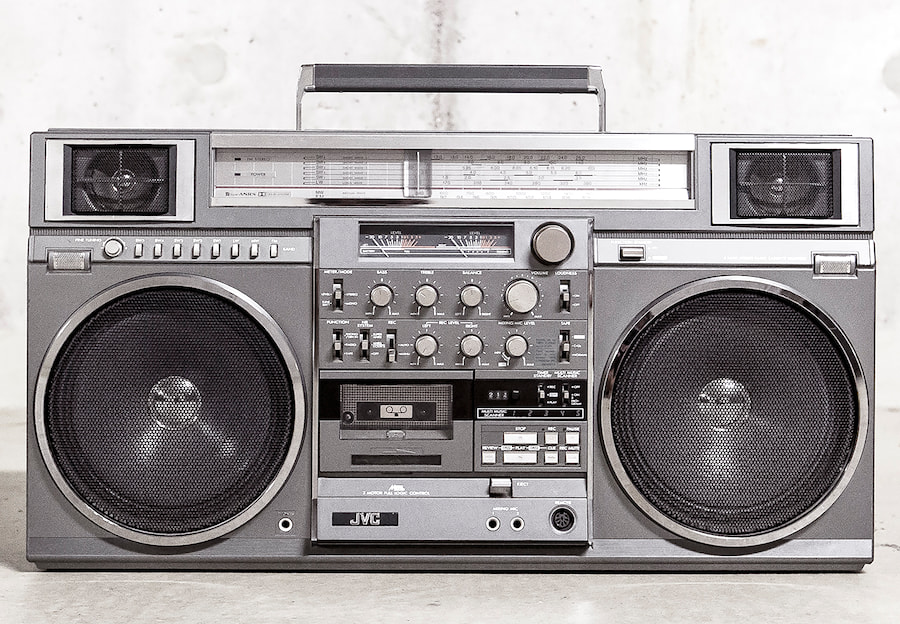
Some regard the JVC RC-M90 as the “King of Boomboxes,” and it’s not an argument without merit. Released in 1981, this was a no-compromise design that combined brute force with an unusually deep feature set.
The built-in speaker system used a two-way, four-speaker layout consisting of dual 8-inch woofers and two 2.5-inch tweeters, driven by amplification rated at approximately 2 x 20 watts. It was designed to move real air, not just make noise.
Operational features were extensive. The RC-M90 included an eight-band tuner with AM and FM coverage plus six shortwave bands, all supported by fine tuning. The cassette deck featured a tape counter, dual-motor full-logic transport, Normal, CrO₂, and Metal tape bias and EQ, JVC’s Multi Music Scanner, record and playback timers, and Dolby NR or Super ANRS noise reduction. With metal tape, cassette frequency response was rated at roughly 30 Hz to 17,000 Hz, impressive for a portable system.
Additional features included two built-in microphones, independent left and right recording level controls, microphone mixing level control, dual meters for VU, battery, and tuning, bass, treble, and balance controls, a loudness switch, and mono or stereo selection. Nothing about this box was casual.
Original pricing is documented at approximately £333 in the UK, with U.S. pricing from 1981 remaining elusive. Today, demand pricing for the JVC RC-M90 routinely exceeds $1,000, with top-condition examples commanding significantly more. For many collectors, this is the mountain every other boombox is measured against.
Find out more details from the Radio Museum.
Lasonic TRC-975
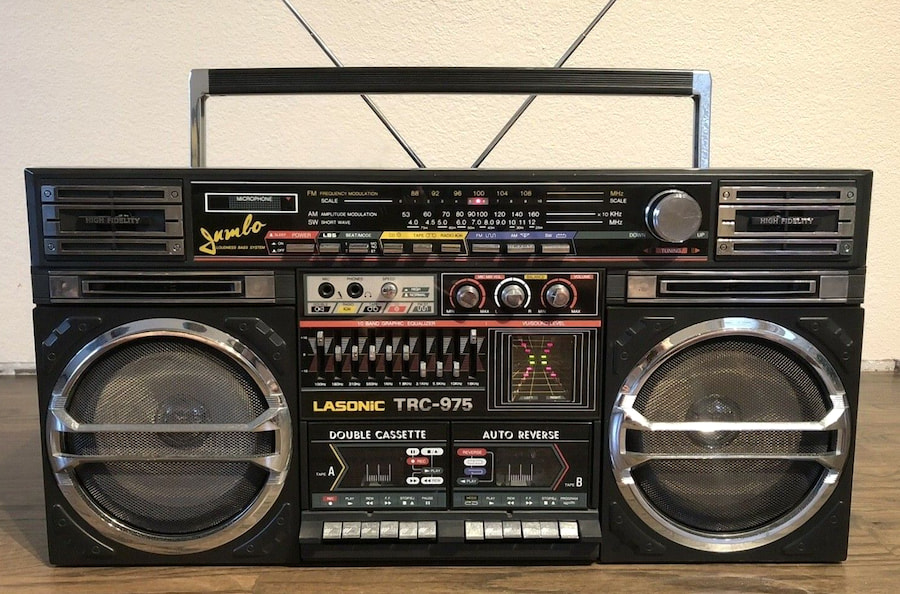
Jumping ahead to 1993, the Lasonic TRC-975 arrived as a genuine value play, originally selling for around $179. While the decade had shifted, its design was pure late-’80s muscle, and the sound followed suit. The TRC-975 earned a reputation for serious output thanks to its “Jumbo” Extra Bass system and a 10-band graphic equalizer that encouraged aggressive tweaking rather than restraint.
The speaker system consisted of dual 8-inch woofers paired with two 2-inch tweeters, a configuration aimed squarely at loud, physical sound. Feature-wise, the TRC-975 included dual cassette decks for recording and dubbing, AM/FM/SW radio, auto-reverse playback, and both normal- and high-speed dubbing. Connectivity was basic but practical, with an auxiliary input for external sources.
Some units on the secondary market have since been modified to add Bluetooth or MP3 playback, though purists tend to prefer unaltered examples. Closely associated with hip-hop culture, the Lasonic TRC-975 has become one of the most aggressively sought boomboxes of the 1990s era. Current demand pricing typically ranges from around $700 to as high as $2,300 for pristine, original-condition units, while modified versions with Bluetooth often trade closer to the lower end of that range.
Find out more from the Radio Museum.
Sharp VZ-2000

Just as CDs were beginning to reshape how people listened to music in the early 1980s, Sharp responded with one of the strangest boombox designs ever put into production: the VZ-2000, released around 1982-1983.
What made the VZ-2000 truly weird was its ambition. In addition to a radio and cassette deck, it incorporated a vertical turntable capable of playing both sides of a record at 33 or 45 rpm without flipping. To pull that off, Sharp employed dual linear-tracking tonearms controlled by a microcomputer, enabling fully automatic playback. Each arm was fitted with a Sharp 118 phono cartridge and STY-118 stylus, turning this boombox into a portable record player in the most literal sense of the word.
Beyond the vinyl trickery, the VZ-2000 featured a two-way speaker system, easy-touch controls, an auto program pause system, and metal tape compatibility for the cassette deck. On paper, it checked an absurd number of boxes for a single portable unit.
Portability, however, was relative. The VZ-2000 weighed over 35 pounds, which severely limited how far anyone was realistically carrying it. Original pricing was approximately $550, and today a fully operational example typically commands between $1,000 and $1,500 or more, depending on condition. It remains one of the clearest examples of early-’80s audio excess, when engineers still believed anything was portable if you added a handle.
Find out more details from the Radio Museum or YouTube.
The Bottom Line
These 12 boomboxes barely scratch the surface of what flooded streets, stoops, and backseats throughout the 1970s and 1980s, when portable audio was as much about presence as playback. Today’s Bluetooth speakers and smartphones are lighter, cleaner, and infinitely more convenient, but they’ve traded shared experience for private consumption. Boomboxes weren’t just how people listened to music. They were how music forced its way into the room—and made everyone deal with it together.
Related Reading:
There are many factors to consider when buying a vehicle, whether new or used. Not only are there vital questions to ask oneself before committing to any new car, but there’s also the seemingly endless parade of vehicles to choose from, be they practical crossovers or svelte, two-seater performance cars.
One of the main ways that manufacturers differentiate their cars from one another, at least on paper, is through the specs. Some, like fuel efficiency and cargo room, are pretty mundane, while others, like the performance numbers that sportier cars often lead with, can be quite eye-catching. The thing is, though, not all of the latter are all that useful — at least, not for the general driver.
Figures like peak horsepower, 0-60 mph times, and lateral g are nice if you’re bench racing, but they aren’t the be-all-end-all of cars. This isn’t to say that they’re wholly unimportant for everyone, mind you; someone looking for a car to take to weekend track days should, of course, pay a lot of attention to a car’s horsepower and acceleration numbers. However, if you’re mostly driving on public roads, you really don’t need to stress out about these when you’re trying to whittle down your shortlist to a handful of vehicles.
Horsepower
A car’s horsepower is often one of the most emphasized numbers when marketing a vehicle, especially for performance cars. After all, more horsepower supposedly equals better. And while having 717 hp on tap does make cars like the 2025 BMW M5 we reviewed a hoot to drive, there’s more to a vehicle’s driving experience than its horsepower.
Peak engine horsepower is one of the most common ways to express an engine’s capabilities, but regardless of how you measure it, horsepower is undeniably essential for racers seeking to eke out the best lap (or quarter-mile) times possible. But how often is the average driver wringing every last bit of juice out of an engine on a long straightaway? Not very, we’d imagine — unless, of course, they’re blessed enough to have access to the unrestricted sections of Germany’s infamous Autobahn. Even then, they’ll still have to deal with start-stop city traffic and low-speed driving, where even all the horsepower in the world won’t matter as much as having a responsive, torquey engine.
Now, we’re not trying to say that one should always prioritize torque over horsepower, especially since you can’t really have one without the other. Besides, many modern high-horsepower engines will also make more than enough torque to feel responsive at low speeds, offering the best of both worlds. However, if you’re primarily driving around town and rarely, if ever, get into situations where you can stretch your car’s legs, horsepower is one number that should take a backseat to other, more practical considerations.
0-60 times
A car’s 0-60 mph time is often held up as a key metric to indicate its performance. And it’s not entirely baseless. All other things being equal, a car with a lower 0-60 mph time will indeed accelerate better and be objectively quicker from a standstill (well, kind of — more on this later). However, therein lies the rub: Realistically, how often will you be making high-rpm launches from standing starts on the road?
An amazing 0-60 mph time, on its own, won’t matter that much if you rarely find yourself in that sort of a situation … and we’d venture that most people won’t. This isn’t to say that acceleration is entirely pointless, though; it’s essential when pulling out to overtake cars — the quicker you can do that, the better. However, in those situations, numbers like 30-50 mph acceleration times — which some reviewers test for — are more important, as they better represent a car’s midrange power and responsiveness.
Beyond that, 0-60 mph times are often fraught with caveats that make them less definitive than you might expect. Many U.S.-based car reviewers publish 0-60 mph times that omit a 1-foot rollout — leading to arguably misleading figures. Similarly, these numbers don’t always reflect real-world situations, either. Journalists are known for treating cars roughly to get the best possible times, while manufacturers aren’t above stacking things in their favor, either. Some headline-grabbing 0-60 mph times, like the 1,250-hp Corvette ZR1X’s crazy 1.68 seconds, were recorded on prepared surfaces that do not reflect typical public road conditions.
Engine displacement
There’s no replacement for displacement, as the saying goes — or is there? Well, that depends entirely on who you ask and what their interests are, but we’d suggest the average driver really doesn’t need to care much about how big their engine is these days. Unless you need massive grunt for towing heavy loads — or just drive a big car, which is why so many American vehicles still have big engines — then many drivers will be fine with a smaller, turbocharged, four- or six-cylinder engine instead.
But even in those situations, bigger may not always be better. Case in point: Ram reintroduced the 5.7-liter HEMI V8 into the 2026 Ram 1500, which, if one were to go solely by displacement, would be the best engine for the truck. However, as we found out when we reviewed a 2026 Ram 1500, the 5.7-liter V8 makes less horsepower and torque than the 3.0-liter Hurricane inline-six and actually feels slower in the real world, too. On top of that, it’s less economical and doesn’t tow as much as the inline-six.
Smaller engines reduce a car’s weight, which, in turn, allows for better fuel economy. And you don’t necessarily have to give up raw performance, either. Thanks to forced induction, there are even four-cylinder engines that make more power than a traditional V8. Now, that won’t apply to all engines, but it’s a great example of how you can’t solely go by displacement to determine a vehicle’s worthiness — or lack thereof.
Top speed
Ah, top speed. Is there a performance number that more readily evokes the thrills of high-end motoring? Probably not. And yet, for the average driver who sticks to public roads, top speed is a mostly pointless number — as are, arguably, ultra-high-end hypercars like the Rimac Nevera R and its many equally pointless records.
This isn’t to say that the Nevera R isn’t an impressive feat of engineering, or that we don’t respect the amount of work that it takes to get a car like the Koenigsegg Regera to hit its top speed. However, we imagine that even owners of those cars won’t be taking them to the limit regularly, if ever. Scale that down to the much more mundane lives most of us lead, and top speed is almost silly to even pay any attention to — and that’s even without taking into account the risk of falling foul of laws such as Florida’s harsh new “super speeder” law.
Some modern cars have speed limiters anyway, with German automakers like BMW, for example, restricting cars to 155 mph, rendering the spec meaningless. Two cars may have wildly different performance profiles but look the same on paper if one were to go solely by the top speed figure, rendering it a useless point of comparison.
Skidpad lateral gs
Numbers like horsepower, 0-60 mph times, and top speed generally focus on a car’s straight-line performance, but conventional cars don’t go only in a straight line. A car’s ability in the corners is often just as important, and there’s a stat that supposedly covers that, too: G-forces measure the forces acting on objects when accelerating or decelerating.
Now, this usually isn’t a spec that automakers publish; instead, you’ll most often find it in third-party reviews from the likes of Motor Trend and Car and Driver, both of which will include a skidpad lateral g figure in their reviews. The latter calls it “roadholding,” and the idea, then, is that a car with good roadholding (and higher skidpad G-force numbers) will be able to stick to the road and maintain its direction of travel better. More gs equals more grip, generally speaking, and a bigger number will represent how hard a car can take corners.
However, while it can be a useful number, it’s not the be-all and end-all of car handling. For one, even Motor Trend itself had to admit that cars can perform significantly differently on track than the numbers might suggest, depending on various factors. One might uncharitably suggest that makes the number entirely meaningless, then, although we won’t go that far. Beyond that, there’s also the question of how often the majority of drivers will be pushing their cars’ limits and carving up corners at high speeds in their daily lives anyway, and the phrase that comes to mind is “almost never.”

There’s finally a release date for the Spaceballs sequel — but before you get too excited, it’s a whole year away. As first reported by Deadline, Amazon MGM Studios announced on Friday night that the upcoming Spaceballs movie will hit theaters on April 23, 2027, right around the 40th anniversary of the first film. Several members of the original cast will be reprising their roles, according to Deadline, including Mel Brooks, Rick Moranis, Bill Pullman, George Wynder and Daphne Zuniga.
Whispers of a potential Spaceballs 2 go back a couple of years, but Brooks officially confirmed in an extremely on-brand announcement video last summer that the movie is actually happening. Following Deadline‘s latest report, Amazon MGM Studios posted a screenshot of the article on X, along with the words, “Spaceballs: The Release Date. April 23, 2027.” The movie is being directed by Josh Greenbaum and written by Josh Gad, Dan Hernandez and Benji Samit, according to Deadline. Along with the returning cast members, it will star Gad, Keke Palmer (!!), Lewis Pullman and Anthony Carrigan.
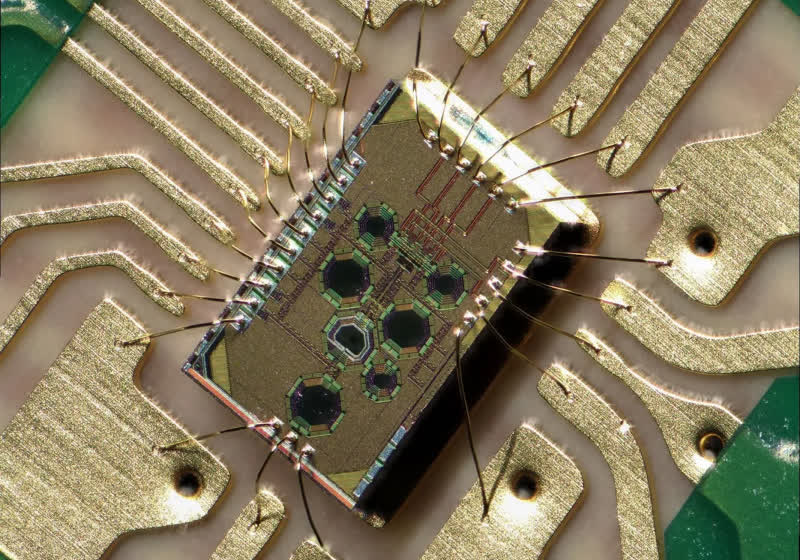
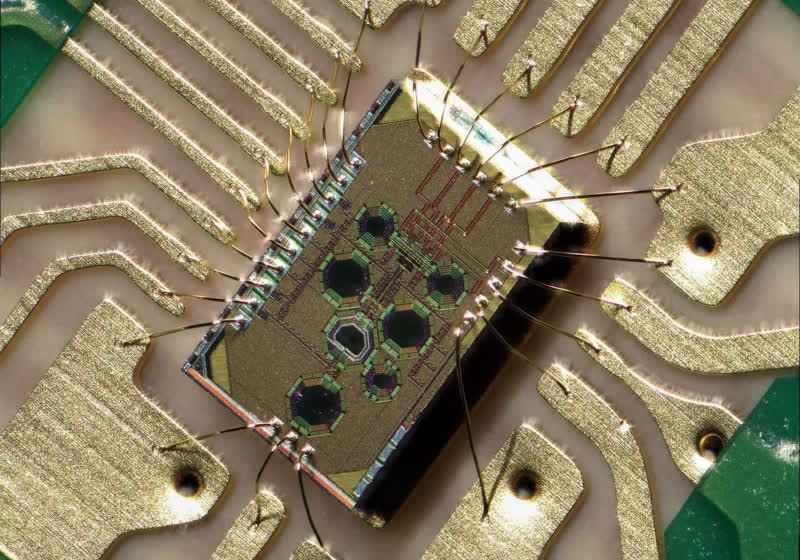
The research, presented at the IEEE International Solid-State Circuits Conference in San Francisco earlier this year, shows the receiver can continue operating after exposure to 500 kilograys of radiation. That level of endurance far exceeds what even space-grade electronics are designed to handle.
Read Entire Article
Source link
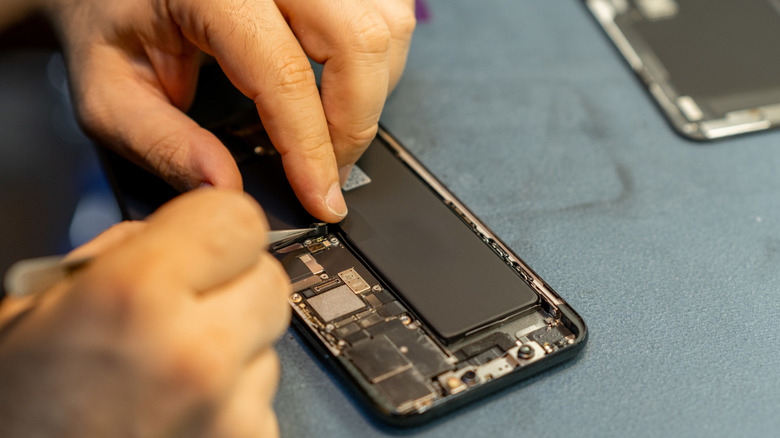
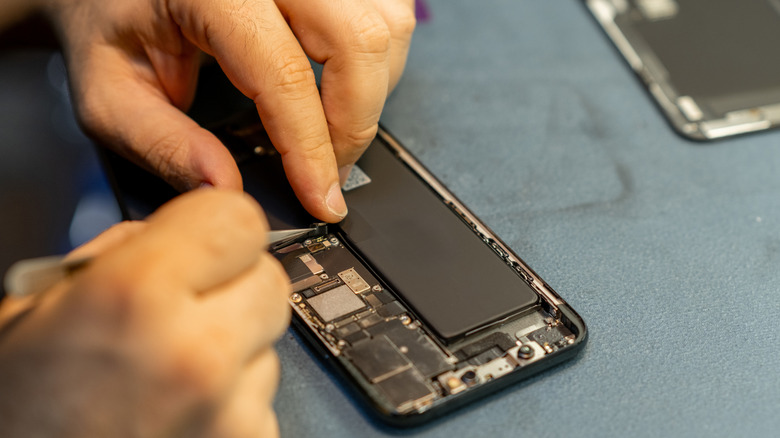
Accidents can happen with our smartphones sometimes, which might require us to take them to a technician. Even though we shouldn’t assume ill intent, any of us would be wary allowing a technician to access our phone and all of our private data and information. That stuff is meant to stay private, and the last thing we want is the prying eyes of a stranger looking through our stuff.
If you have an Android device — specifically a Pixel or a Samsung Galaxy running Android 14 and above — you’re in luck; both of these devices contain a private mode. It’s called Repair Mode on Pixels and Maintenance Mode on Samsung devices. It’s exactly what it sounds like; it allows the technician to use the phone as normal, which would also allow them to test that everything works, but they cannot access your data at all. It’s a great idea, and it definitely solves the privacy concern. If you cannot repair your smartphone yourself, this may be a good option.
How does Repair Mode work?
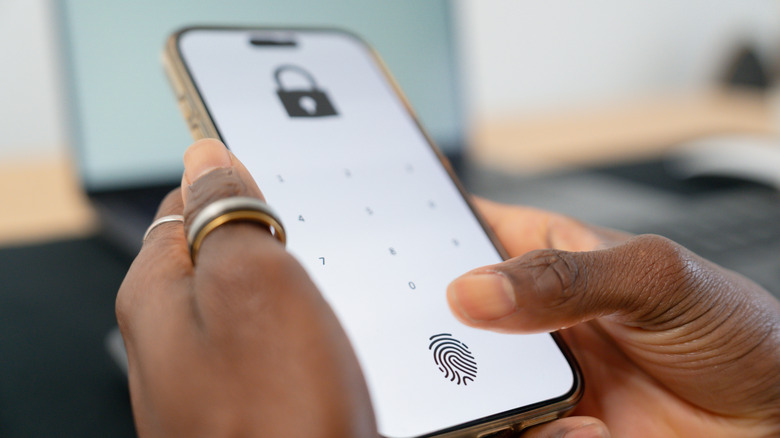
Activating Repair Mode is as easy as diving into the settings on your device and finding the option, which is in different places, deepening on which phone you have. You will be required to enter your phone’s PIN or password for extra security.
It works in a similar manner to Windows’ multiple desktop support. The phone behaves normally, but all of your data and files are completely inaccessible. The only thing is, if there’s a SIM card in the device, it can still pick up cellular signals, so if you’re wary of someone using your device and phone number to perform shady phone calls, remove the SIM card before handing it over.
The benefit is nobody will be able to see your stuff, and sometimes smartphone repairs can include something that would require using the phone’s software to make sure one or more of the features are working right. For example, if you needed one of the lens on the cameras replaced, the technician needs to open the Camera app to see if the replacement went successfully. The biggest problem is that this feature is currently only available on Google’s Pixel family and Samsung’s Galaxy family. Other Android devices don’t have it as of yet, which is a little disappointing. But if you have a supported device, this is an extra bit of security you can perform before handing your device over to the technician.


Another round of layoffs at Meta will affect 168 employees in Washington state, according to a filing from the state Employment Security Department. The cuts are part of a broader reduction impacting hundreds of Meta workers around the U.S.
“Teams across Meta regularly restructure or implement changes to ensure they’re in the best position to achieve their goals. Where possible, we are finding other opportunities for employees whose positions may be impacted,” said a Meta spokesperson via email.
The workers are primarily based in Seattle, Redmond and Bellevue, with 39 working remotely within the state. The layoffs will impact engineering, product management, manager and recruiting roles, among other titles. Jobs in Reality Labs, which focuses on AR and VR hardware and software and wearable devices such as smart glasses, were heavily affected.
The layoffs will take place starting May 8.
The company employs thousands of people across multiple offices in the Seattle region, one of its largest engineering hubs outside Menlo Park, Calif.
In January, the Facebook parent disclosed layoffs impacting 331 employees in Washington as it pared down its Reality Labs division. Meta previously cut more than 100 employees in the state in October as part of a broader round of layoffs within its artificial intelligence division.
The repeated workforce reductions and increased workplace use of AI have helped drive significant productivity gains. Meta’s average revenue per employee has spiked 85% over the past three years, Axios reported today.
The most recent layoffs coincided with the release of a new stock program targeting six top executives, potentially increasing their compensation by up to $921 million each over the next five years, the New York Times reported last week.
RELATED:


The maintainers of the popular Axios HTTP client have published a detailed post-mortem describing how one of its developers was targeted by a social engineering campaign linked to North Korean hackers.
This follows the threat actors compromising a maintainer account to publish two malicious versions of Axios (1.14.1 and 0.30.4) to the npm package registry, triggering a supply chain attack.
These releases injected a dependency named plain-crypto-js that installed a remote access trojan (RAT) on macOS, Windows, and Linux systems.
The malicious versions were available for roughly three hours before being removed, but systems that installed them during that period should be considered compromised, and all credentials and authentication keys should be rotated.
The Axios maintainers said they have wiped affected systems, reset all credentials, and are implementing changes to prevent similar incidents.
The Google Threat Intelligence Group has since linked this attack to North Korean threat actors tracked as UNC1069.
“GTIG attributes this activity to UNC1069, a financially motivated North Korea-nexus threat actor active since at least 2018, based on the use of WAVESHAPER.V2, an updated version of WAVESHAPER previously used by this threat actor,” explains Google.
“Further, analysis of infrastructure artifacts used in this attack shows overlaps with infrastructure used by UNC1069 in past activities.”
Targeted in a social engineering attack
According to a post-mortem, the compromise began weeks earlier through a targeted social engineering attack on the project’s lead maintainer, Jason Saayman.
The attackers impersonated a legitimate company, cloned its branding and founders’ likenesses, and invited the maintainer into a Slack workspace designed to impersonate the company. Saayman says the Slack server contained realistic channels, with staged activity and fake profiles that posed as employees and other open-source maintainers.
“They then invited me to a real slack workspace. this workspace was branded to the companies ci and named in a plausible manner,” explained Saayman in a post to the post-mortem.
“The slack was thought out very well, they had channels where they were sharing linked-in posts, the linked in posts i presume just went to the real companys account but it was super convincing etc. they even had what i presume were fake profiles of the team of the company but also number of other oss maintainers.”
The attackers then scheduled a meeting on Microsoft Teams that appeared to include numerous people.
During the call, a technical error was displayed, claiming that something on the system was out of date, prompting the maintainer to install a Teams update to fix the error. However, this fake update was actually RAT malware that gave threat actors remote access to the maintainer’s device, allowing them to obtain the npm credentials for the Axios project.
Other maintainers reported similar social engineering attacks, where the threat actors tried to get them to install a fake Microsoft Teams SDK update.
This attack is similar to a ClickFix attack, in which victims are shown a fake error message and then prompted to follow troubleshooting steps that deploy malware.
This attack also mirrors previous campaigns reported by Google’s threat intelligence teams, in which North Korean threat actors tracked UNC1069 used the same tactics to target cryptocurrency firms.
In previous campaigns attributed to the UNC1069 threat actor, the threat actors would deploy additional payloads on devices, such as backdoors, downloaders, and infostealers designed to steal credentials, browser data, session tokens, and other sensitive information.
Since the attackers gained access to authenticated sessions, MFA protections were effectively bypassed, allowing access to accounts without having to re-authenticate.
The Axios maintainers confirmed that the attack did not involve modifying the project’s source code, but instead relied on injecting a malicious dependency into otherwise legitimate releases.
Pelle Wessman, a maintainer of numerous open-source projects, including the popular Mocha framework, posted on LinkedIn that he was targeted in the same campaign and shared a screenshot of a fake RTC connection error message used to trick targets into installing malware.
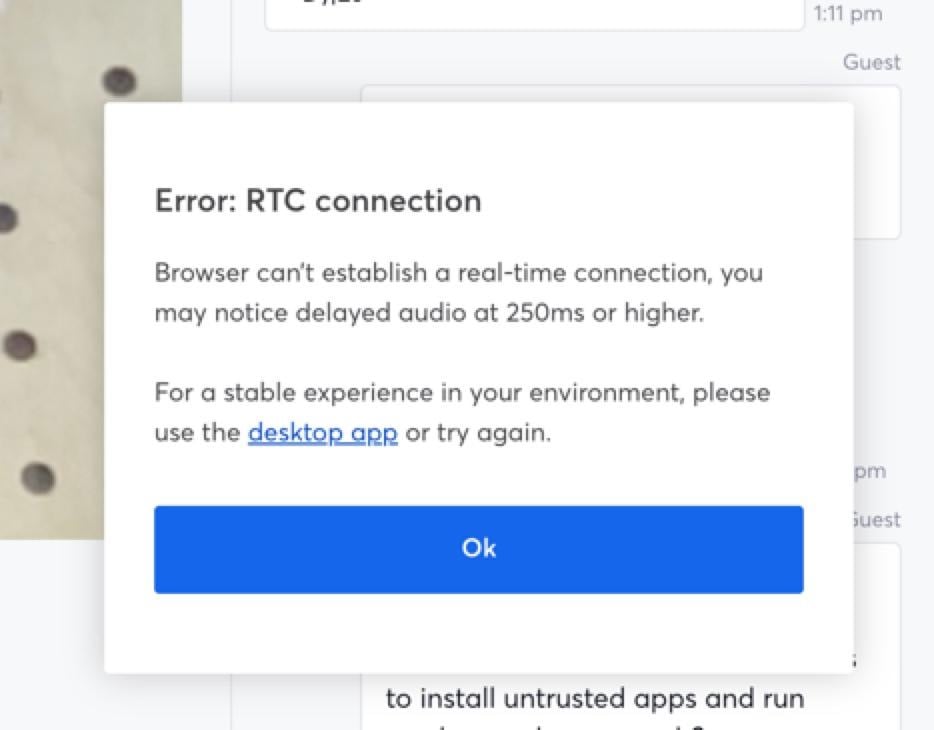
Source: Pelle Wessman
When Wessman refused to install the app, the threat actors tried to convince him to run a Curl command.
“When it became clear that I wouldn’t run the app and we had chatted back and forth on website and chat app they made one final desperate attempt and tried to get me to run a curl command that would download and run something, then when I refused they went dark and deleted all conversations,” explained Wessman.
Cybersecurity firm Socket also reported that this was a coordinated campaign that has begun targeting maintainers of popular Node.js projects.
Multiple developers, including maintainers of widely used packages and Node.js core contributors, reported receiving similar outreach messages and invitations to Slack workspaces operated by the attackers.
Socket noted that these maintainers are responsible for packages with billions of weekly downloads, demonstrating that the threat actors focused on high-impact projects.
“Since we published our initial analysis of the axios compromise, a deep dive into its hidden blast radius, and a report on the maintainer confirming it was social engineering, maintainers across the Node.js ecosystem have come out of the woodwork to report that they were targeted by the same social engineering campaign,” explained Socket.
“The accounts now span some of the most widely depended-upon packages in the npm registry and Node.js core itself, and together they confirm that axios was not a one-off target. It was part of a coordinated, scalable attack pattern aimed at high-trust, high-impact open source maintainers.”
Socket said the campaign followed a consistent pattern, with the threat actors first making contact through platforms like LinkedIn or Slack and then inviting recipients into private or semi-private workspaces.
After building rapport with the target, the threat actors scheduled video calls, which in some cases were conducted through sites impersonating Microsoft Teams and other platforms.
During these calls, an error message would be displayed to the targets, which prompted them to install “native” desktop software that works better or run commands to fix the technical issues.
The same playbook used against all these targets during the same time period indicates this was a coordinated campaign rather than a series of one-off attacks.
The Socket researchers say that these types of supply chain attacks are becoming more common, with attackers now focusing on widely used packages to cause widespread impact.

Automated pentesting proves the path exists. BAS proves whether your controls stop it. Most teams run one without the other.
This whitepaper maps six validation surfaces, shows where coverage ends, and provides practitioners with three diagnostic questions for any tool evaluation.

Slashdot reader Kirkman14 writes: A year before the Web opened to the public, Texas entrepreneur Don Lokke was trying to syndicate weekly political cartoons to bulletin board systems. His “telecomics,” as he called them, represent an overlooked early experiment in online comics.
Lokke launched his main series, “Mack the Mouse” at the height of the 1992 Clinton-Bush-Perot presidential race. His mouse protagonist voiced the frustrations felt by everyday Americans about rising taxes and the recession.
Lokke gave away “Mack” for free, but sold subscriptions to his other telecomics, betting sysops would pay for exclusive content. The timing wasn’t crazy: enthusiasm for BBSes as an industry was surging, with conferences like ONE BBSCON promoting “BBSing for profit.”
But the Web soon deflated those hopes, and Lokke left BBSes behind in 1995. Decades later, about half of his nearly 300 telecomics were recovered and preserved on 16colors.

Hyperliquid Coin Price Prediction: HYPE Gains Traction While Pepeto Lands on CoinMarketCap With 300x Ahead Of Binance Official Launch

Ari 458 Pro is Germany’s Smallest Electric Camper Van, Delivers Weekend Freedom

Tether May Delay Fundraising If Demand Falls Short at $500B Valuation


-

 NewsBeat2 days ago
Steven Gerrard disagrees with Gary Neville over ‘shock’ Chelsea and Arsenal claim | Football
-

 Business2 days ago
No Jackpot Winner and $194 Million Prize Rolls Over
-

 Fashion1 day ago
Weekend Open Thread: Spanx – Corporette.com
-
Entertainment5 days ago
Fans slam 'heartbreaking' Barbie Dream Fest convention debacle with 'cardboard cutout' experience
-

 Crypto World3 days ago
Gold Price Prediction: Worst Month in 17 Years fo Save Haven Rock
-

 Tech6 days ago
The Pixel 10a doesn’t have a camera bump, and it’s great
-
Crypto World5 days ago
Dems press CFTC, ethics board on prediction-market insider trades
-

 Tech6 days ago
Avatar Legends: The Fighting Game comes out in July and it looks pretty slick
-

 Business3 days ago
Login and Checkout Issues Spark Merchant Frustration
-

 Tech5 days ago
Apple will hide your email address from apps and websites, but not cops
-

 Sports4 days ago
Tallest college basketball player ever, standing at 7-foot-9, entering transfer portal
-

 Tech5 days ago
EE TV is using AI to help you find something to watch
-

 Sports3 hours ago
India men’s 4x400m and mixed 4x100m relay teams register big progress | Other Sports News
-

 Fashion7 days ago
Amazon Sundays: Soft Spring Layers
-

 Politics5 days ago
Should Trump Be Scared Strait?
-

 Tech7 days ago
Elon Musk’s last co-founder reportedly leaves xAI
-

 Fashion6 days ago
The Best Spring Trends of 2026
-

 Tech5 days ago
How to back up your iPhone & iPad to your Mac before something goes wrong
-

 Tech5 days ago
Flipsnack and the shift toward motion-first business content with living visuals
-
 Crypto World6 days ago
Bitcoin’s Six-Month Losing Streak: What On-Chain Data Says About the Market’s Next Move
You must be logged in to post a comment Login