
Tech
UW, Microsoft and E8 back climate tech incubator targeting data centers as AI energy concerns surge


As public concern grows about the environmental impact of AI data centers, the University of Washington is launching a startup incubator to support climate tech innovations addressing those challenges.
UW CoMotion Labs is partnering with Microsoft and the investment network E8 to create a four-month program targeting technologies in areas including backup energy storage, grid improvements, efficient data center cooling, electronics waste reduction and low-carbon building materials.
“This is a really important initiative,” said Karin Kidder, executive director of E8. “The other really great part about this is it’s elevating the Pacific Northwest. There’s so much good work happening here.”
CoMotion has previously run two climate tech incubator cohorts, the second of which wrapped up Tuesday with a public demo event. The new effort is the first to focus on a specific industry within the climate space. Organizers are seeking early-stage applicants with technologies ready to commercialize, deploy as pilot projects or scale.
“Meeting growing demand for digital infrastructure requires continued innovation across energy, water, materials, and cooling,” said Brandon Middaugh, Microsoft’s general manager for sustainable markets, in a statement.
E8, which has invested $77 million in climate startups over two decades, will provide an investor-in-residence to advise founders and a representative on the startup selection committee. Microsoft will share technical and industry expertise and other support. Both organizations are providing funding for the effort, but the UW did not say how much.
In addition, the climate tech investment group Elemental Impact previously launched a Data Center Innovation Initiative to similarly address these challenges and will offer advisory support for the Seattle-based program.
The kickoff for the CoMotion Labs initiative coincides with a poll released Wednesday finding that 53% of Americans are “extremely or very concerned” about the environmental impacts of AI, up from 41% a year ago.
The survey, from the Associated Press-NORC Center for Public Affairs Research and the Energy Policy Institute at the University of Chicago, found that 80% of adults are concerned about data center effects on electric bills, power outages or water supply. The computing facilities are a central issue in the upcoming elections.
When it comes to technologies to lessen the burden of data centers, “these solutions are needed today,” Kidder said. “So I’m hopeful that while some of these solutions may be a couple years out, some may be relevant for today.”
Sarah O’Sell, manager of CoMotion Labs’ climate tech incubators, said one strategy will be connecting startups with partners and customers to speed deployment of new technologies.
“We recognize that climate solutions aren’t necessarily always looking for venture investment,” she said. “They might be looking for a strategic partner or customers or grant funding. There’s all kinds of ways to scale these businesses.”
The 2027 Data Center Innovation Cohort will be based at the Seattle Climate Innovation Hub downtown.
An information session is set for Oct. 15, and applications are due Nov. 15. The cohort begins in February.

Looking for the most recent Wordle answer? CNET publishes daily answers and hints for The New York Times Mini Crossword, Connections, Connections: Sports Edition and Strands puzzles. And here’s a page that Wordle players should be sure to bookmark. We’ve made a list, with help from the Oxford English Dictionary, showing which letters show up the most in English words. So if your starter word isn’t getting the job done, consider switching to one of the words that utilizes more of the highly ranked letters. (I like TRAIN and CLOSE.)
Today’s Wordle answer might smash some streaks. Sorority and fraternity members might have a better shot at guessing it. Need a tip or two? Read on for hints and the answer.
Today’s Wordle hints
Before we show you today’s Wordle answer, we’ll give you some hints. If you don’t want a spoiler, look away now.
Wordle hint No. 1: Repeats
Today’s Wordle answer has one repeated letter.
Wordle hint No. 2: Vowels
Today’s Wordle answer has two vowels.
Wordle hint No. 3: First letter
Today’s Wordle answer begins with T.
Wordle hint No. 4: Last letter
Today’s Wordle answer ends with A.
Wordle hint No. 5: Meaning
Today’s Wordle answer can refer to the eighth letter of the Greek alphabet.
TODAY’S WORDLE ANSWER
Today’s Wordle answer is THETA.
Yesterday’s Wordle answer
Yesterday’s Wordle answer, Sept. 16, No. 1915, was WISPY.
Recent Wordle answers
Sept. 12, No. 1911: NIFTY
Sept. 13, No. 1912: FOCUS
Sept. 14, No. 1913: RINSE
Sept. 15, No. 1914: DEALT

Tech
As Part of California's Coast Begins to Crumble, Is the Clock Ticking on Moving Radioactive Waste?

“As parts of the Southern California coastline crumbled into the sea, slammed by intense waves and flooding in recent days, oceanographer Kim McCoy had one thing on his mind,” reports the Los Angeles Times.
He was thinking about “the nuclear waste set in concrete on the beach near San Clemente at the shuttered San Onofre nuclear power plant.”
“Rising sea levels, storm waves, El Niño which increases wave height … these could wash away a section of the walkway that protects the San Onofre seawall, and the waste canisters are just 100 feet away from that,” the former wave dynamics researcher and longtime advocate against beach storage of nuclear waste said. Most experts agree the risk of erosion damaging the nuclear waste storage system is extremely low in the near term. The plant’s owner, Southern California Edison, has promised the California Coastal Commission to move the waste to higher elevation on-site if modeling shows sea level rise and erosion will start to pose a challenge. But the recent waves, fueled by Hurricane Marie far away in the Pacific, resurfaced the issue of the ultimate fate of the highly radioactive spent fuel that used to power the reactors. “At the moment, it is under control, I think it’s essential to say that,” said James Day, a geology professor at UC San Diego. “But geologically we must be thinking long term. The waste lasts for hundreds, if not thousands of generations….” [In 2103 some of the site’s canisters’ approach their intended 100-year lifespans, and the utility may have to start the transfer into new cansiters.]
The distinctive twin domes that once housed the reactor cores will start coming down early next year. But the 3.6 million pounds of high-level waste will stay in the coastal community indefinitely. How much of a safety hazard that is depends on whom you ask. “San Onofre is sitting on some fairly young rocks in a seismically active region,” Day said at a recent symposium at the Scripps Seaside Forum in La Jolla, hosted by the Samuel Lawrence Foundation. “This is not the sort of place you would leave nuclear waste.” Others noted that collapse of beach slopes could make the site more vulnerable to tsunamis. They spoke of the corrosive effects of the ocean air on the steel canisters that hold the waste…
Edison says its system will be safe for decades to come. “The maximum credible tsunami here would not even overtake the seawall,” said Manuel Camargo, principal manager of decommissioning for Edison, standing on the concrete pad that holds the steel waste storage canisters. “The maximum credible earthquake, somewhere around a 7.0 magnitude, would produce something about half of what this system is designed to withstand….” Edison is bolstering a path below the seawall. Based on state data from the California Ocean Protection Council, the seawall would not be inundated before 2050, Camargo said…
Plans for a deep geological repository beneath Yucca Mountain in Nevada crumbled in the face of local opposition in 2011. Utilities around the U.S. now sue the federal government every year to recoup their storage expenses because the Department of Energy has not come through on its promise. The lawsuits cost taxpayers $2 million a day, according to Camargo.
“It’s so safe that it’s almost a problem,” Camargo said. “It’s not a priority to a lot of folks to move it.”
“The Trump administration’s Department of Energy wants to create ‘campuses’ in several states to store waste,” the article points out, “and, in exchange, give local jurisdictions funding to develop different aspects of the nuclear cycle — such as fuel creation, power generation and potentially fuel recycling…”
“The administration wants to address the fact that waste is sitting at 80 reactor sites around the country. It also needs places for waste from new reactors it wants to build.”


Read more of this story at Slashdot.
Out in a courtyard at Snap’s Santa Monica, California, headquarters, I’m kicking a soccer ball around. I’m terrible at sports. But a glowing arrow stretching across the ground points me to a flashing target I’m supposed to dribble the ball to. I get there and get pointed somewhere else. I’m playing a virtual soccer game, but the ball is real. And the big Spec glasses I’m wearing are making it happen.
When Snap announced its $2,195 augmented reality glasses back in June at the Augmented World Expo conference in Long Beach, California, everyone mocked them. Absurdly large, crazy expensive. I was waiting to try them first, and now I have, for about an hour. I don’t think they’re all-day glasses, and neither does Snap CEO Evan Spiegel, whom I spoke with after my demos. “I’d still think of them today as a computer, and it’s going to be more session-based,” he tells me. “Almost like a pair of reading glasses you put on to get something done. But I don’t think we’re far away from lighter, less expensive and far more capable versions.”
I don’t think I’d want to use them all the time in my everyday life. But damn, I want to go to a museum or theme park or theater experience that uses them.
While most of the smart glasses that exist right now either serve up just audio and cameras and maybe a basic head-up 2D display, Snap Specs are more like a portable mixed reality device, something like a very pared-down Meta Quest but with see-through lenses. It’s another evolution of AR headsets going all the way back to Magic Leap and Microsoft HoloLens, but unlike those, Snap’s got all the pieces to fit into one arguably reasonably sized set of glasses.

Are these doorways to smaller glasses? A toolkit for AI? A way for Snap to try to get ahead of Apple, Google, Samsung and Meta while it can? Yes, possibly, but they also feel like the best-functioning prototype of an AR glasses idea that still isn’t mainstream for anyone yet. Snap’s also announced a charging case that doubles as a cellular hotspot with Verizon service in the US, a way to try to make this work standalone without a phone, that costs an extra $200 in a bundle with the glasses.
In my time with Specs, I felt like I was back in familiar AR experiences… but in the best current glasses-like form possible, given where tech is at. Which ends up being a state of existence unlike everyday glasses at all.

Big, chunky, fine to wear, not normal glasses
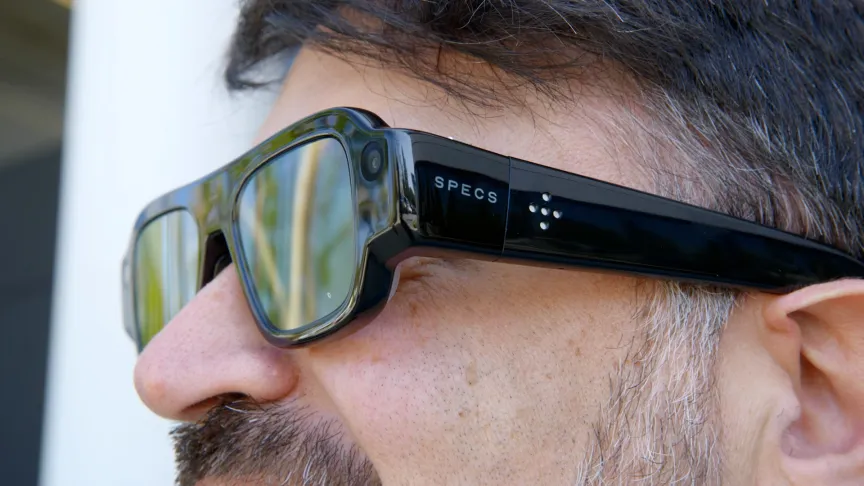
First, the fit: Are the Snap Specs uncomfortable? Weirdly, no, not for a half hour at least. The very thick arms sort of rested against my temples, with a bit of pressure that didn’t bother me. My ears bent down a bit, but not in a way I noticed (till I felt them). The 4.7- to 4.8-ounce (132- to 136-gram) frames (depending on the size you get) are much heavier than other smart glasses, but they balance the weight well on the side of my head, though I sometimes felt them slipping down my nose.
But these are clearly not normal glasses, in any sense. Not just the design, which pushes at the very edges of “big eyewear.” The lenses are rainbowed because of their waveguide layer that shows 3D projections in AR. Unlike Meta’s Ray-Ban Displays, which hide most of the waveguide, these have a notable sheen.

Also, they don’t use standard installed prescription lenses. Instead, there are lens inserts that, well, snap in. Honestly, I prefer this. That makes the glasses look even chunkier, but it also means that if Snap were to use these devices at a theme park, a museum or some public space, demoing them would be a lot easier. I use snap-in lenses for VR headsets all the time. And finally, Snap at least makes inserts that go up to -8, which is basically where my heavy nearsightedness is at.

Displays that are fine, but not always great
Specs have a limited field of view, far more limited than that of VR headsets (or even Xreal’s upcoming Aura pair of tethered AR glasses). It’s better than Snap’s previous Spectacles, and kind of close to or better than my memories of Magic Leap 2. The portrait-style vertical viewing area is tall but not that wide.
It’s wide enough, at least, to watch YouTube video highlights of the Jets-Titans game in a browser, which I call up by saying “Hey Snap” and asking the onboard AI. The display is bright enough indoors, but semi-transparent and ghostly like all AR glasses, and it can get washed out in bright light. That’s why these glasses also have transition lenses that become sunglasses outdoors.
I tried them outside and found the experience usable. But the resolution and the clarity are steps below what sharper micro OLED displays in glasses and headsets can do.

A familiar set of experiences (for me)
I tried Snap’s developer Spectacles a bunch of times in the past, which showed a whole augmented reality OS that works with hand tracking and launches “Lens” apps, some 2D, some full 3D, that can map into the real world. A lot of those were back here, because Specs supports all the independent lenses and creator stuff that Snap’s been building out for a while. But I only got to try a handful of the new Specs during my demo.
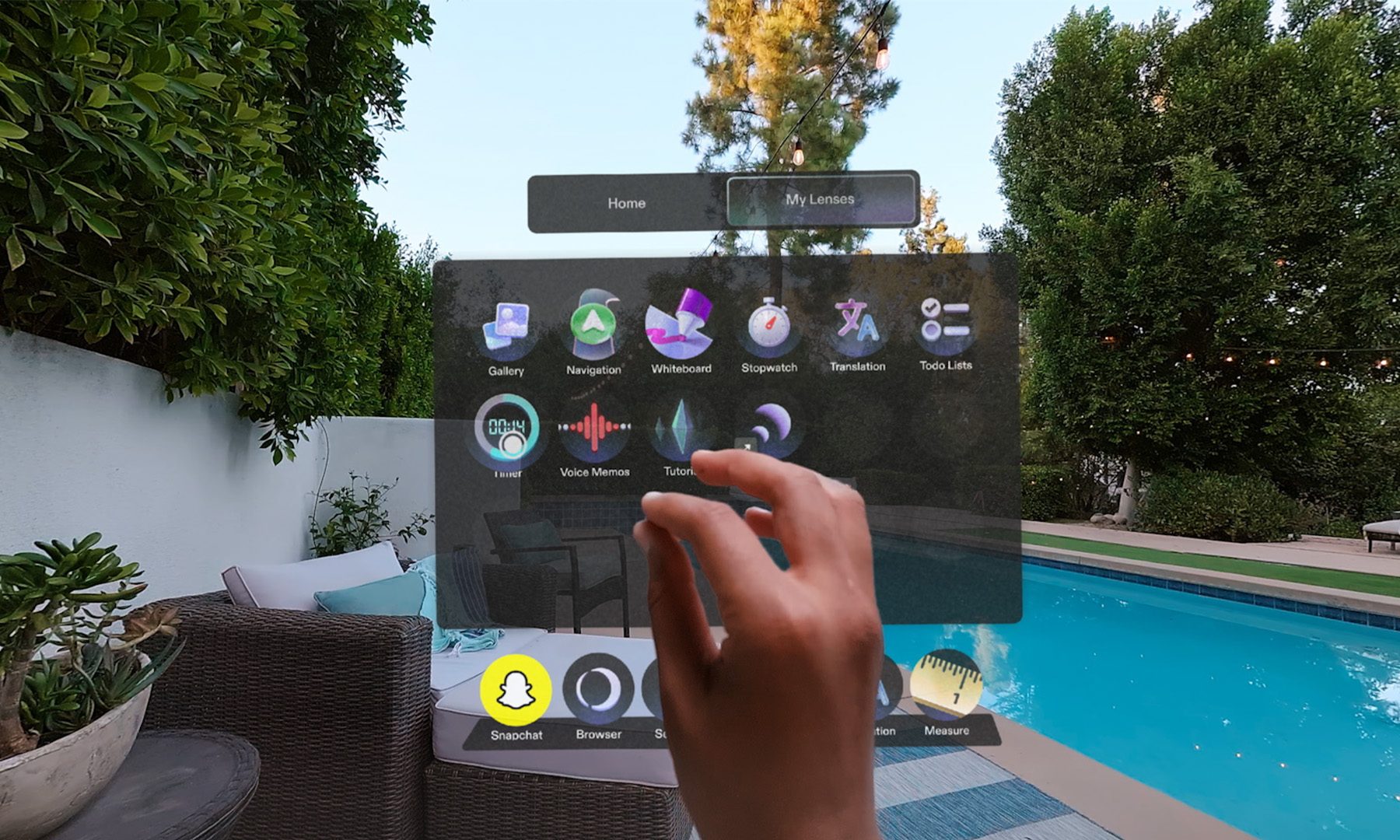
I browsed YouTube in a window I called up, resizing the floating window as big as I could and pushing it back and forth with a cursor I’d control with my hands outstretched and pinching to tap. Some apps let you “touch” things directly or pinch them, but most involve aiming your outstretched hand and controlling an air cursor like a Jedi. When windows got far away or small, it became a little hard to aim and tap at times, but looking at your open palm brings up a button dashboard for recentering things, bringing up the home screen, or turning AI on or off. Windows can follow you if you want, as you walk around.

I even wore Specs in a car: One demo put me in an SUV circling the parking lot while I kept watching Jets-Titans plays, testing how the built-in travel mode handled stability in motion. Pretty well, actually. The display stayed pinned and didn’t drift, and I didn’t get carsick. I enjoyed my Jets win while I could.
I tried connected experiences, one of Snap’s more intriguing features, sitting across from a Snap team member wearing a pair. We looked at each other to begin a shared session, and launched a dominoes game that was apparently co-developed with one of Snap’s celebrity ambassadors, NBA star Jimmy Butler.

It was pretty basic: We laid virtual dominoes out one by one on the table in front of us, seeing the shared layout together. We could have just used real dominoes instead. But this idea, with other games I didn’t try – laser tag-like arena battles, virtual table tennis, or even larger group experiences that could support up to 30 people, according to Spiegel – could open some fascinating ideas. I like that these connect simply by looking at someone else wearing them.

I tried a navigation app that hovered a 3D map in front of me, showing me how to walk to Santa Monica College. I shrank the layout down to a smaller directional arrow pointing the way.
And I tried working on Specs, launching Google Docs with a paired Bluetooth keyboard. That definitely wasn’t a great experience, mainly because of keyboard input lag in my session. But could you try to make this a portable work device? Snap is trying to prove it out.

I also tried live translation with a Snap employee who spoke Italian to me while I saw captions in English pop up in front of me – something I’ve done on other smart glasses, from Even Realities G2 to Meta Ray-Ban Displays to Google and Samsung’s upcoming glasses.
The most promising thing to me was kicking around a soccer ball outdoors using an app called Football Trainer. The training aspect wasn’t perfect, and I sometimes worried I’d try to finesse the ball to the virtual target and trip over myself in the process. But, I noticed that the glowing overlays had no occlusion, or a way of letting the ball or my legs look properly positioned over the graphics, something that exists on devices like Apple Vision Pro. Instead, the graphics overlapped the ball and my legs.

But that real-world overlay showed me possibilities. I’ve tried Snap Specs with demos of overlaid virtual pets before, and tried theme park-like augmented reality experiences with other companies using hardware like the Quest 3 (DreamPark’s Mario Kart-like driving experience, where I rode a motorized unicorn along a virtual road). Snap Specs could do things like this if location-based experiences were built to support it. I saw an AR play in New York that used an older Magic Leap 2 to project virtual actors in front of a real audience. Snap Specs could do it better.

AI ambitions with an agent called Snap Intelligence, too
Snap’s also betting hard on AI, to no one’s surprise. A newly announced agentic app called Snap Intelligence promises to work with Macs and iPhones and on Snap Specs glasses, tapping into your connected apps and information and providing recommendations and actions to help run your life.
The idea sounds like Meta’s recently launched AI agent Muse, which is likely to extend to Meta’s glasses hardware more expansively at next week’s Meta Connect conference. Snap’s getting ahead of that likely news here, but I wasn’t able to demo Snap Intelligence at all during my Specs briefing in Santa Monica. That’s all coming later this fall, per Snap, to time with the glasses launch.
“It actually installs on your Mac, so it can use your Mac for you,” Spiegel says to me about Snap Intelligence. “It can also log into services for you without accessing your credentials, because it can just use your keychain.” But he also promises the agent won’t act without your knowledge: “It just doesn’t do anything until you say it’s OK. It won’t change anything or send anything, or anything like that, until you say OK.”
Spiegel is bullish on lots of AI tools working in Specs beyond the company’s own Intelligence agent, from AI-infused AR experiences to running platforms like ChatGPT or agentic systems on the glasses. Snap’s also pushing promises of business partnerships for Specs with Amazon and Nvidia, among others, exploring how the chunky glasses could be worn in either offices or factory floors. Would they be safe and reliable enough to use? It’s unknown yet. But there aren’t any other current AR glasses with full world-tracking 3D and hand tracking in the size and form of Specs yet. Spiegel sees it as “get that big screen experience if you want it, but ultimately, hopefully, get the computer out of the way and just supervise agents who are getting things done on your behalf.”

Privacy plans: Maybe being big and obvious is better?
Snap isn’t trying to hide what Specs are, something Spiegel seemed to celebrate as we chatted. Unlike Meta’s glasses, which can seem so normal that you wouldn’t notice the cameras in the corners, Specs are very much not standard-looking eyewear. Aas Spiegel said to me, you’d know if someone was wearing them. Will that help address growing privacy concerns on smart glasses that are increasing every month?
Recording photos and video clips, including captures that show your augmented-reality experiences overlaid, is done by pressing a side button on the glasses, which then lights up a big LED light. There’s also a clever new snapping gesture for taking photos, which is appropriately on-brand…and again a clearly visible gesture, although one people might not know was a photo-taking trigger.
Spiegel reflected on Snap’s own history of camera glasses, which extends way further back than Meta’s. He tried to make Snap’s Spectacles glasses look unique, even strange, to celebrate their distinct style…and also broadcast that they were different. It made me wonder if smart glasses should all be doing this, in the spirit of the at-the-time odd-looking, long-stemmed first-gen AirPods.

Too ambitious, maybe, but these would be perfect for demos
Snap’s going for it all with these Specs, but I have concerns for sure. Battery life (promised as “up to four hours”), which I didn’t get to truly test during quick demos where I swapped pairs of Specs for different experiences. A not-perfect display. 3D experiences that sometimes looked good, sometimes a step below what a higher-powered VR headset could do. And would any of this really replace a phone at all? I doubt it.
But Snap is aiming to host demos for Specs at a new LA flagship store this fall, something I hope will expand to other locations. And installations and experiences. I’d gladly buy a ticket to a fun event where these Specs were used for a collective immersive experience, but I wouldn’t be compelled to buy a pair. Demos and experiences feel like the next step, and these Specs finally feel ready to be worn. Not all the time, but at least for a while.

Specs seem like part of a new wave of odd VR/AR devices pushing beyond their previous categories, trying to be more or to connect to other systems and services: Valve’s Steam Frame, Xreal Aura and Snap Specs. Specs are the closest living relative to the Meta Orion AR prototype glasses I demoed two years ago, but they’re still full of question marks. And yet, they’re also likely to be a place to prototype AR and AI ideas in outdoor spaces.
I want to see what else they can do, but that’ll have to wait until a review later in the fall. In the meantime, I appreciate they’re trying something no other hardware is doing yet…but also, there’s a reason others haven’t succeeded yet. Size and compromises to get to AR glasses are still a big challenge, but Snap’s Specs are the closest I’ve seen to making it work. It’s far from perfect, but it’s a start.
Editors’ note: Scott Stein’s travel costs were covered by Snap. The judgments and opinions of CNET are our own.


Snap is taking another swing at the idea that glasses could become the next computer. The company has officially introduced SPECS, a pair of augmented reality glasses with an AI-native operating system designed to put digital information directly into the wearer’s view. Unlike some AR experiments that need a separate computing puck or tether, SPECS packs its computing hardware directly into the glasses.

And this isn’t just Snapchat with a fancy pair of frames. SPECS can handle navigation, real-time translation, entertainment, fitness, education, shopping, and even productivity. Users can get directions overlaid onto the real world, translate conversations into subtitles across 60 languages, stream content onto a virtual 115-inch display, and wirelessly connect the glasses to a computer for a larger workspace.
The real trick is SPECS Intelligence
The more interesting part of the announcement is SPECS Intelligence, Snap’s new anticipatory AI service. Rather than waiting for a question, it is designed to understand a user’s goals, priorities, relationships and routines from the apps they choose to connect, then surface useful information when it matters. That could mean preparing someone for an upcoming meeting or pulling together flight, hotel and dinner details before a trip.
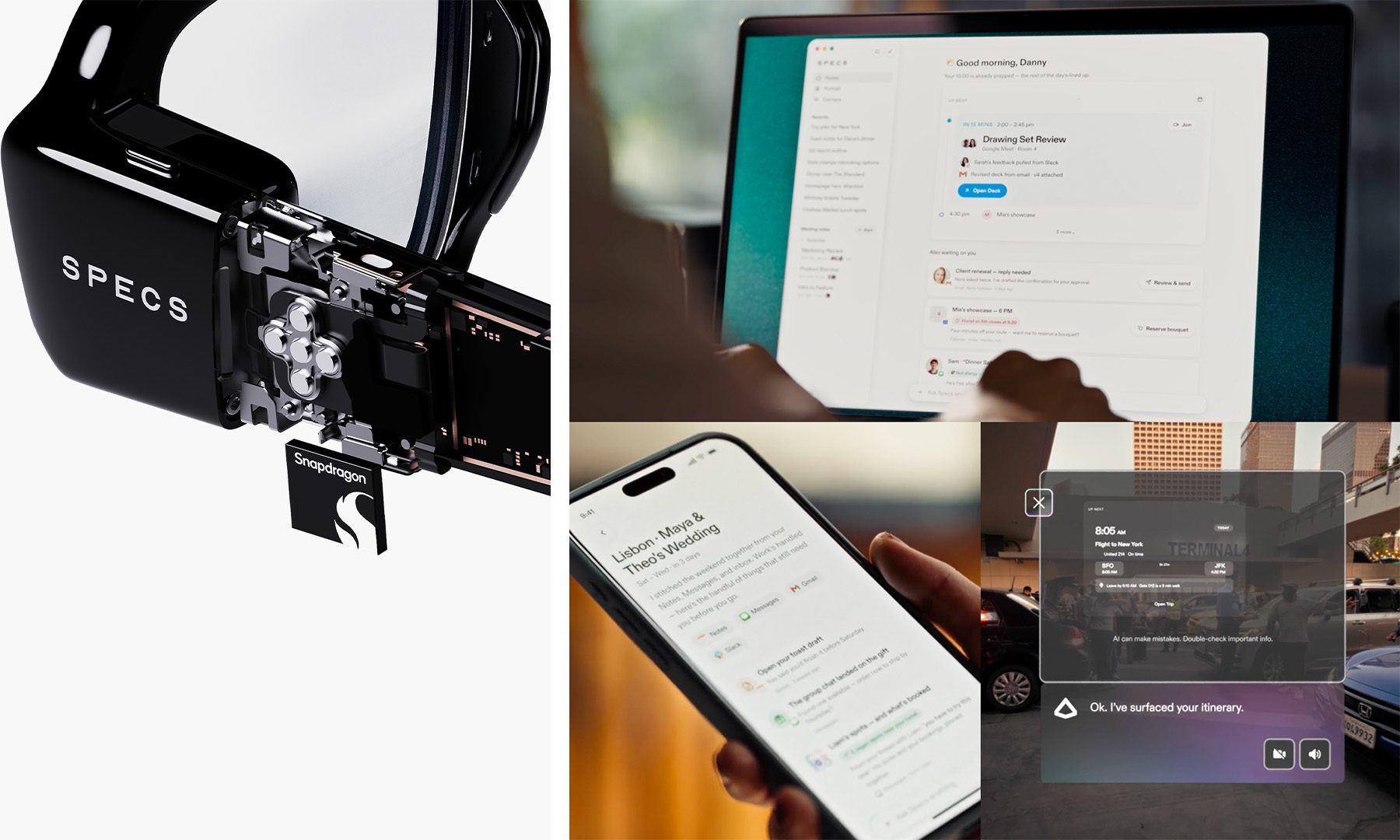
The AI works across iPhone, Mac and SPECS, meaning the glasses are essentially another window into the same personal context. Ask about a day while wearing SPECS, and the idea is to get a briefing, schedule information, and meeting preparation without digging through half a dozen apps. The iOS preview is available now in the U.S. for users aged 18 and over, while the fuller Mac experience is coming through an invitation-only early-access program.
Privacy is also a major part of the pitch. Snap says SPECS does not use facial recognition, does not continuously record the surrounding world, and uses an external LED when photos, video, or audio are being captured. For SPECS Intelligence, connected personal content isn’t used to train Snap’s AI models or serve personalized ads.
SPECS is ambitious, but it isn’t exactly pocket change
Snap is positioning SPECS as a genuine computing platform rather than simply another pair of smart glasses. Developers can build AR experiences through Lens Studio, while enterprise partners including NVIDIA, AWS and Salesforce are exploring hands-free uses in workplaces such as factories, retail floors and field operations.
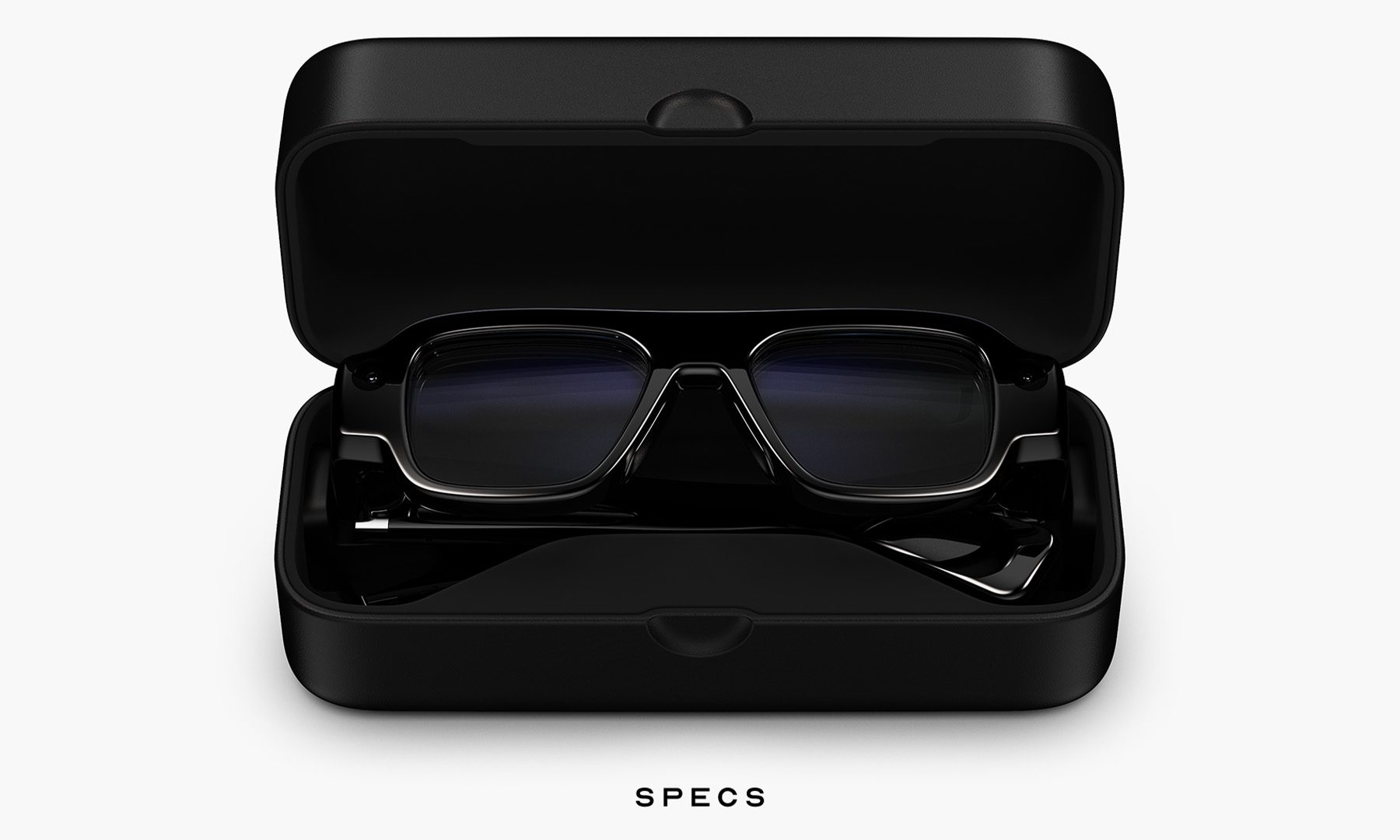
The glasses are available to preorder for $2,195, with a $200 refundable deposit, and shipping is expected later this fall in the U.S., U.K. and France. A new cellular charging case, which provides four additional charges and cellular connectivity, brings the U.S. Connected Case bundle to $2,395.
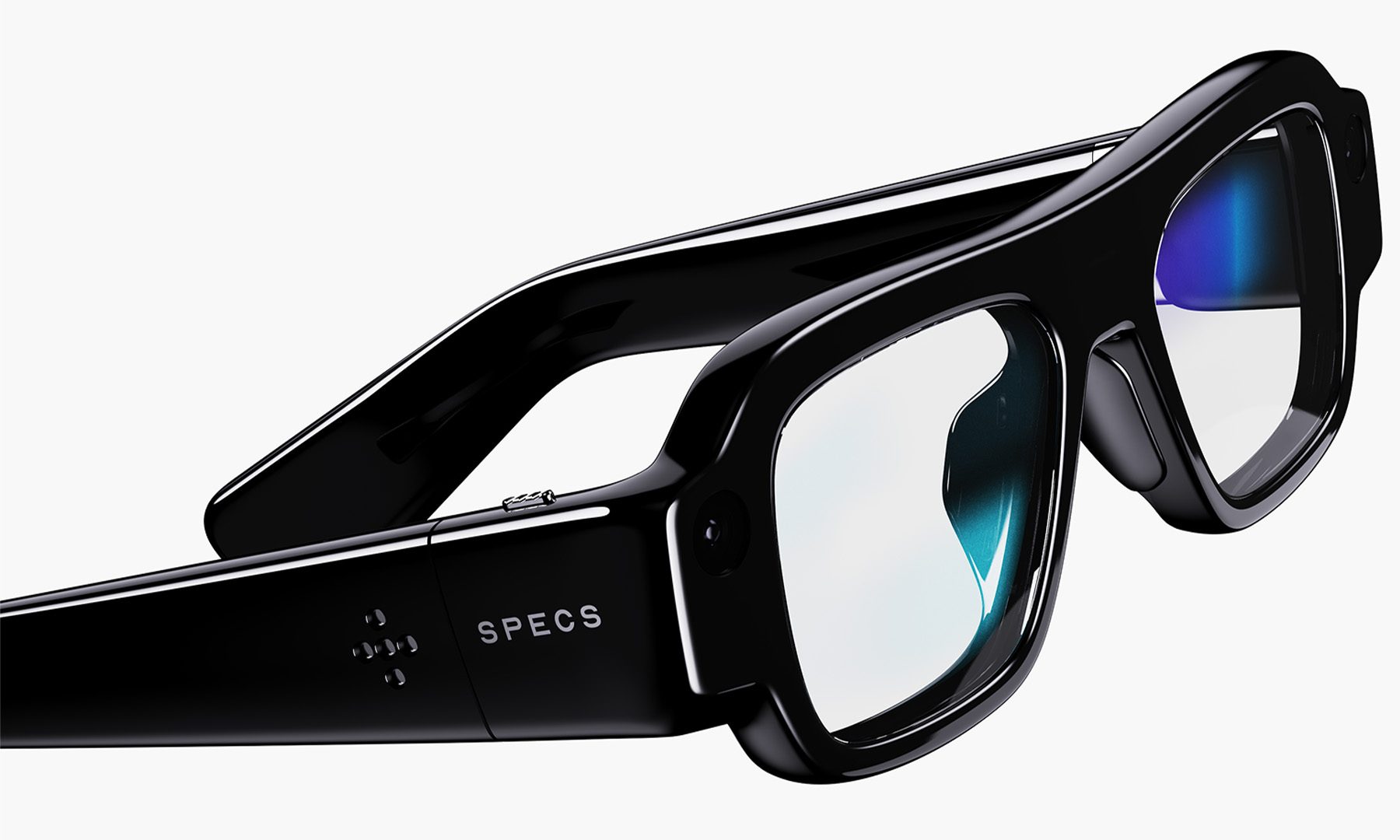
At that price, SPECS is very much an early look at where Snap thinks computing is headed, rather than a mass-market phone replacement. But the interesting bit is the combination of AR plus anticipatory AI. If SPECS Intelligence can genuinely figure out what matters before being asked, Snap may have found a more compelling reason to wear a computer on the face than simply taking hands-free selfies
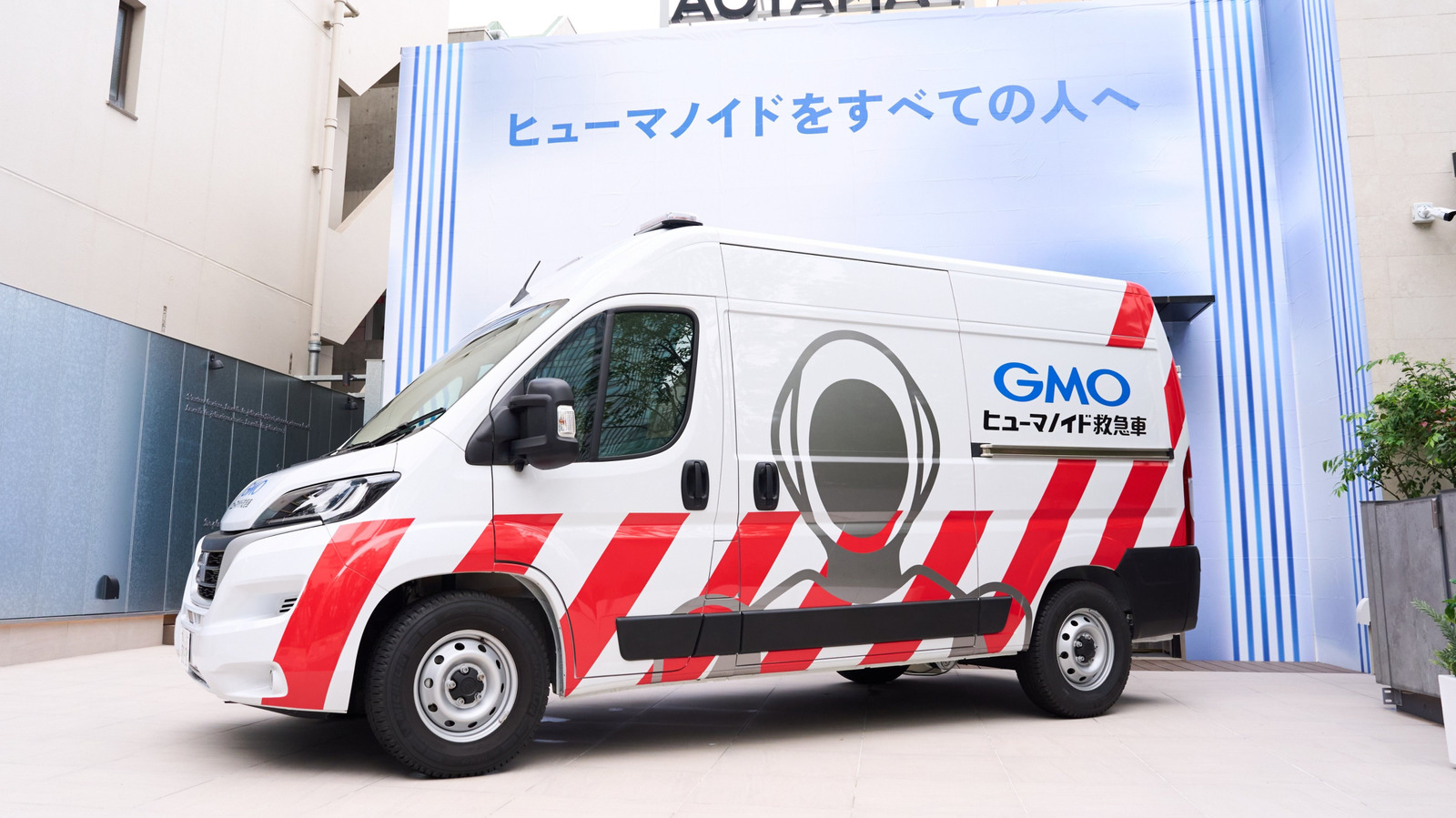
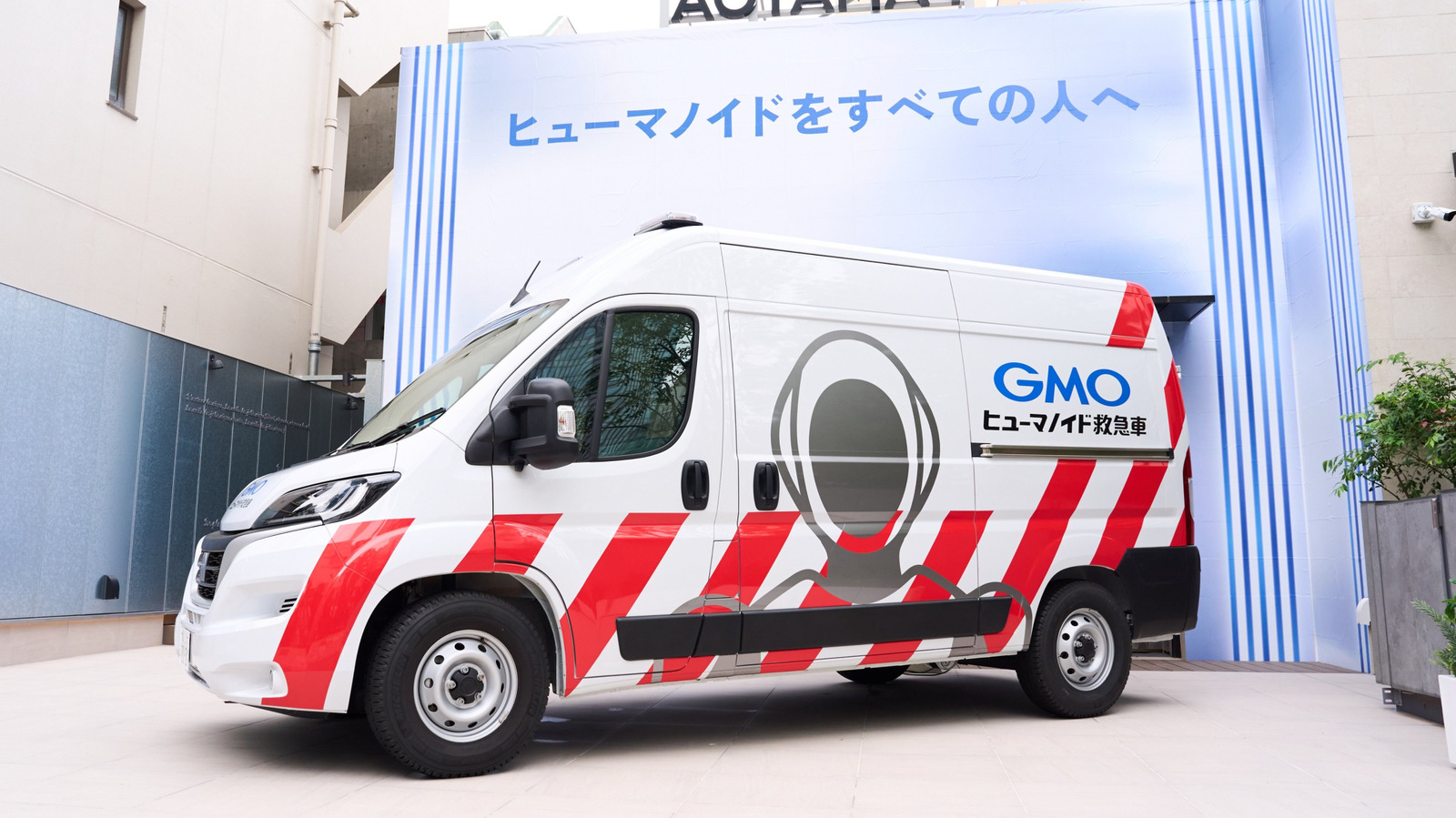
If you see what looks like an ambulance with a set of flashing lights weaving through Tokyo traffic, it might not be rushing to save a human. GMO Internet Group is unleashing what it calls Japan’s first “humanoid ambulance” on the streets of Tokyo this month.
A maintenance van designed to make house calls when humanoid robots break down, the ambulance carries diagnostic equipment, spare parts, repair tools and engineers to wherever a robot has stopped working. If a robot can’t be fixed at the roadside, there’s a spare humanoid on board ready to be subbed in and take over on the spot. Meanwhile, the broken unit is ferried back to GMO’s repair base at its Humanoid Lab in Shibuya, Tokyo.
There’s only one ambulance stationed at its Tokyo headquarters for now, and it won’t be used to respond to any and all stricken robots; the service only covers humanoids deployed by GMO AI & Robotics Trading (also known as GMO AIR), with dispatch decided on a case-by-case basis. That’s the same company behind the humanoid robots working as baggage handlers at a Tokyo airport. It’s currently running a trial of Unitree-built machines at Haneda in a collaboration with JAL Ground Service through 2028.
“When humanoids become more popular, this kind of service will be needed,” said Shota Takizawa, an engineer at GMO AIR, at a press event covered by Euronews. The interior and exterior styling of the ambulance came from designer Yasumichi Morita of Tokyo firm GLAMOROUS, who modeled the look on emergency vehicles from around the world. Its exterior features purple roof-mounted lightbars and the text “Humanoid Ambulance.”
GMO says that the ambulance service was created after damaged humanoids had to be sent away for repair, leading to service disruptions. “Learning from that experience, we came up with the idea of providing replacement humanoids,” GMO AIR’s CEO, Tomohiro Uchida, said. GMO’s parent business is internet infrastructure: domains, hosting, that type of thing. Its robotics unit doesn’t build robots at all, but instead resells hardware from Unitree and other manufacturers, then sells services around the machines.
Japan’s government published an AI Robotics Strategy back in April that targets more than 30 percent of the global robot market and a roughly $135 billion domestic industry by 2040. One flashy van isn’t going to have much of an impact on those numbers, but GMO is clearly pitching the ambulance as a solution built ahead of need; a way to bank field-repair experience before humanoids are common enough to demand it.


GM is overhauling its infotainment interface on the 2027 Chevrolet Silverado and GMC Sierra, giving Apple CarPlay and Android Auto their own window alongside native apps rather than the whole screen, after saying phone mirroring would be removed from its cars. Euro NCAP’s 2026 protocol asks for separate physical controls on five functions, which a redesigned touchscreen does not address.
GM is rebuilding the interface in its trucks and giving Apple CarPlay and Android Auto a window of their own beside its native apps, InsideEVs reported. It arrives on the 2027 Chevrolet Silverado and GMC Sierra.
The layout is split by default, so more than one app is visible at once. The blue background and pale icons give way to jet black and higher contrast, the quick access menu becomes customisable, and the gauge cluster has been reworked.
“What we heard was that people were hunting for controls, navigating through too many steps,” said Sebastian Bauer, GM’s executive director of human interface. The team went after fewer taps and clearer visual, auditory and haptic feedback.
The phone half is a reversal. GM stripped mirroring out of its electric cars and Mary Barra said petrol models would follow as models were refreshed, calling the switch between systems clunky. Cars already sold keep it.
Now projection holds the right-hand side rather than swallowing the display. Customers want that simplicity while keeping quick access to the car, said Michael Wahlstrom, who runs software product management.
Europe changed the test in January.
Euro NCAP’s 2026 protocol asks for separate physical controls on five functions, being indicators, hazard lights, the horn, the wipers and the emergency call. A car without them cannot take five stars. The point is to cut the time a driver spends looking away from the road.
Fewer taps is not the same thing. Those five have to leave the screen, not move up a menu.
China went considerably further. Its new standard names 19 functions needing physical controls, each at least 10mm square and working when the power does not, from July 2027.
GM’s announcement mentions physical buttons for the headlights, which survive in the quick menu. Headlights are not among the five.
The trucks are not sold in Europe. Cadillac is.
GM sells the Optiq, Lyriq and Vistiq across the continent, the Optiq from about EUR 65,000, and has been opening the brand in the UK. It says the new interface will spread across its lineup over time.
Whether that includes the European cars, and whether phone projection travels with it, GM would not say. Rivian went the other way and still offers no projection at all.
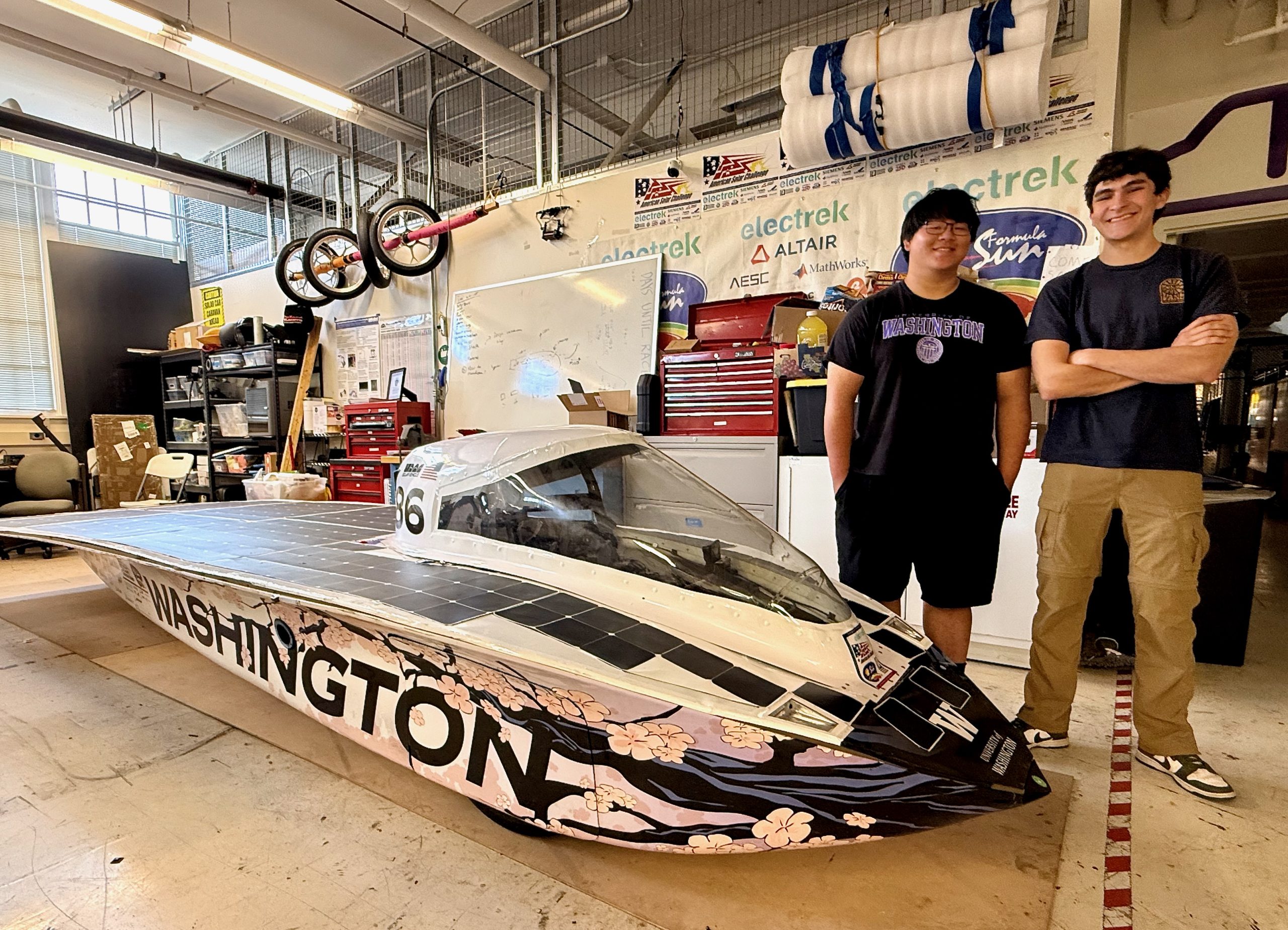
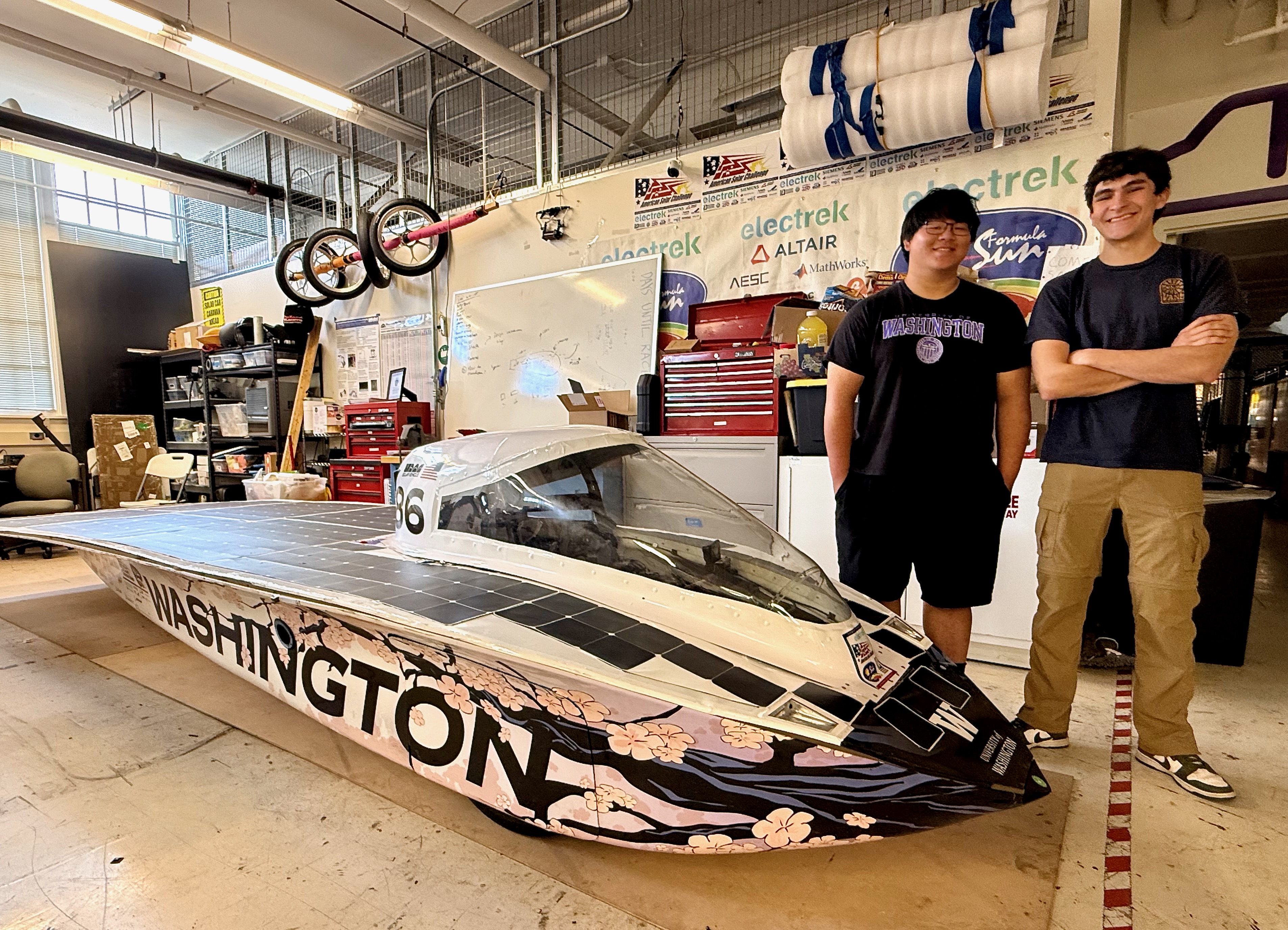
In a cramped corner workspace in a mechanical engineering building at the University of Washington, a team of students is working to harness the power of the sun.
They operate on a fraction of the budget of elite international programs, fitting build hours around class schedules and other extracurriculars. Yet this summer, the scrappy crew took their handmade, solar-powered car — dubbed Sakura — out of the shop and onto the open road.
Over seven days in July and 1,778 miles from Minnesota to Texas, they outpaced nearly every competitor to finish fourth overall and cross the line as the top-ranking American team in the American Solar Challenge.
Now entering its fourth year, the Solar Vehicle Team at UW (SVTUW) is still a relative newcomer to collegiate solar racing. Officially affiliated with the university’s Mechanical Engineering Department, the roughly 50-person group has evolved into a broader interdisciplinary effort spanning electrical engineering, computer science, business, aerodynamics, and more.

Operated entirely by undergrads, the club handles every aspect of the operation in-house — from sponsor outreach and logistics to hands-on fabrication.
While top international competitors rely on multi-million dollar budgets and years of development, the Huskies assembled their vehicle (named after the Japanese word for cherry blossom) in just 11 months — a lightning-fast turnaround for a machine built entirely from scratch.
For team president Rudy Heredia-Jantz, an electrical and computer engineering senior, even making it to the starting line felt like a triumph.
“Frankly, we have no idea [how we pulled it off],” Heredia-Jantz said. “This car — it was a little bit of a miracle. We did not have it up and running until the day before we left for competition. We didn’t even have it moving. We just spun the rear motor, threw it in the trailer, and figured we’ll blow something up eventually.”
Things did indeed blow up — 12 tires in total along the way — but the Huskies kept rolling. For a third-year program competing against seasoned international juggernauts, simply keeping the car on the road was an achievement; outpacing them was a statement.
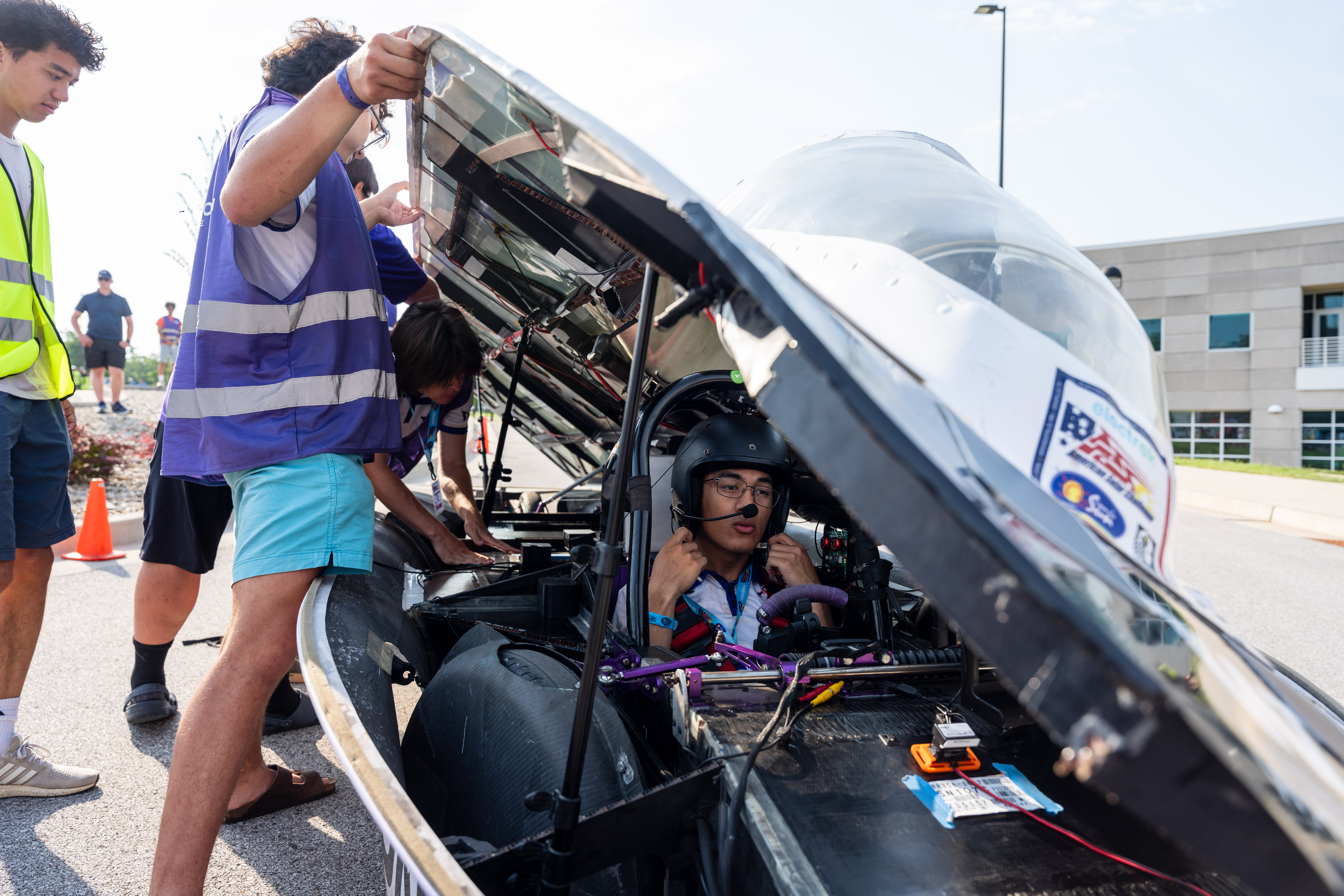
UW didn’t just survive the route to Texas — they blew past expectations for a young club, clinching the Aesthetics Award and Spirit of the Event Award alongside their top-four finish.
For second-year mechanical engineering student Elijah Yan, who serves as the team’s mechanical lead, the learning curve was immediate.
“Building a car is just not something I’ve done before, so it’s very new to me, and it’s super cool to learn that type of stuff — suspension stuff, how to do vehicle dynamics,” Yan said.
That hands-on engineering paid off when Sakura hit highway speeds on open pavement. Designed to maximize efficiency, the ultra-lightweight vehicle — weighing roughly 500 pounds with a driver inside — stretches 19 feet long to fit its array of solar panels while keeping its profile as narrow as possible.
Under the hood, Sakura is a blend of precision engineering and strict energy conservation:
- Solar array: 386 Maxeon Gen 7 photovoltaic cells covering six square meters, producing up to 1,540 watts of max power output directly from sunlight.
- Battery pack: A student-built 5.125 kWh lithium-ion battery in a 36S9P cell configuration (121V nominal), supplemented by a secondary backup battery used solely for system startups.
- Drivetrain and motor: Powered by a 2 kW Mitsuba 2096-III hub motor capable of pushing the 500-pound vehicle up to 65 mph on open highways.
- Data and cockpit: A custom steering wheel equipped with push-to-talk comms, digital telemetry displays, and regenerative braking controls, paired with an onboard Samsung Galaxy smartphone that streams real-time battery and motor analytics back to the pit crew.
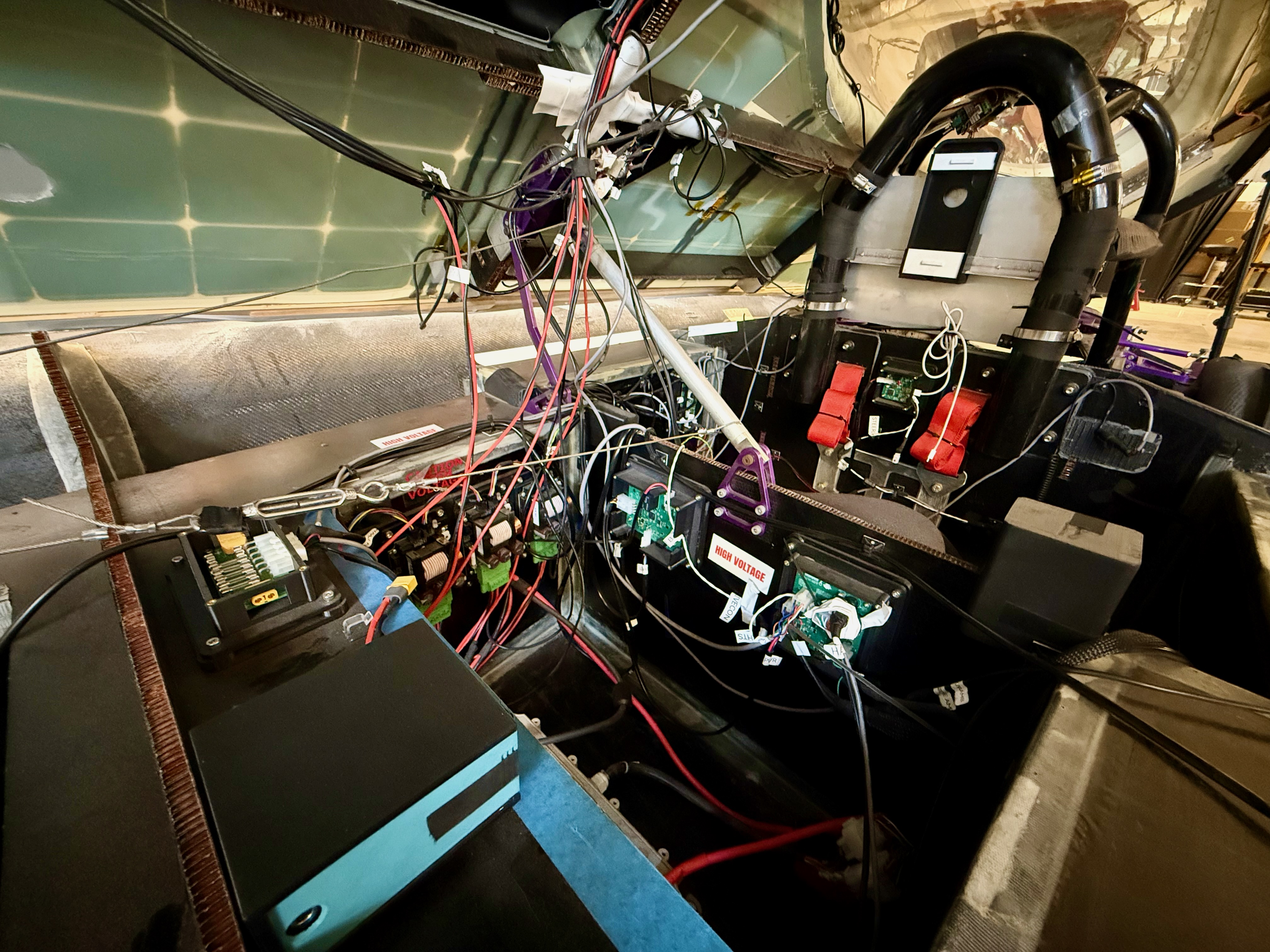
To pull off a competitive build on a shoestring budget, the team combined its resourcefulness with local industry support. The vehicle’s lightweight frame, for instance, relies on carbon fiber sandwich panel flooring donated by Boeing, held together with specialized fiberglass tape.
“It’s the perks of being a Seattle-based team — we work with some amazing materials,” Heredia-Jantz said.
Yet even with aerospace-grade composites, bringing a prototype car across the finish line required plenty of improvised shop hustle.
“The car is held together with cardboard and duct tape, essentially,” Yan joked.
And managing the technical hardware on the road is as much a game of data processing as it is driving.
During the race, a dedicated strategy team monitors Sakura‘s health in real time. Using a custom dashboard that feeds off the onboard smartphone’s data stream, students track battery state-of-charge, individual array voltages, and motor temperatures from a trailing support vehicle.
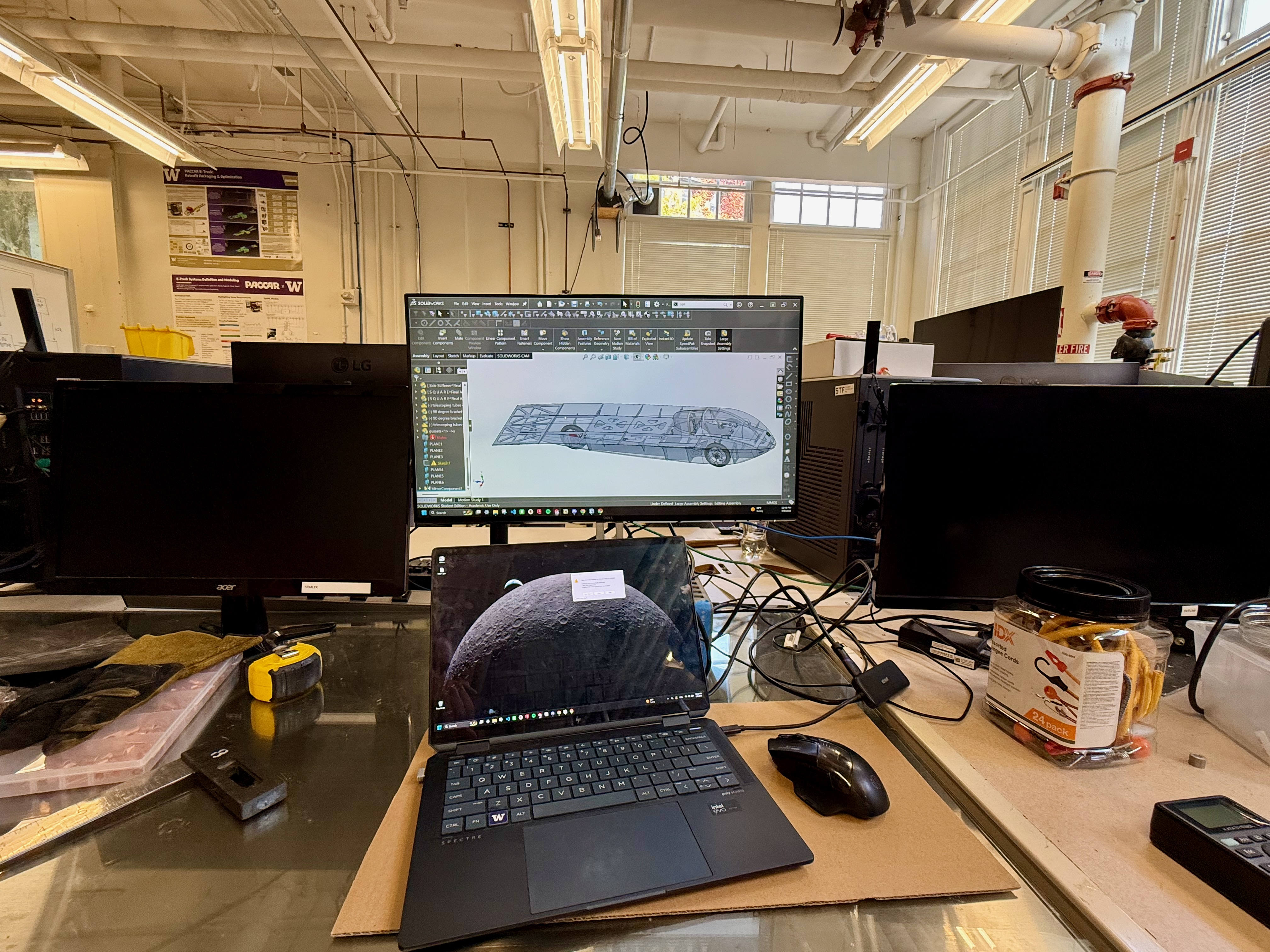
By pairing live telemetry with incoming weather forecasts, the crew calculates optimal cruise speeds on the fly — relaying instructions to the driver via walkie-talkie so they can balance energy consumption, leverage regenerative braking, and avoid tripping the battery’s protection systems on steep climbs or hard accelerations.
That real-time power management was also put to the test right before the cross-country journey, when the team competed in the Formula Sun Grand Prix — an annual three-day track race where cars run on a single initial charge and whatever sunlight they can harvest along the way. Despite navigating a track that pushed their power distribution system to its limits, the track time gave the team crucial baseline data and momentum before taking on the road race.
Now the club is already preparing for its next evolution. While repairing Sakura for upcoming competitions, students are designing their next-generation vehicle from scratch — overhauling power distribution, reinforcing the chassis, and building a new solar array.
For a club building sun-powered technology in a city known for grey skies, the project is ultimately driven by something deeper than weather.
“I believe this team is building something special in the early morning hours on UW’s campus: talent that shows up before sunrise, a refusal to wait for better resources before doing great work, and a stubbornness that looks a lot like faith,” said Caoilin Krathaus, the team’s administrative lead. “It reminds me of the story behind Boys in the Boat, and what I’ve always thought of as the true Husky experience.”

realme has revealed the design of its upcoming 16 Pro Harry Potter Edition. The phone takes inspiration from Hogwarts and the wider Harry Potter wizarding world. realme developed the edition through an expanded collaboration with Warner Bros. Discovery Global Consumer Products following the realme 15 Pro Game of Thrones Limited Edition. The company will also launch a Hogwarts-themed limited-edition gifting box with the phone. realme will showcase the new edition at a special pop-up launch on September 21.
Design and Limited-Edition Box
The realme 16 Pro Harry Potter Edition brings several Hogwarts-inspired details to the phone’s design. It uses a brown finish with a premium leather texture. The Argyle pattern on the back takes inspiration from the Wizard’s Chess scene. The phone also features Hogwarts Crests at the center of its rear panel. realme uses the Metal Mirror Camera Deco from the standard realme 16 Pro. However, the camera module draws inspiration from Hedwig’s bright and spirited eyes. A laser-engraved “Welcome to Hogwarts” slogan also appears on the metallic mid-frame.
realme will also offer a Hogwarts-themed limited-edition gifting box for Harry Potter fans. The company plans to produce only 5,000 units worldwide. The box recreates Harry Potter’s iconic trunk as a 1:1 replica. Inside, buyers will find a Hogwarts Welcome Pack with several themed items. These include a Hogwarts acceptance letter, train ticket, and Hogwarts Crest bookmarks. The pack also includes postcards featuring Harry, Hermione, and Ron. A Hogwarts-logo phone case and phone pin complete the collection. realme says the edition combines its phone design with the spirit of the wizarding world.
realme 16 Pro Harry Potter Edition Price and Availability
realme has not yet revealed the price of the 16 Pro Harry Potter Edition. The company will showcase the device at a special pop-up launch on September 21. The event will follow a young wizards theme and highlight the Hogwarts-inspired experience. realme has also confirmed that it will produce only 5,000 units of the limited-edition gifting box worldwide. realme is expected to share more information through its website and social media platforms. Until then, buyers will need to wait for the company’s official pricing and availability details.
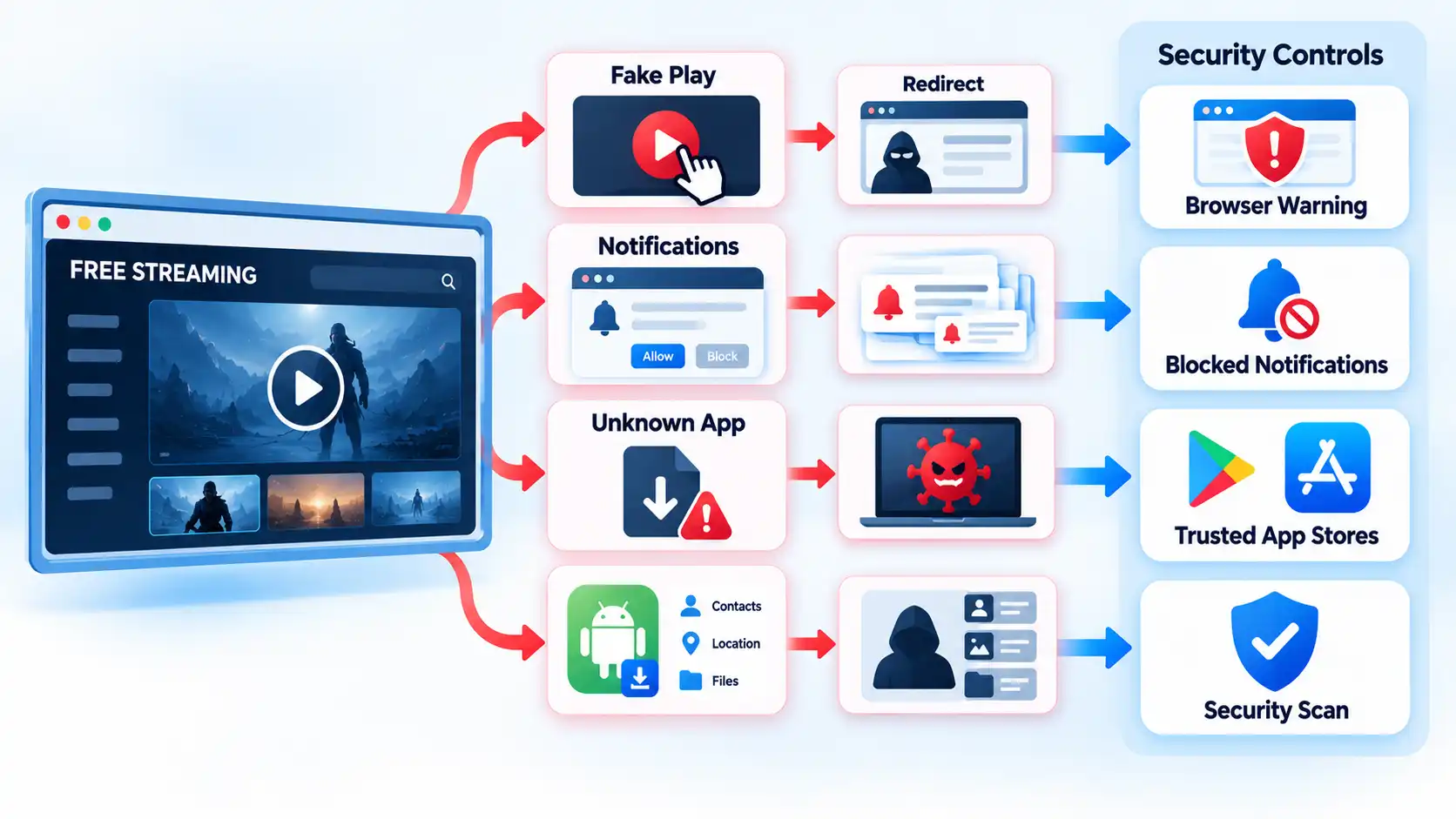
Some free streaming services are legitimate and reasonably low-risk, but unfamiliar streaming sites can expose you to phishing, deceptive advertising, malicious downloads, notification spam, and unsafe apps. The biggest risk usually comes from what a page persuades you to click, install, allow, or enter, not simply from the fact that the stream is free.
Quick Take
- Free does not automatically mean unsafe. Licensed ad-supported streaming services are a different category from unfamiliar sites distributing unknown apps or questionable streams.
- A pop-up is not the same thing as a malware infection, but deceptive pop-ups can lead to phishing pages, fake updates, dangerous downloads, or fraudulent payment prompts.
- Installing an unknown streaming app or APK creates more risk than simply viewing a webpage because installed software can request permissions and run code on the device.
- Browser warnings, forced notification prompts, unexpected downloads, and demands to disable security tools are strong reasons to leave.
- If you already installed something, entered a password, or supplied payment information, the appropriate response depends on exactly what happened.
Are Free Streaming Sites Safe?
Some are. “Free” describes how a service charges you, not whether it is secure. A legitimate ad-supported streaming service can provide programming without a subscription because advertising funds the service. That is different from an unfamiliar site that sends you through several redirects, demands a browser extension, or tells you to install an unknown “HD player” before a video will start.
It helps to separate three situations. The first is a recognizable streaming service delivered through its normal website or an established app marketplace. The second is an unfamiliar browser-based streaming site that may rely on aggressive advertising, redirects, or questionable content sources. The third is an unofficial app, Android application package, or modified streaming device that asks you to install software from a source you cannot confidently verify.
An Android application package, usually called an APK, is a file format used to install Android apps. Sideloading means installing an app from outside the device’s usual app marketplace. Neither term means the software is automatically malicious, but software from an unfamiliar source deserves more scrutiny because installing it lets code run on the device.
The practical safety question is therefore not just “Is this streaming site free?” It is also: Does it push you to override a browser warning, install something, grant a permission, enter a password, provide payment details, or trust software from an unknown publisher?
Where the Risk Actually Comes From
Streaming-related security problems often develop through a chain of small interactions. A page itself might display little more than a player and advertisements. Risk increases when a click moves you into a different process.
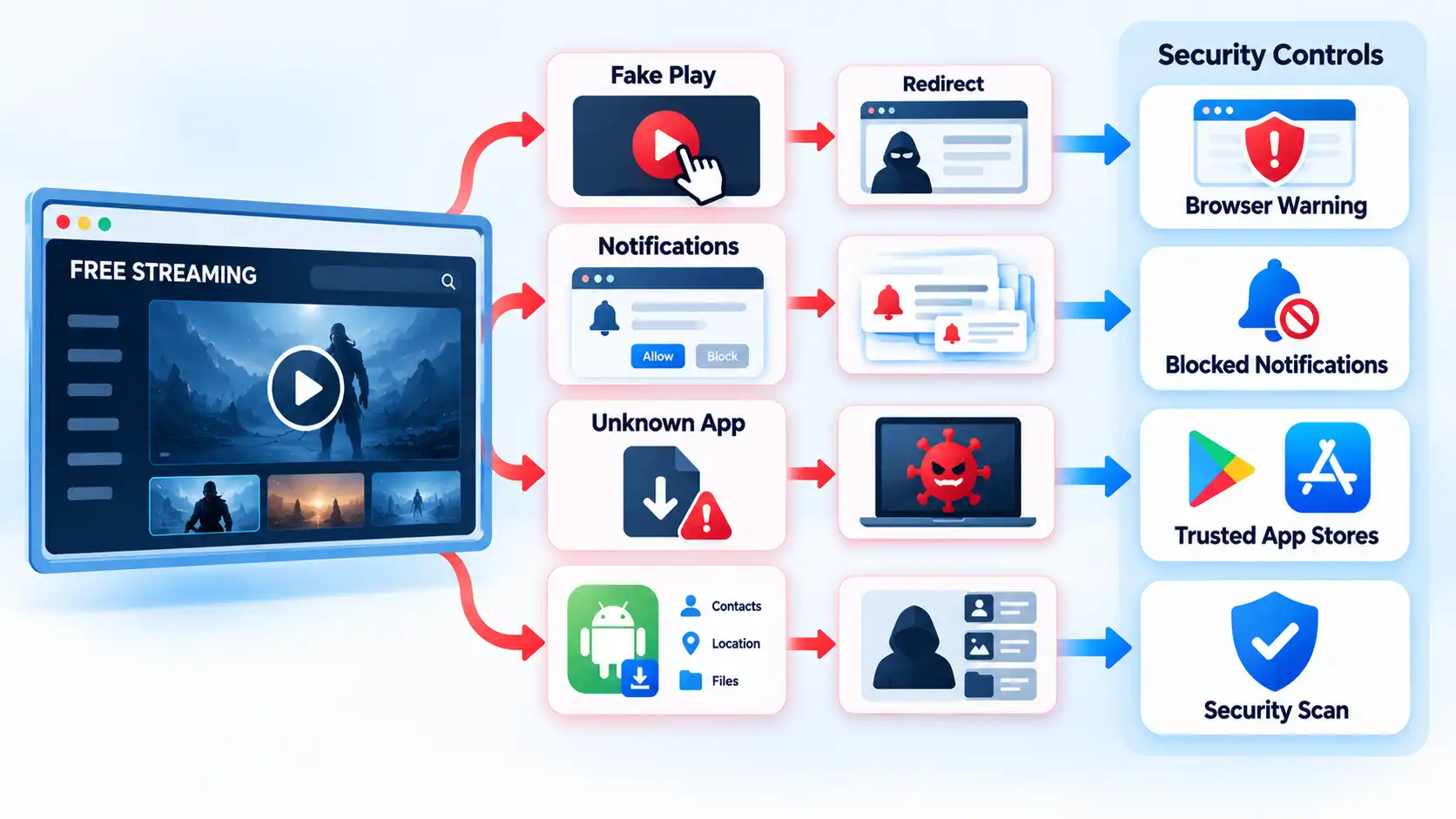
For example, what looks like a large Play button might actually be an advertisement. Clicking it can open another tab. The new page might then claim that your browser is outdated, that a codec is missing, that your device has a virus, or that you must complete an account check before watching. The next interaction may ask for a download, notification permission, password, or card details.
This is an example of social engineering: persuading someone to perform an action that benefits an attacker or scammer. A redirect simply moves the browser from one page to another. Redirects are used legitimately across the web, but an unexpected chain can also move users from a streaming page into phishing, scam, or malicious-download pages.
Malvertising is malicious or deceptive activity delivered through advertising channels. In practice, a user may encounter a fake system warning, a misleading download control, or an advertisement designed to resemble part of the streaming interface. That does not mean every advertisement is malicious. The risk is that deceptive advertising can blur the line between the video player and an unrelated action.
Modern browsers include defenses against some of these paths. Google Chrome’s Safe Browsing warnings can flag phishing, malware, unwanted software, malicious or intrusive advertising, and other unsafe pages. Firefox can warn about deceptive sites and block dangerous downloads. These controls reduce risk, but the absence of a warning does not prove that a page is trustworthy.
Pop-Ups, Redirects, and Fake Play Buttons
A pop-up is a browser window, tab, overlay, or alert that appears in addition to the page you intended to use. Pop-ups are not automatically dangerous. Banks, stores, and other legitimate sites sometimes use them for ordinary functions. The important question is what the pop-up tries to make you do.
Microsoft’s Edge guidance notes that pop-ups can use phishing tactics involving fake warnings, prizes, and free downloads. Google’s unwanted-software guidance lists persistent pop-ups, unfamiliar redirects, fake virus alerts, unwanted extensions, and changed browser settings among signs that unwanted software or malware may be present.
Warning
If a streaming page says your device is infected, demands an urgent browser update, or tells you to install a special player, do not use the button inside that warning. Leave the page and obtain any genuine update from the product’s official website or built-in update mechanism.
Google specifically advises users not to click suspicious update or download pop-ups and instead to obtain software from its official source. A webpage showing an alarming “virus detected” graphic should therefore not be treated as equivalent to a warning from your operating system or installed security software.
A redirect is also different from an infection. If clicking Play sends you to a gambling page, fake store, or unrelated site, the redirect itself does not prove malware was installed. It does show that the original page is generating or allowing unwanted navigation, and continuing to interact creates more opportunities for phishing, deceptive downloads, or permission prompts.
Why Notification Spam Can Continue After You Close the Site
Browser notifications are not ordinary pop-ups. They use a site permission that lets a website send notifications through the browser or operating system after you have left the page.
A suspicious streaming page may display a message such as “Click Allow to continue,” “Allow to prove you are not a robot,” or “Enable notifications to watch.” Granting that permission can result in advertisements, fake security warnings, or other unwanted messages appearing later.
Microsoft’s Edge notification documentation distinguishes website notifications from pop-ups and confirms that website notifications can still appear even after Edge is closed.
The practical check is the source of the message. A notification sent under a website permission is not the same thing as a warning generated by Windows Security, Android, or another installed security product. If a browser notification claims that a virus has been detected, avoid its “clean,” “scan,” or “renew” button and manage the site’s notification permission through the browser instead.
Fake Streaming Apps and APKs Are a Different Risk
Installing software changes the risk model because the app can execute code and ask the operating system for access to device features or personal data. A webpage is constrained by browser and operating-system security controls. An installed app can potentially do more, depending on the permissions it receives and the protections the platform enforces.
On Android, Google recommends obtaining apps from Google Play and warns that apps from unknown sources can put the device and personal information at risk. Google Play Protect checks apps from Google Play and other sources for potentially harmful behavior, can warn about harmful apps, and may disable or remove them. It can also request a code-level evaluation of some previously unscanned apps installed outside Google Play.
This does not mean every APK distributed outside Google Play is malware. Developers and organizations can legitimately distribute software outside the Play Store. The important questions are whether you can verify the publisher and download source, whether the requested permissions make sense for the app’s function, and whether the operating system raises a security warning.
A streaming app available only as a file on an anonymous download page deserves particular caution if it requests sensitive access unrelated to playing media. An entertainment app requesting powerful device privileges without a clear functional reason should prompt investigation rather than automatic approval.
Apple’s alternative app distribution model requires separate treatment. In supported regions, Apple allows qualifying apps to be installed through alternative marketplaces or web distribution. Apple says those apps undergo a baseline Notarisation review intended to check platform integrity and known security threats. Apple also states that alternative distribution does not receive all of the App Store’s broader review and support protections and can involve additional privacy, security, fraud, payment, and support risks. That controlled system is not equivalent to downloading an arbitrary APK from an unidentified file host.
What About Modified Streaming Boxes and “Free TV” Devices?
The risk is not limited to phones and computers. Internet-connected streaming devices can also contain malicious software or insecure modifications.
A residential proxy routes someone else’s internet traffic through a household or business internet connection so that the traffic appears to originate from that connection. In March 2026, the FBI warned that compromised internet-connected devices can be enrolled in residential proxy networks.
The FBI specifically warns about TV streaming devices that claim to provide free sports, television, and movies because compromised devices may contain malware or backdoors. It also advises using official, trusted app stores and warns that sideloading unofficial applications onto streaming sticks or Android TV boxes increases the chance of installing malicious software.
This does not mean every inexpensive Android TV box or third-party streaming device is infected. The higher-risk case is a device or application that has been compromised, maliciously modified, distributed through an untrusted channel, or sold with implausible promises of unrestricted premium programming.
How to Judge a Free Streaming Site Before You Interact
No single visual clue can certify a streaming website as safe. Instead, look at what the site asks you to do. The table below separates ordinary behavior from patterns that deserve more caution.
| Signal | Lower-risk interpretation | Higher-risk pattern or action |
|---|---|---|
| Advertising | Normal ads displayed around or during programming | Fake system warnings, forced redirects, misleading Play buttons, or advertisements designed to look like security tools |
| Account request | Ordinary signup with an identifiable provider | Card details supposedly required only to “verify” that free viewing can begin |
| Downloads | The stream plays in the browser or through an established app | A surprise EXE, APK, browser extension, codec, ZIP archive, or “HD player” is required |
| Notifications | Optional notifications with a clear purpose | The page says you must click Allow to continue, prove you are human, or start the video |
| Browser warning | No browser security warning appears | The browser flags phishing, malware, dangerous downloads, or deceptive content and the page tells you to bypass the warning |
| App source | Established app marketplace or clearly identifiable publisher | Unknown APK, anonymous file-sharing page, unverifiable marketplace, or preloaded modified streaming device |
These are warning signals, not a certification system. A polished site can still be malicious, and a plain-looking website is not automatically unsafe. HTTPS is also only one part of the picture. It encrypts the connection between your browser and the website, but it does not prove that the operator behind the encrypted connection is trustworthy.
What a VPN, Incognito Mode, HTTPS, and Ad Blocking Do Not Fix
Several useful privacy and browser tools are sometimes treated as if they make an untrusted streaming site safe. They do not.
A virtual private network, or VPN, encrypts traffic between your device and the VPN server and usually changes the public Internet Protocol address websites see. That can be useful for privacy on untrusted networks, but it does not inspect every file you download or stop you from giving a password to a phishing page. Understanding what a VPN actually protects helps separate connection privacy from malware and phishing protection.
Private or Incognito mode mainly changes what the browser stores locally after the session. It does not make you anonymous to every website or network, prevent malware installation, or establish that a stream is licensed.
HTTPS encrypts traffic between the browser and the site. A phishing site can also use HTTPS, so the padlock is not proof that the person operating the site is honest.
An ad blocker can reduce exposure to some advertising, overlays, and tracking scripts. It does not certify the underlying service, inspect an unknown APK, undo a granted notification permission, or guarantee that a deceptive download cannot reach you through another route.
If You Already Clicked, Installed Something, or Entered Details
The safest response depends on what actually happened. Clicking one unwanted tab requires a different response from installing software or entering a password on a fake login page.
I clicked a pop-up or was redirected, but I did not download or enter anything
Close the unwanted page and do not interact with fake virus, update, prize, or download prompts. A redirect by itself does not prove that malware was installed. If the browser begins behaving abnormally afterward, such as repeatedly opening tabs, changing its homepage, or redirecting searches, investigate for unwanted software rather than assuming the incident ended with the closed tab.
I clicked Allow and now I keep receiving strange notifications
Revoke notification permission for the site through the browser’s site-permission settings. Do not click notification messages claiming that your antivirus has expired or your device is infected. Website notifications are separate from ordinary pop-ups and can continue after the original page is closed.
I downloaded a file but did not open or install it
Do not run the file. Remove it if you did not intentionally obtain it from a trusted source, and do not disable browser or antivirus warnings to force it to open. Browsers such as Chrome and Firefox can block downloads they consider dangerous or deceptive, so an unexpected warning is a reason to stop rather than an obstacle to bypass.
I installed an unknown Android streaming app or APK
Remove the unfamiliar app, keep Google Play Protect enabled, install available Android and security updates, and review whether other suspicious apps or permissions remain. Google’s Android malware-removal guidance recommends enabling Play Protect, applying security updates, and removing problematic apps. If abnormal behavior continues afterward, treat it as a broader device-security issue rather than repeatedly reinstalling the app.
I installed unknown software on a Windows PC
Use Windows Security to scan the device. Microsoft documents Quick, Full, Custom, and Microsoft Defender Offline scans. Defender Offline restarts the PC and scans outside normal Windows operation, which can make it harder for persistent malware to hide or defend itself. If symptoms continue after reputable scanning and removal, consider qualified technical help rather than repeatedly disabling security controls.
I entered my password on a suspicious page
Go directly to the real service’s official website or app and change the compromised password. If you reused that password elsewhere, change it on those accounts as well and enable two-factor authentication where available. FTC scam-recovery guidance recommends replacing a password given to a scammer, updating reused passwords, and enabling two-factor authentication.
I entered my card or banking information
Contact the card issuer, bank, or payment provider immediately through its official app, website, or the verified number on your card. Review the account for activity you do not recognize and report suspicious transactions promptly. The FTC advises people who made a fraudulent card payment or experienced unauthorized card or bank activity to contact the relevant financial institution immediately and ask about reversing the transaction where applicable.
The Practical Safety Rule
Free streaming and safe streaming are not opposites. The more useful dividing line is whether you can identify the provider and whether the service behaves like ordinary media software instead of trying to push you through security warnings, forced permissions, unexpected downloads, or unverifiable apps.
If the browser starts warning you, a page demands an unknown player, or an app source cannot be verified, leaving is usually safer than trying to make the site trustworthy with more tools. When the goal is simply to avoid another subscription, free legal streaming services provide a cleaner starting point than an unfamiliar download or modified device.

The International Meteor Organization, the nonprofit that coordinates and publishes amateur and professional observations of meteor phenomena, said its infrastructure has suffered a “critical blow” from a cyberattack.
“We recently suffered a cyberattack that dealt a critical blow to aging infrastructure, taking much of our site offline,” a static page on its website on Wednesday said. “We expect several weeks of partial downtime as we transition to new infrastructure and services.”
“I am very sad to see the site down”
In the meantime, the IMO said it’s prioritizing the reporting of fireball observations, which can be reported here. The organization is also providing some information on its Facebook page.
The IMO has helped forge unified standards for reporting meteor observations. Its databases of reported meteor and fireball observations—made up of text, photos, and videos—are also considered essential by many in the field. The IMO also publishes the bimonthly WGN journal, which in English is short for Working Group News. The body was formally founded in 1988.
It’s unclear why an organization that tracks large, fiery space objects hurtling toward Earth would be the target of a damaging cyberattack. It’s equally unclear why someone would want to steal its data (assuming that was the motive), which is mostly public.

9 Greatest Superhero Shows With Fewer Than 40 Episodes

Diddy’s lawyers seek to withdraw as they accuse rapper of failure to pay and causing ‘difficult’ representation

TransCode Therapeutics, Inc. (RNAZ) Discusses Advancing Multi-Platform Oncology Pipeline Targeting Metastatic Cancer Transcript



-

 Fashion5 days ago
Weekend Open Thread – Corporette.com
-

 Business7 days ago
Micron Stock Climbs Above $1,031 as AI Memory Crunch and a $50 Billion Outlook Fuel the Rally
-

 Tech3 days ago
The Latest Weird Thing to Play Doom Is the Mapped-Out Brain of a Fruit Fly
-

 Business7 days ago
AMD Stock Climbs After Management Lifts 2027 Data Center Outlook Toward $70 Billion in AI Sales
-

 Business6 days ago
10 Most-Streamed Songs On Spotify In 2026 So Far, Led By Ella Langley’s Dominant Run On The Charts This Year
-

 Crypto World6 days ago
XAG/USD: Silver’s Short-Term Rally Meets Its Moment of Truth
-

 Crypto World6 days ago
2 Chip Stocks Broke Out This Week. Neither Was Nvidia
-

 Tech6 days ago
Battery life is the only iPhone 18 Pro and iPhone Duo upgrade I care about. Apple didn’t disappoint
-

 Crypto World6 days ago
OKX launches 10x OpenAI, Anthropic X-Perps in Europe
-

 Crypto World6 days ago
Diesel Tops $6 a Gallon for the First Time as 28 States Set Records
-
 Business6 days ago
Western Digital Slips 2.7% as AI Storage Rally Cools After Record Cash and Guidance
-

 News Videos5 days ago
Facing Financial Fears
-

 Entertainment7 days ago
Case Sees Major Update As Jury Deliberations Begin
-

 Business4 days ago
Rivals Sam Altman and Elon Musk Rally Behind Dario Amodei’s Call for a Slowdown in AI Development
-

 Crypto World3 days ago
Elon Musk Drops a Bombshell: Grok 5 Could Be the AGI Breakthrough
-

 Business7 days ago
Five Leading AI Experts Warn Superintelligence Could Kill Humans and Explain Their Case
-
 Crypto World7 days ago
Ethereum price breakout hinges on a close above $2,535
-
Crypto World6 days ago
Ethereum Price Analysis: Consolidation at $2.5K Tests Momentum as On-Chain Activity Surges
-

 Crypto World7 days ago
Ant International joins Visa, Mastercard to build AI agent payment standards
-
 NewsBeat2 days ago
‘Sick conspiracy’: Trump says only guardrails AI needs is ‘a strong and smart (High IQ!) president’ in all-caps rant
You must be logged in to post a comment Login