Connect with us
DAPA Banner
DAPA Coin
DAPA
COIN PAYMENT ASSET
PRIVACY · BLOCKDAG · HOMOMORPHIC ENCRYPTION · RUST
ElGamal Encrypted MINE DAPA
🚫 GENESIS SOLD OUT
DAPAPAY COMING

Tech

What does 25 years in the tech industry look like for this expert?

Published

on

Carol Twomey of Fidelity Investments Ireland explores the quarter of a century that she has spent navigating the evolving technology space.

Carol Twomey, vice-president of software engineering at Fidelity Investments Ireland, joined the organisation 25 years ago, when she was drawn in by the opportunity to travel, work across different locations and develop a strong technical foundation.  

“As a systems associate programmer working in Boston and Rhode Island, I wrote code, solved real problems and learned how large, complex systems operate,” she told SiliconRepublic.com.

“That early exposure gave me a deep appreciation for scale, accountability and the responsibilities that come with building technology in a regulated, customer‑focused environment.”

Advertisement

She added: “Over time, what has kept me here is the variety of meaningful work and the quality of the people I work alongside, and a culture that actively supports growth and inclusion. It also feels especially meaningful to reflect on that journey in a year when Fidelity Ireland is celebrating its 30-year milestone, a reminder of the lasting presence, growth and impact the organisation has built here over three decades.” 

What factors have shaped you into the technology leader you are today? 

Looking back, a defining turning point in my career was recognising that growth doesn’t always come from moving straight up, but from being willing to move sideways. I made a conscious decision to pursue lateral opportunities across roles and businesses to broaden my experience, deepen my understanding and build a stronger foundation for future leadership. Along the way, I also came to appreciate the lasting importance of relationships, investing in genuine connections across teams, functions and levels, which proved invaluable as those relationships resurfaced years later, providing trusted perspectives when it mattered most. Together, these experiences paid dividends in perspective, confidence and capability as I progressed into more senior roles.

Over 25 years, my journey has shaped how I view leadership today. As my responsibilities grew, I came to understand that my greatest impact lies not in individual achievement, but in developing and advancing others. Creating opportunities for others to stretch, supporting their growth and building strong, inclusive teams has become central to how I lead. Giving people the platform to thrive is extremely important to me.

How has the technology landscape within financial services changed over the course of your career?

Over the course of my career, I’ve seen the technology landscape shift a lot, from on-premise systems to cloud-first architectures underpinned by automation and continuous delivery. Everyone is now talking about AI and how that may change how we build, operate, and think about technology and our customer experience. What hasn’t changed is the need to operate in a highly regulated environment. The defining challenge today is balancing rapid innovation with resilience, security and trust. That intersection, where technology, regulation and customer expectations meet, has become both the greatest complexity and the greatest opportunity for financial services.

Advertisement
You lead the Fidelity Ireland Innovation Council – how do you build a culture where engineers feel empowered to bring new ideas, rather than just execute on what’s handed down? 

I’m fortunate to work with a great, cross‑functional group drawn from both technology and operations across Fidelity Ireland. The Innovation Council is driven by people who are passionate about connecting others and creating space for innovation to emerge organically. Our focus is on bringing associates across our Dublin and Galway sites together, sharing stories, generating and surfacing ideas, developing an innovative mindset and encouraging connections that might not naturally happen day to day. We create avenues where curiosity is welcomed and experimentation is encouraged, so ideas can be explored, refined and learned from collectively.

Engineers are close to the work and often have great insight into meaningful opportunities for innovation. That’s why we actively encourage everyone to bring their ideas forward. By fostering a culture of openness, shared learning, and collaboration, innovative solutions become something that’s collectively created, shared and reused across the organisation, rather than something that’s simply handed down.

As co-lead of the Workplace Investing Women’s Technical Circle, how do you think the industry can better support women in engineering? 

I think it comes down to three things: opportunity, sponsorship and peer advocacy, and accountability.

While progress has been made, women remain underrepresented in technology roles in Ireland, with fewer than 25pc of ICT professionals being women. Closing this gap is critical to building a workforce that reflects the diversity of the customers and communities we serve and fully harnesses the talent that exists across Ireland.

Advertisement

Despite positive momentum, it’s clear that more work remains to support women in entering and building long‑term engineering careers, from entry level through to senior leadership. Inclusion must translate into consistent access to opportunity. That begins with everyday leadership behaviours – recognising potential early, creating space for learning, and ensuring women have access to challenging technical work, visible responsibilities and decision‑making forums. These opportunities are essential for building confidence, credibility and momentum over time.

Opportunity is most powerful when paired with active sponsorship and strong peer advocacy. Having benefited from sponsorship myself, I pay it forward by advocating for women in decision‑making forums, opening doors to growth opportunities and backing people as they step into bigger challenges. This support should not sit solely with senior leaders; strong peer leadership communities matter just as much. When leaders actively support, challenge and advocate for one another, progress is compounded. I am fortunate to work alongside a great peer group where that mutual investment is tangible and sustained; we openly share perspective, advocate for one another’s teams and hold each other to a high standard.

Ultimately, supporting women in engineering requires deliberate and shared accountability. That means being intentional about who gets opportunities, providing meaningful coaching and having people’s backs as they grow into new roles. When accountability is built into how we lead, women are far more likely to stay, progress, lead and thrive. That’s also why initiatives like Fidelity Women in Technology and the WI Women’s Technical Circle matter; they help create community, visibility, advocacy and practical support for women at different stages of their careers.

For someone considering a career in engineering or technology today, what advice do you have?

Capability and impact grow through experience, not perfection. My advice is to seek experience across different areas of your business to broaden your perspective and deepen your overall understanding. Focus on learning deeply and staying curious. Engineering is a field where learning never stops, so the ability to think critically, ask good questions, and apply human‑centred thinking and empathy really matters. Build strong relationships and invest in your network. Be willing to step into unfamiliar territory – you don’t need to have all the answers to contribute meaningfully and grow. 

Advertisement

Over the past 25 years, I’ve learned that lasting success in technology comes from leading with people, purpose and craft, pairing strong technical and business expertise with authentic leadership, everyday kindness and a genuine commitment to bringing others along.

Don’t miss out on the knowledge you need to succeed. Sign up for the Daily Brief, Silicon Republic’s digest of need-to-know sci-tech news.

Source link

Advertisement
Continue Reading
Click to comment

You must be logged in to post a comment Login

Leave a Reply

Tech

Ford Rehires ‘Gray Beard’ Engineers After AI Falls Short

Published

on

Ford executives said they’ve hired 350 veteran engineers — some of them former employees — after AI and automated systems failed to deliver the desired quality, reports TechCrunch:

Bloomberg reports the company’s chief operating officer Kumar Galhotra told journalists that Ford had been “relying more and more on automated quality systems” with disappointing results. So the company “brought back technical specialists,” and those specialists “hunt for failure points before a part ever reaches the plant floor.”

Charles Poon, Ford’s vice president of vehicle hardware engineering, added, “Mistakenly we thought that by just introducing artificial intelligence and ingesting the design requirements that we had, that that would produce a high-quality product.”

The article points out that Ford is using the rehired gray beard engineers to train younger staff — and, to reprogram its AI tools.

Advertisement

Source link

Continue Reading

Tech

GTA 6 Weapons Guide: All Guns and Weapons Revealed

Published

on

Rockstar Games has confirmed several new combat features for GTA 6, making the game’s weapon system more detailed than ever before. Official trailers and promotional material have already revealed more than 30 weapons across different categories, including pistols, assault rifles, shotguns, sniper rifles, launchers, melee weapons, and throwables. This guide covers all the GTA 6 weapons revealed so far and highlights the new gameplay features that make combat more immersive.

GTA 6 Handguns List

GTA 6 handgun Weapons
Image Credit: Rockstar Games

Handguns play an important role in GTA 6, offering a balance of speed, accuracy, and convenience. Rockstar has already showcased multiple sidearms through official trailers and screenshots, including both pistols and revolvers. Here’s a complete list of the confirmed handguns in GTA 6.

Handgun Real-World Inspiration Notable Customization
Girardi ES9 Beretta 92FS Extended magazine, suppressor, flashlight, weapon tints
Heavy Pistol M1911 platform Barrel upgrades, custom grips, weapon skins
Klose K17 Glock series Suppressor, extended magazine, optic sight
Hawk and Little Morgan Revolver Classic revolver Ultimate Edition exclusive bonus
Mustang .357 Revolver Colt Python Custom barrel finish, custom grip
Nipper .38 Revolver Compact revolver Paint finishes
Standard Pistol Taurus PT92 / Beretta 92 series Supports various weapon attachments

GTA 6 Shotguns List

GTA 6 includes powerful shotguns for close-quarters combat. These weapons are useful during indoor fights and high-action missions. Rockstar has already showcased two shotguns in official trailers and screenshots. Below are the confirmed shotgun weapons in GTA 6.

Shotgun Real-World Inspiration Notable Customization
Double-Barreled Shotgun Classic double-barreled shotgun Wood finish, engraved receiver
Pump Action Shotgun Pump-action shotgun Extended tube magazine, flashlight, stock upgrades

GTA 6 Assault Rifles List

Assault rifles

Assault rifles are among the most versatile weapons in GTA 6. They perform well in both close- and long-range combat. Rockstar has confirmed several rifles through trailers and screenshots. Here’s every confirmed assault rifle in the game.

Assault Rifle Real-World Inspiration Notable Customization
Assault Rifle (AK-47) AK-pattern rifle Suppressor, extended magazine, drum magazine, custom finishes
Carbine Rifle AR-15 / HK416 Optics, foregrips, stocks, suppressor
Carbine Rifle Mk II AR-15 variant Heavy barrel, scopes
Service Carbine M16A1 / M16A2 Tactical attachments

GTA 6 Machine Guns and SMG List

GTA 6 includes several SMGs and machine guns for intense firefights. These weapons are useful during missions, chases, and vehicle combat. Rockstar has already showcased multiple models in official trailers and screenshots. Below are all the confirmed weapons.

SMG / Machine Gun Real-World Inspiration Notable Customization
Heckler & Koch SMG (MP5) HK MP5 Scope, suppressor, foregrip
Compact SMG Scorpion Mini SMG Suppressor, extended magazine
Micro SMG Mini Uzi Drum magazine, weapon skins
Combat MG (Heavy MG) M249 SAW Box magazine, optics, barrel upgrades

GTA 6 Sniper Rifles List

Sniper Rifles

Players who prefer long-range combat will find several sniper rifles in GTA 6. These weapons are designed for precision and serious damage. Official gameplay footage has showcased multiple sniper rifle models. Here’s every confirmed sniper rifle revealed so far.

Sniper Rifle Real-World Inspiration Notable Customization
Bolt Action Sniper Remington 700 Heavy barrel, bipod, camouflage skins
Assault Sniper (L129A1) L129A1 Variable zoom scope, suppressor
Ruger-inspired Rifle Ruger 10/22 Lightweight attachments

GTA 6 Launchers List

Launchers deliver the most serious explosive damage in GTA 6. They are the best choice for destroying vehicles and heavily armored targets. Players can also use them during large-scale combat. Below are all the confirmed launchers in GTA 6.

Advertisement
Launcher Real-World Inspiration Notable Customization
Grenade Launcher Milkor MGL Alternative ammunition types
RPG (Rocket Launcher) RPG-7 Cosmetic finishes

GTA 6 Throwable Weapons List

Not every combat situation requires a gun in GTA 6. Throwables give players another way to attack enemies or create an opening. Each weapon has its own strengths and uses. Below are all the confirmed throwable weapons in GTA 6.

Thrown Weapon Primary Use
Fire Bottle Fire damage
Flashbang Crowd control
Golf Ball Improvised weapon
Grenade Explosive damage
Molotov Area denial
Smoke Grenade Smoke cover
Speargun Underwater combat

GTA 6 Melee Weapons List

GTA 6 Melee

Melee weapons remain an important part of combat in GTA 6. They offer a quiet and reliable way to deal with nearby enemies. Different weapons suit different combat styles. Here’s every confirmed melee weapon revealed so far.

  • Baseball Bat
  • Crowbar
  • Golf Club
  • Hammer
  • Knife
  • Pool Cue
  • Fists (Unarmed)

GTA 6 Equipment and Utility Item List

GTA 6 includes more than just guns and melee weapons. Players can use different equipment to complete missions in creative ways. These items add more flexibility to gameplay. Here’s the complete list of confirmed equipment.

  • Auto Dialer
  • Backpack
  • Binoculars
  • Body Armor
  • Cigarettes
  • Cut-off Tool
  • Flashlight
  • Food & Drinks
  • Immobilizer Bypass
  • Lock Pick
  • Loot Bag / Duffel Bag
  • Painkillers
  • Slim Jim
  • Soda
  • Taser
  • Torch Flashlight
  • Tracker Jammer
  • Trauma Kit
  • USB Drive
  • Wine
  • Zipties

Source link

Continue Reading

Tech

Samsung, SK hynix & Micron face lawsuit over DRAM prices

Published

on

Apple’s largest memory suppliers are being sued in California, with consumers and small businesses alleging Samsung Electronics, SK hynix and Micron coordinated DRAM production cuts that drove up memory prices.

Apple isn’t accused of wrongdoing in the lawsuit. Samsung, SK hynix and Micron supply memory used across Apple’s hardware lineup, putting the dispute much closer to customers than it might first appear.

The company has already raised prices on several Mac, iPad and other products after saying higher RAM and storage costs had become too expensive to absorb. Court filings argue coordinated DRAM production cuts contributed to those higher costs, though the plaintiffs still have to prove that claim.

Court filings argue the shift reduced supplies of mainstream DRAM, including DDR3 and DDR4, and drove prices higher across the market. The allegations haven’t been proven, and Micron denied the claims and said it will defend itself, according to Investor’s Business Daily.

Advertisement

The lawsuit targets the AI memory shift

The complaint centers on DRAM, the working memory used in computers, smartphones, tablets, servers and many other electronic devices. Samsung, SK hynix and Micron dominate the global DRAM market, giving them enormous influence over memory supply.

Counterpoint Research said Samsung held a 38% share of global DRAM revenue during the first quarter of 2026, followed by SK hynix at 29% and Micron at 22%. Plaintiffs argue that concentration is central to the lawsuit because a competitive commodity market would normally encourage at least one supplier to expand production as prices rise.

Instead, the complaint alleges Samsung, SK hynix and Micron shifted manufacturing capacity toward HBM, which commands much higher prices from AI companies. Companies are free to pursue more profitable products, and that business decision isn’t illegal by itself.

The lawsuit ultimately turns on whether Samsung, SK hynix and Micron coordinated those production decisions or reached the same conclusion independently. Antitrust law prohibits agreements among competitors, not similar business decisions driven by the same economic incentives.

Advertisement

Why Apple customers should care

Apple has spent months navigating the same memory market pressures described in the lawsuit. Industry analysts have widely attributed rising RAM and storage prices to AI demand, and the company cited higher component costs when it raised prices on some hardware.

Two tablet computers on a wooden table, each with attached keyboard, displaying photo editing software showing a hand holding a smartphone with a blurred backgroundIndustry analysts have widely attributed rising RAM and storage prices to AI demand

Plaintiffs argue coordinated supply restrictions offer a competing explanation for those higher memory costs. The companies maintain they independently responded to the same market conditions.

Court-ordered discovery could become the most important stage of the case if the lawsuit survives early legal challenges. Emails, production plans and other internal records could show whether Samsung, SK hynix and Micron coordinated production decisions or acted independently.

The DRAM industry has faced price-fixing cases before

The lawsuit arrives against the backdrop of earlier DRAM antitrust cases. Samsung and Hynix pleaded guilty in the 2000s to participating in a DRAM price-fixing conspiracy investigated by the U.S. Department of Justice.

Samsung agreed to pay a $300 million criminal fine in 2005, and Hynix agreed to pay a $185 million criminal fine that same year. Several executives also received prison sentences for participating in that conspiracy.

Advertisement

The earlier convictions don’t establish that Samsung, SK hynix or Micron violated antitrust law in this case. The earlier cases do show the DRAM industry has faced similar allegations before, adding context as the current lawsuit moves through the courts.

Source link

Advertisement
Continue Reading

Tech

SCOTUS rules location data is protected by Fourth Amendment

Published

on

A new Supreme Court ruling will require police to have probable cause before using sweeping geofence warrants that rely on people’s personal location data to find criminals.

Police subpoena Apple, Google, and other tech companies for precious user location data using so-called “geofence warrants,” which can serve as a dragnet to catch a single criminal while implicating many others. The Supreme Court says this method is no longer an option without probable cause.

According to SCOTUSblog, breaking down the ruling, a geofence warrant meets the criteria of a “search” as defined by the Fourth Amendment. Simply put, this means that anyone included in a warrant must be there with a reason.

In short, dragnet-style searches with no suspects identified by other evidence will no longer be an option except in very specific circumstances.

Advertisement

That isn’t to say user location data is off-limits for law enforcement. A subpoena to Apple or Google with an individual’s identity that is reasonably suspected of a crime with evidence gathered from other sources remains legal and viable.

There’s also the option of using geofence warrants when tracking a group of criminals or trying to find associates of a known criminal. Of course, warrants will need to be provided on a case-by-case basis.

Previously, law enforcement would simply ask for the location data of everyone that was within an area for a select period of time even when a suspect wasn’t known. If you happened to be passing by, you could be implicated for no reason other than being there with a smartphone.

The Supreme Court has ruled 6-3 that this violates the Fourth Amendment.

Advertisement

Justice Elena Kagan wrote that “an individual has a reasonable expectation of privacy in records about his cell phone’s location, and police intrude on that constitutionally protected interest when they demand the information — even though for only a limited time, and from a third-party tech company.” In other words, suspects will have to be identified using other means.

According to Harvard Law Review, Google was served with more than 11,500 warrants across 2020 for sweeping geofence searches. With this ruling, that number will now be zero without cause for every individual affected by the search.

Robbing a bank with a smartphone

The reason the Supreme Court shared this ruling today is due to a case from 2019 involving a bank robbery. A man escaped with nearly $200,000 and the police had zero suspects. The “zero suspects” bit is key to the ruling.

A geofence warrant was sent to Google, and the company provided 19 accounts that were within 150 meters of the bank robbery spanning that hour. Law enforcement narrowed it down to 9 accounts and requested location information for 2 hours surrounding the robbery.

Advertisement

The results were narrowed to three individuals — one was a man named Okello Chatrie. The location data led police to a residence with nearly $100,000, a gun, and demand notes.

The individual was arrested and pled guilty. However, Chatrie still argued that his Fourth Amendment rights were violated. After two escalating appeals on opposite sides of the issue, the case was pushed up to the Supreme Court.

With Monday’s ruling, Chatrie’s case isn’t over. It is being passed back down to the Circuit Court to determine if the police had reason to access the location data.

Regardless of that outcome, know that your location data is protected by a constitutional right. Police will need more than “wrong place, wrong time” tactics to find suspects in the future.

Advertisement

Source link

Continue Reading

Tech

Apple’s $502M payment to Optis in question again

Published

on

Apple is contesting a ruling that would force it to pay Optis $502 million for LTE patent infringement, but the UK Supreme Court has yet to reach a verdict.

The legal battle between Apple and Optis goes back to February 2019, and there’s still no end in sight all these years later. Apple was accused of infringing upon Optis’ LTE patents, which ultimately led to lawsuits in both the United Kingdom and the United States.

The latter case resulted in Apple’s victory, as it avoided paying Optis $300M in damages in February 2026. The outcome of the UK lawsuit, however, isn’t quite as clear-cut.

As spotted by 9to5mac and reported by The Financial Times, Apple now wants the UK Supreme Court to overturn a 2023 Court of Appeal ruling that would force it to pay Optis $502 million.

Advertisement

Initially, Apple was only supposed to pay $56 million, as decided by the High Court in London. Later, the Court of Appeal increased that amount to $502 million by using Optis’ deal with Google as a baseline and adding royalties dating back to 2013.

Apple, however, claims the increase was “arbitrary” and that the Court of Appeal “erred in law.” The outcome of the UK lawsuit remains to be seen, but the case could drag on for years to come.

Apple vs. Optis: The progression of the UK lawsuit

Back in 2020, the UK Supreme Court ruled that UK courts can set the payment rate for patents worldwide, even though the court can only consider the infringement of UK patents. This was good news for Optis, as it was free to seek more damages from Apple.

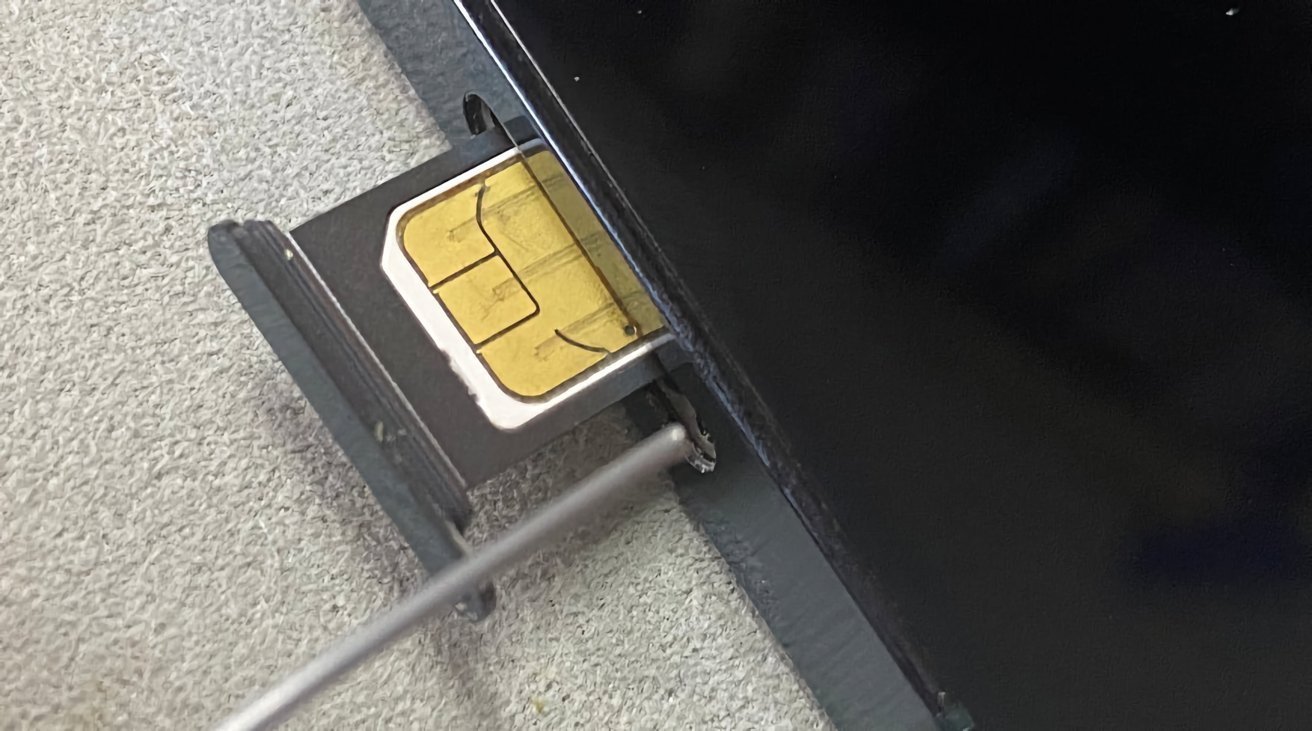
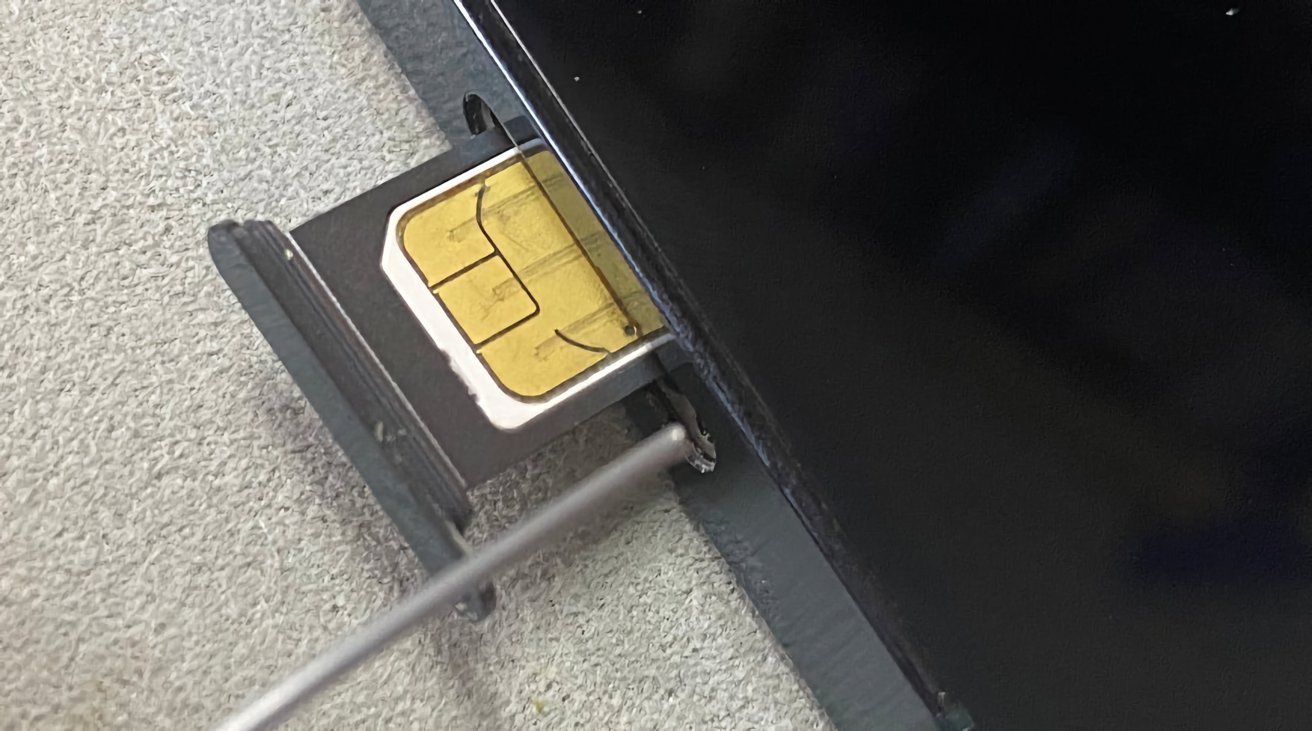
Close-up of a smartphone with a SIM card tray partially ejected, showing the gold contacts of the SIM card as a small metal tool pushes the tray out

Optis claims that Apple violated its patents on LTE technology.

Advertisement

In July 2021, Optis wanted to force Apple into paying $7 billion in damages, along with a global royalty rate. Apple called the fee “commercially unacceptable” and threatened to leave the UK market if it was forced to pay such a high amount.

Later, in March 2022, the London High Court declared that Apple infringed two 4G patents held by Optis, which it described as “standard essential patents.”

Apple tried to argue that none of the patents were essential, and said it hadn’t committed any infringement. Still, its appeal was ultimately denied in July 2023.

Instead of the $7B sought by Optis, the London High Court said Apple had to pay only $56.43 million. However, Optis filed an appeal, which was ultimately successful. A $502 million fine was imposed by the UK Court of Appeal in May 2025.

Advertisement

This amount represents a lump sum covering 2013 to 2027, and was supposed to serve as a global license to use Optis LTE patents in the iPhone, Apple Watch, and other devices.

“[We are] pleased the UK Court of Appeal has recognized and corrected a clearly flawed prior ruling,” an Optis spokesperson told AppleInsider at the time, “and has made meaningful progress toward affirming the true value of our patents to Apple devices.”

Now, however, it’s up to the UK Supreme Court to decide just how much Apple will have to pay.

Advertisement

Source link

Continue Reading

Tech

The AI jobs debate just got messier

Published

on

AI-related job loss fears grow each time another company announces a round of layoffs. Through May of 2026, companies announced that close to 90,000 job cuts were tied to AI, and, by some accounts, up to 15% of U.S. jobs are projected to be eliminated by AI over the next five years. Promises from the tech industry that AI will also create new jobs does little to ease fears, especially for the generation wondering if anyone will be hiring when they graduate. 

A recent report from Ramp and Revelio Labs, which track enterprise AI spend and workforce records from nearly 22,000 companies, respectively, complicates that gloomy narrative. 

The report found that companies spending heavily on AI are growing headcount faster, even in the entry-level roles that many fear are doomed. According to the report, “high-intensity adopters” — firms that spend on average $30 per employee per month on AI in the first three months — saw headcount increase 10.2%.

Headcount also rose across functions, including engineering, sales, administration, customer service, finance, marketing, and scientist roles. The strongest job growth among high-intensity adopters was in the information sector, which includes software, internet, media, and tech-adjacent firms. 

Advertisement

Despite these positive signals, the data isn’t as rosy as it seems. It skews heavily towards tech-forward, knowledge-work firms — ones that might have VC-backing and are growing fast anyway, making it difficult to say whether AI is contributing to the hiring or just showing up at companies that are expanding anyway.

“This paper does not show that AI universally creates jobs,” the paper’s authors admit, “but it does counter claims that AI will lead to broad job losses.”

It also counters claims that AI is killing all junior jobs. Recent research from Goldman Sachs found that AI has already erased about 16,000 net jobs per month over the past year, with Gen Z and entry level workers taking the brunt of the burden. But in tech-forward firms, the report finds that entry-level headcount actually rose by 12%.

So what can we take away from this? Perhaps that AI isn’t always a tool for labor substitution, but that it can be a tool for firm-expansion instead. 

Advertisement

“For software and technology firms, AI can make core output cheaper or faster to produce: writing code, debugging, building internal tools, producing technical documentation, and supporting product development,” the report reads. “Lower production costs in these workflows can raise the return to expanding the whole firm, not just the engineering team.”

But companies that buy subscriptions and run pilots, yet did not go on to make sustained investments, don’t tend to see any gains in headcount, per the report. 

That sets up the potential for a widening gap between firms that have the resources — like capital, technical staff, founder networks, and management bandwidth — to turn AI adoption into actual business gains and those that are stuck experimenting with subscriptions. In other words, this report suggests that firms that already have the resources are the ones who will see the largest gains. 

The paper’s authors speculate such a divide may continue to grow, saying: “Firms without those channels may fall behind.”

Advertisement

When you purchase through links in our articles, we may earn a small commission. This doesn’t affect our editorial independence.

Source link

Continue Reading

Tech

US Agency Cancels Contract For Warrantless Tracking of Mobile Devices

Published

on

America’s Bureau of Alcohol, Tobacco, Firearms and Explosives has “canceled its contract for a surveillance tool that enables warrantless tracking of mobile devices,” reports the Associated Press.

They note the move comes “after lawmakers, a prosecutor and a judge raised concerns about the legality of the tool in criminal investigations.”

ATF, the federal agency responsible for enforcing the nation’s gun laws, told The Associated Press that it discontinued what it called a “pilot” program using a tool called Webloc after Rep. Michael Cloud, a Republican from Texas, and Sen. Ron Wyden, a Democrat from Oregon, expressed reservations about the agency’s use of bulk commercial location data. Webloc, which is made by a vendor called Penlink, sources data from consumer apps and advertising networks, which collect the location of mobile devices from consumers who download apps or browse the web…

The U.S. Supreme Court ruled in 2018 that police needed a warrant to obtain historic movement data from cellphone companies on a criminal suspect. But it has never addressed the growing practice of commercially acquired data.

Advertisement

Other users of Webloc include the U.S. military and U.S. Immigration and Customs Enforcement but also local law enforcement agencies such as police in places like Elk Grove, Calif. and Durham, N.C. The technology has also expanded around the world, with the national police in El Salvador and Hungarian intelligence agencies as customers, according to a report from earlier this year from Citizen Lab, a group of researchers at the University of Toronto who investigate digital threats to civil society.

The article notes that other U.S. law enforcement agencies continue to buy commercial geolocation data, “including the FBI and the Department of Homeland Security.”

Source link

Continue Reading

Tech

South Korea Plans To Train Entire Military As ‘Drone Warriors’

Published

on

“South Korea plans to train every single member of its nearly half-million-strong military to operate drones as easily as they handle personal firearms,” reports Ars Technica:


The goal is to make drones a “universal combat tool” for all troops by training them to use drones like a “second personal weapon,” said Ahn Gyu-back, South Korea’s Minister of National Defense, in a June 26 briefing reported by Reuters and other media outlets. The announcement coincides with broader plans to equip individual military units with more cheap and expendable drones for surveillance and strike missions, along with deploying more counter-drone lasers and microwave weapons.

Meanwhile, South Korea’s former drone operations command headquarters that used to have direct command authority over combat units will be reorganized to focus on collaborating with South Korean industry on developing and procuring commercial drone technology, according to The Korea Times. The South Korean defense minister specifically cited the conflicts in Ukraine and the Middle East as inspiring such military reforms with a focus on drone technologies… Ukraine’s use of drones and military robots as a force multiplier to offset its numerical disadvantage on the battlefield versus Russia’s larger military may carry special resonance for South Korea, given that the South Korean military’s current active-duty strength of 450,000 personnel faces a numerical disadvantage against North Korea’s active-duty military consisting of more than 1.2 million soldiers…

The defense ministry is starting out by providing 11,000 “training drones” to military personnel this year, with the goal of eventually deploying 60,000 drones across the military by 2029. An additional complication comes from the South Korean military looking to procure drones with 100 percent domestically produced components and no Chinese components due to security concerns, according to the defense minister’s comments reported by Reuters… South Korean companies are building new military attack drones, but the defense ministry may struggle to find enough commercial drones made without Chinese components to train hundreds of thousands of military conscripts, said Min-Cheol Jung, a cofounder of the Team Retriever counter-drone red team based in South Korea, in a War on the Rocks article.

Advertisement

Source link

Continue Reading

Tech

NFP Restores All The Content From Climate.gov That Trump Attempted To Disappear

Published

on

from the nice-try-fascist dept

It’s no secret that Donald Trump has been waging an Orwellian war on knowledge and information for most of his second term thus far. While purging history of American racism, slavery, and anything else that makes us look less than perfect has been the primary focus in this war, so too has Trump attempted to simply disappear data and information around climate change from the public view. This attempt to make us all more ignorant about the harms and potential negative outcomes from climate change is, of course, completely insane and self-destructive. But if you’re an octogenarian suffering from a textbook case of narcissistic personality disorder, what happens years after you’re going to be worm-food probably doesn’t concern you all that much.

Most recently, the Trump administration shut down climate.gov, a website that contained a wealth of information and research generated by government researchers and third-party scientists that worked at the request of government. Decades and decades of content and data, wiped away with the wave of a bruised hand by Trump.

Over decades, researchers in the US government and programs it sponsored built up a tremendous number of climate resources, from comprehensive analyses to massive datasets to basic explainers meant to inform the public. And people within the government built the climate.gov website to make it all accessible. But if you try to navigate there today, you get redirected to the climate page of the National Oceanic and Atmospheric Administration, and are greeted with the following message:

In compliance with Executive Order 14303 (“Restoring Gold Standard Science”), the White House Office of Science and Technology Policy’s June 23, 2025 Memorandum (“Agency Guidance for Implementing Gold Standard Science in the Conduct & Management of Scientific Activities”), 15 USC § 2904 (“National Climate Program”), 15 USC § 2934 (“National Global Change Research Plan”), and 33 USC § 893a (“NOAA Ocean and Atmospheric Science Education Programs”), you have been redirected to NOAA.gov. Future research products previously housed under Climate.gov will be available at NOAA.gov/climate and its affiliate websites.

This is, of course, nonsense. Or, to borrow a phrase, a litany of inconvenient truths that gave Trump indigestion and therefore had to be done away with. This was a repository of knowledge. It was a public good, making information on climate science available to anyone who sought it out. It didn’t cost a bunch of money. It contained work done by real scientists doing real science.

And, poof, it was gone.

Advertisement

Except many of the people who worked to build and maintain the site seem to have anticipated that this might happen. I don’t know how else to explain how they managed to not only maintain the full library of the site, but also spun up their own non-profit organization to host and maintain a nearly identical site on their own. And because this is material the government can’t copyright, it appears there is fuck-all the Trump administration can do about it.

While the government didn’t hesitate to delete inconvenient climate information, dedicated volunteers outside the government managed to preserve copies of much of the material, which the federal government is prohibited from copyrighting. The volunteers and former climate.gov admins got together and launched climate.us. On Tuesday, the team announced that it had completed the project to restore everything lost when climate.gov shut down.

The website features Climate.gov’s 15-year collection of climate news and stories, expert blogs, visual status reports on key climate indicators, maps and data pathways, climate literacy resources, classroom materials, and restored access to the Fifth National Climate Assessment.

If our own government is going to attempt to make us more stupid by trying to hide information, this is all of our jobs now. It may be a shame that it is the work of citizens to restore what our government is attempting to steal from us, but it is also a necessity. This is how you fight back against an authoritarian. It takes work. It takes effort. And it takes some money.

But this knowledge isn’t Trump’s property to erase. It belongs to all of us.

Filed Under: climate change, climate.gov, data, donald trump, transparency

Advertisement

Source link

Continue Reading

Tech

How to use Tailscale to remotely connect to your Mac

Published

on

If you need to securely connect to your Mac desktop at home while on the move, Tailscale may be the answer. Here’s how to get started.

One of the main benefits of having a gigabit-class Internet connection is being able to connect to your home devices from outside the home. If you need a file from a home fileserver, you have tons of bandwidth so you know you can get it remotely, quickly.

However, while having the bandwidth is good, establishing the connection in the first place can be a problem.

In the old days, that used to simply mean setting up port forwarding on your router and connecting to a specific IP, or an address if you had set up a dynamic DNS service beforehand.

Advertisement

But with the rising use of Carrier-Grade NAT (CGNAT), this won’t work anymore. If you’re using an app like Jellyfin that lets you stream media outside the home, CGNAT will screw that up completely without something managing your connection.

Then there are the problems associated with firewall configuration, and many other small security and privacy-related things to consider. It quickly becomes a mountain of issues to mitigate.

What you ideally need is a way to connect your devices together that also handles most of the issues for you. Tailscale is one good answer.

What is Tailscale?

Tailscale describes itself as a “Zero Trust identity-based connectivity platform” that can replace a VPN, SASE, and PAM. That’s a lot of buzzwords in a sentence, but it is primarily pitched as an enterprise tool, not really a consumer app.

Advertisement
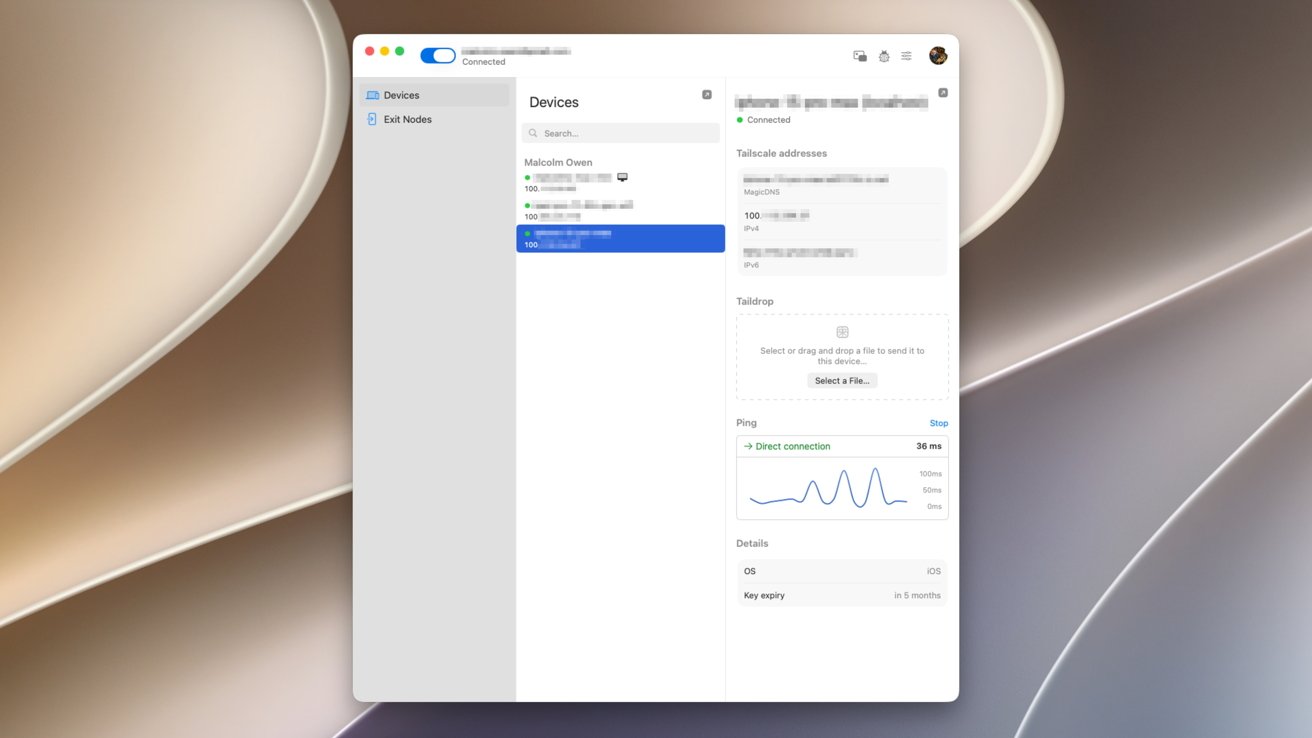
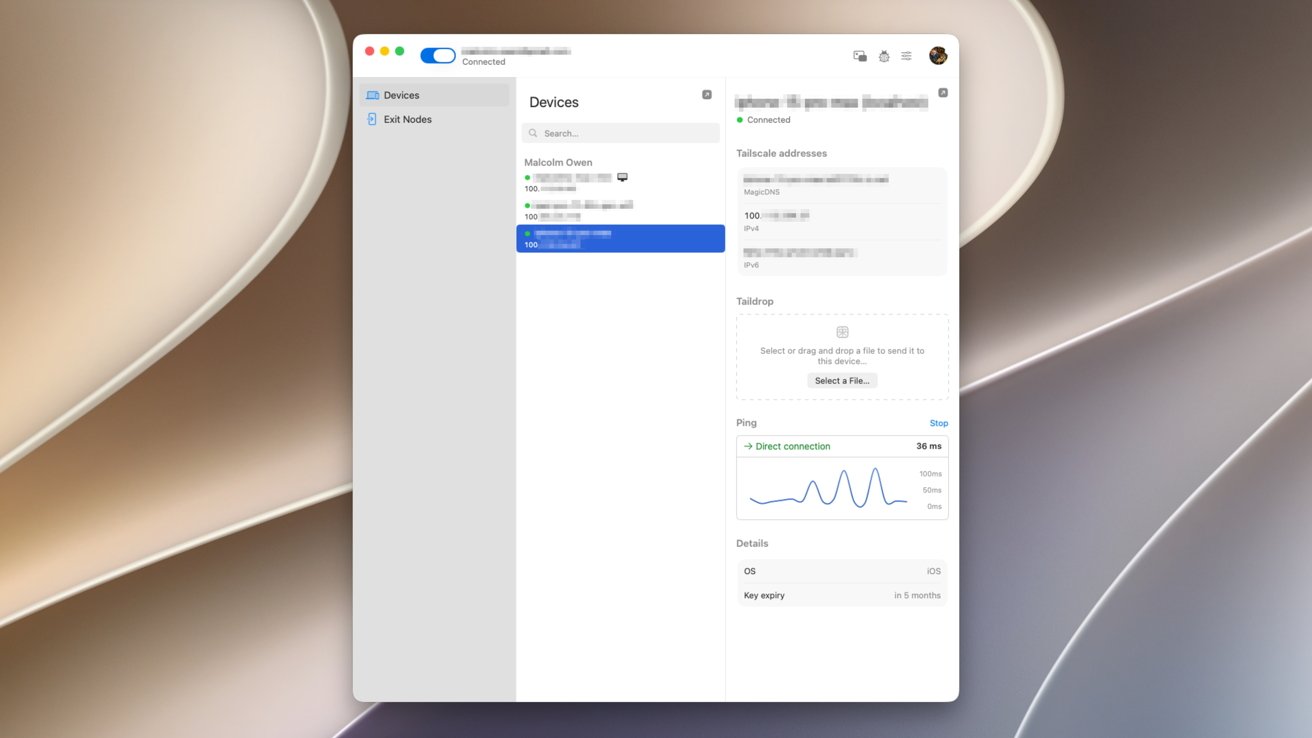
Computer screen showing a device management window with a selected iPhone 13 Pro Max, displaying storage details, backup options, and usage graph on a blurred abstract beige and gray background

An example of a three-device setup in Tailscale’s macOS client.

It is a way to create a private mesh network between your devices, or more simply, so your devices can communicate directly with each other. Once set up, your iPhone could connect to your Mac over a cellular connection, or to a computer in a completely different country, all treated as if it’s on the same “local” network.

These connections are peer-to-peer and encrypted, protecting your privacy and your data in transit. As it’s an encrypted mesh network, the communications are also peer-to-peer, as direct as possible between your devices, without using an intermediary host server.

You’re not using a VPN server itself. Instead, it’s a direct connection between computers.

Advertisement

What can you do with Tailscale?

The whole point of Tailscale is to establish a network that’s somewhat similar to your home or office network between devices. Even if they’re not on the same physical network.

Tailscale refers to this as a Tailnet.

At a bare minimum, that means you can connect to a server while remote to access files, or to upload them. This is a fairly useful service for home users.

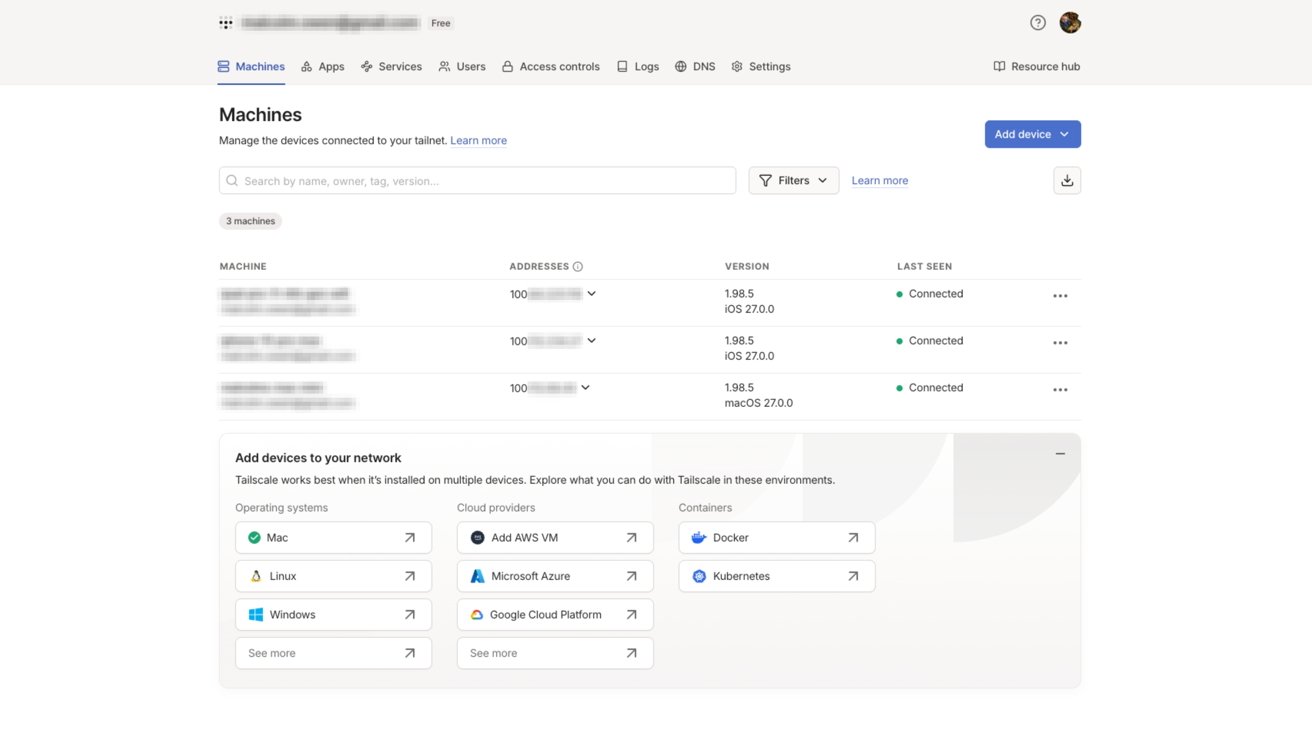
Web dashboard titled Machines listing several connected devices with status, IP addresses, and last-seen times, plus a section offering options to add devices from GitHub, AWS, Google Cloud, and other platforms

Tailscale’s web admin view. Devices on a Tailnet are listed, alongside 100-range iP addresses assigned to that hardware.

Advertisement

Since there’s file sharing, you could also use it for facilities such as remote access. You could control your at-home Mac while away from home, knowing full well it’s protected.

Both of these use cases also apply to business users, who could work from home as well as being out of the office on a trip.

You can also treat Tailscale like a hyper-personalized VPN service. You can designate a computer, like a home Mac, as an “exit node” that acts as a gateway to the Internet for devices on the Tailscale network.

That means you could be sat in a cafe on public Wi-Fi, connecting using Tailscale to your Mac to access the Internet via your home connection, all while encrypted.

Advertisement

How does Tailscale work?

Tailscale is all based on the idea of getting devices within a group to communicate with each other, even if there are obstacles in the way.

It all starts by having an account set up and clients installed on your devices. There are clients for macOS and iOS, as well as Windows, Linux, and Android.

The base of the platform is WireGuard, which creates encrypted tunnels between devices. This is normally between the user’s device and a VPN gateway or server, but in this case it’s between devices.

Rather than using a central hub server that all traffic is ferried through, the client devices connect to each other directly as a mesh network.

Advertisement

To actually set up the connections in the first place, as well as the encryption key exchange, the clients do connect to a central coordination server. However, that is only a minimal connection to establish communications, as the mesh network itself handles the data transfers.

The central communications server is also important as it is a place for the clients to contact that is a known quantity. With firewalls, CGNAT, and other things getting in the way, it’s to be assumed that the user doesn’t know what stands in the way of the connection itself.

Tailscale uses this as an opportunity to traverse the network obstacles between the clients, regardless of what connection they’re using. In some cases, it uses standards like STUN, ICE, and Designated Encrypted Relay for Packets (DERP) to keep things running.

How to get started with Tailscale

The first thing to do is to download and install the Tailscale client onto your devices. It is easiest to set up the account on a Mac, but install the iOS client on your iPhone too.

Advertisement

Go to the sign-up page, select Personal, and use one of the existing identity provider services. That is, use the links for Google, Microsoft, Apple, or GitHub.

You will need to set up under a public domain email account, for example, Gmail or iCloud.com, to be enrolled into the Personal plan automatically.

If you use a custom domain, you’ll be enrolled into the Enterprise plan for a 14-day trial. However you can also opt out of the trial and go onto the Personal plan anyway, through the service’s administration console.

The Personal plan, which is for individuals, is a free account for an unlimited number of devices and up to six users. For most home users, this is the one you will want to use.

Advertisement

The paid plans start from $8 per user per month for the Standard, rising to $18 for Premium, and custom pricing for enterprise customers. There are a number of paid add-ons you can also get, but most home users won’t need to touch these at all.

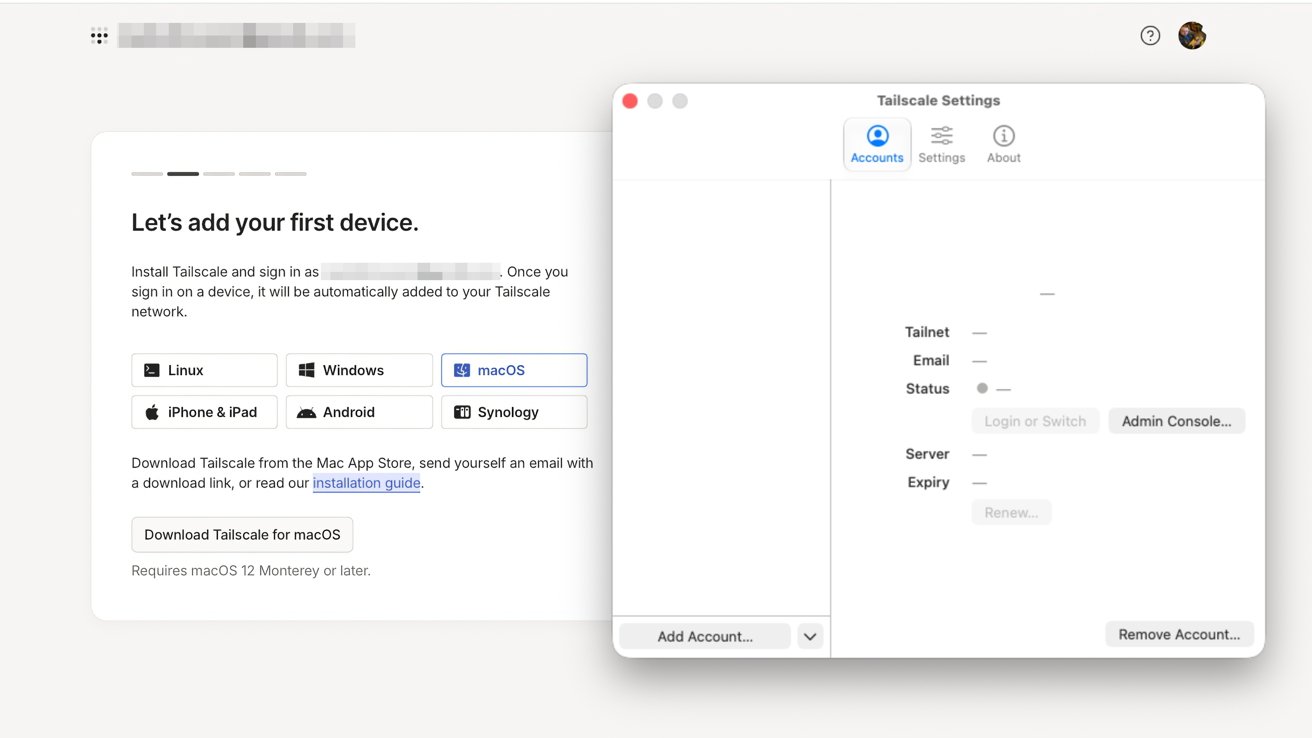
Computer screen showing Tailscale setup: left panel prompting to add first device with platform buttons; right macOS-style window displaying Tailscale account settings with tabs, blurred personal details, and remove account button

Adding the first device to Tailscale

The online signup will pause after authentication on a screen, requiring you to set up a first device. Open your Mac client and click Get Started.

You’ll be asked to allow VPN configuration. Click Allow VPN Configuration, then on the popup, click Allow to permit Tailscale to make changes.

Advertisement

In the Menu Bar, select Tailscale, then Settings. Click Add Account, which will open a browser for authentication via the same service as the initial registration.

When asked to Connect Device, click Connect. You’ll also be asked if you want to start on log-in, which you should agree to, or face starting it manually each time.

At that point, you will be informed that your device is set up for your Tailscale account, that you can find other network devices in the Menu Bar, and you can connect to them using specially designated IP addresses.

The browser will hint that you should set up and connect a second device. Do this now, using the appropriate app.

Advertisement
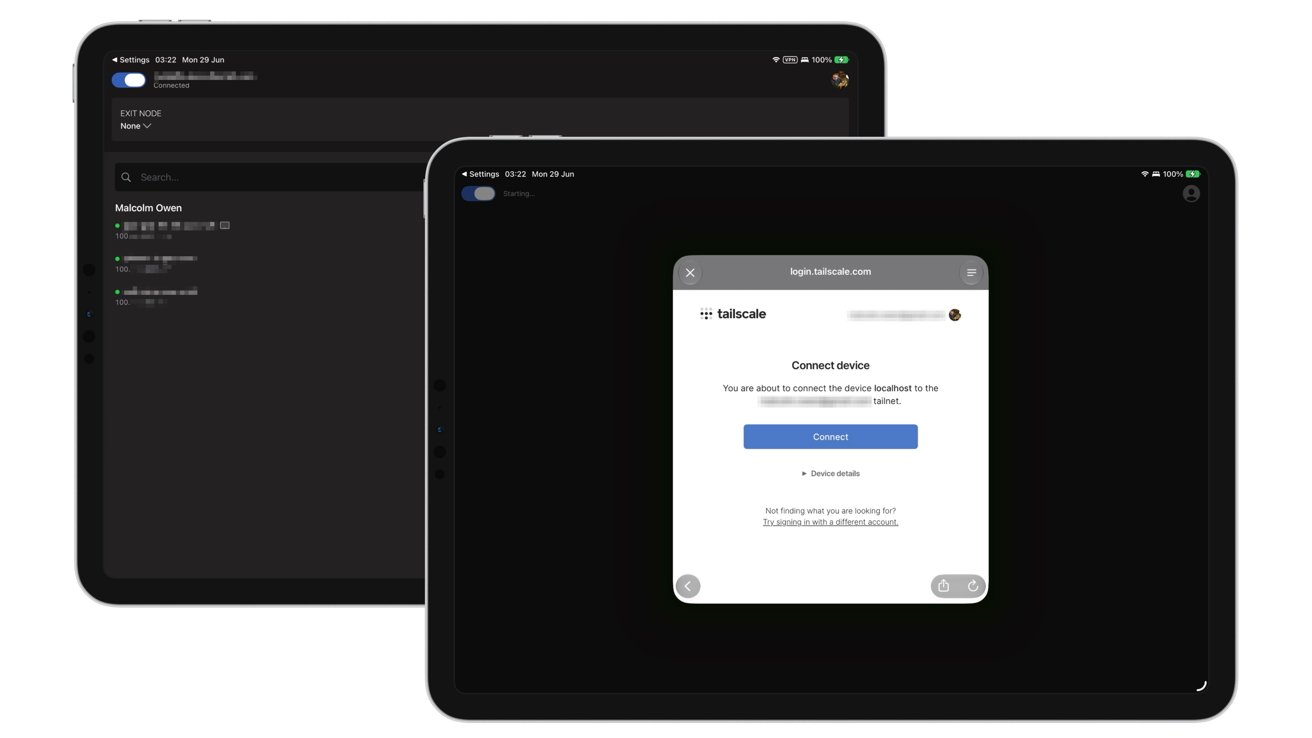
Two tablet screens side by side displaying a dark interface, one showing an options list, the other showing a Telstra Connect devices dialog with buttons to connect or cancel

Tailscale on iPadOS

The authentication on iOS and iPadOS is relatively similar to macOS, in that you’re asked to configure VPN settings and notifications. After that, you sign in with your authentication details once more.

In the browser, you’ll be asked to test the connection between devices. Copy the ping command and paste it into Terminal, and ensure there’s no packet loss.

Click “Success, it works!”

Advertisement

At this point, you will have two or more devices connected using Tailscale’s Tailnet and communicating with each other.

Tailscale basics

Once you have established your Tailnet, you can immediately do a few things.

For a start, open the Tailscale app to see your account-connected devices, designated Tailnet IP addresses, and other essential information.

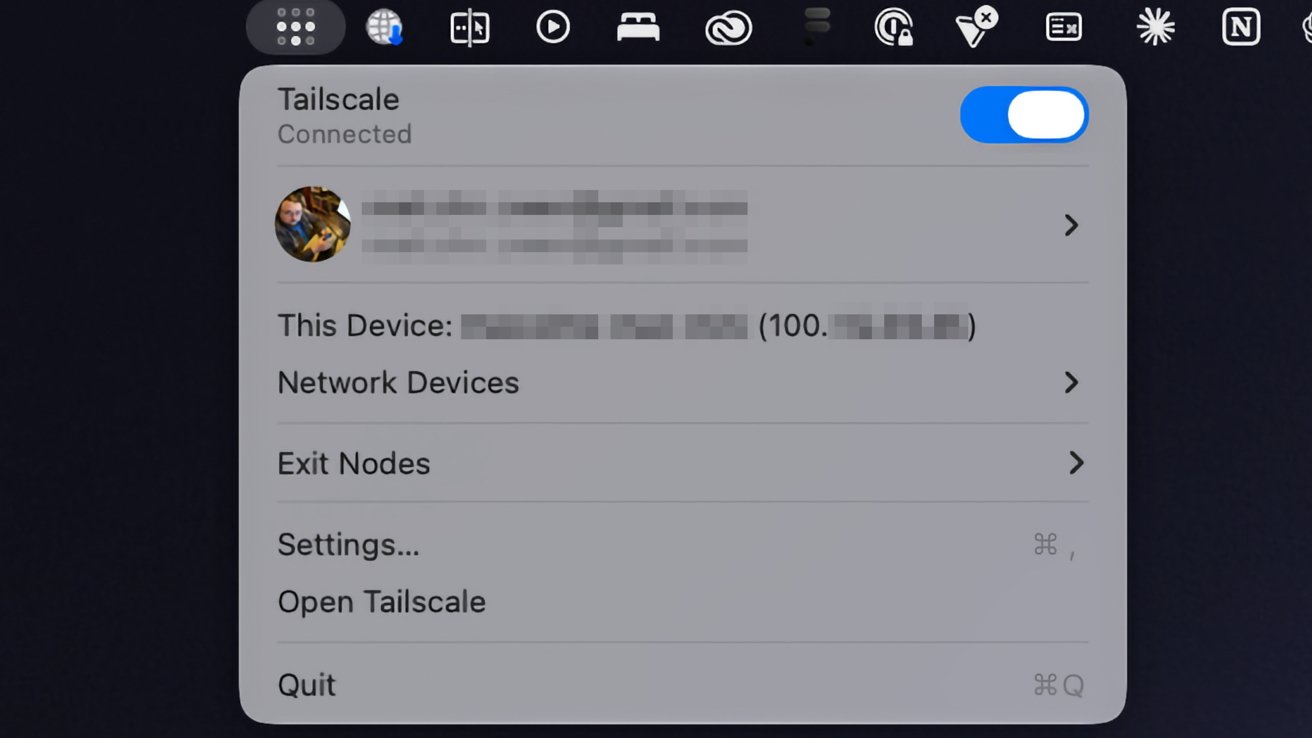
You can also get some of this information from the Menu Bar in macOS.

Advertisement

The apps include a function known as Taildrop, which you can think of as AirDrop but just for your Tailnet. You can select a file to send to another device, and it will transfer over automatically.

Mac menu bar showing Tailscale VPN dropdown panel with connection toggle enabled, user profile, current device details, options for network devices, exit nodes, settings, open Tailscale, and quit

Tailscale’s presence in the macOS Menu Bar.

Since you also have access to IP addresses, you can also use them in network applications to connect to other devices on the Tailnet.

For example, you can use the Files app on an iPhone and use the Connect to Server with that IP address to access shared files on your Mac.

Advertisement

Another thing you can do is set your Mac as an Exit Node, which can funnel the Internet connections of other Tailnet devices through it like a private VPN.

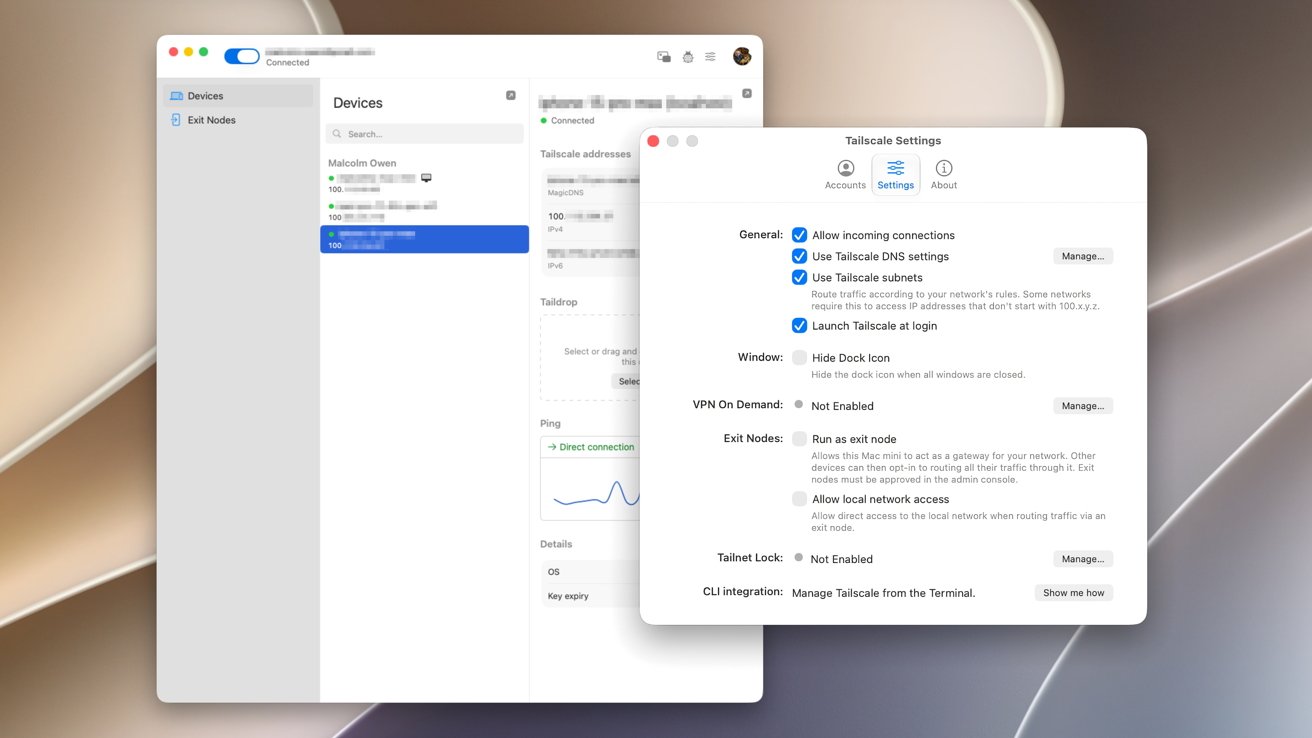
On the Tailscale app on the Mac, select Exit Nodes to view any already set up on the network. If none are available, click the Settings icon then, under Exit Nodes, check Run as exit node then Ok on the warning box.

Two overlapping computer settings windows on a blurred abstract background, showing device list and detailed network preferences with toggles, checkboxes, and text options for configuring online and VPN behavior

Tailscale macOS client settings include options to launch at login and to set the Mac as an Exit Node.

Go to the Admin Console, which opens in a browser window. Select the Mac, which also has the blue Exit Node status icon. Under Routing Settings, click Edit under Exit Node Awaiting approval.

Advertisement

Add the checkmark to Use as exit node and click Save.

In the Tailscale app on another device, select Exit Node. In the options, select your Mac to immediately reroute your traffic.

To stop the connection, tap Disable.

This is a very simple overview of using Tailscale as a personal user. But, it’s something that has a considerable number of features, if you’re prepared to dig deeper.

Advertisement

It is an enterprise tool at heart, after all.

The vast majority of these extra tools are handled in the admin console, in the browser. This includes setting up and managing users and changing settings for individual devices, at the more basic end of things.

However, you can go down the route of setting up DNS settings, network services, access to third-party SaaS apps, and connecting to cloud providers. Access controls and logs will also help you manage your virtual network here, too.

For AI researchers, Tailscale has Aperture in beta, which is a reverse proxy going between LLM clients and providers like OpenAI and Anthropic. It can be used to automatically ferry the right requests through to the right service, which could result in more accurate or suitable responses or reduced spending.

Advertisement

There’s a lot more beyond the scope of this article that an advanced user can go into. While most won’t necessarily care about these more technical aspects of Tailscale, it’s nice to know that there are options to tweak it to fit your exact networking needs.

Source link

Advertisement
Continue Reading

Trending

Copyright © 2025