Apple is contesting a ruling that would force it to pay Optis $502 million for LTE patent infringement, but the UK Supreme Court has yet to reach a verdict.
The legal battle between Apple and Optis goes back to February 2019, and there’s still no end in sight all these years later. Apple was accused of infringing upon Optis’ LTE patents, which ultimately led to lawsuits in both the United Kingdom and the United States.
The latter case resulted in Apple’s victory, as it avoided paying Optis $300M in damages in February 2026. The outcome of the UK lawsuit, however, isn’t quite as clear-cut.
As spotted by 9to5mac and reported by The Financial Times, Apple now wants the UK Supreme Court to overturn a 2023 Court of Appeal ruling that would force it to pay Optis $502 million.
Advertisement
Initially, Apple was only supposed to pay $56 million, as decided by the High Court in London. Later, the Court of Appeal increased that amount to $502 million by using Optis’ deal with Google as a baseline and adding royalties dating back to 2013.
Apple, however, claims the increase was “arbitrary” and that the Court of Appeal “erred in law.” The outcome of the UK lawsuit remains to be seen, but the case could drag on for years to come.
Apple vs. Optis: The progression of the UK lawsuit
Back in 2020, the UK Supreme Court ruled that UK courts can set the payment rate for patents worldwide, even though the court can only consider the infringement of UK patents. This was good news for Optis, as it was free to seek more damages from Apple.
Optis claims that Apple violated its patents on LTE technology.
Advertisement
In July 2021, Optis wanted to force Apple into paying $7 billion in damages, along with a global royalty rate. Apple called the fee “commercially unacceptable” and threatened to leave the UK market if it was forced to pay such a high amount.
Later, in March 2022, the London High Court declared that Apple infringed two 4G patents held by Optis, which it described as “standard essential patents.”
Apple tried to argue that none of the patents were essential, and said it hadn’t committed any infringement. Still, its appeal was ultimately denied in July 2023.
Instead of the $7B sought by Optis, the London High Court said Apple had to pay only $56.43 million. However, Optis filed an appeal, which was ultimately successful. A $502 million fine was imposed by the UK Court of Appeal in May 2025.
Advertisement
This amount represents a lump sum covering 2013 to 2027, and was supposed to serve as a global license to use Optis LTE patents in the iPhone, Apple Watch, and other devices.
“[We are] pleased the UK Court of Appeal has recognized and corrected a clearly flawed prior ruling,” an Optis spokesperson told AppleInsider at the time, “and has made meaningful progress toward affirming the true value of our patents to Apple devices.”
Now, however, it’s up to the UK Supreme Court to decide just how much Apple will have to pay.
“The Viaim RecDot’s are the perfect balance between great sound and AI transcription”
Pros
Simply, one-touch recording
Detailed, balanced sound
Excellent battery life
Multiple charging options
Cons
Average noise canceling
Bass could be better
Plasticky build
Quick Take
The Viaim RecDot grabbed my attention because they offer a truly unique feature to wireless earbuds. Rather than chase the best possible sound or the best noise cancellation, they’re built to capture, transcribe, and summarize everything you hear. Simply hit the record button (located on the case) and choose a record mode to turn calls, lectures, and in-person meetings into searchable transcripts. The Viaim app’s AI then gives you summaries and to-do lists within seconds. If you spend your day in back-to-back conversations and are ok giving up your AirPods, then the RecDot can be a very helpful companion.
The Viaim RecDot is a decent set of earbuds in their own right. The 11mm titanium-coated drivers produce fairly good, detailed, balanced sound that produces great vocals and acoustic tracks, and battery life runs up to nine hours per charge, or 36 with the case. Calls came through clearly for me in most calls, and the recording and transcription features are fast and dependable. Translation covers more than a dozen languages, and the whole system is easy to live with once you accept that the app is doing most of the work.
On the other hand, they’re not perfect. Noise cancellation is good, not great, and bass gets muddy on some deep house or hip-hop tracks. The build feels plasticky, and at full price they sit uncomfortably close to more polished all-rounders from Apple, Soundcore and Samsung. But if your main goal is capturing and organizing what’s said around you, the RecDot does it very well. For the right buyer, these are a great choice that I would recommend.
Viaim RecDot specifications
Product
Viaim RecDot AI Recording True Wireless Earbuds
Drivers
11mm titanium-coated dynamic drivers
Bluetooth
Bluetooth 5.2, multipoint (dual pairing)
Codecs
AAC (manufacturer does not detail full codec list)
Noise cancellation
Smart ANC, rated up to 48dB reduction; auto/low/mid/high modes
Battery life
Up to 9 hours (buds); up to 36 hours with charging case
Charging
USB-C and wireless charging
Water resistance
IPX5
Weight
~4.9 g per earbud
Eartips
5 sizes included, with in-app fit test
AI features
Real-time transcription, summaries, to-do lists, mind-map, translation (14+ languages); 600 free minutes/month, 1800 minutes for $9.99/month and unlimited minutes for $19.99/month
Price
$249.99 MSRP (frequently $179–$219 at retail as of July 2026)
Viaim RecDot design, build & comfort
Dan Gaul/Digital Trends
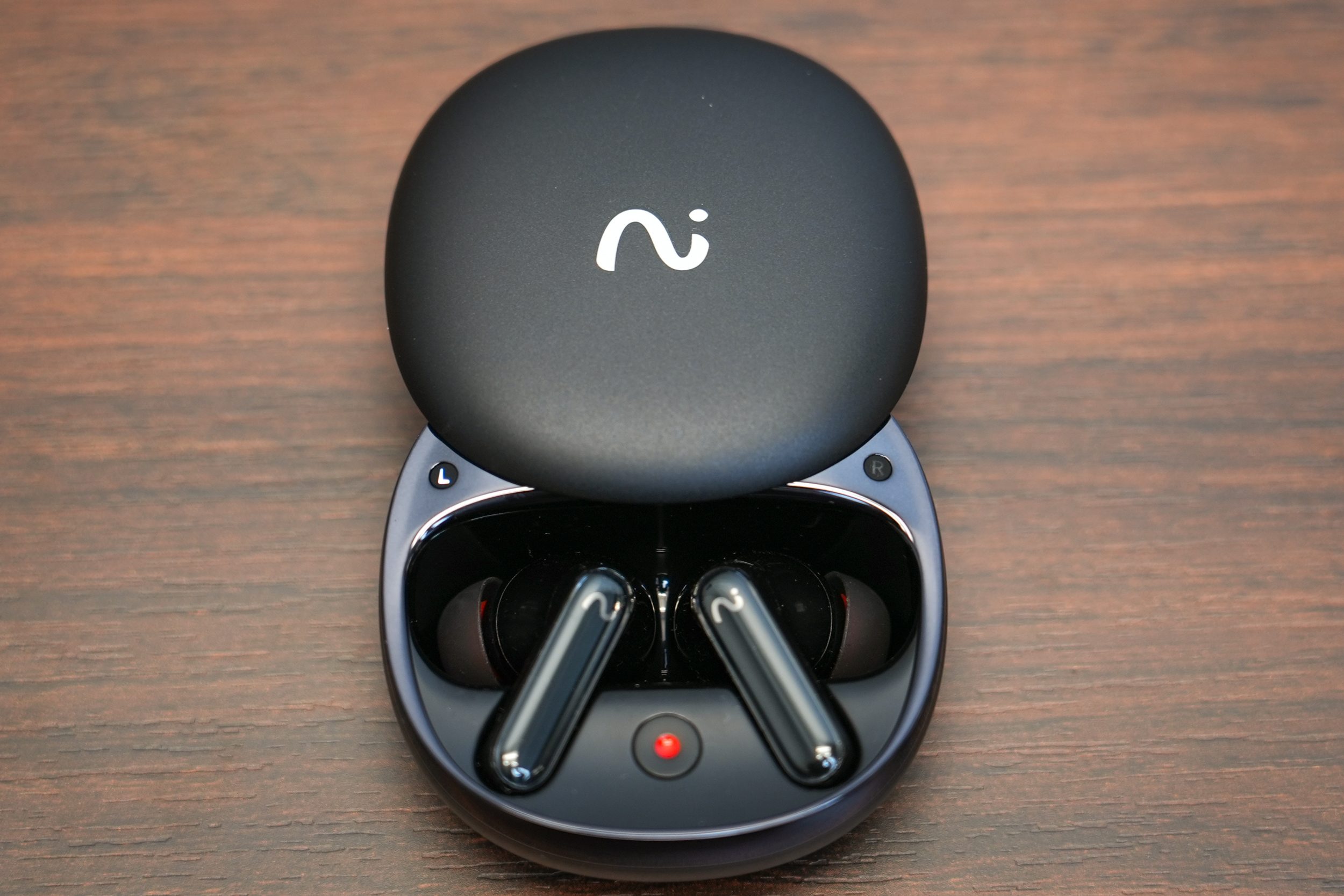
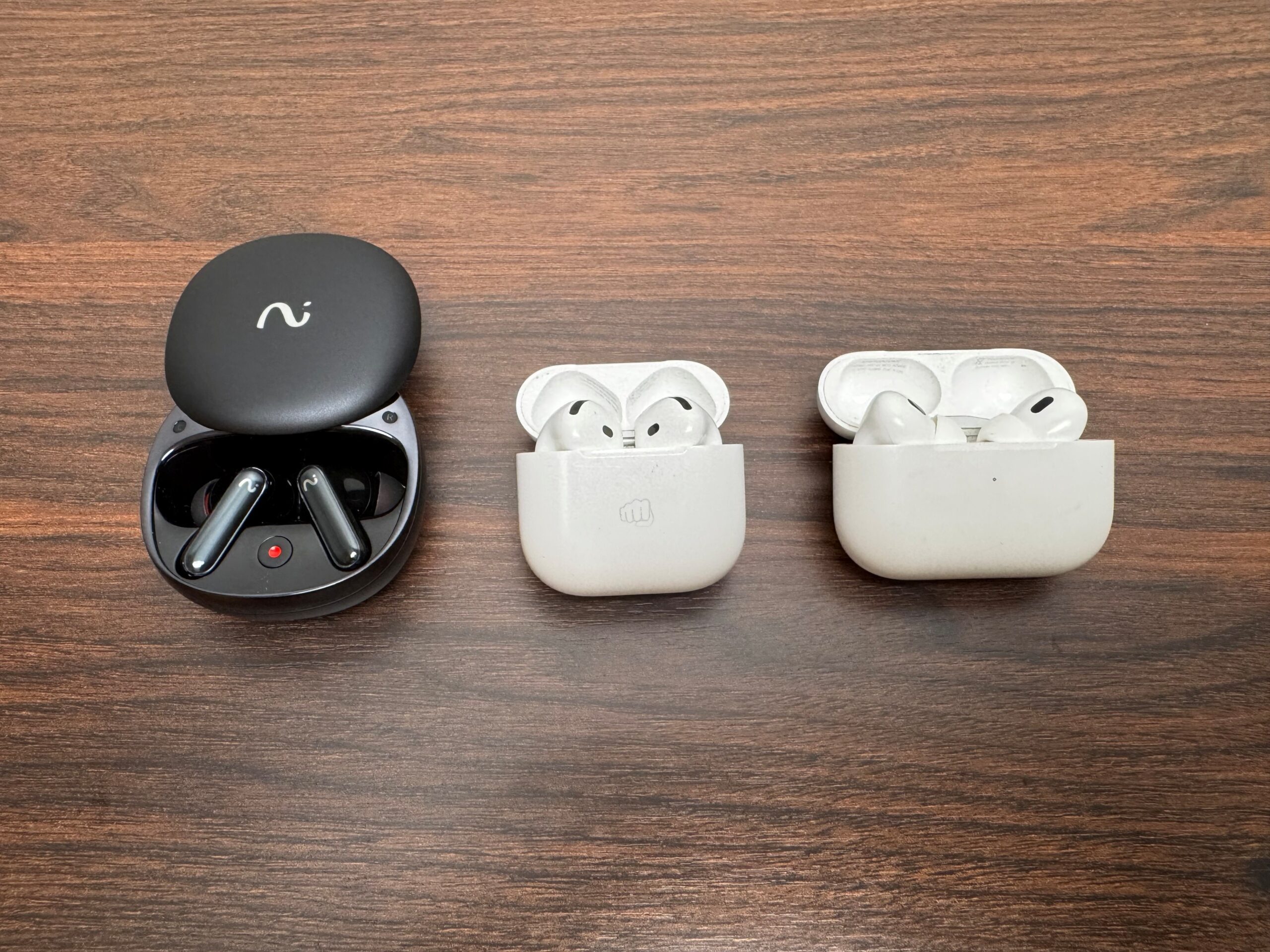
The RecDot follows the long-stem template Apple made famous, but these sit a touch chunkier in the hand than the AirPods 4 that I use on a regular basis and the AirPods Pros that I borrowed to compare these against – and you notice it. That extra bulk makes room for the recording hardware, so it’s easy to understand why it’s there. The build leans more plastic than premium, and the sliding lid on the charging case feels flimsier than the rest of the package at times. Everything else about the case is genuinely good. The buds snap into their magnetic cradles with a satisfying click and stay put no matter how hard you shake the thing.
Best of all is a physical record button on the outside of the case, which starts a meeting recording with a single press. It’s a smart, tactile touch, though the tiny blinking light that tells you recording is live could be far more obvious in direct sunlight. Viaim throws in five sizes of eartips, which is more generous than most, and an in-app fit test runs frequencies through the earbuds to check your seal. Swapping tips is a little fiddly, but once you land on your size, the fit holds up for long sessions. These aren’t gym buds, though.
Advertisement
The fit isn’t tight enough for running or hard training, but for sitting at a desk, commuting, or grinding through a day of meetings. Controls live on the stem as a touch sensor that handles play, pause, volume slides, and track skips. Overall, it works. There’s no haptic confirmation, though, so you sometimes can’t tell whether your tap registered, and the triple-press to jump back a track takes practice. If you plan on switching earbuds for different occasions (like running, flying, etc), then you might have a tough time remembering the tap sequences.
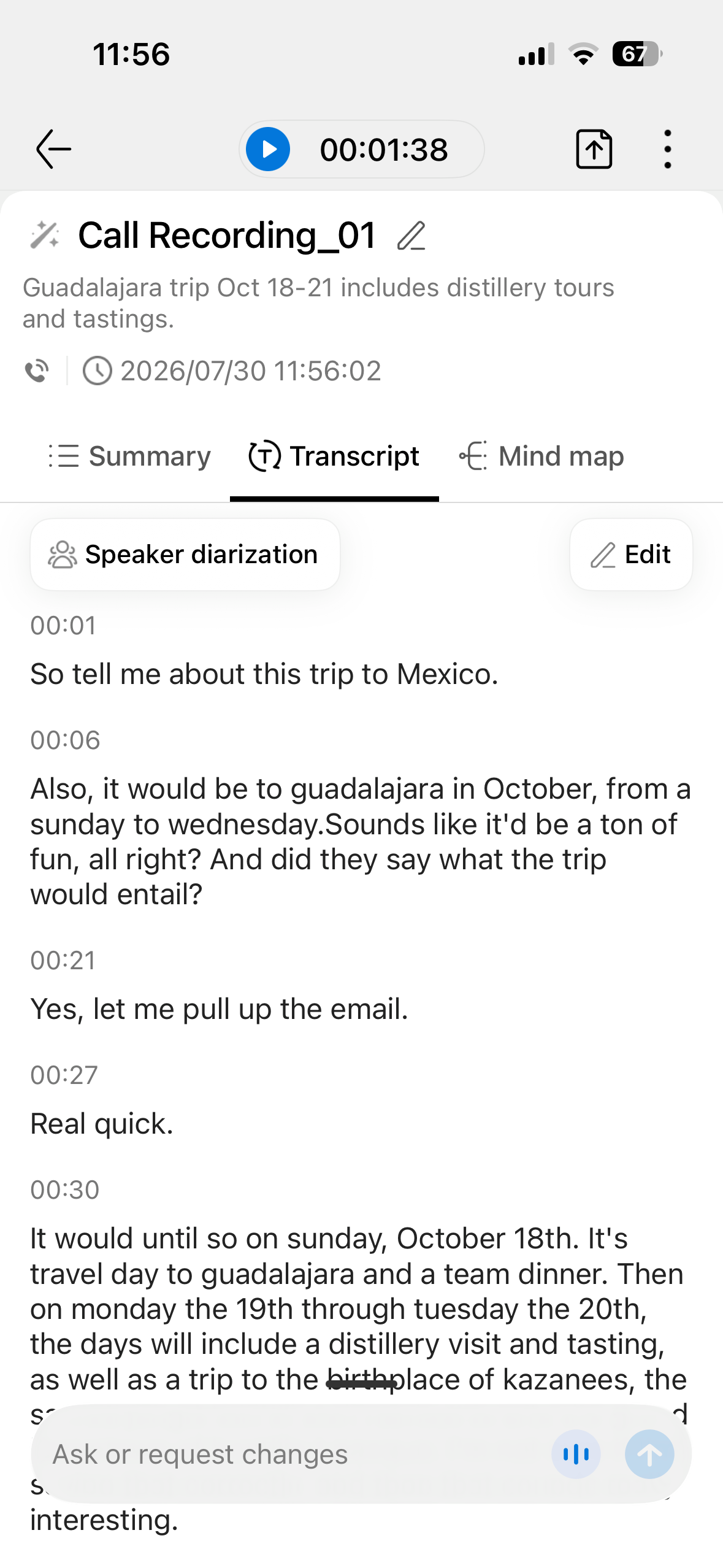
This is where the RecDot earn their name and why you would buy them. There are three ways to record: call recording that transcribes system or VoIP calls in real time, audio or video recording that transcribes a clip, and live recording for face-to-face conversations and small meetings. Starting a recording was fairly straightforward for me, whether you press the button on the case or hold the stem until you hear “recording start.” Pressing the button on the case was simpler for me.
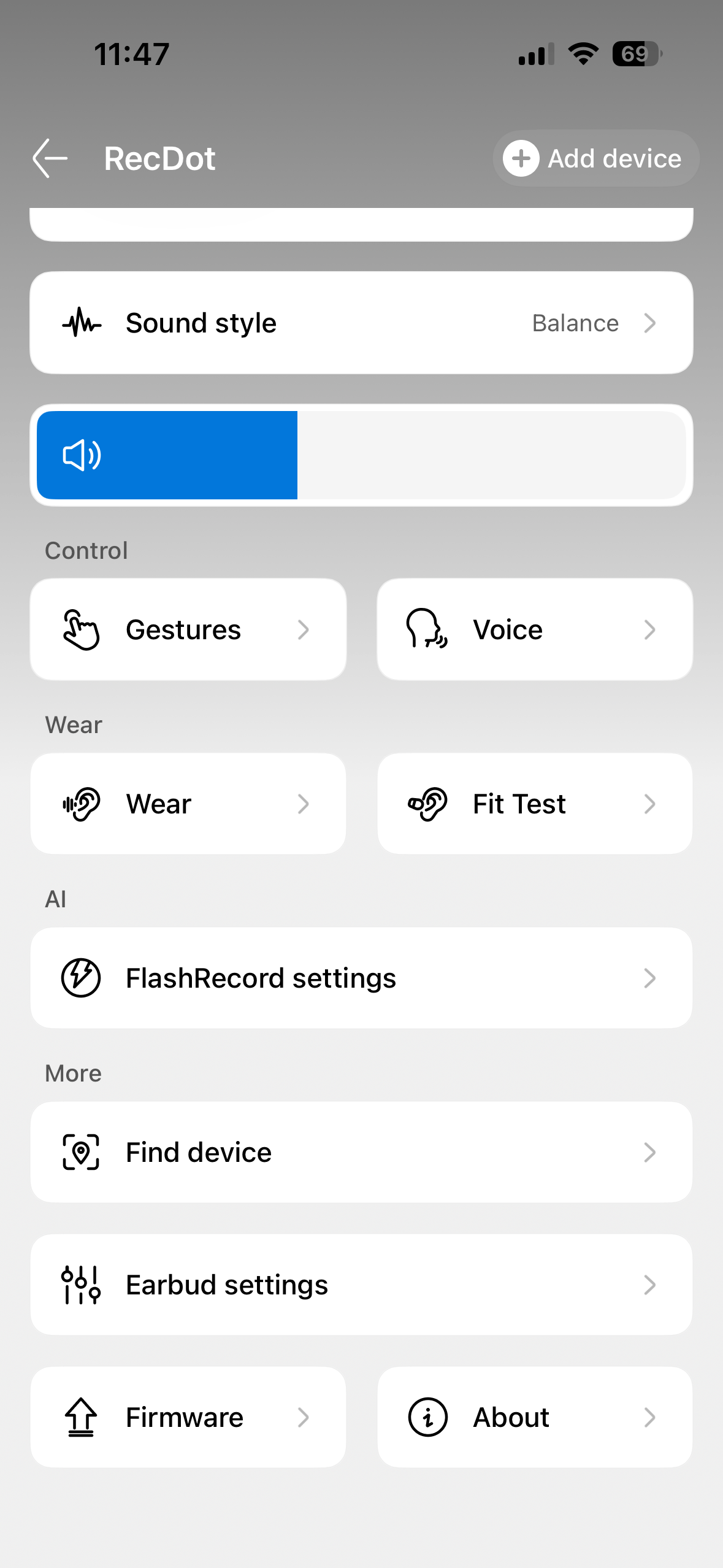
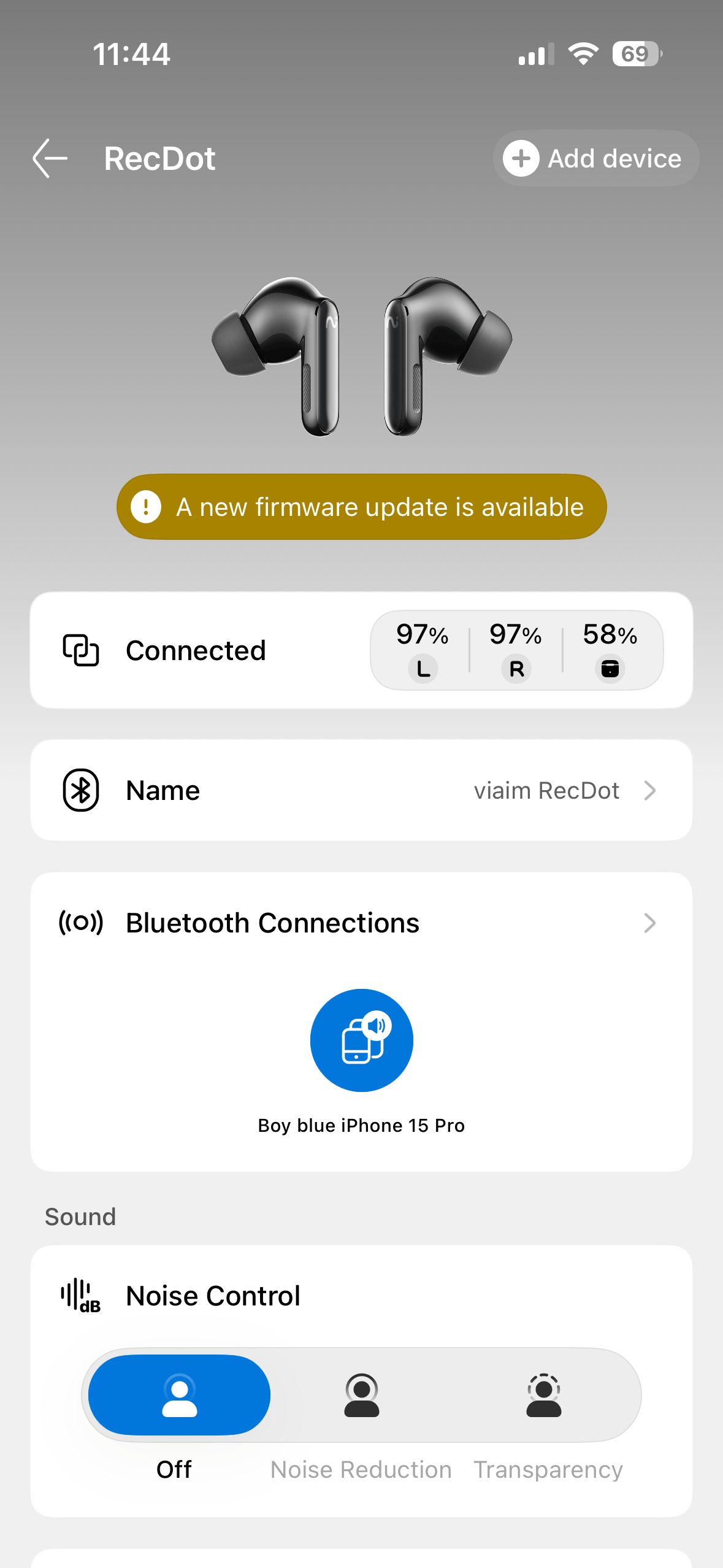
You can choose to have every call auto-record as well. When you have this turned on, you will hear a voice telling you and the person on the other end that the call is being recorded. Everything winds up in the Viaim app, and this is the one thing I had to learn. Viaim markets recording on the buds themselves, but the transcription and AI features live in the app. Simply put, the app isn’t optional. You have to use it.
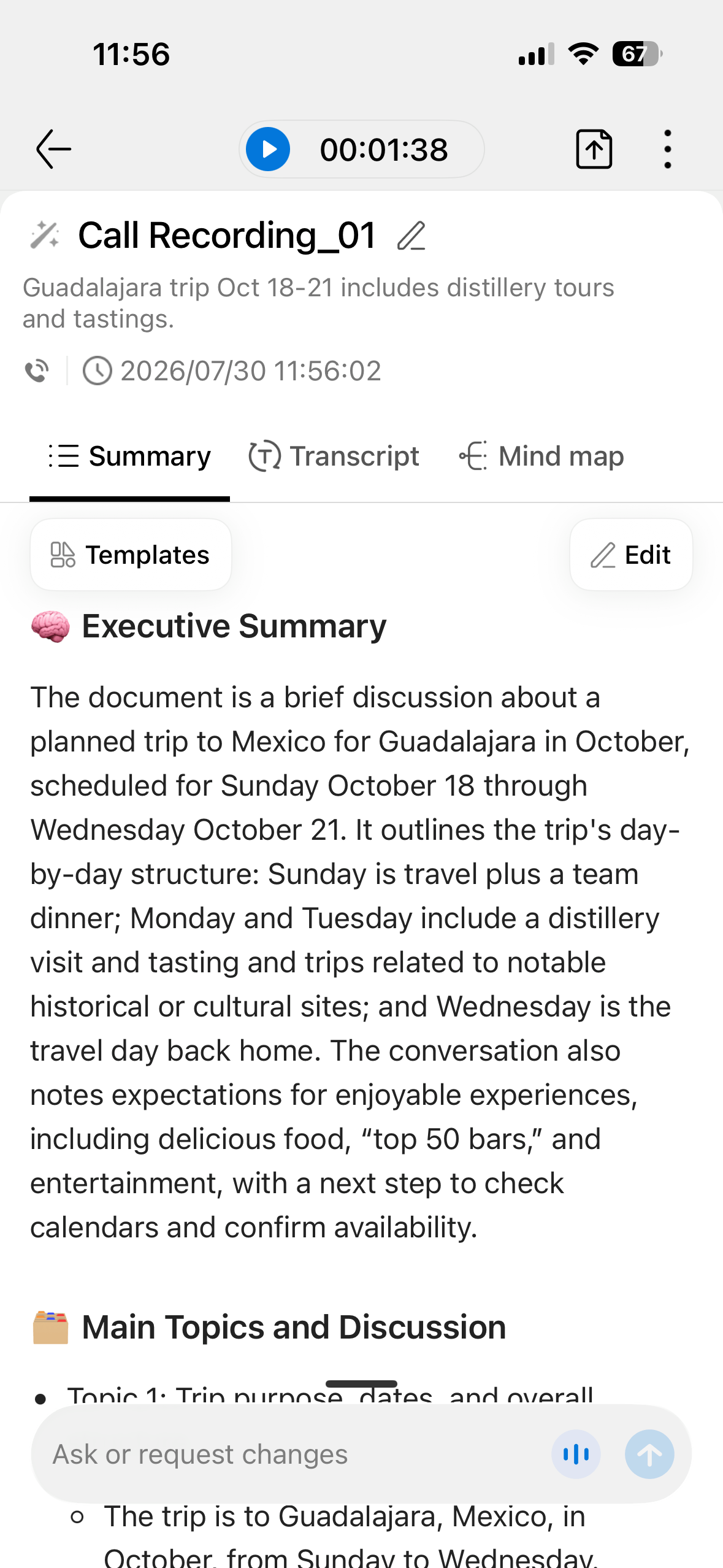
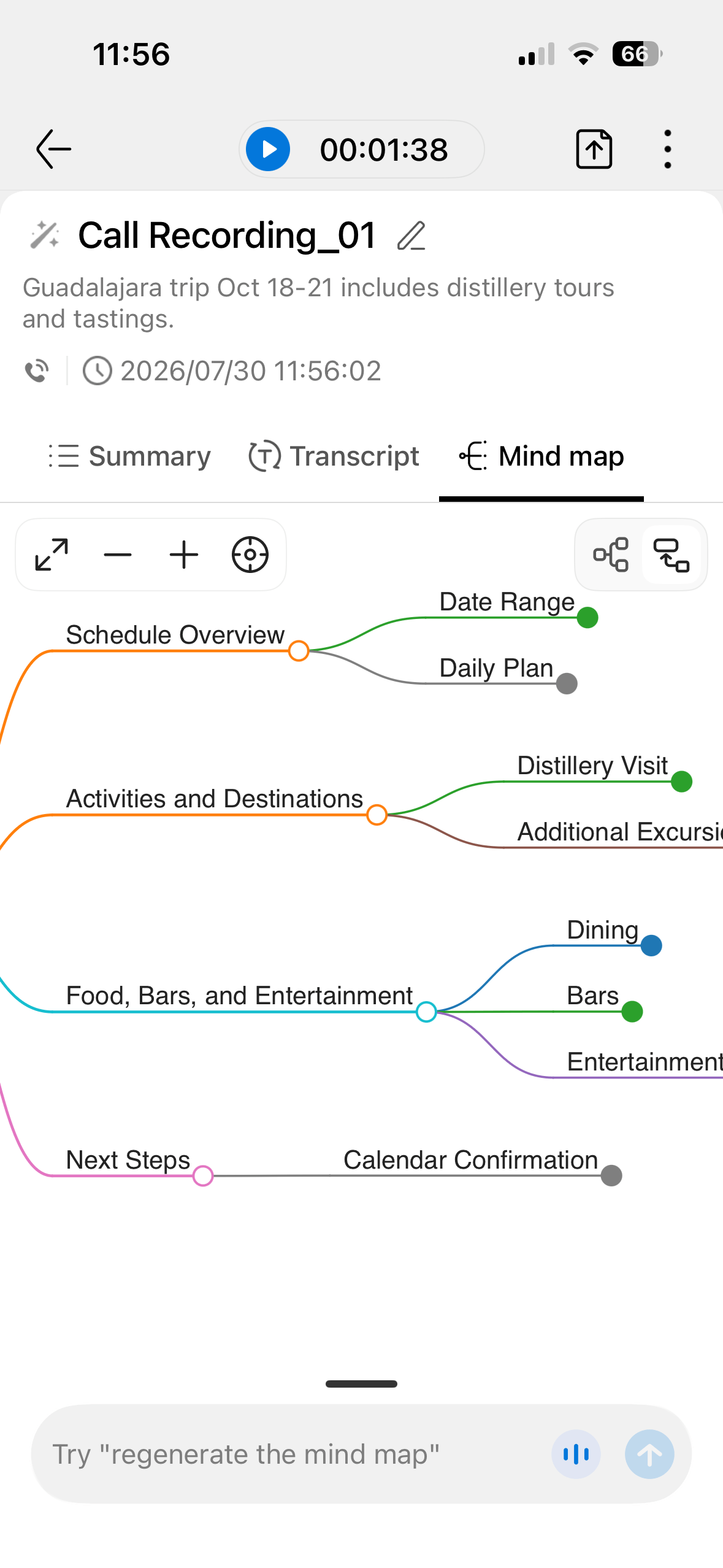
Once your audio is in, the AI does the work. Transcription was pretty reliable and thorough for me in my testing, picking up speech with few errors. The meeting assistant extracts concise summaries and pulls out actionable to-do items, and it does so quickly and with surprising accuracy about who owns what. There’s even a mind-map view, and the app taps large language models such as ChatGPT, Gemini, and Claude for its AI tools. Transcripts can be translated into more than a dozen languages, though translation is laggy, the way it is on rival systems.
Note: I only used Spanish in my translation testing.
Advertisement
Two quirks jumped out for me. A long pause makes the software insert a full stop or start a new sentence, so you’ll do some light cleanup afterward, and speaker separation is inconsistent, nailing it in some sessions and merging voices in others. My hope is that future firmware updates will fix this. You get 600 free transcription minutes a month, which most people won’t use up. If you want more minutes, you’ll need to spend extra per month for those (I listed them above in the specs, and below in the FAQs). One practical note the marketing skips: recording conversations carries legal and etiquette obligations that vary by location, so know the consent rules where you are before you hit record.
The rules depend on where you and the other person are. Federal law and most states use one-party consent, meaning if you’re part of the conversation, you can record it without telling anyone else. That covers states like New York, Texas, and Virginia. A minority of states like California require all-party consent, where everyone must be informed and agree before you record. In those states, quietly recording a meeting or call can be a crime even if you’re a participant.
Viaim RecDot sound quality
For a product built around AI, the RecDot sounds better than I expected it to. The 11mm titanium-coated drivers put out a vibrant, detailed, crisp presentation that leans balanced rather than bass-heavy, great for vocals. Ed Sheeran’s Azizam (a recent favorite of mine, make fun all you want) serves up a dance beat that punches through without trampling the vocal, and the soundstage runs surprisingly wide for earbuds. Orchestral material holds up too, with clear separation between flutes, piano, and the rest of the sections.
Where the RecDot’s struggled for me is during dense, heavy music. Rock tracks can turn muddy and cluttered at times, the loudest sections sounding squashed rather than powerful. Bass occasionally feels stuck and short on depth, and percussion can lean tinny. Sparser genres like acoustic, singer-songwriter, soul, and ambient electronic are where these buds shined for me. There’s an EQ in the app with pop, bass boost, and electronic presets, and while a few nail specific tracks, none held up reliably across a broad library, so the default balanced profile is the one that I thought worked best for me. Audiophiles looking for next-level detail will want a dedicated pair of earbuds, or straight-up over-the-ear headphones. Everyone else will find the sound more than pleasant.
Advertisement
Viaim RecDot active noise cancellation
Viaim’s Smart ANC claims up to 48dB of reduction, and in daily use it does a decent job of quieting an office or a commute on a plane or bus. It isn’t class-leading, and I felt like it was on par with my AirPods 4 in most instances. To be fair though, I think the AirPods 4 do an OK job. I have been on plenty of calls where the person on the other end had ANC turned on, and they were difficult to hear during that call. Put the RecDots side-by-side with the best buds at this price, and the RecDot let more low-frequency rumble through, and jet-engine noise on a long-haul flight would test its limits. There are low, middle, and high manual modes, but none of them stayed reliable as environments changed, so the auto setting is the one I would recommend. Auto occasionally colors the sound in the process, but that beats fiddling with presets every time you move rooms. For everyday commuting and open-plan offices, the ANC is more than good enough.
Viaim RecDot call quality
Ian Bell/Digital Trends
The RecDot’s call quality is clear and dependable. In my tests, callers said my voice came through cleanly, with only a slight fuzziness on sharp sibilant sounds, and the mics keep background noise off the line. In a busy environment, you can still make out a caller’s words without straining. As I mentioned before, it’s not the best on the market, but it’s perfectly reliable for the meetings and 99 percent of the calls you will make.
Viaim RecDot battery & charging
Battery life really surprised me. Coming from my AirPods 4, I was expecting to get about 4 hours of continuous use, but was able to push beyond that in the 7-9 hour range with the RecDots. You get up to nine hours from the buds themselves and an extra 36 hours with the case as a charger, which comfortably outlasts AirPods Pro and Samsung’s Galaxy Buds. In my testing, eight hours of listening drained the buds to 80 percent, which is a lot given all the recording and processing happening in the background. The case charges over USB-C or wirelessly, which is a nice convenience at this price. Cheaper rivals push past 40 hours, but for a pair doing this much processing, the RecDot’s battery life is more than competitive.
Viaim RecDot comparison & alternatives
Ian Bell/Digital Trends
Apple AirPods Pro remain the pick for anyone in the Apple ecosystem who cares most about noise cancellation, fit, and easy device switching, and they now do basic live translation, though they can’t come close to matching the RecDot’s structured summaries and to-do lists. Samsung Galaxy Buds are the equivalent choice for Galaxy owners, with strong ANC and longer battery than Apple, and they only cost a little more than the RecDot. For pure recording on the cheap, dedicated AI note-takers like the Plaud NotePin capture and summarize conversations for less, but you lose the everyday earbud. The RecDot’s whole argument is that it does both jobs in one device, and for the right person that combination justifies the premium. And I’d say for the average person, the premium is worth it.
Verdict: Should you buy them?
The Viaim RecDot are a forward-looking pair of earbuds that do the one thing they set out to do, and they do it extremely well. Recording and transcription are fast, accurate, and super useful. The sound and battery life are much better than I expected. Holding them back from being a perfect 10 for me is the ANC that trails the best in class, bass that struggles with heavier music, a plasticky build, and a premium price. If your days are full of meetings, lectures, or interviews, nothing else at this price captures and organizes them as neatly. I found the RecDot to be the perfect companion for my work and play schedule. Score: 4 out of 5.
How I tested the Viaim RecDot earbuds
I tested the Viaim RecDot over three weeks of daily use, wearing them for meetings, calls, drive-time and plane commutes, and focused desk work, with listening sessions running well past two hours at a stretch. I streamed music from Spotify, Pandora, and Apple Music across an iPhone and a laptop, listening to EDM/House, Rock, classical, acoustic, and podcast material, and leaned on the recording and transcription features across real calls and in-person conversations. I compared them directly against Apple AirPods 4 and AirPods Pro for sound, ANC, and call quality.
Advertisement
FAQs (Frequently Asked Questions)
Do the Viaim RecDot record phone calls?
Yes. Call recording transcribes system and VoIP calls in real time. You either hold the stem or press the button on the case to start. I found the button on the case to be the simplest. The transcript, summary, and any to-do items appear in the Viaim app afterward.
Do I need a subscription to use the AI features?
You get 600 free transcription minutes a month, which covers most people. Heavy, all-day recorders may hit that cap; the AI tools themselves run through the Viaim app. Viaim offers a Pro plan, which is $9.99/month or $79.99/Year and comes with 1800 minutes, and an Ultra plan, which is $19.99/month and $159.99/year and has unlimited minutes.
How many languages does translation support?
Transcripts can be translated into more than a dozen languages, including English, Chinese, French, and German. Translation works but lags in real time, much like it does on Apple and Samsung buds (from what I have researched).
Are the RecDot good for working out?
Not really. The IPX5 rating shrugs off sweat and light rain, but the fit isn’t tight enough for running or hard training. They’re built for desks, commutes, and meetings. You’ll want dedicated earbuds for that.
Advertisement
Should I buy the RecDot over AirPods Pro?
Buy the RecDot if automatic transcripts, summaries, and to-do lists genuinely save you time. Choose AirPods Pro if you mainly want stronger noise cancellation, a snugger fit, and tight integration with Apple devices.
joshuark quotes a report from MIT Technology Review: It is impossible to make large language models fully secure against hacks because of a fundamental flaw in how they work, a team of researchers argue in a paper presented at the International Conference on Machine Learning, a top AI conference, this month. The claim has huge implications for the safety of this technology. By taking advantage of this flaw, which concerns how LLMs identify who or what is giving them instructions, the researchers were able to make popular LLMs spit out information they had been trained not to provide, such as how to synthesize cocaine and how to sabotage a commercial aircraft’s navigation system. “There’s a real probability that this is going to be a problem that’s fundamentally unsolvable,” says Charles Ye, an independent researcher and coauthor of the ICML paper. […]
The ICML paper describes attacks against several of OpenAI’s models, but Cui and Ye say that they have since seen similar results with models made by Anthropic, Alibaba, and DeepSeek. Cui and her colleagues wanted to find out why an attack like chain-of-thought forgery was so effective. They suspected it had something to do with the mechanism that LLMs use to keep track of where their instructions are coming from. But what Cui and her colleagues discovered is that LLMs are in fact very bad at keeping track of different roles.
In a series of experiments that looked at what was going on inside a handful of different models, the researchers found that LLMs seem to identify the role of a specific chunk of text not by the tags around it but by the style of that text and the words it contains. The upshot, the researchers claim, is that all an attacker needs to do to hack an LLM is write text that spoofs a certain role. And because roles are a fundamental part of how LLMs work, no amount of training will fully solve the problem. “There’s going to be a huge economic incentive for people to do jailbreaks and prompt injections,” says Cui. The best defense could be to expect the worst. Organizations shouldn’t trust LLMs, and they should expect that anything done by agents could be unsafe, he says: “That’s not a great solution, but it just might be what we have to do.”
“It’s really incredible that these things are being deployed everywhere to control super-critical systems. There’s been no study of the fundamental science here. We’re all doing it ad hoc.”
Winamp will use Deezer technology to launch a premium streaming service in 2027, combining subscription music with local files, radio, podcasts and cloud libraries. It sounds useful, but the important details remain missing.
Before Spotify, Apple Music and recommendation algorithms decided what everyone should hear next, millions of listeners stored their music on a computer. Those collections were assembled from ripped CDs, purchased downloads and MP3 files acquired through methods best left between the listener and their internet service provider.
Winamp was the software that made those libraries manageable.
The Windows music player let users organize playlists, adjust an equalizer, install plug-ins, run visualizations and completely change the interface through downloadable skins. It was fast, flexible and considerably more personal than most of the streaming apps that eventually replaced it.
Advertisement
Now Winamp wants another opportunity to shape digital music playback.
The company announced on July 29, 2026, that it has formed a strategic partnership with Deezer to develop a new Winamp Player. Scheduled for the first half of 2027, the software will combine a Winamp-branded premium streaming service with locally stored music, internet radio, podcasts, personal cloud collections and other audio sources.
That is considerably more interesting than launching yet another streaming service. The world already has enough of those, along with enough annual price increases to make renting the same albums indefinitely feel like a retirement strategy.
What Was Winamp?
Winamp first appeared in 1997 and was developed by Justin Frankel through his company Nullsoft. It arrived as the MP3 format was beginning to change how music could be stored, shared and played on personal computers.
Advertisement
Winamp did not invent digital music, but it helped make large computer-based libraries practical for ordinary users. AOL acquired Nullsoft in 1999 after the software had attracted millions of listeners.
Its popularity was about more than playback. Winamp gave users control over how their music was organized and how the software looked. Thousands of skins and plug-ins turned it into something that felt personal rather than another corporate storefront.
The player later drifted through ownership changes and uncertain development. AOL announced plans to discontinue it in 2013, although the shutdown did not happen as expected. Belgian internet radio company Radionomy acquired Winamp and Shoutcast in 2014.
Advertisement. Scroll to continue reading.
Advertisement
Winamp never completely disappeared. A legacy Windows version remains available, while newer mobile applications have been released for iOS and Android.
Calling the 2027 product a full comeback is therefore not entirely accurate. Winamp has been trying to rebuild itself for several years. The significant change is the addition of a complete subscription streaming service powered by Deezer.
Winamp creates personal experiences for listeners
What Are Winamp and Deezer Building?
Deezer will supply its catalog and white-label streaming technology, but the service will be presented as a native Winamp subscription rather than Deezer wearing someone else’s jacket.
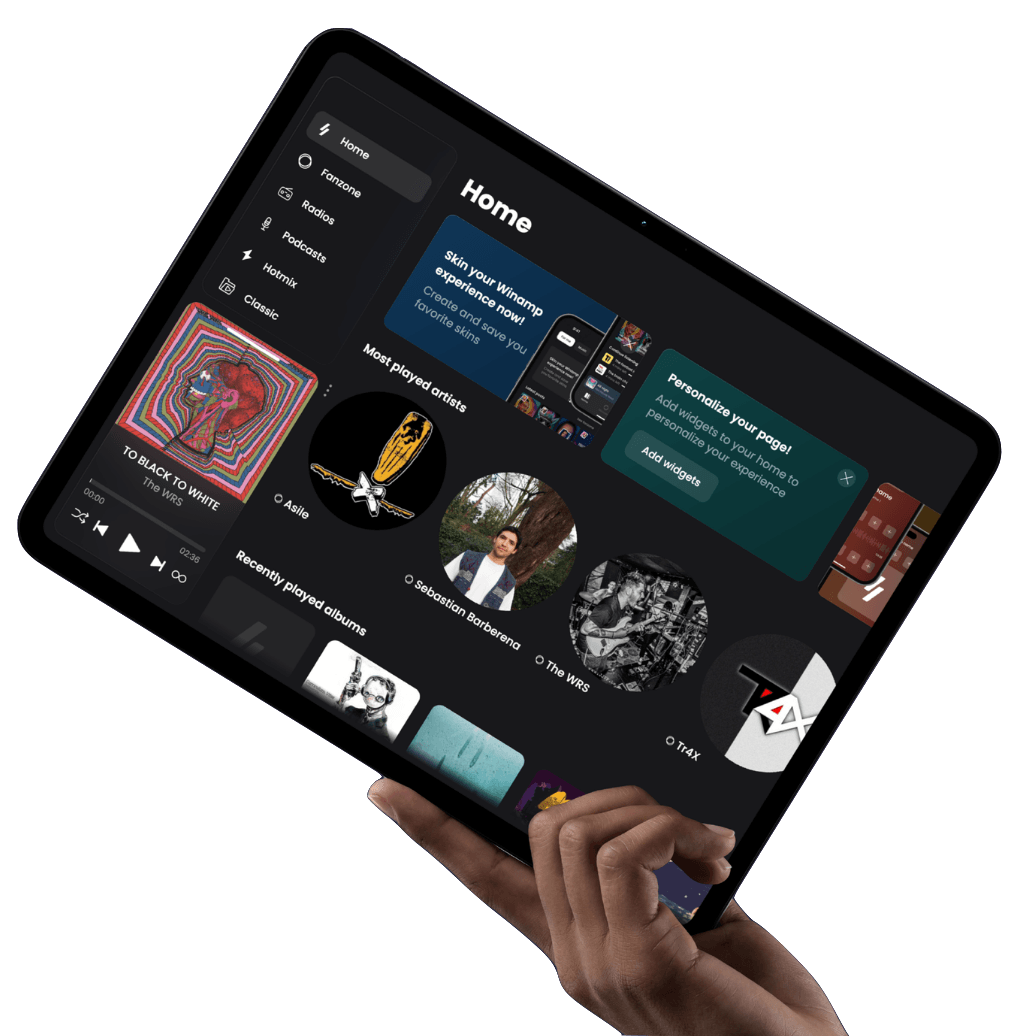
Winamp says the new player will bring together streaming music, local files, internet radio, podcasts and personal cloud libraries within one customizable interface. The company is also promising social features and new tools for music discovery and organization.
Advertisement
The existing desktop player will eventually gain access to the premium subscription.
Winamp and Deezer also claim that more than 40 million people still actively use the desktop software worldwide. That is an extraordinary figure for an application many listeners assumed had disappeared alongside dial-up modems, although neither company has provided independent verification.
Deezer is a logical infrastructure partner. It already operates a global streaming service and supplies music technology to telecommunications companies, hardware manufacturers and other third-party businesses.
For Deezer, Winamp creates another way to distribute its catalog without having to persuade Spotify and Apple Music subscribers to switch directly to the Deezer brand.
Advertisement
Winamp supports listening to locally stored music.
Why Deezer?
Deezer enters the Winamp partnership from a stronger financial position than its smaller market share might suggest.
The French streaming company reported revenue of €268.2 million for the first half of 2026, adjusted EBITDA of €8.5 million and net income of €6.7 million, reversing a €7.6 million loss from the same period one year earlier. Direct subscribers increased 8.7% to 5.8 million, although Deezer’s total subscriber base declined 3.5% to 8.9 million as subscriptions supplied through outside partnerships continued to fall.
Deezer is not remotely close to challenging Spotify or Apple Music on scale, but it has a licensed global catalog, lossless streaming technology and an expanding business supplying music infrastructure to other companies. Winamp does not need Deezer to become the world’s largest streaming platform. It needs Deezer to make the plumbing work.
What Are the Alternatives to Winamp?
Winamp will not be the first platform to combine locally stored music with subscription streaming.
Advertisement
Advertisement. Scroll to continue reading.
Roon is the most obvious alternative for audiophiles. It merges local files with services including TIDAL and Qobuz, adds extensive metadata and discovery tools, supports bit-perfect playback and works with more than 1,000 compatible audio devices. It is also priced at $14.99 monthly, $149.88 annually or $829.99 for a lifetime subscription, before anyone buys a dedicated Roon server.
Audirvāna Studio also combines local files stored on computers, USB drives and NAS devices with TIDAL, Qobuz, Presto Music, HIGHRESAUDIO and internet radio. Its emphasis is more firmly placed on high-resolution playback and computer-based audio than mainstream discovery or social features.
Plexamp is another strong option for people who primarily want to organize and stream their own music collection. It offers gapless playback, loudness leveling, smart playlists, CarPlay, Android Auto, AirPlay and Chromecast, but it does not merge that library with a full subscription music catalog in the same way Winamp is proposing.
Advertisement
Winamp’s opportunity is therefore not proving that local and streamed music can coexist. Roon and Audirvāna already do that rather well. Its challenge is making the experience simpler, cheaper and more accessible to people who do not own a dedicated server or use “bit-perfect signal path” in casual conversation.
Roon
Why Does This Matter?
Streaming services have made access to music remarkably convenient, but they have also separated many listeners from the music they already own.
Someone with 2,000 ripped CDs, purchased FLAC downloads, independent releases, live recordings and carefully organized playlists often needs one application for local files and another for streaming. Internet radio, podcasts and cloud storage may require additional software.
Winamp wants to put those sources inside one player.
Advertisement
That could be genuinely useful because streaming and locally owned music serve different purposes. Streaming is excellent for discovery and immediate access. Local files offer permanence, specific masterings and control over recordings that may disappear when licensing agreements change.
Winamp is not the first company to attempt this. Roon combines local libraries with several streaming platforms, while music servers from companies such as Innuos merge stored files with subscription catalogs. Apple Music also allows listeners to manage local music alongside its streaming library.
The difference is that those solutions are either tied to specific ecosystems, require another subscription or work best with dedicated audio hardware.
A properly designed Winamp application could offer a broader software-based alternative for listeners who want one library without purchasing a dedicated music server.
Advertisement
The word “could” is carrying a rather large loudspeaker up the stairs.
Advertisement. Scroll to continue reading.
Who Would Use It?
The most obvious audience consists of listeners who built substantial digital music libraries during the CD-ripping and download eras and never deleted them simply because Spotify arrived.
That includes people with MP3, AAC, ALAC, WAV and FLAC collections stored on computers, external drives or cloud accounts. It also includes listeners who buy music directly from artists, collect alternate masterings or own recordings unavailable through mainstream services.
Advertisement
Existing Winamp users are another natural audience, assuming that 40 million figure is remotely close to reality.
The player could also appeal to people who dislike the increasingly uniform design of major streaming applications. Customization was central to Winamp’s original appeal, and the company says users will again be able to modify layouts and create skins.
Audiophiles should remain cautious.
Deezer currently offers lossless streaming, but neither company has confirmed that the Winamp subscription will include lossless audio. There is also no information about bit-perfect playback, exclusive audio modes, automatic sample-rate switching, USB DAC support or compatibility with network streamers.
Advertisement
Until those details emerge, this is a promising library-management concept rather than an audiophile playback platform.
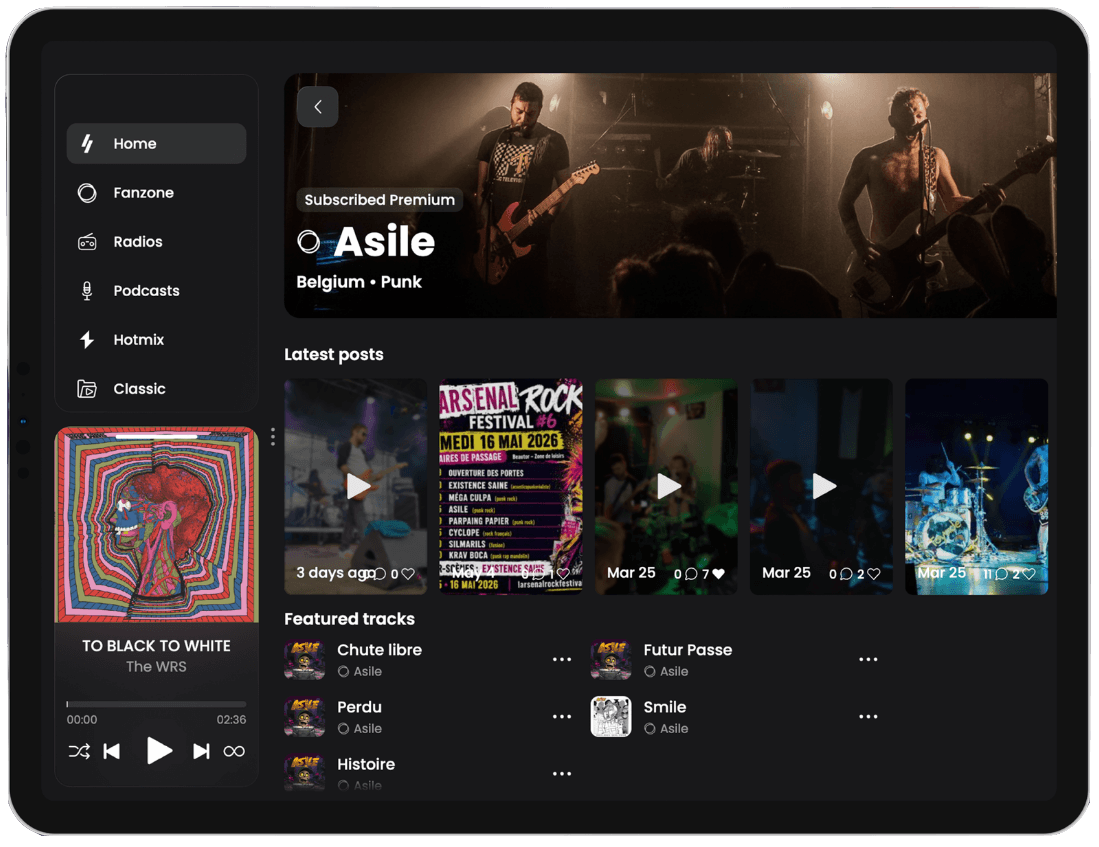
Winamp app home screen as of 2026.
What We Don’t Know
Winamp has not announced the price, launch countries or which operating systems will be supported at launch. There are no confirmed details about streaming quality, offline downloads, family plans, playlist transfers or whether existing Deezer subscribers will have any upgrade path.
The company has not identified which cloud-storage platforms will work or whether the player will index NAS drives and shared network folders.
Hardware support is another large blank space. Winamp has not confirmed AirPlay, Google Cast, UPnP, DLNA, smart-speaker integration, automotive support or direct playback through connected audio components.
Advertisement
It has also not demonstrated the finished software.
At this stage, Winamp and Deezer have announced a partnership, a concept and a 2027 release window. That is not the same thing as delivering a stable player capable of merging a complicated local library with millions of streamed tracks.
Advertisement. Scroll to continue reading.
The Bottom Line
Winamp and Deezer are pursuing an idea that deserves attention.
Advertisement
Major streaming services have spent years improving discovery and recommendation systems while often treating locally owned music as something listeners abandoned with CD binders and beige computers.
Millions of people still own large digital collections and should not require a separate archaeological expedition every time they want to play them.
Deezer gives Winamp a catalog, licensing relationships and streaming infrastructure. Winamp brings a recognizable brand and decades of experience with local music playback and customization.
That combination could produce a genuinely useful alternative to conventional streaming apps. It could also become another Deezer-powered service with a different logo, several customizable buttons and a marketing department leaning very heavily on the past.
Advertisement
The difference will come down to pricing, audio quality, hardware support and whether Winamp can combine local and streamed music without turning library management into unpaid technical support.
We can all see how the newest digital products require flexibility and the ability to scale quickly together with the business. At the same time, they must cope with growing workloads. That’s why teams choose is*hosting for their Linux VPS hosting to get the job done. Flexible server solutions make it possible to configure resources, select a suitable location, and deploy the environment automatically.
The list of users who will find this helpful is extensive: DevOps engineers, web application developers, SaaS platforms, and many others. Using open-source tools helps them create a reliable, transparent, and scalable environment for development and operations.
DevOps is today one of the key approaches to creating and managing software products. It connects development, testing, and operations, helping teams work faster. Open-source tools make workflows easier and flexible. Open source is basically built to bend. You can customize your tools, stitch them together, and automate the boring stuff. Honestly, it’s a perfect fit for pretty much anything — web, mobile, cloud, data, or AI.
It is fair to say that several specific DevOps components help automate processes, improve system stability, and shorten the time between product development and launch. These include:
Advertisement
application build automation;
containerization of production services;
server configuration management;
infrastructure health monitoring;
secure storage of credentials.
Less manual grunt work means fewer mistakes. Auto-deploys let you ship updates in a flash, while smart monitoring catches performance bottlenecks before they become fires.
Scalable Infrastructure for DevOps Teams
In practice, any DevOps model requires a reliable and powerful infrastructure. Every project, even the smallest one, must have the ability to quickly scale resources as more and more users join or as technical requirements change. The server environment must support flexible power settings, rapid creation of new environments, and stable service operation.
International IaaS providers offer VPS/VDS, dedicated servers, VPN services, and additional infrastructure solutions. Users can configure key server parameters, including:
processing power;
amount of RAM;
drive type;
data center location.
A broad infrastructure geography makes it possible to select suitable locations for different projects and reduce access latency. Such opportunities are in demand in various fields. Online stores use scalable servers to handle large numbers of requests.
When choosing DevOps infrastructure, it is important to consider not only current challenges but also growth prospects. A flexible server platform should allow configuration changes without complex migrations. Among the most popular features are:
setting up CPU and RAM;
use of fast NVMe drives;
support for different operating systems;
connecting additional IP addresses;
automatic deployment of environments;
integration via API tools.
This model makes it easier for technicians and helps launch new projects faster. DevOps teams can create test environments, run experiments, and migrate applications between environments with minimal time investment.
Fundamentals of System Security and Resilience
As soon as digital products begin to evolve, securing the system as a whole becomes just as important as maintaining performance. Good companies must secure the users data, provide uninterrupted service, and minimize the risk of breakdowns.
Advertisement
It is exactly these advanced open-source tools that help not only manage the entire system but also monitor it clearly. Teams will be able to track changes, audit settings, and implement additional security measures. When building a secure DevOps environment, special attention is paid to the following aspects:
isolation of virtual servers;
data backup;
protecting network connections;
use of IPv4 and IPv6;
user access control.
KVM technology ensures effective isolation of virtual machines and stable operation of VPS servers. SSDs and NVMe drives enable faster processing, and the latest generation of Intel Xeon and AMD EPYC processors allows you to run resource-intensive applications.
How to Choose Infrastructure for Long-Term Development
Choose a server that actually grows with you. You want to scale smoothly without hitting hidden fees. Look for clear, pay-as-you-go pricing — it’s the smartest way for startups to get top-tier tech without breaking the bank.
Flexible servers work for almost any project. Building an edtech app? Marketing tools? Analytics? AI? To summarize, good infrastructure is the secret sauce to keep your product growing smoothly.
When you need a comprehensive strategy, keep in mind that it can only be based on a successful combination of elements. This includes automation, open-source tools, and high-quality server infrastructure. Together, they create a secure and scalable DevOps environment. These technologies help developers build products faster, monitor all critical processes, and manage resources as efficiently as possible.
Photo credit: Crissa Graves Crissa Graves has spent years making the old Game Boy Camera feel less like a novelty and more like something you might actually carry. Her latest prototype, the GBD-M2, takes that work further. It starts with a fully working Game Boy Pocket and turns the whole thing into a dedicated handheld camera with a removable camera module and interchangeable CS-mount lenses.
Video of Camera GBD-M2 in action
Once I’ve reached a comfortable place with the project, I plan on sharing the files to build yourself
You still get the same 128 by 112 pixel grayscale photographs that the first Game Boy Camera produced in 1998. The small little sensor from that era remains at the heart of every photo, but Graves has simply given it a body that makes you feel like you’re holding a proper camera while still being able to play all of the original Game Boy titles.
Advertisement
There is a dedicated shutter button that sits exactly where your finger would normally go, and the screen is a nice illuminated IPS LCD that you can see outside, which is a great benefit. An 1800mAh battery will keep you snapping away for hours, and you can even charge it via USB-C. The connection connector remains, allowing you to transfer your images to a Game Boy Printer. Surprisingly, Graves claims that you can even play some casual games like Tetris or Pokémon one-handed, despite the fact that the speaker has been removed from this version.
Graves had already completed various iterations of this Camera M project, demonstrating that the whole concept was feasible, although those older versions required hacking into a Game Boy Pocket and had some rather improvised power boards that you’d have to cobble together. The GBD-M2 is a completely new design that takes the Game Boy’s original CPU and RAM and transplants them onto a fresh new circuit board without interfering with a functional handheld. The layout is more camera-like, with bespoke buttons and a shell that has been reduced to a more manageable size after several rounds of design improvement. You also get two battery options: a LiPo battery that can be charged by USB-C, or a set of simple AA cells that you can replace out when they run out.
The camera module detaches, allowing you to replace the custom CS-mount version with alternative lenses, insert the original Game Boy Camera, or simply load a typical old game cartridge. Graves has already created a separate camera module the size of a regular game cartridge, using an iPhone lens and a custom board, which still works in any Game Boy. The GBD-M2 employs the same technique, but in a body designed to be portable and usable.
There are no mass production plans for this device yet, but Graves has mentioned releasing both DIY kits and a limited run of the finished model. You can access all of the files and updates on her GitHub page for the Camera M2 project. For the time being, the GBD-M2 is only a functional prototype, the latest stage in a long journey to find new methods to revitalize an old relic from 1998. You may monitor her progress at gameboycamera.com and on her Bluesky account. [Source]
Apple has reached 1.5 billion paid subscriptions across its platform, adding another milestone to an Apple Services business that generated record June-quarter revenue of more than $30 billion.
CEO Tim Cook disclosed the milestone during Apple’s fiscal third-quarter earnings report. Apple didn’t provide a breakdown showing how many subscriptions belong to its own services or third-party apps sold through the App Store.
The figure represents paid subscriptions rather than 1.5 billion individual customers. A single customer can hold multiple subscriptions, and multiple devices in use, across services such as iCloud, Apple Music, Apple TV, and third-party apps.
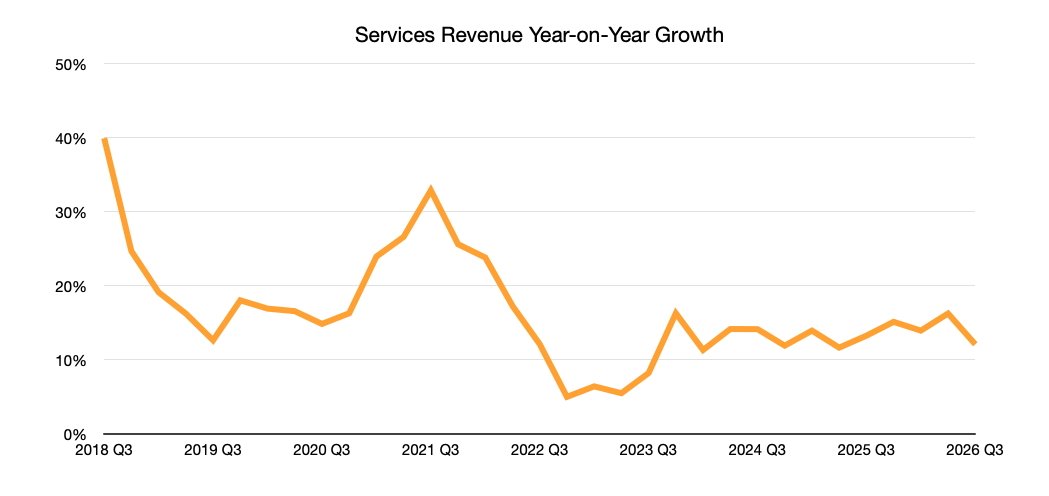
Apple’s Services division generated $30.74 billion during the June quarter, up 12% from a year earlier and setting a new June-quarter record. Revenue increased across advertising, the App Store, AppleCare, music, video, iCloud, and payment services.
Advertisement
The result still came in below the $31.22 billion analysts expected. Apple cited foreign exchange headwinds, but the shortfall against Wall Street’s estimate doesn’t change the division’s year-over-year growth or its new June-quarter record.
Apple Services revenue
Services generated $30.9 billion in the previous quarter, continuing the division’s steady growth beyond hardware sales. The latest result rose from $27.4 billion in the same quarter a year earlier.
Apple also has more than 2.5 billion active devices in use, giving the company a large installed base for subscriptions and other digital services. Paid and transacting accounts reached records during the previous quarter, although Apple didn’t disclose a comparable subscription count at the time.
The 1.5 billion total is more than 50% higher than the nearly one billion paid subscriptions Apple reported in 2023. The increase shows continued expansion across Apple’s subscription ecosystem even as quarterly Services revenue missed analysts’ forecast.
Services have become a major source of repeat business beyond Apple’s hardware sales. The latest milestone reinforces that growth, while the Wall Street miss shows investors are still judging the division by the revenue those subscriptions produce.
“It’s not red,” IBM’s design center manager patiently explained. “It’s magenta.”
The safety function officer wasn’t buying it. Between his fingers, he held up a small, rubbery disc that looked like a pencil eraser. “You know it’s red and I know it’s red,” he said.
The design manager didn’t back down. He insisted that what the man held was indeed magenta. The safety officer called his boss. The boss called Tom Hardy, Design Program Director at IBM. Hardy didn’t flinch.
Advertisement
Latest Videos FromTechRadar
“It’s not red. It’s magenta.”
It was one of the boldest lies ever told in tech. And it made the ThinkPad iconic.
Years later, Hardy relayed the incident in an interview with Laptop Retrospective, detailing the design origins of the TrackPoint, the input stick resting in a central position of the ThinkPad keyboard since 1992.
Instantly recognizable today, the little red nub remains core to the ThinkPad’s identity. For anyone working in design, its history serves as a lesson on creative control and innovation.
Sign up to the TechRadar Pro newsletter to get all the top news, opinion, features and guidance your business needs to succeed!
Every designer knows red on black is a classic combination. So, for Hardy’s team, it was a no-brainer choice when first tasked with adding the TrackPoint to the system.
Advertisement
However, at the time, IBM instituted a strict color-code. For control systems like the TrackPoint, the standard was blue. Playing by the rules, the team toyed with that. According to Hardy, “it just didn’t sing like red did.”
They switched back to red. But there was a major problem with that.
Red was reserved for emergency power shutdowns. It’s the kill-switch color. Hardy knew, even then, the safety team had to approve the color scheme. There was no way they’d let it ship with a red cursor control. That simply wasn’t the way it was done.
Advertisement
Rather than fight and inevitably lose that battle, the designers got creative.
They scrapped every trace of ‘red’ in the documentation. They replaced it with ‘magenta’.
“The safety guys,” Hardy explained, “They may not know what magenta is, but they’ll know it’s not red.”
Think Design Stories: TrackPoint Origins, The story of how it became red (ft. Tom Hardy) – YouTube
They may not know what magenta is, but they’ll know it’s not red.
Soon, the parts came in, labeled as magenta. No-one looked twice at them until the safety official snooped on a box of TrackPoints and demanded to know who approved the color for non-power related functions. He didn’t get an answer he liked. He threatened to shut down the whole production line.
Advertisement
Hardy got involved shortly after. Corporate on corporate combat ensued, arguing over the subjective difference between magenta and red. “The next stop in the line,” Hardy reminded them, “It goes to the CEO.”
Fighting his corner, he tells them, will be famed industrial designer Richard Sapper who created the classic ThinkPad design, as well as corporate graphic design consultant Paul Rand, the man behind the IBM logo. Both are color experts.
Even as the back and forth continued, Hardy’s team had linked up with the advertising team. The ad agency had poured millions of dollars into a campaign that was ready to launch. “So hot,” the adverts said with a close-up on the new TrackPoint, “We had to make it red.”
It was enough to make the safety team think twice. Later that day, an email was sent. It said: ‘Make them red.’
Advertisement
They’ve been the same iconic color ever since.
It’s no secret I’m a massive ThinkPad fan ever since I got my paws on a T431s, but check out the best business laptops my team and I have tested.
Amazon linked multiple high-profile open-source software supply chain attacks targeting the Node Package Manager (npm) ecosystem to North Korean hackers.
The cloud computing giant linked the compromises of the typo-crypto, debug, chalk, and axios libraries to the Sapphire Sleet threat actor, also known as BlueNoroff and Stardust Chollima.
Initial activity started with trojanizing the typo-crypto package in March 2025, which Amazon believes served as a testing ground. It then escalated in September of the same year with the compromise of the widely used debug and chalk packages, affecting an estimated 10% of cloud environments within two hours.
In March 2026, the hacker targeted axios, one of npm’s most popular packages with over 100 million weekly downloads.
It should be noted that the axios incident has already been publicly attributed to DPRK-linked actors, but Amazon connected it to the earlier package compromises.
Advertisement
Amazon says the attacker gained access by socially engineering package maintainers, and then published malicious updates that were automatically distributed to unsuspecting users.
The attribution to Sapphire Sleet has medium confidence and is based on the shared tactics, techniques, and procedures (TTPs) observed in the campaign, the command-and-control (C2) infrastructure, and various operational similarities.
Also, the researchers believe the attacker had a financial motivation, targeting popular packages to gain indirect access to a large pool of potential downstream victims at once.
Amazon also highlights several trends that have emerged from the recent supply-chain attacks:
Advertisement
Attackers are splitting malicious functionality across multiple seemingly benign packages, making detection more difficult.
Threat actors are spending months building trust by maintaining legitimate projects or becoming contributors before introducing malicious code.
Malicious behavior is increasingly decoupled from package contents, relying on external scripts, configuration files, or servers that can be weaponized later.
Malware is using stronger encryption and multi-stage payloads, with runtime or remotely fetched keys that hinder static analysis.
Payloads are becoming environment-aware, delaying execution unless they detect real developer or production environments to evade analysis sandboxes.
Attackers are increasingly exploiting “slopsquatting” by registering package names hallucinated by AI coding assistants, hoping developers or autonomous coding agents will install them.
Many of these tactics are enhanced and simplified by AI, Amazon explains, as they help attackers generate code, documentation, and maintainer identities.
Amazon highlighted a multi-faceted response to these dangers, including reporting its findings and intelligence to the community, collaborating with OpenSSF and other industry partners, and investing $12.5M in the Akrites initiative, which helps protect critical open-source software from AI-enabled attacks.
Security teams log 54% of successful attacks and alert on just 14%. The rest move through your environment unseen.
The Picus whitepaper shows how breach and attack simulation tests your SIEM and EDR rules so threats stop slipping by detection.
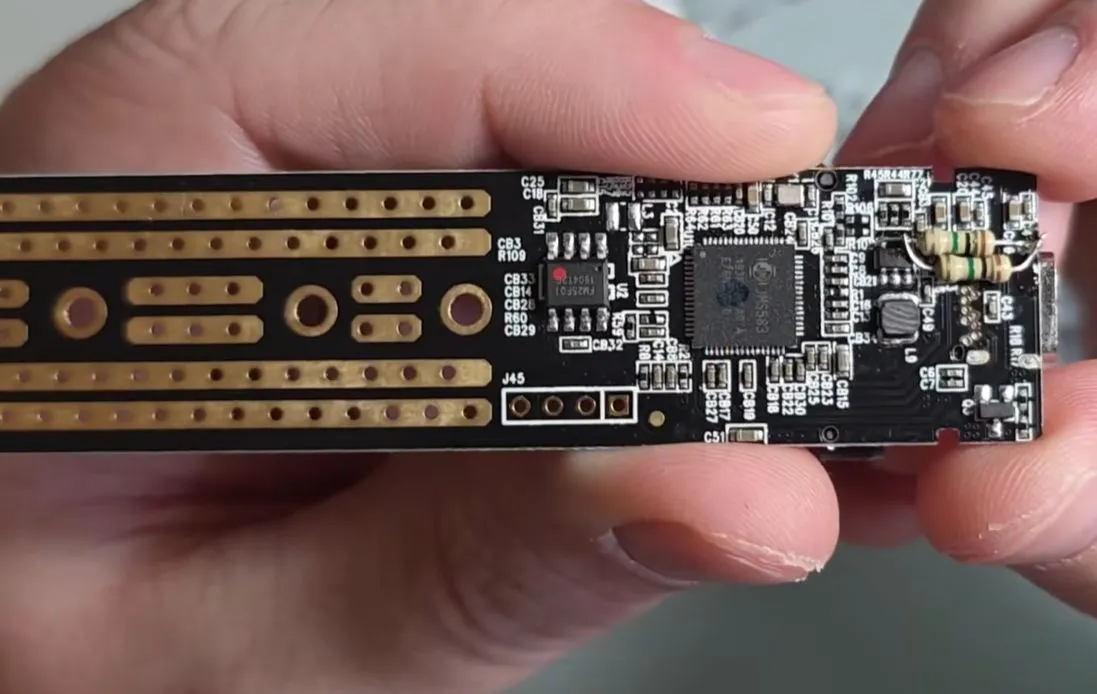
As useful as USB-to-M.2 SSD adapters are, sometimes you come across a bit of a dud. A case in point is the Orico-branded TCM2-C3 that features both an attractive clear case and in its earlier revisions a JMicron controller-based circuit that apparently degrades over time, causing erratic boot behavior. After implementing a fix a few years ago, [Mark Furneaux] can happily report that the thus fixed enclosures are still working.
These faulty board revisions feature the JMicron JMS583 controller IC, which has a 1.0V core voltage input pin. Apparently to save power, Orico designed the board to target the minimum ~-0.95V core voltage per the datasheet. Apparently due to component drift or degradation, this lower core voltage is after a while often not enough any more to start the controller, which thus translates into an unresponsive USB device and presumably some panic about lost data.
Although [Mark] doesn’t describe the fix in detail, it entails bumping up this core voltage to something closer to the nominal 1.0V, which restores functionality at the cost of presumably a measurable amount of extra heat production by said controller.
Advertisement
Later versions of the Orico TCM2-C3 enclosure switched from this JMicron controller to a Realtek one, which so far appears to be noticeably more reliable. Although Orico kept the same model name, the transparent enclosure makes it at least a snap to see which revision you are dealing with.
Just recently Karl warned that we were going to see some absolute nonsense as the US sought to somehow “ban” Chinese AI models from being used in the US. That seems to already be happening. It kicked off with talk that the US might “fight Chinese AI” using nearly identical arguments to what was used to ban (or force the sale of) TikTok before it. Some combination of “national security threat” combined with “oh no China” propaganda.
But most of the AI industry is now speaking out, in an open letter put together by Nvidia, against the potential path that the Trump administration considered taking: an attempt to ban or limit so-called “open weight” models. The companies seem to recognize that focusing on holding back these competitive models would actually do much more damage to the wider AI ecosystem.
There were notable exceptions from the campaign in defense of open weight models: Anthropic, OpenAI, and Google (the three leading frontier model labs) were not initially signed onto the letter. Though their absence quickly became the story — leading OpenAI and Google to reconsider and sign onto the letter days after it came out.
That left one major player off the letter: Anthropic (a company that has so far refused to release any open weight models). And now the company is trying to explain itself, but seems to only be digging itself a deeper hole.
Advertisement
One of the problems here is that the leading Chinese AI models tend to be open weight models, which can be downloaded and run locally, as compared to the leading frontier models from US companies which require you to access them via their own hosted models. Yes, most of the leading Chinese models also offer (sometimes significantly cheaper) cloud/API access to their models, but you can also run them yourself (for the smaller models directly on your own computers, or for the larger models via your own cloud setup).
There’s no inherent reason why the best open weight models are coming out of China, other than that they seem to have recognized that it may be the best way to get more people to use them and to compete against the American frontier models, which are much more proprietary and locked up. The strategy is a recognition that offering a compelling, more open alternative is how to get people to adopt your system over the American frontier models. If a generation of developers builds on top of Kimi or Qwen or one of the other Chinese open weight models, they become the de facto infrastructure for the next generation of digital tools.
In the same manner that Linux quietly became the substrate of the open internet, and it’s likely that an open weight model may become the equivalent for the next generation. Organizations may rely on frontier models for really deep work, but so much can be done with open weight models that a winner here becomes the commodity infrastructure provider for a new generation of software. That’s why any proposed restrictions on open weight models would get everything precisely backwards. It would guarantee that the wider open ecosystem gets built on non-American tools. Yet, the discussion around such bans seems to treat these as just another software product, rather than a fight over how the infrastructure of the internet will work going forward.
Of course, that’s not the only argument the Trump admin is using to try to stop these models. Last week they focused on claims that Kimi’s K3 model (the latest model to shake up the US market, despite being not quite as good as the frontier models) must have been “distilled” from Anthropic’s Fable 5.
Advertisement
“If we see, especially that overseas models are stealing from our great companies, we have the ability to sanction them because of this theft,” Bessent told Fox Business’ “Mornings with Maria” on Tuesday.
Bessent said the technical term for this theft is called distillation, which is an AI training method where a smaller, less capable model is built using outputs from an existing, stronger model. Anthropic sent a letter to the U.S. Senate Committee on Banking, Housing, and Urban Affairs last month alleging that the Chinese tech company Alibaba had carried out the “the largest known distillation attack” against it to date.
This is rich for a variety of reasons, not the least of which is that all of the frontier AI models were built by feeding their training models whatever information they could get their hands on, including (in Anthropic’s case) building a pirate library of downloaded books for which it had to pay out a pretty massive settlement to authors.
Distillation is not quite the same thing, but is functionally similar. It’s taking the work of an existing model to fine tune the model you’re working on. The claims about Kimi K3 seem somewhat exaggerated, as the initial claims were that it was distilled based on Anthropic’s Fable 5 release, but multiple people I’ve spoken to don’t see how that’s possible, given how Fable 5 has only been out for a little while (and then was turned off for a while due to the US government freaking out over nothing).
No matter what, distilled models are likely to be less powerful, and at least a decent period behind the frontier models, given that they’ll need access to the frontier models and time to train based on them. There’s also some dispute over how the open weight models may be using distillation, and which part of the training process works best.
Advertisement
But either way, the freakout over distillation seems… ridiculous. Bessent calling it “theft” is nonsense. Just as training a model on copyrighted works is a form of reading (which shouldn’t implicate copyright in the first place), so too is distilling, which is (in effect) training your model by having it compare its initial answers to similar answers from a frontier model and then adjusting based on the different results. It’s a form of learning based on observed results by others, not “stealing.” Pretending that it’s stealing or somehow should face sanctions or other consequences will put US AI development in a bad, bad spot.
Which brings us back to that letter. Here’s the case it actually makes:
Open weights also strengthen competition and competition is what keeps the gains of AI broadly shared rather than concentrated in a few hands. By allowing many organizations to build, adapt, and deploy advanced models, open weights create rivalry not only among model developers but across cloud chips, applications, and services. That competition spurs innovation, drives down costs, and distributes the benefits of AI broadly across our economy.
Open weights also give customers greater control. As organizations invest in AI, they want to know that they will not become locked into a single provider or lose the knowledge and capabilities they build over time. Open weight models help provide that assurance by allowing organizations to control their own data, evaluate and adapt models to their own needs, and deploy them wherever their business requirements demand. And as organizations create value with AI, open weights allow them to own that value through self-improving models, specialized capabilities, and accumulated knowledge that drive American sovereignty and prosperity.
Of course, Anthropic (which hasn’t released any open weight models) was conspicuously absent from the signatory block of that letter. Earlier this week, Anthropic’s Dario Amodei came out and tried to explain/justify the company’s stance, which boils down to: “we don’t think anyone should ban open weight models… but we do think the US should ban all the conditions that make quality open weight models possible.”
Amodei argues that simply banning Chinese open weight models wouldn’t solve the alleged “threats” that people are concerned about, though he admits directly that it would act as protectionist industrial policy that could benefit American AI companies (like Anthropic):
But banning the use of these models by US businesses does nothing to address this risk, because bad actors are unlikely to be legitimate US businesses. It would protect US AI companies from competition, but that has never been my goal.
It feels a bit like he’s protesting too much regarding the protectionism here, while trying to have it both ways. He claims he really has the best interests of safety at hand, and is against protectionist ideas, but it’s hard to square that with the rest of the article.
While he says the US shouldn’t ban open weight models (and it shouldn’t), he then puts a bunch of conditions on it, which would make it that much more difficult for the current crop of open weight models to compete. Namely, he leans in on the Sinophobia that has become popular these days in warning about “CCP” influence over models (which… should be less of a concern with open weight models, since those who use versions not hosted by the Chinese companies can adjust the models to deal with those concerns).
Advertisement
But then he says that we should punish Chinese AI companies for engaging in distillation:
We should crack down on industrial-scale distillation operations. Distillation is a much more compute-efficient process than training models from scratch. It allows China to build much better models than its number of chips would ordinarily enable, and thus partially evade chip bans. Distillation does not allow the CCP to obtain equivalent or superior AI capabilities to the US, but it can bring the Chinese frontier to within a few months of the US frontier. It is true that many of the companies carrying out these operations release open-weights models—but the open weights are far less relevant than the fact that the operations are backed by an authoritarian state seeking to overtake the US at the frontier. We should have policy interventions to deter this behavior. A blanket ban on open-weights models is neither the correct remedy nor something we have called for.
To be fair to Amodei, not everything on his list is competitor-hobbling. He also wants chip export controls tightened (a policy that predates this fight and has its own problems, but at least isn’t aimed at a business model), and he wants mandatory pre-release safety testing for all sufficiently capable models — open or closed, foreign or domestic, Claude included. That last one is the tell, though, and not in the way he intends: if you genuinely believe capability-based testing is the right lever, and you’ve just said bans “would protect US AI companies from competition, but that has never been my goal,” then what is the argument about distillation doing on the list at all? Testing catches dangerous capabilities regardless of how the model got them. The distillation crackdown adds nothing on safety. It only serves to kneecap cheaper competition.
And even the “safety testing” plank isn’t as neutral as it sounds. While safety testing is obviously important, when legally mandated, it can quickly turn into an expensive compliance-function of box-checking that only the largest companies can do, taking us back to the world of just a few providers, and limiting smaller competitive models from really being viable. While there are legitimate reasons for it, it can also create its own moat.
The proposed crackdown on distillation is just asking the state to step in and block lower-cost competitors from competing. Yes, these models can be competitive, but they should be driving the leading frontier models to continue to improve and to provide more value. What Amodei is asking for here is basically the US government to help prevent lower cost, lower quality competitors from pushing the floor of the AI market upwards.
Advertisement
Now, to be clear, as with any technology, you can claim that a more open, more widely available, more powerful version can be misused. But that has always been the case and we, in the US, have tended to default to allowing the technology to proceed, and figuring out ways to minimize the dangers/increase the good uses, rather than resorting to assuming the tech will be abused and working backwards to block all possible abuses. Historically, seeking to pre-vet technologies tends not to work well, and (often) opens up the market to foreign competitors to simply build better products.
The open letter makes a sharper version of this point, and you can see why Anthropic wouldn’t want to put its name to this point in particular:
Relying solely on closed models is not inherently safe: they can be breached, misused, or fail in ways that outsiders cannot detect. And concentrating advanced AI capabilities behind a small number of closed models compounds that risk. It results in a small number of single points of failure, weakens competition, and leaves critical technology in the hands of a few providers. Open weight models, on the other hand, allow a broad community of researchers and developers to examine their behavior, identify vulnerabilities, develop safeguards, and improve them over time. Just as open-source software demonstrated that transparency can be more secure than obscurity, AI safety may depend on giving more people the ability to test and strengthen the models on which society relies. It allows for rigorous benchmarking and evaluation, red teaming, and protections tied to real and demonstrated harms rather than assuming that closed systems are safer by default.
Amodei also claims he supports the general argument of the open letter, but he disagrees with the idea that open weight models lead to better security:
This brings me to the open letter. I agree with much of it: open weights expand access to the AI economy, they strengthen competition at least for some use cases, and they give customers greater control. Concerns about distillation should be addressed through targeted legal and commercial frameworks—the same measure I described above. But I don’t agree with the letter’s assertions that open-weights models necessarily make it easier to develop safeguards or that broad access to capabilities necessarily helps defenders more than attackers. It seems at least as likely to me that the opposite will be true.
This strikes me as a repeat of the age-old fight that always shows up in discussions of open source technologies: the claim that by making them open, security vulnerabilities are easier to find. Of course, what we’ve seen historically in other spaces is that this actually means that security vulnerabilities are more quickly patched, rather than in the “security by obscurity” space, where they can remain open (and possibly exploited) for much longer.
Advertisement
Amodei is asserting that the AI space is somehow different, though without much evidence for that other than what feels like a bit of fear-mongering about “weaponizing pandemic-level viruses.”
Of course, part of the problem here is that it often feels like Anthropic treats “crying wolf” as a marketing strategy, whereby much of the company is focused on talking up “our tools are soooooooo dangerous that you need us in there to protect you from them.” Even if there’s some truth to it, it’s awfully convenient that the same argument also happens to justify banning, punishing, or limiting the cheaper, more open, more user-controllable alternatives.
In the end, the federal government still might try to punish the Chinese open models in some form or another just because they view current American industrial policy in very nationalistic terms. But that won’t be good for the wider ecosystem, or for the general incentives to innovate. And, worst of all, it makes it that much harder to build a world where we’re not entirely dependent on a few giant companies controlling the “brains” of the tools the rest of us rely on.



































































You must be logged in to post a comment Login