So, that’s it. The final bell has rung for Windows 10. On October 14, 2025, Microsoft just switched it off, stopping all the free updates for this system that has worked hard for ten years. Now, millions of people are stuck at a very big decision point. No more security fixes. No new things. Just your computer is slowly becoming old and useless.
For all those millions of computers still on Windows 10, this “end-of-life” is a very serious wake-up call. But this isn’t just about saying goodbye to something old; it’s about grabbing your chance to move to Windows 11 and its very clever AI helper, Copilot. From big security dangers to the problem of all the old computers being thrown away, here is your essential guide to what is happening and how you can stay ahead.
Advertisement
Why Did Microsoft End Support For Windows 10?
So why did they do it? Because Microsoft is only looking forward now, and they want to focus on Windows 11, or should I say, aggressively promote Windows 11. I am one of the people who really enjoyed Windows 10. It was on students’ laptops, in big office servers—everywhere! People loved its familiar look and how reliable it was.
But ten years is a long, long time in technology. Now, Microsoft’s whole mind is on Windows 11—a system built for this new world of AI and modern hardware.
So, what does this October 14 deadline really mean for you?:
No More Free Security Updates: Microsoft will not give you any free fixes for viruses or security holes. Big companies can pay a lot of money for extra protection, but for you at home? That door is closed.
Frozen Features: No more development. Windows 10 will stay exactly as it is now, forever.
You Are a Target: The hackers are watching. A computer without updates is like a ripe mango waiting to be picked.
This isn’t just about selling a new system. It’s a big move to push everyone into a more secure, AI-powered world. But for you, it can feel like you are being forced.
The Danger: Should You Continue Using Windows 10
Staying on Windows 10 now is a gamble. A very dangerous one. Here is why:
Advertisement
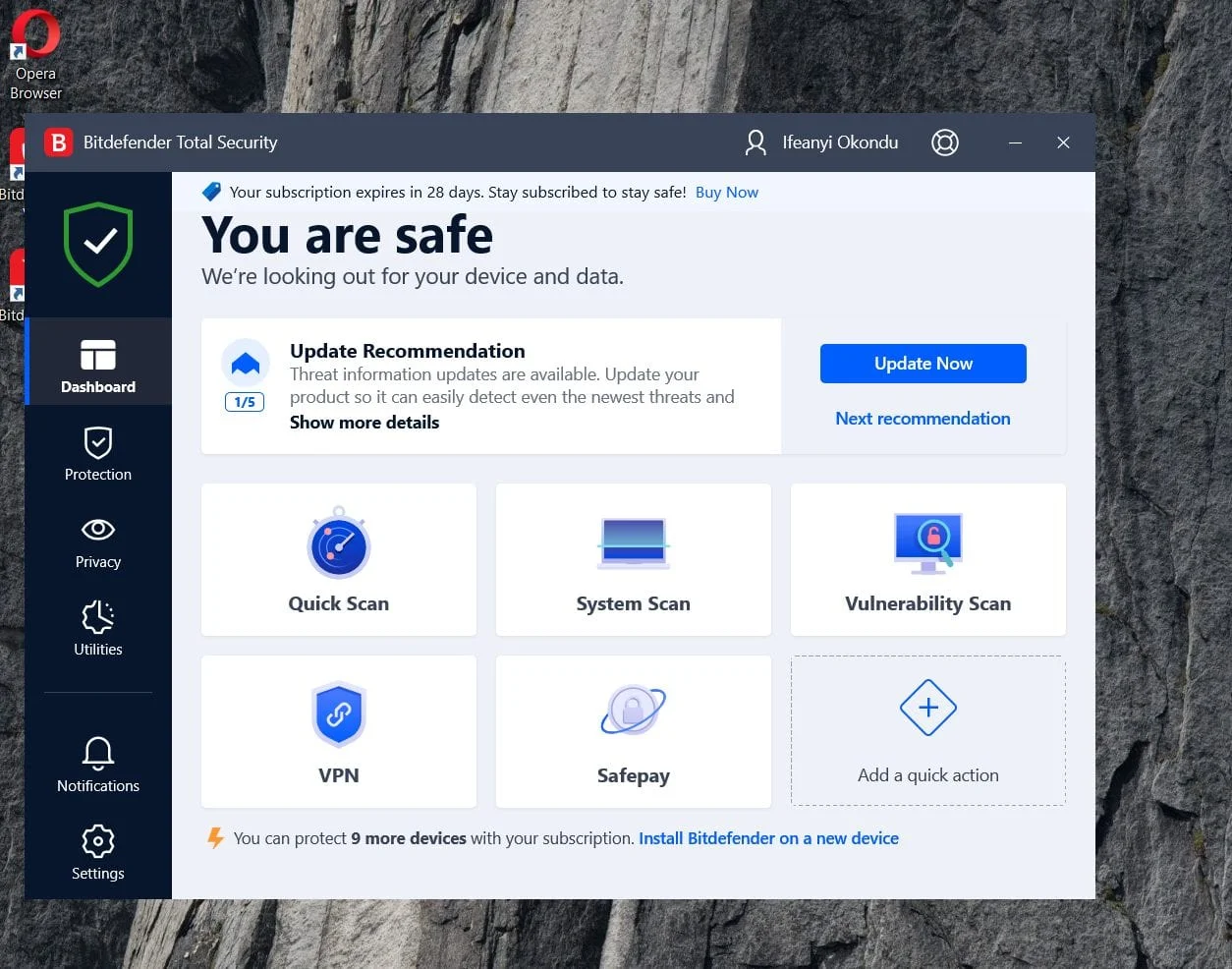
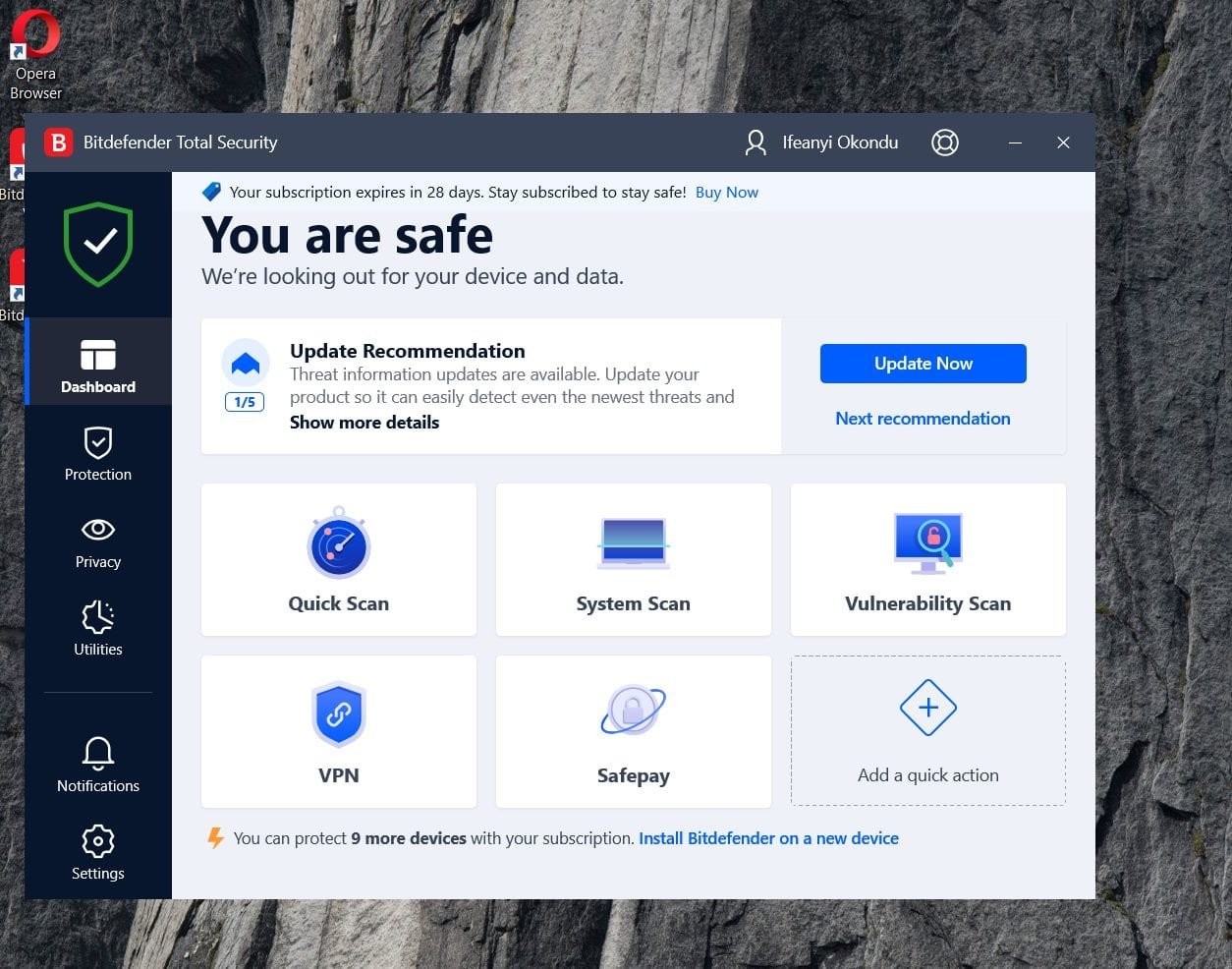
Bitdefender Total Security
You Are an Easy Target: Without those security patches, your PC has no defence, unless you invest in Antivirus software. Those online thieves are looking for someone just like you.
Some Apps May Stop Working: New apps, especially the smart AI ones, are being made for Windows 11. Soon, even your old programs will not work with Windows 10. You will be stuck.
It Will Feel Terribly Slow: One problem with all these upgrades is that the previous version seems to start slowing down even on higher-end PCs. New processors are designed for Windows 11. Your old computer will struggle to keep up and will feel sluggish.
Microsoft is trying to tempt you with Windows 11’s Copilot+ AI, a helper that can search your computer with your voice or even create pictures from text. But for many, the pain of buying a new computer is too much.
Windows 11: What’s New and Should You Move?
This is not just a new coat of paint. Windows 11 is a proper leap into the future. Here’s what you get:
Credit: Michelle Ehrhardt
Copilot+ AI is Very Clever: It’s like a smart friend inside your PC. You can tell it, “find my budget from last month,” and it will. You can even ask it to create images in Paint just by typing.
Security Like a Fort: It has security built right into the machine itself, stopping most attacks before they can even start.
A Sleek Look & Better for Work: The design is clean and modern. It has great features for organising your work if you do many things at once.
Great for Gaming: With things like Xbox Game Pass built-in, it’s a dream for people who love to play.
Windows 10 vs. Windows 11: The Main Differences
Windows 10 (Final Version)
Windows 11 (Latest Version)
Security Updates
Finished
Continuing until 2031
AI Helper
The old Cortana
Smart Copilot+
Runs on Old PCs
Yes
No, needs new hardware
Gaming
Standard
Better graphics and speed
Battery Life
Normal
Can be much better
Upgrading To Windows 11: What to Do Next
Credit: Windows Blog
Don’t just sit there. You have to make a move.
Check If Your PC Can Handle It. Now: Download the “PC Health Check” app from Microsoft. It will tell you if your computer has the right parts. If it’s too old, you need to start thinking about a new one.
Upgrade to Windows 11. It’s Free: If your PC is good to go, just go to your Settings and update. But ah! First, make sure you back up all your important files!
Look at Your Other Choices: Think outside the box. Linux (like Ubuntu) is free, very secure, and is perfect for an old laptop. ChromeOS Flex can also bring an old machine back to life for web work. Or, if you’re buying new, an Apple MacBook is a powerful, though more expensive, alternative.
Don’t Just Throw Your Old PC Away: Please. Take it to an e-waste collection point or see if a shop will take it as a trade-in.
Protect Your Information: If you must stay on Windows 10 for a little while, turn on BitLocker and move your sensitive files to a cloud service like OneDrive.
The End Of The Line: Don’t Be Left Behind
This is it. The end of Windows 10 is a big push into the future. The tech world is running towards AI, and if you stay behind with an old, unpatched system, you will be left in the dust.
So, make your decision. Check if you can upgrade. If you can, try Windows 11 and see its clever AI for yourself. If you can’t, plan for a new machine or try a free system like Linux.
But most importantly, don’t ignore this. An unsecured computer is a risk you cannot afford. Upgrade wisely, stay safe, and keep moving forward.
The Bigger Picture: AI, Sustainability, and You
Microsoft’s EOL move is part of a broader tech shift. With AI dominating—think Nvidia’s $1.2T chip investments or Anthropic’s Claude Haiku 4.5 launch—the industry demands modern, secure platforms. Windows 11’s Copilot+ is Microsoft’s bet on keeping you competitive, whether you’re a creator using AI to edit videos or a business securing hybrid workforces. But the e-waste fallout and upgrade costs spark debate: Is Microsoft pushing progress or profiteering?
Advertisement
Globally, the U.S. leads in AI adoption, but trade tensions (like Trump’s 100% China tariffs) could spike PC prices, making upgrades pricier. Meanwhile, states like Ohio and Georgia are rolling out AI policies to ensure ethical use, signalling a future where OS security is non-negotiable.
Your Next Steps: Don’t Get Left Behind
Checking Windows Update
The Windows 10 EOL is a nudge to evolve. Here’s how to stay proactive:
Test Windows 11: If eligible, try the free upgrade and explore Copilot+ for a week. Love the AI tools? Keep it. Miss the old vibe? Roll back within 10 days.
Budget for Hardware: Black Friday 2025 is weeks away—watch for deals on Windows 11 PCs from HP, Dell, or Microsoft Surface.
Spread Awareness: Share this post on X with #Windows10EOL to warn friends about security risks.
Join the Conversation: Comment below—will you upgrade, switch to Linux, or stick it out? Let’s debate!
Microsoft’s betting on a smarter, safer digital world, but the transition is on you. Don’t let an unsupported or unpatched PC compromise your data. Upgrade smart, stay secure, and keep your tech game strong.
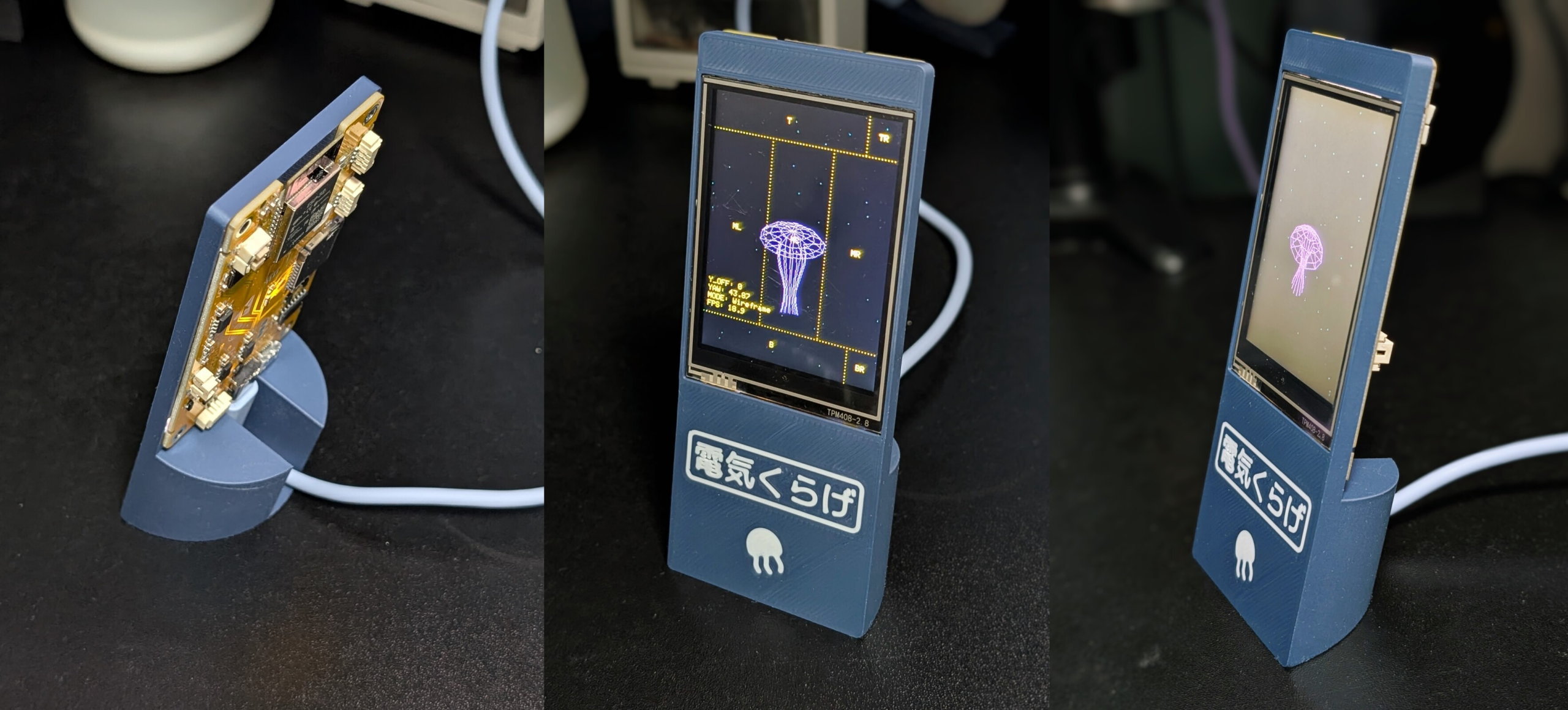
We have to admit, we didn’t know that we wanted a desktop electric jellyfish until seeing [likeablob]’s Denki-Kurage, but it’s one of those projects that just fills a need so perfectly. The need being, of course, to have a Bladerunner-inspired electric animal on your desk, as well as having a great simple application for that Cheap Yellow Display (CYD) that you impulse purchased two years ago.
Maybe we’re projecting a little bit, but you should absolutely check this project out if you’re interested in doing anything with one of the CYDs. They are a perfect little experimentation platform, with a touchscreen, an ESP32, USB, and an SD card socket: everything you need to build a fun desktop control panel project that speaks either Bluetooth or WiFi.
We love [likeablob]’s aesthetic here. The wireframe graphics, the retro-cyber fonts in the configuration mode, and even the ability to change the strength of the current that the electric jellyfish is swimming against make this look so cool. And the build couldn’t be much simpler either. Flash the code using an online web flasher, 3D print out the understated frame, screw the CYD in, et voila! Here’s a direct GitHub link if you’re interested in the wireframe graphics routines.
Advertisement
We’ve seen a bunch of other projects with the CYD, mostly of the obvious control-panel variety. But while we’re all for functionality, it’s nice to see some frivolity as well. Have you made a CYD project lately? Let us know!
Need something new for your reading list? Here are two titles we think are worth checking out. This week, we’ve got Andy Weir’s Project Hail Mary and The Thing on the Doorstep, an H.P. Lovecraft adaptation for Image Comics.
This article originally appeared on Engadget at https://www.engadget.com/entertainment/what-to-read-this-weekend-revisiting-project-hail-mary-and-the-thing-on-the-doorstep-190000250.html?src=rss
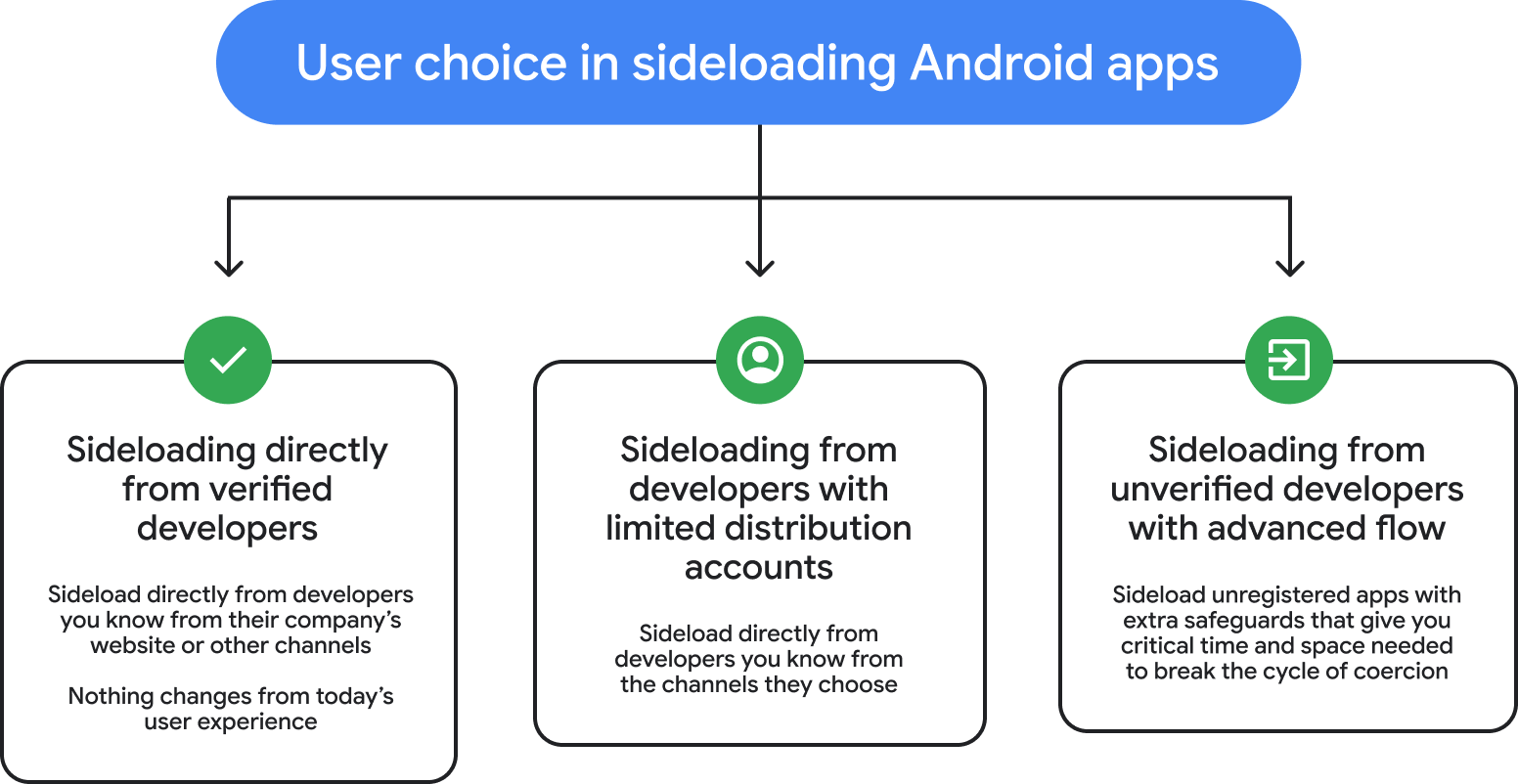
Google has announced a new mechanism in Android called Advanced Flow, which will allow sideloading APKs from unverified developers for power users in a more secure manner.
The new system, scheduled to roll out this August, aims to allow installing Android apps from unverified developers while minimizing the risk of malware infections and scams, which caused an estimated $442 billion in losses last year, according to the Global Anti-Scam Alliance (GASA).
Distinct APK sideloading pathways Source: Google
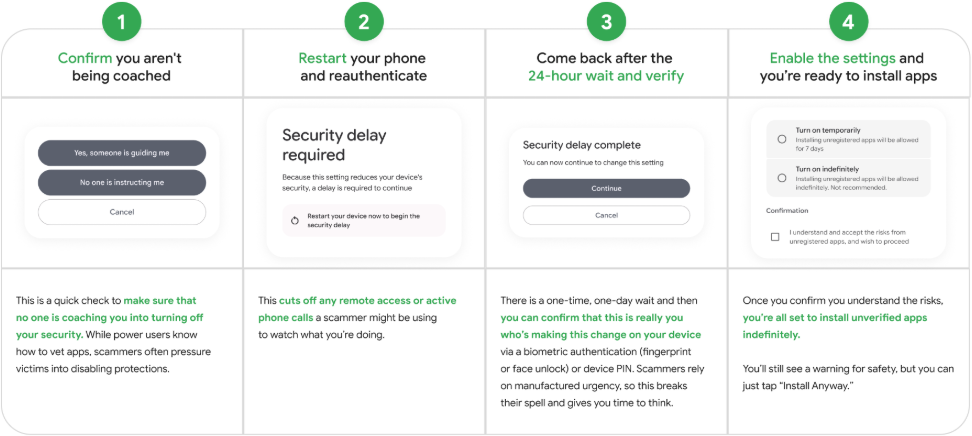
Power users who want to install APKs on their devices will have to go through a one-time process involving the following steps:
Turn on Developer Mode from system settings
Confirm they are not being coached by threat actors
Restart the phone and reauthenticate
Wait one day and then confirm that the modifications are legitimate
Then users can install apps from unverified developers and enable them for a week or indefinitely. Android will display a warning that the app is from an unverified developer.
Overview of the Advanced Flow procedure Source: Google
The process is designed to add friction and disrupt typical scamming tactics that trick people into installing unsafe apps on their devices by playing on the urgency of the operation.
“This flow is a one-time process for power users – it was designed carefully to prevent those in the midst of a scam attempt from being coerced by high-pressure tactics to install malicious software,” explains Google.
“In these scenarios, scammers exploit fear – using threats of financial ruin, legal trouble, or harm to a loved one – to create a sense of extreme urgency.”
Advertisement
“They stay on the phone with victims, coaching them to bypass security warnings and disable security settings before the victim has a chance to think or seek help.”
Google frames the Advanced Flow system as a safe compromise between Android’s openness and user protection, needed for a smooth transition to the new developer verification requirements scheme, first announced last August.
Developer verification is meant as an anti-malware measure, requiring all Android app publishers, regardless of the distribution method they use, to have their identity verified by Google; otherwise, the installation of their software on certified Android devices will be blocked.
Although Google retracted the original timeline for applying the new rule after backlash from the community, it didn’t abandon plans to implement the identity verification system.
Hachette Book Group said it will not be publishing a novel called “Shy Girl” over concerns that artificial intelligence was used to generate the text.
The novel was scheduled to be published in the United States this spring. Hachette said it will also discontinue the book in the United Kingdom, where it’s already available.
Although the publisher claimed the decision came after a thorough review of the text, reviewers on GoodReads and YouTube had been speculating that the book was likely AI-generated. And The New York Times said it asked Hachette about the “Shy Girl” concerns the day before the announcement.
In an email to the NYT, author Mia Ballard denied using AI to write her novel, instead blaming an acquaintance she’d hired to edit the original, self-published version of “Shy Girl.” Ballard said she’s pursuing legal action, and that as a result of the controversy “my mental health is at an all time low and my name is ruined for something I didn’t even personally do.”
Advertisement
Writer Lincoln Michel and other industry observers have noted that U.S. publishers rarely do extensive editing when they acquire titles that have already been published in other forms.
Apple may be preparing a major upgrade for the iPhone’s camera, and this time, it’s not just about hardware. According to The Information, Apple explored acquiring Lux Optics, the studio behind the popular Halide camera app, as part of its efforts to improve the iPhone 18 Pro’s camera experience.
Jeremy Bezanger / Unsplash
The talks reportedly took place in 2025 but didn’t result in a deal. Still, the intent is clear: Apple wants its default Camera app to catch up with pro-level tools, especially as its hardware continues to improve.
Why is Apple suddenly focusing on camera software?
Let’s be real, hardware alone isn’t enough anymore. Apple’s upcoming iPhone 18 Pro is expected to push closer to professional-grade camera hardware, but that also raises the bar for software. Right now, many advanced users rely on third-party apps like Halide to unlock manual controls, RAW shooting, and deeper exposure adjustments.
Halide
Halide, in particular, is known for offering precise manual control over iPhone camera hardware, something Apple’s default app still lacks. By potentially integrating similar features directly into iOS, Apple could eliminate the need for third-party apps and make pro-level photography more accessible to everyday users.
What does this mean for iPhone users?
Apple hasn’t confirmed anything yet, but the direction is pretty obvious. If Halide’s influence kicks in, the iPhone could get manual focus, exposure controls, advanced RAW capture, long-exposure shots, and pro-level video tools. Basically, turning the Camera app from “tap and pray” to “dial it in like a pro.”
Unsplash
What makes this more interesting is that Halide co-founder Sebastiaan de With is now at Apple, which feels less like a coincidence and more like a soft rollout of ideas. The iPhone camera might soon think a little less like Apple… and a little more like a photographer. For users, this could be a big shift. Instead of jumping to third-party apps for serious shooting, the default Camera app might finally do it all. And if Apple gets the balance right, the iPhone 18 Pro could stop playing catch-up and start setting the pace again.
Looking for the most recent regular Connections answers? Click here for today’s Connections hints, as well as our daily answers and hints for The New York Times Mini Crossword, Wordle and Strands puzzles.
For today’s Connections: Sports Edition, the purple category came to me right away, and it’s usually the toughest. I also got a kick out of the green category. If you’re struggling with today’s puzzle but still want to solve it, read on for hints and the answers.
Connections: Sports Edition is published by The Athletic, the subscription-based sports journalism site owned by The Times. It doesn’t appear in the NYT Games app, but it does in The Athletic’s own app. Or you can play it for free online.
Hints for today’s Connections: Sports Edition groups
Here are four hints for the groupings in today’s Connections: Sports Edition puzzle, ranked from the easiest yellow group to the tough (and sometimes bizarre) purple group.
Yellow group hint: Same-same.
Advertisement
Green group hint: Otto, Anna.
Blue group hint: He ain’t heavy…
Purple group hint: The DMZ is one.
Answers for today’s Connections: Sports Edition groups
Looking for the most recent Mini Crossword answer? Click here for today’s Mini Crossword hints, as well as our daily answers and hints for The New York Times Wordle, Strands, Connections and Connections: Sports Edition puzzles.
Need some help with today’s Mini Crossword? It’s not too tough, but 7-Across made me stop and start thinking of five-letter beverage brands. Read on for all the answers. And if you could use some hints and guidance for daily solving, check out our Mini Crossword tips.
If you’re looking for today’s Wordle, Connections, Connections: Sports Edition and Strands answers, you can visit CNET’s NYT puzzle hints page.
Samsung’s next generation of foldable phones could bring some changes to charging, though not all of them might be what fans are hoping for. According to recent certification listings spotted via SammyGuru, upcoming devices like the Galaxy Z Fold 8 and a new “Wide Fold” variant have appeared on China’s 3C database, hinting at potential updates to charging capabilities.
Samsung
These listings typically reveal wired charging specs ahead of launch, making them an early indicator of what to expect. But here’s the catch: the “upgrade” might not be as big as it sounds.
What do the leaks actually reveal?
Two upcoming devices, SM-F9710 and SM-F9760, are believed to be the Chinese variants of the Galaxy Z Fold 8 and a new “Galaxy Z Wide Fold.” These listings show support for 15V at 3A charging, which translates to 45W wired charging. If accurate, that would mark a noticeable jump over previous Fold models, which have typically been limited to 25W wired charging.
SammyGuru
However, a separate listing for what’s believed to be the Galaxy Z Flip 8 shows 9V at 2.77A (~25W) charging, essentially unchanged from its predecessor. So while the Fold lineup may finally see a boost, the Flip series appears to be sticking with the same charging speeds for now.
How big of an upgrade is this?
For the Fold lineup, this is actually a meaningful upgrade. Samsung has stuck with 25W charging for years, so moving to 45W would finally bring it closer to its Galaxy S Ultra devices and noticeably cut down charging times. That said, these numbers only apply to wired charging, as 3C listings don’t reveal wireless speeds.
Nirave Gondhia / Digital Trends
For buyers, this is a welcome but uneven improvement. The Fold 8 and Wide Fold could see a solid boost, while the Flip 8 may remain unchanged, creating a clear divide in the lineup. It’s a step in the right direction, but not quite the full upgrade many were hoping for. Especially when you already have players like OnePlus and other Chinese brands that go well beyond 100W.
Elon Musk made a game-changing announcement hours ago when he revealed plans for Tesla’s Terafab during a live event, taking its work on vehicles and robots literally out of this world. The initiative is a game changer, bringing together SpaceX and xAI to create the world’s largest chip factory. The sheer scale of the operation is mind-boggling, since Terafab will be capable of producing 1 trillion watts of finished chips every year, all under one gigantic roof that will house logic circuits, memory storage, and final packaging.
All of this is important because we desperately need a reliable mechanism to generate solar energy that can be beamed back from space. Terafab is specifically built to accomplish just that. We’re talking about launching an incredible 100 million tons of capture equipment into orbit EVERY YEAR. To accomplish this, we must be able to move millions of tons of material year after year. Once in orbit, solar-powered satellites will conduct all of the AI heavy lifting, with millions of Tesla Optimus robots on hand to erect and maintain those structures well above the good old earth.
Each of those Optimus robots is a significant undertaking, as they require between 100 and 200 billion watts of chips just to function. When you factor in the satellites, you can see the tremendous demand we’re talking about: trillions of watts of chips that no existing chip manufacturer can possibly offer, at least not yet. According to projections, we will have the same shortage until 2030.
That is where Terafab comes in, since it is specifically designed to bridge that gap, with the kind of huge capacity that has the ability to overcome the hurdles that have been holding back both ground-based robot fleets and processing power in orbit. To get it erected, the construction team will use established launch techniques to transport the enormous cargo into place. To get the factory up and running, robots that are already in development will take on assembly tasks that are simply too dangerous for humans to do on a regular basis. As a result, we will have a consistent supply of chips to meet our rising requirements on Earth and beyond.
Advertisement
ELON MUSK: “We’re starting off with an advanced technology fab here in Austin, and I’d like to thank @GregAbbott_TX and the state of Texas for the support.
So in the advanced technology fab, we will have all of the equipment necessary to make a chip of any kind logical memory,… pic.twitter.com/kQ1r5pCgcn
The driving factor behind all of this is a strong desire to explore the universe, not just envision what’s out there, but to experience it firsthand. As one of the speakers put it, “understanding comes only from direct experience out there in the universe,” and Terafab is the first step in translating that idea into something concrete, something that anyone can track, from the start of creation to the end of delivery.
The decision, made public on Thursday, concludes that Apple’s latest implementation of pulse-oximetry functionality falls outside the scope of Masimo’s asserted rights. The full ITC commission will now review the judge’s ruling and decide whether to adopt it – a step that will determine whether the redesigned watches remain protected… Read Entire Article Source link




























































You must be logged in to post a comment Login