Wish you looked at your phone less? Then you’ve probably heard of Brick, a $59 device that claims to help you block distractions. You tap your phone against the Brick when you want to avoid distractions—the bundled software stops you from opening whichever apps you’ve decided you need to stop doomscrolling.
The idea is to add a physical barrier between you and apps like Instagram—if you want to scroll, you need to physically get up, find the Brick, and tap it. It’s a good idea, and implemented in a way that makes it easy to get started. But what if you don’t want to buy a chunk of plastic?
Good news: the Brick is basically just an NFC chip, not that different from the one in your credit card or passport. You can buy a blank NFC chip for a dollar. Even better, free applications can use these chips to block distractions, exactly like the Brick. Or, if you prefer, these apps also support QR codes, meaning all you need is a printer. Here are two free distraction-blocking apps—complete with physical barriers—for iPhone or Android.
Best for iPhones: Foqos
Photograph: Justin Pot
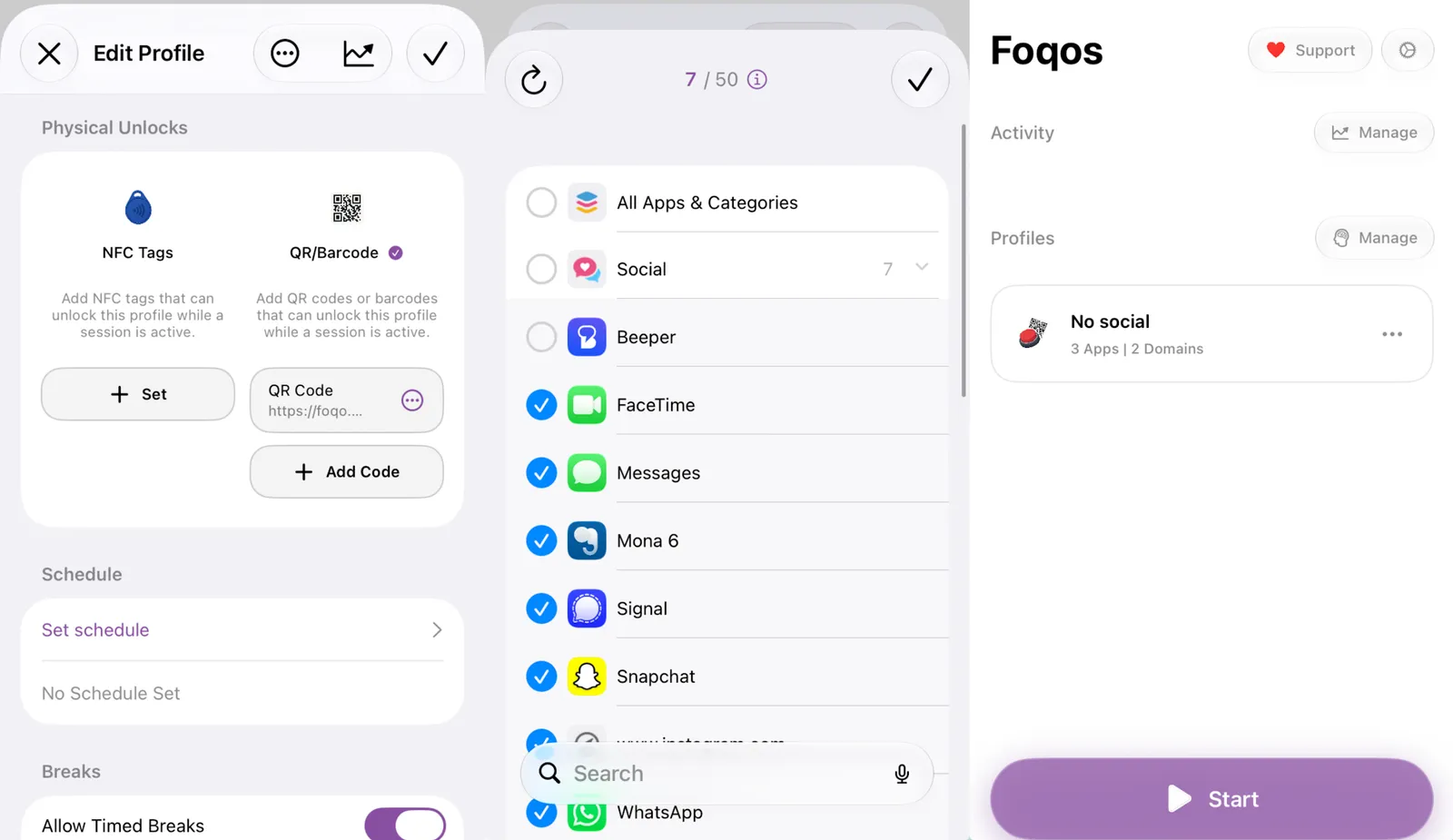
The oddly named Foqos is a free, open source app for iOS by Canadian developer Ali Waseem. Many open source apps lack polish, but not this one—it’s easy to configure the necessary permissions, set up a profile, and start blocking distractions.
Advertisement
While creating a new profile, you first choose which physical object you want to use to start and stop your blocking sessions. The two most popular options are NFC tags (there’s a handy link to buy some in the app) or a QR code. But you can also block using a daily schedule, if you prefer, or by scanning any barcode. The barcode option is nice because you don’t need to buy or print anything—scan the code on your favorite book, beverage, or anything else you keep around the house.
Foqos can block you from managing apps while a profile is running. This means you can’t just delete Foqos to get around a block you set up, which is exactly what someone fighting against their own urges needs. You can allow a limited number of breaks, if you want.
I’ve been using this to break my Reddit habit and can report that it works. I keep a printed QR code inside a cabinet, far from the couch where I tend to scroll. It creates just enough friction that I can finish reading a book instead. The application has an excellent privacy policy—no data leaves your device.
Best for Android: Switchly
Photograph: Justin Pot
Foqos is sadly iOS-exclusive, and I couldn’t find an Android equivalent that’s quite as polished. But Switchly, by Vienna-based developer Saltyy, stands out as one of the more feature-complete apps I tested. You will need to spend some time fiddling to get it set up, granted, but once you do, you’ll find it every bit as flexible as Foqos.
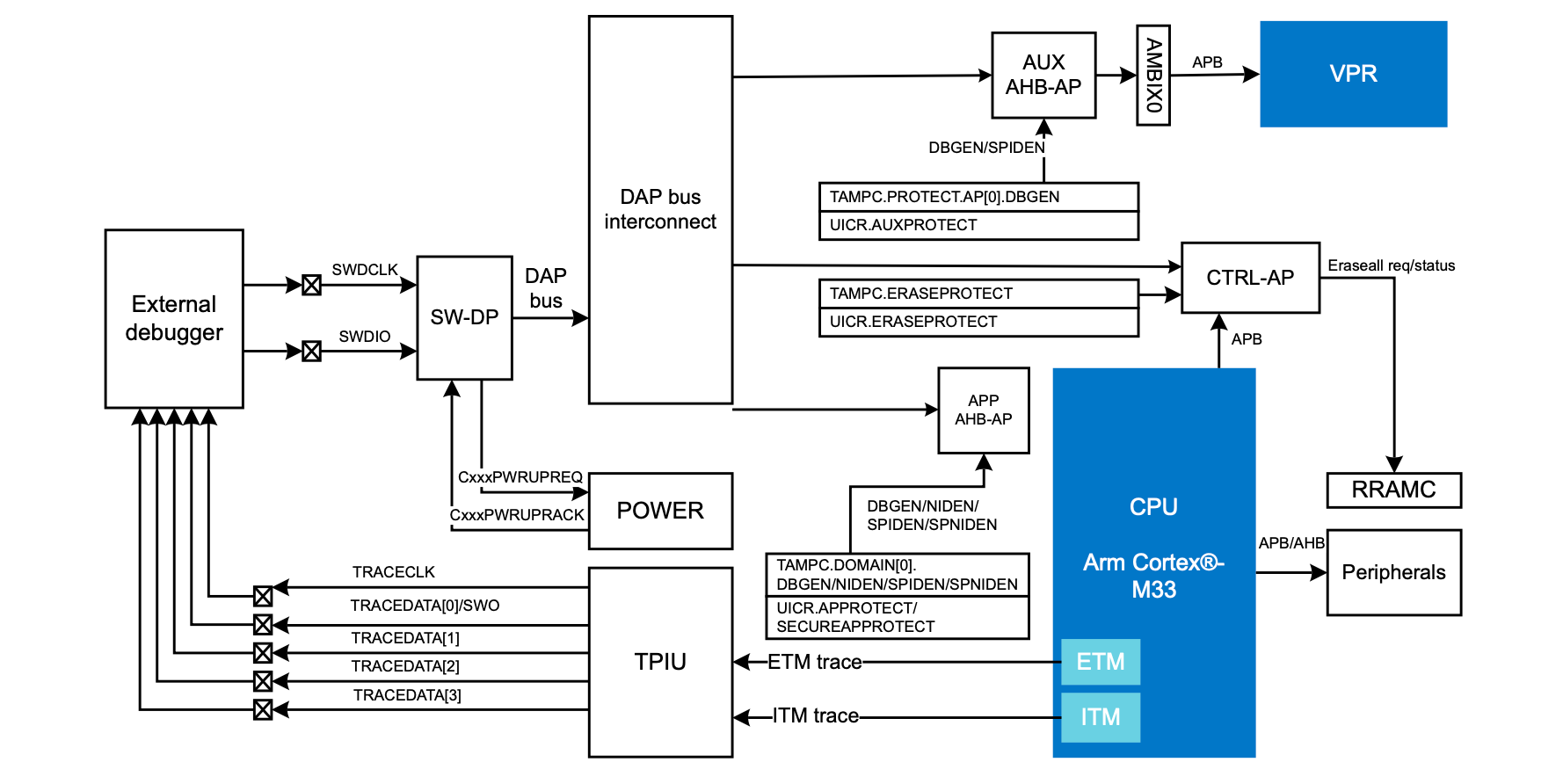
In a recent blog post by [Daniel Mangum] he goes over a scenario observed while debugging the Cortex-M33-based nRF54LM20, reading and writing values while running through a few scenarios. After initially it seemed to go seemingly without any issues, suddenly the GDB debugger would happily return values that suggested that a previous operation had not succeeded. Or, as the case turned out to be, stale cached values were being returned.
What follows is a very technical and low-level breakdown of how this MCU functions inside, especially its cryptographic features and Key Management Unit, which is used for storing sensitive information. The most amusing part is probably you can bypass the cached data by explicitly specifying the access port and memory address along with other parameters.
This ReadMemAP command supported by the JLinkGDBServer used here showed the right value, whereas the normal GDB read command using x kept returning the cached values. This raised the question of which cache was doing this. The direct read from the AHB-AP access port worked fine, so the suspicion is that the J-Link software’s own caching, with a run without the J-Link caching indeed working fine.
Advertisement
J-Link has had some hardware-related issues too, with this new issue pointing to an awkward software bug that could be table-flip-and-rage-quit worthy depending on how much time it wastes during a debug session. Fortunately [Daniel] seems to have caught this one quickly and had an easy way to bypass it, but we aren’t all that lucky.
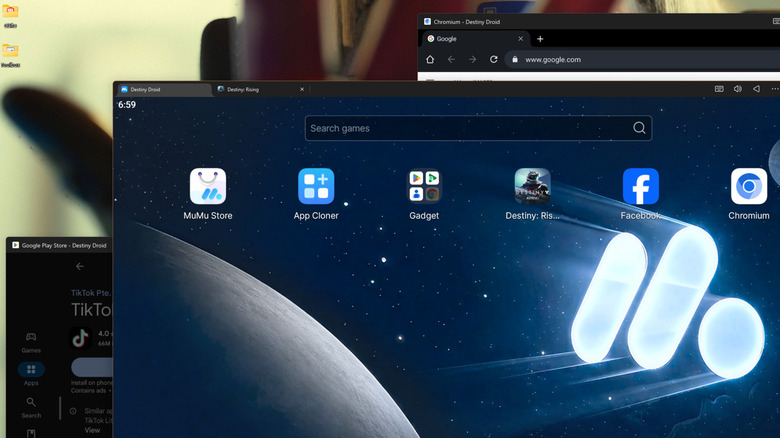
This summer, the popular games studio Bungie ended development on the long-running, live-service game Destiny 2. As an avid player who had chewed through all the content that game had to offer, I still wanted a Destiny fix, so I turned to the next best thing: the mobile game Destiny: Rising, developed by NetEase. But while I could easily play the game on my phone or tablet, gaming on a handheld screen has never appealed to me. So, I installed the Android version of the game on my PC instead, then kicked back and enjoyed the game’s robust mouse and keyboard support, with far better graphics to boot.
But how did I install an Android game on my Windows PC, and are there any reasons to do so beyond gaming? It’s a lot easier to run Android on your PC than you may think, with multiple popular and powerful tools available for that purpose. Pretty much any computer made in the past decade can run an Android emulator, and as long as you’re at least somewhat familiar with Android, you’ll quickly get the hang of it. And while emulating Android on a PC opens up new possibilities for mobile gamers, it’s also useful for content creators, developers and DIY tinkerers. Here’s what you need to know to get started using Android apps on your PC, and why you might want to.
Advertisement
Easy tools for running Android apps on your Windows PC
Max Miller for Engadget
There was a time when Microsoft planned to make Android apps compatible with Windows 11 out of the box, using something called the Windows Subsystem for Android. While a subsystem for Linux ended up shipping, Android app support was dropped in 2024 for reasons beyond the scope of this article. The bottom line is that, if you’re looking to run Android apps on your PC in 2026 and beyond, there are two main paths before you: Android emulators and the Google Play Games app.
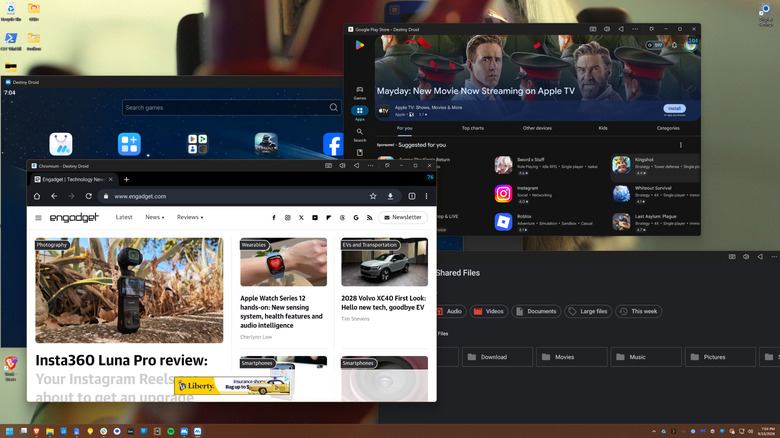
Emulators are the most robust solution. Two of the most popular options are BlueStacks and MuMuPlayer, with the latter being the tool I personally use. Bluestacks is a legitimate app, but it’s chock full of ads that it seems to prioritize over all else, and they clutter up nearly every corner of the interface. MuMuPlayer is free, and though it has more ads than it did a year ago, they only appear on a few loading screens. Because it’s developed by NetEase, the Chinese publisher of the popular PC and console title Marvel Rivals and mobile games including Destiny: Rising, MuMuPlayer is meant as a PC portal for NetEase games and is not as reliant on ads. Nevertheless, it is a full-fat Android emulator and recently got an update to Android 15. You simply create virtual phones and then run apps from the Play Store or elsewhere, just as you would on a handset.
If you only want games, you can instead try Google Play Games for PC, which is a project from Google that translates Android games directly to your PC using a lightweight virtual machine. However, it only works with a select band of titles from developers who have opted in. You’ll find plenty of familiar games, such as Genshin Impact, Clash of Clans and even the mobile adaptation of the critically acclaimed RPG Disco Elysium. Others, such as my beloved Destiny: Rising, are conspicuously absent.
It should be noted that Phone Link on Windows 11 will let you cast your Android phone’s apps or screen to your desktop wirelessly, though they’ll be running on the phone itself rather than directly on your PC.
Advertisement
Why emulate Android apps on PC?
Max Miller for Engadget
Gaming is an obvious use case for Android emulation on PC. Even on top-tier gaming tablets, you may find restrictions to graphical fidelity and frame rate. That’s the case with Destiny: Rising, which is capped at 60 frames per second on my Samsung Galaxy Tab S10 Ultra tablet when I crank up the graphics (even though I’m fairly sure it could handle both at once, the game has decided for me that it cannot). With PC emulation through MuMuPlayer, I’m able to get far better graphics using the Nvidia RTX 4070 Ti Super on my PC. I could also install Android emulators for old consoles like the PS3 or GameBoy, but given the legally dubious area those use cases can tip into, I have not done so.
If you’re not a gamer, there are still use cases for on-PC Android emulation. Plenty of Android apps lack a dedicated PC edition or have more features in the mobile app than on PC. You can run social media programs like Instagram or TikTok, messaging apps like Snapchat, or that app your landlord made you download to control your smart thermostat and locks which annoyingly does not have a PC version. Of course, Android developers use emulation to test apps. And low-end computers which cannot run pro-grade creative software may be able to run the slimmed-down Android versions of those programs, at least if their more limited functionality is tolerable.
An Android emulator like MuMuPlayer or BlueStacks can also be a great way to silo certain workflows away from your main compute environment (though local emulation still consumes local system resources). Both tools also allow parallel instances — that is, multiple emulated Android devices running at once — an ability some mobile gamers use to farm in-game resources, social media creators use for multi-account management, and others may use to create separation between work and personal accounts.
We spend hours testing every product or service we review, so you can be sure you’re buying the best. Find out more about how we test.
AOOSTAR MACO 6850H: 30-second review
Although it now has a much longer name, this mini PC was originally called just the Maco, but it spawned a line of products so for the purpose of this review I’ll refer to it as the Maco 6850H.
This NUC packs a proper eight core workstation grade chip into a palm sized box, and backs it with three full speed NVMe slots, dual 2.5 gigabit networking, and a pair of USB4 ports. That is a striking amount of connectivity for a machine this size, and substantially more than many modern designs offer.
Advertisement
The catch is the platform underneath. The Ryzen 7 PRO 6850H dates back to 2022, and while it still holds up well for general desktop work, buyers comparing it against newer Zen 4-based rivals should know exactly what generation they are getting. Memory is also soldered at a fixed 24GB, so there is no room to grow later.
Latest Videos FromTechRadar
But don’t let any of this convince you that this isn’t an excellent small machine. The memory is 6400 MT/s LPDDR5 organised into four 6GB banks for maximum bandwidth, which boosts both processor throughput and GPU performance. This enables it to outperform more modern platforms, like the AMD Ryzen 9 8945HS. And the cherry on top is the connectivity it supports, with both an OcuLink and two USB4 ports.
Advertisement
Overall, it’s easy to look at the MACO 6850H and consider the technology in it as being dated. But the benchmarks don’t lie, and this highly affordable machine punches significantly above its weight. Is it one of the best Mini PCs around? Based purely on value, there is a strong argument to be made that it is.
(Image credit: Mark Pickavance)
AOOSTAR MACO 6850H: Price and availability
How much does it cost? From $459
When is it out? Available now
Where can you get it? You can get it directly from Aoostar or via an online retailer
There are two SKUs listed for the MACO 6850H: the review hardware with 24GB of RAM and 1TB of storage, and another model with no storage.
For whatever reason, the no-storage option isn’t currently available, but if it is released, it might offer an even better deal for those with a spare NVMe drive handy. According to the Aoostar webpage, the model without storage comes with a free Windows 11 Pro key, which could be a significant deal-maker for some.
Sign up to the TechRadar Pro newsletter to get all the top news, opinion, features and guidance your business needs to succeed!
Advertisement
Direct from AOOSTAR, the review hardware costs $459 for those in the USA, and it is shipped from a US warehouse. It’s the same price in Germany, and comes from a warehouse in that region, but oddly, for those in the UK it only ships from China and costs $519, or an extra $60. Why the UK customers aren’t supplied from Germany is a mystery.
However, you can buy it elsewhere; I found it on Amazon.com, where it’s $479, although it isn’t offered with next-day delivery. In the UK, on Amazon.co.uk it’s £395, or the equivalent of $529.
For those looking for a bargain, AliExpress doesn’t have better prices, although they do have the barebones model with 16GB of RAM that sells for only £369.99. Unless you definitely want that option, it’s probably cheaper to get it from the maker’s website.
Looking back at machines I’ve previously reviewed with this processor, the only candidate was the GMKtec NucBox M7. But that was discontinued in favour of the M7 Ultra, which uses the 6859U CPU.
Advertisement
You can buy that machine from GMKtec in the UK for only £ 299.99 with no RAM or storage, or £599.99 with 32GB and 1TB, respectively. Since I also tested that, I can say the DDR5 memory it uses slows the machine down considerably compared to the LPDDR5 in the Aoostar.
For the hardware and specifications it has, the Aoostar looks like a bargain.
(Image credit: Mark Pickavance)
AOOSTAR MACO 6850H: Specs
Swipe to scroll horizontally
AOOSTAR MACO 6850H Specifications
Component
Advertisement
Specification
CPU
AMD Ryzen 7 PRO 6850H, 8 cores, 16 threads, Zen 3+, 3.2GHz base, 4.7GHz boost, 45W TDP, 16MB L3 cache
Graphics
Advertisement
AMD Radeon 680M, RDNA2, 12 compute units, up to 2.2GHz
Memory
24GB LPDDR5 6400MHz, soldered to the board, single channel, not upgradeable
Storage
Advertisement
3 x M.2 2280 PCIe 4.0 x4 slots, up to 24TB combined. Review configuration ships with 1TB
Networking
WiFi 6, Bluetooth 5.2, dual 2.5GbE ports using Intel I226V controllers
Ports
Advertisement
2 x USB4, 1 x OCuLink (no hot swap), 2 x USB 3.2 Gen 2 Type A, 2x USB 2.0, 1 x DisplayPort 1.4, 1 x HDMI 2.1, 3.5mm audio jack
Power
External 120W adapter, 19V at 6.32A
Operating system
Advertisement
Windows 11 Pro
Chassis
Recycled aluminium body with a plastic base panel, fingerprint power button
Dimensions and weight
Advertisement
150 x 132 x 57mm
VESA Mountable
No
Advertisement
AOOSTAR MACO 6850H: Design
A larger NUC
Easy access
Excellent NVMe options
Lacks USB labels
Aoostar has kept the Maco in a genuinely pocketable footprint, built from what the company calls 100% recycled aluminium, with only the base panel made of plastic. That is a sensible way to keep the exterior feeling solid while controlling cost and weight.
A fingerprint reader sits in the power button, letting Windows Hello unlock the machine without a password. It is a feature more commonly seen on business laptops than mini PCs, and it fits the company’s positioning of this being a small workstation rather than a toy.
In the gamut of NUC designs, this one is on the large side, but the 150 x 132 x 57mm enclosure isn’t massive by any standards.
One slight disappointment is that it lacks a VESA plate to mount it on a monitor, which feels odd.
Access to the inside is easy, with just four screws on the base to remove before you have free rein inside. While this system doesn’t have socketed memory, it has four M.2 slots, two of which are used for the supplied drive and the Wi-Fi module. That leaves two unused, and all the 2280-sized slots are Gen4 x 4 specification.
Advertisement
That’s excellent for turning this machine into a high-performance mini server, and the external IO supports that pathway with dual 2.5GbE LAN ports and USB 4.0.
(Image credit: Mark Pickavance)
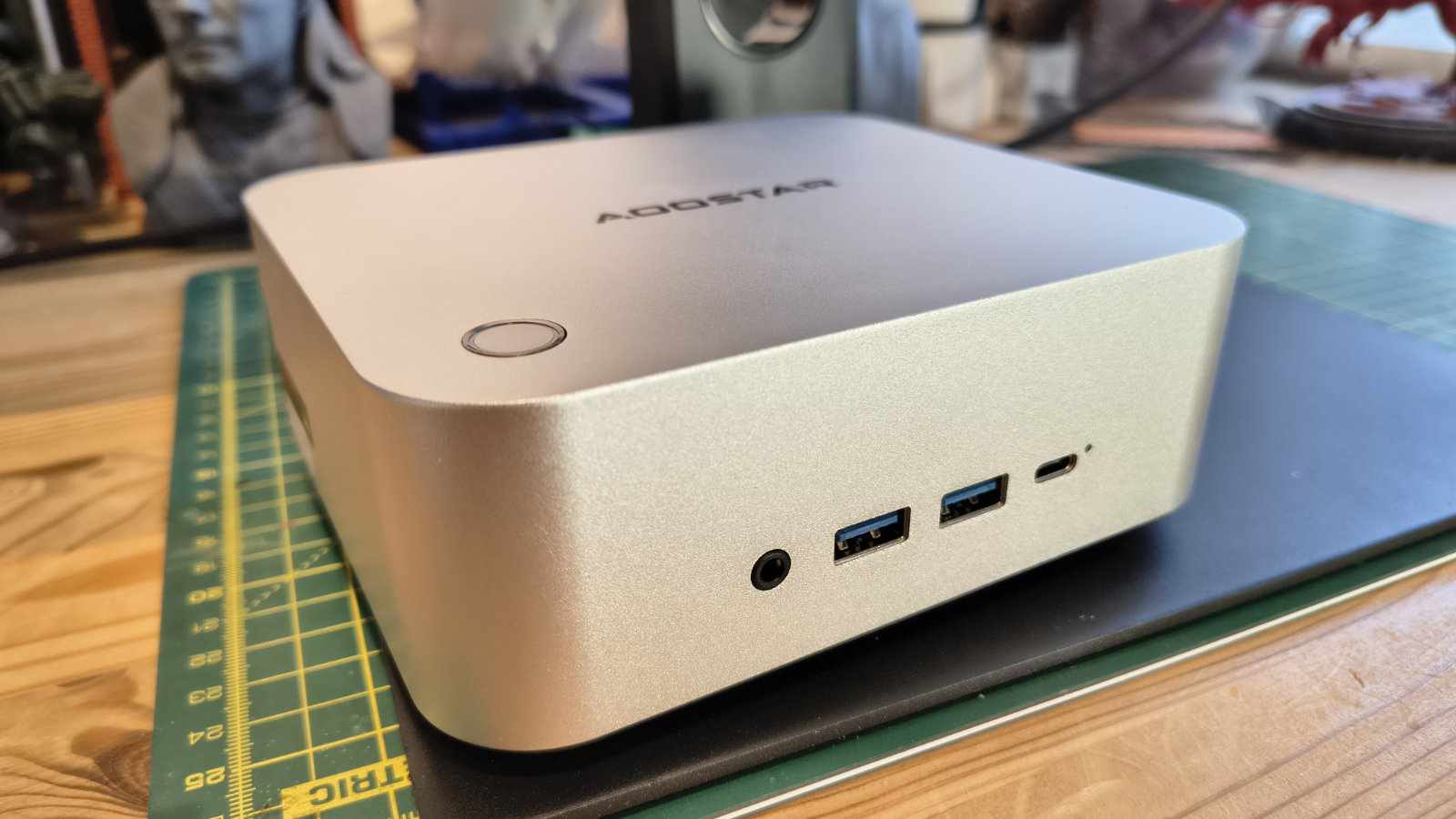
The port layout has an audio jack, two USB 3.2 Gen 2 ports and a USB4 on the front; the OCuLink port on the left side; and another USB4 on the back, with HDMI, DisplayPort, and the LAN ports.
According to the Aoostar web page, the two USB ports on the back right are USB 3.2 Gen 1 and USB 2.0, but neither is blue, and in my tests both proved to be USB 2.0.
One minor detail I wish was different is that none of the front ports is labelled, and both rear USB ports are merely labelled “USB” rather than anything more helpful.
Advertisement
Some might also miss an SD card slot, but the ports on this NUC do align well with using a docking station that often includes that feature.
AOOSTAR MACO 6850H: Features
AMD Ryzen 7 PRO 6850H
LPDDR5 6400 MT/s
USB 4.0 and OCuLink
The heart of the Maco 6850H is the AMD Ryzen 7 PRO 6850H, a chip that first appeared in business laptops back in 2022 under the Rembrandt codename. It pairs eight Zen 3+ cores with sixteen threads, running from a 3.2GHz base up to a 4.7GHz boost, all inside a 45W thermal envelope. The PRO suffix adds Microsoft Pluton security and remote management features aimed at business buyers, on top of the same silicon found in the consumer Ryzen 7 6800H.
Zen 3+ is a modest refinement of the Zen 3 architecture rather than a clean-sheet redesign, built on a 6 nanometre TSMC process. Anyone expecting Zen 4 or newer should adjust expectations accordingly. That said, eight cores and sixteen threads remain a genuinely useful amount of compute for a small form factor desktop, and the chip still competes well against many newer six-core parts in multi-threaded work.
Graphics duties fall to the Radeon 680M, built on RDNA2 with twelve compute units clocked up to 2.2GHz. When this chip launched, the 680M was widely regarded as the fastest integrated GPU AMD had shipped. It’s since been overtaken by the 780M, 880M and the new 8060S, but it remains capable of light gaming and everyday creative work, particularly when paired with fast memory.
Advertisement
(Image credit: Mark Pickavance)
That memory pairing matters more than you might think. Integrated graphics performance leans heavily on system memory bandwidth, since there is no dedicated video memory to draw on.
Aoostar has fitted 24GB of LPDDR5 running at 6400MHz, which should let the 680M stretch its legs more than it could on slower 4800 MT/s DDR5 and DDR4-based systems. The tradeoff is that this memory is soldered directly to the board, fixed at 24GB with no slots to expand it later.
Storage is where the Maco 6850H distinguishes itself from cheaper rivals. Three M.2 2280 slots are wired for full PCIe 4.0 x4 bandwidth, supporting up to 24TB combined. That is a genuinely generous allowance for a machine this size, and positions the MACO as a plausible small NAS or media server as well as a desktop replacement.
Networking follows the same business-minded theme, with dual 2.5 gigabit Ethernet ports built around Intel I226V controllers, alongside Wi-Fi 6 and Bluetooth 5.2. Two USB4 ports and an OCuLink connector round out the external expansion options, the latter aimed at anyone wanting to attach an external GPU with less signal loss than a USB4 connection would introduce.
Advertisement
I plan to test these scenarios and maybe write a feature based on what it reveals for those wanting discrete graphics performance or a cheap AI platform.
AOOSTAR MACO 6850H: Performance
(Image credit: Mark Pickavance)
Swipe to scroll horizontally
Mini PC
Row 0 – Cell 1
Aoostar Maco 6850H
Advertisement
GMKtec NucBox M7 Pro
CPU
Row 1 – Cell 1
AMD Ryzen 7 PRO 6850H
AMD Ryzen 9 PRO 6950H
Advertisement
Cores/Threads
Row 2 – Cell 1
8C 16T
8C 16T
RAM
Advertisement
Row 3 – Cell 1
16GB DDR4 (2x8GB)
32GB DDR5 (2x16GB)
SSD
Row 4 – Cell 1
1TB Apacer AS2280Q4
Advertisement
1TB
Graphics
Row 5 – Cell 1
Radeon 680M
Radeon 680M
Advertisement
3DMark
WildLife
17098
15703
Advertisement
Row 7 – Cell 0
FireStrike
6792
7036
Row 8 – Cell 0
TimeSpy
Advertisement
2872
2811
Row 9 – Cell 0
S.Nomad
2502
Advertisement
2497
Cine24
Single
84
Advertisement
94
Row 11 – Cell 0
Multi
708
772
Advertisement
Row 12 – Cell 0
Ratio
8.39
8.23
GeekBench 6
Advertisement
Single
1996
2167
Row 14 – Cell 0
Multi
Advertisement
9601
10454
Row 15 – Cell 0
OpenCL
29110
Advertisement
29730
Row 16 – Cell 0
Vulkan
33652
30797
Advertisement
CrystalDisk
Read MB/s
7070
3544
Advertisement
Row 18 – Cell 0
Write MB/s
6680
2145
PCMark 10
Advertisement
Office
7100
7064
WEI
Advertisement
Score
8.2
8.2
Considering the AMD Ryzen 7 PRO 6850H is a four-year-old CPU, it’s looking reasonably agile in this quick comparison with an AMD Ryzen 9 PRO 6950H that the GMKtec NucBox M7 Pro used. Both these chips are from the same generation, and these results show just how similar they are.
Advertisement
It all comes down to the memory on the Maco 6850H, and that 6400 MT/s LPDDR5 gives the older machine significant pause for thought.
If I were to compare it to an Intel platform, it would be the Intel Core i7-11800H, although I’ve never tested a system with that specific CPU. I tested one with the Intel Core i7-13700H, the MinisForum NBP7, and it struggled to beat the Maco 6850H.
Later Intel mobile processors that have Arc Graphics are faster, but they’re also generally more expensive.
One choice by Aoostar that helped the Maco 6850H in these tests was including a decent Gen4 x4 NVMe drive, since reading at more than 7000MB/s and writing at 3500MB/s helps massively with tests like PCMark.
Advertisement
AMD and Intel are both making faster mobile chips, and they are available in SFF systems, but given the price increases we’ve seen this year, the Aoostar Maco 6950H seems like a good choice if you want better-than-entry-level performance while staying within a modest budget.
AOOSTAR MACO 6850H: Final verdict
(Image credit: Mark Pickavance)
Given the turmoil in the PC industry caused by massive leaps in memory and storage prices, the antidote is to take a second look at older technology that delivers enough performance to run Windows 11 and a decent range of demanding applications.
That’s where the Aoostar Maco 6850H provides a good justification for not plunging into the latest technology with both feet. Unless you want to play games or something equally demanding, this machine has plenty of performance to spare.
Advertisement
And, should you need more power for graphics or AI tasks, it is possible to add a discrete video card using OCuLink, without resorting to a desktop system.
When you factor in the performance and the price, this machine looks like a solid choice for a wide range of interactive tasks.
Should you buy a AOOSTAR MACO 6850H?
Swipe to scroll horizontally
Value
Advertisement
You need to spend twice this amount for a bump in performance
4.5 / 5
Design
Simple but effective enclosure, but no VESA mount
Advertisement
4 / 5
Features
Punchy CPU, LPDDR5 memory, USB and OCuLink
4 / 5
Advertisement
Performance
Good performance for older silicon
4 / 5
Overall
Advertisement
Great combination of performance, build quality and price is almost unbeatable value.
On the old iPods, generally referred to here in the future as iPod Classic, there lives a tiny, undocumented chip called Mikey. It sits at the headphone output and performs only two functions: powering the Apple wired headset microphone and handling button presses from the three buttons. Despite these headphones and iPods having existed for nearly two decades, no one in the open source community has figured out the protocol Apple used for these buttons until now.
As [Hemant] discovered after finding a single archived blog post from 16 years ago about it, the chip is relatively simple by modern standards. Besides handling microphone bias, it sits on an I2C bus and monitors presses from the three buttons on the headset. Each button has its own resistive load, so a press from any of them drops the voltage on the line to a certain amount which the chip can read. The more involved part is a “chirp” that’s a sort of handshake between headset and iPod, which took a bit of work with a debugger that [Hemant] built into a custom Rockbox firmware.
With the chirp sorted out, [Hemant] built the feature into an existing version of Rockbox, and submitted the update to the Rockbox team for integration in future official builds. It’s a long overdue feature for those still using wired headphones and iPods from the turn of the century, but welcome. Some of those iPods are still working to this day, but only conditionally if they’re very cold.
Early holiday sales will kick off in the next few weeks, like Amazon’s October Prime Day sale that’s Oct. 6 and 7. And between the NFL season in full swing and new shows launching for the fall, now’s a good time to start taking your TV upgrade seriously if you’re considering a new one.
Choosing a new TV comes down to a few specifications, like price, picture quality and your specific use cases — whether it’s gaming or movies. With so many features and factors to consider, choosing the right one can be overwhelming. But our readers may help narrow down your choices.
CNET’s People’s Picks gives readers a chance to share their opinions on their TV brand. Many of you love LG, but some readers have opinions on other brands that you may not have considered before. Here’s which brands won over readers and what our experts think.
Overall People’s Picks winner
LG
Advertisement
LG is well-known among TV brands for its OLED screens, and it’s a favorite among CNET editors and readers. LG earns high marks in many of CNET’s People’s Picks categories and wins three awards from readers: picture quality, fast-moving content and OLED/QD-OLED.
CNET editors give LG several nods for recent OLED TVs, lauding the contrast in the new C6H, the color accuracy of the G5 — recipient of a CNET Lab Award — and the contrast and brightness of G6 for movie buffs. The LG OLED G4 is one of the best gaming TVs for its top-notch gaming features, especially as a more cost-effective option compared to the LG G6.
Advertisement
Picture quality
Runner-up: Sony
CNET readers crown LG as a winner for picture quality. More than 3 out of 5 (61.7%) of CNET readers who own an LG TV reported an “Excellent” experience with their LG TVs in bright rooms and during the day. Readers say there’s no glare and it’s beautifully bright, and 65.1% of readers with LG TVs report perfect dark scenes with inky blacks and zero light bleed — performance that’s common on OLED models and can really improve the look of movies and TV shows. That brings LG’s picture quality to 63.4%.
Advertisement
Sony is a runner-up for picture quality, based on nearly half (49.8%) of readers with a Sony TV saying the brand has inky blacks with no bleed and great daylight performance.
Fast-moving content
Runner-up: Sony
LG wins for flawless, fast-moving content. Of readers, 71% say LG TVs are perfectly smooth, are without blur and are without weird, artificial artifacts with fast-moving content, whereas 28% say LG’s fast-moving content quality is natural but occasionally slightly blurry. When it comes to gaming, CNET readers (59.8%) who have an LG TV say fast-moving content is flawless and incredibly responsive and that the TV has great gaming menus.
Sony is the next top pick, with 60% of readers saying its fast-moving content is flawless on Sony TV screens.
Advertisement
OLED/QD-OLED
Runner-up:Samsung
Lastly, LG sweeps the OLED/QD-OLED category with 82.4% of readers with an LG TV preferring the brand for its OLED displays. If you’re considering an LG OLED TV, the latest LG OLED G6 has excellent contrast, an improved antireflective coating and good brightness for gaming. One of CNET’s lab-tested favorites is the previous LG OLED G5. CNET editors say it has the best color accuracy. The C4 is still a favorite, but if you want the latest and greatest, LG’s C6 and C6H are standout OLED picks. The C6 is the ultra version of the C6 TV, and it comes in larger sizes with higher brightness and better colors.
Samsung trails behind LG with 45% of readers who own a Samsung TV have an OLED or QD-OLED model. That’s not surprising because Samsung has only been selling OLED TVs since 2022, after a single model in 2013, whereas LG’s OLED models have been on sale for more than a decade. Both the S90F and S95F are Samsung OLED TVs that get praise from CNET for image quality and glare reduction.
Roku
Roku/J. Hazelwood/CNET
Budget TV
Runner-up: Vizio
Roku wins three categories in CNET’s People’s Picks — budget, smart TV ecosystem and standard LED/LCD. Roku has several affordable TVs. Most CNET readers (72%) have purchased a Roku TV that’s under $500. And nearly half of readers with Roku TVs have purchased their TV within the past year.
Advertisement
Roku has a few popular TV picks under $500, including the TCL 4-Series, the Pioneer 50-inch 4K smart Roku TV and the Roku – 40″ Class Select Series Full HD (1080p) LED Smart RokuTV. Roku’s cost-effective options don’t skimp on quality. For instance, the Pioneer 4K Roku TV is an LED TV with 4K resolution and a smart TV interface, and it supports High Dynamic Range to improve your picture quality.
Vizio is next up to Roku, with 45% of readers having Vizio TVs costing less than $500. If you’re in the market for a mini-LED TV, Vizio has its Mini LED Quantum Series 4K TV for under $500 in two sizes (65 and 75 inches). Interestingly, 40.8% of CNET readers with Vizio TVs have had them the longest (over five years) — speaking to its quality and longevity for the price.
Smart TV ecosystem
Runner-up: TCL
Trust me, a smart TV’s interface can make or break your day-to-day experience. Roku understands that and wins over 59.1% of CNET readers.
Advertisement
Most readers with a Roku TV say its interface is fast, clean and very easy to navigate. No readers reported the interface being cluttered, slow or frustrating to use — the only TV brand to do so. Roku recently released a new interface that includes a “For You” section, which combines AI suggestions, saved entertainment and what you’re already watching. And the new interface has a “Quick Access” section to get to your most used apps faster, but we have a guide if you’re not a fan and want to turn it off.
TCL is a runner-up for the Smart TV ecosystem category. Over half (56.5%) of readers who own a TCL TV say the interface is fast, clean and easy to navigate, while 22.5% say the interface is good but has too many ads or sponsored recommendations.
Readers say Vizio is the next top pick for LED/LCD TVs, with 32.7% owning an LED or LCD Vizio TV.
Hisense
Hisense/J. Hazelwood/CNET
Sound quality
Runner-up: Sony
Hisense wins CNET’s People’s Picks for its sound quality. Nearly half of readers (45.7%) with Hisense TVs rate the internal audio as “great.” And that’s nearly double CNET readers’ satisfaction with popular brands like Sony (25.2%), Samsung (23.8%) and Vizio (22.2%). One of the perks of Hisense’s latest U7 and UR8 models is Dolby Atmos, which uses surround sound to deliver 3D audio. The U7 models also have a built-in 2.1.2-channel speaker system for more immersive sound. CNET’s favorite budget TV, the Hisense QD7 TV, also supports Dolby Atmos.
Sony is next up for the sound quality category, with 25.2% of owners saying Sony TVs have great sound quality with clear dialogue and decent bass. Some (41.7%) say it’s adequate for casual watching.
TCL
TCL/J. Hazelwood/CNET
Mini-LED/QLED
Runner-up: Hisense
Mini LED TVs use tiny LEDs to give you better brightness, blacks and contrast compared to most standard LED TVs. When it comes to mini-LED and QLED TV panels, TCL wins, with 57.5% of readers owning mini-LED/QLED TCL TVs and naming it their primary TV brand. TCL has been producing mini-LED TVs longer than most TV makers, and many of them have earned CNET’s praise.
Advertisement
According to CNET editors, the TCL QM8K is nearly comparable to an OLED TV in terms of picture quality for less money. TCL’s QM8L is another mini-LED QLED TV that CNET loves for its brightness, color and contrast, too.
Over half (52.1%) of readers with a Hisense TV have a mini-LED/QLED TV, with its model ranking second to TCL. Hisense has a few mini-LED models, including the U6, U7 and the new RGB mini-LED UR8, which we got a glimpse of at CES 2026. It’s around $1,300 and comes with better-than-before color reproduction.
Don’t buy a new TV without reading this first
Many TVs have similar features that may make it seem like the best deal is the biggest screen for your buck. Of everything to consider, CNET’s TV expert Ty Pendlebury advises looking at price, size and picture quality to help narrow down your options.
“It’s always what fits their budget, so not necessarily a ‘budget’ model. If an OLED is within your budget, get it, that’s the quickest shortcut,” said Pendlebury.
Advertisement
And don’t worry about perfecting your TV’s sound quality during your upgrade. Pendlebury says that most TVs sound tinny, so you should consider a soundbar as a separate purchase for better audio.
CNET’s editor-in-chief, David Katzmaier, has 26 years of experience reviewing TVs and has some practical advice to help you feel more satisfied with your purchase years later. For instance, bigger doesn’t always mean better.
“A bigger TV is great, but it can expose lower-quality sources,” said Katzmaier. The reason is that a bigger screen can show imperfections more than a smaller one. If you still want a bigger screen, consider subscribing to 4K plans to streaming services like Netflix and YouTube TV for better picture quality. You can also try adjusting your picture settings, such as putting the TV in Filmmaker Mode, but Katzmaier says that’s not a cure-all.
Instead of screen size, focus on getting a picture quality you’re satisfied with. “The biggest improvement would be getting a new display technology, especially QD-OLED/OLED,” said Katzmaier. “TVs with those kinds of screens deliver clear improvements in contrast and viewing angle that the others can’t match.”
CNET editors and readers highly recommend LG. But other brands were close runners-up. If you’re looking for deep black levels and strong color reproduction, readers recommend Sony as a second contender. Or if you’re struggling to watch TV in a room with a big window, consider TCL or Samsung — all CNET favorites.
Advertisement
“I’ve always liked Roku and Google TV better than proprietary systems from Samsung and LG, and I’m happy to see that CNET readers took our advice and bought LG and Samsung OLED TVs — because they’re the picture-quality champs,” said Katzmaier.
CNET has plenty of reviews of some of the latest TVs, like the TCL QM8L, if you’re looking for a brighter TV, or the Samsung S90F, if you’re looking for the best value for overall picture quality. Regardless, there are also guides to help narrow down your TV choice, like choosing between LCD and OLED TVs, what to know about micro-LED and a list of everything to look for when buying a new TV.
Did you like these findings? CNET’s People’s Picks is community-driven and helps us spread the word about the tech and services you love. Take our ongoing laptops survey to tell us what you love about yours.
Dashia Milden
Senior Consumer Insights Editor
Advertisement
Dashia is the consumer insights editor for CNET. She specializes in data-driven analysis and news at the intersection of tech, personal finance and consumer sentiment. Dashia investigates economic shifts and everyday challenges to help readers make well-informed decisions, and she covers a range of topics, including technology, security, energy and money. Dashia graduated from the University of South Carolina with a bachelor’s degree in journalism. She loves baking, teaching spinning and spending time with her family.
See full bio
ChatGPT and Gemini are some of the most popular chatbots you can use today and each is very capable in their own ways. ChatGPT has been around longer and it is still the most popular option, but Google has slowly been catching up slowly since Gemini was released.
Both chatbots excel at working with text and deep research, but there may be some times you want to use one over the other. We consider ChatGPT to be the most versatile chatbot around, where Google generally provides more value, especially when you go for its paid subscription plan.
When it comes to multimodality — where a chatbot can understand more than just text, but audio images and video — there’s a clear winner, especially when it comes to image recognition. Below are a series of tests to see just how well each chatbot understands the world around you.
(Disclosure: Ziff Davis, CNET’s parent company, in 2025 filed a lawsuit against OpenAI, alleging it infringed Ziff Davis copyrights in training and operating its AI systems.)
Advertisement
ChatGPT vs. Gemini features
Both chatbots are incredibly popular but ChatGPT still has a larger user base thanks to its first-move advantage. That said, Gemini is essentially preinstalled on all Android phones, so it may only take time before Google’s option becomes the predominant chatbot.
Both chatbots can essentially do the same things on the surface, but when it comes to creating images, we’d tip the hat to Gemini, thanks to its almost-too-good Nano Banana image generator. ChatGPT is no slouch, but it’s hard to stand up to what Google has on offer here.
The free versions of both chatbots are very capable, but it’s when you actually start paying for the premium versions that you’ll see the differences between the two. While we still say that Claude is the best overall chatbot, it’s a close race between ChatGPT and Gemini.
If you opt to pay for Gemini, you’ll essentially get a lot more than access to its most advanced models, especially when you compare what you get with ChatGPT. Google’s AI plans offer additional cloud storage to use across your Google account, starting at 400GB for its cheapest plan. If you choose the standard, $20 a month plan, you’ll get even more: expanded access to AI models, more storage, Google Spark and even a YouTube Premium Lite plan that will show you fewer ads. If you’re firmly in the Google ecosystem, there’s almost too much value not to go with Gemini’s premium plan.
Advertisement
ChatGPT’s premium plans provide you with higher usage access and better models. For its comparable $20 plan, this means access to its latest GPT-6.
Test 1: Scribbled notes
I sloppily wrote a page from a book on my e-ink tablet to see which chatbot could read it better.Blake Stimac/CNET
For an easy starter test, I quickly scribbled in the notes app on my Boox Note Air 5C with the pen. It looked like a mess, which is what I was going for. I copied the words from a random page from The Hound of the Baskervilles by Arthur Conan Doyle:
“’A moderate walk along this moor-path brings us to Merripit House,’ said he. ‘Perhaps you will spare an hour that I may have the pleasure of introducing you to my sister.’ My first thought was that I should be by Sir Henry’s side. But then I remembered the pile of papers and bills–” (I ran out of room to complete the sentence, so I left it at that.)
ChatGPT
ChatGPT missed this one. The first line, “a moderate walk along this moor-poor path brings us to Merripit House,” was almost completely wrong, with the chatbot transcribing it as, “A moment will always this moment — [Henry’s?] to Merritt House.”
Its analysis said the handwriting contained notes about a memory involving Henry, Sir Henry and the writer’s sister. It also pointed out that some of the words were hard to determine, so it marked words with uncertain words in brackets.
Advertisement
Gemini
Gemini nailed it. It translated my sloppy text word for word, identified the source and even offered specific handwriting characteristics from the image, like “open loop formations on the letters like y, g, and f.”
The fact that Gemini was able to correctly identify the source may also have affected the accuracy of the translation. Nonetheless, compared to ChatGPT, it’s a night-and-day difference.
To get an idea of how both chatbots interpret an ongoing chess match, I snapped a photo from a game on the Esports World Cup YouTube channel and asked both Gemini and ChatGPT what the next best move was for black.
Gemini
While I’m not a chess expert by any means, Gemini’s answer was long and elaborate.
Its final answer was Bxf4.
Advertisement
ChatGPT
ChatGPT’s approach to responding was initially different. It was showing its thinking process, and one of the lines said it “installed chess libraries and searched for a local Stockfish engine,” which is an open-source chess engine used to calculate moves. However, it took over 4 minutes to get to the response.
Its final answer was c5 to d4.
It did offer a secondary best move: Bxf4, the same as Google’s suggestion.
I reached out to the US Chess Federation to humor me and get some insight about what they thought of the test, but did not receive a reply.
Advertisement
To look for another party’s interpretation of each chatbot’s response, I decided to ask… Claude. I uploaded the same image and included the original prompt as well as both responses from Gemini and ChatGPT. Claude’s conclusion, without going into detail, was that Gemini read the board incorrectly and ChatGPT was the more appropriate answer.
Test 3: Sick plant
ChatGPT and Gemini tried to identify the type of plant and why one of the traps was turning black.Blake Stimac/CNET
The third test was of a photo of a Venus flytrap I own. I asked the chatbots to identify what type of Venus flytrap it is (it’s a towering giant) and why one of the traps was turning black. I knew this would be a particularly tricky one, given that most Venus flytraps look similar.
Gemini
Gemini didn’t identify the correct name of the flytrap, but I didn’t really expect it to. As far as the blackening trap, it listed a variety of ways why it could be happening, including the correct one: The trap attempted to consume an insect that was too large.
ChatGPT
ChatGPT gave a similar, but more detailed reply. It said it wasn’t confident in assigning a particular cultivar for the specific trap itself, but it did give more information about how the one trap could be blackening, as well as a section of “what I’d do” that provided some helpful tips.
Overall, both chatbots provided decent answers, but ChatGPT’s more detailed response won this round.
Advertisement
Test 4: Movie art
Gemini managed to figure out which movie inspired this art. ChatGPT was at a total loss.Blake Stimac/CNET
This was a fun one: I took a photo of three pieces of art that depicted the mouths of the Sanderson sisters from the movie Hocus Pocus. The hand-painted pieces are from an artist and not official movie merchandise.
ChatGPT
ChatGPT was unable to identify the movie, though it was able to accurately describe the image I uploaded: “Three diamond-shaped paintings that look like custom artwork.” It asked for additional details, like the year the film was made, to identify it.
Gemini
Gemini was easily able to identify what I showed it. “This artwork features the iconic smiles of the Sanderson Sisters from Disney’s Hocus Pocus (1993).”
From there, it went into detail about what character was in what position and the actresses who played the characters.
Gemini seems to be the winner
While I preferred ChatGPT’s response for the Venus flytrap test, Gemini’s consistency and ability to correctly identify sources in both the notes and the movie art tests makes me favor it overall. Since I couldn’t get a real answer from an expert about the chess test, I’ll leave that one out of the final tally.
Advertisement
Either way, if you’re looking for the best AI chatbot that can most accurately “see” and describe the world around you, Gemini takes the cake — for the most part.
Blake has over a decade of experience writing for the web, with a focus on mobile phones, where he covered the smartphone boom of the 2010s and the broader tech scene. When he’s not in front of a keyboard, you’ll most likely find him playing video games or watching horror movies.
See full bio
Could this push solar cell efficiency beyond the theoretical 33% limit? Interesting Engineering reports:
Researchers at the University of Groningen in the Netherlands found that tin-based perovskite solar cells can slow heat loss from high-energy “hot electrons…”
When sunlight strikes a panel, photons jump-start electrons into action. The most energetic photons create super-charged hot electrons… [but] in fractions of a trillionth of a second, these high-energy particles rapidly cool, dumping their bonus energy as waste heat before ever leaving the solar cell… In collaboration with Maria Antonietta Loi, professor of Photophysics and Optoelectronics, the team created an experimental setup. Using a specialized solar cell material called tin-based perovskite, Loi’s lab performed a feat many thought impossible: she slowed the heat loss down by a factor of 1,000.
Suddenly, the extra energy lingered for nanoseconds instead of vanishing in picoseconds… To solve the puzzle, Koster and PhD student Tim Faber built digital simulations to peel back the quantum layers. And discovered a surprising double-action mechanism at work… The simulations matched the exact nanosecond delay observed in the lab… These specialized materials could be used to build a new generation of super-efficient solar cells.
Advertisement
Tin-based metal halide perovskites are non-toxic, eco-friendly crystalline materials for high-performance solar energy conversion… The material possesses an unusually low electron mass. As a result, electric charges move quickly and retain extra thermal energy for extended periods. This combination of broad light absorption, efficient charge movement, and prolonged energy retention makes these materials prime candidates for next-generation solar panels.
“There are many other questions that still need answers,” the team said in their announcement, “but in theory, this discovery could allow the creation of more efficient solar cells, beyond the theoretical limit of 33 percent.”
Thanks to long-time Slashdot reader fahrbot-bot for sharing the article.
As you spend more time in the kitchen, it becomes clear that having the right tools can have an outsized impact on your recipe success rate. Some gadgets out there aren’t worth the space they take up in a drawer, but many are essential without an obvious substitute or workaround. A high-quality knife collection, forgiving wooden cutting boards and a smattering of good pans fall squarely in this category.
Other, less obvious kitchen tools that chefs and home cooks deem essential exist. As a culinary school grad-turned kitchen tech writer, I have several. One, in particular, I can never count on finding in rental kitchens and Airbnbs, so I always take one along.
I used to travel to summer beach rentals with all manner of basic tools: tongs, a whisk, a rubber spatula, you name it, plus a fleet of knives, a good bottle of olive oil and bagged-up samples of my entire spice rack.
After a couple of years, I realized that most rentals, at least on the East Coast, were well-equipped, and I was happier not having to schlep the contents of my kitchen to feel empowered to make dinner. I might stash a chef’s knife, just in case, but more often than not, even that would stay tucked in my bag.
There is one tool, however, whose utility is so singular that it can’t be substituted; in my experience, it’s the key between a good dinner and a great dinner (and dessert), and, surprisingly, you can’t expect to find it in other kitchens.
Advertisement
My Microplane, myself
The Microplane is an essential tool I can’t count on finding in the drawers of an Airbnb.Pamela Vachon/CNET
Yes, it’s a Microplane. If you’re now puzzling over how a handheld zester of all things is that important a tool, well, some of you have never enjoyed scraped-together key lime pie for breakfast at the beach, and it shows.
But seriously. No other tool does what a Microplane does to the same degree. Using a paring knife to gingerly cut the rind off citrus fruits without taking the pith with it, then mincing it up? I’ve done it. Hard pass.
A box grater is not likely to do the trick.Pamela Vachon/CNET
Don’t start with me about some cheap grocery store zester that’s both ergonomically overcomplicated and entirely ineffective. A box grater you would typically use for cheese or carrots, with that one plane dedicated to zesting? Have you tried it lately? (Actually, has anyone ever? It just looks like a recipe for pulpy zest and bloody knuckles.)
Why the zester is an essential kitchen tool
Maybe your skepticism isn’t about the tool’s quality, but about why any kind of zester is so critical. So I challenge you: the next time you make salad dressing or pasta, enchiladas, pad thai, or anything that calls for citrus juice, add a hit of zest and see what it does to the outcome. Citrus zest adds several times the flavor, minus the sharp acidity. In a word, it adds vibrancy to whatever you’re doing, without the pucker. It’s a wow factor with the simplest execution. Not to mention: key lime pie for breakfast.
A hit of zest is like fairy dust for food.Pamela Vachon/CNET
And the economics are inarguable. Even in today’s economy, a lemon or lime can only set you back so far, but it contributes so much. And the Microplane itself? Is all of about $18.
Here I am waxing all poetic about citrus, but let’s also talk about two other cooking champions whose processing is made infinitely easier by a Microplane. Garlic and ginger — also cheap yet dynamic ingredients. A garlic press is a fine thing, but if yours is as difficult to clean after use as most I’ve owned have been, ditch it. The microplane can do that work for you, and basically rinses clean afterward.
A zester will inspire you to grate cheese over, well, everything.Pamela Vachon/CNET
Or, if you’ve been buying pre-shredded Parm or another hard cheese, here’s another taste-test challenge for you. It’s so quick to grab a hunk and shave directly into or onto whatever you’re making or eating, with the added bonus of leaving out the extra starches that act as anti-clumping agents in pre-shredded stuff. I could also make a point here about freshly grated nutmeg, but that would be extra. Suffice to say, I never make béchamel without it.
Microplanes of a different color
My go-to zester comes in more than a dozen colors.
If you’re convinced, I am partial to the Microplane brand here, whose handles are especially comfortable and which includes a protective sleeve for storage. Incidentally, you can also get a Microplane in over a dozen colors, and they are made in the US, if buying locally is a compelling argument.
If you’re already a Microplane evangelist and have made it this far, here’s an invitation to maybe upgrade yours. They don’t last forever, as the blades will dull over time. I recently switched out my 15-year-old model, and it has brought new life to my kitchen.
Advertisement
Pamela Vachon/CNET
For argument’s sake, I also checked out one of Amazon’s best-selling and least expensive models, the MasterChef version, which retails for only $10. It’s a little more generous in width, and its protective cover is admittedly a little easier to maneuver. Functionally, it works just like the Microplane, but is made in China for those keeping score.
Pamela Vachon
Contributor
Pamela is a freelance food and travel writer based in Astoria, Queens. While she writes about most things edible and potable (and accessories dedicated to those topics,) her real areas of expertise are cheese, chocolate, cooking and wine. She’s a culinary school grad, certified sommelier, former bartender and fine dining captain with 10 years in the industry. When not sitting at the keys, she leads in-home cheese classes, wine tastings and cocktail demonstrations.
See full bio
Apple might be late to the foldable party, but the iPhone Duo still brings plenty of fresh ideas to the table.
From its passport-style design to its matte folding screen and clever software, it feels more polished than many first-generation foldables. And if history has taught us anything, Android manufacturers won’t be shy about borrowing Apple’s best ideas either.
In fact, I’d bet these iPhone Duo features will appear on rival foldables sooner rather than later.
Passport-style form factor
Apple might not’ve been the first manufacturer to produce a passport-style foldable – but let’s be honest, it started the trend.
Advertisement
Sure, Samsung got there a month early with its similarly shaped Galaxy Z Fold 8, and the almost comically identical Xiaomi 18 Fold launched in China two days before Apple unveiled the iPhone Duo. But Apple’s foldable plans have been, much to then-CEO Tim Cook’s chagrin, pretty widely known for a few years now.
Advertisement
Image Credit (Trusted Reviews)
Specs, renders and the like had been doing the rounds in the tech sphere for a good while ahead of the big reveal, giving the competition a good idea of what Apple was planning and to essentially try and beat it to the punch.
So, yes, we’ll probably see more Android foldables with a similar form factor in 2027 – Motorola has already teased one, rumours suggest Oppo is working on one, and I’d bet good money that Honor will do one too – though I’m not particularly mad about it.
As I found with the Z Fold 8, the passport form factor feels right, with both apps and videos playing nicely on both the inner and outer screens, certainly more so than the boxy alternatives we’ve seen until now. I imagine it’ll pretty much be the de facto design going forward, even if manufacturers (ahem, Samsung) insist that the boxy aspect ratio still has its place.
Advertisement
Matte foldable screens
The iPhone Duo’s matte foldable screen makes so much sense that, honestly, I’m surprised we’ve not seen it on the Android side of things so far.
The matte finish on the iPhone Duo looks to essentially address two of the biggest issues with foldable screens at the moment. The first is just how damn reflective they are; due to their foldable nature, the screens are plastic instead of glass, and reflections are apparent, especially in brighter environments. The matte finish looks to do away with the worst of these reflections, which immediately makes it look more pleasing to the eye than any Android foldable.
Advertisement
The second, and just as important, is that it helps hide the effect of the crease that runs centrally down book-style foldable screens – maybe not when brand new and nearly invisible, but over time as the panels are constantly folded and unfolded.
If there’s any feature on this list that’ll definitely make it to Android foldables in 2027, it’s this one.
Advertisement
The (dreaded) return of under-display cameras
Under-display cameras – also known as UDCs – aren’t a new thing in the Android world. They’re quite the opposite, actually, making an appearance on multiple devices from the likes of Samsung, RedMagic and ZTE from 2020 until 2024, before quietly going the way of the Dodo in favour of regular pin-hole cameras.
Image Credit (Trusted Reviews)
Why? Because, simply put, they weren’t very good – for the most part, anyway. Samsung famously used UDC tech on earlier models of its Galaxy Z Fold, but the area housing the camera was always noticeable, so it kinda defeated the purpose. It also meant the camera itself took a massive hit to overall quality, because it’s literally trying to look past a layer of pixels.
Advertisement
That’s not to say that they were all terrible; I distinctly remember the ZTE Axon 40 Ultra nailing the UDC tech compared to most of the competition. The camera quality still wasn’t the best, but at least you couldn’t see a weirdly off-looking patch of screen where the camera was hiding.
With Apple trying – and by early impressions online, failing – to hide its camera beneath the Duo’s foldable inner screen, it’s possible that we’ll once again see a resurgence of UDCs on Android foldables to try and match the all-screen look. Let’s just hope they’re closer in quality to ZTE’s than Samsung’s, at least.
Standby mode and iOS-like UI tweaks
Apple is famous for how it marries its software and hardware, and it’s no different with the iPhone Duo. It offers software features we’ve not yet seen on Android foldables – though, again, I imagine that won’t be the case for much longer.
Advertisement
That’s particularly true when the phone is in its tented form. Elements like Apple’s Standby mode, which uses the Duo’s outer screen when in a tented form factor to display the time, notifications, weather and the like, makes a lot of sense here, as does using the inner display as a light when your morning alarm goes off.
Advertisement
Then there are more fundamental tweaks to the UI to better suit the foldable form factor, like Apple moving the dock from the bottom – where it has lived since the inception of the first iPhone – to the right-hand side for better reachability, and the combined battery, Wi-Fi and cellular signal icon that saves precious space on the screen.
Again, these seem like no-brainers when you really think about it, and it’s surprising that we hadn’t seen anything like it in the years of Android foldables that came before.
Well, for now, anyway – I swear, I can hear Honor’s MagicOS software team salivating from here.
Am I surprised about any of this? Not really. Apple tends to set trends in the smartphone world, especially when it comes to the design side of things, and it’ll be no different now that the iPhone Duo is here.
Someone recently had to sit me down, hold my hands, and tell me something no pet owner ever wants to hear: my apartment smelled like wet dog. Horrifying.
With all the nonstop fur and dander that seem to appear everywhere no matter what, the intervention was probably necessary. So when Levoit launched its Vital Pet Pro Air Purifier, I was curious to see whether it could actually make a noticeable difference.
Designed specifically for pet-friendly households, the $189.99 machine takes a more targeted approach than a conventional air purifier, combining a three-stage filtration system with features designed around one of the biggest problems pet owners face: fur everywhere. (And the occasional “wet dog” smell.)
The three-stage filtration system consists of a washable pre-filter, a main filter, and an activated carbon filter. The pre-filter catches larger debris such as pet hair, while the main filter targets smaller particles and dander. The carbon filter is designed to tackle odors, with 140 grams of activated carbon packed into it.
Advertisement
Another one of the purifier’s key design features is its U-shaped air inlet, which Levoit says is designed to capture airborne pet hair and particles while improving airflow and helping prevent the filter from becoming clogged.
Image Credits:Levoit
After testing the purifier for a little over a week, I found it impressively effective at collecting fur and trapping the kind of debris that would normally end up floating around the apartment or settling onto furniture.
When it comes to tackling pet odors, Levoit says that the Vital Pet Pro can remove up to 70% of odors within an hour. I can’t really do a specific test to verify that claim, but the difference was easy enough to notice. After the purifier had been running, the room smelled considerably fresher.
I also appreciated the automatic cleaning technology, which removes accumulated hair and debris from the pre-filter and collects it in a removable tray. It’s a very practical feature, especially if the alternative is constantly pulling apart the purifier to clean out a layer of fur.
Additionally, the companion app offers different modes designed to make the purifier more hands-off. Auto Plus Mode monitors changes in air quality and adjusts the purifier’s performance in real time.
Advertisement
Pet Mode is designed specifically around the way pet-related particles can build up throughout the day. It alternates between running the fan at its highest speed for 15 minutes to capture particulates in the pre-filter and then switching to a lower speed for 60 minutes to maintain air quality while reducing noise and energy use.
Image Credits:Levoit
Also, rather than displaying a numerical air-quality reading, the Vital Pet Pro uses a simple color system. Red indicates bad air quality, orange means moderate, green means good, and cyan means very good. I actually preferred this since you can quickly glance at the purifier and immediately get a sense of whether the air is improving without having to interpret a number.
I’ll also point out that the Vital Pet Pro is a little larger than I expected, so make sure you have enough floor space before bringing one home.
Noise is another consideration. At its highest setting, the fan is definitely audible. Once the purifier settles into a lower setting, however, it’s quiet enough to leave running overnight without disrupting my sleep. For light sleepers, Sleep Mode makes the purifier run even more quietly.
The air purifier is available to purchase from Levoit’s website, Amazon, Chewy, and other retailers.
Advertisement
When you purchase through links in our articles, we may earn a small commission. This doesn’t affect our editorial independence.





































































You must be logged in to post a comment Login