


Connect with us
DAPA Banner

Tech

Pixel 11 Pro XL renders show Google’s bold new camera bar

Published

on

New renders of the Pixel 11 Pro XL have surfaced, giving us one of the clearest looks yet at Google’s next flagship.

Fresh CAD-based images suggest Google is reworking its signature camera bar, swapping the familiar two-tone look for a more unified, monochromatic design that stretches cleanly across the rear. This is a subtle shift on paper. However, it could give the Pixel 11 lineup a noticeably sharper, more modern feel.

The renders, first shared by Android Headlines, follow earlier leaks of the standard Pixel 11 and Pixel 11 Pro. They complete the picture of Google’s 2026 non-foldable range. While CAD renders aren’t official, they’re typically based on manufacturing dimensions. This makes them a fairly reliable preview of overall shape and layout.

Credit: Android Headlines/OnLeaksCredit: Android Headlines/OnLeaks
Credit: Android Headlines/OnLeaks

Alongside the new camera bar, there are hints that Google could be dropping the infrared thermometer seen on previous Pro models. That’s one detail worth treating with caution, as smaller features don’t always show up accurately in CAD leaks.

Advertisement

Advertisement

In terms of size, the Pixel 11 Pro XL is expected to come in at 162.7 x 76.5 x 8.5mm, making it marginally smaller than its predecessor. However, the display is tipped to remain unchanged. Google is likely sticking to a 6.8-inch AMOLED panel.

Under the hood, there aren’t many surprises yet. A next-gen Tensor G6 chip is widely expected, but beyond that, details around RAM and storage are still unclear. There’s also no strong indication of a major hardware shake-up this time around.

If Google follows its usual schedule, the Pixel 11 series is still a few months away from launch. An August reveal looks likely.

Advertisement

Source link

Continue Reading
Click to comment

You must be logged in to post a comment Login

Leave a Reply

Tech

Seattle VR gaming studio Polyarc announces ‘significant’ layoffs

Published

on

Moss: Book II. (Polyarc screenshot)

Polyarc, the Seattle-based VR gaming developer behind the award-winning Moss series, announced that it’s had to “significantly reduce the size of the company.”

The announcement, via LinkedIn on Monday, notes that the layoffs come after “an unsuccessful team-wide effort to secure funding following the cancellation of a major project.”

The company, which had around 52 employees according to LinkedIn, did not specify how many were affected, but said it plans to share a spreadsheet with information about those who were impacted to help them make connections in new job searches.

Polyarc was founded in 2016 by Tam Armstrong, Danny Bulla, and Chris Alderson, all three of whom had formerly worked on Destiny at Bungie. The studio’s debut project, the fantasy adventure Moss, came out in 2018 to critical and commercial success, which led to both a 2021 sequel and a multiplayer spinoff in 2023.

The Moss series, which began as exclusives for the PlayStation VR platform before going multiplatform, is on the short list of candidates for VR gaming’s “killer app.” In Moss, players take the role of a Reader, an unseen individual who discovers a magical book in a forgotten library. That book allows you to watch and affect events in the fantasy world of Moss, where a young mouse named Quill is on a quest to save her kingdom.

Advertisement

The problem for the VR market, however, is that much of it is driven by Meta, and Meta has been steadily stepping back from its VR endeavors for the better part of the last couple of years. In January, another wave of VR layoffs at Meta closed several studios and dramatically lowered the headcount at Bellevue, Wash.-based Camouflaj.

There are still major players in VR gaming, such as Valve and its upcoming Steam Frame. It’d be a mistake to say the sector is dead or dying, but Meta drove so much of the conversation around VR that its slow abandonment has destabilized the format.

In addition, the last three years have been a tough time to work in the video game industry, as numerous companies have been forced to slim or shut down. Other recently affected studios in the Pacific Northwest include Phoenix Labs, Monolith Productions, and Rec Room.

Source link

Advertisement
Continue Reading

Tech

Amazon meets FedEx Office: A seamless return and one very dumb question about stamps

Published

on

A microchip pet door awaits its fate at the FedEx Office on NW 46th Street in Seattle. (GeekWire Photo / Todd Bishop)

For a while now, since the closure of the Amazon Fresh Pickup in Seattle, I’ve been complaining about having to drive across the Ballard Bridge to Whole Foods to do my Amazon returns. 

So when news emerged that FedEx Office locations are now part of Amazon’s drop-off network, I jumped at the chance to try it. Turns out there’s a FedEx Office on the way to GeekWire HQ, near the PCC on NW 46th Street (across from the “Up” house in the Ballard Blocks complex).

I walked in with a microchip pet door (long story), showed the QR code on my phone, got it scanned, handed over the unpackaged item, and walked out with a receipt. No box, tape, or label required, just as with other drop-off locations. There was no line.

The refund hit my account the same day.

The one thing that made me scratch my head is that, unlike returning something at a Kohl’s or Whole Foods, there’s no real ancillary benefit for FedEx Office. I dropped off the package and there was nothing else to do in the store. I had no copies to make, nothing to ship, and no need for any of the miscellaneous supplies in their limited displays.

Advertisement

However, I was in need of traditional U.S. Postal Service stamps, so I asked if they sold them, and the guy looked at me like I was a complete idiot. Fair enough.

But for pure convenience, it seems like a win for Amazon customers. 

Amazon and FedEx severed their logistics relationship back in 2019 as Amazon built out its own delivery network. Now they’re patching things up, and more than 1,500 FedEx Office locations are accepting returns as part of a network of over 10,000 drop-off points nationwide. 

We discussed this (and much more) on this week’s GeekWire Podcast. Listen above, and subscribe to GeekWire in Apple PodcastsSpotify, or wherever you listen.

Advertisement

Source link

Continue Reading

Tech

KeeperDB brings zero-trust database access to privileged access management

Published

on

Database credentials remain one of the most common attack vectors in enterprise breaches, yet most organisations still manage them through shared spreadsheets, hardcoded connection strings, or standalone credential vaults with no session oversight. Keeper Security, the Chicago-based cybersecurity company best known for its password management platform, is attempting to close that gap with KeeperDB, a new capability that embeds database access controls directly into its privileged access management (PAM) platform.

The product was announced at RSA Conference 2026 in San Francisco, where Keeper also collected 18 industry awards across categories including password management, privileged access management, and zero-trust security.

What KeeperDB actually does

KeeperDB adds a vault-native database access interface to KeeperPAM, Keeper’s unified privileged access management platform. In practical terms, this means developers, database administrators, and security teams can connect to MySQL, PostgreSQL, Oracle, and Microsoft SQL Server databases directly from the Keeper Vault, without exposing credentials in plaintext or relying on separate database management tools.

Every database session is governed by centralised policies, with full session recording for audit and compliance purposes. The idea is straightforward: if organisations already store their passwords, secrets, and privileged credentials in Keeper, database access should live there too, rather than requiring a separate tool with its own credential store.

Advertisement

“KeeperDB represents a natural evolution of our zero-trust architecture,” said Darren Guccione, CEO and co-founder of Keeper Security. “By embedding database access directly into the vault, we eliminate the credential sprawl that creates risk in most enterprise environments.”

Advertisement

The credential sprawl problem

The challenge KeeperDB addresses is well documented. Database credentials in most organisations are scattered across configuration files, environment variables, CI/CD pipelines, and individual developer machines. When an employee leaves or a credential is compromised, tracking down every instance of that credential becomes an exercise in archaeology.

Traditional database access tools compound the problem. Each tool maintains its own connection profiles and saved credentials, creating multiple copies of sensitive information outside any centralised governance framework. For organisations subject to SOC 2, HIPAA, PCI DSS, or similar compliance requirements, this fragmentation makes audit preparation significantly more time-consuming.

KeeperDB’s approach consolidates database access under the same zero-knowledge encryption and policy engine that already governs passwords, SSH keys, API tokens, and remote desktop sessions in KeeperPAM. Credentials are never exposed to users in plaintext, access is granted based on role-based policies, and every query session is recorded.

Proxy mode for existing workflows

Recognising that many teams have established workflows with existing database clients, Keeper is also introducing KeeperDB Proxy. This companion feature allows developers to continue using their preferred tools (pgAdmin, MySQL Workbench, DBeaver, and similar clients) while routing connections through Keeper’s infrastructure. The proxy maintains centralised policy enforcement, credential protection, and session visibility without requiring teams to abandon their existing tooling.

Advertisement

This is a pragmatic concession. Asking database administrators to switch from tools they have used for years is a reliable way to generate friction and reduce adoption. By offering both a native vault interface and a proxy mode, Keeper is betting that organisations will adopt whichever path creates the least disruption.

A broader PAM strategy

KeeperDB is the latest addition to a platform that has expanded considerably beyond its password management origins. KeeperPAM now includes password and passkey management, secrets management for DevOps and CI/CD pipelines, privileged session management with recording, remote browser isolation, secure remote desktop and SSH access via Keeper Connection Manager, and now database access.

The company’s strategy is to consolidate multiple point solutions into a single platform with a single credential store and a single policy engine. For managed service providers (MSPs), Keeper announced a revamped 2026 partner programme in February with tiered discounts and expanded enablement resources, suggesting that the mid-market and channel are key growth targets alongside direct enterprise sales.

The F1 connection

Keeper’s RSAC presence coincided with the company’s broader visibility push. Now in its third season as the official cybersecurity partner of the Atlassian Williams F1 Team, Keeper launched a global advertising campaign in March 2026 featuring driver Alex Albon. The campaign, filmed during pre-season testing in Bahrain, draws parallels between the real-time data protection required in Formula 1 operations and the identity-first security model that Keeper promotes for enterprise environments.

Advertisement

Williams uses KeeperPAM to protect passwords, infrastructure secrets, and privileged accounts both at its Grove headquarters and trackside, where race strategy, telemetry, and engineering systems depend on tightly controlled access to sensitive data.

What this signals

The broader trend KeeperDB reflects is the continued consolidation of identity and access management tools. Organisations that once maintained separate solutions for password management, secrets management, privileged access, remote connectivity, and database access are increasingly looking for unified platforms that reduce complexity and the number of credential stores to protect.

Keeper is not the only vendor pursuing this strategy. CyberArk, BeyondTrust, and Delinea have all expanded their PAM platforms in recent years. What distinguishes Keeper’s approach is its zero-knowledge architecture (meaning Keeper’s own servers cannot access customer data) and its consumer-grade user experience, which the company argues drives higher adoption rates than traditional enterprise PAM tools.

KeeperDB is available now for KeeperPAM customers, with support for MySQL, PostgreSQL, Oracle, and Microsoft SQL Server. KeeperDB Proxy is expected to follow in a subsequent release.

Advertisement

Source link

Continue Reading

Tech

The Dreame Miracle Pro finally gives my scalp and hair the attention they deserve

Published

on

Why you can trust TechRadar


We spend hours testing every product or service we review, so you can be sure you’re buying the best. Find out more about how we test.

Dreame Miracle Pro: two-minute review

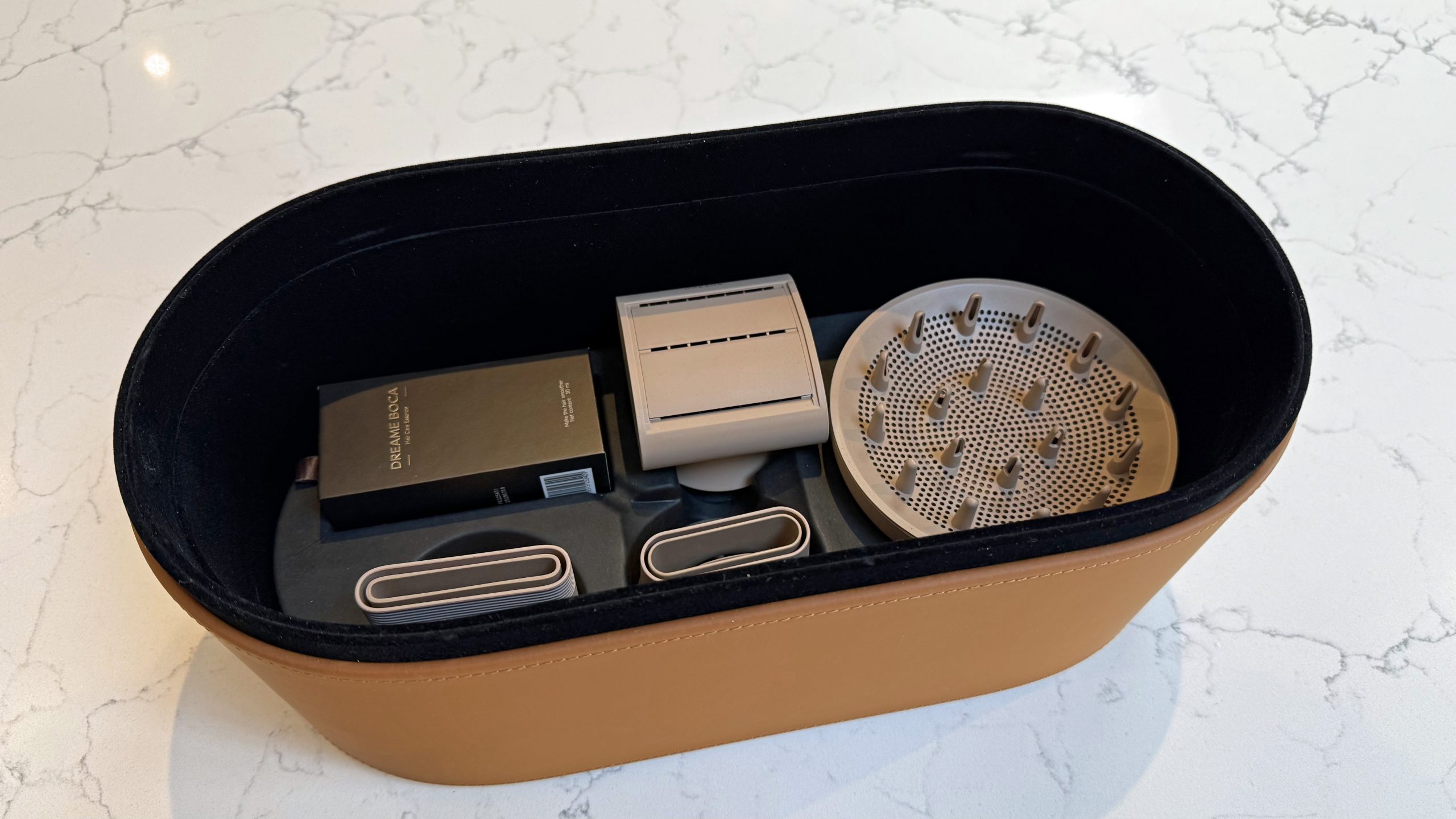
The Dreame Miracle Pro is a premium dryer that does a lot more than just dry your hair. Alongside six modes — Cool, Scalp, Essence, Comfort, Quick Dry, AI Smart — it comes with a built-in essence mister, a ring of red and near-infrared light therapy around the barrel, and a distance sensor that automatically adjusts heat and airflow depending on how close the dryer is to your head.

Advertisement

Source link

Continue Reading

Tech

Open Graphics Card Powers Cyberpunk “Laptop”

Published

on

For once, we can avoid debating in the comments what constitutes a “cyberdeck”, because [LCLDIY] does not refer to his cyberpunk masterpiece as such — he calls it a laptop. Considering the form factor is more like an all-in-one with a built-in laser projection keyboard, that’s arguably an even more controversial label to use, but as stylish this build is, it’s what’s inside it that interests us most.

This would be much easier than the original for our old eyes, especially in the dark.

No, not the cash-register motherboard that serves as the brain, though that has got to be worth some hacker cred. No, it’s the graphics card [LCLDIY] designed to drive 10″ electroluminescent (EL) displays that really has us interested. EL screens have a unique and beautiful glow that many find captivating, but we don’t see them all that often for two reasons. One is price: if you can’t find them surplus, they’re not cheap. The other is driving them, which [LCLDIY]’s project helps with, because the graphics card is open source.

The card is PCI, so you’ll need an adapter to plug it into a modern PCIe slot, or you’d have to redesign the thing. Since this isn’t elegant-engineering-a-day, we know which we’d do. The card is based on the CHIPS65548/5 chip, which means you should be able to find driver support under Linux and Windows. [LCLDIY] seems to be using Windows 2000, but that might just be because it’s all been downhill since then.

If the cyberpunk laptop wasn’t enough inspiration, [LCLDIY] also created a giant-scale Game Boy using the same 10″ screen and DIY graphics card. The soft glow of the EL display is particularly suited to the low-res nature of the retro games, as it’s not entirely unlike a CRT. You can see it in action–both builds!– in videos embedded below.

The last time somebody posted an EL display here, they had to build the driver board for it, too.

Advertisement

Source link

Advertisement
Continue Reading

Tech

Fixing Your Slow SSD Might Be Easier Than You Think

Published

on


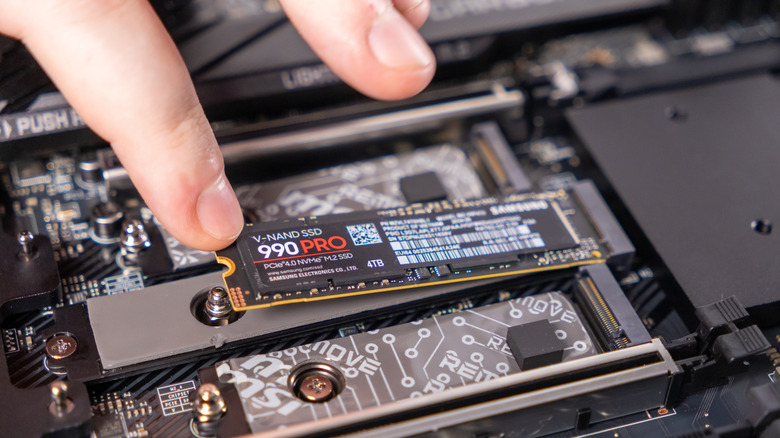
Solid-state drives have completely changed the game for storage on computers and laptops. No moving parts, no RPM (revolutions-per-minute) to worry about, and lightning-fast read and write speeds. Even early SSDs were impressive, but once the M.2 format hit the market, things got even better. While SSDs are currently monstrously expensive, pretty much every modern desktop and laptop uses them, mostly due to the demands of modern software, video games, and operating systems.

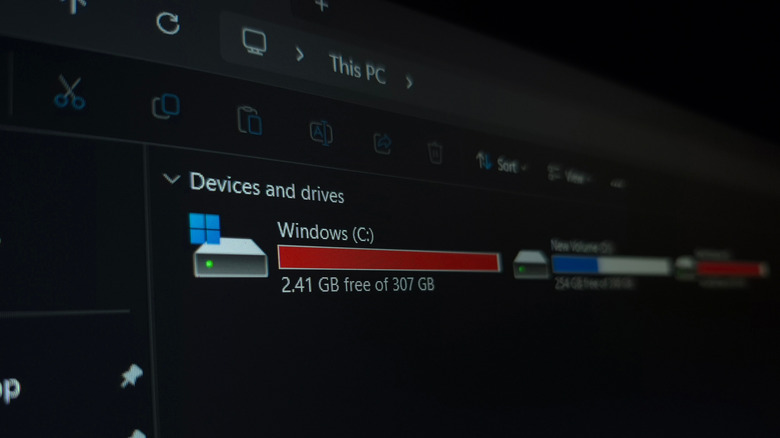
Here’s the thing, though. Even though modern SSDs are super fast, and they will last a lot longer than most hard drives due to their lack of moving parts, they can still slow down. As you fill them up with data, which can happen very quickly if it’s a smaller SSD, that advertised speed of several thousand megabytes per second goes down fast. 

Fortunately, modern operating systems like Windows support a standard hardware command to help you solve this issue, with a very fitting name: TRIM. TRIM cleans up so-called blocks of data so that the SSD knows which ones to use, making it more efficient and increasing its lifespan.

Advertisement

Why should you use TRIM?

Although it has a much cooler name, TRIM is essentially the modern equivalent of disk defragmentation, which Windows can still do. Defragmenting old hard drives brought all the data closer together in a more accessible spot, allowing the hard drive to cycle through the data more efficiently and make it faster. TRIM doesn’t work on the same principle as defragmentation, as SSDs and HDDs store data in different ways, but TRIM does serve a similar purpose. It increases your SSD’s efficiency and lifespan by clearing up empty blocks of data that are no longer in use.

Recent releases of Windows run this process automatically in the background, and you can check this through the drive’s properties from inside This PC on your computer. If the scheduled optimization (which you can find inside of Properties > Tools > Optimize) is set to On, then Windows runs TRIM for you on a weekly basis. 

Advertisement

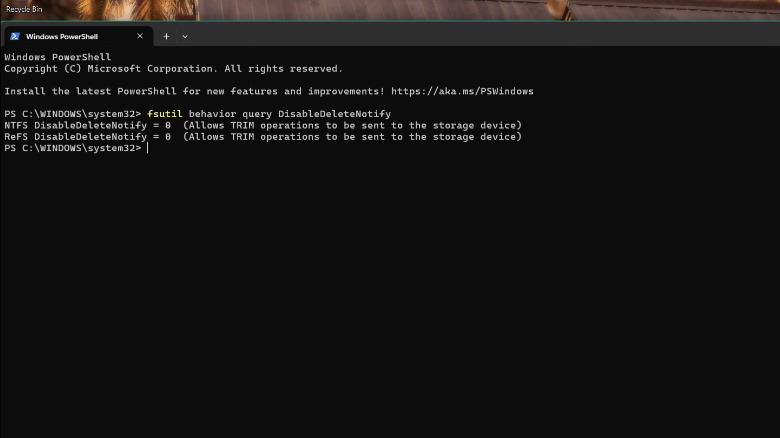
Another way to check if TRIM is on is through PowerShell. Simply run PowerShell with administrator privileges. Next, type “fsutil behavior query DisableDeleteNotify” without the quotes, then hit Enter.

If both values are zero, then TRIM is on, and you don’t need to worry about it. We would not recommend disabling it, as in this era of highly unpredictable SSD prices and the importance of keeping our data safe and secure, it’s always a good idea to keep your SSD on its best behavior, and TRIM definitely helps out with that.


Advertisement

Source link

Continue Reading

Tech

Please, Apple, let me turn off this one feature on my iPhone

Published

on

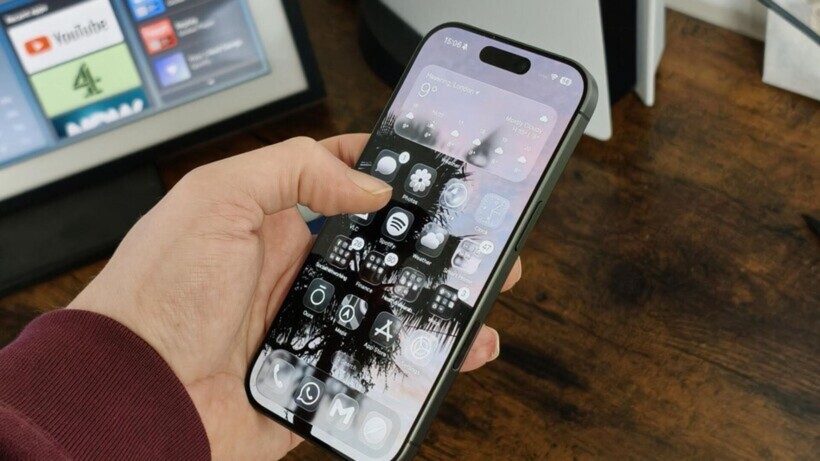
We’ve all been there at one point or another; you unlock your iPhone with the intention of checking the weather or sending a quick text, only to be greeted by a sea of little red circles. 

They’re everywhere, screaming for your attention like a digital toddler until you open the app and clear it. It’s a core part of the iOS experience, sure, but after years of staring at these tiny stress-inducers, I’ve had enough. The problem? I can’t really do much about it. 

App badges are my worst enemy

The problem with app badges is that they are designed to be addictive. They’re pitched as helpful reminders, but in reality, they’re designed to draw you into an app to see what’s “new,” even when there’s nothing of substance actually waiting for you. 

Every time I unlock my iPhone and see a bunch of badges on my home screen, I’m immediately distracted. Instead of doing what I actually set out to do, I find myself mindlessly scrolling through a feed just to make the number go away.

Advertisement
iPhone 17 in handiPhone 17 in hand
Image Credit (Trusted Reviews)

Advertisement

It’s even more infuriating when the badges refuse to leave. We’ve all dealt with that one stubborn app – it’s the Oura app for me at the moment, oddly enough – where you’ve cleared every notification, read every message, and checked every update, yet the badge remains. 

For a company that prides itself on “clean” design, the home screen often looks like a messy desk covered in red Post-it notes.

No, I’m not going to disable them one by one

Now, I know what the power users among you are going to say, “Just go into Settings and turn them off!” And yes, technically, you can. 

But, there’s the catch: Apple forces you to do it on an app-by-app basis. I have hundreds of apps installed on my iPhone, and the idea of diving into the notification settings for every single one of them to toggle off “Badges” leaves me in a cold sweat – and besides, it’d take the better part of an afternoon.

Advertisement

It begs the question: why isn’t there a system-wide toggle? Apple gives us “Silence Unknown Callers” and “Focus” modes to reclaim our digital sanity, yet it won’t give us a single master switch to kill the red dots. It’s a bizarre omission when you really think about it, especially for an operating system that is supposed to be the very pinnacle of user-friendliness.

Advertisement

Android fixed the issue years ago

What makes this even harder to swallow is that our friends over in the Android camp solved this ages ago. 

Samsung Galaxy S26 UltraSamsung Galaxy S26 Ultra
Image Credit (Trusted Reviews)

On most Android skins, app badges (or “dots”) are intrinsically linked to the notification shade. If you swipe away a notification because you’ve seen it and decided it’s not important, the badge on the app icon vanishes too. A system that, in my mind, makes a lot of sense.

On iOS, the badge and the notification centre live in two completely different worlds. You can clear your entire lock screen, but those red circles will stay pinned to your icons until you manually open the app. 

Advertisement

At the very least, Apple should give us the option to mirror that Android-style functionality in the Settings menu for those of us who find the current system a little bit archaic.

It probably won’t change any time soon

As much as I’d love to be optimistic, I’m not holding my breath. With the reveal of iOS 27 scheduled for WWDC in early June, the rumour mill is buzzing about the long-awaited reveal of the Gemini-powered Siri and even more powerful AI features, but a badge overhaul is nowhere to be found.

Advertisement

Badges have been a staple of the iPhone since the very beginning, and despite Apple redesigning the notification system multiple times over the last decade, they’ve remained largely untouched. It seems Apple is perfectly happy with the status quo, even if it means our home screens remain a cluttered, distracting mess for the foreseeable future. 

Advertisement

Please, Apple, prove me wrong.

Source link

Advertisement
Continue Reading

Tech

The Document Foundation Removes Dozens of Collabora Developers

Published

on

Long-time GNOME/OpenOffice.org/LibreOffice contributor
Michael Meeks is now general manager of Collabora Productivity. And earlier this month he complained when LibreOffice decided to bring back its LibreOffice Online project, as reported by Neowin, which had been inactive since 2022. After the original project went dormant — to which Collabora was a major contributor — they forked the code and created their own product, Collabora Online.

But this week Meeks blogged about even more changes, writing that the Document Foundation (the nonprofit behind LibreOffice) “has decided to eject from membership all Collabora staff and partners.
That includes over thirty people who have contributed faithfully to LibreOffice for many years.” Meeks argues the ejections were “based on unproven legal concerns and guilt by association.”

This includes seven of the top ten core committers of all time (excluding release engineers) currently working for Collabora Productivity. The move is the culmination of TDF losing a large number of founders from membership over the last few years with: Thorsten Behrens, Jan ‘Kendy’ Holesovsky, Rene Engelhard, Caolan McNamara, Michael Meeks, Cor Nouws and Italo Vignoli no longer members. Of the remaining active founders, three of the last four are paid TDF staff (of whom none are programming on the core code).
The blog It’s FOSS calls it “LibreOffice Drama.” They’ve confirmed the removals happened, also noting recently adopted Community Bylaws requiring members to step down if they’re affiliated with a company in an active legal dispute with the Foundation. But The Documentation Foundation “also makes clear that a membership revocation is not a ban from contributing, with the project remaining open to anyone, and expects Collabora to keep contributing ‘when the time comes.’”

Collabora’s Meeks adds in his blog post that there’s “bold and ongoing plans to create an entirely new, cut-down, differentiated Collabora Office for users that is smoother, more user friendly, and less feature dense than our Classic product (which will continue to be supported for years for our partners).

Advertisement

This gives a chance to innovate faster in a separate place on a smaller, more focused code-base with fewer build configurations, much less legacy, no Java, no database, web-based toolkit and more. We are excited to get executing on that.

To make this process easier, and to put to bed complaints about having our distro branches in TDF gerrit [for code review], and to move to self-hosted FOSS tooling we are launching our own gerrit to host our existing branch of core…
We will continue to make contributions to LibreOffice where that makes sense (if we are welcome to), but it clearly no longer makes much sense to continue investing heavily in building what remains of TDF’s community and product for them — while being excluded from its governance. In this regard, we seem to be back where we were fifteen years ago.

Source link

Advertisement
Continue Reading

Tech

Anthropic says Claude Code subscribers will need to pay extra for OpenClaw usage

Published

on

It’s about to become more expensive for Claude Code subscribers to use Anthropic’s coding assistant with OpenClaw and other third-party tools.

According to a customer email shared on Hacker News, Anthropic said that starting at noon Pacific on April 4 (today), subscribers will “no longer be able to use your Claude subscription limits for third-party harnesses including OpenClaw.” Instead, they’ll need to pay for extra usage through “a pay-as-you-go option billed separately from your subscription.”

The company said that while it’s starting with OpenClaw today, the policy “applies to all third-party harnesses and will be rolled out to more shortly.”

Anthropic’s head of Claude Code Boris Cherny wrote on X that the company’s “subscriptions weren’t built for the usage patterns of these third-party tools” and that Anthropic is now trying “to be intentional in managing our growth to continue to serve our customers sustainably long-term.”

Advertisement

The announcement comes after OpenClaw creator Peter Steinberger said he was joining Anthropic rival OpenAI, with OpenClaw continuing as an open source project with support from OpenAI.

Steinberger posted that he and OpenClaw board member Dave Morin “tried to talk sense into Anthropic” but were only able to delay the increased pricing by a week.

“Funny how timings match up, first they copy some popular features into their closed harness, then they lock out open source,” Steinberger said.

Techcrunch event

Advertisement

San Francisco, CA
|
October 13-15, 2026

Cherny, however, insisted that Claude Code team members are “big fans of open source” and that he himself “just put up a few [pull requests] to improve prompt cache efficiency for OpenClaw specifically.”

Advertisement

“This is more about engineering constraints,” he said, adding that Anthropic is still offering full refunds for subscribers. “We know not everyone realized this isn’t something we support, and this is an attempt to make it clear and explicit.”

Meanwhile, OpenAI recently shut down its Sora app and video generation models, reportedly to free up computing resources and as part of a broader effort to refocus on winning over the software engineers and enterprises that are increasingly relying on products like Claude Code.

Source link

Advertisement
Continue Reading

Tech

Rec Room shutdown, robot umps, torpedo bats, FedEx meets Amazon, and OpenAI’s odd media buy

Published

on

This week on the GeekWire Podcast: Rec Room, the Seattle-based social gaming platform once valued at $3.5 billion, is shutting down — and Snap is picking up some of the pieces.

Todd talks about what it was like fielding calls from distraught users on the night of the announcement. John offers his thoughts on what the shutdown says about the VR hype cycle, and whether everyone betting on the AI boom should take notes.

Plus: Major League Baseball’s new automated ball-strike system is already exposing umpires and creating a whole new kind of showboating — including one player who was so confident the robot would overrule the ump that he just started walking to first base.

Also on the show: Todd road-tests Amazon’s new FedEx Office returns partnership (pro tip: don’t ask for stamps), OpenAI makes a head-scratching move into media by acquiring tech talk show TBPN, John gets fooled by an April Fools’ prank, WSU researchers take on the torpedo bat, and our weekly trivia question ties Apple’s 50th anniversary to a piece of Microsoft lore.

Subscribe to GeekWire in Apple Podcasts, Spotify, or wherever you listen.

Advertisement

Audio editing by Curt Milton.

Source link

Continue Reading

Trending

Copyright © 2025